

Page 1
V2.04 Page 1 von 7
Stand: 08.04.2018
Diese Bedienungsanleitung ist Eigentum der Fa. ProChip. Sie wird Kunden und Wiederverkäufern der Fa. ProChip kostenlos
zur Verfügung gestellt. Jede Vervielfältigung oder Modifikation, Weitergabe, Digitalisierung oder Abänderung zur
Eigenverwendung ist ohne schriftliche Erlaubnis der Fa. ProChip verboten.
© 2013 by ProChip
Owners Manual M- Ped-SE
- For e-bikes and pedelecs with the BionX drive system -
Please read these instructions carefully before using the M-Ped-SE device !
The activation of this device will void the manufacturer's warranty.
Please note the legal regulations: This device is only to be used for sport or competition
purposes. Once the M-Ped-SE system is activated, the bike must not be used on the road !
The actual achievable speed depends on the type of BionX system on the bicycle.
Connecting the M-Ped-SE to the bike:
- Locate the connector plug on the BionX cable near the Console or Motor.
- Remove the shrink tubing on the cable plug
- Disconnect the cable (slide back the connector sleeve on the plug, then pull the connector
apart)
- Connect the M-Ped-SE to the bike cable plug.
- Press the Start button on the BionX Console.
- See a video on YouTube at: http://www.youtube.com/watch?v=OsKpRP19I6Q
After switching the unit on, the following information is displayed on the M-Ped-SE screen:
- Firmware version (of the M-Ped-SE )
- Limit: xx / Free : xx ( limit : xx = number of possible Bikes / Free: xx = Remaining bikes)
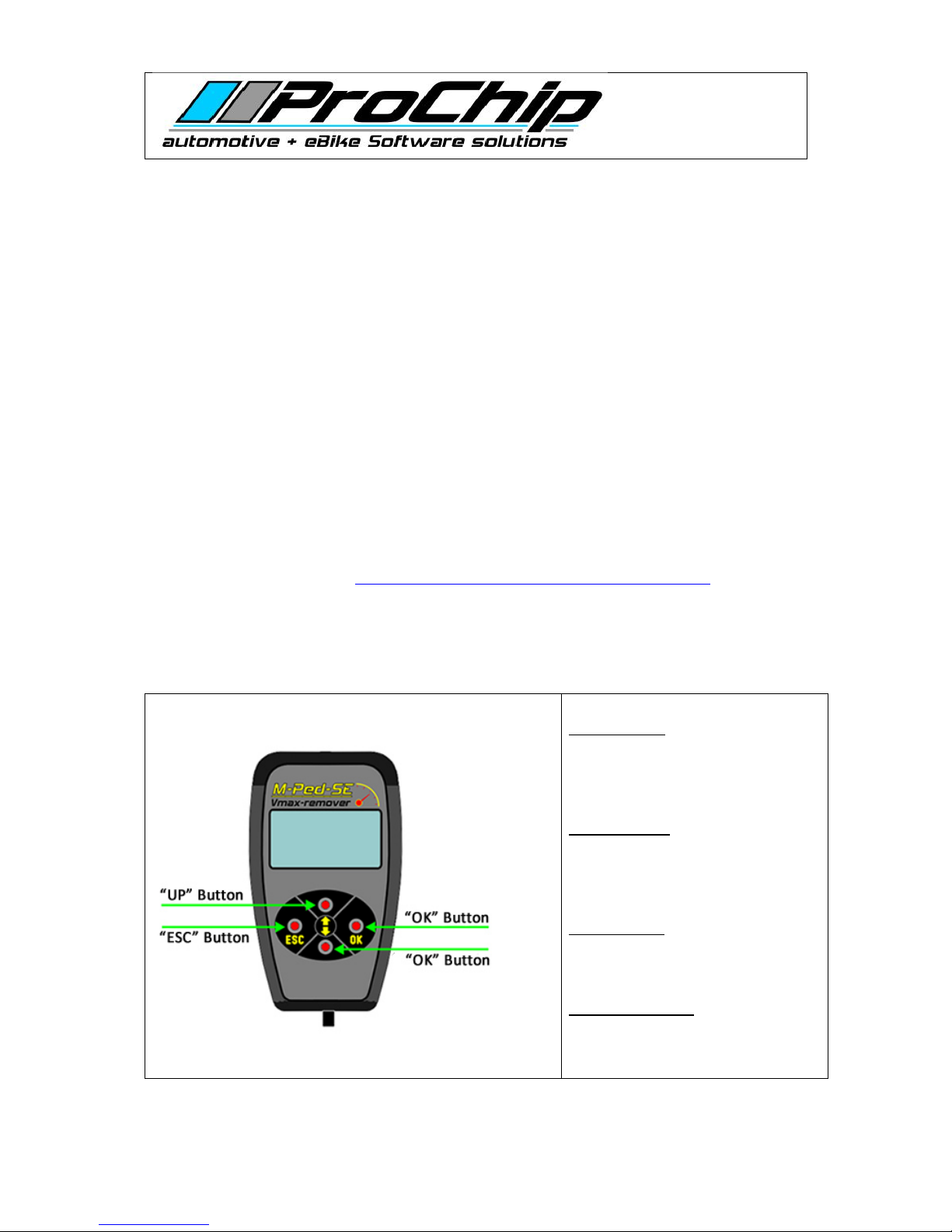
“OK“ Button:
With the OK button confirm or select
a function.
“ESC“ Button:
With the ESC button cancel an
operation.
“UP“ Button:
With the UP button scroll forward in
the menu.
“DOWN“ Button:
With the DOWN button scroll
backwards in the menu.
Page 2

V2.04 Page 2 von 7
Stand: 08.04.2018
Diese Bedienungsanleitung ist Eigentum der Fa. ProChip. Sie wird Kunden und Wiederverkäufern der Fa. ProChip kostenlos
zur Verfügung gestellt. Jede Vervielfältigung oder Modifikation, Weitergabe, Digitalisierung oder Abänderung zur
Eigenverwendung ist ohne schriftliche Erlaubnis der Fa. ProChip verboten.
© 2013 by ProChip
Main Menu:
- Setting the M-Ped-SE operating language to English
The default M-Ped-SE menu language is German.
To set it to English, press the Up button to display Setup, then press OK
Sprache will display. Press OK
Press the UP button to display English, then press OK
Press ESC to return to the main menu
- Setting the maximum bike speed: (Vmax)
25 km / h
35 km / h
45 km / h
55 km / h
65 km / h
Custom setting
Select the desired preset speed from the menu by pressing the UP button, or enter a specific
desired maximum speed (1 Km/h- 70 Km/h) on the keypad. Specific values can be entered by
pressing OK when individ. is displayed (See: Entering a value)
After setting the Vmax value and confirming with the OK - button, the console will display
several process settings. The unit will then ask for confirmation. Press either ESC to return to
the main menu, or OK to confirm the setting. After pressing OK, the system will power down
and turn off automatically.
If you want to perform another function (eg throttle Vmax), press the ESC button, the
console will remain in CanSlave mode and the main menu of the M-Ped-SE will be displayed
again.
After the power is off, remove the M-Ped-SE unit and reconnect the bike cable.
If an error occurs (eg with a G1 Console) see troubleshooting below.
Page 3

V2.04 Page 3 von 7
Stand: 08.04.2018
Diese Bedienungsanleitung ist Eigentum der Fa. ProChip. Sie wird Kunden und Wiederverkäufern der Fa. ProChip kostenlos
zur Verfügung gestellt. Jede Vervielfältigung oder Modifikation, Weitergabe, Digitalisierung oder Abänderung zur
Eigenverwendung ist ohne schriftliche Erlaubnis der Fa. ProChip verboten.
© 2013 by ProChip
- Setting the throttle speed
If your BionX system has a "throttle" feature, you can enter a custom Vmax value under this
menu item. (See: Entering a value)
- Setting the KM odometer (mileage)
If you change the BionX console you can set the actual distance previously ridden by
entering the desired KM-value on the new console. (See: Entering a value)After successfully
writing the value, the console will automatically turn off.
Please observe the legal requirements: True Mileage must be specified when a bike is sold!
- Values
ON / OFF
Indicates how many times the bike settings have been modified or "Switched", the value is
displayed until any key is pressed on the M-Ped-SE.
LadeZyk
Indicates how many times the battery has been charged, the value is displayed until any key
is pressed on the M-Ped-SE.
- Wheel circumference
Read:
Reads the actual stored Wheel circumference in mm from the Bike ECU
Change:
Write a personal Wheel circumference in mm in the Bike ECU
- Motor Temperature
(shows the Motortemperature in the G2-Console)
On:
Activate the Function
Off:
Deactivate the Function
Page 4

V2.04 Page 4 von 7
Stand: 08.04.2018
Diese Bedienungsanleitung ist Eigentum der Fa. ProChip. Sie wird Kunden und Wiederverkäufern der Fa. ProChip kostenlos
zur Verfügung gestellt. Jede Vervielfältigung oder Modifikation, Weitergabe, Digitalisierung oder Abänderung zur
Eigenverwendung ist ohne schriftliche Erlaubnis der Fa. ProChip verboten.
© 2013 by ProChip
M-Ped-SE Setup
Language
The default M-Ped-SE menu language is German. To set it to English, press the Up button to
display Default language = "English" then press OK
Develop
This is a function restricted to the M-Ped-SE manufacturer and is password protected.
Note: misuse of this function will permanently disable the M-Ped-SE device!
Page 5
V2.04 Page 5 von 7
Stand: 08.04.2018
Diese Bedienungsanleitung ist Eigentum der Fa. ProChip. Sie wird Kunden und Wiederverkäufern der Fa. ProChip kostenlos
zur Verfügung gestellt. Jede Vervielfältigung oder Modifikation, Weitergabe, Digitalisierung oder Abänderung zur
Eigenverwendung ist ohne schriftliche Erlaubnis der Fa. ProChip verboten.
© 2013 by ProChip
General Operation:
Entering a value:
When a setup function requires a new value, the M-Ped-SE display will show: "new value" 0
Example: To enter the value 357:
-Press is the UP button three times until the display reads 3
3x UP button ...
3x UP-button…
- Press the Down button, and the display will read 30
-Now press the UP button five times until the display reads 35
5x UP button ...
5x UP-button…
- Press the Down button, and the display will read 350
-Now press the UP button seven times until the display reads 357
7x UP button ...
7x UP-button…
When the desired value is displayed, press the OK button, the displayed value is accepted.
An incorrect entry can be reset by pressing the ESC key.
Page 6

V2.04 Page 6 von 7
Stand: 08.04.2018
Diese Bedienungsanleitung ist Eigentum der Fa. ProChip. Sie wird Kunden und Wiederverkäufern der Fa. ProChip kostenlos
zur Verfügung gestellt. Jede Vervielfältigung oder Modifikation, Weitergabe, Digitalisierung oder Abänderung zur
Eigenverwendung ist ohne schriftliche Erlaubnis der Fa. ProChip verboten.
© 2013 by ProChip
Troubleshooting
Problems setting the "CAN slave mode " :
If you can not enable the CanSlave mode by the G1 Console, press and hold the On / Off
button on the G1 Console from the beginning of the procedure "fixed" during the activation
process.
Error messages:
ErrorNr = 1 / Failed to set the CanSlave mode
ErrorNr = 2 / Failed to read the serial number
ErrorNr = 3 / Failed to write the Vmax value to the Console
ErrorNr = 4 / Failed to write the Vmax value to the Motor
ErrorNr = 5 / Failed to read the Vmax value from the Console
ErrorNr = 6 / Failed to read the Vmax value from the Motor
ErrorNr = 7 / Failed to write the Vmax value to theThrottle
ErrorNr = 8 / Failed to read the Vmax value from the Throttle
ErrorNr = 9 / Failed to read the KM value from the Console
ErrorNr = 10 / letter of the KM article
ErrorNr = 11 / Failed to read the number of ON / OFF cycles
ErrorNr = 12 / Failed to read the number of charge cycles
Limited Error / M-Ped-SE is married with another BionX system as the actual connected
If an error code is displayed, press the ESC or OK button. This will display the main menu.
Press on the OK - button, then repeat the desired process.
Page 7

V2.04 Page 7 von 7
Stand: 08.04.2018
Diese Bedienungsanleitung ist Eigentum der Fa. ProChip. Sie wird Kunden und Wiederverkäufern der Fa. ProChip kostenlos
zur Verfügung gestellt. Jede Vervielfältigung oder Modifikation, Weitergabe, Digitalisierung oder Abänderung zur
Eigenverwendung ist ohne schriftliche Erlaubnis der Fa. ProChip verboten.
© 2013 by ProChip
Information on Smart and Grace Bike’s:
- Connect the M-Ped-SE as described above on your Smart or Grace bike.
-Select the desired value and press the OK button.
-Then press IMMEDIATELY the buttons on the console of your bike shortly alternately.
Press all buttons short but do not hold, the order is not relevant.
If you observe this, the bike will not turn off and you can complete the activation with the
M-Ped-SE without any problems.
Information on Diamant / Trek Bike’s:
For the bike's manufacturer Diamant / Trek is a battery-powered version of the
M-Ped-SE available which operates independently of the power supply of the bike.
 Loading...