

Page 1

PROAVIO
Drive your creativity
TM
www.proavio.com
Quick start guide
EB8MS
SAS/SATA Multi-Lane Storage Array for Digital Media Production
EB8MS-UG v.1.0
Page 2
EB8MS
Quick start guide
1
2
Welcome
Thank you for choosing Proavio
Thank you for buying editBOX EB8-MS, the rst professional SAS/SATA storage
solution designed for high resolution digital media production, and general high
performance storage requirements.
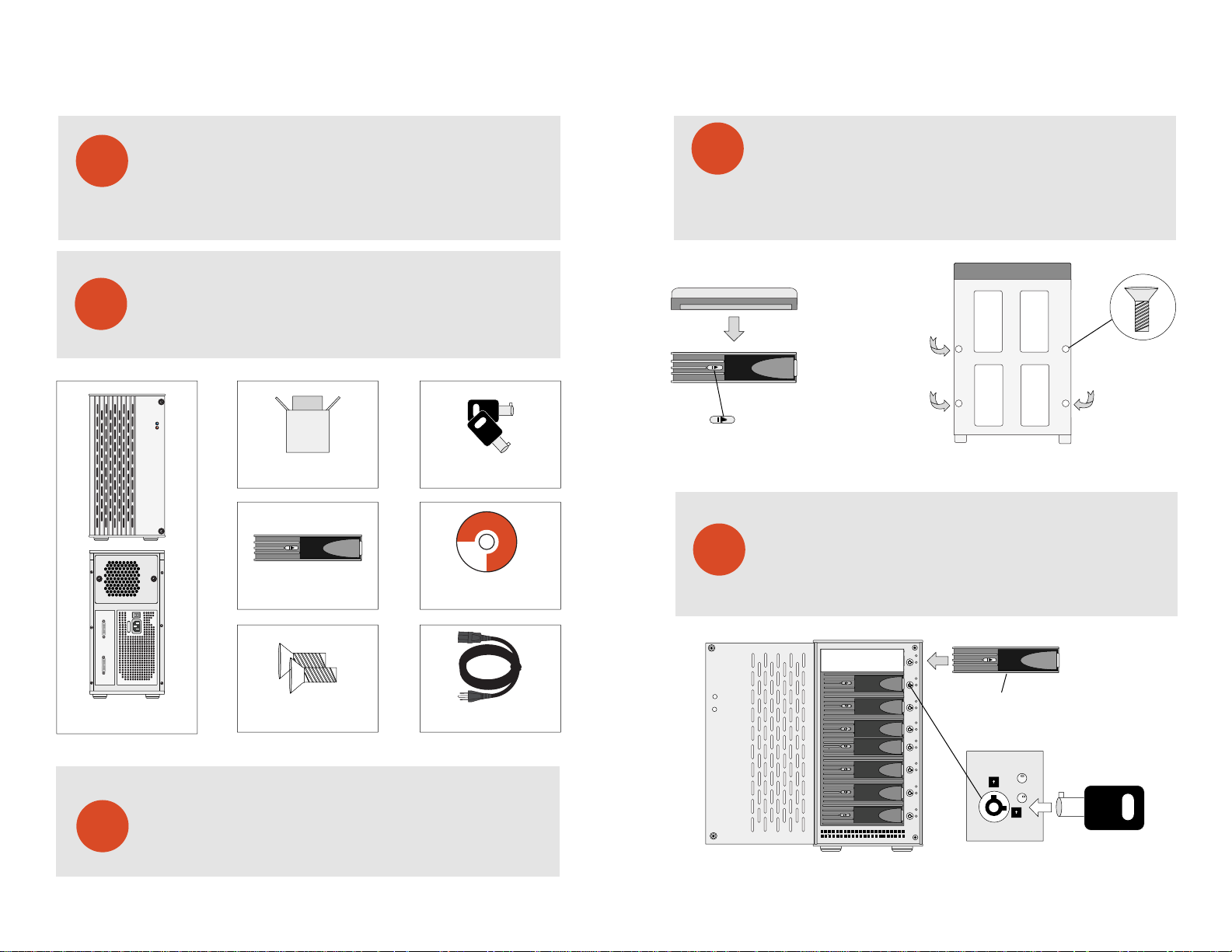
What is in the box?
Carefully unpack your EB8-MS storage system, and inventory the
accessories according to your model type.
TM
PROAVIO
TM
POWER
STATUS
PROAVIO
Double-box Package - Qty 1
Hot-swap Disk Trays - Qty 8
HDD Key Set - Qty 2
editBOX
Professional Media Storage Systems
Windows Software Driver, Installation Guide
PROAVIO
© 2005 PROAVIO, USA
Installation Guide CD - Qty 1
Disk Installation
4
Hard Disk
Disk Tray
NOTE: Push right to unlock
If your EB8-MS was purchased with capacity, please skip this section and
immediately go to section 5. If your EB8-MS was purchased without disks,
install each disk into the provided disk trays and fasten using the supplied
hdd screws. Do not use any other mounting screws other than the ones provided
with your EB8-MS. System or disk damage may occur if using non-approved
mounting hardware.
Insert Disk Module
5
After fastening each disk, insert the disk trays in the open disk bay on your
EB8-MS. For added security, your EB8-MS is equipped with locking disk
bays to prevent accidental or malicious disk removal.
+
+
Figure 1. Figure 2.
Disk tray - Bottom view
+
+
DISKS 1-4 DISKS 5-8
FULL RANGE
EB8-MS Multi-Lane Array - Qty 1
HDD Mounting Hardware - Qty 32
Standard IEC Power Cable - Qty 1
Unpack your editBOX
3
EB8MS | Multi-Lane Storage Array for Digital Media Production
Unpack all components including the HDD mounting screws, key sets and
cables. If you are missing any of the items mentioned above, please contact
your dealer or contact proavio at www.proavio.com.
Gently “press” tray handle to insert HDD
C
C
Figure 3.
PROAVIO
TM
Page 3
EB8MS
Quick start guide
6
7
HBA/RAID Controller Installation
Your EB4-ML features a RAID-ready JBOD architecture. This provides the
best support for a wide range of host bus adapters & PCI RAID controllers.
Always follow your HBA/RAID controller’s installation procedure to ensure
proper operation.
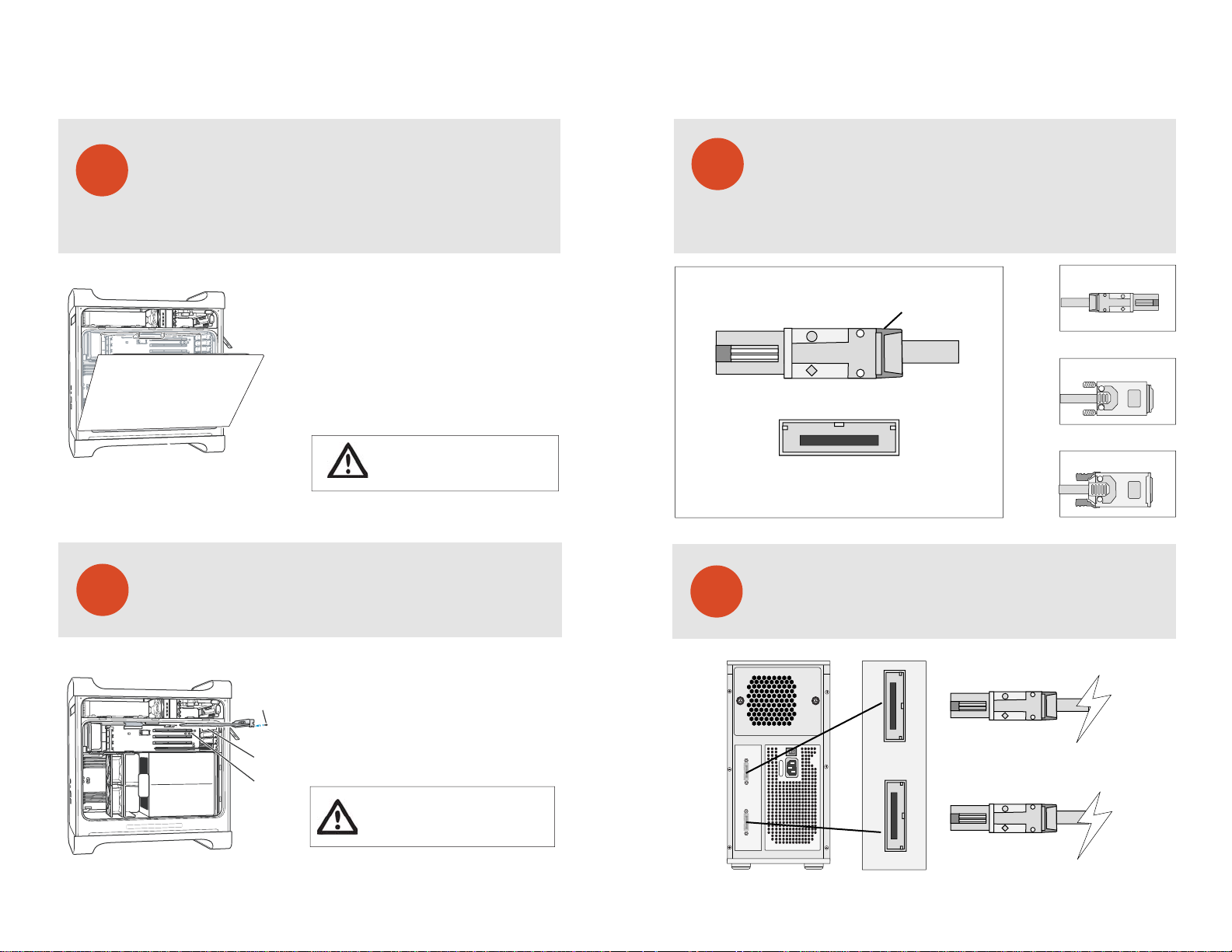
1. Touch the metal PCI slot covers on the back
of your computer to discharge any static electricity.
2. Unplug ALL cables from your computer, and remove
the side access panel according to your system type.
3. Apple G5 users must rst remove the deector cover
and place it on a clean, safe surface.
NOTE: Remember to replace the air deector after you
have nished installing your HBA/RAID controller card.
WARNING: Allow a few minutes for the internal
computer compenents to cool down before
opening your computer system.
HBA/RAID Controller Installation - Cont’d
Please follow your HBA/RAID controller’s driver installation notes to ensure
operation & hassle free conguration.
8
9
Multi-Lane Interface Overview
Introduction to Multi-Lane Cable Types
Your EB8-MS is equipped with industry standard 4x SFF8088 (Mini SAS)
Multi-Lane interface ports. The correct cable type is detirmined by the
HBA or RAID controller you have seleceted. Please visit our website at
www.proavio.com to learn more about cable options for your HBA.
SFF8088 [Mini SAS]
SFF8088 [Recieving Connector View]
+
+
Release clip
Figure 4.
SFF8088 [Mini SAS]
+
+
SFF8470 [Screw Type]
+
+
SFF8470 [Latch Type]
+
+
Connecting Your EB8-MS - Cable Connections
Ensure that both connectors are properly secured & fastned. Most commom
issues are related to poor cable connection.
1. Remove the PCI slot cover plate from an available
Reinstall the screw
to secure the card
in place.
Port access opening
PCI slot
PCI slot. Consult your HBA or video capture card
for recommended slot postions.
2. Install & secure your PCI controller card into the slot
and rmly press the card into place.
3. Close and replace the system panel.
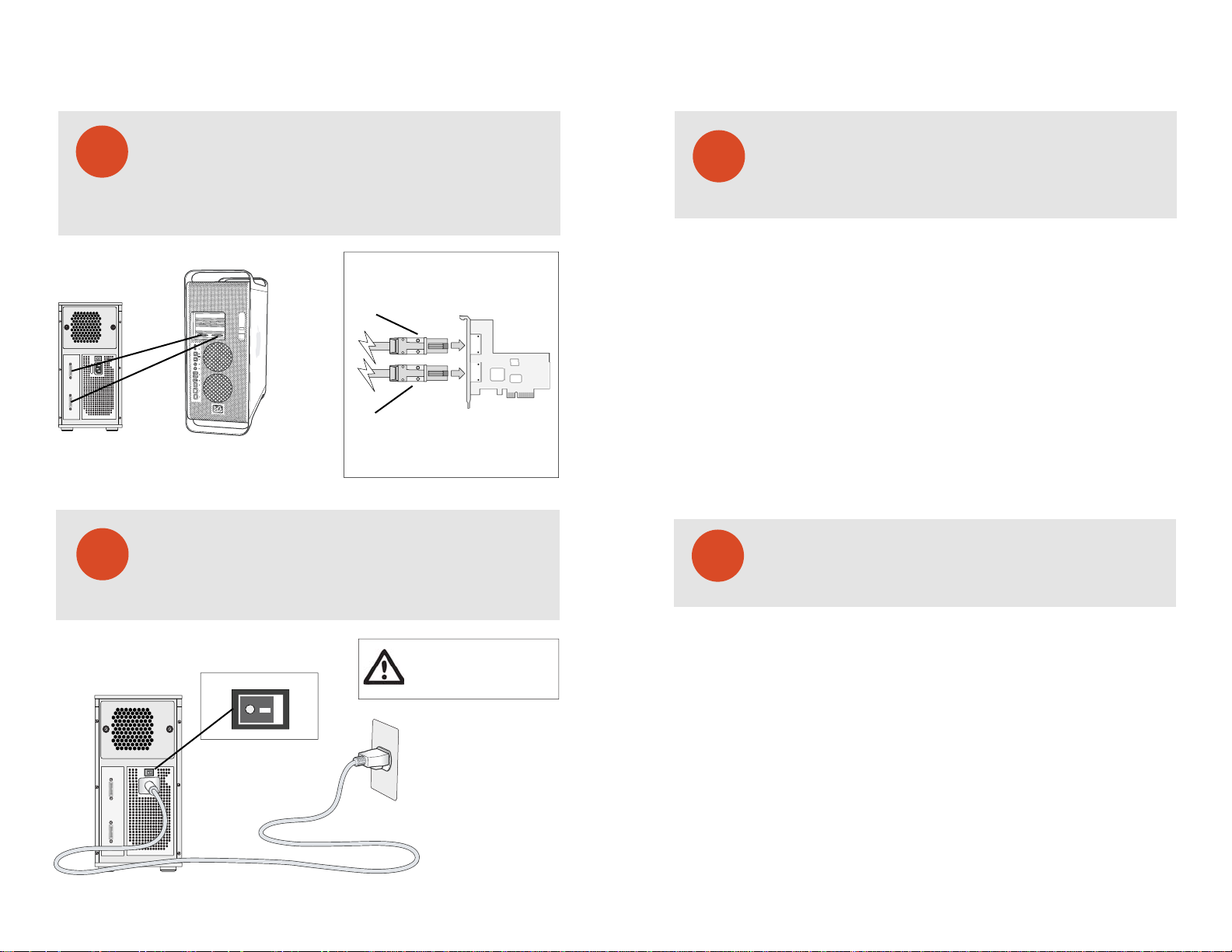
WARNING: To minimize the chance of electrical
shock, always follow proper saftey rules when
working with electrical components.
EB8MS | Multi-Lane Storage Array for Digital Media Production
Port 1 [Disks 1-4]
+
+
DISKS 1-4 DISKS 5-8
FULL RANGE
Port 2 [Disks 5-8]
+
+
PROAVIO
Figure 5.
TM
Page 4
EB8MS
Quick start guide
Figure 6.
DISKS 1-4 DISKS 5-8
10
FULL RANGE
11
Connecting Your EB8-MS - Host Workstation
After connecting the cables to your EB8-MS, connect each cable to an open port
on your Multi-Lane HBA or RAID controller. Currently there is no Multi-Lane
connector standard. The most common interface cable types are both
SFF8470-to-SFF8088, and SFF8088-to-SFF8088. To select the right cable type,
please refer to you RAID card’s documentation.
SFF8088 [Mini SAS]
+
+
+
+
SFF8088 [Mini SAS]
Figure 7.
Finished
After connecting both cables to your EB8-MS and host workstation, power-on
your EB8-MS rst, then power-on your host computer. Your array is now ready
for RAID conguration. To learn more about RAID conguration, please refer
to your HBA or RAID controller’s documentation.
Troubleshooting
12
Connection Problems:
Always double check for loose cable connections or improperly seated disks
if you experience problems where a disk or volume does not appear in your
computer, or you recieve an error message stating a disk missing
when you have the drives congured as a RAID set.
1. Disconnect the data cables and reconnect each cable one at a time,
ensuring each connector is screwed in securely on your EB4-ML.
2. Make sure the connector is properly secured on your HBA.
3. Check your EB4-ML’s drive presence LEDs, located on the front
panel of your EB4-ML. If the LEDs are not lit, remove the disk and
reinsert the disk module.
If the problem persists, please contact your dealer or contact Proavio’s support department
at 562-777-3488.
This section covers some common support questions.
If you are experiencing an urgent issue, please contact
your dealer or visit us online at www.proavio.com
Qualied Host Adapers & RAID Controllers
13
This section is provided as a reference only. Please consult
your dealer regarding the best choice of HBA/RAID controller
for your media requirements.
WARNING: To minimize the chance of
electrical shock, always follow proper
On O
safety rules when working with
electrical materials.
DISKS 1-4 DISKS 5-8
FULL RANGE
EB8MS | Multi-Lane Storage Array for Digital Media Production
Figure 8.
All HBA/RAID controllers are cross platform for Mac & PC
Accusys Technologies - 61020
PCI-e Multi-Lane RAID controller for Mac & PC. Dual SFF8088 4x interface ports.
Supports 3Gb SATA disks. Requires two SFF8088-to-SFF8088 Multi-Lane cables.
Atto Technologies - R380
PCI-e Multi-Lane RAID controller for Mac & PC. Dual SFF8088 4x interface ports.
Supports 3Gb SAS & SATA disks. Requires two SFF8088-to-SFF8088 Multi-Lane cables.
HighPoint Technologies - RR2322
PCI-e Multi-Lane RAID controller for Mac & PC. Dual SFF8088 4x interface ports.
Supports 3Gb SATA disks. Requires two SFF8088-to-SFF8088 Multi-Lane cables.
Areca Technology Corporation - ARC1220ML/ARC1221x
PCI-e Multi-Lane RAID controller for Mac & PC. Dual SFF8088 4x interface ports.
Supports 3Gb SATA disks. Requires two SFF8088-to-SFF8088 Multi-Lane cables.
PROAVIO
TM
Page 5

Three (3) Year Limited Warranty
WARRANTY COVERAGE
Proavio's warranty obligations are limited to the terms set forth below:
Proavio, as dened below, warrants this Proavio-branded hardware product against defects in materials and workmanship under normal use for a period
of THREE (3) YEARS from the date of retail purchase by the original end-user purchaser ('Warranty Period"). If a hardware defect arises and a valid claim is
received within the Warranty Period, at its option, Proavio will either (t) repair the hardware defect at no charge, using new or refurbished replacement
parts, or (2) exchange the product with a product that is new or which has been manufactured from new or serviceable used parts and is at least
functionally equivalent to the original product, or (3) refund the purchase price of the product. Proavio may request that you replace defective parts with
new or refurbished user-installable parts that Proavio provides in fulllment of its warranty obligation. A replacement product or part, including a user
¬installable part that has been installed in accordance with instructions provided by Proavio, assumes the remaining warranty of the original product or
ninety (90) days from the date of replacement or repair, whichever provides longer coverage for you. When a product or part is exchanged, any
replacement item becomes your property and the replaced item becomes Proavio's property. Parts provided by Proavio in fulllment of its warranty
obligation must be used in products for which warranty service is claimed. When a refund is given, the product for which the refund is provided must be
returned to Proavio and becomes Proavio's properly.
EXCLUSIONS AND LIMITATIONS
This Limited Warranty applies only to hardware products manufactured by or for Proavio that can be identied by the "Proavio" trademark,
trade name, or logo axed to them. The Limited Warranty does not apply to any non-Proavio hardware products or any software, even if
packaged or sold with Proavio hardware. Manufacturers, suppliers, or publishers, other than Proavio, may provide their own warranties to the
end user purchaser, but Proavio, in so far as permitted by law, provides their products "as is". Software distributed by Proavio with or without
the Proavio brand name (including, but not limited to system software) is not covered under this Limited Warranty. Refer to the licensing
agreement accompanying the software for details of your rights with respect to its use.
Proavio does not warrant that the operation of the product will be uninterrupted or error-free. Proavio is not responsible for damage arising
from failure to follow instructions relating to the product's use.
This warranty does not apply: (a) to damage caused by use with non-Proavio products: (b) to damage caused by accident, abuse, misuse,
ood, re, earthquake or other external causes; (d to damage caused by operating the product outside the permitted or intended uses
described by Proavio; (d) to damage caused by service (including upgrades and expansions) performed by anyone who is not a representative of Proavio or an Proavio Authorized Service Provider; (e) to a product or part that has been modied to signicantly alter functionality or
capability without the written permission of Proavio; ( to consumable parts, such as batteries, unless damage has occurred due to a defect
in materials or workmanship; or {g} if any Proavio serial number has been removed or defaced.
TO THE EXTENT PERMITTED BY LAW, THIS WARRANTY AND REMEDIES SET FORTH ABOVE ARE EXCLUSIVE AND IN LIEU OF ALL OTHER
WARRANTIES, REMEDIES AND CONDITIONS, WHETHER ORAL OR WRITTEN, STATUTORY, EXPRESS OR IMPLIED. AS PERMITTED BY APPLICABLE
LAW, PROAVIO SPECIFICALLY DISCLAIMS ANY AND ALL STATUTORY OR IMPLIED WARRANTIES, INCLUDING, WITHOUT LIMITATION, WARRANTIES OF MERCHANTABILITY. FITNESS FOR A PARTICULAR PURPOSE AND WARRANTIES AGAINST HIDDEN OR LATENT DEFECTS. IF PROAVIO
CANNOT LAWFULLY DISCLAIM STATUTORY OR IMPLIED WARRANTIES THEN TO THE EXTENT PERMITTED BY LAW, ALL SUCH WARRANTIES
SHALL BE LIMITED IN DURATION TO THE DURATION OF THIS EXPRESS WARRANTY AND TO REPAIR OR REPLACEMENT SERVICE AS
DETERMINED BY PROAVIO IN ITS SOLE DISCRETION. No Proavio reseller, agent. or employee is authorized to make any modication,
extension, or addition to this warranty.
EXCEPT AS PROVIDED IN THIS WARRANTY AND TO THE EXTENT PERMITTED BY LAW, PROAVIO IS NOT RESPONSIBLE FOR DIRECT, SPECIAL,
INCIDENTAL OR CONSEQUENTIAL DAMAGES RESULTING FROM ANY BREACH OF WARRANTY OR CONDITION, OR UNDER ANY OTHER LEGAL
THEORY, INCLUDING BUT NOT LIMITED TO LOSS OF USE; LOSS OF REVENUE; LOSS OF ACTUAL OR ANTICIPATED PROFITS (INCLUDING LOSS OF
PROFITS ON CONTRACTS); LOSS OF THE USE OF MONEY; LOSS OF ANTICIPATED SAVINGS; LOSS OF BUSINESS; LOSS OF OPPORTUNITY: LOSS
OF GOODWILL: LOSS OF REPUTATION; LOSS OF, DAMAGE TO OR CORRUPTION OF DATA; OR ANY INDIRECT OR CONSEQUENTIAL LOSS OR
DAMAGE HOWSOEVER CAUSED INCLUDING THE REPLACEMENT OF EQUIPMENT AND PROPERTY, ANY COSTS OF RECOVERING, PROGRAMMING, OR REPRODUCING ANY PROGRAM OR DATA STORED OR USED WITH PROAVIO PRODUCTS AND ANY FAILURE TO MAINTAIN THE
CONFIDENTIALITY OF DATA STORED ON THE PRODUCT. THE FOREGOING LIMITATION SHALL NOT APPLY TO DEATH OR PERSONAL INJURY
CLAIMS. PROAVIO DISCLAIMS ANY REPRESENTATION THAT IT WILL BE ABLE TO REPAIR ANY PRODUCT UNDER THIS WARRANTY OR MAKE A
PRODUCT EXCHANGE WITHOUT RISK TO OR LOSS OF THE PROGRAMS OR DATA.
CONSUMER PROTECTION LAWS
FOR CONSUMERS WHO ARE COVERED BY CONSUMER PROTECTION LAWS OR REGULATIONS IN THEIR COUNTRY OF PURCHASE OR, IF
DIFFERENT, THEIR COUNTRY OF RESIDENCE. THE BENEFITS CONFERRED BY THIS WARRANTY ARE IN ADDITION TO ALL RIGHTS AND REMEDIES
CONVEYED BY SUCH CONSUMER PROTECTION LAWS AND REGULATIONS. Some countries, states and provinces do not allow the exclusion or
limitation of incidental or consequential damages or exclusions or limitations on the duration of implied warranties or conditions, so the
above limitations or exclusions may not apply to you. This warranty gives you specic legal rights, and you may also have other rights that
vary by country, state or province.
This Limited Warranty is governed by and construed under the laws of the country in which the product purchase took place. Proavio, the
warrantor under this Limited Warranty, is identied at the end of this document according to the country or region in which the product
purchase took place.
EB8-MS Product Specications
Model Number:
EB8-MS
Form Factor Dual
8-disk desktop disk array with two 4xMiniSAS interface ports for 3Gb SAS & SATA-II
Host Interface
Two 4xSFF8088 Multi-Lane MiniSAS ports. NOTE! Each port manages four disk channels.
Disk Interface
Industry-standard 3Gb SATA or SAS disks. Supports 250GB, 500GB, 750GB and 1.0TB disks.
RAID Conguration
Open JBOD (Point-to-Point) design supports a wide variety of Host Bus Adapters.
Data Rate
Up to 500MB/s
Supported OS
Mac OSX
WindowsXP/Vista/2000/2003
Weig ht
29 Lbs
Dimensions
17.5”x5.75”x11.5”
Power
300W low-noise studio psu
Warranty
3 year limited warranty
Page 6

PROAVIOTM
© 2007 Proavio, U.S.A. All rights reserved.
Under the copyright laws, this manual may not be
copied, in whole or in part, without the written consent
of Proavio, U.S.A.
Every eort has been made to ensure that the
information in this manual is accurate. Proavio is not
responsible for printing or clerical errors.
Proavio, U.S.A.
12221 Florence Ave.
Santa Fe Springs, CA 90670
(562) 777-3488
www.proavio.com
 Loading...