

Page 1

PROAVIO
Drive your creativity
TM
www.proavio.com
Quick start guide
EB4MS
SAS/SATA Multi-Lane Storage Array for Digital Media Production
EB4MS-UG v.1.0
Page 2
EB4MS
Quick start guide
1
2
+
Welcome
Thank you for choosing Proavio
Thank you for buying editBOX EB4-MS, the rst professional SAS/SATA storage
solution designed for high resolution digital media production, and general high
performance storage requirements.
What is in the box?
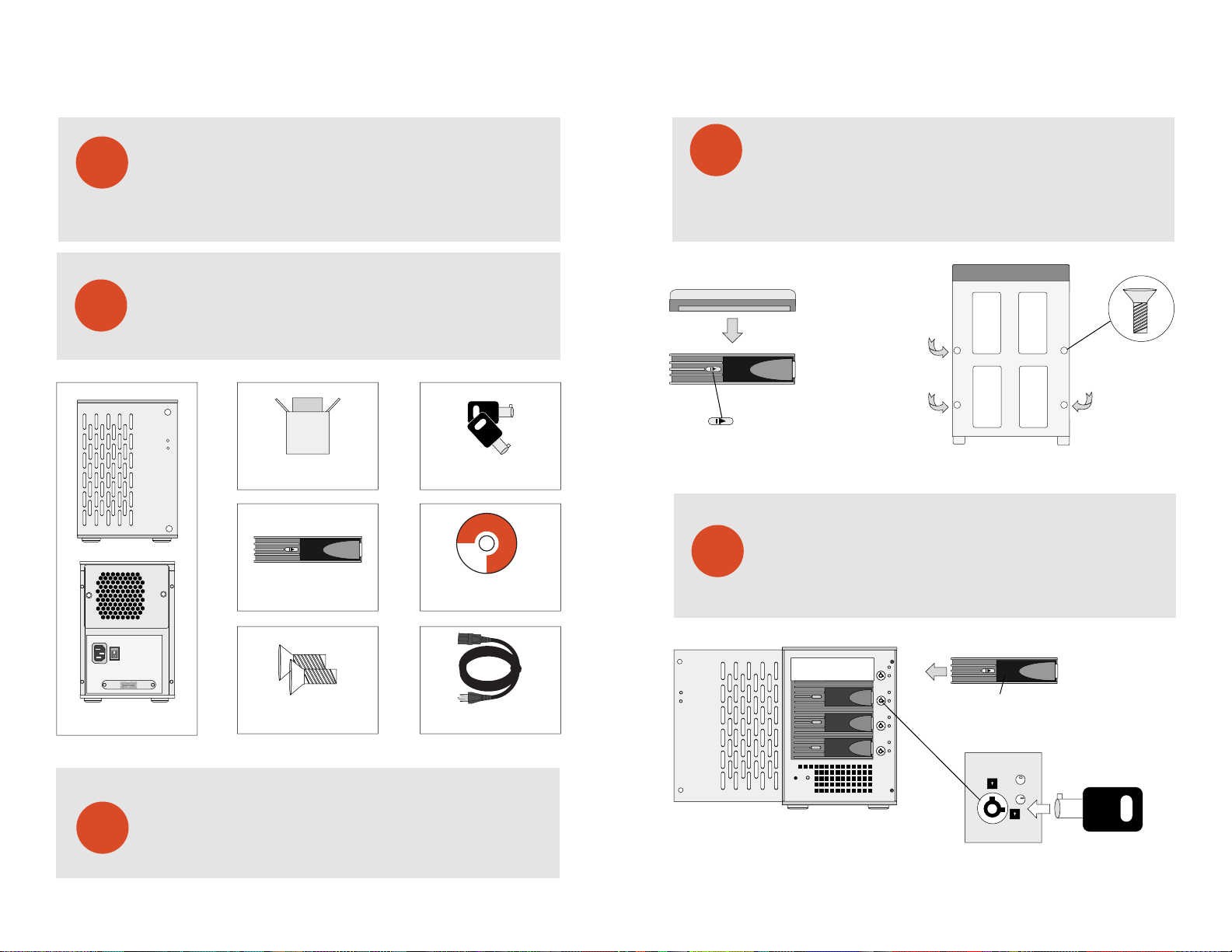
Carefully unpack your EB4-MS storage system, and inventory the
accessories according to your model type.
TM
+
POWER
STATUS
+
+
PROAVIO
TM
PROAVIO
Double-box Package - Qty 1
Hot-swap Disk Trays - Qty 8
HDD Key Set - Qty 2
editBOX
Professional Media Storage Systems
Windows Software Driver, Installation Guide
PROAVIO
© 2005 PROAVIO, USA
Installation Guide CD - Qty 1
Disk Installation
4
Hard Disk
Disk Tray
NOTE: Push right to unlock
If your EB4-MS was purchased with capacity, please skip this section and
immediately go to section 5. If your EB4-MS was purchased without disks,
install each disk into the provided disk trays and fasten using the supplied
hdd screws. Do not use any other mounting screws other than the ones provided
with your EB4-MS. System or disk damage may occur if using non-approved
mounting hardware.
Insert Disk Module
5
After fastening each disk, insert the disk trays in the open disk bay on your
EB4-MS. For added security, your EB4-MS is equipped with locking disk
bays to prevent accidental or malicious disk removal.
+
+
Figure 1. Figure 2.
Disk tray - Bottom view
+
+
EB4-MS Multi-Lane Array - Qty 1
HDD Mounting Hardware - Qty 32
Standard IEC Power Cable - Qty 1
Unpack your editBOX
3
EB4MS | Multi-Lane Storage Array for Digital Media Production
Unpack all components including the HDD mounting screws, key sets and
cables. If you are missing any of the items mentioned above, please contact
your dealer or contact proavio at www.proavio.com.
Gently “press” tray handle to insert HDD
MUTE
C
C
Figure 3.
PROAVIO
TM
Page 3
EB4MS
Quick start guide
6
7
HBA/RAID Controller Installation
Your EB4-MS features a RAID-ready JBOD architecture. This provides the
best support for a wide range of host bus adapters & PCI RAID controllers.
Always follow your HBA/RAID controller’s installation procedure to ensure
proper operation.
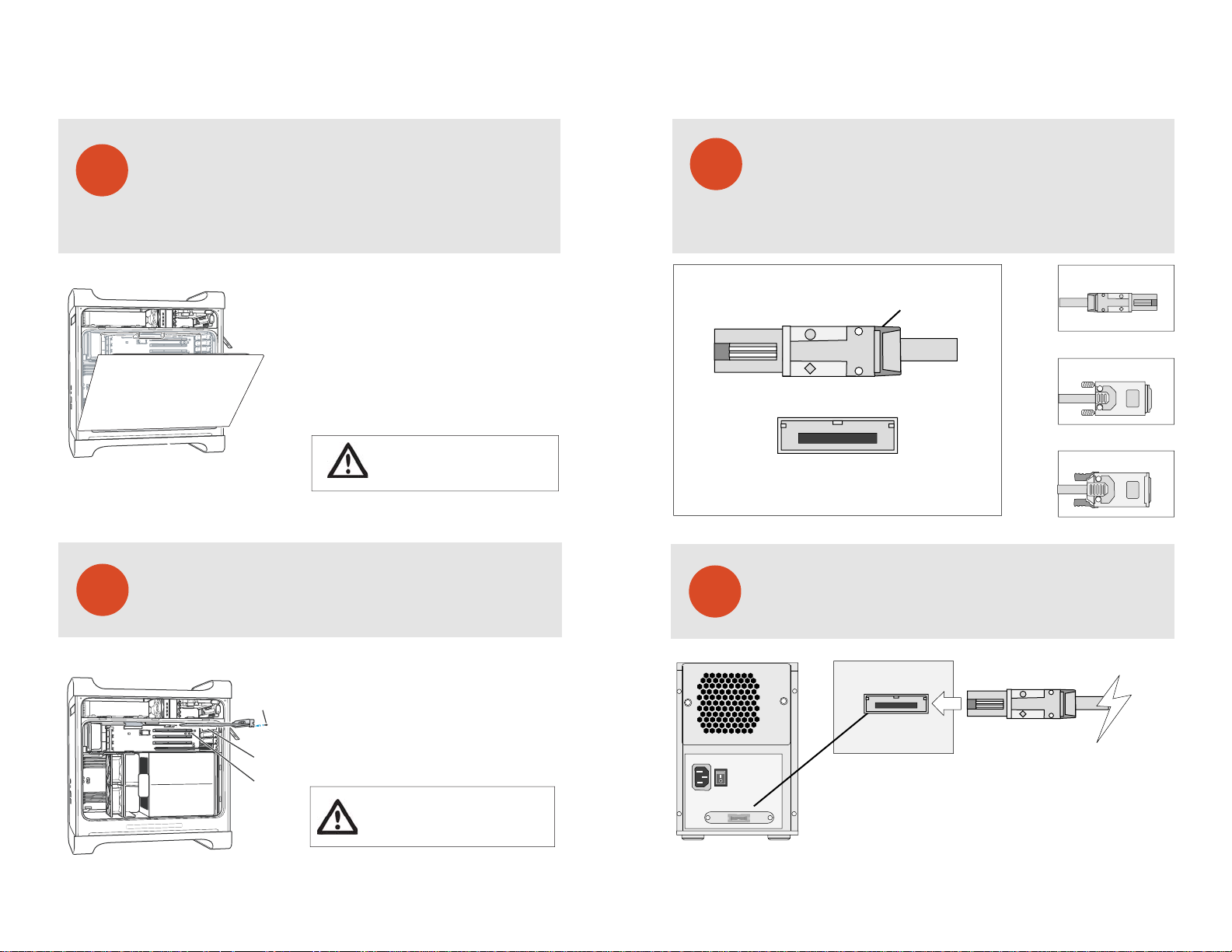
1. Touch the metal PCI slot covers on the back
of your computer to discharge any static electricity.
2. Unplug ALL cables from your computer, and remove
the side access panel according to your system type.
3. Apple G5 users must rst remove the deector cover
and place it on a clean, safe surface.
NOTE: Remember to replace the air deector after you
have nished installing your HBA/RAID controller card.
WARNING: Allow a few minutes for the internal
computer compenents to cool down before
opening your computer system.
HBA/RAID Controller Installation - Cont’d
Please follow your HBA/RAID controller’s driver installation notes to ensure
operation & hassle free conguration.
8
9
Multi-Lane Interface Overview
Introduction to Multi-Lane Cable Types
Your EB4-MS is equipped with industry standard 4x SFF8088 (MiniSAS)
Multi-Lane interface ports. The correct cable type is detirmined by the
HBA or RAID controller you have seleceted. Please visit our website at
www.proavio.com to learn more about cable options for your HBA.
SFF8088 [Mini SAS]
SFF8088 [Recieving Connector View]
+
+
Release clip
Figure 4.
SFF8088 [Mini SAS]
+
+
SFF8470 [Screw Type]
+
+
SFF8470 [Latch Type]
+
+
Connecting Your EB4-MS - Cable Connections
Ensure that both connectors are properly secured & fastned. Most commom
issues are related to poor cable connection. Do not over tighten thumbscrews.
1. Remove the PCI slot cover plate from an available
Reinstall the screw
to secure the card
in place.
Port access opening
PCI slot
PCI slot. Consult your HBA or video capture card
for recommended slot postions.
2. Install & secure your PCI controller card into the slot
and rmly press the card into place.
3. Close and replace the system panel.
WARNING: To minimize the chance of electrical
shock, always follow proper saftey rules when
working with electrical components.
EB4MS | Multi-Lane Storage Array for Digital Media Production
Port 1 [Disks 1-4]
+
+
+
+
PROAVIO
Figure 5.
TM
Page 4
EB4MS
Quick start guide
Figure 6.
10
+
11
Connecting Your EB4-MS - Host Workstation
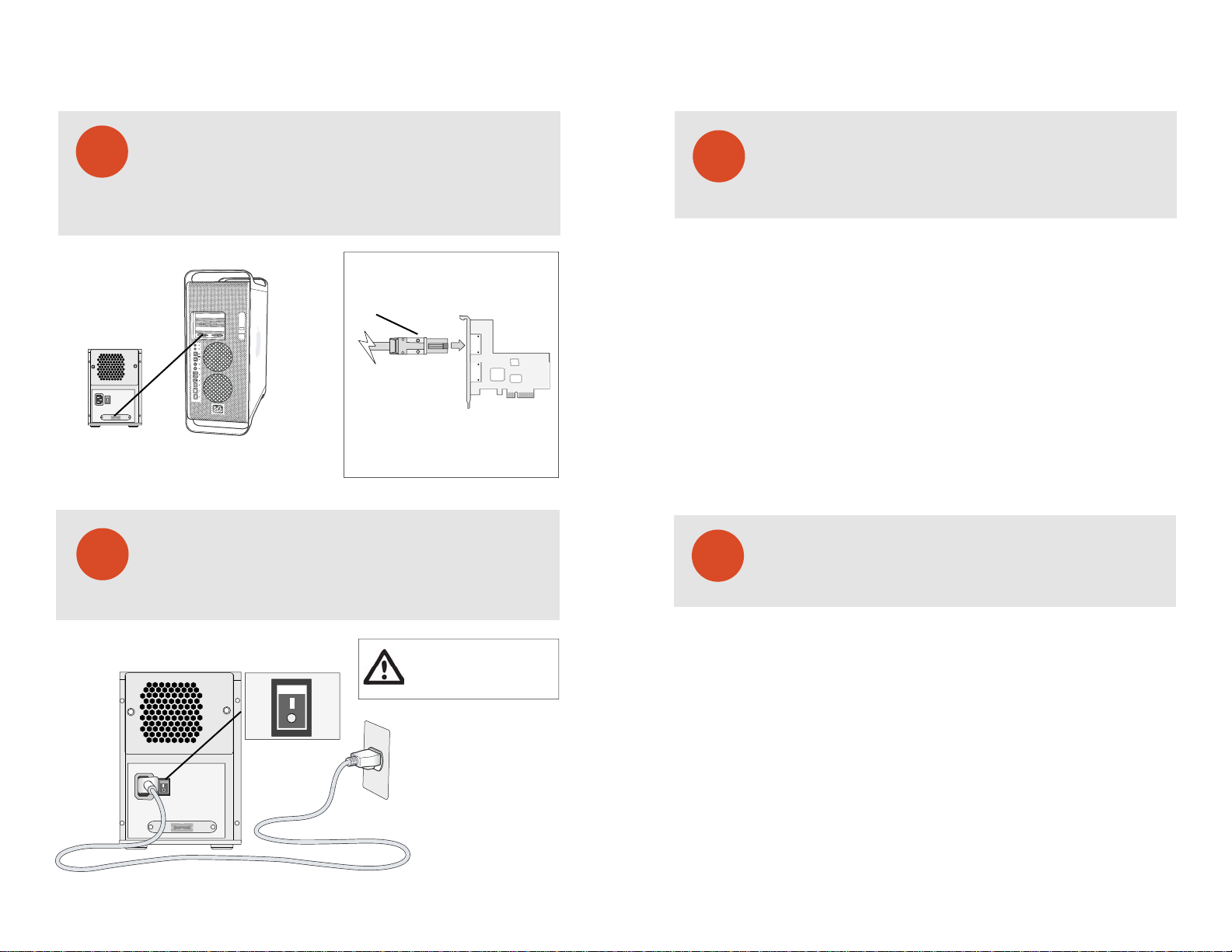
After connecting the cables to your EB4-MS, connect each cable to an open port
on your Multi-Lane HBA or RAID controller. Currently there is no Multi-Lane
connector standard. The most common interface cable types are both
SFF8470-to-SFF8088, and SFF8470-to-SFF8470. To select the right cable type,
please refer to you RAID card’s documentation.
+
SFF8088 [Mini SAS]
+
+
Figure 7.
Finished
After connecting both cables to your EB4-MS and host workstation, power-on
your EB4-MS rst, then power-on your host computer. Your array is now ready
for RAID conguration. To learn more about RAID conguration, please refer
to your HBA or RAID controller’s documentation.
Troubleshooting
12
Connection Problems:
Always double check for loose cable connections or improperly seated disks
if you experience problems where a disk or volume does not appear in your
computer, or you recieve an error message stating a disk missing
when you have the drives congured as a RAID set.
1. Disconnect the data cables and reconnect each cable one at a time,
ensuring each connector is screwed in securely on your EB4-MS.
2. Make sure the connector is properly secured on your HBA.
3. Check your EB4-MS’s drive presence LEDs, located on the front
panel of your EB4-MS. If the LEDs are not lit, remove the disk and
reinsert the disk module.
If the problem persists, please contact your dealer or contact Proavio’s support department
at 562-777-3488.
This section covers some common support questions.
If you are experiencing an urgent issue, please contact
your dealer or visit us online at www.proavio.com
Qualied Host Adapers & RAID Controllers
13
This section is provided as a reference only. Please consult
your dealer regarding the best choice of HBA/RAID controller
for your media requirements.
WARNING: To minimize the chance of
On
+
+
O
electrical shock, always follow proper
safety rules when working with
electrical materials.
EB4MS | Multi-Lane Storage Array for Digital Media Production
Figure 8.
All HBA/RAID controllers are cross platform for Mac & PC
Accusys Technologies - 61020
PCI-e Multi-Lane RAID controller for Mac & PC. Dual SFF8088 4x interface ports.
Supports 3Gb SATA disks. Requires two SFF8088-to-SFF8088 Multi-Lane cables.
Atto Technologies - R380
PCI-e Multi-Lane RAID controller for Mac & PC. Dual SFF8088 4x interface ports.
Supports 3Gb SAS & SATA disks. Requires two SFF8088-to-SFF8088 Multi-Lane cables.
HighPoint Technologies - RR2322
PCI-e Multi-Lane RAID controller for Mac & PC. Dual SFF8088 4x interface ports.
Supports 3Gb SATA disks. Requires two SFF8088-to-SFF8088 Multi-Lane cables.
Areca Technology Corporation - ARC1220ML/ARC1221x
PCI-e Multi-Lane RAID controller for Mac & PC. Dual SFF8088 4x interface ports.
Supports 3Gb SATA disks. Requires two SFF8088-to-SFF8088 Multi-Lane cables.
PROAVIO
TM
Page 5

PROAVIOTM
© 2007 Proavio, U.S.A. All rights reserved.
Under the copyright laws, this manual may not be
copied, in whole or in part, without the written consent
of Proavio, U.S.A.
Every eort has been made to ensure that the
information in this manual is accurate. Proavio is not
responsible for printing or clerical errors.
Proavio, U.S.A.
12221 Florence Ave.
Santa Fe Springs, CA 90670
(562) 777-3488
www.proavio.com
 Loading...