

Page 1
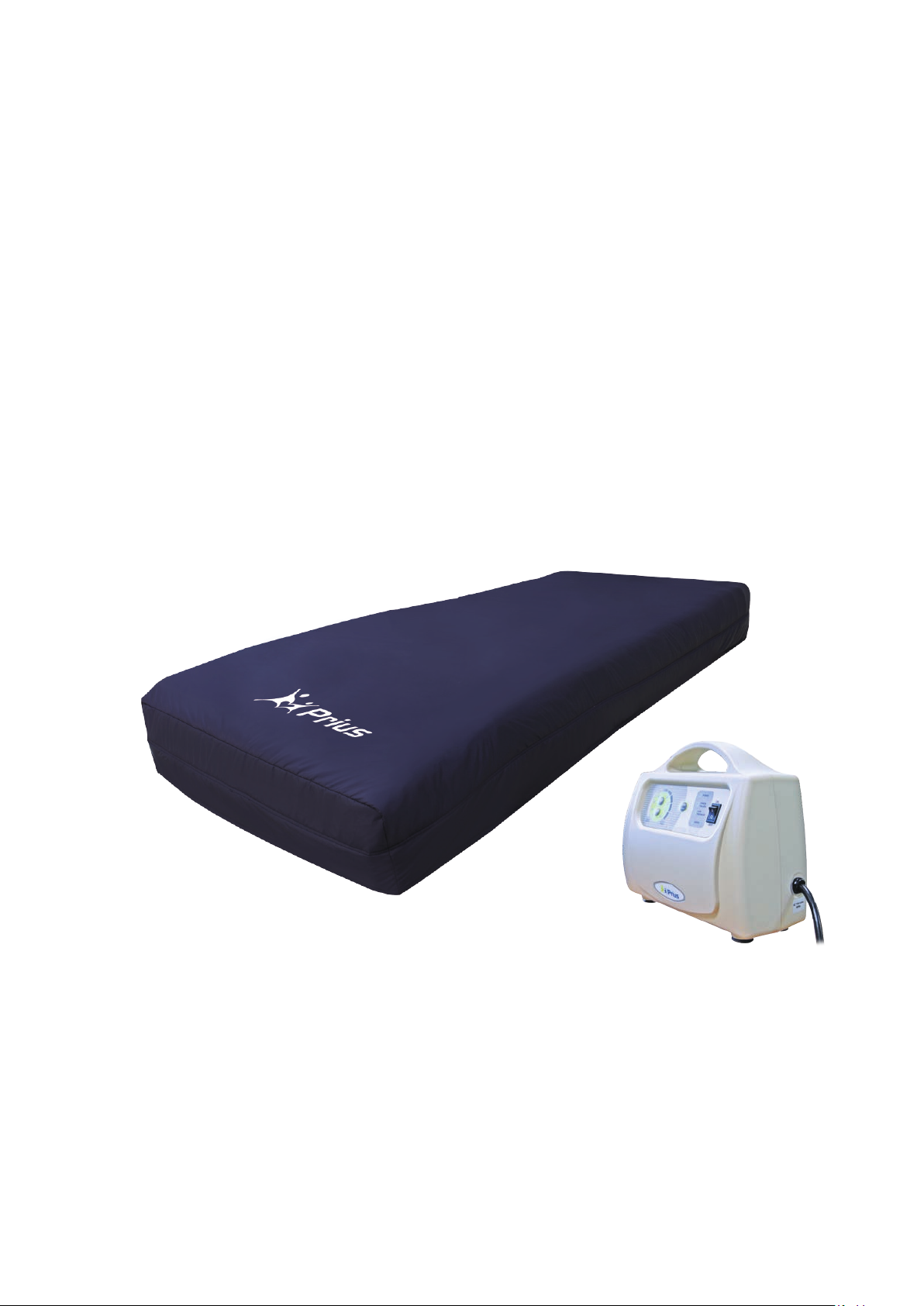
Enhance RDX
This manual MUST be given to the user of the product.
BEFORE using this product, this manual MUST be read and saved for future
reference.
Alternating Pressure Mattress System
User Manual
Page 2

Contents
1. Safety ............................................................................................................................................... 4
2. The Purpose of this Manual .................................................................................................... 5
3. Intended Use ................................................................................................................................. 5
4. Indications for Use ..................................................................................................................... 5
5. Intended Users ............................................................................................................................. 5
6. Contraindications for use ........................................................................................................ 5
7. Product Description .................................................................................................................. 5
Master Control Unit Features ................................................................................... 6
Mattress Features .......................................................................................................... 6
8. Technical Data.............................................................................................................................. 7
Master Control Unit ....................................................................................................... 7
Mattress Replacement ................................................................................................. 7
Symbols information essential for proper use .................................................. 8
9. Instructions for Proper Use .................................................................................................... 8
Alarm Function ............................................................................................................... 9
CPR Deflation ................................................................................................................... 9
10. Cleaning .......................................................................................................................................... 9
The Mattress ................................................................................................................. 10
The Master Control Unit ........................................................................................... 10
Replace Air Filter......................................................................................................... 11
Waste Disposal ............................................................................................................. 11
IP21 ................................................................................................................................... 11
11. Storage and Handling ............................................................................................................. 12
Master Control Unit .................................................................................................... 12
Mattress: ......................................................................................................................... 12
12. Maintenance & Troubleshooting ...................................................................................... 12
13. EMC Related Notifications ................................................................................................... 13
14. Expected Service Life ............................................................................................................. 17
15. Limited Warranty .................................................................................................................... 17
Page 3

4
1. Safety
Warning
The safety section contains important information for the safe operation and use
of this product. Read this information and any other safety information included
with the product.
❖ Connect the Master Control unit to a proper power source.
❖ Don’t use the system in the presence of any flammable gases
(such as Anesthetic Agents).
❖ Keep the pump and mattress away from open flame.
❖ Keep sharp objects away from the mattress.
❖ The device is not AP/APG protected.
❖ Do not place a heating device on or close to the mattress system.
❖ Use the product only for its intended use as described in this manual. Do
not use attachments not recommended by the manufacturer.
❖ If pain, irritation, numbness, swelling, or redness occurs discontinue use
and contact a healthcare professional.
❖ This device can be used in home healthcare and professional healthcare
environment.
❖ This device should not be used adjacent to or stacked with other
equipment.
❖ Medical electrical equipment needs special precautions regarding EMC and
needs to be installed according to the EMC information provided.
❖ The product should never be left unattended when plugged in.
❖ Close supervision is necessary when the product is used by, on, near
children or physically challenged individuals.
❖ Never block the air opening of this product or place it on a soft surface,
such as a bed or couch, where the air openings may be blocked. Keep the
air openings free of lint, hair, and other similar debris.
❖ Never drop or insert objects into any openings.
❖ DISCONNECT POWER SUPPLY BEFORE OPENING.
❖ Power cable & pump shall be placed at the foot-side of the patient to
prevent any risk of strangulation due to cable.
❖ Please ensure the Enhance RDX Alternating Pressure Mattress System is
used with stable power or in connection with UPS.
❖ To reduce the risk of electrocution:
Always unplug product immediately after use.
Do not use while bathing.
Do not place or store product where it can fall or be pulled into a tub or
sink.
Do not place in or drop into water or other liquids.
Do not reach for product that has fallen into water. Unplug immediately.
❖ Do not obstruct the mains plug or position the equipment where the
connection to the mains line can be accidentally disconnected.
Page 4

5
2. The Purpose of this Manual
Caution
❖ The mattress system should always be used in accordance with your
Institution’s pressure care guidelines.
❖ Re-positioning of the patient is always recommended when using an
alternating pressure air mattress (APAM).
❖ The Control unit can only be repaired by an authorized technician.
❖ Do not drop the control unit.
❖ Do not store the system in direct sunlight or extreme cold conditions.
This operation manual is mainly focused on the set up, cleaning and routine
maintenance of the Enhance RDX Alternating Pressure Mattress System.
We recommend keeping this manual available to answer questions related
to the system.
3. Intended Use
The Enhance RDX system is intended for patients who are at risk of
developing pressure ulcers according to your sound clinical judgment. The device
can also be used for patients who have an existing stage 1, 2, and 3 pressure
ulcers, in conjunction with your policy on pressure area management.
4. Indications for Use
Indicated for patients who are at risk of developing pressure ulcers according to
your sound clinical judgment.
5. Intended Users
Healthcare professionals or caregivers who are at least fifteen years in age, with
the ability to read and understand English and Westernized Arabic Numerals.
This device should not be operated by patient.
6. Contraindications for use
Alternating pressure therapy should not be used for patients with unstable
fractures, gross edema, burns or an intolerance to motion.
7. Product Description
This product is intended to help reduce the incidence of pressure ulcers while
optimizing patient comfort.
The Enhance RDX is an alternating mattress replacement system used in the
prevention and treatment of pressure ulcers. By using the established principles
of alternating therapy the Enhance RDX offers patients a comfortable and
relaxing support surface which can prevent skin breakdown and enhance wound
healing.
Page 5
6
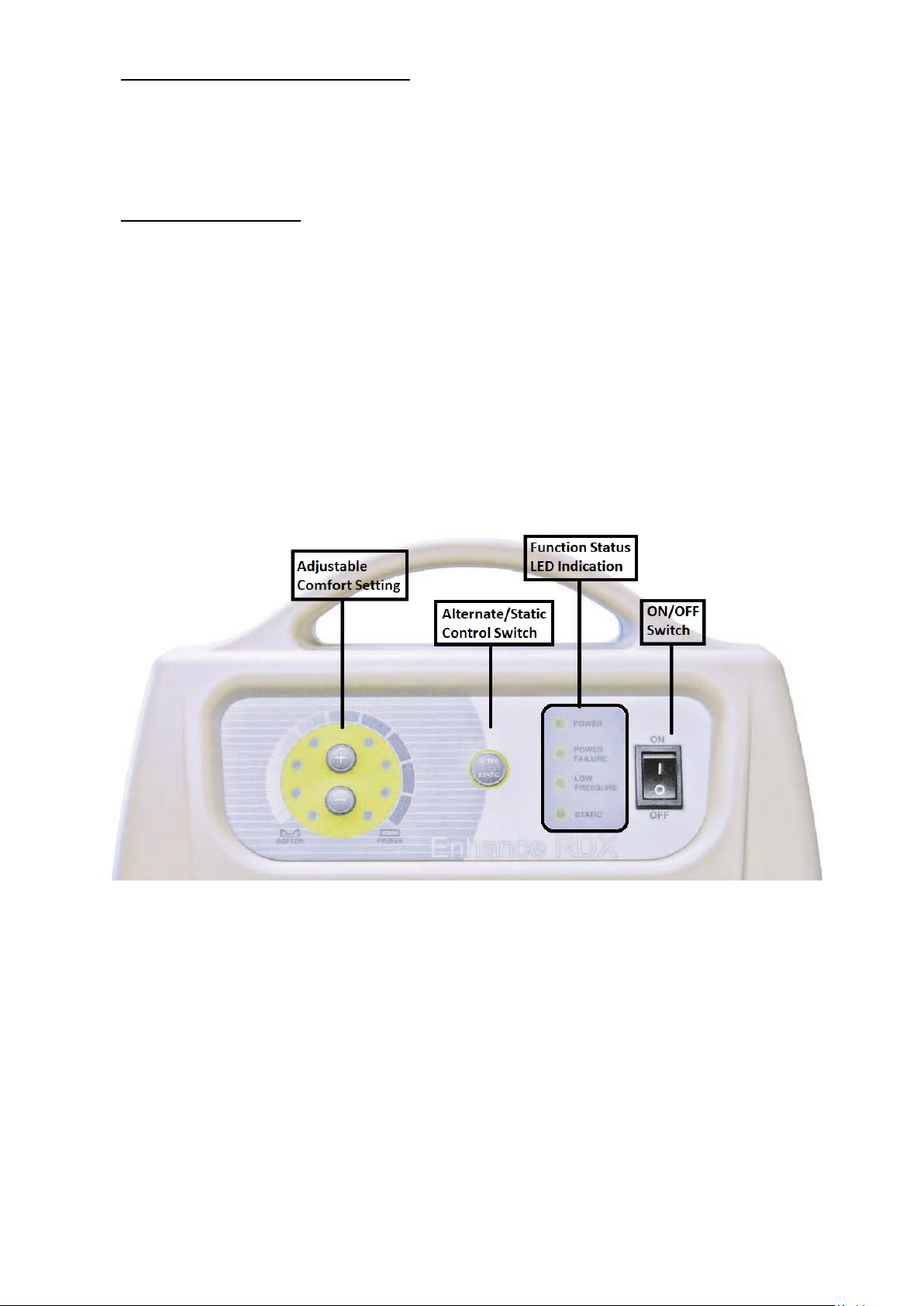
Master Control Unit Features
⚫ LED indicator for function status.
⚫ Electronic adjustable comfort setting.
⚫ 2-in-1 alternation with 10 minutes cycle time.
Mattress Features
⚫ Modularized design for easy air cell replacement.
⚫ A vapor permeable, oversized, pliable, quilted nylon top cover provides
low shear, friction and moisture protection.
⚫ CPR quick release for rapid deflation.
⚫ Cell in cell design provides additional protection for upper torso
and sacrum in the event there is a loss of power
⚫ Integrated power cable management for organization and safety.
Page 6
7
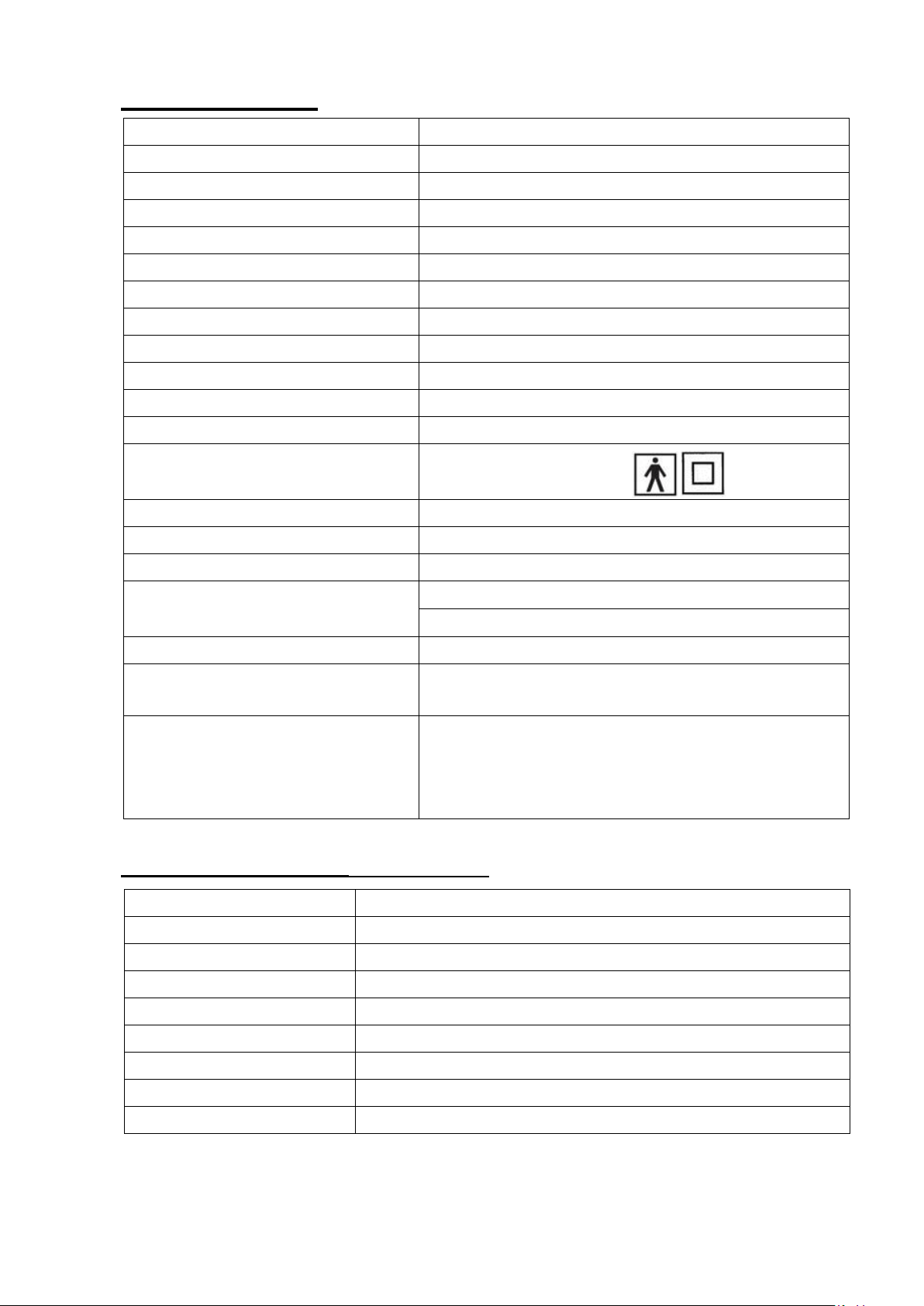
8. Technical Data
Model Name
Model No.
Size (inch)
10.1” (L) x 4.5” (W) x 8.3” (H)
Weight (lbs)
4.85 lbs (2 kg)
Max Flow Rate
5 L/min
Cycle Time
10 min
Min Operating Pressure
14 +/- 6mmHg
Max Operating Pressure
60 +/- 6mmHg
Rated Voltage
AC 110-120V
Rated Frequency
60 Hz
Fuse Rating
T1AH 250V
Max Current
0.1A
Classification
Class II, Type BF
Not AP or AGP type
Ingress of Water Protection
IP21
Mode of Operation
Continuous
Power Cable
15ft, non-shielding, AC powered
Environment (Temperature)
Operation: 15°C to 35°C (59°F to 95°F)
Storage:5°C to 60°C (41°F to 140°F)
Environment (Humidity)
15% to 90% non-condensing
Operation Atmospheric
Pressure Range
800 hPa to 1060 hPa
Standard
IEC 60601-1,
CAN/CSA C22.2 No. 60601-1,
IEC 60601-1-2
IEC 60601-1-11
Model Name
Model No
Size (inch)
36” (W) x 80” (L) x 8” (H)
Weight (lbs.)
22 lbs (10 kg)
Cell Number
18 cells
Cells Material
Cover Material
Blue Nylon w/ PU coating finish
Base Material
Black Polyester w/ PVC coating
Weight Capacity
350 lbs (159 kg)
Master Control Unit
Enhance RDX Control Unit
FC-PHR0035
Mattress Replacement (applied part)
Enhance RT Mattress
FM-PHR0034
Blue Nylon with PU coating
Page 7
8
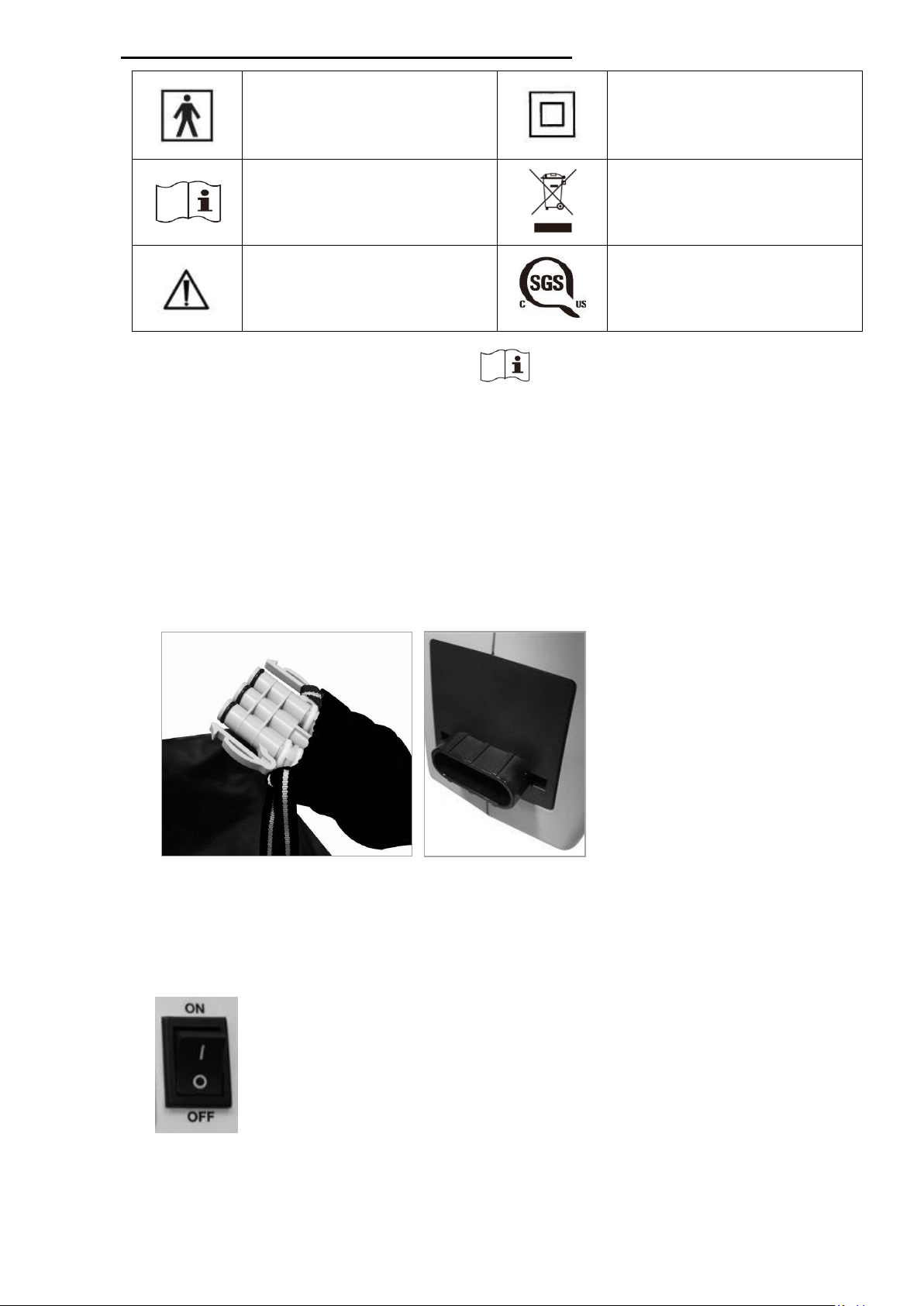
Symbols information essential for proper use
Type BF
Protection Against
Electronic Shock
Class II Equipment
Consult instructions for
use
Waste Disposal
Caution, Consult
accompanying
documents
SGS product certification
mark
9. Instructions for Proper Use
1. Remove the existing mattress from the bed frame.
2. Replace the standard mattress with mattress system and make sure to orient
mattress so that the air tube is placed at the foot of the bed.
3. Secure the straps beneath the mattress to the bed frame.
4. Hang the Master Control Unit on the foot-board of the bed frame.
5. Attach the air tubes connectors to socket on the left panel of the Master
Control Unit.
6. Ensure the air hoses are not kinked under the mattress. (Could be verified by
simple visual check).
7. Plug in the control unit and turn it on.
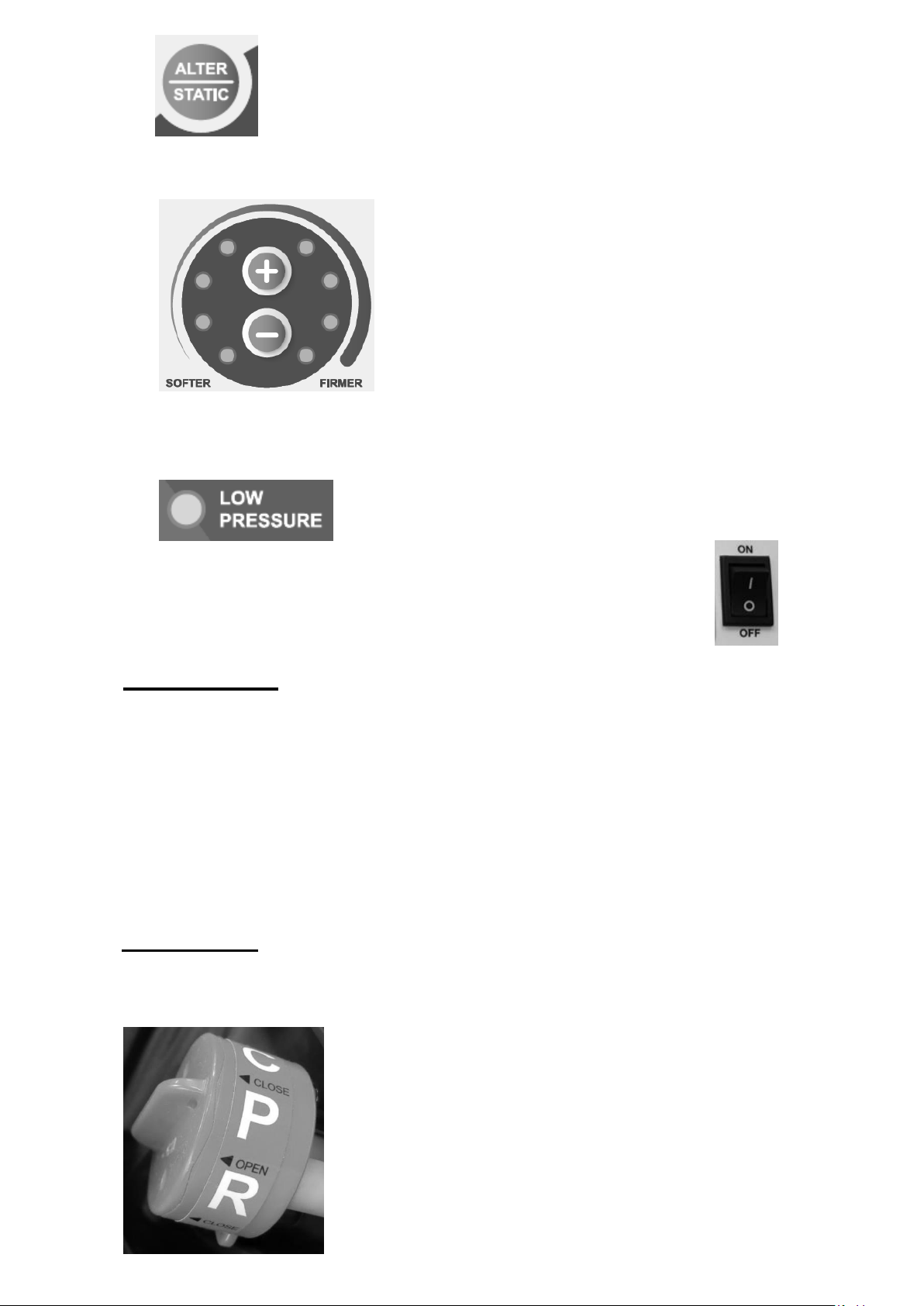
8. The pump pressure dial blinks to Max setting and will now inflate the
mattress.
9. Do not press the control button on pump to select alternation or static until
pump pressure dial defaults to solid light and mattress is fully inflated .
Page 8
9
10. Set the required pressure by pressing the “+” to increase pressure or “-“to
reduce pressure.
11. Pressure is constantly monitored by the control unit. When pressure is less
than the pump set pressure the “Low Pressure” LED will illuminate and an
alarm will sound.
12. Make sure to turn the power off when the system not in use.
Alarm Function
The Enhance RDX Alternating Pressure System is equipped with a visual and
audible alarm in the event of low pressure. During the initial inflation period
the system is in low pressure mode and the low pressure LED will illuminate.
The audible alarm is set with a delay function to take into
consideration the inflation time. The alarm will activate automatically after
45 minutes if the unit does not inflate properly.
When the mattress pressure drops from the set pressure during patient
repositioning the audible alarm will switch to a 5 minute delay to avoid undesired
alarm activation.
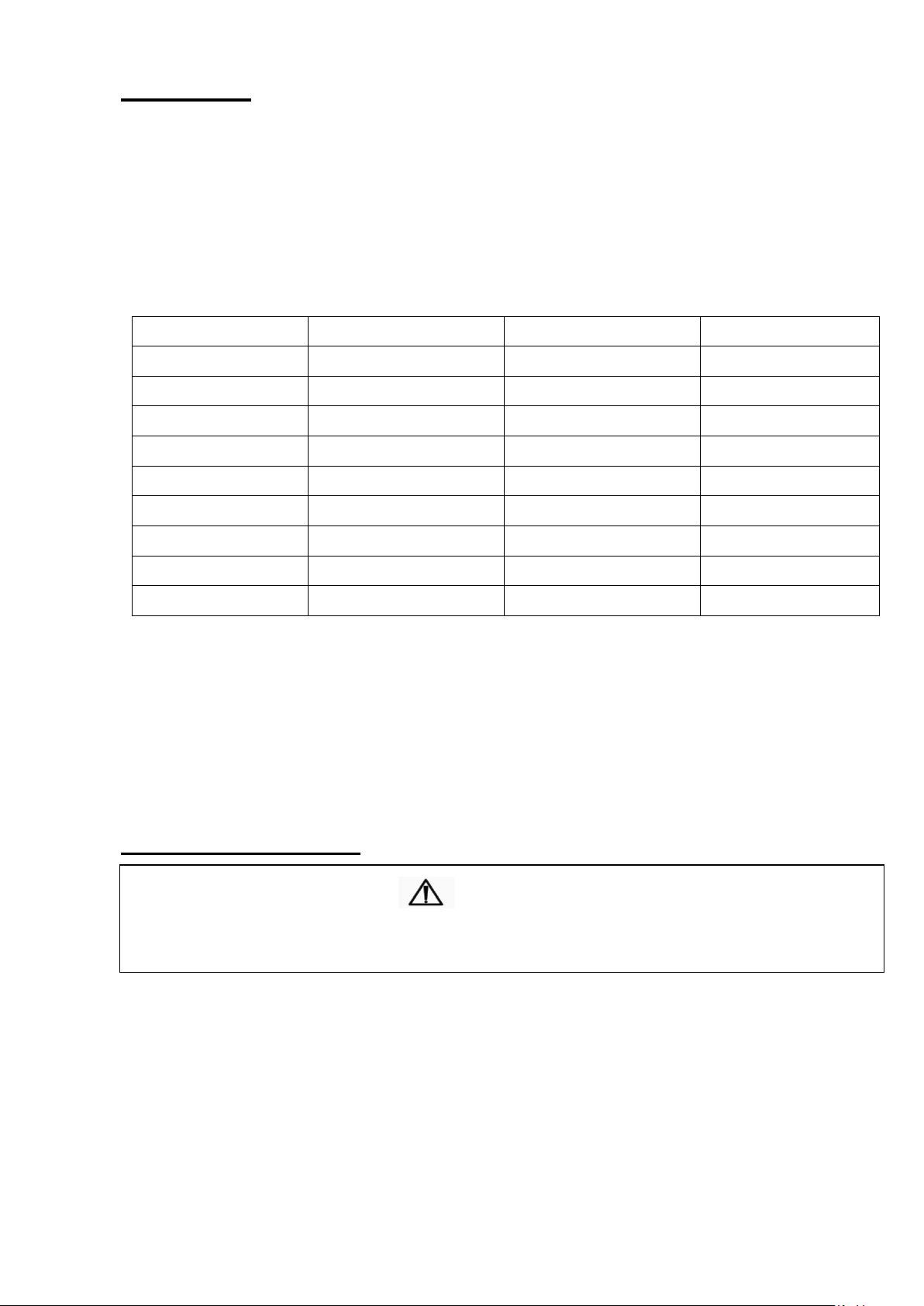
CPR Deflation
For emergency mattress deflation turn the CPR valve to the ‘’OPEN’’ position. The
mattress should deflate within 30 seconds. To close the CPR simply turn the valve
to the ‘’CLOSE’’ position.
Page 9
10
10 Cleaning
Industrial
Break washes
Cold
10 minutes
Main washes
60°C (140°F)
16 minutes
Extraction
2 minutes
Cold Rinses
Extraction
5 minutes
Domestic
Pre-wash
Cold
Main Wash
60°C (140°F)
10 minutes
Extraction
2 minutes
Cold Rinses
Extraction
5 minutes
CAUTION
SWITCH OFF THE ELECTRICAL SUPPLY TO THE PUMP AND DISCONNECT THE
POWER CORD FROM THE MAIN SUPPLY BEFORE CLEANING AND INSPECTION
The Mattress
The mattress should be cleaned on the bed weekly using a damp soft cloth and
mild detergent.
If top cover or base cover becomes grossly soiled, put on clean gloves, plastic
gown and eye protection before removing top and base covers and disposing
according to standard hospital procedures for contaminated waste and replace
with clean covers.
Covers can be washed and thermally disinfected in a washing machine by
following below procedure: (Never use phenol based cleaning solutions).
Tumble Drying or Tunnel Drying is not recommended.
Mattress Cells can be wiped over with a solution of sodium hypochlorite
1000ppm or any other non-phenolic germicidal solution.
The Master Control Unit
The pump unit should also be cleaned weekly using a damp soft cloth and mild
detergent.
The pump casing is manufactured from ABS plastic and if the case is soiled the
pump can be wiped down with a sodium hypochlorite solution to dilution of
1000ppm or any EPA- approved hospital grade disinfectant. (Do not use phenol
based cleaning solution).
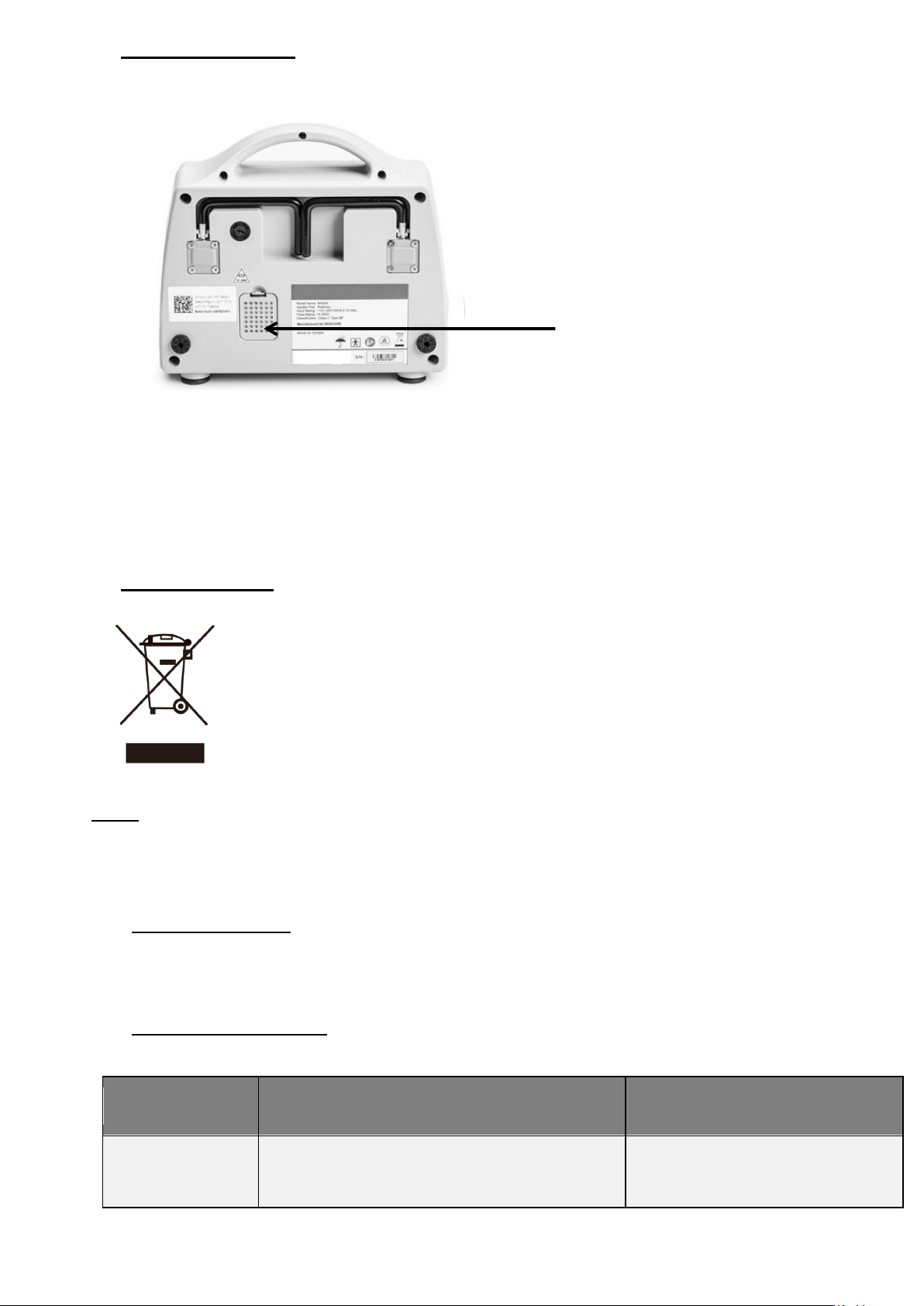
The air filter should also be cleaned and checked as often as possible at a
minimum of every six months. Air Filter can be removed by pinching center of the
filter and pulling outward from the back of the control unit.
Page 10
11
Replace Air Filter
IP Number
First Digit - SOLIDS
Second Digit - LIQUIDS
IP21
Protected from touched by fingers and
objects greater than 12.5mm.
Against water : Vertical water
drips.
Filter
1. Remove air filter and replace with a new one.
2. Use a soft bristle to remove dust and difficult dried-on soil.
NOTE:
1. Do not use phenol based cleaning solutions.
2. Switch off the electrical supply to the pump and disconnect the power cord
from the main supply before cleaning and inspection)
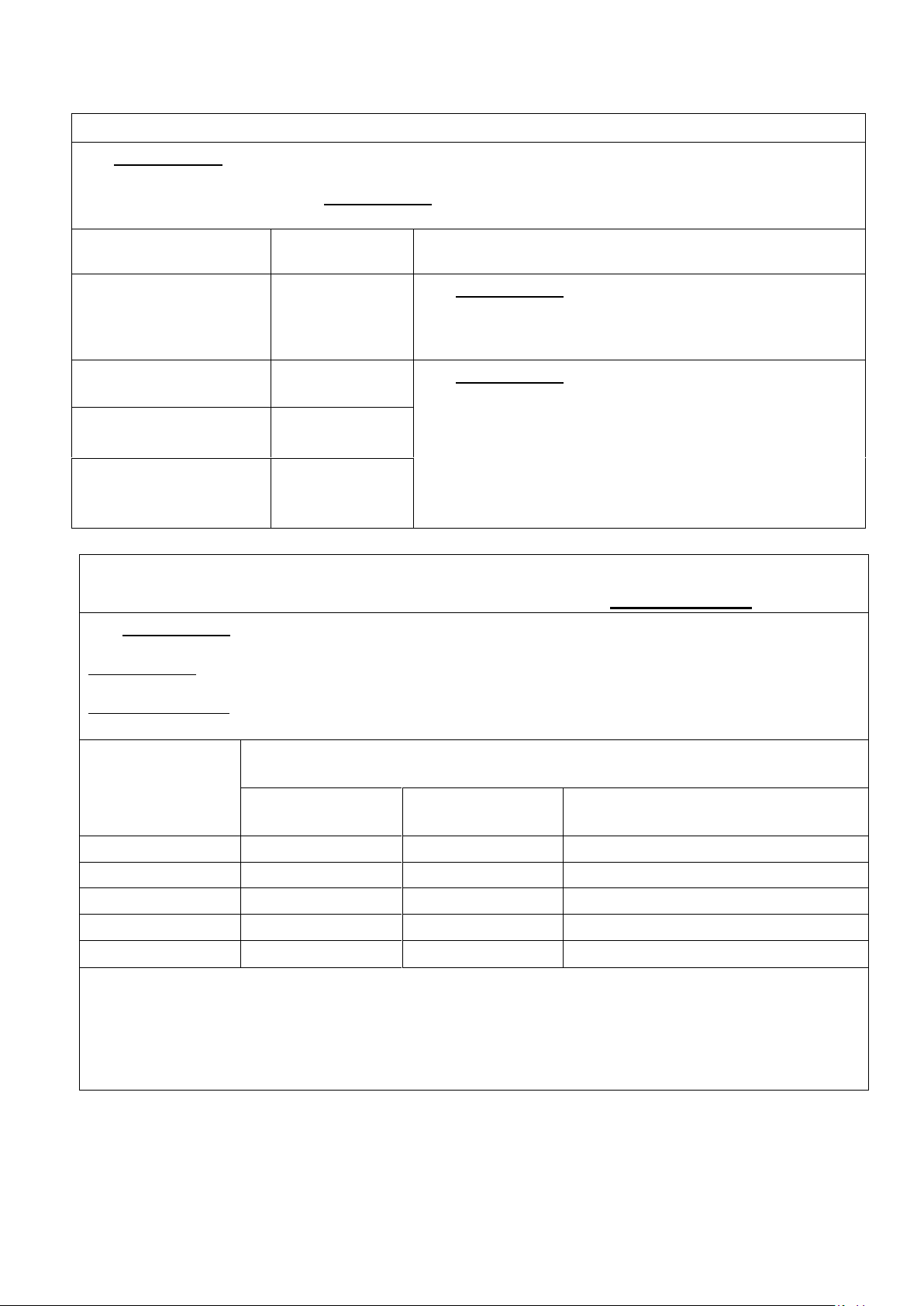
Waste Disposal
This Product has been supplied from an environmentally aware
manufacturer that complies with the WEEE.
This product may contain substances that could be harmful to the
environment if disposed of in places (landfills) that are not
appropriate according the legislation. Please be environmentally
responsible and recycle this product through your recycling facility
at its end of life.
IP21
The IP Code (or International Protection Rating, sometimes also interpreted as Ingress
Protection Rating*) consists of the letters IP followed by two digits and an optional
letter.
⚫ First Digit: Solids
The first digit indicates the level of protection that the enclosure provides against
access to hazardous parts (e.g., electrical conductors, moving parts) and the ingress of
solid foreign objects.
⚫ Second Digit: Liquids
Protection of the equipment inside the enclosure against harmful ingress of water.
Page 11

12
11. Storage and Handling
Symptom
Inspection Procedures
Possible Solution
The pump is not
functioning or power
failure.
1. Check power source
connection.
2. Check fuse.
1. Connect to proper power
source.
2. Replace fuse.
3. Refer to qualified service
technician if problem persist.
Low pressure LED is
constantly illuminated or
the mattress is not
inflating while pump is in
operation.
1. Check hoses and hose
connections.
2. Check CPR valve.
3. Check air cells for holes or
tears other than where
designed.
1. Make sure all connections are
secure.
2. Make sure CPR valve is in the
“CLOSE” position.
3. Replace damaged air cell if
necessary.
4. Refer to qualified service
technician if problem persist.
Pump is noisy.
1. Make sure pump is resting
against a solid surface.
1. Reposition the pump.
2. Refer to qualified service
technician if problem persist.
Power failure LED or
alarm sound in abnormal
when power off.
1. Turn off the power in the
standard process then
restart the control unit to
check if alarm still existing.
2. Check PCB function
1. Refer to qualified service
technician if problem persist.
Master Control Unit:
⚫ Check the power cord and plug for abrasions or excessive wear.
⚫ Plug in the unit and verify air flows from the units hose connection ports.
⚫ Place in plastic bag for storage.
Mattress:
⚫ Check the air manifold for kinks or breaks. Replace if necessary.
⚫ Set CPR valve to “OPEN” and disconnect the air hose to the pump.
The mattress will now deflate and can be packed for storage.
⚫ Place in plastic bag of storage.
It is recommended the following guidelines are used whenever this system is
being stored or transported another location:
Temperature limitations: 5°C (41°F) ~ 60°C (140°F)
Relative Humidity: 15% to 90% non-condensing
12. Maintenance & Troubleshooting
No daily maintenance is required. Caregivers should check the patient and
control unit setting every two hours. It is intended this equipment should
only be serviced by properly qualified, authorized technical personnel. In
case of minor trouble please refer to the Troubleshooting table in this section.
Contact the provider or Invacare for questions and repair information.
Page 12
13
13. EMC Related Notifications
Rated maximum
output power of
transmitter
W
Separation distance according to frequency of transmitter
m
150 kHz to 80 MHz
d =1,2√P
80 MHz to 800 MHz
d =1,2√P
800 MHz to 2,7 GHz
d =2,3√P
0,01
0,12
0,12
0,23
0,1
0,38
0,38
0,73
1
1,2
1,2
2,3
10
3,8
3,8
7,3
100
12
12
23
For transmitters rated at a maximum output power not listed above, the recommended separation distance d in
meters (m) can be estimated using the equation applicable to the frequency of the transmitter, where p is the
maximum output power rating of the transmitter in watts (W) according to the transmitter manufacturer.
NOTE1 At 80 MHz and 800 MHz, the separation distance for the higher frequency range applies.
NOTE2 These guidelines may not apply in all situations. Electromagnetic propagation is affected by absorption
and reflection from structures, objects and people.
Manufacturer’s declaration-electromagnetic emissions
Emission test
Compliance
Electromagnetic environment-guidance
(for home and professional healthcare environment)
RF emissions CISPR
11
Group 1
RF emissions CISPR
11
Class B
Harmonic emissions
IEC 61000-3-2
Not applicable
Voltage fluctuations
/flicker emissions IEC
61000-3-3
Not applicable
The Enhance RDX is intended for use in the electromagnetic environment (for home and
professional healthcare) specified below.
The customer or the user of the Enhance RDX should assure that it is used in such an
environment.
The Enhance RDX uses RF energy only for its internal
function. Therefore, its RF emissions are very low and
are not likely to cause any interference in nearby
electronic equipment.
The Enhance RDX is suitable for use in all
establishments, including domestic establishments and
those directly connected to the public low-voltage power
supply network that supplies buildings used for
domestic purposes.
Recommended separation distance betweenportable and mobile
RF communications equipment and the Enhance RDX
The Enhance RDX is intended for use in an electromagnetic environment (for home and professional
healthcare) in which radiated RF disturbances are controlled. The customer or the user of the
Enhance RDX can help prevent electromagnetic interference by maintaining a minimum distance
between portable and mobile RF communications equipment (transmitters) and the Enhance RDX as
recommended below, according to the maximum output power of the communications equipment.
Page 13
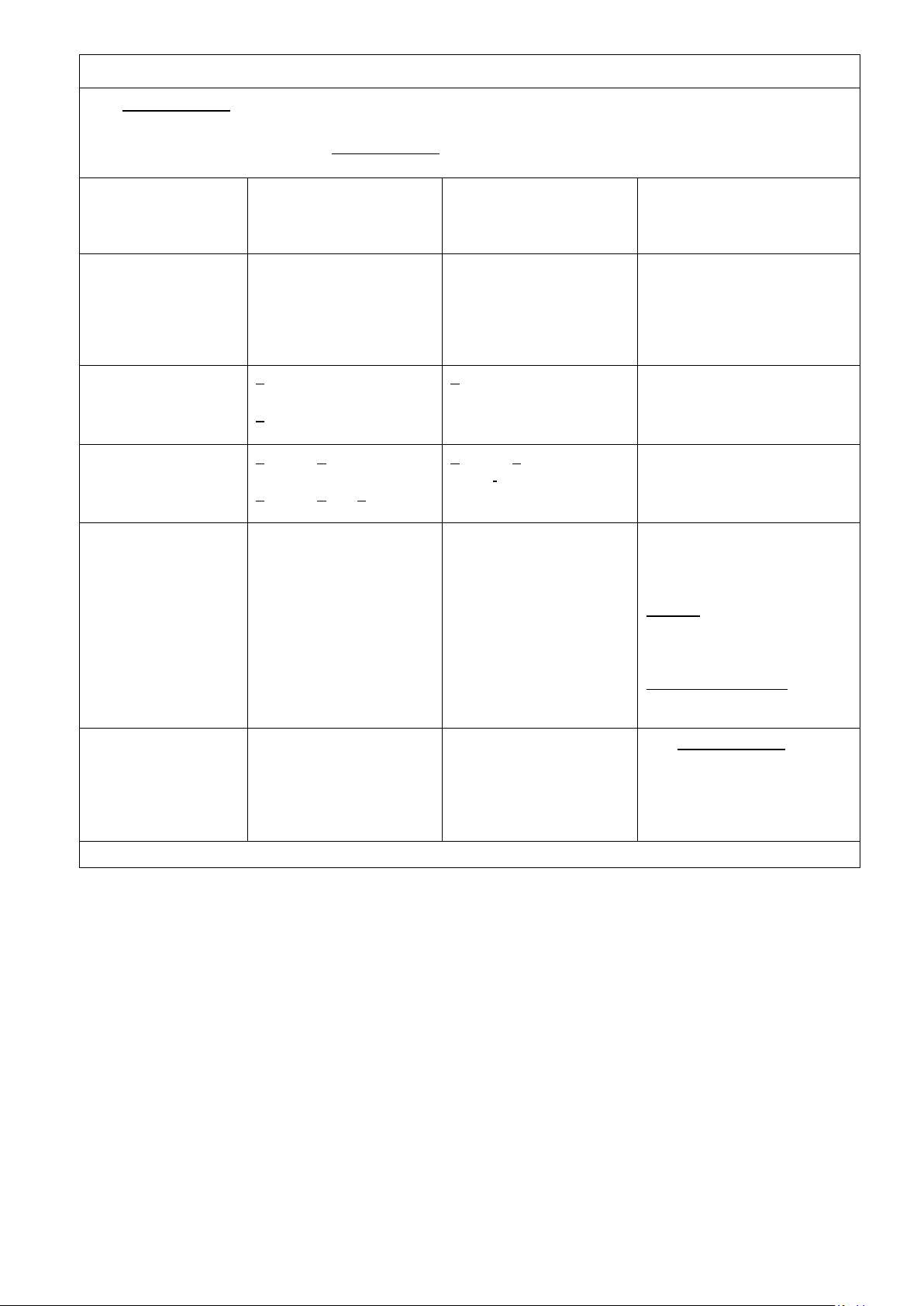
14
Manufacturer’s declaration-electromagnetic immunity
The Enhance RDX is intended for use in the electromagnetic environment (for home and
Immunity test
IEC 60601
test level
Compliance level
Electromagnetic
environment-guidance
(for home and professional
healthcare environment)
Electrostatic
discharge(ESD)
IEC 61000-4-2
Contact:±8 kV
Air±2 kV,±4 kV,±8 kV,±15
Kv
Contact:±8 kV
Air±2 kV,±4 kV,±8 kV,±15
kV
Floors should be wood,
concrete or ceramic tile. If
floors are covered with
synthetic material, the relative
humidity should be at least
30%
Electrical fast
transient/burst
IEC 61000-4-4
+ 2kV for power supply
lines
+ 1kV for input/output
lines
+ 2kV for power supply
lines
Not applicable
Mains power quality should
be that of a typical home
healthcare environment.
Surge
IEC 61000-4-5
+ 0.5kV, +1kV line(s) to
line(s)
+ 0.5kV, +1kV,+ 2kV
line(s) to earth
+ 0.5kV, +1kV line(s) to
line(s)
Not applicable
Mains power quality should
be that of a typical home
healthcare environment.
Voltage Dips, short
interruptions and
voltage variations on
power supply input
lines
IEC 61000-4-11
Voltage dips:
0 % UT; 0,5 cycle
0 % UT; 1 cycle
70 % UT; 25/30 cycles
Voltage interruptions:
0 % UT; 250/300 cycle
Voltage dips:
0 % UT; 0,5 cycle
0 % UT; 1 cycle
70 % UT; 30 cycles
Voltage interruptions:
0 % UT; 300 cycle
Power frequency(50,
60 Hz) magnetic field
IEC 61000-4-8
30 A/m
50 Hz or 60 Hz
30 A/m
60 Hz
NOTE UT is the a.c. mains voltage prior to application of the test level.
professional healthcare) specified below.
The customer or the user of the Enhance RDX should assure that it is used in such an
environment.
Mains power quality should
be that of a typical home
healthcare environment. If
the user of the Enhance
RDX requires continued
operation during power mains
interruptions, it is
recommended that the
Enhance RDX be
powered from an
uninterruptible power supply.
The Enhance RDX
power frequency magnetic
fields should be at levels
characteristic of a typical
location in a typical home
healthcare environment.
* During DIP interference, the pump will outage these normal. The cells connected with pump still
have air inside which won’t affect the use and function of the system.
* During DIP, the LED of front panel board might anomalous blinking with indicating sound. The
pump will back to normal function after DIP disturbance.
* During DIP, pump will show abnormal but won’t affect essential performance and no need to
worry the basic safety.
Page 14
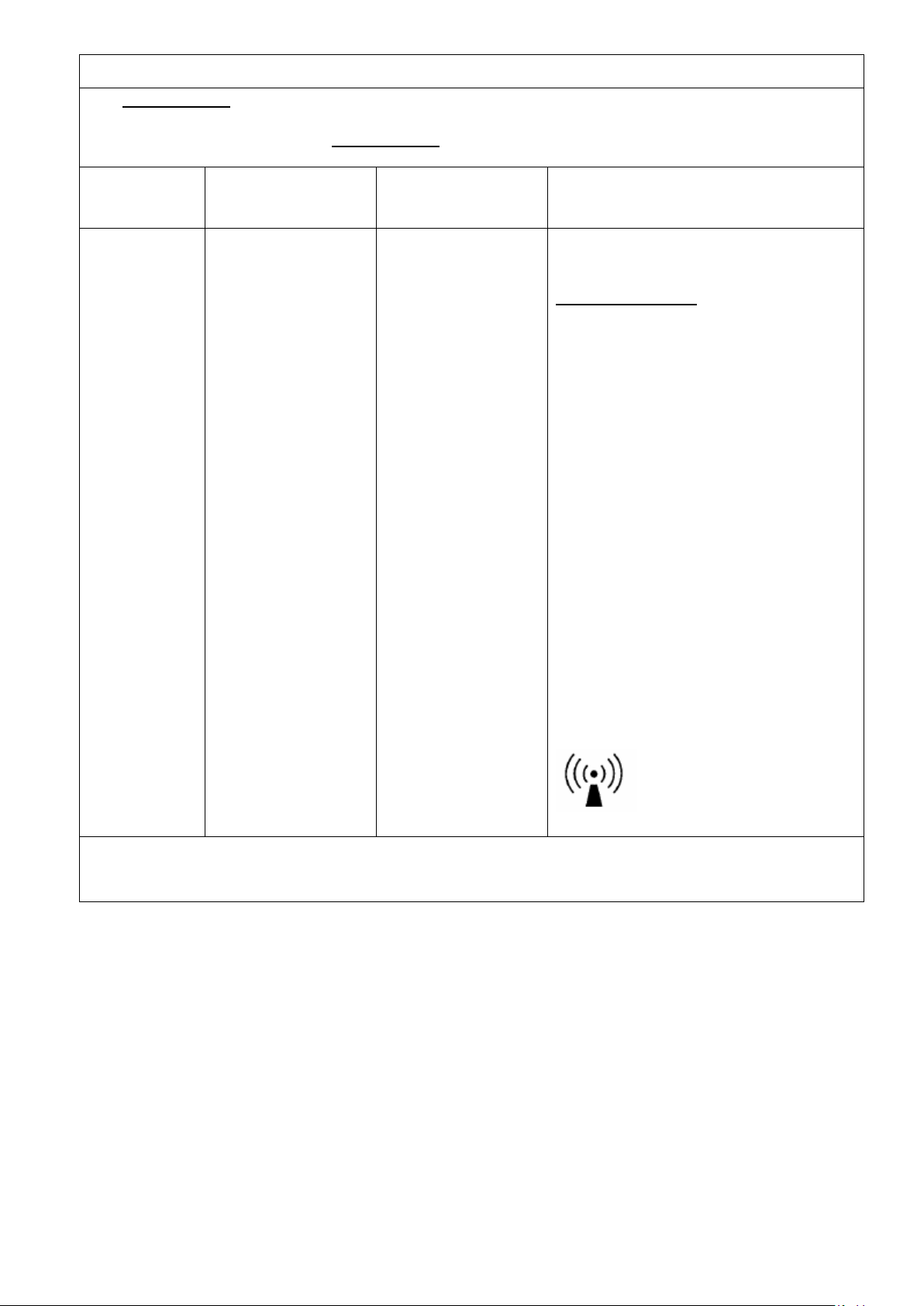
15
Manufacturer’s declaration-electromagnetic immunity
The Enhance RDX is intended for use in the electromagnetic environment (for home and
Immunity test
IEC 60601 test level
Compliance level
Electromagnetic environment-guidance
(for home and professional healthcare
environment)
Conducted RF
IEC 61000-4-6
Radiated RF
IEC 61000-4-3
3 Vrms:
0,15 MHz – 80 MHz
6 Vrms:
in ISM and amateur
radio bands between
0,15 MHz and 80 MHz
80 % AM at 1 kHz
10 V/m
80 MHz – 2,7 GHz
80 % AM at 1 kHz
3 Vrms:
0,15 MHz – 80 MHz
6 Vrms:
in ISM and amateur
radio bands between
0,15 MHz and 80 MHz
80 % AM at 1 kHz
10 V/m
80 MHz – 2,7 GHz
80 % AM at 1 kHz
NOTE1 At 80 MHz and 800 MHz, the higher frequency range applies.
NOTE2 These guidelines may not apply in all situations. Electromagnetic propagation is affected by absorption
and reflection from structures, objects and people.
professional healthcare) specified below.
The customer or the user of the Enhance RDX should assure that it is used in such and
environment.
Portable and mobile RF
communications equipment should be
used no closer to any part of the
Enhance RDX including cables, than the
recommended separation distance
calculated from the equation applicable to
the frequency of the transmitter.
Recommended separation distance:
d = 1,2 √P
d = 1,2 √P 80MHz to 800 MHz
d = 2,3 √P 800MHz to 2,7 GHz
Where P is the maximum output power
rating of the transmitter in watts (W)
according to the transmitter manufacturer
and d is the recommended separation
distance in meters (m).
Interference may occur in the vicinity of
equipment marked with the following
symbol:
Page 15
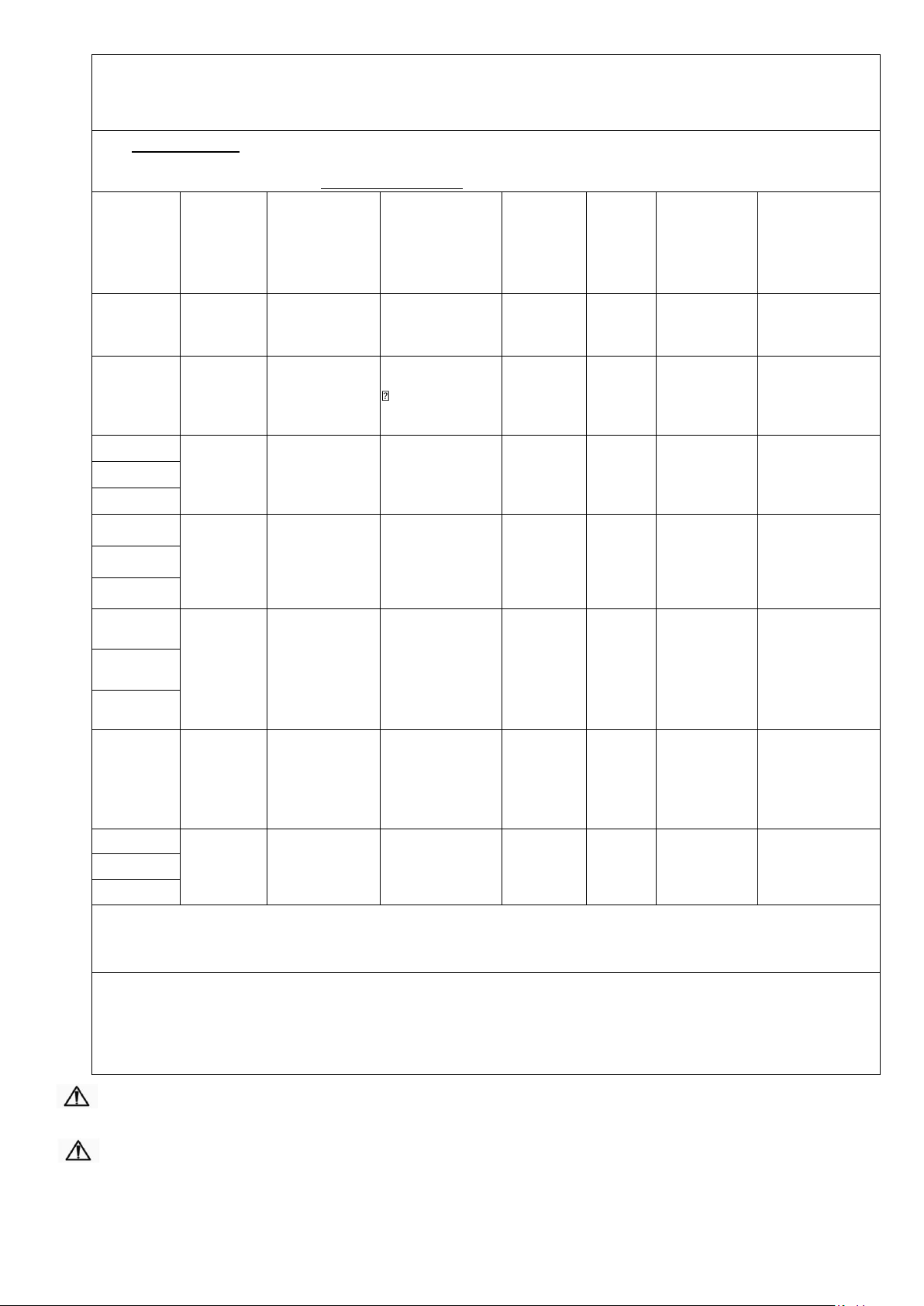
16
Manufacturer’s declaration-electromagnetic immunity
Test specifications for ENCLOSURE PORT IMMUNITY to RF wireless communications
equipment
The Enhance RDX is intended for use in the electromagnetic environment (for home and professional
Test
frequency
(MHz)
Band a)
(MHz)
Service a)
Modulation b)
Maximum
power
(W)
Distance
(m)
IMMUNITY
TEST LEVEL
(V/m)
Compliance
LEVEL
(V/m)
(for home and
professional
healthcare)
385
380 –390
TETRA 400
Pulse
modulation b)
18 Hz
1,8
0,3
27
27
450
430 – 470
GMRS 460,
FRS 460
FM c)
±5 kHz deviation
1 kHz sine
2
0,3
28
28
710
704 – 787
LTE Band 13,
17
Pulse
modulation b)
217 Hz
0,2
0,3 9 9
745
780
810
800 – 960
GSM 800/900,
TETRA 800,
iDEN 820,
CDMA 850,
LTE Band 5
Pulse
modulation b)
18 Hz
2
0,3
28
28
870
930
1 720
1 700 –
1 990
GSM 1800;
CDMA 1900;
GSM 1900;
DECT;
LTE Band 1, 3,
4, 25; UMTS
Pulse
modulation b)
217 Hz
2
0,3
28
28
1 845
1 970
2 450
2 400 –
2 570
Bluetooth,
WLAN,
802.11 b/g/n,
RFID 2450,
LTE Band 7
Pulse
modulation b)
217 Hz
2
0,3
28
28
5 240
5 100 –
5 800
WLAN 802.11
a/n
Pulse
modulation b)
217 Hz
0,2
0,3 9 9
5 500
5 785
NOTE If necessary to achieve the IMMUNITY TEST LEVEL, the distance between the transmitting
antenna and the ME EQUIPMENT or ME SYSTEM may be reduced to 1 m. The 1 m test distance is
permitted by IEC 61000-4-3.
a) For some services, only the uplink frequencies are included.
b) The carrier shall be modulated using a 50 % duty cycle square wave signal.
c) As an alternative to FM modulation, 50 % pulse modulation at 18 Hz may be used because while it
does not represent actual modulation, it would be worst case.
healthcare) specified below.
The customer or the user of the Enhance RDX should assure that it is used in such an environment.
CAUTION: If abnormal behavior is observed due to EM disturbances, please relocate the device
accordingly.
CAUTION: Please do not use any other cables or accessories not approved by the manufacturer in
this manual to avoid negative influence on electromagnetic compatibility.
Page 16

17
14. Expected Service Life
The Enhance RDX pump has an expected service life of five years. To maintain the condition of
the pump, have the pump serviced regularly according to the schedule recommended by
Caremed. Do NOT use unapproved accessories or attempt to modify, disassemble or otherwise
misuse the Enhance RDX system.
15. Warranty
a. Prius Healthcare guarantees this equipment to be free from defects in material and
workmanship for up to 12 months from the date of delivery.
b. All warranty work will be performed at the service address below, shipping charges
prepaid.
c. At Manufacturers discretion we agree to service, repair or replace any equipment or
part found to be defective at no charge.
d. This warranty excludes equipment damaged through shipping, tampering, improper
maintenance, carelessness, accident, negligence, misuse, or which has been altered,
repaired or dismantled other than with the manufacture’s written authorization
following approved procedures and performed by certified technicians.
e. In no event shall Prius Healthcare be liable for any direct, indirect, consequential
damage or loss resulting from the use of equipment.
f. Warranty is non-transferrable.
 Loading...