

Page 1
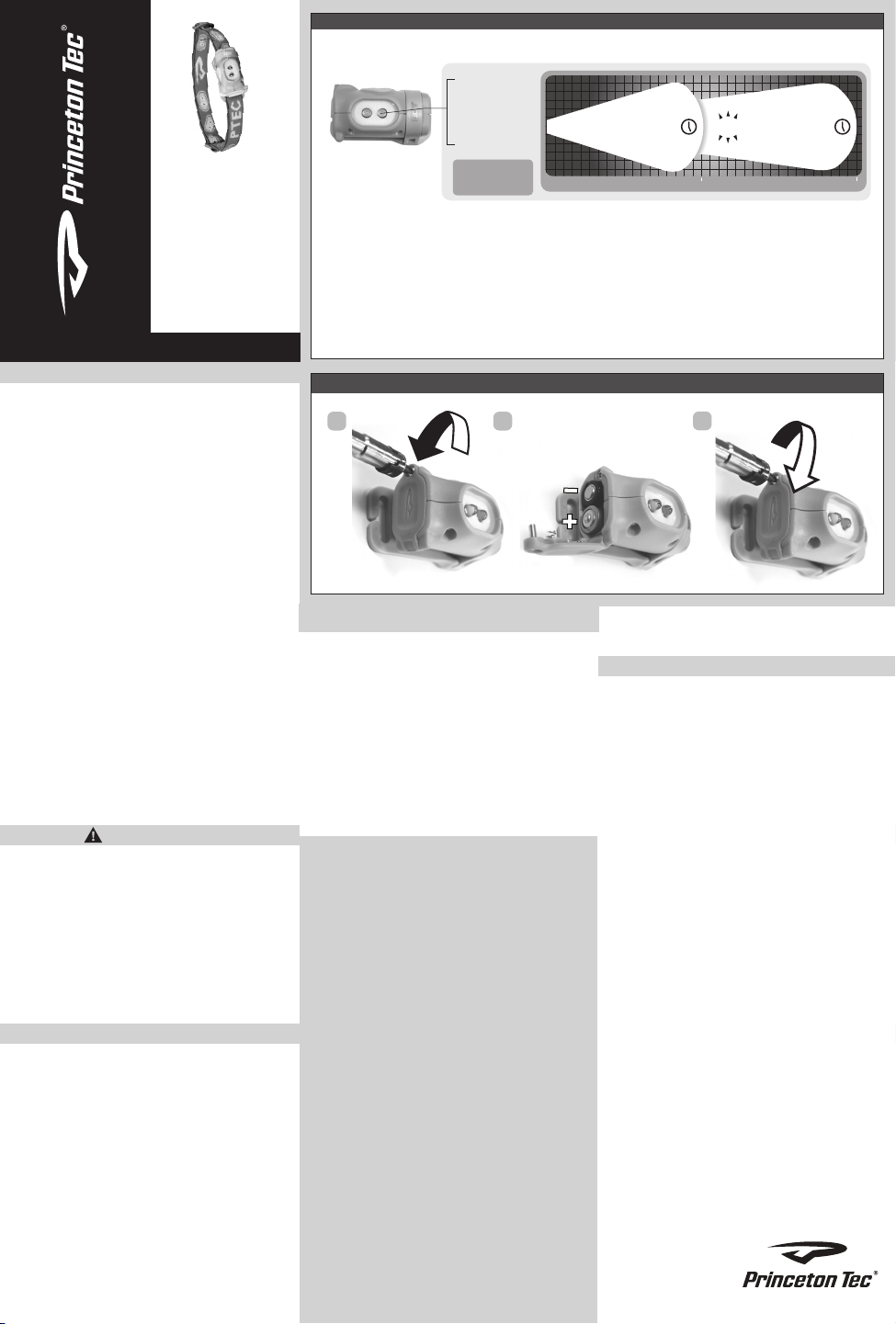
Figure 1 – Switch Operation
press 1x = Low
press 2x = High
press 3x = Flash
To switch between light
sources, press and hold
TM
button (1-2 seconds)
2 Ultrabright
Opération de commutation Betriebsartenschalter
LEDs
LOW 9H
DISTANCE (Meters)
FLASH
11 H
15
HIGH
4.5H
25
www.princetontec.com
Instructions
BOT
LED HEADLAMP
Operating and Maintenance
Notice d’utilisation et d’entretien
ENGLISH
Battery Installation – See Battery Installation Diagram
• 2 AAA
• Alkaline (LR03) or Lithium
• Rechargeable NiCad or NiMH
Princeton Tec cares about the environment and
recommends recycling batteries. For more
information about battery recycling, please go
to: www.batteryrecycling.com
To install the batteries, open the battery door.
The battery door has a screw enclosure to
prevent accidental opening. The screw
requires a #1 Philips screwdriver for opening.
Once the screw is unsecured, rotate the
battery door open.
Install two (2) AAA batteries as shown in the
diagram. The tall spring on the battery door
should correspond with the negative polarity
and the shorter spring should correspond with
the positive polarity. Observe proper battery
polarity when installing the batteries. Improper
installation of the batteries will damage the light
and void the warranty.
Rotate the battery door to the closed position.
Using a #1 Philips screwdriver, secure the
battery door shut with the screw. Rotate the
screw down until secure.
WARNING
• Never mix fresh and used batteries.
• Never mix different battery brands or
chemistry types.
• Always remove drained batteries immediately.
• Remove batteries during long periods of
storage.
NOTE: Rechargeable NiCad or NiMH
batteries may result in reduced brightness
due to lower nominal voltage.
Switch Operation –
The first button press turns the light on in low
mode. A second press activates high. A third
push activates the flash mode. Once a mode
has been selected for more than 2 seconds,
the next button press will turn the light off.
The Bot also has an auto shutoff function. After
2.5 hours of uninterrupted operation, the light
will turn itself off.
*The burn times listed on the rear of the
packaging assume you start with fresh
batteries, the light remains on, and you use
only one mode.
See Switch Operation diagram
* Princeton Tec calculates total burn time as the time it takes for the light source to produce a
minimum of 0.25 lux at 2 meters. 0.25 lux is about the equivalent of a full moon on a clear night.
* Princeton Tec berechnet die Gesamtbrenndauer bezogen auf eine von der Stirnlampe erzeugte
minimale Beleuchtungsstärke von 0,25 Lux in 2 Meter Abstand. 0,25 Lux entsprechen in etwa
Bedienungsanleitung
der Beleuchtungsstärke des Vollmonds in einer klaren Nacht.
* Princeton Tec définit la durée totale d’éclairage comme le temps nécessaire à la source
lumineuse pour produire un minimum de 0,25lux à 2mètres. 0,25lux équivaut à peu près à la
luminosité d’une pleine lune dans un ciel nocturne dégagé.
Figure 2 – Battery Replacement
1 2
Troubleshooting
If the Bot fails to light:
• Check the batteries for proper installation.
• Replace batteries if proper installation is
confirmed.
• Check the light for water contamination on
the circuit board. The light will resume
normal operation once the water is shaken
or blown out and the light is left open until
completely dry. If the light has been
contaminated with salt water, flush the unit
with fresh water and dry as described above.
USA– International 5-Year Warranty
WARRANTY – Princeton Tec warrants this
product to be free from defects in workmanship
and materials under normal use for as long as
you own this product. This warranty covers all
of the component parts of the product except
batteries. This warranty does not cover
deterioration due to normal wear or damage
due to misuse, alteration, negligence,
accidents, or unauthorized repair. Princeton
Tec will repair or replace parts which are
defective in workmanship or materials.
Your authorized Princeton Tec Dealer and
Princeton Tec are the only facilities authorized
to repair the product. After (3) unsuccessful
attempts (within the warranty period) to repair
the product, you have the right to elect
replacement of the product or a refund of the
purchase price less allowance for use of the
product. NO INCIDENTAL OR CONSEQUENTIAL DAMAGES ARE INCLUDED IN THIS
WARRANTY. (Some states do not allow the
exclusion or limitation of incidental or
consequential damages, so the above
limitations or exclusions may not apply to you.)
This warranty gives you specific legal rights,
and you may also have other rights which vary
from state to state.
Remplacement des piles Einlegen der Batterien
3
Princeton Tec reserves the right to change
product specifications without notice.
Return Policy
If your light fails to operate, follow these
simple steps:
1) Check batteries. Replace if necessary.
2) Contact Princeton Tec customer service at
800-257-9080 to request an RMA number to
send your light in for repair or replacement. No
warranty repairs will be accepted without an
RMA number.
3) Return the light without batteries to:
Princeton Tec, 5198 Rt. 130, Bordentown,
NJ 08505. Postage due and freight collect
items will not be accepted.
Princeton Tec
PO Box 8057,
Trenton, NJ 08650
Phone: 609-298-9331
Fax: 609-298-9601
www.princetontec.com
© 2013 Princeton Tec
Page 2
Francais
Installation Des Piles
Veuillez vous référer au diagramme d'installation des piles
• 2 piles AAA
• Alcaline (LR03)
• Piles rechargeables de type NiCad ou NiMH
À Princeton Tec, nous avons le soucis de l'environnement et
nous recommandons de recycler vos piles. Pour plus
d’informations sur le recyclage des piles, rendez-vous sur :
www.batteryrecycling.com
Pour installer les piles, ouvrez le volet d'accès au
compartiment des piles. Le volet est équipé d’une vis pour
permettre d’éviter toute ouverture intempestive. Il vous faut
utiliser un tournevis Philips No 1 pour l’ouvrir. Une fois que
la vis est dévissée, faites pivoter le volet du compartiment
des piles pour l’ouvrir.
Installez deux (2) piles de type AAA, comme illustré dans le
diagramme. Le ressort long attaché sur le volet correspond
au pôle négatif de la pile, et le ressort court correspond au
pôle positif. Veillez à bien respecter la polarité des piles lors
de leur installation. Une installation incorrecte des piles va
endommager la lampe et annule la garantie.
Faites pivoter le volet du compartiment des piles pour le
fermer. Vissez la vis avec un tournevis Philips No 1 pour
bloquer le volet du compartiment. Vissez jusqu’à ce que le
volet soit bloqué en place.
AVERTISSEMENT
• Ne jamais mélanger des piles neuves et des piles
usagées.
• Ne jamais mélanger des piles de marques ou de
composition chimique différentes.
• Immédiatement enlever des piles déchargées.
• Enlever les piles lors de l’entreposage prolongé.
Utilisation du commutateur – voir le diagramme explicatif
Un premier appui sur le bouton permet d’allumer la lampe
en mode faible intensité. Un deuxième appui sur le bouton
permet de mettre la lampe en mode haute intensité. Un
troisième appui permet de mettre la lampe en mode
Deutsch
Einsetzen der Batterien
Siehe Schema zum Einsetzen der Batterien
• 2 AAA
• Alkaline (LR03)
• Aufladbare Nickel-Cadmium- oder NiMH Batterien
Princeton Tec Care about the environment and
recommends recycling batteries. Weitere Informationen zum
Batterie-Recycling finden Sie unter:
www.batteryrecycling.com.
Um die Batterien einzusetzen, öffnen Sie die Batterieklappe.
Die Batterieklappe ist mit einem Schraubverschluss
versehen, um unbeabsichtigtes Öffnen zu vermeiden. Zum
Öffnen wird für die Schraube ein KreuzschlitzSchraubendreher Größe 1 benötigt. Wenn Sie die Schraube
gelöst haben, drehen Sie die Batterieklappe auf.
Setzen Sie zwei (2) AAA-Batterien wie in der Abbildung
gezeigt ein. Die große Feder auf der Batterieklappe ist der
Kontakt für den Minuspol, die kleine Feder der Kontakt für
den Pluspol der Batterie. Achten Sie beim Einsetzen der
Batterien auf die richtige Polung. Unsachgemäßes
Einsetzen der Batterien kann die Lampe beschädigen und
zum Erlöschen der Garantie führen.
Drehen Sie die Batterieklappe in die geschlossene Position.
Um die Batterieklappe zu verschließen, drehen Sie die
Schraube mit einem Kreuzschlitz-Schraubendreher Größe 1
fest. Drehen Sie die Schraube ein, bis sie fest sitzt.
WARNUNG
• Vermischen Sie keine neuen und entladenen Batterien.
• Es dürfen keine Batterien unterschiedlicher Marken oder
Typen verwendet werden.
• Entladene Batterien müssen unverzüglich entnommen
werden.
• Entnehmen Sie die Batterien bei längerer
Nichtbenu zung.
Schalterbedienung – siehe Schalterbedienungsschema
Beim ersten Drücken des Schalters schaltet sich die Lampe
clignotant. Quand un mode reste sélectionné pendant
plus de 2 secondes, tout appui sur le bouton va éteindre
la lampe.
La Bot offre également un mode Extinction automatique.
Après 2.5 heures de fonctionnement ininterrompu, la lampe
va s’éteindre automatiquement.
*Les durées d’illumination listées à l’arrière de l’emballage
ne sont correctes que si vous utilisez des batteries
chargées à bloc, que la lampe reste allumée sans
interruption et que vous ne changez pas de mode.
Dépannage
Si la lampe Bot ne s'allume pas :
• Vérifier que les piles sont bien installées.
• Si elles sont bien installées, remplacer les piles.
• Vérifiez qu'il n'y a pas d'eau sur les circuits électroniques
de la lampe. La lampe fonctionnera de nouveau après
avoir évacué l'eau en secouant ou en soufflant dans la
lampe, et après l’avoir laissé sécher complètement. Si de
l'eau salée a pénétré dans la lampe, rincer à l'eau douce
et suivre les instructions notées ci-dessus.
Garantie de 5 ans aux USA et dans le monde
GARANTIE - Princeton Tec garantit au propriétaire initial,
tant qu’il possède ce produit, que ce produit, utilisé dans le
cadre d’une activité normale, n’a pas de défauts de matériel
ou de fabrication. Cette garantie couvre toutes les pièces
composantes du produit sauf les piles. Cette garantie ne
couvre pas les détériorations causées par l’usure normale ni
les dommages provoqués par une utilisation abusive, des
modifications, la négligence, les accidents ou par une
réparation non agréée. Princeton Tec réparera ou
remplacera les pièces qui souffrent de défaut matériel ou de
fabrication.
Seuls votre revendeur Princeton Tec agréé et Princeton Tec
sont habilités à réparer le produit. Après trois (3) tentatives
de réparation non couronnées de succès (pendant la
période de garantie), vous avez le droit, à votre choix, de
mit der niedrigen Leuchtstufe ein. Erneutes Drücken
aktiviert die hohe Leuchtstufe. Wenn der Schalter zum
dritten Mal gedrückt wird, schaltet sich die Lampe in den
Blinkmodus. Wenn Sie nach dem Drücken des Schalters
länger als 2 Sekunden warten, schaltet sich die Lampe beim
nächsten Drücken aus.
Die Bot besitzt eine automatische Abschaltfunktion. Nach
2.5 Stunden ununterbrochenem Betrieb schaltet sich die
Lampe von selbst aus.
*Die Leuchtdauern auf der Rückseite der Verpackung
setzen voraus, dass Sie neue Batterien verwenden, die
Lampe eingeschaltet lassen und nur eine Leuchtstufe
verwenden.
Störungshilfe
Bot leuchtet nicht:
• Überprüfen Sie, dass die Batterien ordnungsgemäß
eingesetzt sind.
• Wenn dies der Fall ist, tauschen Sie die Batterien aus.
• Überprüfen Sie, ob sich an der Leiterplatte im Inneren der
Lampe Wasser befindet. Die Lampe kann wieder
verwendet werden, nachdem das Wasser herausgeschü
telt oder herausgeblasen wurde und die Lampe
vollständig getrocknet ist. Wenn Salzwasser in die Lampe
eingedrungen ist, spülen Sie sie mit sauberem Wasser
aus und befolgen Sie die obenstehenden Anweisungen.
USA – Internationale 5-Jahres-Garantie
VOLLGARANTIE – Princeton Tec gewährleistet, dass
dieses Produkt bei sachgemäßem Gebrauch frei von Fehlern
in Material und Verarbeitung ist, solange Sie es besitzen.
Diese Garantie gilt für alle Komponenten des Produkts mit
Ausnahme der Batterien. Diese Garantie gilt nicht für
Schäden durch normalen Verschleiß oder infolge von nicht
bestimmungsgemäßer Verwendung, Modifizierung,
Unterlassung, Unfälle oder unsachgemäßen Reparaturen.
Teilen, die Verarbeitungs-oder Materialfehler aufweisen
werden von Princeton Tec repariert oder ersetzt.
faire remplacer le produit par un article neuf ou d’obtenir le
remboursement du prix d’achat, moins un forfait pour
prendre en compte la période d’utilisation du produit.
CETTE GARANTIE NE COUVRE AUCUN DOMMAGES
ACCESSOIRES OU INDIRECTS. (Certaines juridictions ne
permettent pas l'exclusion ou la limitation des dommages
accessoires ou indirects. Par conséquent les limitations ou
exclusions exprimées ci-dessus peuvent ne pas s'appliquer
à votre cas.) Cette garantie vous confère des droits légaux
spécifiques. Il est également possible que vous disposiez
d'autres droits, qui varient d'une juridiction à l'autre.
Princeton Tec se réserve le droit de modifier les
spécifications du produit sans avertissement.
Conditions de retour du produit
Si l'unité d'éclairage ne fonctionne pas, suivre les étapes
simples ci-dessous :
1) Vérifiez les piles. Remplacez-les si besoin est.
2) Contactez le service d'assistance à la clientèle de
Princeton Tec au 800-257-9080 (numéro gratuit en
Amérique du nord) pour demander un numéro d'autorisation
de retour d'article afin de renvoyer votre lampe pour
réparation ou remplacement. Nous ne pourrons accepter
aucun article pour réparation sous garantie s'il n'est pas
accompagné d'un numéro d'autorisation de retour d'article.
3) Renvoyez la lampe sans piles à : Princeton Tec, 5198 Rt.
130, Bordentown, NJ 08505, U.S.A. Nous ne pouvons pas
accepter les envois en port dû.
Princeton Tec
PO Box 8057
Trenton, NJ 08650, U.S.A.
Téléphone : 609-298-9331
Télécopieur : 609-298-9601
www.princetontec.com
© 2013 Princeton Tec
Das Produkt darf nur von zugelassenen Princeton
Tec-Händlern und Princeton Tec repariert werden. Nach drei
(3) erfolglosen Versuchen, das Produkt zu reparieren, können
Sie das Produkt umtauschen oder erhalten den Kaufpreis
abzüglich einer Minderung für die Nutzung des Produkts
zurückerstattet. ZUFÄLLIGE ODER FOLGESCHÄDEN SIND
VON DIESER GARANTIE NICHT GEDECKT. In einigen
Ländern ist der Ausschluss oder die Beschränkung der
Haftung für zufällige oder Folgeschäden nicht statthaft, so
dass die obigen Ausschlüsse oder Beschränkungen für Sie
möglicherweise nicht gelten.) Diese Garantie gewährt Ihnen
bestimmte Rechte. Je nach Ihrem Wohnort verfügen Sie
jedoch möglicherweise über weitere Rechte.
Princeton Tec behält sich das Recht vor, die Produktspezifikationen ohne Benachrichtigung zu ändern.
Rücknahmeverfahren
Falls Ihre Lampe nicht funktioniert, gehen Sie
folgendermaßen vor:
1)Prüfen Sie die Batterien. Ersetzen Sie sie, falls nötig.
2) Um Ihre Lampe für Reparaturen oder Ersatz
einzuschicken, wenden Sie sich an den Princeton
Tec-Kundendienst unter 800-257-9080 und fordern Sie
eine RMA-Nr. an. Garantieforderungen werden nur
mit RMA-Nr. akzeptiert.
3)Senden Sie die Lampe ohne Batterien zurück an:
Princeton Tec, 5198 Rt. 130, Bordentown, NJ 08505.
Unterfrankierte und unfreie Sendungen werden nicht
angenommen.
Princeton Tec
PO Box 8057
Trenton, NJ 08650
Phone: 609-298-9331
Fax: 609-298-9601
www.princetontec.com
© 2013 Princeton Tec
 Loading...