

Page 1
Lenovo Wireless Mouse N3902
Quick Start Guide
Lenovo 无线光学鼠标N3902
Features
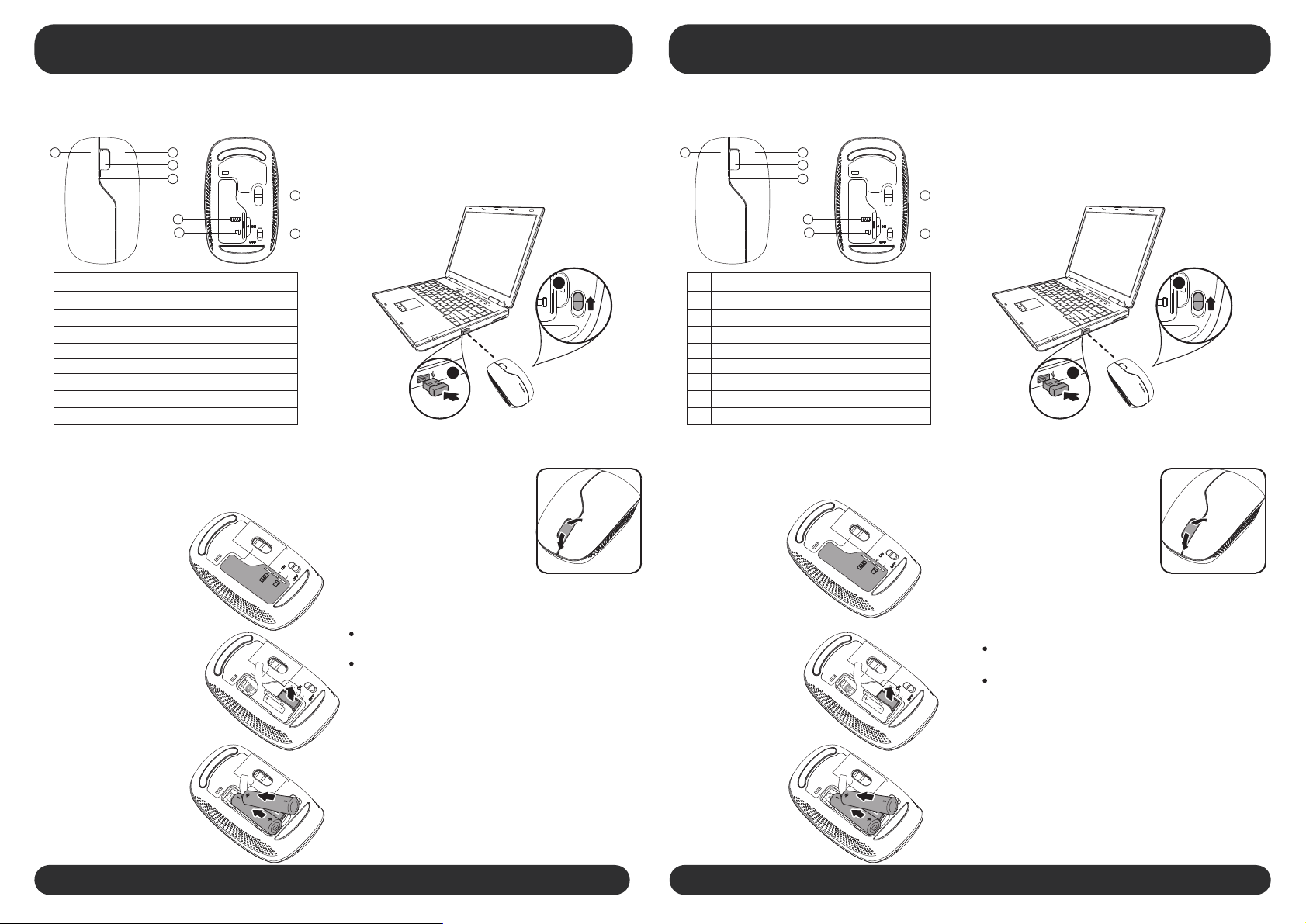
Front View Back View
1 1
# #
1 1
Left mouse button
2 2
Right mouse button
3 3
Scroll wheel
4 4
LED indicator
5 5
Battery compartment
6 6
USB dongle
Optical sensor
7 7
8 8
Power button
2 2
3 3
4 4
7 7
5 5
6 6
8 8
Component
Connecting your mouse
To connect your mouse:
1. Open the battery cover.
4. Plug the USB dongle into an open USB port
on your laptop.
5. Switch the power button on the bottom
of your mouse to the ON position. The
laptop automatically detects the mouse.
2
1
Using your mouse
To use your mouse:
1. Use the scroll wheel to scroll
up and down the screen.
2. Press and hold the scroll
wheel down, then move the
mouse up and down to scroll
up and down the page.
特征
前视图 后视图
左键
右键
滚轮
LED指示灯
电池盖
USB接收器
光学感应器
电源开关
连接鼠标
连接鼠标方法:
1.打开电池盖
组件
4.把USB接收器插到电脑的USB接口
5.把鼠标底部的电源开关推至ON位置电脑会自动连
接鼠标
2
1
使用鼠标
使用鼠标:
1. 移动滚轮以向上﹐向下移动屏
幕图像
2. 按住滚轮向上向下移动可以
滚动页面
2. Remove the USB dongle from
the back of the mouse.
3. Insert the batteries, then
replace the battery cover.
LED Indicator
The LED indicator lights green when the mouse is
switched on and pairing is established.
2.从鼠标底部取出USB 接收器
LED提示
当打开电源开关或配对成功后﹐LED指示显示绿光
The LED indicator continuously flashes green 1 minute
when the battery
A
A
A
A
A
A
immediately.
level is low. Replace the batteries
A
A
A
AA
A
当电池电量不足时﹐LED指示灯会连续闪烁1分钟
绿光﹐请及时更换电池
3.装入电池然后盖好电池盖
A
A
A
A
A
A
A
A
A
A
A
A
Quick Start Guide
A
A
A
A
A
A
A
A
A
AA
A
快速使用指南
Page 2
Lenovo Wireless Mouse N3902 FCC ID:EMJMN3902
Lenovo Melon 2.4G Nano Dongle FCC ID:EMJD2EO01
Mouse Product Name:Lenovo Wireless Mouse N3902
Mouse Model:N3902
Mouse IC:4251A-MN3902
Dongle Product Name:Lenovo Melon 2.4G Nano Dongle
D Model:ongle 20-2EO01D
Dongle IC:4251A-D2EO01
RSS-210
 Loading...