

Page 1
Quick Start Guide
Prestigio MultiPhone
Inside your package
• Prestigio MultiPhone • Earphones
• Battery • USB cable
• Adapter • Stylish carrying case
• Quick start guide
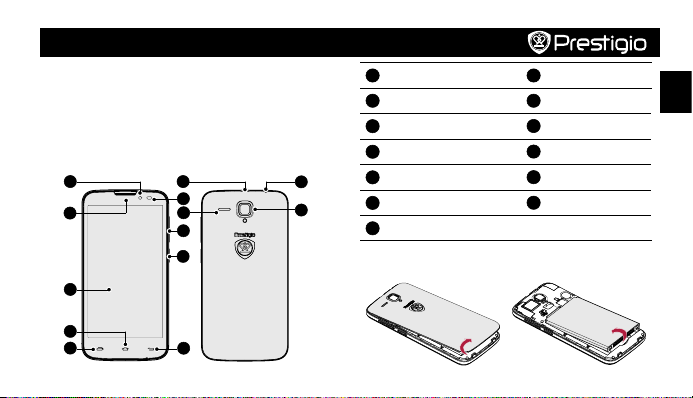
Your phone at a glance
1
2
3
4
5
6
7
8
9
10
11
Front camera
1
Earpiece
2
Touch screen
3
Home key
4
Menu key
12
13
5
Micro USB port
6
Proximity and light sensor
7
8
9
10
11
12
13
Speaker
Volume button
Power button
Back key
Earphone jack
Rear camera
EN
Getting started
1. Remove the back cover. 2. Take out the battery.
Page 2
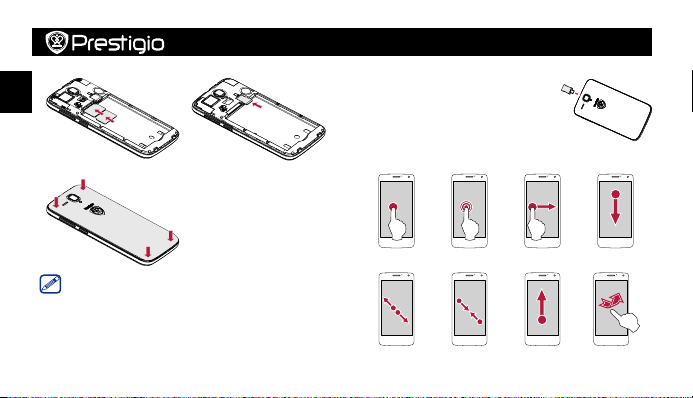
3. Insert your SIM card. 4. Insert a memory card.
EN
5. Put back the back cover. 6. Press and hold the power
button to power on your
phone.
Charge your phone
Connect your phone to a power outlet by
using the included USB cable and adapter.
Finger tips
• Tap • Hold
• Swipe • Slide
Quick Start Guide
Prestigio MultiPhone
The device supports two SIM cards for voice calls and data
connection. During a voice call or data transfer via one SIM
card, the other SIM card becomes inactive (not registered with
your mobile network operator). This means that you cannot
receive incoming calls or use data connection via the inactive SIM
card. When the call or data transfer ends, both SIM cards will
become active and show on the list of registered networks.
• Zoom in • Zoom out • Scroll • Flick
Page 3
Quick Start Guide
Prestigio MultiPhone
Make a call
1. Use one of the following methods:
• Tap to open the dial pad, enter the number directly.
• Tap to open the contact list, select a contact.
2. Tap Call.
Home screen
Your Home screen is the starting point to access all of your
phone’s features. The Home screen can have multiple panels. To
view other panels, swipe left or right.
Add an app icon to Home screen
On the Home screen, tap to open the list menu, tap and
hold an application icon, and then drag it into a panel preview.
Set your wallpaper
1. On the Home screen, tap > Wallpaper.
2. Select one of the following: ES File Explorer, Gallery, Live
wallpapers, Video Wallpaper, or Wallpapers.
3. Select an image and tap Set wallpaper. Or, select an image,
resize it by dragging the frame, and then tap OK.
Use your apps
Open an app
• On the Home screen or list menu, select an app icon to open it.
Technical specifications
Item Specification
Processor High performance quad-core 1.3GHz
Memory RAM 1GB + ROM 4GB, micro SD slot
OS Android 4.2
Display 5" QHD (960*540) IPS, capacitive touch
Camera Front 2MP FF / rear 8MP AF
Band UMTS: 900/2100MHz;
supports up to 32 GB
GSM:900/1800MHz
EN
Page 4
Interfaces Micro USB 2.0, micro SD (micro SDHC
EN
Communications Wi-Fi (802.11 b/g/n), 3G, Bluetooth 3.0
Battery 4000mAh
Dimension 144*73.3*10.9mm (H*W*D)
Weight 192 g
Specific absorption rate information
The highest SAR value for this PAP5503 DUO model when tested
for compliance against the standard was 0.397 W/kg (10g) for
ICNIRP recommendation.
functionalities than what is presented in this quick start guide.
Prestigio hereby states that this smartphone complies to basic
requirements and other relevant regulations given by the EU
compatible)
Notice: As Prestigio products are constantly updated
and improved, your device’s software and hardware
may have a slightly different appearance or modified
Quick Start Guide
Prestigio MultiPhone
directive 1999/5/EC. Full version of the declaration of conformity
is available on: http://www.prestigio.com/compliance.
Excessive exposure to loud sounds for extended
periods of time may result in hearing loss.
 Loading...