

Page 1
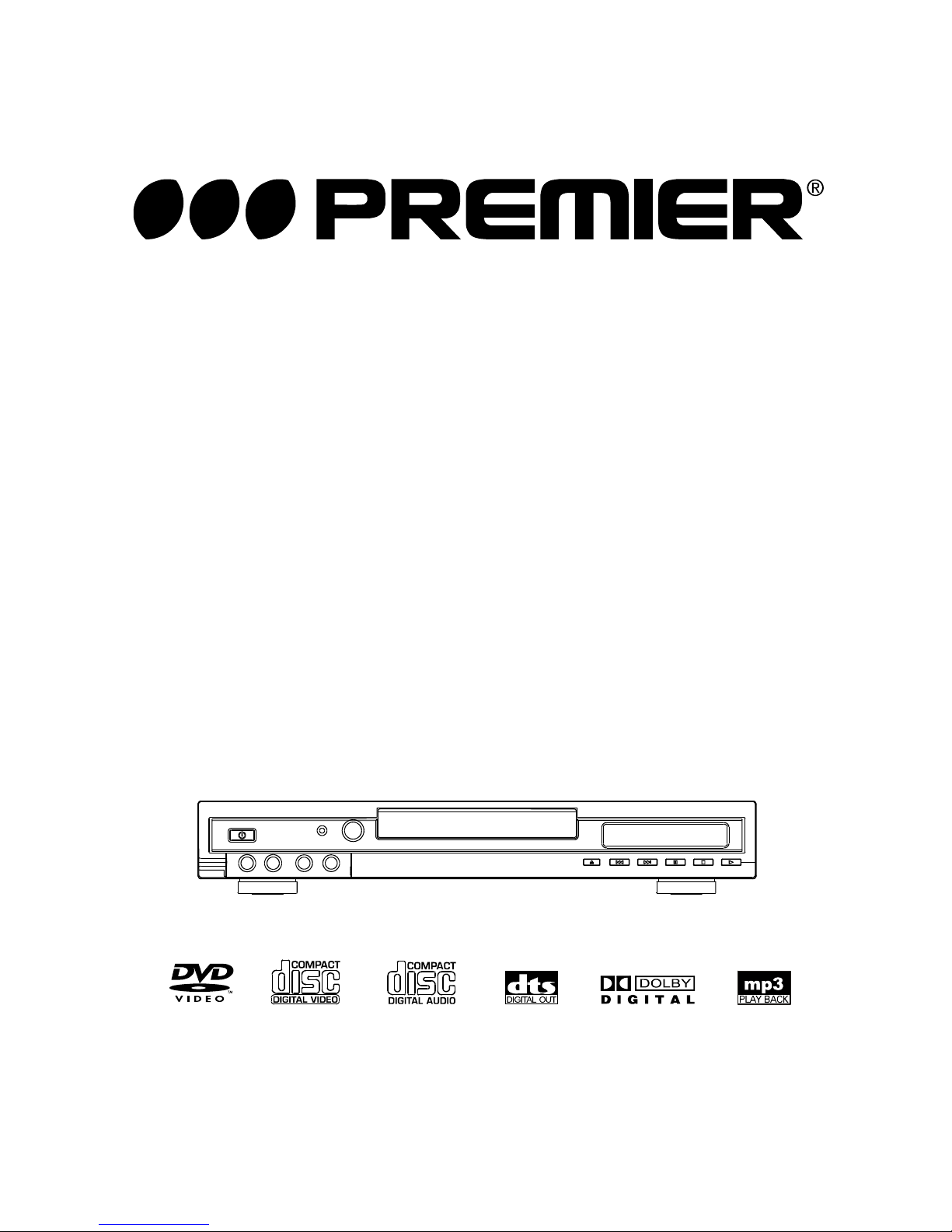
Beforeattemptingtoconnect,operateoradjustthisplayer,pleasereadtheseinstructionscompletely.
DVD/VIDEOCD/CDPlayer
User Manual
Model:SX-005DVDR
Page 2
1
CAUTION:
DVD/VIDEOCD/CDPLAYERISACLASS1LASER
PRODUCT.HOWEVERTHISDVD/VIDEOCD/CD
PLAYERUSESAVISIBLELASERBEAMWHICH
COULDCAUSEHAZARDOUSRADIATIONEXPOSUREIFDIRECTED.BESURETOOPERATETHE
DVD/VIDEOCD/CDPLAYERCORRECTLYASINSTRUCTED.
WHENTHISDVD/VIDEOCD/CDPLAYERIS
PLUGGEDTOTHEWALLOUTLET,DONOT
PLACEYOUREYESCLOSETOTHEOPENING
OFTHEDISCTRAYANDOTHEROPENINGSTO
LOOKINTOTHEINSIDEOFTHISPLAYER.
USEOFCONTROLSORADJUSTMENTSOR
PERFORMANCEOFPROCEDURESOTHER
THANTHOSESPECIFIEDHEREINMAYRESULT
INHAZARDOUSRADIATIONEXPOSURE.
DONOTOPENCOVERSANDDONOTREPAIR
YOURSELF.REFERSERVICINGTOQUALIFIED
PERSONNEL.
WARNING:
TOREDUCETHERISKOFFIREORELECTRIC
SHOCK,DONOTEXPOSETHISEQUIPMENTTO
RAINORMOISTURE.
VENTILATIONWARNING:
THENORMALVENTILATIONOFTHEPRODUCT
SHALLNOTBEIMPEDEDFORINTENDED
USE.
TOREDUCETHERISKOFFIREORELECTRIC
SHOCK,ANDANNOYINGINTERFERENCE,USE
THERECOMMENDEDACCESSORIESONLY.
THISDEVICEISINTENDEDFORCONTINUOUS
OPERATION!
CAUTION
Safetyinformation
(Insideofplayer)
(Backofplayer)
CAUTION:TOREDUCETHERISKOFELECTRIC
SHOCK,DONOTREMOVECOVER
(ORBACK).NOUSER-SERVICEABLE
PARTSINSIDE.REFERSERVICING
TOQUALIFIEDSERVICE
PERSONNEL.
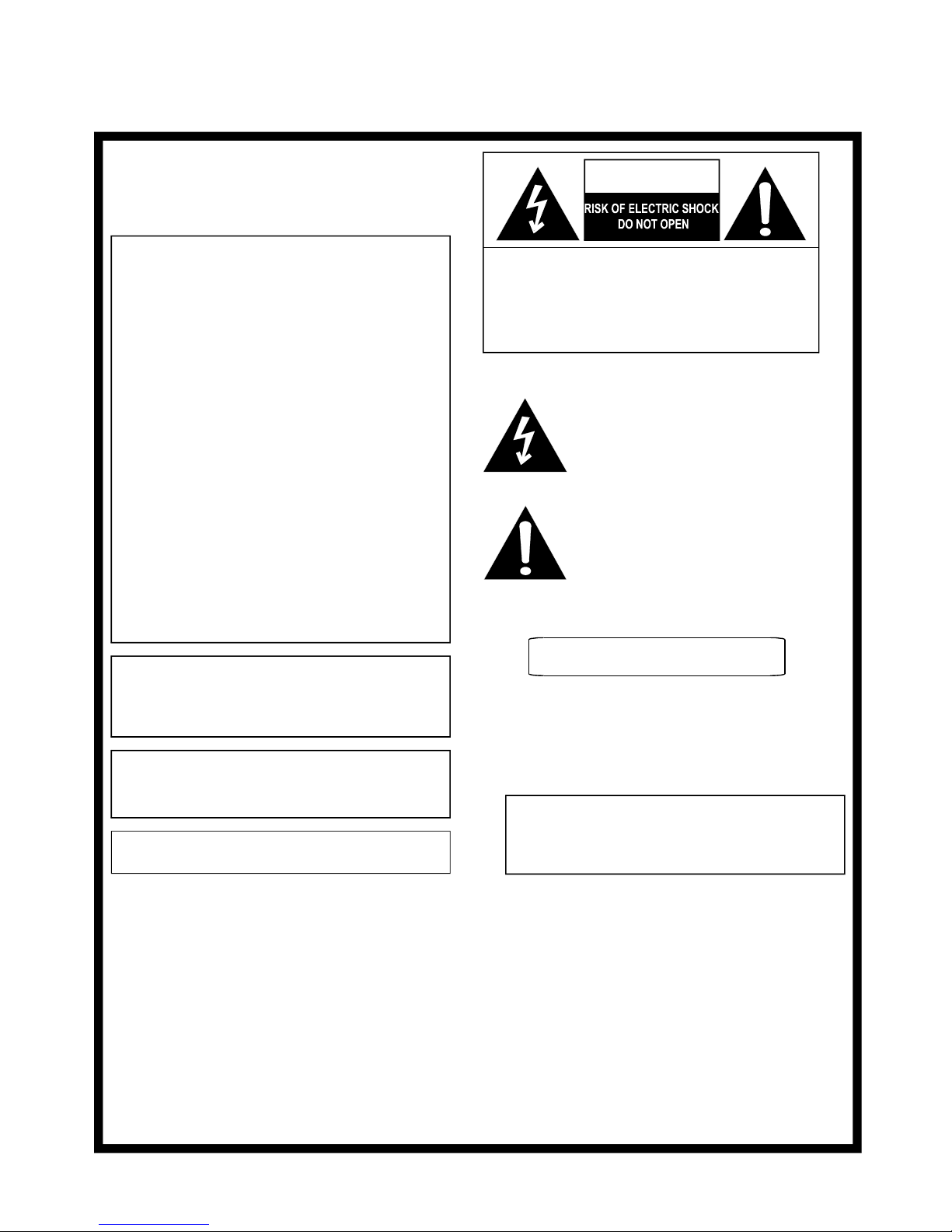
Thelightningflashwitharrowheadsymbol,
withinanequilateraltriangle,isintendedtoalert
theusertothepresenceofuninsulated
"dangerousvoltage"withintheproduct'senclosurethatmaybeofsufficientmagnitudeto
constituteariskofelectricshocktopersons.
Theexclamationpointwithinanequilateral
triangleisintendedtoalerttheusertothe
presenceofimportantoperatingandmaintenance(servicing)instructionsintheliterature
accompanyingtheappliance.
DONOTSTAREINTOBEAM.
CAUTION-LASERRADIATIONWHENOPEN.
Page 3

2
Tableofcontents
GettingStarted:
InitialSettings:
AdvancedOperation:
FORREFERENCE:
BasicOperation:
Safetyinformation..............................................1
Features..............................................................3
Accessories........................................................4
Precautions.........................................................4
Controlreferenceguide...................................5,6
Basicconnection.............................................7,8
Optionalaudioconnections..........................9,10,11
Remotecontrolunitpreparation.......................12
ConnectingMicrophones.......................................12
Definitionofterms...........................................25
Troubleshooting...............................................26
Dischandlingandmaintenance........................27
Basicplay....................................................13
Preparations...................................................................13
Basicplay........................................................................13
Stoppingplay.......................................................... 14
Skippingaheadorback.14.....................................................
Rapidadvance/(Rapidreverse)..14......................................
Pause/stepplay..........................14......................................
Mp3playback................................................15
Basicplay.........................................................................15
Playmode.........................................................................15
Kodak/JPEGPictureCD............................16,17
Playmode.........................................................................16
Skiptonext/previouspictures.............................................16
Rotatingpictures................................................................16
Flippingpictures................................................................16
Picturezoom.....................................................................16
Slideshoweffects..............................................................17
EnjoyingVideoCDswithplaybackcontrol....17
KARAOKEoperation.....................................17
ONScreendisplayinformation.....................18
Programplay...............................................18
Repeatplay..................................................19
Repeatviewing(listening)................................................19
A-Brepeatplay...............................................................19
Changingsubtitlelanguage..........20[DVDonly]
Changingaudiosoundtracklanguage..........
.............................................20[DVD/VCDdisc]
Viewingfromdifferentangle.........21
[DVDonly]
Searchforpreferredscene.........................21
Generalsetup...............
...................................................22
Audiosetup.....................................................................23
Videosetup.....................................................................23
Preferencesetup.............................................................23
Passwordsetup...............................................................24
Slow-motionplay
[DVD/VCD]....................................15
Page 4
3
MaywetakethisopportunitytothankyouforpurchasingthisDVD/VCD/CDplayer.
WestronglyrecommendthatyoucarefullystudytheOperatingInstructionsbeforeattemptingtooperatetheplayerandthatyounotethe
listedprecaution.
i
96kHz/24bitaudioD/Aconverter
Thisplayerenables96kHz/24bitlinearPCMsignals,which
constitutethehighestspecificationsintheDVDstandards,to
bereproducedfaithfully.Tosupport96kHzsampling/24bit
sound,theshapingnoiseofthismulti-leveldigitalsigmatype
ofD/Aconverteriskeptflatupto44kHz,thuspreventingthe
importantaudiosignalsfrombeingaffectedinanyway.In
termsofthebottomline,thesoundinallofitsvariousmodes
isreproducedfaithfully.
i
Componentvideooutputconnectors
Theseconnectorsareprovidedtosupportthekindoftop-ofthe-linemonitorswhosespecificationscatertoprofessionals.A
frequencybandforthecoloursignalsupto3MHzissupportedsothatvividlydefinedcoloursarereproducedfaithfully.
TheplayercanplaybackdiscswithsignalsystemofPALand
NTSC.
SimplybypressingtheDISPLAYbuttonontheremotecontrol
unit,informationontheplayeranddisccanbedisplayedonthe
TVscreenforeasyidentification,Theplayer'soperationsand
settingscaneasilybeperformedbyoperatingtheremotecontrol
whilemonitoringtheTVscreen.
Theaudiosoundtrackcanbeheardinupto8languages.(The
numberofaudiosoundlanguagesdependsonthesoftware.)
Subtitlesmaybedisplayedinoneofamaximumof32
languagesdependsonthesoftware.
Thisfunctionallowsyoutochoosetheviewingangleofscenes
whichwereshotfromanumberofdifferentangles.(Limitedto
DVDrecordedwithmultiplecameraangles.)
ThiscanpreventplayofDVDunsuitableforchildren.
Theplayercanplaybackdiscsbearinganyofthefollowing
marks:
i
10bitvideoD/Aconverter
Withits10bitcapability,thisD/Aconverterreproducesimages
faithfully.
Features
HIGHSOUNDANDPICTUREQUALITY
GRAPHICALUSERINTERFACESCREEN
MULTI-AUDIOFUNCTION
MULTI-SUBTITLESFUNCTION
MULTI-ANGLEFUNCTION
PARENTALLOCKFUNCTION
DISCFORMATSSUPPORTEDBYPLAYER
DVD
COMPACT
DIGITALAUDIO
CD
COMPACT
DIGITALVIDEO
VideoCD
Page 5
Accessories
Precautions
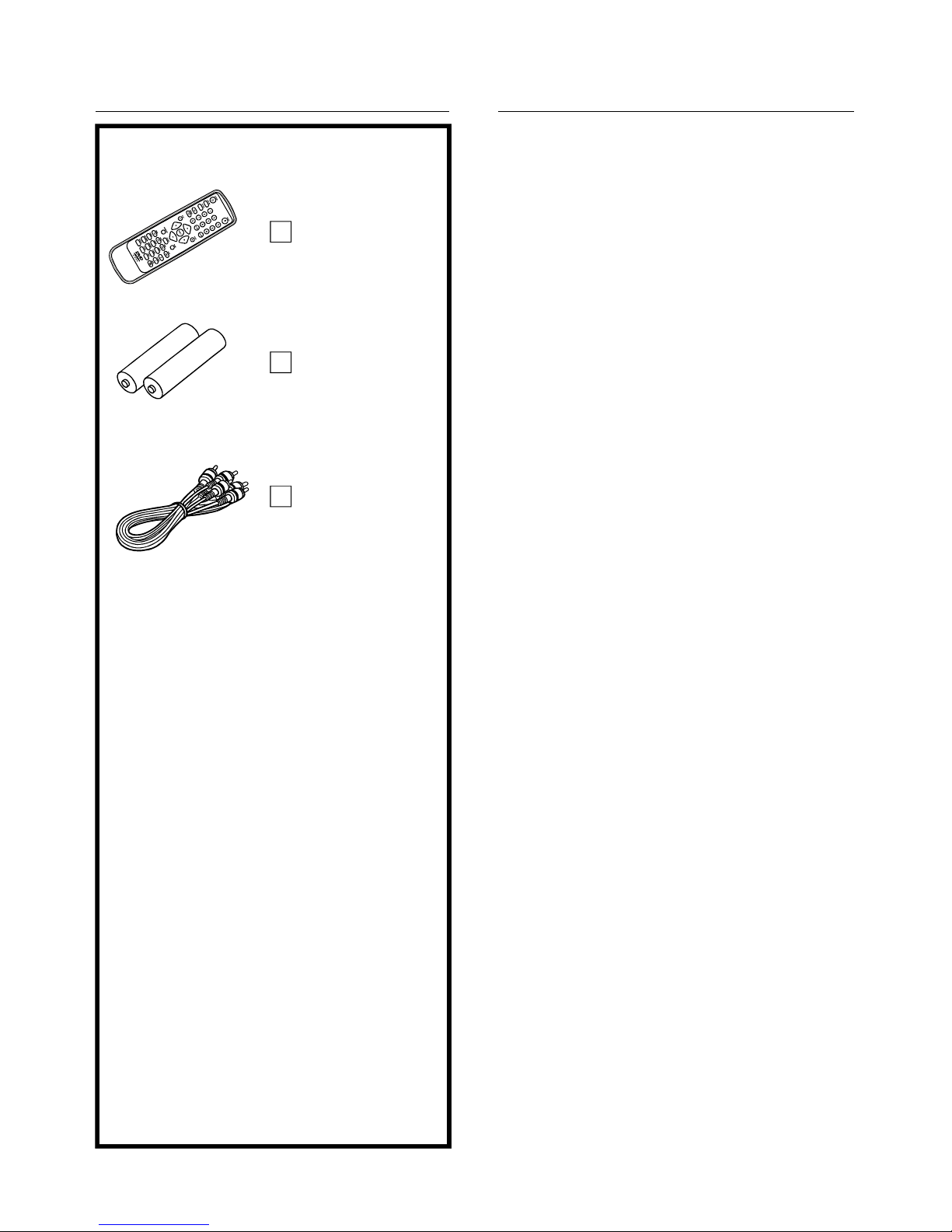
Remotecontrol
unit.............................1
Batteries....................2
forremotecontrolunit
[sizeAAA](optional)
Video/audio
cable..........................1
OptionalAccessories
Coaxialaudiocable
IfthereisnoiseinterferenceontheTVwhilea
broadcastisbeingreceived
Avoidplacingtheplayerinareasof:
directsunlightorheatingradiators,orclosedautomobiles
hightemperature(over35C)orhighhumidity(over90%)
excessivedust
vibration,impactorwherethesurfaceistiltedastheinternal
partsmaybeseriouslydamaged.
i
i
i
i
0
Whentheplayerisnotbeingused,settheplayertothestandby
mode.
Whenleftunusedforalongperiodoftime,theplayershouldbe
unpluggedfromthehouseholdACoutlet.
i
i
Keeptheplayerawayfromflowervases,tubs,sinks,etc.If
liquidsarespilledintotheplayer,seriousdamagecouldoccur.
Keepmagneticobjectssuchasspeakers,atadistancefrom
theplayer.
i
i
Placetheplayerinahorizontalposition,anddonotplace
anythingheavyonit.
Donotplacetheplayeronamplifiersorotherequipment
whichmaybecomehot.
moisturemayformonthelensinthefollowingconditions:
immediatelyafteraheaterhasbeenturnedon.
inasteamyorveryhumidroom.
whentheplayerismovedfromacoldenvironmenttoawarm
one.
Ifmoistureformsinsidethisplayer,itmaynotoperateproperly.
Inthiscase,turnoffthepowerandwaitaboutonehourforthe
moisturetoevaporate.
i
i
i
DependingonthereceptionconditionoftheTV,interference
mayappearontheTVscreenwhileyouarewatchingaTV
broadcastandtheplayerislefton.Thisisnotamalfunctionof
theplayerortheTV.TowatchaTVbroadcast,settheplayerto
thestandbymode.
i
i
Touchinginternalpartsofthisplayerisdangerous,andmay
causeseriousdamagetotheplayer.Donotattemptto
disassembletheplayer.
Donotputanyforeignobjectonthedisctray.
i
i
i
i
i
i
i
i
Holdtheplugfirmlywhenconnectingordisconnecting
theACpowercord.
DonotconnectordisconnecttheACpowercordwhen
yourhandsarewet.
KeeptheACpowercordawayfromheatingappliances.
NeverputanyheavyobjectontheACpowercord.
DonotattempttorepairorreconstructtheACpower
cordinanyway.
Removedust,dirt,etc.ontheplugatregularintervals.
Iftheplayerhasbeendroppedorotherwisedamaged,
settheplayertothestandbymodeanddisconnectthe
ACpowercord.
Iftheplayerhasfumes,odoursornoise,settheplayerto
thestandbymodeanddisconnecttheACpowercord.
Pleasereadtheseprecautionsbeforeoperatingthisplayer.
Toavoidanymalfunctionsoftheplayer,andtoprotectagainst
electricshock,fireorpersonalinjury,pleaseobservethe
following.
4
PowerCordProtection
Placement
Non-useperiods
Nofingersorotherobjectsinside
Keepawayfromwaterandmagneticobject
Stacking
Condensation
Page 6
5
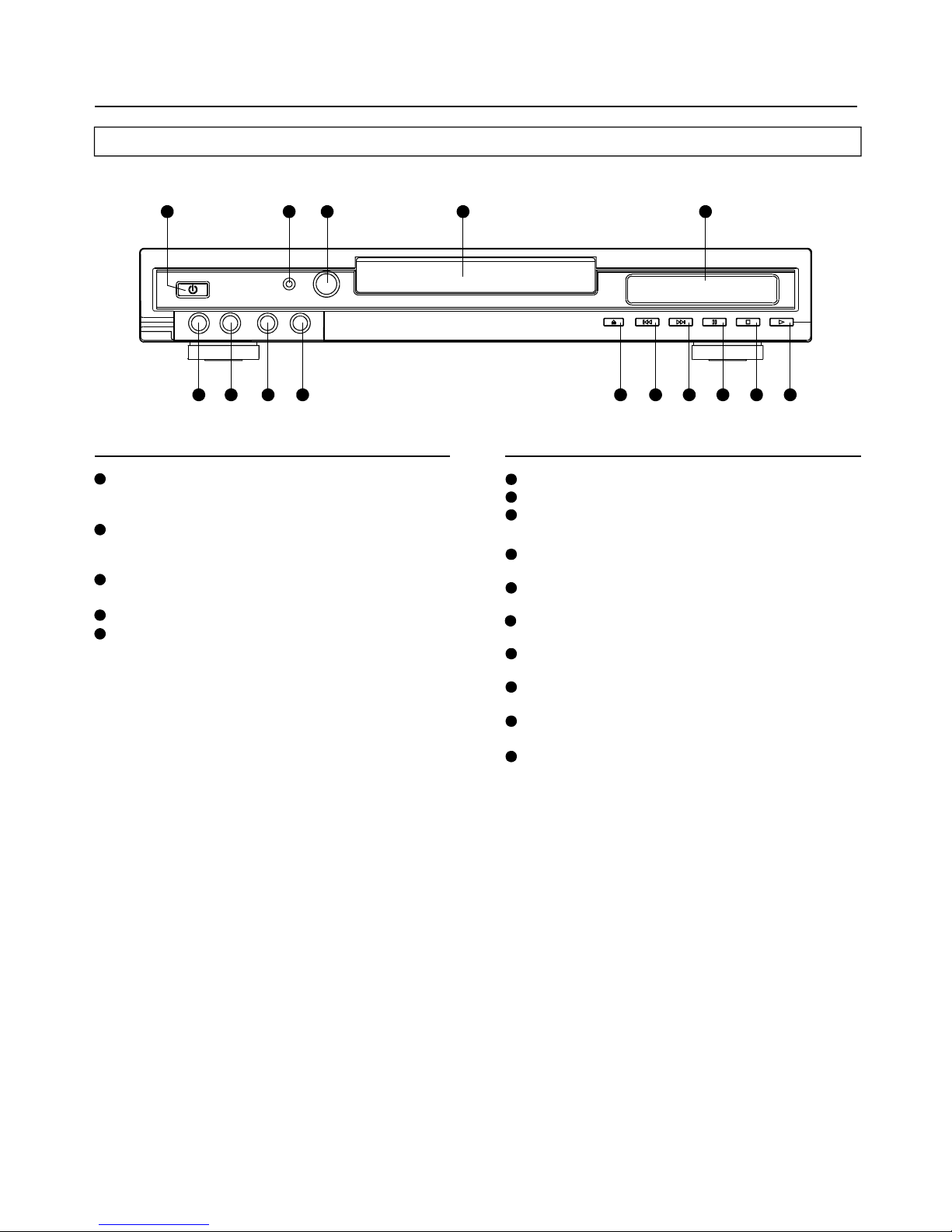
Controlreferenceguide
Mainunit
POWERbutton-
STANDBYindicator-
Remotecontrolsignalsensor-
Disctray
Displaywindow-
Presstoswitchontheplayer.
OnorOffstate:Thisbuttonmustbeoninordertobeable
tousetheremotecontrol.
receivethesignalfrom
theremotecontrol.
displayallinformationaboutDVDwork
Scene.
Whentheplayerisconnectedto
theACpowersupply,thisindicatorlightsupinstandby
modeandgoesoutwhentheplayeristurnedon.
MIC1MIC2MICVOLUMEbutton-
ECHObutton-
OPEN/CLOSE-
PREVIOUSbuttonbutton-
NEXTbutton-
STOPbutton-
PAUSEbutton-
PLAYbutton-
toconnecttheMIC1.
toconnecttheMIC2.
adjustthisknob,thevolume
willbereducedorincreased.
tocontroltheechoeffectoftheMIC
input.
pressthisbutton,thetraywillbein
orout.
pressthisbuttontoskip
thePREVIOUSchapterortitleortrack.
pressthisbuttontoskiptheNEXT
chapterortitleortrack.
pressthisbuttontostopplayingdisc
duringtheplayerplaybackthedisc
pressthisbuttontohalttheplaying
discduringtheplayerplaybackthedisc
pressthisbutton,theplayerwillstart
toplaythedisc.
3
4
1
5
2
7
8
6
9
14
15
1
4
6
2 5
10
7 8 9
11 12 13 14 15
3
1010
11
12
13
Page 7
6
11
6
1
9
2
3
4
7
8
5
10
13
15
17
12
14
16
25
24
27
29
31
26
28
30
22
18
23
19
20
21
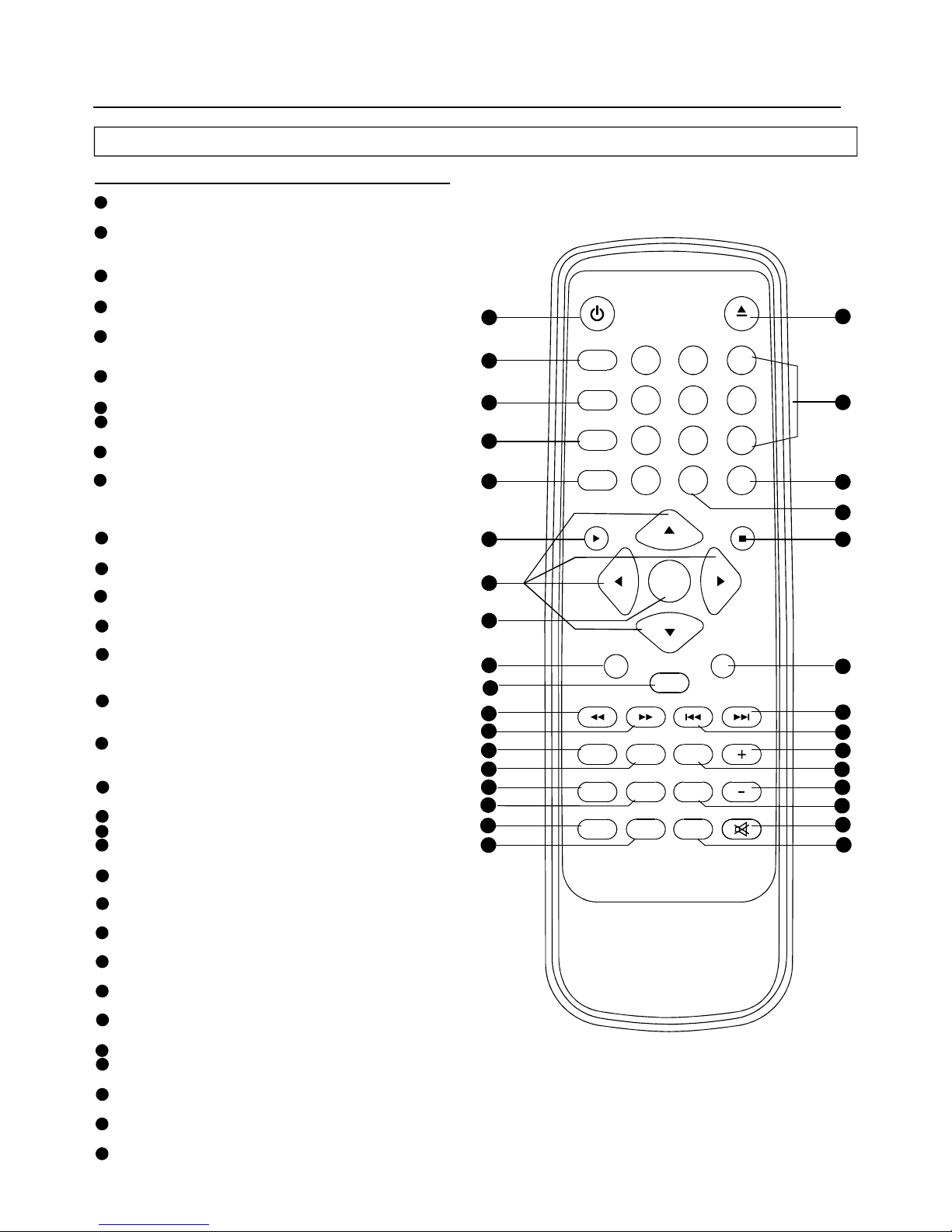
Controlreferenceguide
Remotecontrolunit
15
16
17
18
19
6
1
2
3
4
5
POWERbutton
DISPLAYbutton
ZOOMbutton
REPEATA-Bbutton
REPEAT1/ALLbutton
PLAYbutton
NAVIGATION
SELECTbutton
PAUSE/STEPbutton
SUBTITLEbutton
ANGLEbutton
PROGRAMbutton
MENU/PBCbutton
SEARCHbutton
NUMERICbutton
CLEARbutton
+10button
STOPbutton
SLOWbutton
NEXTbutton
PREVbutton
VOLUME+button
AUDIObutton
VOLUME-button
button
MUTEbutton
SETUPbutton
-Pressthisbuttontosettheplayerto
standbyonoroffstate(ifthemainpowerofthesetison)
-PressDisplaybuttoncontinuously
duringtheplayback,thescreenwilldisplaytheelapsed
timeandremainingtime.
-PressZOOMbuttontoenlargepicture
size.
-Pressthisbutton,theplayerwill
repeatsectionsbetweentwospecificpoints(A-B).
-Pressthisbutton,theplayerwill
repeatplayonechapteroronetitle(forDVD),orrepeat
playthecurrenttrackorthewholetracks(forVCD/CD).
-Pressthisbutton,theplaywillstarttoplay
thedisc.
button-Leftnavigationbutton
-Pressthisbuttontoconfirmwhatyou
select.
-Pressthisbuttonwillhaltorshow
themovieonepictureeachtime.
-thisbuttonwilldisplaythedifferent
languageonthescreen
-
-
-
-Pressthisbuttonduringplaythen
pressNUMERICbuttontochoosenumbercorresponding
tothedesiredpoint
-
-
-
-
-Pressthisbuttonduringplaybacktheplay
speedwillbereduced
-Pressthisbutton,thescenewillskiptothe
nextchapterorthenexttrack.
-Pressthisbutton,thescenewillskiptothe
PREVIOUSchapterorthetrack
-Pressthisbutton,thevolumewill
increase
-Selectthesoundtrack
-Pressthisbutton,thevolumewill
reduce
-Playthetitle(DVD)orreturnroot(
VCD)
-theaudiooutputofthemainunitistobe
shutoffbypressingthisbutton.
-pressthisbuttonwillenterinitialsettings
menu
-
P.scanbutton:linebylinescanvideo,pleaserefertothe
TV'sfunctioninstructionthatyouused,iftheTVdisplay
isnotnormal,pleasepressthisbuttonagaintoreturnthe
previousdisplaymode
F.BWDbutton
F.FWDbutton
TVsystembutton
TITLE/RET.
-Pressthisbuttontofastbackwardplaying
atX2,X4,X8,X16,X32speeds.
-Pressthisbuttontofastforwardplayingat
X2,X4,X8,X16,X32speeds.
-Pressthisbuttontodirectlychange
TheTVsystemamongCVBSandYUV.
Pressthisbuttonwilldisplaytheangle
numberandchangetodifferentangles.
Pressthisbuttoncansetupthe
memoryorderofchapterortitle(forDVD)ortracks(for
CD).
SelectPlaybackControlforVCDif
PBCison,whenyoupressreturnbutton,theplayerwill
statattheVCDroot.
Usethesebuttonstoselectthetrack.
Pressthisbutton,theinformationonthe
screenwillallbecleared.
addtentracksorchaptersbypressingeach
time.
Pressthisbutton,theplayerwillstop
playing.
EJECT button-Thetrayinandtrayoutswitchbutton
7
8
9
10
11
12
13
14
20
21
22
23
24
25
26
27
28
29
30
31
MUTE
1 2 3
4
5 6
7 8 9
0
POWER
DISPLAY
ZOOM
REPEAT
A-B
1/ALL
+10
CLEAR
PLAY STOP
SELECT
PAUSE/STEP SLOW
F.FWDF.BWD PREV NEXT
SUBTITLE ANGLE AUDIO
PROGRAM MENU/PBC TITLE/RET. VOLUME
SEARCH TVSYS SETUP
EJECT
P.SCAN
32
32
Page 8
7
TVset
(Continuedonthenextpage)
Tovideoinputconnector(yellow)
Toaudioinputconnectors(red,white)
Topower
outlet
ACpower
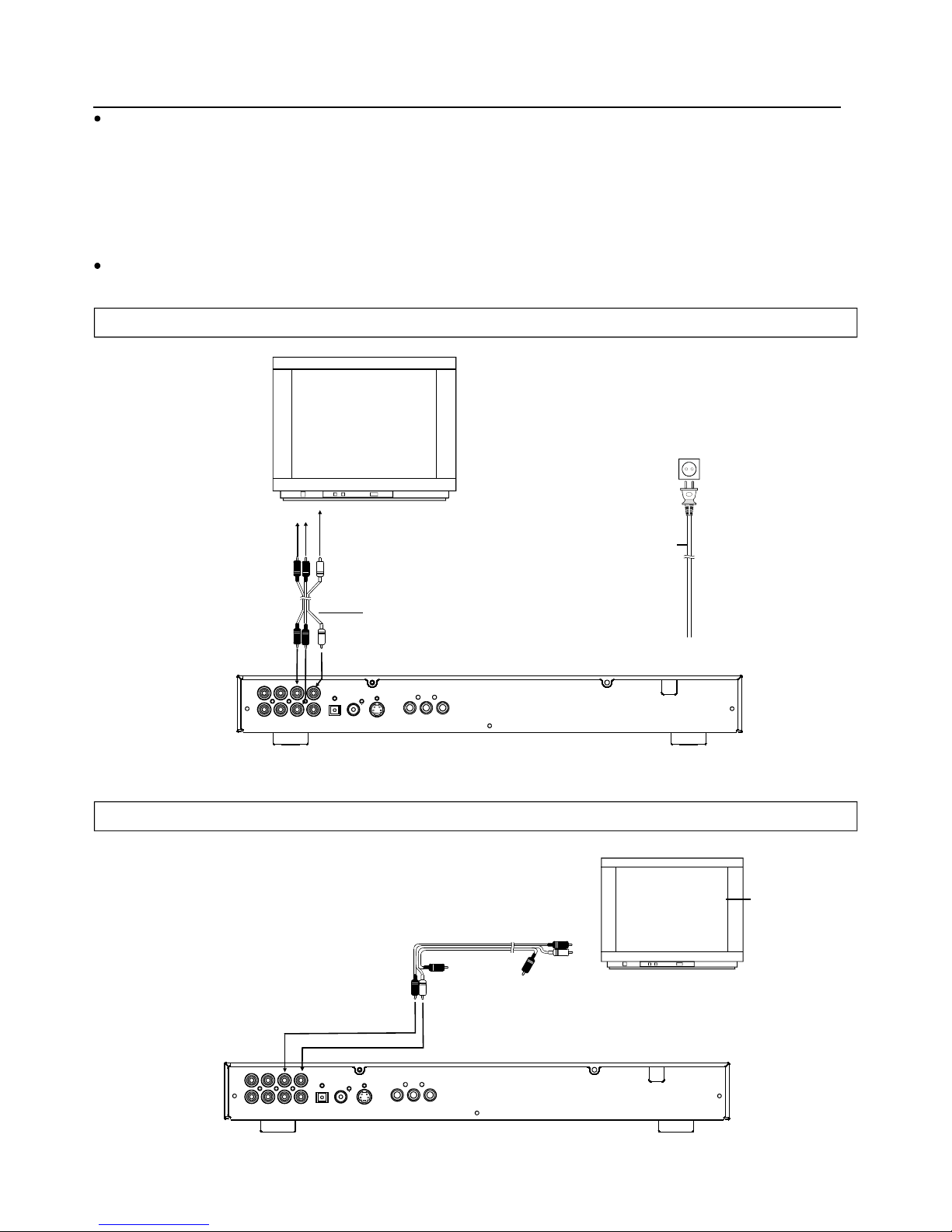
cord
Video/audiocable
Basicconnection
Itisrecommendedtoconnectamulti-systemTV.
EnsurethatthisplayerandotherequipmenttobeconnectedaresettothestandbymodeoroffanddisconnecttheACpower
cordsbeforecommencingconnection.
Donotblockventilationholesofanyoftheequipmentandarrangethemsothataircancirculatefreely.
Readthroughtheinstructionsbeforeconnectingotherequipment.
Ensurethatyouobservethecolorcodingwhenconnectingaudioandvideocables.
i
i
i
i
Note:
i
DuringDVDplay,theTVvolumemaybeatalowerlevelthanduringTVbroadcasts,etc.Ifthisisthecase,adjustthevolumeto
thedesiredlevel.
IftheDVD/VCD/CDplayerisconnectedtotheTVthroughavideocassetterecorder,thepicturemaynotbeplayedback
normallywithsomeDVDs.Ifthisisthecase,donotconnecttheplayerviatheVCR.
ConnectingtoastereoTVset
ConnectingtoamonauralTVset
Video/audiocable
Tovideoinputconnector(yellow)
Toaudioinputconnectors(redorwhite)
L
R
Page 9
8
Basicconnection
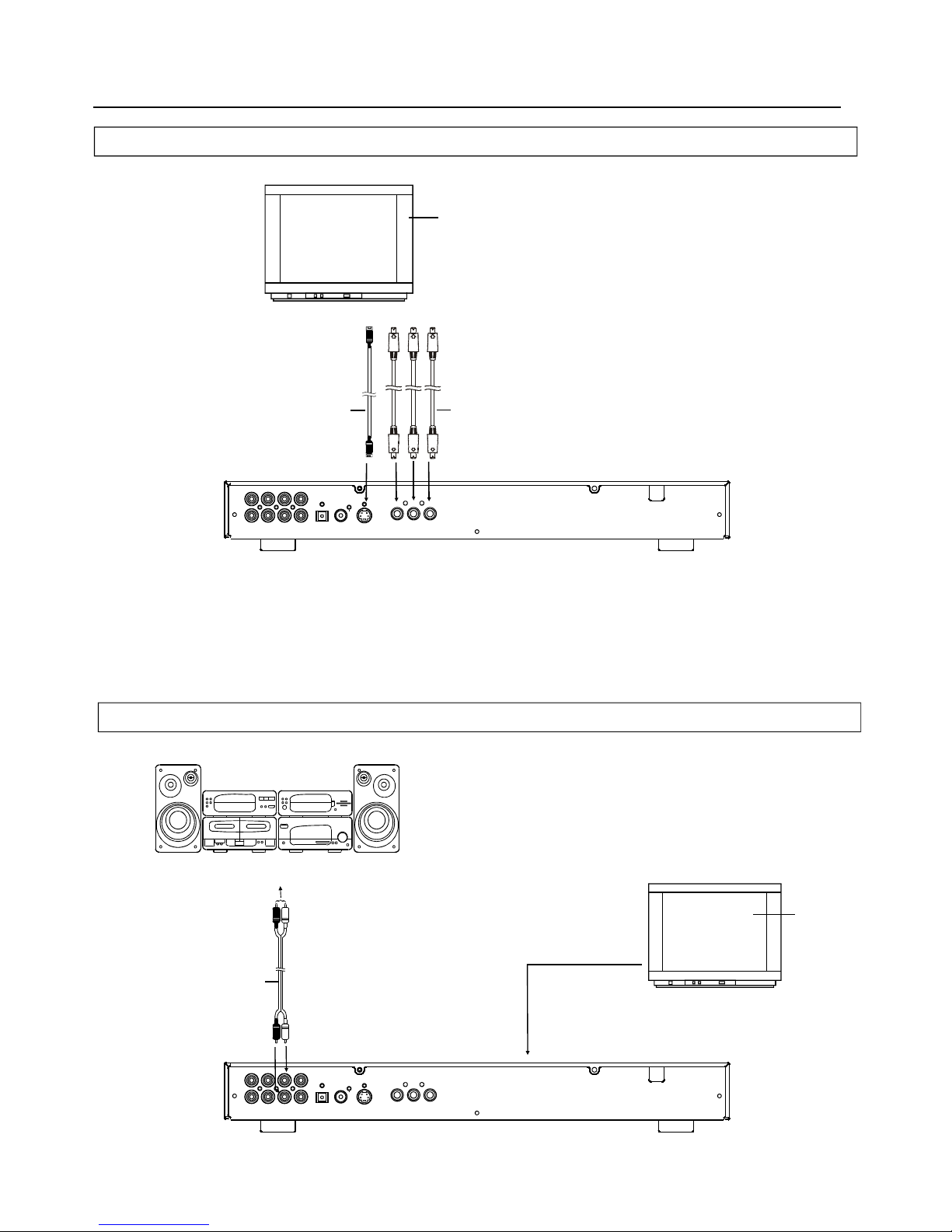
Connectingtoaudioequipment
ConnectingtoaTVsetormonitorwithvideooutputconnectorsYCb/PbCr/Pr
TVsetmonitoror
YCbCrCable
ToVideoinput
connectors(YCb/PbCr/Pr)
S-videocable
ToS-videoinput
connector
S-videooutputconnectors
TheS(separate)videooutputconnectorseparatesthecolor(C)andluminance(Y)signalsbeforetransmitting
themtotheTVsetinordertoachieveasharperpicture.
UsetheS-videocable(supplied)whenconnectingtheplayertoaTVsetequippedwithanS-Videoinput
connectorforthebestpictureclaritypossible.
Toaudioinputconnectors(red,white)
Audioequipment
TVset
Audiocable
audiocable
S-videocableor
videocable
,CVBS
TheYCb/PbCr/Prconnectoroutputsthecolorsignals(luminance,red,bluecolourdifferenceprimary)inordertoachieve
highfidelityinreproducingcolors.
ThedescriptionofthecomponentvideoinputconnectorsmaydifferdependingontheTVsetormonitor.Refertothe
instructionmanualofyourTVsetfordetails.
Page 10
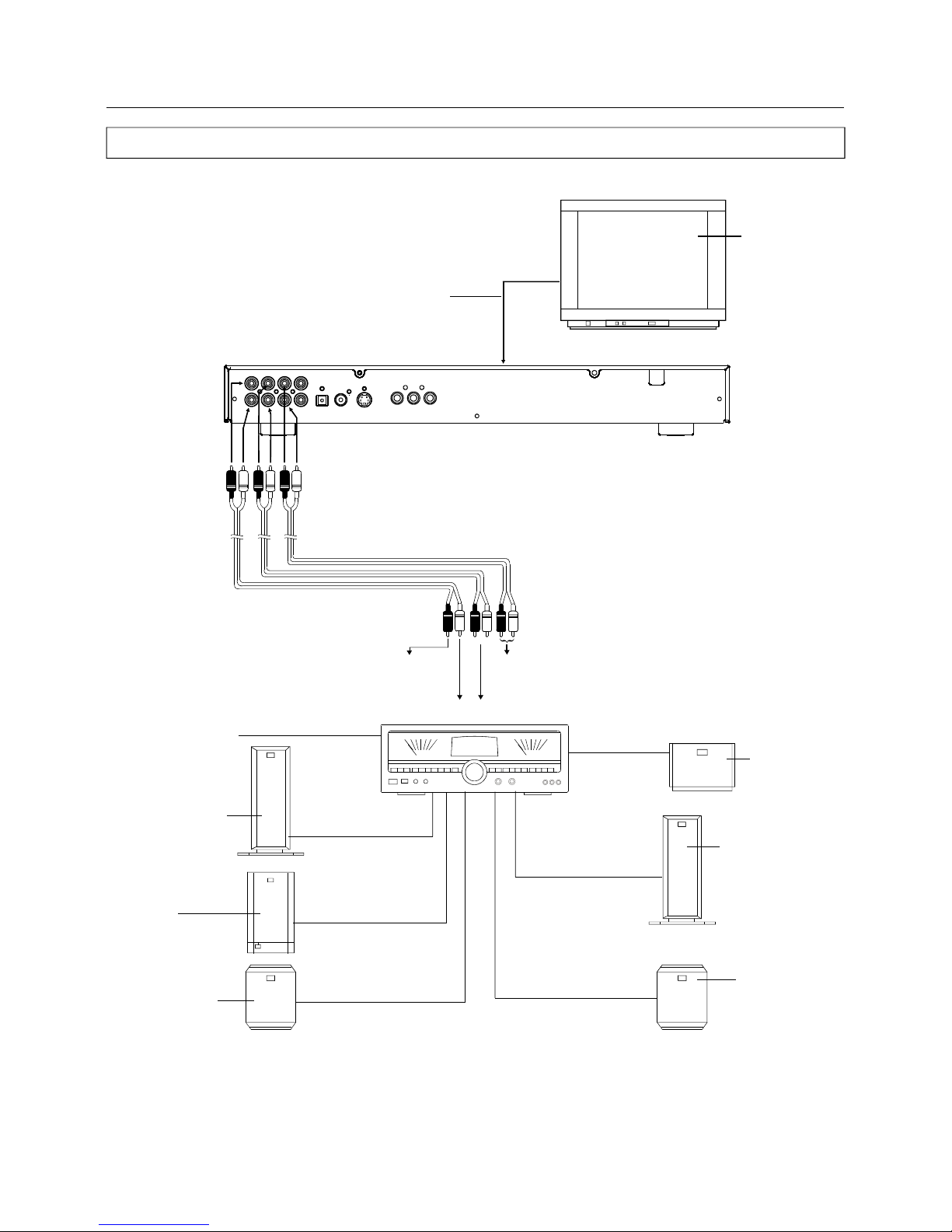
Optionalaudioconnections
ConnectingtoAVAmplifilerwith5.1chprocessing
TVset
AVAmplifierwithDobly
Digital(AC-3/DTS)
Centerspeaker
Frontspeaker (Right)
Surroundspeaker
(Right)
Subwoofer
Surroundspeaker
(Left)
Toaudioinputconnector
(superwoofer)
Toaudioinputconnectoror
directlyconnecttothe(center)
Video/audiocable
S-videocable
videocable
or
Toaudioinputconnector(SURROUNDL.R)
Toaudioinputconnector(FRONTL.R)
WhenconnecttheDVDplayertootherequipment,besuretoturn
offthepowerandunplugalltheequipmentfromthewalloutlet
beforemakinganyconnection.
Afterconnectionismade,setspeakersettings.Thiswillenablethe
5.1chaudiosettingsontheDVDplayer.
Note:
Frontspeaker (Left)
(Continuedonthenextpage)
9
Page 11
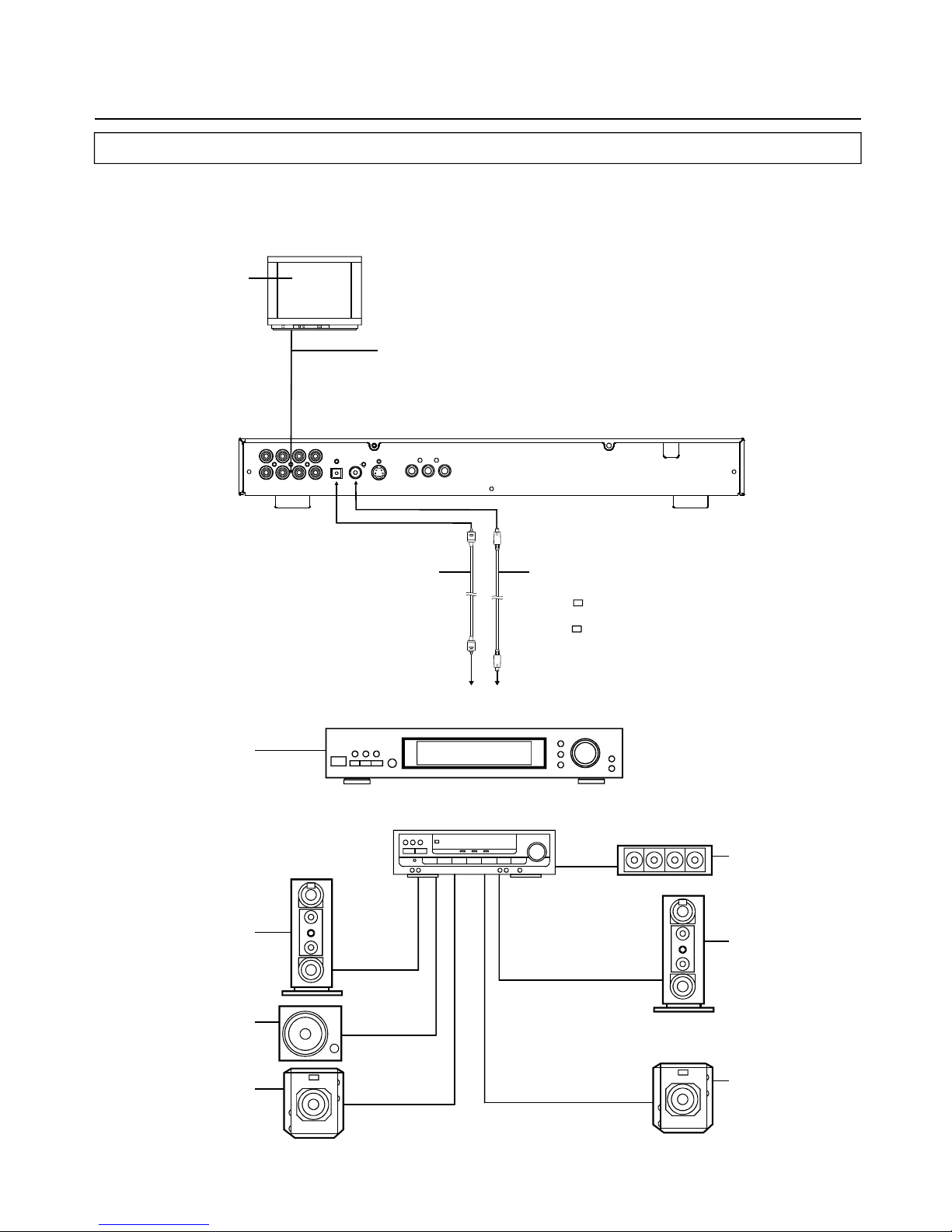
10
Optionalaudioconnections
ConnectingtoadecoderwithDolbyDigital(AC-3/DTS)processing
WhenDVDrecordedinDolbyDigital/DTSareplayed,Dolbydigital/DTSbitstreamisoutputfromtheplayer'sOPTICALdigitalaudio
outputconnectororCOAXIALdigitalaudiooutputconnector.WhentheplayerisconnectedtoaDolbyDigital/DTSdecoder,youcan
enjoytheater-qualityaudioinyourhome.[Anopticaldigitalaudiocableorcoaxialaudiocable(bothoptional)isrequiredwhenan
optionalDolbydigital/DTSdecoderisused.]
(Continuedonthenextpage)
OR
Opticaldigitalaudio
cable
TVset
Video/audiocable
S-videocable
Videocable
or
Coaxialaudiocable
Opticalorcoaxialcanbeselectedat
youroptionwhileconnecting.
IfyouhaveDTSdecoderorprocessor,
youcanenjoytheDVDdiscorCDsound
decodedby5.1channelDTS.
DecoderorAmplifierwithDolbyDigital
(AC-3/DTS)processing
(Allsoldseparately)
Frontspeaker(left)
Subwoofer
Surroundspeaker(left)
Centerspeaker
Frontspeaker (Right)
Surroundspeaker
(Right)
Toopticaldigitalaudio
inputconnector
Tocoaxialdigitalaudio
inputconnector
Page 12
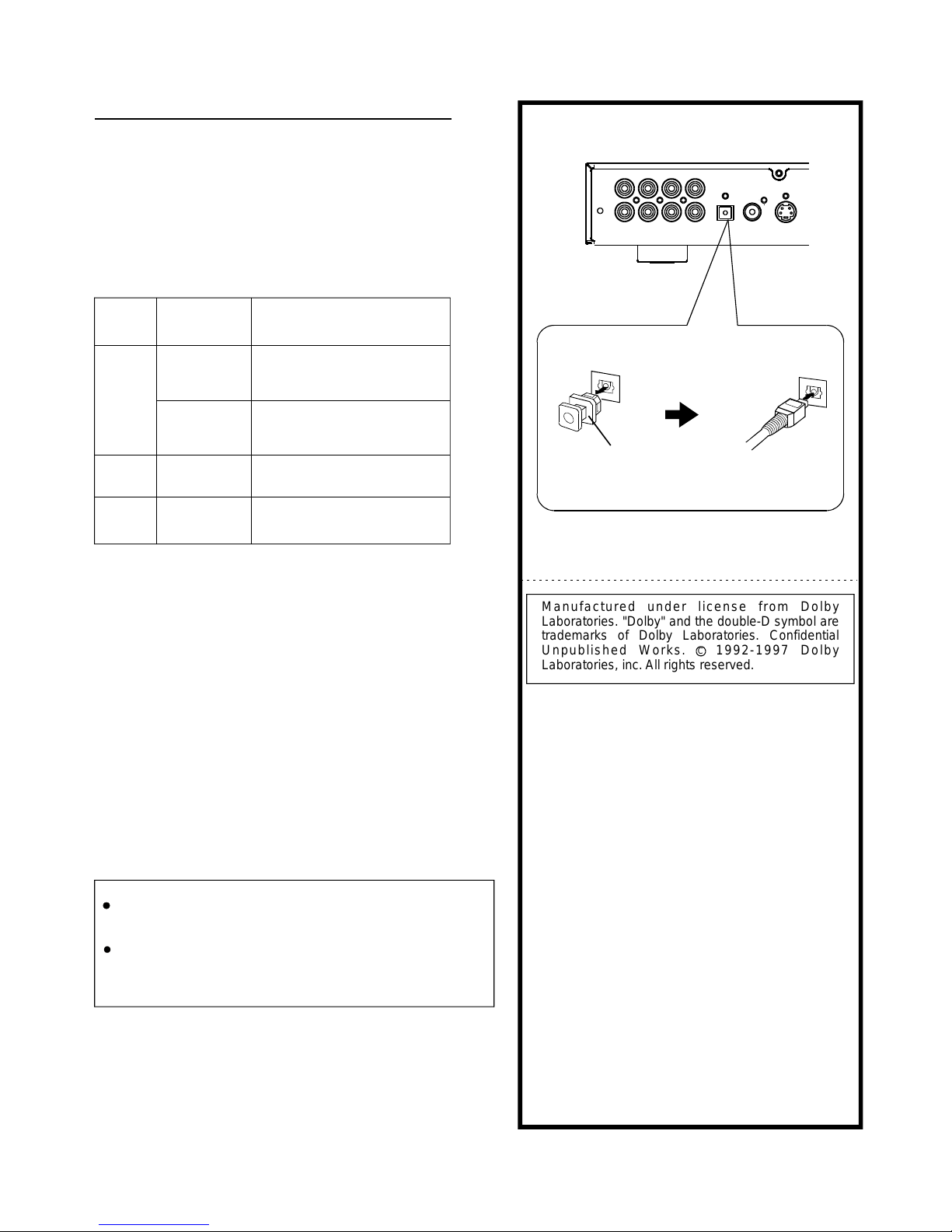
11
Foryourreference:
i
i
i
DolbyDigital(AC-3)isadigitalsoundcompression
techniquedevelopedbytheDolbyLaboratoriesLicensing
Corporation.
LinearPCMissignalrecordingformatusedinaCD.Whilea
CDisrecordedin44.1KHz/16bit,aDVDisrecordedin48
KHz/16bitupto96KHz/24bit.
IfyouhaveaDolbyProLogicSurrounddecoder,youwill
obtainthefullbenefitofProLogicfromthesameDVD
moviesthatprovidefull5.1-channelDolbyDigital
soundtracks,aswellasfromtitleswiththeDolbySurround
mark.
*1Thetypeofaudiooutputfromtheconnectorcanbe
selectedbytheinitialsettings.
*2Soundhaving96KHzsamplingisconvertedinto48KHz
samplingwhenitisoutputfromtheplayer'soptical/coaxial
digitalaudiooutputconnector.
DVD
Video
CD
CD
DolbyDigital
(AC-3)
DolbyDigitalbitstream
(2-5.1ch)orPCM(2ch)
(48kHz/16bit)*1
LinearPCM(2ch)
(48kHzsampling/16bitonly)*2
ornooutput*1
LinearPCM
(48/96kHz
16/20/24bit)
MPEG1
LinearPCM
PCM
(44.1kHzsampling)
LinearPCM
(44.1kHzsampling)
Disc Sound
recording
format
Optical/coaxialdigitalaudio
outputfromconnector
Optionalaudioconnections
Noteswhenconnectingtheopticaldigitalaudiocable
(optional)
Removethedustprotectioncapfromtheopticaldigital
audiooutputandconnectthecablefirmlysothatthe
configurationsofboththecableandtheconnectormatch.
Keepthedustprotectioncapandtoprotectagainstdust,
alwaysreattachthecapwhennotusingtheconnector.
i
i
Concerningtheaudiooutputfromtheplayer's
optical/coaxialdigitalaudiooutputconnector
ManufacturedunderlicensefromDolby
Laboratories."Dolby"andthedouble-Dsymbolare
trademarksofDolbyLaboratories.Confidential
UnpublishedWorks.1992-1997Dolby
Laboratories,inc.Allrightsreserved.
C
DustprotectioncapDustprotectioncap
Cautionforspeakersetup
TurnofftheamplifierbeforeyouconnectordisconnecttheDVD
videoplayer'spowercord.Ifyouhavetheamplifierpoweron,the
speakersmaybedamaged.
TheoutputsoundoftheDVDvideoplayerhasawidedynamic
range.Besuretoadjustthereceiver'svolumetoamoderate
listeninglevel.Otherwise,thespeakersmaybedamagedbya
suddenhighvolumesound.
Page 13
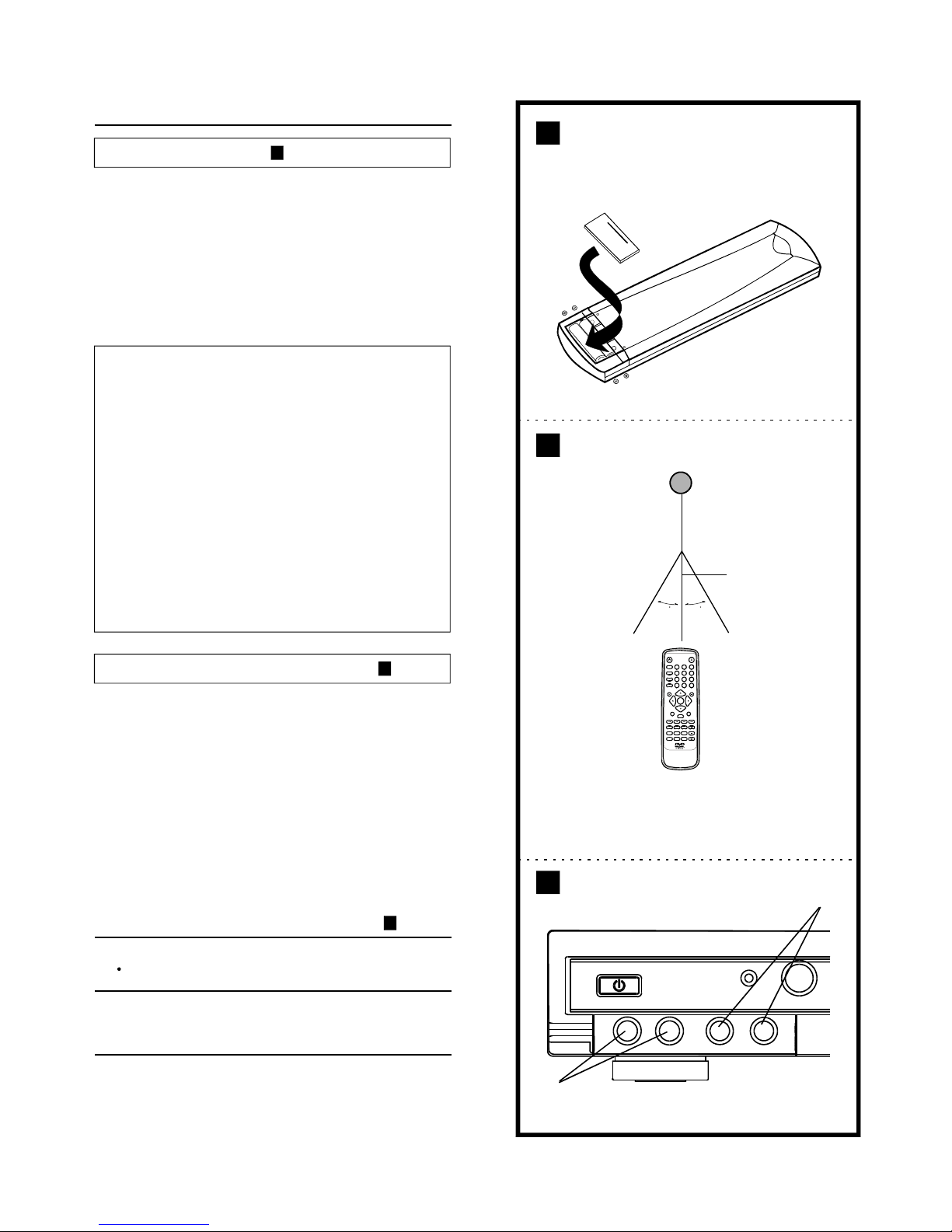
MUTE
Insertthebatterieswhileobservingthecorrect(+)and(-)
polaritiesasillustratedatright.
Servicelifeofbatteries
i
i
Thebatteriesnormallylastforaboutoneyearalthough
thisdependsonhowoften,andforwhatoperations,the
remotecontrolunitisused.
Iftheremotecontrolunitfailstoworkevenwhenitis
operatedneartheplayer,replacethebatteries.
Use2sizeAAAbatteries.
Note:
i
i
i
i
i
i
Donotuserechargeable(Ni-Cd)batteries.
Donotattempttorecharge,short-circuit,disassemble,
heatorthrowthebatteriesintothefire.
Donotdrop,steponorotherwiseimpacttheremote
controlunit.Thismaydamagethepartsorleadto
malfunction.
Donotmixoldandnewbatteries.
Iftheremotecontrolunitisnotgoingtobeusedfora
longtime,removethebatteries.Otherwise,
electrolytemayleakwhichmayleadnotonlyto
malfunctioningbutalsotoburnsifcontactismade
withtheelectrolyte.
Wipeawayanyelectrolyteleakinginsidetheremote
controlunit,andinstallnewbatteries.
Ifanyelectrolyteshouldcomeintocontactwithparts
ofyourbody,washitoffthoroughlywithwater.
l
Note:
i
i
i
Donotpointbrightlightsattheremotecontrolsensor.
Donotplaceobjectsbetweentheremotecontrolunitand
theremotecontrolsensor.
Donotusethisremotecontrolunitwhilesimultaneously
operatingtheremotecontrolunitofanyotherequipment.
ConnectoneortwoMicrophonestoMIC1orMIC2.
A
B
C
Remotecontrolunitpreparation
ConnectingMicrophones
Batteryinstallation
Remotecontroloperationrange
Pointtheremotecontrolunitfromnomorethanabout7m
fromtheremotecontrolsensorandwithinabout60ofthe
frontoftheplayer.
Theoperatingdistancemayvaryaccordingtothe
brightnessoftheroom.
o
i
1 ConnecttheMicrophones.
2
AdjusttheMICVolumeandECHOtoProperlevel
thatyouwant.
A
B
C
30 30
7m
REMOTESENSOR
12
1 2 3
4
5 6
7 8 9
0
POWER
DISPLAY
ZOOM
REPEAT
A-B
1/ALL
+10
CLEAR
PLAY STOP
SELECT
PAUSE/STEP SLOW
F.FWDF.BWD PREV NEXT
SUBTITLE ANGLE AUDIO
PROGRAM MENU/PBC TITLE/RET. VOLUME
SEARCH TVSYS SETUP
EJECT
P.SCAN
1
2
Page 14
Basicplay
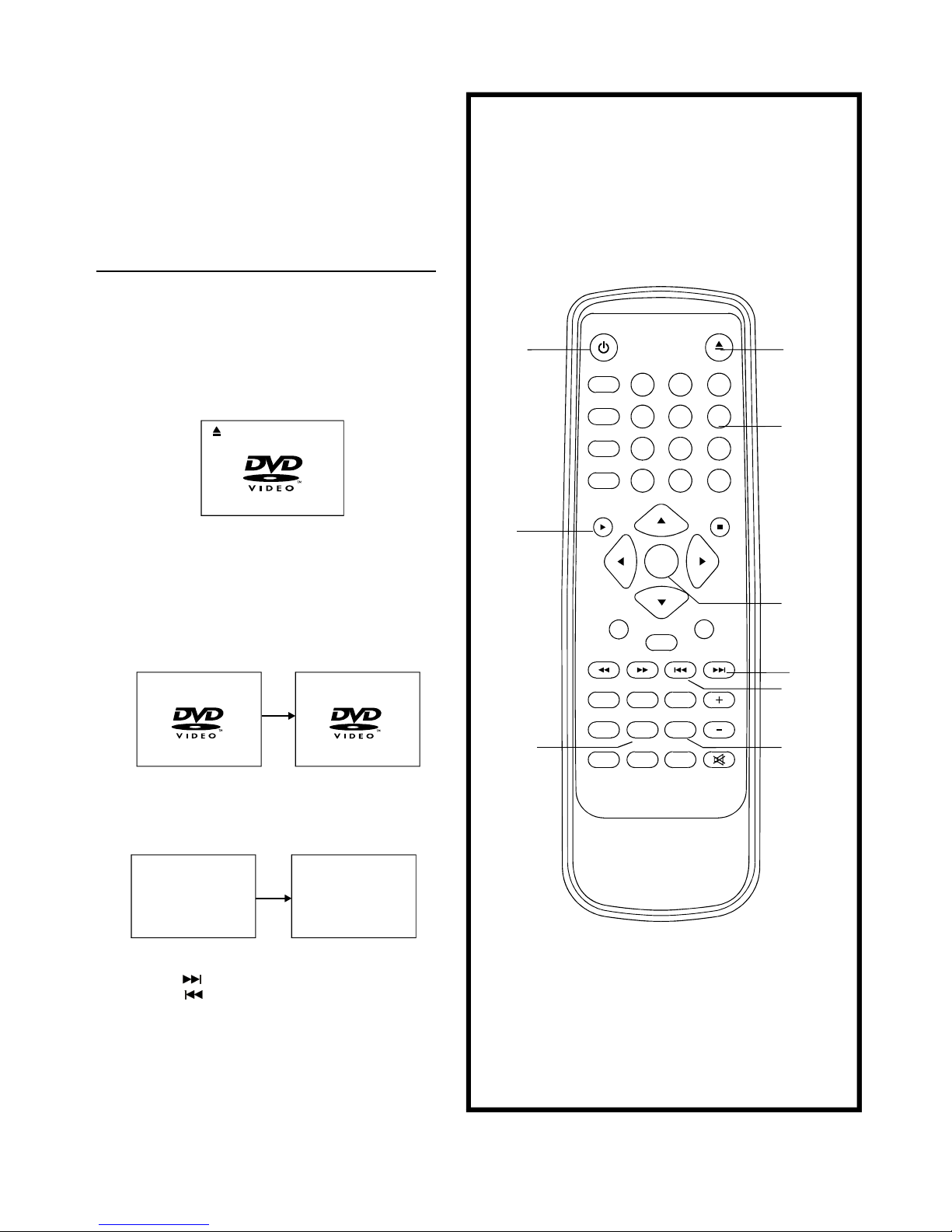
Basicplay
1.PressPOWERtoswitchonthepower.
2.PressOPEN/CLOSEtoopenthedisctray.
5.WhenamenuscreenappearsontheTV,movethe
navigationbuttonsorpressthenumericbuttonstoselect
preferredtracknumber,thenpressSELECTbuttonto
confirm.
1WHATWILLIDO
2HEARMECRY
3WITOUTYOU
4MOVECLOSER
H
WITHOUTYOU
Preparations
SwitchtheTVONandselect"Video"astheTVinput.
Switchonthestereosystem'spoweriftheplayerhasbeen
connectedtoastereosystem.
3.Placeadiscontothedisctray.
Holdthediscwithouttouchingeitherofitssurfaces,position
itwiththeprintedtitlesidefacingup,alignitwiththe
guides,andplaceitinitsproperposition.
4.PressOPEN/CLOSE
Thedisctrayisautomaticallyclosedandplaybegins.When
thedisctrayisclosedbypressingOPEN/CLOSE,the
playerwillstarttoreadthediscimmediately.
LOADING
OPEN
6.Whenthemenucontinuesontoanotherscreen,press
NEXTSKIPbuttontoviewthenextscreen,orpress
PREVSKIPbuttontoskiptopreviousscreen.
NOTE:Duetothedifferentdesignofsomesoftwaretitles,
NEXTbuttonmaynotalwayswork.
7.Tostopplayandreturntothemenuscreen,pressTITLE
button,orMENUbutton(whichbuttonispresseddiffers
dependingonthediscused)DVD,PRESSTITLE,MENU
orRETURN.VideoCD,pressRETURN.
13
BeforeenjoyingDVD/VideoCD/CD
TheOn-Screenmenulanguageofyourplayerhasbeen
factorypre-settoEnglish.
Ifyouwouldliketochangethemenulanguagetoother
language,pleasereferto"SelectinglanguageofOn-Screen
Displaymenu".
IntheexplanationgivenbelowitisassumedthatEnglish
hasbeenselectedasthemenulanguage.
DVD-VIDEO
SELECT
NEXT
MENU
/PBC
PLAY
PREV
TITLE
/RET.
OPEN/CLOSE
POWER
NUMERIC
BUTTONS
MUTE
1 2 3
4
5
6
7 8 9
0
POWER
DISPLAY
ZOOM
REPEAT
A-B
1/ALL
+10
CLEAR
PLAY STOP
SELECT
PAUSE/STEP SLOW
F.FWDF.BWD PREV NEXT
SUBTITLE ANGLE AUDIO
PROGRAM MENU/PBC TITLE/RET. VOLUME
SEARCH TVSYS SETUP
EJECT
P.SCAN
Page 15
F.BWD
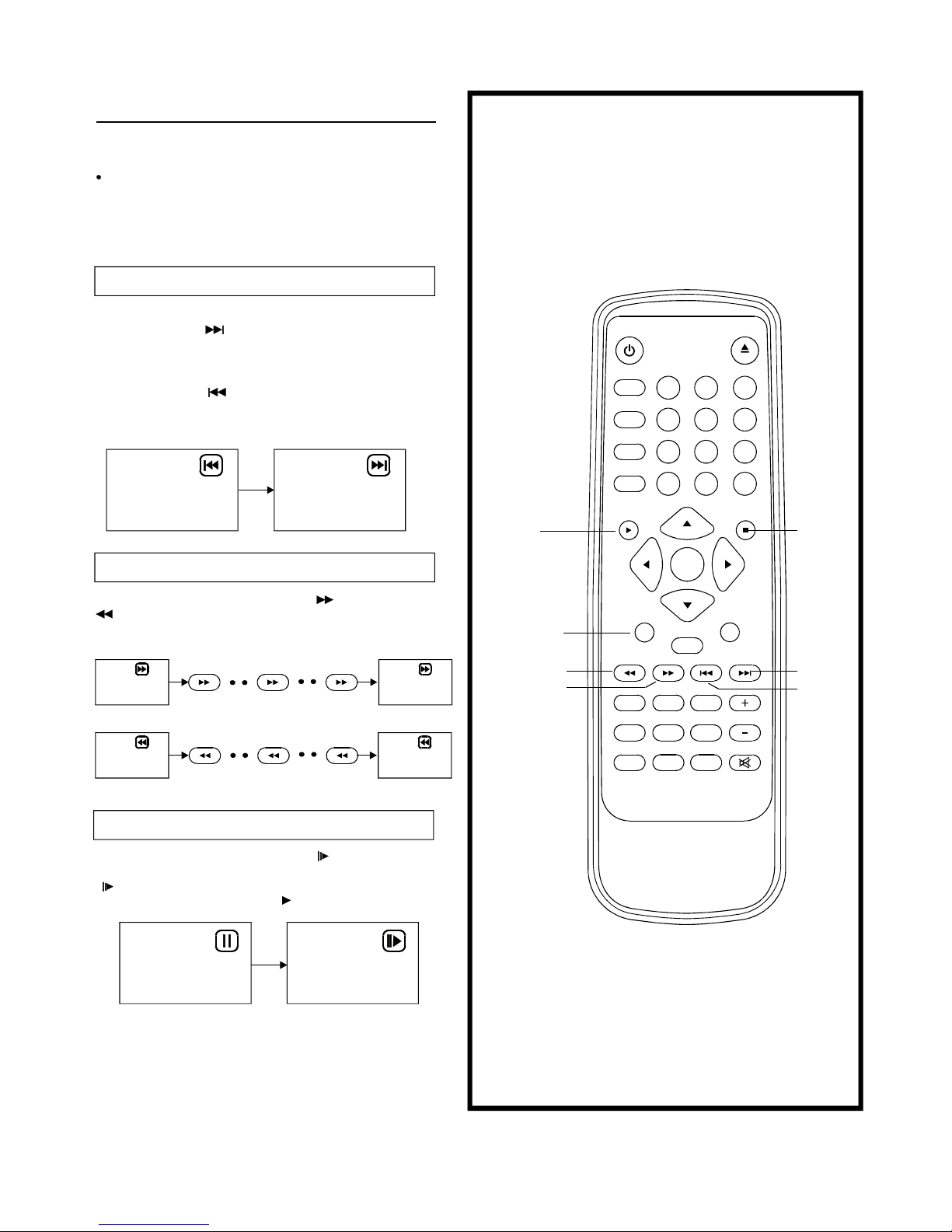
Duringplayback,pressF.FWDbuttonorF.BWDbutton
tofastforward/rewind.
PressPLAYbuttontoresumenormalplay.
Duringplayback,pressPAUSE/STEPbutton,theplaywill
bepaused,andinthismode,eachtimethePAUSE/STEP
buttonispressed,theplayerwillonlyplayonepicture,to
resumenormalplay,pressPLAYbutton.
Stoppingplay
PressSTOP
Foryourconvenience:
Whenplayerisstopped,theplayerrecordsthepointwhere
STOPwaspressed(RESUMEfunction).PressPLAYagain,
playbackwillresumefromthispoint.Whenthetrayis
OpenedorSTOPispressedagain,theRESUMEfunction
willbecleared.
Skippingaheadorback
Skippingahead
Skippingback
PressNEXTSKIPbuttonduringplay
Achapter(DVD)oratrack(VideoCD/CD)isskippedeach
timethebuttonispressed.
Rapidadvance(Rapidreverse)
Pauseorstepplay
PressPREVSKIPbuttonduringplay
Achapter(DVD)oratrack(VideoCD/CD)isskippedeach
timethebuttonispressed.
14
NEXT
PLAY
PREV
STOP
F.BWD
F.FWD
PAUSE/STEP
2X 32X
2X 32X
Fastforward
F.FWD F.FWD F.FWD
Fastbackward
F.BWD F.BWD
MUTE
1 2
3
4
5 6
7 8 9
0
POWER
DISPLAY
ZOOM
REPEAT
A-B
1/ALL
+10
CLEAR
PLAY STOP
SELECT
PAUSE/STEP SLOW
F.FWDF.BWD PREV NEXT
SUBTITLE ANGLE AUDIO
PROGRAM MENU/PBC TITLE/RET. VOLUME
SEARCH TVSYS SETUP
EJECT
P.SCAN
Page 16
15
Slow-motionplay(DVD/VCD)
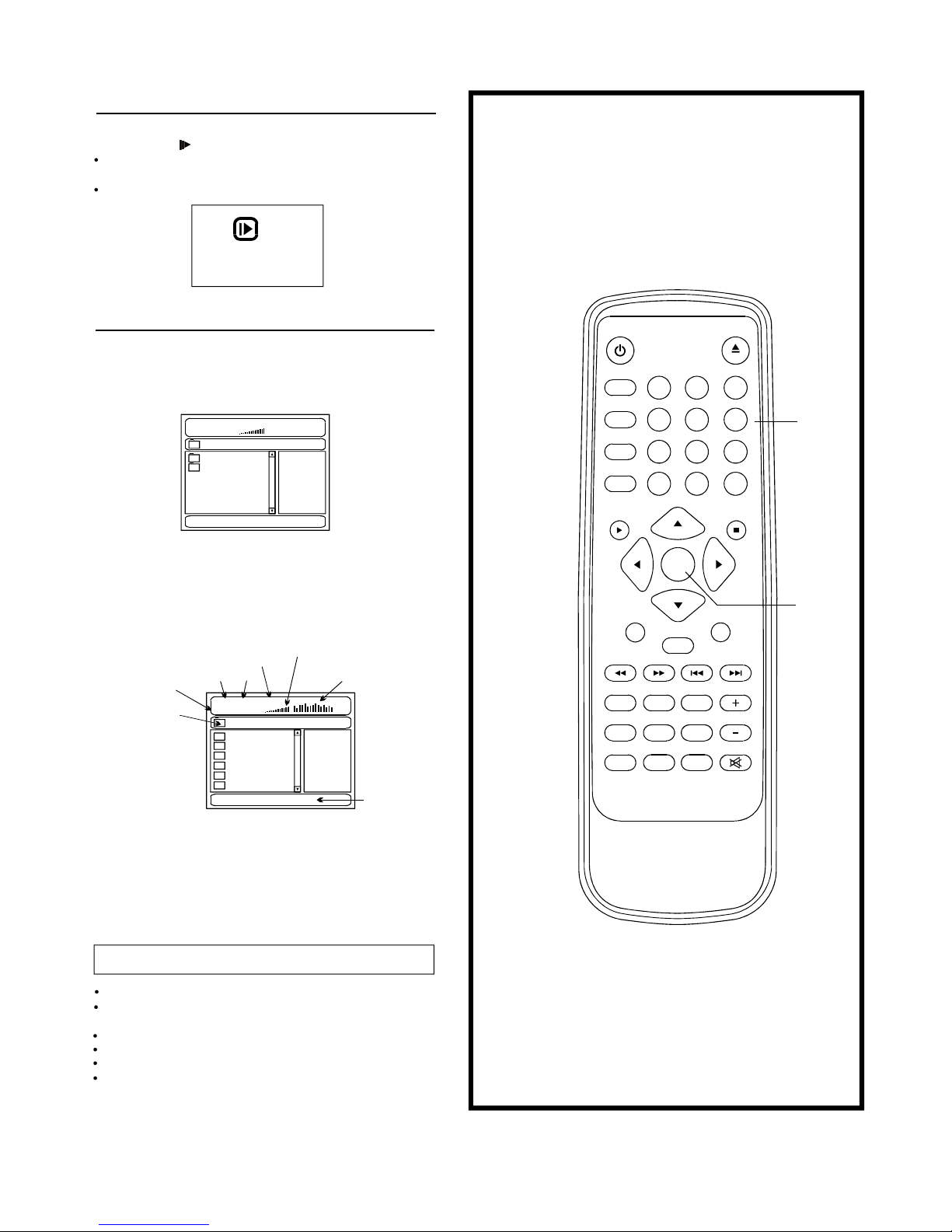
Ontheremotecontrolunit
PressSLOWbuttonduringplayback.
Playsthediscata1/2ofnormalspeedatfirst.Eachtime
Thebuttonispressed,theplayspeedbecomesslow
PressPLAYbutton,normalplaywillresume.
1/2
MP3playback
1. InsertthedisccontainingthefilesinMP3formattobe
playedandafterafewseconds,theTVscreenwillshow
allfoldersonthedisc.
Note:
Playmode:
Basicplay
FOLDER-allthefilesinthefolderwillbeplayed.
SINGLE-playonefileonly.
REPEATONE-repeatonefile.
REPEATFOLDER-allthefilesinthefolderwillbe
playedrepeatedly.
SHUFFLE-Allthefileswillbeenrandomlysortedand
.playbytheorder
SELECT
NUMERIC
BUTTONS
001/002
00:0000:00
\
SONG
Folder
MUSIC
Currentsong/Totalsongs
Currentfolder
002/006
01:5103:47192
\MUSIC\
BUZZ
CANDY
DIANA
MANDY
SIMPSON
Folder
MP3
MP3
MP3
MP3
MP3
MP3
ALAN
MP3bitrateindicator
Volumelevelindicator
Equalizerindicator
Playmode
Playtime
Totaltime
PressNEXTbuttontoseethenextpageorPREVbuttontosee
thepreviouspage
PressREPEAT1/allbuttonchangeplaymode.
Selectthefolderyouwanttoplaybythenavigation
buttonsandpressSELECTbuttontoconfirm.
Thefilesinthisfolderaredisplayedandselectyour
favourablesongbyusingtheup/downnavigation
buttonsandpressSELECTbuttontostartplayback.
2.
3.
4.
5.
Maximum11charactersincludingspacecanbe
displayedforthefilename.
Non-Englishfilenamewillnotbedisplayed
correctly
RANDOM-randomlyselectanyfiletoplay.
MUTE
1 2
3
4
5 6
7 8 9
0
POWER
DISPLAY
ZOOM
REPEAT
A-B
1/ALL
+10
CLEAR
PLAY STOP
SELECT
PAUSE/STEP SLOW
F.FWDF.BWD PREV NEXT
SUBTITLE ANGLE AUDIO
PROGRAM MENU/PBC TITLE/RET. VOLUME
SEARCH TVSYS SETUP
EJECT
P.SCAN
Page 17
16
(Continuedonthenextpage)
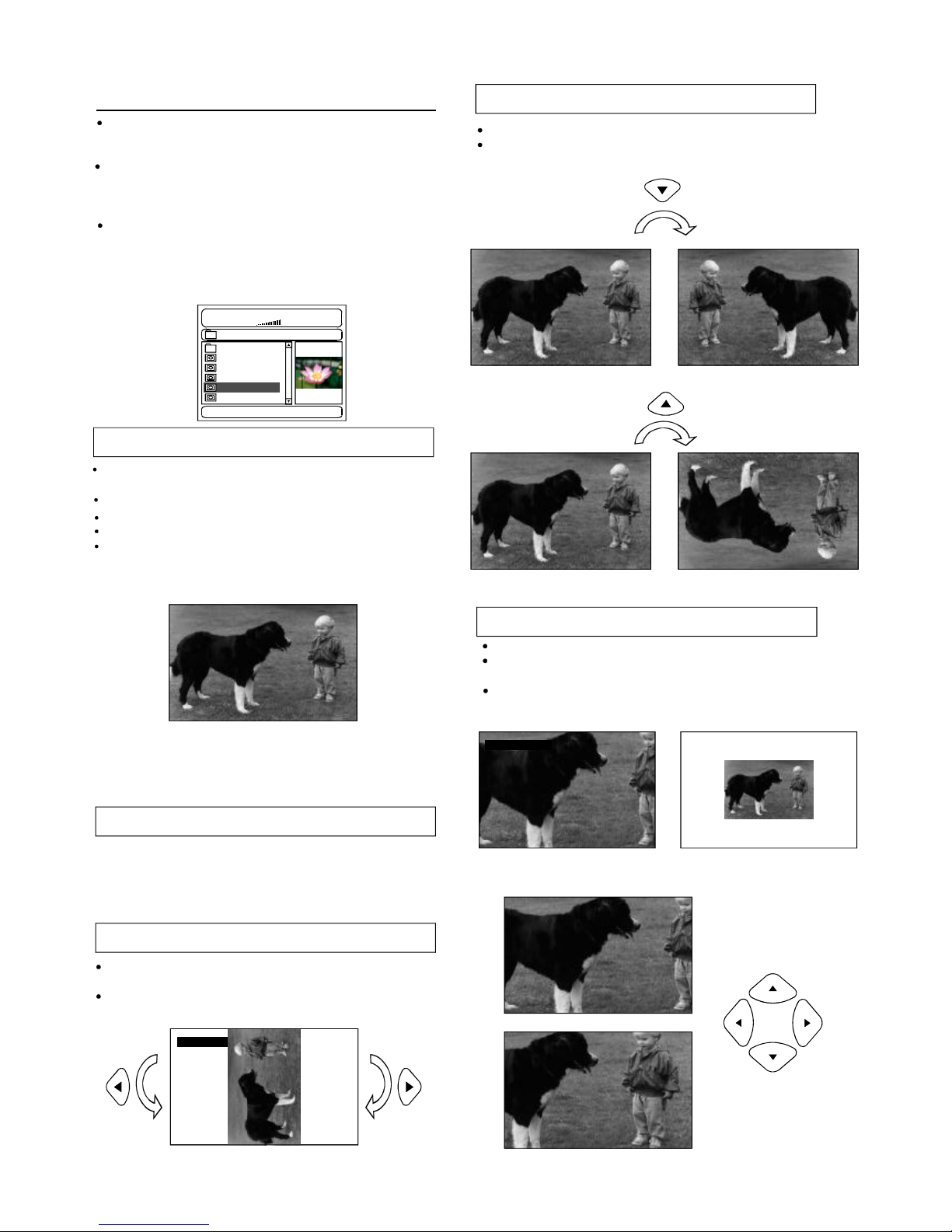
Flippingpictures
PressUPnavigationbuttontoflipthepicturevertically.
PressDOWNnavigationbuttontoflipthepicture
horizontally.
PictureShrink/Zoom
Ifthepictureisenlarged,youmaypressnavigationbuttons
toseeotherportionsofthepicture.
ROTATINGROTATING
ZOOM150%
Onceafolderandfileisselected,thepictureisloadonto
theTVscreen.
Note:Thetimetoloadanddisplaypicturedependsonthe
filesizeofthepictures.
Duringplayback,pressMENUbuttontoreturntofolder
selectionorSTOPbuttontoenterpreviewmode.
Skiptonext/previouspicture
PressNEXTbuttontoskiptothenextpictureorPREV
buttontoskiptothepreviouspicture.
Ifnokeyispressedfor5seconds,itwillskiptonext
pictureautomatically.
Rotatingpictures
PressRIGHTnavigationbuttontorotatethepicture
clockwise.
PressLEFTnavigationbuttontorotatethepicture
counter-clockwise.
KodakPictureCD/JPEGCD
Playmode:
SINGLE-playonefileonly.
REPEATONE-repeatonefile.
REPEATall-allthefilesinthefolderwillbe
playedrepeatedly.
002/006
00:0000:00
\FOLDER1\
BOAT
CAR
DOG
FLOWER
SHUTTLE
Resolution640x480
IfKodakPictureCDisinserted,slideshowisbegins
automatically.
ForJPEGpictureCD,selectthefolderyouwantto
playbythenavigationbuttonsandpressSELECT
buttontoconfirm.
Thefilesinthisfolderaredisplayedandselectyour
favourablepicturesbyusingtheup/downnavigation
buttonsandpressSELECTbuttontostartplayback.
Thumbnailofpicturewillbedisplayedwhileyou
scrollingacrossthefilename.
PressZOOMbuttontoenterthezoommode
PressF.FWDbuttontoenlargepictureto100%,125%,
150%and200%
PressF.BWDbuttontoshrinkenlargepicturesto50%,
75%,and100%
ZOOM50%
SHUFFLE-Allthefileswillbeenrandomlysortedand
.playbytheorder
RANDOM-randomlyselectanyfiletoplay.
Page 18
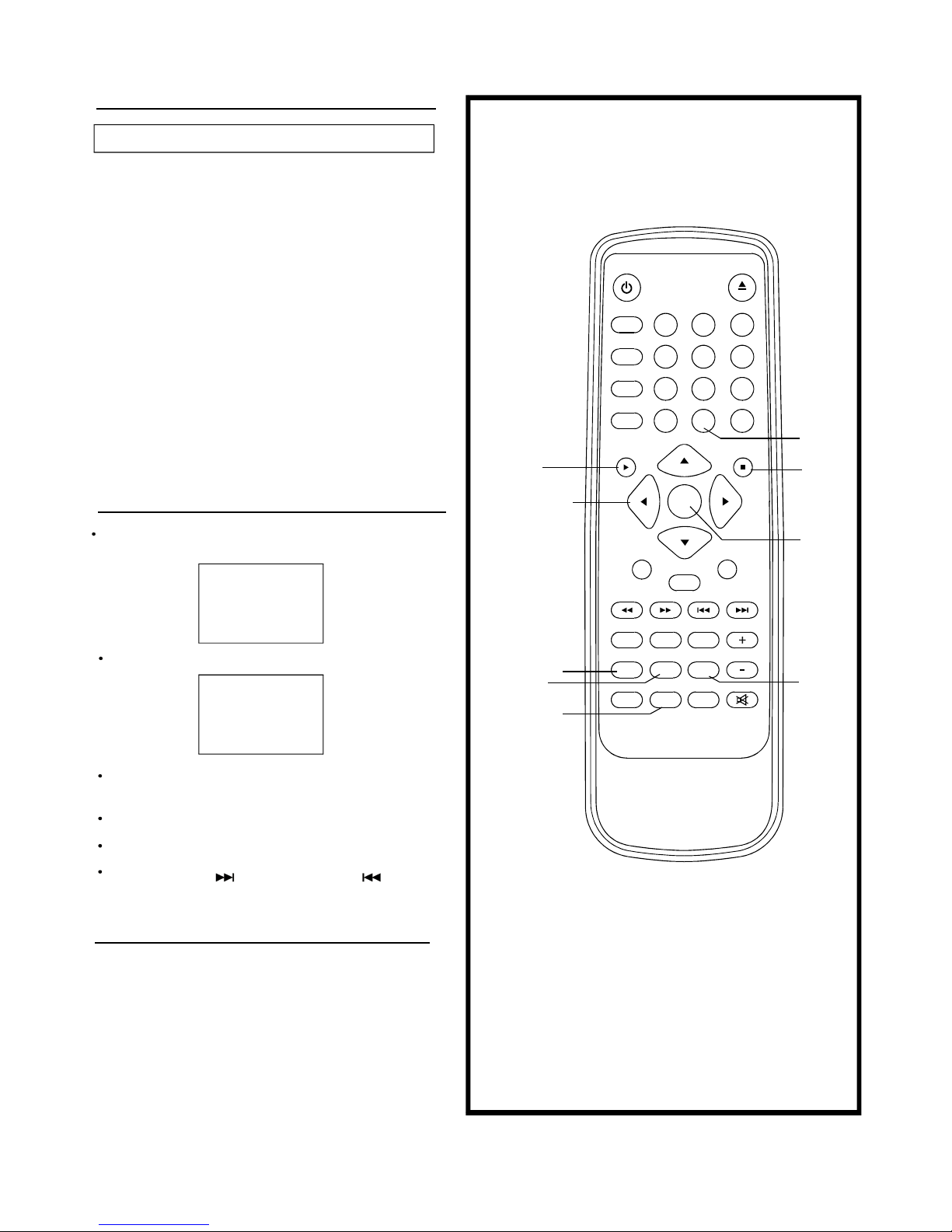
Slideshoweffects
PressPROGRAMbuttontoselectoneoftheeffects
whenchangingfromonepicturetoanother:
1WIPETOP
2WIPEBOTTOM
3WIPELEFT
4WIPERIGHT
5DIAGONALWIPELEFTTOP
6DIAGONALWIPERIGHTTOP
7DIAGONALWIPELEFTBOTTOM
8DIAGONALWIPERIGHTBOTTOM
9EXTENDFROMCENTREH
10EXTENDFROMCENTREV
11COMPRESSTOCENTREH
12COMPRESSTOCENTREV
13WINDOWH
14WINDOWV
15WIPEFROMEDGETOCENTRE
16MOVEINFROMTOP
PictureCD
17
Pressnumericbuttonstoselectcorrespondingtrack,ifthe
tracknumberisunder10,chooseoneofthenumeric
buttons0~9.
Ifthetracknumberisexceed10,press+10buttonfirstly,
thenpressnumericbuttons0~9.
Duringplayback,pressRETURNbuttontoreturntomain
menu.
PressNEXTSKIPbuttonorPREVSKIPbutton,the
playerwillplayinthescheduledsequenceonthedisc.
EnjoyingVideoCDswith
playbackcontrol
WhenplayingVCD2.0/3.0withPBC,theplayerwillshow
TheVCDversionandPBCstatusonthescreen
Afterafewseconds,amenuwilappearonthescreen.
1WHATWILLIDO
2HEARMECRY
3WITHOUTYOU
4MOVECLOSER
VCD2.0
PBCON
KARAOKEOPERATION
1.ConnectoneortwomicrophonestoMIC1andMIC2
MicrophoneJacksonthefrontpanel,TurntheMIC
VolumeswitchMIN.
2.PowerontheunitandplayaKARAOKEDisc.
3.TurnontheMicrophonesSwitch.
4.IfyouholdtheMicrophonestoocloseorDirection
towardtheSpeakers,howlingmaybeoccur,toprevent
it,Pleasedon'tholdtheMicrophonestoocloseor
directiontowardtothespeakers,orAdjusttheMIC
leveltoaproperposition.
5.AdjusttheECHOandVOLUMEknobstoaproperlever
thatyouwanted.
PROGRAM
SELECT
STOP
NAVIGATION
BUTTONS
TVSYS
PLAY
MENU
TITLE
+10
17NONE
MUTE
1 2 3
4
5
6
7 8 9
0
POWER
DISPLAY
ZOOM
REPEAT
A-B
1/ALL
+10
CLEAR
PLAY STOP
SELECT
PAUSE/STEP SLOW
F.FWDF.BWD PREV NEXT
SUBTITLE ANGLE AUDIO
PROGRAM MENU/PBC TITLE/RET. VOLUME
SEARCH TVSYS SETUP
EJECT
P.SCAN
Page 19
ONScreendisplayinformation
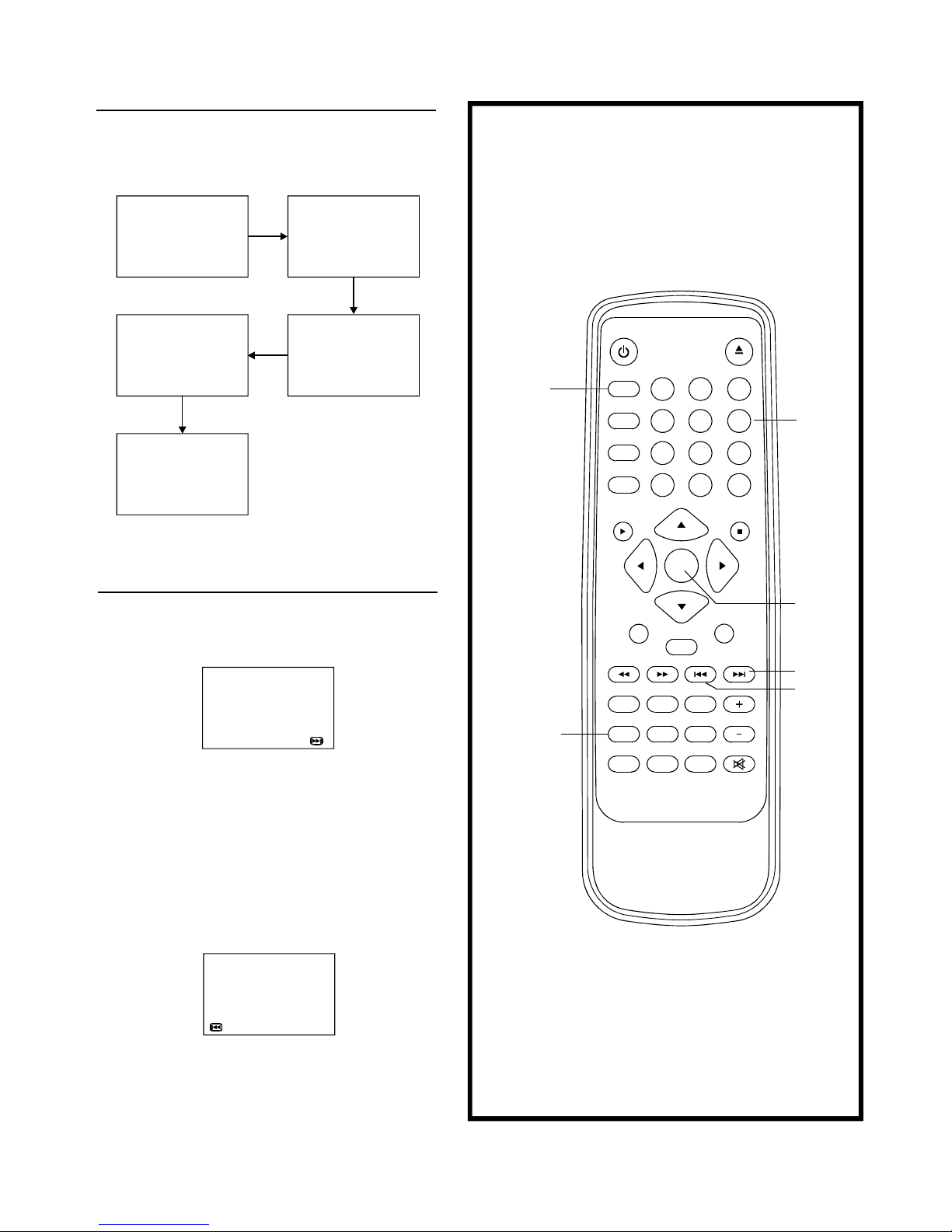
Press"DISPLAY"buttonagain,thescreendisplaywillbecleared.
Whentheplayerisunderoperation,pressDISPLAYbutton
continuouslyontheremotecontrol,thescreenwill
displaysequentlypartsofinformation,allinformationandclear
information..
Programplay
18
TITLEREMAIN
TT02/03CH07/281:17:00
TITLEELAPSED
TT02/03CH07/280:19:20
CHAPTERREMAIN
TT02/03CH07/280:01:34
CHAPTERELAPSED
TT02/03CH07/280:01:53
DISPLAYOFF
TT=TITLENO.
CH=CHAPTERNO.
DISPLAY
PROGRAM
SELECT
NEXT
PREV
NUMERIC
BUTTONS
Theplayerplaysthetracksinthediscinanorderyoudesired.
1.PressPROGRAMbuttonandthescreenwilldisplaythe
programmenu.
2.Pressnavigationbuttonstochoosememoryindexandthen
pressSELECTbuttontostartinput.Enterdesired
Titles/Chaptersnumbersbyusingthenumericbuttons.The
selectedTitles/Chaptersarestoredintothememory.Select
NEXTonthemenutoseethenextpage.Upto20memories
canbestored.
Note:Leadingzeroisnotnecessary.Ifthetracknumberis
morethan10,pressthe10keyfirstandthentheunitdigit.
Example:Track3,press"3"
Track12,press"+10"andthen"2"
Track21,press"+10"twiceandthen"1"
3.Tostartprogramplay,selectSTARTonthemenuorselect
EXITonthemenutoexitwithoutprogramplay.
4.Toclearprogrammeditems,scrollthenavigationbuttonto
theitemtobeclearedandpressCLEARbuttononthe
remotecontrol,theselectedItemwillbedeleted.
PROGRAM:TT(03)/CH(--)
01TT:CH:06TT:CH:
02TT:CH:07TT:CH:
03TT:CH:08TT:CH:
04TT:CH:09TT:CH:
05TT:CH:10TT:CH:
11TT:CH:12TT:CH:
13TT:CH:14TT:CH:
15TT:CH:16TT:CH:
17TT:CH:18TT:CH:
19TT:CH:20TT:CH:
PREVEXIT
PROGRAM:TT(03)/CH(--)
01TT:CH:06TT:CH:
02TT:CH:07TT:CH:
03TT:CH:08TT:CH:
04TT:CH:09TT:CH:
05TT:CH:10TT:CH:
EXIT NEXT
MUTE
1 2 3
4
5
6
7 8 9
0
POWER
DISPLAY
ZOOM
REPEAT
A-B
1/ALL
+10
CLEAR
PLAY STOP
SELECT
PAUSE/STEP SLOW
F.FWDF.BWD PREV NEXT
SUBTITLE ANGLE AUDIO
PROGRAM MENU/PBC TITLE/RET. VOLUME
SEARCH TVSYS SETUP
EJECT
P.SCAN
Page 20
A
Repeatplay
A-Brepeatplay
Repeatingsectionsbetweentwospecificpoints(A-B
repeat)
DVDDISC
VCD/CDDISC(InthePBCOFFmode)
Repeatchapter
Repeattitle
Repeattrack
Repeatdisc
Repeatall
1.PressA-BREPEATbuttonduringplayatthepointwhere
repeatplayistobestarted(A).
2.PressA-BREPEATbuttonatthepointwhererepeatplay
istobeended(B).Repeatplayoftheselectionbetween
pointsAandBstarts.
3.PressA-BREPEATbuttontoreturntonormalplay.
19
CHAPTER
TITLE
ALL
AB
TRACK
ALL
REPEAT
1/ALL
REPEAT
A-B
SELECT
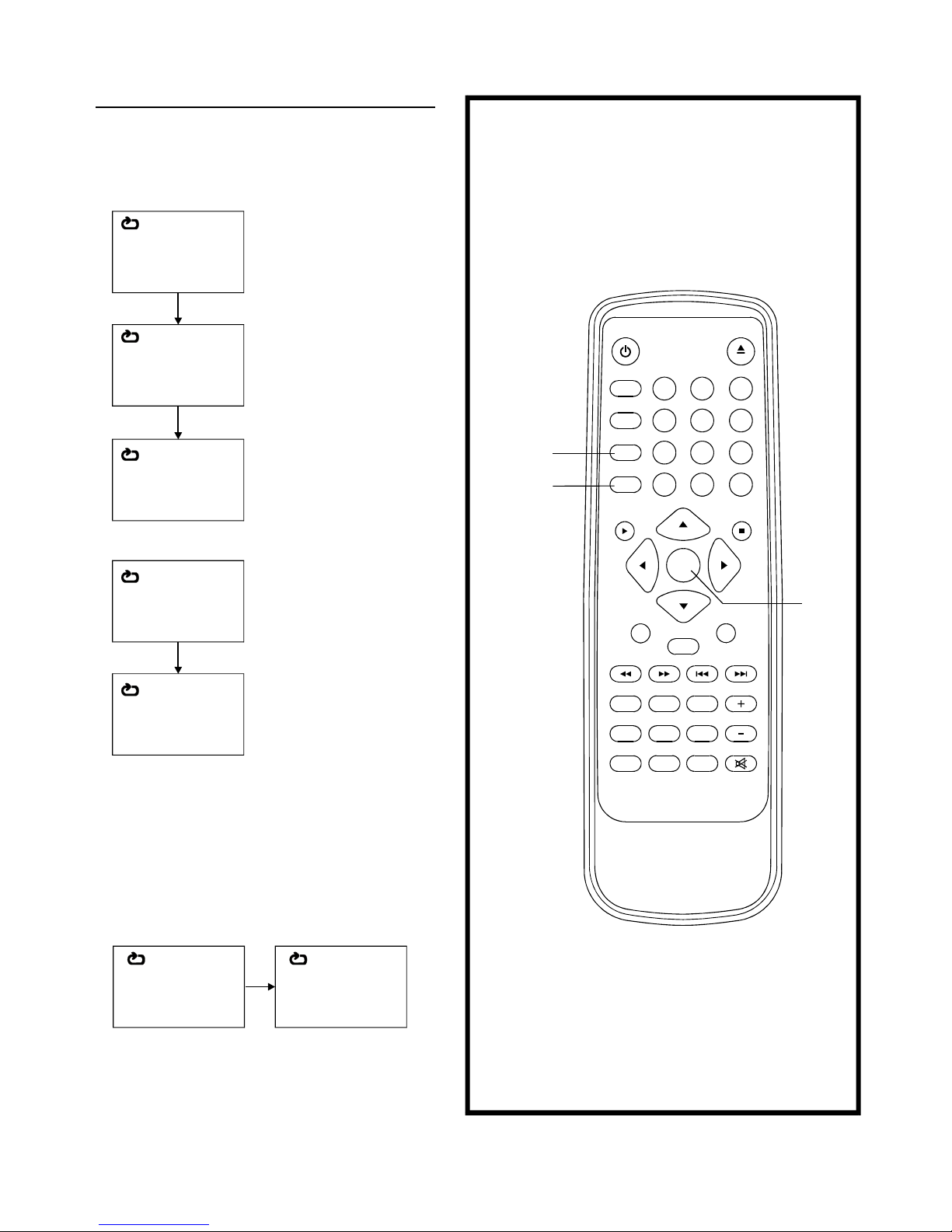
PressREPEAT1/ALLbuttonduringplay,itwillrepeat
playonechapteroronetitle(forDVDdisc),orrepeat
playtrack(forVCD/CD).
MUTE
1 2
3
4
5 6
7 8 9
0
POWER
DISPLAY
ZOOM
REPEAT
A-B
1/ALL
+10
CLEAR
PLAY STOP
SELECT
PAUSE/STEP SLOW
F.FWDF.BWD PREV NEXT
SUBTITLE ANGLE AUDIO
PROGRAM MENU/PBC TITLE/RET. VOLUME
SEARCH TVSYS SETUP
EJECT
P.SCAN
Page 21
Changingsubtitlelanguage
(DVDonly)
ZOOMPLAY
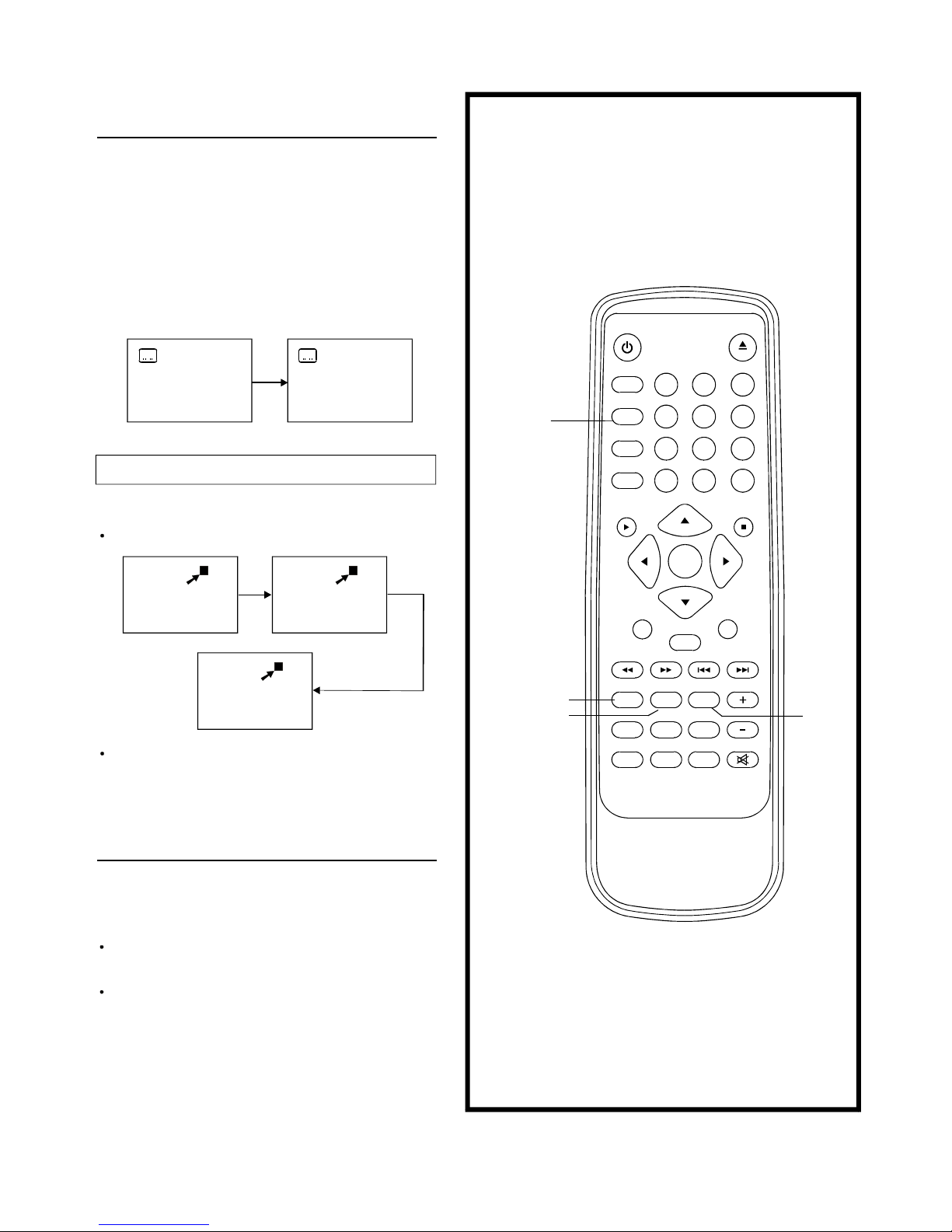
PressZOOMbuttonwhenplaying,thescreenshows:
PressNAVIGATIONbuttontoscrollacrosstheenlarged
picture.
Changingaudiosoundtrack
language(DVD/VCDdisc)
CHANGINGSUBTITLELANGUAGE
Itispossibletochangethesubtitlelanguagetoadifferent
languagefromtheoneselectedattheinitialsettings.(This
operationworksonlywithdiscsonwhichmultiplesubtitle
languagesarerecorded)
1.PressSUBTITLEbuttonduringplay,thescreenwilldisplaythecurrentlanguage.
2.PressSUBTITLEbuttonagaintochangelanguageorturn
off.
NOTE:Whennosubtitlesarerecorded,pressthis
buttonwillnotwork.
Thisfunctionallowyoutoenjoyamotionormotionlesspicture.
Itispossibletochangetheaudiosoundtracklanguagetoa
differentlanguagefromtheoneselectedattheinitial
settings(Thisoperationworksonlywithdiscsonwhich
multipleaudiosoundtracklanguagesarerecorded).
PressAUDIObuttonduringplayingDVDdisc,thescreen
willdisplaythenumberofcurrentsoundtracklanguage,
pressthebuttonagainwillchangethelanguage.
PressingAUDIObuttonduringplayingVCDdiscwill
changeaudiooutputmode:Laudiosoundtrack,Raudio
soundtrackandstereo(VCDdisconly).
NOTE:Whennosoundtracklanguagesarerecorded,
pressthisbuttonwillnotwork.
NOTE:Whenthepoweristurnedonorthediscisre-
moved,thelanguageheardistheoneselected
attheinitialsettings.
1/3
2/3
20
3x2x
4x
ZOOM
SUBTITLE
ANGLE AUDIO
MUTE
1 2 3
4
5
6
7 8 9
0
POWER
DISPLAY
ZOOM
REPEAT
A-B
1/ALL
+10
CLEAR
PLAY STOP
SELECT
PAUSE/STEP SLOW
F.FWDF.BWD PREV NEXT
SUBTITLE ANGLE AUDIO
PROGRAM MENU/PBC TITLE/RET. VOLUME
SEARCH TVSYS SETUP
EJECT
P.SCAN
Page 22
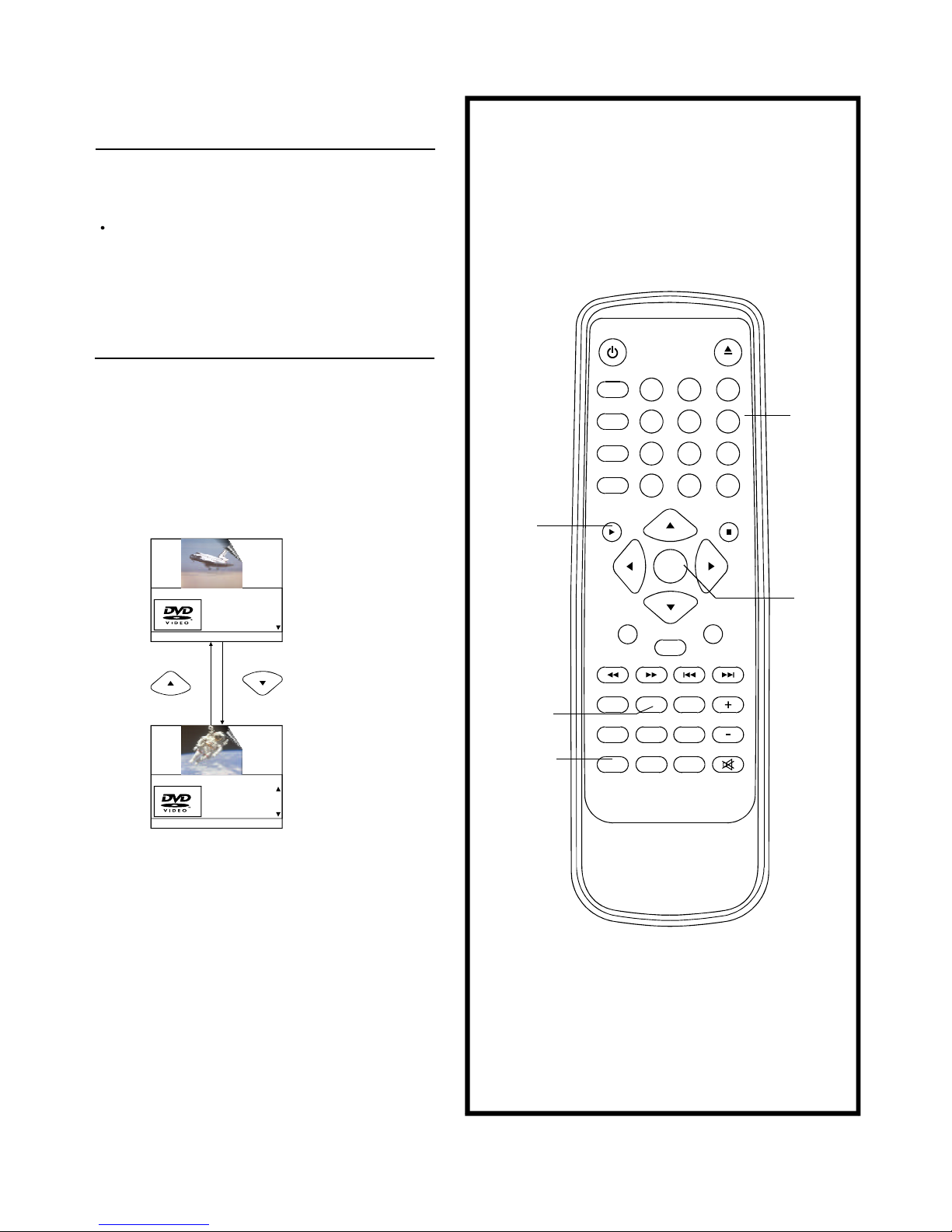
(DVDonly)
Viewingfromanotherangle
Searchforpreferredscene
1.PressSEARCHbuttonduringplay,thenpressupordown
navigationbuttontoselectTitle,Chapter,Titletimeor
Chaptertimetoplay.
2.PressSELECTbuttontoconfirmselection.
3.EntertheTitle,Chapter,TitletimeorChaptertimetoplayby
usingthenumericbuttons..
4.PressSEARCHbuttonagaintoexitsearchmode.
SomeDVDsmaycontainsceneswhichhavebeenshot
simultaneouslyfromanumberofdifferentangles.Forthese
discs,thesamescenecanbeviewsfromeachofthese
differentanglesusingtheANGLEbutton.
PressANGLEduringplay,numberofanglebeing
playbackwillbedisplayedinthescreen,pressthebutton
willchangetodifferentangles.
21
SEARCH
NUMERIC
BUTTONS
ANGLE
SELECT
PLAY
Audio
Menu
SubtitleOff
Chapter2/29
Title1/2
Bitrate52||||| TitleElapsed0:06:38
Selecttitleorchapternumber
Selecttitleorchaptertime
Note:TTTime=Titletime
CHTime=Chaptertime
TTTime0:06:38
Menu
CHTime0:23:14
SubtitleOff
Audio
Bitrate52||||| TitleElapsed0:06:38
MUTE
1 2 3
4
5
6
7 8 9
0
POWER
DISPLAY
ZOOM
REPEAT
A-B
1/ALL
+10
CLEAR
PLAY STOP
SELECT
PAUSE/STEP SLOW
F.FWDF.BWD PREV NEXT
SUBTITLE ANGLE AUDIO
PROGRAM MENU/PBC TITLE/RET. VOLUME
SEARCH TVSYS SETUP
EJECT
P.SCAN
Page 23
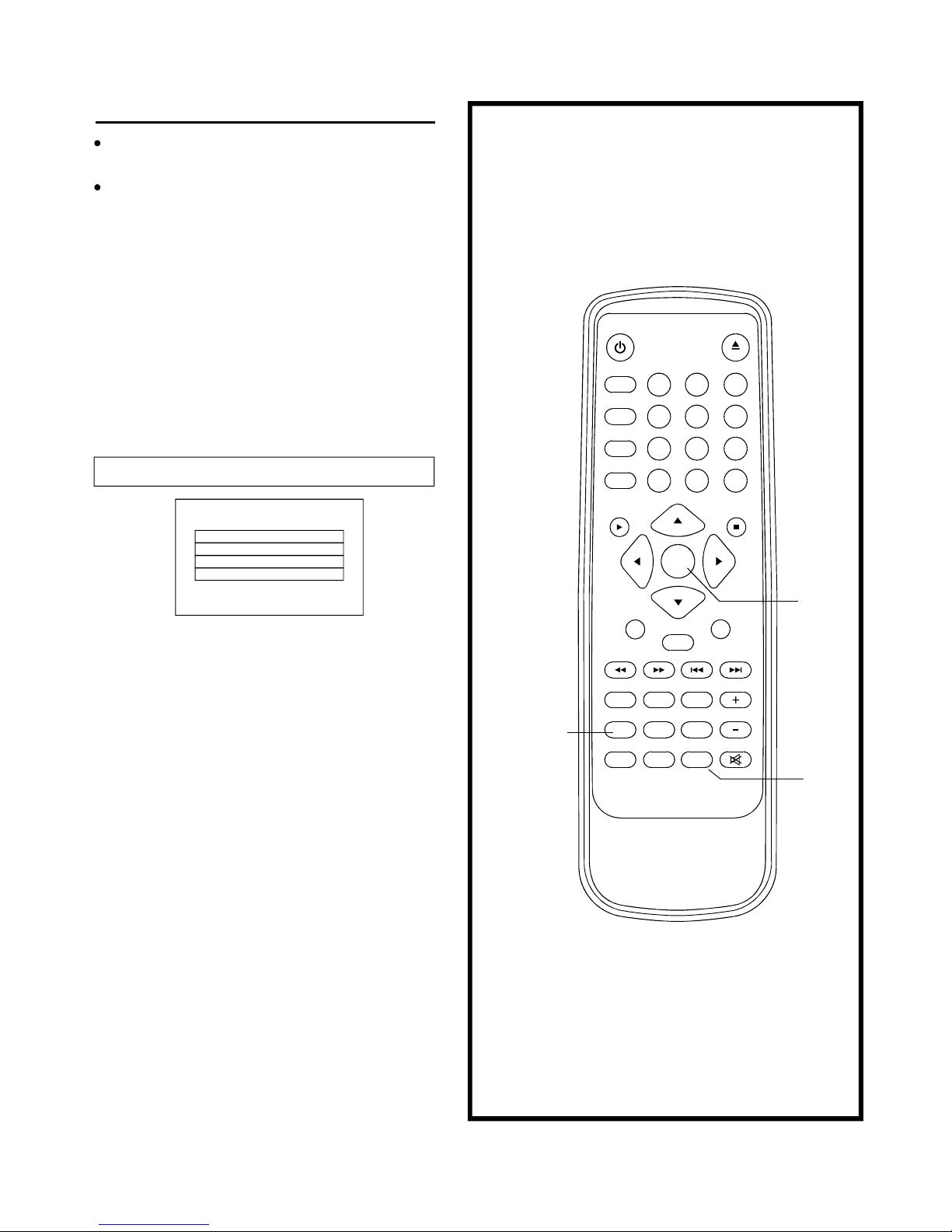
(Continuedonthenextpage)
InitialSettings
1.PressSETUPbutton.
2.Usethenavigationbuttonstoselectpreferreditem,then
pressSELECTbutton,eachscreenforsettingthevalueis
displayed.
3.PressSETUPbuttontoclosesetupmenuinanymode.
22
Oncetheinitialprogrammingisentereditisretainedin
memoryuntilchanged,theplayercanalwaysbeoperated
underthesameconditions.
Thesettingswillberetainedinthememoryuntilthesettings
arechangedevenaftersettingtheplayertothestandby
mode.
Commonprocedureforinitialsettings
1.GENERALSETUP
1.2ANGLEMARK -itisusedtoselectwhetherornot
Themulti-angleiconisdisplayonthescreenwhena
Multi-angleDVDdiscisplaying.
Options: On:Iconwillbedisplayed
Off:Iconwillbeturnedoff
SETUP
PROGRAM
SELECT
1.3OSD.LANG -itisusedtoselectdifferentOnScreen
Displaylanguagefordifferentuser.
1.4SCREENSAVER -whentheplayerisnotinusedfor
2minutes,arunningDVDlogowillmoveacrossthe
TVscreentoprotecttheTVCRT.
Options:
On:Screensaverisenabled
Off:Screensaverisdisabled
4.Useleftnavigationbuttontoswitchtoanothermainsetup
items
-itisusedtoselecttheTVoutputmode.1.1TVDISPLAY
Options: Normal/PS:Pan&scanmode
Normal/L/B:Letterboxmode
Wide:16:9widescreenmode
AngleMark
OSDLang
ScreenSaver
GeneralSetupPage
TvDisplay
MUTE
1 2 3
4
5
6
7 8 9
0
POWER
DISPLAY
ZOOM
REPEAT
A-B
1/ALL
+10
CLEAR
PLAY STOP
SELECT
PAUSE/STEP SLOW
F.FWDF.BWD PREV NEXT
SUBTITLE ANGLE AUDIO
PROGRAM MENU/PBC TITLE/RET. VOLUME
SEARCH TVSYS SETUP
EJECT
P.SCAN
Options:English,Spanish
Page 24

23
2.Audiosetup
DOWNMIXmode
4.Preferencesetup
4.1PBC -selectPlayBackControlforVCD
Options:On/Off
(Recommendedsetting:ON)
4.2AUDIO -selectpreferredaudiolanguage.
(DVDonly-needdiscsoftwaresupport)
4.3SUBTITLE -selectpreferredsubtitlelanguage.
(DVDonly-needdiscsoftwaresupport)
4.4DISCMENU -selectpreferreddiscmenulanguage.
(DVDonly-needdiscsoftwaresupport)
4.5PARENTAL -selectratinglevels.Youmustset
PASSWORDMODEOFFtoenablethisselection.
(DVDonly-needdiscsoftwaresupport)
4.6DEFAULT -Resettofactorysettings
MAINPAGE
InitialSetting
Warning:PressP-SCANONLYifyourTVsupports
progressivescan.Ifwrongmodeisselect,theTVwill
havenooutput.
Ifwrongmodeisselectedaccidentally,youmaypress:
a)SETUPbuttontoexitsetupmodeorpoweroffthe
playerandpowerupagain
B)PressP-SCANbuttontotogglebetweenInterlace
andP-Scanmode
SpeakerSetup
SPDIFSetup
AudioSetupPage
PBC
Audio
Subtitle
DiscMenu
Parental
Default
PreferencePage
Equalizer
3Dprocessing
2.1SPEAKERSETUP -itisusedtosetthespeaker
Outputslevels
Options:LT/RT-Left/Rightmixmode
STEREO-Selectthisoptionifyoudon't
Havea5.1channelsamplifier.
OFF-SelectOFFwhenyouwantareal
5.1channelsoutput
FRONTSpeakerCenterSpeaker-:
RearSpeaker-:
SUBWOOFER-:
Options:Large/Small
OptionsLarge/Small/off
OptionsLarge/Small/off
OptionsOn/Off
3.2TVOUPUT
Options:
CVBS
YPbPr/YCbCr
CVBS=Compositeoutput
=outputYPbPr/YCbCrYPbPr/YCbCr
Thefirstpoweronthissetbypresspowerbuttononthefrontplane
withoutplacinganydisconthistray,presssetupbutton,thenyou
canbypressingnavigatebutton.enterthePreferencePage
3.Videosetup
TVTYPE
VideoSetupPage
TVOutput
3.1TVTYPE
Options:
PAL/MULTI/NTSC
2.43DPROCESSING-
2.4.2REVERBMODE
selectonesoundeffect.
Options:off/concert/livingroom/hall/bathroom/
cave/arena/church.
2.4.1PROLogicII
.
Options:on/off/auto
2.3Equalizer
Eqtype
Option:none/rock/pop/live/dance/techno/classic/soft
2.2.1SPDIFOUTPUT -digitaloutputscodeformat
Options:OFF/RAW/PCM/MANUAL
2.2SPDIFSETUP
IfMANUALisselected,theoptionsforCD,DOLBY
DIGITALDTS,MPEG,PCMCHANNELcanbe
selectedindividually.Otherwise,theywilloutput
Atthesameformat:RAWorPCM.
Recommendedsettings:
SPDIFOUTPUT:SPDIFOFF
(ifyouarenotconnectingtoanamplifiervia
Digitaloutput)
SPDIFOUTPUT:SPDIF/RAW
(Usedingeneralhometheater,selectthiscanoutput
5.1channel)
SPDIFOUTPUT:SPDIF/PCM
(selectthisitcanonlyoutput2channel,butyouwill
gethighqualityaudio)
2.2.2LPCMOUT -setbit-rateofcoaxialandopticaloutput
Options:96K/48K
(Ifyouareconnectingtoanamplifierviadigitaloutput
pleasereferenceyourdigitalamplifiermanualbeforeyou
selectthisoption)
Page 25

24
(Continuedonthenextpage)
PasswordMode
Password
PasswordSetup
5.PasswordSetup
Option:
Change
Selecttochangepassword
5.1PASSWORDMODE
Options:ON/OFF
5.2PASSWORD
5.2.1OLDPASSWORD
5.2.2NEWPASSWORD
5.2.3CONFIRMPWD
Proceduretochangepassword:
1)EnteroldpasswordintheOLDPASSWORDrow
2)EnternewpasswordintheNEWPASSWORDrow
3)EnterthenewpasswordagainintheCONFIRMPWDrow
Youmayresetthepasswordifyouforgettheoldpassword
byusingthesupervisorpassword:1379
Page 26

Definitionofterms
Angle
Chapternumber
DVD
Playbackcontrol(PBC)
Subtitles
Timenumber
Titlenumber
Tracknumber
VideoCD
RecordedontosomeDVDdiscsaresceneswhichhavebeensimultaneouslyshotfromanumberofdifferentangles(thesame
sceneisshotfromthefront,fromtheleftside,fromtherightside,etc.).Withsuchdiscs,theANGLEbuttoncanbeusedtoview
thescenefromdifferentangles.
ThesenumbersarerecordedonDVDdiscs.Atitleissub-dividedintomanysections,eachofwhichisnumbered,andspecific
partsofvideopresentationscanbesearchedquicklyusingthesenumbers.
Thisreferstoahigh-densityopticaldisconwhichhigh-qualitypicturesandsoundhavebeenobtainedbymeansofdigitalsignals.
Incorporationanewvideocompressiontechnology(MPEGII)andhigh-densityrecordingtechnology,DVDenablesesthetically
pleasingfull-motionvideotoberecordedoverlongperiodsoftime(forinstance,awholemoviecanberecorded).DVD hasa
structureconsistingoftwo0.6mmthindiscswhichareadheredtoeachother.Sincethethinnerthedisc,thehigherthedensityat
whichtheinformationcanberecorded,aDVDdischasagreatercapacitythanasingle1.2mmthickdisc.Sincethetwothindiscs
areadheredtoeachother,thereisthepotentialtoachievedouble-sidedplaysometimeinthefutureforevenlongerdurationplay.
ThisisrecordedonaVideoCD(version2.0).Thescenesorinformationtobeviewed(orlistenedto)canbeselected
interactivelywiththeTVmonitorbylookingatthemenushownontheTVmonitor.
ThisistheappearanceofthedialogueatthebottomofthescreenwhichareprerecordedonsomeDVDdiscs.
Thisindicatestheplaytimewhichhaselapsedfromthestartofadiscoratitle.Itcanbeusedtofindaspecificscenequickly.(It
maynotworkwithsomediscs.)
ThesenumbersarerecordedonDVDdiscs.Whenadisccontainstwoormoremovies, thesemoviesarenumberedastitle1,title
2,etc.
ThesenumbersareassignedtothetrackswhicharerecordedonVideoCDsandCDs.Theyenablespecifictrackstobelocated
quickly.
Thiscontainsrecordingsofpicturesandsoundwhosequalityisonaparwiththatofvideotape.ThisplayeralsosupportsVideo
CDswithplaybackcontrol(version2.0).
25
Page 27
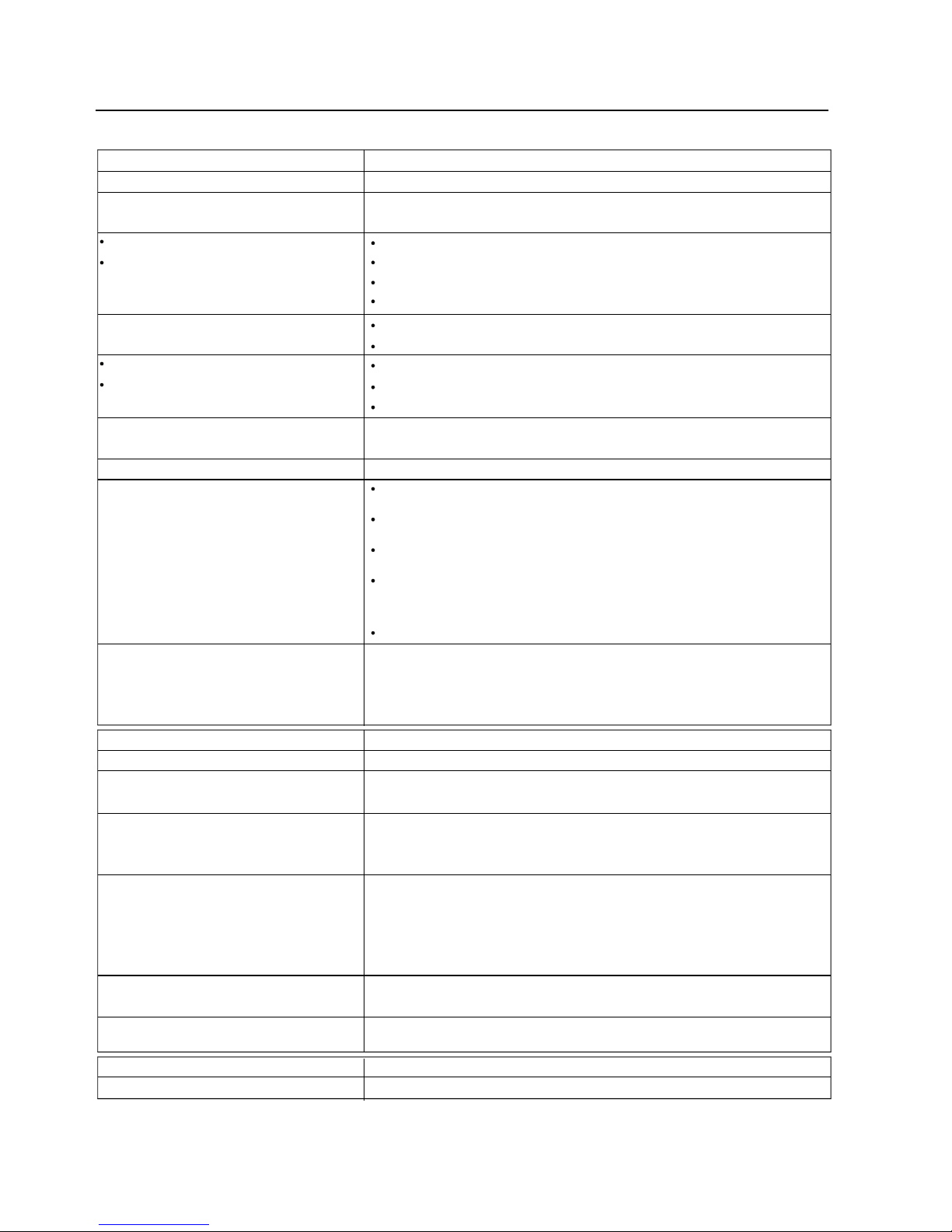
26
Troubleshooting
Beforerequestingserviceforthisplayer,checkthechartbelowforapossiblecauseoftheproblemyouareexperiencing.
Somesimplechecksoraadjustmentonyourpartmayeliminatetheproblemandrestoreproperoperation.
remotecontrolunit)iseffective.
Nokeyoperation(bythemainunitand/orthe
remotecontrolunit.
Nooperationscanbeperformedwiththe
Norapidadvanceorrapidreverseplay.
rapidreverse.
Pictureisdistortedduringrapidadvanceor
Distortedsound.
Nosound.
Nopicture.
Playstartsbutthenstopsimmediately.
PlayfailstostartevenwhenPLAYispressed.
mode.
Theplayerisautomaticallysettothestandby
Nopower.
Symptom(Common) Remedy
InserttheACpowerplugsecurelyintothepoweroutlet.
Theplayerisautomaticallysettothestandbymodeafterapprox.30minutesinthe
stopmode(autopower-offfunction).Turnthepoweronagain.
Condensationhasformed:waitabout1to2hourstoallowtheplayertodryout.
ThisplayercannotplayadiscotherthanDVD,VideoCDandCD.
Thediscmaybedirtyandmayrequirecleaning.
Ensurethatthediscisinstalledwiththelabelsideup.
Ensurethattheequipmentisconnectedproperly.
EnsurethattheinputsettingfortheTVis"Video".
Ensurethattheequipmentisconnectedproperly.
EnsurethattheinputsettingfortheTVandstereosystemarecorrect.
AdjustthemastervolumeusingtheGUIscreenforplayerinformation.
Thepicturewillbesomewhatdistortedattimes:thisisnormal.
Somediscsmayhavesectionswhichprohibitrapidadvance(orrapidreverse.)
Checkthebatteriesareinstalledwiththecorrectpolarities(+and_).
Thebatteriesareexhausted:replacethemwithnewones.
Pointtheremotecontrolunitattheremotecontrolsensorandoperate.
Operatetheremotecontrolunitatadistanceofnotmorethan7mfromthe
remotecontrolsensor.
Removetheobstaclesbetweentheremotecontrolunitandremotecontrolsensor.
PressPOWERtosettheplayertothestandbymodeandthenbacktoON.
Alternatively,pressPOWERtosettheplayertothestandbymode,disconnectthe
powerplugandthenre-connectit.(Theplayermaynotbeoperatingproperlydue
tolightning,staticelectricityorsomeotherexternalfactor.)
forgotten.
Thepasswordforratinglevelhasbeen
Anglecannotbechanged.
languagesfailtobeselected.
Alternativeaudiosoundtrack(orsubtitle)
Nosubtitles.
nottheinitialsettings.
Audiosoundtrackand/orsubtitlelanguageis
Playdoesnotstartevenwhentitleisselected.
Symptom[DVD] Remedy
Confirmthe"2Ratings"setting.
Iftheaudiosoundtrackand/orsubtitlelanguagedoesnotexistonthedisc,the
languageselectedattheinitialsettingswillnotbeseen/heard.
Subtitlesappearonlywithdiscswhichcontainthem.
SubtitlesareclearedfromtheTVmonitor,Performthestepstodisplaythesubtitles.
Analternativelanguageisnotselectedwithdiscswhichdonotcontainmore
thanonelanguage.
Inthecaseofsomediscs,thealternativelanguagecannotbeselectedbyoperatingtheAUDIOorSUBTITLEbutton.TryselectingitfromtheDVDmenuifone
isavailable.
Thisfunctionisdependentonsoftwareavailability.Evenifadischasanumberof
anglesrecorded,theseanglesmayberecordedforspecificscenesonly.
Pleasecontactyourlocalsalesdealer.
Nomenuplay.
Symptom[VideoCD]
Remedy
ThisfunctionworksonlyforVideoCDswithplaybackcontrol.
Page 28

27
Dischandlingandmaintenance
Handlingprecautions
Ifthesurfaceissoiled
Ifthediscisbroughtfromacoldtoawarmenvironmentmoisturemayformonthedisc
Improperdiscstorage
Maintenance
Holdthediscbytheedgessothesurfacewillnotbesoiledwithfingerprints.
Fingerprints,dirtandscratchescancauseskippinganddistortion.
Donotwriteonthelabelsidewithaball-pointpenorotherwritingutensils.
Donotuserecordcleaningsprays,benzine,thinner,staticelectricitypreventionliquidsorbendthedisc.
Becarefulnottodroporbendthedisc.
Donotinstallmorethan1disconthedisctray.
Donottrytoclosethedisctraywhenthediscisnotinstalledproperly.
Besuretostorethediscinitsexclusivecasewhennotinuse.
Wipegentlywithasoft,damp(wateronly)cloth.
Whenwipingdiscs,alwaysmovetheclothfromthecentreholetowardtheoccur,whichwillcausenoise.)
(Ifyouwipethediscsusingacircularmotion,circularscratchesarelikelytooccur,whichwillcausenoise.)
Wipethismoistureoffwithasoft,dry,lint-freeclothbeforeusingthedisc.
Youcandamagediscsifyoustoretheminthefollowingplaces:
Areasexposedtodirectsunlight
Humidordustyareas
Areasdirectlyexposedtoaheatoutletorheatingappliance
BesuretopressPOWERtosettheplayertothestandbymodeanddisconnecttheACpowercordbeforemaintaining
theplayer.
Wipethisplayerwithadry,softcloth.
Ifthesurfacesareextremelydirty,wipecleanwithaclothwhichhasbeendippedinaweaksoap-and-watersolutionand
wrungoutthoroughly,andthenwipeagainwithadrycloth.
Neverusealcohol,benzine,thinner,cleaningfluidorotherchemicals.Anddonotusecompressedairtoremovedust.
TM
MACROVISIONInformation
ThisDVD/VCD/CDplayerisprotectedbyMACROVISIONandnounauthorizedcopycanbemadebyVIDEOCASSETTERECORDER.
ThisproductincorporatescopyrightprotectiontechnologythatisprotectedbymethodclaimsofcertainU.S.patentsandotherintellectual
propertyrightsownedbyMacrovisionCorporationandotherrightsowners.Useofthiscopyrightprotectiontechnologymustbeauthorized
byMacrovisionCorporation,andisintendedforhomeandotherlimitedviewingusesonlyunlessotherwiseauthorizedbyMacrovision
Corporation.Reverseengineeringordisassemblyisprohibited.
 Loading...