

Page 1
WWW PREMIERMUNDO COMWWW PREMIERMUNDO COM
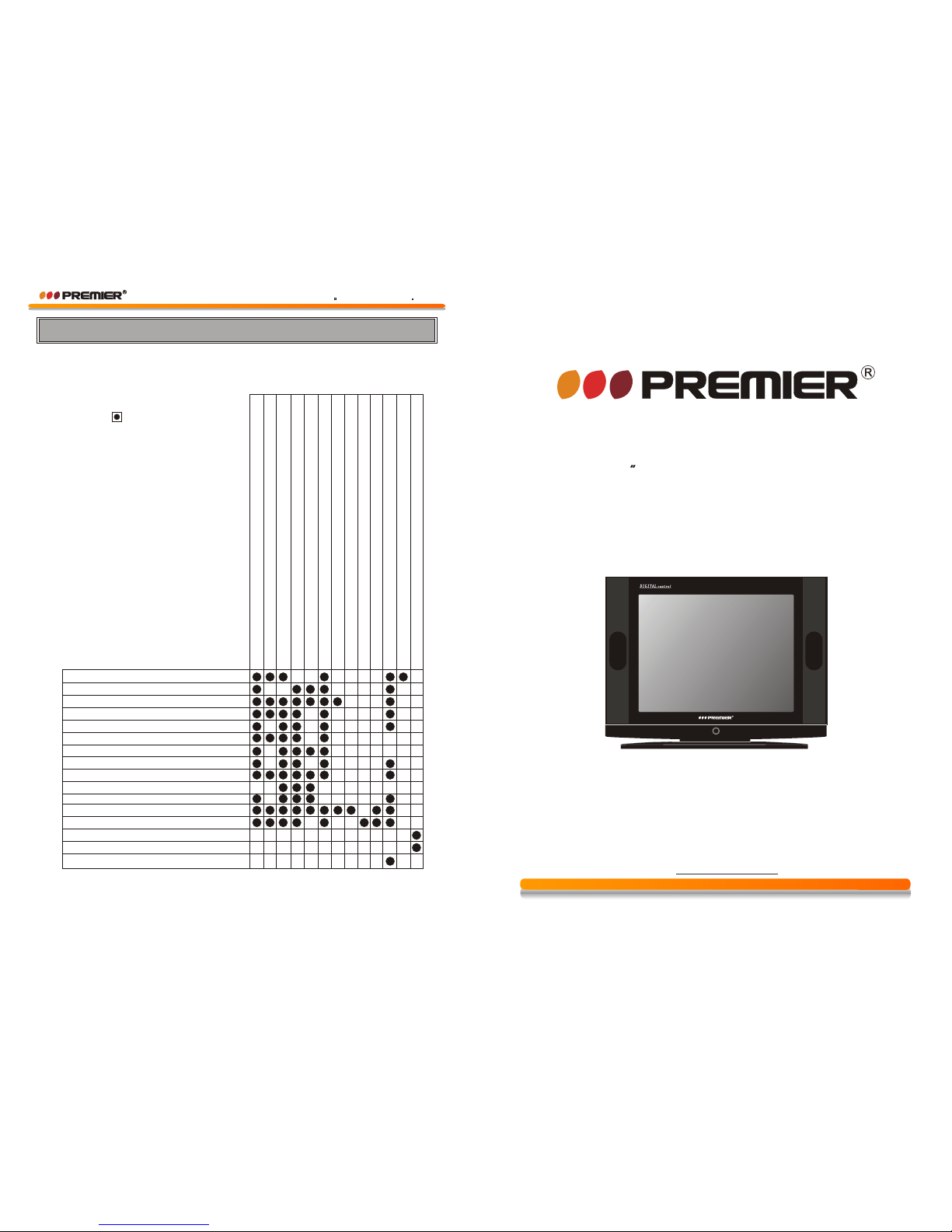
Service Tips
Symptoms
Solution
BEFORE CALLING FOR SERVICE,HAVE YOU
ON SYMPTOMS AND SOLUTIONS?
Try different channel,if OK,probably station trouble
Check aerial connectiions on back of set
No picture,no sound
Poor sound,picture OK
Poor picture,sound OK
Weak picture
Blurred picture
Double image
Lines in picture
Distorted picture
Weak reception on some channels
Horizontal bars
Picture rolls vertically
Poor colour
No colour
Misoperation of Remote control
No Remote control
On screen Display Control outside the screen
Check aerial for broken wires
Re-orient aerial(if indoor type)
Probably local interference,such as an appliance
Adjust fine tuning control
Adjust brightness control
Adjust contrast control
Check if station is broadcasting colour
Adjust colour control
Check if system switch is correct
Check if on/off switch is on
Check Batteries in Remote control
CHECKED( )THE FOLLOWING CHART
DEAR CUSTOMER
Congratulations for your purchase!
Please read this manual carefully, and keep it for future reference.
If you need extra support, please write to [email protected]
CTV-3409SR
INSTRUCTION MANUAL
COLOR TELEVISION
21
m
u
l
t
i
-
s
y
s
t
e
mm
u
l
t
i
-
s
y
s
t
e
m
Page 2
1.DC Power supply: 12V DC to 14V DC
2.Maximum Current: 9Amp
3.Minimum Current: 4Amp
4.Standby Current: 80mA
5.Battery Low Protection: Below 10.8V DC-11.1VDC
2.Remove the AC cord and Battery cord and the CTV will
switch-off Immediately. When DC is in-used, the CTV
main switch can't be functioned
3.When the battery 12V DC is connected, at the same time
AC supply is connected,In this connection the battery
was not able to be re-charged.When you use AC supply,
you must remove the DC cord.
2.When the battery DC supply is low, the CTV is automatic
protected and power cut-off. Remove the old battery and
replace the new charged battery.
3.during the battery connection. If you find any abnormal
condition, the CTV will switch off and be automatic protected.
Let the battery at standby position for 5 seconds and
then re-connect the DC cord.
Instruction
A.Technical specification
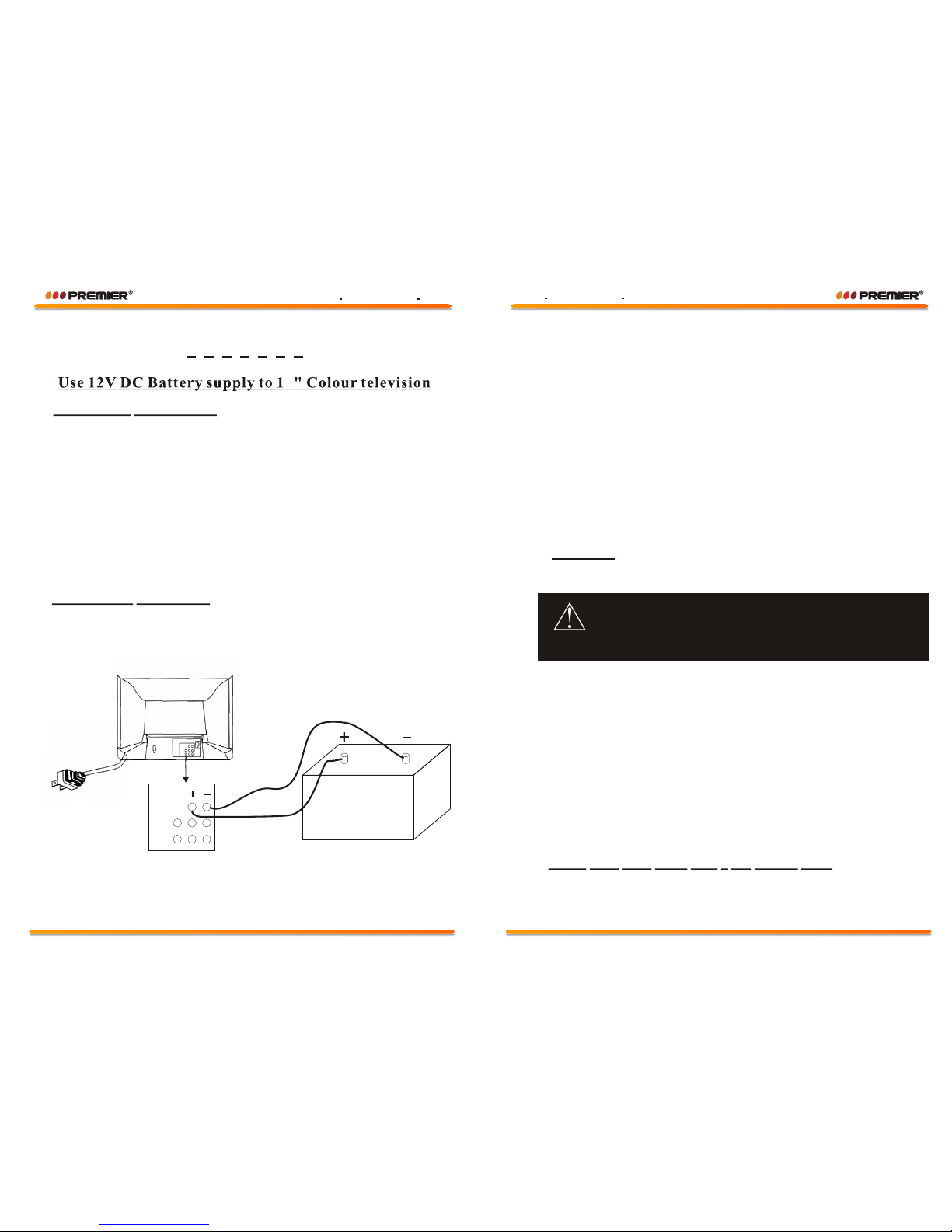
1.Connect the Battery cord from Battery("+"and"-")
terminal to Colour TV 12VDC jacks("+"and"-")
B.Operation Instruction
C.Caution
D.The CTV must come with 1 DC battery cord.
You must connect the correct polarity position of battery
cord"+"and"-" terminal in-between battery and CTV.
When the battery is in wrong polarity position, the CTV
will be able to damnify.
WARNING
Battery 12 VDC
DC12
4
Page 14
Page 1
WWW PREMIERMUNDO COMWWW PREMIERMUNDO COM
WWW PREMIERMUNDO COMWWW PREMIERMUNDO COM
Page 3
WWW PREMIERMUNDO COMWWW PREMIERMUNDO COM
Page 4
Precaution
1. Read these instructions.
2. Keep these instructions.
3. Heed all warnings.
4. Follow all instructions.
5. Do not use this apparatus near water, the apparatus shall not be exposed to
dripping or splashing and that no objects filled with liquids, such as vases, shall
be placed on the apparatus.
6. Clean only with dry cloth.
7. Do not install this apparatus in windtight places such as the wall-unit. Do not block
any ventilation openings.
8. Do not install near any heat sources such as radiators, heat registers,
stoves, or other apparatus (including amplifiers) that produce heat.
9. Do not defeat the safety purpose of the polarized or grounding-type plug. A
polarized plug has two blades with one wider than the other. A grounding type
plug has two blades and a third grounding prong. The wide blade or the third prong
are provided for your safety. If the provided plug does not fit into your outlet,
consult an electrician for replacement of the obsolete outlet.
10. Protect the power cord from being walked on or pinched particularly at plugs,
convenience receptacles, and the point where they exit from the apparatus.
11. Only use attachments/accessories specified by the manufacturer.
12. Use only with the cart, stand, tripod, bracket, or table specified by the
manufacturer, or sold with the apparatus. When a cart is used, use caution
when moving the cart/apparatus combination to avoid injury from tip-over.
13. Unplug this apparatus during lightning storms or when unused for long periods
of time.
14. Refer all servicing to qualified service personnel. Servicing is required when
the apparatus has been damaged in any way, such as power-supply cord or plug
is damaged, liquid has been spilled or objects have fallen into the apparatus, the
apparatus has been exposed to rain or moisture, does not operate normally, or
has been dropped.
Danger of explosion if battery is incorrectly replaced.
Replace only with the same or equivalent type.
Batteries shall not be exposed to excessive heat such as sunshine,
fire or the like.
Used batteries should not be thrown into the garbage can, please
leave them at an appropriate depot.
CAUTION
Where the MAINS plug or an appliance coupler is used as the
disconnect device, the disconnect device shall remain readily
operable.
CAUTION
These servicing instructions are for use by qualified service
personnel only. To reduce the risk of electric shock, do not perform
any servicing other than that contained in the operating instructions
unless you are qualified to do so.
CAUTION
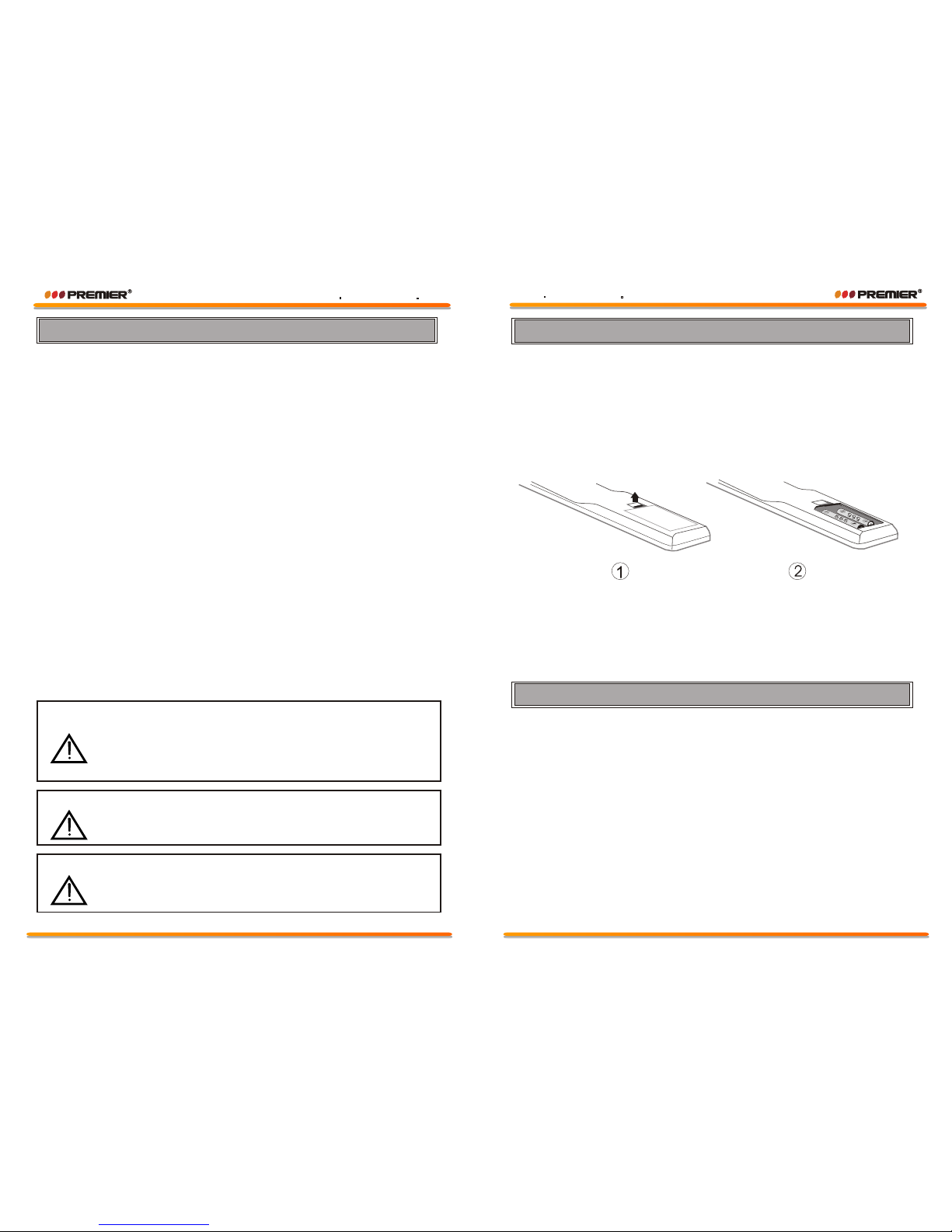
Battery Installation(Remote Control Unit)
1.Remove the battery cover.
2.insert the batteries making sure the polarity(+or -)of the batteries
matches the polarity marks inside the unit.
3.Replace the battery cover.
Replace with new batteries when the TV set begins to show the following symptoms:
operation is unsteady or erratic. Sometimes the TV set does not function with Remote
control unit.
2 UM-4 AAA 1.5V
Remark:
1) Alkaline batteries recommended.
2) Remove batteries when they are exhausted or if the remote control is not to be
used for a long time.
The Causes of Interference
Incorporated in your TV receiver are the most
up-to-date devices to eliminate interference.
Local radiation however, can create
disturbances which Visibly affect your picture.
Proper installation, a good aerial are your best
safeguards against these disturbances.
INTERFERENCE
Moving ripples across the screen are caused
by nearby transmitting or receiving shortwave
radio equipment.
DIATHERMY
Herringbone pattern and partial picture loss
can result from the operation of diathermy
equipment from a nearby doctors surgery or
hospital.
SNOW
Weak TV signals from long distant stations
result In an unsteady picture and give the
effect of falling snow. An antenna
adjustment or antenna amplifier may be
needed.
GHOST
Multiple images caused by TV signals
reflected back from surrounding buildings,
hills, aircraft, etc. are minimized by correct
aerial positioning.
CAR IGNITION
Nearby cars and electrical motors can
cause small streaks across the picture or
make the picture roll.
WARNING:
The battery(battery or batteries or battery pack)shall not be exposed to excessive
heat such as sunshine,fire or the like.
Page 14
Page 1
WWW PREMIERMUNDO COMWWW PREMIERMUNDO COM
WWW PREMIERMUNDO COMWWW PREMIERMUNDO COM
Page 5
Specifications
Note: We will not notify customers particularly when there is any change happened in the
design and specification of the product. The pictures in the handbook may bear slight
differences from the real one. Please take actual products as the standard.
FEATURES
Language English
Blue screen On
Picture enhance Off
CCD On
CC mode CC1
Parental
Game
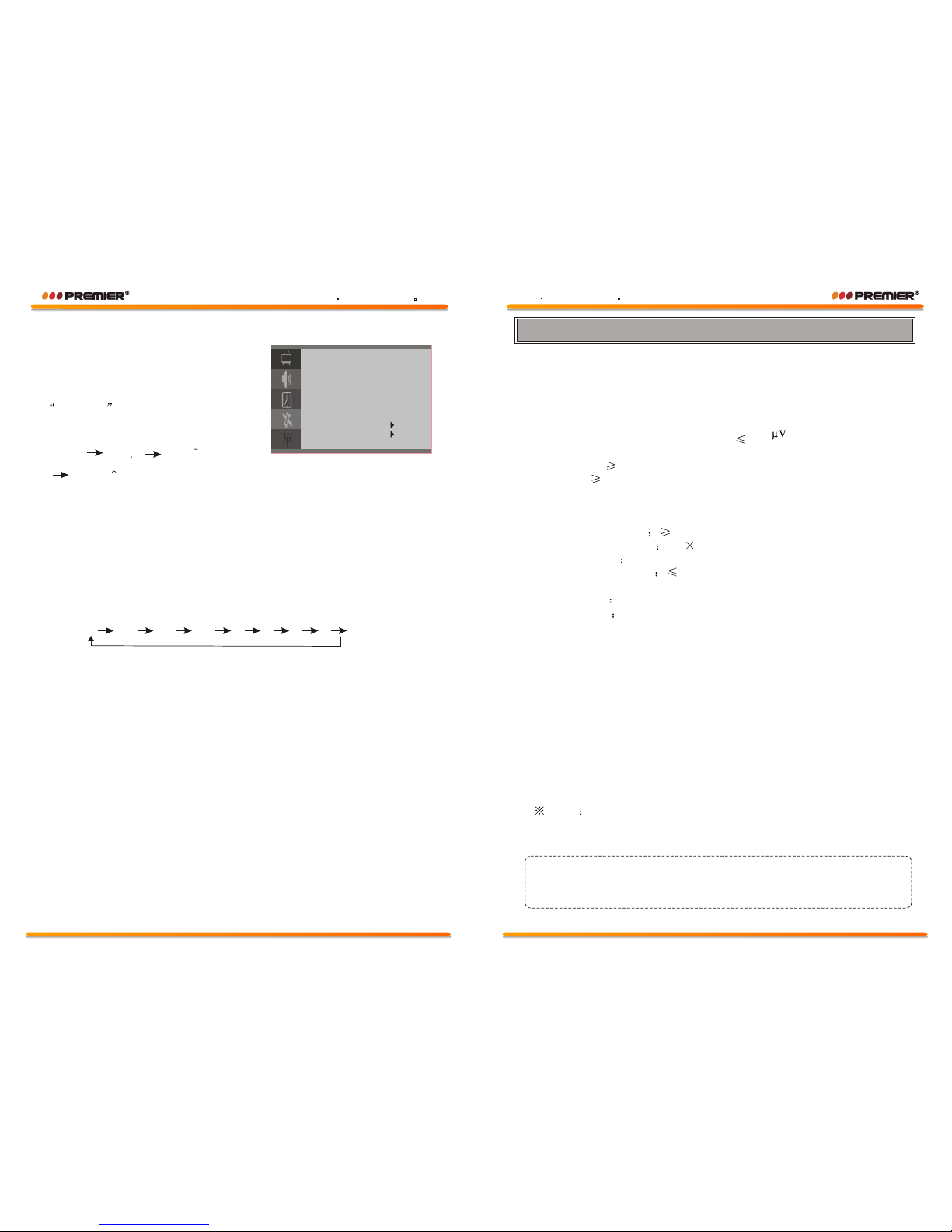
5) FEATURES MENU Function: other functions setting.
A. Using [P+]/[P-] keys,to select each item.
Using [V+]/[V-] keys,to change the value
of each item.
B.Using [P+]/[P-] keys, to select
Language .
Using [V+]/[V-] keys, Language will
change as follows:
C.Using [P+]/[P-] keys, select the"Blue screen".
Using [V+]/[V-] keys, select "On"or "Off".
D.Using [P+]/[P-] keys, select the"
Using [V+]/[V-] keys, select "On"or "Off".
E.Using [P+]/[P-] keys, to select "CCD .
Using [V+]/[V-] keys, to preset "ON"or "OFF".
F.Using [P+]/[P-] keys, to select the"C.C mode .
Using [V+]/[V-] keys, caption mode will change as follows.
G.Using [P+]/[P-] keys, to select the"GAME .
Using [V+]/[V-] keys, to enter the game.
Picture enhance".
"
"
"
English Francais Espanoc
Portugues
CC1 CC2 CC3 CC4 T1 T2 T3 T4
1. Television system
RF input: NTSC / PAL M / PAL N
Video input: NTSC / PAL M / PAL N
2. Receive frequency range
US CH
181 Channels (Air+CATV)
3. Picture sensitivity of limited noise 350
4. Picture resolution
Horizontal 220
Vertical 320
5. Intermediate frequency
Picture IF 45.75MHz
Volume IF 41.25MHz
6. Luminance grades 8 grade
7. Sound power output 3W 2
8. Power supply AC 90-260V 50/60Hz
9. Power consumption 75W (standard status)
10. Screen size: 54cm
11. Dimension
12. Net Weight
598(W)x463(D)x460(H)mm
18.6kg
Note
All specifications are subject to change without notice.
All quality and size are approximate value.
WWW PREMIERMUNDO COMWWW PREMIERMUNDO COM
Page 2
Page 13
WWW PREMIERMUNDO COMWWW PREMIERMUNDO COM
Page 6
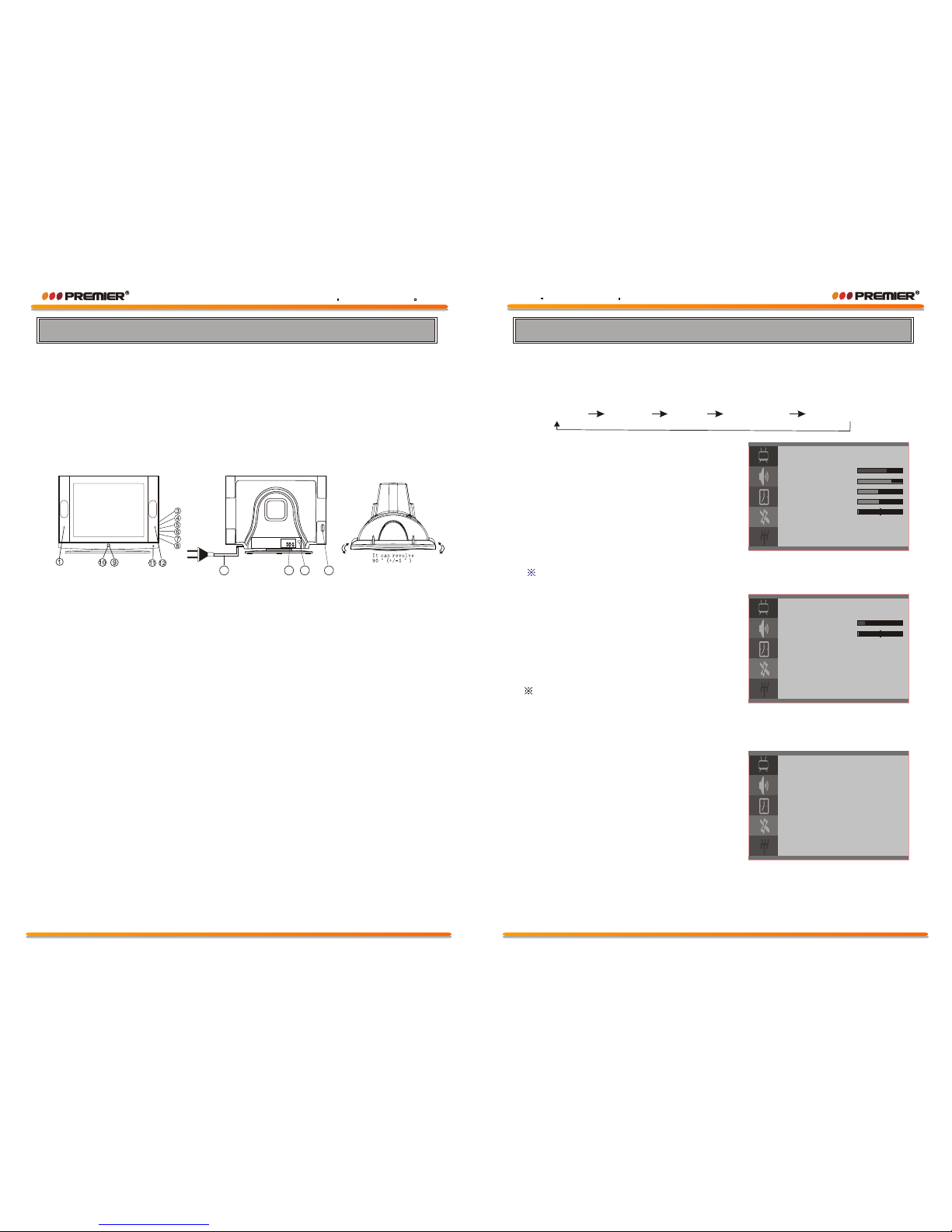
Control Location
For control knobs (all panels subject to the real object), please refer
to your own TV set.
Front and Back Control Panel
PICTURE
Bright 75
Contrast 75
Color 50
Sharpness 50
Tint 0
1) [MENU] key
Press [MENU] key continuously, to scroll through the MENU selection,
as follows:
2) PICTURE MENU
A. Select each function using
[P+]/[P-] keys.
B. Each value can be controlled by
[V+]/[V-] keys.
C. Repeat any functions if required.
3) SOUND MENU
A.Select each function using
[P+]/[P-] keys.
B.Each value can be controlled
by [V+]/[V-] keys.
C.Repeat any functions if required.
Balance , AVL is option.
Menu Operation
The TINT will only appear when receiving the signals of NTSC system.
PICTURE SOUND TIMER FEATURES INSTALLATION
SOUND
Volume 16
Balance 0
AVL O ff
TIMER
Timer Off
Clock 11:09PM
Off time -- : -On time -- : -On channel 1
4) TIMER MENU Function: Time and Timer setting.
A. Using [P+]/[P-] keys, to select
"Timer", "Clock","On time", "Off time"
or "On channel"
B. Using [P+]/[P-] keys, select "Timer".
Using [V+]/[V-] keys, channge Timer
On or Off.
C. For "Clock", "On time", "Off time"
setting.
Using [V+]/[V-] keys, select minutes
or hours.
Using [P+]/[P-] keys, set minutes or hours.
D. For "On Channel" setting.
Using [P+]/[P-] keys, select "On Channel" .
Using [V+]/[V-] keys, change On Channel number.
1. Speaker
2. Side AV In(Option)
3. AV/TV Button
4. Menu Button
5. Volume Down Button
6. Volume Up Button
7.Program Down Button
8. Program Up Button
9. Power Indicator
10. Remote Sensor
11. Power Switch
12. Speaker
13. AC power Cord
14. Audio/Video-in/out
15. Terminal Antenna(75 Ohm)
WWW PREMIERMUNDO COMWWW PREMIERMUNDO COM
Page 12
Page 3
WWW PREMIERMUNDO COMWWW PREMIERMUNDO COM
13
14
15
2
Page 7
OPERATION INSTRUCTIONS OF PANEL
First insert power plug and then insert antenna or cable antenna into the socket
of antenna.
SWITCH ON AND OFF TV
When press Power button, power is connected. When press Power button
again, power is off. When TV is at stage of sleep, it can not be switched on or
off by pressing the power button.
NOTE:
when TV is at stage of sleep, it can be switched on or off by pressing the
sleep button on the remote controller.
CAUTIONS:
In case that electricity is cut when watching TV, switch off the power. If
TV is not watched, please switch off the power. When TV is at stage of
sleep, there is a part of circuit working and consuming electricity.
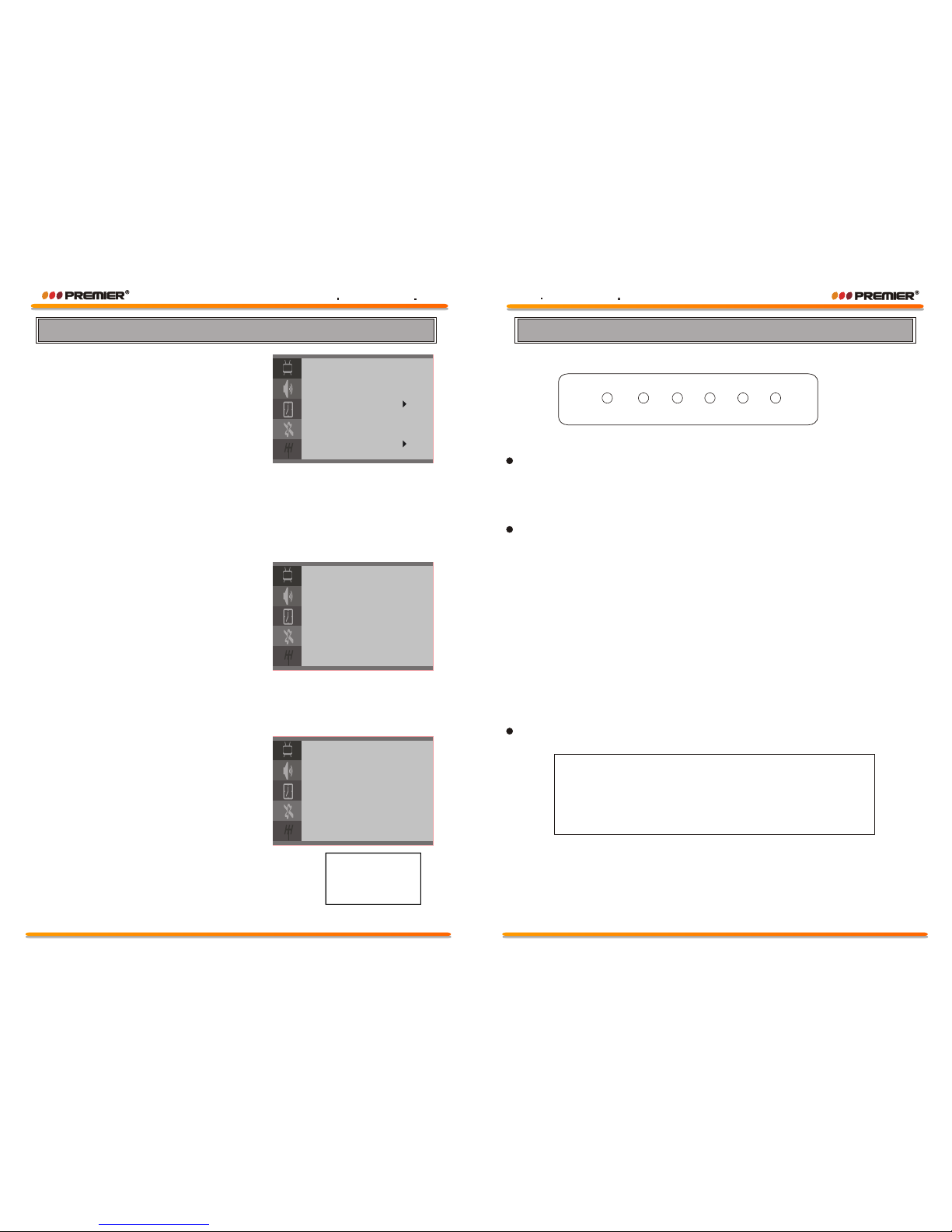
Operation of Function Board
Press "MENU" button and enter "Installation"
with P+/P- button selected "Auto search"
function and then press V+ or V- button starting
to search the channels automatically.
P+P-V+V-
TV/AV
MENU
Automatic Search Channel
Change code
New code - - - Confirm - - - -
7) CCD
Select the program which is broadcasting the CCD
you want to watch. Press [CCD] key on the remote
control, "CCD On" appear on the screen and after
it disappears, the information of CCD will display
on the screen. By repeatedly pressing [CCD] key,
CCD will change between ON and OFF.
6) CHANGE PASSWORD
Select and enter "Change Code"menu,
A. Input a new PIN.
B. Input the PIN again to confirm.
CCD On
Parental
Lock Code - - - -
Lock Off
PG Rating
MPAA Rating: Off
Can. english: Off
Can. French: Off
Change code
3) PG RATING
When you select " U.S. TV" ,using [P+]/
[P-] keys, to move the cursor for up and
down.
Using [V+]/[V-] keys, to move the cursor
for right or left .
Using the [MENU] key, to preset view or
block.
4) MPAA RATING
When you select " MPAA RATING",Using [V+]/[V-] keys, to change setup.
5) CANADA ENGLISH AND CANADA FRENCH
When you select "Can.english" or "Can french" Using [V+]/[V-] keys, to
change setup.
1) SELECT VCHIP MODE
A. Press [MENU] key repeatedly to select
"FEATURES".
B. Press [P+]/[P-] keys, to select "parental".
C. Press [V+]/[V-] keys, to parental menu
appears.
PG Rating
Rating Status FV V S L D
TV-Y View
TV-Y7 View V
TV-G V ie w V V V V
TV-PG View V V V V
TV-14 View V V V V
TV-MA View
VCHIP and CCD
2) VCHIP Password
A. Factory mode PIN is "0000", the common PIN is "4100".
B. Input the correct PIN, then can set the next items, include "PG Rating",
"MPAA Rating", " Can.english", " Can. French".
C. "Lock" is general lock, only when this item is on, parental mode can be
effective. When parental mode is effective, the screen is blue background
and sound is mute.
D. Using [P+]/[P-] keys, to move the cursor.
Using [V+]/[V-] keys, to select each item.
WWW PREMIERMUNDO COMWWW PREMIERMUNDO COM
Page 4
Page 11
WWW PREMIERMUNDO COMWWW PREMIERMUNDO COM
Page 8
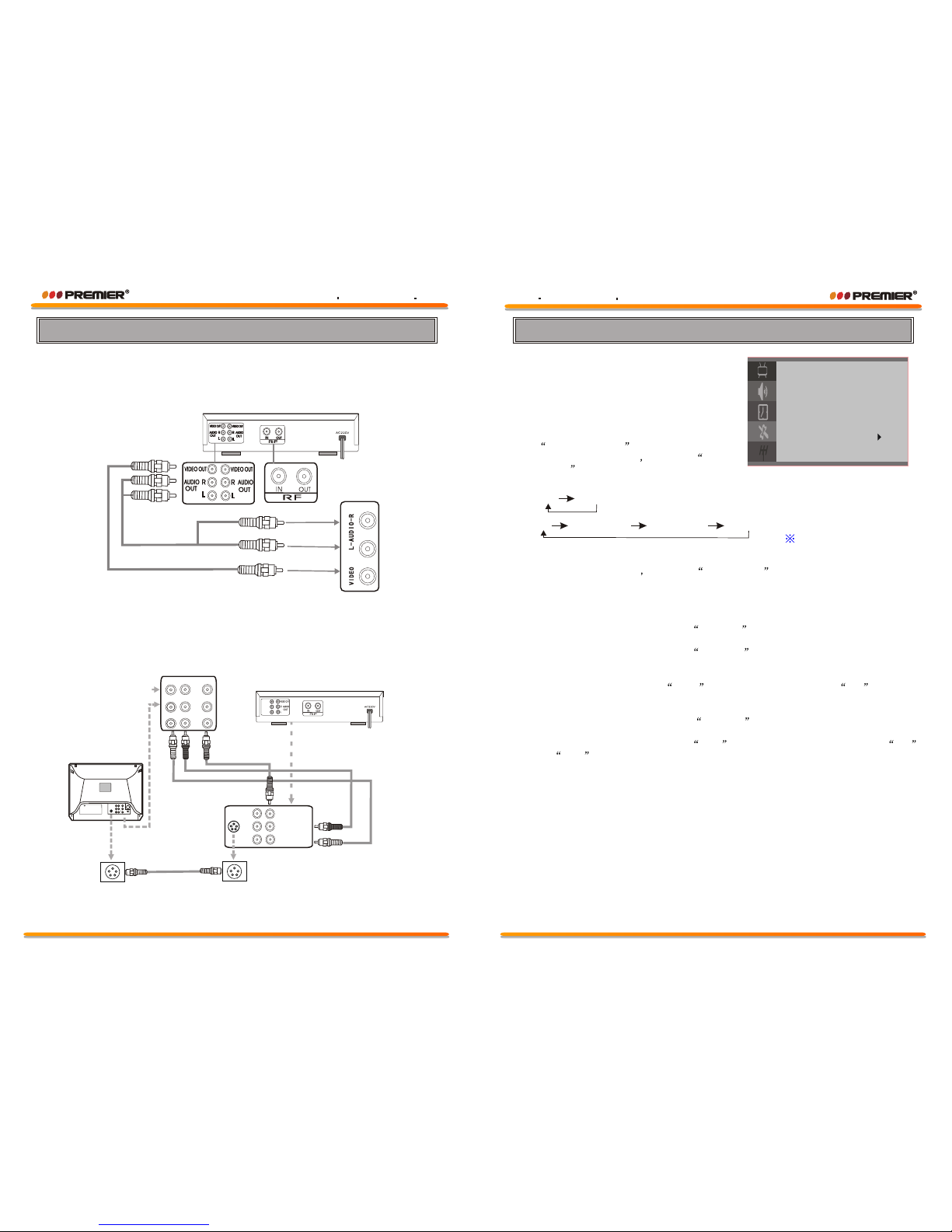
This TV set can be connected to videotape player, videodisc player,
video camera, game player or audio player.
NOTE:
VCD PLAYER
Front AV terminal
Connection to Other Equipment
Back AV terminal
Y
Cr
Cb
DVD PLAYER
Y
Cr
Cb
TV
L
Y
CrCb
IN
IN
OUT
V
R
L
V
R
Y, Cr, Cb, input (OPTION)
S-VIDEO(OPTION)
VIDEO OUT
R AUDIO
OUT
L
Video/ Audio equipment can be connected to sockets of AUDIO IN
or VIDEO IN in rear
1) Auto Search Function:
Automatic Search and Memory (ASM)
Using the [MENU] key on the front or
the [MENU] key on the Remote for ASM.
A. Press [MENU] key repeatedly to select
INSTALLATION
B. Press [P+]/[P-] keys to select Tuning
mode .
Repeatedly pressing [V+] key, signal input model will change as follows:
and select input model.
C. Press [P+]/[P-] keys to select Auto search
D. Press [V+] key, to start ASM .
2) FINE TUNING Function: Fine Tuning for current setting.
A. Using [P+]/[P-] keys, to select Channel . Using [V+]/[V-] keys, to change
Program Number.
B. Using [P+]/[P-] keys, to select Fine ture .
C. Using [V+]/[V-] keys, to adjust for best tuning.
3) SKIP Function: Use to SKIP Programs. After setting to ON , the
program will not be selected by program Up/Down keys.
A. Using [P+]/[P-] keys, to select Channel . Using [V+]/[V-] keys, to change
Program Number.
B. Using [P+]/[P-] keys, to select Skip . Using [V+]/[V-] keys, to select ON
or OFF .
Air CATV(STD) CATV(HRC) CATV(IRC)
Air CATV
This item is option.
Tuning Procedure
INSTALLATION
Tuning mode Air
Channel 6
Color system Auto
Skip On
AFT On
Auto search
Fine ture
WWW PREMIERMUNDO COMWWW PREMIERMUNDO COM
Page 10
Page 5
WWW PREMIERMUNDO COMWWW PREMIERMUNDO COM
Page 9
SLEEP
CALE
12) CALENDAR
By pressing this key, CALENDAR
will be appear.
Using [P+]/[P-] keys, to
change the year.
Using [V+]/[V-] keys, to
change the month.
13) SLEEP
Repeatedly pressing this key, sleep
timer will change as follows:
SU
5
12
19
2008 1
26
MO
TU WE TH FR
ST
2
3
4
7
8
14
15
1
10119
1816
17
212822
2923302431
25
6
13
20
27
"" 0 15 30 45 60 75 90 105 120 135 150 165 180 195 210 225 240 0
120
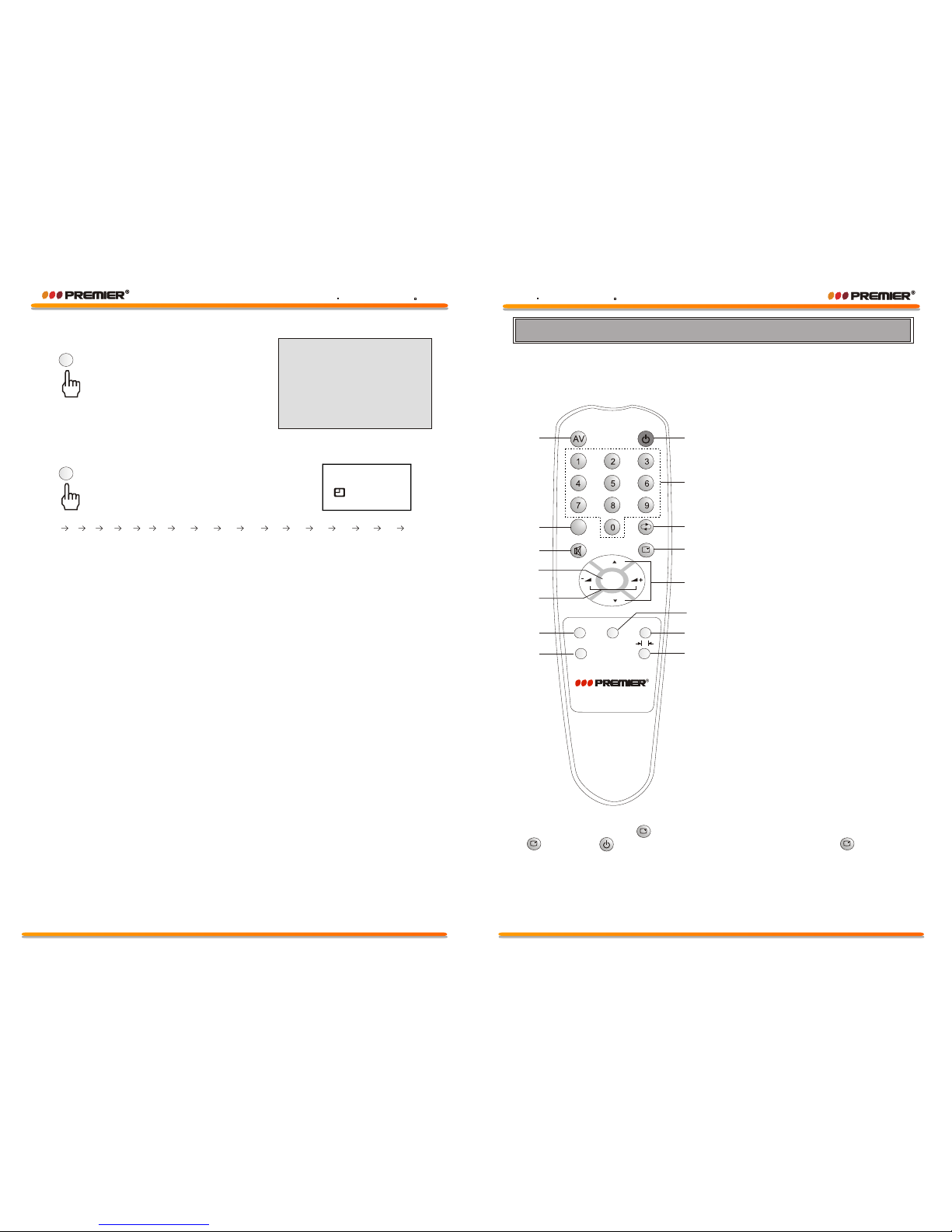
Remote Controller
2. CCD
3. Mute
8. Power/Standby
9. Direct Access Numeric Keys
10. Quick View
11. Screen Display
12. Program Up/Down
14. Sleep
15. Picture Effect
1. TV/AV Select
4. Menu
5. Sound Volume Up/Down
13. V-CHIP (OPTION)
7. Calendar
6. Scan
P
MENU
SCAN
SLEEPV-CHIP
CALE
P
CCD
P
1
2
3
4
5
6
7
8
9
10
11
12
13
14
15
Don't mix different battery types. Take out of the batteries from the remote
for long time of no use.
CHILD LOCK FUNCTION (OPTION)
Pressing and holding ( )key for more than 5 seconds, all the keys except
( ) key and ( ) key are locked, then pressing and holding ( ) key for
more than 5 seconds, all the keys the face panel are unlocked.
WWW PREMIERMUNDO COMWWW PREMIERMUNDO COM
Page 6
Page 9
WWW PREMIERMUNDO COMWWW PREMIERMUNDO COM
CTV-3409SR
Page 10
MENU
SCAN
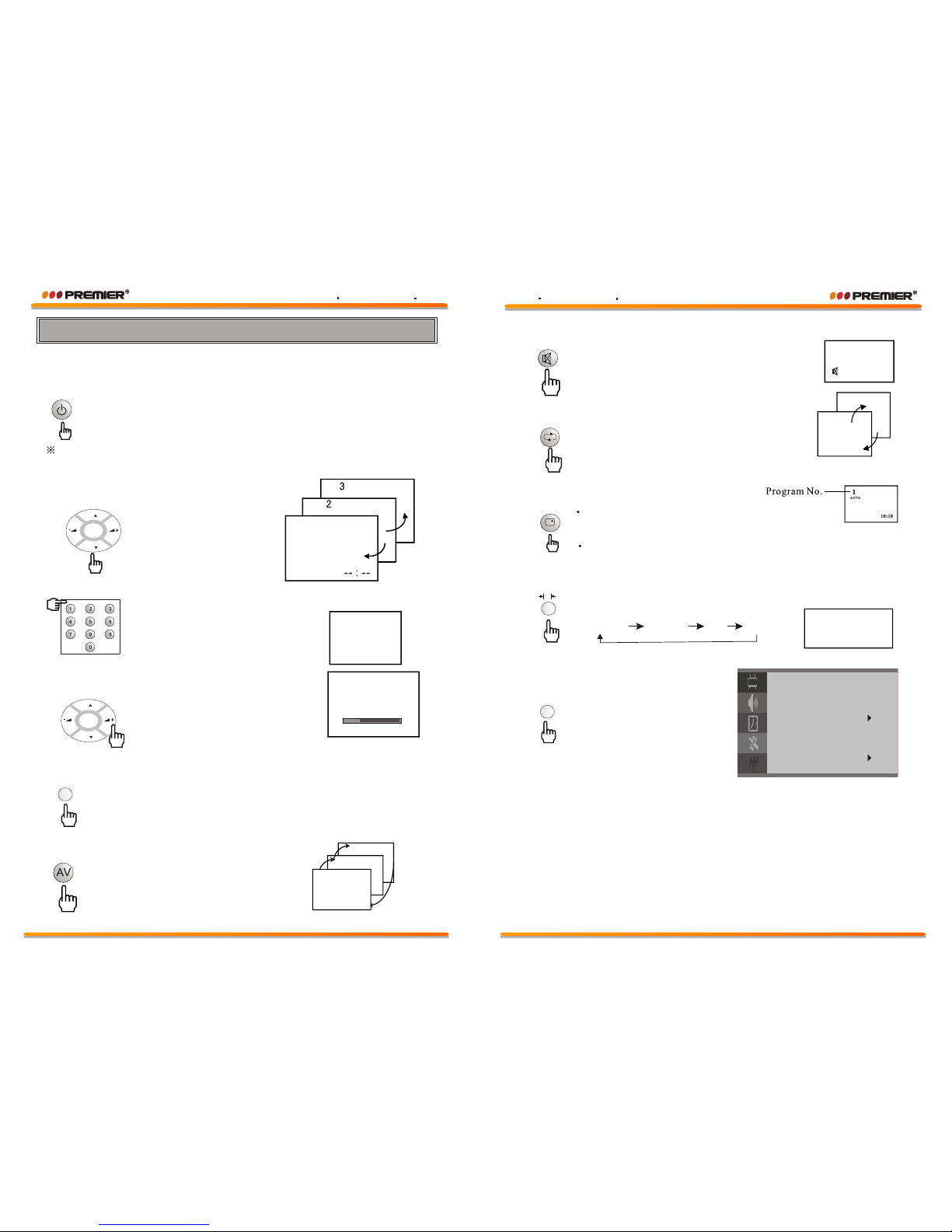
1) Power/Stand-By ON/OFF
With Mains status On, you can also turn off using Remote Control
Hand Unit. This status is called Stand-By mode. In this mode, You
can also turn on the TV by pressing the Program Up/Down keys on
the front controls.
The TV has an Automatic Power OFF function. With no signal condition, the
TV will automatically turn off after 10 minutes.
2) Program Up/Down
Press [P+] key, to change
Program Up.
Press [P-] key, to change
Program Down.
1
3) Direct Access Tuning
Using the numeric keys on
Remote Control Hand Unit,
Programs can be selected
directly.
2
4) Volume Control
Press [V+] key, for Volume Up.
Press [V- ] key, for Volume Down.
16
5) SCAN
By Pressing this key, Programs will change automatically.
Each program will be previewed for 2 seconds, and stop at
original program. Skipped programs will not be previewed.
6) TV/AV Selection
You can select your video
source by the [ AV] key.
AV2
AV1
3
Volume
MENU
V-CHIP
7) MUTE
By pressing this key, sound output will
be muted.
Press MUTE key again, or Volume Up,
and sound Volume will return.
8) Quick View
.
Program will quick back to the
previous program being watched
10
2
10) PICTURE EFFECT
By repeatedly pressing this key, picture effects
will change as follows:
11) V-CHIP
9) DISPLAY
TV / AV MODE
This key will call the program No On Screen Display.
Press again, to remove the program No On Screen Display.
Menu MODE
Pressing the DISPLAY key, current menu will exit directly.
By pressing this key, the
parental menu appears.
Standard Dynamic User Mild
Standard
Parental
Lock Code - - - -
Lock Off
PG Rating
MPAA Rating: Off
Can. english: Off
Can. French: Off
Change code
P
Control your TV
WWW PREMIERMUNDO COMWWW PREMIERMUNDO COM
Page 8
Page 7
WWW PREMIERMUNDO COMWWW PREMIERMUNDO COM
P
P
P
P
.
.
 Loading...