

Page 1
9 Inch Desk Fan
Order ref: 450.002UK
User Manual
A stylish desk fan with 2 speed settings, oscillating head and tilt control. Ideal for home and work, it is quiet yet powerful
and offers flexible directional adjustment for focused coverage. The steel mesh guard is easy to detach and replace,
allowing for easy cleaning of the interior and fan blades as required.
Specification:
Cable length 1.25m
Power output 22W
Blade diameter 220mm
Mains power 220-240V
Dimensions 370 x 270 x 210mm (H x W x D)
Weight 1.2 kg
Features:
Quiet yet powerful 22W motor
2 speed settings
75° oscillation
15° tilt adjustment
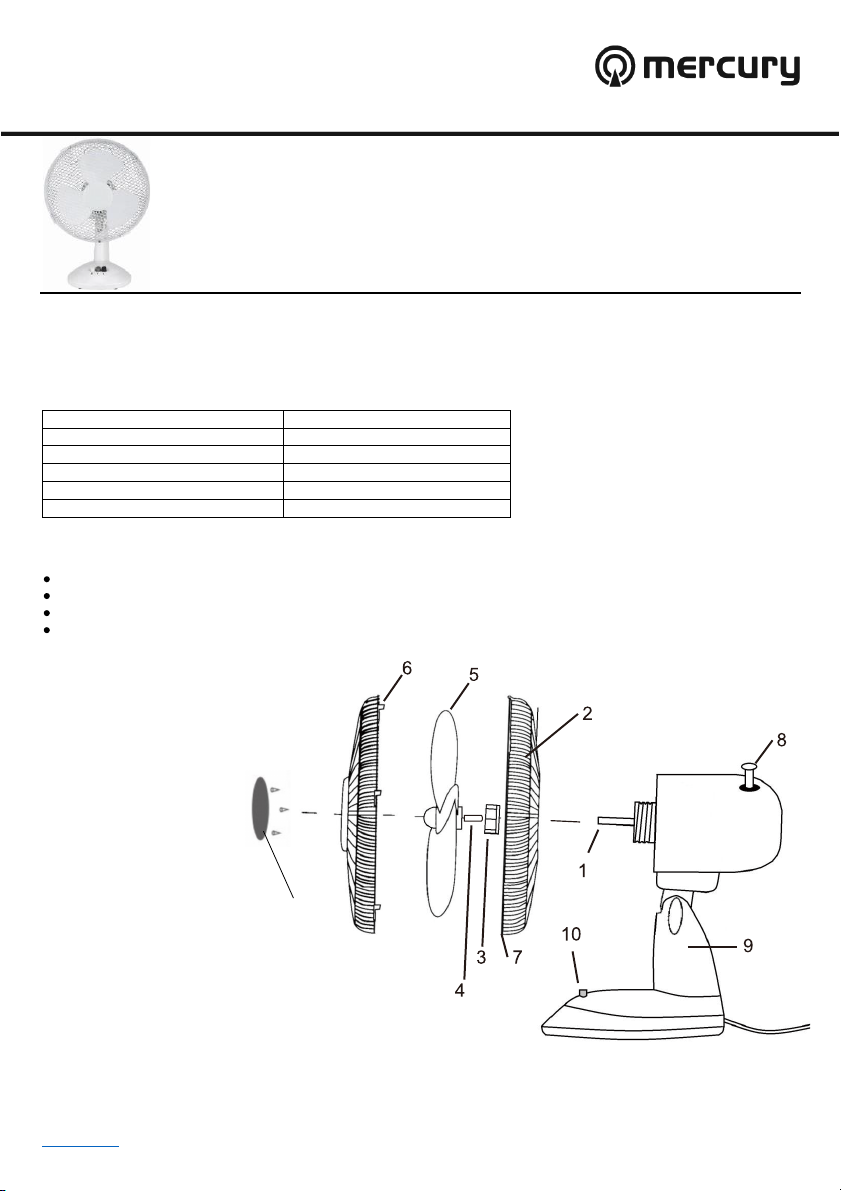
Assembly Diagram:
1. Motor shaft
2. Rear grille
3. Grille nut
4. Plastic packing sleeve
5. Fan blade
Front grille
6.
Locking nut and screw
7.
Oscillation knob
8.
Main body
9.
Fan button
10.
decorative ring
www.avsl.com 450.002UK User Manual
Page 2

Assembling the fan blade and grille:
1. Remove and discard the plastic packing sleeve (4), required for transportation purposes only.
2. Unscrew the grille nut (3).
3. Set the rear grille (2) so the handle is at the top and the alignment pin on the main body (9) is correctly positioned
in the vertical grille slot.
4. Tighten the grille nut (3) by hand to secure the grille onto the main body (9) .
5. Slide the fan blade (5) onto the motor shaft (1), ensuring it locks securely onto the retaining pins.
6.
Use 3 screws to install the decorative ring in the middle of front grill.
7. Open the locking clips on the edge of the front grille (6) .
8. Remove the small locking nut and screw (7), mounted on the rear grille (2), then attach the front grille (6) to the
rear grille (2) using the top hook.
9. Align the screw holes at the bottom of both grilles and tighten the small locking nut and screw (7) .
10. Close the locking clips on either side of the grilles.
Operation:
1. Set the fan on a dry, level and secure surface, allowing sufficient space on either side for the oscillation movement.
2. Connect the fan to the mains supply using the 1.25 m power lead and plug.
3. To operate the fan, press button 1 or 2 to select low or high speed (10).
4. To stop the fan, press button 0.
5. To make the fan oscillate, press down the oscillation knob (8) on the top of the main body (9) .
6. To stop the oscillation in any position, pull up on the oscillation knob (8) .
7. To adjust the tilt of the fan, simply move the head unit up or down, selecting the desired gradient. The head will
securely ‘click’ into position.
Cleaning the fan blades:
To clean the fan blades and keep them free from dust and dirt, disconnect the fan from the mains supply and remove the
front grille. Clean the blades and grille using a soft, damp cloth, rinsed in soapy water. Take care to not press too hard or
allow moisture to get into the fan motor.
Warnings:
• For reasons of electrical safety, this device must never be immersed in water, exposed to damp conditions or
excessive force.
• Do not use this device if you find that it is damaged in any way.
• Do not attempt to repair this device or take apart under any circumstances, as this will invalidate your warranty.
• Never cover the fan or place anything on the grilles, as this may result in overheating or fire .
• Never allow foreign objects to be pushed into the motor, or fan blades as this may result in fire, injury or damage to
the fan.
This product is classed as Electrical or Electronic equipment and should not be disposed with other household or commercial waste at the end
www.avsl.com 450.002UK User Manual
of its useful life. The goods must be disposed of according to your local council guidelines.
Errors and omissions excepted.
Copyright© 2018. AVSL Group Ltd.
 Loading...