

Page 1

INFUSION PUMP
Quick Start Guide
2018
Page 2
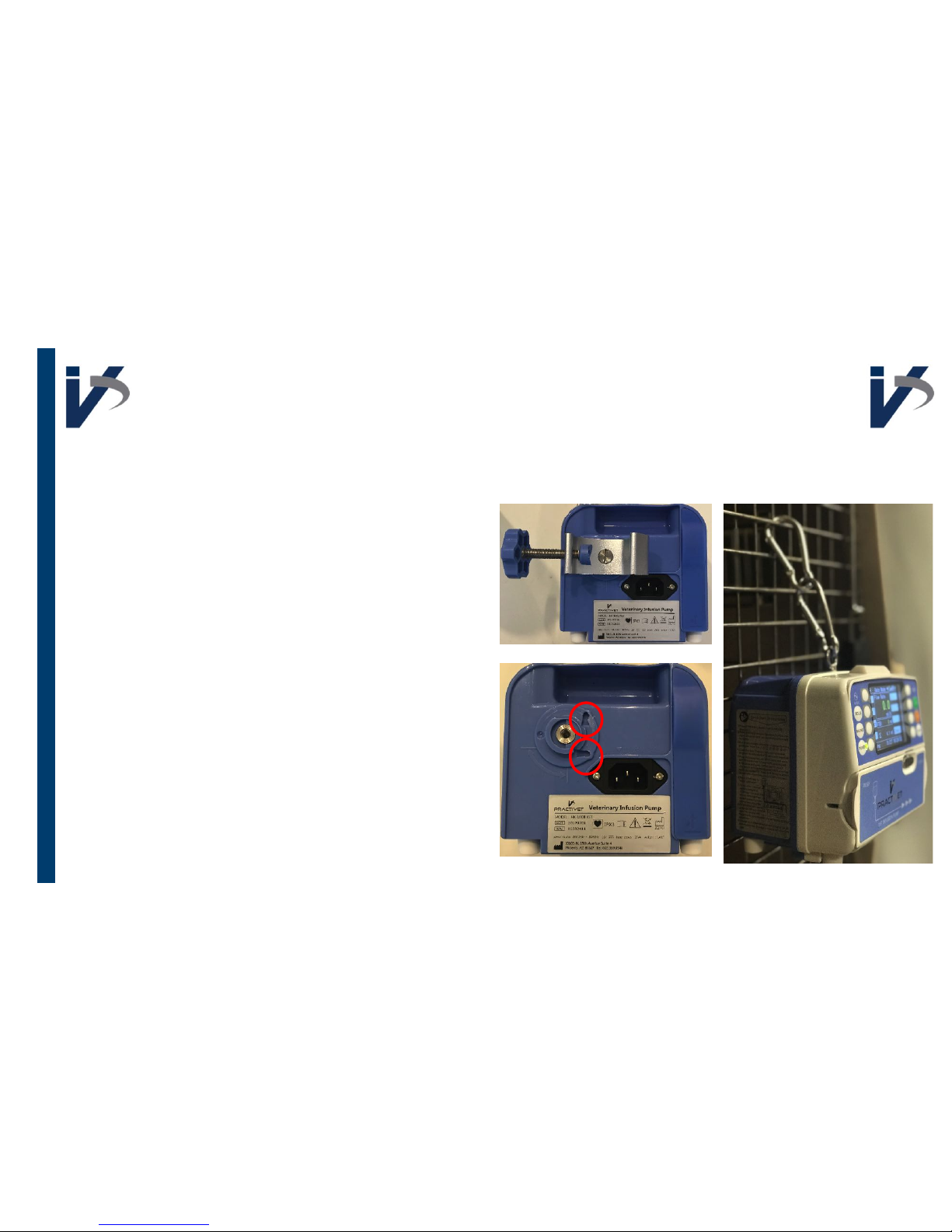
Removing Pole Clamp
Twist knob to retract clamp
Use a flat head screwdriver to loosen
pole clamp until you can remove clamp
from pump
Use carabiner clips to secure pump on
cage
You can secure the pole clamp onto
the pump vertically or horizontally
using the groves on the pump body
Page 3

To silence any alarm press
SILENCE
key on front of pump
Page 4
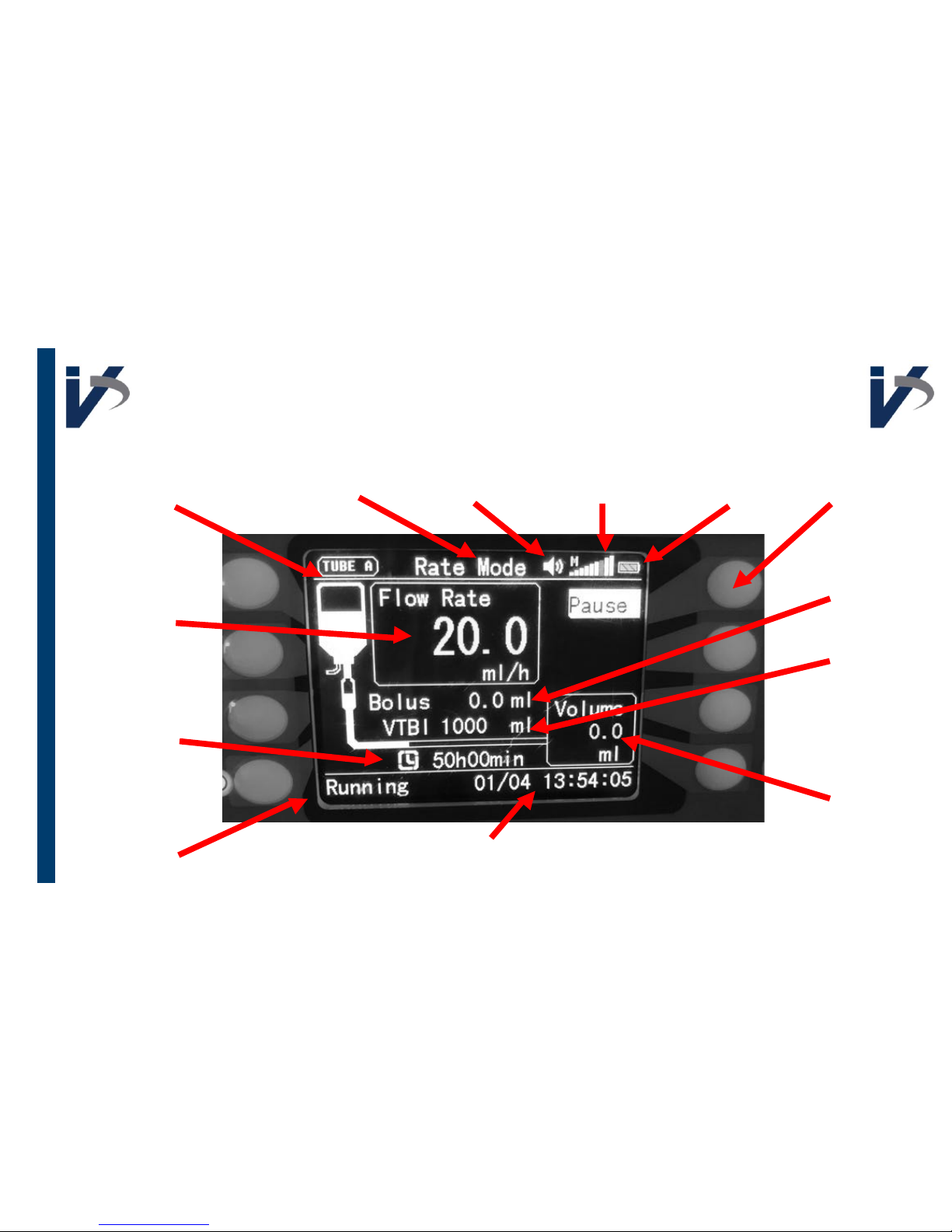
Running Interface
Tubing
Being Used
Flow Rate
Duration of
Infusion
Status
Infusion Mode Volume Line Pressure Battery
Time & Date
Pause Button
Bolus Volume
Administered
Volume to be
Infused
Volume
Administered
Page 5
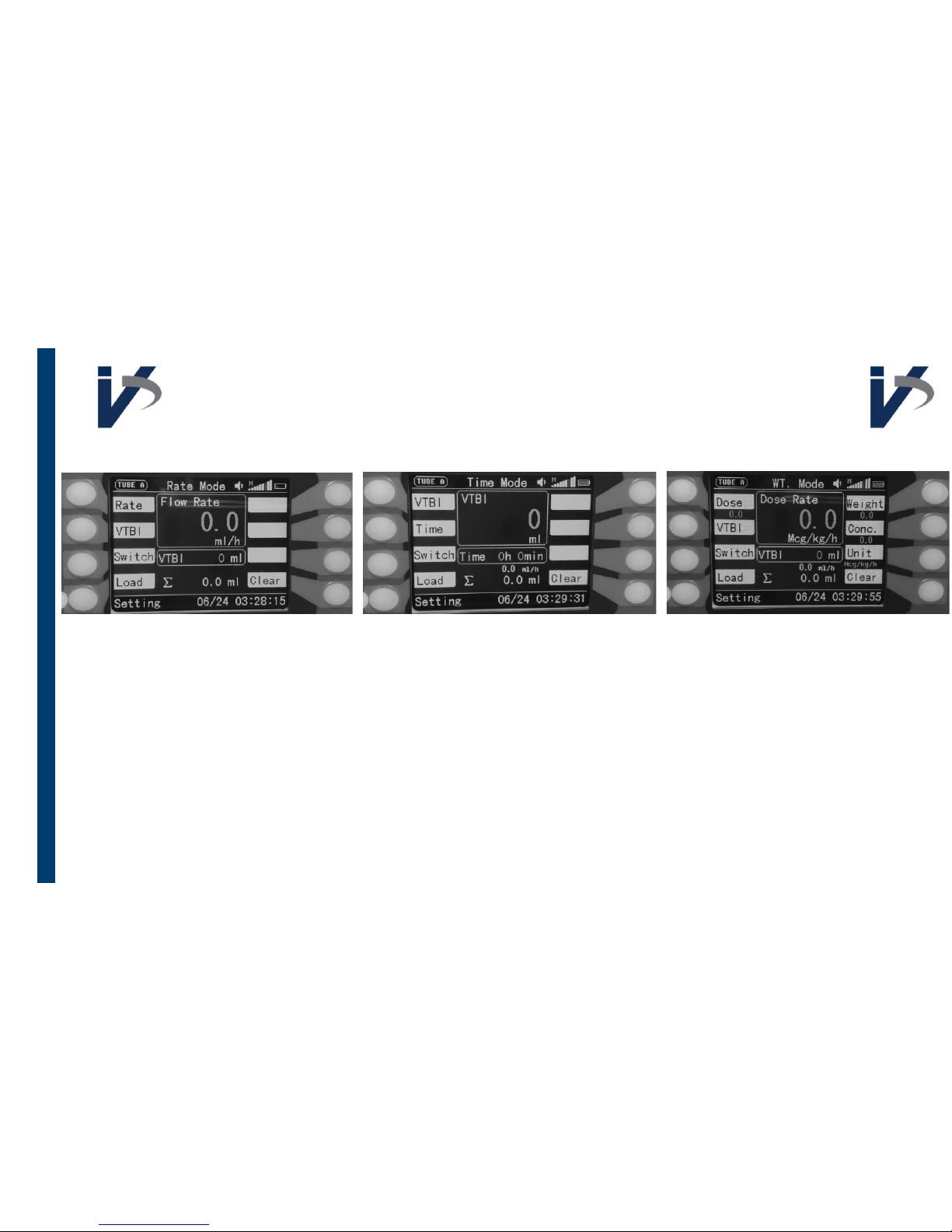
Infusion Modes
Input Rate & Volume To Be
Infused
Input Volume To Be Infused
& Infusion Duration
Input Unit, Dose, VTBI &
Patient Weight
Push ’
Load
’ key to load
previous infusion settings
Push ’
Clear
’ key to clear
amount infused
Push ’
Switch
’ key to
switch infusion modes
Page 6
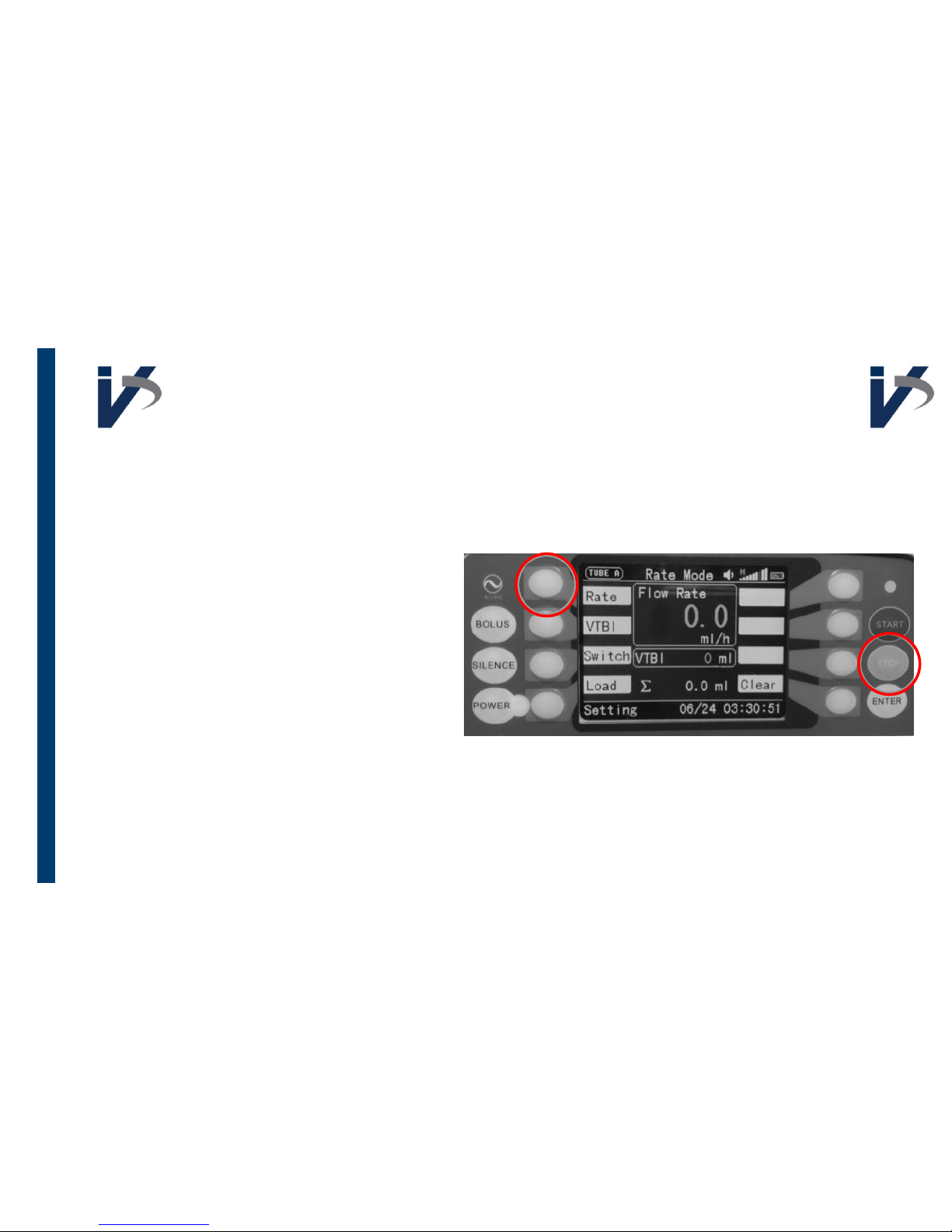
Getting to Additional
Settings & Features
To go from the
infusion interface
to the
settings interface
press & hold STOP
button, and press the top left white
key at the same time
To get back to the
infusion interface
while in the
settings interface
press
the same 2 keys
Page 7
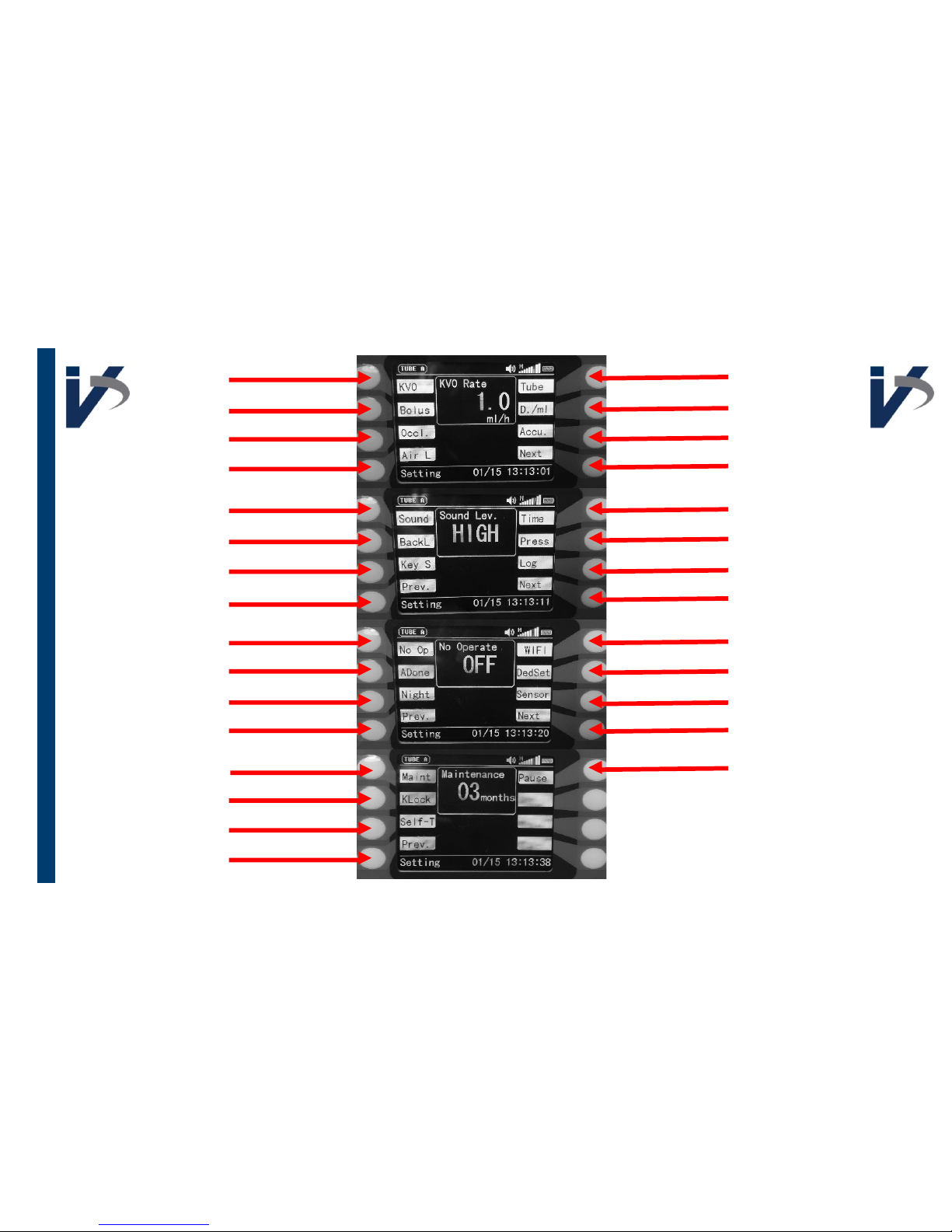
Keep Vein Open
Bolus
Occlusion
Air in Line
Volume
Backlight
Key Stroke Sound
Previous
No Operation
Almost Done
Night Mode
Previous
Maintenance
Key Pad Lock
Self Test
Previous
Tube Type
Drops/mL*
Accuracy (Calibration)
Next
Time & Date
Pressure*
Event Log
Next
Wi-Fi*
Dedicated Set*
Drop Sensor*
Next
Pause
* Indicates a setting that is not
applicable at this time
Page 8
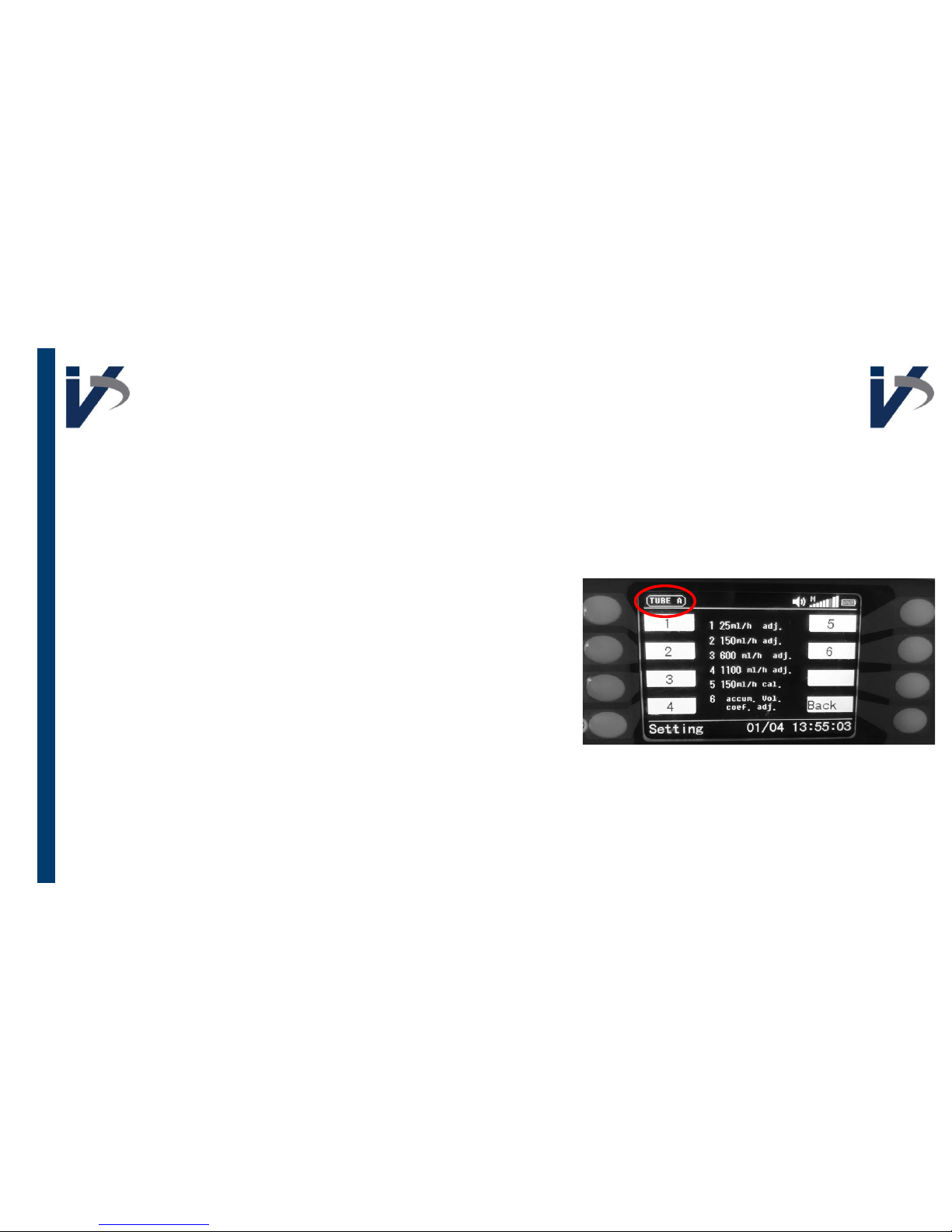
Tube, Accu, & Calibration
Choose ‘
Tube
’ you want to calibrate in the ’Tube’ menu (A-J)
Up to 10 calibrations can be stored
Before each infusion, be sure the correct ’
Tube
’ appears in
the top left corner so that the correct infusion settings are
used
When calibrating we strongly recommend using a gram
scale that measure in 0.1g increments or a graduated
cylinder when fine tuning motor speed. If you do not have
either of those tools, infuse into a container and draw up
fluid infused with a syringe, or connect a female/female
transfer device to the male end of your admin set and a
syringe.
The ‘Accu’ Screen
Page 9
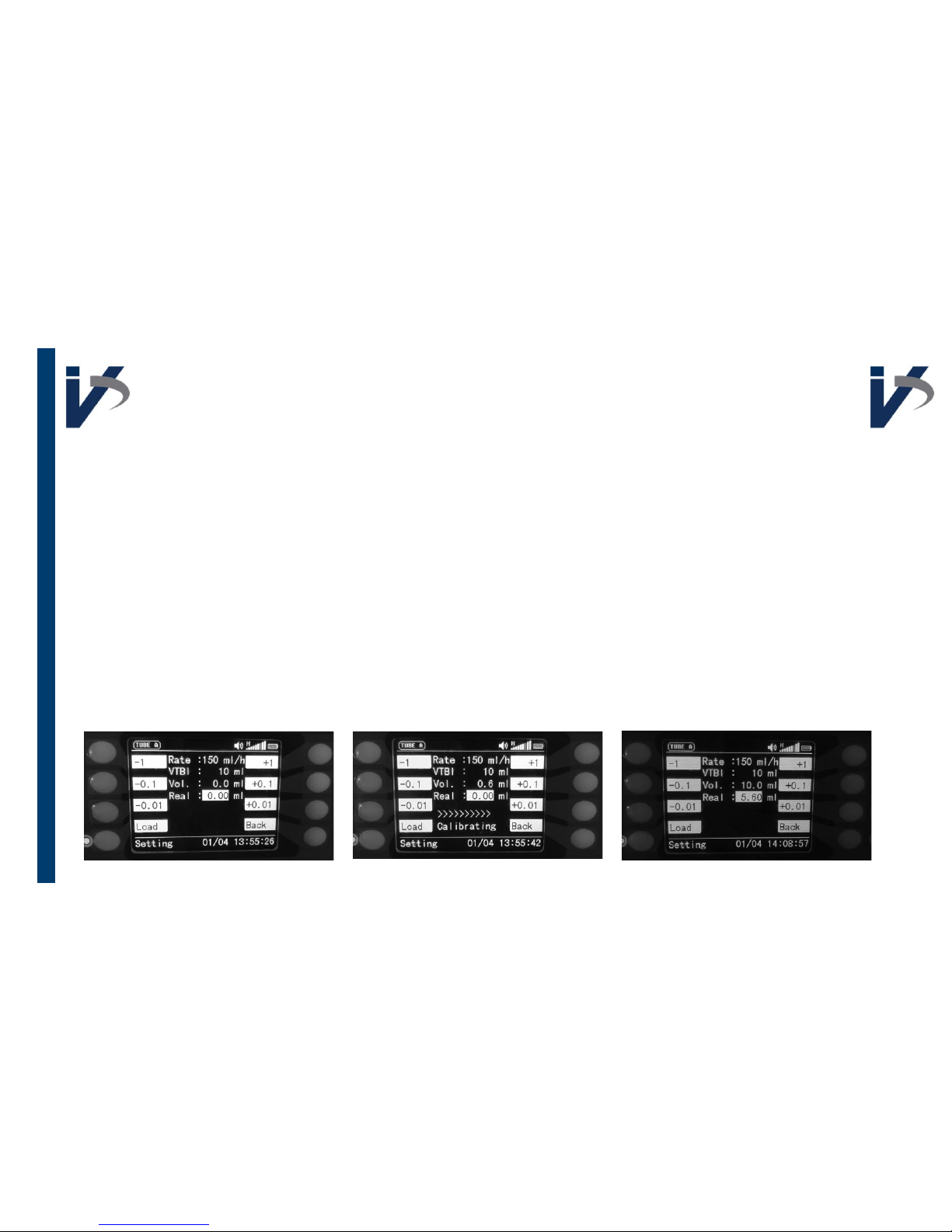
Calibration Process
1. Set up a way to measure volume infused in 0.1
mL increments (empty container & draw up
fluid with syringe, gram scale, etc.)
2. In the settings interface, go to ‘ACCU’
3. Press OPTION 5
4. Prime administration set and feed primed line
through pump
5. Put male end in measuring container
6. Press START
7. Wait until calibration is finished (Vol 10mL)
8. Input amount infused next to ‘Real’ (This value
should be between 5 & 7)
9. Press ENTER to save this value
Option 1, 2, 3, 4: ml/h Adj
Fine Tu n e Based On Rate
1. Run a 10ml infusion at each rate: 25, 150, 600,
& 1100 ml/h
2. Input percent accuracy for each
• If output was 9.2 ml you would input -8%, if it
was 10.3 ml, you would input 3%
• Keep in mind this is OPPOSITE of what you
would think!
Option 6: Accum Vol Coef Adj
Please only make adjustments to Option 6 at the
direction of a PractiVet Product Specialist
Page 10
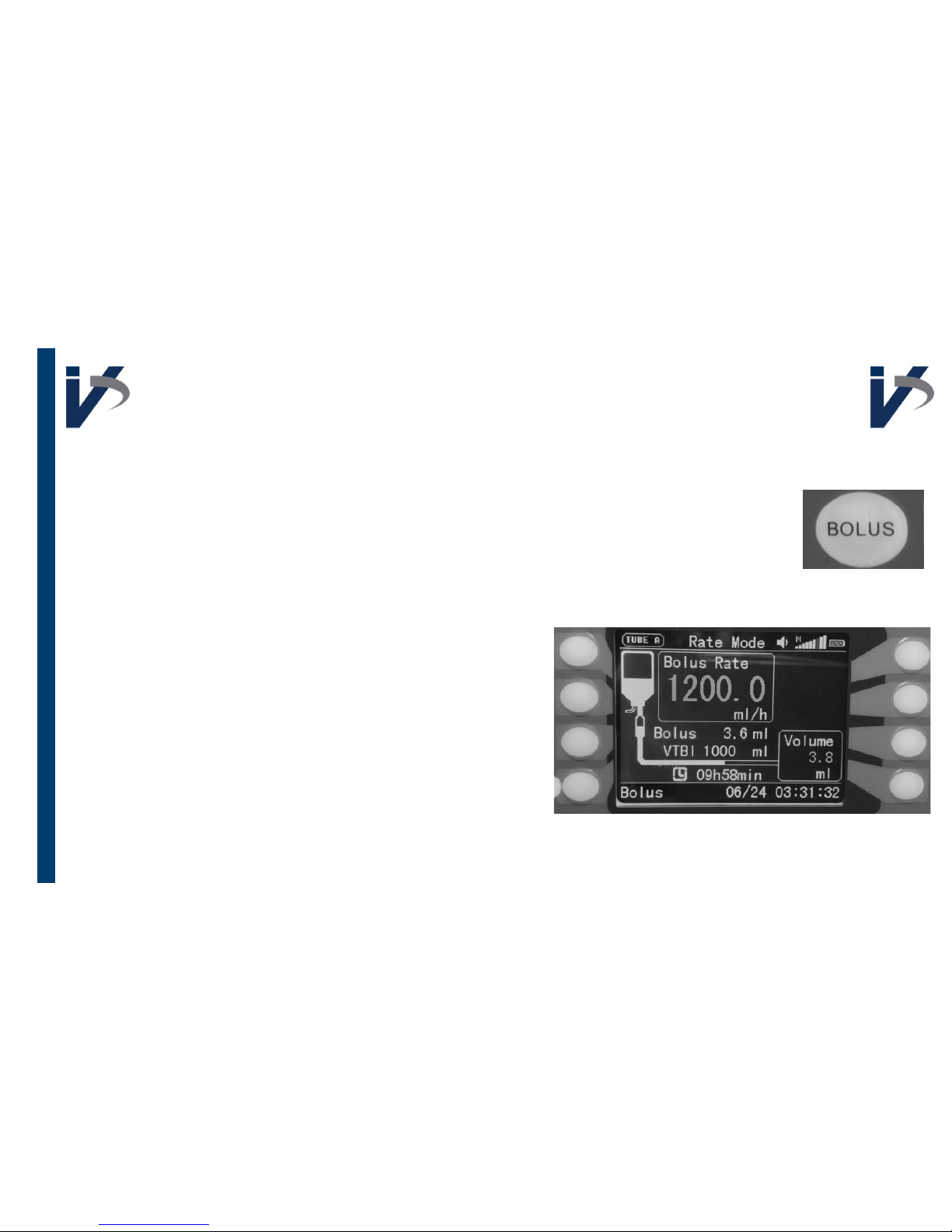
Bolus Rate
Bolus Key
When the BOLUS key is pressed when infusion in NOT running, the pump
will run at 600 ml/hr; this can be used to prime administration set or
clear an air bubble
Programming an Intermittent Bolus
1. Go to settings interface
2. Program desired bolus rate & volume
3. Press ENTER to save these values
4. Go to infusion interface
5. Program desired maintenance rate & total
volume to be infused
6. Press START to start infusion
7. Press the BOLUS key to start administering
programmed bolus
8. Once bolus is complete, the pump will
automatically revert to maintenance rate
Page 11
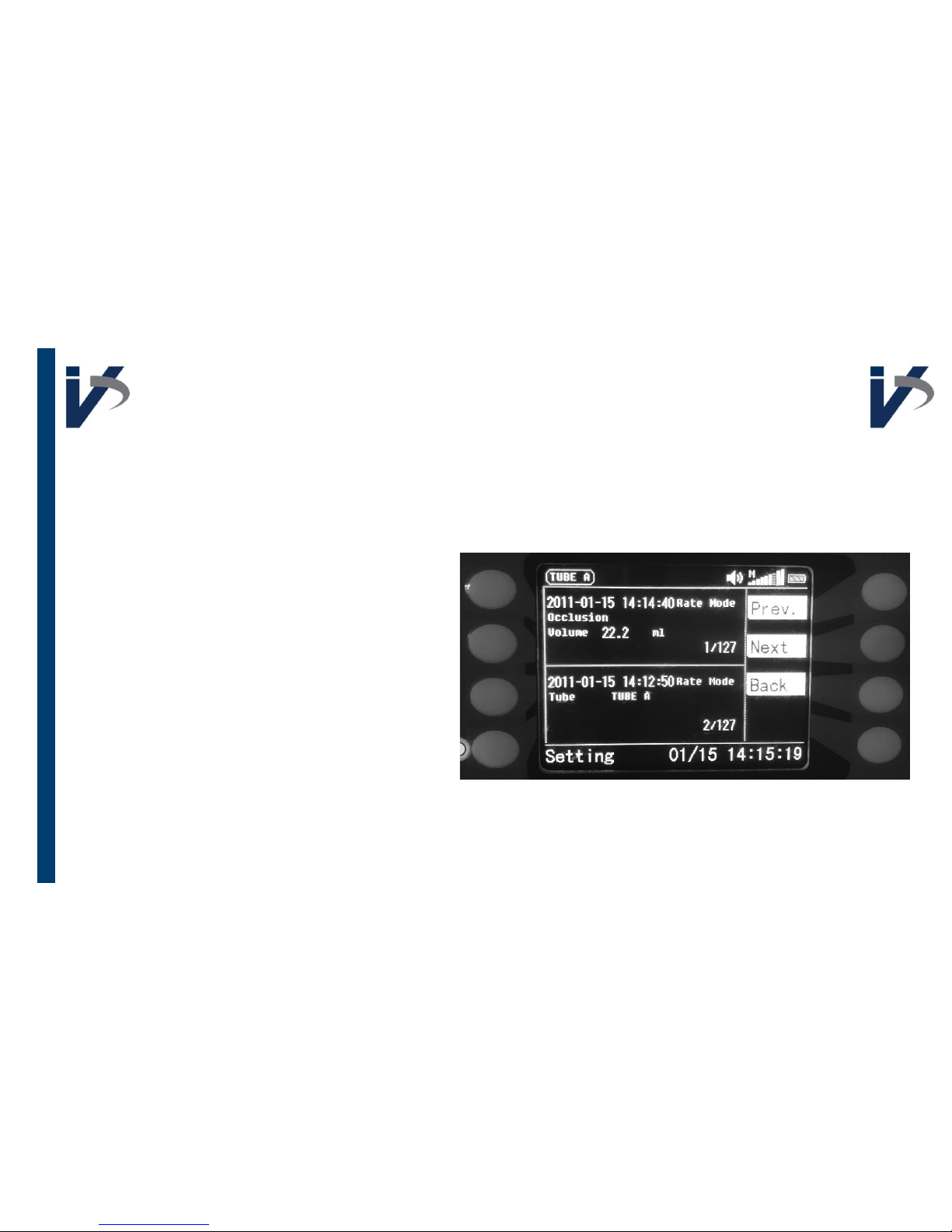
Infusion Event Log
Be sure the time and date is
accurate on your infusion
pump to best utilize this
feature
Once in ‘Log’ menu, select
‘View Log’
Up to 1500 infusion events
are stored including alarms,
calibration, and infusions
Page 12
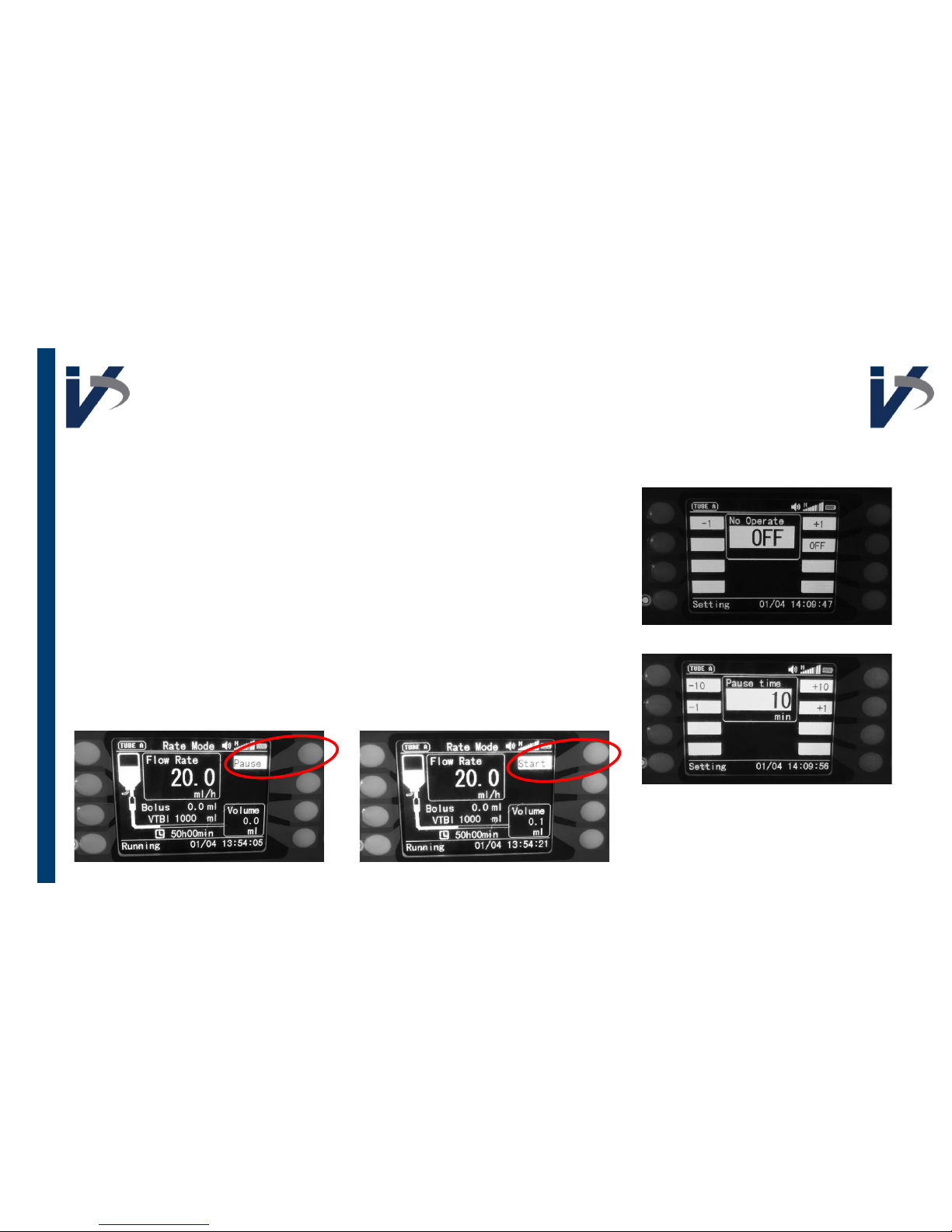
Setting Up Pause & Idle Function
Go into ‘
No Op
’ menu in the settings interface and select
the amount of time you would like to allow before alarm
sounds with no activity when pump is on with no activity
Go into ‘
Pause
’ menu in the settings interface and select
the amount of time you would like to allow before alarm
sounds with no activity when you
pause your infusion
When infusion is paused, the running interface screen
will stay on pump screen
 Loading...