

Page 1
Document Number: RD-WI-004
NO.18P3N8503AF25T1001
Block HD Camera Module Technical
Handbook
P3N8503A-F25T[V1001]
P3N8503A-F25T User Manual
@Copyright POWERVIEW 2014
1
Page 2

Document Number: RD-WI-004
Document Modification Record
Document Version
Publish
Date
Updated Content
Department
Author
P3N8503A-F25T-V10
01
October 16,
2018
First Draft
R&D
Department
Yang Yang
NO. 18P3N8503AF25T1001
2
Page 3

Document Number: RD-WI-004
NO. 18P3N8503AF25T1001
Table of Content
Table of Content .......................................................................................... 3
Product Features.......................................................................................... 4
Specifications .............................................................................................. 5
Dimensional Drawing ................................................................................. 8
Output Interface Description ...................................................................... 8
Basic Functions ........................................................................................... 9
List of Commands: Function Command List ..................................... 13
Inquiry Command List ........................................................................ 19
Zoom Ratio and Zoom Position, Fov, Focal Range (for reference) ... 22
Exposure Control ................................................................................ 22
Register Setting ................................................................................... 23
OSD Menu .......................................................................................... 24
Video Output Sequence No....................................................................... 27
1080p_25Hz Output Sequence ........................................................... 27
1080p_30Hz Output Sequence ........................................................... 27
300W_25Hz Output Sequence ........................................................... 28
300W_30Hz Output Sequence ........................................................... 28
3
Page 4

Document Number: RD-WI-004
NO. 18P3N8503AF25T1001
Product Features
• Outstanding 3M (2048 x 1536) high definition image quality
• 1/1.8" CMOS sensor, 3 megapixels, high image quality and high sensibility
• Powerful zoom capability - 3x optical zoom, excellent automatic focus, F1.4-F1.6 aperture
and 15.0-50.0mm focus range
• Video Output Pixels: 2048(H) ×1536(V)
• Video Format 3Mp/25,3Mp/30,1080p/25,1080p/30
• Day/Night Function (On, Off, Auto)
• Multiple white balances
• Powerful low noise effect and outstanding noise reduction
• Supports super loLux: 0.05Lux@F1.4 (color), 0.01Lux@F1.4 (black and white), 0Lux(IR)
• Signal-to-noise ratio ≥50dB
• Picture effect (e-flip, black & white, NET.ART, mirror image and picture gamma)
• Electronic shutter
• Supports OSD features
• Support privacy masking
• Support title display 11 rows, 20 columns
• 30-pin KEL coaxial cable interface (LVDS output, compatible with Sony FCB-EH6300) or
36-pin flexible flat cable (FFC) interface (BT1120 digital video output, compatible with
HITACHI DI–SC110)
• Support SONY VISCA protocol.
4
Page 5
Document Number: RD-WI-004
Specifications
Model
Model
P3N8503A-F25T
Name
3X 3MP 1/1.8" CMOS
Global Shutter ICR Day Night Block HD Camera
Module
CMOS Image Sensor
Image Dimension
8.9mm (Type 1/1.8)
Effective Pixels
3.19MP
Progressive Scan
Supported
Output Pixels /
Frame Rate
2048 (H) x 1536(V)/25fps
2048 (H) x 1536(V)/30fps
1920(H) x 1080(V)/25fps
1920(H) x 1080(V)/30fps
Pixel Curer
Supported
Lens
Optical Zoom
3X
Focal Distance
15.0~50.0mm±5%
FOV
H:WIDE 27.6º±5% TELE 8.1º±5%
V:WIDE 20.7º±5% TELE 6.0º±5%
F No.
F1.4~Close±5%
Zoom
Optical Zoom
Supported
Direct Preset
Position
Supported
Indirect Preset
Position
Supported
Focus
Auto
Supported
Manual
Supported
Infrared / Visible
Light Switching
Supported
IR-CUT
Auto
Supported
NO. 18P3N8503AF25T1001
5
Page 6
Document Number: RD-WI-004
NO. 18P3N8503AF25T1001
Manual (On/Off)
Supported
AGC Control
Auto
Supported
Manual
Supported
Image
Flip Vertical
Supported
Image Freezing
Supported
Flip Horizontal
Supported
Black / Color /
NEG.ARG
Supported
Noise Reduction
Supported
Gamma
Supported
Privacy Masking
Supported
Aperture
Manual
Supported
Auto
Supported
White Balance
Manual
Supported
Auto
Supported
RGain Adjusting
Supported
BGain Adjusting
Supported
Exposure
Manual
Supported
Auto
Supported
Aperture Priority
Supported
Shutter Priority
Supported
Sharpness
Manual
Supported
Auto
Supported
OSD
OSD Display
Supported
Title Display
Supported
Others
Power Supply
DC12V ±10%
Current (Normal
Operation @ 12V)
800mA
6
Page 7
Document Number: RD-WI-004
NO. 18P3N8503AF25T1001
Current (Zoom
Focus Motor Runs
@ 12V)
930mA
Power Consumption
Static 9.6W, Dynamic 11.16W
Output Video
Format
3Mp/25,3Mp/30,1080p/25,1080p/30
Control interface of
the integrated
module assembly
baud rate: 9.6Kb/s, 19.2 Kb/s, 38.4 Kb/s, 115.2
Kb/s, stop bit: 1/2 bit optional
Dimensions
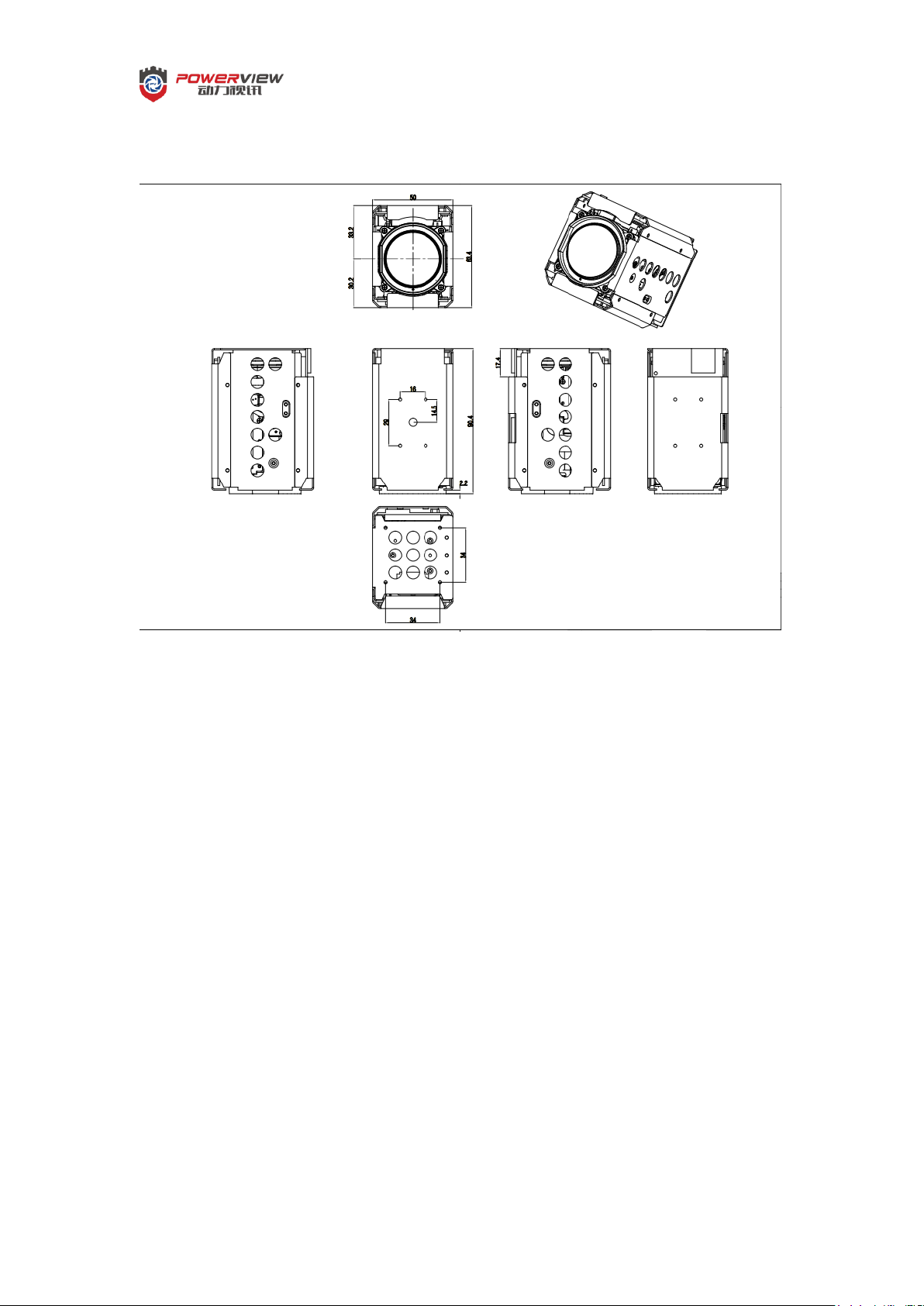
90.4*50*63.4mm
Number of
Connectors
3 (36-Pin FPC / 30-Pin Coaxial, 2Pin Strobe out
LED signal)
Operating
Temperature
-10°C to 60°C
Operating Humidity
Lower than 90%
Weight
Approx. 300g
Synchronizing
System
Internal / External Synchronizing
Minimum
Illumination
Color: 0.05Lux @ (F1.4, AGC NO)
Black and White: 0.01Lux @ (F1.4, AGC NO)
0Lux with IR
7
Page 8
Document Number: RD-WI-004
Dimensional Drawing
NO. 18P3N8503AF25T1001
8
Page 9
Document Number: RD-WI-004
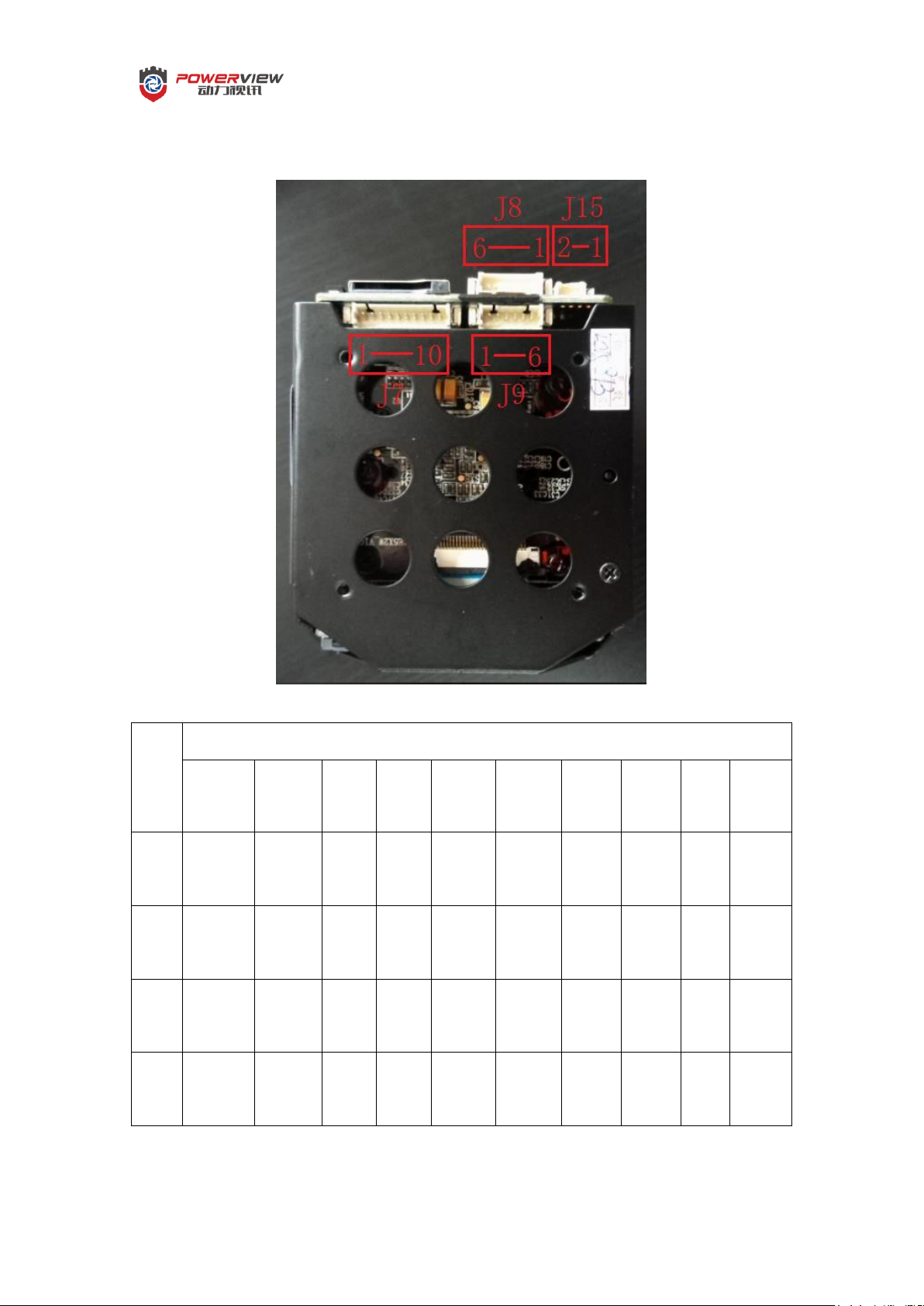
Output Interface Description
Pin
Nam
e
Pin NO.
1 2 3 4 5 6 7 8 9
10
J7
Lens
TXD
Lens
RXD
Eth
RD+
Eth
RD-
Eth
TD+
Eth
TD-
Pelco
D
TXD
Pelco
D
RXD
GND 12VD
C
J9
GND
IR_LE
D
IN
Alar
m
IN
CVB
S
OUT
AUDI
O
OUT
AUDI
O
IN
J8
Alarm
OUTR1
Alarm
OUTL
1
GND
USB
DM
USB
DP
3.3VD
C
J15
AC_MI
C
IN
GND
NO. 18P3N8503AF25T1001
9
Page 10

Document Number: RD-WI-004
NO. 18P3N8503AF25T1001
Basic Functions
VISCA Command is the Basis for Controlling the Integrated Module
1. Command Sequence Diagram
2. Zoom
Optical Zoom:
A. 1X to 3X automatic optical zoom, with the picture staying clear during zooming;
B. The optical zoom speed registration range is 0-7 grades, with grade 4 by default;
C. The zoom time from min to max is approx. 2 seconds;
3. Focus
Focus modes are listed as below, which can be switched via VISCA command:
A. Auto Mode: adjusting focal point automatically;
B. Manual Mode: adjustment of the focal distance direction and speed;
C. Single Trigger Mode: in Manual Focus Mode, one auto focusing could be realized and
focusing stops upon completion;
D. Zoom Trigger Mode: one auto focusing is triggered upon zooming and focusing stops upon
completion;
4. White Balance
White Balance Modes are listed as below, which can be switched via VISCA Command:
A. Auto White Balance: it automatically calculates the value of white balance color temperature
information of the entire image and adjusts the image to the right color temperature at
different light sources, with the adjustable range of 2700K-7500K; factory default;
B. Indoor Mode: 5500K in Indoor Mode;
C. Outdoor Mode: 6500K in Outdoor Mode;
10
Page 11

Document Number: RD-WI-004
NO. 18P3N8503AF25T1001
D. Manual White Balance: in Manual White Balance Mode, R and B values can be adjusted
manually, with the adjustable range 0-255;
5. Exposure
Exposure Modes are listed as below and can be switched via VISCA Command:
A. Manual Exposure: manually adjusting the aperture, shutter and gain parameters;
B. Auto Mode: automatic adjustment to the exposure parameters to gain proper image
brightness; factory default;
C. Aperture Optimizing Mode: the aperture can be adjusted manually, while gain and exposure
time are adjusted automatically;
D. Exposure Time Priority: the Exposure Time can be adjusted manually, while aperture and
gain are adjusted automatically;
6. Sharpness
The Sharpness function can enhance the edges of the objects in the image within the range of 0-15
grades;
Adjustments to the image sharpen grade can be made via VISCA Protocol, grade 8 by default;
7. Noise Reduction
Noise Reduction to effectively remove the noises in the image, with 0-5 grades available;
Adjustments to the noise reduction grade can be made via VISCA Protocol; grade 2 by default;
8. Gamma
Gamma is used to change the input and output of image to get a better image effect;
With 0-4 grades, grade 0 is default;
9. Saturation Adjustment
Adjusting the saturation grades of the image;
With 0-15 grades, grade 8 is default;
10. ICR Modes
ICR Modes have both Manual Mode and Auto Mode available, which can be switched via VISCA
Command;
A. Manual Mode: manually set the ICR Filter as Infrared or Normal Light; factory default;
B. Auto Mode: in Auto Exposure Mode, the Module will automatically switch the ICR Filter to
Infrared or Normal Light;
11
Page 12

Document Number: RD-WI-004
NO. 18P3N8503AF25T1001
1
Focus Mode
11
Aperture
21
ICR Mode
2
AF Mode
12
Shutter
22
Auto ICR Enabling
3
Digital Zoom Mode
13
Brightness
23
Image Color / Black and
White
4
Digital Zoom
Enabling
14
Spot Ae Pos
24
OSD Display
5
White Balance
Mode
15
Sharpen Grade
25
ExpComp Grade
6
B Gain
16
Saturation Grade
26
Shutter Pos Limit
7
R Gain
17
Noise Reduction
Grade
27
Gain Pos Limit
8
Gamma Level
18
Flip State
28
Iris Pos Limit
9
Exposure Mode
19
Mirroring State
29
AE Threshold Value Level
10
Gain
20
Freezing State
30
Point Source Restrain Level
11. Title Display
Setting Title Display via VISCA Protocol;
A. Supports display of characters of 11 Rows, 20 Columns;
B. Supports display of characters in different colors;
C. Supports uploading font file to display various types of characters;
12. Initialization, User’s Customized Parameter Saving
Camera Reset, User’s Customized Parameter Saving and Loading work via VISCA Protocol;
Parameters include:
13. Video Output Format
Video Output Format: Sony 1080p/25fps, Sony 1080p/30fps, 3M/25fps, 3M/30fps;
14. Flip
Mirror Left-Right and Flip Top-Bottom work via VISCA Protocol;
15. Register Setting
Communication Band Rate, Output format and Internal / External Synchronization can be set via
VISCA Protocol;
Please refer to List of Commands: CAM_RegisterValue
Annex: Register Setting, Monitoring Mode.
12
Page 13

Document Number: RD-WI-004
NO. 18P3N8503AF25T1001
Command Set
Command
Command Packet
Comments
Support
Network Change
Broadcast
88 30 0x FF
●
AddressSet
Broadcast
88 30 01 FF
Address setting
●
IF_Clear
Broadcast
88 01 00 01 FF
I/F Clear
●
CommandCancel
-
8x 2p FF
p: Socket No. (=1 or 2)
●
CAM_Zoom
Stop
8x 01 04 07 00 FF
●
Tele(Standard)
8x 01 04 07 02 FF
●
Wide(standard)
8x 01 04 07 03 FF
●
Tele(Variable)
8x 01 04 07 2p FF
p=0 (low) to 7 (High)
●
Wide(Variable)
8x 01 04 07 3p FF
●
Direct
8x 01 04 47 0p 0q 0r 0s FF
pqrs: Zoom Position
●
CAM_DZoom
On
8x 01 04 06 02 FF
Digital zoom ON/OFF
○
Off
8x 01 04 06 03 FF
○
Combine Mode
8x 01 04 36 00 FF
Optical/Digital Zoom
Combined
○
Separate Mode
8x 01 04 36 01 FF
Optical/Digital Zoom
Separate
○
Stop
8x 01 04 06 00 FF
○
Tele(Variable)
8x 01 04 06 2p FF
p=0 (Low) to 7 (High)
*Enabled during Separate
Mode
○
Wide(Variable)
8x 01 04 06 3p FF
○
x1/Max
8x 01 04 06 10 FF
x1/MAX Magnification
Switchover
*Enabled during Separate
Mode
○
Direct
8x 01 04 46 0p 0q 0r 0s FF
pq: D-Zoom Position
*Enabled during Separate
Mode
○
CAM_Focus
Stop
8x 01 04 08 00 FF
●
Far(Standard)
8x 01 04 08 02 FF
●
Near(Standard)
8x 01 04 08 03 FF
●
Far(Variable)
8x 01 04 08 2p FF
p=0 (low) to 7 (High)
●
Near(Variable)
8x 01 04 08 3p FF
●
Direct
8x 01 04 48 0p 0q 0r 0s FF
pqrs: Focus Position
●
Auto Focus
8x 01 04 38 02 FF
AF ON/OFF
●
Manual Focus
8x 01 04 38 03 FF
●
Auto/ Manual
8x 01 04 38 10 FF
●
One Push Trigger
8x 01 04 18 01 FF
One Push AF Trigger
●
Near Limit
8x 01 04 28 0p 0q 0r 0s FF
pqrs: Focus Near Limit
Position
●
List of Commands: Function Command List
●Stands for Supported command ○Stands for Unsupported command
13
Page 14

Document Number: RD-WI-004
NO. 18P3N8503AF25T1001
CAM_AFMode
Normal AF
8x 01 04 57 00 FF
AF Movement Mode
●
Interval AF
8x 01 04 57 01 FF
●
Zoom Trigger AF
8x 01 04 57 02 FF
●
Active/Interval
Time
8x 01 04 27 0p 0q 0r 0s FF
pq: Movement Time, rs:
Interval
●
CAM_IRCorrection
Standard
8x 01 04 11 00 FF
FOCUS IR compensation
data switching
○
IR Light
8x 01 04 11 01 FF
○
CAM_Zoom Focus
Direct
8x 01 04 47 0p 0q 0r 0s 0t 0u
0v 0w FF
pqrs: Zoom Position
tuvw: Focus Position
●
CAM_Initialize
Lens
8x 01 04 19 01 FF
Lens Initialization Start
●
Camera
8x 01 04 19 03 FF
Camera Reset
●
CAM_WB
Auto
8x 01 04 35 00 FF
Normal Auto
●
Indoor
8x 01 04 35 01 FF
Indoor mode
●
Outdoor
8x 01 04 35 02 FF
Outdoor mode
●
One Push WB
8x 01 04 35 03 FF
One Push WB mode
●
ATW
8x 01 04 35 04 FF
Auto
●
Manual
8x 01 04 35 05 FF
Manual Control mode
●
One Push Trigger
8x 01 04 10 05 FF
One Push WB Trigger
○
Outdoor Auto
8x 01 04 35 06 FF
Outdoor auto
●
Sodium Lamp
Auto
8x 01 04 35 07 FF
Auto including sodium lamp
source
●
Sodium Lamp
8x 01 04 35 08 FF
Sodium lamp source fixed
mode
●
CAM_R Gain
Reset
8x 01 04 03 00 FF
Manual Control of R Gain
●
Up
8x 01 04 03 02 FF
●
Down
8x 01 04 03 03 FF
●
Direct
8x 01 04 43 00 00 0p 0q FF
pq: R Gain
●
CAM_B Gain
Reset
8x 01 04 04 00 FF
Manual Control of B Gain
●
Up
8x 01 04 04 02 FF
●
Down
8x 01 04 04 03 FF
●
Direct
8x 01 04 44 00 00 0p 0q FF
pq: B Gain
●
CAM_AE
Full Auto
8x 01 04 39 00 FF
Automatic Exposure mode
●
Manual
8x 01 04 39 03 FF
Manual Control mode
●
Shutter Priority
8x 01 04 39 0A FF
Shutter Priority Automatic
Exposure mode
●
Iris Priority
8x 01 04 39 0B FF
Iris Priority Automatic
Exposure mode
●
Bright
8x 01 04 39 0D FF
Bright Mode (manual
control)
●
CAM_SlowShutter
Auto
8x 01 04 5A 02 FF
Auto Slow Shutter ON/OFF
○
Manual
8x 01 04 5A 03 FF
○
CAM_Shutter
Reset
8x 01 04 0A 00 FF
Shutter Setting
●
14
Page 15

Document Number: RD-WI-004
NO. 18P3N8503AF25T1001
Up
8x 01 04 0A 02 FF
● Down
8x 01 04 0A 03 FF
● Direct
8x 01 04 4A 00 00 0p 0q FF
pq: Shutter Position
●
CAM_Gain
Reset
8x 01 04 0C 00 FF
Gain Setting
●
Up
8x 01 04 0C 02 FF
●
Down
8x 01 04 0C 03 FF
●
Direct
8x 01 04 4C 00 00 0p 0q FF
pq: Gain Position
●
Gain Limit
8x 01 04 2C 0p FF
P:Gain Position
●
CAM_Iris
Reset
8x 01 04 0B 00 FF
Iris Setting
●
Up
8x 01 04 0B 02 FF
●
Down
8x 01 04 0B 03 FF
●
Direct
8x 01 04 4B 00 00 0p 0q FF
pq: Iris Position
●
CAM_Bright
Reset
8x 01 04 0D 00 FF
Bright Setting
●
Up
8x 01 04 0D 02 FF
●
Down
8x 01 04 0D 03 FF
●
Direct
8x 01 04 4D 00 00 0p 0q FF
pq: Bright Position
●
CAM_ExpComp
On
8x 01 04 3E 02 FF
Exposure Compensation
ON/OFF
●
Off
8x 01 04 3E 03 FF
●
Reset
8x 01 04 0E 00 FF
Exposure Compensation
Amount Setting
●
Up
8x 01 04 0E 02 FF
●
Down
8x 01 04 0E 03 FF
●
Direct
8x 01 04 4E 00 00 0p 0q FF
pq: ExpComp Position
●
CAM_BackLight
On
8x 01 04 33 02 FF
Back Light Compensation
ON/OFF
○
Off
8x 01 04 33 03 FF
○
CAM_SpotAE
On
8x 01 04 59 02 FF
Spot Automatic Exposure
Setting
●
Off
8x 01 04 59 03 FF
●
Position
8x 01 04 29 0p 0q 0r 0s FF
pq: X (0 to F) , rs: Y (0 to F)
●
CAM_AE_Response
Direct
8x 01 04 5D pp FF
pp: Automatic Exposure
Response Setting (01to 30) ,
default value: 01
○
CAM_WD
On
8x 01 04 3D 02 FF
Wide-D ON/OFF
○
Off
8x 01 04 3D 03 FF
○
AutoOnOff
8x 01 04 3D 00 FF
Wide dynamic ON/OFF auto
switching
○
On(RatioFix)
8x 01 04 3D 01 FF
Wide dynamic ON (Fixed
exposure ratio mode)
○
On(Dver
Compati)
8x 01 04 3D 04 FF
Wide dynamic ON (Dver
operation)
○
15
Page 16

Document Number: RD-WI-004
NO. 18P3N8503AF25T1001
Set Parameter
8x 01 04 2D 0p 0q 0r 0s 0t
0u 00 00 FF
p: Screen display
0: Combined image, 2:
Long-time, 3: Short-time
q: Detection sensitivity (0: L
1: M 2: H)
r: Blocked-up shadow
correction level (0: L 1: M 2:
H 3: S)
s: Blown-out highlight
correction level (0: L 1: M 2:
H )
tu: Exposure ratio of short
exposure (x1 to x64)
○
CAM_WDAlarmReply
On
8x 01 04 3B 02 FF
Wide dynamic auto
switching alarm ON/OFF
○
Off
8x 01 04 3B 03 FF
○
(Reply)
y0 07 04 3B 02 FF
Wide dynamic OFF—>ON
○
y0 07 04 3B 03 FF
Wide dynamic ON—>OFF
○
CAM_Sharpen
Reset
8x 01 04 02 00 FF
Sharp Control
●
Up
8x 01 04 02 02 FF
●
Down
8x 01 04 02 03 FF
●
Direct
8x 01 04 42 00 00 0p 0q FF
pq: Sharp Gain
●
CAM_HR
On
8x 01 04 52 02 FF
High-Resolusion Mode
ON/OFF
○
Off
8x 01 04 52 03 FF
○
CAM_NR
-
8x 01 04 53 0p FF
p:NR Setting (0: OFF, level
1 to 5)
●
CAM_Gamma
-
8x 01 04 5B 0p FF
p: Gamma setting (0:
Standard, 1 to 4)
●
CAM_HighSensitivity
On
8x 01 04 5E 02 FF
High Sensitivity mode
ON/OFF
○
Off
8x 01 04 5E 03 FF
○
CAM_LR_Reverse
On
8x 01 04 61 02 FF
Mirror Image ON/OFF
●
Off
8x 01 04 61 03 FF
●
CAM_Freeze
On
8x 01 04 62 02 FF
Still Image ON/OFF
●
Off
8x 01 04 62 03 FF
●
CAM_PictureEffect
Off
8x 01 04 63 00 FF
Picture Effect Setting
●
Neg-Art
8x 01 04 63 02 FF
●
B&W
8x 01 04 63 04 FF
●
CAM_DEFOG
off
8x 01 04 37 03 00 FF
Defog ON/OFF
○
On
8x 01 04 37 02 00 FF
○
CAM_PictureFlip
On
8x 01 04 66 02 FF
Picture flip ON/OFF
●
Off
8x 01 04 66 03 FF
●
CAM_ICR
On
8x 01 04 01 02 FF
Infrared Mode ON/OFF
●
Off
8x 01 04 01 03 FF
●
CAM_AutoICR
On
8x 01 04 51 02 FF
Auto dark – filed on/off
●
16
Page 17

Document Number: RD-WI-004
NO. 18P3N8503AF25T1001
Off
8x 01 04 51 03 FF
●
Threshold
8x 01 04 21 00 00 0p 0q FF
pq: ICR ON – OFF threshold
Level
○
CAM_AutoICRAlarmR
eply
On
8x 01 04 31 02 FF
Auto ICR switching Alarm
ON/OFF
○
Off
8x 01 04 31 03 FF
○
(Reply)
y0 07 04 31 02 FF
ICR OFF—>ON
○
y0 07 04 31 03 FF
ICR ON—>OFF
○
CAM_CUSTOM
Reset
8x 01 04 3F 00 7F FF
Starts up in this mode when
the power is turned on
●
Set
8x 01 04 3F 01 7F FF
●
Recall
8x 01 04 3F 02 7F FF
●
CAM_Display
On
8x 01 04 15 02 FF
Display ON/OFF
●
Off
8x 01 04 15 03 FF
●
On/Off
8x 01 04 15 10 FF
●
CAM_MultiLineTitle
Title Set1
8x 01 04 73 1L 00 nn pp
qq 00 00 00 00 00 00 FF
L: Line Number,
nn: H-position,
pp: Color, qq: Blink
●
Title Set2
8x 01 04 73 2L mm nn pp
qq rr ss tt uu vv ww FF
L:Line Number,
mnpqrstuvw: Setting of
characters (1 to 10)
●
Title Set3
8x 01 04 73 3L mm nn pp
qq rr ss tt uu vv ww FF
L:Line Number,
mnpqrstuvw: Setting of
characters (1 to 10)
●
Title Clear
8x 01 04 74 1p FF
Title Setting clear (0 to a,
f=all lines)
●
On
8x 01 04 74 2p FF
Title display On/Off (0 to a,
f=all lines)
●
Off
8x 01 04 74 3p FF
●
CAM_PrivacyZone
SetMask
8x 01 04 76 mm nn
0r 0r 0s 0s FF
mm: Mask Settings
nn 00: Modify,01: New
rr: W, ss: H
●
Display
8x 01 04 77 pp pp pp pp FF
Mask Display ON/FF,
pp pp pp pp: Mask
Settings(0: OFF, 1: ON)
●
SetMaskColor
8x 01 04 78 pp pp pp pp qq
rr FF
pp pp pp pp: Mask Color
Settings
qq: Color Setting when 0 is
selected
rr: Color Setting when 1 is
selected
●
SetPanTiltAngle
8x 01 04 79 0p 0p 0p 0q 0q
0q FF
Pan/Tilt Angle Settings
ppp: Pan
qqq: Tilt
●
17
Page 18

Document Number: RD-WI-004
NO. 18P3N8503AF25T1001
SetPTZMask
8x 01 04 7B mm 0p 0p 0p 0q
0q0 0q 0r 0r 0r FF
Pan/Tilt/Zoom Settings fo
Mask
ppp: Pan, qqq: Tilt, rrrr:
Zoom
●
Non_InterlockMa
sk
8x 01 04 6F mm 0p 0p 0q 0q
0r 0r 0s 0s FF
mm: Non_Interlock Mask
Settings
pp: X, qq: Y, rr: W, ss: H
●
GridOn
8x 01 04 7C 02 FF
Grid Display ON/OFF
○
GridOff
8x 01 04 7C 03 FF
Grid/Center Line Display
Off ○ CenterLineOn
8x 01 04 7C 04 FF
Center Line Display On
○
CAM_IDWrite
-
8x 01 04 22 0p 0q 0r 0s FF
pqrs: Camera ID (=0000 to
FFFF)
○
CAM_COLORGAIN
Direct
8x 01 04 49 00 00 00 0p FF
p: Color Gain setting 0h
(60%) to Eh (200%)
●
CAM_RegisterValue
-
8x 01 04 24 mm 0p 0p FF
mm: Register No.
pp: Register Value
●
CAM_MENU
Menu ON
8x 01 04 DF 01 FF
On ● Menu OFF
8x 01 04 DF 02 FF
Off
●
Up
8x 01 04 07 02 FF
(8x 01 04 07 2X FF)
Up: X (0~7)
●
Down
8x 01 04 07 03 FF
(8x 01 04 07 3X FF)
down: X (0~7)
●
Left
8x 01 04 08 02 FF
(8x 01 04 08 2X FF)
left: X (0~7)
●
Right
8x 01 04 08 03 FF
(8x 01 04 08 3X FF)
right: X (0~7)
●
CMD_OTHER
HLC
8x 01 04 40 02 0p FF
p: 0x02 ON 0x03 OFF
○
Contrast
8x 01 04 40 03 0p FF
p: 0x00~0x0F
○
Exposure value
8x 01 04 40 04 0p 0p FF
pp: 0x00~0xFF
●
Gain Limit
8x 01 04 40 05 0p 0p 0q 0q
FF
pp: Limit Max
qq: limit Min
0x00~0xAA
●
Shutter Limit
8x 01 04 40 06 0p 0p 0p 0q
0q 0q FF
ppp: Limit Max
qqq:Limit Min 0x000~0x465
●
Iris Limit
8x 01 04 40 07 0p 0p 0p 0q
0q 0q FF
ppp: Limit Max
qqq:limit Min 0x000~0x44C
●
Point Light
Restrain Level
8x 01 04 40 4E 0p FF
p:Level(1~8)
●
AE Threshold
Value Level
8x 01 04 40 51 0p 0p FF
pp:Level(1~1F)
●
18
Page 19

Document Number: RD-WI-004
Inquiry Command List
Inquiry Command
Command Packet
Inquiry Packet
Comments
Support
CAM_ZoomPosInq
8x 09 04 47 FF
y0 50 0p 0q 0r 0s FF
pqrs: Zoom Position
●
CAM_DZoomModeInq
8x 09 04 06 FF
y0 50 02 FF
D-Zoom On
○
y0 50 03 FF
D-Zoom Off
○
CAM_DZoomC/SModeIn
q
8x 09 04 36 FF
y0 50 00 FF
Combine Mode
○
y0 50 01 FF
Separate Mode
○
CAM_DZoomPosInq
8x 09 04 46 FF
y0 50 00 00 0p 0q FF
pq: D-Zoom Position
○
CAM_Focus
ModeInq
8x 09 04 38 FF
y0 50 02 FF
Auto Focus
●
y0 50 03 FF
Manual ●
CAM_FocusPosInq
8x 09 04 48 FF
y0 50 0p 0q 0r 0s FF
pqrs: Focus Position
●
CAM_FocusNear
LimitInq
8x 09 04 28 FF
y0 50 0p 0q 0r 0s FF
pqrs: Focus Near Limit
Position
●
CAM_AFModeInq
8x 09 04 57 FF
y0 50 00 FF
Normal AF
●
y0 50 01 FF
Interval AF
●
y0 50 02 FF
Zoom Trigger AF
●
CAM_AFTime SettingInq
8x 09 04 27 FF
y0 50 0p 0q 0r 0s FF
pq: Movement Time,
rs: Interval
●
CAM_IRCorrectionInq
8x 09 04 11 FF
y0 50 02 FF
Standard ○
y0 50 03 FF
IR Light ○
CAM_WBModeInq
8x 09 04 35 FF
y0 50 00 FF
Auto ●
y0 50 01 FF
In Door ●
y0 50 02 FF
Out Door
●
y0 50 03 FF
One Push WB
●
y0 50 04 FF
ATW ●
y0 50 05 FF
Manual ●
y0 50 06 FF
Outdoor Auto
●
y0 50 07 FF
Sodium Lamp Auto
●
y0 50 08 FF
Sodium Lamp
●
CAM_RGainInq
8x 09 04 43 FF
y0 50 00 00 0p 0q FF
pq: R Gain
●
CAM_BGainInq
8x 09 04 44 FF
y0 50 00 00 0p 0q FF
pq: B Gain
●
CAM_AEModeInq
8x 09 04 39 FF
y0 50 00 FF
Full Auto
●
y0 50 03 FF
Manual ●
y0 50 0A FF
Shutter Priority
●
y0 50 0B FF
Iris Priority
●
y0 50 0D FF
Bright ●
CAM_SlowShutterModeI
nq
8x 09 04 5A FF
y0 50 02 FF
Auto ○
y0 50 03 FF
Manual ○
CAM_ShutterPosInq
8x 09 04 4A FF
y0 50 00 00 0p 0q FF
pq: Shutter Priority
●
CAM_IrisPosInq
8x 09 04 4B FF
y0 50 00 00 0p 0q FF
pq: Iris Priority
●
CAM_GainPosInq
8x 09 04 4C FF
y0 50 00 00 0p 0q FF
pq: Gain Priority
●
NO. 18P3N8503AF25T1001
19
Page 20

Document Number: RD-WI-004
NO. 18P3N8503AF25T1001
CAM_GainLimitInq
8x 09 04 2C FF
y0 50 0q FF
p: Gain Limit
●
CAM_BrightPosInq
8x 09 04 4D FF
y0 50 00 00 0p 0q FF
pq: Bright Position
●
CAM_ExpCompModeInq
8x 09 04 3E FF
y0 50 02 FF
On ●
y0 50 03 FF
Off ●
CAM_ExpCompPosInq
8x 09 04 4E FF
y0 50 00 00 0p 0q FF
pq: ExpComp Position
●
CAM_BackLightModeInq
8x 09 04 33 FF
y0 50 02 FF
On ○
y0 50 03 FF
Off ○
CAM_SpotAEModeInq
8x 09 04 59 FF
y0 50 02 FF
On ●
y0 50 03 FF
Off ●
CAM_SpotAEPosInq
8x 09 04 29 FF
y0 50 0p 0q 0r 0s FF
pq: X position, rs: Y position
●
CAM_AE_ResponseInq
8x 09 04 5D FF
y0 50 pp FF
pp: 01 to 20 (hex)
○
CAM_WDModeInq
8x 09 04 3D FF
y0 50 02 FF
On Wide-D
○
y0 50 03 FF
Off ○
y0 50 00 FF
Auto On/Off
○
y0 50 01 FF
On (RatioFix)
○
y0 50 04 FF
On (Dver operation)
○
CAM_WDParameterInq
8x 09 04 2D FF
y0 50 0p 0q 0r 0s 0t 0u 00
00 FF
p: Screen display
q: Detection sensitivity
r: Blocked-up shadow
correction level
s: Blown-out hightlight
correction level
tu: Exposure radio of short
exposure
○
CAM_WDAlarmReplyIn
q
8x 09 04 3B FF
y0 50 02 FF
On ○
y0 50 03 FF
Off ○
CAM_ApertureInq
8x 09 04 42 FF
y0 50 00 00 0p 0q FF
pq: Aperture Gain
●
CAM_HRModeInq
8x 09 04 52 FF
y0 50 02 FF
On (Hi-Resolution)
○
y0 50 03 FF
Off ○
CAM_NRModeInq
8x 09 04 52 FF
y0 50 0p FF
Noise Reduction p: 0 to 5
●
CAM_GammaInq
8x 09 04 5B FF
y0 50 03 FF
Gamma p: 0 to 4
●
CAM_HighSensitivityInq
8x 09 04 5E FF
y0 50 02 FF
On ○
y0 50 03 FF
Off ○
CAM_LR_Reverse
ModeInq
8x 09 04 61 FF
y0 50 02 FF
On ●
y0 50 03 FF
Off ●
CAM_FreezeModeInq
8x 09 04 62 FF
y0 50 02 FF
On ●
y0 50 03 FF
Off ●
CAM_PictureEffectMode
Inq
8x 09 04 63 FF
y0 50 00 FF
Off ●
y0 50 02 FF
Neg-Art ●
y0 50 04 FF
B&W ●
CAM_DEFOG
8x 09 04 37 FF
y0 50 02 FF
ON
○
y0 50 03 FF
OFF
○
20
Page 21

Document Number: RD-WI-004
NO. 18P3N8503AF25T1001
CAM_PictureFlipModeIn
q
8x 09 04 66 FF
y0 50 02 FF
On ●
y0 50 03 FF
Off ●
CAM_ICR ModeInq
8x 09 04 01 ff
y0 50 02 FF
On ●
y0 50 03 FF
Off ●
CAM_AutoICR ModeInq
8x 09 04 51 ff
y0 50 02 FF
On ●
y0 50 03 FF
Off ●
CAM_AutoICR
ThresholdInq
8x 09 04 21 ff
y0 50 00 00 0p 0q ff
pq: ICR ON—>OFF
Threshold level
○
CAM_AutoCRAlarmRepl
yInq
8x 09 04 31 FF
y0 50 02 FF
On ○
y0 50 03 FF
Off ○
CAM_DisplayModeInq
8x 09 04 15 FF
(8x 09 06 06 FF)
y0 50 02 FF
On ●
y0 50 03 FF
Off ●
CAM_PrivacyDisplayInq
8x 09 04 77 FF
y0 50 pp pp pp pp FF
pp pp pp pp: Mask displayed
(0: OFF, 1: ON)
●
CAM_PrivacyPanTiltInq
8x 09 04 79 FF
y0 50 0p 0p 0p 0q 0q 0q
FF
ppp: Pan
qqq: Tilt
●
CAM_PrivacyPTZInq
8x 09 04 7B mm
FF
y0 50 0p 0p 0p 0q 0q 0q
0r 0r 0r 0r FF
mm: Mask Settings
ppp: Pan
qqq: Tilt
rrr: Zoom
●
CAM_PrivacyMonitorInq
8x 09 04 6F FF
y0 50 pp pp pp pp FF
pp pp pp pp: Mask is
displayed now
●
CAM_RegisterValue_Inq
8x 09 04 24 mm
0p 0p FF
y0 50 0p 0p FF
●
CAM_ColorGainInq
8x 09 04 49 FF
y0 50 00 00 00 0p FF
p: Color Gain setting 0h
(60%) to Eh (200%)
●
CAM_VersionInq
8x 09 00 02 FF
y0 50 GG GG HH HH JJ
JJ KK FF
GG GG = Vender ID
(0020: SONY)
(0010: POWERVIEW)
HHHH=Mode ID
JJJJ=ROM revision
KK=maximum socket
●
CAM_MENU
8x 09 04 DF FF
y0 50 01 FF
Menu On
●
y0 50 02 FF
Menu Off
●
CMD_OTHER
8x 09 04 40 02 FF
y0 50 01 FF
HLC ON
○
y0 50 02 FF
HLC OFF
○
8x 09 04 40 03 FF
y0 50 0p FF
Contrast ○
8x 09 04 40 04 FF
90 50 0p 0p FF
Exposure value
●
8x 09 04 40 05 FF
y0 50 0p 0p 0q 0q FF
Gain Limit
pp: Up limit qq: low limit
●
8x 09 04 40 06 FF
y0 50 0p 0p 0p 0q 0q 0q
FF
Shutter Limit
ppp: Up limit qqq: low limit
●
8x 09 04 40 07 FF
y0 50 0p 0p 0p 0q 0q 0q
Iris Limit
●
21
Page 22

Document Number: RD-WI-004
NO. 18P3N8503AF25T1001
FF
ppp: Up limit qqq: low limit
8x 09 04 40 42 FF
y0 50 pp qq rr ss uu vv FF
ppqq: shutter pos ; rrss: iris
pos; uuvv: gain pos
●
8x 09 04 40 44 0u
FF
y0 50 0u 0p 0p 0q 0q 0r
0r 0s 0s FF
u:0~7; pp:X; qq:Y; rr:W;
ss;H
●
8x 09 04 40 4E FF
y0 50 0p FF
P:Point light Restrain
Level
●
8x 09 04 40 51 FF
y0 50 0p 0p FF
PP:AE Threshold
Value Level
●
Zoom Ratio x20
Lens
Fov (D :
WIDE º)
Fov (H :
WIDE º)
Fov (V :
WIDE º)
Optical Zoom Position
Data
X1
34.60
27.68
20.77
0x0000
X2
15.80
12.67
9.44
0x2A16
X3
10.19
8.19
6.07
0x4000
Shutter Speed
15
1/10000
14
1/6000
13
1/3500
12
1/2500
11
1/1750
10
1/1250
0F
1/1000
0E
1/600
0D
1/425
0C
1/300
0B
1/215
0A
1/150
09
1/120
08
1/100
07
1/75
06
1/50
05
1/25
Zoom Ratio and Zoom Position, Fov, Focal Range (for reference)
Exposure Control
22
Page 23

Document Number: RD-WI-004
NO. 18P3N8503AF25T1001
04
1/25
03
1/25
02
1/25
01
1/25
00
1/25
Iris
11
F1.6
10
F2
0F
F2.4
0E
F2.8
0D
F3.4
0C
F4
0B
F4.8
0A
F5.6
09
F6.8
08
F8
07
F9.6
06
F11
05
F14
00
Close
Gain
0F
+28db
0E
+26db
0D
+24db
0C
+22db
0B
+20db
0A
+18db
09
+16db
08
+14db
07
+12db
06
+10db
05
+8db
04
+6db
03
+4db
02
+2db
01
+0db
00
-3db
Register No.
Value
Register Setting
23
Page 24

Document Number: RD-WI-004
VISCA Baud Rate
00
00(Default value)
9600bps
01
19200bps
02
38400bps
03
115200bps
SAV/EVA
56
00(Default value)
OFF
01
ON
Output Mode
72
06
1080P/30
08
1080P/25
21(Default value)
300W/25
22
300W/30
MENU
LANGUAGE
ENGLISH
FOCUS
AUTO/MANUL
ZOOM
&
WB & AE
&
IMAGE
&
VIDEO
&
SET
&
FAC
&
SAVE
YES/NO
EXIT
FOCUS
FOCUS_MODE
FOCUS_AUTO/FOCUS_MANUAL
AF_MODE
AF_NORMAL/AF_INTERVAL/AF_ZOOMTRIG
GER
BACK
ZOOM
DZOOM-MODE
COMBINE/SEPARATE
DZOOM-EN
ON/OFF
BACK
OSD Menu
NO. 18P3N8503AF25T1001
24
Page 25

Document Number: RD-WI-004
NO. 18P3N8503AF25T1001
WB
WB-MODE
AUTO/INDOOR/OUTDOOR/ONE-PUSH-WB/A
TW/MANUL/WB_OUTDOOR_AUTO/WB_SO
DIUMLAMP_AUTO/WB_SODIUMLAMP/WB_
SODIUMLAMP_OUTDOOR_AUTO
R-GAIN
0~255
B-GAIN
0~255
BACK
AE
AE-MODE
AUTO/SHUTTER-P/IRIS-P/MANUL
GAIN
0~15
SHUTTER
0~21
IRIS
0~17
BRIGHT
0~31
EXPCOMP
0~14
HLC
ON/OFF
BACK
IMAGE
SATURATION
0~15
SHARP
0~15
CONTRAST
0~15
DENOISE
CLOSE/1~5
WDR
ON/OFF
BLC
ON/OFF
B/C
COLOR/BLACK
FREEZE
ON/OFF
MIRROR
ON/OFF
FLIP
ON/OFF
GAMMA
0~4
BACK
VIDEO
FRAME
1080P-25/1080-30/300W-25/300W-30
SAV/EAV
ON/OFF
25
Page 26

Document Number: RD-WI-004
NO. 18P3N8503AF25T1001
BACK
SET
ICR
DAY/NIGHT/AUTO
THRESHOLD
0~28
DISPLAY
ON/OFF
FAC
LENS-INIT
CAMERA
BACK
26
Page 27

Document Number: RD-WI-004
Video Output Sequence No.
VSYNC
HSYNC
HSYNC
DATA
DATA
CLOCK
74.25MHZ
1080P/25HZ Sequence No. Diagram
VSYNC
5 H
1125 H
41 H
1080 H
44
236 CLOK 1920 CLOK
2640 CLOK
VSYNC
HSYNC
HSYNC
DATA
DATA
CLOCK
74.25MHZ
1080P/30HZ Sequence No. Diagram
VSYNC
5 H
1125 H
41 H
1080 H
44
236 CLOK 1920 CLOK
2200 CLOK
1080p_25Hz Output Sequence
NO. 18P3N8503AF25T1001
1080p_30Hz Output Sequence
27
Page 28

Document Number: RD-WI-004
714 lines
1536
effictive
lines
714 lines
592
pixels
592
pixels
VSYNC
HSYNC
2048
effictive
pixels
HSYNC
DATA
DATA
CLOCK
148.5M
CLOCK
148.5M
2250 lines
(1 frame)
300W/25HZ Sequence No. Diagram
VSYNC
2640CLK
714 lines
1536
effictive
lines
714 lines
152
pixels
152
pixels
VSYNC
HSYNC
2048
effictive
pixels
HSYNC
DATA
DATA
CLOCK
148.5M
CLOCK
148.5M
2250 lines
(1 frame)
VSYNC
2200CLK
300W/30HZ Sequence No. Diagram
300W_25Hz Output Sequence
NO. 18P3V8503F25D1001
300W_30Hz Output Sequence
28
Page 29

Document Number: RD-WI-004
NO. 18P3V8503F25D1001
BRING STAKEHOLDERS AND SOCIAL SATISFACTION
Chengdu Powerview Science and Technology Co., Ltd.
Add: Floor10, Block B, Flat2, Group A2, No433, Wuxing Fifth Road, Wuhou District, Chengdu
Postal Code: 610000
Tel: 86-28-85188031
Company Website: www.powerview.cn
29
 Loading...