

Page 1
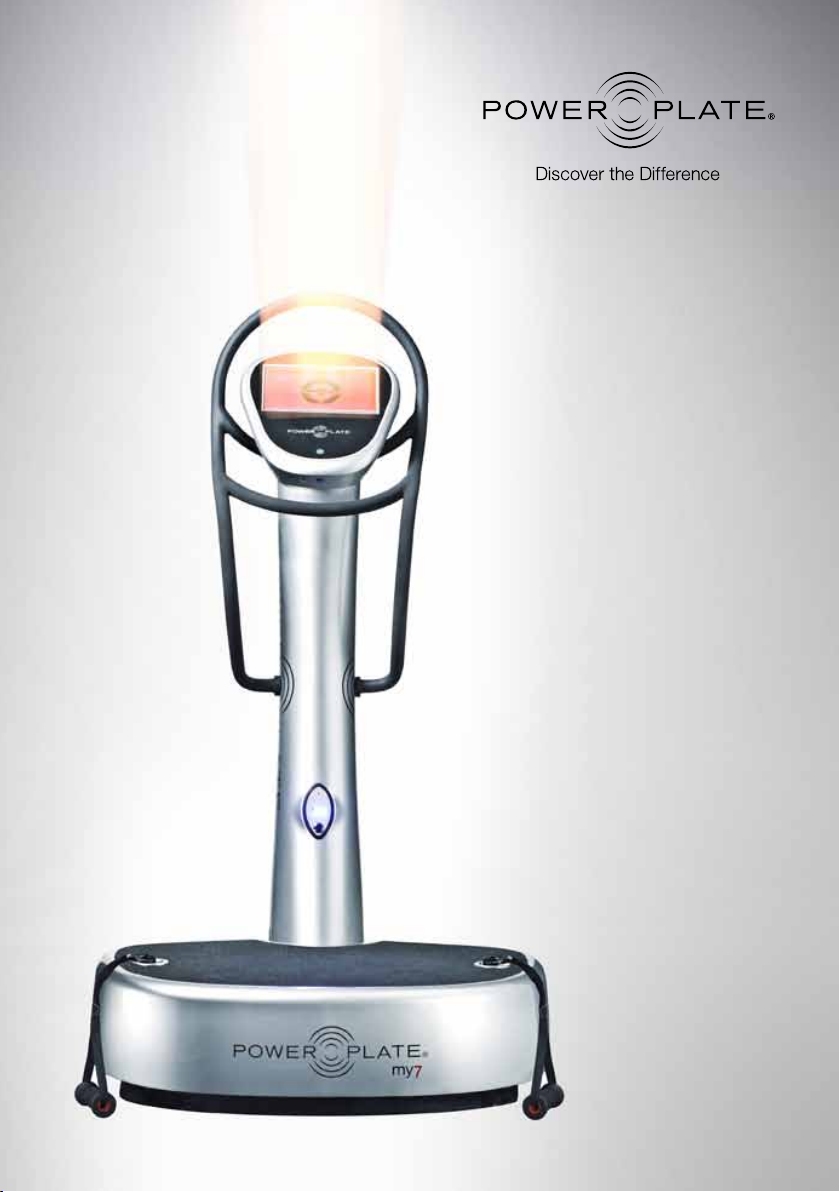
Instructions for Use
my7™ Model
Page 2

Contents
Introduction
Introduction 01
Correct Use is Essential for Optimal Results 01
Medical Indications 02
Important Safety Instructions 04
Health Warnings 04
Setup and Handling 04
Hydration 05
Clothing and Padding 05
Position and Balance 05
EMC Precautions 06
Touchscreen Controls 07
Settings 08
Service Menu 09
proMOTION™ Dynamic Vibration Technology 10
How Does it Work? 10
Usage and Guidelines 11
Varying the Intensity 12
Exercise Time, Number of Exercises and Rest Time 12
Frequency and Amplitude 13
Ma t 13
Sessions per Week 13
Extra Load 13
Technical Specifications 14
Maintenance 15
Troubleshooting 15
Contact and Support 16
Warranty 16
© 2011 Power Plate. All ri ghts reser ved. Power Plate, the Powe r Plate device/logo, pro6, pro5, pro5
AIRdap tive, pro5 HP, my7, my5, my 3 proM OTION powerBIKE and Accel eration Train ing are regi stered
tradem arks and/or trademar ks of Power Plate I nternatio nal Ltd., Power Plate N orth America, Inc. and/or
their af filiates. A ll other tra demarks a re the prope rty of the ir respec tive owner s. Power Plate
are protected under p atents and de sign rights in numero us countr ies around the world. Powe r Plate
retain s all rights ( includi ng copyrig ht, tradema rk and all other intellectual pro perty r ights) in rel ation to
all info rmation pr ovided in th is manual. You may n ot copy, publish or distrib ute any of the inf ormation
contai ned in this m anual, or in a ny other doc uments pub lished by Pow er Plate, with out the prior written
conse nt of Power Plate.
®
machines
Power Plate® machines use the
principles of Acceleration Training™
exercise to stimulate the body’s natural
response to vibration. Power Plate
machines create vibrations that cause
instability throughout the body. As these
vibrations transmit waves of energy,
a variety of muscles subconsciously
contract throughout the body. This
rapid cycle of muscle contraction and
release is what makes training with
Power Plate equipment so effective.
Acceleration Training was discovered in
the former Soviet Union, where it was
found to effectively combat the negative
effects of the zero-gravity environment
in space. Cosmonauts were faced with
considerable loss of muscle strength and
bone density from their time in space,
and Acceleration Training exercise
helped reverse these effects. However,
this new form of training was unknown in
Western Europe until after the fall of the
Iron Curtain, when Dutch sports expert
Guus van der Meer introduced the
technology, resulting in the development
of the first Power Plate model in 1999.
Since then, Power Plate technology
has been adapted for the masses so it
is now possible for everyone to enjoy
training on Power Plate machines. That
means you can strength train without
the need to add extra weights, thus
without overloading the body and its
joints. Power Plate machines are used by
everyone from high performance athletes
to the elderly, and anyone wishing
to improve their general health and
fitness levels.
Correct Use is Essential for
Optimal Results
In theor y, the Power Plate machine
can be used by almost everyone.
You can adjust training to your own
level and reduce any burden on your
joints, tendons and ligaments. As with
every form of training, the correct use
of exercises, adjusted to your personal
abilities, will determine the benefits and
effects of completing a training session
on the Power Plate machine, while at
the same time reducing the risk of injury
or damage to the body.
Body posture, muscle stiffness and
muscle tension (i.e. how contracted your
muscle is) are important contributing
factors in your training session. If
muscles are tensed, or contracted,
they will absorb vibrations to help
strengthen and tone those muscles.
Passive exercises, such as stretch and
massage on the Power Plate machine,
don’t absorb as much vibration and
can therefore be performed on a more
frequent basis.
Acceleration Training exercise should
be used on a regular basis, starting
with low intensity, which means low
frequency and amplitude settings for
short sessions. The body should be
gently stimulated in a way that will allow
you to adjust to vibration training, but will
not overload your body. Over time, the
intensity and duration can be increased
in the same manner as other progressive
training programs. Once the body has
adapted to vibration, the training can be
changed or intensified to keep improving
performance, whether this improvement
is desired for sports or daily life goals.
1
Page 3

Medical Indications
Claimed medical
indications include
use in rel ation to the
prevention, treatment
and/or alleviation
of disease.
Fall Prevention
Claim: Power Plate® training can be a
beneficial tool/intervention for the elderly
population to prevent falls.
Definition: Fall prevention is defined as
a variety of actions to help reduce the
number of accidental falls suffered by
older people.
Muscular Strength and Power
Claim: Power Plate training can be
a beneficial tool/intervention to help
increase strength and power to improve
daily life performance, both acute and
structural.
Definition: Physical strength is the ability
of a person or animal to exert force
on physical objects using muscles.
Increasing physical strength is the goal
of strength training. Power is the amount
of work done or energy transferred per
unit of time.
Pain
Claim: Power Plate training can be a
beneficial tool/intervention to reduce and/
or alleviate (chronic) pain.
Definition: Pain is an unpleasant sensory
and emotional experience associated
with actual or potential tissue damage, or
described in terms of such damage.
Cellulite
Claim: Power Plate training can be a
beneficial tool/intervention to diminish the
appearance of cellulite.
Definition: Cellulite describes a condition
that occurs in men and women (although
much more common in women) where
the skin of the lower limbs, abdomen and
pelvic region becomes dimpled
after puberty.
Weight Loss
Claim: Power Plate training can be a
beneficial tool/intervention to lose weight
and specifically lose body fat.
Definition: Weight loss, in the context of
medicine, health or physical fitness, is a
reduction of the total body weight, due to
a mean loss of fluid, body fat or adipose
tissue and/or lean mass, namely bone
mineral deposits, muscle, tendon and
other connective tissue.
Bone Density/Bone Mineral Density
Claim: Power Plate training can be a
beneficial tool/intervention to increase
bone density and prevent bone mineral
density loss related to aging.
Definition: Bone density (or bone mineral
density) is a medical term referring to the
amount of matter per cubic centimeter
of bones.
Circulation and Cardiovascular
Claim: Power Plate training can be a
beneficial tool/intervention to improve
and increase circulation and improve the
function of the cardiovascular system.
Definition: The circulatory system is an
organ system that moves nutrients,
gases and wastes to and from cells,
helps fight diseases and helps stabilize
body temperature and pH to maintain
homeostasis. Two types of fluids move
through the circulatory system: blood
and lymph. The blood, heart and blood
vessels form the cardiovascular system.
The lymph, lymph nodes and lymph
vessels form the lymphatic system. The
cardiovascular system and the lymphatic
system collectively make up the
circulatory system. Pulmonary circulation
is the portion of the cardiovascular
system which transports oxygendepleted blood away from the heart, to
the lungs, and returns oxygenated blood
back to the heart.
Flexibility/Range of Motion
Claim: Power Plate® training can be a
beneficial tool/intervention to improve
flexibility and range of motion.
Definition: Flexibility is the absolute
range of movement in a joint or series of
joints and muscles that is attainable in
a momentary effor t involving a partner
or a piece of equipment. The flexibility
of a joint depends on many factors,
particularly the length and looseness
of the muscles and ligaments due to
normal human variation, and the shape
of the bones and cartilage that make up
the joint.
Pathology Studies
Claim: Power Plate training can be a
beneficial tool/intervention to improve
general well being, fitness and daily life
functioning in patient populations. Power
Plate might have a positive impact on
general fitness, muscle strength, daily life
performance and well being but does not
have a direct impact on the state of the
disease or injury. It will improve patient’s
life quality.
Definition: No definition possible for this
very diverse group. Examples of patients:
Multiple Sclerosis, Parkinson’s Disease,
Fibromyalgia, Cerebral Palsy, Spinal Cord
Injury, Diabetes, Cardiac Rehabilitation.
2 3
Page 4
Important Safety Instructions
Before using the Power Plate® machine,
it is essential that you read the entire user
manual, including all warnings and safety
instructions. You should also convey
all such warnings and instructions to
any other person using the Power Plate
machine. Retain this user manual for
future reference.
! Health Warning
Before beginning any exercise program,
you should consult a physician for a
physical examination and clearance to
engage in the program, or personal injury
could result.
If you have any known medical condition,
or any physical limitation on your
ability to exercise, Power Plate strongly
recommends that you seek the advice
of a physician before using the Power
Plate machine, in order to avoid possible
personal injury.
If while using the Power Plate machine,
you experience any dizziness, faintness,
shortness of breath or pain, you must
stop using the machine immediately
and consult a physician. Failure to do so
could result in personal injury.
The Power Plate machine is a medical
device and is designed for therapeutic
Never reach into or under the machine,
or tip the machine on its side, while it is in
operation.
Use the machine only for the purposes
described in this user manual and only
with attachments or accessories that
come with the machine or which Power
Plate has specifically approved for use
with the machine, or personal injury could
result.
Setup and Handling
! Danger: To reduce the risk of electrical
shock, always unplug the Power Plate
machine before cleaning or servicing it.
! Warning: To reduce the risk of electrical
shock, fire, burns or other injury, always
plug the Power Plate machine into a
properly-grounded electrical outlet.
! Warning: To ensure safe use of the
Power Plate machine, it must be regularly
examined for damage and wear. The
machine, however, contains no userserviceable parts. Thus, with the
exception of the maintenance tasks
described later in this manual, the owner/
user should always retain an authorized
Power Plate service professional to
perform maintenance and/or service on
the machine.
partially immersed in water, unless
an authorized Power Plate ser vice
professional has examined the machine
and cleared it for use.
Never insert objects into any opening
on the machine. If an object falls into
the machine, shut the machine off
and remove the power plug before
attempting to retrieve the object.
If the object cannot be reached,
contact an authorized Power Plate
service professional.
Hydration
Power Plate recommends that the user
stay well hydrated by drinking at least
300 ml (16 ounces) of water before,
during and after each exercise session.
Clothing and Padding
During exercises in which the user
stands on the vibration platform, the
user should wear rubber-soled shoes
or if the user chooses to exercise in
socks or bare feet, the user should use
one of the three contoured mats that
are provided with the machine.
During exercises in which any part
of the user’s body is in contact with
the vibration platform, Power Plate
recommends the use of at least one
contoured mat.
Position and Balance
In order to avoid possible injury from
the machine’s vibrations, Power Plate
recommends that the user not lean back
on his/her heels or “lock” his/her joints
or straighten his/her legs when standing
upright on the machine.
It is important at all times to maintain
balance while on the machine.
The user, however, should not “hang”
on the machine’s handles in order to
maintain balance but should (unless the
directions for a particular exercise state
otherwise) keep his/her knees directly
above the toes.
Proper position and balance are
especially important if the user employs
weights during any exercise on the
machine. Power Plate strongly
recommends that users not employ
weights while using the machine,
unless they are being coached by an
exercise professional or unless the user
has extensive experience with weight
training or with the Power Plate machine.
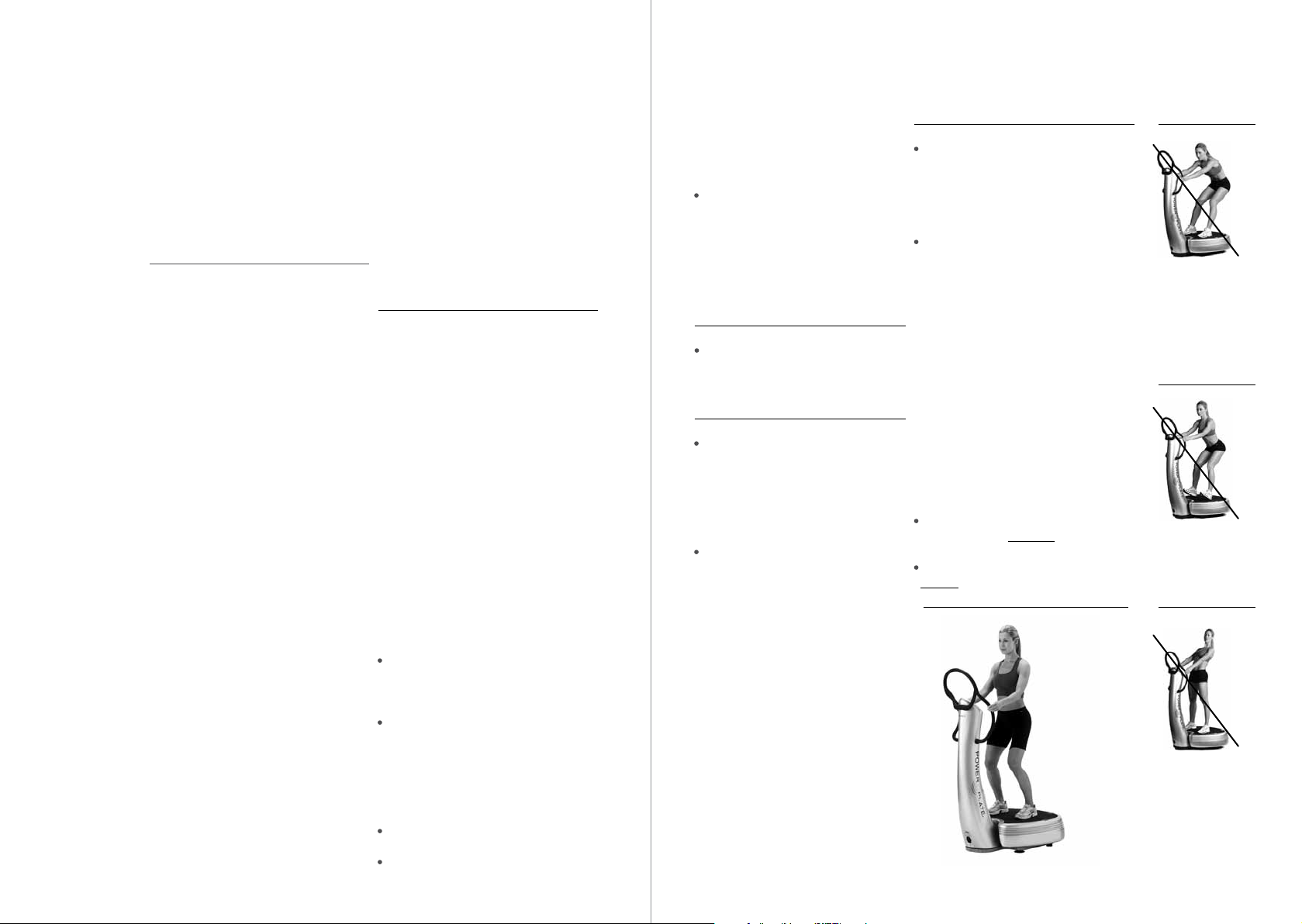
The three illustrations on the right
demonstrate the incorrect ways to stand
on the machine.
The illustration below demonstrates the
correct way to stand on the machine.
Correct
Incorrect
You always nee d to be
balanced when
standing on the Power
Plate machine. Never
hang on to th e handles,
use them only to
maintain balance
.
Incorrect
Don’t lean on your
heels to o much.
Balance your weight
predominantly on the
front of yo ur feet.
Incorrect
purposes within specific medical
indications and supervision integrated
into an closely monitored exercise
program only and as par t of an exercise
program.
The machine should be set up on a
hard, level sur face in an area free of
obstructions within at least three feet
of the vibration platform.
The machine should not be used
Always follow the directions on the
machine’s console for proper operation.
Close supervision is required when the
machine is used by or near, children or
disabled persons.
Always take care when getting on and
off the machine. Use the handles on the
machine as needed, to maintain stability
when getting on and off the machine.
outdoors, near a pool, or near any source
of water or extreme humidity. Contact
with water could cause a
short-circuit, which could cause personal
injury or damage the machine.
Unplug the machine when not in use.
Never attempt to lift or move the machine
without assistance.
Never operate the machine if it has been
dropped, tipped over, damaged, or even
Legs slightly ben t.
When training with the
Power Plate machine,
do not “lo ck” any joi nts,
such as yo ur knees a nd
elbows, b ut keep the m
slight ly bent.
4 5
Page 5

My7 Touchscreen controls
! Electromagnetic Compatibility (EMC)
Precautions
The my7™ model is suitable for use in
all establishments, including domestic
establishments and those directly
connected to the public low-voltage
power supply network that supplies
buildings used for domestic purposes.
Both models have been tested against,
and have passed the applicable
requirements of relevant electromedical
standards, including EN 60601-1-2:2007.
The my7 model emits electromagnetic
energy to perform its intended function.
Nearby electronic equipment may be
affected by this emission. Similarly
the my7 model may be affected by
electromagnetic emissions from other
equipment in the vicinity.
The my7 model is intended for use in the
electromagnetic environment specified
below. The customer or user of the my7
model should ensure that it is used in
such an environment:
– Floors should be wood, concrete or
ceramic tile. If the floor is covered with
synthetic material, the relative humidity in
the room should be at least 30%.
The my7 model is intended for use in an
electronic environment in which radiated
radio-frequency (RF) disturbances
are controlled.
The customer or user of the my7 model
can help prevent electromagnetic
interference by maintaining a minimum
distance between portable and mobile
RF communications equipment
(transmitters) and the my7 model as
recommended in this user manual,
according to the maximum output power
of the communications equipment:
The adequate separation distance
to provide base immunity to RF
disturbances is 1.0m.
Retain this user manual for your future
reference.
The my7 software is organized in three modules: MANAGE – EXERCISE – USERS
Home page
The home page allows a quick access
to SETTINGS, USERS and EXERCISE
as well as educational videos about our
company and the my7.
• FeelBetter
• LookBetter
• PlayBetter
Exercise Users
Settings
This button takes you to the setting
module. The settings are broken down
into 4 areas.
• MachineConf
•Education/Help
• ServiceMenu
• Contact
– Power quality should be that of a typical
domestic, commercial or hospital
environment as appropriate.
– The my7 model should not be used
during power interruptions.
– Power frequency magnetic fields should
be at levels characteristic of a typical
location in a typical commercial or
hospital environment.
6 7
This button takes you to the exercise
module. The exercise are broken down
into 3 areas.
• Programs
• SingleExercises
• ManualMode
This button takes you to the users’ module.
It is broken down into 2 areas.
• NewUsers
• ExistingUsers
Page 6

Settings Settings – Service Menu
G-factor™
The my7 model offers a new way
of setting the machine, called the
G-Factor™, which simplifies how
one sets the machine to operate
at various levels of intensity. The
G-Factor combines the frequencies
and amplitudes, as shown in the table
below.
The term G-factor™ is based on
g-forces as described in paragraph
1.2 Intensity Level, a combination of
frequency and amplitude.
Intensity level
The intensity at which the machine
operates can be determined by
multiplying frequency and amplitude,
which shows how fast and how far the
platform is accelerating. Acceleration
is expressed in meters per second
squared (m/s2) and can be converted to
g-forces. An acceleration of 9.81 m/s2 is
equal to a g-force of 1g.
Stretch – Readies your muscles and
connecting tissues. An excellent prep for
any workout.
Balance – Activates your mind/body
connection and increases your stabilizing
muscle strength.
Core – Engages and strengthens your
central pillar including abs, obliques and
spinal erectors.
Strength – Builds lean muscle, tones and
burns fat with both dynamic and static
style exercises.
Massage – Stimulates blood flow and
relaxes muscles while reducing postworkout fatigue.
Service Menu has three Main Categories:
I. Diagnostics II. Usage Statistics III. Technical Support
I. Diagnostics
a. Will allow the user to run a self diagnostics check on the system. This diagnostic check will produce
error codes if the system has an internal software problem.
II. Usage Statistics
a. Will display the total machine hours of use
III. Technical Support
a. Software Information & Updates
i. Provide current sof tware application version number
ii. Install software updates
b. Hardware Information
i. Embedded hardware information
c. Hardware Touchscreen Calibration
i. To recalibrate touchscreen
d Troubleshooting & Support
i. Touchscreen support
1. Touchscreen non responsive, actions:
a. Reboot the my7
b. Recalibrate touchscreen
c. Contact support at www.powerplate.com > Choose your Country > Click on “Support”
ii. Touchscreen support
1. Touchscreen freezes or hangs, actions:
a. Reboot the my7
b. Recalibrate touchscreen
c. Contact support at www.powerplate.com > Choose your Country > Click on “Support”
iii. Touchscreen support
1. How do I clean the touchscreen?
a. Turn touchscreen off. Use a piece of dry, lint free soft cloth. First wipe down monitor to remove
Programs and
exercises performed
on the my7 model will
always communicate
the recommended
settings as G-Factor.
Settings G-factor™
30 Hz - Low 1
35 Hz - Low 2
40 Hz - Low 3
30 Hz - High 4
35 Hz - High 5
40 Hz - High 6
b. Do not use excessive force when cleaning, to avoid damaging the touchscreen. The touchscreen
iv. my7 Machine suppor t
1. my7 power is intermittent, follow the actions below:
a. Reboot the my7
a. Check to ensure the power cord is inser ted fully into the power inlet ( just above the on /off switch.)
dust. Please use deionized or distilled water or iso-propyl alcohol - Don’t use tap water or mineral
water as they could leave white marks on the screen because of the dissolved salts. Spray
this liquid on the cloth. Never spray liquid directly onto the touchscreen. Moisten the cloth with
the cleaner and gently move the wet cloth in just one direction - from top to bottom. Completely
dry the touchscreen with a second cloth. Do not use any solutions that contain Acetone, ethyl
alcohol, toluene, ethyl acid, ammonia, or methyl chloride.
is not a rigid hard surface and can be damaged if too much pressure is applied.
b. Contact Power Plate representative for local service provider information
v. Software support
1. my7 software support
c. Contact support at www.powerplate.com > Choose your Country > Click on “Support”
8 9
Page 7
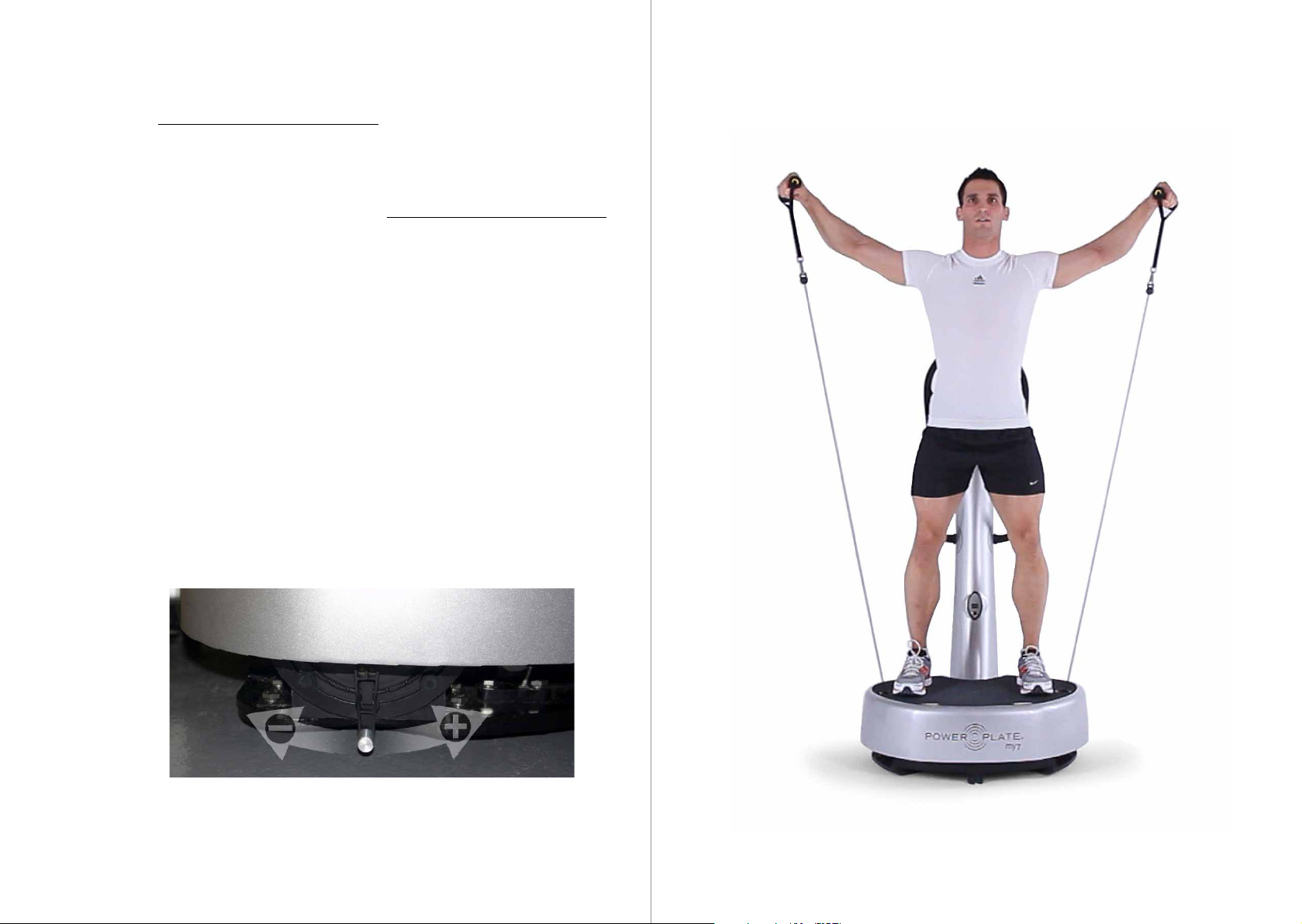
proMOTION
Technology
™
Dynamic Vibration
How Does it Work?
proMOTION™ Dynamic Vibration
Technology uses high strength Vectran®
cables, which have been specifically
chosen for their unique ability to optimize
the transfer of vibrations generated by the
platform directly to the targeted muscle.
Specifically upper body muscles. The
Vectran cables, which pound-by-pound
are five times stronger than steel, transfer
vibration to the upper body at high-speed
frequency rates between 30 and 40 times
per second. Vectran® is a registered
trademark of Hoechst Celanese Corp
Each cable extends to more than two
meters, allowing for movement in all
planes and directions, so you can enjoy
full range of movement and infinite
dynamic exercise options.
Not only does the proMOTION optimize
the transmission of vibrations to the
targeted muscle but it also offers variable
resistance. Changing the resistance puts
more load on the muscles during the
most intense part of the movement,
offering another way to progress your
workouts by increasing the intensity of
your training. The unique gel dampening
system also increases the resistance
as you work harder.
Usage and Guidelines
As with any form of exercise, cease your
session immediately if you feel faint, dizzy
or ill while working out on the Power Plate®
machine. Always consult a doctor or
specialist before restarting your training.
As with any training routine, it is important
to start using the proMOTION on the
lowest level of resistance and with the
Power Plate machine on a low setting.
Establish a good technique before
increasing the setting on the proMOTION
from low to high.
Always pay special attention to your
posture, especially the position of your
wrists and back, and how close you are
to the Power Plate machine.
Dynamic exercises should be performed
mainly in vertical movements.
Shif t lever towards you to increase;
shif t away from you to decrease
10 11
Page 8

Varying the Intensity
Training on the Power Plate machine is
like any other type of training: start with
light and short training sessions, and once
accustomed to the vibrations, one can
begin to gradually intensify the program.
We strongly recommend that you always
listen to what your own body is telling you.
The step-by-step build up of intensity is
extremely important for your training so
that it is both efficiently and responsibly.
The exercise intensity can be varied simply
by using the following variables:
Length of time for each exercise
Rest time between exercises
Number of exercises
G-Factor
Sessions per week (between 2 and
3 is optimal)
Muscle tension (how tightly contracted
the muscle is) by changing the angle of
the joint or, for example, performing the
exercise on one leg only
Complexity of movement or additional
movement (i.e., active or dynamic
movement versus only holding an
exercise position)
Additional weight or extra load, i.e.,
using a weight vest or dumbbells
How these variables are applied depends
on the individual and training goals of
the person involved. Other factors that
should be taken into account are injuries,
limitations, specific demands and/or
any other circumstances influencing the
training regimen.
In general the following progression steps
can be taken:
Exercise Time, Number of Exercises and
Rest Time
These settings depend on your training
goals. If you are new to Acceleration
Training™ sessions, we recommend
performing only a few exercises and
resting for the same amount of time as
is spent actively using the Power Plate
machine. After a while, more exercises
can be added.
When trying to accomplish weight
loss, cardiovascular or endurance
improvements, rest time can be reduced,
exercise time can be extended and the
number of exercises can be increased to
add to the total volume of training.
For recover y, flexibility and preparation, it
is better to perform specific exercises and
keep the total volume low, with enough
rest between exercises.
For strength, power and speed, the
intensity (i.e., Hertz settings) per exercise
can be increased, but the total volume
should be kept low.
Example: If you are training for endurance
or weight loss goals, you should
progressively extend the duration of
training to multiple sets of 60 seconds
each and cut the rest period to 30
seconds or less between subsequent
sets. If your goal is to achieve maximum
strength or power, you should do multiple
sets of short duration on high amplitude,
and take long rest periods, from 1 to 4
minutes.
Another important aspect is ensuring
that between training sessions, you rest
long enough to fully recover. We normally
recommend two days of rest after each
training session. It is our experience that
one day’s rest after training with
Power Plate equipment is often enough,
but every body is different and you will
have to find what works best for you.
If you feel the schedules are too easy
or too intense once you have become
accustomed to this training method, you can
adjust them to your comfort level.
G-Factor
Exercise which is selected manually has its
own preset setting and G-factor range. For
each type of exercise, we recommend the
following g-factor settings:
Stretch settings should be performed on
g-factor level 1.
Balance settings should be performed
between g-factor level 1 and 2.
Core, Strength and Massage exercises
should be performed between g-factor
level 1 and 6.
When the G-factor level is increased, the
volume of exercises should be decreased
(duration, number of sets) and the rest
period should be increased proportionally.
Mat
The mat dampens the vibrations. Always
use the mat when you have a body part in
contact with the plate surface, or if you are
exercising in socks or bare feet.
Sessions per Week
In general, we recommend performing
two to three sessions per week.
Stretches, massages, relaxation and
preparation programs can be
performed more often.
Extra Load
We recommend only adding external
load, such as using weights, if you are an
experienced Power Plate user, or if your
professional coach or trainer is supervising
your training. All of the above parameters
can be varied with the extra load. When
external load is added to your exercises
on the Power Plate® machine, amplitude
and volume of the exercises should be
decreased and the rest period should be
increased proportionally as though starting
the entire exercise progression again.
Specialized programs and additional
progression steps for individual users
should be drawn up by educated and
certified Power Plate® trainers.
Power Plate offers a variety of educational
and training materials, including DVDs,
online learning and in some countries,
specialized academies. For more
information please visit our website,
www.powerplate.com.
12 13
Page 9
Technical Specifications
Maintenance
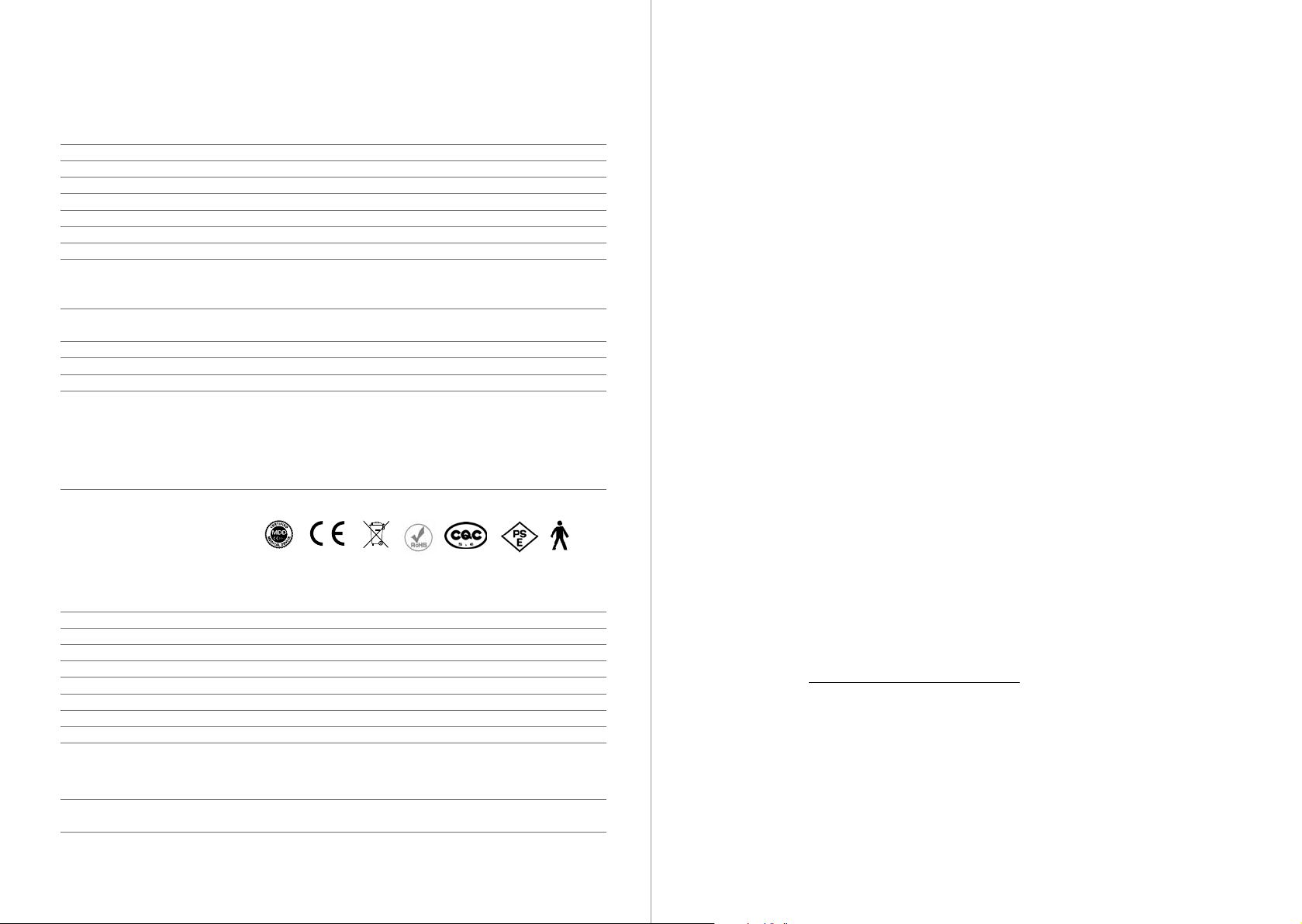
Power Plate® my 7™ Technical Specifications
Color (standard) Graphite or Silverstone
Dimensions (W x D x H) 87cm x 80cm x 153cm / 35 in x 32 in x 61 in
Weight 179kg / 394.63lb
Power Supply 100-240V, 50/60 Hertz, Universal Voltage
Nominal Power 160-185W
Maximum Load 136.4kg / 300lb
Operation User-friendly interactive display
DualSync Twin Motor System DualSync Twin Motor System maintains precise balance at any
frequency and amplitude level, allowing perfect synchronization
of vibration for maximum muscle response and efficiency.
PrecisionWave Technology High-fidelity harmonic vibration system that provides
uncompromising performance for unsurpassed results.
Frequencies 30 - 40 Hertz (1Hertz increments)
Time Selections 0 - 9 minutes (15second increments)
Vibration Energy Output High or Low
G-Factor 1 30Hz/low amplitude
G-Factor 2 35Hz/low amplitude
G-Factor 3 40Hz/low amplitude
G-Factor 4 30Hz/high amplitude
G-Factor 5 35Hz/high amplitude
G-Factor 6 40Hz/high amplitude
Certifications MDD, CE and EMC (TUV certified); RoHS / WEEE compliant
0086
Computer & Software Specifications
Operating System Windows CE 6.0 Professional
Software Power Plate proprietary My7 software (v1.0)
Graphics Built in Graphic Card
Total Memory Mobile-DDR SDRAM (133Hz) : 256MB
Hard Drive (Storage) 16GB micro-SD card
Screen/Monitor 10.1” LCD Display (800 x 480 pixel)
USB Port/Hub USB 1.0 Port x2
LAN port 10/100M Ethernet
Audio 2 x 2W
proMOTION™ Dynamic Vibration Technology Specifications
Resistance Levels 6 resistance levels. Pull toward front of the machine to increase
Push toward back of the machine to decrease.”
Cable Maximum 2.2m / 98.4in
WARNING: THE MACHINE
!
CONTAINS NO USER-SERVICEABLE
PARTS. PLEASE CONTACT AN
AUTHORIZED POWER PLATE®
SERVICE PROFESSIONAL
FOR ANY MAINTENANCE OR
TROUBLESHOOTING NOT
OTHERWISE DESCRIBED BELOW,
OR PERSONAL INJURY OR DAMAGE
TO THE MACHINE COULD RESULT.
CAUTION: Any changes, modifications
!
or unauthorized maintenance performed
to or on the machine could void the
product warranty.
Always unplug the machine and then
•
wait for at least one minute before
performing any maintenance.
Clean the machine only with a moist
•
cloth. Do not use sharp objects, bristles,
scrubs or acid-based detergents, which
will damage the lacquer finish.
Do not spray any cleaning solution
•
directly onto the machine. Instead,
moisten a cloth, then apply to the
machine.
On plastic components, use only
•
polishes specifically designed for
plastic. Use a soft brush, not a cloth,
to clean the platform, including the
contoured mat.
•
Clean electrical components only with
a dry cloth, in order to avoid the risk of
shock or damage to the components.
Troubleshooting
•
Always unplug the machine and then
wait for at least one minute before
performing any troubleshooting.
•
If the machine is not operational and the
console display is not illuminated, check
the power connections to the machine.
•
If all power connections are working,
please check the circuit breaker or fuse
for the electrical outlet that is supplying
power to the machine in order to ensure
that the outlet is receiving electrical power.
•
If the console display is illuminated, but
the platform will not vibrate, unplug the
machine, wait at least one minute, then
check the connection to the machine’s
motor, located under the base of
the machine.
•
If the machine makes a rattling noise,
unplug the machine, wait at least one
minute, then check to make sure that
the feet are properly tightened.
!
DANGER: The user not try to resolve
any electrical issues regarding the power
source to the machine. Instead, Power
Plate requests that the user contact
a licensed, professional electrician to
conduct any examination and make any
necessary repairs. Otherwise, serious
personal injury or property damage
could result.
14 15
Page 10

Contact and Support
If you have any questions,
please visit our website,
www.powerplate.com.
Select your country for
local contact details.
Warranty / Product Registration
To register your Power Plate®
machine please visit us online at
www.powerplate.com.
Copies of this manual and any other
paperwork may be obtained by
contacting Power Plate through the
“Contact Us” page online or by
writing to Power Plate:
Power Plate International Ltd
13 George Street
London, W1U 3QJ
United Kingdom
T +4420 7317 5000
F +4420 7317 5001
[email protected]
Power Plate North America Inc
17900 Von Karman, Suite 125
Irvine, CA 92614, USA
T | +1 949 863 1737
F | +1 949 863 1216
[email protected]
877 87 PLATE
www.powerplate.com
Rev. 3.0 – 25/MAR /2011 © Copyright 2011 Power Plate. All Rights Rese rved.
 Loading...