

Page 1
Safety and
Instruction
Manual
Page 2

Congratulations on
purchasing an
ELECTROVAYA
PowerPad® 600C products!
This PowerPad® 600C is designed to extend the runtime of your
portable computer, desktop computers, TVs, lights and other
electronics devices less than 500 watts, while significantly enhancing
productivity and mobility.
PLEASE DIRECT ALL INQUIRIES TO
PowerPad® 600C TECHNICAL SUPPORT:
PP Tech Support
Electrovaya
2645 Royal Windsor Drive
Mississauga, ON
Canada, L5J 1K9
Website:
www.epowerpad.com
Page 3
CONTENTS
Please Note: Electrovaya assumes no liability for problems that occur when the instructions for use
and safety information are not followed.
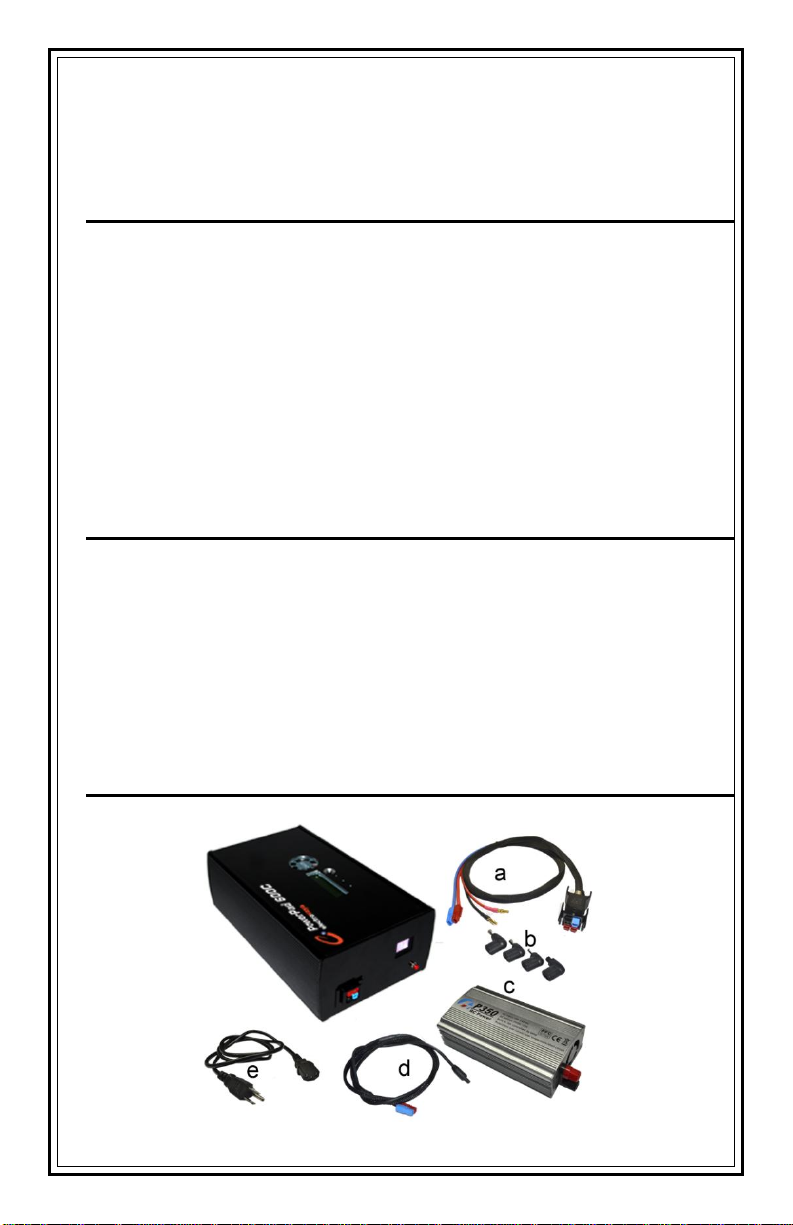
Box Includes: 1 PowerPad® 600C Battery Unit
Accessories a. Power Cable b. Adaptor Tips c. DC to AC Inverter
d. DC Charger Cable e. AC Charger Cable
SAFETY INFORMATION ................................................. 3
IMPORTANT TIPS: ................................................................................................. 4
CHARGING ............................................................................................................ 4
STORAGE & HANDLING ........................................................................................ 5
DISPOSAL .............................................................................................................. 5
IN CASE OF EMERGENCY ............................................ 6
FIRE/SMOKE EMISSION........................................................................................ 6
CONTACT/INGESTION .......................................................................................... 6
UNDERSTANDING THE DISPLAYS AND BUTTON ....... 7
UNDERSTANDING THE FUEL GAUGE ......................... 8
GETTING STARTED ....................................................... 9
SPECIFICATIONS ......................................................... 10
RECOMMENDED USE OF THE POWERPAD® 600C .. 10
OPTIMIZING BATTERY LIFE ........................................ 11
CHARGING THE POWERPAD® 600C .......................... 11
POWERPAD® 600C PACKAGE …………………………11
RECOMMENDED CHARGING PROCEDURE .............. 12
LIMITED WARRANTY ................................................... 15
Notice
Please read these instructions in entirety before using your PowerPad®
600C product. All batteries contain energy and should be used, stored,
and disposed of in an appropriate manner.
The PowerPad® 600C has been shipped in a partially discharged state and
will reach full capacity after its first recharge.
Electrovaya to purchase the correct 120 VAC Adapter: Output between 10VDC 18 VDC, rating min 200 Watts.
Caution: Misuse or abuse of the PowerPad® 600C may
result in personal injury or fire.
AC Adapter is required to charge the PowerPad® 600C. Contact
Page 4

SAFETY INFORMATION
Please read these instructions carefully and save them for future
reference. This battery is designed to provide a safe and
transportable form of energy when handled under conditions of
normal and intended use. It should always be used in a manner
consistent with Electrovaya's recommendations and guidelines.
IMPORTANT TIPS:
Do not disassemble the battery.
Do not puncture, drop, crush, throw, hit, bend, open, or
modify the battery or casing.
Do not use if it has been dropped
Do not change the factory battery setting
Do not submerge this product in water, or splash with any
fluid.
Do not expose the battery to heat above 45°C (113°F) under
use /55°C (131°F) under storage or incinerate.
Do not insert any foreign object into the charging port.
Do not short-circuit the battery by bringing it into contact with
metal objects or by charging incorrectly.
Keep the battery away from children.
Always dispose of used batteries in accordance with local
regulations.
If this battery is misused or abused, it can result in personal
injury from heat, smoke, fire or explosion.
Obtain approval of airline or Courier Company before
travelling with or shipping this battery.
No outdoor usage
CHARGING
The PowerPad® 600C requires DC source between 10 VDC -
18 VDC, rating minimum 200W, AC adapter. Please consult
Electrovaya Technical support at 905 855 4610 x 3074
Do not charge your PowerPad® 600C with an AC adapter that
has not provided by Electrovaya, as this may cause damage
to the PowerPad® 600C.
Do not use AC adapters with reversible polarities.
Page 5

STORAGE & HANDLING
Always store the battery in a cool and dry place between 0°C
(32 °F) and 20°C (70°F), and away from flammable materials.
The battery should not be heated or exposed to temperatures
exceeding 45°C (113°F); exposure may lead to heat, smoke,
fire or explosion. If the battery smokes, swells, or emits a
strange smell, discontinue use.
Do not submerge or expose battery to water or any other
liquid.
It is recommended that the battery be kept out of the reach of
children.
DISPOSAL
Do not place in fire.
Do not incinerate.
This battery should be disposed of in accordance with local
regulations.
Page 6
INCASE OF EMERGENCY
FIRE/SMOKE EMISSION
Batteries contain flammable/combustible material that may be
ignited, explode, release toxic materials, cause burns or give
off gases when heated or in contact with sparks or flames.
In the event of fire, vapor releases, and/or smoke emissions,
evacuate the immediate area of all unnecessary personnel.
CONTACT/INGESTION
Elements within the battery may cause skin burns, eye burns
and respiratory tract burns if in contact with any of these
tissue membranes.
In the event that the electrolyte inside the battery comes into
contact with the skin or eyes, flush area immediately. Seek
immediate medical attention.
For contact with skin, wash the
affected area with soap and water. Dry gently
with towel. Seek immediate medical
attention.
If fumes are inhaled, leave the immediate area. If not
breathing, give artificial resuscitation. If breathing, give
oxygen. Seek immediate medical attention.
If battery material is ingested, give one or two full glasses of
water to dilute material. Do not induce vomiting. Never give
anything by mouth to an unconscious person. Seek
immediate medical attention.
Page 7
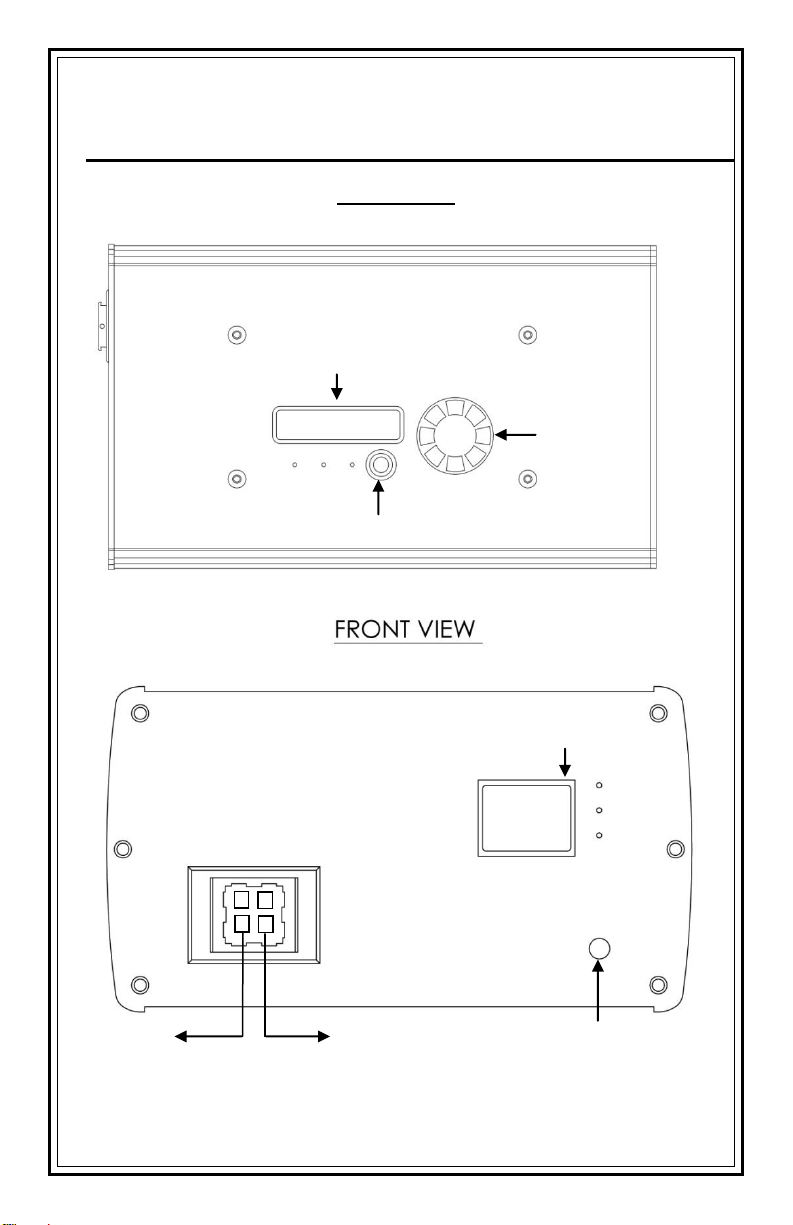
UNDERSTANDING THE DISPLAYS AND
Charge Display
Fan
Charge Button
Reset Button
State of Charge Display
DC Out
DC In
Connect AC/DC
adapter
Connect to computer
or Electronic device
BUTTONS
TOP VIEW
Page 8
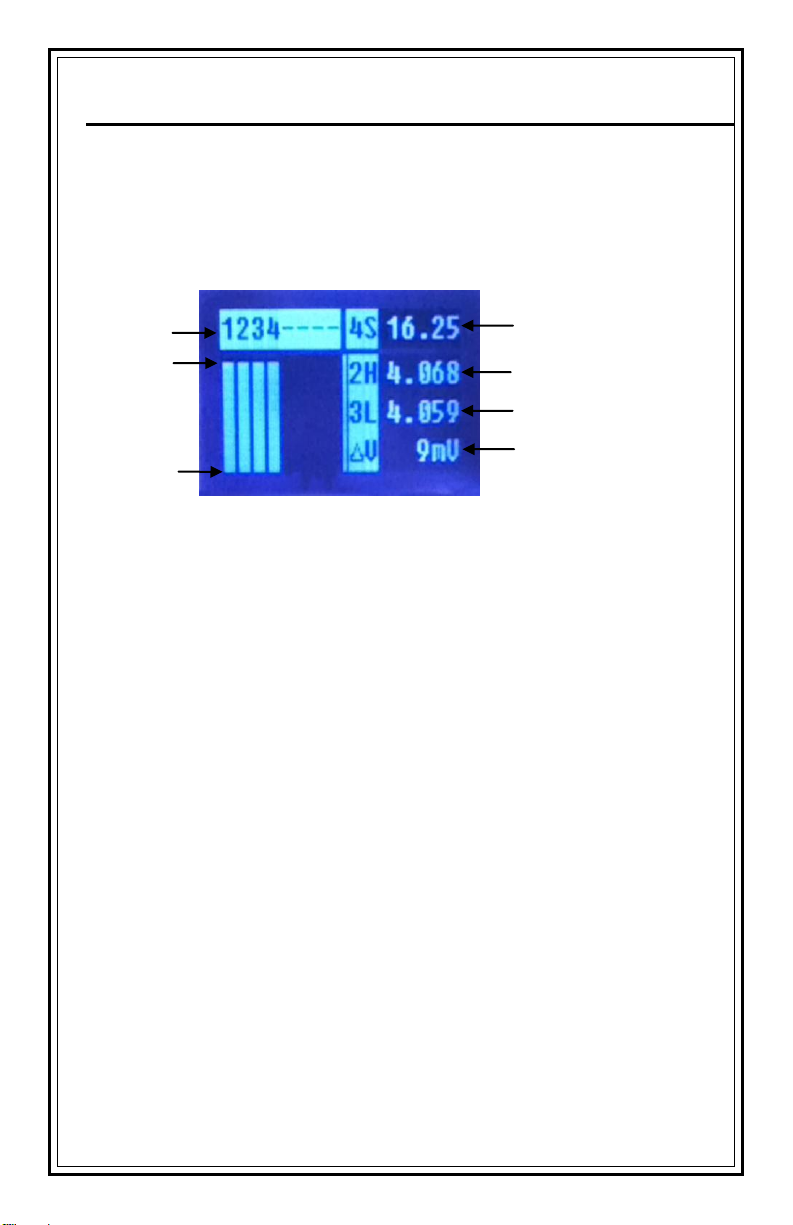
UNDERSTANDING THE FUEL GAUGE
Cell Number
Pack Voltage
Highest Volt/Cell
Lowest Volt/Cell
Fully Charged
Maximum Voltage
Difference
Fully Discharged
The PowerPad® 600C uses a comprehensive fuel-gauge system to
indicate its charging/discharging state.
The fuel gauge displays the following information:
While the PowerPad® 600C fuel gage provides a relatively accurate
state of charge during discharge, it more accurately shows the true
state of charge when idle. It is therefore normal for the PowerPad®
600C to alter it has been idle for more than an hour.
If voltage on any cell drops below 3.35 V the buzzer starts beeping
and internal circuit will disconnect the internal battery. Battery needs
to be immediately charged and the Reset Button pressed.
Page 9
GETTING STARTED
1. Read this Safety and Instruction Manual in its entirety prior to
using your PowerPad® 600C.
2. Ensure your PowerPad® 600C package contains the PowerPad®
600C and the PowerPad® 600C connection cable.
3. Use an approved AC adapter to charge the PowerPad® 600C.
Using PowerPad® connection cable, connect AC adapter to
PowerPad® 600C and turn on and a beep will sound once.
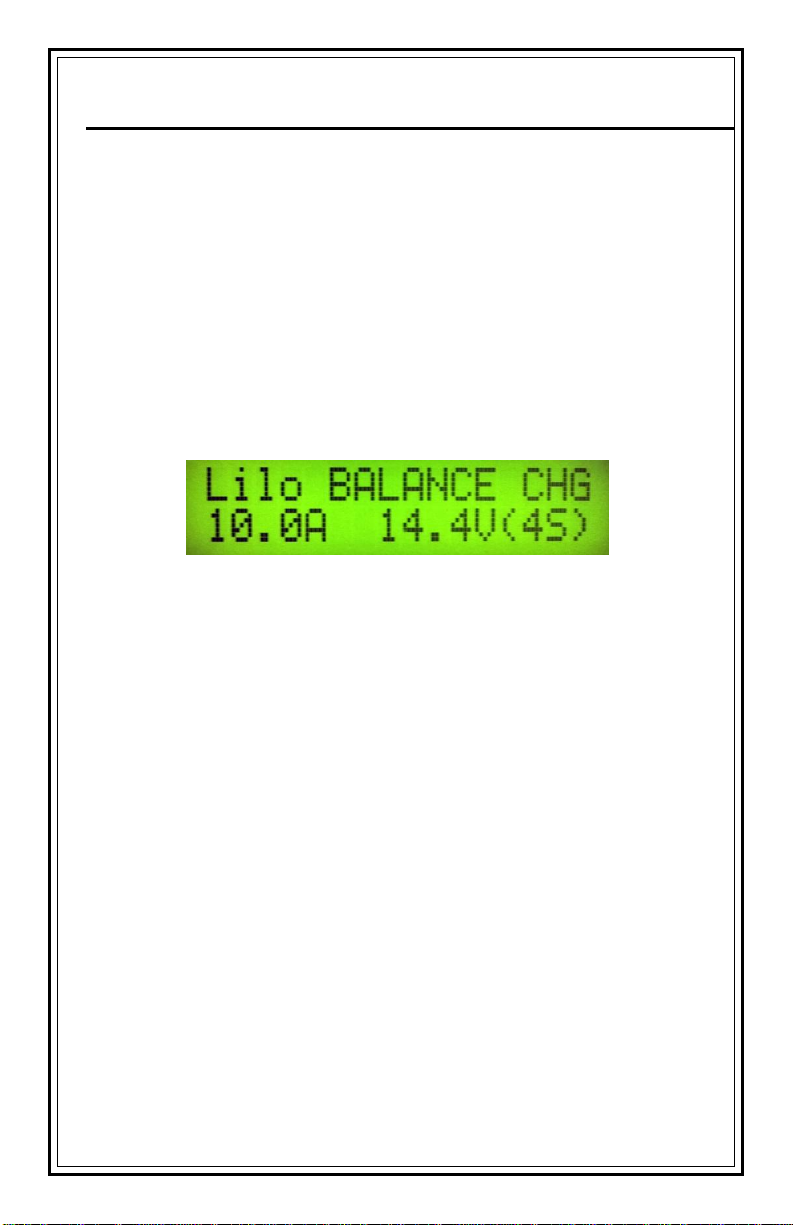
4. Check the charger display, it must show:
If showing other than this display, DO NOT continue and call
Electrovaya technical support: 905 855 4610 x 3074
5. Press Charge Button until hear a beep and release
6. The charger will beep when it is fully charge. Press charger
button and release, beeping sound should stop.
7. Connect the PowerPad® 600C connection cable to your electronic
device or to an inverter for AC power.
8. Optimize your portable computer's Power Management Settings.
See "Optimizing Battery Life". P.9
9. You are now ready to use your PowerPad® 600C product. See
"Recommended Use of the PowerPad® 600C" P.8 and "Safety
Information".P.3
10. Although rechargeable, the battery has a limited life span.
Replace the battery when the runtime between charging
diminishes
Page 10
SPECIFICATIONS
PowerPad® 600C
Maximum Capacity
600 Wh
Run-time*
20 hrs
Charge-time**
80% charge in less than 3 hours with approved AC
adapters
Dimensions
280mm X 168mm X 94 mm
Weight
6700g
Casing
Aluminum
Operating Temperature
0°C (32°F) to 45°C (113°F)
* Based on common laptop with optimize energy setting.
** Charge times may be longer than specified during the first few charge cycles.
RECOMMENDED USE OF THE PowerPad
®
600C
The PowerPad® 600C is designed to work with portable computers,
desktop computers, TVs, lights and other electronics devices or
combination of electronics devises less than 400 watts. The
PowerPad® 600C must be attached to the electronics device using
only the PowerPad® 600C connection cable provided.
It is recommended that the PowerPad® 600C be used in conjunction
with the electronics device’s internal battery. This will ensure a
backup of power and a seamless transfer of power supply from the
PowerPad® 600C to the internal battery, in the event of a full
discharge or accidental disconnection. In this situation, it may be
possible to charge your computer's (or other electronics device’s)
battery through the recharge port of the connection cable while the
PowerPad® 600C is in use. The runtime of the PowerPad® 600C will
be reduced. It is recommended that the internal battery be charged
separately from the PowerPad® 600C to achieve optimal
performance.
The optimal operating temperature is between 20°C (70°F) and 45°C
(113°F). It is recommended that the PowerPad® 600C not be exposed
to direct sunlight, or to temperatures less than 0°C (32°F). When
exposed to temperatures below 0°C (32°F) and above 45°C (113°F),
Page 11
the PowerPad® 600C will not operate; however, when the PowerPad®
600C returns to a temperature between 0°C (32°F) and 45°C (113°F)
the PowerPad® 600C will again be operable.
OPTIMIZING BATTERY LIFE
1. Charge the PowerPad® 600C immediately after received and
unpacked.
2. When not in use for a month or more, charge the PowerPad®
600C prior to storing. Monitor the PowerPad® 600C during
storage, and if needed, recharge to maintain capacity.
3. After a period of time, the PowerPad® 600C will lose its ability to
perform at maximum capacity and will need to be replaced. This
is normal for all batteries
CHARGING THE PowerPad® 600C
In order to optimize your charge time, it is recommended that the
PowerPad® 600C not be charged while connected to the portable
computer (or other electronics device). If charged while connected to
the electronics device, charge time will take significantly longer than
when disconnected from the electronics device.
Only charge your PowerPad® 600C with an AC adapter, supplied by
Electrovaya.
PowerPad® 600C PACKAGE
Page 12
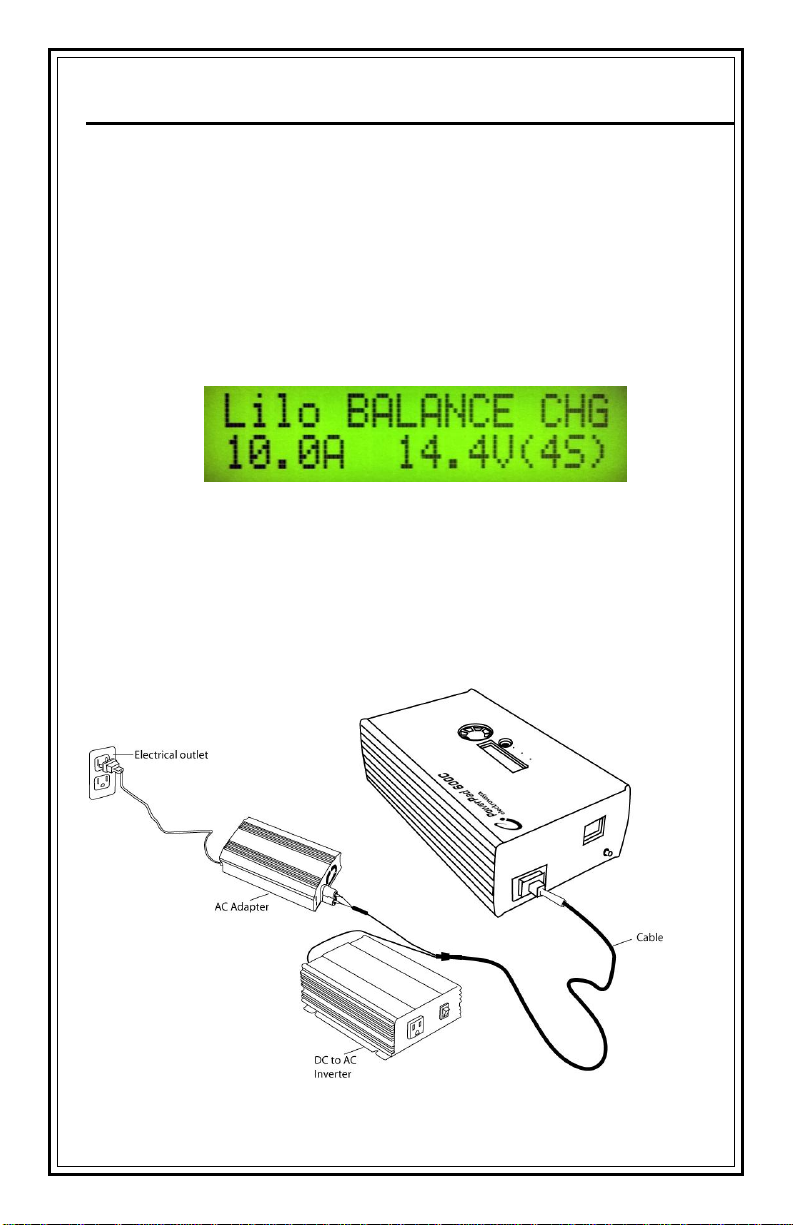
RECOMMENDED CHARGING PROCEDURE
1. Disconnect the PowerPad® 600C connection cable from the
computer, or other electronic devices, for the fastest charge.
2. Use an approved AC adapter to charge the PowerPad®
600C. Using PowerPad® connection cable, connect AC
adapter to PowerPad® 600C and turn on and a beep will
sound once.
3. Check the charger display, it must show:
4. If showing other than this display, DO NOT continue and call
Electrovaya technical support: 905 855 4610 x 3074
5. Press Charge Button until hear a beep and release
6. The charger will beep when it is fully charge. Press charger
button and release, beeping sound should stop.
Page 13

Thank you for
purchasing the
ELECTROVAYA
PowerPad® 600C® products!
We appreciate your feedback, and would like to hear from you!
Please direct all comments/product feedback to
PLEASE DIRECT ALL INQUIRIES TO
PowerPad® 600C TECHNICAL SUPPORT:
PP TechSupport
Electrovaya
2645 Royal Windsor Drive
Mississauga, ON
Canada, L5J 1K9
Website:
www.epowerpad.com
Page 14
PLACE CORRECT
POSTAGE HERE
Customer Service
Electrovaya
2645 Royal Windsor Drive,
Mississauga, Ontario,
Canada, L5J 1K9
Page 15
LIMITED WARRANTY
For Assistance Call:
1-800-388-2865
Visit our Website
www.epowerpad.com
To activate your
Limited
warranty, please
complete form
and return it to
us by mail. Your
limited warranty
is depending
upon completion
and return of this
Limited Warranty
Registration
Form within 30
days after
purchase.
Name: ____________________________________________
Address: __________________________________________
Zip/Postal Code: ____________________________________
Phone Number: Business ( ) ______________________
Home ( ) _____________________________________
Email: ____________________________________________
Purchase Location: __________________________________
Date Purchased: ____________________________________
Price Paid: ________________________________________
Computer Brand/Models: _____________________________
Serial#: ___________________________________________
(Please a make copy for your records)
Electrovaya ("Electrovaya") warrants to the original purchaser ("Customer") this PowerPad® 600C product
and its components ("Product") to be in good working order under normal use and maintenance for a period
("Warranty Period") of twelve (12) months from the date of purchase for the battery component and six (6)
months from the date of purchase for any other components. During the Warranty Period, should the
product, in Electrovaya's sole opinion, malfunction due to any defect in material and/or workmanship, the
Customer's sole remedy and Electrovaya's sole liability shall be, at Electrovaya's option, to either repair or
replace the malfunctioning Product with a similar product at no charge or reimburse the purchase payment,
provided that the malfunctioning Product is returned, with proof of purchase in the form of the Customer's
original copy of the sales receipt, within the Warranty Period to the address specified hereon (the "Limited
Warranty"). If a replacement or repair product is issued, the Limited Warranty will apply to the replacement
or repair product with any remaining, applicable Warranty Period continuing to run from the date of the
original purchase. The Limited Warranty shall only be available to the Customer and not to any product that
has been transferred and no longer owned by the Customer.
This Limited Warranty is void if Electrovaya determines that the Product has been serviced by anyone other
that Electrovaya, or one of its authorized service centers, or if the Product is damaged from accident,
misuse, misapplication, abusive operation, improper use and/or insufficient care or has been operated
outside the parameters of the Safety and Instruction manual. THERE ARE NO EXPRESS OR IMPLIED
WARRANTIES, REPRESENTATIONS OR CONDITIONS OTHER THAN THOSE STATED IN THIS
LIMITED WARRANTY. This Limited Warranty is made in lieu of all other warranties, representations or
conditions, whether expressed or implied, including without limitation, merchantability or fitness for a
specific purpose. Some jurisdictions do not allow limitations on implied warranties, representations or
conditions, so the above limitations may not apply to the Customer. The remedy set forth herein shall be
the sole, exclusive remedy with respect to the Product. No person is authorized to make any other warranty
or representation concerning the performance of the Product or extend, or enlarge the Limited Warranty
contained herein.
Under no circumstances will Electrovaya be liable for any direct, indirect, special incidental or consequential
damages (even if Electrovaya is notified of the possibility of such damages) including, but not limited to, any
loss of revenue, loss of profit, or loss of data whether based upon any alleged breach of warranty,
representation or condition, contract, or any other conduct including negligence (intentional or otherwise),
giving rise to such claim. Some jurisdictions do not allow the exclusion or limitation of incidental or
consequential damages, so the above exclusion may not apply to the Customer. Electrovaya shall not be
liable for any claims made by a third party or made by the Customer for a third party. This Limited Warranty
is not transferable. No suit or action shall be brought against Electrovaya more than one year after the
accrual of the cause of action. This Limited Warranty gives the Customer specific legal rights and the
Customer may also have other rights, which vary from jurisdiction to jurisdiction.
Electrovaya
Limited Warranty Registration Form
Registration Form
Mr. Mrs. Ms
 Loading...