

Page 1
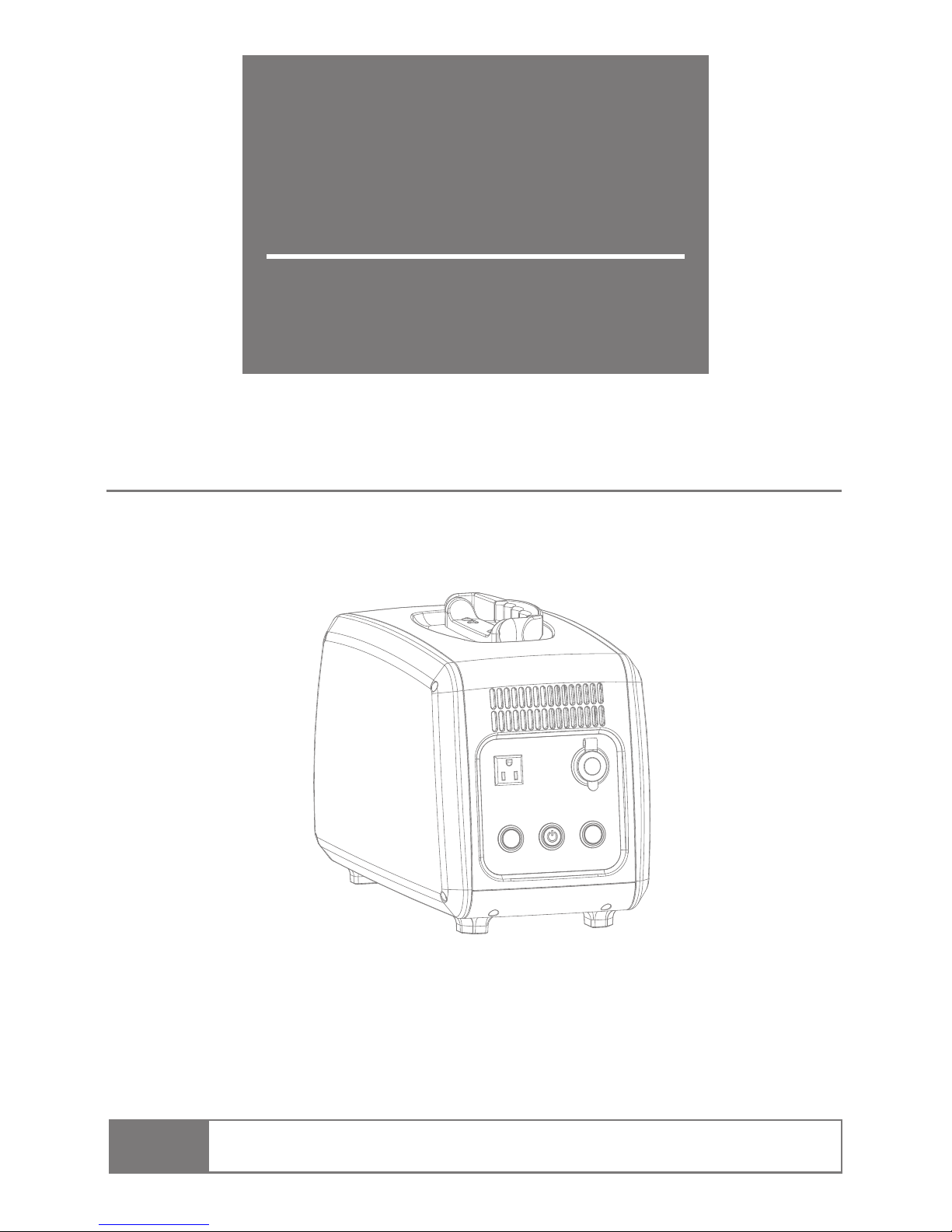
PS10B
Portable Power Station
Many thanks for buying this Portable Power Station. In order to use this product safely,
please read this manual carefully; and please safekeep this manual (including letter of guarantee) so
that you can read it any time you need. Please refer and keep the additional detail file together with
this manual if it’s offered.
Disobeying safety considerations may cause human injury such as fire hazard or
electric shock, etc.
Note:
Operating Manual
Page 2

1.
2.
3.
4.
5.
6.
7.
8.
9.
10.
11.
12.
13.
14.
15.
16.
1
2
3
7
8
9
10
12
15
16
17
18
19
20
21
21
Contents
Packing Confirmation
Preface
Safety Considerations
Name of Parts
Lifting &Handling
AC Charging
Solar Charging
AC Output
Estimated Backup Time
Storage
Long Using Life of Polymer Lithium Battery
Recycle of Lithium Ion Battery
Malfunction & Maintenance
Product Specification Parameters
Warranty& After-service
Attachment: Product Guarantee
Charge&Discharge Simultaneously
Page 3
1
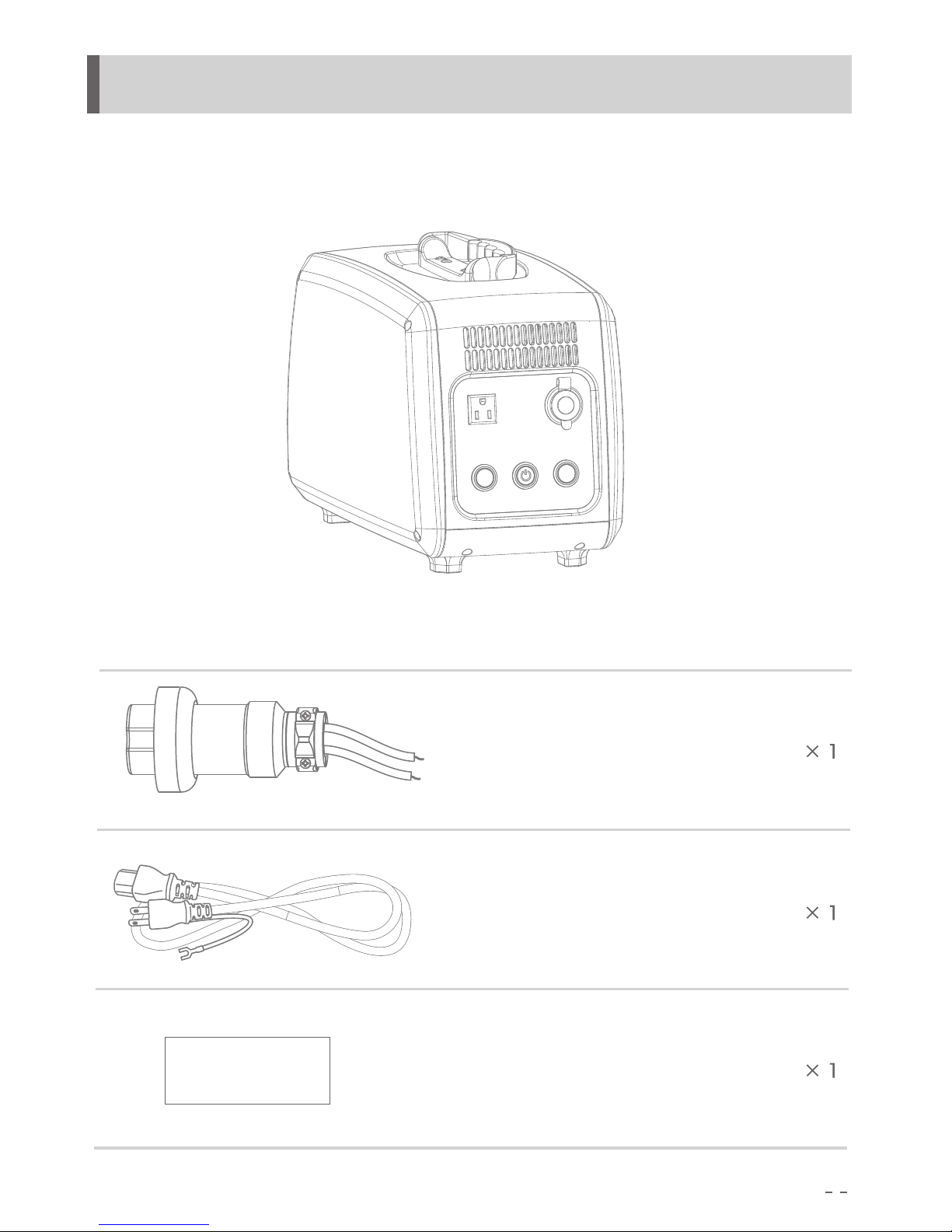
1. Packing Confirmation
Product specifications
and guarantee
Solar Input Plug
AC input Plug
Page 4

●
●
●
●
●
●
●
●
●
2
2.Preface
Please pay attention to the following content when reading the operating instruction.
The change of this manual won’t be informed to users in future.
The change of product appearance or specifications won’t be informed to users in future.
We have tried our best to make this manual. Please contact us if any unclear elaboration,
mistake or omission found.
Except for personal use, this manual is not allowed to copy and reprint.
Disclaimer (For guarantee content please refer to letter of guarantee)
Our company is not liable for the damage caused by fires, earthquakes, third party’s use or
other accidents, customer’s willful misconduct, misuse and other abnormal conditions.
Please do not repair the connector failure when using the product.
Letter of guarantee covered all the guarantee content, matters excluded of the guarantee is
beyond our scope of responsibility.
Our company refuses to take responsibility for damages caused by operation that disobey our
operation manual.
Our product is not suitable for equipment that concerns personal safety such as medical
equipment, atomic energy equipment, aerospace equipment, etc; neither equipments that
highly dependent on electricity. We refuse to take responsibility for personal safety accidents,
fire accidents or machine breakdown that caused by applying our product to the equipment
mentioned above.
Page 5
3
3.Safety Considerations
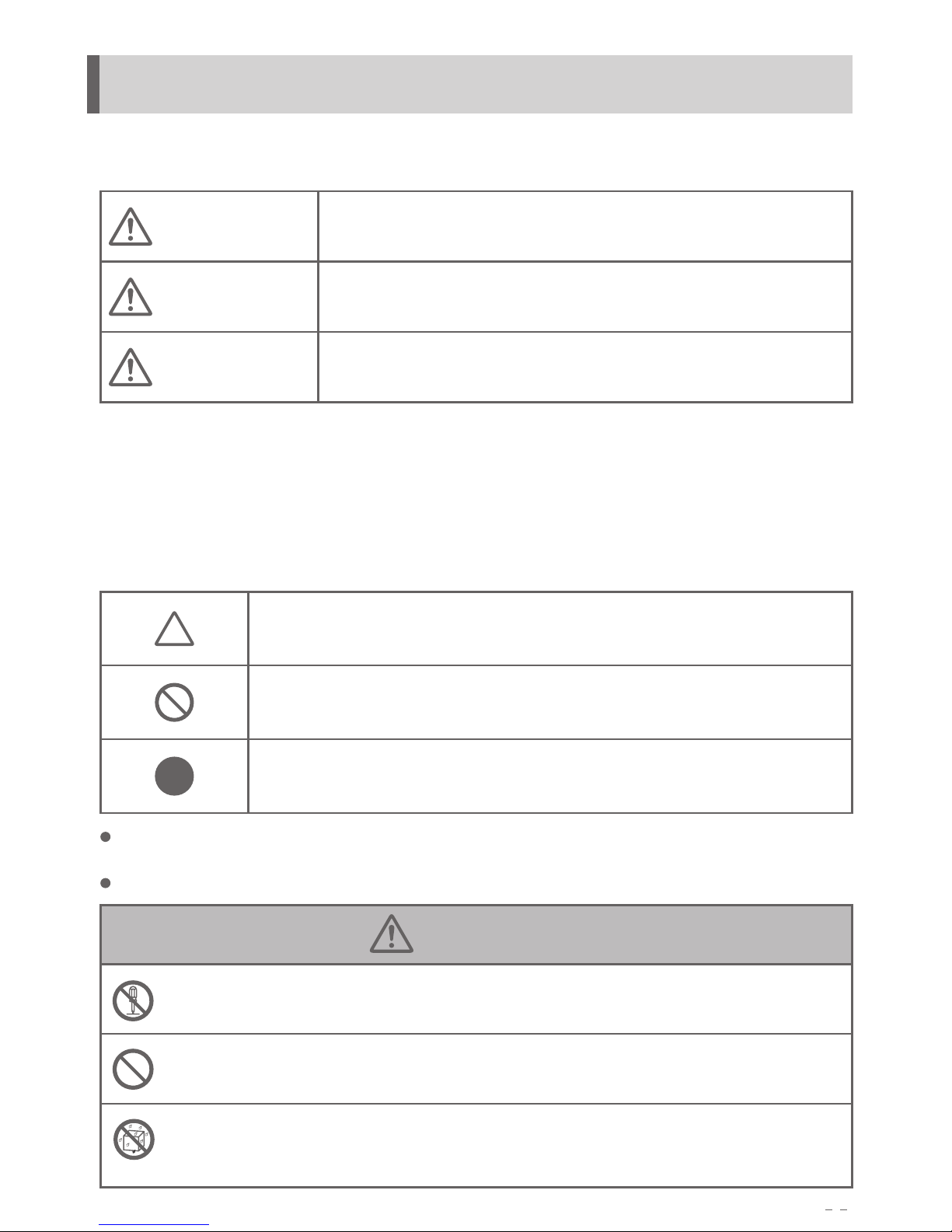
Please follow the instructions for safe use.
Display Description
Danger indicates that
Warning indicates that
Incorrect operation will very likely to result in death or serious injury.
Notice indicates that
Incorrect operation will lead to the possibility of death or serious injury.
Incorrect operation may result in injury or property damage.
Serious injury: refers to blindness, injury, burns, electric shock, fractures, poisoning, etc that
may lead to complications, hospitalization or regular treatment.
Harm: refers to injuries, burns, electric shock,etc that does not need hospitalization or regular
treatment.
Property damage: refers to damage to houses, family property, pet, etc.
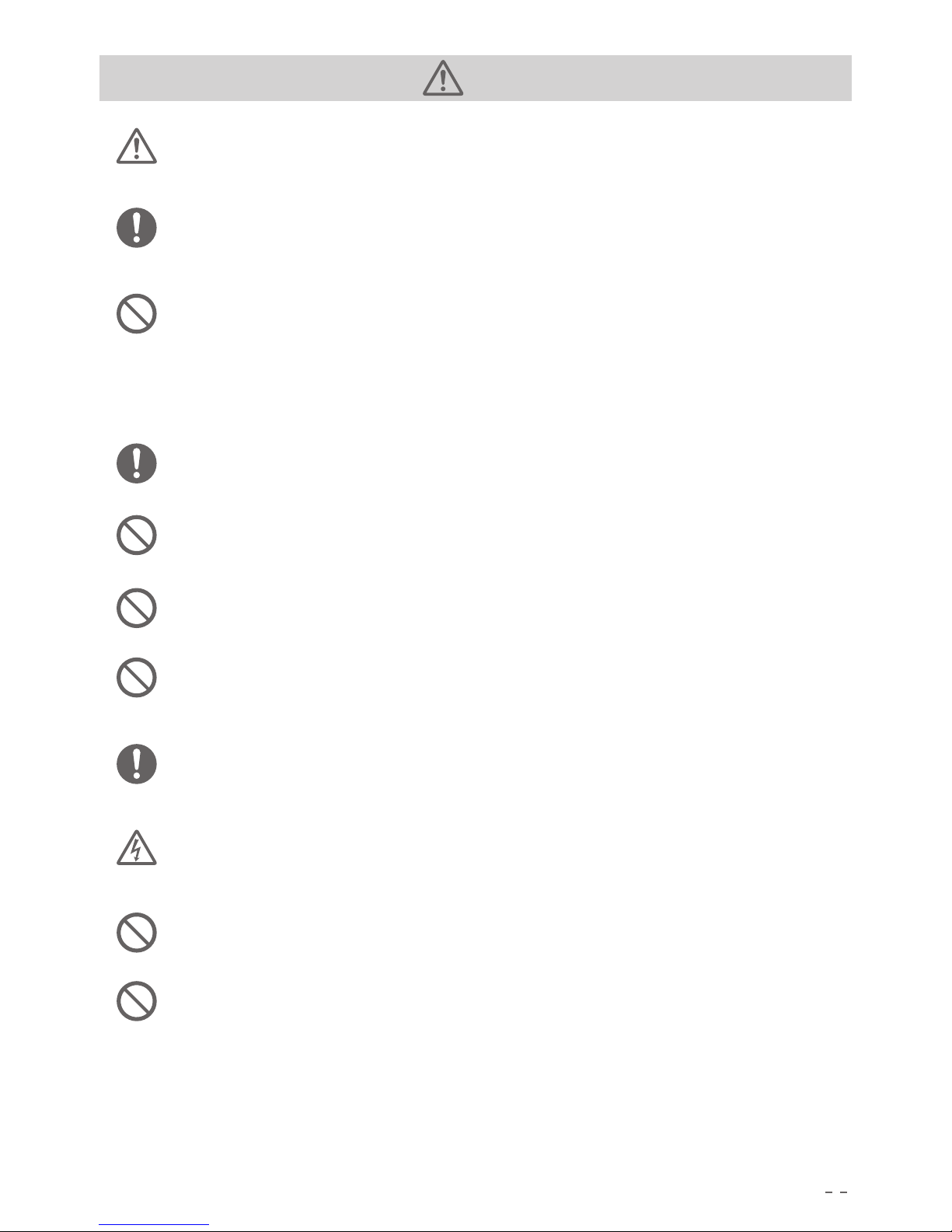
Symbol Indicator
Triangular means attention to fire breakout, fracture, high temperature, etc.
The picture describes the specific attention content.
Means the behavior is prohibited during operation of the product. The specific
prohibited behavior is illustrated or described in the picture.
Circle means the behavior that is required during the operation of the product.
The specific required behavior is illustrated or described in the picture.
Dangerous
Do not disassemble, repair and reform this product.
It may cause electric shock, fever, fire, etc.
Do not put this product close to fire or in fire or heat it.
It may cause fire or burn injury.
Do not charge, use and store this product in the bathhouse, rain or the place with dew.
It may cause electric shock, fever, fire, etc.
For safe use of PS10B, we pasted notice label. Please use the product with reference to the manual
content and label.
Please do not make the label on the product dirty or drop off.
Page 6
4
Dangerous
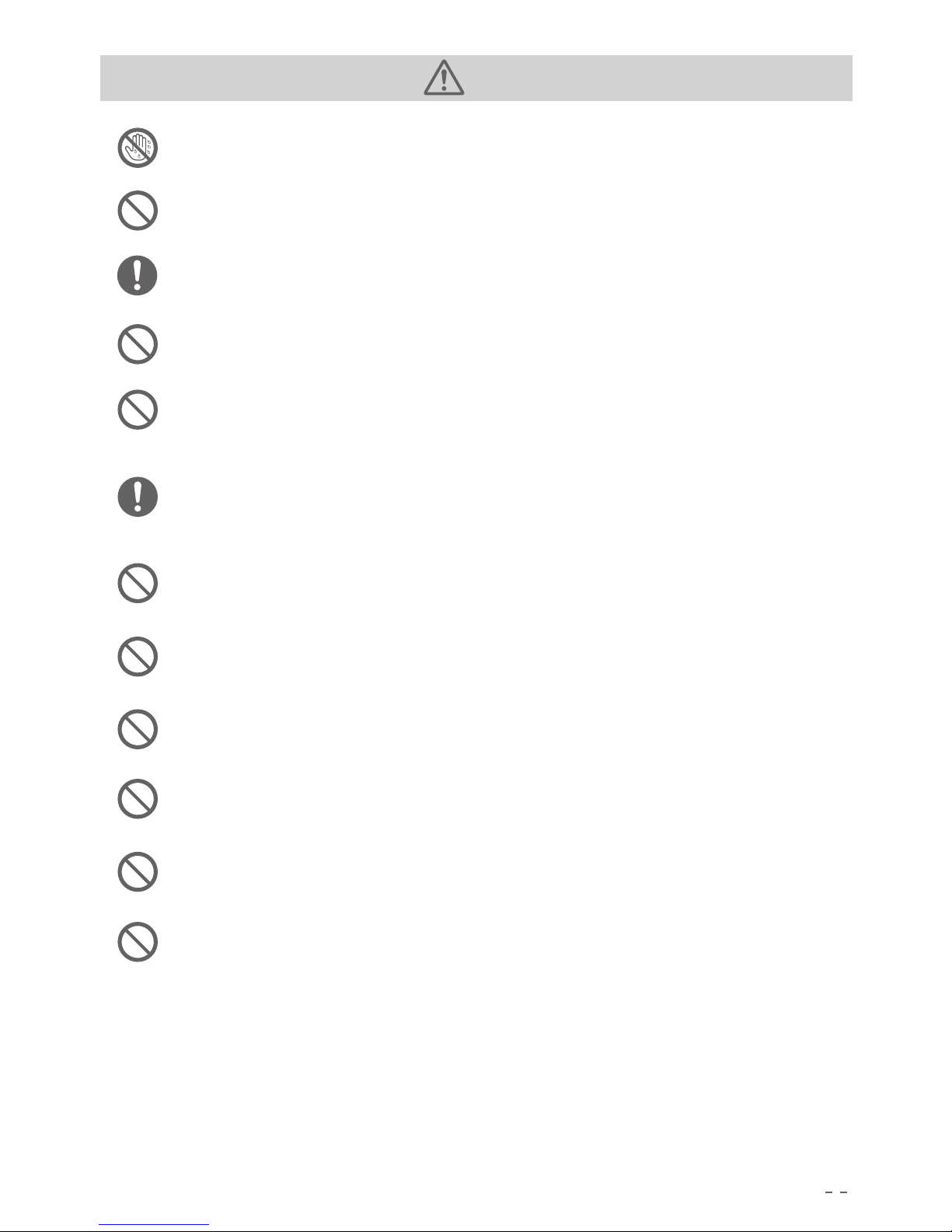
Do not touch this product and connector socket when your hands are wet.
It may cause electric shock.
BA N
BA N
BA N
Do not connect the metal to AC input and output.
It may cause electric shock, fever, fire, etc
Do not wipe when the liquid inside of this product gets into your eyes.
Please rinse and seek medical advice urgently. It may cause blindness.
Do not disposal this product as a normal waste.
It may cause electric shock, fever, fire, etc in dumping ground or waste collector.
Do not connect the AC wire in twice. Do not insert the AC wire to AC output outlet.
When AC input wire is already connected to AC input socket, using the wire to connect
AC output outlet may cause electric shock, fever, fire, etc.
Do not connect the output socket to metallic conductor like distribution wire directly.
(Output outlet is connected to AC socket of machine)
It may cause electric shock, fever, fire, etc.
Do not use the un-specified AC connector wire.
It may cause electric shock, fever, fire, etc.
Do not work this product over the rated specifications of connector or machine.
It may cause electric shock, fever, fire, etc.
Do not attack this product, such as drop it down or hit it by hammer.
It may cause electric shock, fever, fire, product damage, etc.
Please do not use it when it is in a suspended state.
It may cause electric shock, fever, fire and product damaged etc.
Please do not move the product when it is being charged or used.
It may case fire or electric shock and other injuries or product damage.
Do not store and use this product in the place where easy to fall down(like high shelf).
It may cause electric shock, fever, fire and product damaged etc.
.
Page 7
5
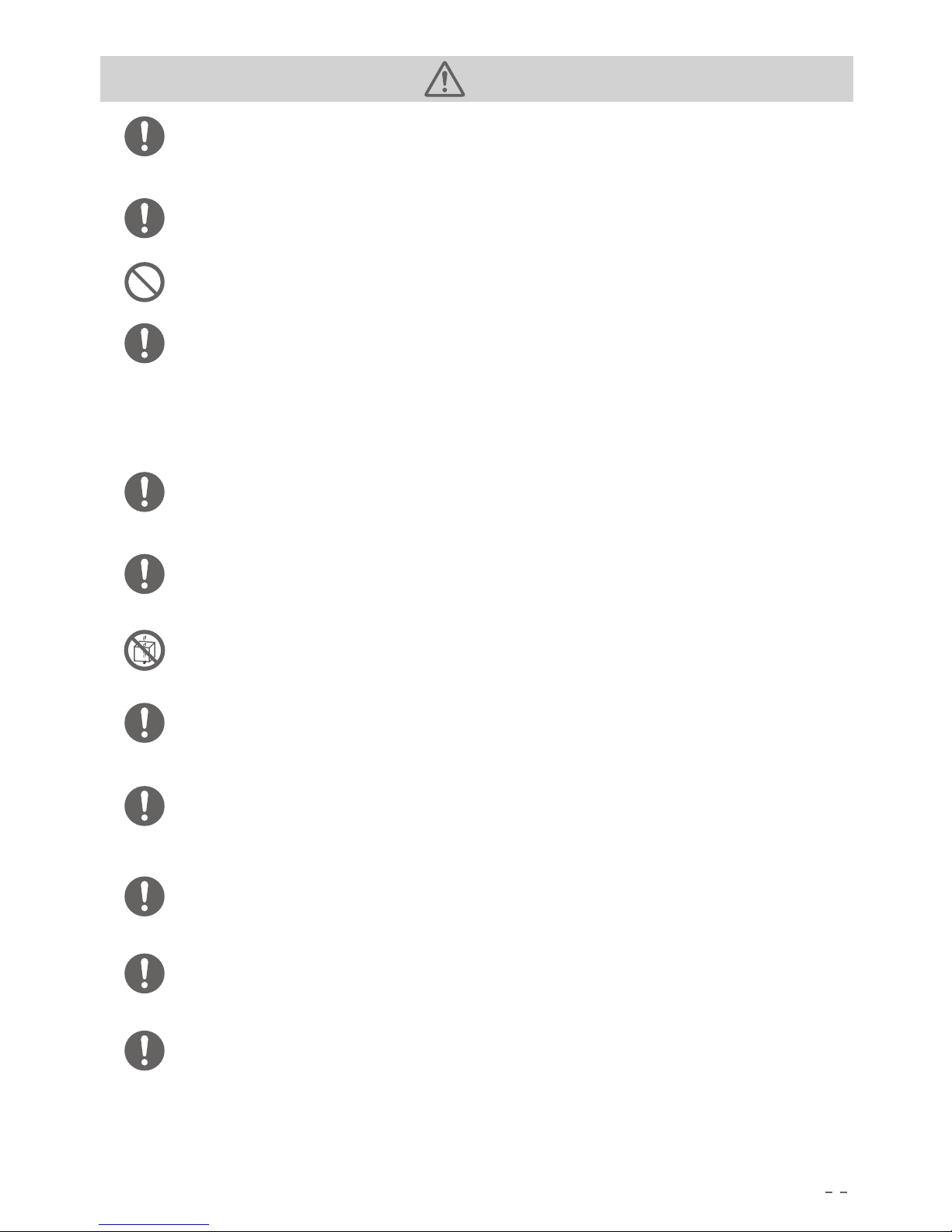
Warning
Please keep the place clean where you use or store the product.
It may cause short circuit, smoke or fire accident if powdered or small metal
object contact the terminals.
Please check the products before using.
When you found the products have damage, rupture, cracks, fever or other
abnormity, please stop using it and contact selling shop or our customer service.
Please notice when the AC line is damaged.
Do not move AC line.
Do not unplug the AC line from the input socket.
Do not let AC line near to heat sources.
Do not stampede and pull the AC line.
These are the reasons of AC line damage, fire or heat shock.
Do not let children use this product.
It may lead to an accident or injury.
Do not use it if the plug is loose or deformed.
it may cause shock, over heat or fire, etc.
Please do not use it in coastal and dusty places.
it may cause smoke and fire.
Please do not use or storage the product in the following place, like a car, trunk,
loading counter top or high temperatures environment.
It may cause the products deterioration or over heat.
When the liquid inside the product is stained to skin or cloth, please wash and
clean with tap water.
It may lead to skin hurt.
When thundering , please pull out the AC cable from wall outlet.
When thunder, big current from the outlet may cause heating, fire or other accidents.
Please do not charge the device beyond AC100-240V.
It may cause heat, fire, etc.
When using or storing, please do not put the product up-side-down or sidewards.
May cause leak, heating, fire and other accidents.
BA N
BA N
BA N
BA N
BA N
BA N
CA UT ION
EN FORCE
EN FORCE
NO TE SENSE
OF POWER
EN FORCE
Page 8
6
Caution
For unusual conditions such as rusting, rare smell, heating, please stop using the
product immediately and contact the agent shop or our customer service.
This product is very heavy, please mind when operation.
It may cause lumbar pain or hurt.
Please do not make the label stuck to the product dirty or fall.
For transportation, the product conforms with all the legal requests about the
dangerous goods.
The capacity of the li-polymer battery inside this product exceeds 100Wh.
Based on UN standards, when ship this product by air or vessel, it must be according to
IATA standard packaging, instructions, label and fill in the declarations.
Please make the product stable when ship it by automobile.
It may cause product damage , which may cause electric shock, heating, fire and other
accidents.
Product must connect to AC ground wire when charging .
Do not make product wet or AC ground wire wet by water or other liquids.
It may cause short-circuit, heating, fire, etc.
Please charge, use and store within temperature environment of 0〜40°C.
It will cause low efficiency or heating if product is used beyond this temperature range.
Please stop using the product immediately if it falls off or strokes by mistake.
In order to prevent accidents, please contact the seller or our customer service to
ask for checking and repairing.
Please read carefully the instructions of electrical device you need connect to
this product.
Please ensure that the device is turned off before connecting.
Sudden start of the facility may lead to accident or injury.
When protection function starts and this product stops output, please disconnect
the electrical appliances from AC output outlet. Do power off the product when
storage, and also to prevent unnecessary discharge of the inside battery and electric
shock, fever, etc.
BA N
BA N
BA N
EN FORCE
EN FORCE
EN FORCE
EN FORCE
EN FORCE
EN FORCE
EN FORCE
EN FORCE
BA N
Page 9
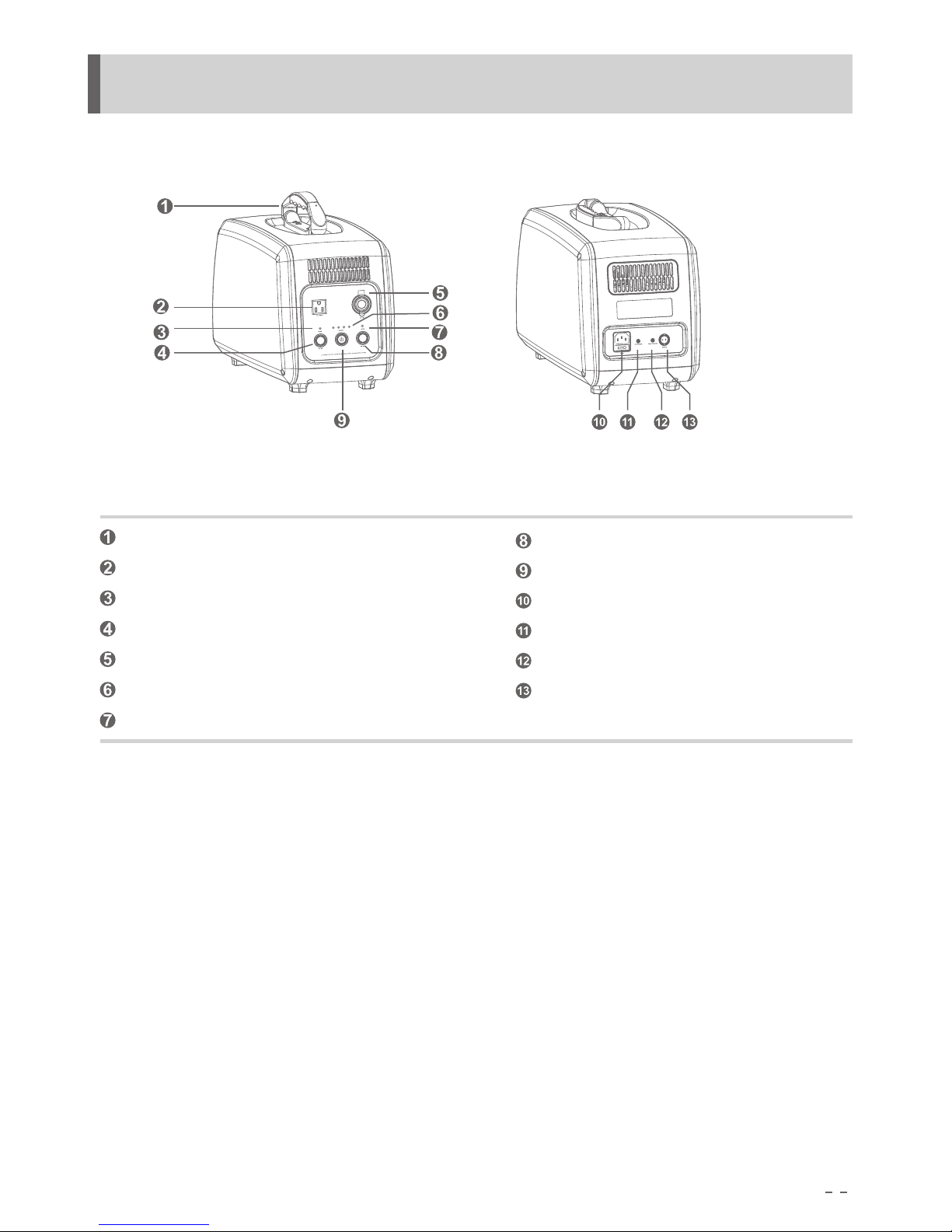
DC Output On/Off
AC Input Socket
AC Output Indicator
Power On/Off Button
AC Output Outlet
Solar Input Indicator
DC12V Output Outlet
Solar Input Socket
Capacity Indicator
AC Input Indicator
AC Output On/Off
DC Output Indicator
7
4. Name of Parts
Handle
Page 10
8
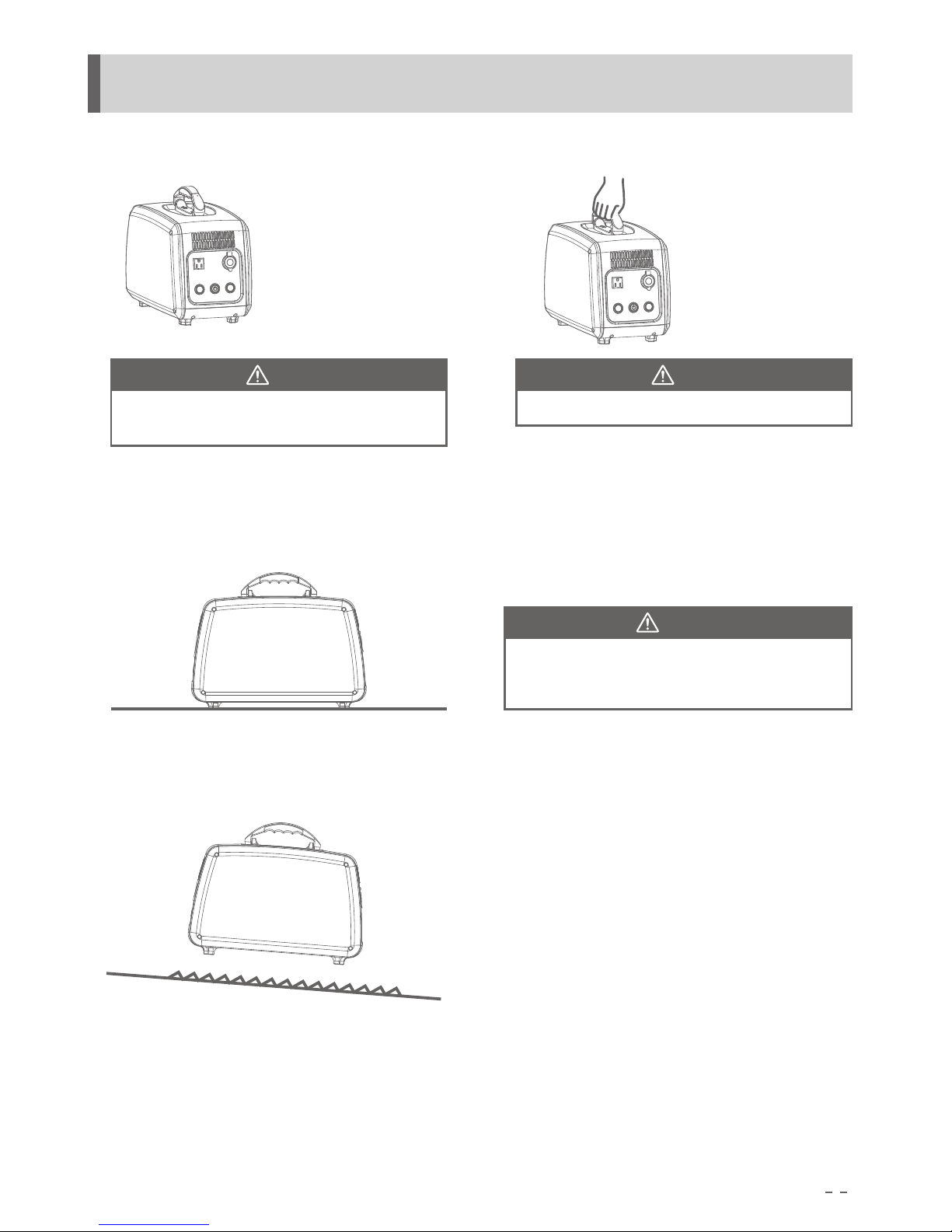
5.Lifting & Handing
1. Pull the handle up
2.Moving by carry handle
Notice
Keep the product away from anything
when moving.
Notice
Hold the handle steady.
3.Put at stationary place
Notice
Please put the product at stationary place.
And indicators can be saw easier.
4.Do not place it where unsteady
Page 11
Capacity
AC OUT DC OUT
DC 12V
DC ONAC ON
AC Output
Please tur n the p ower o ff for long p eriod no-op erati on sta tus
ACCharg ing
SolarCh argin g
Solar in
AC IN
Capacity
AC OUT DC OUT
DC 12V
DC ONAC ON
AC Output
Please tur n the p ower o ff for long p eriod no-op erati on sta tus
Capacity
AC OUT DC OUT
DC 12V
DC ONAC ON
AC Output
Please tur n the p ower o ff for long p eriod no-op erati on sta tus
9
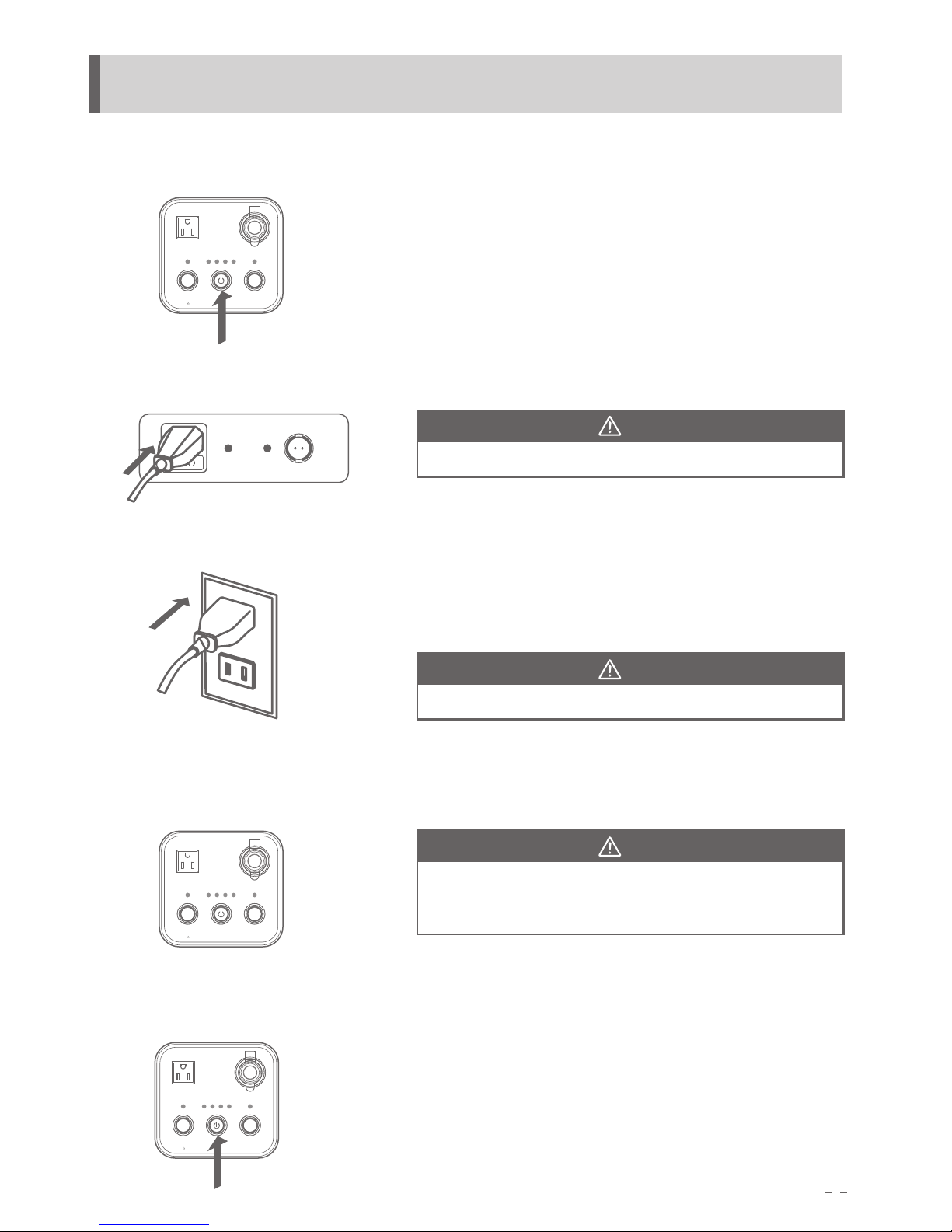
6.AC Charging
1.Press the power on/off button
Power indicator lights up, also the capacity indicators show battery capacity.
2.Connect AC cable
Notice
Notice
Notice
Make sure the AC cable plug is inserted into the AC input socket
3.Connect AC cable to wall AC outlet
Please charge under temperature 0~40°C
4.After fully charged: 4 green indicators lights up.
Charging time alters based on ambient temperature or
charger internal state.
5.Press Power on/off button to stop charging
Power off, stop charging and disconnect
the AC input cable from wall AC outlet.
Please make sure AC cable plug is inserted into standard AC outlet.
(PS10B-P1:100V/110V/120V;PS10B-P2:220V/230V/240V)
Capacity indicator flash every 2 seconds, AC input indicator lights up.
Page 12
10
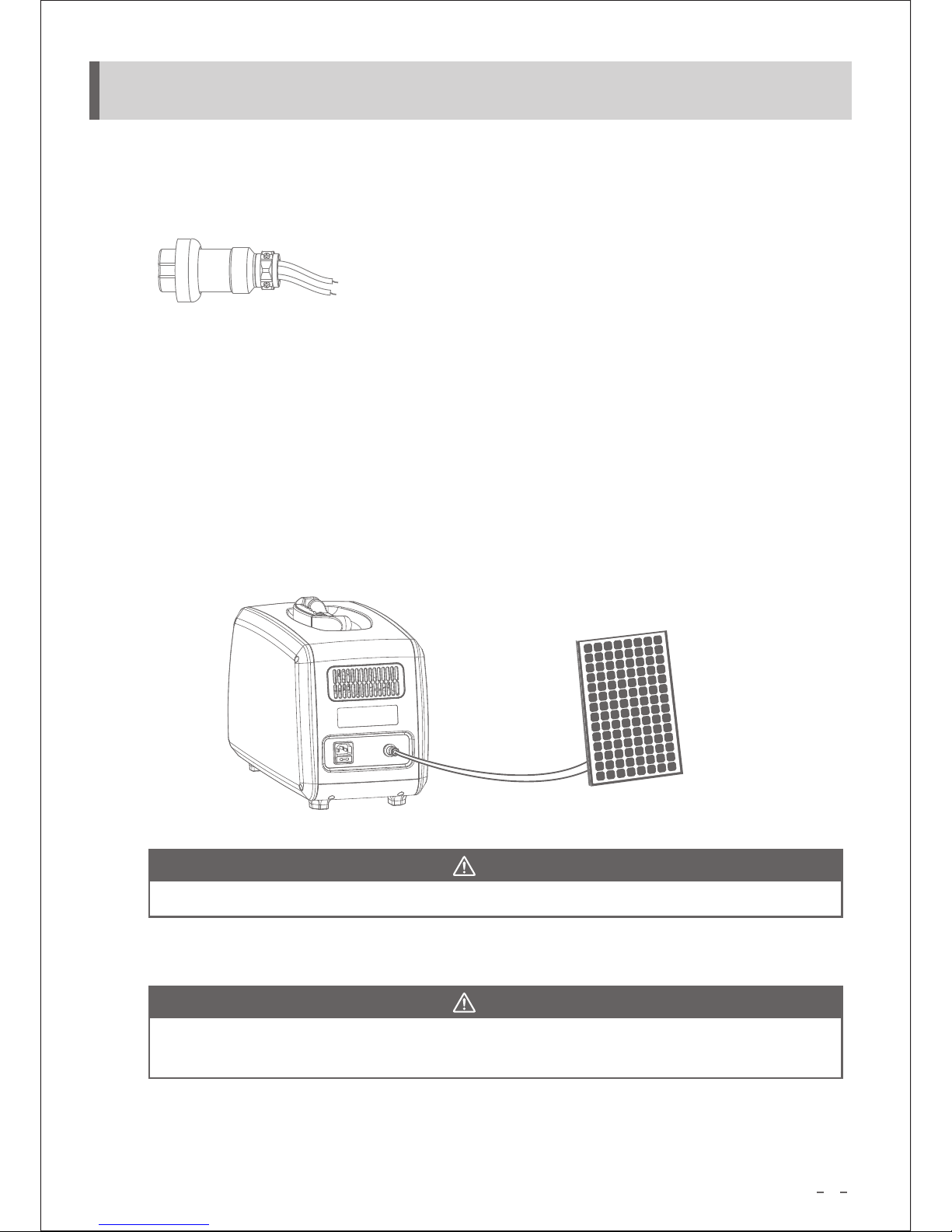
7.Solar Charging
1.Special solar input connector
1# Red wire: positive
2# Black wire: negative
2.Connect the solar panel to solar input connector
Red wire connects to positive of solar panel and black wire connects to negative of solar panel.
(attention: solar panel voltage requires DC18V to DC54V)
3.Press power on/off button: solar charging indicator lights up and also battery capacity indicators
4.Plug the solar input connector into solar charging input socket
Capacity indicator twinkles once per second and also solar input indicator lights up. It’s normal
that if the product heats up (charging ambient temperature requires 0~40 °C)
Notice
Notice
Please charge under the temperature 0~40°C
5.Fully charged by solar panel: 4 green indicators light up (PV max input power 210 watt)
Charging time may be different because of environment temperature or solar charger
internal factor
6.Power off to stop charging
Press the power on/off button, unplug solar input connector from solar input socket
Page 13
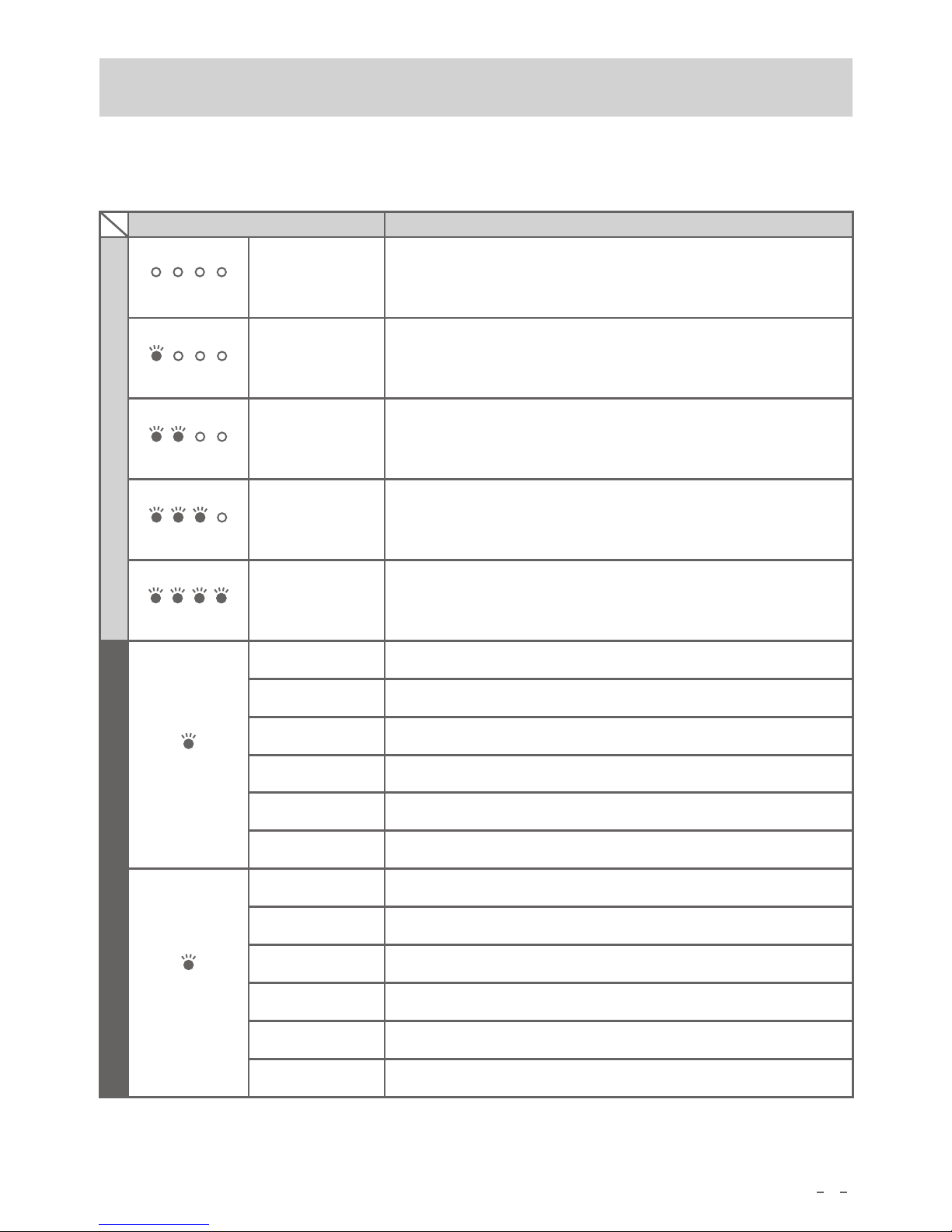
1 green on
Twinkle per second, charging, SOC 0%~25%
25 50 75 100
25 50 75 100
25 50 75 100
25 50 75 100
25 50 75 100
11
Green on
Light off
Red on
Red twinkle
Orange on
Orange twinkle
Normal AC Input
Abnormal AC Input or no input
AC charging short-circuit protection
AC charging over temperature protection
Fan failure
Battery failure
Green on
Light off
Red on
Red twinkle
Orange on
Orange twinkle
Normal solar input
Abnormal solar input or no input
Solar charging short-circuit protection
Solar charging over temp protection
Fan failure
Battery failure
4 indicators off
Indicator State Indication
Power off or no electric inside
2 green on
Twinkle per second, charging, SOC 25%~50%
3 green on
4 green on
Twinkle per second, charging, SOC 50%~75%
Twinkle per second, charging, SOC 75%~100%
4 lighting up means it’s charged fully and charging stops
Normal
Need confirmation
AC input
indicator
Solar input
indicator
6. Capacity Indicator
Page 14
Capacity
AC OUT DC OUT
DC 12V
DC ONAC ON
AC Output
Please tur n the p ower o ff for long p eriod no-op erati on sta tus
60Hz
50Hz
12
Connect electric appliance to AC output outlet and
check whether well connected. Please make sure the
electric appliance is powered off before connecting
Note
Note
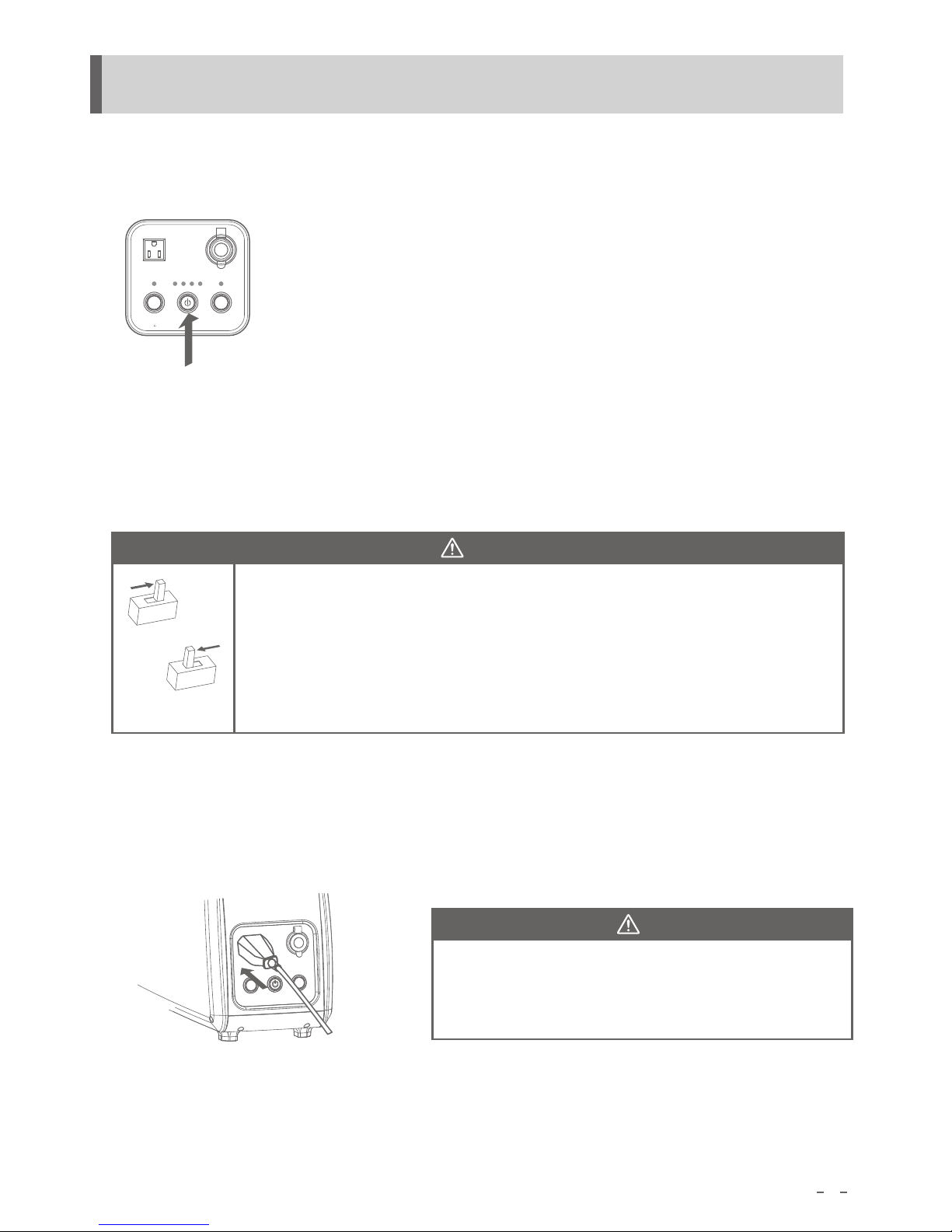
8.AC Output
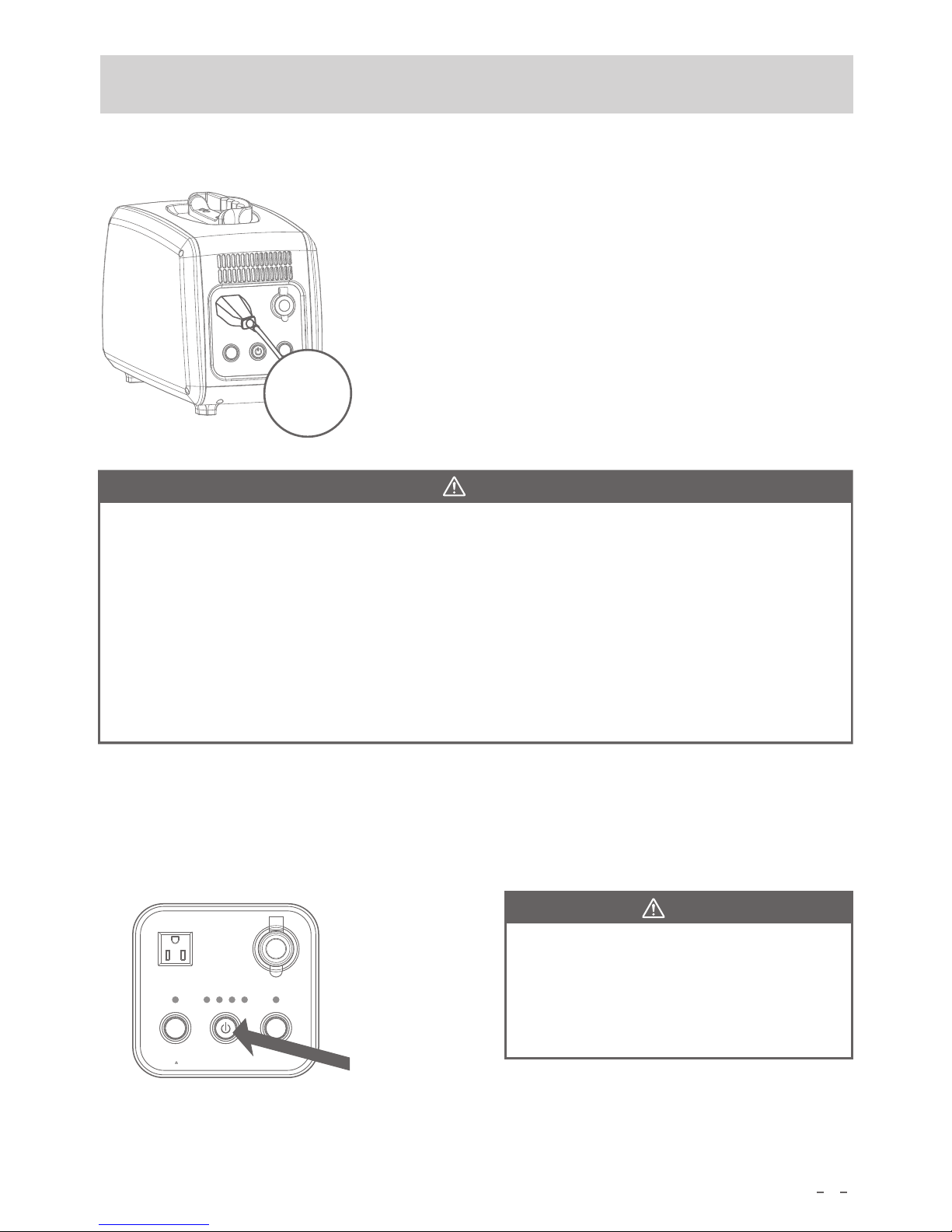
1.Press the on/off button
2.Match the frequency of the electronic appliance (50Hz or 60Hz)
Standard frequency: 50Hz. Different frequency may lead to abnormal
operation of electronic product, it may also lead to breakdown of electronic
appliance.
Switch frequency: please contact the agent or please operate with the
authorization of agent.
Switch method: Power it off, open the cover on the left side, and move the
dial switchon the inverter to corresponding frequency.
3.Connect other electronic devices input plug to the AC output outlet.
Make sure the input plug of other electronic device is certainly inserted into the AC output outlet.
Page 15
Capacit y
AC OUT DC OUT
DC 12V
DC ONAC ON
AC Output
Please turn t he pow er off for lo ng per iod no -oper ation statu s
13
4.Using of electrical appliances
Make sure electric appliances is powered off before using.
Confirm the battery capacity according to indicator 1-4
lights during the processing.
Usage time is varied due to the ambient temperature or
change of the built-in li-ion battery .
It’s normal if the product heats up during output.
Note
Please make sure the electric appliance works well before using the product.
The max AC load of power consumption for electric appliance is 500 watt.
Due to the difference of electrical appliances, there are circumstances that it doesn’t work even if
the load is less than 500 watt.
Compared with household AC power source. It’s also possible happen that low capacity at electrical
products.
When the product connects to radio, video player, TV screen and so on, there might be some noise.
Please stop using it immediately when repeated output stops, and then contact the retail store or
consult customer service of our company for help.
5.Stop using the appliance
Power off: pull out the connector of electric appliance, press power on/off button.
Note
When the product operates more than 12
hours without load, AC output will cut down
automatically to avoid self-consuming.
Please restart the product when you use it.
Connect To
Electric Device
Page 16
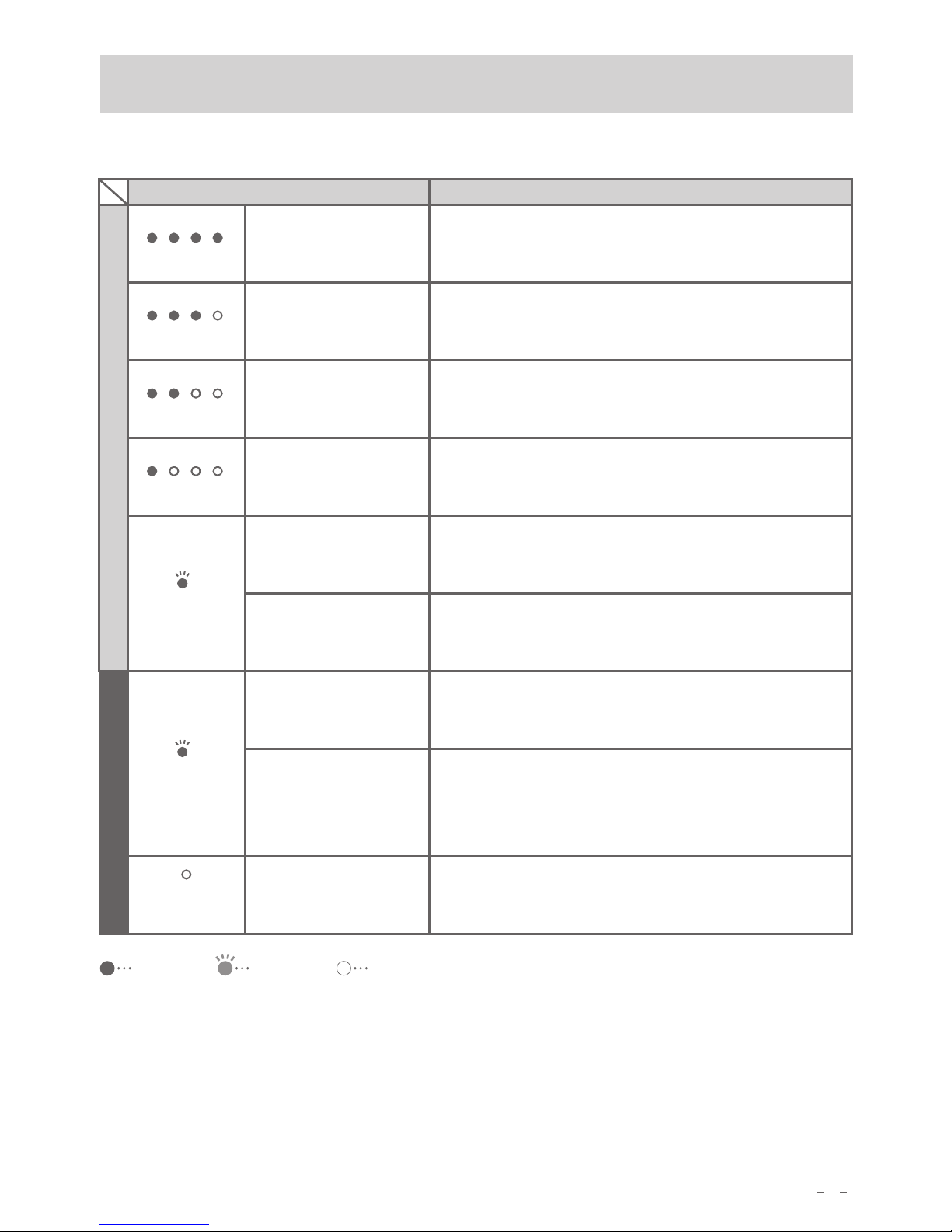
6.Discharging SOC Indicators
Indicator State
25 5 0
75
100
25 5 0
75
100
25 5 0
75
100
25 5 0
75
100
Indication
Discharging, SOC 75~100%
Discharging, SOC 50~75%
Discharging, SOC25~50%
Discharging, SOC 0~25%
14
Twinkle between
green and red
Inverter over load, over temp; battery low voltage,
over voltage; fan failure. These are general alarms if
inverter can still output.
Red twinkle
Inverter misoperation, no output from inverter: bad
alarm
Cut off load, check if there is over load, short-circuit.
Light off
Abnormal DC12V output.
Green
Output 50Hz
Red
Output 60Hz
1 green on
2 green on
3 green on
4 green on
Light on
Twinkle
Light off
Normal
Abnormal
AC output
indicator
AC output
indicator
DC output
indicator
Page 17
20W
70hours
50W
28 hours
100W
14hours
200W
7hours
300W
4.5hours
400W 3.5hours
Power consumption Estimated back up time
20 Wh
LED Light
70
hou rs
(32 model)
LC D TV
75 Wh
18
hou rs
15
1400
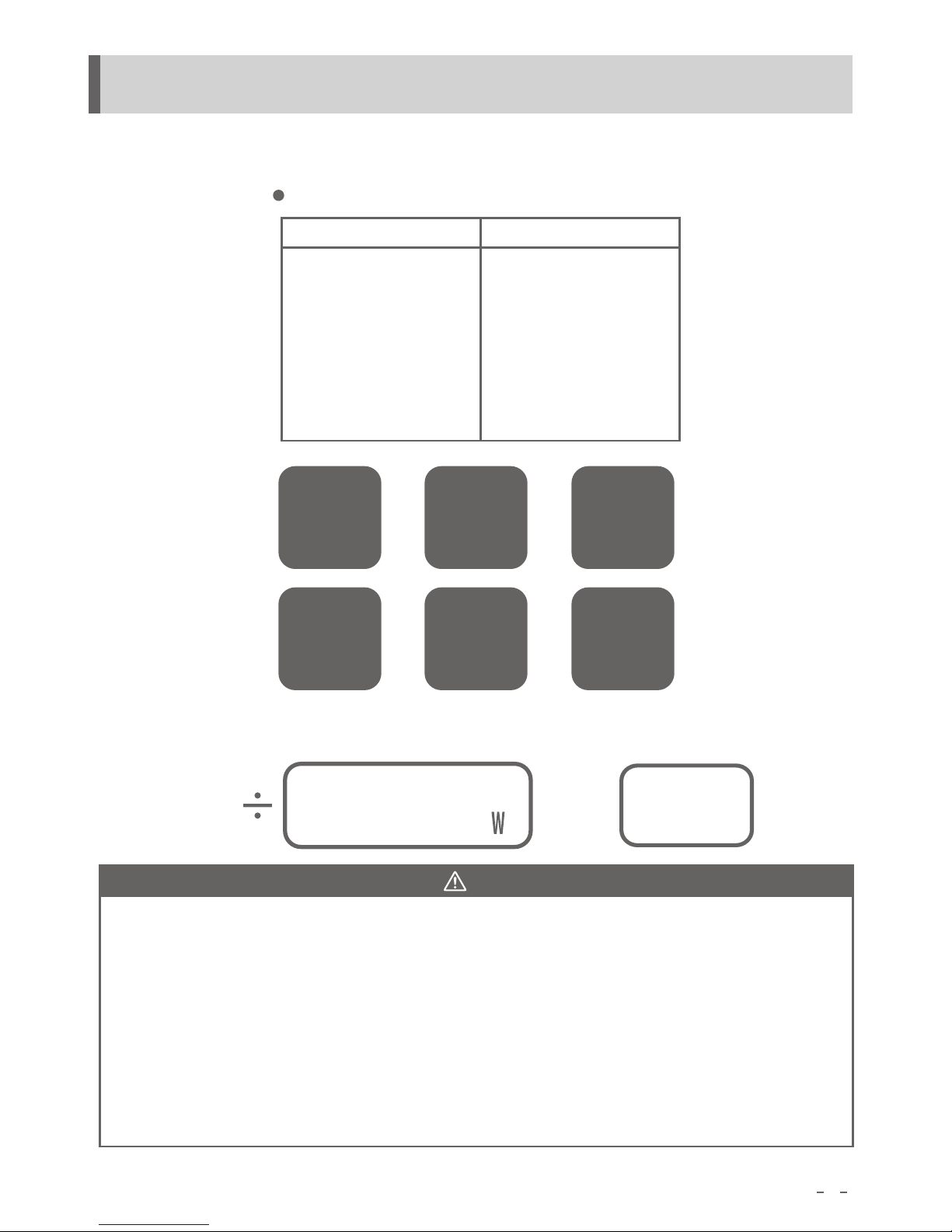
9. Estimated Backup Time
Please ensure the load for power station is no more than 500 watt, matching electrical appliances
with standard AC input.(PS10B-P1:100V/110V/120V;PS10B-P2:220V/230V/240V).
Estimated Backup Time
25
pieces
5.6
10 Wh
Smart Phone
hours
3
Electric Kettle
43 0 Wh
hou rs
Electric Tool
80 Wh
17.5
hou rs
Refrigerator
90 Wh
15.5
hou rs
Note
Above data is just for reference. We collect the approx values when we develop it with ambient
temperature of 25°C and full charged, these values may vary regarding to different electrical
appliance manufacturer or other else.
It may not work even the load for power station is less than 500 watt depending on different
electrical appliances.
No output and power off automatically if it’s overloaded.
When power consumption is no more than 10W, after about 12 hours, the output will stop
automatically. Restart output button, then restart output.
When plasma TV, LCD TV above 41 type, desktop computers started with high power or load
variation appliances, PFC circuit equipped with devices etc., it may not work even the load for
power station is less than 500 watt.
Power Consumption
Hours
≈
Model PS10B back up time calculation
(based on PS10B 1500Wh model)
Page 18
16
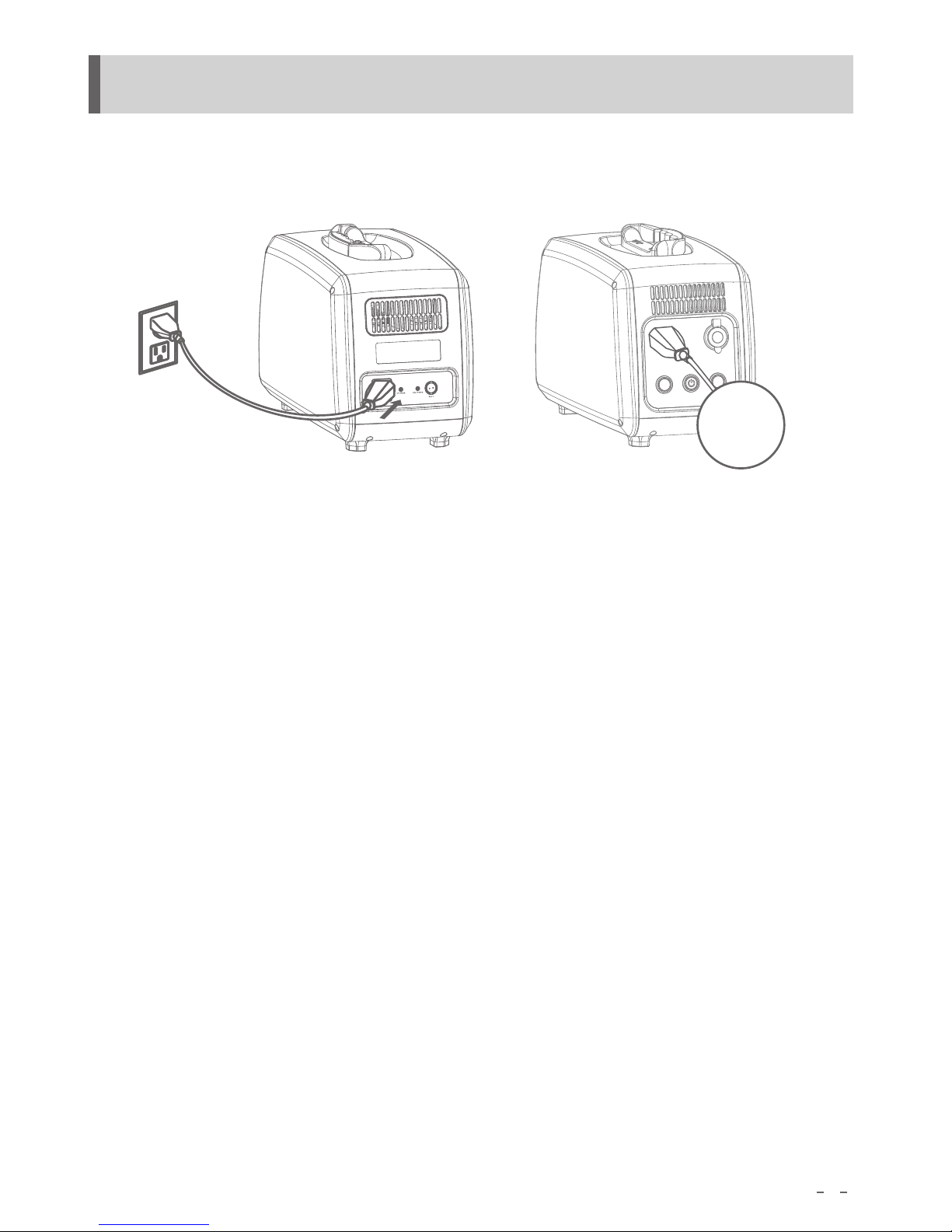
PS10B power station can be discharged while charging.
In the condition of charging, it can supply power to electric appliance at the same time.
10.Function of Charging & Discharging Simultaneously
Connect To
Electric Device
Page 19
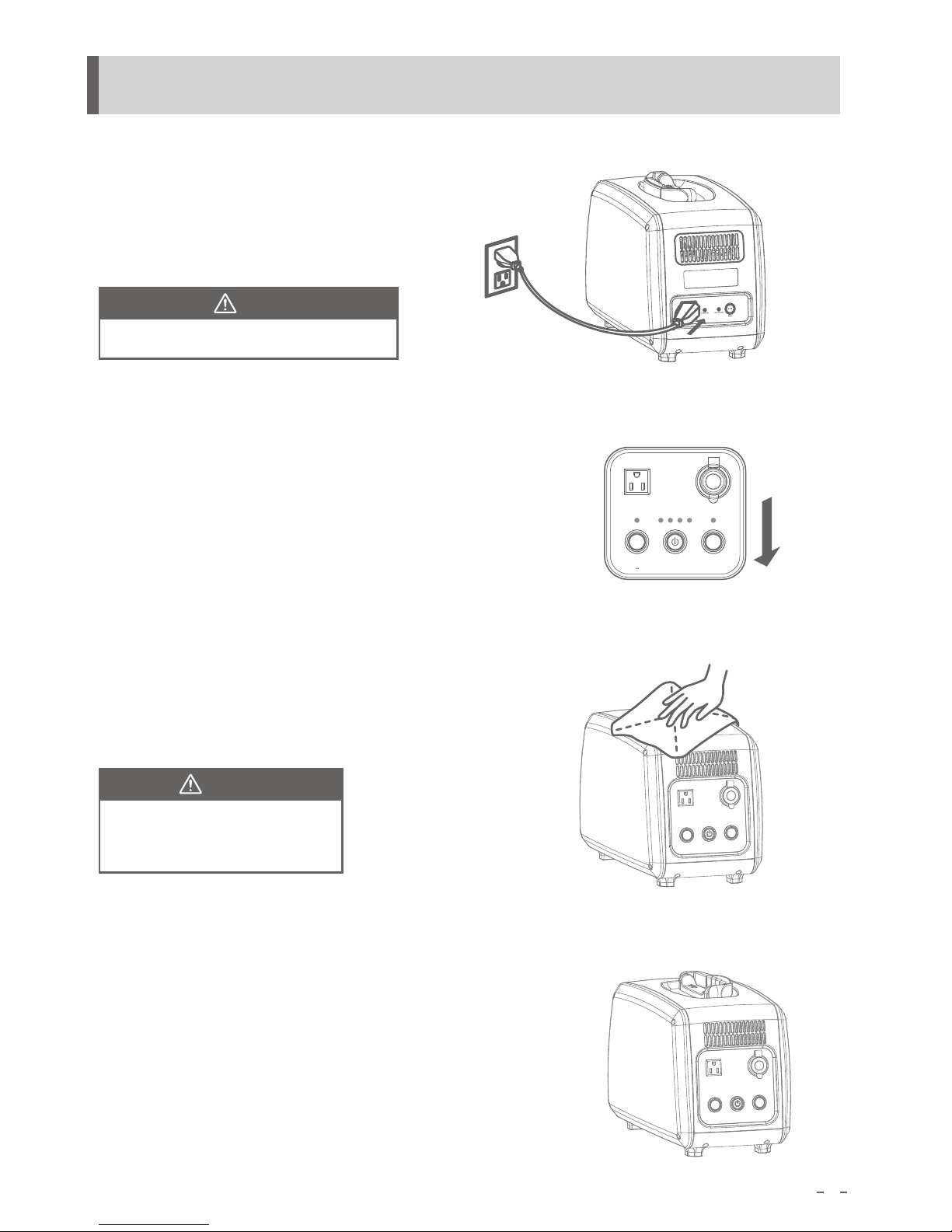
Fully charge the power station before long term storage.
Fully charge the power bank at least once a year.
2.Shut down all the buttons
After fully charged, pull out AC input connector from AC input socket, shut down on/off buttons
3.Clean
Mop the unclean spot by not dripping duster.
Capacity
AC OUT DC OUT
DC 12V
DC ONAC ON
AC Output
Please tu rn the power off fo r long perio d no-o perat ion st atus
17
11.Storage
Note
Gasoline, naphtha, diluent, kerosene,
etc have the effect of the soluble resin,
please do not use.
Note
4.Storage
Try to storage the power station in dry and less dust environment.
Suitable storage temperature: 0~40°C, avoid direct sunshine.
Please store the product at stable place.
1.Full charge
please refer to the content in page 11
Page 20

18
12.Long Using Life of Polymer Lithium Battery
Charge, discharge and storage at 0~40°C
Using battery with too low or high temperature shorten battery cycle life.
Don’t connect the load more than 500W continually
Over load makes PS10B stop discharging automatically and shorten battery cycle life.
Don’t charge battery after it’s fully charged
Pay attention to the SOC indicators, don’t charge battery after be fully charged or finishing fully
charged. Otherwise, it shortens cycle life of lithium battery.
Don’t discharge battery when SOC is 0
PS10B cuts off discharging automatically. But electric device connecting to AC output outlet
shortens cycle life of lithium battery.
Shut it down when no need to use
Wasting the electricity inside the battery is another reason of less cycle life of lithium battery.
Fully charge the product for storage
For long-time no-use state, please keep the product fully charged for storage, and recharge it at
least once a year.
Page 21
13.Recycle of Lithium Ion Battery.
19
After use, complete lithium-ion batteries can be recycled .
Please do not disassemble, be sure to contact the retail store or our
“customer service center”
Page 22
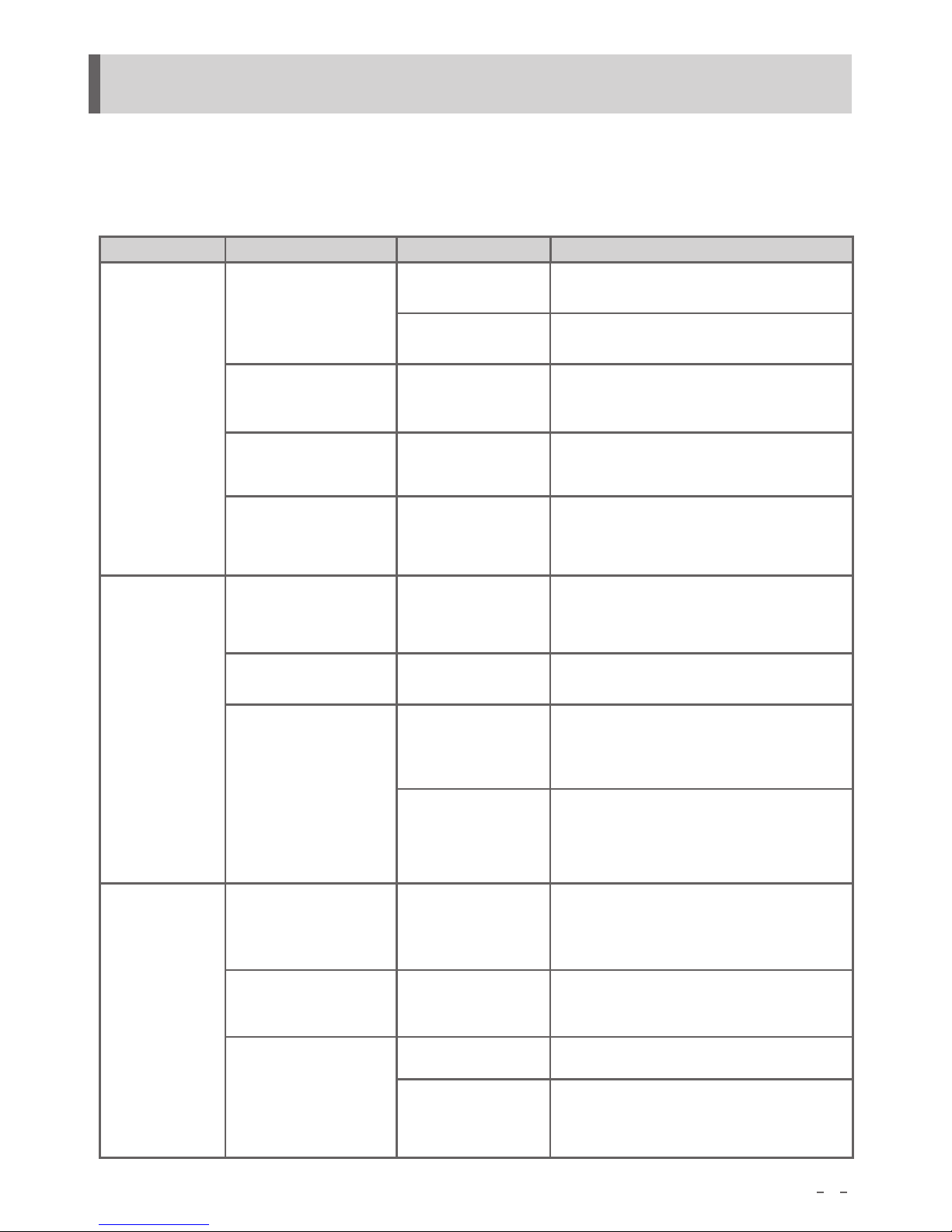
For the occasions that the following "corresponding disposal"is not available, please stop using
the product immediately and contact the retail store or "customer service center" of our
company.
Remaining capacity
quickly reduce
Electric start but stop
just a minute
Electric do not work
correctly after
connected
Refer to“need
confirmation”
in page 10
Charging stop due to
the circuit fault
Electric overload
Battery cycle life
Electric power less
than 10W
No solar input
Refer to “need
confirmation”in
page 10
The Product Internal
Temperature
Anomalies
No matching
frequency
Overload protection
function start,
output stop
No power supply
for electric
Restart AC output button, confirm the total
power (when the power is less than10W
for more than 12 hours, the product is
checked as no load and output stops)
Please stop to charge immediately and
contact retail store or our customer service
center.
Lower total power of electricy
Please stop to charge immediately and
contact retail store or our customer service
center.
In compliance with“need confirmation”
in page 10
Confirm the matching frequency
Restart AC output button, lower the total
power of electric Output stops when electric
power is over 500W )
20
Phenomenon
Status
Main reason
Corresponding disposal
Non-
rechargeable
Can not start charging
No enough power
supply
AC wire is not connected
or not connected well
Check whether the wiring is normal
Charging more than two
hours of battery shows
no increase
Place the product in ambient temperatures
0~40°C. (begin charging automatically
at an appropriate temperature )
Light indicator shown as
the state of “need confir-
mation” in page 10
In compliance with “need confirmation”
in page 10
The state that is not
shown in “need
confirmation” in page10
Charging stop due
to the circuit fault
Please stop charging immediately and
contact retail store or our customer
service center
Confirm electric plug is inserted into
ac socket
Electric do not work
correctly
Electric do not
work
Electric work
but short time
14.Malfunction & Maintenance
Light indicator shown as
the state of “need confir
mation” in page 10
The state that is not
shown in “need
confirmation” in page10
Page 23
■
21
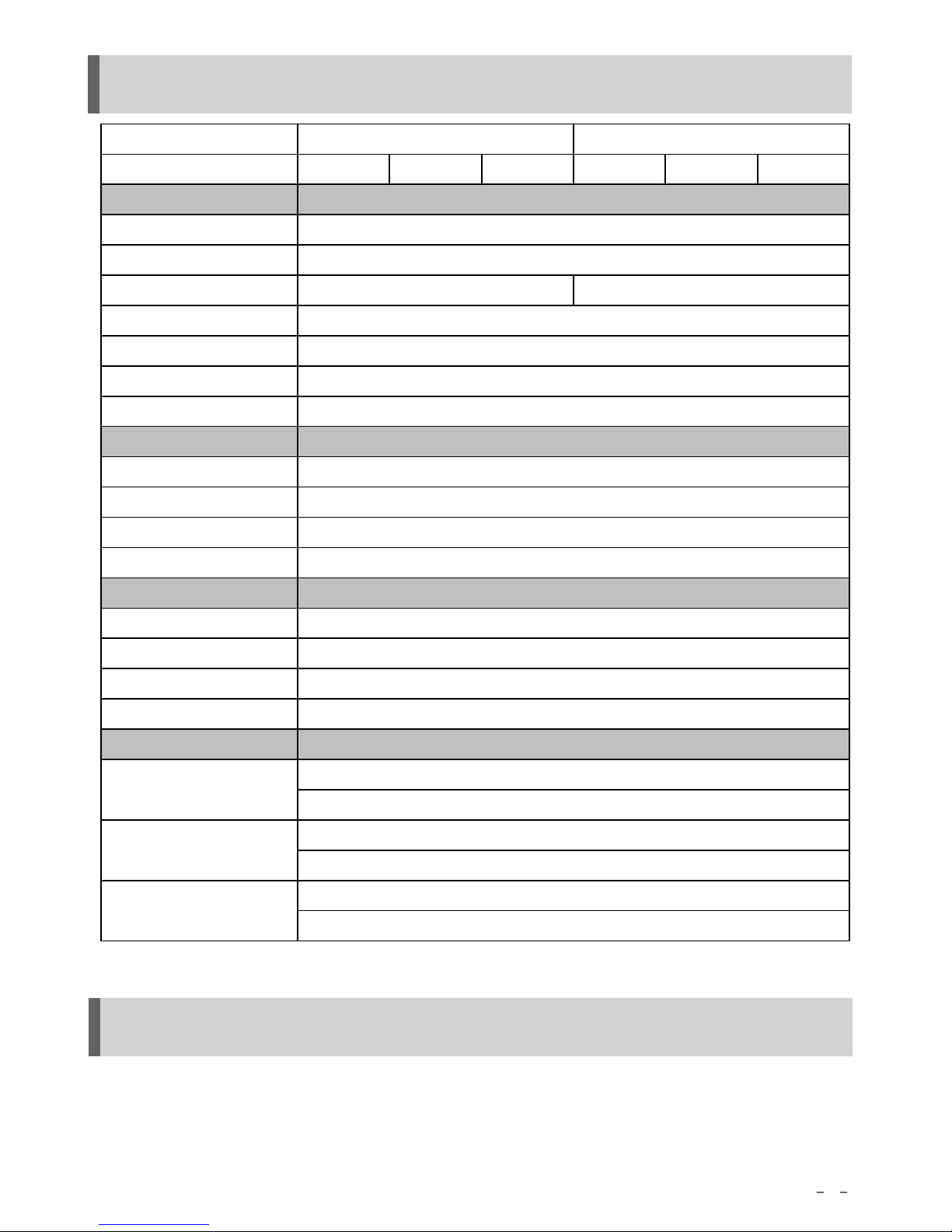
15.Specification
Due to product improvement, product function and appearance change won’t be informed in advance.
Warranty brochure
Take the warranty brochure from retail store, you need register『retail store name•purchase
date』etc. The warrant is 2 year from the date of purchase.
■
Any product consult or after-sale service needs, please contact your local deals or us directly.
16.Warranty&After-sale Service
Modle
Battery Capacity 7 00Wh 1200Wh 1500Wh 700 Wh 1200Wh 1500Wh
Rated Output Power
Peak Output
Output Voltage
Output Frequency
Overload Ability
Max Efficiency
Car Plug Output
Input Voltage
Power Factor
Input Frequency
Max Charge Power
Max Input Power
Start-up Voltage
MPPT Input Voltage
Max Input Voltage
DC12V6A
AC Charge
Solar Charge
18~50Vdc
54Vdc
Dimension(mm)
Weight
L405×215×261(Product)
L485×296×390(Packing)
7.8/10/12Kg (Net Weight)
9.4/11.4/13.6Kg (Gross Weight)
Working Condition
50Hz/60Hz
120%<load<130% @10min; 130%<load<150% @10s
88~264Vac
≥0.94(full load)
50Hz/60Hz
327W
Relative Humidity: 5%~90%
Temperature: 0~40℃
General
210W
18Vdc
PS10B-P1 PS10B-P2
500VA
Output
750VA 10s
100V/110V/120Vac 200V/230V/240Vac
90% (>70% load)
Page 24

22
FREE REPAIR REGULATIONS
1.For product failure caused by manufacturing reasons, please bring the guarantee and vouchers
of purchase date (invoices, etc.) to retail store. It is free to repair or replace the product during
the 2 year warranty period under normal use. In addition, customer should bear the necessary
shipping costs when needed.
2.The repair is not free for the following circumstances, even within warranty period.
1) No warranty brochure and vouchers of purchase date (invoices, etc.) is provided.
2) Product failure caused by operation mistake. (Such as operation mistake beyond the notice
in the manual.)
3) Product failure caused by repair, modification, dismantling, etc.
4) Product failure caused inadvertent operation (fall/ impact/soaking/sediment attached-out
side or inside of the machine), improper maintenance (mildew, dust, etc.).
5) Other accessories and consumables besides the body.
6) Damage cause by special purpose usage (such as business with significant continuous use,
the ship carrying, etc.)
7) Product failure that is not caused by ontology reason, such as the power supplying or other
electric appliance, or damage caused by inspection or repair.
8) Failure caused by reasons besides all conditions mentioned above is also not our responsibility.
3.Please note that we will not bear compensation related to the secondary damage (expected
damages, mental damage, etc.)
 Loading...