

Page 1

1
INSTRUCTION
MANUAL
Page 2

2
3
YOUR
POWERDOT
Thank you for purchasing PowerDot®!
PowerDot uses electrical muscle
stimulation (EMS) technology to stimulate
your muscles and help you improve muscle
performance.
To get the most effective muscle
stimulation out of your PowerDot , please
read this man ual carefu lly before you sta rt.
For your convenie nce, you can op erate
your PowerD ot wirelessly using the
companion Android or iOS Mobile
Application on your Bluetooth Smart
Ready mobile phone.
INTENDED USE
PowerDot is a batter y-powered
neuromuscular stimulator, intended to
stimulate hea lthy muscles in order to
improve or facilitate muscle performance
and, therefore, can be considered a s a
technique or method for muscle trainin g.
PowerDot is not intende d to be used in
conjunction with therapy or treatment
diseases of m edical or m edical con ditions
of any kind. Electrical stimulation, when
effectively combined with regular physi cal
training, c an significantly improve the
perform ance of stimulated muscles i n just
a few weeks’ time.
An efficient way to make your mus cles
work without causing cardiovascular or
mental fatigue, elec trical stimulation also
minimizes the stress on your joints and
tendon s.
PowerDot stimulation programs and
guidelin es are based on the latest resea rch
by the world’s lea ding spor ts scientist s.
For maximum re sults, use PowerDot as a
sports assistance/supplementary product
in combination with a healthy lifestyle that
includes regular physic al training a nd a
balanced diet.
Page 3

4
5
POWERDOT
PACKAGE
CONTENTS
CARRY CASE
For storing an d carrying your PowerDot
(or two PowerDots), your working
electrode pads and lead cables in
between your stimulation sessions.
POWERDOT
Generates and sends electrical signals,
via electro de pads, to your muscles,
causing th em to twitch or contra ct.
ROUND/RECTANGULAR
ADHESIVE ELECTRODE PADS
Self-adhesive electrode pads are
connecte d to the lead cab les via snap on connec tors. Always follow the pad
placement instructi ons found in th e
PowerDot Mobile Application.
USB CHARGING CABLE
For charging and recharging PowerDot,
but only from a reliable US B connection.
DO NOT use the PowerDot on your
muscles while it is still charging.
LEAD CABLES
(ELECTRODE CABLES)
Used to transm it electric al signals from
the PowerDot device to the electrode
pads. Power Dot lead cables are eithe r 10
cm/4" or 30 cm/12 " long. Depending on
the muscle group you’re targeting and
on your height/physical measurements,
you can use eith er of these two lead
cables (e.g., th e 10 cm/4" lead cab le will
suffice fo r abdominal muscles , while
the 30 cm/12" lead c able will be mo re
suitable for longer quadriceps muscles).
Page 4

6
7
WARNING
AND SAFETY
GUIDELINES
COUNTER-INDICATIONS
NEVER use PowerDot if you have AN Y of
the following:
Cardiac stimulator (pacemaker), implanted
defibri llator or othe r implante d metallic o r
electro nic device. S uch use coul d cause
electri c shock, b urns, el ectrica l interfere nce
or death.
• Epilepsy.
• Cancer o r cancero us lesion s.
• Any heart problem or condition.
• Pregnancy
• (do not use over the ab dominal a rea).
• Seriou s arterial c irculation d isorder s in
lower limbs .
• Abdominal or inguinal hernia.
USAGE PRECAUTIONS
CONSULT YOUR DOC TOR before
using PowerDot if you have ANY of the
following:
• After tra uma or a recen t operatio n
• (less tha n 6 months prio r).
• Muscle atrophy.
• Persistent pain.
• Need for m uscle reha bilitatio n.
SAFETY MEASURES
• Do not char ge or re-c harge Power Dot
when it is at tached to any p art of your
bod y.
• Do not appl y stimulati on near the
area of an im plant, suc h as cochle ar
implant s, pacem akers, el ectrica l or
skeletal a nchorag e implant s or any other
active imp lanted or bo dy worn device s.
Such use co uld cause e lectric s hock,
burns, i mplanta ble/bod y worn device
malfun ction due to elect rical interfere nce
or death.
• Do not appl y stimulati on near met al.
Remove jewelr y, body pierc ings,
belt buck les or any othe r removabl e
metallic p roduct o r device in the a rea of
stimulation .
• If pregna nt or menstruating , do not place
electro des direc tly over the uteru s or
connec t pairs of el ectrodes a cross the
abdomen.
• Do not use Powe rDot in water o r in a
humid atmosphere (sauna, hydrotherapy,
etc.) .
• Do not appl y stimulati on in bath or
shower.
• Do not use Powe rDot in an oxyg en-rich
atmosphere.
• Do not conn ect leads or pad s to the other
objects.
• During a s timulation s ession, d o not
disconnect electrodes when stimulation
is runnin g. Stop the sti mulation f irst.
• Do not use th e PowerDot whi le driving ,
operatin g machine ry, cycling or d uring
any activit y in which elec trical stimula tion
can put you a t risk of injur y.
• Do not appl y stimulati on while sle eping.
• Do not allow m ovement resu lting
from musc ular contra ction dur ing a
stimulati on sessio n. You should tr y to
always stimu late in isomet ric way; this
means tha t the extremi ties of the lim b
in which a mu scle is bein g stimulate d
must be fi rmly fixed , so as to prevent any
movement re sulting fro m contracti on.
• Keep PowerD ot device and its a ccessorie s
out of reach o f children a nd pets. D o not
allow any fore ign objec ts (soil, water,
metal, etc .) to get into the devi ce.
• Do not use th e PowerDot uni t within
1.5 me ters of shor t wave or unshie lded
microwave device s as this coul d alter
the curren t generate d by the stimul ator.
If you have any dou bts when us ing the
stimulato r in close proxi mity to anoth er
medica l device, ple ase contac t the
device man ufacture r or your doc tor.
• Sudden te mperatu re changes c an cause
conden sation to buil d up inside th e
stimulato r. Only use the dev ice once it
has reached ambient temperature.
• Do not exert yo urself wh en using
electri cal muscl e stimulati on. Any
workout sho uld be at a level co mforta ble
for you.
• Do not use th e stimulator a t altitudes o f
over 3,0 00 meter s.
• Do not use th e stimulator o n children .
• Do not use Powe rDot if you are conn ected
to a highfre quency surgica l instrument as
this could c ause skin i rritation s or burns
under the electrodes.
• Do not use Powe rDot in area s where
unprotec ted devices ar e used to emit
electromagnetic radiation. Portable
communications equipment, RFID and
electro magnetic s ecurity sy stems (e.g.
metal dete ctors and E AS) can in terfere
with PowerDo t and alter the c urrent
generated by it.
Page 5

8
9
Some RF em itters, such as
RFID system s, might not
be visible to you . If you
experience unexpected
change in stimulation
intensities, please terminate
stimulation immediately,
as advised in section “6 .
Terminating Stimulation” of
this User Ma nual
• Do not use Powe rDot in the cl ose
proximity o f medical d evices such a s
MRI, C T, diathermy, X-Ray as thos e could
alter the cu rrent gene rated by PowerD ot
stimulato r, cause tissu e damage, a nd can
result in seve re injury o r death. If yo u
have any doubt s when usin g PowerDot
stimulato r in close proxi mity to anoth er
medica l device, ple ase contac t the
device man ufacture r or your doc tor.
PowerDot is MR unsafe
device. Never us e your
PowerDot near on in the
MRI scan ner (magnet)
room.
PAD PLACEMENT
PRECAUTIONS
NEVER attach electrode pads:
• Near or to you r head sinc e the effec ts of
stimulati on of the brai n are unknow n.
• On the fron t and sides of t he neck
becaus e this could c ause severe mu scle
spasms re sulting in closu re of your airway,
diffic ulty in brea thing, or a dverse eff ects
on hear t rhythm or bl ood pressu re.
• Across your ch est beca use the
introduc tion of elec trical cu rrent into the
chest may c ause rhyth m disturba nces to
your hear t, which co uld be letha l.
• To your front torso (i .e. ches t or abs) and
back torso ( i.e. upp er back, lo wer back)
simultaneously.
• Over painf ul areas . If you have painf ul
areas, yo u should con sult with your
physician b efore using t his device.
• Over open wo unds or ras hes, or over
swollen , red, infec ted, or inf lamed
areas or sk in eruptio ns (e.g., phle bitis,
thrombophlebitis , varicose veins).
• Over, or in proximi ty to, cance rous
lesions.
PAD USAGE PRECAUTIONS
• Only use el ectrode p ads suppl ied by
PowerDot. O ther ele ctrodes may c ause
potential a llergic rea ctions du e poor
biocomp atibility, or h ave electric al
proper ties that are u nsuitabl e for the
PowerDot.
• Replacement PowerDot electrodes can
be obtain ed from Power Dot offic ial
distributors, authorized resellers and/or
from PowerD ot Online Sto re
(http://powerdot.co m).
• Do not imme rse the pad s in water.
• Do not appl y solvents of a ny kind to the
pads.
• Do not attem pt to place pads on any par t
of the body wh ich is not dire ctly visib le
without assistance.
• For best res ults, was h and clean t he skin
of any oil and d ry it before a ttachin g the
pads.
• When att aching the p ads, ple ase ensure
that the enti re surfac e is in contac t with
the skin.
• For hygieni c reasons , each user m ust
have his/he r own set of pads . Do not use
the same pads on different people.
• Never use a set o f adhesive pads for m ore
than 30 sti mulation se ssions as th eir
bondin g power deterio rates overti me
and optim al contact i s very impo rtant
for both use r comfort a nd stimula tion
eff ica cy.
• Use cauti on if stimula tion is appl ied over
areas of ski n that lack no rmal sens ation.
• Use cauti on if you have a tend ency to
bleed inte rnally, such a s following a n
injury o r fractur e.
ADVERSE REACTIONS
• Some peo ple with ver y sensitive ski n
may experie nce redne ss under th e pads
after the s timulatio n session . Genera lly,
this redne ss is compl etely harml ess
and disa ppears af ter 15 to 20 min utes.
However, avoid star ting a stimu lation
session o n the same are a until the
redness i s no longer v isible.
• You may experience headache and other
painful s ensations durin g or following the
applic ation of elec trical sti mulation n ear
your eyes and to your head and face.
You should stop us ing PowerDot and
consult wit h your physicia n if you
experience adverse reactions from the
device.
Page 6

10
11
POWERDOT
DEVICE
& ACCESSORIES
Power/Stimulation
Indicator
Multifunction Button
Micro USB connector
(dual function:
connects either leads
or charging cable)
Charging Indicator
Snap-on connector
Lead cable with two
3.5 mm female snap
connectors
Rectangular pad with
2.2 mm male snap
connector
Round pad with
3.5 mm male snap
connector
POWER/STIMULATION
INDICATOR :
Can be eith er WHITE (when the
PowerDot is on or o n standby mode)
or ORAN GE (when it’s being used for
stimulation).
MULTIFUNCTION BUT TON
MODES :
The touch- enabled Multifunc tion Button
carries out these PowerDot f unctions:
Multifunction
Button Action
PowerDot
Initial State
PowerDot Resulting State
Hold for ~1
second
PowerDot i s
OFF (no l ight s)
PowerDot i s
now ON (whi te
light is on)
Quick Click
PowerDot i s
ON (white light
is on)
PowerDot i s
now OFF
(no l ight s)
Quick Click
PowerDot is
in Stimulation
(orange lig ht
is on)
Stimulation
stops
(orange lig ht
is on)
Hold for 5
seconds
Device is ON
Activatio n lock
is releas ed,
Power LED
blinks s everal
times, and the
PowerDot i s
OFF
MICRO-USB CONNECTOR :
PowerDot uses the same high voltage
micro-USB connector (3) for lead cable
connection and for charging.
If the device is being used for stimulation,
it will immediately stop once the lead
cables are disconnected from the microUSB connector.
CHARGING INDICATOR :
While the device is still charging, you
will see the ORANGE Charging Indicator
(4) next to the micro-USB charging
connector.
Refer to the Recharging PowerDot
section below for more information on
PowerDot charging.
SNAP-ON CONNECTOR :
Used to attach and hold the PowerDot
device in place on the rectangular pad.
LEAD CABLE :
For an easier, more comfortable
PowerDot stimulation, two lead cables of
different lengths (10 cm and 30 cm) (6)
are provided with each PowerDot. These
give you the option to choose the right
cable to reach the muscle group you’re
targeting, depending on your physical
measurements.
ELECTRODE PADS , :
PowerDot uses two types of electrode
pads – one 9x5 cm (3.5"x2") rectangular
pad (7) and a pair of 5.5 cm (2.1") round
pads (8). The rectangular pad also acts as
a holder for the PowerDot device itself.
Page 7
12
13
PowerDot pads use unique skin
biocompatible hydrogel with superb
conductive qualities and adhesiveness.
The lifetime of the PowerDot pads
depends a lot on your individual skin
properties, level of hairlessness and the
quality of maintenance. On average,
each pad lasts for around 25 stimulation
sessions. After that, adhesiveness and
conductive properties of the pads may
start deteriorating.
Store your pads inside
the safety film, in a dry
environment (either in the
original zipper plastic bag
or inside the PowerDot
carry case). Make sure you
attach the p ads to clean
and dry sk in!
DIRECTIONS
FOR USE
INSTALLING / LAUNCHING
THE POWERDOT MOBILE
APPLICATION
1) Make sure your mobile device a) runs
on Android 4.4 (KitKat) or later, and b) is
Bluetooth Smart Ready-enabled.
2) Click on the Google Play application,
search for the “PowerDot” Mobile
Application and install it.
3) Launch the installed PowerDot
application, walk through the on-screen
Safety Briefing, then follow instructions
to locate and activate your PowerDot (or
PowerDots) for the first use.
1) Make sure your mobile phone a) runs
on iOS 7.0 or later, and b) is iPhone 4S
or later.
2) Launch Apple App Store application,
search for the “PowerDot” Mobile
Application and install it.
3) Launch the installed PowerDot
application, walk through the on-screen
Safety Briefing, then follow instructions
to locate and activate your PowerDot (or
PowerDots) for the first use.
TURNING POWERDOT ON/OFF
To turn on your PowerDot device, hold
down the Multifunction Button for
approximately 1 second, until you see the
power light turn on. When PowerDot is
not in stimulation, you can turn it off
by pressing the Multifunction Button.
When a stimulation is ongoing, click on
the Multifunction Button twice to turn off
the device, as the first click will only stop
the stimulation. The second click will turn
off PowerDot.
ACTIVATING POWERDOT
Before PowerDot can be used for muscle
stimulation, it must be activated from
within your PowerDot Mobile Application.
When PowerDot is activated, it gets
paired with your mobile phone securely.
Neither you nor anyone else will be able
to connect and use your PowerDot from
any other mobile phone.
We will never allow strangers to connect
to and control your PowerDot from their
phones!
Follow the Mobile Application’s onscreen
advice to scan for and activate your
PowerDots. Make sure your PowerDot (or
PowerDots) is turned on before you start
scanning.
Use the My Device screen (accessible
from the PowerDot app menu bar) to
activate another or additional PowerDot
devices, or to deactivate previously
activated ones. You can activate up to
two PowerDots at the same time.
Remembe r, you won’t be
able to use your Powe rDot
(or PowerDots) until
you activate it with
your PowerDot Mobile
Application on your
smartphone!
Page 8

14
15
PREPARING AND PLACING
POWERDOT
1) Plug the lead cable you intend to use
into the micro-USB connector on your
PowerDot device.
2) Snap on PowerDot to the rectangular
electrode pad while the pad is still
attached to its safety film.
3) Detach the round pads from their
safety film and stick them to the targeted
part of your body, according to the pad
placement visual guidelines found in your
PowerDot Mobile Application.
4) Once the PowerDot device and the
lead cable are already attached to the
rectangular pad, remove the rectangular
pad from its safety film and stick it to the
targeted part of your body, according
to the same pad placement visual
guidelines found in your PowerDot Mobile
Application.
5) Snap on the lead cable connectors to
the round pads.
6) Make sure that the entire surface of the
round and rectangle pads are completely
and securely attached to your body.
7) It’s a good time to turn on your
PowerDot (or PowerDots), if you haven’t
done it yet.
Always thorough ly
inspect the lead cable and
PowerDot device fo r any
signs of dama ge BEFORE
every stimul ation session.
Do not use dam aged
accessories or devices.
For your safet y, you are
strongly advised to replace
them immediately.
LAUNCHING & CONTROLLING
A STIMULATION
Once you select a muscle group for
stimulation, assemble and place your
PowerDot (or PowerDots) and pads as
advised above. The Mobile Application
will automatically check for the remaining
battery level and the lead cable
connection status.
When the battery level and lead cable
connection has been verified, the big
red Get Started button will appear,
which means you can already launch the
stimulation session.
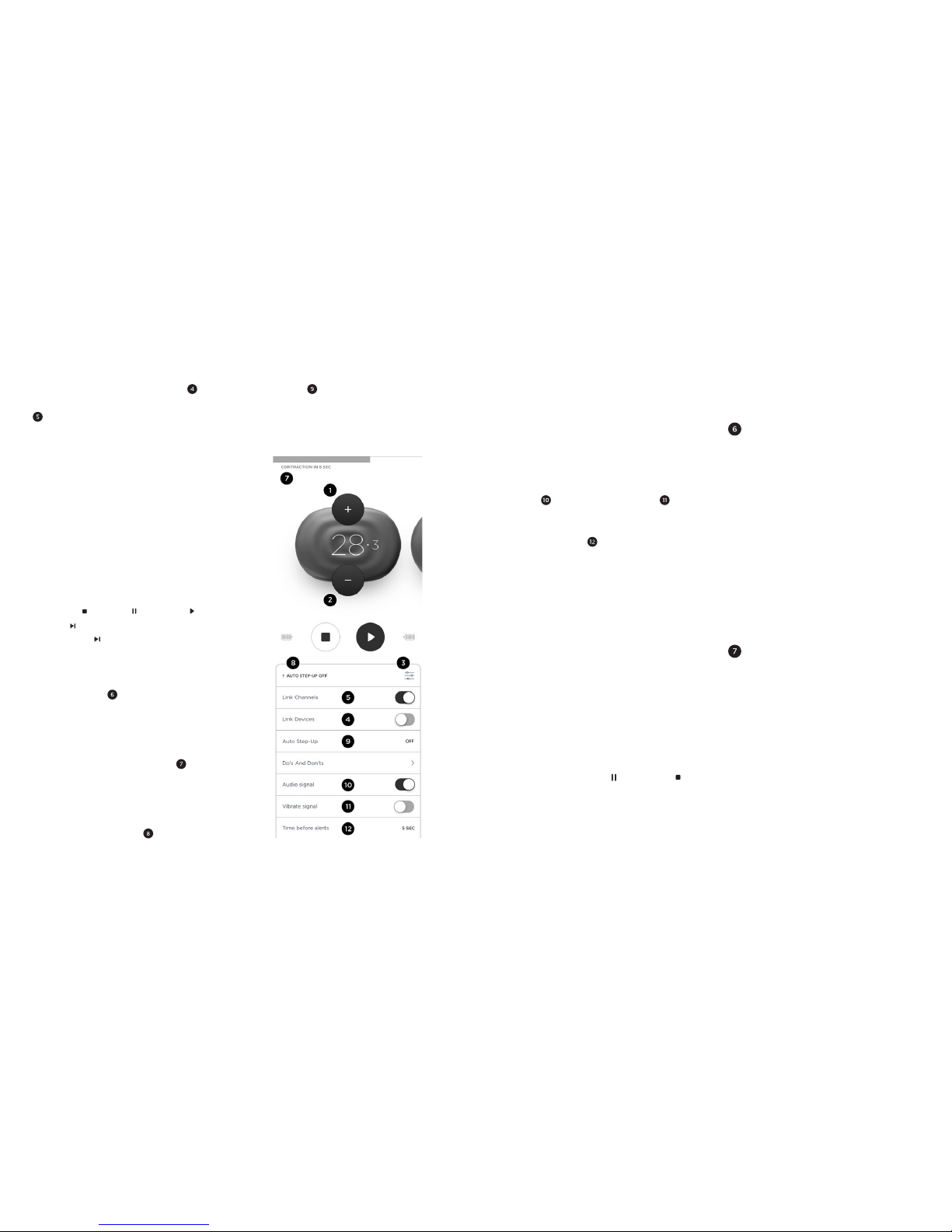
Using the Mobile Application, you can
control your stimulation session from the
Stimulation Dashboard, which has these
controls:
For first tim e users, muscle
stimulation can be an
unusual se nsation. We
recommend that you begin
in recommended
stimulation positions, u sing
low stimulatio n settings to
familiarize yourself with the
sensation b efore
progressing to higher
intensities.
If you experience major
discomfor t or pain –
PAUSE your stimulati on
session an d/or DECREAS E
intensities . For your
safety, after a PAUSE ,
your stimulation session
will resume at only 80%
(or less) of your previous
intensity values.
Intensity Adjustment controls – Tap
on Intensity Increase (or “+”) and
Intensity Decrease (or “-“) buttons for
an accurate adjustment, or hold either
button down for a faster adjustment.
Stimulation Dashboard Menu - to
access, tap on it or swipe screen up.
Page 9
16
17
Up Control - for programs and phases
involving muscle contractions, allows to
turn on or turn off automatic one step
increase in stimulation intensities after
every few muscle contractions.
Device-level Intensities Lock and
Channel-level Intensities Lock controls
synchronize intensity changes either
a) between the two stimulation channels
of one PowerDot device; or b) when two
PowerDot devices are in use (this applies
only to the Duo stimulation mode, which
involves two PowerDot devices).
Both controls are enabled by default and
can be used to finetune the intensity of
your current stimulation session. However,
it’s best to use them only when you really
need them (e.g. for a better balance
between your left and right sides, or when
your muscles are not evenly developed).
Use Stop ( ), Pause ( ), Resume ( ), Skip
Phase ( ) controls for your stimulation.
Skip Phase ( ) control allows to switch
from Warm Up to Main Phase or from
Main Phase to Recovery.
Timer indicator displays the remaining
time for the total stimulation session (for
all remaining phases) as well as time left
for the currently active stimulation phase.
Contraction/Rest Indicator - for
programs and phases involving muscle
contractions, helps to understand time
between and during contraction and rest
intervals.
Auto-Step Up Indicator and Auto-Step
Auto-Step Up is a helpful feature for
performance training as muscle fibers
are getting used to stimulation intensity
levels and, for maximum effectiveness,
regular intensity adjustments up are
strongly recommended.
Pre-contraction Alerts: configure Audio
Signal and/or Vibrate Signal alerts
to notify you 1 to 5 seconds ahead of next
muscle contraction (use Time Before
Alerts control to configure alert
timing). This is a helpful feature to use
if you are performing dynamic exercises
during stimulation.
TERMINATING STIMULATION
It’s important to know the quick ways to
end your stimulation when something
unexpected happens (e.g. one of the pads
gets detached; the intensity increases
unexpectedly; the stimulation area gets
wet, etc.).
There are 3 main ways to immediately
terminate stimulation:
• The recommended/most commonly used
option: Tap Pause ( ) or Stop ( ) on
the Stimulation screen
• Alternatively: Press the Multifunction
Button on your PowerDot (or on any
PowerDot when in Duo mode)
• Only in emergencies: Unplug the lead
cable from PowerDot.
CARRYING & STORING
POWERDOT
PowerDot carry case is specifically
designed for carrying and storing your
PowerDot device, cables and electrode
pads.
To keep electrode pads clean and make
them last longer, always re-attach them to
the safety film in between uses, then store
them in your carrying case pocket. You
can use both sides of a single safety film
to attach one set of PowerDot electrode
pads (one side for the rectangular pad
and the other for the two round pads).
DEACTIVATING POWERDOT
PowerDot can be deactivated and
unpaired from a mobile phone either
from within the Mobile Application or by
manually deactivating the device.
For manual deactivation: When PowerDot
is ON and not in stimulation, press and
hold down the Multifunction Button for 5
seconds until you see the power indicator
blinking several times. When you turn on
your PowerDot again, it will already be
deactivated.
Page 10
18
19
GENERAL
USAGE
GUIDELINES
PAD PLACEMENT
ALWAYS follow the pad
placement guidelines
found in the Powe rDot
Mobile Application. The
manufac turer disclaims
all responsibility for
injuries , damages a nd
other consequences
arising from stimulation s
where pads placement
recommendations were
ignored.
Where nece ssary, look fo r the best
possible position by pausin g the
stimulatio n, slowly moving the round pa d
over the targeted m uscle, and resuming
stimulation until you find the position
that produces the perfect combination
of the strongest contractio ns and the
greatest comfort.
Deactivation from the Mobile Application
via My Devices screen: When your active
PowerDot device is on, deactivate it
by tapping on the active device. Upon
successful deactivation, the power
indicator will blink several times.
Forgot to deac tivate
your device from within
the PowerDot Mo bile
Application? Do it manually
by holding down th e
Multifunction Button on the
device for 5 seconds!
STIMULATION POSITIONS
The optimal s timulation position will var y
depending on the actu al placeme nt of
the pads, t argeted musc le group, and
your stimulation program selection.
For Main Programs, which generally
induce powerful muscular contractions,
muscles sh ould always be stim ulated in
an isometric fashion (for your reference,
illustratio ns will be provide d in the
Mobile Application.)
ALWAYS follow PowerD ot
Mobile Application
recommen dations on the
best stimulation position.
The manuf acturer is not
responsible for any damage
or injury suffered by
users who engaged in
physical ac tivities or
assumed stimulation
positions other than the
ones recom mended in
the Mobile Application’s
stimulation guidelines.
You should therefore try to arrange your
limbs in such a way that you achieve
maximum resistance to the movement
and prevent any shortening of the muscle
during the contraction.
ADJUSTING STIMULATION
INTENSITIES
In a stimulated muscle, the number of the
recruited fibers depends on the intensity
of the stimulation. For Main Programs that
simulate powerful muscle contractions: to
recruit the maximum number of fibers,
stimulate up to intensity levels that you
can comfortably endure.
For programs meant to induce muscle
twitches: you should progressively
increase the stimulation intensities until
you see the targeted muscles actually
twitching.
The PowerDot Mobile Application will
always give you the best advice on which
intensity levels to use, depending on your
selected stimulation program and the
current stimulation phase.
Keep in mind that the maximum intensity
levels may vary, not only from one
stimulation session to another, but also
within the course of a single stimulation
session. It’s possible your muscles will
adapt to stimulation at a certain intensity
level reasona bly quickly. Various
Page 11

20
21
RE-CHARGING
POWERDOT
PowerDot can b e recharged from any
reliable USB connection (e.g. your
laptop, mobile phone cha rger, etc.). It
takes aroun d 60 minutes for th e device
to go from zero to full charge.
NEVER charge or recharge
your PowerDot when it is
attache d to your body.
ALW AYS use the origi nal
charging cable provided in
your PowerD ot packag e.
NEVER charge o r recharge
PowerDot from unreliable
or problematic sources!
When using 3rd party
USB AC charge rs, we
recommend unplugging
the AC plug from the wall
before connecting your
PowerDot device.
PowerDot uses a b uilt-in Lithium Polymer
battery, which requires recharging af ter
conditions , such as dif ferences in s kin’s
dampnes s or sweat levels, o r the rate
of the electrode pad deterioration, may
also affect the rate of stimu lation.
ALW AYS follow your
feelings a nd sensatio ns
when you incre ase
intensities during
stimulation. While we
advise you to use the
maximum inte nsities
that you can tole rate, for
some of the stim ulation
programs , make sure to
complete at least several
sessions and familiarize
yourself with th e controls
and sensations at the lower
and more comfortable
intensities , before trying
out maximum tolerable
levels.
POWERDOT
STIMULATION
PROGRAMS
(PROTOCOLS)
The PowerDot M obile Appli cation
supports a number of b uiltin stimulation
programs and output modes suitable for
different sports a nd relaxation purposes.
These programs work best w hen you
combine them with regular p hysical
training.
PowerDot stimulation progra ms can be
divided into t wo main sectio ns:
PERFORMANCE PROGRAMS
Performance Programs are design ed
to compleme nt your regula r sports &
fitness worko uts, and help you improve
and maintain your muscle performance.
It’s ideal to run the Performance
Programs 3-5 times per week d uring
preparatory mid-season period, and
1-2 times per wee k during com petition
season or tra nsition periods. Your daily
stimulatio n session should usu ally involve
approximately 5-6 hours of continuous
use. The bat tery will las t for at least 500
charging cycles.
If you plan to store you r PowerDot,
unused, for longer than six months ,
charge it to at least 50% every six
months.
In the PowerDot Mobile Application, the
current PowerD ot battery level is always
displayed at the Stimulation Dashboard.
The Mobile Application won’t let you
launch a new stimulation session if any
of your active PowerDot devices is not
charged to at least 10% .
When you see th e ORANGE charging
light next to the micro- USB connector,
this means your PowerDot is cha rging.
Once PowerDot i s fully charg ed, the
ORANGE light will turn off.
Page 12

22
23
STRENGTH ENDURANCE
Improves muscle ability to resist intense
and prolon ged effor t. Perfe ct for
complementing workouts which focus
on both endurance and strength, but
with stronger s hift towards en durance.
Improves muscle tone and definition.
For best ef ficiency, pla n your PowerDot
Strength Endurance sessions BEFOR E
your phys ical wor kouts .
We recommend using your Strength
Endurance Program 3- 4 times a week
per muscle group during preparation
period (preseason) and 1-2 time s a week
during competition period (midseason).
RESISTANCE
Improves muscle ability to resist intense
and prolon ged effor t. Perfe ct for
complementing workouts which focus
on both endurance and strength, but
with stronger s hift towards strength.
Increases muscle hypertrophy.
For best ef ficiency, pla n your PowerDot
Resistance sessions in b etween or af ter
your phys ical wor kouts .
We recommend using your PowerDot
stimulation of 1-3 muscle gro ups of your
choice (depending on the specifics and
objectives of your sport). If you use only
one PowerDot device, you will nee d to
run separate stimulation sessions for the
left and th e right sides of your muscle
groups.
All Performance Programs start with:
1) a highly reco mmended 3-minute
Warm U p; 2) a Main Workout phase
(Depending on a progra m, this can t ake
anywhere from 10 to 50 minutes); and,
3) a highly recommende d 5-minute
Recovery phase.
MUSCLE ENDURANCE
Improves muscle endurance and fatigue
resistance. Perfect for complementing
your physical e ndurance training
workouts.
For best ef ficiency, pla n your PowerDot
Endurance sessions BEFORE your
physical workouts.
We recommend using your PowerDot
Muscle End urance Program 4-5 times
a week per muscle group during
preparatio n period (pre -season) and 2-3
times a week du ring competition period
(mid -s ea son) .
maximum possible rest interval.
We recommend using your PowerDot
Strength Program up to 3 times a week
per muscle group during preparation
period (preseason) and not more
than once wee k during competition
(midseason) or de-tr aining periods.
EVERYDAY PROGRAMS
Everyday Programs do not depend
as much on meticulous planning and
regularit y as Performance Programs do.
While Performance Programs are
intensive training programs, Everyd ay
Programs are designed either for posttraining recovery and relaxation or for
pre-traini ng preps.
ACTIVE RECOVERY
Improves and accelerates the muscle
recovery af ter an intensive en durance
exercise. Use with in 2 hours of intensive
workout or competition.
EXTENDED RECOVERY
Same as Active Recovery, but runs
longer for b etter effe ct.
Resistance Program 2-3 times a we ek
per muscle group during preparation
period (preseason) and 1 time a we ek
during competition period (midseason).
STRENGTH
Improves muscle strength. Perfect
for complementing strength training
workouts.
For best ef ficiency, pla n your PowerDot
Strength sessions in between your
physical workouts and with maxi mum
rest interval possible.
We recommend using your PowerDot
Strength Program up to 1-3 times a week
per muscle group during preparation
period (pre-season) and not more than
once time a week during comp etition
(mid-season) or de -training pe riods.
EXPLOSIVE STRENGTH
Focuses on ra pid muscle strength
development. Perfect for complementing
strength and speed train ing workouts ,
including plyometric training.
For best ef ficiency, pla n your PowerDot
Explosive Stre ngth session s in between
your physical workouts and with
Page 13

24
25
BASIC
TROUBLESHOOTING
DEVICE DOESN’T TURN ON
PowerDot is prob ably very low on
battery. Cha rge your PowerDot .
DURING PRE-STIMULATION SET
UP, POWERDOT(S) CANNOT
BE FOUND (OR ARE NOT
CONNECTED)
Check out My Devices screen and make
sure that PowerD ot device you’re trying
to use is activated.
Make sure your Powe rDot is turned on
(the white light is on in the device). If
the device is cha rged and ac tivated,
but still doe ns’t connect: in the ca se of
some Android phones , there may be an
issue with the B luetooth stack. Quit your
PowerDot Mobile Application through
the Task Manager, resta rt Bluetooth (via
your mobile p hone’s Settings menu) and
try again .
STIMULATION DOES NOT
PRODUCE THE USUAL
POTENTIATION
Increases contraction s peed and
prepares muscles for max power output.
Use it 10-1 5 minutes before importa nt
competition events (right after reg ular
warm-ups and stretching).
MASSAGE
Temporarily increases blood circulation
in the area applied. Maximize usage
during tran sition (post-seas on, recovery)
period.
CAN’T ACTIVATE DEVICE OR
PHONE STOPPED CONNECTING
TO THE DEVICE
If you have problems either activating or
connecti ng to your PowerDot devices:
• Remove all ac tive PowerDot s from your
applic ation My Device s menu. To remove,
tap and ho ld on the Power Dot device
image, th en tap on the r ight top corn er
cross icon .
• Manual ly reset your Powe rDot (or
PowerDots) by hol ding the but ton on the
device for ar ound 5 secon ds, until yo u
see power lig ht blinki ng several time s.
Your PowerDot devi ce should b e turned
on before you p erform th e manual re set.
• Kill/term inate your PowerD ot applicat ion.
• Go your pho ne/table t Bluetooth S ettings
and remove/fo rget all devi ces which
start wit h PowerDot or a PowerDot.
For later An droid phon e models ,
clearin g Bluetooth c aches is al so highly
recomme nded (it ca n be done fro m
Setting s Application Manager All
Blu etooth) .
• Turn Bluetooth o n your phone O FF and
then ON ag ain.
• Restart your PowerDot application and
try to activ ate your device ag ain.
• If you still have co nnectiv ity proble m,
please se nd us your ph one model , OS
SENSATION
Check that yo ur electrode pads a re firmly
attache d to your body and a re correctly
positioned (as advised on the Pre Stimulation screen). Put the stimulation
on pause, re -attach or reposition the
pads, the n resume the stimulation.
THE STIMULATION CAUSES
DISCOMFORT OR A BURNING
FEELING
If you’re using your standard intensity
modes, th an most probably your pads
are worn out and/or losing their bo nding
strength. P ause the stimulation and re attach your p ads firmly, then resume
stimulation. If the same sensation
continues , stop the stimulation and
replace your pads.
ELECTRODE PADS DON’T
STICK TO THE BODY, OR THE
STIMULATION IS SURPRISINGLY
VERY WEAK EVEN ON HIGH
INTENSITIES.
Replace your electrode p ads. Most
probably th ey’re worn out. If this doesn’ t
work, chec k if snap on your lead cable is
loose or the c able itself is damaged . In
either case, replace the lead cable.
Page 14
26
27
version an d the list of ac tions you have
performed to [email protected].
We will respon d within 24 hou rs.
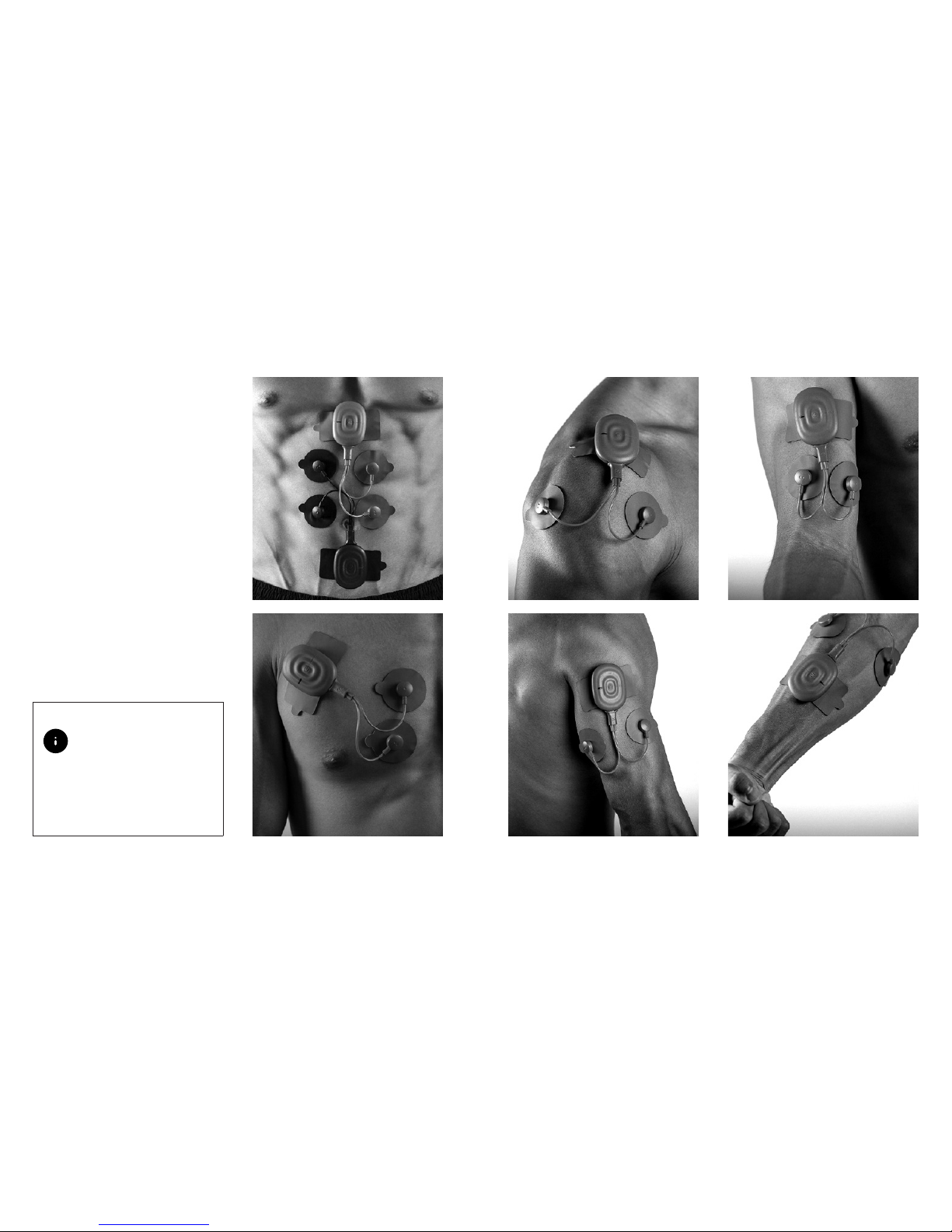
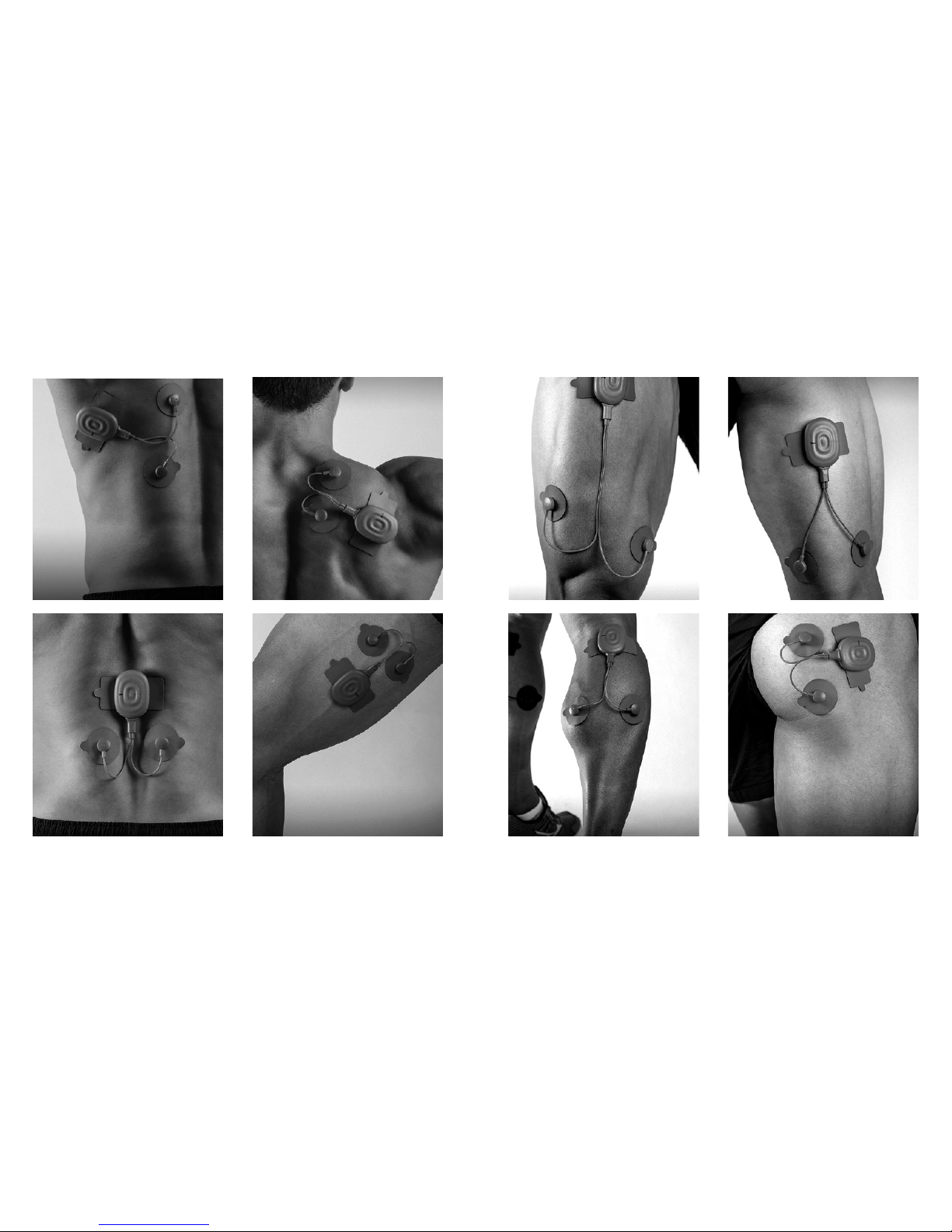
PAD PLACEMENT
GUIDELINES
To maximize your stimulation
effectiveness and safety, please strictly
follow the follow ing visual pad place ment
guidelin es (based on your target mus cle
group sele ction, applicable fo r all
stimulation programs):
Application of electrodes
near the tho rax may
increase the risk of cardiac
fibrillation. This risk i s
applica ble to Pecs, Lats and
Abs placement guidelines
below.
BICEPSDELTOIDS
TRICEPS FOREARM
Page 15
28
29
TRAPS
ADDUCTORS
LATS
LOWER BACK
QUADS
CALVES
HAMSTRINGS
GLUTS
Page 16
30
31
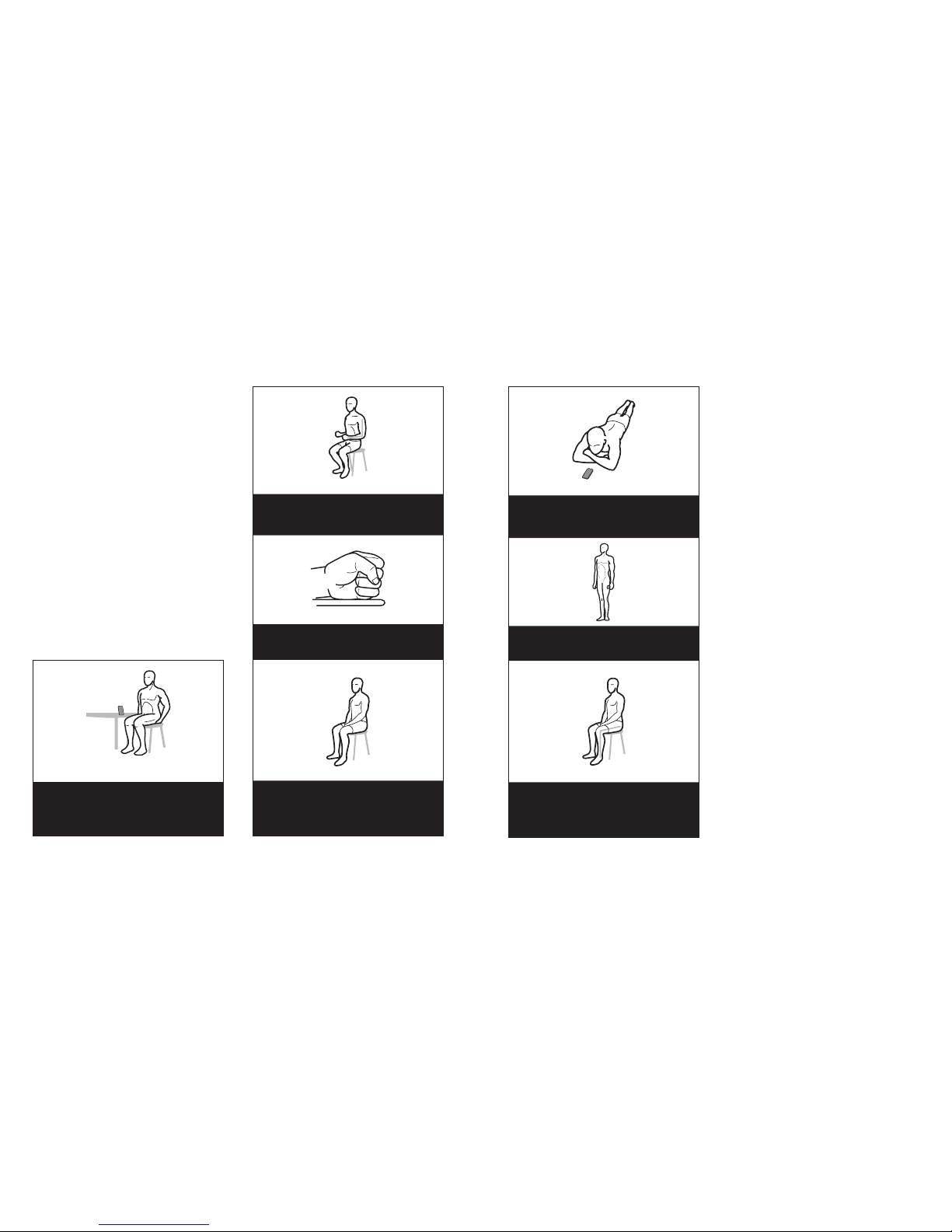
TRICEPS
Sit with your a rms at 90 deg rees
FOREARMS
Make a fist , resist wris t movement
DELTOIDS, TRAPS, PECS,
LATS, LOWER BACK, ABS
Sit comfortably
RECOMMENDED
STIMULATION
POSITIONS
To maximize your stimulation
effectiveness and safety, please
follow the below stimulation p ositions
recommen dations when you run Muscle
Endurance, Strength Endurance,
Resistance, Strength, Explosive Strength
and Potentiation s timulation programs
(based on you r target muscle group
selection):
BICEPS
Sit with your ha nds locke d
under your thighs.
HAMSTRINGS,
GLUTES CALVES
Lie on your sto mach, res ist leg movem ent
CALVES
Maintain standing position
QUADS, ADDUCTORS
Sit with your le gs at 90 deg rees,
resist le g movemen t
As Active Recover y, Extended Re covery
and Massage programs do not require
maximum tole rable intensities to be
used, you are allowed to take any
comforta ble position of your preference
and even move freely when runni ng
these stimulation programs.
Page 17

32
33
POWERDOT
MAINTENANCE
PowerDot device , together with its
accessories, should be kept in the
PowerDot car ry case and caref ully stored
on a secure sur face and protected from
conditions listed in the Warnin gs above.
Keep replacing your
electrod e pads after 2530 uses as reco mmended.
Deteriorated & worn
out pads ca n cause
major discomfort during
stimulation, affec t the
effectiveness of the
stimulation, and even lead
to minor injury.
Cleaning : only clean you r
PowerDot device using a
dry soft cloth.
Keep PowerDot device
and electrode pads away
from water. Store them in
a dry place , in protective
packaging or in the
PowerDot c arry ca se.
PowerDot devices do not require
calibration or verification of performance
parameter s. The characteristic s are
systemically verified an d validated
for each device m anufactured. Those
characte ristics are stable an d do not vary
when used under normal conditions .
The manuf acturer st ates that PowerDot
cannot be re paired by personne l external
to the company. Any work of this nature
carried o ut by personn el not authorized
by the manufa cturer will be classified a s
tampering with the unit, re leasing the
manufac turer from any responsibility
with regards to the warranty an d
hazards that th e operator or u ser may be
exposed to.
POWERDOT
WARRANTY
PowerDot is covered by a worldwide
warranty of 1 year, which comes into
effect o n the date of purchase of the
device (proof of purchase is required).
The warrant y does not apply to the
electrode pads and carry cases.
Within the warranty period,
manufac turer will replace your faulty
PowerDot or acce ssories at no charge
(except shipping & handling fees in some
cases), provided that the product :
• Has been u sed for the i ntended pu rpose
and in the ma nner des cribed in th is
manual.
• Has not be en connec ted to an unsui table
power source .
• Has not be en subjec ted to misuse o r
neglect.
• Has not be en modifi ed or repai red.
• Has not be en damage d furth er by shock.
Legal right s are not affected by this
warranty.
ELIMINATION
European Di rective 2002 /96/CEE
(WEEE) h as a first priorit y, the prevention
of waste electrical and el ectronic
equipme nt, and in addition, the re -use,
recycling an d other forms of re covery of
such wastes so as to reduce the disp osal
of waste:
• The picto gram wheeled b in barred means
that the eq uipment c an’t be throw n with
the house hold refu se, but that i t makes
the objec t of a selec tive collecti on;
• The equi pment has to b e given to
a suitabl e collecti on point for th e
treatment;
• By this way, you contri bute to the
safeguarding of the natural resources
and the human health protection;
• Batteri es must be di sposed of in
accordan ce with your cou ntry’s nati onal
laws governin g the dispos al of such
items.
Page 18

34
35
Bluetooth: Built-in Bluetooth LE 4.0
module.
Electro-compatibility (EMC): ETSI E N
301 489 -1/EN 301 48 9-17/EN 50385/E N
55011/EN 60601-1-2.
C RF Data:
• Operati ng Frequen cy Range: 24 02 MHz-
2480 MHz ( ISM range).
• Modula tion Type: GFSK with A FH.
• Peak Transmit P ower: -15. 86dB m (0.026
mW).
• Channel Spacing/Number of Channels: 2
MHz, 40 ch annels (3 f or adverti sing, 37
for d ata) .
• Antenna Type: Mu ltilayer Chip Antenna , 2
dBi (1 .58 mW) g ain.
Mobile Application Compatibility:
• Android 4 .4 KitKat (or late r) powered
smart p hone with Bluetooth S mart Ready
compatib ility and H D (or better)
• touch screen.
• Apple iP hone 4S (or later) sma rt phone
powered by iOS 7.0 (or later).
TECHNICAL
SPECIFICATIONS
All electrical specifications are given for
an impeda nce of 100 0 Ω per channel.
Battery: Lithium Polymer (LiPo)
rechargeable 3.7 V, 210 mA h (~5-6 hours
of continuou s stimulation o n average
parameters).
Charging Input: 5V through USB 2.0 o r
3.0 connection (custom micro -USB to
USB charging cable is p rovided as par t
of the packag e), I/P rating: 5Vdc 1-2.1A .
Stimulation Channels: 2 independent.
Stimulation Waveform: Assymetrical
biphasic with zero mean.
Supported Stimulation Frequency
Range: 1-120 Hz.
Supported Stimulation Pulse Width:
150-400 μS (for main/positive phase).
Maximum output voltage/amperage:
115 V/115 mA (+-5%, fo r 150 μS pulses).
Housing: ABS & TPU.
Limitations: product is not suit able
for use in the envi ronments with a
high concentration of oxygen and/or
flammable liquids and/or flammable gas;
do not use with eq uipment for electro
surgery or short-wave or microwave
therapy; the d evice may be interfered
by other equip ment, even if that
other equipment complies with CISP R
EMISSION requirements.
Device Dimensions: 60.4x43.5x13.6 mm.
Device Weight : 25 g.
Environment Specifications:
• Operating/Storage/Transport:
Temperature f rom 0 C to +40 C.
• Humidit y: 10-90 % RH.
• Atmos pheric pressure: from 700 h Pa to
1060 h Pa.
Product Expected Lifetime: 5 years.
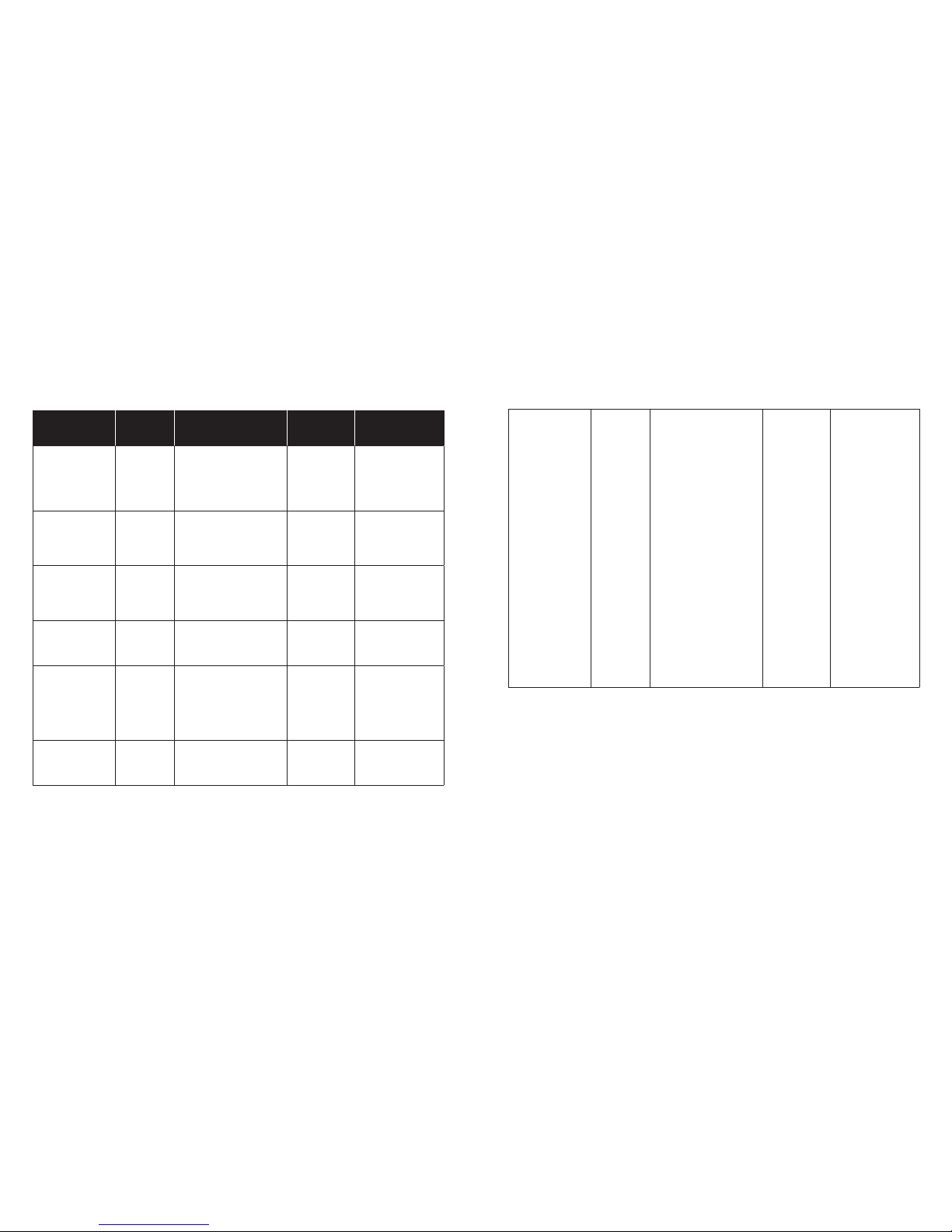
PowerDot PD -01 has be en tested to the compliance with the fo llowing Emissi on and
Immunity standards:
EMISSION:
Standard Item Remarks
CISPR 11: 2011 Conducted Class B
Radiated Class B
IEC 61000-3-2:2014 Harmonic current emissions
IEC 61000-3-3:2013 Voltage fluctuations & flicker
Page 19
36
37
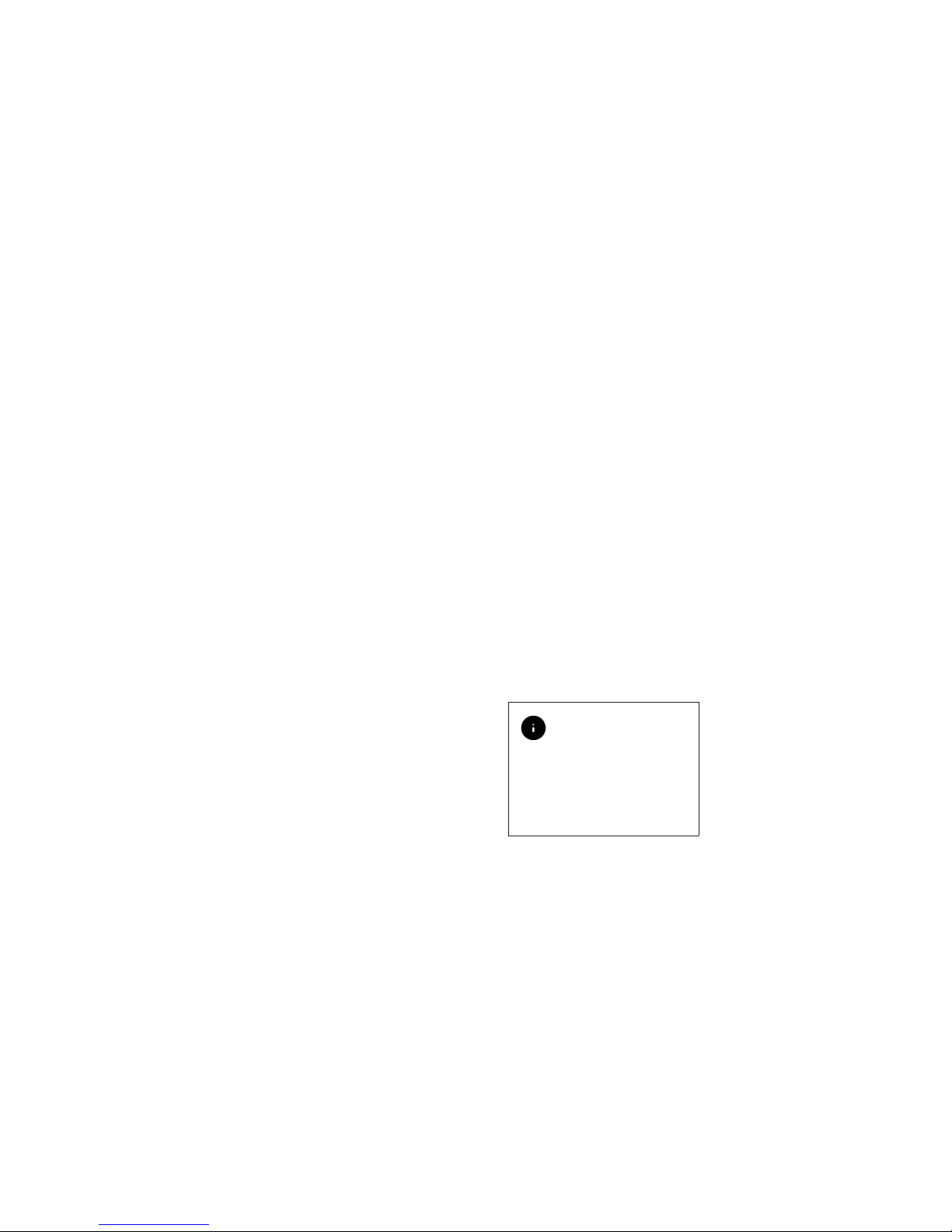
IMMUNITY:
Standard Item
IEC 60601-1-2
Test Levels for Home
Healthcare Environment
PowerDot
PD-01
Test Levels
Remarks
IEC 61000-42:2008
ESD
± 8 kV contact;
± 2 kV, ± 4 kV,
± 8 kV, ± 15 kV air
± 2 kV,
± 4 kV, ± 8 kV
contact;
± 2 kV,± 4 kV,
± 8 kV,
± 15 kV air
No
performance
degradation
observed.
IEC
61000-4-3:2010
RS
10 V/m
80 MHz – 2.7 GHz
80% AM at
1 kHz
10 V/m
80 MHz –
5.785 GHz
80% AM at
1 kHz
No
performance
degradation
observed.
IEC
61000-4-4:2012
EFT
± 2 kV
100 kHz
repetition frequency
± 2 kV
100 kHz
repetition
frequency
No
performance
degradation
observed.
IEC
61000-4-5:2014
Surge
± 0.5 kV,
± 1 kV
± 0.5 kV,
± 1 kV
No
performance
degradation
observed.
IEC
61000-4-6:2013
CS
3V 0.15 MHz –
80 MHz
6V in ISM
and amateur bands
between 0 .15 MHz and
80 MHz
80% AM at 1 kH z
10V
0.15 MHz – 80
MHz
80% AM at
1 kHz
No
performance
degradation
observed.
IEC
61000-4-8:2009
PFMF
30 A/m
50 Hz or
60 Hz
± 0.5 kV,
± 1 kV
No
performance
degradation
observed.
IEC
61000-411:2004
Voltage
dips &
voltage
variations
Voltage Dips:
1) 0% UT; 0,5
cycle at 0º.
45º, 90º, 135º,
225º, 270º,
315º
2) 0% UT;
1 cycle;
Single phase at 0º
3) 70% UT;
25/30 cycles;
Single phase at 0º
Voltage
Interruptions:
0% UT;
250/300
cycle;
As on the
previous
column
Voltage Dips:
1) No performance
degradation
observed.
2) No performance
degradation
observed.
3) No performance
degradation
observed.
Voltage
Interruptions:
Performance
degradation
(device stopped
charging) has been
observed only
during voltage
interruption
testing, but no
degradation
observed after
the testing.
Page 20
38
39
DISCONNECTIONS AND
QUALITY OF SERVICE
PowerDot Mobile Application
and PowerDot PD-01 Bl uetooth
communication interface are specifically
designed to accommodate temporary
and permanent Bluetooth disconnections
during a stim ulation session.
PowerDot PD -01 device is capable of
independent execution of a pre-load ed
stimulation program with the l atest
intensity values as well as im plement
automatic Bluetooth® reconnections.
In this regard , temporar y radio
frequen cy interference (e.g. caused by
co-existence of multiple B luetooth and/
or Wi-Fi devices in your rang e) will not
affect th e overall efficiency and safety of
your stimulation.
Due to hardware -level emergency stop
mechanisms (see Directions For Use),
Bluetooth dis connections of a more
permanent nature should not affect
the safety of stimulation , and can only
BLUETOOTH
®
COMPATIBILITY
The unique feature of PowerDot is that
it’s controlled through Bl uetooth Low
Energy wireless radio interface.
PowerDot is spe cifically d esigned to be
used togethe r with PowerDot Mobile
Application, which is suppo rted for
select Android and iOS mobile devices.
SECURE PAIRING
Your PowerDot is paired with your
mobile phone using secure 8 digit
numeric co de which, by de sign,
prohibits a ny other mobile phones or
wireless devi ces to connect to your
PowerDot. Se cure pairing t akes place
during PowerDot activation p rocess (see
Activating PowerDot above) and, once
your PowerDot be comes active, numeric
activation co de is written into PowerD ot’s
flash mem ory and gets verified by your
PowerDot Mobile Application after
every Power Dot restart.
All Bluetooth commands se nt from your
mobile phone to PowerDot device are
securely en crypted using Bluetooth
AES-128 encryption protocol.
TROUBLESHOOTING
WIRELESS CONNECTIVITY
If you run into issu es with Bluetooth
wireless con nectivit y (e.g. your
PowerDot device becomes unresponsive
to PowerDot Mobile Application
commands during stimulation session
or you were not abl e to connect to your
PowerDot and initiate stimulation), do
not panic an d consider ter minating
your stimulation session manually by
shortly pressing Power but ton on your
PowerDot device.
Your PowerDot Mobile Application has
built-in re-connection and disconnection
detection mechanism a nd, in most c ases,
it will re-connect bac k to your PowerDot
shortly and allow you to resume yo ur
stimulation using Resume button on the
stimulation screen.
If you fail to re- connect a nd resume
stimulation after several at tempts,
consider stopping your stimulation
session usi ng Stop button on th e
Stimulation S creen and postponing it fo r
lat er.
cause a temp orary inconvenience by
forcing you to postpone your pla nned
stimulatio n session until a more favorab le
Bluetooth con nectivity environment is
established.
Like any wireless device, PowerDot P D01 emits ver y low levels in the radio
frequen cy (RF) interval, and is therefore
not likely to cause any interfere nce
with nearby ele ctronic equipment (e.g.,
radios, computers, telephones etc.).
PowerDot PD -01 is designed to wit hstand
foreseeable disturbances originating
from elec trostatic disch arges, ma ins
supply mag netic fields, or radio
frequency transmitters.
Despite this , it is not possible to
guarantee that the stimulator will not be
affecte d by strong RF (radio fre quency)
fields em itting from other sources.
Try not to use PowerDot
closer than 1 .5 meters to the
workin g microwave ove n
as radio inter ference fro m
microwave is likely to cau se
disconnection between
PowerDot and you r mobile
phone.
Page 21

40
41
EU Authorized represent ative
Internal ly powered dev ice Class
II with Type BF app lied par ts
Produc t subject to W EEE
regulations concerning
separate w aste collec tion
Read the in structio ns for use
careful ly before usi ng this
device
Protected f rom touch by ha nds
greater tha n 12 millime ters and
from water sp ray less than 1 5
degrees f rom vertic al.
The device complies with Par t 15 of FCC.
Operation is subject to the following
conditions:
• This device m ay not cause h armful
interference.
• This device m ust accept a ny interfer ence
received , includin g interfe rence that may
cause undesired operation.
FCC ID: 2AC2KPD001201400SMT
NORMALIZED
SYMBOLS
Serial Number
Stand by
Attentio n
Direct C urrent (DC )
EU O NLY
This symb ol on your Power Dot
unit is to indi cate confor mity
with the requ irement s of the
Medica l Device Dire ctive
(9 4/4 2/ EE C)
Manufacturer
ELECTRODE PADS
MANUFACTURER:
ZMI Electro nics Ltd.,
6F-1, No. 286-4, Shin Ya Road,
Chien Che n District,
Kaohsiun g, Taiwan, R.O.C .
ELECTRODE PADS
EU AUTHORIZED
REPRESENTATIVE:
Geoffrey Jerrom-Pugh,
Lower Barn, T he Bayntons,
Vicarage Road, Napton, Southham,
Warwickshire, CV47 8NA, UK
MANUFACTURER
& AFTER-SALE
SERVICE
MANUFACTURER:
Smartmissimo Technologies Pte Ltd
4 Shenton Way, #28- 01 SGX Centre II
Singapore 068807
E-Mail: supp [email protected]
Contact m anufacturer for any assistance
in setting up, u sing, maintaining, or
reportin g unexpecte d operation or
events .
EU AUTHORISED
REPRESENTATIVE:
Medical Technology Prome dt Consultin g
GbmH, Altenhostrasse 80, 663 86, St.
Ingbert, Germany
Phone: (+49) 6894 581020
E-Mail: [email protected]
Page 22

42
43
However, the performance of PowerDot
PD-01 device can still affected by radio
frequen cy fields originating from other
sources.
For more information about EMC
emissions and immunity, contact
Smartmissimo Technologies.
The device sho uld not be
used adjacent to or stacked
with other equipment. If
adjacent or stacked use
is necessa ry, the device
should be observed to
verify nor mal operation in
the configu ration in which
it will be used .
The use of acces sories,
transducers and cables
others than those
specifie d or provided by
the manufacturer of this
equipment could result in
increased electromagnetic
emissions or decrease d
electromagnetic immunity
of this equip ment and result
in improper operation.
ELECTROMAGNETIC
COMPATIBILITY
(EMC)
PowerDot PD-01 is desig ned to be
used in hom e healthca re environments
in accordance with the EMC safety
standard I EC 60601 -1-2 (4th Edition) and
with limitations, defined by the warnings
and preca utions in this manual (e.g.
operation n ear RFID emitters, wor king
microwave ove ns, etc .).
Examples of home healthcare
environment include res taurants ,
cafes, sh ops, stores , markets, s chools,
churches , libraries, outdoors (streets,
sidewalks, parks), domiciles (residences,
homes, n ursing hom es), vehicles (cars,
buses, tra ins, boat s, planes, helicopters),
train stations, bus stati ons, airp orts,
hotels, hos tels, pensions, museums,
theaters.
PowerDot PD -01 is desig ned to support
anticipated disturbance originating f rom
electrostatic discharge, magnetic fields
for the power sup ply or radio -frequen cy
emitters.
The following d evice functi on is
considere d essential to the safety of
the user: ability to maintain consistent
stimulation intensity (amplitu de), pulse
frequen cy and pulse waveform (both
shape and width).
In case if the essential performance is
lost or degraded due to electromagn etic
disturbances, stimulation safety and
effectiveness can be compromise d.
Whenever the user realizes unexpected
change in any of stimulation parameters ,
it is advised to terminate the stimulation
session immediately by usin g one of the
methods provided in the Terminating
Stimulation se ction.
Portable RF communica-
tions equipment (including
periphe rals such as an -
tenna cables and extern al
antennas) should be used
no closer tha n 30 cm (12
inches) to any part of th e
PowerDot PD-01, includ-
ing cable s specified by the
manufacturer. Otherwise,
degradati on of the perfor-
mance of this equipment
could occur.
PowerDot batte ry charging
performance might
degrade in environment s
with freque nt voltage
interruptions (when
charging f rom a wall
adapter). To support
consistent and reliable
charging , the usage of U PS
is highly reco mmended,
if operating in such
environments.
Page 23

44
45
CONTENTS
Your PowerDot EM C 3
Intende d Use 3
PowerDot Pa ckage Conte nts 5
Warning And Safety Guidelines 6
PowerDot Dev ice & Accessor ies 10
Directions For Use 12
General Usage Guidelines 18
Re-Ch arging PowerD ot 20
PowerDot Stimulatio n Programs (Protocol s) 21
Basic Troubleshooting 24
Pad Placement Guidelines 26
Recommended Stimulation Positions 30
PowerDot Maintainence 32
PowerDot Warranty 33
Technical Specifications 34
Normalized Symbols 40
Manufacturer & After-Sale Service 41
Electromagnetic Compatibility (EMC) 42
Page 24

46
 Loading...