

Page 1
CHARGING OPERATION
PLEASE NOTE:
*PowerBase Industrial (HK) Ltd. will not be responsible for any
personnel loss and/or injury if the defect was caused by misuse or
mishandling by the user in any way.
Congratulation on your purchase of the outstanding PowerBase C-515 Multi
Functional Output CHARGER. This manual will help you understand how
to operate this Charger and Batteries.
FEATURES OF C-515 RAPID CHARGER
- International Voltage 100~240V
- USB power input
- 2 AA / AAA Ni-MH batteries can be charged
- Small in size and easy for carrying and using
- Short circuit and timer protections
- Red & Green LED Indicators
- Automatic batteries fully charge cut-off
- Can be used in indoor by USB power adaptor or outdoor USB car adaptor
- Possess reverse polarity protection
C-515
Multi Functional Charger
C-515
* C-515 Charger is designed to charge 2 AA / AAA sizes Ni-MH batteries.
Please refer to the combinations below:
For 2 AA / AAA size Ni-Mh Cells.
Note: Charger can only perform either "Charging" or "Output " function.
It cannot perform both function at the same time.
CAUTION
1. Open the cover during charging. It helps to reduce the high
temperture created during the charging process.
2. This product is designed for Ni-MH rechargeable batteries only.
To avoid personal injury and damage, do not charge any primary
alkaline, zine chloride, or zinc carbon type batteries.
3. Do not expose the charger to rain or moisture.
4. Do not operate the charger with using an extension cord.
5. Do not use the charger if it has received a sharp blow, been
dropped, or damaged in anyhow
6. To reduce risk of shock, disconnect the power adaptor from
outlet before attempting any cleaning of the charger.
7. Do not charge a leaking, corroded or dead battery.
8. Do not attempt to repair charger by yourself. When service or
repair is required, contact qualified service personnel.
9. Do not try to disassemble the charger.
10. Always disconnect the charger from the mains when not in use.
11. Store the charger in a cool and dry place when not in use. Keep
away from children.
SPECIFICATION of C-515 charger
Input Voltage
Operation Temperature
Termination Method
Trickle Charge
Charging Current
Battery Type / Size
USB, DC 5V, 500mAh
USB Car Adaptor DC, 12V
USB Power Adaptor AC 100-240V
(UL, VDE, BS, SAA plugs)
2 x AA : 450 mA
2 x AAA : 450 mA
Continuous 10mA ~ 20mA
-10℃~ 40℃
Ni-MH AA & AAA Batteries
Output ( A )
5V , 300 mA
Minus Delta V (-△V)
Timer Protection
5.5 hrs.
For : iPhone series, iPod series
Output ( B )
5.6V , 300 mA
For : Mobile Phones, Game Players (PSP, NDS)
* The charging time is only for general reference. For detail of different charging time require,
please see the PowerBase battery specification and contact PowerBase for the latest information.
Ni-MH AA
Ni-MH AA
2500 mAh
2300 mAh
1000 mAh
5.5 hours
5 hours
2.2 hours
Ni-MH AAA
Battery Charge Time :
Chemistry
& Size
*Charging Time
(Approximate)
Battery
Capacity
1
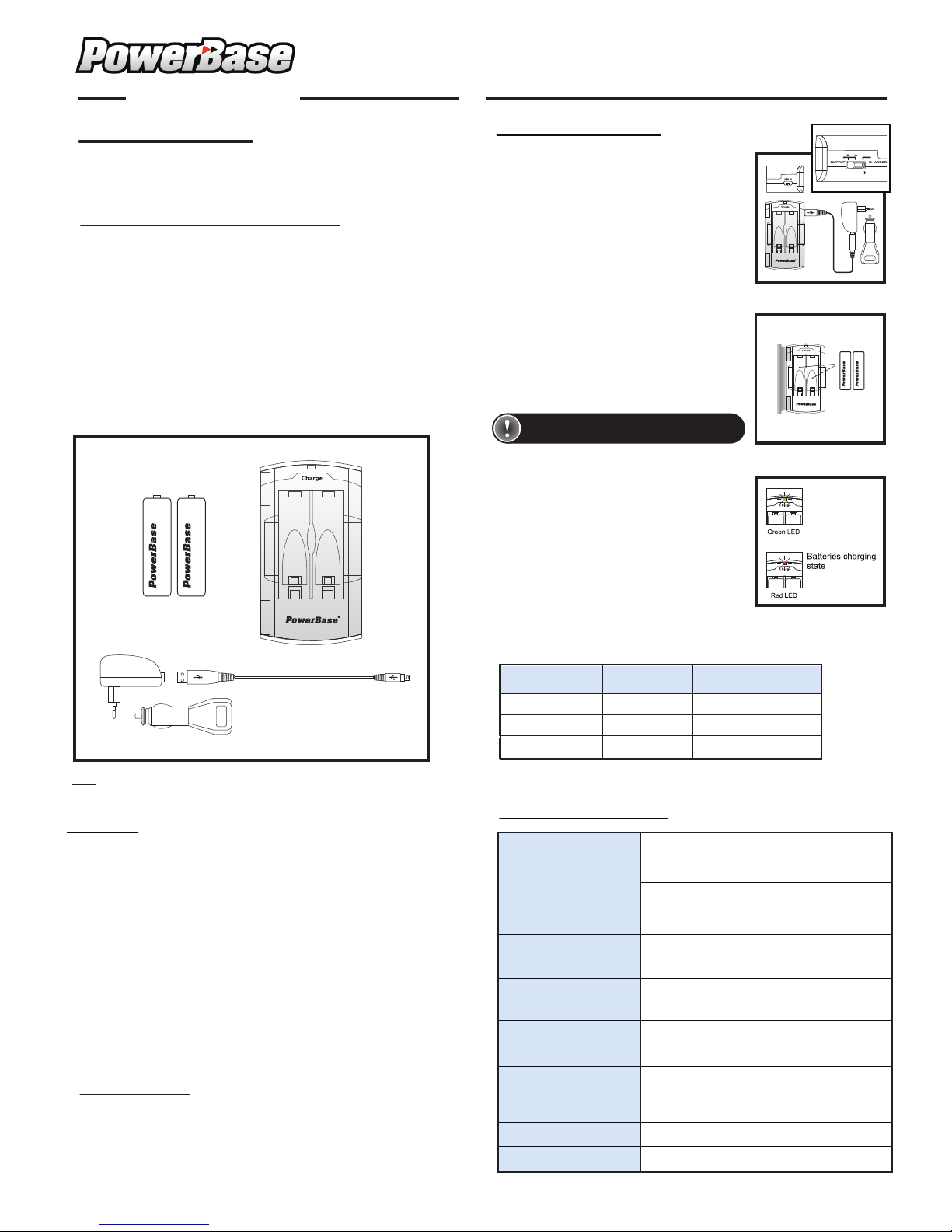
1. Switch the button to “Charger” position.
Connect the USB cable to:
- Desktop or notebook computer
- USB power adaptor
- USB car adaptor
3. Indications of RED and GREEN LED Light.
Red LED Light - will turn on to indicate the
charger is charging the batteries.
Green LED Light - will stay on when the
charger is in standby stage, without battery.
- will also turn on when the batteries are fully
charged.
2. Select the type of batteries to be charged - AA
or AAA size. Place 2 pieces AA or AAA size
batteries for charging process.
* Open the cover during charging. It helps to
reduce the high temperture created during the
charging process.
* When batteries are fully charged, remove the
USB cable from the charger and prepare for
the output process.
Keep the cover open when charging
Ni- MH Batt ery AA/A AA
Ni- MH Batt ery AA/A AA
Ni-MH Battery AA/AAA
Ni-MH Battery AA/AAA
**USB Power Adaptor & USB Car Adapter can only be used for C-515,
not directly used for mobile phone or ipod.
- Standby stage
- Fully charged
stage
USB car adaptor
USB power adaptor
USB cable
USER MANUAL
Page 2
OUTPUT PROCESS PROCEDURES
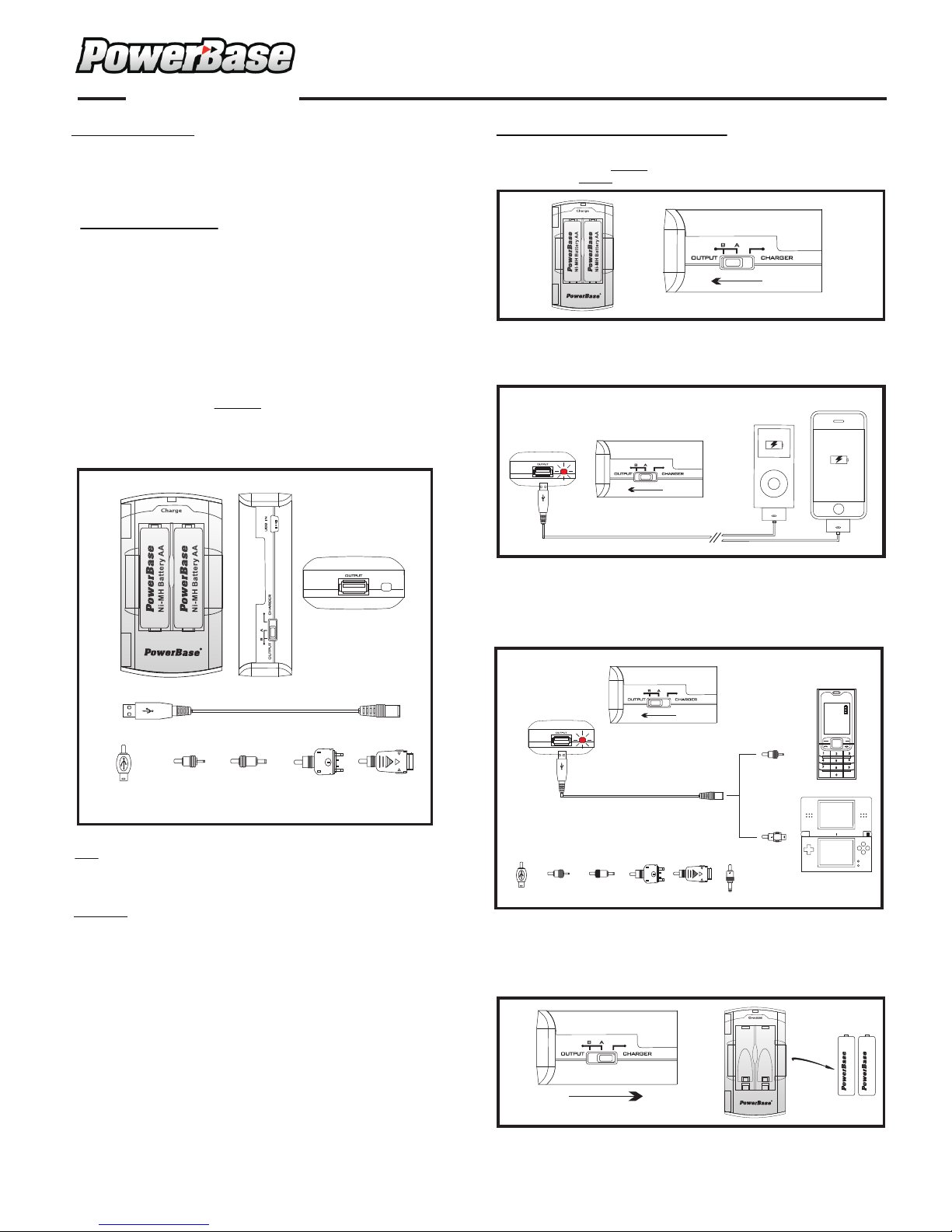
1 : Place 2 pieces of Fully Charged AA/AAA batteries into the C-515 charger.
Switch the button to
Output “A” or “B” postion, LED red light will turn on to
show that the Output function is ready to start.
C-515
Multi Functional Charger
OUTPUT PROCESS
Output Process of POWERBASE C-515 Multi function al C ha rg er.
-Portable Emer ge nc y Po we r Ba ck u p for peripheral Eq ui pm en t.
-USB Output for various devices with USB outlet.
-Suitable for equipment :
“A” position: iPhone & ipod se ri es
“B” position: Mobile phone
MP3/MP4 playe rs
Game players (P SP, ND S)
-2 pcs of AA Ni-Mh batteries are required for any Output
function through the C-515 Output channels.
- After the AA / AAA batteries are fully charged, these batteries can
also be used for other application.
-Alternative power source for emergency use:
If the fully charged AA/AAA batteries in C-515 have consumed most
of its remaining capacity, and min. recharge time would not be allowed
at that moment, 2 p cs o f Alkaline batteries can be placed inside The
C-515 in order to provide output power to various units.
(1) Output process with accessories.
Note: Never put Ni-MH with other kinds of batteries together in the
POWERBASE C-515 Multi Function Output Charger.
CAUTION
1. For best result of output, please make sure the batteries in
the charger are f ul ly c ha rg ed .
2. Do not put different types of battery (Ni-Cd/ Alkaline/ Ni-Mh
in difference capacity) mixed together during the stage of
Charging or Output.
3. When not using the charger or batteries, please take out the
batteries from the charger.
Output fuction start
Output “A”
Output “B”
2 : Output “A”
Switch to Output “A” postion and connect the USB cable to iPod or iPhone,
the charging process will start automatically.
4) After fully charged the selected devices, unplug the cables and switch the
button back to the "Charger" position. RED LED light will turn off
immediately and the output process will be stopped. For safety renson,
please take off the batteries form the C-515 charger after used.
Power Output "OFF"
Take out the batteries.
2
3 : Output “B”
Switch to Output “B” postion and connect the USB cable/booster with the
selected suitable plug to various devices such as mobile phone, game players or
mp3/mp4 player. The charging will start automatically.
SONY
PSP
For Mobile : Nokia , Motorola , Sony-Ericsson , Samsung
Game player : NDS , PSP
1
2
3
4
5
6
7
8
9
0
GAMEBOY NDS
SAMSUNG
A300 D600
SONY
W800/750
NOKIA
N71; 9300;N80
MOTOROLA
Mini USB; V3;V3i
NOKIA
3210;8310;
8250;3200
SAMSUNG
A300 D600
SONY
W800/750
NOKIA
N71; 9300;
N80
MOTOROLA
Mini USB; V3;V3i
NOKIA
3210;8310;
8250;3200
Ni-MH Battery AA/AAA
Ni-MH Battery AA/AAA
 Loading...