

Page 1
Charging Station for
DUALSHOCK®4
BDA Inc. (PowerA)
15525 Woodinville-Redmond Rd NE Woodinville, WA 98072
Customer [email protected]
For current FAQs, visit PowerA.com/support.
USER MANUAL
Manuel de l’utilisateur
Manual de usuario
Bedienungsanleitung
Manuale per l’uso
Manual do usuário
2-Year Limited Warranty : Visit PowerA.com for details
Garantía limitada de 2 años. V isita PowerA.com para obtener det alles.
Garantia limitada de 2 anos: Visita PowerA.com para obter detalhes
Beschränkte 2-Jahres-Garantie: Details und Informationen finden unter PowerA.com
Garantie limitée d e 2 ans: Rendez-vous sur PowerA .com pour de plus am ples informations
Garantia limitada de 2 anos: Visita PowerA.com para obter detalhes
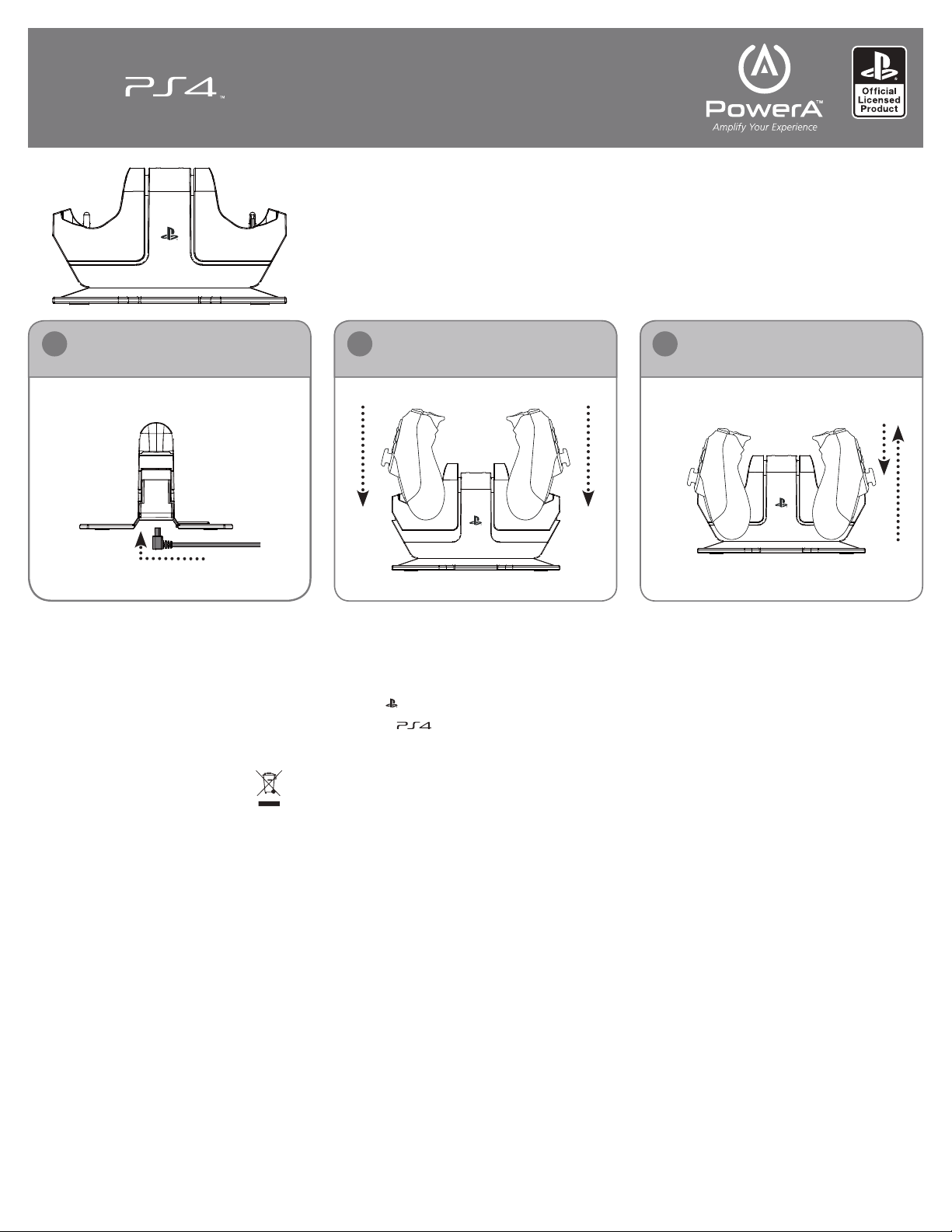
Connect the AC Adapter Dock Your Controllers
Press Down
31 2
to Remove Controllers
ENGLISH
SETUP:
1. Connect t he included AC adapter to the DC input
locate d on the bottom of the Charging Station.
2. Plug the included AC adapter into your wall outlet.
CHARGING YOUR DUALSHOCK
The Charging Station can charge one or two
DUALSHOCK
• Dock your DUALSHOCK®4 controller by placing
• Place the DUALSHOCK
• If the DUALSHOCK
To remove your D UALSHOCK®4 controller, press
down on the controller. The cradle will release your
controller.
TROUBLESHOOTING:
For current FAQs, visit www.PowerA.com/support
Q: Why are my controllers not charging?
A: Confirm your Charging Station AC adapte r is
connected to both the Charging Station and your wall
outlet.
A: Confirm your controllers are prope rly docked on the
Charging Station.
A: Your controller might already be fully charged.
SUPPORT:
For assistance with authentic PowerA accessories,
please email PowerA@ bdainc.com or call
(888) 6 64-4327 from 5 AM –5 PM PST.
®
4 controllers.
it over the Charging Station’s charge cra dle and
aligning the Charging Station’s connectors with
your controller’s charge input.
chargin g cradle and push down. The cradle will
click into place to indicate the contr oller is properl y
docked.
isn’t currently connected to your PlayStation®4
console, it will illuminate orange to indicate
charging. Once charging is complete, the
DUALSHOCK
If the DUALSHOCK
connected to the PlayStation
controller colour will not change to indicate
chargin g status. Charging stat us can be checked in
the PlayStation
®
®
4 controller illumination will turn off.
®
®
4 interface.
®
4 CONTROLLERS:
®
4 controller onto the
4 controller you’re charging
4 controller is cur rently
®
4 system, the
PowerA, the PowerA logo, and “Amplify Your
Experience” are trademarks of Bensussen Deutsch
and Ass ociates,Inc. TM and © Bensussen Deutsch
and Ass ociates, Inc.
Manufactured & distributed under license by Sony
Computer Entertainment Europe.“ ”, “
“DUALSHOCK” are registered trademarks of Sony
Computer Enter tainment Inc. Also, “ “ is a
trademark of the s ame company.
All rights reserved.
This symbol on the product or its packaging
indicates that this product must not be
disposed of with your other household
waste. Instead, it is your responsibility to
dispose of your waste equipment by handing it over
to a designated collection point for the recycling of
waste eletrical and elec tronic equipment. The separate
collec tion and recycling of your waste equipment
at the time of disposal will help conserve natural
resources and ensure that it is rec ycled in a manner
that protects human health and the environment.
For more information about where you can drop off
your waste for recycling, please contact your local
authority, or where you purchased your product.
WARRANTY
2-Year Limited War ranty: Visit PowerA.com for det ails.
FCC AND IC NOTICE:
Warning: Changes or modif ications to this unit not
expressly approved by t he party responsible for
compliance could void the user’s authority to operate
the equipment.
NOTE
This equipment has been te sted and found to
comply with the limits for a Class B digital device,
pursuant to Part 15 of the FCC Rules. Thes e limits are
designed to provide reasonable protec tion against
harmful interference in a residential installation. This
equipment generates, uses and c an radiate radio
frequency energy and, if not installe d and used in
accordance with the instructions, may cause harmful
interference to radio communications. However, there
is no guarantee that interference will not occur in a
particular installation. If this equipment does cause
harmful interference to radio or television reception,
PlaySta t ion”,
which can be determined by turning the equipment
off and on, the user is encouraged to try to correc t the
interference by one or more of the following measures:
Reorient or relocate the receiving antenna. Increase
the separation b etween the equipment and receiver.
Connec t the equipment into an outlet on a circuit
different from that to which the receiver is connected.
Consult the dealer or an experienced radio/T V
technician for help.
IC CLASS B
This device complies with Industry Canada licenseexempt RSS standard(s). Operation is subje ct to the
following two conditions:
(1) This device may not cause inter ference, and (2)
this device mustaccept any inter ference, including
interference that may cause
undesired operation of the device. This Class B digital
apparatus complies with Canadian ICES-003.
AUSTRALIAN WARRANTY STATEMENT
This product comes with guarantees that cannot be
excluded under the Australian Consumer Law. You
are entitled to a re placement or refund for a major
failure and for compensation for any other reasonably
foreseeable loss or damage. You are also entitled
to have the goods repaired or replaced if the goods
fail to be of acceptable quality and t he failure does
not amount to a major failure. If purchased within
Australia or New Zealand, this product comes with a
one-year warranty from date of purchase. Defects in
the product must have appeared within one year from
date of purchase, in order to claim the warrant y. All
warranty claims must be facilitated back through t he
retailer of purchase in accordance with the retailer’s
return policies and procedure s. Any expenses incurr ed,
as a result of returning the produc t to the retailer of
purchase are the full responsibility of the consumer.
AU WHOLESALE DISTRIBUTOR
Bluemou th Interactive Pty Ltd Level 2, 2 Darling Street
South Yarra, VIC 3141, Australia +51 (3) 9867 2566
MANUFACTURED BY
Bensussen Deut sch & Associates, Inc . (BDA, Inc.)
15525 Woodinville-Redmond Rd. NE Woodinville, WA
98072 www.bdainc.com
FRANÇAIS
INSTALLATION :
1. Connec tez l’adaptateu r CA inclus à l’entr ée CC située en
bas de la st ation de charg ement.
2. Branc hez l’adaptateu r CA sur une pris e murale.
CHARGEMENT DE VOS CONTRÔLEURS DUALSHOCK
La sta tion de charge ment peut char ger un ou deux
contrôleurs DUALSHOCK
• Placez votre contrôleur DUALSHOCK®4 sur le soc le de la
stati on de chargeme nt et alignez les c onnecteur s de cette
derniè re à l’entrée de ch argement de vot re contrôleu r.
• Positi onnez le contrô leur DUALSH OCK®4 sur le soc le de
charge ment en appuya nt dessus. Un cl ic sur le socle vou s
indiquera que le contrôleur est correctement positionné.
• If the DUA LSHOCK®4 contro ller you’re charg ing isn’t
currently connected to your PlayStation®4 consol e, it will
illuminate orange to indicate charging. Once charging
is compl ete, the DUAL SHOCK®4 controller illumination
will tur n off. If the DUA LSHOCK®4 controller is currently
connec ted to the Play Station®4 system, the controller color
will not change to indicate charging status. Charging status
can be ch ecked in the Play Station®4 interface.
Pour ret irer le contrô leur DUALSH OCK®4, appu yez sur le
contrôleur. Le socle relâchera alors le contrôleur.
DÉPANNAGE :
Pour consulter les Questions fréquemment posées, rendezvous sur www.PowerA.com/support
Q : Pourq uoi mes cont rôleurs ne se chargent pas?
R : Vérifiez q ue l’adaptateur C A de votre station d e
charge ment est bien con necté à celle -ci et bien branch é sur
une prise mu rale.
R : Vérifiez q ue vos contrôleu rs sont correcte ment
positio nnés sur la station d e chargement .
R : Votre contrô leur est peut- être déjà entière ment chargé.
SOUTIEN TECHNIQUE :
Pour obt enir de l’aide conce rnant les acce ssoires
authentiques PowerA, veuillez envoyer un courriel à
PowerA@b dainc.com ou bi en composer le +1 88 8
664 -4327 entre 5 h e t 17 h, heur e normale du Pacif ique.
PowerA , le logo PowerA et « A mplify Your Ex perience »
sont de s marques de com merce de Bensus sen Deutsc h
and Ass ociates, Inc . Marque de com merce et © Bensus sen
Deutsch and Associates, Inc.
®
4 à la fois.
®
4:
Page 2

Fabriq ué et distribu é en vertu d’une lic ence par Sony
Comput er Entertai nment Americ a LLC. « PlaySt ation », le
logo de la f amille « PS » et « DUA LSHOCK » sont d es
GARANTIE :
Garant ie limitée de deu x (2) ans : Rendez- vous à PowerA.
com pour e n savoir.
CLA SSE B D’INDUST RIE CANADA :
Cet app areil répond au x normes RSS -210 de l’Industr ie
Canada , qui régissen t les appareil s radio exempt s de licence.
Son fonctionnement est assujetti aux deux conditions
suivantes :
(1) Cet appar eil ne doit pas pro voquer d’inte rférences e t
(2) cet ap pareil doit acc epter toutes l es interfér ences, y
compri s celles suscep tibles de prov oquer son mauv ais
fonctionnement. Cet appareil numérique de classe B est
confor me à la norme ICES -003 du Ca nada.
ESPAÑOL
CONFIGURACIÓN:
1. Conect e el adaptado r de corriente a lterna incluid o a la
toma de co rriente dire cta ubicad a en la parte infe rior de la
Estac ión de carga.
2. Conec te el adaptad or de corrien te alterna a un
tomacorriente de pared.
CÓMO CARGAR LOS CONT ROLES DUALSHOCK®4:
La Est ación de carga s irve para uno o d os controles
DUALSHOCK®4.
• Acople e l control DUAL SHOCK®4 colocándolo sobre el
recep táculo de carg a de la Estació n de carga y alinea ndo los
conec tores de la est ación de carga c on la entrada de c arga
del control.
• Coloqu e el control DUA LSHOCK®4 en el receptáculo
de carg a y presione haci a abajo. Se escuc hará un clic en el
receptáculo que indicará que el control está debidamente
acoplado.
®
• If the DUA LSHOCK
currently connected to your PlayStation
illuminate orange to indicate charging. Once charging
is compl ete, the DUAL SHOCK®4 controller illumination
will tur n off. If the DUA LSHOCK®4 controller is currently
connec ted to the Play Station
will not change to indicate charging status. Charging status
can be ch ecked in the Play Station
Para retirar el control DUALSHOCK
hacia aba jo. El receptá culo liberará e l control.
RESOLUCIÓN DE PROBLEMAS:
Para ver la s preguntas f recuentes ac tuales, vis ite
www.PowerA.com/support.
P: No se es tán carga ndo mis controles .
R: Confir me que el adapta dor de corrien te alterna de la
Estació n de carga esté cone ctado tanto a la Est ación de
carga co mo al tomacorrie nte de pared.
R: Confir me que los controle s estén bien aco plados a la
Estació n de carga.
R: Es posib le que el control ya e sté totalmente ca rgado.
ASISTENCIA:
Para rec ibir asistenci a en relación con a ccesorios PO WER
A autént icos, envíe un me nsaje de corr eo electrón ico a
PowerA@b dainc.com o llam e al (888) 66 4-4327 de 5 a. m.
a 5 p.m., ho ra del Pacífico . PowerA, el log otipo de PowerA
y “Amplify Your Experience” son marcas registradas de
Bensus sen Deutsch a nd Associat es, Inc. TM y © Ben sussen
Deutsch and Associates, Inc.
Fabric ado y distribu ido bajo licenci a de Sony Comput er
Enter tainment Ame rica LLC. “Pla yStation”, el logoti po de
la familia “P S” y “DUALSHOC K” son marcas com erciales
regist radas y “PS4” es u na marca comer cial de Sony
Computer Entertainment Inc.
GARANTÍA:
Garantía limitada de 2 años: Visite PowerA.com para
obtener detalles.
DEUTCH
EINRICHTUNG:
1. Das mitge lieferte Ne tzteil am DC-E ingang unten an d er
Ladestation anschließen.
2. Das mitgelieferte Netzteil an einer Wandsteckdose
anschließen.
DUALSHOCK
Mit der L adestatio n können ein oder z wei DUALSHO CK®4Controller geladen werden.
• Den DUA LSHOCK®4-C ontroller so in d ie Aufnahme de r
Lade station set zen, dass der Ein gang des Contr ollers mit der
Anschlussstelle der Ladestation verbunden ist.
• Dann den D UALSHOCK®4-Controller auf die Aufnahme
der Ladestation drücken. Die Aufnahme rastet mit einem
Klickgeräusch ein, wenn der Controller richtig in der
4 contro ller you’re charg ing isn’t
®
4 system, the controller color
®
®
®
4-Controller laden:
®
4 consol e, it will
4 interface.
4, pres ione el control
Ladestation sitzt.
• Wenn der D UALSHOCK
nicht an d er PlayStatio n®4-Konsole angeschlossen ist,
weist eine leuchtende orangefarbene Anzeige auf den
Ladevorgang hin. Nachdem der Ladevorgang abgeschlossen
ist, er lischt die Anze ige des DUALS HOCK®4-Controllers.
Währen d der DUALSHO CK®4-Controller an der
PlayStation®4-Ko nsole angesc hlossen ist , ändert sich di e
Anzeig efarbe nicht , d. h. es wird nich t auf den Ladez ustand
hingew iesen. In dies em Fall kann der La dezustand ü ber die
PlayStation®4-Benutzeroberfläche überprüf t werden.
Zum Herausnehmen auf den DUALSHOCK®4-Controller
drücke n. Daraufhin wi rd der Control ler aus der Aufn ahme
freigegeben.
FEHLERBEHEBUNG:
Die aktuelle Liste häufig gestellter Fragen finden Sie unter
www.PowerA.com/support
F: Warum la den meine Cont roller nicht?
A: Verge wissern Sie sic h, dass das Net zteil sowohl a n der
Ladestation als auch an der Wandsteckdose angeschlossen
ist.
A: Verge wissern Sie sic h, dass die Cont roller richti g in die
Ladestation eingesetzt wurden.
A: Ihr Controller ist möglicherweise bereits vollständig
geladen.
Hilfe:
Unterstützung für PowerA Originalzubehör erhalten Sie
per E-Mail über PowerA@ bdainc.com oder telefonisch
von 5.0 0-17.00 Uhr u nter der Rufnu mmer +1 888 664 -4327.
PowerA , das PowerA-L ogo und „Ampli fy Your Exper ience“
sind Mar ken von Bensusse n Deutsch and A ssociates , Inc. TM
und © Bens ussen Deuts ch and Assoc iates, Inc.
Herstellung und Vertrieb erfolgt unter Lizenz von Sony
Computer Entertainment America LLC. „PlayStation“, das
„PS“-Log o und „DUALSH OCK“ sind einget ragene Marken
und „PS4“ ist eine Marke von Sony Computer Entertainment
Inc.
Garantie
Beschränkte 2-jährige Garantie Details finden Sie auf www.
PowerA.com.
FCC- UND IC-HINWEIS:
Warnhinweis: Änderungen bzw. Modifizierungen an diesem
Gerät, die nicht ausdrücklich von demjenigen genehmigt
wurden, der für die Einhaltung der gesetzlichen Vorschriften
verantwortlich ist, können die Betriebsgenehmigung des
Benutzers für dieses Gerät ungültig machen.
HINWEIS
Dieses Gerät wurde getestet und entspricht den
Grenz werten für di gitale Gerät e der Klasse B gem äß Teil
15 der Richtlinien der FCC. Diese Grenzwerte dienen dem
angemessenen Schutz vor schädlichen Funkstörungen in
Wohnbereichen. Das Gerät erzeugt und verwendet Signale
im Frequenzbereich von Rundfunk und Fernsehen und
kann die se ausstrahle n. Wenn das Gerät n icht gemäß den
Anweis ungen install iert und betr ieben wird, kö nnte es
Empfangsstörungen verursachen. Es kann jedoch nicht in
jedem Fall garantiert werden, dass bei ordnungsgemäßer
Installation keine Empfangsstörungen auftreten. Wenn das
Gerät Störungen beim Rundfunk- oder Fernsehempfang
verursacht, was durch vorübergehendes Ein- und
Ausschalten des Geräts festgestellt werden kann, sollte
versucht werden, die Störung durch eine oder mehrere der
folgenden Maßnahmen zu beheben:
Änderung der Ausrichtung oder Position der
Empfangsantenne. Vergrößerung des Abstands
zwis chen Gerät und Emp fangsteil. Ansc hluss des
Gerätes an ein e Steckdose, d ie vom Stromk reis der
Steckdose get rennt ist, an der das Empfangsteil
angeschlossen ist.
Beratung durch einen Fachhändler oder Radio- bzw.
Fernsehtechniker.
IC-Klasse B
Dieses Gerät entspricht der Richtlinie Industry
Canada Lice nse-Exe mpt RSS Stand ard(s). Für de n
Betrieb des Geräts g elten die bei den folgenden
Bedingungen:
(1) Dieses Ge rät darf keine s chädlichen Stö rungen
verur sachen und (2) di eses Gerät mus s jede Störung
akzeptieren, auch solche Störungen, die unerwünschte
Funktionen des Geräts verursachen können. Dieses
digit ale Gerät der Kla sse B erfüllt d ie Anforder ungen des
kanadischen Standards ICES-003.
®
4-Controller, der geladen wird,
ITALIANO
CONFIGURAZIONE :
1. Collegar e l’adattator e CA in dotazio ne alla presa CC
situat a nella parte in feriore della b ase di ricaric a.
2. Inser ire la spina dell’ad attatore C A in dotazione i n una
presa d’alimentazione.
Ricarica dei controller DUALSHOCK®4
La base d i ricarica pu ò caricare uno o d ue controlle r
DUALSHOCK®4.
• Caric are il controll er DUALSHOC K®4 posizionandolo
nell’appo sito alloggia mento della bas e di ricarica e
allinea ndo i connett ori della base di r icarica con q uelli del
controller.
• Posizio nare il control ler DUALSHO CK®4
nell’allog giamento di ric arica e preme re verso il bass o.
Un clic se gnala il corret to posiziona mento del contr oller
nell’alloggiamento.
• Se il cont roller DUAL SHOCK®4 in caric a non è collegat o
alla Play Station®4, si illum ina di colore ara ncione a indica re
lo stat o di carica. Una v olta terminat a la carica, la l uce del
controller DUALSHOCK®4 si spegn e. Invece, se il co ntroller
DUALSHOCK®4 è colleg ato alla PlaySta tion®4, il colo re
non cam bia. Lo stato di c arica può ess ere verific ato tramite
l’interfaccia della PlayStation®4.
Per togl iere dalla base d i ricarica il co ntroller
DUALSHOCK®4 premer e sullo stesso i n modo da liberar lo
dall’alloggiamento.
RISOLUZIONE DEI PROBLEMI:
Per le FAQ ag giornate visi tare il sito ww w.PowerA.co m/
support
D: Perché il controller non si ricarica?
R: Verif icare che l’adat tatore CA de lla base di ricar ica sia
colleg ato alla base ste ssa e ad una pres a di alimentazio ne.
R: Verif icare che il cont roller sia corr ettament e posizionato
sulla bas e di ricarica .
R: Il cont roller potre bbe già esser e completame nte carico.
Assistenza:
Per assis tenza sugli acc essori orig inali PowerA inviar e una
e-mai l a PowerA@bdainc .com o telefona re al numero (88 8)
664 -4327 dalle or e 5.00 alle 17.00 (ora del Pa cifico).
PowerA , il logo PowerA e “Amplif y Your Experie nce” sono
marchi di f abbrica di Be nsussen Deut sch and Asso ciates, Inc .
TM e © Bensu ssen Deuts ch and Associ ates, Inc.
Prodo tto e distrib uito su licenza da S ony Computer
Enter tainment Ame rica LLC. “Pla yStation”, il logo dell a
famigli a “PS” e “DUALSHO CK” sono marchi de positati,
e “PS4” è un m archio di fabbr ica di Sony Comp uter
Entertainment Inc.
Garanzia
Garanzia limitata di 2 anni: per ulteriori informazioni visitare
PowerA.com.
AVVI SO FCC e IC:
Avvertenza: cambiamenti o modifiche al dispositivo non
espressamente autorizzati dal responsabile della conformità
posso no far decade re il diritto ad u tilizzare il pr odotto.
NOTA
Quest a apparecch iatura è stata c ollaudata ed è r isultata
confor me ai limiti prev isti per i dispo sitivi digit ali di Classe
B, Part e 15 delle n orme FCC. Tali limit i hanno lo scopo d i
fornire adeguata protezione dalle interferenze dannose
che pos sono originar si in ambienti re sidenziali. Qu esta
apparecchiatura genera, usa e può emettere energia
in radiof requenza e, s e non viene inst allata e utiliz zata
secon do le istruzion i, può causare i nterferen ze dannose alle
comunicazioni radio. Non è comunque garantita l’assenza
di interferenze in determinate installazioni. Qualora
l’apparecchiatura dovesse provocare interferenze nella
ricezio ne radiotelev isiva, cosa ch e può essere ver ificata
spegn endo e riaccend endo l’appare cchiatura, si co nsiglia di
eliminar e l’interfe renza in uno dei se guenti modi:
Modificare l’orie ntamento o la posizione d ell’antenn a
ricevente; aumentare la distanza tra l’apparecchiatura
e il ricev itore; colle gare l’apparecch iatura ad una
presa che si trovi su u n circuito di verso da quello al
quale è collegato il ricevitore.
Consult are il rivendi tore o un tecnic o radiotelevi sivo
competente per ottenere assistenza.
IC Class e B
Il disp ositivo è con forme alla no rmativa In dustry
Canada lice nse-exempt RSS . Il funzionamento è
soggetto alle due condizioni seguenti:
(1) questo dispositivo non può provocare interferenze; (2)
questo dispositivo deve accettare eventuali interferenze,
comprese quelle che potrebbero provocare funzionamenti
indesi derati. Ques to apparato di gitale di Class e B è
conforme alle norme canadesi ICES-003.
PORTUGUÊS
CONFIGURAÇÃO:
1. Liga o adap tador de CA in cluído à entrad a de CC
locali zada na parte i nferior da est ação de carre gamento.
2. Liga o ad aptador de C A incluído à toma da eléctric a.
Carregar os comandos DUALSHOCK®4:
A estaç ão de carreg amento pode ca rregar um ou do is
comandos DUALSHOCK®4.
• Acopla o comando DUALSHOCK®4 coloc ando-o na bas e
da esta ção de carre gamento e alinha ndo os conect ores
desta c om a entrada de c arregament o do comando.
• Coloc a o comando DUAL SHOCK®4 na base de
carre gamento e faz pr essão para bai xo. A base irá prod uzir
um esta lido para indic ar que o comando s e encontra
devidamente acoplado.
• Se o coman do DUALSHO CK®4 que est iveres a carre gar
não esti ver ligado à cons ola PlayStat ion®4, irá ace nder-se
com a cor la ranja para indic ar que está a car regar. Quando o
carregamento estiver concluído, o comando DUALSHOCK®4
apaga -se. Se o comand o DUALSHOCK®4 estive r ligado à
consol a PlayStation®4, a cor do c omando não muda p ara
indica r que está a car regar. O estado d e carregame nto pode
ser veri ficado na int erface da Play Station®4.
Para retirares o comando DUALSHOCK®4, faz pr essão sobre
o comand o. A base irá solt ar o comando.
RESOLUÇÃO DE PROBLEMAS:
Para consultares as Perguntas Frequentes actuais, visita
www.PowerA.com/support
P: Porq ue é que os meus coma ndos não estã o a carregar?
R: Conf irma se o adapta dor de CA da est ação de
carre gamento est á ligado à estaç ão de carreg amento e à
tomada eléctrica.
R: Conf irma se os comand os estão dev idamente acop lados
na esta ção de carreg amento.
R: O teu com ando pode já es tar completa mente carre gado.
Apoio:
Para obt eres ajuda com ac essórios or iginais da PowerA ,
envia um e -mail para Powe [email protected] m ou liga para
(888 ) 664-43 27 das 5 às 17 h (PST).
PowerA , o logótipo da Po werA e “Ampli fy Your Exper ience”
são marcas comerciais da Bensussen Deutsch and
Asso ciates, Inc. T M e © Bensussen D eutsch and A ssociates,
Inc.
Fabric ado e distribu ído sob licenç a pela Sony Compu ter
Enter tainment Ame rica LLC. “Pla yStation”, o logótip o
da famíl ia “PS” e “DUALSHO CK” são marcas co merciais
regist adas e “PS4” é uma m arca comercia l da Sony
Computer Entertainment Inc.
Garantia
Garantia limitada de 2 anos: Visita PowerA.com para
obteres detalhes.
AVISO DA F CC E IC:
Aviso: as alterações ou modificações nesta unidade não
aprovadas expressamente pela entidade responsável pela
confor midade pode rão anular o direi to de utilizaçã o do
equipamento por parte do utilizador.
NOTA
Este equipamento foi testado e comprovou-se que cumpre
os limite s para disposi tivos digitai s de Classe B, de ac ordo
com a Par te 15 das Regras da FCC . Estes limite s destinam- se
a fornecer uma protecção razoável contra interferências
nocivas numa instalação residencial. Este equipamento
gera, u tiliza e pode irr adiar energia d e radiofrequ ência e, se
não for in stalado e utili zado de acordo c om as instruçõ es,
pode causar interferências nocivas nas radiocomunicações.
No enta nto, não é garanti do que a interf erência não oc orra
numa determinada instalação. Se este equipamento causar
inter ferência noci va na recepçã o de rádio ou telev isão, o que
pode se r determinad o ao desligar e liga r o equipament o, é
recomendável que o utilizador tente corrigir a interferência
atravé s de uma ou mais das se guintes medi das:
Reorientar ou deslocar a anten a de recepçã o.
Aumentar a s eparação entre o eq uipament o e o
recep tor. Ligar o equipamento a uma tomada num
circu ito diferen te daquele ao qual está lig ado o
receptor.
Contac tar o distri buidor ou um téc nico de rádio/ TV
exper iente para obt er ajuda.
IC Class e B
Este di spositivo c umpre a(s) nor ma(s) RSS de ise nção
de lice nça da indústria d o Canadá. O fu ncioname nto
está sujeit o às duas cond ições que se seguem:
(1) Este disp ositivo não pod e causar inter ferências e ( 2) este
dispositivo tem de aceitar qualquer interferência, incluindo
interferências que possam causar funcionamento indesejado
do dispo sitivo. Este a parelho digit al de Classe B cum pre a
norma canadiana ICES-0 03.
 Loading...