

Page 1
Version 1.0 December 2016
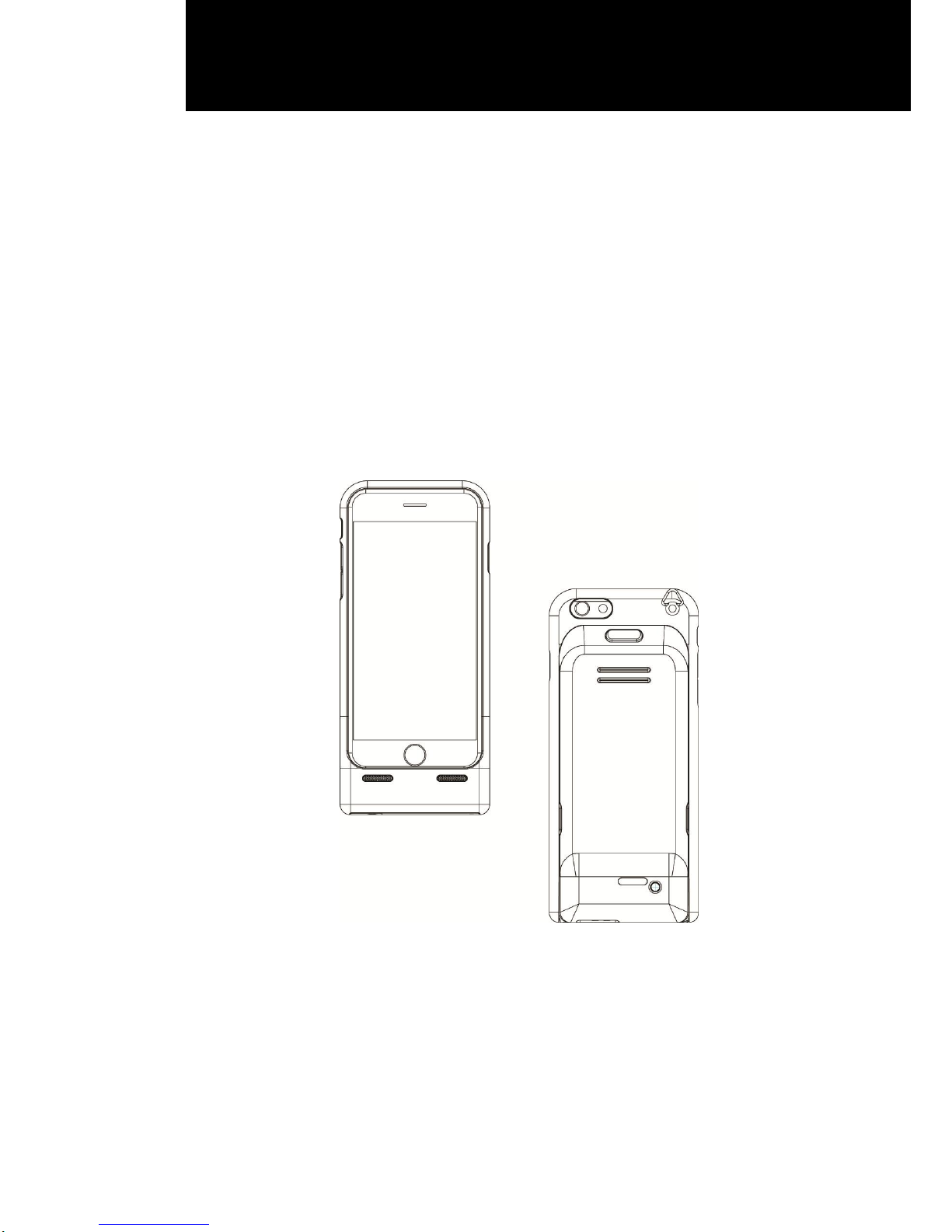
iSAPPOS 4 / iSAPPOS 5
Scanner Jacket
User Manual
Page 2

ii
Copyright
Copyright 2016
All Rights Reserved
Manual Version 1.0
The information contained in this document is subject to change without notice.
We make no warranty of any kind with regard to this material, including, but not limited to,
the implied warranties of merchantability and fitness for a particular purpose. We shall
not be liable for errors contained herein or for incidental or consequential damages in
connection with the furnishing, performance, or use of this material.
This document contains proprietary information that is protected by copyright. All rights
are reserved. No part of this document may be photocopied, reproduced or translated to
another language without the prior written consent of the manufacturer.
TRADEMARK
The material in this manual is subject to change without notice.
Bluetooth is a registered trademark of Bluetooth SIG.
Microsoft® , Windows® and ActiveSync® are either registered trademarks or trademarks
of Microsoft Corporation.
All other product or service names are the property of their respective owners.
Page 3

iii
Safety
Regulatory Information
Caution: Only use approved and UL Listed accessories, battery packs and battery
chargers. Do NOT attempt to charge damp/wet mobile computers or batteries. All
components must be dry before connecting to an external power source.
Power Supply
Use only the approved power supply 50-14000-148 output rated 5 Vdc and minimum 2 A.
The power supply is certified to EN60950-1 with SELV outputs. Use of alternative power
supply will invalidate any approval given to this device and may be dangerous.
Warning for Use of Wireless Devices
Please observe all warning notices with regard to the usage of wireless devices.
Potentially Hazardous Atmospheres
You are reminded of the need to observe restrictions on the use of radio devices in fuel
depots, chemical plants etc. and areas where the air contains chemicals or particles
(such as grain, dust, or metal powders)
and any other area where you would normally be advised to turn off your vehicle engine.
Safety in Aircraft
Switch off your wireless device whenever you are instructed to do so by airport or airline
staff.
Pacemakers
Pacemaker manufacturers recommended that a minimum of 15cm (6 inches) be
maintained between a handheld wireless device and a pacemaker to avoid potential
interference with the pacemaker. These recommendations are consistent with
independent research and recommendations by Wireless Technology Research.
Persons with Pacemakers
Persons with Pacemakers should ALWAYS keep the device more than 15cm (6 inches)
from their pacemaker when turned ON and hence they should not carry the device in a
breast pocket .
Should use the ear furthest from the pacemaker to minimize the potential for
interference.
If you have any reason to suspect that interference is taking place, turn OFF your device.
Page 4

iv
Hearing Aids
The wireless device may interfere with some hearing aids. In the event of interference
you may want to consult your hearing aid supplier to discuss solutions.
Other Medical Devices
Please consult your physician or the manufacturer of the medical device, to determine if
the operation of your wireless product may interfere with the medical device.
FCC/EU RF Exposure Guidelines
FCC Statement
This equipment has been tested and found to comply with the limits for a Class B digital
device, pursuant to part 15 of the FCC Rules. These limits are designed to provide
reasonable protection against harmful interference in a residential installation. This
equipment generates, uses and can radiate radio frequency energy and, if not installed
and used in accordance with the instructions, may cause harmful interference to radio
communications. However, there is no guarantee that interference will not occur in a
particular installation. If this equipment does cause harmful interference to radio or
television reception, which can be determined by turning the equipment off and on, the
user is encouraged to try to correct the interference by one or more of the following
measures:
Reorient or relocate the receiving antenna.
Increase the separation between the equipment and receiver.
Connect the equipment into an outlet on a circuit different from that to which the
receiver is connected.
Consult the dealer or an experienced radio/TV technician for help.
This device complies with FCC radiation exposure limits set forth for an uncontrolled
environment. This device complies with Part 15 of the FCC Rules. Operation is subject to
the following two conditions: (1) this device may not cause harmful interference, and (2)
this device must accept any interference received, including interference that may cause
undesired operation.
Page 5

v
Caution!
Any changes or modifications not expressly approved by the party responsible for
compliance could void t he user's authority to operate the equipment.
CE Marking and European Economic Area
The use of 2.4GHz RLAN's, for use through the EEA, have the following restrictions:
Maximum radiated transmit power of 100 mW EIRP in the frequency range
2.400 -2.4835 GHz
France, outside usage is restricted to 2.4 - 2.454 GHz.
Italy requires a user license for outside usage.
Bluetooth® Wireless Technology for use through the EEA has the following restrictions:
Maximum radiated transmit power of 100mW EIRP in the frequency range
2.400 -2.4835 GHz
France, outside usage is restricted to 10mW EIRP
Italy requires a user license for outside usage.
Battery Information
Our rechargeable battery packs are designed and constructed to the highest standards
within the industry.
However, there are limitations to how long a battery can operate or be stored before
needing replacement.
Many factors affect the actual life cycle of a battery pack, such as heat, cold, harsh
environmental conditions and severe drops.
When batteries are stored over six (6) months, some irreversible deterioration in overall
battery quality may occur. Store batteries discharged in a dry, cool place, removed from
the equipment to prevent loss of capacity, rusting of metallic parts and electrolyte
leakage. When storing batteries for one year or longer, they should be charged and
discharged at least once a year. If an electrolyte leakage is observed, avoid any contact
with affected area and properly dispose of the battery. Batteries must be charged within
the 32° to 95° F (0° to +35° C) ambient temperature range.
Replace the battery when a significant loss of run time is detected.
Page 6

vi
Battery Caution
Risk of explosion if battery is replaced by an incorrectly type.
Dispose of used battery according to the local disposal instructions.
Waste Electrical and Electronic Equipment (WEEE)
English: For EU Customers: All products at the end of their life must be returned to the
reseller for recycling.
Notational Conventions
The following conventions are used in this document:
Italics are used to highlight specific items in the general text, and to identify
chapters and sections in this and related documents.
bullets (•) indicate:
action items
lists of alternatives
lists of required steps that are not necessarily sequential
Sequential lists (e.g., those that describe step-by-step procedures)
appear as numbered lists.
NOTE This symbol indicates something of special interest or importance to the reader.
Failure to read the note will not result in physical harm to the reader, equipment or data.
CAUTION This symbol indicates that if this information is ignored, the possibility of data
or material damage may occur.
WARNING! This symbol indicates that if this information is ignored the possibility that
serious personal injury may occur.
Page 7

vii
Revision History
Version
Date
Description
1.0
December 2016
Initial release
Page 8

viii
Table of Contents
1 Item Checklist ............................................ 1
1-1 Standard Items ................................................................................... 1
1-2 Optional Items .................................................................................... 2
2 System View ............................................... 3
2-1 Features .............................................................................................. 3
2-2 Specification ....................................................................................... 5
3 Getting Started ........................................... 6
3-1 Assemble the iSAPPOS 4 / 5 Scanner Jacket .................................. 6
3-2 Install iPhone into the iSAPPOS 4 / 5 Scanner Jacket .................... 7
3-3 Power On/ Power Off .......................................................................... 7
3-4 Charging the Device ........................................................................... 8
3-5 Install the Audio Cable ....................................................................... 8
Page 9
1
1 Item Checklist
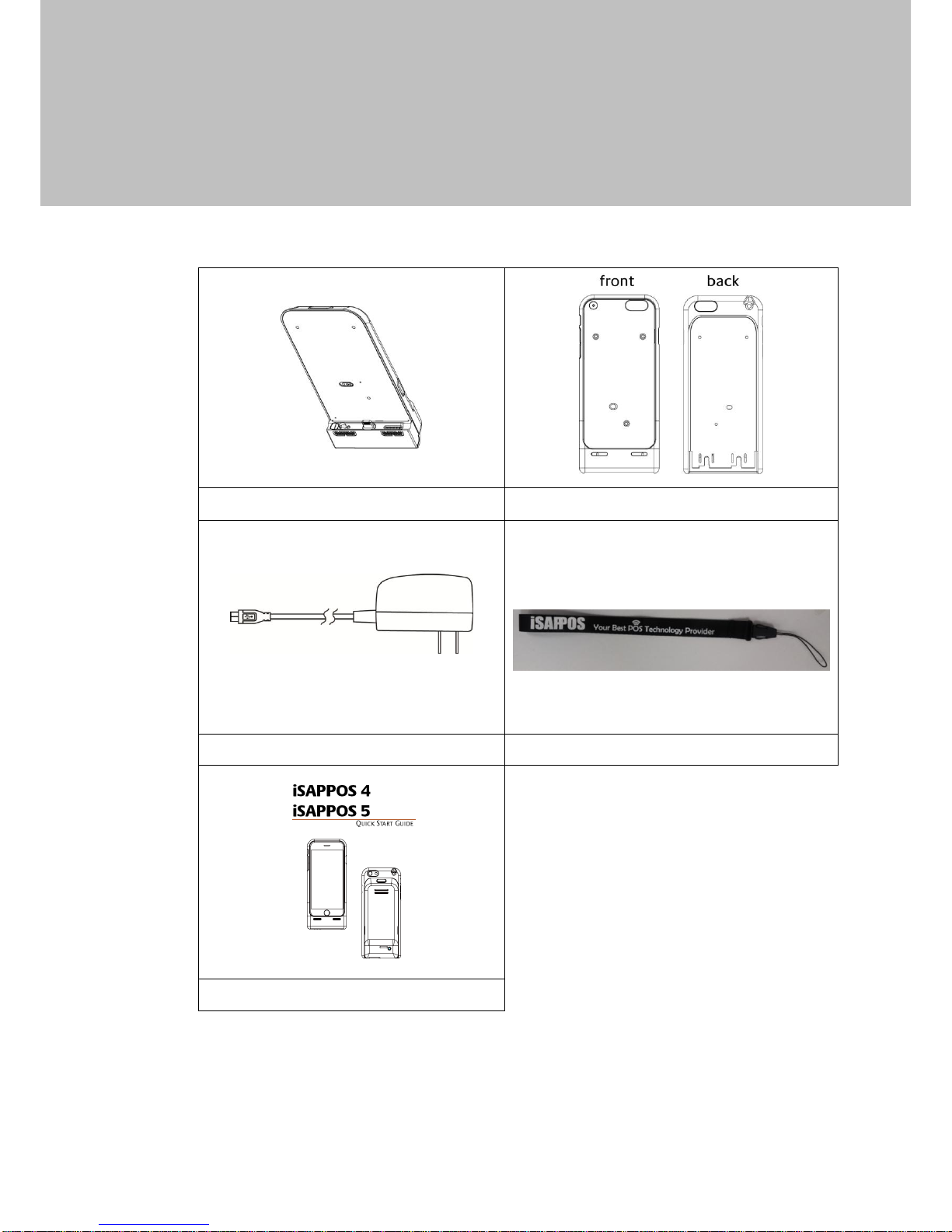
1-1 Standard Items
a. Main unit
b. Top cover of iSAPPOS 4 or iSAPPOS 5
c. Power cable
d. Hand strap
e. Quick start guide
Page 10
2
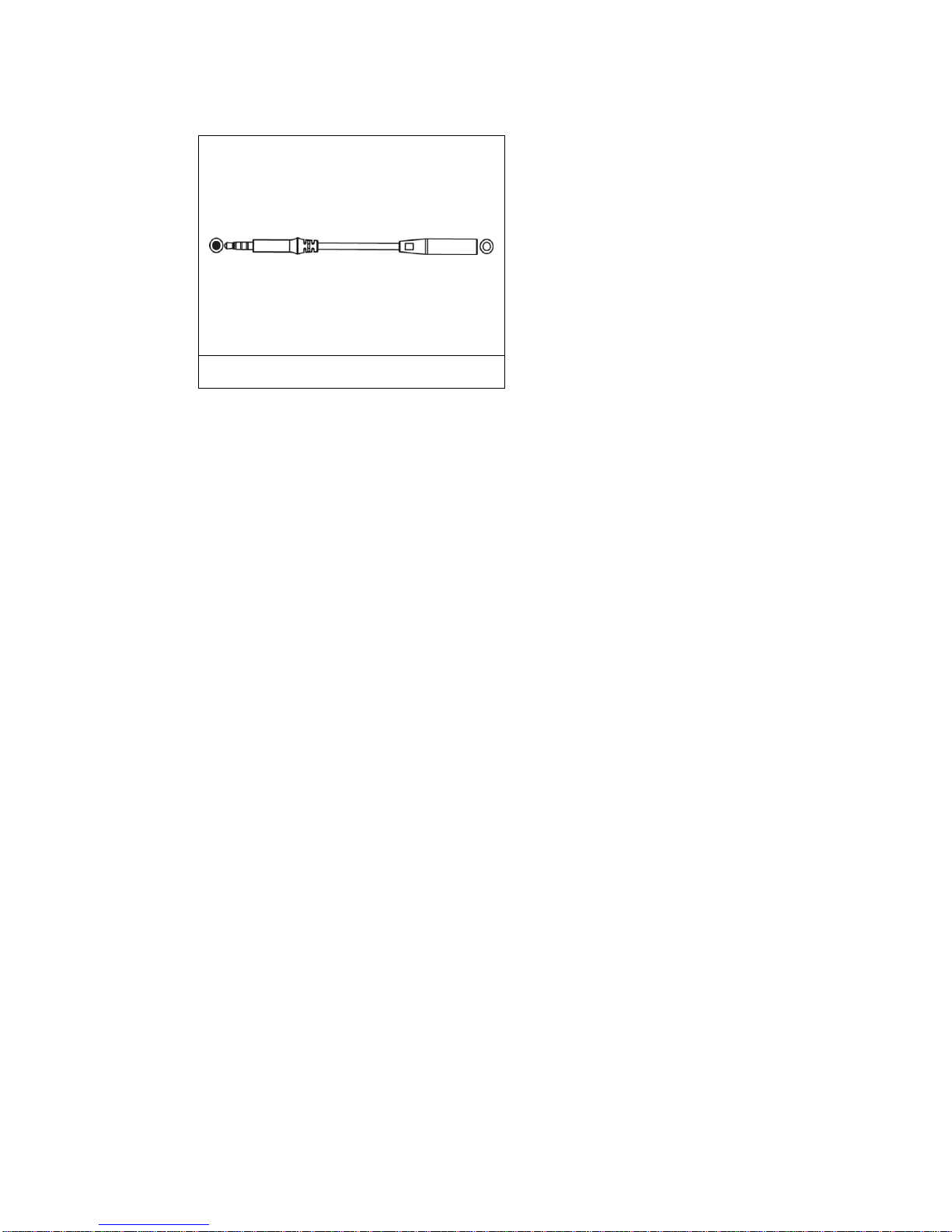
1-2 Optional Items
a. Audio cable
Page 11
3
2 System View
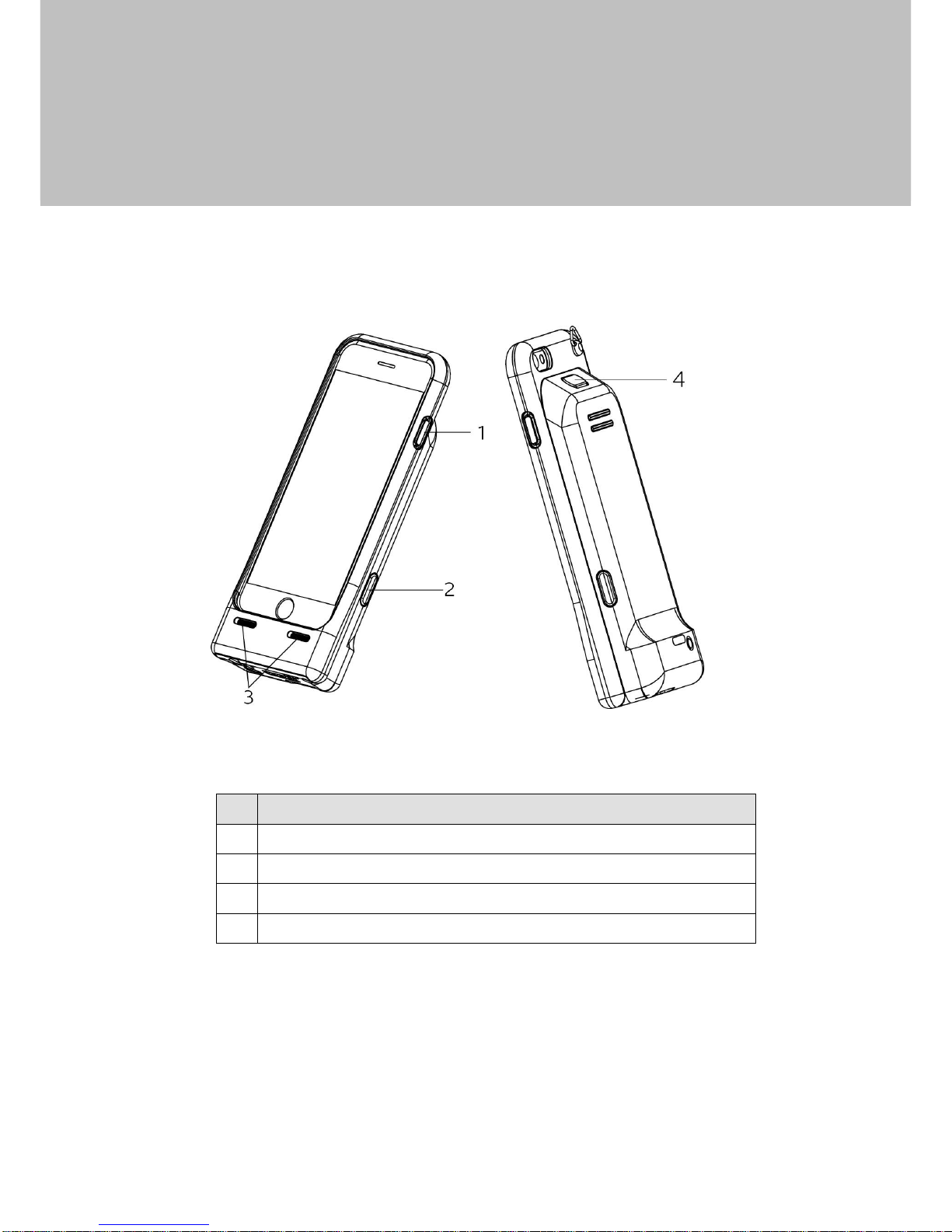
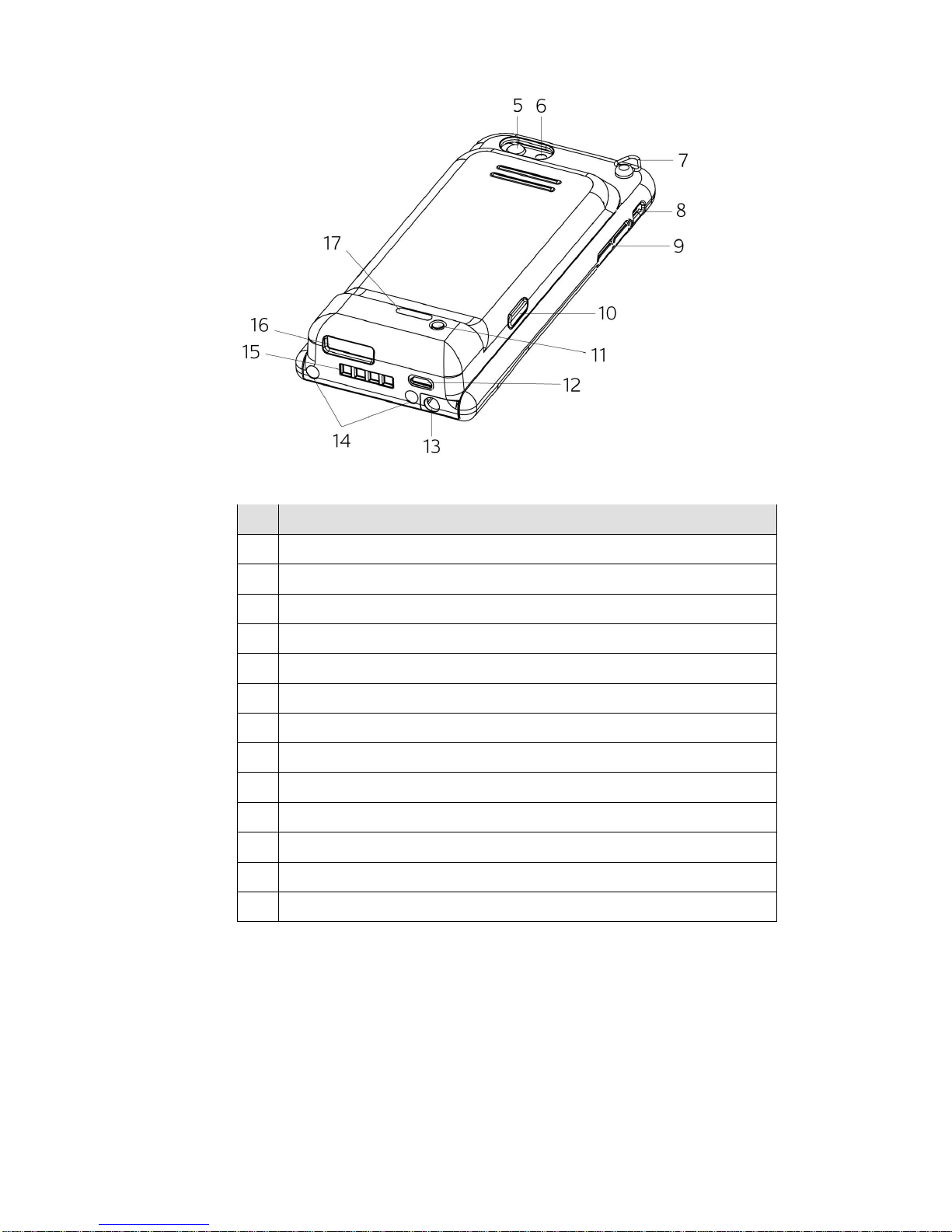
2-1 Features
No.
Description
1
iPhone 6/6S or iPhone 6/6S Plus sleep/wake button
2
Scan button (left)
3
Speaker
4
Scan button (top)
Page 12
4
No.
Description
5
iPhone 6/6S or iPhone 6/6S Plus iSight camera
6
iPhone 6/6S or iPhone 6/6S Plus LED flash
7
Neck strap
8
iPhone 6/6S or iPhone 6/6S Plus ring/silent switch
9
Volume buttons
10
Scan button (right)
11
Power button
12
Micro USB
13
Audio jack
14
Rubber pads
15
Charging slot
16
Scanner
17
Power LED light indicator
Page 13
5
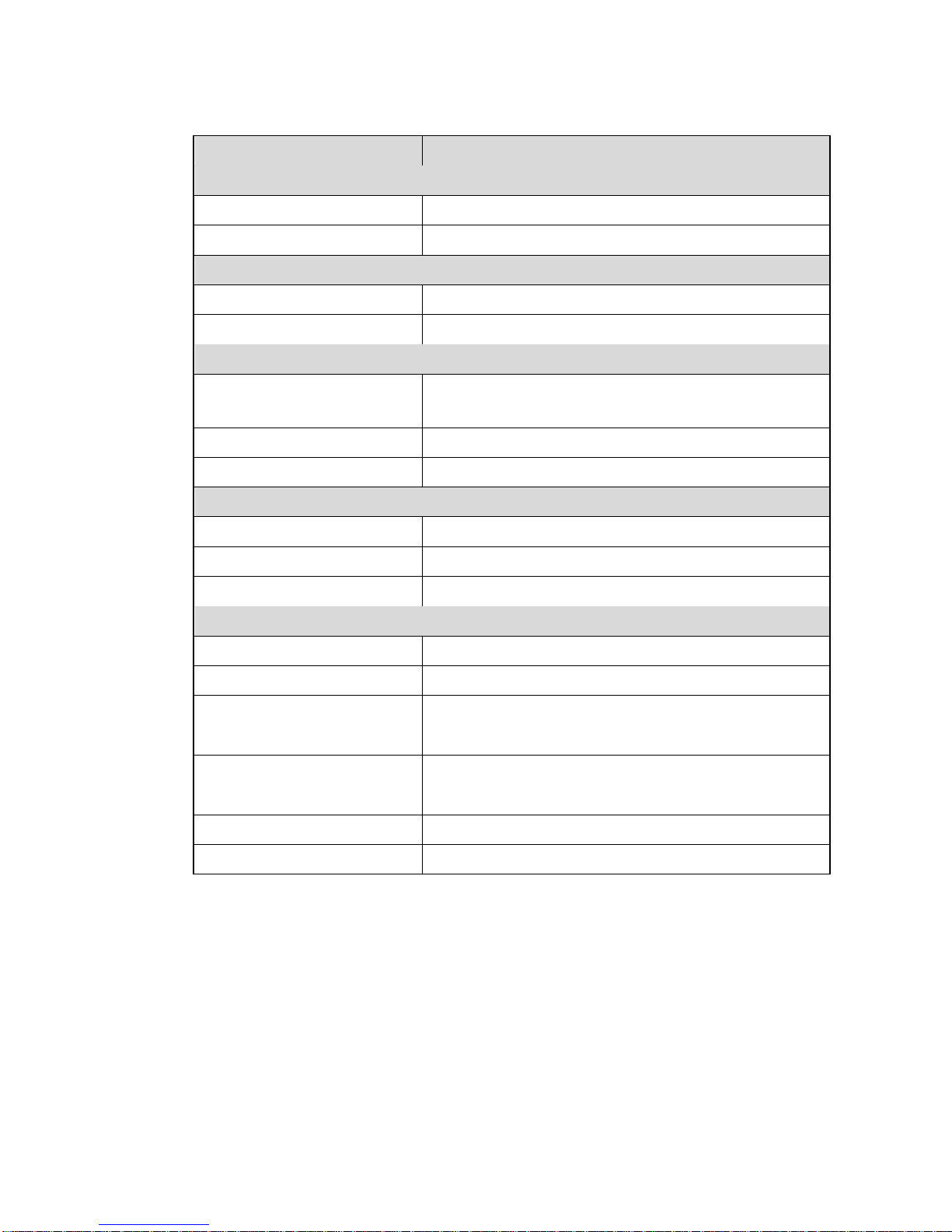
2-2 Specification
Model Name
iSAPPOS 4 / iSAPPOS 5 Scanner Jacket
External I/O Ports
USB port
1 x USB 2.0 Micro USB (Charging )
Lightening port
1 - charging to Phone (5V,1A)
Power
Power adapter
5V/12W
Battery
3.7V, 1100mAh (Not charging to iPhone)
Control / Indicator
Physical button
3 x scan button, 1 x battery status button,
1 x power switch
LED indicator
4 LEDs for battery status
Audio indicator
1 x electromagnetic buzzer
Peripherals
Scanner
2D barcode scanner
RFID reader
13.56 MHz , ISO 14443 A
Attached cable
Audio cable X1
Environment
EMC & safety
FCC Class B, CE, LVD
ESD
4kV contact discharge, 8kV air discharge
Operating temperature
0oC ~ 40 oC (32 oF ~ 104 oF)
(None charging mode)
Operating temperature
0oC ~ 35 oC (32 oF ~ 95 oF)
(Charging mode)
Storage temperature
-10°C ~ 45°C (14° F ~ 114°F)
Humidity
20% ~ 85% RH non condensing
Page 14
6
3 Getting Started
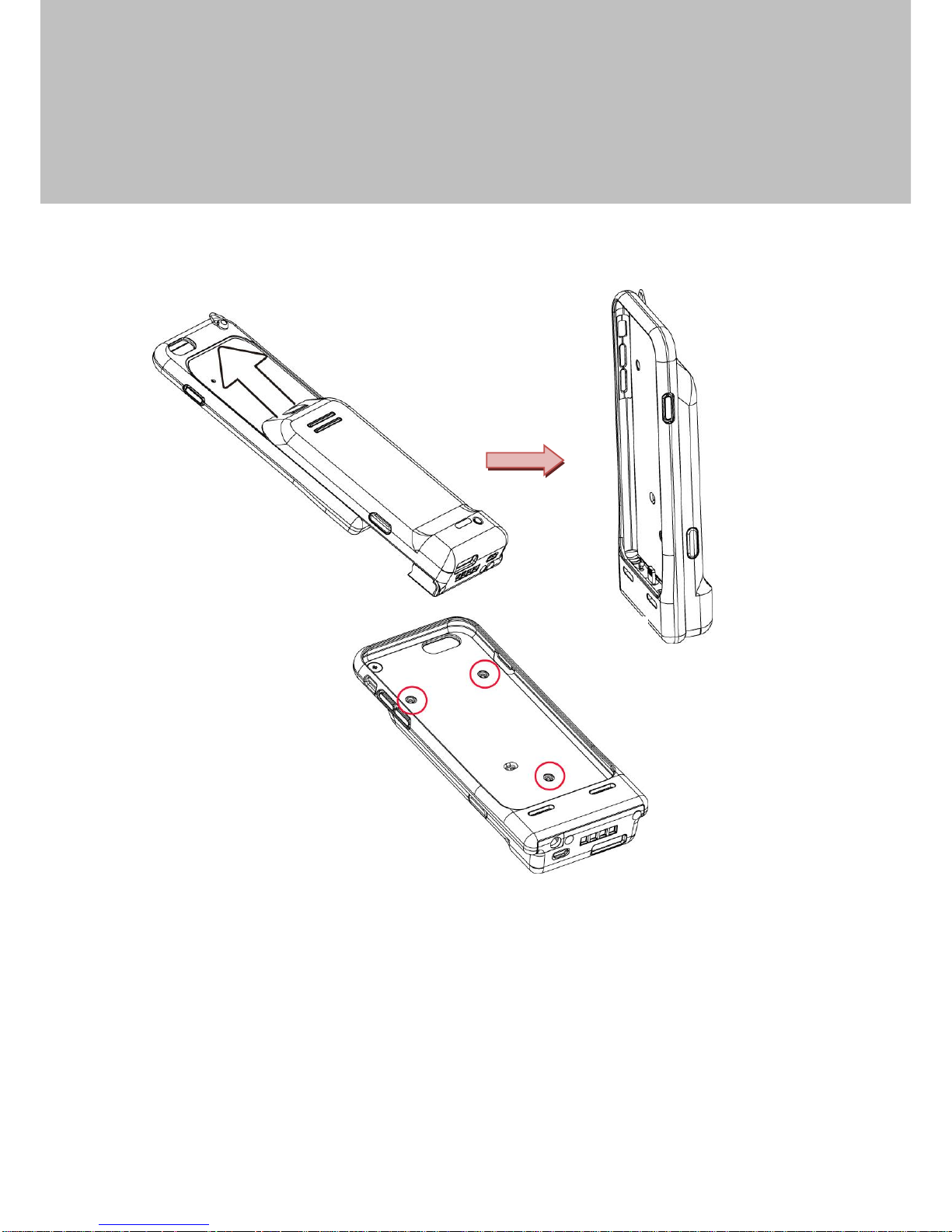
3-1 Assemble the iSAPPOS 4 / 5 Scanner Jacket
1. Slide the main unit into the top cover of iSAPPOS 4 or iSAPPOS 5 jacket.
2. Fasten the screws(x3) to secure the main unit as the picture shown.
Page 15
7
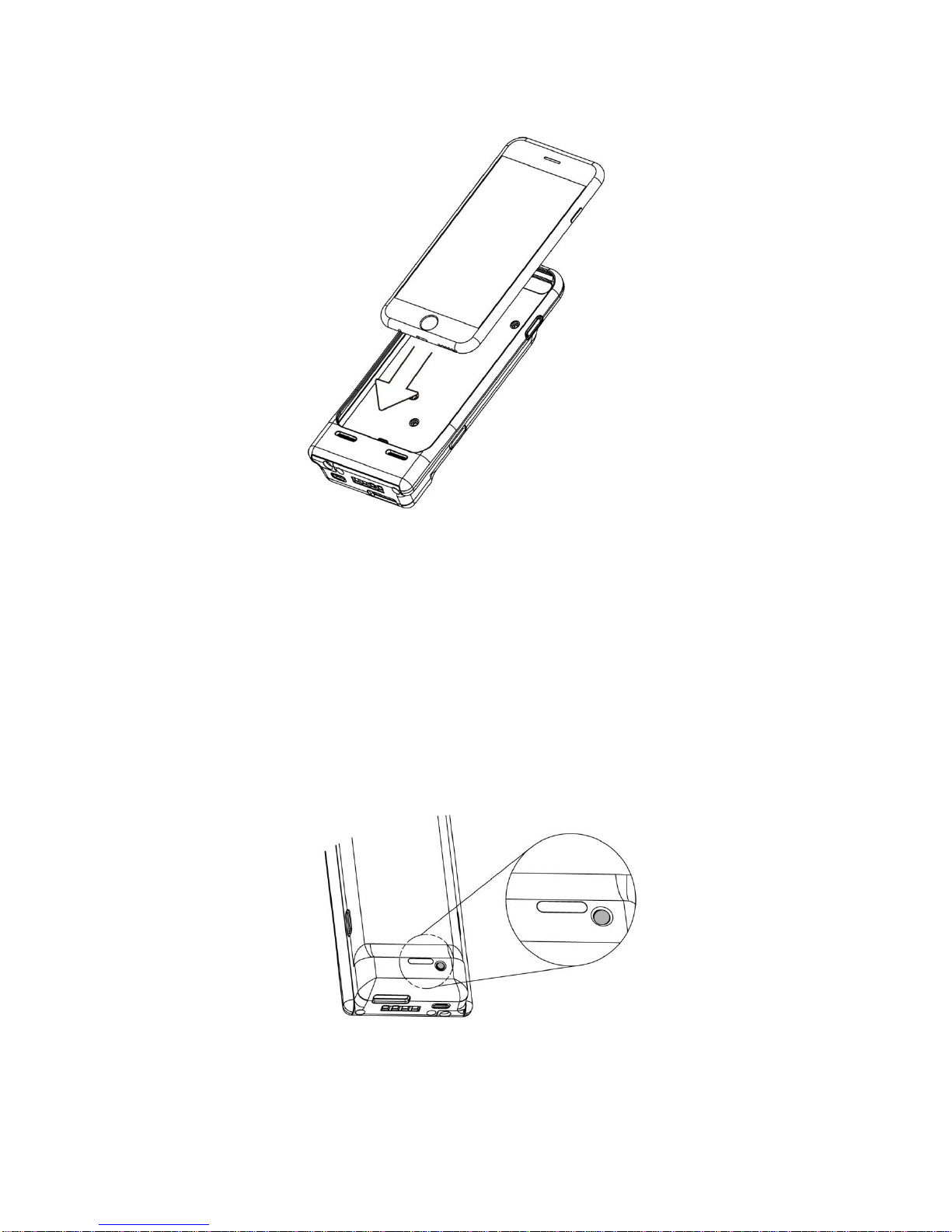
3-2 Install iPhone into the iSAPPOS 4 / 5 Scanner Jacket
1. Thoroughly clean your iPhone 6/6S or iPhone 6/6S Plus with cloth. Avoid
scratching the screen during normal use.
2. Align and insert the iPhone 6/6S or iPhone 6/6S Plus into iSAPPOS 4 / iSAPPOS
5 jacket and press firmly all around the jacket to ensure iPhone 6/6S or iPhone
6/6S Plus is completely fixed.
3-3 Power On/ Power Off
1. Push the power button to turn on the system and hold 3 seconds to turn off the
system.
Page 16
8
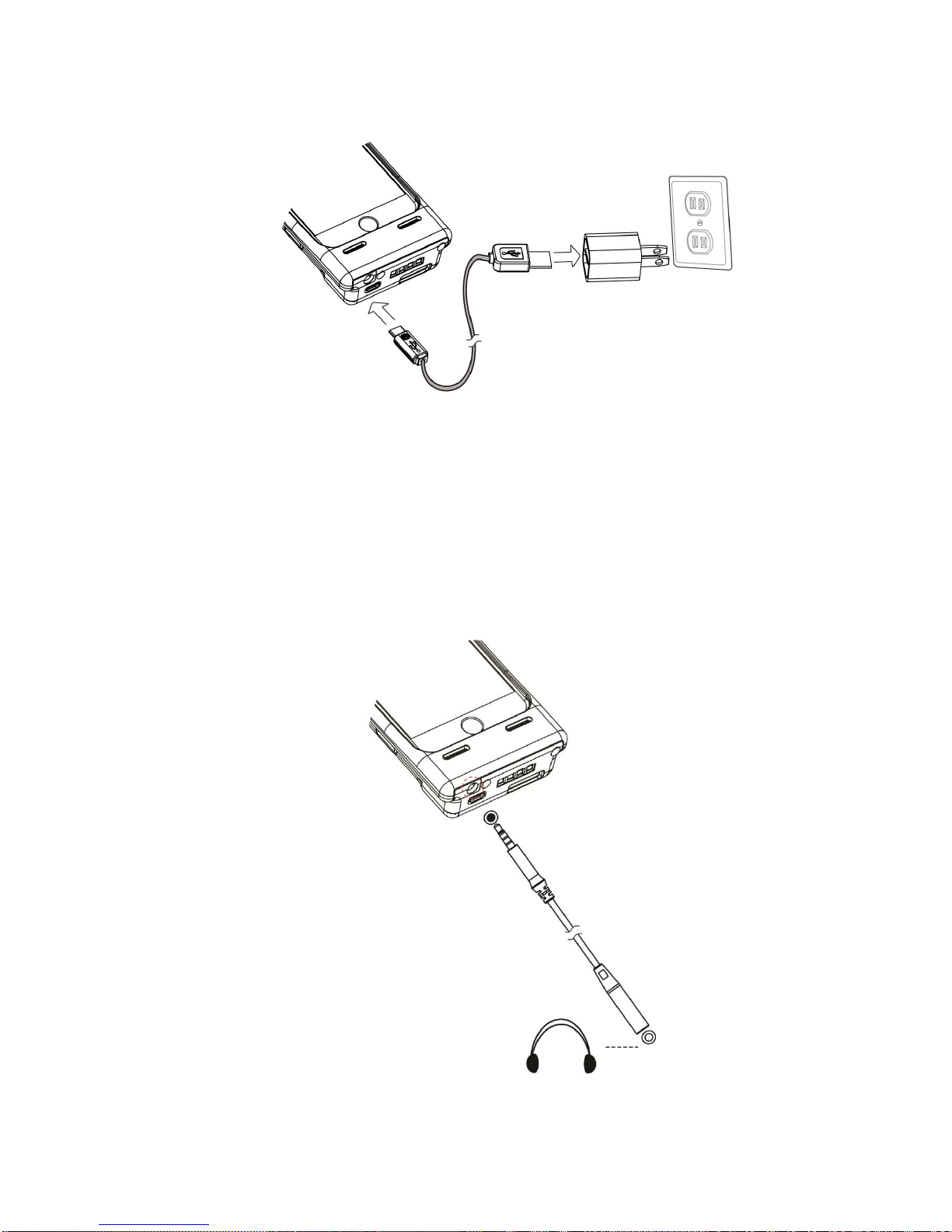
3-4 Charging the Device
1. Charging the device using the computer.
Plug the end of the USB connector into your computer’s USB port. Make sure the
computer is turned on and not in Sleep mode.
2. Charging the device using the power outlet.
Plug the USB end of the power adapter cable into the AC power adapter and then
Connect the AC ad adapter to an electrical outlet.
3-5 Install the Audio Cable
1. Insert the 3.5 mm audio cable plug into the connector on the system until fully
seated.
 Loading...