

Page 1
1
Package Contents
Printer unit (PP-6900: for Windows; PP6901: for Android)
Thermal sensitive paper roll of 80 mm
width
One piece of spacer plate for the paper
roll of 58mm width
One of the interface cables:
USB cable for PP-6900/6901
Serial cable with 9 pin D sub
Female to 9 pin D sub Male
connectors for PP-6900S/6901S
serial model
Parallel cable with 25 pin D sub
Male to 25 pin D sub Female
connectors for PP-6900P parallel
model
No interface cable for PP-6900L
or PP-6900W/6901W
Power adaptor + power cord
(depending on a specific country or
region)
User Manual x1
Views of PP-6900/6901
Top View
PP-6900/6901
Thermal Printer
User Manual
19780901020 Ver. A0
http://www.posiflex.com
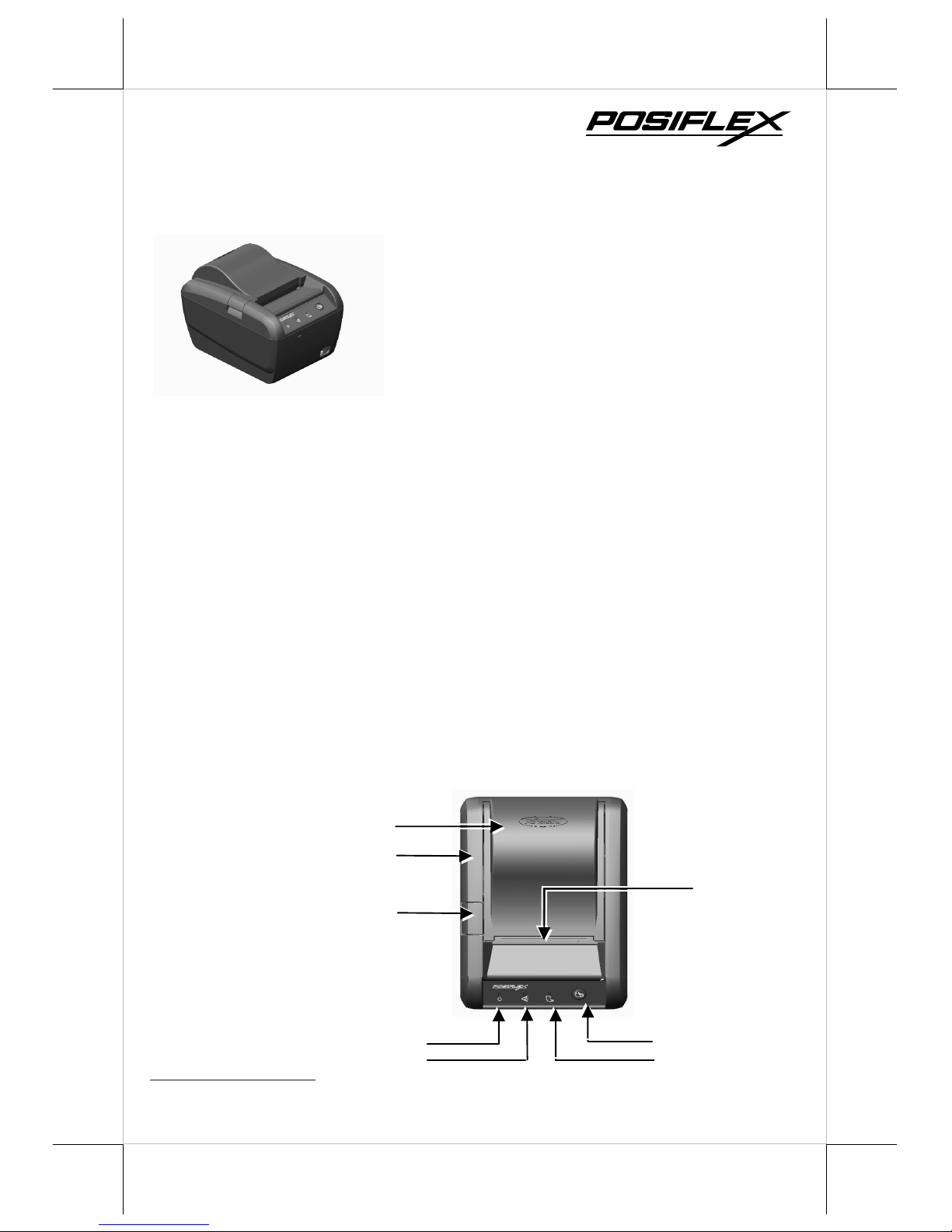
Paper Cover
Top Cover
Hood Release
Power LED
Error LED
Paper-Out
Feed Button
Roll Paper
Page 2
2
Front View
Bottom View
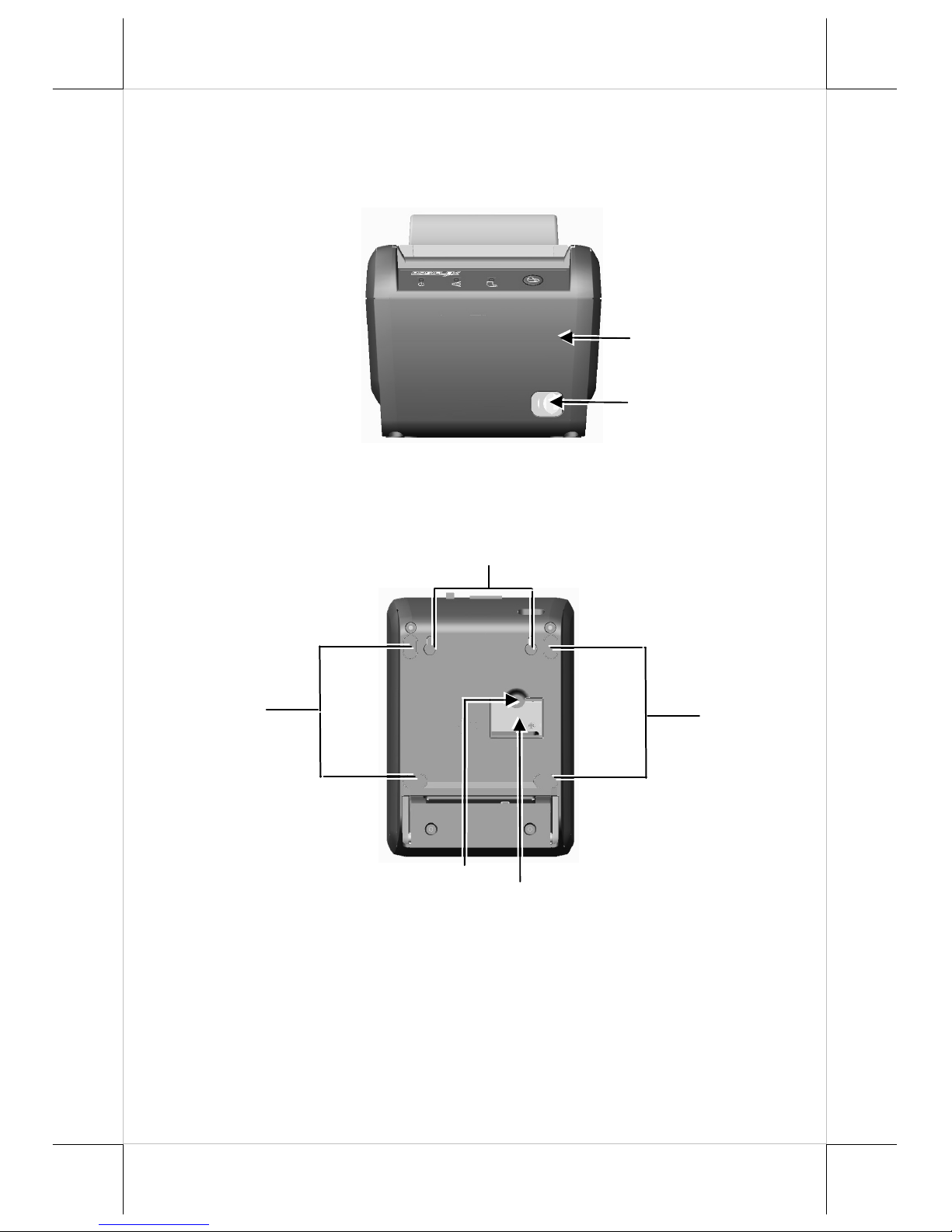
Power Button
Bottom Cover
Rubber Foot
Rubber Foot
Wall Mount Hanging Hole
Window Plate Screw
Setup Window Plate
Page 3
3
Rear View
QUICK START-UP
LOADING A PAPER ROLL
While loading a paper roll for PP-6900/6901, please
do NOT power ON your printer.
Start to load a paper roll according to the following steps.
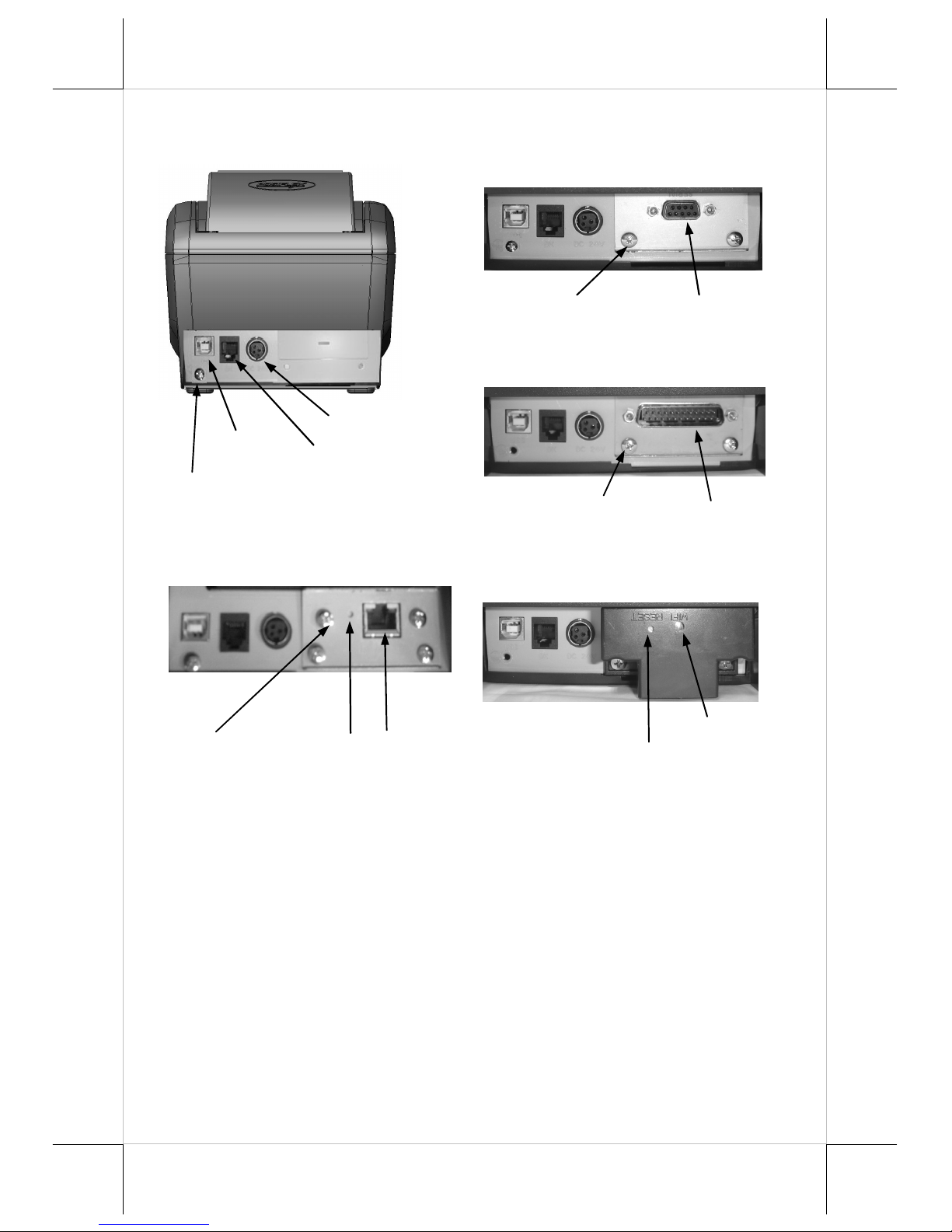
Frame Ground Screw
USB Port
P
eripheral Port
P
ower Connector
Serial Port
Serial Adaptor
Fixation Screw
(I/O Area for PP-6900S/6901S)
Parallel Port
Parallel Adaptor
Fixation Screw
Wi-Fi Indicator
Reset Button
LAN Port
LAN Adaptor
Fixation Screw
(I/O Area for PP-6900L)
Reset
(I/O Area for PP-6900P)
(I/O Area for PP-6900W/6901W)
Page 4
4
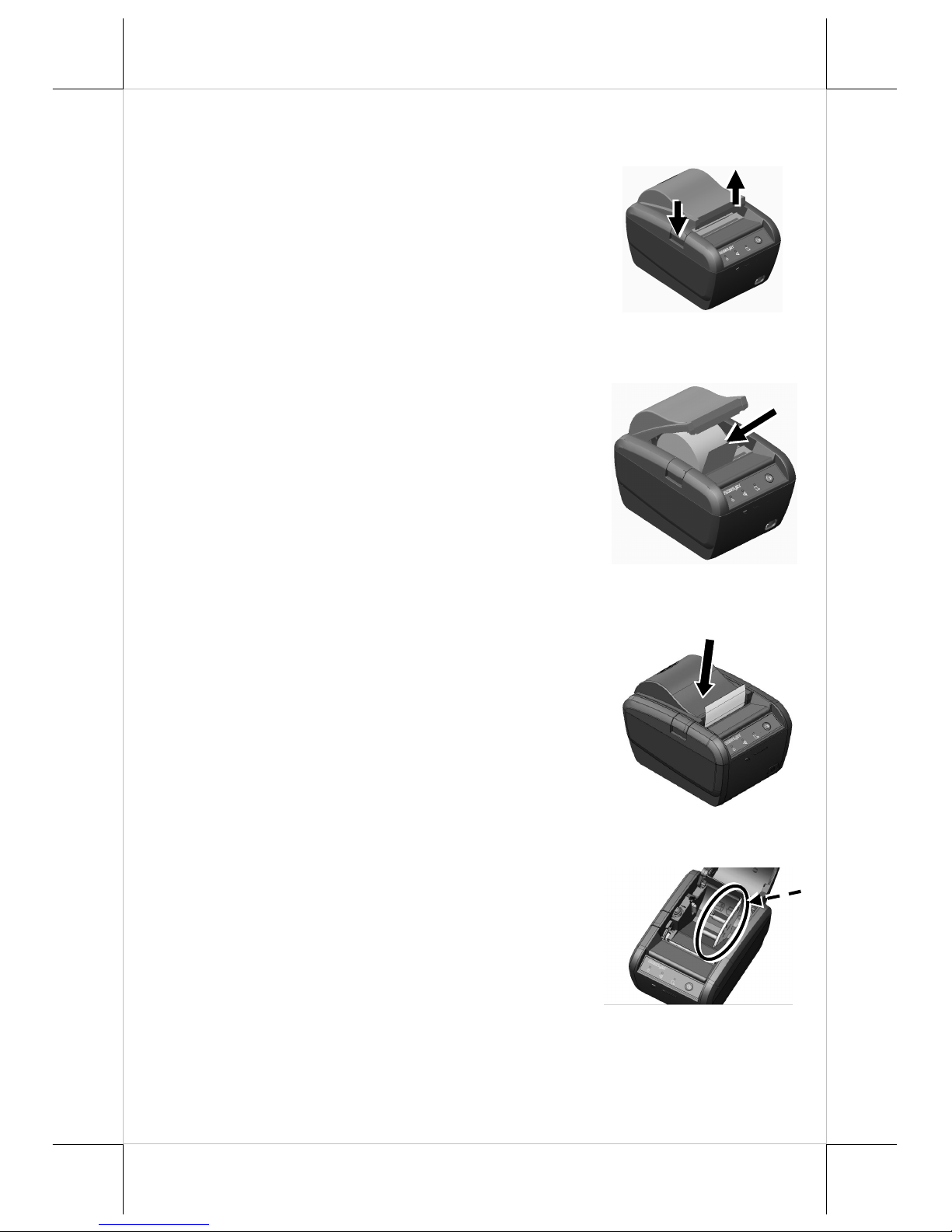
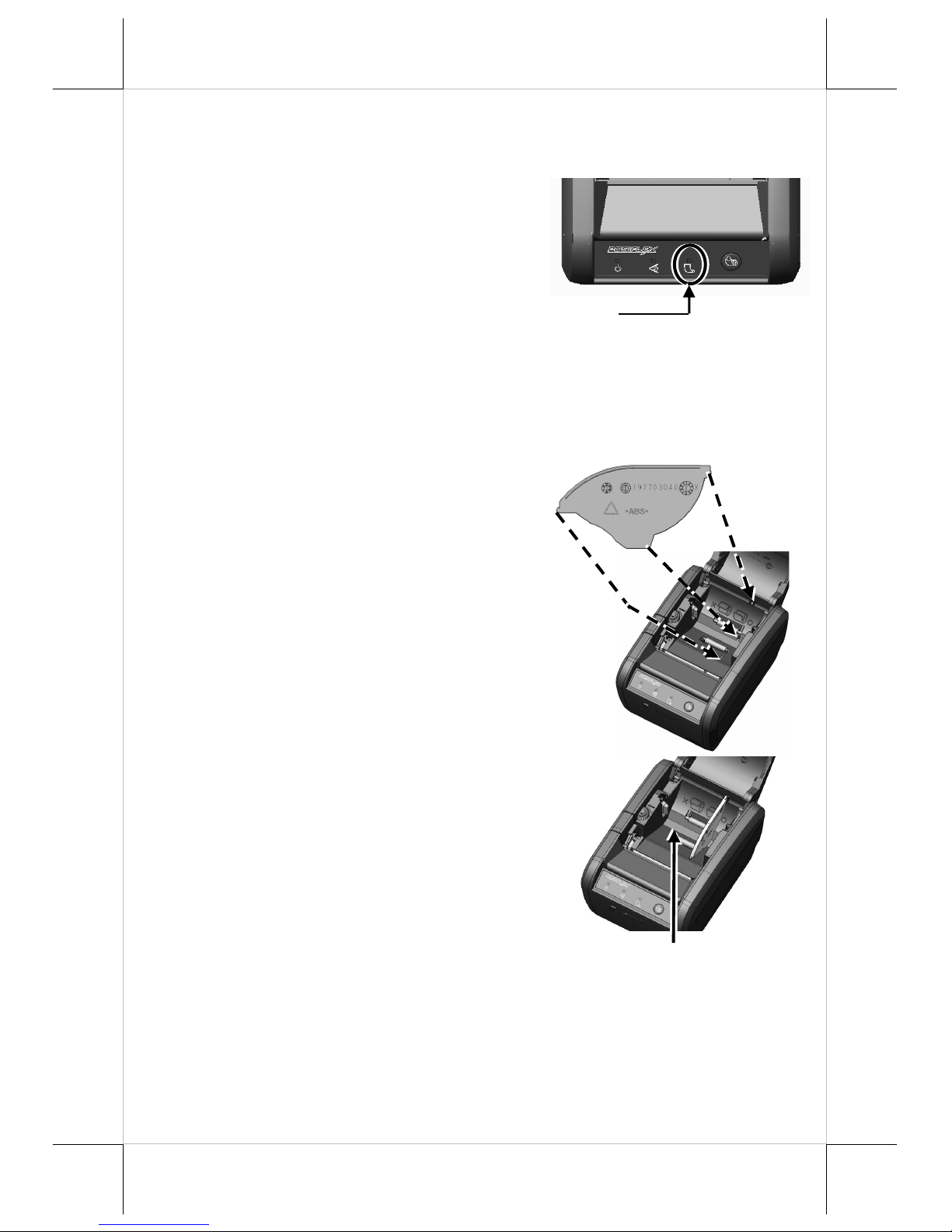
1. Press down the hood release button to
release the paper cover.
2. Raise the released paper cover manually and
drop the thermal paper roll inside the printer
as shown in the right figure.
3. It is essential to close the paper cover by
pushing its middle leading edge, so as not to
apply uneven force, resulting in not fully
engaged activity, and make the tail of the
paper roll come out of the track between the
hood and the top cover.
Excessive paper will be cut off
automatically when the printer is powered
ON.
4. If you want to use a paper roll of 58mm
width, install the spacer plate in the
compartment of the printer, as shown in the
right figure, and then load the paper roll of
58mm width into the partition at the left
side of the plate.
1
2
Page 5
5
When to Replace Paper Roll
When the printer gives a paper out signal or a
red line appears on the thermal sensitive
paper, it is time to replace the paper roll. Do
not wait till the print engine is dragging the
paper roll at the very end. Remove the
leftover and replace the old paper roll with a
new paper roll as guided above to prevent the
printer from excessive paper dust and lower
the possibility of consequent paper jam.
Spacer Plate Installation for Paper Roll of 58mm Width
Before installing the 58mm-width paper roll,
please refer to the figure shown at the right
for mounting the spacer plate to the paper roll
compartment of the printer.
Note that the smooth side is toward the paper
roll.
Insert the noted corners of the spacer plate
into the 3 dents inside the paper roll
compartment as arrowed in numeric order.
Then the 58mm-width paper roll compartment
is formed.
58mm-width Compartment
Paper-out signal
1
2
3
Page 6
6
ON DIP
1 2 3 4 5 6 7 8
PRINT HEAD CLEANING
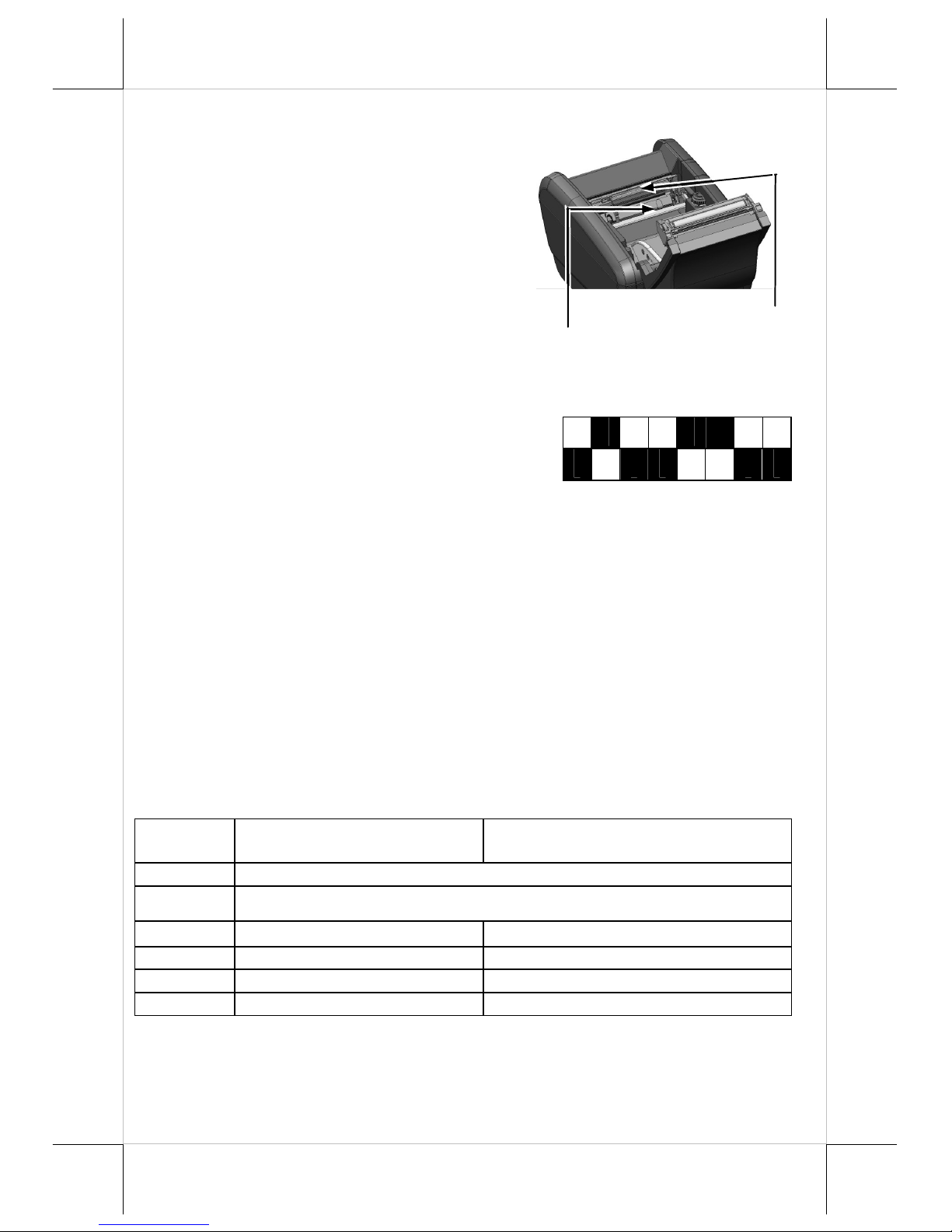
The print head is located underneath the
roll paper passage at the exit. You can
clean the thermal sensitive elements of
the print head and paper roll sensor
gently by using a cotton swab moistened
with isopropyl alcohol solvent.
PRINTER SETUP
There are two different ways to set up PP6900/6901. The first way of setup is
implemented through the hardware DIP Switch
on the bottom of printer for setting up
functions such as baud rate, paper width and
others. The second one is implemented through a software utility to adjust the
switch, such as printer density and other functions.
Setup through Hardware DIP Switch
On the bottom cover of the PP-6900/6901 series thermal sensitive printer,
there is a screwed metal plate for setup window. In this window, there is
an 8-position DIP switch for printer setup. Please use a proper tool to
change the switch setting, if necessary. The functions of each position
may evolve with the revisions of the firmware. The information below is
regarding DIP Switch Position Behavior Table.
DIP Switch Position Behavior Table
Switch
position
ON OFF
1~2
Baud rate definition (Refer to the table below)
3~4
Paper Width & Printable Width (Refer to the table below)
5 Print speed (200 mm / sec) Print speed (170 mm / sec)
6
USB interface (Default) Other interface
7
Auto Cutter Disable Auto Cutter enable
8
Firmware Update Enable Firmware Update Disable
Paper Roll Sensor
Thermal Sensitive Elements
Page 7
7
Setup through software switch:
Another method of setting up PP-6900/6901 series is implemented
through the software switch setting, which means that software utility
must be used for setup of other functions.
For the above 2 setup procedures, please visit our web site
http://www.posiflex.com/up/Download/downlaod to download the PP-
6900/6901 jumper settings.
SPECIFICATIONS
PRINTER
ITEM SPECIFICATION
OS supported
PP-6900: for Windows-based terminal
PP-6901: for Android-based terminal
Printing method Thermal sensitive line dot method
Effective printing width 64 mm / 72mm (Max.)
Thermal head configuration 512 dots line / 576 dots line
Printing speed 200 mm / sec. max.
Paper feed method Friction auto-feed
Paper load method Drop and use
Auto-cutter capability Partial cut (1 point at center left)/full cut
Paper cutting method Guillotine cutting
Manual cutter Saw tooth blade
Dot Pitch 0.125 x 0.125 mm
Life span of print length 100 km
Life span of paper cutting 1 million or more
Input power type DC
Input voltage 24 V + / - 5 %
Dimension (mm) 148 (W) x 205 (D) x 143 (H)
Weight 1.2 Kg net
PAPER
PAPER TYPE THERMAL ROLL PAPER
Paper roll formation External side is heat-sensitive side
Paper width 80 (or 58) + 0 / - 1 mm
Paper roll outer diameter 83 mm max.
Paper roll inner diameter 12 + 1 / - 0 mm
Paper thickness 60 ~ 80 um
Page 8
8
POWER ADAPTOR
ITEM REQUIREMENT
Input voltage 100 V AC ~ 240 V AC
Input frequency 50 ~ 60 HZ
Input current 1.8 A MAX. @ 115 V AC
Output voltage + 24 V DC
Output power 50 W
Static load 0 A ~ 2.08A
Output regulation + / - 5 %
EMI standards VDE – A, FCC – A, VCCI – A
MULTIPLE INTERFACE ISSUE
For model PP-6900/6901, there is only 1 connector for host connection
through USB. For PP-6900P/6901P, there are 2 connectors for host
connection: USB and in addition to parallel port. For PP-6900S/6901S,
there are 2 connectors for host connection: USB Port and in addition to the
serial port. For PP-6900L/6901L, there are 2 connectors for host
connection: USB and in addition to the LAN port. Please always connect
only one interface at a time. Simultaneous multiple host connections
could result in unexpected results!
To get the detailed information on
※※※※
PP-6900/6901, please check this model
from Posiflex Global Website (
http://www.posiflex.com/en-
global/Download/download).
 Loading...