

Page 1

Vacuum Tube Amplifier
POPULAR® A3
( User's Manual)
Date of last revision: 16.2.2015
Page 2

2
Contents
Acknowledgement .................................................................... 3
Important notice ...................................................................... 4
Safety Instructions .................................................................... 5
1. Front panel of the amplifier ................................................. 8
2. Rear panel of the amplifier ................................................... 9
3. After unpacking the amplifier ............................................ 10
4. Connecting the speakers .................................................... 11
5. Connecting the turntable ................................................... 12
6. Connecting the CD player ................................................... 13
7. Connecting the AUX device ................................................ 14
8. Connecting the TAPE/EQ device ......................................... 15
9. Connecting the Bluetooth device ....................................... 17
10. Putting the amplifier in operation .................................... 18
11. Technical parameters ....................................................... 20
12. Solving the possible problems .......................................... 21
Page 3

3
Acknowledgement
We appreciate that you have just selected the
POPULAR® A3 amplifier. We believe that you’ll be satisfied
with its bringing the joy of vacuum tube sound, which is very
popular even after so many years. It is due to a vacuum tube
principle itself, which provides the sound with fullness,
freshness and pleasant feeling of warmth.
On behalf of our company we thank you for your
expressed confidence.
Page 4
4
Important notice
You have got an electrical device working with the
dangerous voltage and therefore please, read carefully the
following pages and thoroughly observe instructions of this
User Manual!!!
The manufacturer is not responsible for property damages
or personal injuries caused by operating the unit in way
nonconforming to the User Manual instructions.
Page 5

5
Safety Instructions
1. The amplifier is intended to operate in a dry interior
with temperature range of 0°C to 40°C.
2. The amplifier SHOULD be protected against the
water, or its sources. It means that amplifier shouldn’t
be located near the water pipeline, bathtub, wash-basin,
washing machine, pools, and so on.
3. The amplifier as well as its ventilation holes MUSTN’T
be covered by ANY material except for the original
cover delivered by manufacturer, because the amplifier would
be overheated or even fire could occur eventually.
4. You shouldn’t enter into the amplifier and its
ventilating holes by ANY subject. Therefore keep the
amplifier beyond reach of children.
Page 6

6
5. In case of fault bring the unit into a certified service
or directly to the manufacturer eventually. In any case
don’t try to repair device by yourselves.
6. During operation of the amplifier its vacuum tubes
are of high temperature and there is a danger of
serious burn injuries. Keep the amplifier out of reach of the
children.
7. Carry out the exterior cleaning of the amplifier each
time only after disconnecting the power supply cable.
If the amplifier is operating, switch it off using the power
switch, disconnect the supplying cable and wait until complete
cool down of amplifier! Don’t clean using the chemicals and
organic solvents. It is sufficient to use a gently moistened cloth
made of micro threads. After wiping, the amplifier may be
switched on only after proper drying up.
Page 7

7
8. For powering use delivered mains EURO cable. The
amplifier is designed for the 230V/50Hz electrical
power network with protective PE conductor. In any case don’t
connect the amplifier to sockets without the middle earthing
plug, or otherwise disconnect the protective PE conductor!
9. Before first putting the amplifier into operation
please, follow the instructions in User Manual.
10. In case of any comments please, contact us on e-
mail address [email protected]
Page 8
8
1. Front panel of the amplifier
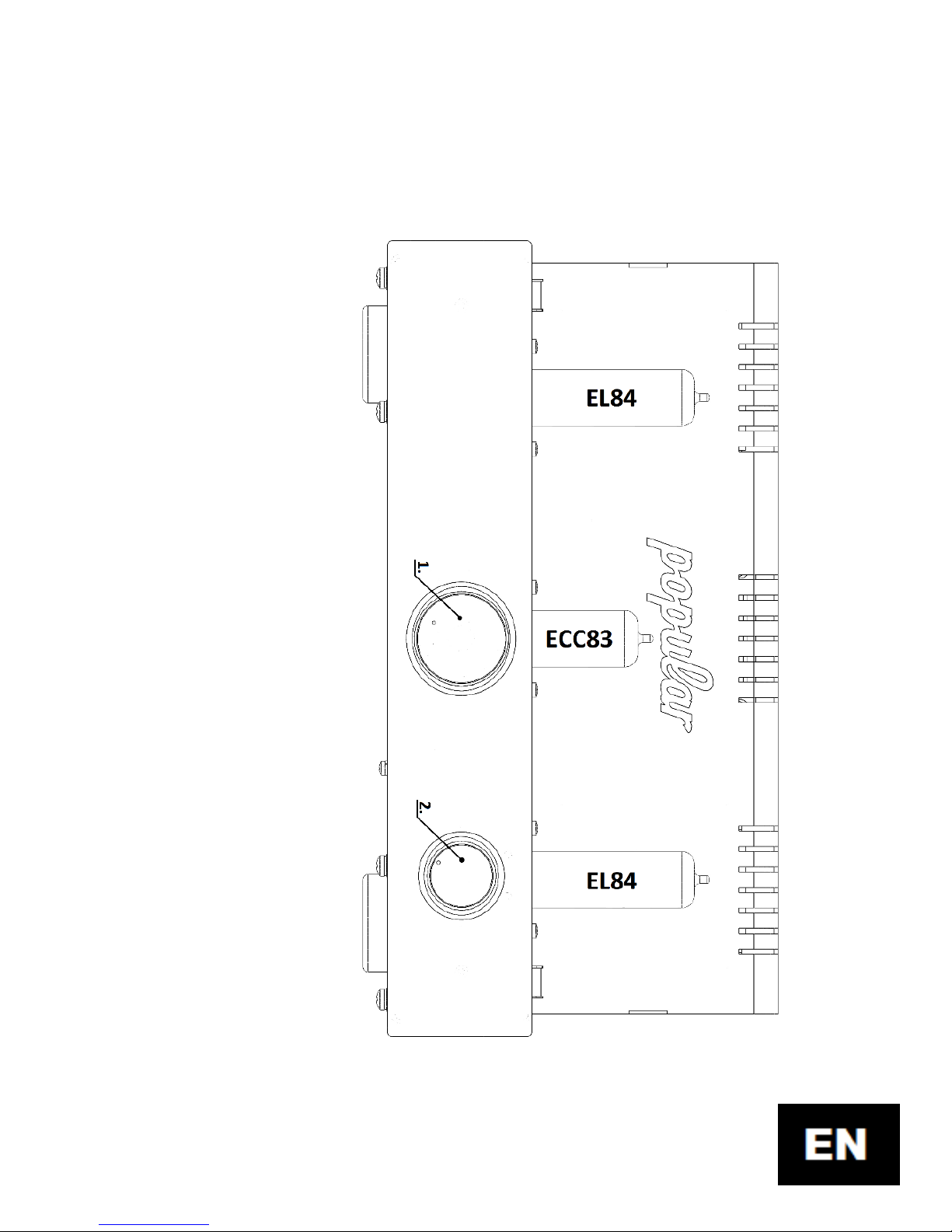
1.
Volume
–
serves for adjusting the total volume of amplifier
,
2.
Channel change
-
over switch
–
used for selection of
audio
input required
.
Page 9
9
2. Rear panel of the amplifier
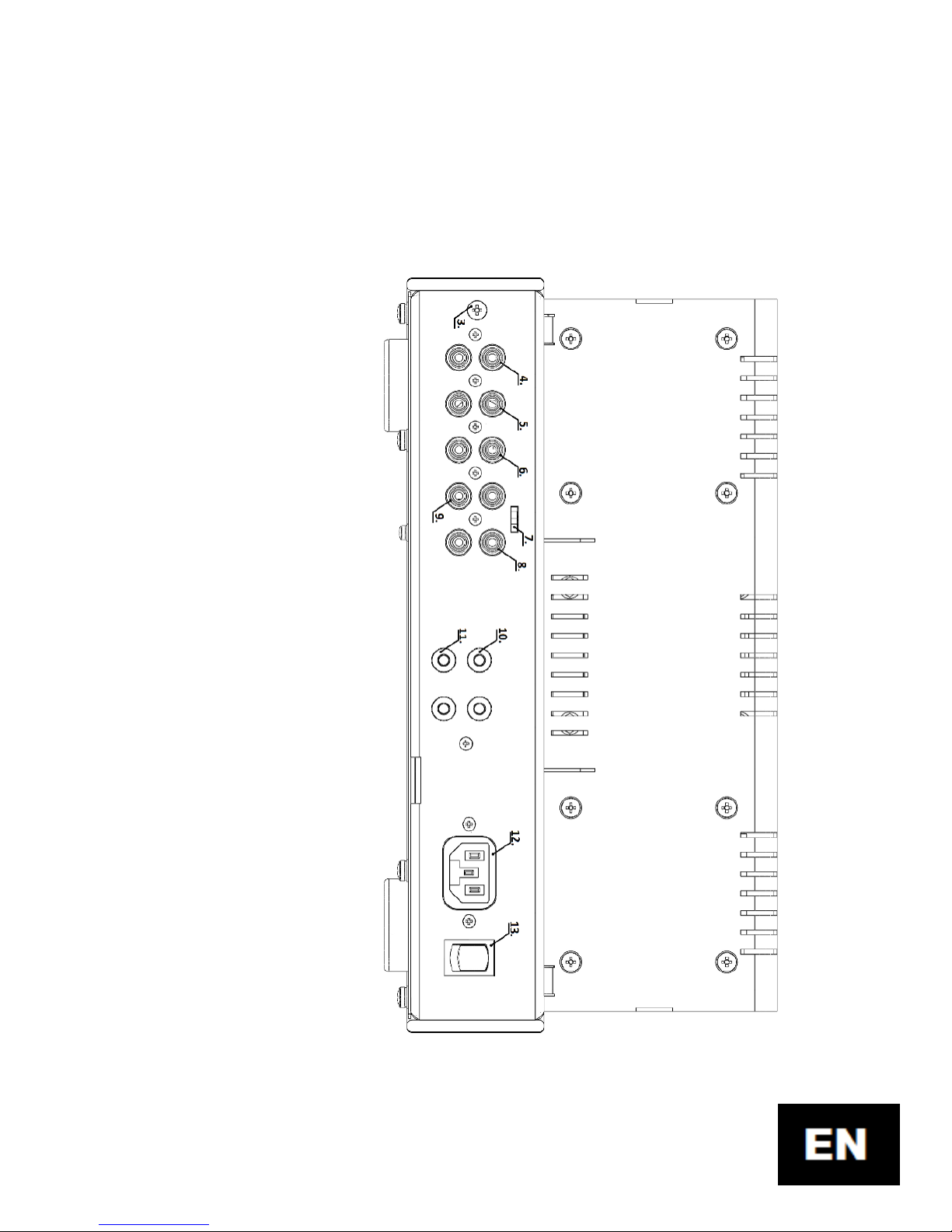
3.
Turntable earthing terminal,
4.
Input of turntable
,
5.
Input for
CD
player
,
6.
Input for
AUX
device
,
7.
BYPASS
change
-
over switch
,
8.
Input
for connection of
output
from
TAPE/EQ
device
,
9.
Output
to the
input of
TAPE/EQ
device
,
10.
Terminals
of
speaker
(
left
channel
),
11.
Terminals
of speaker
(
right
channel
),
12.
Feeding
EURO connector,
13.
Main
swit
c
h
Page 10
10
3. After unpacking the amplifier
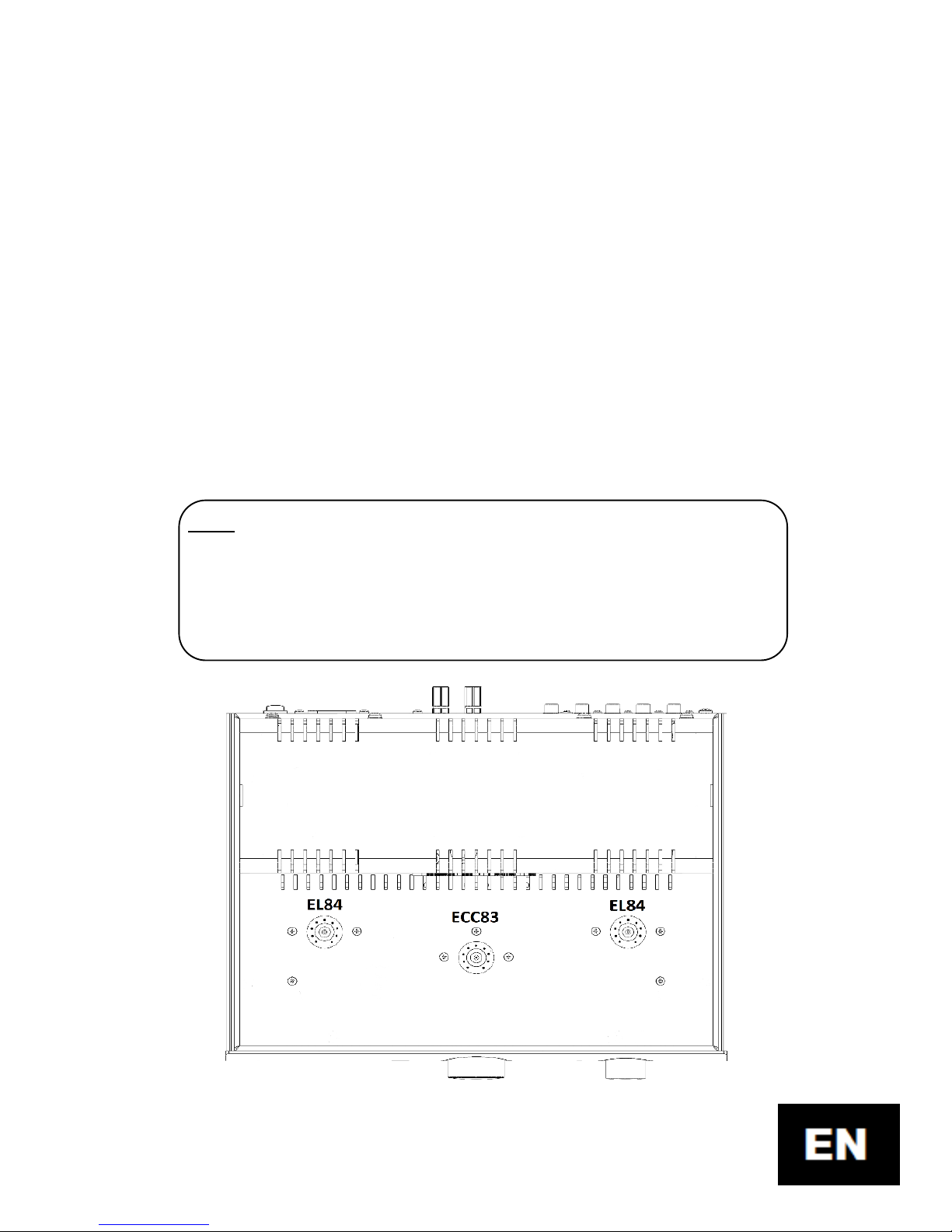
After unpacking the amplifier please, check whether
the EL84 and ECC83S vacuum tubes are at the right locations,
and pushed into place rightly. Eventual insufficient pushing
into position can be caused by transport. Use a dry cloth and
using the soft circular motions push the vacuum tube into its
place.
Note: Don’t try to push the vacuum tube applying perpendicular force
downward, because feet used are very rigid in order to reach a quality
coupling. A gentle circular motion downward facilitates this
operation and you don’t risk any damage of the vacuum tube.
Page 11
11
4. Connecting the speakers
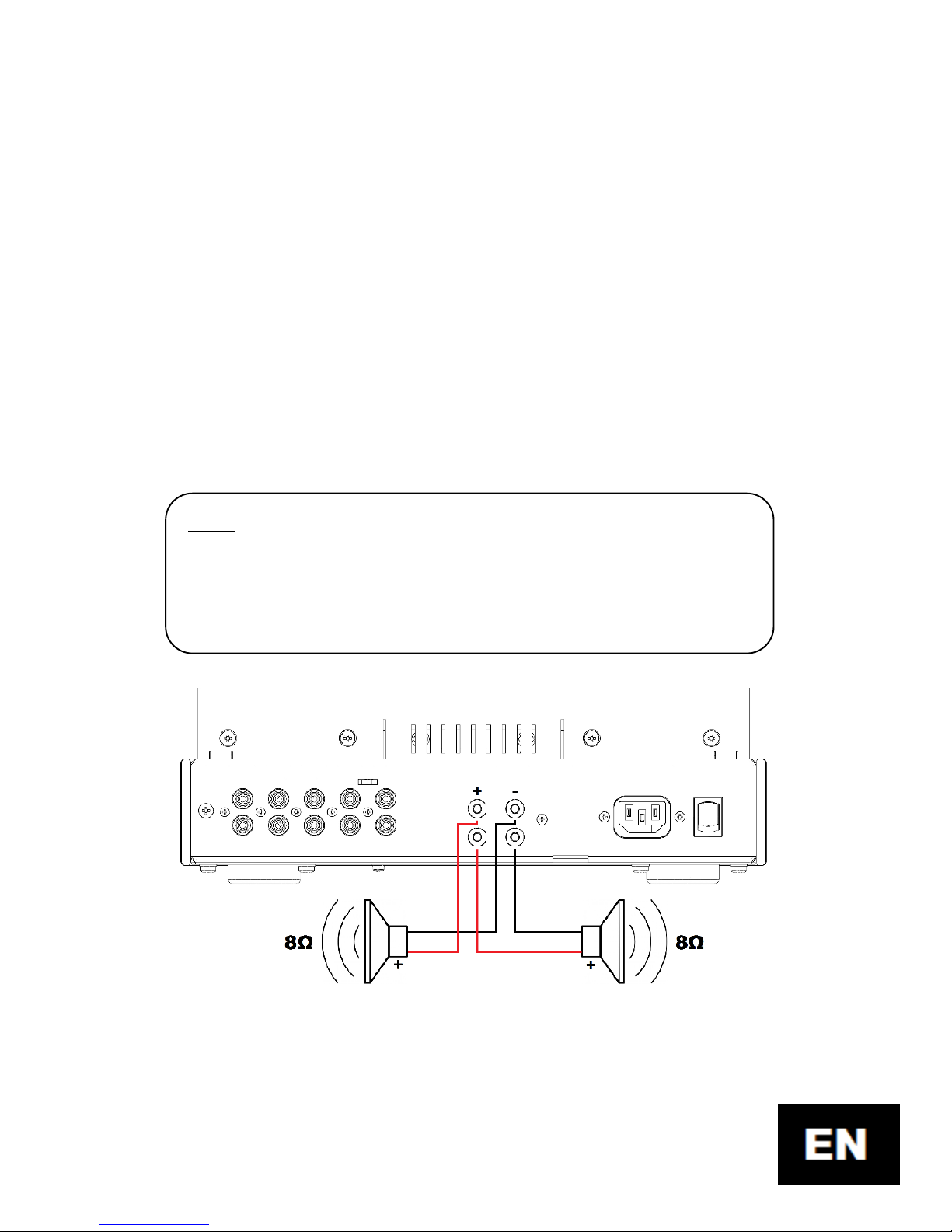
Connect suitable speakers to the speaker terminals 10.
and 11., either using the banana plugs, fork connectors, or
inserting the wire through speaker terminal. Take care to
observe a polarity of connected speakers. Speaker impedance should
be 8Ω and its minimum power output 20W. The higher sensitivity of
speaker is an advantage only (> 90dB).
Note: Theoretically as well as practically it is possible to connect the
4Ω speakers too, but at this impedance the technical parameters
described in Section 11 already are not valid.
Page 12
12
5. Connecting the turntable
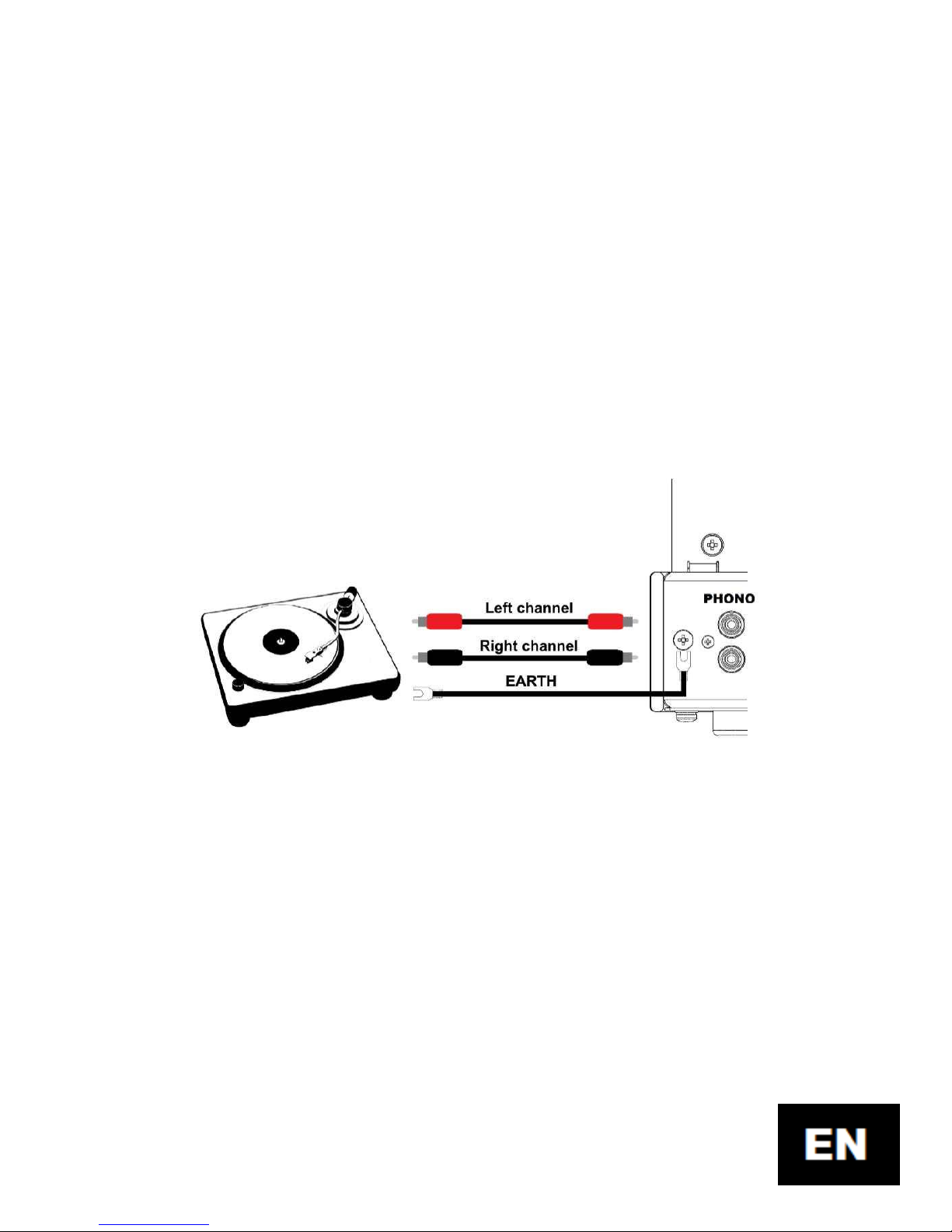
Input of the turntable is very sensitive to an external
electromagnetic interference, and therefore it is necessary to
use good-quality RCA audio cables. Otherwise there exists a
danger of inducing the hum into turntable input resulting in
interfering reception.
It is also necessary to observe the principles of proper
earthing and prevent to so-called earthing loops. The proper
connecting the turntable to the amplifier is illustrated on the
picture above. RCA cables are led to the individual L and R
connectors of the "PHONO" input.
Page 13
13
It does not matter on the color of RCA connector, but it is
important primarily to observe the sides of channels. Good
turntables are equipped with the EARTH (GND) terminal,
which is intended for connection to the EARTH (GND) terminal
at side of the amplifier. In order to prevent the hum
generation, this interconnection SHOULD be carried out!
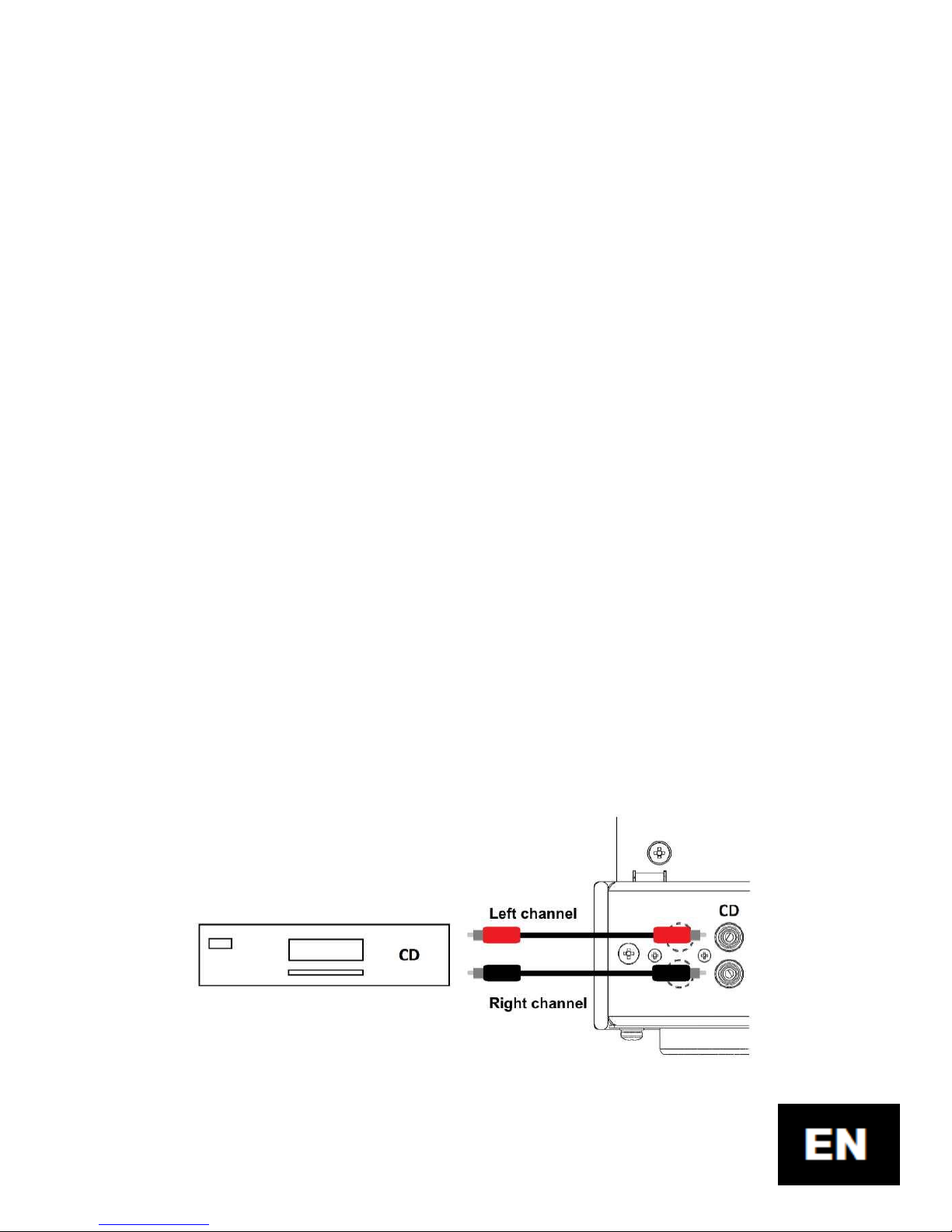
6. Connecting the CD player
Input of CD player is not so sensitive to the external
electromagnetic interference to the turntable input, but a
principle of good-quality RCA audio cables is valid equally. The
earths of amplifier and CD player usually are not interconnected.
In way similar as it is described above connect L and R connectors
of input marked as "CD" with CD player.
Page 14
14
Note: This input is fully compatible with AUX input and can be used
for the same purposes. Also it has the same input sensitivity as AUX
input.
7. Connecting the AUX device
This input is intended for general use and you can
connect there any device, which meets the conditions
specified in Section 6 for this input. These can be e.g.
computer, tuner, TV set, and so on. Input should be connected
similarly as CD input – but device is connected to the AUX RCA
connector.
Note: This input is fully compatible with CD input and can be used for
the same purposes. Also it has the same input sensitivity as CD input.
Page 15
15
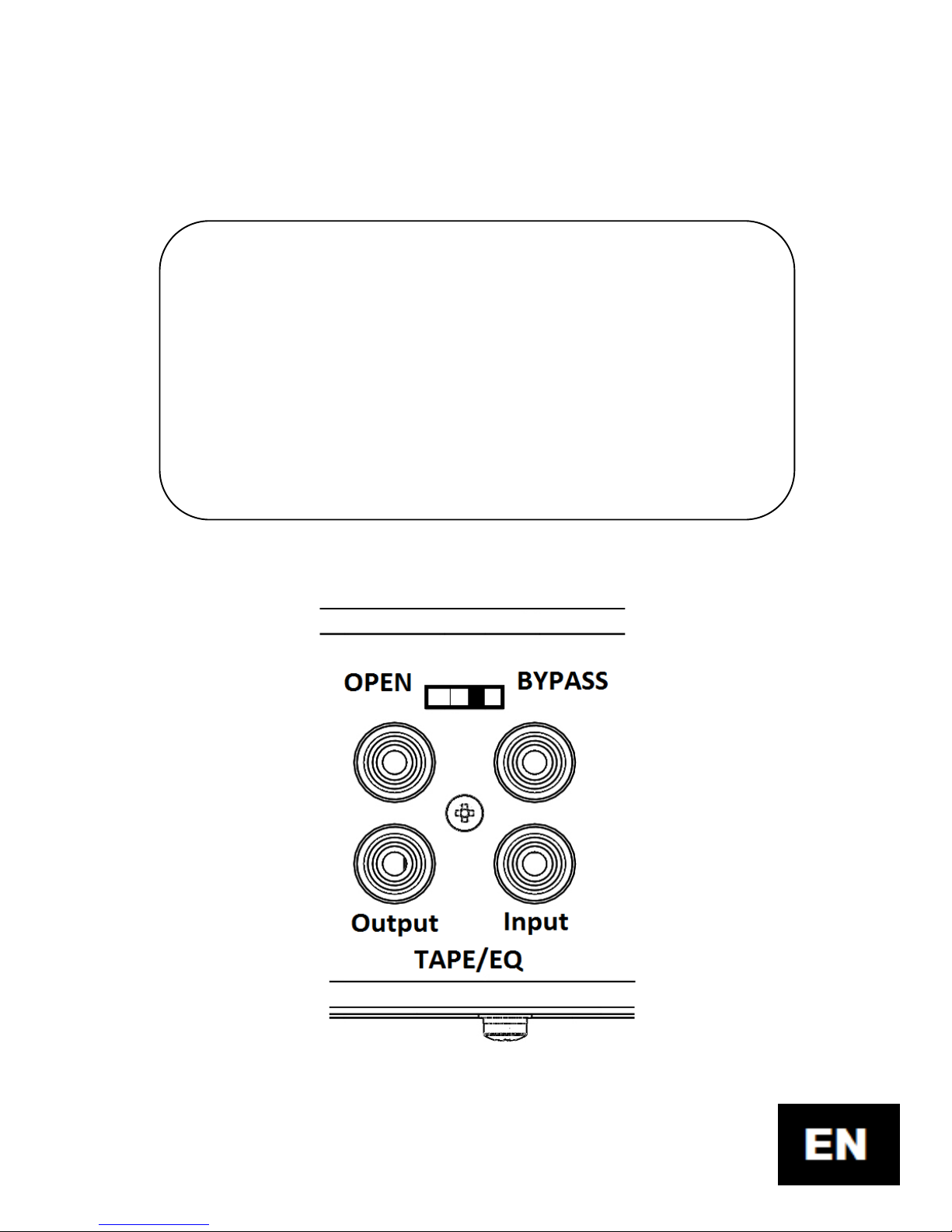
8. Connecting the TAPE/EQ device
!!! ATTENTION!!!
If this device is not connected, or is not used eventually, the
change-over switch at rear panel must be in BYPASS position.
Otherwise the sound from audio devices wouldn’t be
transferred in other inputs. The switch 7 must be in such
position as it is indicated on the picture below.
Page 16
16
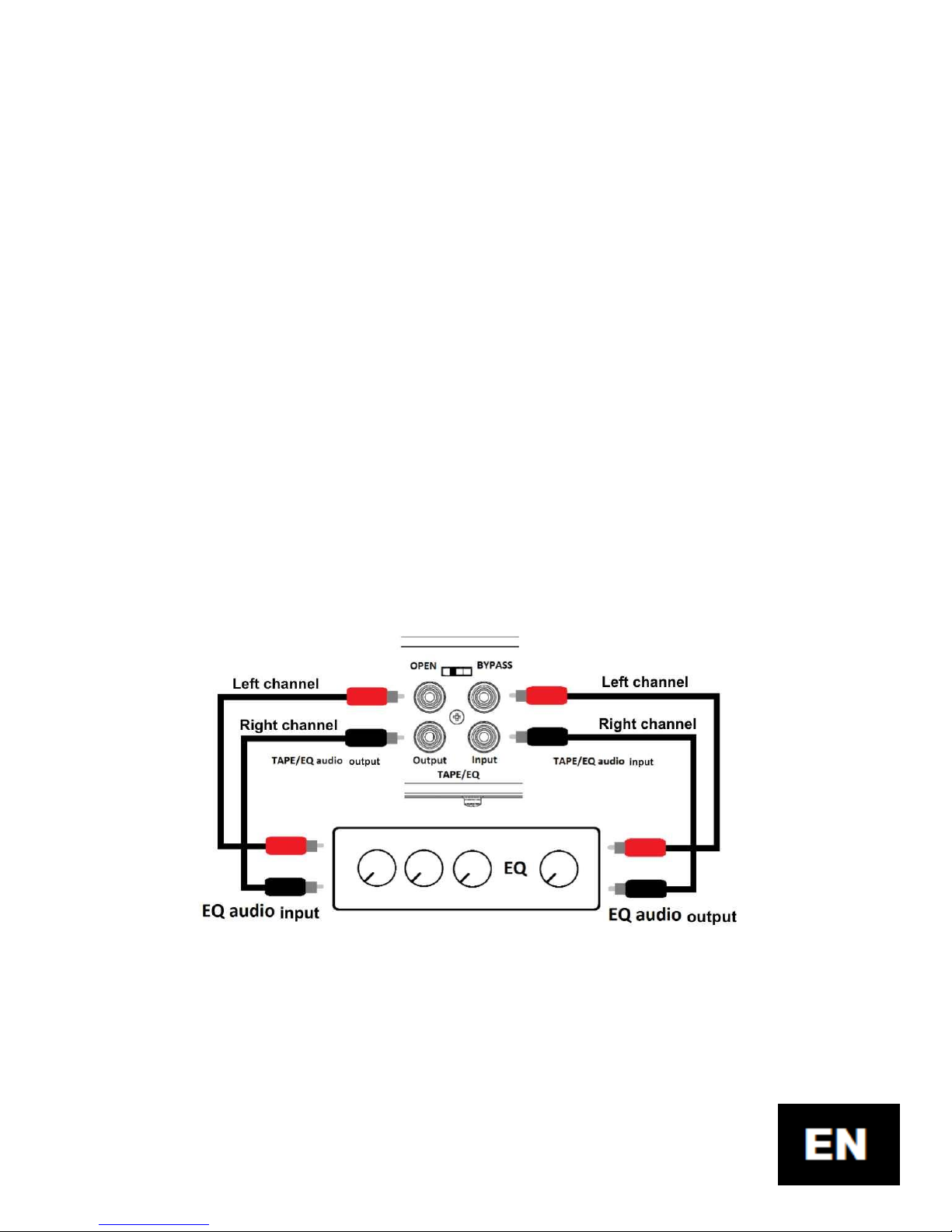
TAPE/EQ loop is enabled by shifting the switch 7 into
OPEN position. This input is intended for connection of a tape
recorder, or correction circuits respectively, e.g. in the form of
a tone corrector, resp. equalizer. The signal from a selected
audio input (by means of channel change-over switch 2 at the
front panel) goes from RCA L and R connectors marked as
TAPE/EQ Output to a connected audio device (tape recorder
or equalizer) to the TAPE/EQ loop. Here this audio signal is
processed and then transmitted back to the amplifier,
particularly to the TAPE/EQ Input terminals. This signal is then
amplified in the amplifier in normal way.
Page 17
17
9. Connecting the Bluetooth device
To connect the Bluetooth device, it is necessary to
move the channel change-over switch 2 at the front panel to
"BLUETOOTH" position. Wait about 10s and then switch
Bluetooth on (if it is not already switched-on) also on your
mobile. Enter the searching a new device and message
"Popular A3" device is to appear (Bluetooth coverage is about
5m). Then pair and connect the device. By doing so, the
connection to the amplifier is completed and you can already
replay your music on your telephone using any of players. If
accidentally mobile phone plays quietly, or it doesn’t play at
all eventually, please check, if the phone has not activated
mute mode, resp. volume is lowered only.
Note: Don’t forget, that in this mode all the sounds from the phone,
i.e. including the voice conversations, are transferred to the amplifier.
Bluetooth PIN: The last four digits of the serial number of the
amplifier
Page 18

18
10. Putting the amplifier in operation
If everything from previous sections is carried out, you
can finally proceed with the most essential point of the
amplifier.
!!! ATTENTION !!!
DON’T SWITCH the amplifier ON without connected
speakers! If you for any reason would like to disconnect
speakers during operation of the amplifier (e.g., if you test
various types of speakers), so each time before disconnecting
the speakers you should set the volume control 1 at full
minimum! This procedure should be observed, because
otherwise the amplifier should be switched off and then it
should be heated-up again. You should remember that
excessively frequent switching on/off of the vacuum tube
devices decreases operating life of vacuum tubes, what can
result in a damage of the amplifier.
Select the required input using the channel change-
over switch 2, set the volume control 1 at minimum, and set
Page 19

19
the main switch 13 at rear panel into ON position. If everything
is in order, backlit lighting under the volume control 1 and the
channel change-over switch 2 would be turned on, and also all
vacuum tubes would start to heat up. Heating-up process lasts
some time (about 30 seconds). It is a good practice to wait at
least 2 minutes from switching on. After this time period you
can increase the volume and enjoy a musical rendering.
Manufacturer’s tip: At listening make comfortable yourselves,
switch off the phone (of course, if it is not a source of sound), close
your eyes and enjoy listening to high quality music – ideal of vinyl
records, CDs (certainly not MP3 with 192kb/s and less), or high-grade
records from sound tape.
Page 20

20
11. Technical parameters
Output sinusoidal power: 2x3W, RMS
Amplifier class: Class A
Frequency range: 18Hz – 25kHz
Impedance of loudspeakers: 4Ohm – 8Ohm
Impedance of headphones: 32Ohm – 250Ohm
Signal/noise ratio (A-weighted):
- CD, AUX, TAPE/EQ: 87dB
- PHONO: 80dB
Harmonic distortion THD+N (at P
out
= 3W):
- f = 100Hz: 1.27%
- f = 1kHz: 1.15%
- f = 10kHz: 1.68%
Input sensitivities:
- CD, AUX, TAPE/EQ Input: 300mV
- PHONO : 3mV
Turntable preamplifier:
- Type of correction: RIAA
- Accuracy with RIAA curve: +- 0.3dB
Page 21

21
BLUETOOTH mode: A2DP, High quality
Total weight: 11.7kg
Power consumption: < 65W
Supply voltage: 230V/50Hz
12. Solving the possible problems
The amplifier after switching the main switch 13 on doesn’t
light up and doesn’t heat up.
Solution:
Check, if the supplying cable is inserted and the amplifier is
connected to the mains.
The amplifier after sufficient heating-up doesn’t play.
Solution:
a) Check, if at least one source of audio signal is
connected, and if the audio channel is selected rightly
using the channel change-over switch 2.
b) Check (when you don’t use TAPE/EQ loop), if the switch
7 is in BYPASS position.
c) When you use the TAPE/EQ loop, then check, if the
device connected in this loop is switched on, or
functional respectively.
Page 22

22
d) Check, if you have speakers connected according to the
Section 4.
e) Check, if you don’t have the volume control 1 set at
minimum.
 Loading...