

Page 1
IMPORTANT
HELPFUL HINTS & TIPS
This product has been designed to aid in the detection of unwanted intrusions into
unsupervised pools. POOLGUARD IS A SAFETY ALARM SYSTEM AND NOT A
LIFE SAVING DEVICE. “This device is not intended to replace any other safety
consideration - i.e., adult supervision, lifeguards, fences, gates, pool covers, locks, etc.,
and some devices may not detect gradual entry.”
OPERATING INSTRUCTIONS
MANUAL
MEETS ASTM SAFETY STANDARD FOR POOL ALARMS
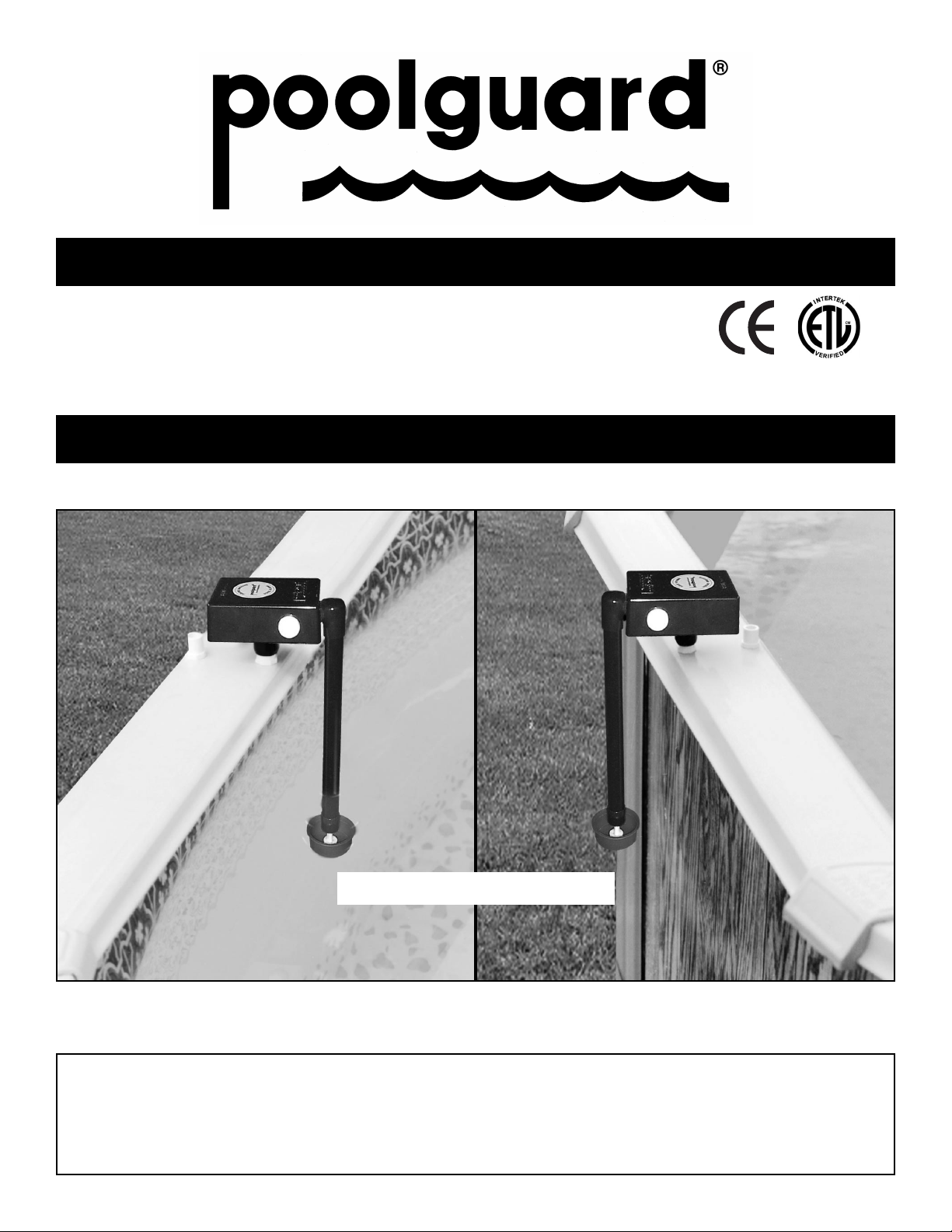
ABOVE GROUND POOL ALARM
READ THOROUGHLY BEFORE USING ALARM
OUT OF POOL
OFF POSITION
IN-POOL
ON POSITION
85dB Horn at 10 Feet
MEETS
ASTM F2208
Page 2

2
GENERAL
POOLGUARD is the result of quality design and manufacturing
techniques that are a standard at PBM Industries, Inc.; a
company dedicated to high quality products. POOLGUARD
is a result of that dedication and we guarantee and stand
behind the POOLGUARD alarm system.
POOLGUARD is an electronic monitoring system that
automatically sounds an alarm when children or pets fall
into your unsupervised pool. POOLGUARD is a portable,
self-contained, lightweight unit that is safe and simple to
operate. Simply place POOLGUARD on the top rail of the
pool. Entry into the pool will be detected by the unit’s
electronic sensor, triggering a loud pulsating alarm and
an internal RF transmitter. A remote receiver unit will
receive the transmitted signal which sounds an alarm
within the home.
INSPECTION
POOLGUARD is packaged in a shipping carton that
minimizes the chance of damage due to handling. Check
for damage and confirm that the contents of the carton
include the following items:
• POOLGUARD ALARM
• TWO QUICK SNAP POSTS & HARDWARE
• REMOTE RECEIVER AND POWER SUPPLY
• OPERATING INSTRUCTION MANUAL
• WARRANTY AND SERVICE CARDS
If an item is missing, contact either the place of purchase
or PBM Industries, Inc. for replacement.
Page 3

3
CARE AND HANDLING
POOLGUARD is constructed from sturdy plastic to withstand the
adverse moisture environment of a swimming pool.
Care needs to
be taken when handling your alarm and be sure to remove the
alarm when the pool is being used.
If the alarm accidentally falls into your pool, remove it immediately
and drain the water from it. Take the alarm apart as indicated in the
Battery Installation/Replacement and remove the battery. Remove
all excess water from inside the unit and battery, and the circuit
board area with a paper towel or cloth. Completely test unit before
each use.
Remember to always remove the alarm from the pool before swimming.
INSTALLING YOUR ALARM
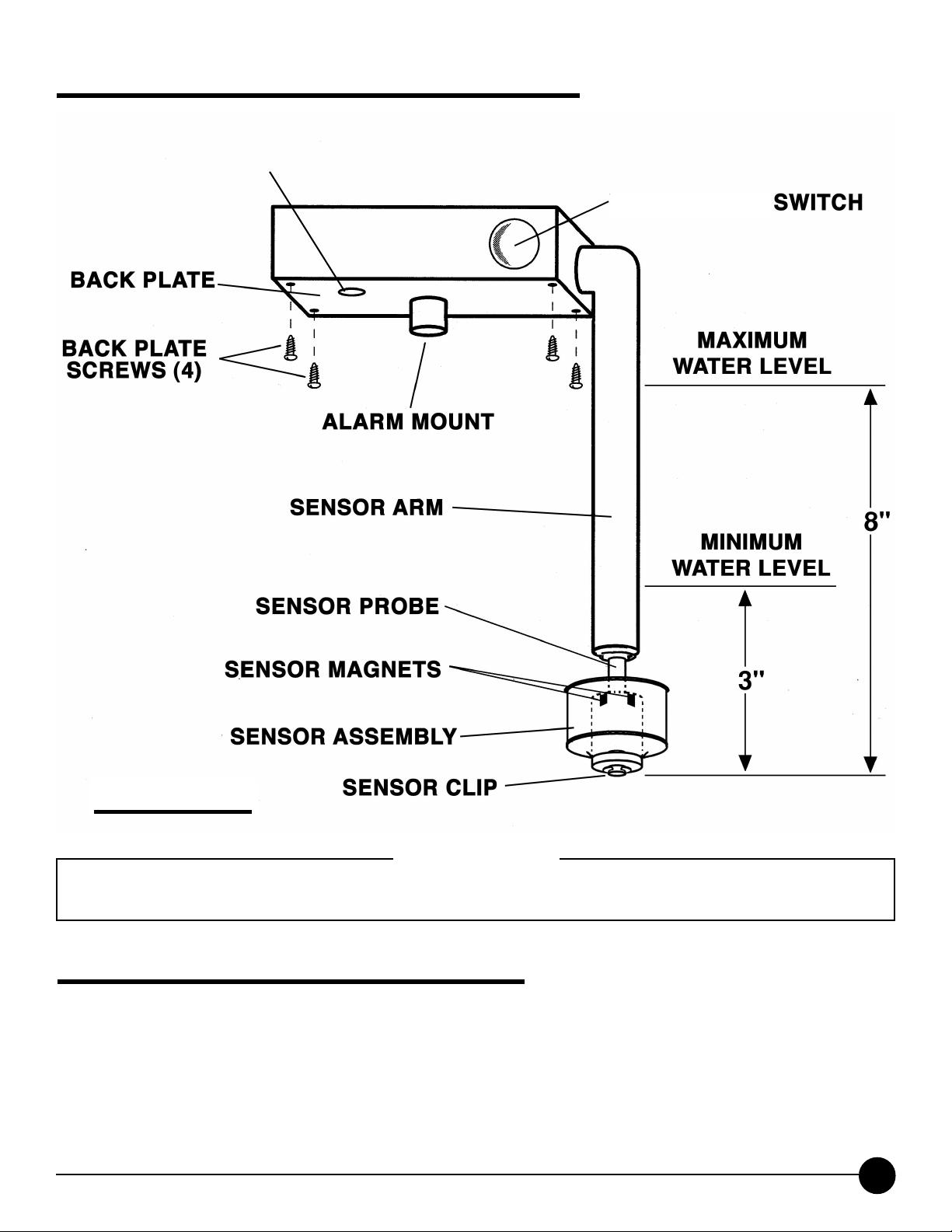
RESET/SLEEP SWITCH. (See Figure 1)
RESET: When the pool unit is installed in the pool and the horn is
sounding; press the reset/sleep switch once to silence the alarm.
SLEEP MODE: When the pool unit is removed from the pool and
the horn is sounding; press and hold the reset/sleep switch for 3
seconds to silence the alarm. The pool unit will automatically wake
up when it is installed into the pool.
THE POOL UNIT WILL NOT
GOT INTO SLEEP MODE ONCE IT IS INSTALLED IN THE POOL.
SILENT INSTALLATION AND REMOVAL FEATURE
• The poolguard system will sound an alarm (Horn will sound)
when you install or remove the pool unit from your pool. If you
would like the poolguard system not to sound an alarm (Horn will
not sound) when you install or remove the pool unit from your pool,
follow the directions below.
1.SILENT INSTALLATION (HORN WILL NOT SOUND)
• Press and hold the reset/sleep switch for 3 seconds, until you
hear the pool units horn chirp. Release the reset/sleep switch,
you now have 15 seconds to install the pool unit into your pool
without the horn sounding.
POOLGUARD WILL INSTANTLY BE
MONITORING YOUR POOL FOR AN INTRUSION.
(Continued on next page)
Page 4

4
SILENT INSTALLATION AND REMOVAL FEATURE (Cont.)
2. SILENT REMOVAL (HORN WILL NOT SOUND)
• Before removing the pool unit from your pool. Press and hold the
reset/sleep switch for 3 seconds, until you hear the pool units horn
chirp. Release the reset/sleep switch, you now have 5 seconds to
remove the pool unit from your pool without the horn sounding.
IMPORTANT: THIS DOES NOT TURN POOLGUARD OFF, IF
THE POOL UNIT IS NOT REMOVED IT WILL CONTINUE TO
MONITOR YOUR POOL FOR AN INTRUSION.
3. POOLGUARD HAS DESIGNED THIS FEATURE FOR “ONLY”
THOSE WHO HAVE THE RESPONSIBILITY OF INSTALLING OR
REMOVING THE ALARM FROM YOUR POOL!
BATTERY INSTALLATION / REPLACEMENT
(Battery not included)
POOLGUARD is powered by a standard 9-volt alkaline battery. To
install or replace battery:
• IMPORTANT: WHEN A 9V BATTERY IS FIRST INSTALLED IN
THE POOL UNIT, THE HORN WILL SOUND. TO SILENCE THE
ALARM PRESS AND HOLD THE RESET/SLEEP SWITCH FOR 3
SECONDS. THIS PLACES THE POOL UNIT IN SLEEP MODE.
THE POOL UNIT WILL AUTOMATICALLY WAKE UP WHEN IT IS
INSTALLED INTO THE POOL.
• Remove the four screws from the back of the alarm, refer to Figure 1.
• Install new battery by attaching battery snap to battery terminals;
place in battery holder on inside of back plate according to the battery placement decal.
• Replace the back plate and four screws.
• To prevent possible damage, battery should be removed
whenever storing the alarm for an extended period of time.
LOW BATTERY FUNCTION
The POOL UNIT AND THE REMOTE RECEIVER will beep once
approximately every 20 seconds to alert you that the battery is low
in the pool unit and needs to be replaced.
Page 5
IMPORTANT
POOLGUARD may not function properly if your pool’s water level is not maintained within the required levels of your
alarm. Also, the unit may not operate effectively while certain types of automatic pool cleaners are in operation.
ABOVE GROUND POOL ALARM
RESET/SLEEP
HORN
85db at 10 feet
PLACEMENT IN YOUR POOL
POOLGUARD automatically compensates for variations in pool
levels within the unit’s operating range. The unit utilizes a sensor
which projects into the water and is designed to operate in most
pools with an in-wall skimmer. The sensor cannot be less than 3
inches, (See Figure 1) and not more than 8 inches into the water.
FIGURE 1
5
(Continued on next page)
Page 6
6
PLACEMENT IN YOUR POOL (Continued)
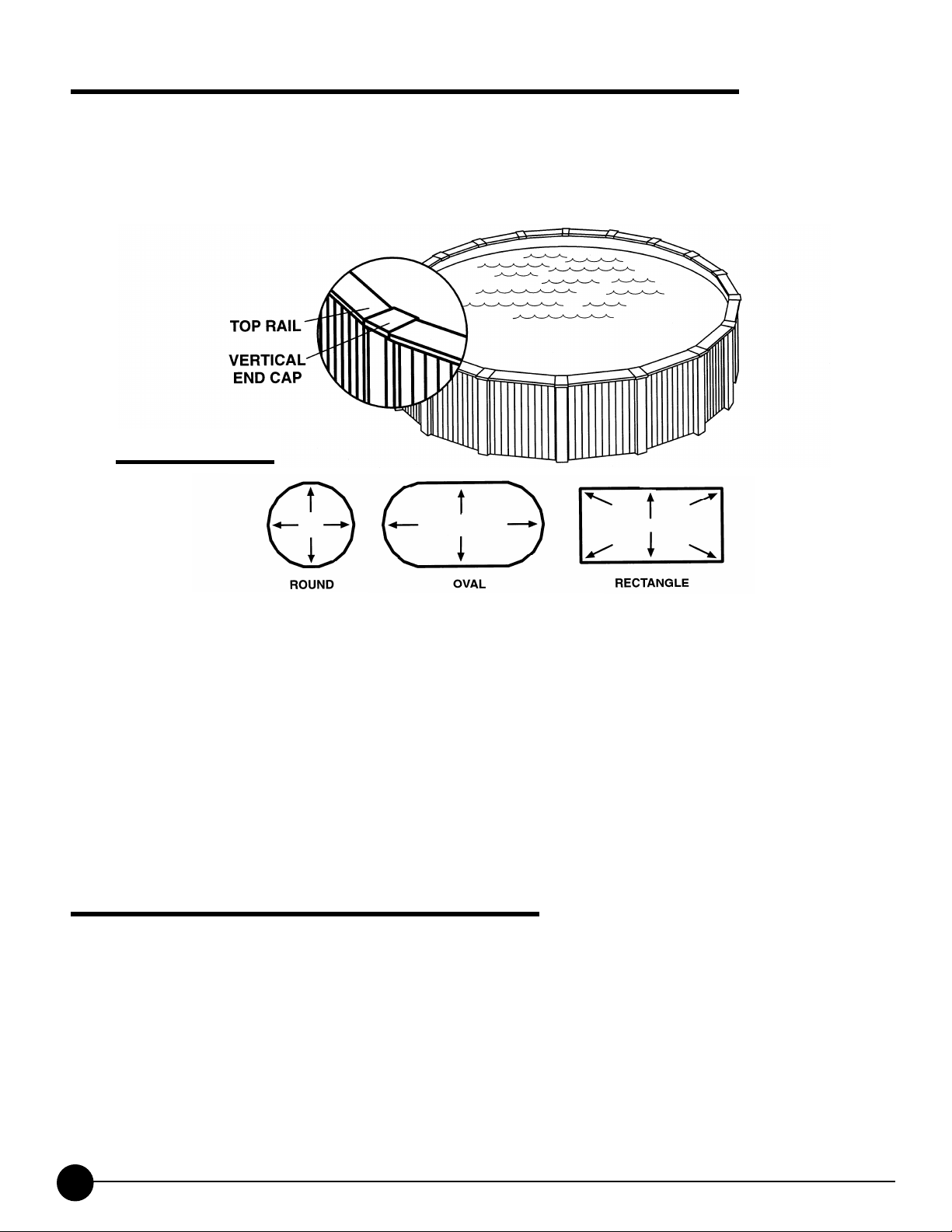
•The two quick snap posts can be mounted to the vertical end
cap or the top rail, See FIGURE 2. FIGURE 2 also iillustrates
locations best suited for detecting intrusions iifrom any area of
the pool.
•If your pool is larger than 800 square feet, if you have more
than 2 return lines, any concerns about the size or if you have
an irregular shaped pool, please call customer service to clarify
the recommended number of alarms and locations for alarms:
1-800-242-7163. Poolguard pool alarms have been tested and
certified by ETL in a 16’ X 32’ pool.
•The
POOLGUARD ALARM should not be placed too close to
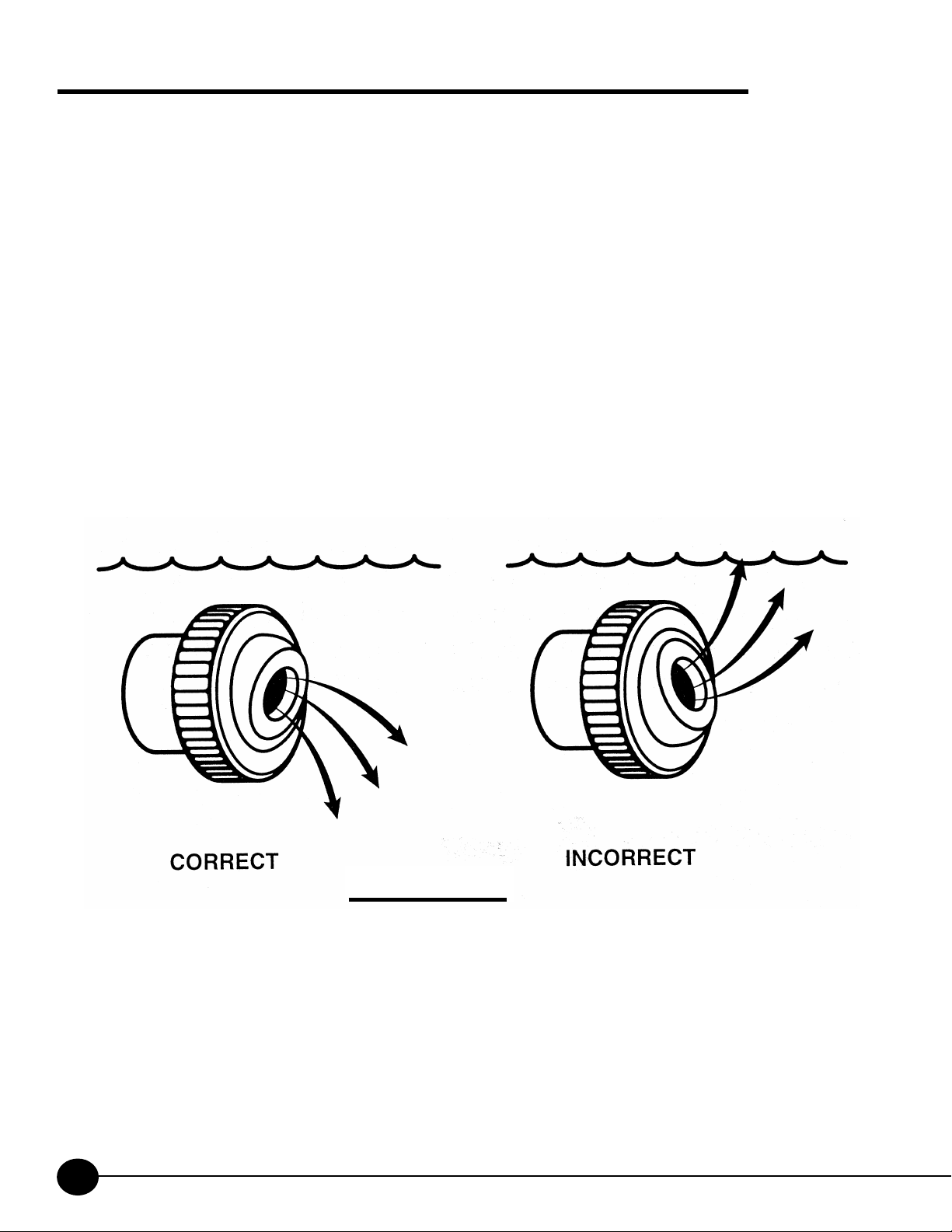
a pool water return line. If your return line has an eyeball fiting,
this must be pointing down, see FIGURE 4.
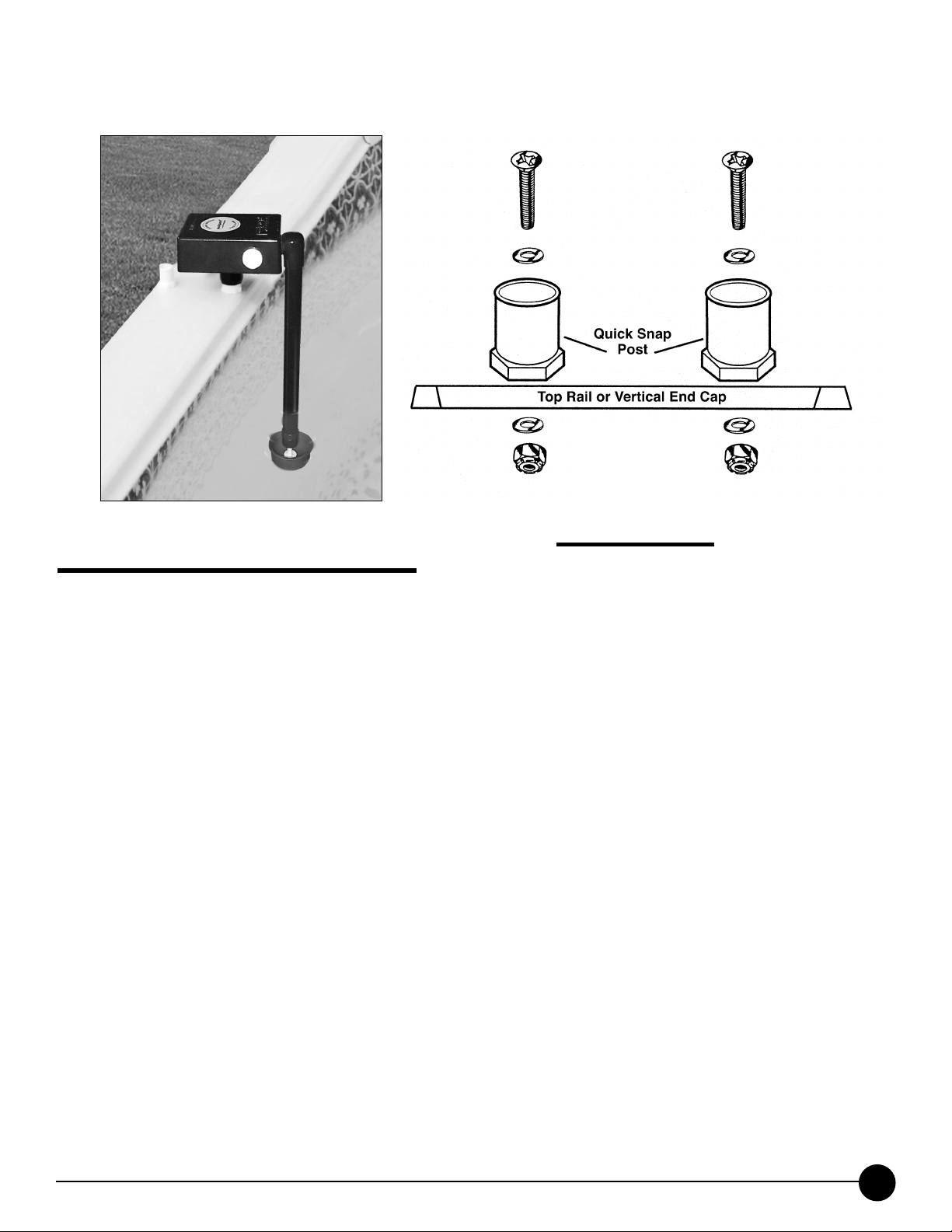
MOUNTING QUICK SNAP POSTS
•
When mounting the quick snap posts to the top rail or vertical
end cap be sure they are as close to the edge as possible and
set flat, this will allow the red sensor assembly to be away from
the pool wall. ii
STANDING ON THE OUTSIDE OF THE POOL, use a ii3/16”
drill bit to drill your two holes for the quick snap post. iSee
FIGURE 3. CAUTION: IF YOU ARE USING AN iiELECTRIC
DRILL, KEEP AWAY FROM POOL WATER!
FIGURE 2
Page 7
7
Install your two quick snap posts with the hardware provided as
shown in Figure 3.
TEST BEFORE USING
To ensure effectiveness, test POOLGUARD every time you place it
into the pool by performing the following procedure:
•POOLGUARD DOES NOT HAVE AN ON/OFF SWITCH
When the alarm is in the pool it is always in the ON position and
cannot be turned off. When the alarm is out of the pool it is
always in the
OFF position.
•To test your alarm push an object of appropriate volume and weight
off the top rail at the farthest location from the alarm. (A four (4)
gallon jug of water or 3-one (1) gallon jugs of water tied together are
ideal for testing.) The alarm should sound when the water action
caused by the intrusion reaches the unit. It may take a few
seconds for the alarm to react to the water action.
•After resetting the alarm and allowing time for the water action to
settle, repeat the procedure from another point in the pool until
you are confident of detection performance.
•POOLGUARD includes a timer function which automatically
resets the unit after the alarm has sounded for approximately
5 minutes.
IN-POOL
ON POSITION
FIGURE 3
Page 8
8
ADJUSTING YOUR RETURN LINE FITTING
The POOLGUARD unit should not be placed too close to a
return line from the filter area. Water turbulence may be too
strong and falsely set the alarm off. If you have more than 2
return lines please call customer service at 1-800-242-7163.
It is very important in pools to adjust all the eyeball fittings
on your return lines so they will not interfere with your pool
alarm. It is not necessary to point your eyeball up for your
pool to circulate properly. If the water is swirling on top of the
pool this makes the pool to turbulent for your alarm to work
properly. Point the eyeball down and your pool will still circulate
properly and allow your alarm to function properly.
If you point
the eyeball fitting up, your alarm may not function properly.
(See Figure 4)
FIGURE 4
Page 9
POOLGUARD REMOTE RECEIVER
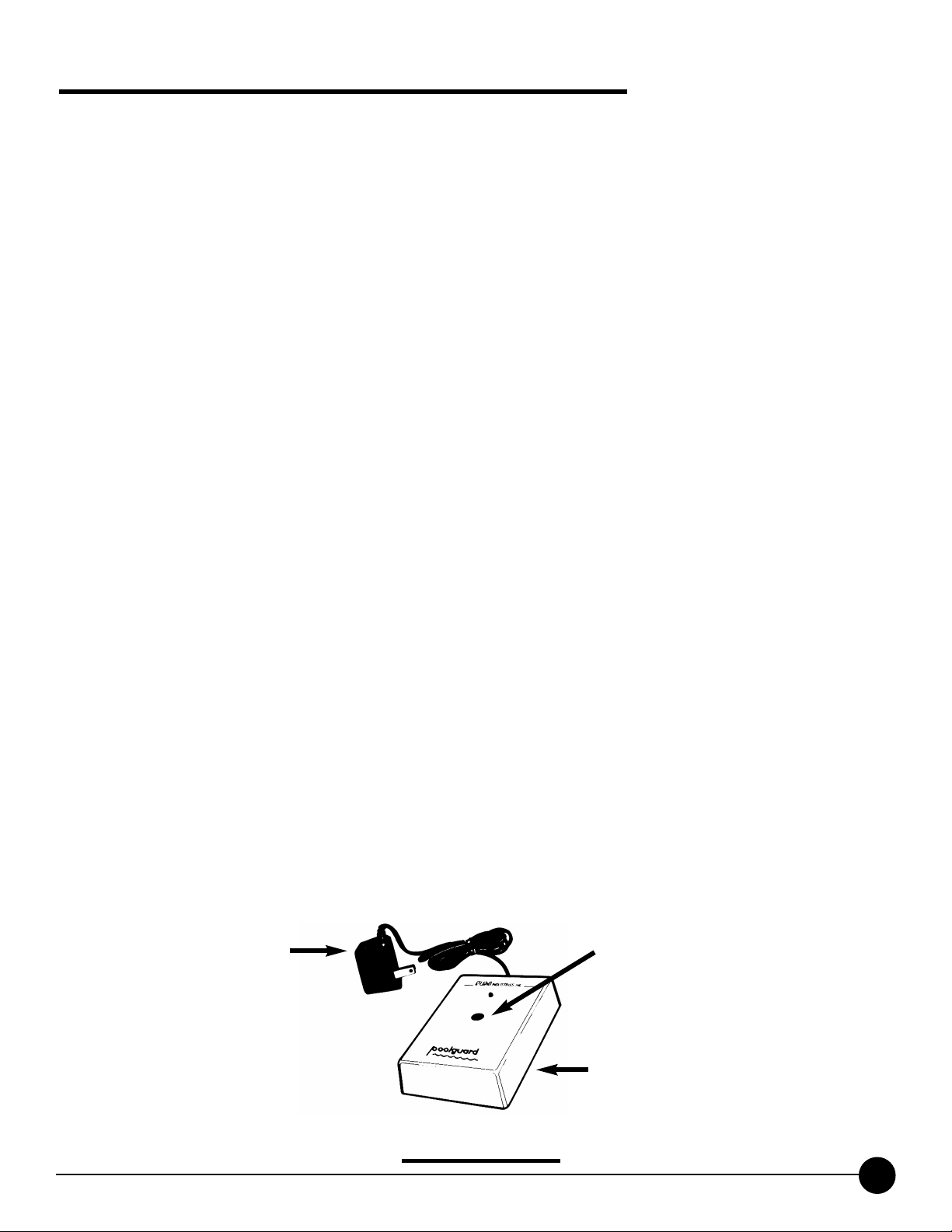
The POOLGUARD REMOTE RECEIVER has been integrated with
the standard POOLGUARD unit to provide a wireless remote alert
operating at distances of up to 200 feet. The POOLGUARD
REMOTE RECEIVER sounds an alarm in the house when the
POOLGUARD unit is activated at the pool.The remote system
consists of the following functional elements:
•A coded pulse receiver (Remote Receiver). Figure 5
•A standard wall outlet power supply. Figure 5
The REMOTE RECEIVER is a compact unit powered by a
UL and
CSA approved AC/DC power supply. The REMOTE RECEIVER
can be placed on a table or a counter top inside the house. The
pulse coded radio frequency signal is transmitted from the pool
unit and is received and decoded to sound the remote receiver.
The remote receiver will sound for an additional 3 seconds
after the pool unit has been silenced. If the REMOTE RECEIVER
beeps once approximately every 20 seconds, it is indicating
that the 9v battery in the pool unit is low and needs to be
replaced.
After you have purchased your POOLGUARD alarm and
you wish to add another remote receiver to your alarm system you
can acquire one from PBM Industries, Inc. Contact PBM by phone
or mail or contact your place of purchase.
POWER SUPPLY
REMOTE RECEIVER
85dB Horn at 10 feet
FIGURE 5
9
Page 10

TO OPERATE YOUR REMOTE RECEIVER
Try to locate your REMOTE RECEIVER in a convenient part of
your house close to the pool. Avoid steel walls or any other
large metal objects or obstructions that might interfere with the
signal reception. The
REMOTE RECEIVER has to be placed
on the same level or a level above the pool in the house (do
not place receiver in an underground basement). The ideal
location for your
REMOTE RECEIVER would be by a window
overlooking your pool. Test your
REMOTE RECEIVER in
different locations in your house to find the best working place
for your receiver. Plug in your power supply to any standard
wall outlet and insert the jack into the receiver. Check that the
indicator light is on. Your
REMOTE RECEIVER unit is now
ready to receive a transmission from your
POOLGUARD unit.
DO NOT USE YOUR REMOTE RECEIVER OUTDOORS.
10
Page 11

SWIMMING POOL SAFETY TIPS
• Supervise children at all times.
• Never permit swimming alone. Never leave a child alone, even
to answer the telephone.
• Always remove the entire solar cover from a pool before
swimming.
• Remember that alcohol and water safety do not mix.
• Have your pool area fenced and the gate locked to prevent
unauthorized entry to the pool, and install a gate alarm.
• Lock and secure all doors in the house which permit easy
access to the pool, and install a door alarm.
• Have a responsible adult teach swimming and water safety to
your children.
• Maintain clean, clear water in the pool.
• Do not swim during electrical storms.
• Do not permit bottles, glass, or sharp objects to be used
around the pool.
• Ask your pool dealer how you can improve your pool
safety––they will be glad to assist you.
• Above all: remember that common sense, awareness, and
caution will allow you to enjoy your pool.
WARRANTY AND REPAIRS
POOLGUARD is sold with a limited warranty to cover defects in parts
and workmanship for three years from date of purchase (retain proof
of purchase).
If POOLGUARD exhibits a defect, please call Customer Service at 1-800242-7163. Unauthorized returns will not be accepted. Proper repair is only
ensured when the unit is returned to the manufacturer.
SEND CORRESPONDENCE TO:
PBM INDUSTRIES, INC.
P.O.BOX 658, NORTH VERNON, IN 47265
1-800-242-7163
This product has been designed to aid in the detection of unwanted intrusions into unsupervised pools.
POOLGUARD IS A SAFETY ALARM SYSTEM AND NOT A LIFE SAVING DEVICE.“This device is not intended
to replace any other safety consideration - i.e., adult supervision, lifeguards, fences, gates, pool covers, locks, etc.,
and some devices may not detect gradual entry.”
REV. 04/2004
MEETS
ASTM F2208
11
Page 12
HELPFUL HINTS AND TROUBLESHOOTING
Pow
er Supply
Remote Receiver
POOLSIDE UNIT
IN-POOL
ON POSITION
POOLSIDE UNIT
OUT OF POOL
OFF POSITION
FALSE ALARMS
All pool alarms will false alarm on occasion for different reasons.
False alarms can be minimized; however, it is important to
remember that a false alarm is better than no alarm at all.
WEATHER & WIND–POOLGUARD sets stationary on the top
rail of the pool so the wind will not effect the alarm unit itself.
Wind may trigger a false alarm if it is strong enough or steady
enough that it causes the water in the pool to rock or bounce
up and down the pool wall. On extremely windy days when the
pool water is rocking it is advised to remove the alarm from the
pool.
LIGHT WIND OR RAIN WILL NOT EFFECT THE POOL-
GUARD ALARM.
Another false alarm occurs when the pool owner tries to install
the alarm too soon after swimming. After swimming, the water
in the pool will rock or bounce up and down the pool wall for
some time depending on the size of the pool and the type of
swimming activity. Before installing the alarm, after swimming,
the pool must be given time to calm. Time will vary (around 10
to 30 minutes); once the pool
owner sees that the pool water is
no longer rocking up and down the pool wall, it is time to install
the alarm.
12
(Continued on next page)
Page 13

FALSE ALARMS (Continued)
Certain automatic cleaners may set the POOLGUARD unit off in
some cases. If the cleaner head or the cleaner hose hits the
POOLGUARD alarm it may cause it to false alarm. Solutions to
this problem are to use your cleaner at night and your alarm during the day. Another option would be to find a place around the
pool where the cleaner does not interfere with the alarm.
ALARM WILL NOT SOUND
Be sure that a 9 volt battery has been installed properly. If you
are testing and it does not alarm, be sure you are testing properly putting your feet in the pool, splashing with your hands, making waves with a leaf skimmer, or dropping something into the
pool that does not have the proper size, weight and volume
WILL NOT SET POOLGUARD ALARM OFF! Testing is very
important and should be done correctly. BE SURE YOUR
RETURN LINE EYEBALL FITTING IS POINTING DOWN.
CARE AND HANDLING
POOLGUARD is made of sturdy PVC Plastic. Because the
alarm is electronic and mechanical, great care should be taken
not to drop the unit; like any other appliance, it may break. Sun
and rain will not hurt the alarm. POOLGUARD is water resistant
but not waterproof. Great care should be taken not to drop the
alarm into the pool. If the alarm goes into the pool, there are
directions in the manual on how to dry it out but more than
likely, it will have to be returned to the factory for service.
ALWAYS REMEMBER TO REMOVE THE ALARM BEFORE
USING THE POOL.
13
Page 14

REMOTE RECEIVER
The only thing that can put the remote receiver into the
alarm mode is the poolside unit. It sends a coded RF
(Radio Frequency) message from the poolside unit to the
in-house remote receiver. When the unit at the pool
alarms, the remote receiver will sound.
Maximum Range
for the remote is 200 feet
from the poolside unit. Avoid
placing remote in basements or around metal walls. Be
sure that the red light on the remote is on. Remember the
poolside unit must be beeping (alarming) for the remote to
work.
If your remote receiver is not getting a clear signal or no
signal from the poolside unit, try the following: Before plugging in the remote power supply, be sure to
stretch out
the cord;
do not leave it tied in a bow as packaged. When
you first plug in the remote it will give one short loud beep
then stop—this is just a power surge.
Your Remote Receiver is similar to a small portable radio.
If your remote is not sounding when the poolside unit is
sounding-move the remote to different locations, and
stand back for a few seconds for the remote to pick up the
signal. You may only have to move your remote a little to
the left or right to bring in the signal-in some cases you
might have to move the remote to a different location or
another room. If you cannot get a signal on your remoteCall Customer Service at 1-(800) 242-7163.
14
Page 15

15
QUICK DO’S AND DON’TS
•Do read the manual carefully
•Do install a 9 volt battery
•Do untie the bow on the power supply
•Do test the alarm properly
•Do turn your return line eyeball fitting towards the
bottom of the pool
•Do remove alarm before swimming
•Do hold on to your red customer service card
with our 800 service number
•Do be extremely careful when using an electric
drill around your pool
•DON’T leave alarm in pool while swimming
•DON’T drop your alarm, it may break
•DON’T let your alarm fall into the pool
•DON’T install your alarm immediately after
swimming
•DON’T turn your return eyeball fitting towards the
top of the pool
•DON’T use your alarm on extremely windy days
•DON’T be careless with an electric drill around
your ABOVE GROUND POOL. Extreme caution
should always be used when using electricity
around water!
Page 16
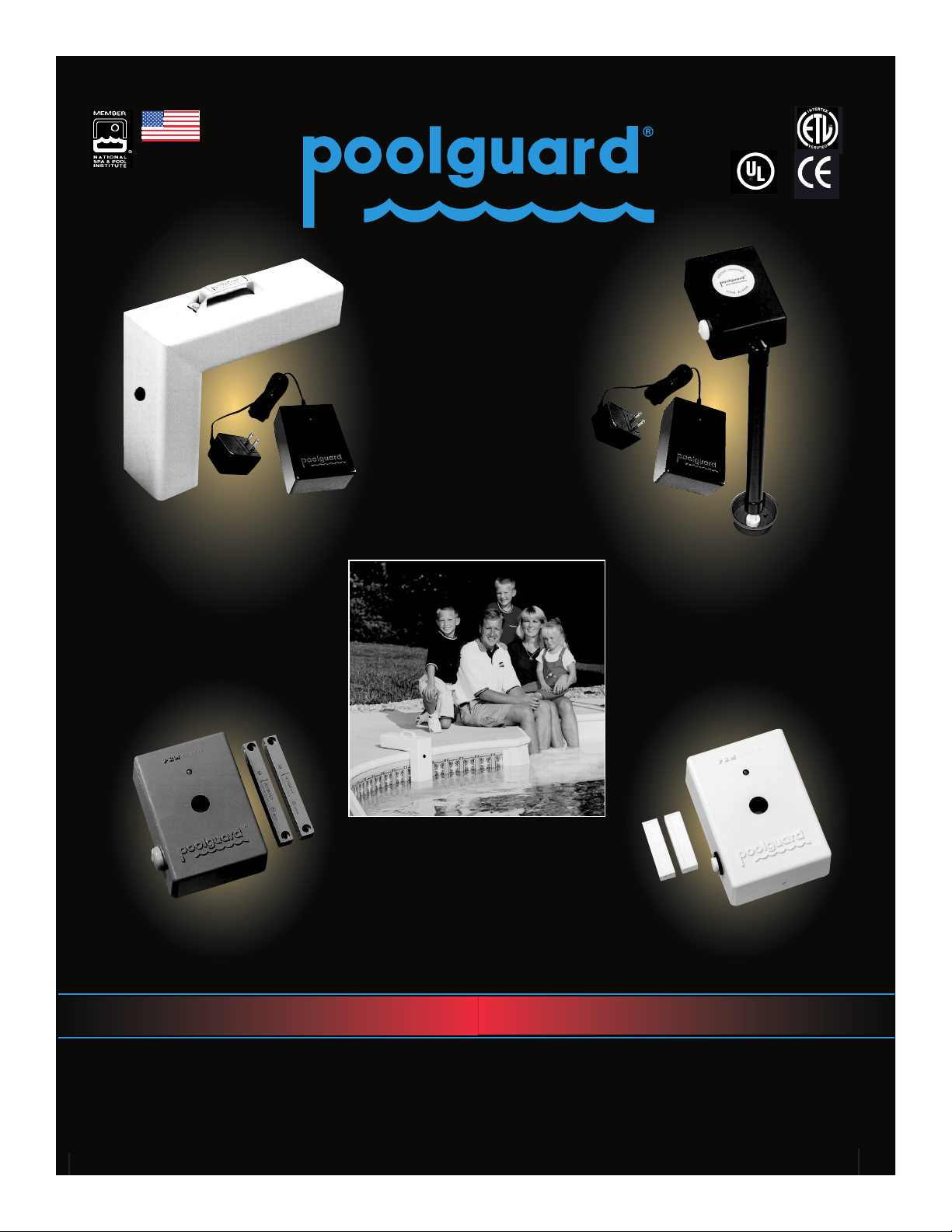
Poolguard’s
Family of Products
Helps Protect Your Family!
One source for all
your pool safety alarms,
number one in
customer service.
All products
made in the USA.
P.O. Box 658 • North Vernon, Indiana 47265
POOLGUARD POOL ALARMS
“BEST SOLUTION”
GOOD HOUSEKEEPING
MAGAZINE
GATE ALARM
DOOR ALARM
ABOVE GROUND
POOL ALARM
WITH REMOTE
IN GROUND
POOL ALARM
WITH REMOTE
ASTM
The name you can trust,
since 1982.
www.poolguard.com
Call Toll Free 1-800-242-7163
 Loading...