

Page 1
INSTALLATION
INSTALLATION
MADE IN
A100TM, A300TM, A600TM-12 Series Filters
MAINTENANCE
MAINTENANCE
A100TM, A300TM, A600TM-12 Series Filters
MADE IN
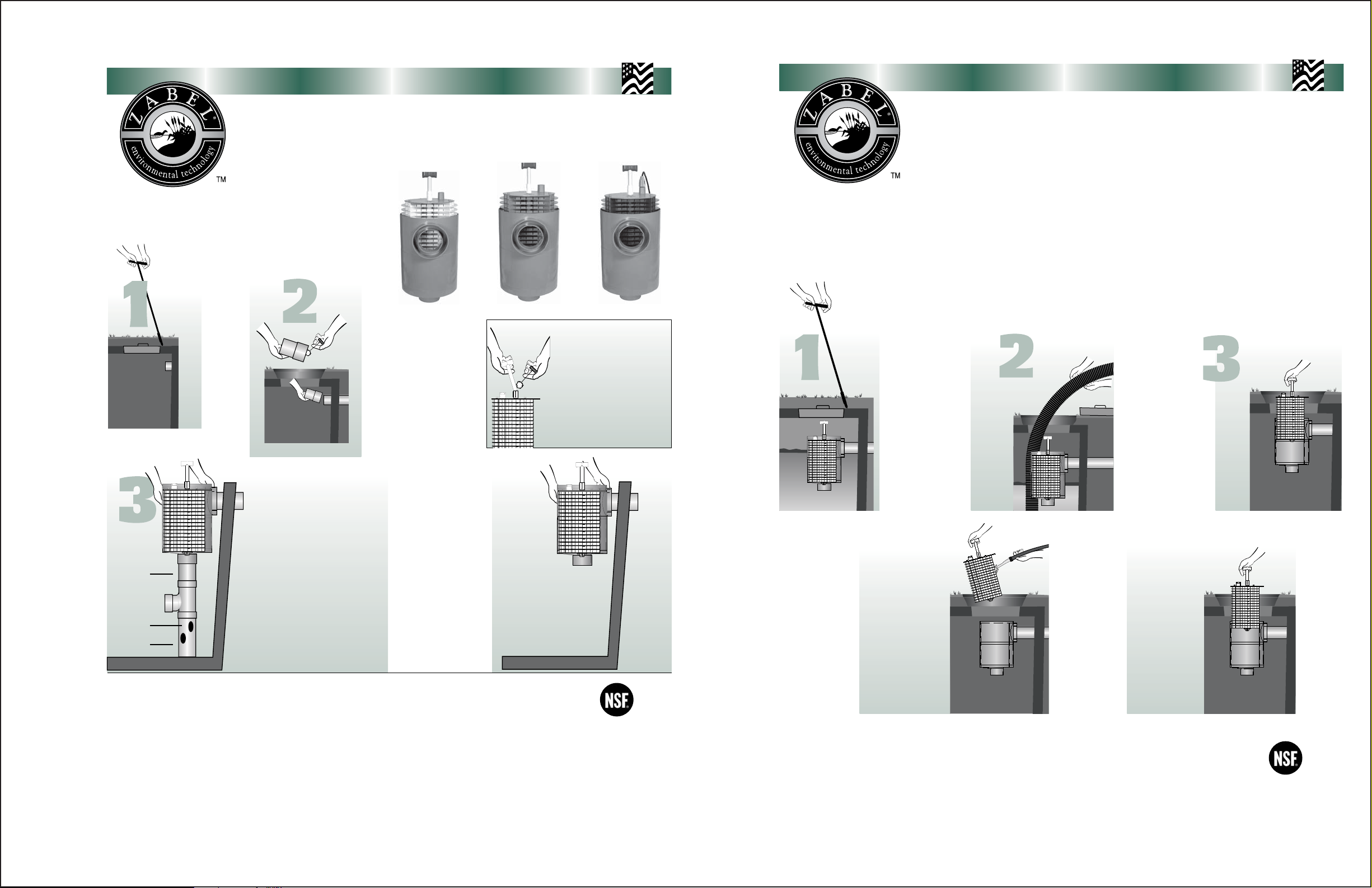
New System Installation
Locate the
STEP
outlet of the
septic tank and
remove the
Note: Make sure tank is
installed level.
STEP
Support
pipe
Inverted Tee
2” holes
Support
pipe
Septic Tank
Existing System Installation
Same as New System, except the tank must be pumped before the installation of the filter.
•
Notes:
If you have purchased an A100/300/600-12x28 or larger model filter Zabel recommends using the Supplementary Support Method seen in step 3.
•
If you have purchased a Zabel® Smartfilter®, additional installation instructions can be found in the Smartfilter Alarm System box.
•
The outlet access opening of the tank, under which the filter is centered, should be at least 15" in diameter to allow for easy removal of the filter cartridge.
•
A riser to grade over the outlet access opening is recommended and may be required in certain states.
•
If the filter can not be installed in the existing tank, it can be installed using a Zeus
•
be used.
Minimum of 3" drop required in tank for proper SmartFilter operation
•
Product(s) covered by one or more U.S. and/or International patents. Other U.S. and International patents may be pending.
Call for a free ZABEL ZONE® •
STEP
A100-12x20-VC A300-12x20-VC
Before installation place the
filter case on the outlet
pipe, to make sure it will be
centered under the access
opening. If not, Solvent
weld (glue) additional pipe
to the outlet pipe.
Note: Always clean and prime all
pipe before solvent welding.
Minimum of 3" drop required in
tank for proper SmartFilter
operation.
Outlet
For installations requiring the Supplementary Support
Method only. If extra support for the filter is not needed, go
to step four.
Solvent weld (glue) the reducer to the bottom of
the filter case. Then weld a support pipe, an
inverted tee, and another support pipe in the
bottom of the reducer. Place the filter, reducer,
and the support pipe on the outlet pipe. Adjust the
support pipe so it rests level on the bottom of the
tank. Remove and cut at least four 2" holes from
top to bottom in the support pipe.
®
Basin System. In this case, the New System Installation instructions will
Copyright 2003, Zabel Industries International, Ltd. All rights reserved
1-800-221-5742
•
Or Order Online: www.zabelzone.com
Handle Installation Instructions
Glue handle on top of 1/2” sch
40 pipe.
Glue the bottom of the 1/2” pipe
and insert into the slip-slip on the
filter top.
Notes: Always clean and prime all pipe
before solvent welding. The handle
assembly must be glued to the lid of
the filter before installation.
STEP
4
Solvent weld the filter
case on the outlet pipe.
Insert the filter cartridge
in the case, making sure
the filter cartridge is
properly aligned and
completely inserted in
the case .
Septic Tank
A600-12x20-VCF
Outlet
Note: Make
sure filter is
installed
level within
the tank.
Residential
Applications
Certified to
ANSI/NSF
Standard 46
The interval for servicing septic tanks is set by state and local code. Throughout the United States there is a wide difference of
opinion on what this interval should be, but most regulatory agencies suggest two to five years. The Zabel
®
filter, which does not
increase the frequency of servicing for the tank, should be cleaned when the septic tank is normally inspected and pumped.
However, our filter is virtually self-cleaning. The continued action of the anaerobic organisms on the Zabel filter causes lodged
particles to disintegrate and fall to the bottom of the tank. If your filter contains a SmartFilter
®
alarm, you will be notified by an
alarm when the filter needs servicing.
To service the filter:
*Servicing any zabel filter should only be done by a certified septic tank pumper or installer.
Locate the
STEP
outlet of the
septic tank.
Remove the tank cover
and pump the tank if
necessary to prevent any
solids from escaping to
the field when the filter is
STEP
4
While holding the cartridge over the
access opening rinse off the cartridge
with fresh water, being careful to rinse
all septage material back into the tank.
Notes:
If you have a Filtered Versa-CaseTM Model Filter, be sure and spray clean the outlet opening before replacing the Filter.
•
Product(s) covered by one or more U.S. and/or International patents. Other U.S. and International patents may be pending.
Call for a free ZABEL ZONE® •
STEP
removed.
STEP
5
Insert the filter cartridge back
in the case making sure the
filter cartridge is properly
aligned and completely
inserted in the case.
Replace the septic tank
Copyright 2003, Zabel Industries International, Ltd. All rights reserved
1-800-221-5742
•
Or Order Online: www.
STEP
Firmly pull the filter
handle and slide the
cartridge out of the
case.
cover.
zabelzone
.com
Residential
Applications
Certified to
ANSI/NSF
Standard 46
071102-229
 Loading...