

Page 1

Product Manual
International Warranty
Movement Cal. 31 мм
Page 2

Product Manual
Movement Cal. 3105, 3133, 31679, 31681, 31682
Page 3

You are now the owner of a Poljot Mechanical Watch
Cal.3105, or Cal.3133, or Cal.31679, or Cal.31681, or Cal.31682.
For best results, please read the instructions in this bucklet carefully
before using your Poljot Mechanical Watch.
Please keep this manual handy for ready reference.
Page 4

CONTENTS
FEATURES . . . . . . . . . . . . . . . . . . . . . . . . . . . . . . . . . . . . . . . . . . . . . . . . . . .4
DISPLAY AND CROWN/PUSHER OPERATIONS . . . . . . . . . . . . . . . . . . . . . . . . .6
HOW TO OPERATE THE SCREW IN LOCK TYPE CROWN . . . . . . . . . . . . . . . . .9
MANUAL WATCH WINDING . . . . . . . . . . . . . . . . . . . . . . . . . . . . . . . . . . . . . .10
TIME/CALENDAR SETTING . . . . . . . . . . . . . . . . . . . . . . . . . . . . . . . . . . . . . .11
STOPWATCH . . . . . . . . . . . . . . . . . . . . . . . . . . . . . . . . . . . . . . . . . . . . . . . . .16
HOW TO USE THE TACHYMETER . . . . . . . . . . . . . . . . . . . . . . . . . . . . . . . . .17
HOW TO USE TELEMETER . . . . . . . . . . . . . . . . . . . . . . . . . . . . . . . . . . . . . .20
HOW TO USE THE WORLD TIME FUNCTION . . . . . . . . . . . . . . . . . . . . . . . . .21
TIME DIFFERENCES TABLE . . . . . . . . . . . . . . . . . . . . . . . . . . . . . . . . . . . . . .24
HOW TO USE THE “SOUNDLESS” TIMER FUNCTION . . . . . . . . . . . . . . . . . . .28
SPECIFICATIONS . . . . . . . . . . . . . . . . . . . . . . . . . . . . . . . . . . . . . . . . . . . . . .30
TO PRESERVE THE QUALITY OF YOUR WATCH . . . . . . . . . . . . . . . . . . . . . . .33
GUARANTEE . . . . . . . . . . . . . . . . . . . . . . . . . . . . . . . . . . . . . . . . . . . . . . . . .37
3
Page 5
TIME
Cal. 3105/3133/31679
• Hour, minute and sub–second
hands;
Cal. 31681
• Hour, minute, 24-hour sub second
and sub second hands;
Cal. 31682
• Hour, minute, 24-hour sub second
and sub second hands;
• Indicator “Day–night” – the stylized
image of the Sun and the Starlit Sky in
the dial window.
4
FEATURES
Page 6

CALENDAR
Cal. 3105, 3133, 31681, 31682
• Date in the dial window
Cal. 31679
• Date in the dial window
• Age of the moon: sub hand and a special scale (optional) and moon phase –
the stylized image of the Moon and
Starlit Sky in the dial window.
STOPWATCH
Cal. 3133, 31679, 31681, 31682
• The stopwatch can measure up to
30 minutes in 1/3 seconds;
• Central 1/3 second hand, sub
minute hand (minute counter);
• Tachymeter function (for models
with tachymeter scale on the dial);
• Telemeter function (for models with
telemeter scale on the dial).
5
FEATURES
Page 7
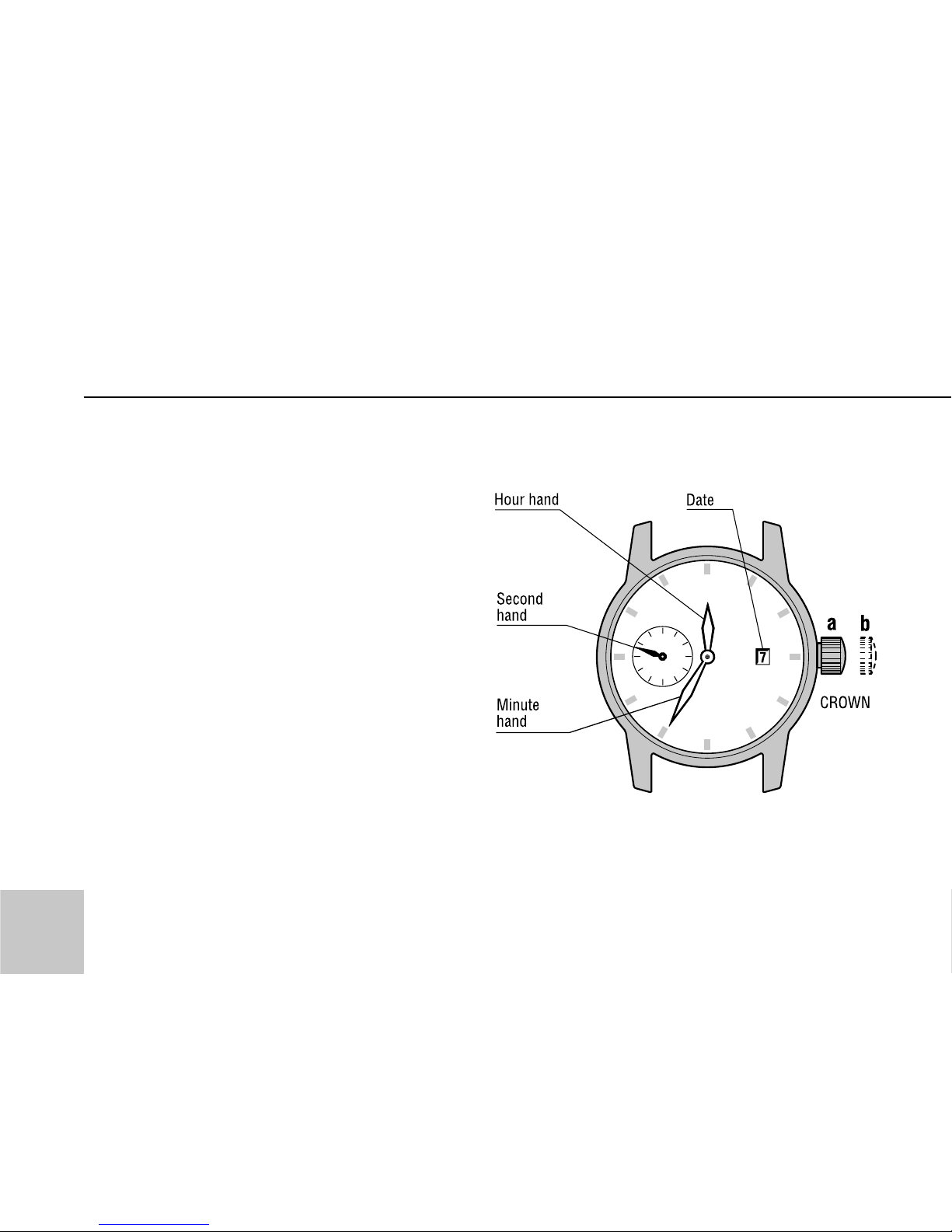
Notes: Crown has 2 positions:
• a – mainspring winding;
• b – time/date setting.
Pusher A – start and stop
of the stopwatch;
Pusher B – reset of the stopwatch.
DISPLAY AND CROWN/PUSHERS OPERATIONS
6
Cal. 3105
Page 8
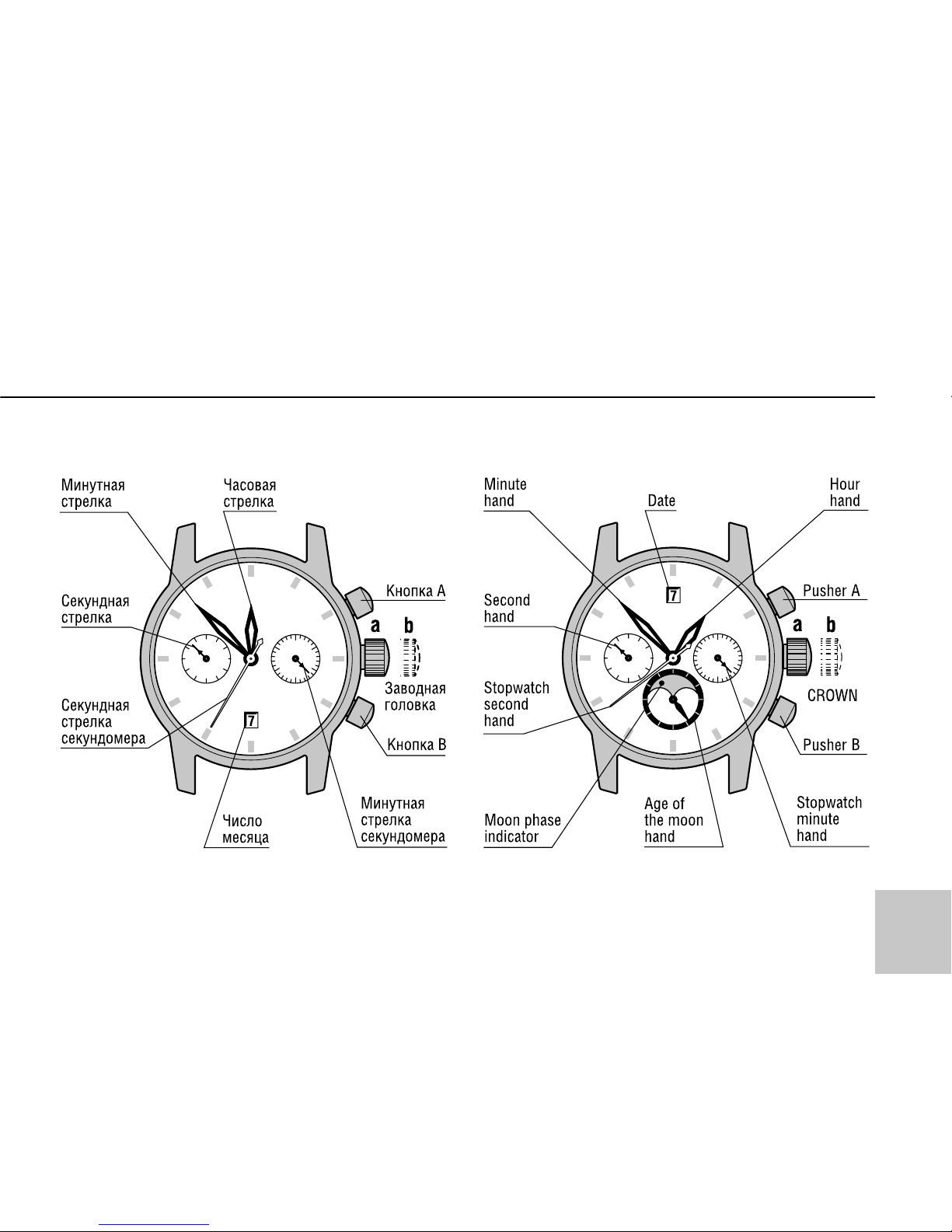
DISPLAY AND CROWN/PUSHERS OPERATIONS
Cal. 3133 Cal. 31679
7
Page 9
8
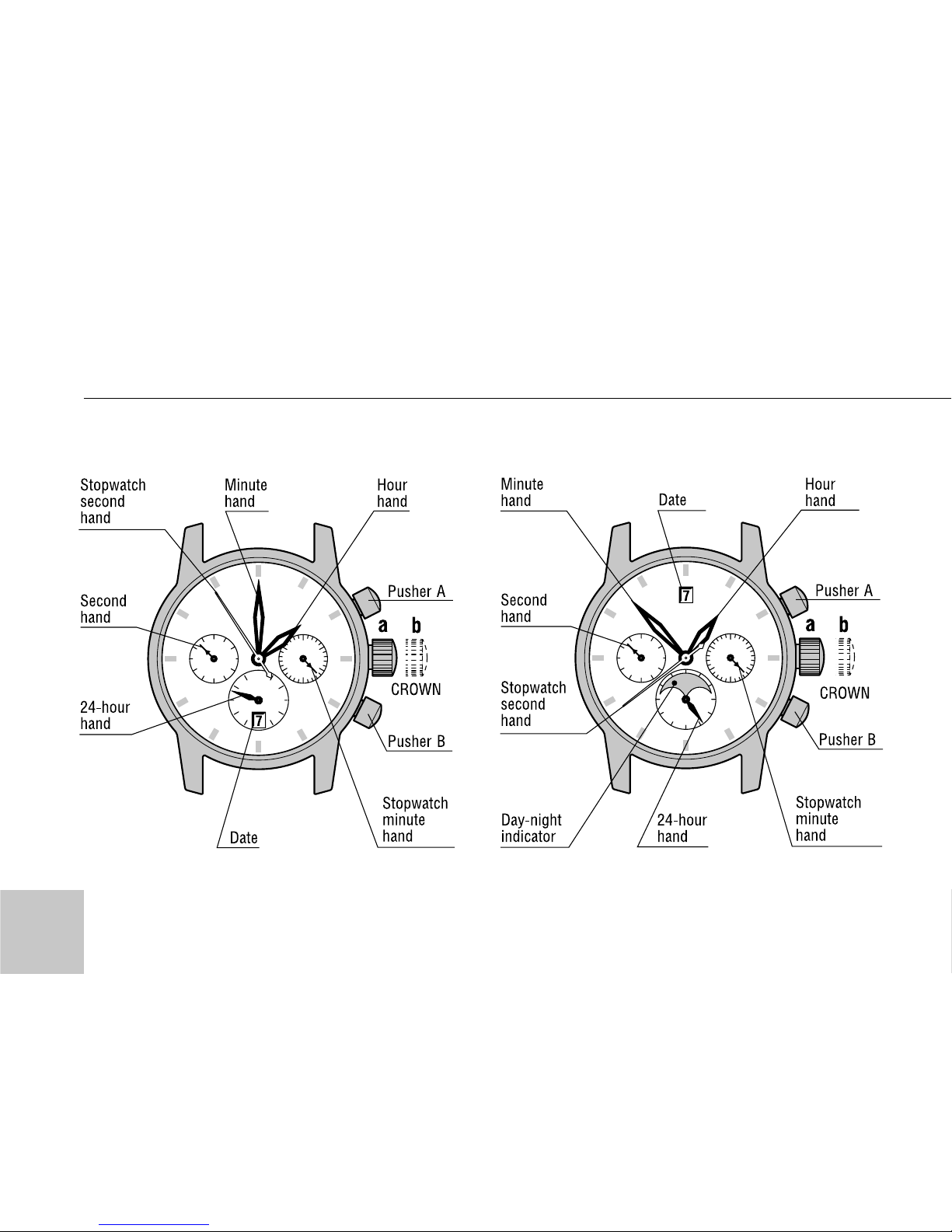
Cal. 31681 Cal. 31682
DISPLAY AND CROWN/PUSHERS OPERATIONS
Page 10
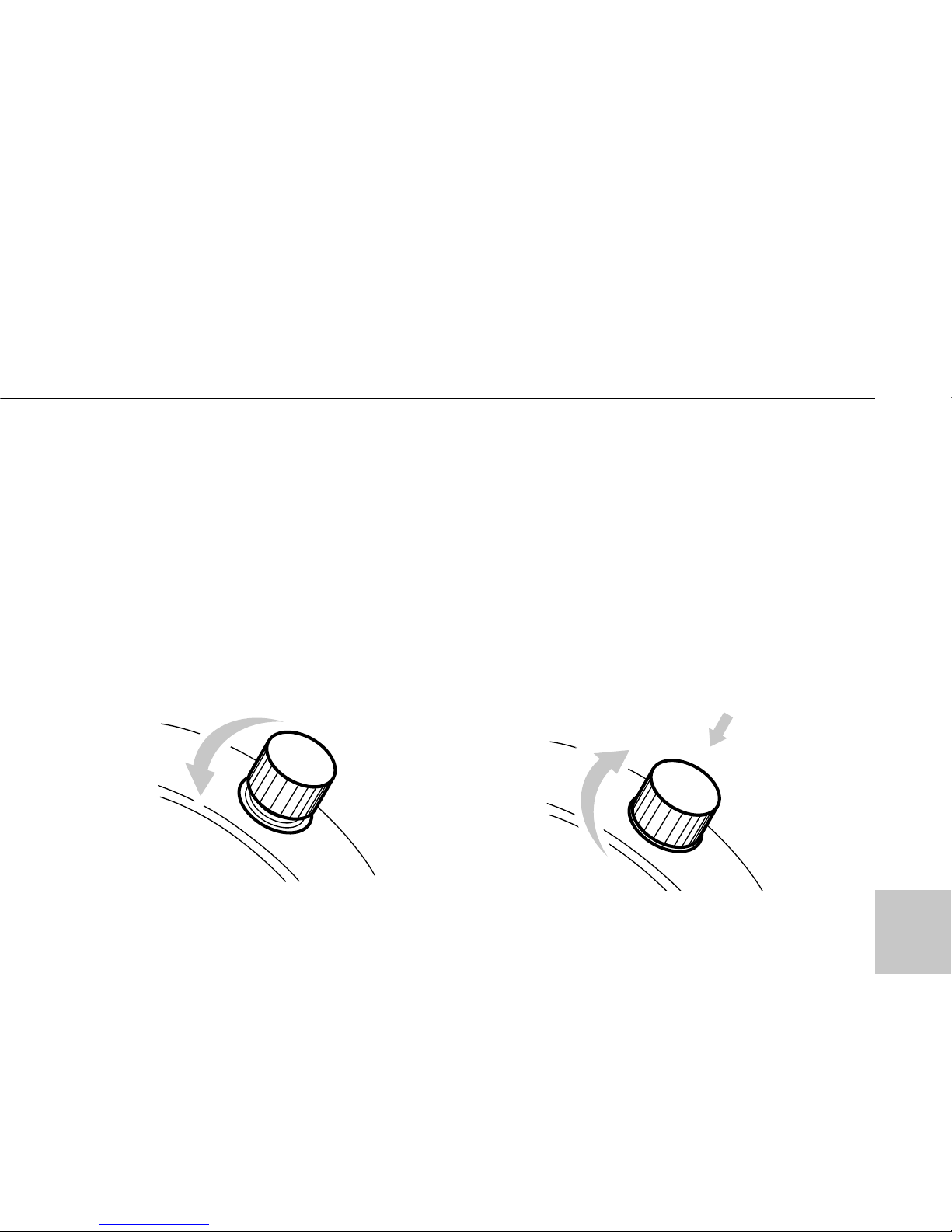
To unscrew the crown:
1. Turn it counterclockwise until tight.
2. Then you can wind the mainspring
or pull crown out for time/calendar
setting (Pos. “b”)
To screw in the crown:
1. Return the crown in Pos. “a”.
2. Turn crown clockwise while
pressing it lightly until tight.
9
HOW TO OPERATE THE SCREW IN LOCK TYPE CROWN
(for models with screw in lock type crown)
Page 11
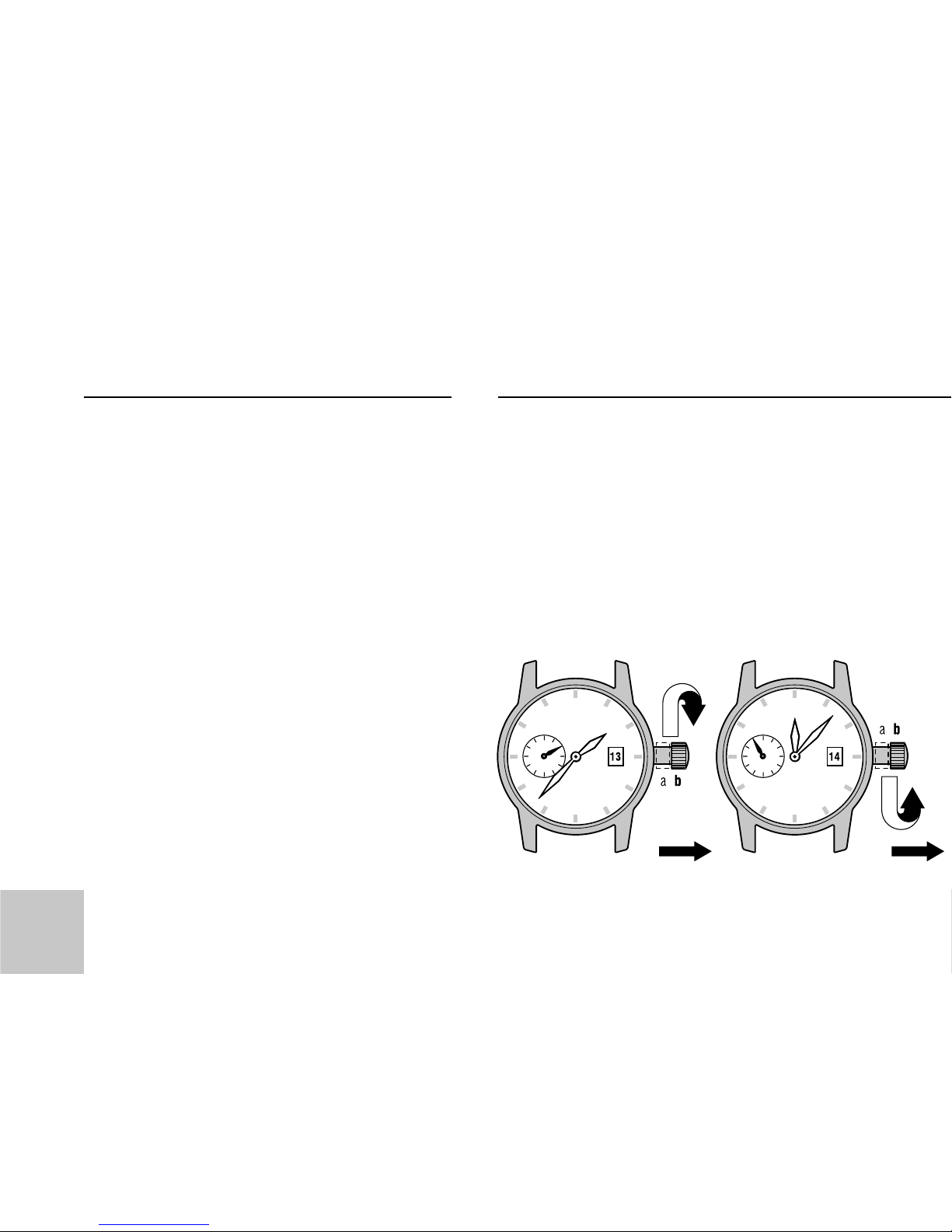
• Turning the crown clockwise in the
Pos. “a” wind up to the stop the
mainspring of the watch.
• It can be allowed to wind the watch
turning the crown counterclockwise
and clockwise alternatively.
• Do not wind your watch with all your
might, it can result in a breakage of
the winding device or the mainspring.
1. Pull the crown in Pos. “b”, turning
it clockwise, turn hands until the next
date appears. (The change of the date
happens at midnight ±15min)
10
WATCH WINDING
Page 12
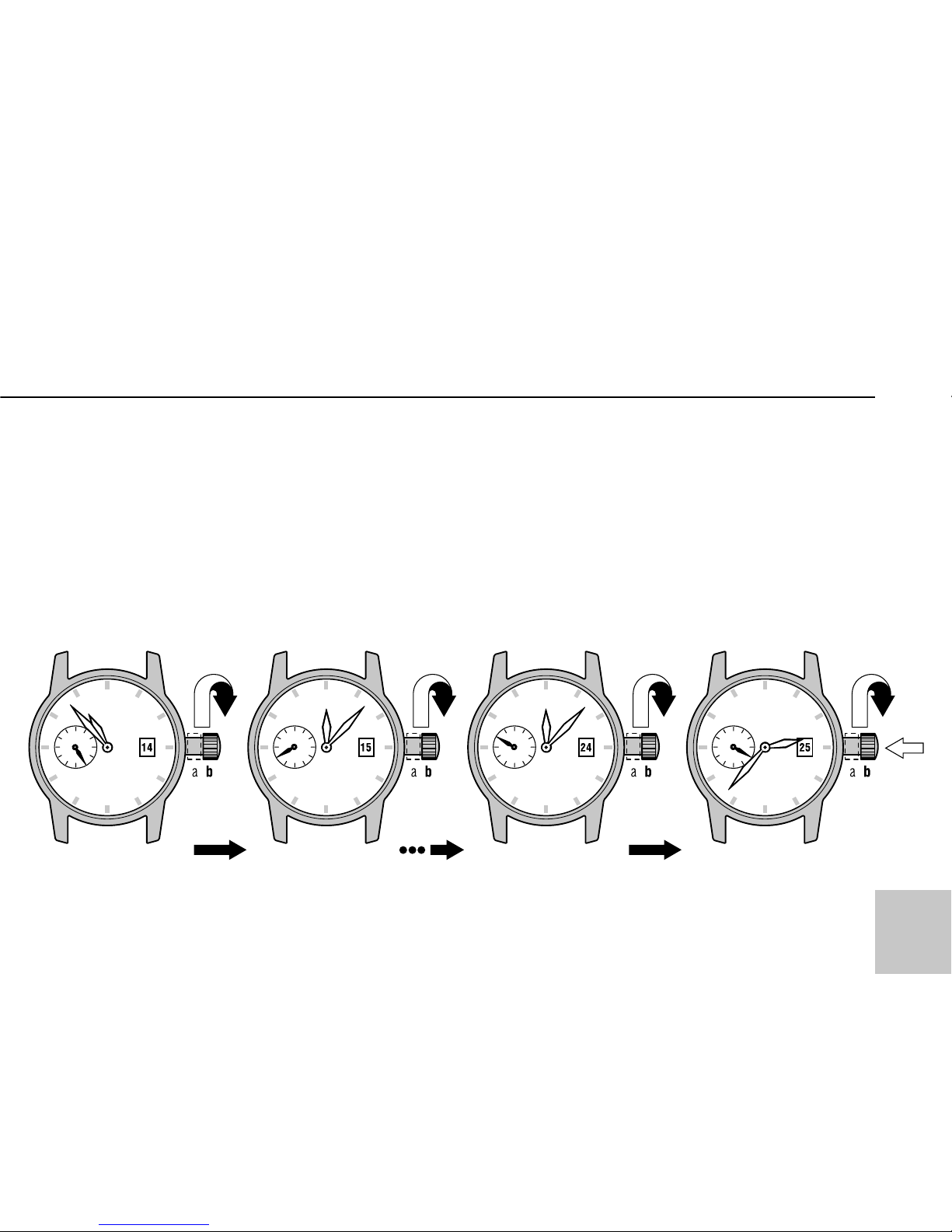
2. Turn hands clockwise and counterclockwise alternatively in the range
12h–11h-12h by the crown until the
previous day’s date appears.
3. Turning the crown clockwise, turn
hands until the desired date appears.
Continuing turning the crown set the
hands to the desired time.
TIME/CALENDAR SETTING
11
Page 13

Notes:
• When setting the hour hand (Cal.
3105, Cal. 3133), check that AM/PM
is correctly set. The watch is so
designed that the date changes once
in 24 hours. Turn the hands past the
12 o’clock marker to determine
whether the watch is set for the A.M.
or P.M. period. If the date changes, the
time is set for the A.M. period. If the
date does not change, the time is set
for the P.M. period.
• When setting the hour hand (Cal.
31681, Cal. 31682), check by the
position of 24-hour hand that AM/PM
is correctly set. The watch is so
designed that the date changes once
in 24 hours.
4. Return the crown in Pos. “a”.
12
TIME/CALENDAR SETTING
Page 14

Cal. 31679
1. Pull the crown in Pos. “b”, turning
it clockwise, turn hands until the
desired age and (or) phase of the
moon installs.
2. Turn hands clockwise and counterclockwise alternatively in the range
12h–11h-12h by the crown until the
previous day’s date appears.
3. Turning the croun clockwise, turn
hands until the desired date appears.
Continuing turning crown set the
hands to the desired time.
Note:
When setting the hour hand check
that AM/PM is correctly set. The
13
TIME/CALENDAR SETTING
Note:
Check the newspapers or other source
for the age or phase of the moon for
today or tomorrow. Select one day
before setting is made, if the listing
tomorrow are used.
Page 15
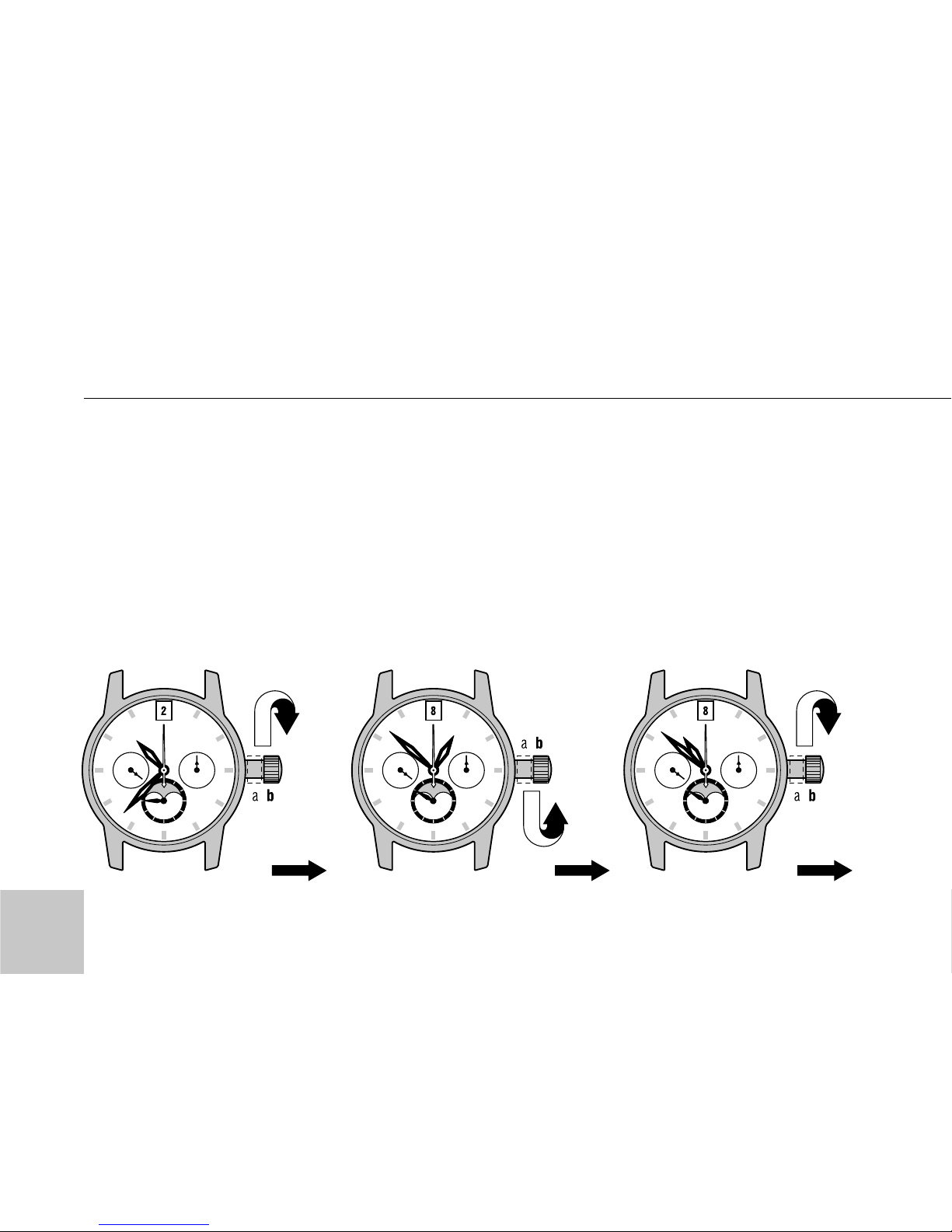
watch is so designed that the date
changes once in 24 hours. Turn the
hands past the 12 o’clock marker to
determine whether the watch is set
for the A.M. or P.M. period. If the date
changes, the time is set for the A.M.
period. If the date does not change,
the time is set for the P.M. period.
4. Return the crown in Pos. “a”.
14
TIME/CALENDAR SETTING
Page 16
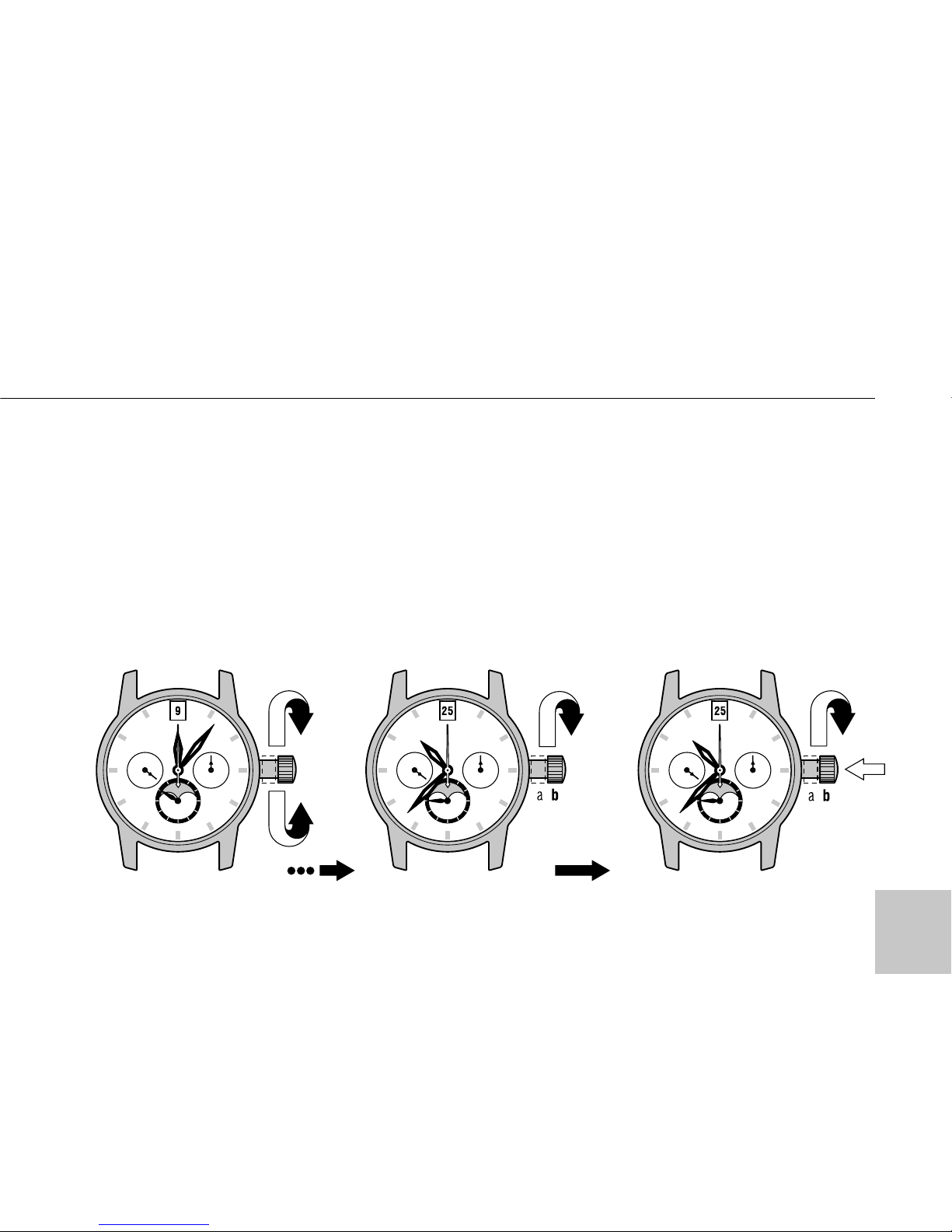
ATTENTION!
• It is necessary to correct the date
manually at the end of February and
all short (30 days) months.
• If it is necessary to correct date in
Cal. 31679, fulfill fast correction only
as at 2 item. Otherwise, the age or
phase of the moon can change too.
TIME/CALENDAR SETTING
15
Page 17

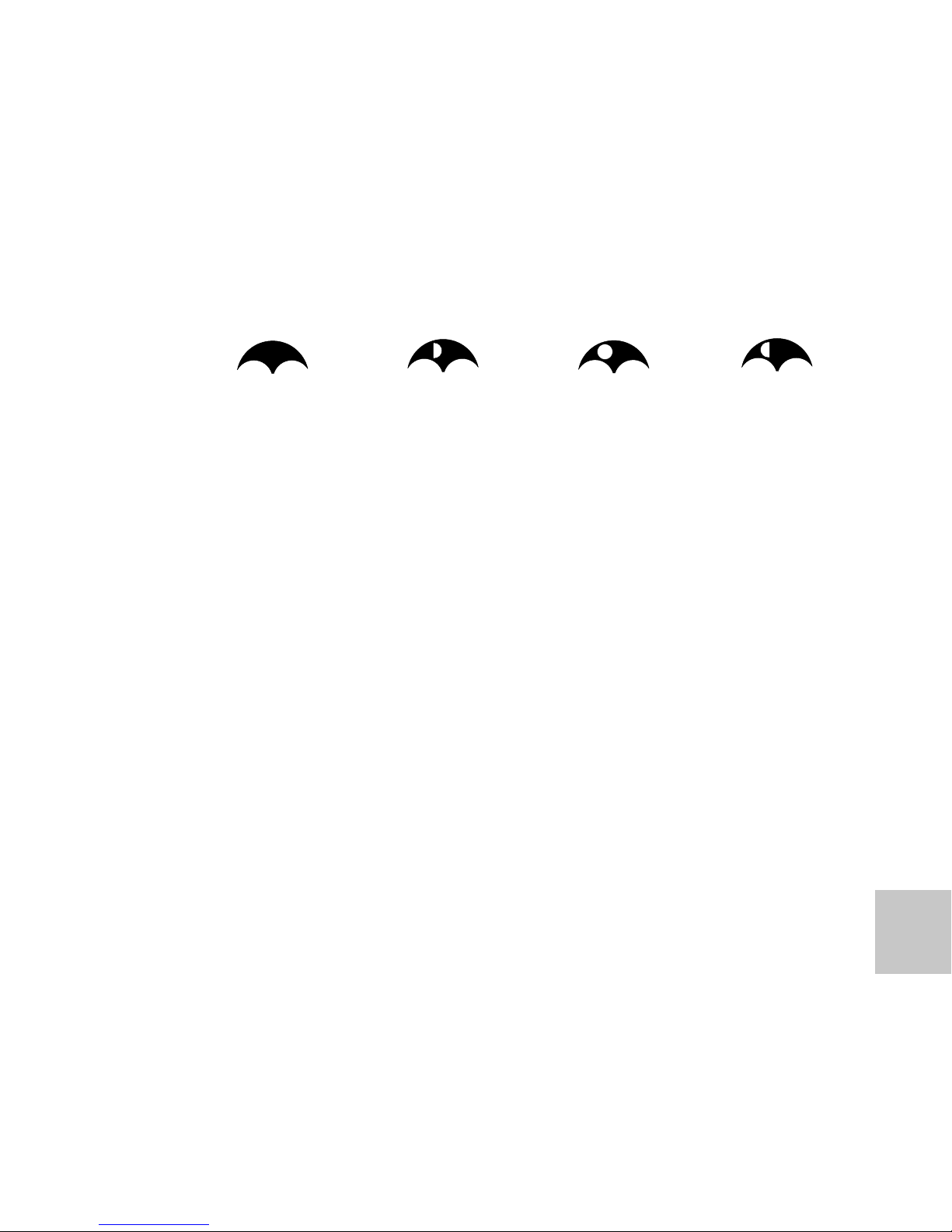
To set the Moon Phase you need to
put the winding crown at extreme
right position and turning the crown
clockwise to set the current phase of
Lunar calendar corresponding to
the current date of the Sun calendar
(see encl.)
After setting of Moon Phase it is necessary to correct the date in the calendar window because change date
change occurs automatically when
passing over the midnight.
It can be done by turning hands clockwise and counterclockwise in the
range 1h-10h-1h (see “Time/Calendar
setting”).
16
MOVEMENT Cal. 3105/79, 31679 SETTING OF MOON PHASE
Page 18
17
dhm
Jan. 10 12 03
Feb. 08 22 29
Mar. 10 09 11
Apr. 08 20 33
May 08 08 46
June 08 21 56
July 06 12 03
Aug. 05 03 05
Sep. 03 18 46
Okt. 03 10 28
Nov. 02 01 25
Dec. 01 15 01
Dec. 31 03 12
dhm
Jan. 17 06 58
Feb. 16 00 17
Mar. 17 19 20
Apr. 16 14 38
May 16 08 57
June 15 01 23
July 14 15 20
Aug. 13 02 39
Sep. 11 11 37
Okt. 10 19 01
Nov. 09 01 58
Dec. 08 09 37
dhm
Jan. 25 10 33
Feb. 24 04 54
Mar. 25 20 59
Apr. 24 10 07
May 23 20 19
June 22 04 14
July 21 11 01
Aug. 19 17 53
Sep. 18 02 01
Okt. 17 12 14
Nov. 16 00 58
Dec. 15 16 16
dhm
Jan. 03 17 46
Feb. 02 07 27
Mar. 03 17 37
Apr. 02 00 51
May 01 06 25
May 30 11 48
June 28 18 24
July 28 03 20
Aug. 26 15 19
Sep. 25 06 41
Okt. 25 01 17
Nov. 23 22 12
Dec. 23 19 37
dhm
Jan. 29 14 15
Feb. 28 00 31
Mar. 29 10 16
Apr. 271944
May 270526
June 25 16 06
July 25 04 32
Aug. 23 19 10
Sep. 22 11 46
Okt. 220515
Nov. 20 22 19
Dec. 201401
dhm
Jan. 06 18 57
Feb. 05 06 29
Mar. 16 20 16
Apr. 05 12 01
May 05 05 14
June 03 23 06
July 03 16 37
Aug. 02 08 46
Aug. 31 22 57
Sep. 30 11 04
Okt. 29 21 26
Nov. 28 06 30
Dec. 27 14 48
dhm
Jan. 14 09 49
Feb. 13 04 45
Mar. 14 23 36
Apr. 13 16 41
May 13 06 52
June 11 16 04
July 11 03 02
Aug. 09 10 54
Sep. 07 18 43
Okt. 07 03 13
Nov. 05 12 59
Dec. 05 00 25
dhm
Jan. 22 15 14
Feb. 21 07 17
Mar. 22 19 11
Apr. 21 03 29
May 20 09 21
June 18 14 09
July 17 19 13
Aug. 16 01 51
Sep. 14 11 16
Okt. 14 00 26
Nov. 12 17 46
Dec. 12 14 32
2005
2006
new moon first quarter full moon last quarter
Page 19
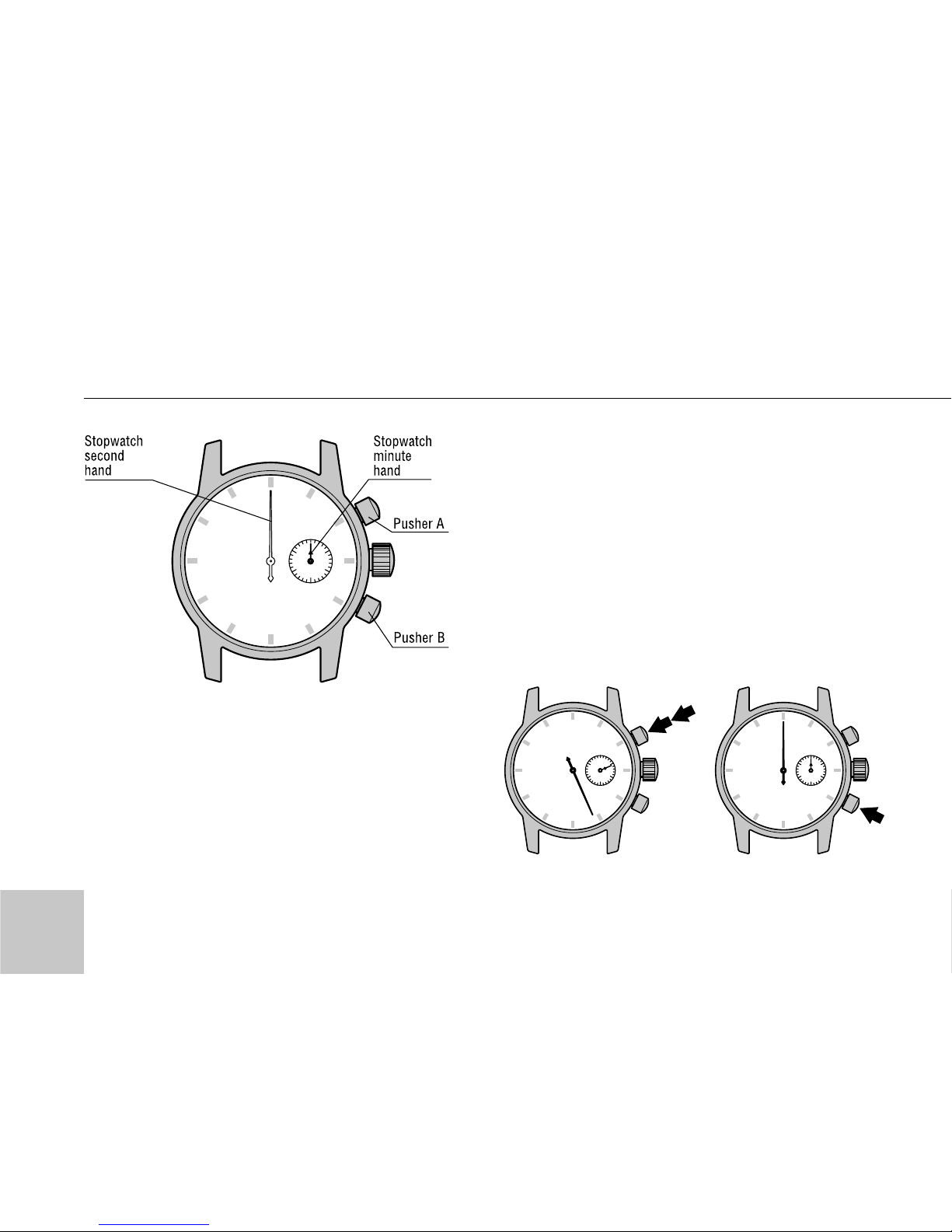
• The stopwatch can mesure up to 30
minutes in 1/3 seconds;
• The stopwatch has sweep second
hand, its minute hand moves at oneminute intervals.
• After 30 minutes, it will start counting again from “0”.
• To start and to stop – press the
pusher “A”.
• To reset – press the pusher “B”.
STOPWATCH
18
Page 20

Standard measurement
А>А > В
Start Stop Reset
Accumulated elapsed
time measurement
А > А > А > ....... > А > В
Start Stop Restart Stop Reset
Use the tachymeter with the stopwatch.
Stopwatch operation
(Standard measurement)
To start: Press “A”
To stop: Press “A”
To reset: Press “B”
The tachymeter can be used for the
following purposes.
HOW TO USE THE TACHYMETER
19
(for the models with
a tachymeter scale on the dial)
Page 21
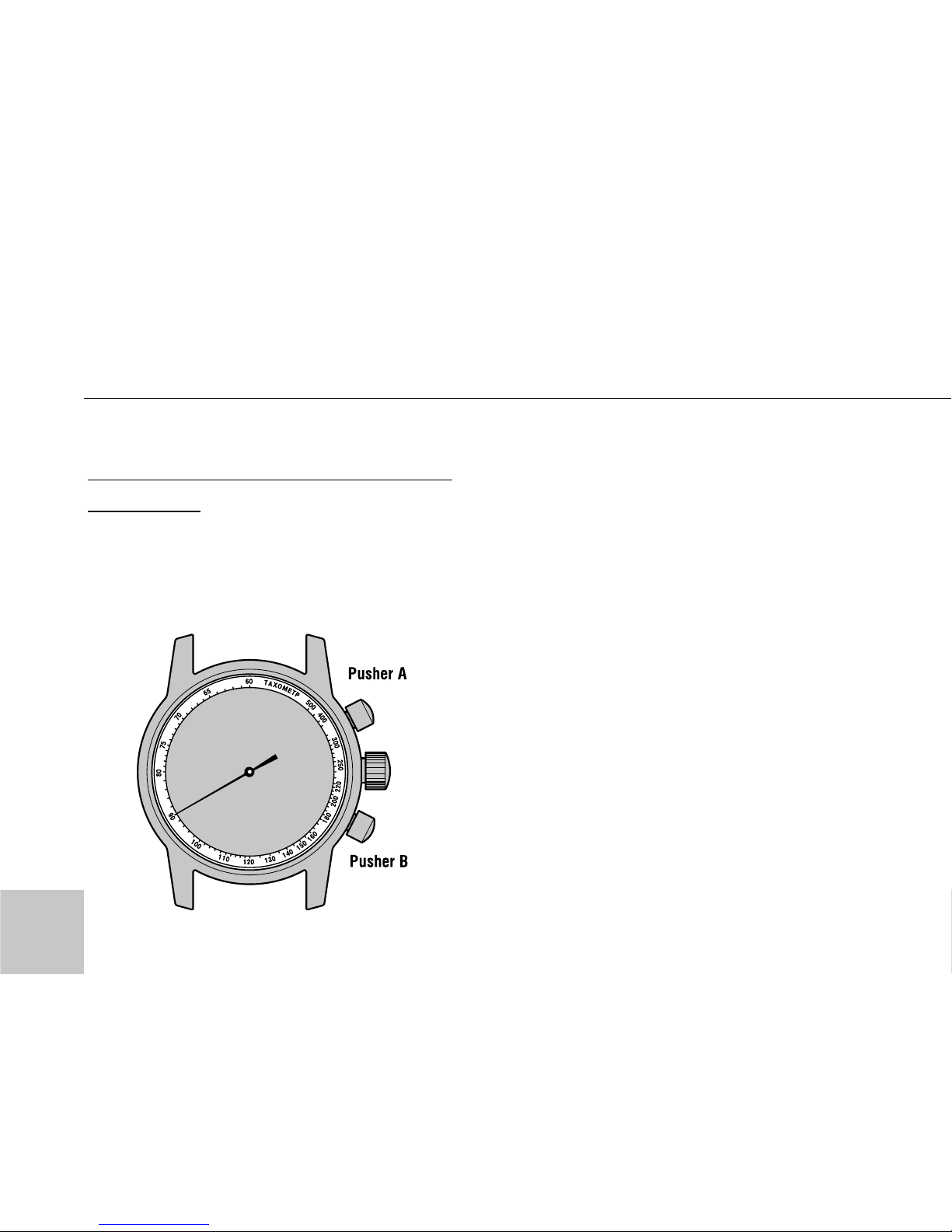
To measure the hourly average speed
of a vehicle
• Use the stopwatch to determine how
many seconds it takes to go one kilo-
meter (or one mile). The tachymeter
scale indicated by the stopwatch second
hand gives the average speed per hour.
• Please note that the tachymeter scale
can be used only when the time
required is less than 60 second. If it
exceeds 60 seconds, shorten the measuring distance (Refer to “Ex 2” below).
Ex. 1:
If it takes 40 seconds to go one kilometer (or one mile), the stopwatch
HOW TO USE THE TACHYMETER
20
Page 22

second hand indicates “90” on the
tachymeter scale. This means that the
average speed of the vehicle is 90
kilometers (or miles) per hour.
90 (Tachymeter scale figure x 1
(Kilometer or mile) = 90 km/h (mph)
at 40 second position)
Ex. 2:
If the measuring distance is extended
to 2 kilometers (or miles) or short-
ened to 0.5 kilometers (miles), multiply the figure on the tachymeter scale
by 2 or 0.5, respectively. We recommend that you utilize the tachymeter
in a rally, speedway or circuit rase.
90 (Tachymeter scale figure x 2
(Kilometers or miles) = 180 km/h
(mph) at 40 second position)
90 (Tachymeter scale figure x 0.5
(Kilometers or miles) = 45 km/h
(mph) at 40 second position)
HOW TO USE THE TACHYMETER
21
Page 23
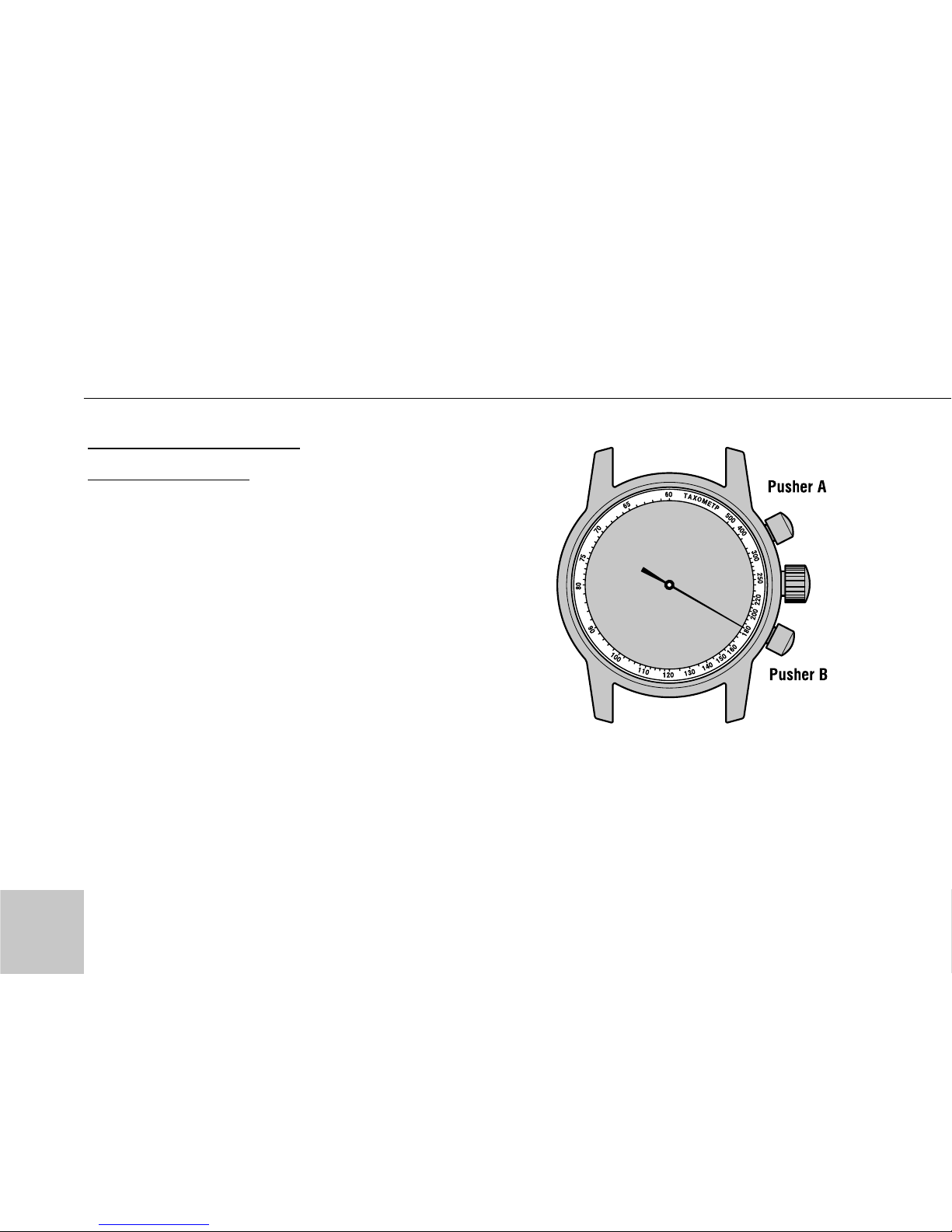
To mesure the hourly
rate of operation
The tachymeter is extremely useful in
calculating factory operation efficiency or machine production amount.
Ex. 1:
Use the stopwatch to mesure the time
required to complete one job.
If it takes 20 second, the stopwatch
second hand indicates “180” on the
tachymeter scale. This means that 180
jobs will be completed in one hour.
180 (Tachymeter scale figure x 1 job =
180 jobs at 20 second position)
22
HOW TO USE THE TACHYMETER
Page 24
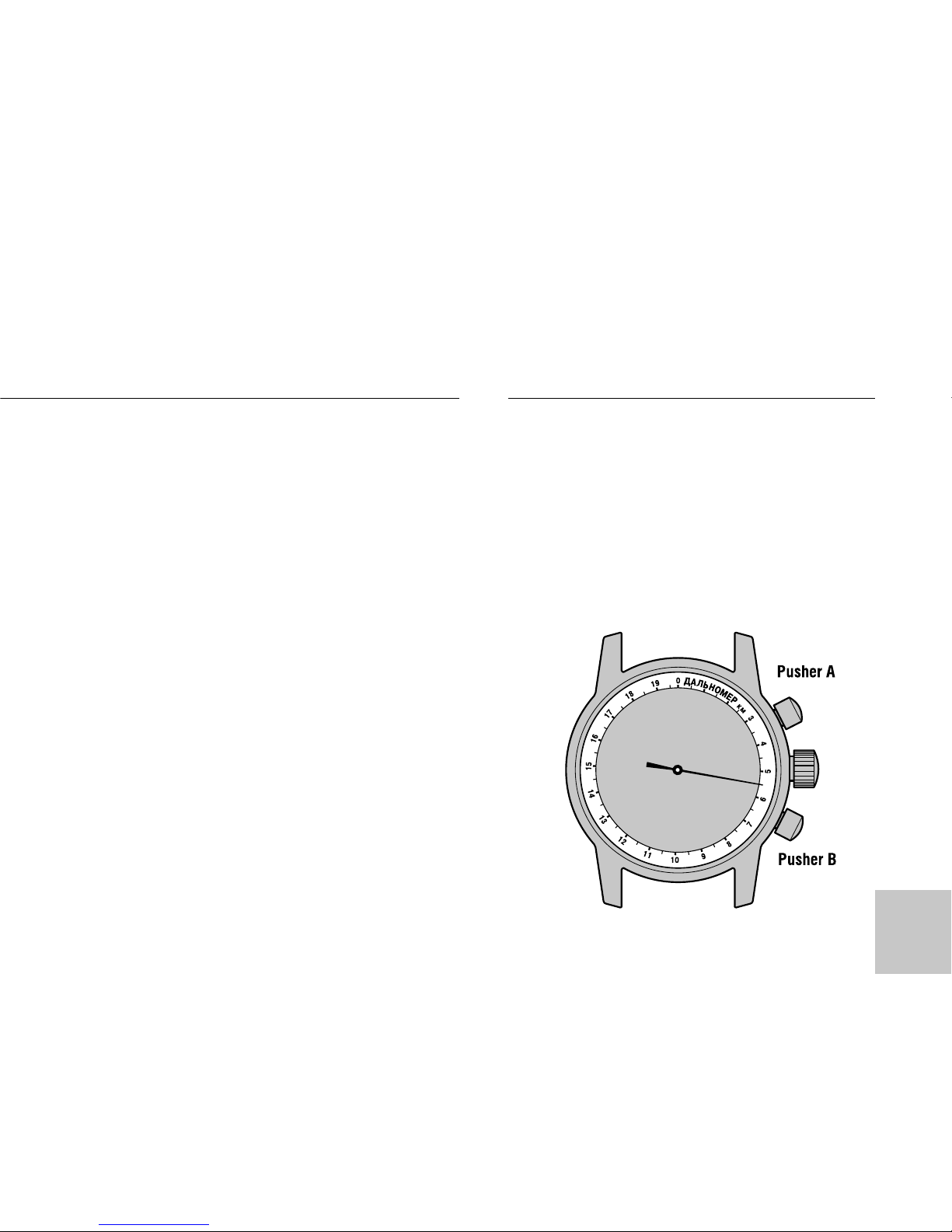
Ex. 2:
Use the stopwatch to determine how
many jobs are completed in a specific
period of time.
If 15 jobs are completed in 20 seconds, multiply “180”, the figure on the
tachymeter scale indicated by the
stopwatch second hand, by 15. Thus,
it is estimated that 2,700 jobs will be
completed in one hour.
180 (Tachymeter scale figure x 15
jobs = 2,700 jobs per hour at 20 second position)
1. Use the stopwatch to measure the
time since the moment when you
have seen the outburst of the forked
HOW TO USE TELEMETER
(for models with
telemeter scale on the dial)
23
Page 25

lightning or the shot, till the moment
when you have heard the thunder or
the sound of the shot.
2. The telemeter scale indicated by
the stopwatch second hand gives the
distance as far as the epicentre of the
thunderstorm or the place of the shot.
Note: Please note that telemeter scale
can be used when the time period is
less than 60 seconds.
The revolving World time scale on the
dial or on the rotating bezel enables you
to find the time of 24 cities in different
time zones throughout the world.
1. Turning the crown “C” or bezel
clockwise or counterclockwise set the
name of the city with the local time in
front of the hour hand arrow.
2. Current hour in the desired city will
indicate opposite its name or the
name of the city, which is at the same
time zone.
24
HOW TO USE TELEMETER
Page 26
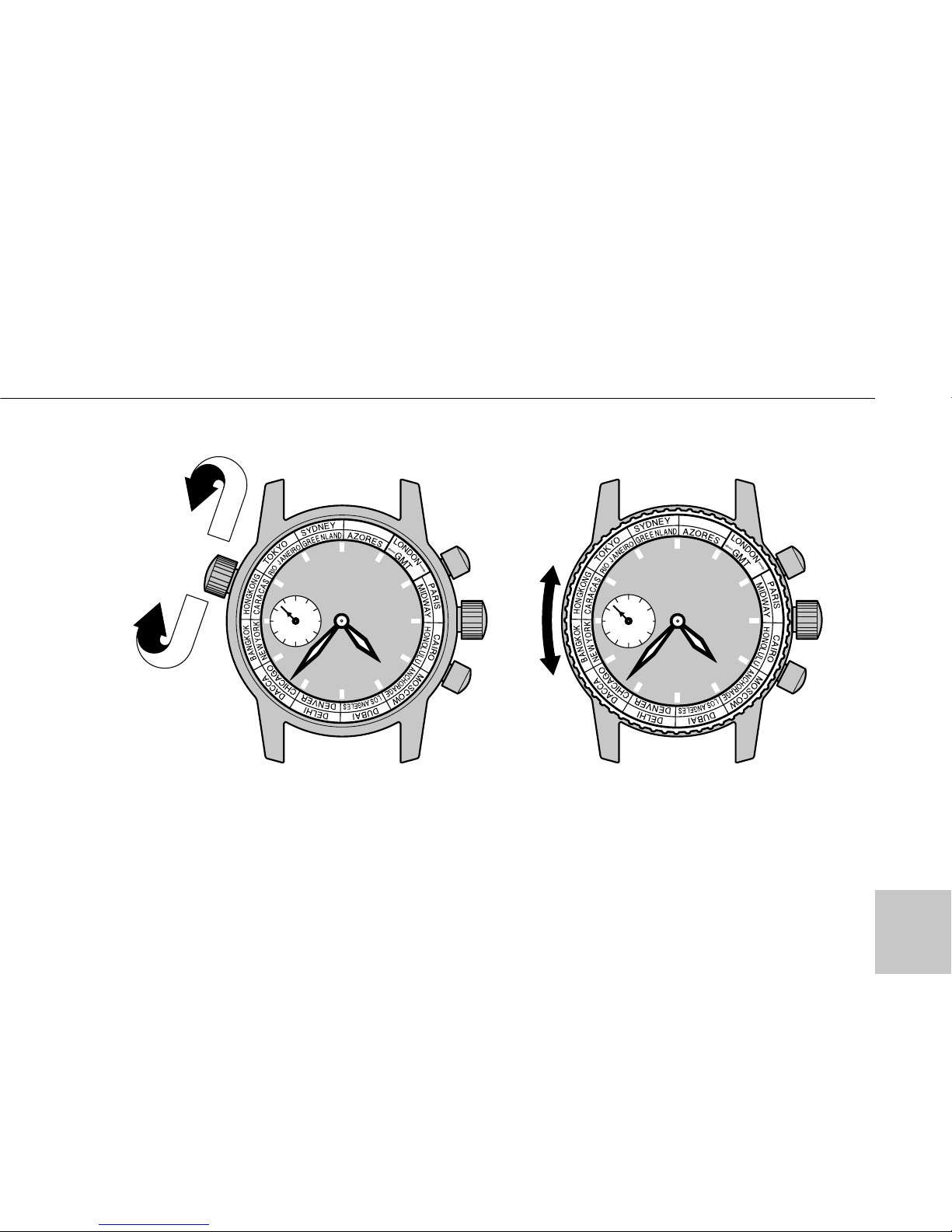
HOW TO USE THE WORLD TIME FUNCTION
Note: Cities of the 12 time zones easterly GMT are at the external scale. Cities of
the 12 time zones westerly GMT are at the internal scale. The time of day of cities
at the external scale is in opposition the time of day of cities at the internal scale.
25
(for models with World time scale)
Page 27

Ex.:
1. You are in Moscow. The local time
of Moscow is 4 : 37 P. M. Set the
name of the city – Moscow in front of
the arrow of the hour hand. Current
hour in the desired city is read opposite its name or the name of the city,
which is at the same time zone.
• PARIS is at the same scale as
MOSCOW – PARIS time is 2 : 37 P. M.;
• TOKYO is at the same scale as
MOSCOW – TOKYO time is 10 : 37
P. M.;
• NEW YORK is at the internal scale –
NEW YORK time is 8 : 37 A. M.;
• HONOLULU is at the internal scale
– HONOLULU time is 3 : 37 A. M.
26
HOW TO USE THE WORLD TIME FUNCTION
Page 28

K Name of the main cities
hours of the time zone
0 London*, Casablanca, Dakar
+1 Paris*, Рим Rome*,
Amsterdam*, Frankfurt*,
Berlin*
+2 Cairo*, Athens*, Istanbul*,
Kiev*, Cape Town, Tripoli
+3 Moscow*, Mecca, Nairobi
+4 Volgograd*, Dubai
+5 Ekaterinburg*, Tashkent*,
Karachi
+6 Novosibirsk*, Dacca
+7 Irkutsk*, Bangkok, Phnom
Penh, Jakarta
+8 Hong Kong, Manila, Beijing*,
Singapore
+9 Iakutsk*, Tokyo, Seoul
+10 Khabarovsk*, Sydney*, Guam
27
TIME DIFFERENCES
(GMT) = Greenwich Mean Time
GMT
Page 29

+11 Magadan*, New Caledonia,
Solomon Islands
+12 Petropavlovsk Kamchatskiy*,
Wellington, Fiji Islands
-11 Midway Islands
-10 Honolulu
-9 Anchorage*
-8 Los Angeles*, San Francis-
co*, Vancouver*
-7 Denver*, Edmonton*
-6 Chicago*, Mexico City
-5 New York*, Washington,
Montreal*
-4 Caracas, Santiago*
-3 Rio de Janeiro*,
Buenos Aires*
-2
-1 Azores Islands*
TIME DIFFERENCES
The asterisk ( “*” ) indicates a city which uses daylight saving time (summer time).
28
Page 30
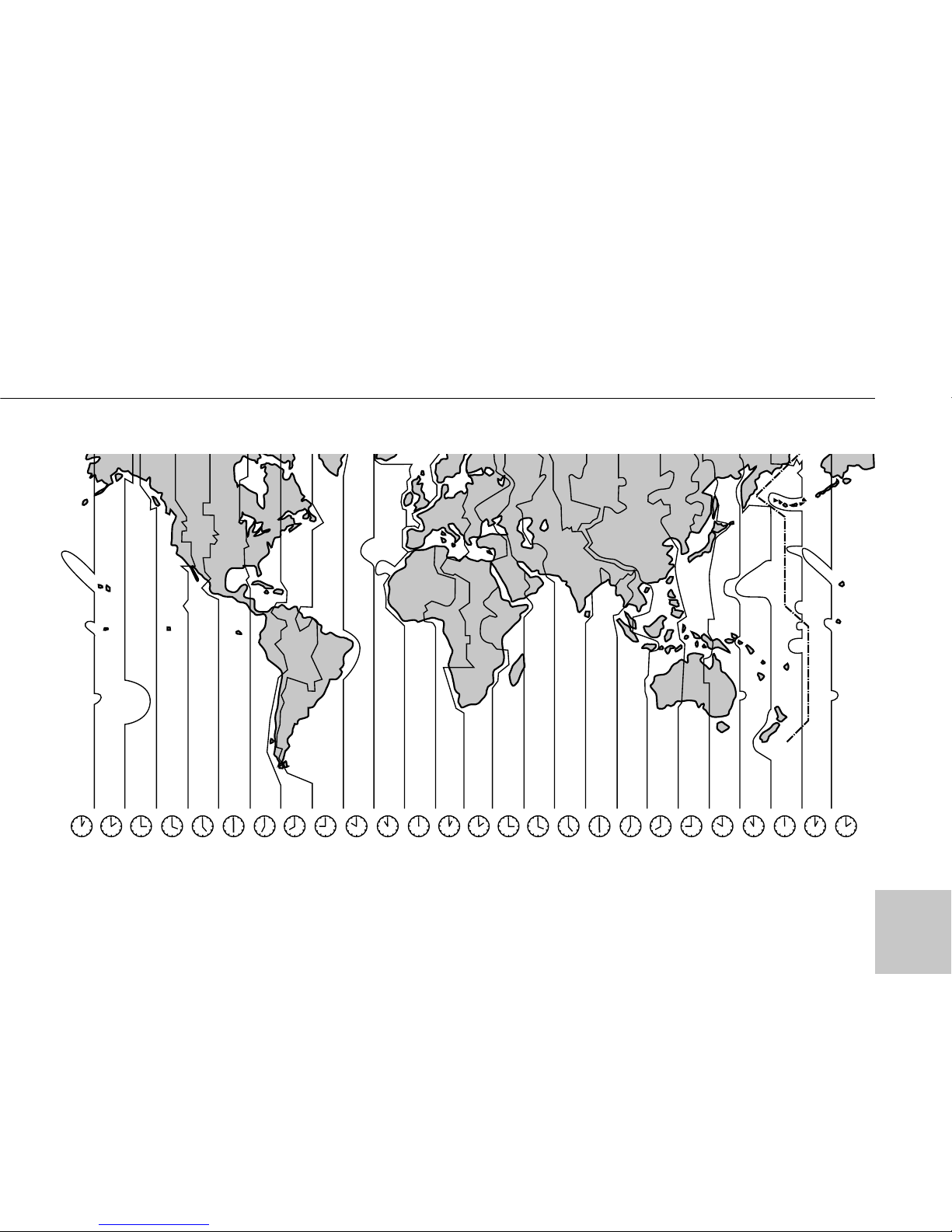
29
TIME DIFFERENCES
Page 31

1. Turn the rotating scale by the
crown “C” or rotating bazel manualy
clockwise or counterclockwise to
align its “ ” mark with the minute
hand.
Note: For some models, the rotating
bezel rotates only counterclockwise.
2. When the minute hand points to
the number of the desired interval fulfill the necessary operation.
30
HOW TO USE THE “SOUNDLESS” TIMER FUNCTION
(for models with the rotating timer scale on the dial or on the bezel)
* The rotating scale or bezel can show up to 60 minutes of elapsed time.
Page 32
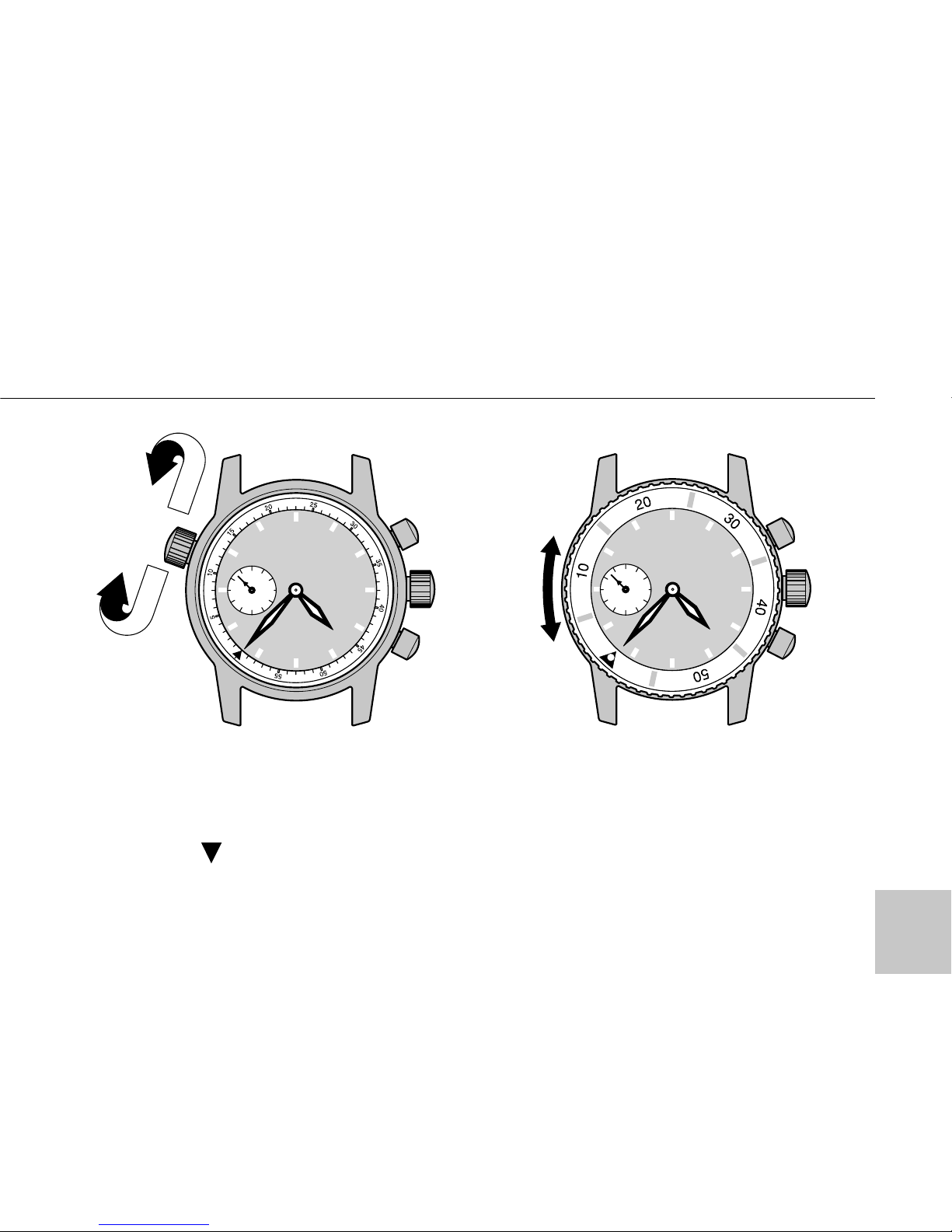
Ex. :
You were given 15 minutes for your
speech. Beginning it at 4 : 37 P. M.
you align “ ” mark with the minute
hand and you must finish your speech
when the minute hand points to “15”
at the timer scale.
31
HOW TO USE THE “SOUNDLESS” TIMER FUNCTION
Page 33

1. Manual winding
2. Frequency . . . . . . . . . . . . . . . . . . . . . . . . . . . . . . . . . . . . .21600 vph (3Hrz)
3. Daily rate . . . . . . . . . . . . . . . . . . . . . . . . . . . . . . . . . . . . .- 20 to + 40 s/day
4. Power reserve minimum
• Cal. 3105 . . . . . . . . . . . . . . . . . . . . . . . . . . . . . . . . . . . . . . . . . . . . . .42 h
• Cal. 3133, 31679, 31681, 31682
- chronograph is not running. . . . . . . . . . . . . . . . . . . . . . . . . . . . . . . . .42 h
- chronograph is running . . . . . . . . . . . . . . . . . . . . . . . . . . . . . . . . . . .37 h
5. Display system
a) Time
• Cal. 3105, 3133, 31679 . . . . . . . . . . . . . . . . . . . . . . . . . . . . . . . . .3 hands
(hour, minute and sub-second)
32
SPECIFICATIONS
Page 34

• Cal. 31681 . . . . . . . . . . . . . . . . . . . . . . . . . . . . . . . . . . . . . . . . . .4 hands
(hour, minute sub-second and 24-hour sub hand)
• Cal. 31682 . . . . . . . . . . . . . . . . . . . . . . . . . . . . . . . . . . . . . . . . . .4 hands
(hour, minute, sub-second and 24-hour sub hand)
Day-night indicator in the dial window
b) Calendar
• Cal. 3105, 3133, 31681, 31682 . . . . . . . .Date calendar in the dial window
• Cal. 31679 . . . . . . . . . . . . . . . . . . . . . . . .Date calendar in the dial window
Age of the moon . . . . . . . . . . . . . . . . . . . . .Moon phase in the dial window,
optional special scale and sub-hand
c) Stopwatch (except Cal. 3105) . . . . . . . . . . . . . . . . . . . . . . . . . . .2 hands
(1/3 second and sub-minute hand)
33
SPECIFICATIONS
Page 35

SPECIFICATIONS
6. Type of the stopwatch . . . . . . . . . . . . . . . . . . . . . . . . . .summing up action
7. Counter . . . . . . . . . . . . . . . . . . . . . . . . . . . . . . . . . . . . . . . . . . .30 minutes
8. Shock protection
9. Jewels number
• Cal. 3105 . . . . . . . . . . . . . . . . . . . . . . . . . . . . . . . . . . . . . . . . . . . . . . .17
• Cal. 3133 . . . . . . . . . . . . . . . . . . . . . . . . . . . . . . . . . . . . . . . . . . . . . . .23
• Cal. 31679, 31681, 31 682 . . . . . . . . . . . . . . . . . . . . . . . . . . . . . . . . . .25
10.Calendar type . . . . . . . . . . . . . . . . . . . . . . . . . . . . . . . . . .not instantaneous
11.Calendar correction . . . . . . . . . . . . . . . . . . . . . . . . . . . .fast date correction
by the turning the crown
in the time setting position (12h-11h-12h)
34
Page 36

WATER RESISTANCE
Non- water resistance
If “WATER RESISTANT” is not
inscribed on the case back, your
watch is not water resistant, and care
should be taken not to get wet as
water may damage the movement. If
the watch become wet, we suggest
that you have it checked by the
AUTHORIZED POLJOT DEALER or
SERVICE CENTER.
Water resistance (3 bar)
If “WATER RESISTANT” is inscribed on
the case back, your watch is designed
and manufactured to withstand up to 3
bar, such as accidental contact with
splashes of water or rain, but it is not
designed for swimming or diving.
Water resistance (5 bar)
If “WATER RESISTANT 5 bar” is
inscribed on the case back, your
watch is disigned and manufactured
35
TO PRESERVE THE QUALITY OF YOUR WATCH
Page 37

to withstand up to 5 bar and is suitable for swimming, yachting and taking a shower.
Water resistance (10 bar/15 bar)
If “WATER RESISTANT 10 bar” or
“WATER RESISTANT 15 bar” is
inscribed on the case back, your watch
is designed and manufactured to withstand up to 10/15 bar and is suitable
for taking the bath and shallow water
diving, but not for deep water diving.
We recommend that you wear a special
Diver’s watch for deep water diving.
• Before using the water resistance 5,
10, or 15 bar watch in water, be sure
the crown is pushed in completely.
• Do not operate the crowns and
pushers when the watch is wet
or in water.
• If used in sea water, rinse the watch
in fresh water and dry it completely.
• When taking the shower with the
water resistance 5 bar watch, or taking the bath with the water resistance
36
TO PRESERVE THE QUALITY OF YOUR WATCH
Page 38

10 or 15 bar watch, be sure to observe
the following:
• Do not operate the crowns or push
the pushers when the watch is wet
with soapy water or shampoo.
• If the watch is left in warm water, a
slight time loss or gain may be
caused. This condition, however, will
be corrected when the watch returns
to normal temperature.
Note:
Pressure in bar is a test pressure and
should not be considered as corre-
sponding to actual diving depth since
swimming movement tends to
increase the pressure at a given
depth. Care should also be taken on
diving into water.
MAGNETISM
Your watch will be adversely affected
by strong magnetism. Keep away
from close contact with magnetic
objects.
SHOCK & VIBRATION
Light activities will not affect your
37
TO PRESERVE THE QUALITY OF YOUR WATCH
Page 39

TO PRESERVE THE QUALITY OF YOUR WATCH
watch, but be careful not to drop your
watch or hit it against hard surface, as
this may cause damage.
CHAMICALS
Be careful not to expose the watch to
solvents (e.g., alcohol and gasoline),
mercury(i.e. from the broken thermometer), cosmetic spray, detergents, adhesives or paints. Otherwise,
the case, bracelet etc. may become
discolored, deteriorated or damaged.
CARE OF CASE AND BRACELET
To prevent possible rusting of the
case and bracelet caused by dust,
moisture and perspiration, wipe them
periodically with the soft dry cloth.
PRECAUTION RECARDING CASE
BACK PROTECTIVE FILM
If your watch has a protective and/or a
sticker on the case back, be sure to
peel them off before using your
watch. Otherwise, perspiration getting
in under them may rust the case back.
38
Page 40

PERIODIC CHECK
It is recommended that the watch be
checked once every 2 to 3 years. Have
your watch checked by an AUTHORIZED POLJOT DEALER or SERVICE
CENTER to ensure that the case,
crowns, buttons, gaskets and crystal
sealing remain intact.
Guarantee period is 1 year from the
date of purchase.
Guarantee period can be increased
for concrete model. The mark of real
Guarantee period is done in
Guarantee Card.
Within Guarantee period regulation,
adjustment, repair or replacement of
parts or movement will be performed
without charge except the case of
damage caused by accidents or lack
of care.
39
GUARANTEE
Page 41

GUARANTEE
IMPORTANT
1. This GUARANTEE does not cover
the glass crystal, bracelet, strap and
attachment.
2. This GUARANTEE does not cover
scratches on the case caused by using.
3. This GUARANTEE is valid only if
properly filled in and dated by the
authorized and appointed POLJOT
dealer from whom watch was purchased.
4. We bear no responsibility under
this GUARANTEE for repairs if the
watch is tampered with or damaged
by other than POLJOT AUTHORIZED
SERVICE facilities.
5. Altered or tampered GUARANTEE
CARD or PHOTOCOPIES of the GUARANTEE CARD are not valid and not
acceptable.
6. We bear no responcibility for any
trouble with or damage to watches
due to natural disaster, such as fire,
flood or earthquake.
40
Page 42
109147, Russia, Moscow,
Marksistskaya str, bld. 34/8.
Tel.: (095) 911-3210.
Fax: (095) 911-6874.
E-mail: [email protected]
www.aviatorwatch.ru
 Loading...