

Page 1

1
Polar OH1 User Manual 4
Introduction 4
Get connected to the Polar ecosystem and get the most out of your OH1. 4
Setting up your OH1 4
Choose one option for setup 4
Option A: Set up with your computer via FlowSync 5
Option B: Set up with your mobile device via Flow app 5
Button functions and LEDs 6
Button Functions 6
LED Guide 6
After setting power on 6
When used as a sensor 6
When used as an independent training device 6
During fitness test 6
During charging 7
Other 7
Wearing your OH1 7
When measuring heart rate from your forearm or upper arm 7
Pairing 8
Pair a mobile device with your OH1 8
Pair OH1 with a Polar wrist unit 8
Pair OH1 with Polar Beat 9
Page 2

2
Updating the firmware 10
Withmobile device or tablet 10
Withcomputer 10
Heart rate training 11
Measuring heart rate with your OH1 11
Start a training session 11
Start a training session as an independent training device 11
Start a training session with a Polar wrist unit 12
Start a training session with Polar Beat 12
Stop a training session 12
Polar Flow App 13
Training data 13
Image sharing 13
Start using the Flow app 13
Polar Flow Web Service 14
Feed 14
Explore 14
Diary 14
Progress 14
Community 15
Programs 15
Syncing 15
Page 3

3
Sync with Flow mobile App 15
Sync WithFlow Web Service Via FlowSync 16
Battery 17
Charging OH1 battery 18
Caring for your OH1 19
Keep your OH1 clean 19
Take good care of the optical heart rate sensor 20
Storing 20
Service 20
Precautions 20
Interference during training 20
Minimizing risks when training 21
Technical specification 22
OH1 22
Polar FlowSync Software 22
Polar Flow mobile application compatibility 23
Water resistance of Polar products 23
Limited international Polar guarantee 24
Disclaimer 25
Page 4

4
POLAR OH1 USER MANUAL
This user manual helps you get started with your new OH1. To see OH1 video tutorials and FAQs, go to
support.polar.com/en/OH1.
INTRODUCTION
Congratulations on your new Polar OH1! The Polar OH1 is an optical heart rate sensor that is worn around
your forearm or upper arm. It can be used as a independent training device that records and stores data or as
a heart rate sensor with a Polar wrist unit
GET CONNECTED TO THE POLAR ECOSYSTEM AND GET THE
MOST OUT OF YOUR OH1.
Get the Polar Flow app from the App Store®or Google PlayTM. Sync your OH1 with the Flow app after
training, and get an instant overview and feedback of your training results and performance.
Sync your training data to the Polar Flow web service with the FlowSync software on your computer or via
Flow app. In the web service you can plan your training, track your achievements, get guidance and see
detailed analysis of your training results. Let all your friends know about your achievements, find fellow
exercisers and get motivationfrom your social training communities. Find all this at flow.polar.com.
SETTING UP YOUR OH1
We recommend that you charge the battery before you start using your OH1. If the battery is completely
empty, it takes a couple of minutes for the charging to start.
See Batteries for detailed information on charging the battery.
CHOOSE ONE O PTION FOR SETUP
A. Wired computer setup is quicker and you can charge your OH1 at the same time, but you need a computer
available. This method requires an Internet connection.
B. Mobile setup is convenient if you don't have access to a computer with a USB port,but it might take longer.
This method requires an Internet connection.
The A and B options are recommended. You can fill in all the physical details required for accurate
training data at once. You can also choose language and get the latest firmware for your OH1.
Page 5
5
OPTION A: SET UP WITH YOUR COMPUTER VIA FLOWSYNC
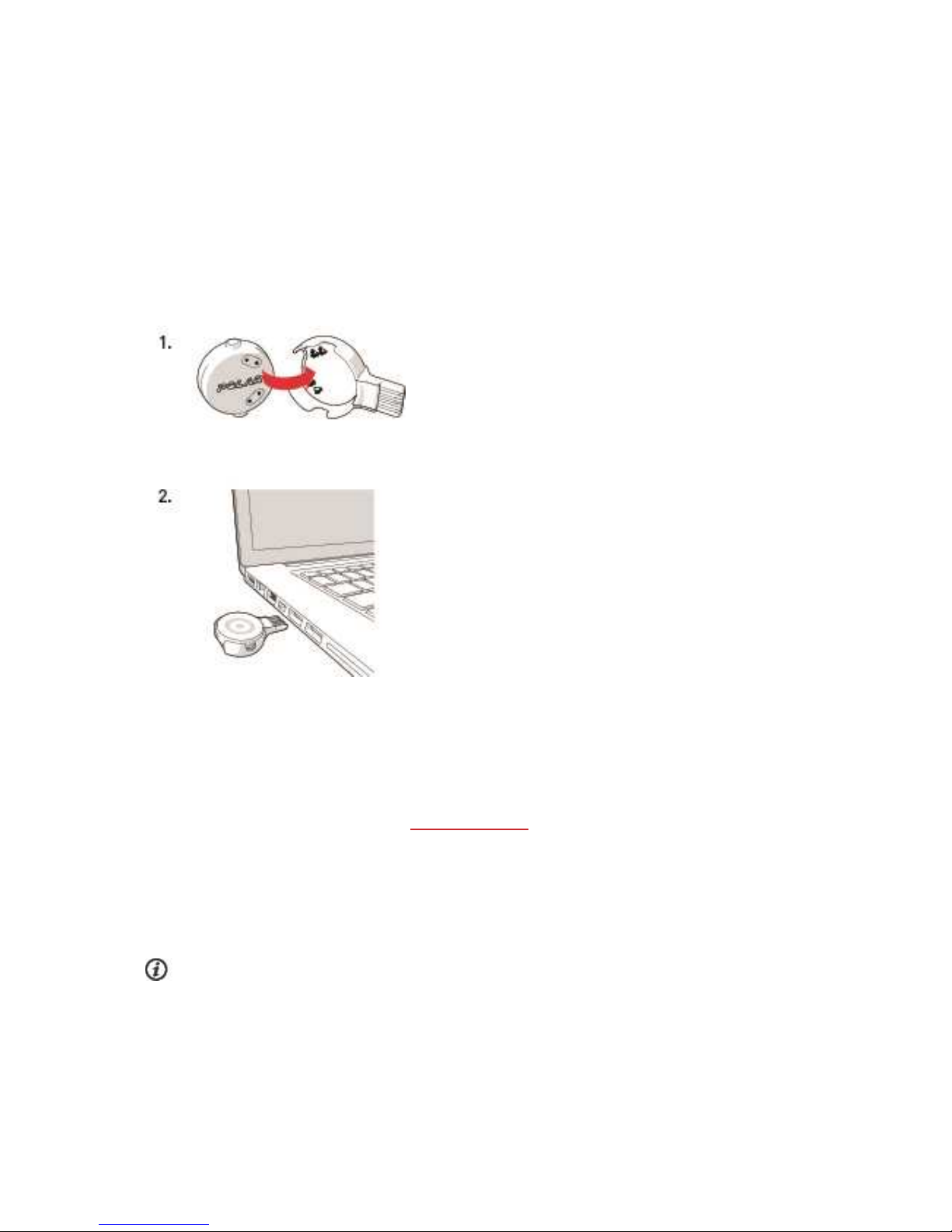
1. Place the sensor into the holder with the lens facing up so that the contacts on the sensor and holder
meet (picture 1).
2. Plug the holder into your computer USB port (picture 2), and go to flow.polar.com/start and install
Polar FlowSync data transfer software to your computer.
3. Sign in with your Polar account or create a new one. We’ll walk you through the sign-up and setup
within the web service.
After the setup is done, you’re ready to go. Have fun!
OPTION B: SET UP WITH YOUR MOBILE DEVICE VIA FLOW APP
Polar OH1 connects to the Polar Flow mobile app wirelessly via Bluetooth, so remember to have Bluetooth
turned on in your mobile device.
Check the Polar Flow app compatibility at support.polar.com.
1. Download the Polar Flow app onto your mobile device.
2. Turn Bluetooth® on, and open Flow app on your mobile device.
3. Turn OH1 on by pressing the button until the lights are switched on, Flow app thenprompts you to start
pairing. Accept the pairing request and follow the on-screen instructions.
Before charging, please make sure there’s no moisture,hair, dust or dirt on the OH1 USB connector.
Gently wipe off any dirt or moisture. Do not charge the OH1 when the device is wet.
Page 6

6
After the setup is done, you’re ready to go. Have fun!
BUTTON FUNCTIONS AND LEDS
OH1 has one button that has different functionalities depending on the situation of use, and how long it is
pressed. The LED on the device indicates different modes. See below what functionalities the button has in
different modes, and what the different colored LEDs mean.
BUTTON FUNCTIONS
Set power ON: Short button press
Set recording ON: Press Button twice
Set power OFF: Long button press
LED GUIDE
AFTER SETTING POWER ON
Battery status normal: Green LED blinks five times
Battery status low: Red LED blinks five times
WHEN USED A S A SENSOR
Heart rate not detected: White led blinks once every two seconds
Heart rate detected: Green led blinks once every two seconds
WHEN USED A S A N INDEPENDENT TRAINING DEVICE
Recording set on but first time use not done: Red LEDblinks three times
Heart rate not detected: White LEDblinks quickly twice
Heart rate detected: Green LEDblinks quickly twice
Battery low: Red LED blinks every other second
Battery critical: Red LED blinks quickly every other second
DURING FITNESS TEST
Heart rate not detected: White LEDblinks once every two seconds
Page 7

7
Heart rate detected: Purple LEDblinks once every two seconds
DURING CHARGING
Charging: Yellow LEDblinks slowly
Battery full: Green LEDcontinuously on
OTHER
Connecting, Syncing or Pairing: Blue LED blinks
Searching or waiting for confirmation: Blue LED blinks quickly
Updating firmware: Blue LEDcontinuously on
Error: Red LEDcontinuously on
WEARING YOUR OH1
WHEN MEASURING HEART RATE FROM YOUR FOREARM OR UPPER ARM
To measure heart rate accurately, you need to wear the OH1 snugly on your forearm or upper arm, not on
your wrist.
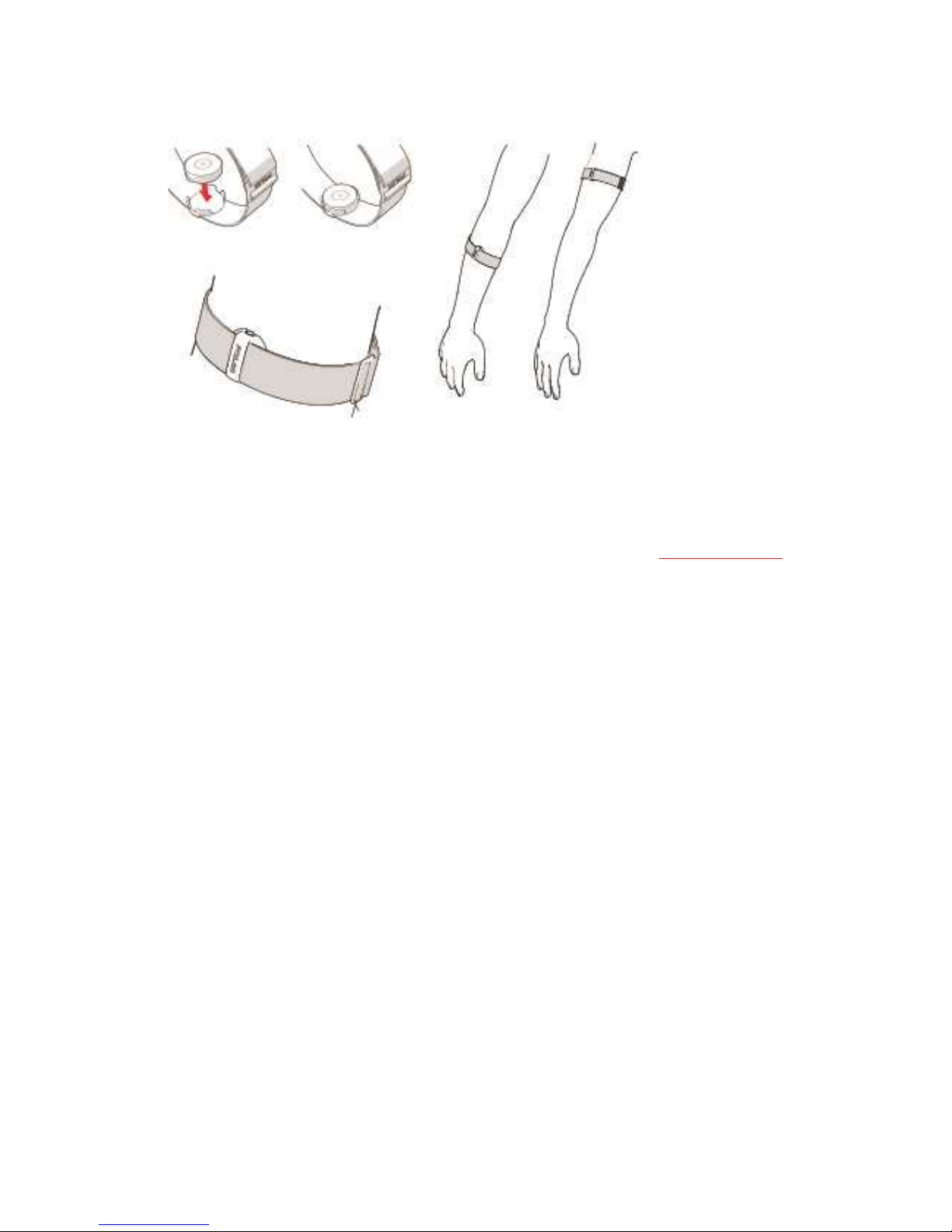
Place the sensor into the armband holder with the lens facing up. Wear the armband so that the sensor is on
the underside of the armband firmly against your skin. Wear the OH1 around your forearm or upperarm. The
sensor must be in firm skin contact, but not too tight to prevent blood flow. For most accurate heart rate
measurement, we advise you to wear your OH1 for a few minutes prior to starting the heart rate
measurement.
Page 8
8
PAIRING
PAIR A MOBILE DEVICE WITH YOUR OH1
If you've done the setup for your OH1 with a mobile device as described in chapter Setting up your OH1, your
OH1 has already been paired. If you did the setup with a computer and would like to use your OH1 with Polar
Flow app, please pair your OH1 and mobile as follows:
Before pairing a mobile device
• download Flow app from the App Store or Google Play
• make sure your mobile device has Bluetooth turned on, and airplane mode/flight mode is not turned
on.
To pair a mobile device:
1. On your mobile device, open Flow app and sign in with your Polar account, which you have created
when setting up your OH1.
2. Press the button until the lights are switched on, and release. OH1 is now on.
3. Wait for the Connect product view to appear on your mobile device (Waiting for OH1 is displayed).
4. Flow app will ask you to press the OH1 button to accept the pairing.
PAIR OH1 WITH A POLAR WRIST UNIT
Press the button until the lights are switched on, and release. OH1 is now on.
See detailed device-specific pairing information at polar.com/support.
Page 9

9
PAIR OH1 WITH POLAR BEAT
Press the button until the lights are switched on, and release. OH1 is now on.
See detailed device-specific pairing information at polar.com/support.
Page 10

10
UPDATING THE FIRMWARE
You can update the firmware of your OH1 yourself to keep it up to date. Firmware updates are performed to
improve the functionality of your OH1. They can include improvements to existing features, completely new
features or bug fixes. We recommend that you update the firmware of your OH1 every time a new version is
available.
You won't lose any data due to the firmware update. Before the update begins, the data from your OH1 is
synced to the Flow web service.
WITH MOBILE DEVICE OR TABLET
You can update the firmware with your mobile device if you're using Polar Flow mobile app to sync your
training and activity data. The app will let you know if there's an update available and will guide you through it.
We recommend that you plug in the OH1 to a power source before starting the update to ensure flawless
update operation.
The wireless firmware update may take up to 20 minutes, depending on your connection.
WITH COMPUTER
Whenever a new firmware version is available, FlowSync will notify you when you connect the OH1 to your
computer. The firmware updates are downloaded via FlowSync.
To update the firmware:
1. Plug your OH1 to your computer.
2. FlowSync starts syncing your data.
3. After syncing, you are asked to update the firmware.
4. Choose Yes. New firmware is installed (this may take up to 10 minutes). Please wait until the firmware update has been finalized before you detach the OH1 from your computer.
Page 11
11
HEART RATE TRAINING
Although there are many subjective clues as to how your body is doing during exercise (perceived exertion,
breathing rate, physical sensations), none of them are as reliable as measuring heart rate. It is objective and
affected by both internal and external factors—meaning that you will have a dependable measure of your
physical state.
MEASURING HEART RATE WITH YOUR OH1
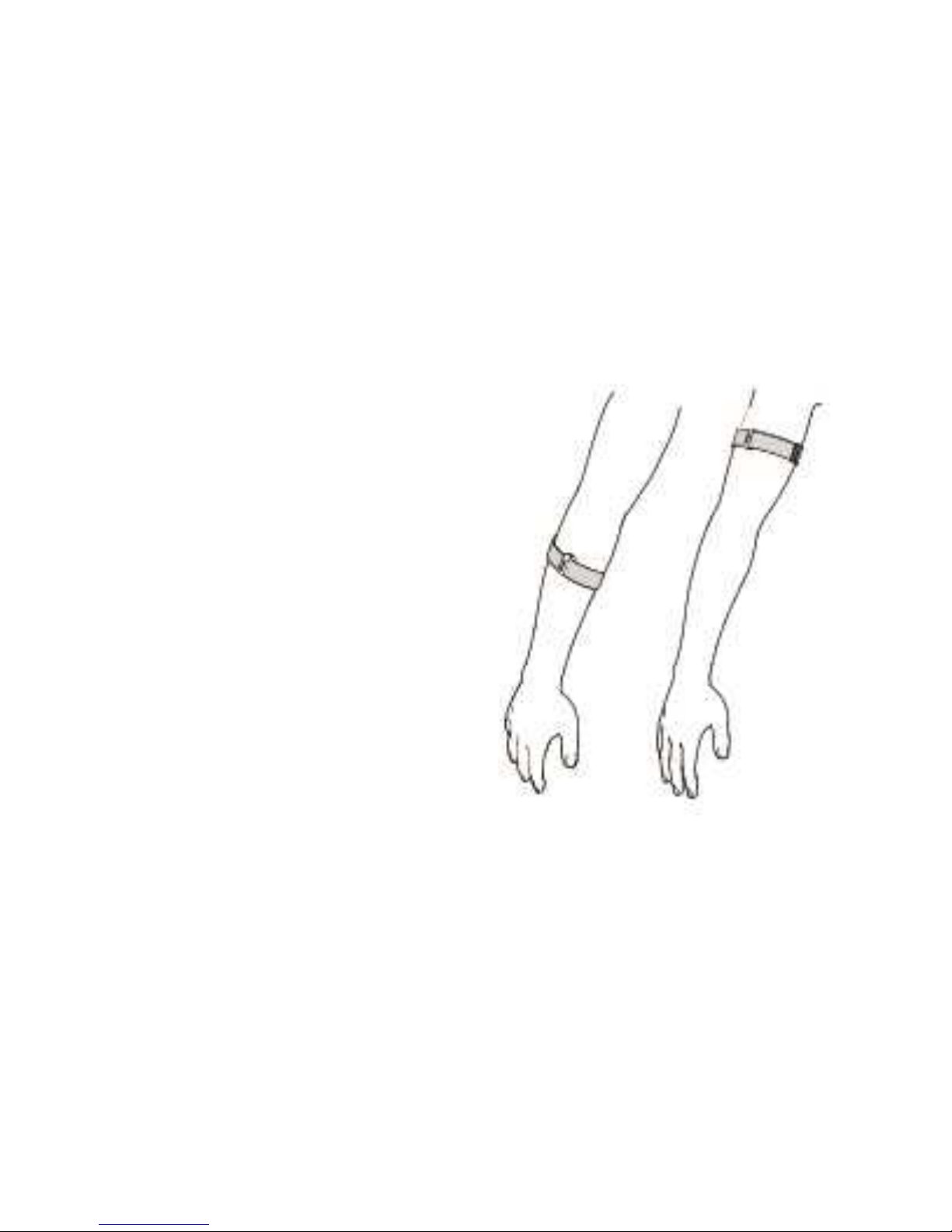
To measure heart rate accurately you need to wear your
OH1 snugly around your forearm or upper arm (see the
picture on the right). The sensor on the back must be in
constant touch with your skin, but the armband should
not be too tight to prevent blood flow. For most accurate
heart rate measurement, we advise you to wear your
OH1 for a few minutes prior to starting the heart rate
measurement.
If you have tattoos avoid placing the sensor right on
them it as it may prevent accurate readings.
Also it's a good idea to warm up the skin if your hands
and skin get cold easily. Get the blood going before
starting your session!
START A TRAINING SESSION
Wear the OH1 around your forearm or upper arm, for
details see "Wearing your OH1" on page7
START A TRAINING SESSION AS AN
INDEPENDENT TRAINING DEVICE
Before using OH1 as an independent training device, it
needs to be registered and linked to Polar Flow account. For details, see "Setting up your OH1" on page4.
1. Press the button until the lights are switched on, and release. OH1 is now on.
2. Once on, press the buttontwice to switch recording on.
3. When your heart rate is detected, the green light LED will blink rapidly, and you can start your session.
Page 12

12
START A TRAINING SESSION WITH A POLAR WRIST UNIT
Before starting, make sure the OH1 is paired with your Polar wrist unit. For details see "Pairing" on page8
1. Press the button until the lights are switched on, and release.
2. OH1 is now on, and can be used as a heart rate sensor with a Polar wrist unit.
3. Start the session from your Polar wrist unit.
START A TRAINING SESSION WITH POLAR BEAT
Before starting, make sure the OH1 is paired with Polar Beat. For details see "Pairing" on page8
1. Press the button until the lights are switched on, and release.
2. OH1 is now on, and can be used as a heart rate sensor with Polar Beat.
3. Start the session from Polar Beat.
STOP A TRAINING SESSION
To stop a training session, press the and hold the button until the led is switched off.
Page 13

13
POLAR FLOW APP
In the Polar Flow mobile app, you can see an instant visual interpretationof your training data.
TRAINING DATA
Withthe Polar Flow app, you can easily access the information of your past and planned training sessions.
Get a quick overview of your training, and analyze every detail of your performance right away. See weekly
summaries of your training in the training diary. You can also share the highlights of you training withyour
friends with the "Image sharing" below function.
IMAGE SHARING
WithFlow app's image sharing function you can share images with your training data on them to most
common social media channels, like Facebook and Instagram, with your training data on them. You can
either share an existing photo or take a new one and customize it with your training data. If you had GPS
recording on during your training session, you can also share a snapshot of your training route.
To see a video, click on the following link:
Polar Flow app | Sharing training results witha photo
START USING THE FLOW APP
You can Setting up your OH1 using a mobile device and Flow app.
To start using the Flow app, download it from the App Store or Google Play onto your mobile device. Flow App
for iOS is compatible withiPhone 4S (or later) and needs Apple’s iOS 7.0 (or later). Polar Flow mobile app for
Android is compatible with devices running Android 4.3 or later. For support and more information about
using Polar Flow app, go to support.polar.com/en/support/Flow_app.
Before taking a new mobile device (smartphone, tablet) into use, it has to be paired with your OH1. See
Pairing for more details.
Your OH1 syncs your training data to the Flow app automatically after your session. If your phone has an
internet connection, your activity and training data are also synced automatically to the Flow web service.
Flow app is the easiest way to sync your training data from your OH1 with the web service. For information on
syncing, see Syncing.
Page 14

14
For more information and instructions on Flow app features, visit Polar Flow app product support page.
POLAR FLOW WEB SERVICE
In the Polar Flow web service, you can plan and analyze your training in detail and learn more about your
performance. You can also share the highlights of you training with your friends in the Flow community, sign
up for your club's classes and get a personalized training program for a running event.
The Polar Flow web service also shows your daily activity goal completion percentage and the details of your
activity, and helps you understand how your daily habits and choices affect your well-being.
You can Setting up your OH1 with your computer at flow.polar.com/start. There you are guided to download
and install the FlowSync software for syncing data between your OH1 and the web service, and to create a
user account for the web service. If you did the setup using a mobile device and Flow app, you can log into the
Flow web service with the credentials you created in the setup.
FEED
In Feed you can see what you and your friends have been up to lately. Check out the latest training sessions
and activity summaries, share your best achievements, comment and like your friends' activities.
EXPLORE
In Explore you can browse the map and see other users' shared training sessions with route information. You
can also relive other people’s routes and see where the highlights happened.
To see a video, click on the following link:
Polar Flow web service | Explore
DIARY
In Diary you can see your daily activity, sleep, planned training sessions (training targets), as well as review
past training results.
PROGRESS
In Progress you can follow your development withreports.
Training reports are a handy way to follow your progress in training over longer periods. In week, month and
year reports you can choose the sport for the report. In custom period, you can choose both the period and
the sport. Choose the time period and sport for report from the drop-down lists, and press the wheel icon to
choose what data you want to view in the report graph.
Page 15

15
Withthe help of the activity reports, you can follow the long-term trend of your daily activity. You can choose
to view either daily, weekly or monthly reports. In the activity report you can also see your best days regarding
daily activity, steps, calories and sleep from your chosen time period.
The Running Index report is a tool to help you monitoryour long term Running Index development, and
estimate your success in running 10K or a half marathon for example.
COMMUNITY
In the Flow Groups, Clubs and Events you can find fellow exercisers who train for the same event or in the
same health club as you do. Or you can create your own group for the people you want to train with. You can
share your exercises and training tips, comment other members’ training results and be part of the Polar
Community. In Flow Clubs you can view class schedules and sign up for classes. Join in and get motivation
from your social training communities!
To see a video, click on the following link:
Polar Flow Events
PROGRAMS
The Polar Running Program is tailored for your goal, based on Polar heart rate zones, taking your personal
attributes and training background into account. The program is intelligent, it adapts along the way based on
your development. The Polar Running Programs are available for 5 k, 10 k, half marathon and marathon
events, and consist of two to five running exercises per week depending on the program. It’s super simple!
For support and more informationabout using the Flow web service, go to,
support.polar.com/en/support/flow.
SYNCING
You can transfer data from your OH1 to the Polar Flow app wirelessly via the Bluetooth connection. Or, you
can sync your OH1 with the Polar Flow web service by using a USB port and the FlowSync software. To be
able to sync data between your OH1 and the Flow app you need to have a Polar account. If you want to sync
data from your OH1 directly to the web service, in addition to a Polar account,you need the FlowSync
software. If you've set up your OH1, you have created a Polar account. If you set up your OH1 using a
computer, you have the FlowSync software on your computer.
Remember to sync and keep your data up-to-date between your OH1, the web service and the mobile app
wherever you are.
SYNC WITH FLOW MOBILE APP
Before syncing make sure:
Page 16

16
• You have a Polar account and Flow app.
• Your mobile device has Bluetooth turned on, and airplane mode/flight mode is not turned on.
• You have paired your OH1 with your mobile. For more information, see Pairing.
Sync your data:
1. Sign in to Flow app.
2. Press the button until the lights are switched on, and release. OH1 is now on.
3. Your OH1 syncs with the Flow app automatically if your phone is withinthe Bluetooth range
Your OH1 syncs with the Flow app automatically after you finish a training session if your phone is within
the Bluetoothrange. When your OH1 syncs with the Flow app, your training data is also synced automatically
via an internet connection to the Flow web service.
For support and more informationabout using the Polar Flow app, go to
support.polar.com/en/support/Flow_app.
SYNC WITH FLOW WEB SERVICE VIA FLOWSYNC
To sync data with the Flow web service you need the FlowSync software. Go to flow.polar.com/start, and
download and install it before trying to sync.
1. Place the sensor into the holder with the lens facing up so that the contacts on the sensor and holder
meet.
2. Plug the holder into a computer USB port. Make sure FlowSync software is running.
3. The FlowSync window opens on your computer, and the syncing starts.
4. Completed is displayed whenyou are done.
Every time you plug in your OH1 to your computer, the Polar FlowSync software will transfer your data to the
Polar Flow web service and sync any settings you may have changed. If the syncing does not automatically
start, start FlowSync from the desktop icon (Windows) or from the applications folder (Mac OS X). Every time
a firmware update is available, FlowSync will notify you, and request you to install it.
If you change settings in the Flow web service while your OH1 is plugged into your computer, press the
synchronize button on FlowSync to transfer to the settings to your OH1.
For support and more informationabout using the Flow web service, go to
support.polar.com/en/support/flow.
For support and more informationabout using FlowSync software, go to
support.polar.com/en/support/FlowSync.
Page 17

17
BATTERY
At the end of the working life of the product Polar encourages you to minimize possible effects of waste on
the environment and human health by following local waste disposal regulations and, where possible,
utilizing separate collection of electronic devices. Do not dispose of this product as unsorted municipal
waste.
Page 18

18
CHARGING OH1 BATTERY
The OH1 has an internal, rechargeable battery. Rechargeable batteries have a limited number of charge
cycles. You can charge and discharge the battery over 300 times before a notable decrease in its capacity.
The number of charge cycles also varies according to use and operating conditions.
Do not charge the battery in temperatures under 0 °C/ +32 °F or over +40 °C/ +104 °F or when the
charging contacts are wet.
Use the holder included in the product set to charge it via the USB port on your computer. You can also
charge the battery via a wall outlet. When charging via a wall outlet,use a USB power adapter(not included in
the product set). If you use a USB power adapter, make sure that the adapter is marked with "output 5Vdc"
and that it provides a minimum of 500mA. Only use an adequately safety approved USB power adapter
(marked with "LPS", "Limited Power Supply" or "UL listed").
Before charging, make sure there’s no moisture,hair, dust or dirt on the OH1 or holder connectors.
Gently wipe off any dirt and blow out the dust. Do not use any sharp tools for cleaning to avoid scratching.
To charge with your computer, just plug your OH1 to your computer, and at the same time, you can have it
synced it with FlowSync.
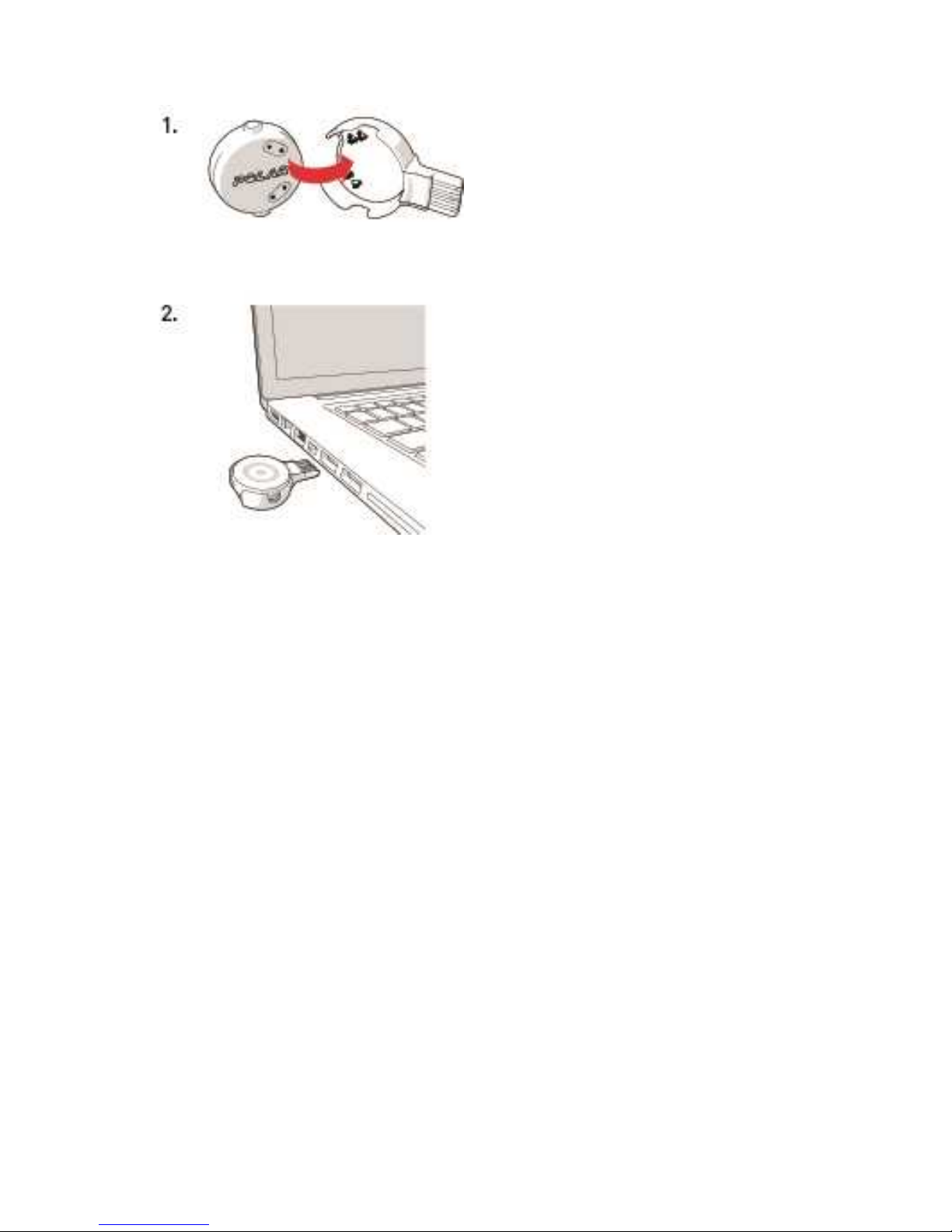
1. Place the sensor into the holder with the lens facing up so that the contacts on the sensor and holder
meet (picture 1).
2. Plug the holder into a computer USB port or USB power wall outlet (picture 2).
Page 19
19
CARING FOR YOUR OH1
Like any electronic device, the Polar OH1 should be kept clean and treated with care. The instructions below
will help you fulfill the guarantee obligations, keep the device in peak condition and avoid any issues in
charging or syncing. Do not machine wash the armband.
KEEP YOUR OH1 CLEAN
Wipe any dirt or mud off OH1 after each training session with a soft towel.
Keep the OH1 and OH1 holder charging contacts and USB connector clean to ensure smooth charging and
syncing.
Before charging, make sure there’s no moisture, hair, dust or dirt on the OH1 or OH1 holder charging
contacts and USB connector. Gently wipe off any dirt and blow off any dust. You can use a toothpick if needed.
Do not use any sharp tools for cleaning to avoid scratching.
Keep the OH1 conatcts clean to protect it from oxidation and other possible damage caused by dirt and salt
water (e.g. sweat or sea water). Th Do not charge the OH1 when the charging contacts are wet or sweaty.
Page 20

20
TAKE GOOD CARE OF THE OPTICAL HEART RATE SENSOR
Keep the optical sensor area scratch-free. Scratches and dirt will reduce the performance of optical heart
rate measurement.
STORING
Keep your training device in a cool and dry place. Do not keep it in a damp environment, in non-breathable
material (a plastic bag or a sports bag) nor with conductive material (a wet towel). Do not expose the training
device to direct sunlight for extended periods, such as by leaving it in a car. It is recommended to store the
training device partially or fully charged. The battery slowly loses its charge when it is stored. If you are going
to store the training device for several months, it is recommended to recharge it after a few months. This will
prolong the battery lifetime.
Do not leave the device in extreme cold (below –10 °C/14 °F) and heat (above 50 °C/120 °F) or under direct
sunlight.
SERVICE
During the two-year guarantee/warranty period we recommend that you have service done by an authorized
Polar Service Center only. The warranty does not cover damage or consequential damage caused by service
not authorized by Polar Electro. For further information, see Limited International Polar Guarantee.
For contact information and all Polar Service Center addresses, visit www.polar.com/support and countryspecific websites.
PRECAUTIONS
The Polar OH1 is designed to measure heart rate. No other use is intended or implied.
The training device should not be used for obtaining environmental measurements that require professional
or industrial precision.
We recommend that once in a while you wash the device and the armband to avoid any skin problems from a
dirty armband.
INTERFERENCE DURING TRAINING
Electromagnetic Interference and Training Equipment
Disturbance may occur near electrical devices. Also WLAN base stations may cause interference when
training with the training device. To avoid erratic reading or misbehavior, move away from possible sources of
disturbance.
Page 21

21
Training equipment with electronic or electrical components such as LED displays, motors and electrical
brakes may cause interfering stray signals.
If the training device still does not work with the training equipment, it may be electrically too noisy for
wireless heart rate measurement. For furtherinformation, www.polar.com/support.
MINIMIZING RISKS WHEN TRAINING
Training may include some risk. Before beginning a regular training program, it is recommended that you
answer the following questions concerning your health status. If you answer yes to any of these questions, we
recommend that you consult a doctor before starting any training program.
• Have you been physically inactive for the past 5 years?
• Do you have high blood pressure or high blood cholesterol?
• Are you taking any blood pressure or heart medication?
• Do you have a history of breathing problems?
• Do you have symptoms of any disease?
• Are you recovering from a serious illness or medical treatment?
• Do you use a pacemaker or other implanted electronic device?
• Do you smoke?
• Are you pregnant?
Note that in addition to training intensity, medications for heart conditions, blood pressure, psychological
conditions, asthma, breathing, etc., as well as some energy drinks, alcohol, and nicotine may also affect
heart rate.
It is important to be sensitive to your body’s responses during training. If you feel unexpected pain or
excessive fatigue when training, it is recommended that you stop the training or continue at a lighter intensity.
Note! If you are using a pacemaker, you can use Polar products. In theory interference to pacemaker caused
by Polar products should not be possible. In practice no reports exist to suggest anyone ever having
experienced interference. We cannot however issue an official guarantee on our products’ suitability withall
pacemakers or other implanted devices due to the variety of devices available. If you have any doubts, or if
you experience any unusual sensations while using Polar products, please consult your physician or contact
the implanted electronic device manufacturer to determine safety in your case.
If you are allergic to any substance that comes into contact with your skin or if you suspect an allergic
reaction due to using the product, check the listed materials in Technical Specifications. To avoid any skin
reaction to the heart rate sensor, wear it over a shirt, but moisten the shirt well under the electrodes to
ensure flawless operation.
Page 22
22
Your safety is important to us. The shape of the Polar stride sensor Bluetooth® Smart is designed to
minimize the possibility of if getting caught in something. In any case, be careful when running with the stride
sensor in brushwood, for example.
The combined impact of moisture and intense abrasion may cause color to come off the heart rate
sensor’s surface, possibly staining clothes. If you use perfume, suntan/sunscreen lotion or insect repellent
on your skin, you must ensure that it does not come into contact with the training device or the heart rate
sensor. Please avoid clothing with colors that might transfer onto the training device (especially training
devices withlight/bright colors) when worn together.
This product is not a toy. Do not allow children or pets to play with this product. This product contains
small components that can be a choking hazard.
TECHNICAL SPECIFICATION
OH1
Operating time: Up to 10 hours of continuous training
Battery type: 45 mAh Li-pol rechargeable battery
Operating temperature: -10 °C to +50 °C / 14 °F to 122 °F
OH1 sensor materials: ABS, ABS+GF, PMMA, SUS 316 (Stainless
steel)
Armband materials: SUS 304 (Stainless steel) PA coated, Polyes-
ter elastane (inside: chloroprene rubber),
Polyester
Holder materials: PC, SUS 301 (Stainless steel) Gold plated
Water resistance: 30 m (suitable for bathing and swimming)
Uses wireless Bluetooth® technology.
POLAR FLOWSYNC SOFTWARE
To use FlowSync software you need a computer with Microsoft Windows or Mac OS X operating system with
an internet connectionand a free USB port.
FlowSync is compatible withthe following operating systems:
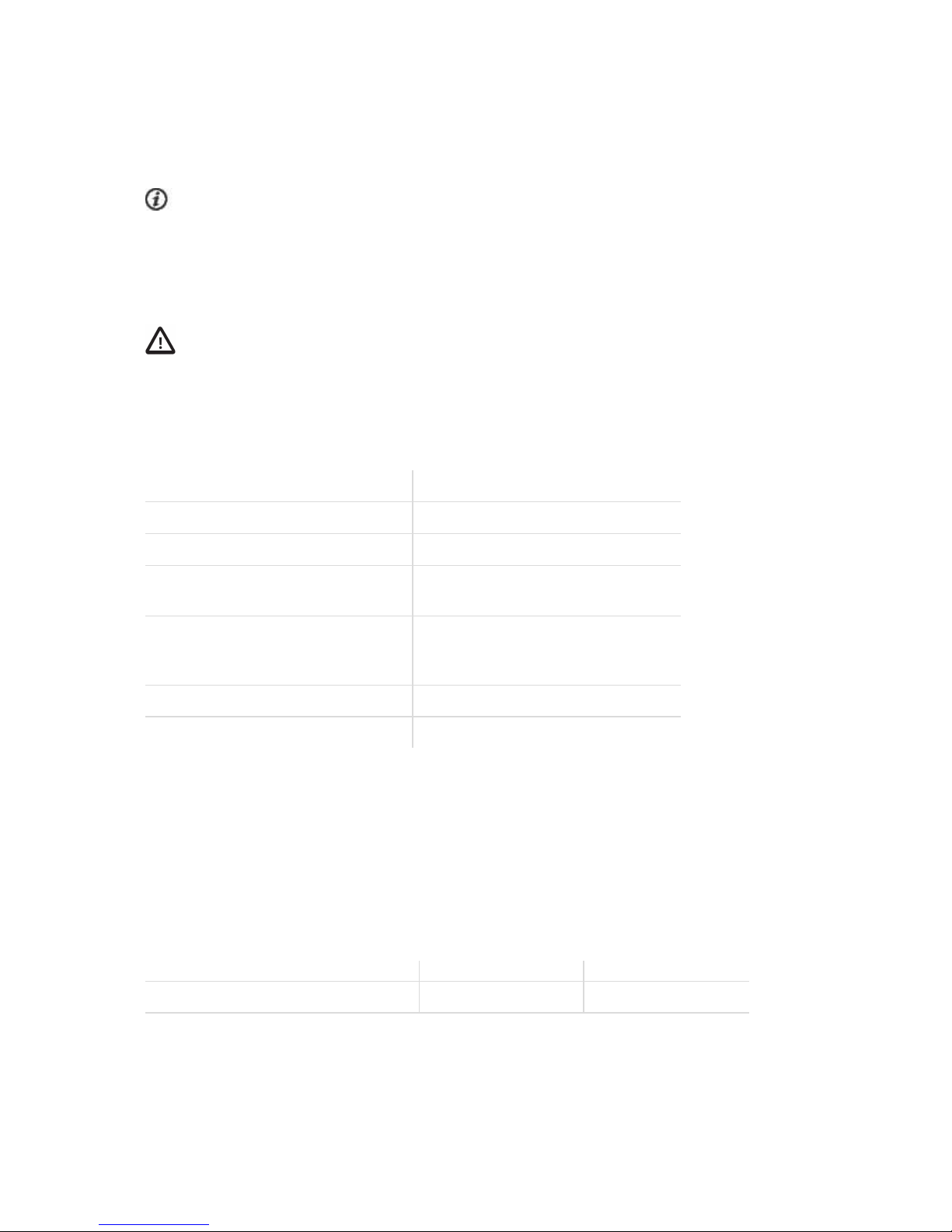
Computer operating system 32-bit 64-bit
Windows XP X
Page 23

23
Computer operating system 32-bit 64-bit
Windows 7 X X
Windows 8 X X
Windows 8.1 X X
Windows 10 X X
Mac OS X 10.6 X X
Mac OS X 10.7 X
Mac OS X 10.8 X
Mac OS X 10.9 X
Mac OS X 10.10 X
Mac OS X 10.11 X
Mac OS X 10.12 X
POLAR FLOW MOBILE APPLICATION COMPATIBILITY
• iPhone 4S or later
• Android 4.3 or later, with Smart Notifications Android 5.0 or later
WATER RESISTANCE OF POLAR PRODUCTS
In the watch industry, water resistance is generally indicated as meters, which means the static water
pressure of that depth. Polar uses this same indication system. Water resistance of Polar products is tested
according to International Standard ISO 22810 or IEC60529. Every Polar device that has waterresistance
indication is tested before the delivery to stand water pressure.
Polar products are divided into four different categories according to their water resistance. Check the back
of your Polar product for the water resistance category, and compare it to the chart below. Please note that
these definitions do not necessarily apply to products of other manufacturers.
When performing any underwater activity, the dynamic pressure generated by moving in water is greater than
the static pressure. This means that moving the product underwater subjects it to a greater pressure than if
the product were stationary.
Marking on the back
of the product
Wash
splashes,
sweat, raindrops etc.
Bathing and
swimming
Skin diving
with snorkel
(no air tanks)
SCUBA
diving
(with air
tanks)
Water resistant characteristics
Water resistant IPX7 OK - - - Do not wash with a pressure
washer.
Page 24

24
Protected against splashes,
raindrops etc.
Reference standard:
IEC60529.
Water resistant IPX8 OK OK - - Minimum for bathing and
swimming.
Reference standard:
IEC60529.
Water resistant
Water resistant
20/30/50 meters
Suitable for swim-
ming
OK OK - - Minimum for bathing and
swimming.
Reference standard:
ISO22810.
Water resistant 100
meters
OK OK OK - For frequent use in water but
not SCUBA diving.
Reference standard:
ISO22810.
LIMITED INTERNATIONAL POLAR GUARANTEE
• This guarantee does not affect the consumer’s statutory rights under applicable national or state laws
in force, or the consumer’s rights against the dealer arising from theirsales/purchase contract.
• This limited Polar international guarantee is issued by Polar Electro Inc. for consumers who have pur-
chased this product in the USA or Canada. This limited Polar international guarantee is issued by Polar
Electro Oy for consumers who have purchased this product in other countries.
• Polar Electro Oy/Polar Electro Inc. guarantees the original consumer/purchaser of this device that the
product will be free from defects in material or workmanship for two (2) years from the date of purchase.
• The receipt of the original purchase is your proof of purchase!
• The guarantee does not cover the battery, normal wear and tear, damage due to misuse, abuse, acci-
dents or non-compliance with the precautions; improper maintenance, commercial use, cracked, broken
or scratched cases/displays, armband, elastic strap and Polar apparel.
• The guarantee does not cover any damage/s, losses, costs or expenses, direct, indirect or incidental,
consequential or special, arising out of, or related to the product.
• Items purchased second hand are not covered by the two (2) year warranty, unless otherwise stipulated
by local law.
• During the guarantee period, the product will be either repaired or replaced at any of the authorized
Polar Service Centers regardless of the country of purchase.
Guarantee with respect to any product will be limited to countries where the product has been initially
marketed.
Page 25
25
This product is compliant with Directives 2014/53/EU and 2011/65/EU. The relevant Declaration of
Conformity is available at www.polar.com/support
The relevant Declaration of Conformity is available at www.polar.com/en/regulatory_information.
This crossed out wheeled bin marking shows that Polar products are electronic devices and are in the scope
of Directive 2012/19/EU of the European Parliament and of the Council on waste electrical and electronic
equipment (WEEE) and batteries and accumulators used in products are in the scope of Directive
2006/66/EC of the European Parliament and of the Council of 6 September 2006 on batteries and
accumulators and waste batteries and accumulators. These products and batteries/accumulators inside
Polar products should thus be disposed of separately in EU countries. Polar encourages you to minimize
possible effects of waste on the environment and human health also outside the European Union by following
local waste disposal regulations and, where possible, utilize separate collection of electronic devices for
products, and battery and accumulator collection for batteries and accumulators.
Manufactured by Polar Electro Oy, Professorintie 5, FI-90440 KEMPELE, Tel +358 8 5202 100, Fax +358 8
5202 300, www.polar.com.
Polar Electro Oy is a ISO 9001:2008 certified company.
© 2017 Polar Electro Oy, FI-90440 KEMPELE, Finland. All rights reserved. No part of this manual may be
used or reproduced in any form or by any means without prior written permission of Polar Electro Oy.
The names and logos in this user manual or in the package of this product are trademarks of Polar Electro
Oy. The names and logos marked with a ® symbol in this user manual or in the package of this product are
registered trademarks of Polar Electro Oy. Windows is a registered trademark of Microsoft Corporation and
Mac OS is a registered trademark of Apple Inc. The Bluetooth® word mark and logos are registered
trademarks owned by Bluetooth SIG, Inc. and any use of such marks by Polar Electro Oy is under license.
DISCLAIMER
• The material in this manual is for informational purposes only. The products it describes are subject to
change without prior notice, due to the manufacturer’s continuous development program.
Page 26

26
• Polar Electro Inc./Polar Electro Oy makes no representations or warranties with respect to this
manual or with respect to the products described herein.
• Polar Electro Inc./Polar Electro Oy shall not be liable for any damages, losses, costs or expenses, dir-
ect, indirect or incidental, consequential or special, arising out of, or related to the use of this material or
the products described herein.
1.0 EN 04/2017
Page 27
POLAR OH1
English
This product is compliant with Directives 2014/53/
EU and 2011/65/EU. The relevant Declaration of
Conformity is available at
www.polar.com/en/regulatory_information.
Deutsch
Dieses Produkt erfüllt die Anforderungen der
Richtlinien 2014/53/EU und 2011/65/EU. Die
zugehörige Konformitätserklärung ist erhältlich
unter
www.polar.com/de/rechtliche_informationen.
Français
Ce produit est conforme aux dispositions
des directives 2014/53/UE et 2011/65/UE. La
Déclaration de Conformité correspondante est
disponible à l’adresse
www.polar.com/fr/informations_reglementaires.
Ελληνικά
Το πρϊόν αυτο είναι συμβατό με την
Ευρωπαϊκή Οδηγία
2014/53/EU και 2011/65/
EU. Η σχετική Δήλωση συμμόρφωσηϚ είναι
διαιθέσιμη στην ηλετρονική διεύθυνση
www.polar.com/el/regulatory_information.
Nederlands
Dit product voldoet aan de richtlijnen 2014/53/
EU en 2011/65/EU. De desbetreff ende
conformiteitsverklaring is beschikbaar op
www.polar.com/nl/wettelijk_verplichte_informatie.
Italiano
Questo prodotto è conforme alle Direttive
2014/53/UE e 2011/65/UE. La Dichiarazione di
conformità relativa è disponibile sul sito
www.polar.com/it/informazioni_normative.
Español
Este producto cumple con las Directivas 2014/53/
UE y 2011/65/UE. La Declaración de conformidad
correspondiente se puede encontrar en
www.polar.com/es/informacion_reguladora.
Português
Este produto está conforme às Directivas
2014/53/EU e 2011/65/EU. A respectiva
Declaração de Conformidade está disponível em
www.polar.com/pt/informacao_regulatoria.
Suomi
Tämä tuote on direktiivien 2014/53/EU ja
2011/65/EU mukainen. Asiaankuuluva
Vaatimustenmukaisuusvakuutus on luettavissa
osoitteessa
www.polar.com//lainsaadannolliset_tiedot.
Svenska
Denna produkt uppfyller direktiven 2014/53/
EU och 2011/65/EU. Tillämplig försäkran om
överensstämmelse nns tillgänglig
på www.polar.com/sv/gallande_bestammelser.
Dansk
Dette produkt er i overensstemmelse med
direktiv 2014/53/EU og 2011/65/EU. Den relevante
Erklæring om overensstemmelse ndes på
adressen
www.polar.com/da/oplysninger_om_regulering.
Norsk
Dette produktet er i samsvar med EU-direktivene
2014/53/EU og 2011/65/EU. Den relevante
samsvarserklæringen nner du på
www.polar.com/nb/informasjon_om_forskrifter.
1.0 GEN
USA
Polar Electro Oy has not approved any changes
or modications to this device by the user. Any
changes or modi cations could void the user’s
authority to operate the equipment.
FCC regulatory information
This device complies with part 15 of the FCC
rules. Operation is subject to the following two
conditions: (1) This device may not cause harmful
interference, and (2) This device must accept any
interference received, including interference that
may cause undesired operation.
Note: This equipment has been tested and
found to comply with the limits for a Class
B digital device, pursuant to part 15 of the
FCC Rules. These limits are designed to
provide reasonable protection against harmful
interference in a residential installation. This
equipment generates, uses and can radiate radio
frequency energy and, if not installed and used
in accordance with the instructions, may cause
harmful interference to radio communications.
However, there is no guarantee that interference
will not occur in a particular installation.
If this equipment does cause harmful
interference to radio or television reception,
which can be determined by turning the
equipment off and on, the user is encouraged to
try to correct the interference by one or more of
the following measures:
1. Reorient or relocate the receiving antenna.
2. Increase the separation between the
equipment and receiver.
3. Connect the equipment into an outlet on a
circuit different from that to which the receiver is
connected.
4. Consult the dealer or an experienced radio/ TV
technician for help.
This product emits radio frequency energy, but
the radiated output power of this device is far
below the FCC radio frequency exposure limits.
This equipment complies with FCC RF radiation
exposure limits forth for an uncontrolled
environment. Nevertheless, the device should
be used in such a manner that the potential for
human contact with the antenna during normal
operation is minimized.
CANADA
Polar Electro Oy has not approved any changes
or modications to this device by the user. Any
changes or modications could void the user’s
authority to operate the equipment.
Polar Electro Oy n’a approué aucune modication
apportée à l’appareil par l’utilisateur, quelle
qu’en soit la nature. Tout changement ou toute
modication peuvent annuler le droit d’utilisation
de l’appareil par l’utilisateur.
Innovation, Science and Economic Development
Canada (ISED) regulatory information
This device complies with Innovation, Science
and Economic Development Canada licenceexempt RSS standard(s). Operation is subject to
the following two conditions: (1) this device may
not cause interference, and (2) this device must
accept any interference, including interference
that may cause undesired operation
of the device.
This device complies with the safety requirements
for RF exposure in accordance with RSS-102
Issue 5 for portable use conditions.
Avis de conformité à la réglementation
d’Innovation, Sciences et Développement
économique Canada (ISDE)
Le présent appareil est conforme aux CNR
d’Innovation, Sciences et Développement
économique Canada applicables aux appareils
radio exempts de licence. L’exploitation est
autorisée aux deux conditions suivantes : (1)
l’appareil ne doit pas produire de brouillage,
et (2) l’utilisateur de l’appareil doit accepter
tout brouillage radioélectrique subi,
même si le brouillage est susceptible d’en
compromettre le fonctionnement.
Cet appareil est conforme aux exigences de
sécurité concernant l’exposition aux RF selon
la norme RSS-102, 5ème édition, pour des
conditions d’utilisation portable.
Class B digital device notice
This Class B digital apparatus complies with
Canadian RSS-Gen and RSS-247.
Cet appareil numérique de la classe B est
conforme à la norme CNR-Gen et CNR-247 du
Canada.
CAN ICES-3(B)/NMB-3(B)
Compliance statement
Model number: 2L
The AC/DC mains adapter shall meet the
clause 2.5 of the standard for limited power
supply
Page 28
Este equipamento opera em caráter secundário, isto
é, não tem direito a proteção contra interferência
prejudicial, mesmo de estações do mesmo tipo, e
não pode causar interferência a sistemas operando
em caráter primário.
modelo: 2L XXXXX-XX-XXXXX
The main body of this radio
equipment labeled the regulatory
compliance mark which had
referred to grant the Test or Type
Certication in accordance with
Radio Law.
CMIIT ID XXXXYZNNNN
CCXXxxYYyyyZzW
警語
低功率電波輻性電機管理辦法第十二條經型式認證合格之低功
率射頻電機,非經許可,公司,商號或使用者均不得擅自變更頻
率,加大功率或變更原設計之特性及功能。
第十四條低功率射頻電機之使用不得影響飛航影響安全及干擾
合法通信,經發現有干擾現象時,應立即停用,並改善至無干擾時
方得繼續使用。
前項合法通信,指一電信法規定作業之無線電通信低功率射頻電
機需忍受合法通信或工業,科學及醫療用電波輻射性電機設備
之干擾。
CCC-ABCDEF
R
Page 29

Page 30

Page 31

 Loading...