

Page 1
Polar F5™
Fitness Heart Rate Monitor
User Manual
ENG
1.
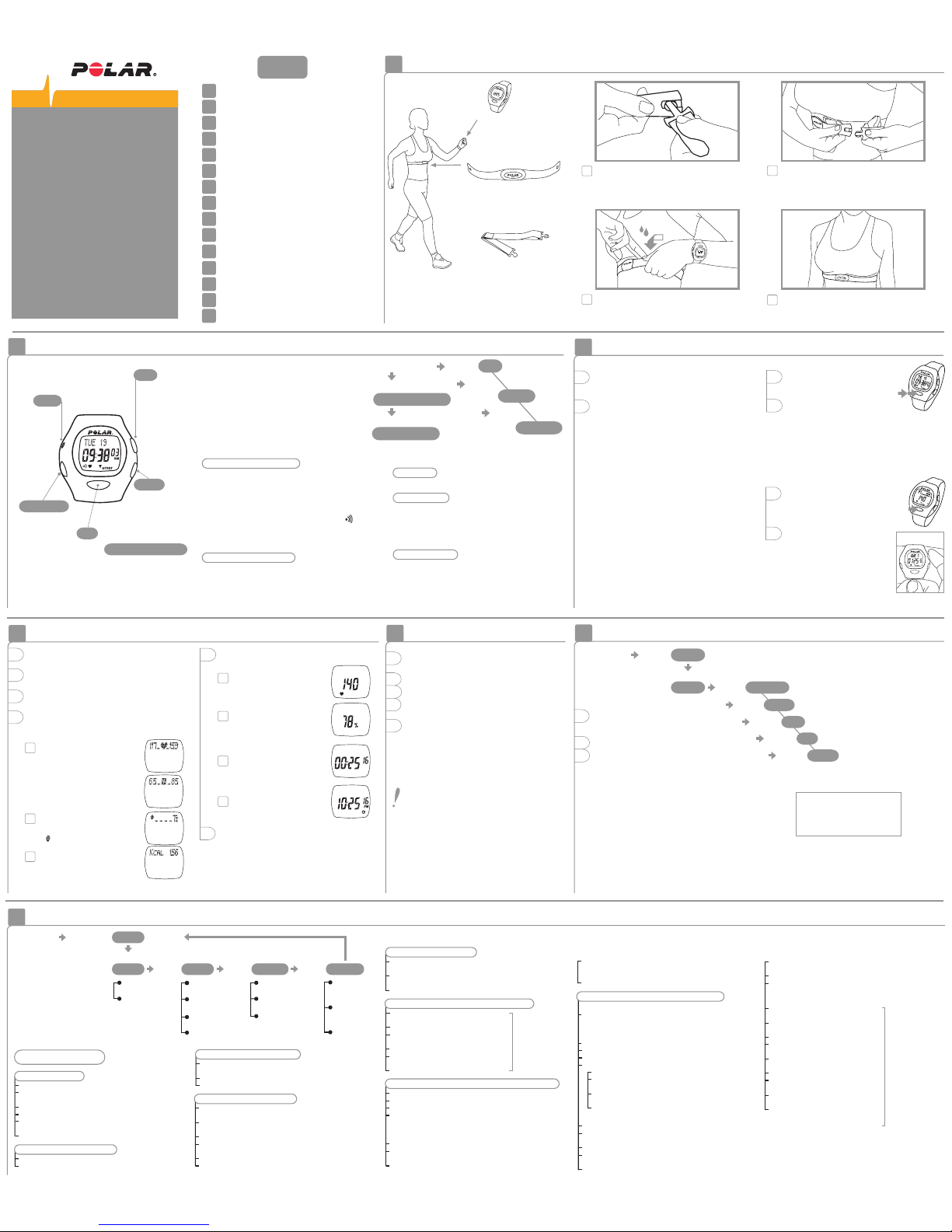
How to Put Your Heart Rate Monitor On
The elastic strap
holds the transmitter in
the correct position.
The Polar F5™
wrist unit
displays your heart rate
during exercise.
The transmitter
detects your heart rate
continuously and transmits
it to the wrist unit.
How to Put Your Heart Rate Monitor On
1.
How to Start and Stop
3.
After Exercising
4.
8.
Target Heart Rate Zone
Settings
7.
5.
Functions During Exercise
6.
How to Recall File Stored in Memory
10.
Resetting
9.
Self Walk Test by Polar and UKK Institute
12.
Technical Specifications
13.
Limited Polar International Guarantee
14.
Disclaimer
11.
Care and Maintenance
2.
Functions and Modes of Polar F5
Contents
How to Recall File Stored in Memory
6.
Reset
If reset,
settings will
return to the
default values.
Walk Test mode
• Based on 1.24 miles/2 km brisk walk
• Measures cardiorespiratory fitness
How to Start and Stop
How to Set up Your New Polar F5 Unit
1. Press any of the four buttons twice to activate
the wrist unit. Unit is displayed. LBS/INCH is
flashing.
2. Once awakened, the wrist unit will guide
you through the necessary settings.
Scroll up or down to set the right values.
Press OK to lock your selection.
Set the following:
Measuring units – lbs/inch or kg/cm
12h or 24h time mode
Time of day
Date
Weight
Height
Sex
Birthday
After setting your birthday, your target heart
rate zone based on your age is automatically
calculated.
After the settings are complete, the wrist unit
automatically goes to the Time of day display.
You can cancel the setting by pressing and
holding OK, but you can not start measuring
the heart rate before you have completed
the settings.
How to Start
1. In the Time of day display press OK.
Your heart rate appears
in a few seconds.
2. Press OK again. The stopwatch
starts running and you can
start exercising. The exercise
data will only be stored if you have
turned the stopwatch on.
3.
How to Stop
1. Press OK to stop the stopwatch.
QUIT and paused stopwatch
appear. Measurement is paused.
Exercise is no longer recorded.
2. Press Up or Down button to
exit the Exercise mode.
The wrist unit shows the Time of
day display within 5 minutes if
you forget to quit the heart rate
measurement mode when you
stopped the stopwatch and
removed the transmitter from
your chest.
Press
twice
Press
once
BMI Interpretation
< 18.5 Underweight
18.5 - 24.9 Normal weight
25.0 - 29.9 Overweight
≥ 30.0 Obesity
Reference: World Health Organization. Obesity: preventing and managing the
global epidemic. Report of a WHO Consultation on Obesity. Geneva: World
Health Organization, 1998.
The BMI value does not distinguish between muscular
and fat tissue. Thus, a weight-lifter may have a BMI
value which indicates obesity although the person only
has large muscles and little fat tissue.
Time of day
display
Press Up
Press OK
FILE
Press Up
KCAL
Press Up
BMI
Press Up
W INDEX
Press Up
IN ZONE
Press Up
AVERAGE HR
1. Press Signal/Light to turn the light on.
2. Press and hold Signal/Light to turn the zone
alarm sound on or off.
3. Check the time of day by bringing the wrist
unit up to the Polar logo on the transmitter.
4. Scroll up to select what values you want to
view in the upper row of the display during
exercise.
Functions During Exercise
4.
5. Scroll down to select what you want to view
in the lower row of the display.
3. Exercise time
6. You can pause the stopwatch by pressing OK.
Repressing OK will restart the stopwatch.
After restart you will see heart rate in the lower
row.
2. Heart rate as a % of your
maximum heart rate.
4. Time of day
1. While in the Time of
day display mode press
Up or Down until FILE is displayed.
2. Press OK.
3. Scroll up or down to recall the exercise
information:
EXE. TIME Total exercise time
AVERAGE HR Average heart rate of the exercise
IN ZONE Time spent in target zone
KCAL Calories expended during the exercise
BMI Body mass index
W INDEX WalkIndex, the result of the walking test
The most convenient way to determine whether a
person is overweight is to use the Body Mass Index,
BMI. The body mass index does not describe the
amount of fat tissue but merely serves as a means for
comparing adult persons in terms of overweight or
underweight.
EXE. TIME
Functions and Modes of Polar F5
2.
1. Heart rate in beats
per minute.
How to operate the set buttons
• To move forward or back, use Up or
Down button.
• To choose the value to begin adjusting,
press OK. It will begin blinking.
• Press Up or Down button to adjust the
value (The digits run faster if you press
and hold the button).
• Wherever you are in the settings, you can
return to the Time of day display by pressing
and holding OK.
File mode
• Shows the data recorded during the exercise
Setting mode
• Set different values
- unit measurement; weight, height, time
- user data
- target heart rate limits
- watch functions; alarm, time, date
1. Carefully wash the transmitter with a mild soap
and water solution.
2. Rinse it with pure water.
3. Dry the transmitter carefully with a soft towel.
4. Keep the wrist unit clean and wipe off any
moisture.
5. Store the heart rate monitor in a clean and dry
place. Dirt impairs the elasticity and functioning
of the transmitter. Sweat and moisture can keep
the electrodes wet and the transmitter activated,
which shortens battery life.
The combined impact of moisture and intense
abrasion may cause a black color, which might
stain light-colored clothes especially, to come
off the transmitter's surface.
After Exercising
5.
1. Heart rate in the target zone
is displayed
a) as absolute heart rate
or
b) as a % of maximum heart rate
according to your
lower row selection.
Up
Moves to the
following
mode or
increases the
selected value.
Signal/Light
Alarm on or off.
Backlight on.
OK
Starts measuring
heart rate. Starts and
stops the stopwatch.
Enters the displayed
mode. Locks in your
selection.
Down
Returns to the
previous mode
or decreases
the selected
value.
Heart Touch function
Bring the wrist unit up
to the Polar logo on
the transmitter during
exercise and you can
check the time of day.
Time of day display mode
• Starting point for all functions
• Shows date and time
Press and hold OK to return to the Time of day
display, wherever you are in the Settings or File
recalling cycle.
When the alarm is turned on, the symbol
appears on the Time of day display. When the alarm
comes on it will sound for one minute or you can
turn it off by pressing any of the four buttons.
Exercise recording mode
• In the Exercise mode you measure your heart
rate and record your exercise information in
a file
• You can view different information while the
heart rate monitor is measuring heart rate
Exercise recording
Time of day display
FILE
Press OK
Press OK
Press Up
Heart rate measuring
2. Fitness bullets
For every 10 minutes in TZ,
a appears.
3. Calorie expenditure
The calorie calculation starts
when your heart rate reaches
100 bpm.
Keep the wrist unit within 3 feet/ 1 meter of your
transmitter. Check that you are not near other
people with heart rate monitors or any source of
electromagnetic disturbance.
Lift the transmitter off your chest and
moisten the two grooved electrode areas
on the back.
3.
Check that the wet electrode areas are firmly
against your skin and the Polar logo is in
a central, upright position.
4.
Attach the transmitter to the elastic strap.
1.
Adjust the strap length to fit snugly and
comfortably. Secure the strap around your
chest, just below the chest muscles, and
buckle it.
2.
Press Up
Press Up
SETTING
WALK TEST
• Use Up or Down button to determine
the lower limit (the lower limit cannot be set
above the upper limit)
• Press OK, LIMITS SET is displayed
4. WATCH – time and day determination
Alarm
• Use Up button to advance from LIMITS display
to WATCH SET, press OK (or in the Time of day
display press and hold Signal/Light button ->
WATCH SET)
• ALARM ON or OFF blinks
• Select alarm on or off
• Press OK
• If you set the alarm on: set the alarm time
• In 12h time mode, select AM/PM, press OK
• Hours blink on the display, use Up or Down
button to select the correct hour, press OK
• Minutes blink on the display, use Up or Down
button to select the correct minutes
• Press OK
Time
• TIME is displayed
• Press Up or Down button to select 12 h or
24 h time display
• Press OK
• In 12 h time mode, select AM/PM with Up or
Down button, press OK
• TIME and blinking hours are displayed
1. To set the units
• Start from the Time of day display
• Press Up or Down until display changes
to SETTING
• Press OK, UNITS SET is displayed
• Press OK again
• Use Up or Down button to select lbs/inch
or kg/cm
• Press OK to accept
2. To set your personal data
• Press Up to advance, USER SET is displayed
• Press OK, WEIGHT is displayed
2.1. WEIGHT – setting weight
• With the number blinking, use Up or Down
button to set your weight
• Press OK to accept
• HEIGHT is displayed
2.2 HEIGHT – setting height
• Following weight acceptance, display
changes to HEIGHT
• With number blinking, use Up or Down button
to select feet
• Press OK to accept
• With number blinking, use Up or Down button
to select inches
• Press OK to accept
• SEX is displayed
Settings
7.
Settings step by step
Time of
day display
Press and
release Up
until
Press OK
SETTING
Alarm time
LBS/INCH
KG/CM
or
HR or HR%
HI LIMIT
LOW LIMIT
ALARM
OFF/ON
TIME
DATE
UNITS SET WATCH SETLIMITS SET
Press Up
USER SET
Press Up Press Up
WEIGHT
HEIGHT
SEX
BIRTHDAY
24h time display
sequence:
DAY –>MONTH –>YEAR
2.3. SEX – setting gender
• Following height acceptance, display changes
to SEX; MALE or FEMALE blinks
• Use Up or Down button to make your selection
and press OK
• BIRTHDAY/MONTH is displayed
2.4. BIRTHDAY – setting your date of birth
• Use Up or Down button to
select the correct month
• Press OK
• Use Up or Down button
to select the correct day
• Press OK
• Use Up or Down button to
select the correct year
• Press OK, USER SET is displayed
3. LIMITS – setting target heart rate zone limits
• USER SET is displayed
• Press Up to advance, LIMITS SET is displayed
• Press OK
• With HR or HR% blinking use Up or Down
to select whether you want to set the limits
in beats per minute or as a percentage of
a maximum heart rate
• Press OK to accept, HI LIMIT is displayed
• Use Up or Down button to determine
the upper limit
• Press OK, LO LIMIT is displayed
• Use Up or Down button to select correct time,
press OK
• TIME and blinking minutes are displayed
• Use Up or Down button to select correct time,
press OK
Date
• MONTH and blinking month
are displayed
• Use Up or Down button
to select the correct month
• Press OK
• DAY and the blinking day
of the month are displayed
• Use Up or Down button
to select the correct day
• Press OK
• YEAR and the blinking number
are displayed
• Use Up or Down button
to select the correct year
• Press OK, press and hold OK
to return to the
Time of day display
24h time display
sequence:
DAY –>MONTH –>YEAR
Press Up
17926108.00 ENG A
15.
Precautions
Page 2
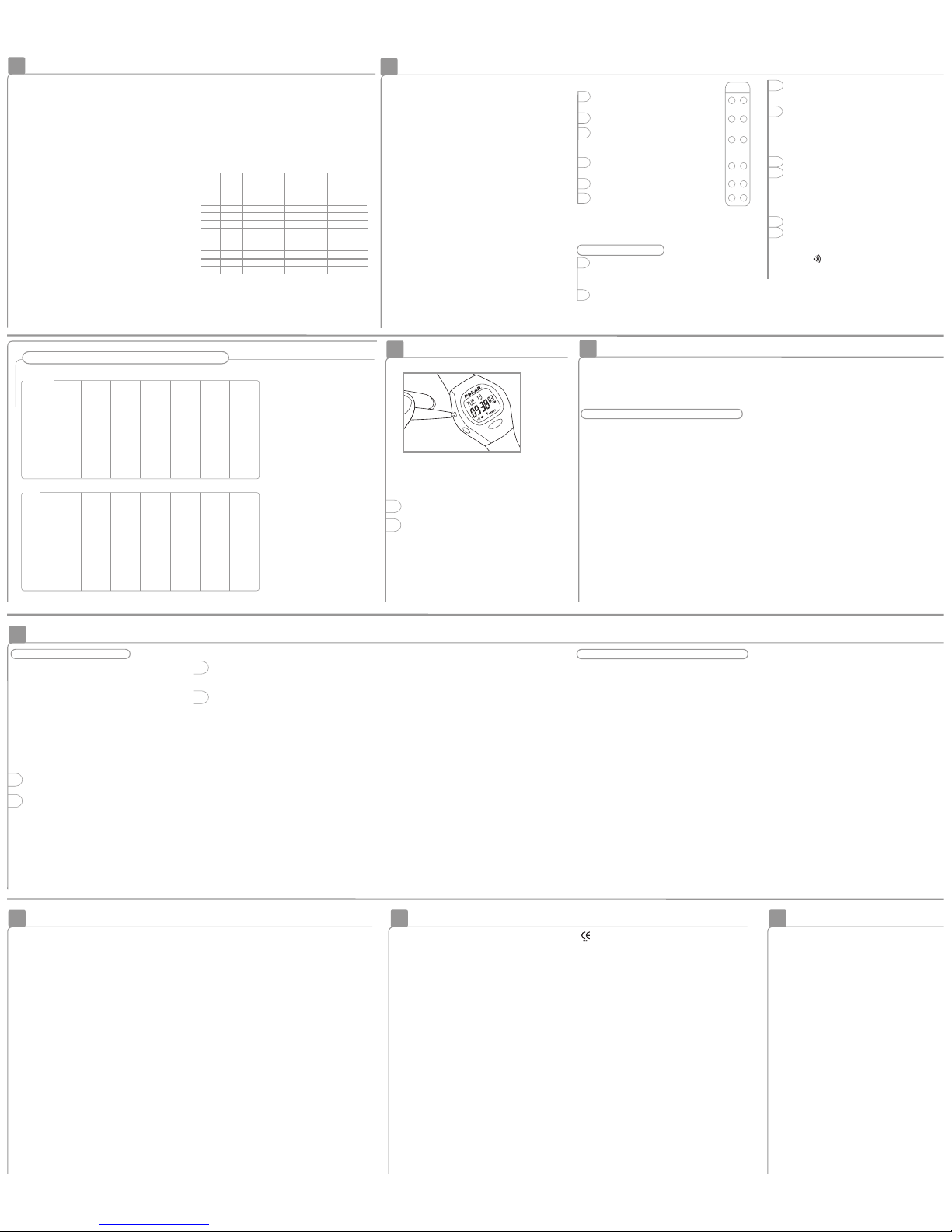
Target Heart Rate Zone
8.
Resetting
10.
Resetting clears the settings which return
to the default values.
If there are no reactions to any buttons,
reset the wrist unit.
1. Press Reset button with a pen tip.
Display becomes full of digits.
2. Press any of the four buttons once.
If you don’t press any button after resetting,
within one minute the wrist unit goes to the
battery saving mode.
Wake up by pressing any of the buttons twice.
Your target heart rate zone is a range between
the lower and upper heart rate limits expressed as
beats per minute (bpm) or as percentages of your
maximum heart rate (HR
max
). HR
max
= The highest
number of heartbeats per minute during maximum
physical exertion.
To find your maximum heart rate, you can use the
age formula, HR
max
= 220 - age. For a more accurate
measurement of your HR
max
visit your doctor or
exercise physiologist for an exercise stress test.
You can set your target limits in beats per minute
or as percentages of your maximum heart rate.
The percentage limits can not be set if you have
not set your birthday. When you set your birthday,
the wrist unit automatically calculates the limits,
which are 65-85% of your estimated maximum
heart rate.
Target Heart Rate Intensity Zones
When your heart beats at 60-70% of your HR
max
,
you are in the Light Intensity Zone. This intensity
still feels fairly easy for most people. It helps in
weight control and improves endurance and
cardiovascular (aerobic) fitness.
Push on to 70-80% of your HR
max
, and you are in
the Moderate Intensity Zone. This is especially good
for people who are exercising regularly. Exercising
in this zone is particularly effective for improving
cardiovascular fitness.
At 80-90% of your HR
max
, you have moved into the
Hard Intensity Zone. You will find yourself breathing
heavily, having tired muscles and feeling fatigued.
This intensity is recommended occasionally for fit
people.
The table below contains target heart rate intensity
zones in beats per minute (bpm) estimated by age
in 5-year intervals. Calculate your own HR
max
, write
down your own target heart rate zones and select
the ones suitable for your exercise.
20 200 120-140 140-160 160-180
25 195 117-137 137-156 156-176
30 190 114-133 133-152 152-171
35 185 111-130 130-148 148-167
40 180 108-126 126-144 144-162
45 175 105-123 123-140 140-158
50 170 102-119 119-136 136-153
55 165 99-116 116-132 132-149
60 160 96-112 112-128 128-144
65 155 93-109 109-124 124-140
Hard
Intensity
80-90% of HR
max
Light
Intensity
60-70% of HR
max
Moderate
Intensity
70-80% of HR
max
HR
max
(220–age)
Age
In exercise, different heart rate zones produce
different health and fitness benefits. The heart rate
zones that suit you depend on your goal and your
basic physical condition. Remember to alternate
between intensity zones to get variation in your
exercise!
Self Walk Test by Polar and UKK Institute
TM
9.
If you answered ‘no’ to all of the above questions,
you can perform the Self Walk Test safely.
If you answered one or more questions with ‘yes’,
consult your doctor before carrying out the test.
1. On the Time of day display, scroll up or down
until WALKTEST is displayed. Press OK.
The wrist unit guides you through the necessary
settings unless you have done them earlier.
2. Press OK to start the 5 minute warm up. At the
end of the warm up you will hear an alarm sound.
In case you already warmed up, you can skip the
warm up by pressing OK.
Self Walk Test by Polar and UKK Institute is based
on 1.24 miles/2 km brisk walk on a hard, even
surface. The test especially measures
cardiorespiratory fitness. The result of the test
WalkIndex™ is based on age, body mass index,
walking time and your heart rate at the end of the
walk. It tells how fit you are compared to others
your age and gender. WalkIndex corresponds to
VO
2max
(ml/kg/min).
The test has been designed for healthy persons
between the ages of 20 and 65. It does not give
dependable results for people outside this age
range or for those who are highly fit.
The Self Walk Test has been designed to be
performed after a supervised test in order to get
the most reliable result. Anyone who participates
in this test does so at his or her own risk.
Check your suitability to be tested by
answering the following questions:
Carrying out the Test
3. When START is displayed after the warm up,
start the test by pressing OK. The heart rate
appears on the display in few seconds.
4. Walk exactly 1.24 miles/2 km on a hard, even
surface (road or track) as fast as you can and
at an even pace. If your heart rate decreases
under the lower limit, WALK FASTER appears
and the wrist unit begins beeping. Increase the
walking speed.
5. Press OK at the end of the test.
6. Your WalkIndex, its interpretation and the date
are displayed. Fitness category compares your
WalkIndex with respect to others in the same
age group (20 – 65 years). The latest WalkIndex
is automatically updated to the file after the
test.
7. Press OK to return to the Time of day display.
8. Stretch out after the test.
If you do not want to have the sound signal on
during the test, press and hold Signal/Light
button. disappears from the display.
You can interrupt the test anytime during the
test by pressing OK.
1. Do you have a heart defect or suffer
from heart disease?
2. Are your joints sore, inflamed or swollen?
3. Do you experience tightness, burning
sensations or pressure in your chest
when you walk?
4. Do you feel faint or dizzy when you
walk?
5. Do you feel excessively tired?
6. Are you on medication?
yes no
References:
• Shvartz E, Reibold RC: Aerobic fitness
norms for males and females aged 6
to 75 years: Aviat. Space Environ. Med.
61:3-11, 1990.
• Guide for The UKK Institute 2-km
Walking Test. UKK Institute 1993.
• Laukkanen R. Development and
evaluation of a 2-km walking test for
assessing maximal aerobic power of
adults in field conditions. Doctoral
thesis. Kuopio University Publications
D. Medical Sciences 23. Kuopio 1993.
Very poor - fair:
Increase exercise for health
and fitness benefits.
Average:
Maintain current exercise
habits to ensure good
health. Exercise increase is
recommended for fitness
improvement.
Good - exellent:
Maintain current exercise
habits for good health and
fitness.
WalkIndex and Fitness Categories (VO
2max
, ml/kg/min)
MEN
WOMEN
20-24
25-29
30-34
35-39
40-44
45-49
50-54
55-59
60-65
Age
(years)
< 27
< 26
< 25
< 24
< 22
< 21
< 19
< 18
< 16
Very poor
27-31
26-30
25-29
24-27
22-25
21-23
19-22
18-20
16-18
Poor
32-36
31-35
30-33
28-31
26-29
24-27
23-25
21-23
19-21
Fair
37-41
36-40
34-37
32-35
30-33
28-31
26-29
24-27
22-24
Average
42-46
41-44
38-42
36-40
34-37
32-35
30-32
28-30
25-27
Good
47-51
45-49
43-46
41-44
38-41
36-38
33-36
31-33
28-30
Very good
>51
>49
>46
>44
>41
>38
>36
>33
>30
Excellent
< 32
< 31
< 29
< 28
< 26
< 25
< 24
< 22
< 21
Very poor
32-37
31-35
29-34
28-32
26-31
25-29
24-27
22-26
21-24
Poor
38-43
36-42
35-40
33-38
32-35
30-34
28-32
27-30
25-28
Fair
44-50
43-48
41-45
39-43
36-41
35-39
33-36
31-34
29-32
Average
51-56
49-53
46-51
44-48
42-46
40-43
37-41
35-39
33-36
Good
57-62
54-59
52-56
49-54
47-51
44-48
42-46
40-43
37-40
Very good
>62
>59
>56
>54
>51
>48
>46
>43
>40
Excellent
Age
(years)
20-24
25-29
30-34
35-39
40-44
45-49
50-54
55-59
60-65
Manufactured by:
Polar Electro Oy
Professorintie 5
FIN-90440 KEMPELE
Tel. +358-8-520 2100
Fax +358-8-520 2300
www.polar.fi
www.polar.fi
Disclaimer
• The material in this manual is for informational
purposes only. The products it describes are
subject to change without prior notice, due to
the manufacturer’s continuous development
program.
• Polar Electro Inc. / Polar Electro Oy makes no
representations or warranties with respect to
this manual or with respect to the products
described herein. Polar Electro Inc. / Polar Electro
Oy shall not be liable for any damages, losses,
costs or expenses, direct, indirect or incidental,
consequential or special, arising out of, or
related to the use of this material or the products
described herein.
Your Polar heart rate monitor is a high-tech
instrument and should be treated with care. The
suggestions below will help you fulfill the guarantee
obligations and enjoy the product for many years
to come.
Taking Care of Your Polar Heart Rate Monitor
• Clean the transmitter regularly after use with a
mild soap and water solution. Dry it carefully
with a soft towel. Keep the wrist unit clean and
wipe off any moisture. Never use alcohol or any
abrasive material such as steel wool or cleaning
chemicals.
• Do not dry the transmitter in any other way than
with a towel. Mishandling may damage the
electrodes.
• Never store the transmitter wet. Sweat and
moisture can keep its electrodes wet and the
transmitter activated, which shortens the battery
life span.
• Store your heart rate monitor in a cool and dry
place. Do not store it in any kind of non-breathing
material, such as a plastic bag or a sports bag if
it is wet.
• Do not bend or stretch the transmitter. This may
damage the electrodes.
• Keep your heart rate monitor out of extreme
cold and heat. The operating temperature is
14 °F to 122 °F/ -10 °C to +50 °C.
• Do not expose the heart rate monitor to direct
sunlight forextended periods, such as by leaving
it in a car.
Service
During the two-year guarantee/warranty period
we recommend that you have service done by an
authorized Polar Service Centre. The warranty does
not cover damage or consequential damage caused
by service not authorized by Polar Electro.
Transmitter Battery
The estimated average battery life span of the
transmitter is 2500 hours of use. If you suspect that
the transmitter battery has run out, contact your
authorized Polar Service Centre for a replacement
transmitter. Polar recycles used transmitters.
Wrist Unit Battery
The estimated average battery life span of the wrist
unit is one year in normal use (including 2h/day, 7
days a week of exercising). Please note that excessive
use of the alarm signals drain the battery more
rapidly. Do not open the wrist unit yourself. To
ensure the water resistance properties and the use
of authorized components, the wrist unit battery
should be replaced by an authorized Polar Service
Centre only. At the same time a full periodic check
of the Polar heart rate monitor will be done.
Care and Maintenance
11.
Precautions
12.
12.1 Interference During Exercise
Electromagnetic Interference
Disturbances may occur near high voltage power
lines, traffic lights, overhead lines of electric railways,
electric bus lines or trams, televisions, car motors,
bike computers, some motor driven exercise
equipment, cellular phones, or when you walk
through electric security gates.
Exercise Equipment
Several pieces of exercise equipment with electronic
or electrical components such as LED displays,
motors, and electrical brakes may cause interfering
stray signals. To try to tackle these problems,
relocate the wrist unit as follows:
1. Remove the transmitter from your chest and use
the exercise equipment as you would normally.
2. Relocate the wrist unit until you find an area in,
which it displays no stray reading and 00 is
displayed. Interference is often worst right in
front of the display panel of the equipment,
while the left or right side of the display is
relatively free of disturbance.
3. Put the transmitter back on your chest and keep
the wrist unit in this interference-free area as
far as it is possible.
4. If the Polar heart rate monitor still does not work
with the exercise equipment, this piece of
equipment may be electrically too noisy for
wireless heart rate measurement.
Crosstalk
Polar F5 wrist unit picks up transmitter signals
within 3 feet/1 meter. Other signals, picked up
simultaneously from more than one transmitter,
can cause incorrect readouts.
Using The Polar Heart Rate Monitor in a Water
Environment
Your Polar heart rate monitor is water resistant to
100 feet/30 meters. To maintain the water resistance,
do not press the buttons of the wrist unit under
water.
12.2 Minimizing Possible Risks when Exercising
Exercise may include some risk, especially for those
who have been sedentary.
Before starting a regular exercise program you are
recommended to answer to the following questions
for health status checking. If the answer is yes to
any of the questions, we recommend that you
consult a doctor before starting an exercise
program.
• Have you been physically inactive for the past
5 years?
• Do you have high blood pressure?
• Do you have high blood cholesterol?
• Do you have symptoms of any disease?
• Are you taking any blood pressure or heart
medication?
• Do you have a history of breathing problems?
• Are you recovering from a serious illness or
medical treatment?
• Do you use a pacemaker or another implanted
electronic device?
• Do you smoke?
• Are you pregnant?
Note that in addition to activity intensity, heart, blood
pressure, psychical conditions, asthma, breathing etc.
medication as well as some energy drinks, alcohol
and nicotine can affect your heart rate.
It is important to be sensitive to your body’s
reactions during exercise. If you feel unexpected
pain or excessive fatigue when exercising, it is
recommended to stop the exercise or continue at
a lighter intensity.
Notice to persons with pacemakers, defibrillator
or other implanted electronic device. Persons who
have a pacemaker use the Polar Heart Rate Monitor
at their own risk. Before starting use, we always
recommend an exercise test under doctor’s
supervision. The test is to ensure the safety and
reliability of the simultaneous use of the pacemaker
and the heart rate monitor.
If you are allergic to any substance that comes into
contact with the skin or if you suspect an allergic
reaction due to using the product, check the
listed materials in the "Technical Specifications"
chapter. To avoid any skin reaction risk with the
transmitter, wear it over a shirt. However, moisten
the shirt well under the electrodes to ensure flawless
operation.
Limited Polar International Guarantee
• This limited Polar international guarantee is issued
by Polar Electro Inc. for the consumers who have
purchased this product in the USA or Canada.
This limited Polar international guarantee is issued
by Polar Electro Oy for the consumers who have
purchased this product in other countries.
• Polar Electro Inc. / Polar Electro Oy guarantees
to the original consumer/ purchaser of this product
that the product will be free from defects in
material or workmanship for two years from the
date of purchase.
• Please keep the receipt or International Guarantee
Card, which is your proof of purchase!
• The guarantee does not cover the battery, damage
due to misuse, abuse, accidents or non-compliance
with the precautions; improper maintenance,
commercial use, cracked or broken cases and
elastic strap.
• Guarantee does not cover any damage/s, losses,
costs or expenses, direct, indirect or incidential,
consequential or special, arising out of, or related
to the product. During the guarantee period the
product will be either repaired or replaced at an
authorized service center free of charge.
• This guarantee does not affect the consumer’s
statutory rights under applicable national or state
laws in force, or the consumer’s rights against
the dealer arising from their sales/ purchase
contract.
This CE marking shows compliance of this
product with Directive 93/42/EEC.
Copyright © 2004 Polar Electro Oy, 90440 KEMPELE,
Finland
All rights reserved. No part of this manual may be
used or reproduced in any form or by any means
without prior written permission of Polar Electro Oy.
The names and logos marked with a ™ symbol in
this user manual or in the package of this product
are trademarks of Polar Electro Oy. The names and
logos marked with a ® symbol in this user manual
or in the package of this product are registered
trademarks of Polar Electro Oy.
This product is protected by one or several of the
following patents:
FI 88223, DE 4215549, FR 92.06120, GB 2257523,
HK 113/1996, SG 9591671-4, US 5491474, FI 88972,
DE 9219139.8, FR 92.09150, GB 2258587,
HK 306/1996, SG 9592117-7, US 5486818, FI 96380,
US 5611346, EP 665947, DE 69414362, FI 68734,
DE 3439238, GB 2149514, HK 812/1989, US 4625733,
FI 100924, FI 100452, US 5840039, FI 4150,
DE 20008882.3, FR 0006504, FI 4069, US 6272365,
FR 9907823, GB 2339833, DE 29910633, FI 104463,
US 6183422, FI 4157, DE 20008883.1, FR 0006778,
WO 97/33512, GB 2326240.
Other patents pending.
Users measuring their heart rate in water may
experience interference for the following reasons:
• Pool water with high chlorine content and
seawater are very conductive. The electrodes of
a transmitter may short-circuit, which prevents
ECG signals from being detected by the transmitter.
• Jumping into water or strenuous muscle
movement during competitive swimming may
cause water resistance that shifts the transmitter
on the body to a location where it is not possible
to pick up ECG signals.
• The ECG signal strength depends on the
individual and also varies depending on an
individual’s tissue composition. The percentage
of people who have problems in heart rate
measuring is considerably higher in water than
in other environments.
All Polar heart rate monitors are designed to
indicate the level of physiological strain and
intensity in sports and exercise. No other use is
intended or implied. Heart rate is displayed as
number of heartbeats per minute (bpm).
Polar Transmitter
Battery type: Built-in Lithium Cell
Battery life: Average 2500 hours of use
Operating temperature: 14 °F to 122 °F /
-10 °C to +50 °C
Material: Polyurethane
Waterproof
Elastic Strap
Buckle material: Polyurethane
Fabric material: Nylon, polyester and natural rubber
including a small amount of latex
Wrist Unit
Battery type: CR 2032
Battery life: Average 1 year (2h/day, 7 days/week)
Operating temperature: 14 °F to 122 °F /
-10 °C to +50 °C
Water resistance: to 100 feet/30 meters, OK button
can be pressed in water
Wrist strap: Polyurethane
Wrist strap buckle: Polyoxymethylene
Back cover: Stainless steel complying with the EU
Directive 94/27/EU and its amendment 1999/C 205/05
on the release of nickel from products intended to
come into direct and prolonged contact with the skin.
Technical Specifications
Accuracy of heart rate measurement: ± 1% or ± 1
bpm, whichever larger, definition applies to steady
state conditions
Default settings
Time of day....................................12h
Alarm clock....................................OFF
Zone alarm ....................................On
Age ................................................0
Upper Limit ...................................160
Lower Limit ...................................80
Limit values
Chronometer.................................23 h 59 min 59 s
Heart rate limits ............................30 – 199 bpm
Total time ......................................99 h 59 min 59 s
Age range for Self Walk Test .......20 – 65
Time range for Self Walk Test......7 – 25 min
Birthday year range ......................1900 – 1999
13.
14. 15.
 Loading...