

Page 1
Polar CS500
™
Getting Started Guide
Page 2

Contents
1. GET TO KNOW YOUR CS500 CYCLING
COMPUTER .................................. 3
Button Functions and Menu Structure .... .. 6
2. SET UP YOUR CYCLING COMPUTER ........ 9
Enter Basic Settings .... .... .... .... .... .... 9
Measure Wheel Size........................ 10
Using an Accessory with Your CS500
Cycling Computer ........................... 12
3. INSTALL THE BIKE MOUNT...... .... .... .... 13
Attach the Cycling Computer to the Bike
Mount........................................ 14
4. TRAINING .................................... 15
Wear the Transmitter . .... .... .... .... .... .. 15
Start Training.. .... .... .... .... .... .... .... .. 16
5. AFTER TRAINING ............................ 17
6. IMPORTANT INFORMATION ................. 18
Caring of Your Product...................... 18
Precautions ................................. 20
Technical Specifications ... .... .... .... .... 22
Limited International Polar Guarantee ..... 25
ENGLISH
Page 3
1. GET TO KNOW YOUR CS500 CYCLING COMPUTER
This guide will help you get started with your new cycling computer.
The full user manual and the latest version of this getting started
guide can be downloaded at www.polar.fi/support.
Polar CS500 cycling computer provides you with all the data you
need to enhance your cycling performance and also saves the data
for later analysis. The new large display guarantees clear visibility of
training information in all conditions. Innovative button technology
allows easy and safe operation even in high speeds.
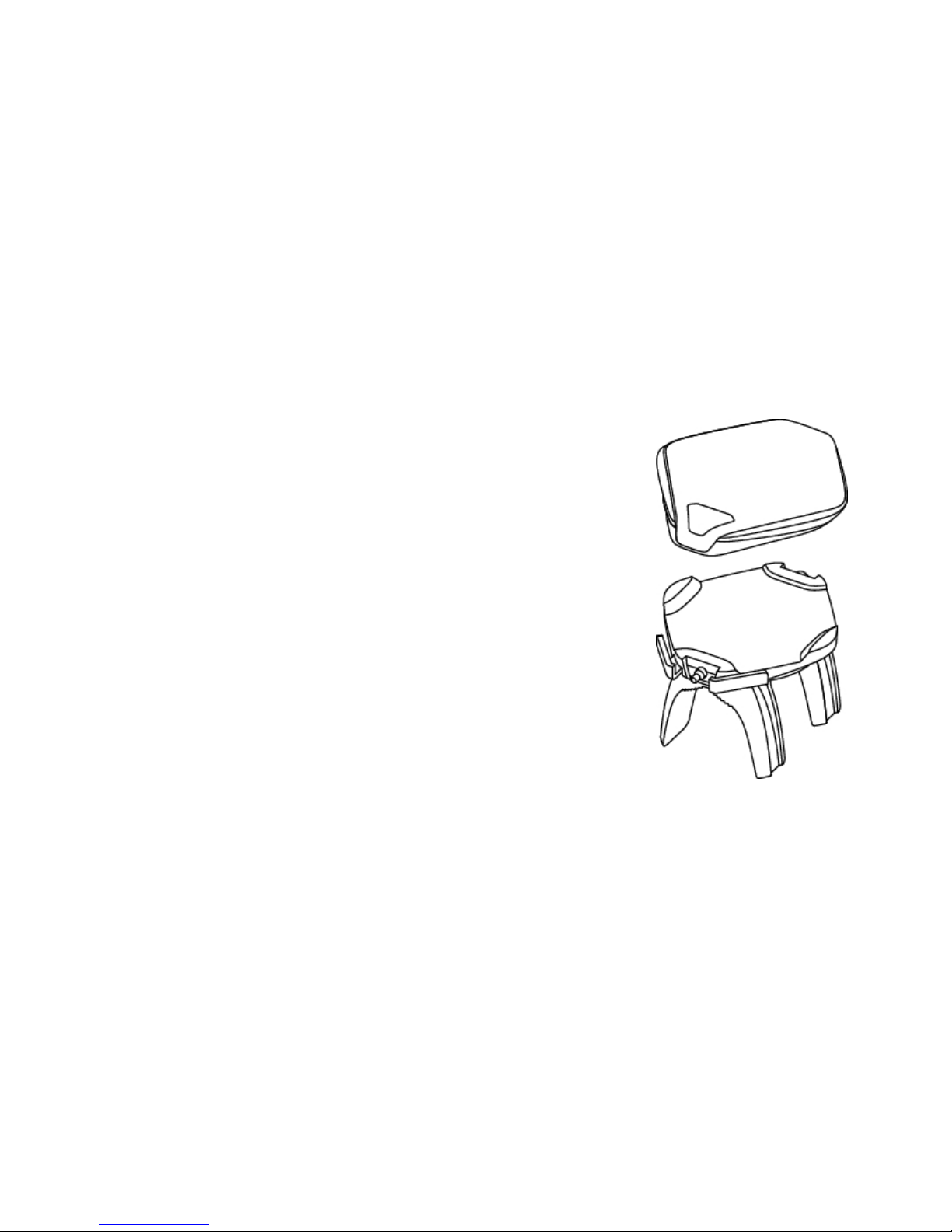
The cycling computer can be easily attached to the stem or
handlebars of your bike with new Polar Dual Lock Bike Mount. Bike
mount’s newly designed metal parts guarantee firm attachment for
the cycling computer.
ENGLISH
Get to Know Your CS500 Cycling Computer 3
Page 4
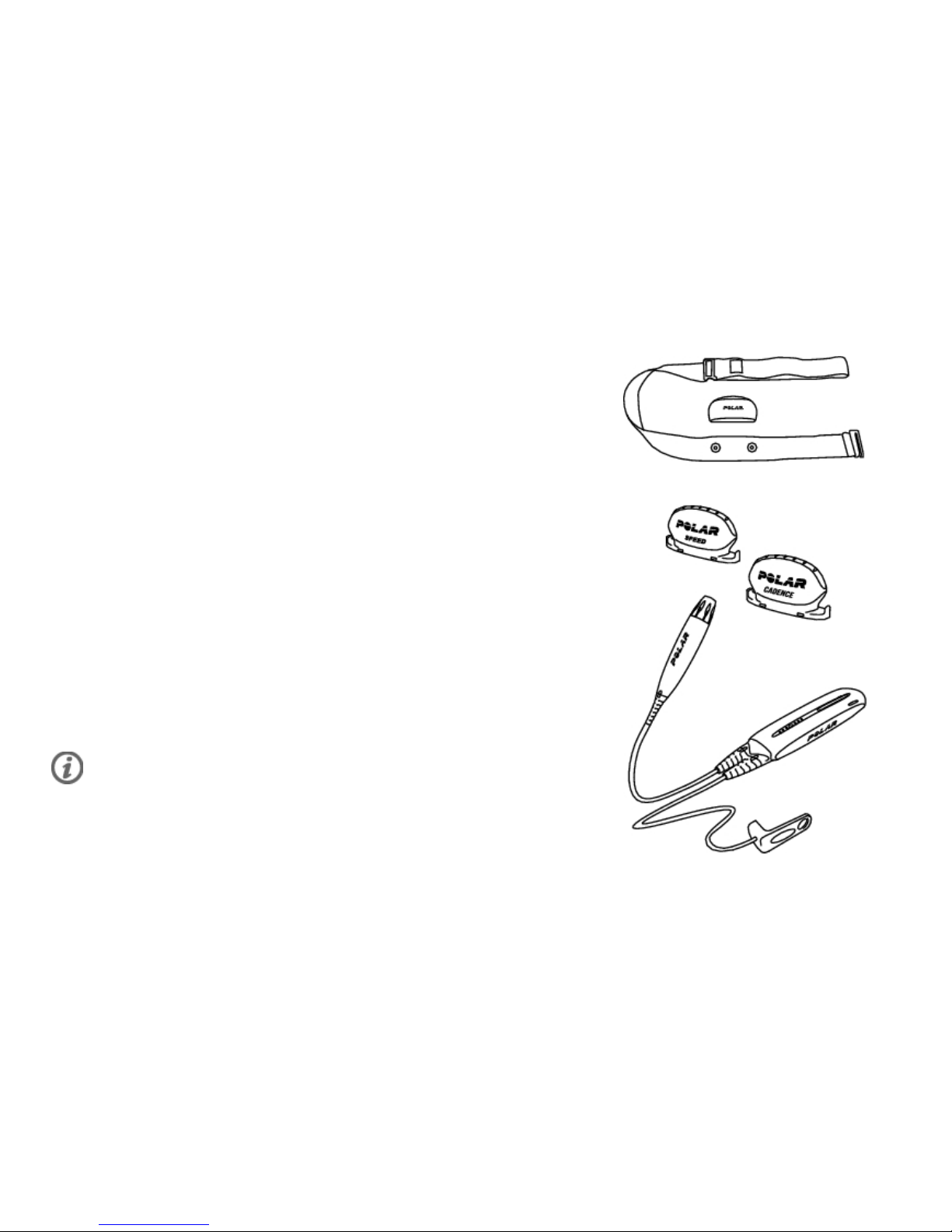
Comfortable Polar WearLink®+ transmitter W.I.N.D. sends the heart
rate signal to the cycling computer ecg-accurately. The transmitter
consists of a strap and a connector.
Polar CS speed sensor™ W.I.N.D. wirelessly measures distance and
your real-time, average and maximum speeds.
Optional Polar CS cadence sensor™ W.I.N.D. wirelessly measures
your real-time and average cadence, also known as pedaling rate, as
revolutions per minute.
Optional Polar Power Output Sensor™ W.I.N.D. wirelessly measures
power output expressed in watts and cadence.
Data from all compatible sensors and WearLink transmitter is sent
wirelessly to the cycling computer over Polar's 2.4GHz W.I.N.D.
technology. This eliminates interference during training.
ENGLISH
4 Get to Know Your CS500 Cycling Computer
Page 5
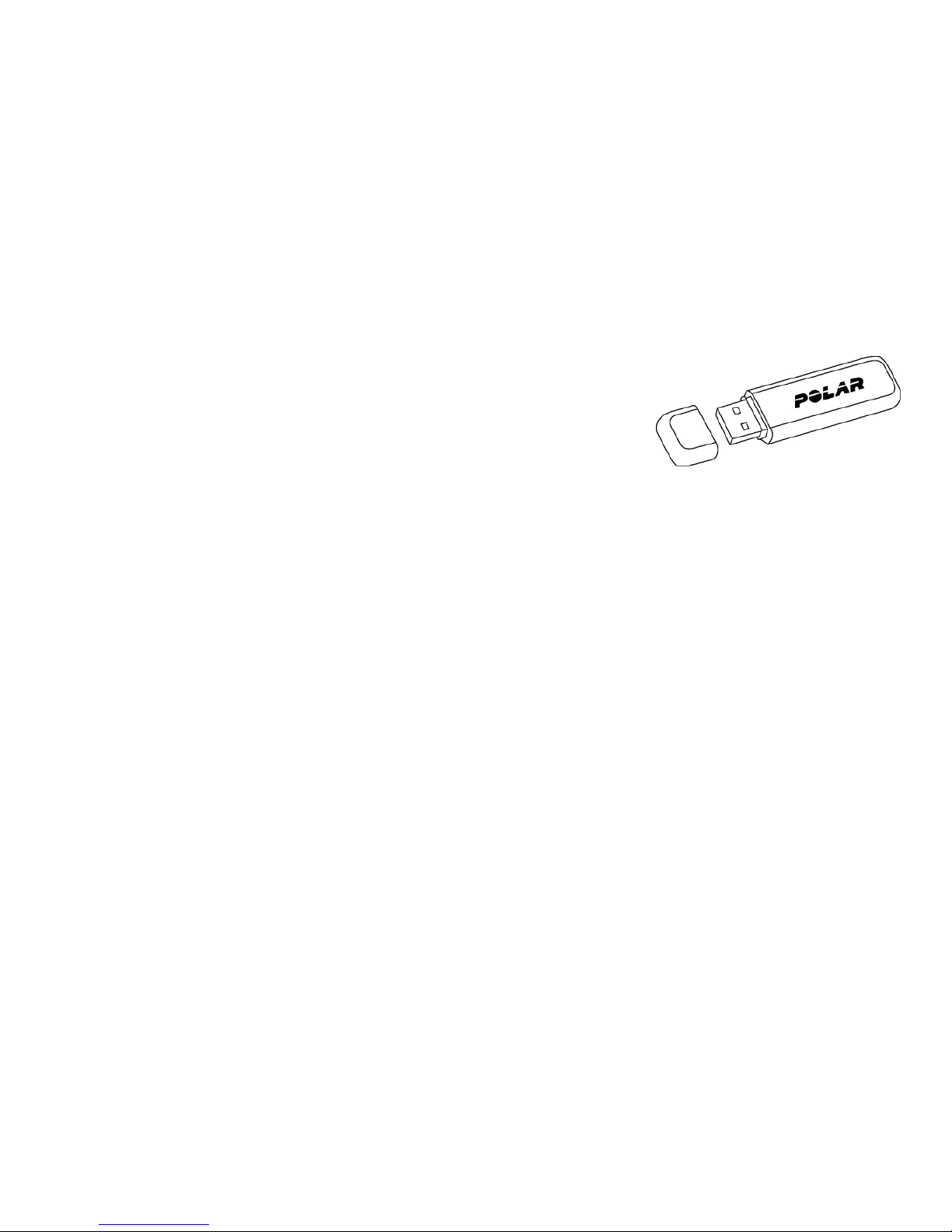
Transfer data between the cycling computer and
polarpersonaltrainer.com with Polar's new data communication
device, Polar DataLink. Just plug your DataLink into the USB port of
your computer, and it detects your cycling computer with W.I.N.D.
technology.
The polarpersonaltrainer.com web service is tailored to support your
training goals. There you can:
• store your training files for a long-term follow-up.
• analyze and follow your progress to the finest detail.
• analyze training intensity and needed recovery time using the
training load feature.
• optimize the way you train by using the Polar training programs.
• challenge your friends to a virtual sports competition and interact
with other sports enthusiasts.
ENGLISH
Get to Know Your CS500 Cycling Computer 5
Page 6
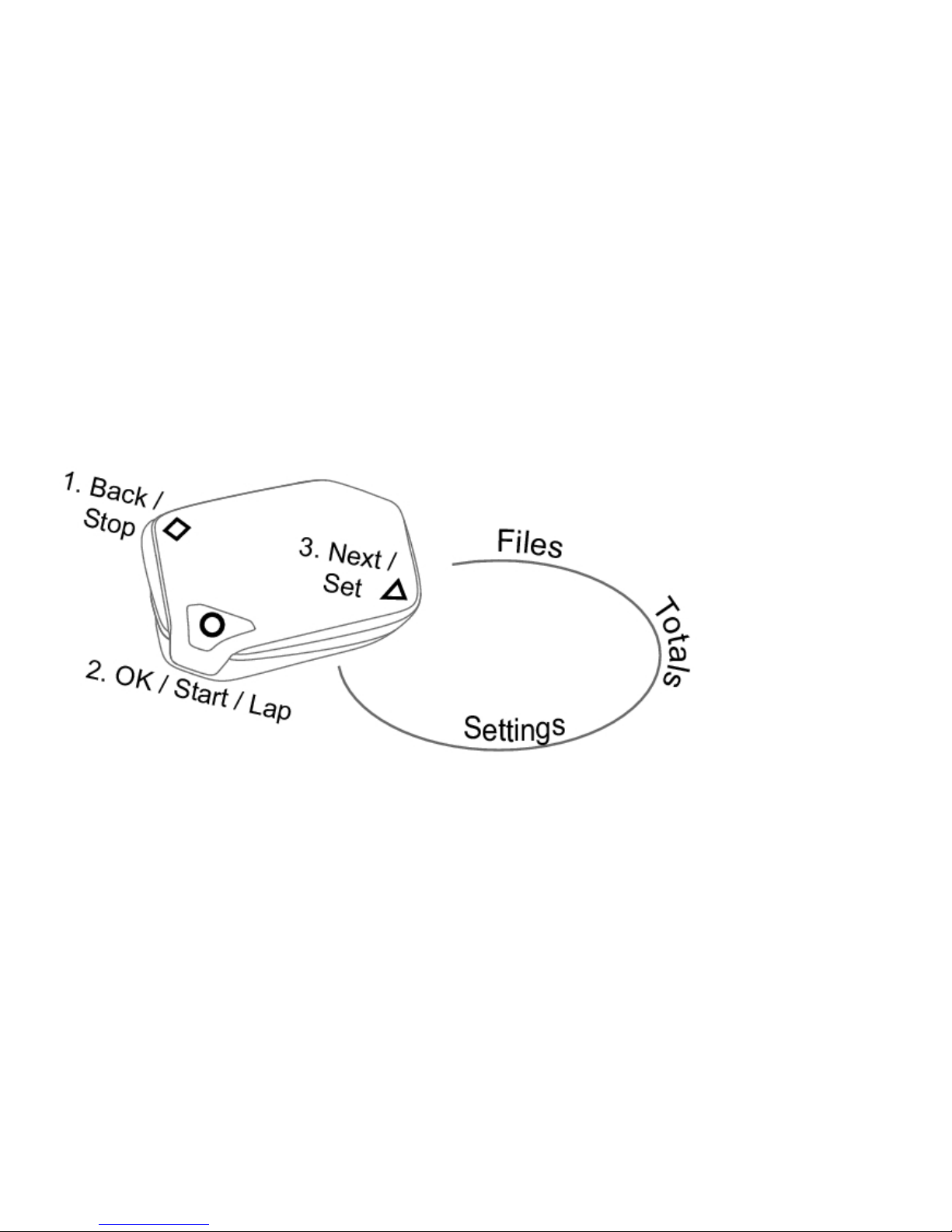
Button Functions and Menu Structure
The cycling computer has three easy-to-use buttons that have different functionalities depending on the
situation of use.
ENGLISH
6 Get to Know Your CS500 Cycling Computer
Page 7
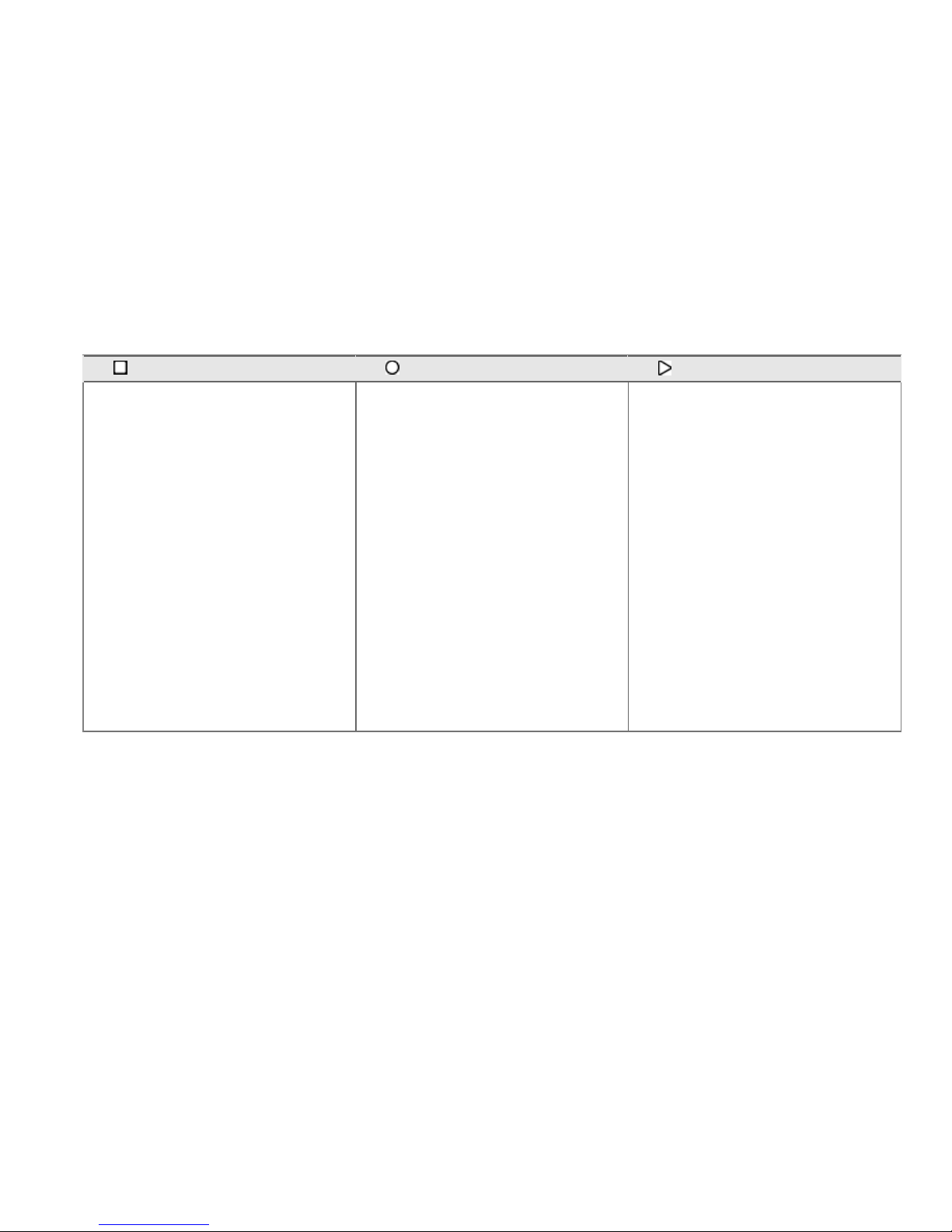
1. BACK / STOP 2. OK / START / LAP / RESET 3. NEXT / SET
• Exit the menu
• Return to the previous level
• Leave settings unchanged
• With a long press, return to
time mode from any mode
• With a long press in time
mode, go to the power save
mode
• With a long press in the power
save mode, activate the
cycling computer
• Cancel selections
• Confirm selections
• Start a training session
• Take a lap
• Reset total values
• Move to the next mode or
menu level
• Change the bike with a long
press in time mode
• Adjust a selected value
ENGLISH
Get to Know Your CS500 Cycling Computer 7
Page 8
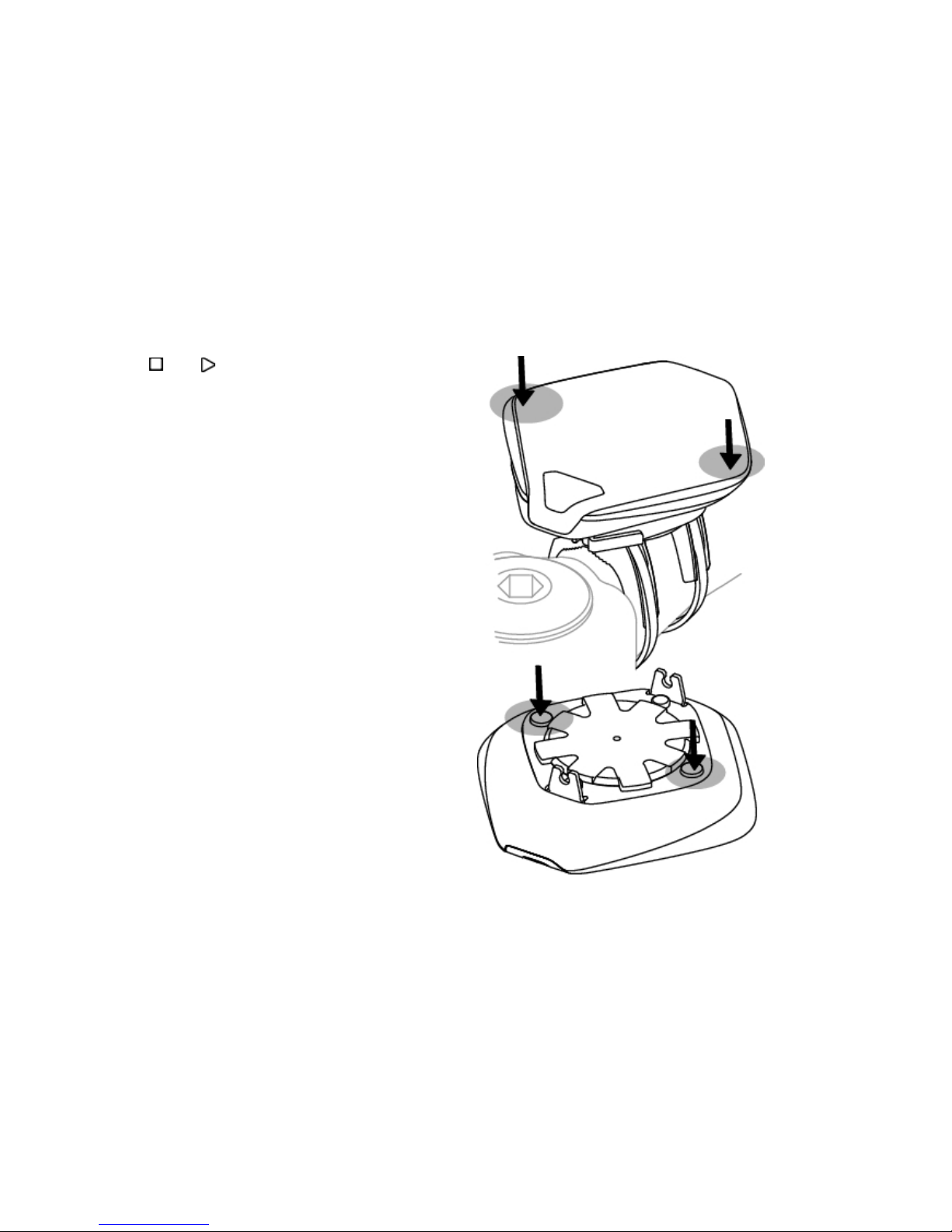
You can use and buttons in two ways:
1. When the cycling computer is mounted on a
stem or handlebar, gently press the left or right
side of the cycling computer.
2. When you hold the cycling computer in your
hand, use the trigger buttons on the backside
of the cycling computer.
ENGLISH
8 Get to Know Your CS500 Cycling Computer
Page 9

2. SET UP YOUR CYCLING COMPUTER
Enter Basic Settings
Before using your cycling computer for the first
time, customize the basic settings. Enter as
accurate data as possible to ensure correct
feedback based on your performance.
To adjust data, use SET and accept with OK. The
values scroll faster if you press and hold SET.
Activate your cycling computer with a
three-second button press. Basic SET is
displayed. Press START and adjust the following
data:
1. Time set: Select 12h or 24h. With 12h, select
AM or PM. Enter time.
2. Date set: Enter date.
3. Unit: Select metric (kg/cm) or imperial (lb/ft)
units.
4. Weight: Enter your weight.
5. Height: Enter your height. In LB/FT format, first
enter feet then inches.
6. Birthday: Enter your date of birth.
7. Sex: Select Male or Female.
8. Settings DONE is displayed. To change the
settings, press BACK until you return to the
desired setting. To accept the settings, press
OK and the cycling computer goes to time
mode.
For detailed information on the settings of your
cycling computer, consult the full user manual at
www.polar.fi/support.
ENGLISH
Set Up Your Cycling Computer 9
Page 10

Measure Wheel Size
Wheel size settings are a prerequisite for accurate
cycling information.
To set the wheel size, go to Settings > Bike SET.
Select Bike 1/ 2 / 3 > Wheel SET.
There are two ways to determine the wheel size of
your bike:
Method 1
Measure the wheel manually for the most accurate
result.
Use the valve to mark the point where the wheel
touches the ground. Draw a line on the ground to
mark the point. Move your bike forward on a flat
surface for one complete rotation. The tire should
be perpendicular to the ground. Draw another line
on the ground when the valve is at the starting
point to mark a full rotation. Measure the distance
between the two lines.
Subtract 4 mm from the distance to account for
your weight on the bike to get your wheel
circumference. Enter this value in the cycling
computer.
Method 2
Look for the diameter in inches or in ETRTO
printed on the wheel. Match it to the wheel size in
millimeters in the right column of the ETRTO
chart on the following page. Wheel sizes on the
chart are advisory as wheel size depends on the
wheel type and air pressure. Due to the variation
of the measurements, Polar cannot be held
responsible for their validity.
You can also check the wheel size from the
manufacturer.
ENGLISH
10 Set Up Your Cycling Computer
Page 11

ETRTO Wheel size diameter (inches) Wheel size setting (mm)
25-559 26 x 1.0 1884
23-571 650 x 23C 1909
35-559 26 x 1.50 1947
37-622 700 x 35C 1958
47-559 26 x 1.95 2022
20-622 700 x 20C 2051
52-559 26 x 2.0 2054
23-622 700 x 23C 2070
25-622 700 x 25C 2080
28-622 700 x 28 2101
32-622 700 x 32C 2126
42-622 700 x 40C 2189
47-622 700 x 47C 2220
ENGLISH
Set Up Your Cycling Computer 11
Page 12

Using an Accessory with Your CS500
Cycling Computer
Polar CS500 cycling computer is compatible with
the following Polar W.I.N.D sensors:
The Polar CS speed sensor W.I.N.D, Polar CS
cadence sensor W.I.N.D and the Polar Power
Output Sensor W.I.N.D.
If you purchase a new sensor, it has to be
activated in the cycling computer and introduced
to it. This is called teaching and takes only a few
seconds. Teaching ensures that your cycling
computer receives signals from your transmitter
and sensor only, enabling disturbance-free
exercise in a group. For more information, see
Using a New Accessory in the user manual.
Before entering an event, make sure to perform
the teaching process at home to prevent
interference due to the long-range data
transmission.
If you purchased the sensor and cycling computer
as a set, the sensor has already been taught to
work together with the cycling computer. In this
case, you will only need to activate the sensor in
your cycling computer. For more information see
Bike Settings in the user manual.
ENGLISH
12 Set Up Your Cycling Computer
Page 13
3. INSTALL THE BIKE MOUNT
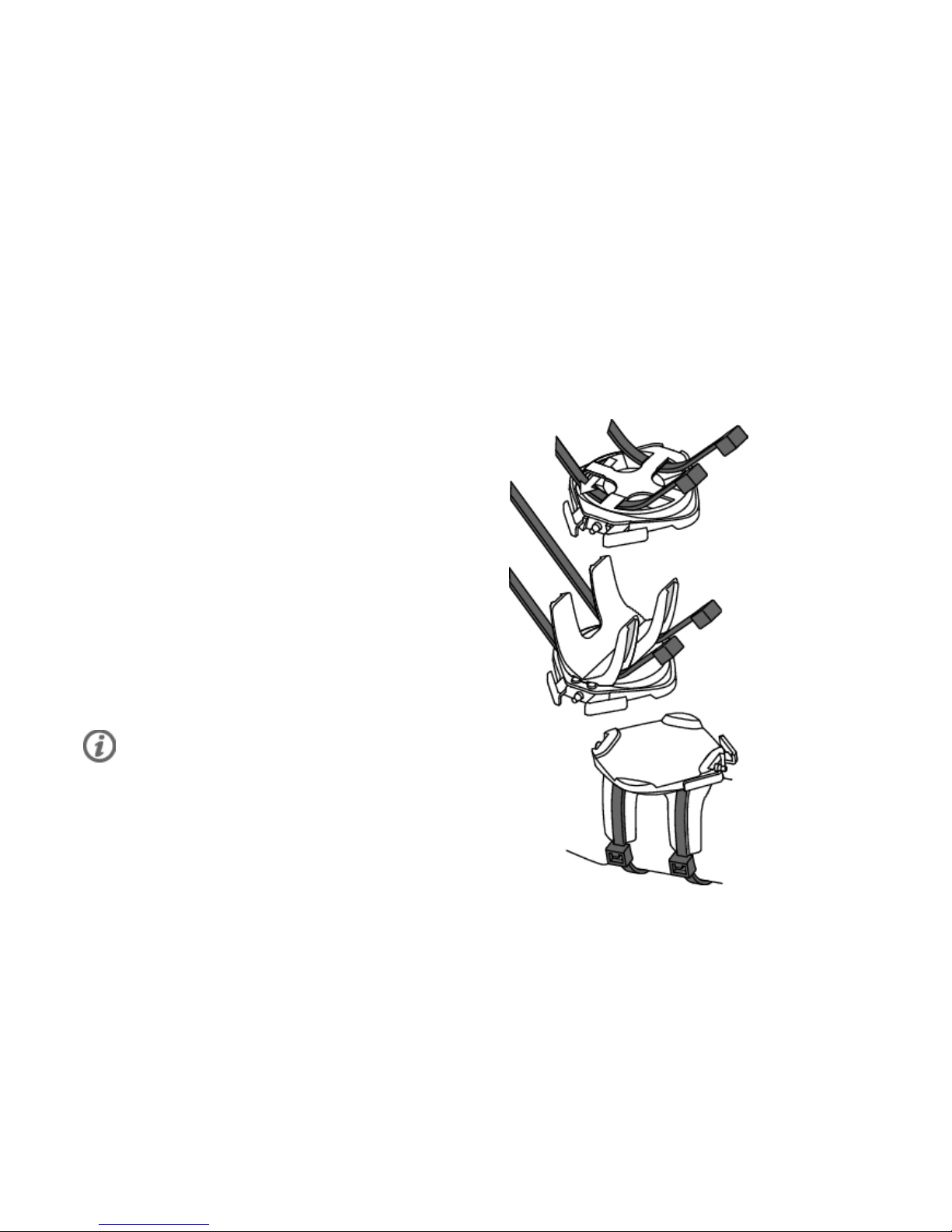
You can install the bike mount on the stem or leftor right-hand side of the handlebar.
1. Thread two cable ties through the passages of
the bike mount. If you install the bike mount on
the handlebar, thread the cable ties to the
opposite direction.
2. Insert the rubber part into the bike mount.
Make sure that it is firmly in its nest.
3. Place the rubber part and the bike mount on
the stem/handlebar and adjust the cable ties
around the stem/handlebar. Secure the bike
mount firmly. Cut off excess cable ties.
For a video tutorial, go to
http://www.polar.fi/en/support/video_tutorials.
ENGLISH
Install the Bike Mount 13
Page 14
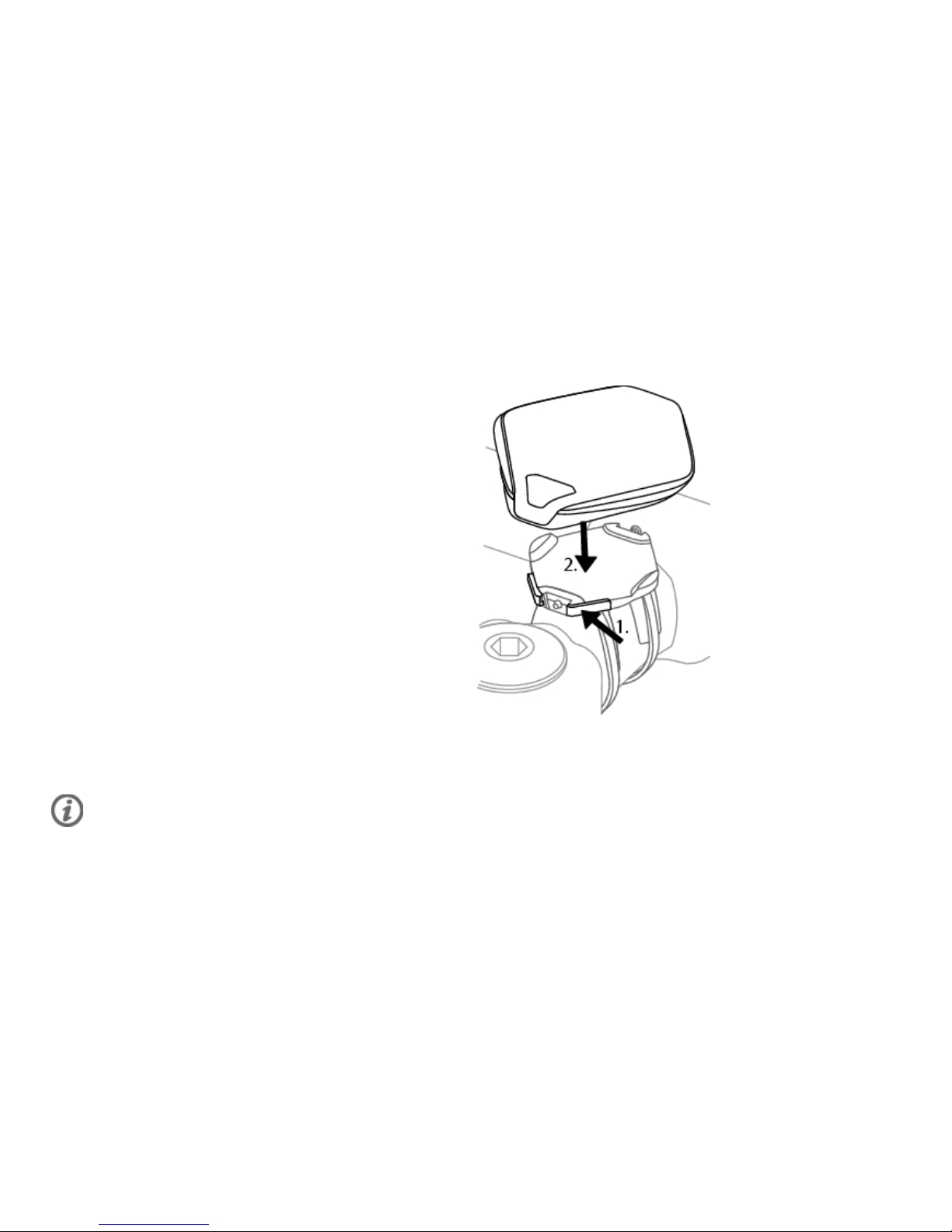
Attach the Cycling Computer to the Bike Mount
1. Push the button and position the cycling
computer onto the bike mount.
2. Release the button to fasten the cycling
computer to the bike mount. Check that the
cycling computer is fastened properly before
you start cycling.
To detach the cycling computer from the bike mount, push the button and lift the cycling computer off
the bike mount.
For a video tutorial, go to http://www.polar.fi/en/support/video_tutorials.
ENGLISH
14 Install the Bike Mount
Page 15
4. TRAINING
Wear the Transmitter
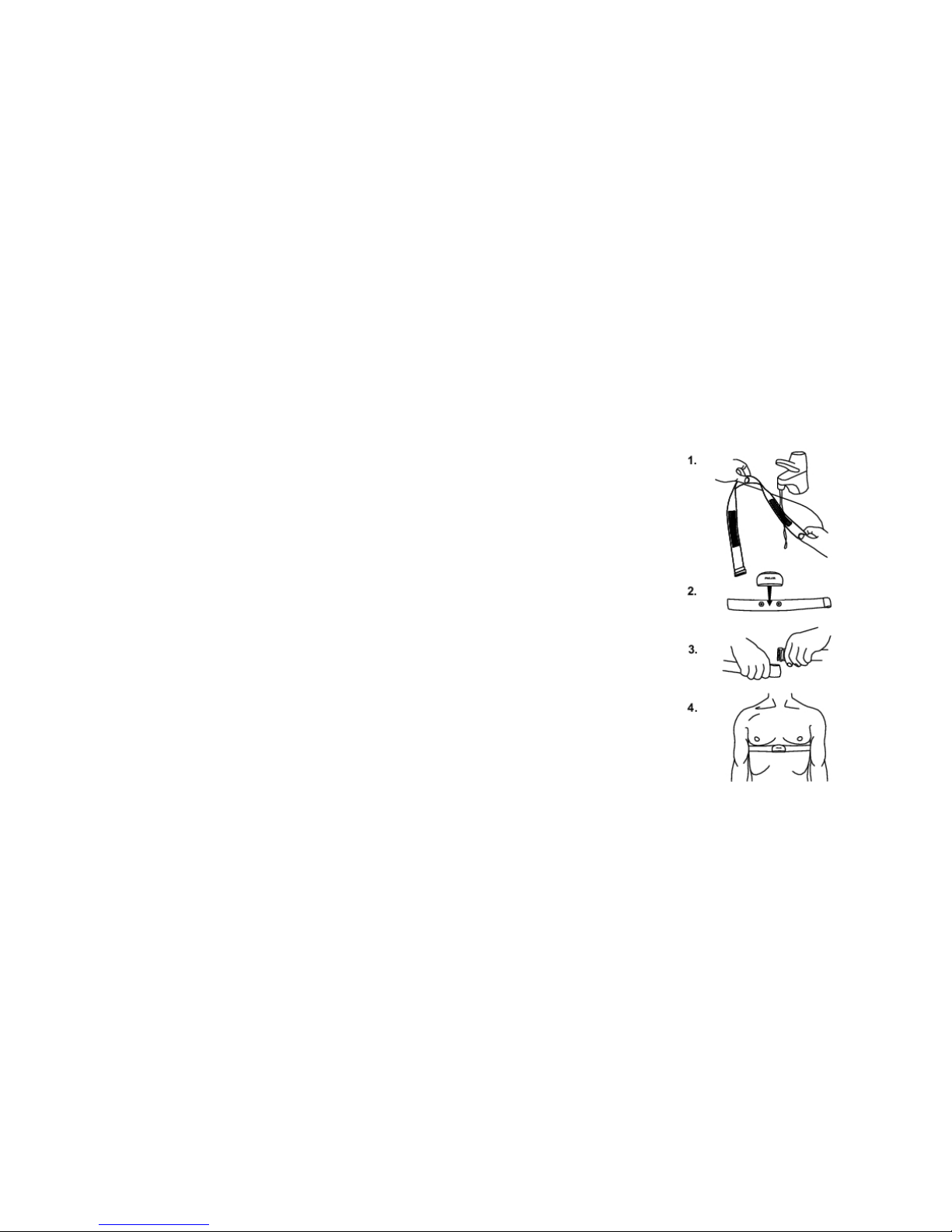
Wear the transmitter to measure heart rate.
1. Wet the electrode areas of the strap under running water.
2. Attach the connector to the strap. Adjust the strap length to fit
tightly but comfortably.
3. Tie the strap around your chest, just below the chest muscles,
and attach the hook to the other end of the strap.
4. Check that the wet electrode areas are firmly against your skin
and that the Polar logo of the connector is in a central and upright
position.
Detach the transmitter connector from the strap after every use, to
maximize the transmitter battery lifetime. Rinse the strap under
running water.
See detailed washing instructions in Care and Maintenance.
ENGLISH
Training 15
Page 16
Start Training
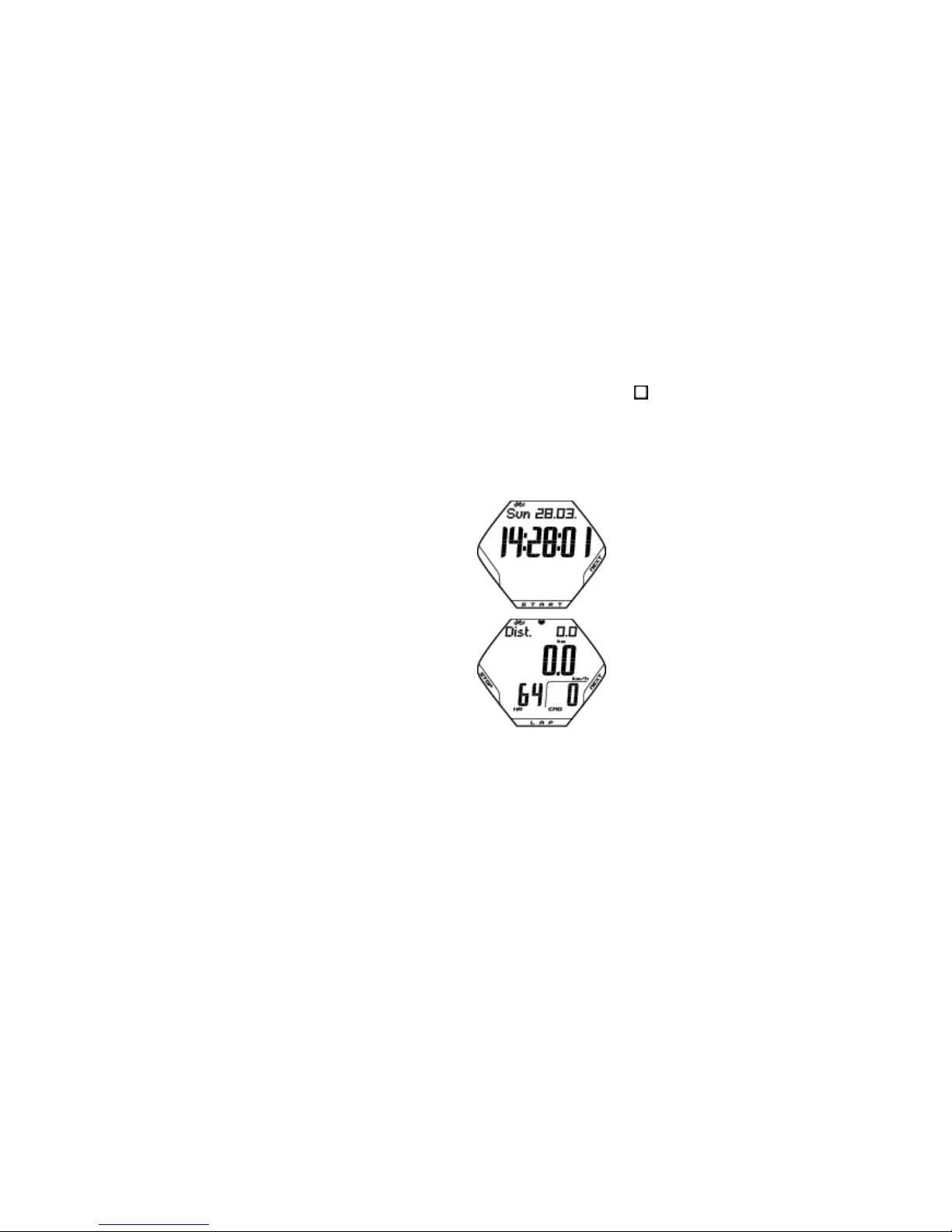
1. Attach the cycling computer to the bike mount and activate it with a long button press.
2. In time mode, the cycling computer automatically starts detecting your heart rate. Within 15 seconds,
your heart rate appears on the display.
3. The number on the upper left-hand corner
indicates the bike that is in use. To change the
bike, long-press NEXT in time mode.
4. Press START to start the recording.
You can view three lines of training information
simultaneously on eight display alternatives.
You can change the display by pressing NEXT.
For further information on training information,
consult the full user manual at
www.polar.fi/support.
5. To pause your training session, press STOP. To stop recording completely, press STOP again.
ENGLISH
16 Training
Page 17

5. AFTER TRAINING
Detach the connector from the strap after use.
Keep the transmitter dry and clean. For further
information, see Care and Maintenance.
• You can view detailed information on your 14
latest training sessions in FILES.
• TOTALS include cumulative values recorded
during training sessions.
For a long-term follow-up, you can store all your
training files at polarpersonaltrainer.com. There
you can see graphs and more of your training data
and get better understanding of your training.
For further information on how to review training
information, consult the full user manual at
www.polar.fi/support.
ENGLISH
After Training 17
Page 18

6. IMPORTANT INFORMATION
Caring of Your Product
Like any electronic device, the Polar cycling computer
should be treated with care. The suggestions below will
help you fulfill guarantee obligations and enjoy this
product for many years to come.
Detach the transmitter connector from the strap and rinse
the strap under running water after every use. Dry the
connector with a soft towel. Never use alcohol or any
abrasive material (steel wool or cleaning chemicals).
Wash the strap regularly in a washing machine at
40ºC/104ºF or at least after every fifth use. This ensures
reliable measurement and maximizes the life span of the
transmitter. Use a washing pouch. Do not soak, spin-dry,
iron, dry clean or bleach the strap. Do not use detergent
with bleach or fabric softener. Never put the transmitter
connector in the washing machine or drier!
Dry and store the strap and connector separately, to
maximize the transmitter battery lifetime. Wash the strap
in a washing machine before long-term storage and always
after use in pool water with high chlorine content.
Keep your cycling computer, transmitter and sensors in a
cool and dry place. Do not keep them in a damp
environment, in non-breathable material (a plastic bag or
a sports bag) nor with conductive material (a wet towel).
The cycling computer, transmitter and sensors are water
resistant, and can be used in rainy weather. To maintain
the water resistance, do not wash the cycling computer or
the sensors with a pressure washer or sink them under
water. Do not expose to direct sunlight for extended
periods such as by leaving it in a car or mounted on the
bike mount.
ENGLISH
18 Important Information
Page 19

Keep your cycling computer and sensors clean. Clean the
cycling computer and sensors with a mild soap and water
solution and rinse them with clean water. Do not immerse
them in water. Dry them carefully with a soft towel. Never
use alcohol or any abrasive material such as steel wool or
cleaning chemicals.
Avoid hard hits to the cycling computer, speed and
cadence sensors, as these may damage the sensor units.
Service
During the two-year guarantee/warranty period we
recommend that you have service done by an authorized
Polar Service Center only. The warranty does not cover
damage or consequential damage caused by service not
authorized by Polar Electro.
For contact information and all Polar Service Center
addresses, visit www.polar.fi/support and country specific
websites.
Register your Polar product at http://register.polar.fi/ to
ensure we can keep improving our products and services
to better meet your needs.
The username for your Polar Account is always your email
address. The same username and password are valid for Polar
product registration, polarpersonaltrainer.com, Polar discussion
forum and Newsletter registration.
Changing Batteries
The CS500 cycling computer and the WearLink
transmitter W.I.N.D. both have a user changeable battery.
To change the battery yourself, consult the full user
manual at www.polar.fi/support.
The batteries for the speed and cadence sensors cannot
be replaced. Polar has designed speed and cadence
sensors to be sealed in order to maximize mechanical
longevity and reliability. The sensors have long-life
batteries inside. To purchase a new sensor contact your
authorized Polar Service Center or retailer.
For instructions on how to change the battery for the
Power Output Sensor W.I.N.D., consult the Power Output
Sensor user manual.
ENGLISH
Important Information 19
Page 20

Precautions
The Polar cycling computer shows your performance
indicators. It indicates the level of physiological strain and
intensity during your exercise. It also measures speed and
distance when cycling with a Polar CS speed sensor
W.I.N.D. The Polar CS cadence sensor W.I.N.D. is
designed to measure cadence when cycling. The Polar
Power Output Sensor W.I.N.D. is designed to measure
power output when cycling. No other use is intended or
implied.
The Polar cycling computer should not be used for
obtaining environmental measurements that require
professional or industrial precision. Furthermore, the
device should not be used to obtain measurements when
engaged in airborne or underwater activities.
Interference During Exercise
Disturbance may occur near microwave ovens and
computers. Also WLAN base stations may cause
interference when exercising with CS500. To avoid erratic
reading or misbehaviors, move away from possible sources
of disturbance.
Minimizing Risks When Exercising
Exercise may include some risk. Before beginning a
regular exercise program, it is recommended that you
answer the following questions concerning your health
status. If you answer yes to any of these questions, we
recommend that you consult a doctor before starting any
training program.
• Have you been physically inactive for the past 5 years?
• Do you have high blood pressure or high blood
cholesterol?
• Are you taking any blood pressure or heart medication?
• Do you have a history of breathing problems?
• Do you have symptoms of any disease?
• Are you recovering from a serious illness or medical
treatment?
• Do you use a pacemaker or other implanted electronic
device?
• Do you smoke?
• Are you pregnant?
ENGLISH
20 Important Information
Page 21

In addition to exercise intensity, medications for heart
conditions, blood pressure, psychological conditions,
asthma, breathing, etc., as well as some energy drinks,
alcohol, and nicotine may also affect heart rate.
It is important to be sensitive to your body’s responses
during exercise. If you feel unexpected pain or excessive
fatigue when exercising, it is recommended that you stop
the exercise or continue at a lighter intensity.
Notice to individuals with pacemakers, defibrillators or
other implanted electronic devices. Individuals who have a
pacemaker use the Polar cycling computer at their own
risk. Before starting use, we always recommend a maximal
exercise stress test under a doctor’s supervision. The test
is to ensure the safety and reliability of the simultaneous
use of the pacemaker and the Polar cycling computer.
If you are allergic to any substance that comes into
contact with your skin or if you suspect an allergic
reaction due to using the product, check the listed
materials in Technical Specifications. To avoid any skin
reaction to the transmitter, wear it over a shirt, but
moisten the shirt well under the electrodes to ensure
flawless operation.
The combined impact of moisture and intense
abrasion may cause a black color to come off the
transmitter’s surface, possibly staining
light-colored clothes.
ENGLISH
Important Information 21
Page 22

Technical Specifications
Cycling computer
Battery life:
Average 3 years (if you train on avg.
1h/day, 7 days/week)
Battery type: CR 2354
Battery sealing ring: Silicone D-ring 28.0 x 0.8mm (no need to
change during battery replacement if
sealing ring is not damaged)
Operating temperature: -10 °C to +50 °C / 14 °F to 122 °F
Cycling Computer Materials: PMMA lens with hard coating in top
surface, cycling computer body
ABS+GF/PA+GF, metal parts stainless
steel (nickel free)
Watch accuracy: Better than ± 0.5 seconds / day at 25 °C
/ 77 °F temperature.
Accuracy of heart rate
monitor:
± 1% or 1 bpm, whichever larger.
Definition applies to stable conditions.
Heart rate measuring range: 15-240
Current speed display range: 0-127 km/h or 0-75 mph
Altitude display range: -550 m … +9000 m / -1800 ft …
+29500 ft
Ascent resolution: 5 m / 20 ft
Cycling computer limit values
Maximum number of files:
14
Maximum time recorded to file:
Hear rate 71 h 40 min
Hear rate + speed 27 h 00 min
Hear rate + speed + cadence 24 h 15 min
Hear rate + speed + power 23 h 05 min
Hear rate + speed + cadence + power 21 h 05 min
Hear rate + cadence 55 h 05 min
Hear rate + power 49 h 25 min
Hear rate + cadence + power 40 h 55 min
Maximum number of laps: 99
Total distance: 999 999 km / 621370 mi
Total duration: 9999h 59min 59s
Total calories: 999 999 kcal
Total exercise count: 9999
Total ascent: 304795 m / 999980 ft
ENGLISH
22 Important Information
Page 23

Dual Lock Bike Mount
Materials:
Rubber Part TPE, Bike Mount body PA+GF,
metal parts stainless steel (nickel free)
Transmitter
Battery life of WearLink
transmitter W.I.N.D.:
2000 hours of use
Battery type: CR2025
Battery sealing ring: O-ring 20.0 x 1.0, material silicone
Operating temperature: -10 °C to +40 °C / 14 °F to 104 °F
Connector material: Polyamide
Strap material: Polyurethane/ Polyamide/ Polyester/
Elastane/ Nylon
Polar DataLink and Polar WebSync 2.1 (or newer)
System Requirements:
PC MS Windows (2000/XP/Vista/7), 32 bit,
Microsoft .NET Framework Version 2.0
Intel Mac OS X 10.5 or newer
The Polar CS500 cycling computer applies the following
patented technologies, among others:
•
OwnZone® assessment for determining personal target
heart rate limits for the day
•
Wearlink® technology for heart rate measurement
ENGLISH
Important Information 23
Page 24
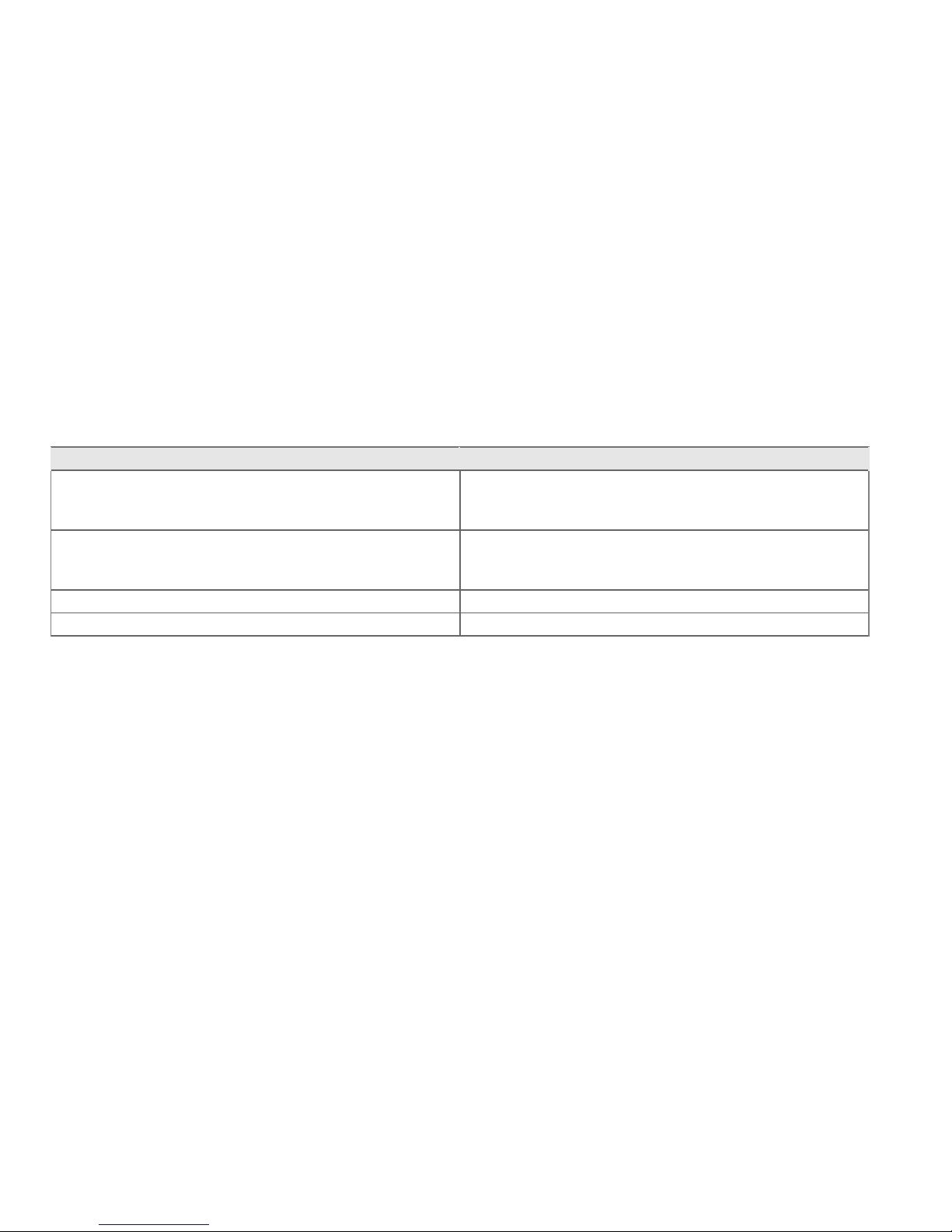
Water resistance of Polar products is tested according to International IEC 60529 IPx7 (1m, 30min, 20ºC). Products are
divided into four different categories according to water resistance. Check the back of your Polar product for the water
resistance category and compare it to the chart below. Please note that these definitions do not necessarily apply to
products of other manufacturers.
Marking on case back Water resistant characteristics
Water proof IPX7 Not suitable for bathing or swimming. Protected against
wash splashes and raindrops. Do not wash with a pressure
washer.
Water resistant* Not suitable for swimming. Protected against wash
splashes, sweat, raindrops etc. Do not wash with a
pressure washer.
Water resistant 30 m/50 m Suitable for bathing and swimming
Water resistant 100 m Suitable for swimming and snorkeling (without air tanks)
*These characteristics also apply to Polar WearLink transmitter W.I.N.D. , CS speed and cadence sensors W.I.N.D. and
Power Output Sensor W.I.N.D. marked water resistant.
ENGLISH
24 Important Information
Page 25

Limited International Polar Guarantee
• This guarantee does not affect the consumer’s statutory
rights under applicable national or state laws in force, or
the consumer’s rights against the dealer arising from
their sales/purchase contract.
• This limited Polar international guarantee is issued by
Polar Electro Inc. for consumers who have purchased
this product in the USA or Canada. This limited Polar
international guarantee is issued by Polar Electro Oy for
consumers who have purchased this product in other
countries.
• Polar Electro Oy/Polar Electro Inc. guarantees the
original consumer/purchaser of this device that the
product will be free from defects in material or
workmanship for two (2) years from the date of purchase.
• The receipt of the original purchase is your proof
of purchase!
• The guarantee does not cover the battery, normal wear
and tear, damage due to misuse, abuse, accidents or
non-compliance with the precautions; improper
maintenance, commercial use, cracked, broken or
scratched cases/displays, elastic strap and Polar apparel.
• The guarantee does not cover any damage/s, losses,
costs or expenses, direct, indirect or incidental,
consequential or special, arising out of, or related to the
product.
• Items purchased second hand are not covered by the two
(2) year warranty, unless otherwise stipulated by local
law.
• During the guarantee period, the product will be either
repaired or replaced at any of the authorized Polar
Service Centers regardless of the country of purchase.
Guarantee with respect to any product will be limited to
countries where the product has been initially marketed.
ENGLISH
Important Information 25
Page 26
Polar Electro Oy is a ISO 9001:2000 certified company.
Copyright © 2011 Polar Electro Oy, FIN-90440
KEMPELE, Finland. All rights reserved. No part of this
manual may be used or reproduced in any form or by any
means without prior written permission of Polar Electro
Oy. The names and logos marked with a ™ symbol in this
user manual or in the package of this product are
trademarks of Polar Electro Oy. The names and logos
marked with a ® symbol in this user manual or in the
package of this product are registered trademarks of Polar
Electro Oy, except Windows which is a registered
trademark of Microsoft Corporation.
This product is compliant with Directives 93/42/EEC and
1999/5/EC. The relevant Declaration of Conformity is
available at
www.support.polar.fi/declaration_of_conformity.html.
FCC regulatory information
This device complies with part 15 of the FCC rules.
Operation is subject to the following two conditions: (1)
This device may not cause harmful interference, and (2)
This device must accept any interference received,
including interference that may cause undesired
operation.
Note: This equipment has been tested and found to
comply with the limits for a Class B digital device,
pursuant to part 15 of the FCC Rules. These limits are
designed to provide reasonable protection against harmful
interference in a residential installation. This equipment
generates, uses and can radiate radio frequency energy
and, if not installed and used in accordance with the
instructions, may cause harmful interference to radio
communications. However, there is no guarantee that
interference will not occur in a particular installation. If
this equipment does cause harmful interference to radio
or television reception, which can be determined by
turning the equipment off and on, the user is encouraged
to try to correct the interference by one or more of the
following measures:
1. Reorient or relocate the receiving antenna.
2. Increase the separation between the equipment and
receiver.
3. Connect the equipment into an outlet on a circuit
different from that to which the receiver is connected.
4. Consult the dealer or an experienced radio/TV
technician for help.
Caution! Changes or modifications not expressly approved
by the party responsible for compliance could void the
user’s authority to operate the equipment.
ENGLISH
26 Important Information
Page 27

This crossed out wheeled bin marking shows that Polar
products are electronic devices and are in the scope of
Directive 2002/96/EC of the European Parliament and of
the Council on waste electrical and electronic equipment
(WEEE) and batteries and accumulators used in products
are in the scope of Directive 2006/66/EC of the European
Parliament and of the Council of 6 September 2006 on
batteries and accumulators and waste batteries and
accumulators. These products and batteries/accumulators
inside Polar products should thus be disposed of
separately in EU countries. Polar encourages you to
minimize possible effects of waste on the environment
and human health also outside the European Union by
following local waste disposal regulations and, where
possible, utilize separate collection of electronic devices
for products, and battery and accumulator collection for
batteries and accumulators.
Disclaimer
• The material in this manual is for informational purposes
only. The products it describes are subject to change
without prior notice, due to the manufacturer’s
continuous development program.
• Polar Electro Inc./Polar Electro Oy makes no
representations or warranties with respect to this manual
or with respect to the products described herein.
• Polar Electro Inc./Polar Electro Oy shall not be liable for
any damages, losses, costs or expenses, direct, indirect
or incidental, consequential or special, arising out of, or
related to the use of this material or the products
described herein.
This product is covered by the following patent
documents:
FI 110303 B, EP 0748185, JP3831410, US6104947,
DE 69532803.4-08, FI 6815, EP 1245184, US
7076291, HK10484, US6199021, US6356838,
EP0909940, FI110915, US7324841, EP1361819,
FI23471, US D492999SS, EU0046107-002,
EU0046107-003
Manufactured by Polar Electro Oy, Professorintie 5,
FIN-90440 KEMPELE.
Tel +358 8 5202 100, Fax +358 8 5202 300,
www.polar.fi.
ENGLISH
Important Information 27
Page 28
Manufactured by
Polar Electro Oy
Professorintie 5
FIN-90440 KEMPELE
Tel +358 8 5202 100
Fax +358 8 5202 300
www.polar.fi
 Loading...