

Page 1
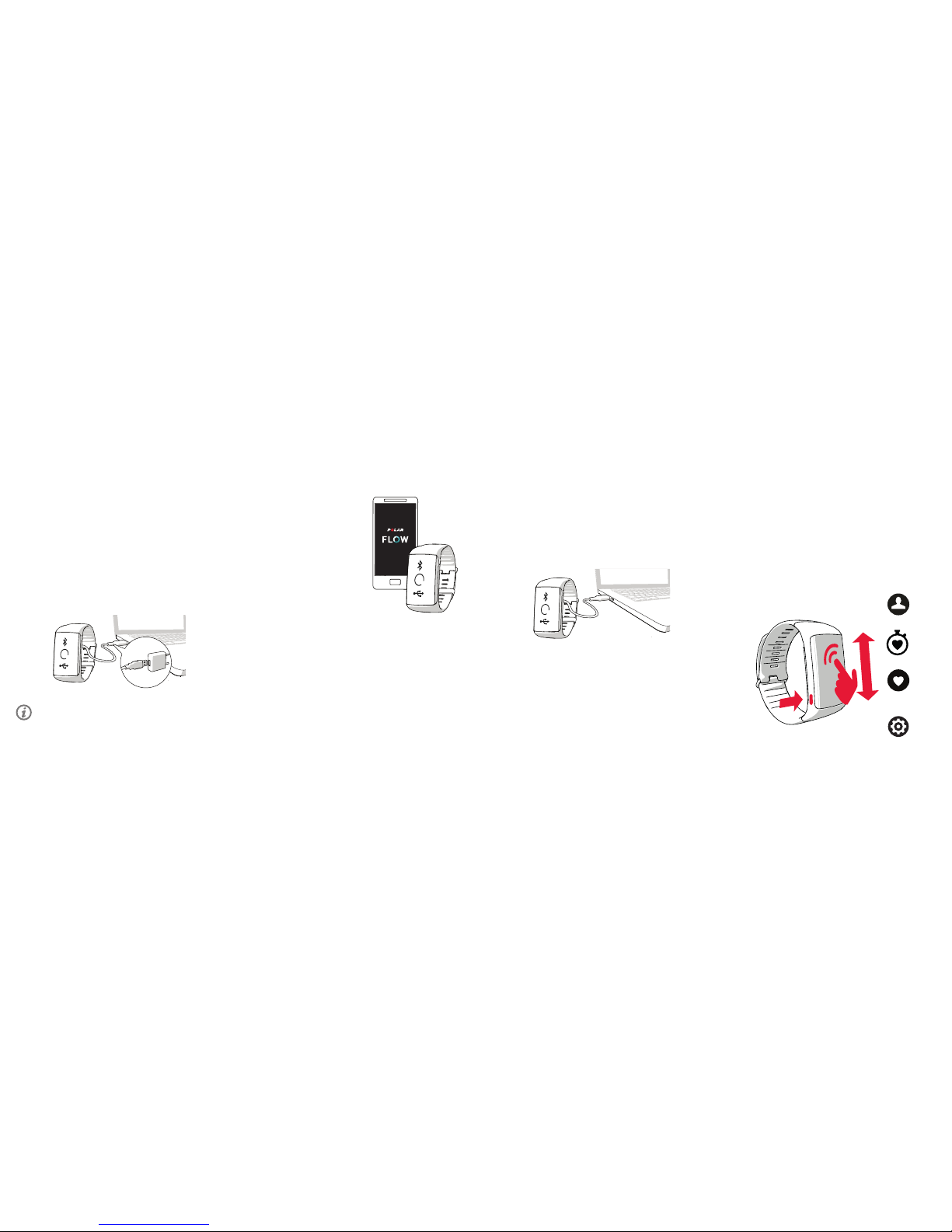
Get to know your A370
• You can tur n on the displa y by turning yo ur wrist or pr essing the
button o n the side.
• Brow se through the m enus by swipi ng the touch scr een up or
down.
• Choos e menu items by ta pping them.
• Pres s the button on th e side to go back in m enus.
• To change cl ock faces tap a nd hold the displ ay in time vie w and
swipe up o r down.
• Pres s and hold the but ton in time vie w until
you see Searching to i nitiate Polar F low app
sync an d pair an access ory devic e
Training
My day
Settings
My
heart rate
SET UP WI TH A COMPUTER
1. Go to ow.polar.com/start and in stall Polar FlowSync
data tra nsfer soft ware to your co mputer.
2. Sign in w ith your Pola r account or cre ate a new one. We’ll
walk you t hrough the sig n-up and setup w ithin the web
service.
B
SET UP WI TH A MOBILE DEV ICE AND POLA R FLOW APP
Please n ote that you have
to do the pai ring in the Flo w
app and NOT i n your mobile
device’s Bl uetooth sett ings.
1. Make s ure your mobile
device is conne cted to
the Internet and tur n on
Bluetooth®.
2. Dow nload the Pola r Flow
app from the A pp Store or
Google Play
on your mob ile
device.
3. Open F low app on your
mobile device.
4. Flow a pp recognize s your A370 ne arby and pro mpts you
to star t pairing it. A ccept the pair ing request a nd enter
the Bluet ooth pairi ng code shown o n the A370 dis play
to Flow app .
5. Sign in with yo ur Polar account or create a new one.
We’ll wal k you through th e sign-up and se tup within the
app.
6. When y ou’re done with t he settings ta p
Save and s ync and
your set tings are syn ced to your A37 0.
A
How to get star ted
You can choo se to set up your ne w Polar A370 e ither with ( A)
a mobile de vice or with (B ) a computer, which ever is the mos t
conveni ent for you. The A 370 is in stor age mode, and i t wakes up
in the setu p. To get the most accu rate and pers onal trainin g and
activ ity data, it ’s important th at you’re precis e with the set tings in
the setup .
Plug you r A370 into a pow ered USB por t or a USB charge r with a
standa rd micro USB ca ble. It may take a fe w minutes for yo ur A370
to wake up. L et your A370 ch arge during t he setup.
If there is a firmware update available for your A370, we
recommend you install it during the setup. It may take up to 10
minutes to complete.
Page 2
MANUFACTURED BY
POLA R ELECTRO OY
PROFESSORINTIE 5
FI-90440 KEMPELE
TEL +35 8 8 5202 100
FAX +35 8 8 5202 30 0
WWW.POLAR.COM
COMPATIBLE WITH
Technical specification
BATTER Y TYPE 100 MAH LI -POL BATT ERY
HEART R ATE SENSO R INTERN AL OPTIC AL
WATER RESI STANCE 30 M
MATERIALS WRISTBAND: SILICONE, STAINLESS STEEL,
PO LYBUTY LENE TEREP THAL ATE, GLA SS FIBER;
DEV ICE: THERMOPLASTIC POLYURETHANE
ACRY LONITRILE BUTADIENE STYRENE, GL ASS FIBER,
PO LYCARBON ATE, STAINLE SS STEEL , GLAS S
POLAR A370
FITNESS TRACKER
WITH WRIST-BASED
HEART RATE
English
Getting Started Guide
/polarglobal
Caring for your A370
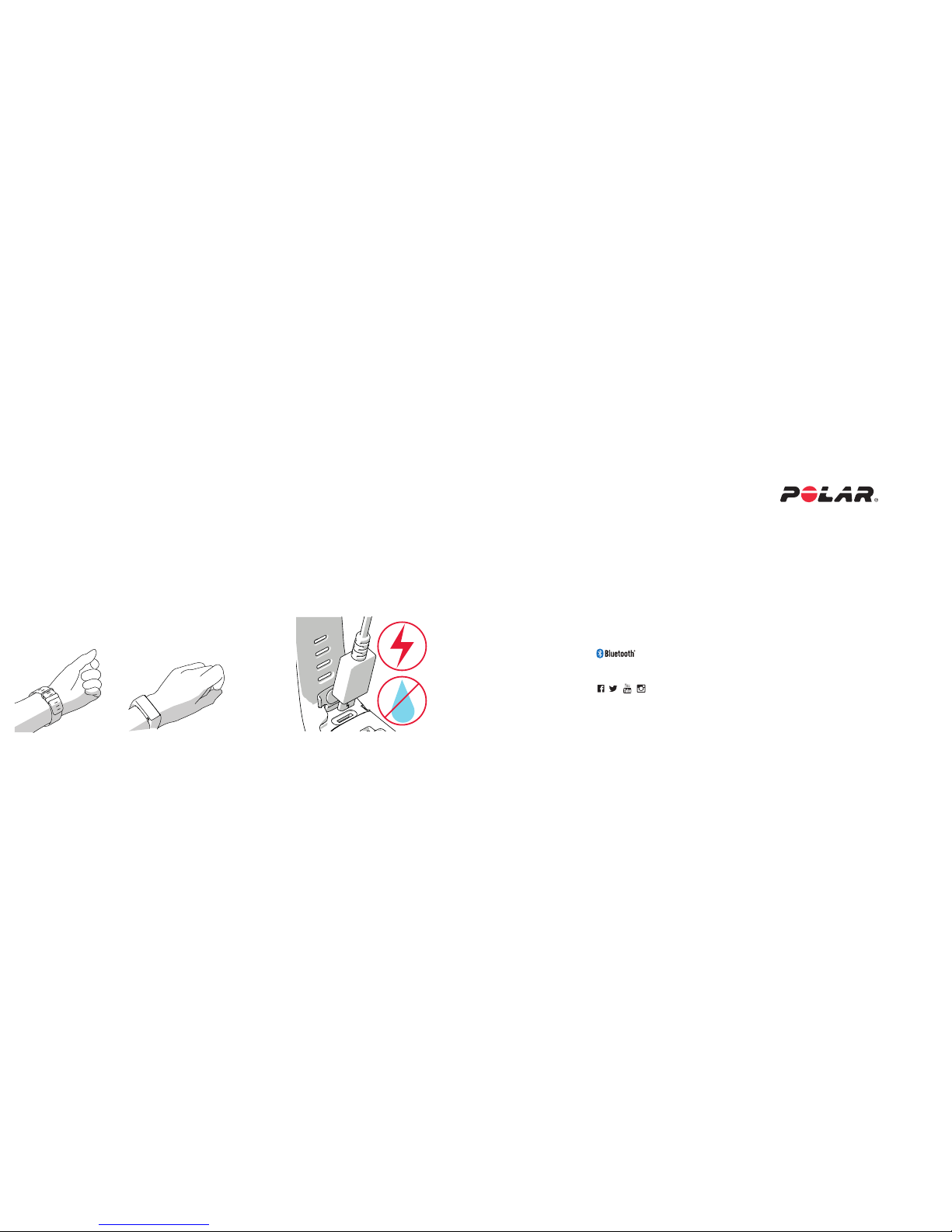
Wash the A 370 and your w rist daily to to av oid any skin ir ritations .
Dry yo ur wrist and th e wrist band b efore you put it b ack on. Once in a
while, t ake the tracker o ff and let your sk in breathe.
After s wimming in se a water or heav y sweating, r inse the USB po rt
under ru nning water and l et the USB por t dry by leav ing the cover
open until i t’s properly d ry.
Do not plu g in the A370 (fo r a charge or sy nc) when the U SB port is
wet or sweaty.
Chargin g a wet device dam ages the USB po rt, so don’t co nnect it
even to you r computer for a s ync when it’s not d ried up yet.
Learn mo re at suppor t.polar.com /en/A370
APP STOR E IS A SERVIC E MARK OF APP LE INC.
ANDROID A ND GOOGLE P LAY ARE TR ADEMAR KS OF GOOGL E INC.
IOS IS A TR ADEMAR K OR REGISTE RED TRADE MARK OF CIS CO IN THE U.S. A ND OTHER
COUNTR IES AND IS USE D UNDER LICEN SE.
A370 co ntinuously me asures hear t rate from th e wrist, in ev eryday-
wear and du ring exercis es. To get accura te heart rate r eadings, n d a
comfor table t for yo ur wrist by fol lowing thes e tips.
In ever yday-wea r, secure the wri st band on top of yo ur wrist, behind
the wrist bone. Do NOT pla ce the tness t racker on top of th e wrist
bone. Th e band can be sli ghtly loose as lo ng as the senso r on the back
is touchin g your skin and s tays in place w hen you move.
Tighten t he band a littl e bit when you st art a traini ng session, s o the
sensor w ill not move wh en you exercis e. The wrist b and should not b e
uncomfortably tight either. Remember to loosen the wrist band after
traini ng for a more comfo rtable t.
How to wear
Nice and ti ght
1796648 9.00 ENG 04 /2017 10011
 Loading...