

Page 1
179320 USA/GBR D
Heart Rate Monitor
User’s Manual
USA/GBR
1.
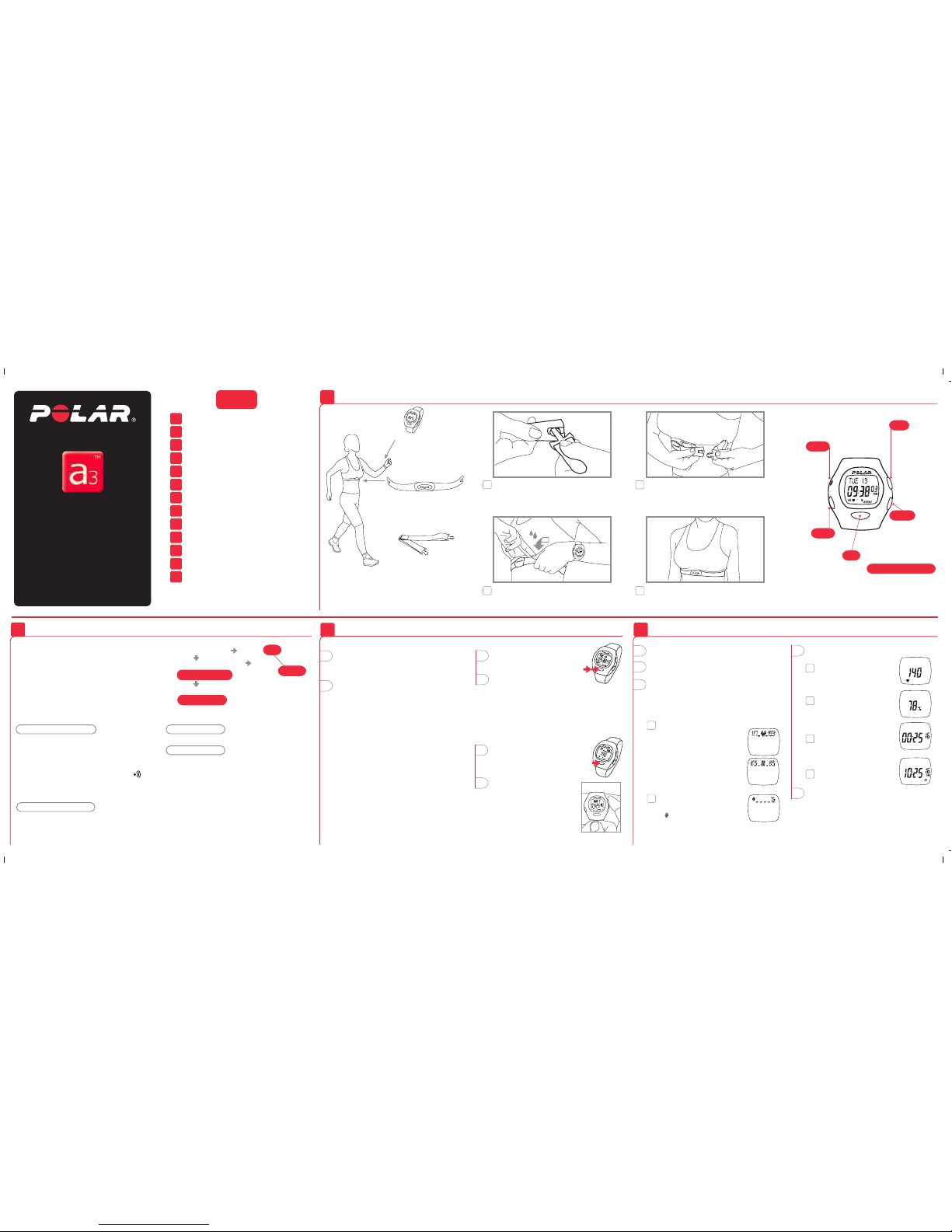
How to Put Your Heart Rate Monitor On
The elastic strap
holds the transmitter in
the correct position.
The transmitter
detects your heart rate
continuously and transmits
it to the wrist receiver.
Heart Touch function
Bring the wrist receiver
up to the Polar logo on
the transmitter during
exercise and you can
check the time of day.
Up
Moves to the
following mode
or increases the
selected value.
Down
Returns to the
previous mode
or decreases
the selected
value.
Functions and Modes of Polar A3
2.
Contents
The Polar A3™
wrist receiver
displays your heart rate
during exercise.
How to Start and Stop
3.
Setting mode
• Set different values
- 12h or 24h time mode
- birthday
- target heart rate limits
- watch functions; alarm, time, date
File mode
• Shows the data recorded during the exercise
After Exercising
5.
4.
Functions During Exercise
How to Start and Stop
3.
2.
Functions and Modes of Polar A3
How to Put Your Heart Rate Monitor On
1.
6.
How to Recall File Stored in Memory
Settings
7.
Target Heart Rate Zone
8.
9.
Resetting
11.
Technical Specifications
Limited Polar International Guarantee
12.
13.
Disclaimer
1. Press Signal button to turn the zone alarm sound
on or off.
2. Check the time of day by bringing the wrist
receiver up to the Polar logo on the transmitter.
3. Scroll up to select what values you want to
view in the upper row of the display
during exercise.
Functions During Exercise
4.
4. Scroll down to select what you want to view
in the lower row of the display.
1. Heart rate in beats
per minute.
3. Exercise time
2. Heart rate as a % of your
maximum heart rate.
1. Heart rate in the target zone
is displayed
a) as absolute heart rate
or
b) as a % of maximum heart rate
according to your lower row
selection.
4. Time of day
How to Set up Your New Receiver
1. Press any of the four buttons twice to activate
the receiver. TIME is displayed. 12h is
flashing.
2. Once awakened, the receiver will guide
you through the necessary settings.
Scroll up or down to set the right values.
Press OK to lock your selection.
Set the following:
12h or 24h time mode
Time of day
Date
Birthday
After setting your birthday, your target heart
rate zone based on your age is automatically
calculated.
After the settings are complete, the receiver
automatically goes to the Time of day display.
You can cancel the setting by pressing and
holding OK, but you can not start measuring
the heart rate before you have completed
the settings.
How to operate the set buttons
• To move forward or back, use Up or Down
button.
• To choose the value to begin adjusting,
press OK. It will begin blinking.
• Press Up or Down button to adjust the value
(The digits run faster if you press and hold
the button).
• Wherever you are in the settings, you can return
to the Time of day display by pressing and
holding OK.
Time of day display mode
• Starting point for all functions
• Shows date and time
Press and hold OK to return to the Time of day
display, wherever you are in the Settings or File
recalling cycle.
When the alarm is turned on, the symbol
appears on the Time of day display. When the alarm
comes on it will sound for one minute or you can
turn it off by pressing any of the four buttons.
Exercise recording mode
• In the Exercise mode you measure your heart
rate and record your exercise information in
a file
• You can view different information while the
heart rate monitor is measuring heart rate
How to Start
1. In the Time of day display
press OK. Your heart rate
appears in a few seconds.
2. Press OK again. The stopwatch
starts running and you can
start exercising. The exercise
data will only be stored if you have
turned the stopwatch on.
How to Stop
1. Press OK to stop the stopwatch.
QUIT and paused stopwatch
appear. Measurement is paused.
Exercise is no longer recorded.
2. Press Up or Down button to
exit the Exercise mode.
The receiver shows the Time of
day display within 5 minutes if
you forget to quit the heart rate
measurement mode when you
stopped the stopwatch and
removed the transmitter from
your chest.
Press
twice
Press
once
OK
Starts measuring
heart rate. Starts and
stops the stopwatch.
Enters the displayed
mode. Locks in your
selection.
Signal
Alarm on or off.
Reset
If reset,
settings will
return to the
default values.
5. You can pause the stopwatch by pressing OK.
Repressing OK will restart the stopwatch.
After restart you will see the heart rate in the
lower row.
Keep the wrist receiver within 1 meter/ 3 feet of
your transmitter. Check that you are not near other
people with heart rate monitors or any source of
electromagnetic disturbance.
2. Fitness bullets
For every 10 minutes in TZ,
a appears.
Lift the transmitter off your chest and
moisten the two grooved electrode areas
on the back.
3.
Check that the wet electrode areas are firmly
against your skin and the Polar logo is in
a central, upright position.
4.
Adjust the strap length to fit snugly and
comfortably. Secure the strap around your
chest, just below the chest muscles, and
buckle it.
2.
Attach the transmitter to the elastic strap.
1.
Exercise recording
Heart rate measuring
SETTING
FILE
Press OK
Press OK
Press Up
Press Up
Time of day display
10.
Minimizing Possible Risks in Exercising
with Heart Rate Monitor
Page 2
All Polar heart rate monitors are designed to indicate the level of
physiological strain and intensity in sports and exercise. No other
use is intended or implied. Heart rate is displayed as number of
heartbeats per minute (bpm).
Transmitter
Battery type: Built-in Lithium Cell
Battery life: Average 2500 hours of use
Operating temperature: 14 °F to 122 °F / -10 °C to +50 °C
Material: Polyurethane
Waterproof
Elastic Strap
Buckle material: Polyurethane
Fabric material: Nylon, polyester and natural rubber including
a small amount of latex
Wrist Receiver
Battery type: CR 2032
Battery life: Average 1 year (2h/day, 7 days/week)
Operating temperature: 14 °F to 122 °F / -10 °C to +50 °C
Water resistance: to 100 feet/30 meters, OK button can be pressed
in water
Wrist strap: Polyurethane
Wrist strap buckle: Polyoxymethylene
Back cover: Stainless steel complying with the EU Directive 94/27/EU
and its amendment 1999/C 205/05 on the release of nickel from
products intended to come into direct and prolonged contact
with the skin.
Accuracy of heart rate measurement: ± 1% or ± 1 bpm,
whichever larger, definition applies to steady state conditions
Default settings
Time of day......................................12h
Alarm clock ......................................OFF
Zone alarm.......................................On
Age...................................................0
Upper Limit......................................160
Lower Limit......................................80
Limit values
Chronometer....................................23 h 59 min 59 s
Heart rate limits...............................30 – 199 bpm
Total time.........................................99 h 59 min 59 s
Birthday year range.........................1900 – 1999
Technical Specifications Limited Polar International Guarantee
• This limited Polar international guarantee is issued by Polar Electro
Inc. for the consumers who have purchased this product in the USA
or Canada. This limited Polar international guarantee is issued by
Polar Electro Oy for the consumers who have purchased this product
in other countries.
• Polar Electro Inc. / Polar Electro Oy guarantees to the original
consumer/ purchaser of this product that the product will be free
from defects in material or workmanship for two years from the
date of purchase.
• Please keep the receipt or International Guarantee Card, which is
your proof of purchase!
• The guarantee does not cover the battery, damage due to misuse,
abuse, accidents or non-compliance with the precautions; improper
maintenance, commercial use, cracked or broken cases.
• Guarantee does not cover any damage/s, losses, costs or expenses,
direct, indirect or incidential, consequential or special, arising out
of, or related to the product. During the guarantee period the
product will be either repaired or replaced at an authorized service
center free of charge.
• This guarantee does not affect the consumer’s statutory rights
under applicable national or state laws in force, or the consumer’s
rights against the dealer arising from their sales/ purchase contract.
Copyright © 2001, 2002 Polar Electro Oy, 90440 KEMPELE, Finland
All rights reserved. No part of this manual may be used or reproduced
in any form or by any means without prior written permission of
Polar Electro Oy.
The names and logos marked with a ™ symbol in this user's manual
or in the package of this product are trademarks of Polar Electro Oy.
The names and logos marked with a ® symbol in this user's manual
or in the package of this product are registered trademarks of Polar
Electro Oy.
This product is protected by one or several of the following patents:
FI 88223, DE 4215549, FR 92.06120, GB 2257523, HK 113/1996,
SG 9591671-4, US 5491474, FI 88972, DE 9219139.8, FR 92.09150,
GB 2258587, HK 306/1996, SG 9592117-7, US 5486818, FI 96380,
US 5611346, EP 665947, DE 69414362, FI 68734, DE 3439238,
GB 2149514, HK 812/1989, US 4625733, FI 100924, FI 100452,
US 5840039, FI 4150, DE 20008882.3, FR 0006504, FI 4069, US 6272365,
FR 9907823, GB 2339833, DE 29910633, FI 104463, US 6183422,
FI 4157, DE 20008883.1, FR 0006778, WO 97/33512, GB 2326240.
Other patents pending.
Disclaimer
• The material in this manual is for informational purposes only.
The products it describes are subject to change without prior
notice, due to the manufacturer’s continuous development
program.
• Polar Electro Inc. / Polar Electro Oy makes no representations
or warranties with respect to this manual or with respect to the
products described herein. Polar Electro Inc. / Polar Electro Oy
shall not be liable for any damages, losses, costs or expenses,
direct, indirect or incidental, consequential or special, arising
out of, or related to the use of this material or the products
described herein.
Exercise may include some risk, especially for those who have
been sedentary.
Before starting a regular exercise program you are recommended
to answer to the following questions for health status checking.
If the answer is yes to any of the questions, we recommend to
consult a doctor before starting an exercise program.
• Have you not exercised for the past 5 years?
• Do you have high blood pressure?
• Do you have high blood cholesterol?
• Do you have symptoms of any disease?
• Are you taking any blood pressure or heart medication?
• Do you have a history of breathing problems?
• Are you recovering from a serious illness or medical treatment?
• Do you use a pacemaker or another implanted electronic device?
• Do you smoke?
• Are you pregnant?
Note that in addition to exercise intensity, medications for heart,
blood pressure, psyche, asthma, breathing etc. as well as some
energy drinks, alcohol and nicotine, can affect heart rate.
It is important to be sensitive to your body’s reactions during
exercise. If you feel unexpected pain or excessive fatigue when
exercising, it is recommended to stop the exercise or continue
at a lighter intensity.
Notice to persons with pacemakers, defibrillator or other implanted
electronic device. Persons who have a pacemaker use the Polar
Heart Rate Monitor at their own risk. Before starting use, we
always recommend an exercise test under doctor’s supervision.
The test is to ensure the safety and reliability of the simultaneous
use of the pacemaker and the heart rate monitor.
If you are allergic to any substance that comes into contact with
the skin or if you suspect an allergic reaction due to using the
product, check the listed materials in the "Technical Specifications"
chapter. To avoid any skin reaction risk with the transmitter, wear
it over a shirt. However, moisten the shirt well under the electrodes
to ensure flawless operation.
Minimizing Possible Risks in Exercising
with Heart Rate Monitor
10. 11. 12. 13.
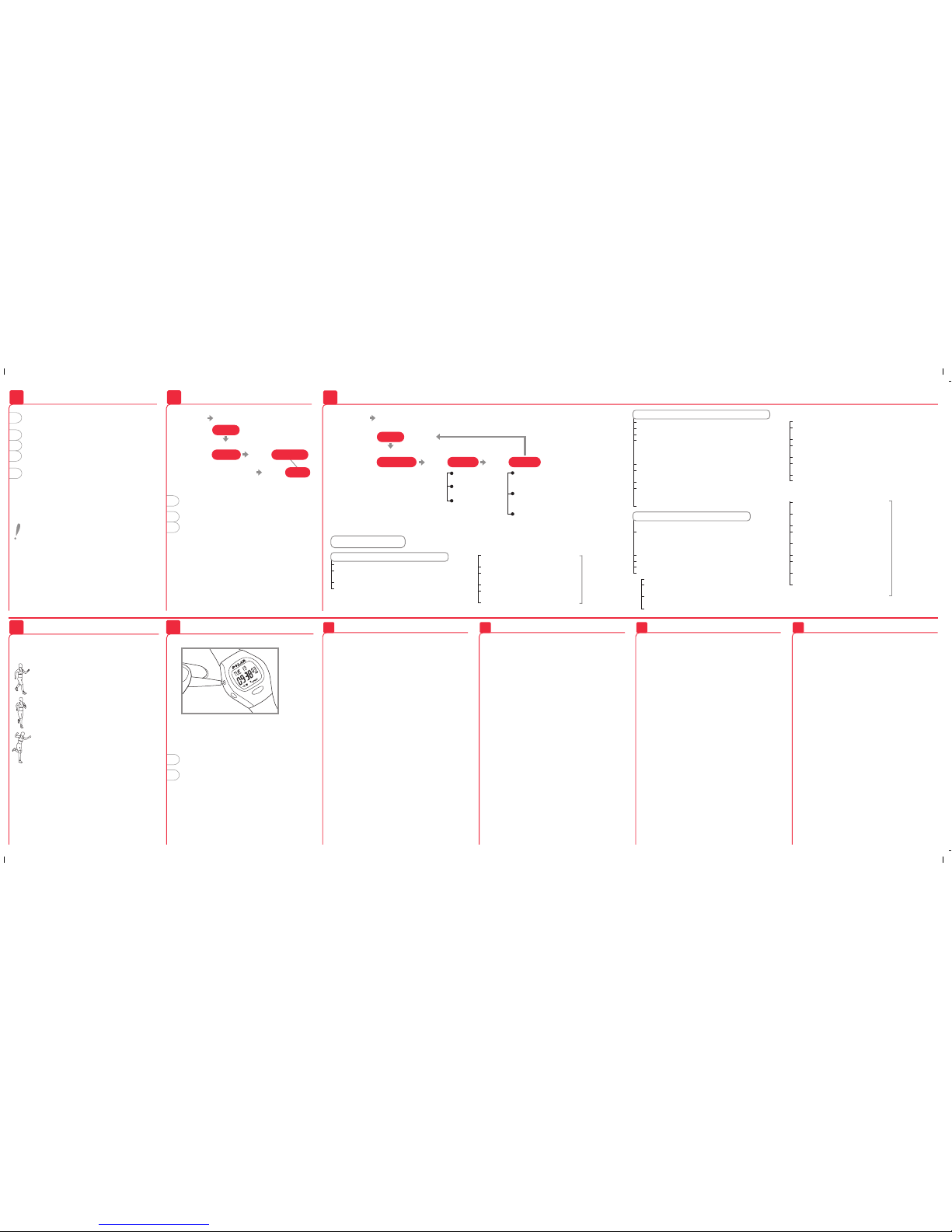
Your target heart rate zone is a range between the
lower and upper heart rate limits expressed as
percentages of your maximum heart rate (HR
max
).
When your heart beats at 50-60% of your
HR
max
, you're in the light intensity zone. This
kind of exercise is easy; ex. daily activities
and light chores. It delivers some health
benefits.
Push on to 60-70% of your HR
max
and you're
in the light to moderate intensity zone. This
is good for improving health, fitness and for
weight loss. It also improves endurance.
At 70-85% of your HR
max
, you've moved into
the moderate to heavy intensity zone. This
is harder work, but effective for strengthening
aerobic fitness and endurance especially for
people exercising more regularly.
You can set your target limits in beats per minute
or as percentages of your maximum heart rate. The
percentage limits can not be set if you have not set
your birthday.
When you set your birthday, the watch automatically
calculates the limits, which are 65-85% of your
estimated maximum heart rate (220 – age). For an
accurate measure of your maximum and exercise
heart rates, visit your doctor for an exercise stress
test.
Target Heart Rate Zone
8.
Resetting
9.
Resetting clears the settings which return
to the default values.
If there are no reactions to any buttons,
reset the receiver.
1. Press Reset button with a pen tip.
Display becomes full of digits.
2. Press any of the four buttons once.
If you don’t press any button after resetting,
within one minute the wrist receiver goes to
the battery saving mode.
Wake up by pressing any of the buttons twice.
Settings
7.
How to Recall File Stored in Memory
6.
1. While in the Time of day display mode press Up
or Down until FILE is displayed.
2. Press OK.
3. Scroll up or down to recall the exercise
information:
EXE. TIME Total exercise time
AVERAGE HR Average heart rate of the exercise
IN ZONE Time spent in target zone
Time of day
display
1. Carefully wash the transmitter with a mild soap
and water solution.
2. Rinse it with pure water.
3. Dry the transmitter carefully with a soft towel.
4. Keep the wrist receiver clean and wipe off
any moisture.
5. Store the heart rate monitor in a clean and dry
place. Dirt impairs the elasticity and functioning
of the transmitter. Sweat and moisture can keep
the electrodes wet and the transmitter activated,
which shortens battery life.
The combined impact of moisture and intense
abrasion may cause a black color to come off
the transmitter's surface, which might stain
light-colored clothes.
After Exercising
5.
Press Up
Manufactured by:
Polar Electro Oy
Professorintie 5
FIN-90440 KEMPELE
Tel. +358-8-520 2100
Fax +358-8-520 2300
www.polar.fi
Distributed in the USA by
Polar Electro Inc.
370 Crossways Park Drive
Woodbury NY 11797-2050
U.S.A.
1-800-227-1314
www.polarusa.com
Distributed in Canada by
Polar Electro Canada
c/o Lanco Logistics Inc.
4330 Joseph Dubreuil
Lachine, Quebec
CANADA, H8T 3C4
1-888-918-5043
USA and Canada: www.polarusa.com
Other countries: www.polar.fi
Time of day
display
Press and
release Up until
3. WATCH – time and day determination
Alarm
• Use Up button to advance from LIMITS display
to WATCH SET, press OK (or in the Time of day
display press and hold Signal button ->
WATCH SET)
• ALARM ON or OFF blinks
• Select alarm on or off
• Press OK
• If you set the alarm on: set the alarm time
• In 12 h time mode, select AM/PM, press OK
• Hours blink on the display, use Up or Down
button to select the correct hour, press OK
• Minutes blink on the display, use Up or Down
button to select the correct minutes
• Press OK
2. LIMITS – setting target heart rate zone limits
• BIRTHDAY SET is displayed
• Press Up to advance, LIMITS SET is displayed
• Press OK
• With HR or HR% blinking use Up or Down
to select whether you want to set the limits
in beats per minute or as a percentage of
a maximum heart rate
• Press OK to accept, HI LIMIT is displayed
• Use Up or Down button to determine
the upper limit
• Press OK, LO LIMIT is displayed
• Use Up or Down button to determine the lower
limit (the lower limit cannot be set above
the upper limit)
• Press OK, LIMITS SET is displayed
Time
• TIME is displayed
• Press Up or Down button to select 12 h
or 24 h time display
• Press OK
• In 12 h time mode, select AM/PM with Up
or Down button, press OK
• TIME and blinking hours are displayed
• Use Up or Down button to select correct time,
press OK
• TIME and blinking minutes are displayed
• Use Up or Down button to select correct time,
press OK
Date
• MONTH and blinking month
are displayed
• Use Up or Down button to select
the correct month
• Press OK
• DAY and the blinking day of
the month are displayed
• Use Up or Down button
to select the correct day
• Press OK
• YEAR and the blinking number
are displayed
• Use Up or Down button to select
the correct year
• Press OK, press and hold OK
to return to the Time of day
display
24h time display
sequence:
DAY –>MONTH –>YEAR
1. BIRTHDAY – setting your date of birth
• Start from the Time of day display
• Press Up or Down until display changes
to SETTING
• Press OK, BIRTHDAY SET is displayed
• Press OK again
• Use Up or Down button to select
the correct month
• Press OK
• Use Up or Down button to select
the correct day
• Press OK
• Use Up or Down button to select
the correct year
• Press OK, BIRTHDAY SET
is displayed
Press OK
SETTING
24h time display
sequence:
DAY –>MONTH –>YEAR
Press Up
Press OK
Press Up
IN ZONE
AVERAGE HR
FILE
EXE. TIME
Settings step by step
Alarm time
HR or HR%
HI LIMIT
LOW LIMIT
ALARM
OFF/ON
TIME
DATE
WATCH SETLIMITS SET
Press Up Press Up
BIRTHDAY SET
Press Up
 Loading...