

Page 1
User Manual
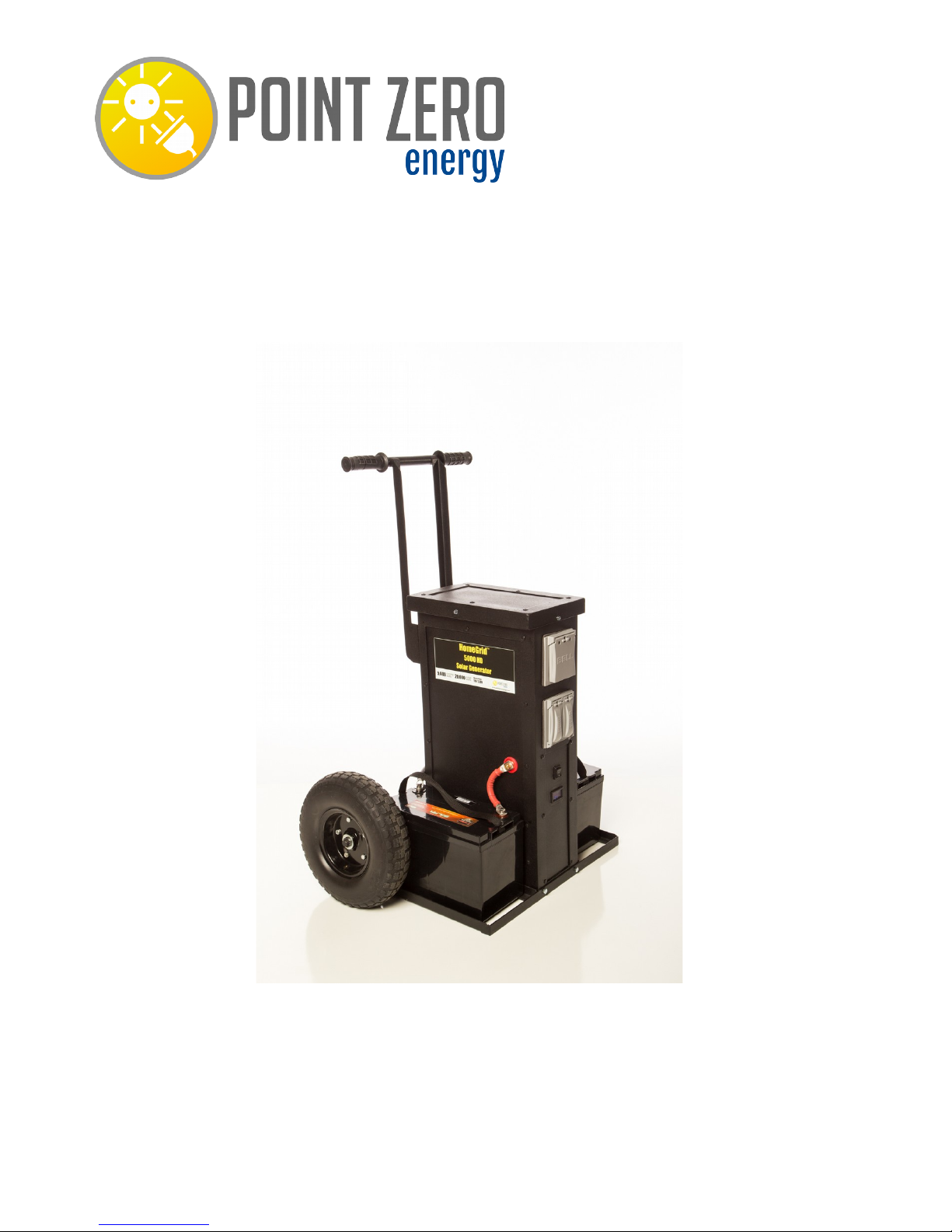
HomeGrid™ 5000 HD
For more information and instruction videos visit:
www.pointzeroenergy.com/learn/videos/
Page 2

HomeGrid™ 5000 HD Solar Generator
Congratulations on purchasing Point Zero Energy's HomeGrid™ solar
generator! With minimal care and proper treatment this generator will
provide years of reliable service. Carefully read, understand, and comply
with all instructions before use. Keep this manual for future reference.
Table of Contents:
1. General Information
1.1 About this Generator
1.2 Controls, Indicators, Connections
1.3 Technical Specifications
2. Charging your HomeGrid™ Solar Generator
2.1 Charging from Solar
2.2 Charging from the Wall
3. Operating instructions
3.1 General Operating Instructions
3.2 What can I power?
3.3 Determining maximum appliance wattage
3.4 How to Use
3.5 Storage and Maintenance
4. Troubleshooting
5. FAQ
6. Warranty and Contact Information
Page 3
1. GENERAL INFORMATION
1.1 About this generator
This HomeGrid™ 5000HD solar generator converts 24 volts, direct current
(24VDC) to 110 and 220 volts alternating household current. It's superior
surge capability allows the HomeGrid™ solar generator to easily power
multiple home appliances simultaneously including refrigerators, freezers,
microwave ovens, and cooking appliances. It's pure sine wave power
output will safely run power tools, electronics, and medical equipment
such as CPAP machines.
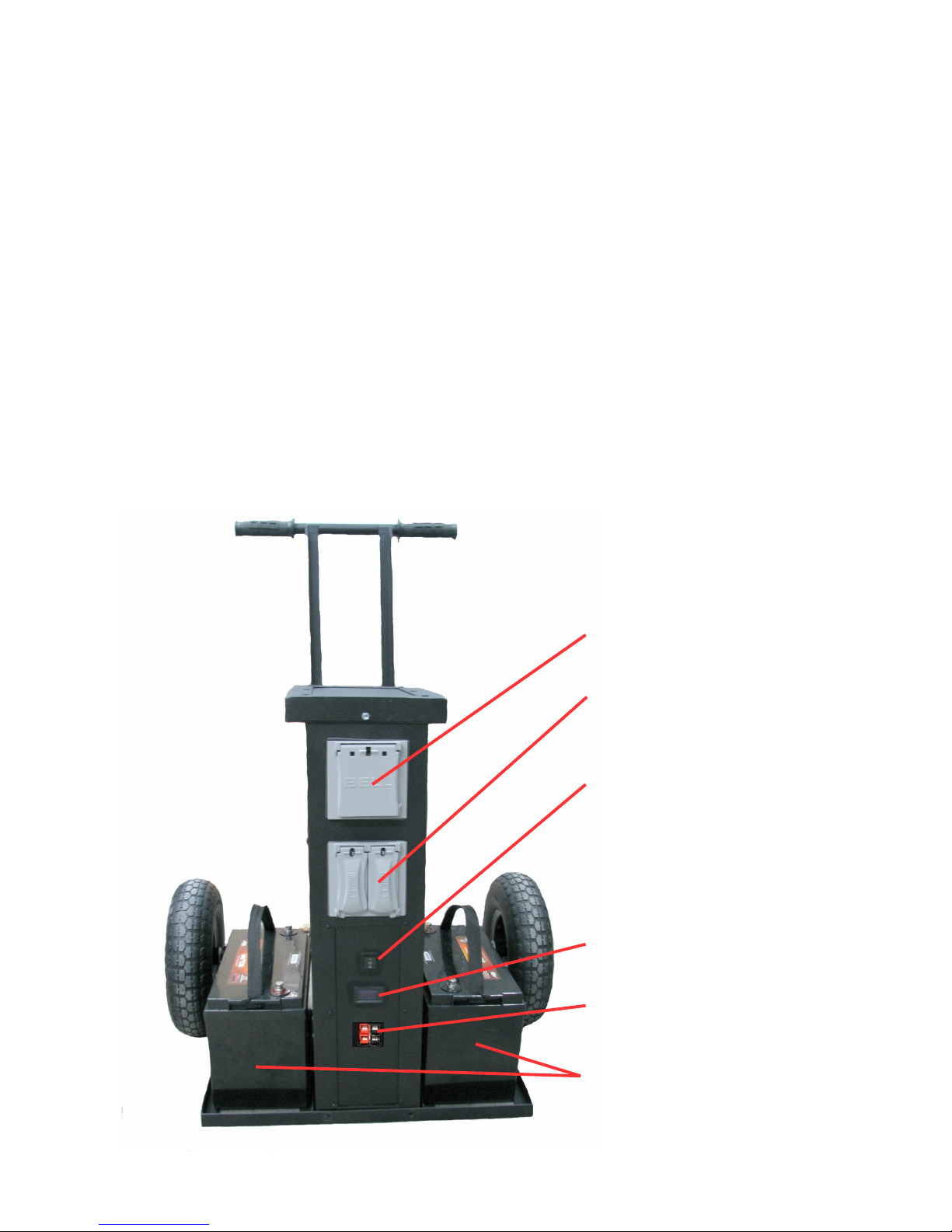
1.2 Controls, Indicators, Connections
_
220V Outlets
110V Outlets and USB
Ports
Power Button
On Mode
O Off
= Power Save Mode
LED Battery Display
Solar Input
Deep Cycle AGM
Batteries
Page 4
1.3 Technical Specifications
HomeGrid™ 5000 HD
Weight
125 lbs (not including batteries)
Dimensions
46x20x16
Generator
Input Voltage
24V DC
Output Voltage
110V AC Pure sine wave
220 V AC Pure sine wave
Continuous Power
Output
5,000 watts
Peak Power Output
20,000 watts
Outlets
(4) 110V, (1) 220V
USB
2
Battery
Cell type
24V Deep Cycle AGM
Capacity
1,800 watt-hours (standard)
3,700 watt-hours (extreme upgrade)
7,400 watt-hours (ultimate upgrade)
Life
3-6 years (standard)
8-10 years (extreme and ultimate
upgrades)
Warranty 1 year limited
Page 5
2. CHARGING YOUR HOMEGRID™ SOLAR
GENERATOR
*IMPORTANT: Before using or storing, make sure your HomeGrid™
solar generator is fully charged. This can be done in one of two ways:
charging from the sun, or charging from the wall using the AC Battery
Charger/Maintainer.
For optimal results, keep your HomeGrid™ solar generator plugged
into any wall outlet using the included AC Battery
Charger/Maintainer when not in use.
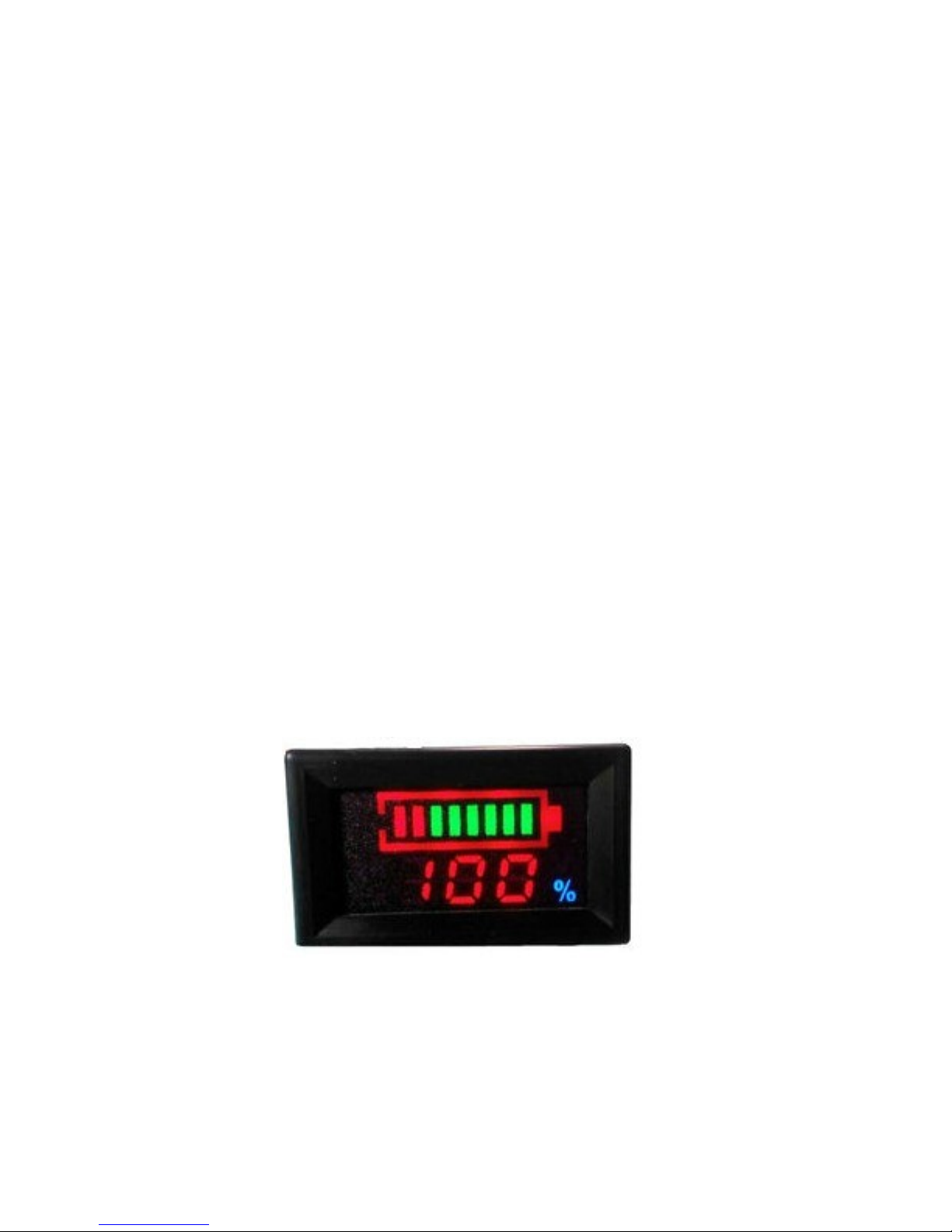
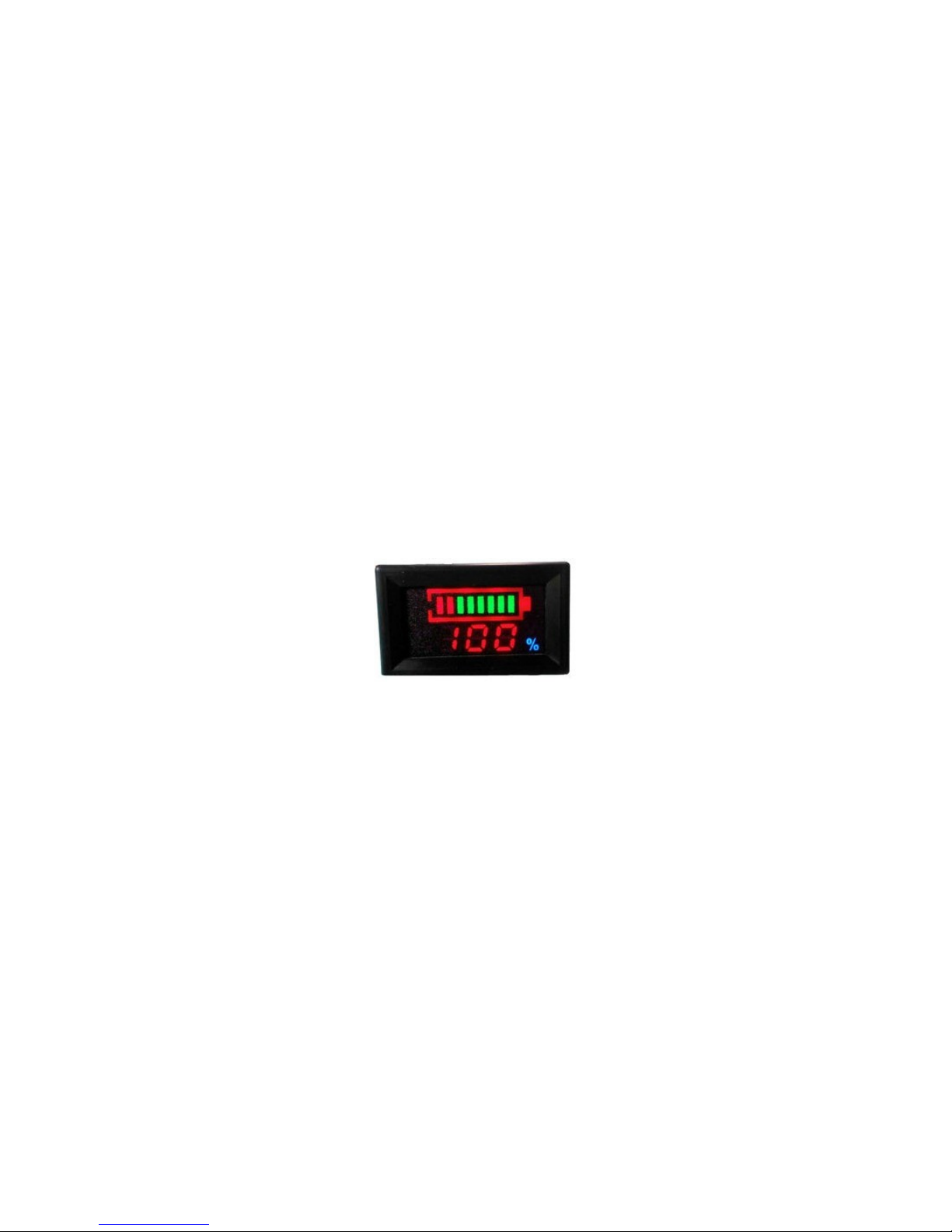
LED Battery Display:
The LED Battery Display indicates the charge level of your HomeGrid™
solar generator.
There are 2 colored segments to the LED display: red and green. As you
use your HomeGrid™ solar generator, the green colored segments will
disappear from right to left in the display, indicating the remaining charge
in the batteries.
IF ONLY RED SEGMENTS ARE DISPLAYED, THIS INDICATES THE
BATTERIES ARE EXTREMELY LOW AND NEED TO BE CHARGED.
Once your HomeGrid™ solar generator is fully charged, all colored
segments will be lit, indicating a full charge.
LED display indicating a full charge.
Page 6
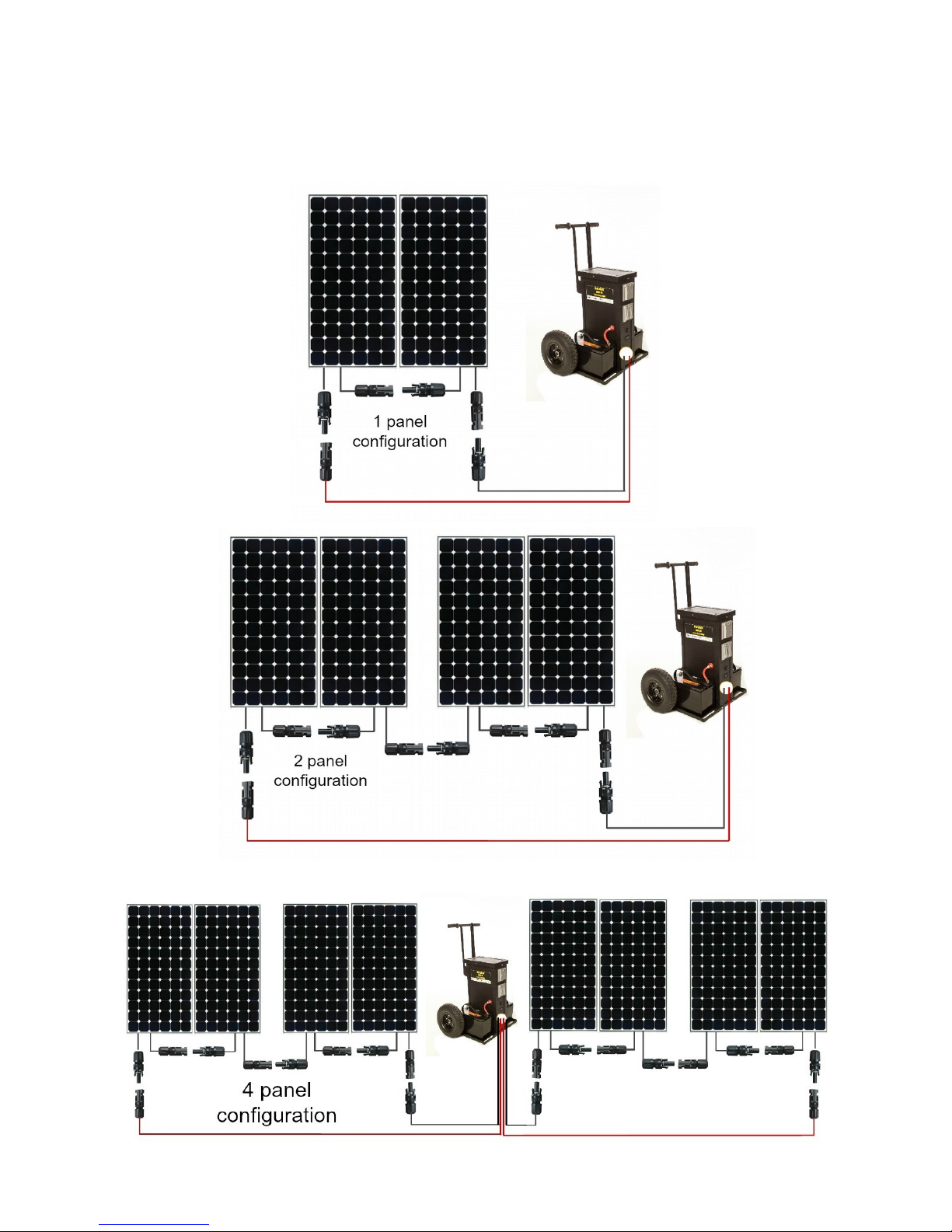
2.1 Charging from Solar
1. Place your solar panels where they will get as much direct sunlight
as possible.
2. Connect solar panels to the generator using the following diagrams.
Page 7

(Charging from Solar Continued...)
3. Charge batteries until all colored segments are lit and leave
charging for an additional 2 hours to ensure a full charge. The solar
panels come with a charge controller which regulates the charging
of batteries so there is no need to worry about over-charging the
batteries.
2.2 Charging from the wall
1. Using the included AC Battery Charger/Maintainer, plug the AC
Battery Charger/Maintainer into any wall outlet.
2. Connect the AC Battery Charger/Maintainer's battery clips to each
terminal on the generator (NOT ON INDIVIDUAL BATTERIES).
Connect these black to black, red to red.
3. The AC Battery Charger/Maintainer will automatically detect
battery type and state of charge and will automatically start
charging the battery.
4. The AC Battery Charger/Maintainer will indicate when the
batteries are fully charged.
* For optimal results, leave your HomeGrid™ solar generator plugged
into a wall outlet using the AC Battery Charger/Maintainer during
storage.
3. OPERATING INSTRUCTIONS
3.1 General instructions
• For optimal performance, when using your HomeGrid™ solar
generator keep the generator in a cool, dry environment. Although
the solar panels need to be kept in direct sunlight, keeping the
generator core away from any direct heat source, including direct
sunlight, will keep the generator from over-heating and shutting
off. Also, keep away from any combustible materials or gases.
• Keep well ventilated- the generator core generates heat.
• This inverter will only operate from a 24- Volt DC power source.
• Incorrect battery polarity will damage the inverter and void the
warranty.
• Do not open the HomeGrid™ solar generator; there are no user
serviceable parts inside.
Page 8

3.2 What can I power?
Due to it's superior surge capability the HomeGrid™ solar generator can
easily power multiple home appliances simultaneously including
refrigerators, freezers, microwave ovens, and cooking appliances. It's pure
sine wave power output will safely run power tools, electronics, and
medical equipment such as CPAP machines.
The amount of power it can run, however, will vary depending on the
appliance.
When deciding on what appliances to power with your HomeGrid™ solar
generator, you will need to calculate the continuous and peak loads of each
appliance you want to run simultaneously to determine if the total amount
of watts is within the capacity of the generator.
3.3 Determining maximum appliance wattage
When a motorized appliance motor starts, it requires an initial surge of
power. This surge of power is called the "starting load" or "peak load".
Once started, the appliance requires less power to
continue to operate. This is known as the "continuous load".
Appliance power is rated in watts. This information is usually stamped or
printed on most appliances and equipment. In some cases, a tool will be
rated in amperes. To convert from amps to watts, multiply: AMPS X 115
(AC voltage) = WATTS. This formula yields an approximation of the
continuous wattage load of the appliance. The start up load of an appliance
is a major factor of whether this generator can power it. Start-up load is
momentary. With many devices, it is approximately twice the continuous
load. However, with some devices start-up load can be as high as eight
times the continuous load. To determine if an appliance or tool will
operate with this generator, run a test. The HomeGrid™ solar generator is
designed to automatically shut down in the event of an output overload.
Page 9
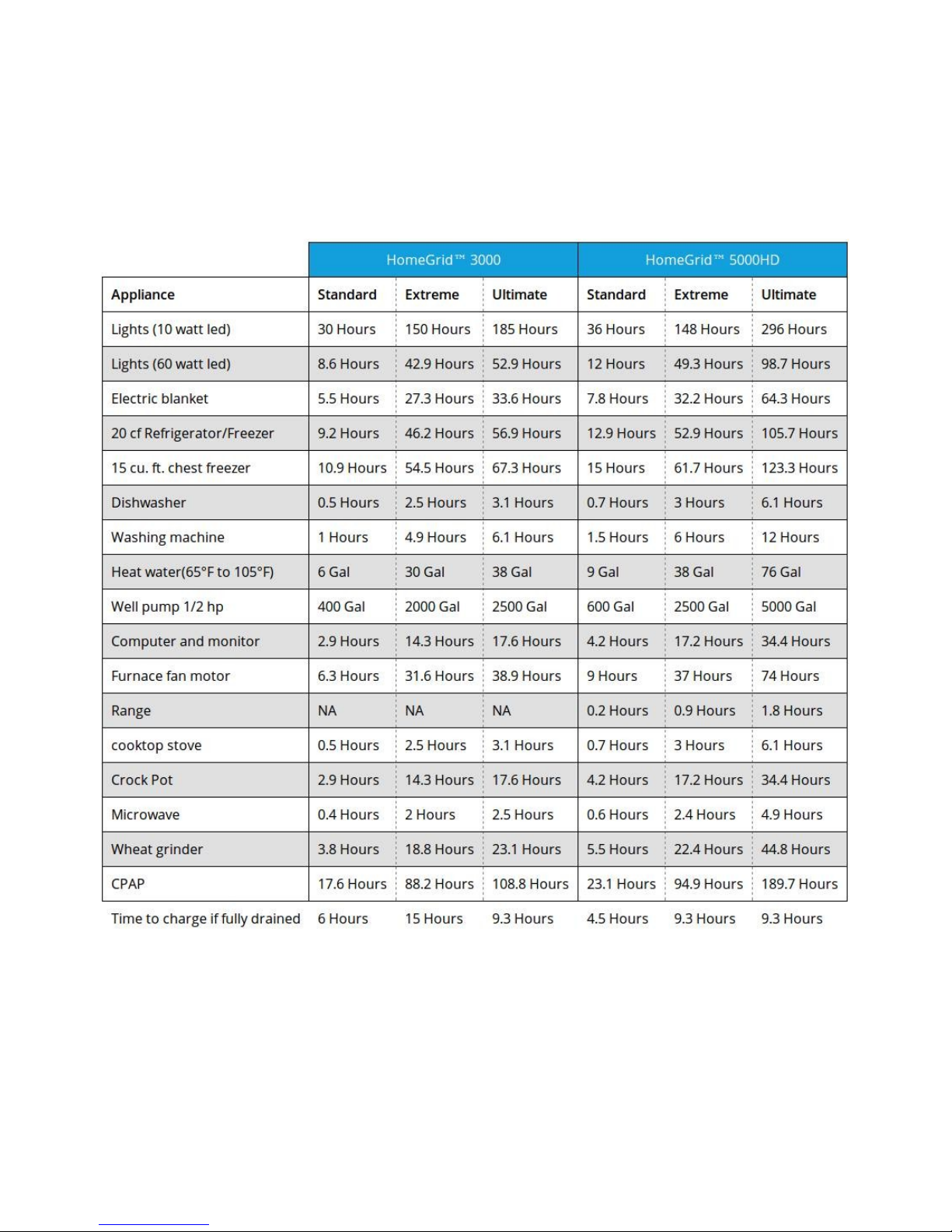
Below are estimated run times for each HomeGrid™ 3000 and 5000HD
solar generator with their various upgrade sizes.
*Run times will vary depending on amount and sizes of batteries and
solar panels.
Page 10

3.4 How to Use
1. Place your solar panels where they will get as much direct sunlight as
possible.*
2. Connect the solar panels to the generator using the red and black
connection wires. See diagram in section 2.1 Charging from Solar.
3. Turn power switch on by flipping switch to the “up” position.
4. The generator is now on and ready to use.
5. Plug your 110V or 220V appliances into the generator outlets for use.**
For instructions on how to set up your HomeGrid 5000 HD for home
backup using the 220V outlet please see our instruction video at
http://pointzeroenergy.com/learn/videos/ LED display indicating a full charge.
*The HomeGrid solar generators can be used without solar panels connected.
However, connecting the solar panels and using with sunlight will increase your
run time. If you do not wish to charge with solar while using you can skip to step
3.
**Because there is no standard 220V outlet your appliance may not be compatible
with the generator outlet. If this is the case, you need to change your cord on
your appliance with one that is compatible. Visit
http://pointzeroenergy.com/learn/videos/ for more information on this.
Power-Save Mode:
If you're planning on running an appliance that cycles on and off, like a
refrigerator or freezer, you can save power by using the Power-Save Mode,
with the power switch flipped in the “down” position.
3.5 Storage and Maintenance
Store your HomeGrid solar generator in a cool, dry place.
Having your HomeGrid™ solar generator connected to a power source,
like the AC Battery Charger/Maintainer, while in storage keeps the battery
in good condition and topped off. This will not only prolong the life of the
batteries, but will ensure that your HomeGrid™ solar generator is charged
and ready to go at any time.
Page 11

(Storage and Maintenance Continued)
*If you can’t keep your HomeGrid™ solar generator plugged into a power
source during storage, disconnect the batteries from the generator and
fully-charge your generator every 6 months using the AC Battery
Charger/Maintainer. *FAILURE TO MAINTAIN YOUR HOMEGRID
SOLAR GENERATOR BY FOLLOWING THESE STEPS WILL
VOID THE PRODUCT WARRANTY.
4. TROUBLESHOOTING
If there is no power to outlets, or appliances are not running properly,
follow these steps:
1. Make sure the POWER button is turned on (in the “up” position).
2. Check the LED Battery Display. If there are no green bars displaying,
turn off your HomeGrid™ solar generator and charge the batteries.
3. Reset the HomeGrid™ solar generator by following these steps:
a. Turn the HomeGrid™ solar generator off by flipping power switch
to middle position.
b. Wait 5 seconds then turn on by flipping switch to the “up”position.
4. Make sure the HomeGrid™ solar generator is not in direct sunlight.
This may over-heat the generator core and cause it to shut down. This can
be remedied by moving the generator into the shade or indoors and
allowing it to cool for at least 1 hour. Reset the HomeGrid™ solar
generator by following the steps in Reset the HomeGrid™ solar generator,
#3.
If you are still experiencing trouble with your HomeGrid™ solar generator,
please contact us at [email protected]
Page 12
5. FAQ'S
What type of batteries come with my HomeGrid™ solar
generator?
The HomeGrid™ solar generator comes stock with two 12V Deep Cycle
AGM batteries. However, these can be customized to the buyers
preference. Sizes, types and prices will vary.
Can I replace the batteries in my HomeGrid™ solar generator?
Yes. As long as you purchase batteries that fit the correct dimensions of
the HomeGrid™ solar generator's battery rack, you can replace your stock
batteries with any two 12V Deep Cycle batteries. When replacing batteries
it's best to replace both batteries at the same time, and with the same type
of battery to get the maximum life of your battery bank.
How do I know if my HomeGrid™ solar generator is charged?
All green bars will be displaying in the LED Battery Display.
How often do I have to charge my HomeGrid™ solar generator?
It’s best to charge your solar generator once every three months. You can
do this by charging from any electrical outlet (see section 2.2 Charging
from the Wall) or using solar (see section 2.1 Charging from Solar).
*Keeping your HomeGrid™ solar generator plugged into a wall outlet
using the trickle charger while in storage keeps the battery in good
condition and topped off.
LED display indicating a full charge.
Page 13

How do I know if my appliance will work with the HomeGrid™ solar
generator?
When figuring what appliances can be powered with your HomeGrid™
solar generator you will need to calculate how much the continuous loads
are of each appliance you want to run simultaneously to determine if the
total amount of watts is within the capacity of the generator.
You can find the wattage of the appliance by looking at the manufacturer's
information (this information is usually stamped or printed on most
appliances and equipment) or using a Kill A Watt meter to measure it's
wattage. Add all wattages of appliances to be run to determine if the total
amount of watts is within the maximum continuous and surge watts of the
HomeGrid™ solar generator.
Can I have my solar panels connected while using my HomeGrid™
solar generator?
Yes. In fact we recommend you use your generator in this way so that the
solar panels can be recharging your batteries while in use.
Can I add more batteries and solar panels to my HomeGrid™ solar
generator?
Yes. Due to the large watt capacity of the HomeGrid™ solar generator
there are many options to increase the battery and solar panel capacity of
your system. In fact, if you add enough batteries and solar panels you can
have a fully functional off-grid system.
Can I run my refrigerator AND freezer during power outages?
Yes. However, the length of time these can be powered simultaneously
will vary depending on the efficiency of your appliances and the capacity
of your batteries and solar panels.
Page 14

6. WARRANTY
ONE-YEAR LIMITED WARRANTY
This HomeGrid™ solar generator is warranted to the original purchaser
only to be free from defects in workmanship and material under normal
consumer use during the applicable warranty period (see WARRANTY
PERIOD) and subject to exclusions set forth in paragraph 4.
Warranties for other Point Zero Energy products may vary.
WARRANTY PERIOD
The HomeGrid™ solar generator, with all included components, whether
stock, upgraded, or custom built, are covered by the LIMITED ONEYEAR WARRANTY. This limited warranty is valid for one year from the
original purchase date; meaning this warranty is NOT transferable and is
only valid for the original consumer. The sales receipt from the original
consumer purchase, or other reasonable documentary proof, is required in
order to establish the start date of the warranty period.
WHAT IS COVERED
Components that are covered under the LIMITED ONE YEAR
WARRANTY include, but are not limited to:
HomeGrid™ solar generator:
This includes inverter, steel frame, internal electronics, and any
attachments including tires and handles.
Solar Panels:
All solar panels are additionally covered under the specific solar
panel manufacturer's 25 year warranty.
Battery or Battery Bank:
Any batteries or battery bank which are included in the
HomeGrid™ solar generator or any HomeGrid™ system.
Page 15

EXCLUSIONS
This warranty does not apply to damage from misuse, alterations, abuse,
normal wear and tear, lack of maintenance, accidents, or repairs made or
attempted by anyone other than an authorized service technician. This
warranty does not cover repair if:
• Normal use has exhausted the useful life of the generator and wear
and tear items (including batteries, control panels including digital
displays, tires, outlet plugs, switches, and extension cords if
applicable).
• The customer fails to install, maintain, and operate the product in
accordance with the instructions and recommendations of the
company set forth in the HomeGrid™ solar generator operator’s
manual.
• Damage occurs due to freezing, heat exposure, water exposure,
rust, corrosion, thermal expansion, fire, dropping, or improper use.
This warranty does not cover freight or labor charges associated with the
inspection and testing of generators.
HOW TO RECEIVE SERVICE
To obtain warranty service, you must contact us at 208-530-2393 or
[email protected] prior to returning any product to receive an
RMA form.
UNAUTHORIZED RETURNS WILL NOT BE ACCEPTED AND
WILL BE REFUSED. CUSTOMER IS RESPONSIBLE FOR ALL
SHIPPING COSTS ON UNAUTHORIZED RETURNS.
Buyer is responsible for any initial shipping charges required to ship the
product for warranty service. Point Zero Energy will pay the return
shipping charges if the product is repaired or replaced under warranty.
 Loading...