

Page 1

User Guide
POD Point Twin Charge
User Guide
Electric Vehicle Charger
Page 2

Page 2
This user guide will help you to get the most out of your POD Point twin charge unit. The POD Point
is the next generation in electric vehicle charging for local councils and corporate clients looking to
join the electric vehicle revolution.
Inexpensive and simple to install, it minimises the increase in street furniture and off ers a level of
management and control not seen before through the POD Point communication system.
POD Points can charge two vehicles simultaneously which signi cantly reduces the eff ective cost per
charging socket.oAll POD Points use standard 3-pin plug points – meaning all electric cars and bikes
can use them.
Introduction
Important Safety Information
• Your charging cable should never be used if it is damaged or has been tampered with.
Please check before plugging into a POD Point that it is in good condition.
• Plug your charging cable into your car before plugging into a POD Point.
• Do not unplug your charging cable from your car before removing the plug from the POD
Point.
• Please do not force the charging door open without your swipe card. If you lose your card
mid-charge, a simple call to our offi ce can remotely release the door.
• If the door is tampered with during charging or the cable is cut, the power will stop
immediately.
• POD Points have several RCDs (Residual Current Devices) built in which will trip if there are
problems
• Read all of these instructions and retain this guide for later use.
• Pass on this guide in the event of change of ownership of the installation site.
• Follow all warnings, cautions and instructions contained in this guide.
• Follow all warnings, cautions and instructions contained on or inside the POD Point
• Anyone who may have diffi culty understanding or operating the controls of the POD Point
should be attended whilst starting and ending a charging cycle.
Page 3

Page 3
Using Your POD Point
To start charging you will need your charging cable and RFID charging card.
If you do not have an RFID card please contact POD Point to join the POD Point Charging
Network and we will be able to provide you with an RFID electric vehicle charging card.
Some POD Points may have restrictions on charging and parking times - please check on nearby
signage before starting your charge.
Start Charging
Finish Charging
To Start Charging
Swipe your POD
Point RFID card
to identify
Connect your
vehicle’s power
cable
Close the POD
Point door
Close the POD
Point door
- all done!
Disconnect
your vehicle’s
power cable
Swipe your POD
Point RFID card
to identify
Page 4
Page 4
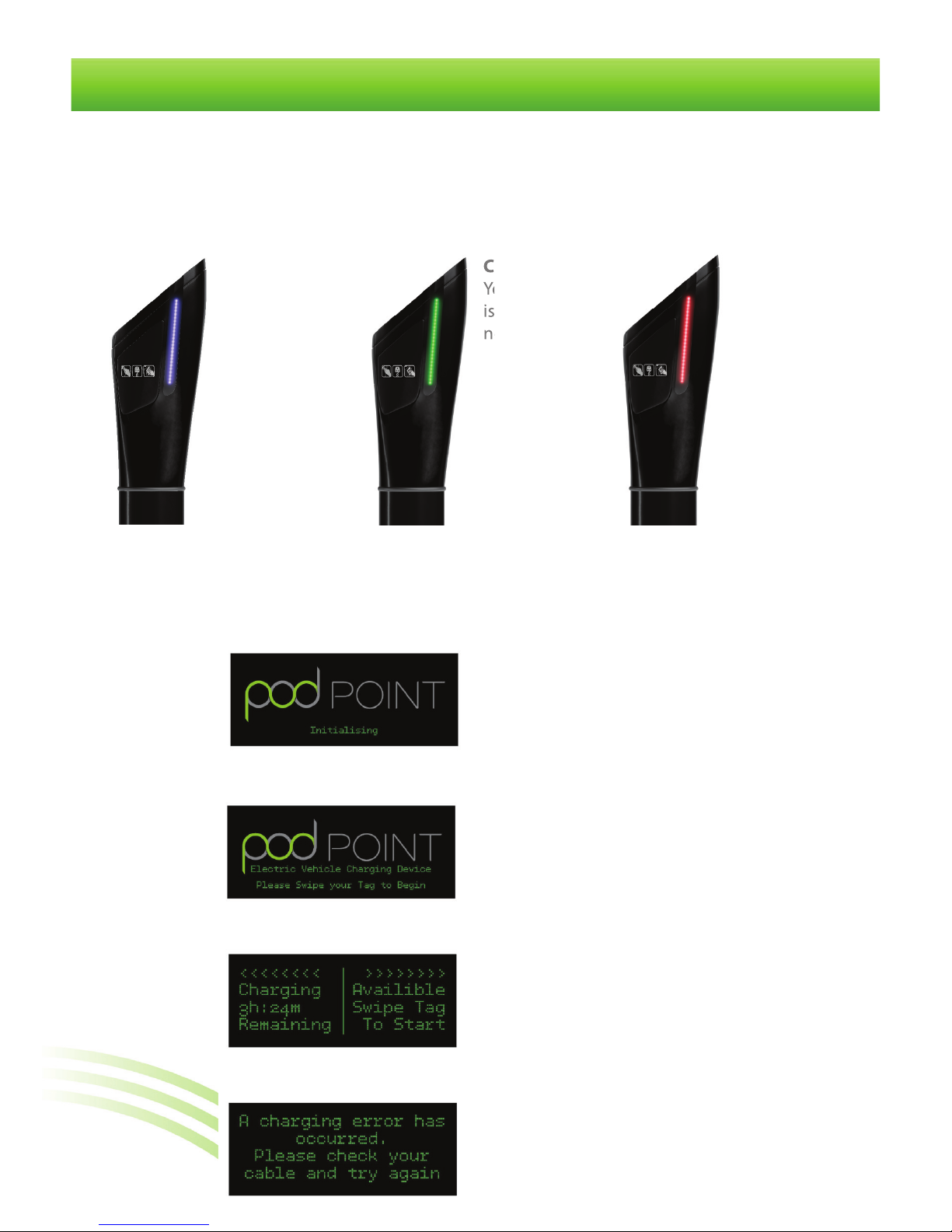
Standby:
Charging point
available for
use
Error:
An error has
occurred
Charging:
Your vehicle
is charging
normally
Charging
Your vehicle
Status
The live availability map on our website (http://www.pod-point.com/live-availability) will be
able to tell you the current status of your nearest POD Point. There are also highly visible status
lights along the side of each POD Point that show whether the unit is charging, available or out
of service.
User Information
Welcome display
Your POD Point is now ready to charge,
swipe your card to start charging
Initializing display
This will appear when your POD Point is rst
installed. Wait until the welcome display
appears to swipe your card
Currently charging display
The left side of the POD Point is currently
charging, this display also noti es you how
much time you have remaining.
Error display
If your POD Point displays this message,
contact our customer services team.
Displays
Use the POD Point display screen to view your charging status. The four display screens are
detailed below:
Page 5

Page 5
Physical Speci cation
Dimension ‘A’ 1300mm
Dimension ‘B’ 1000mm
Dimension ‘C’ 160mm
Dimension ‘D’ 218mm
Dimension ‘E’ 295mm
Standard Colour RAL 9005 (Black)
Paint Finish Anti Graffi ti
Shipping weight 35kg
Operating Temp
-30°C to +50°C
Operating Humidity 95% Non Cond
Enclousre Rating IP56 in all key areas
A
B
C
D
E
Electrical Properties
Twin charge
No. of charge sockets
2
Rated Voltage 240V AC
Rated Frequency 50Hz
Rated output current 2x16a
Rated output 2x3.7kW
Charge Type Mode 1
Over Current Protection Yes
Ground Fault Protection 30ms RCD
Socket Compliance CCE7
RFID Reader Compliance ISO14443 Mifare
RFID Reader Frequency 13.56Mhz
Standards Compliance LVD 73/23/EEC
EMC 89/336/EEC
BS EN 61851-22:2002
Metering
Class 1 per EN 62053-21
& BS 8431
Class 0.25 IEC 60688
Standby Consumption 5W
Speci cations
Page 6

Page 6
Warranty
All POD Point hardware is designed for installation in open air environments, and should give a
long in-service life, wherever installed. Any hardware failure should be promptly reported to us,
ideally be e-mail to [email protected], quoting the serial number and date of purchase of
the product, and giving a brief description of the failure.
Any product failure occurring during the twelve months and arising from any shortcoming in
design or manufacture will be made good free of charge or, at our discretion, by the supply of a
replacement product. In these cases, we will bear any return shipping costs, but will not pay for
any costs of re-installation.
We will not undertake any repairs for any out-of-warranty failures without rst receiving
acceptance of our quotation for the related costs. In no event will we accept any liability for any
loss, costs or damage consequential on the use and/or misuse of our hardware products except
and only to the extent that this is caused by our negligence.
Should an issue arise during the normal operation of your POD Point, please call our Customer
Services team on 0845 519 1995. Our Customer Services Team are comprehensively trained to
provide every assistance you may need: help and advice, or a service visit.
If you have any questions, comments, or issues regarding POD Point Products which are not
covered by this user guide, please contact our customer support team as follows:
As part of our quality and training programme calls may be recorded or monitored.
Customer Support
POD Point Limited
145 - 157 St John St
London, EC1V 4PY
Telephone: 0845 519 1995
E-mail: [email protected]
Web: www.pod-point.com
Contact Us
Page 7

Page 7
Notes
Page 8

POD Point Ltd
145 - 157 St John St, London, EC1V 4PY
Telephone: 0845 519 1995
Copyright 2011 - Pod Point Ltd. POD Point is a registered trade mark. The company reserves the right to alter product specications without notice.
www.pod-point.com
 Loading...