

Page 1

QUICK START GUIDE
Page 2

MAKE ANY
HEADPHONES
WIRELESS
Page 3

TABLE OF CONTENT
DIAGRAM...................................................................................................................... PAGE 01
GET STARTED................................................................................................................ PAGE 02
BASIC USE..................................................................................................................... PAGE 04
CONFIGURATION.......................................................................................................... PAGE 05
TECH SPECS.................................................................................................................. PAGE 06
CARE............................................................................................................................ PAGE 07
MODES......................................................................................................................... PAGE 08
WARRANTY................................................................................................................... PAGE 13
CONTACT...................................................................................................................... PAGE 19
JACK TABLE OF CONTENT
Page 4
01
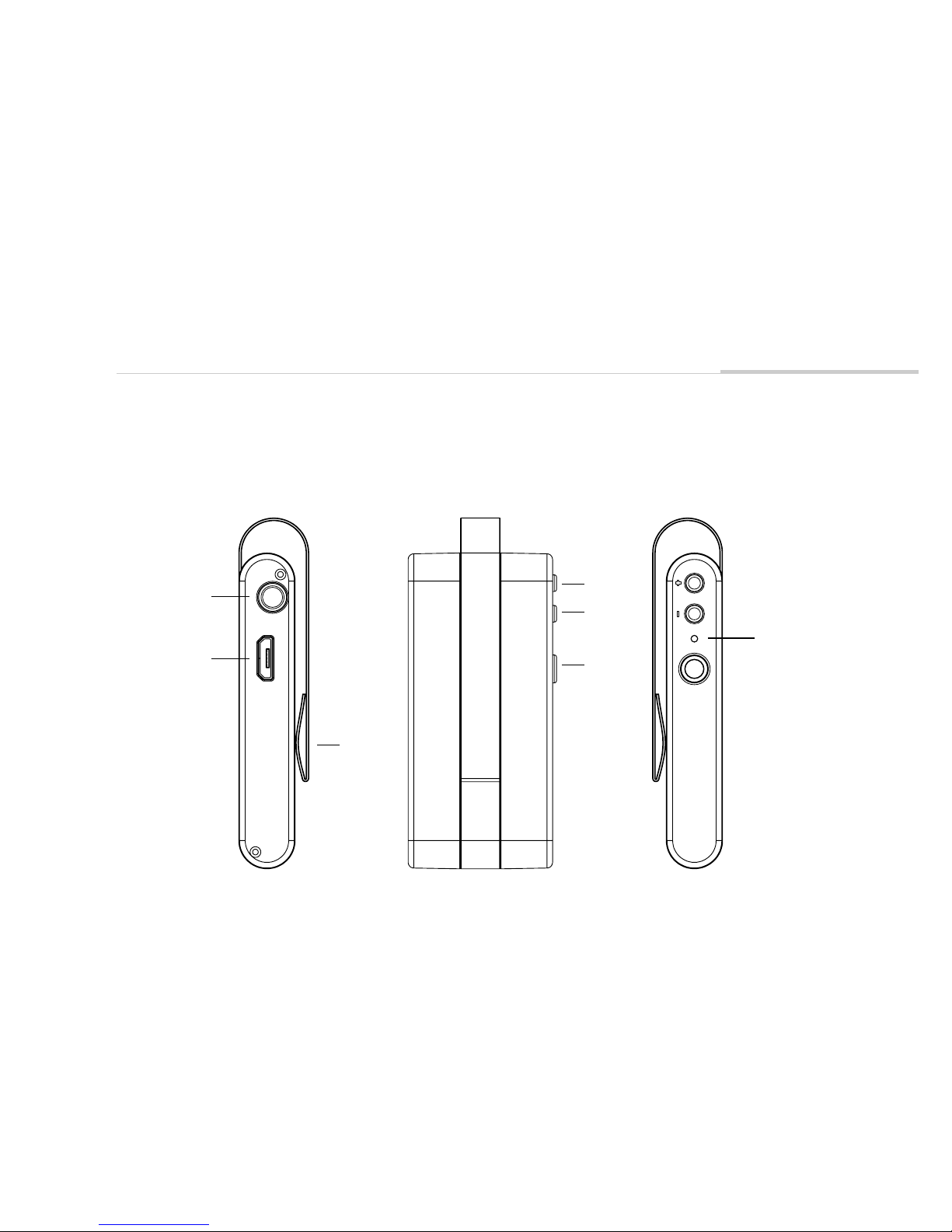
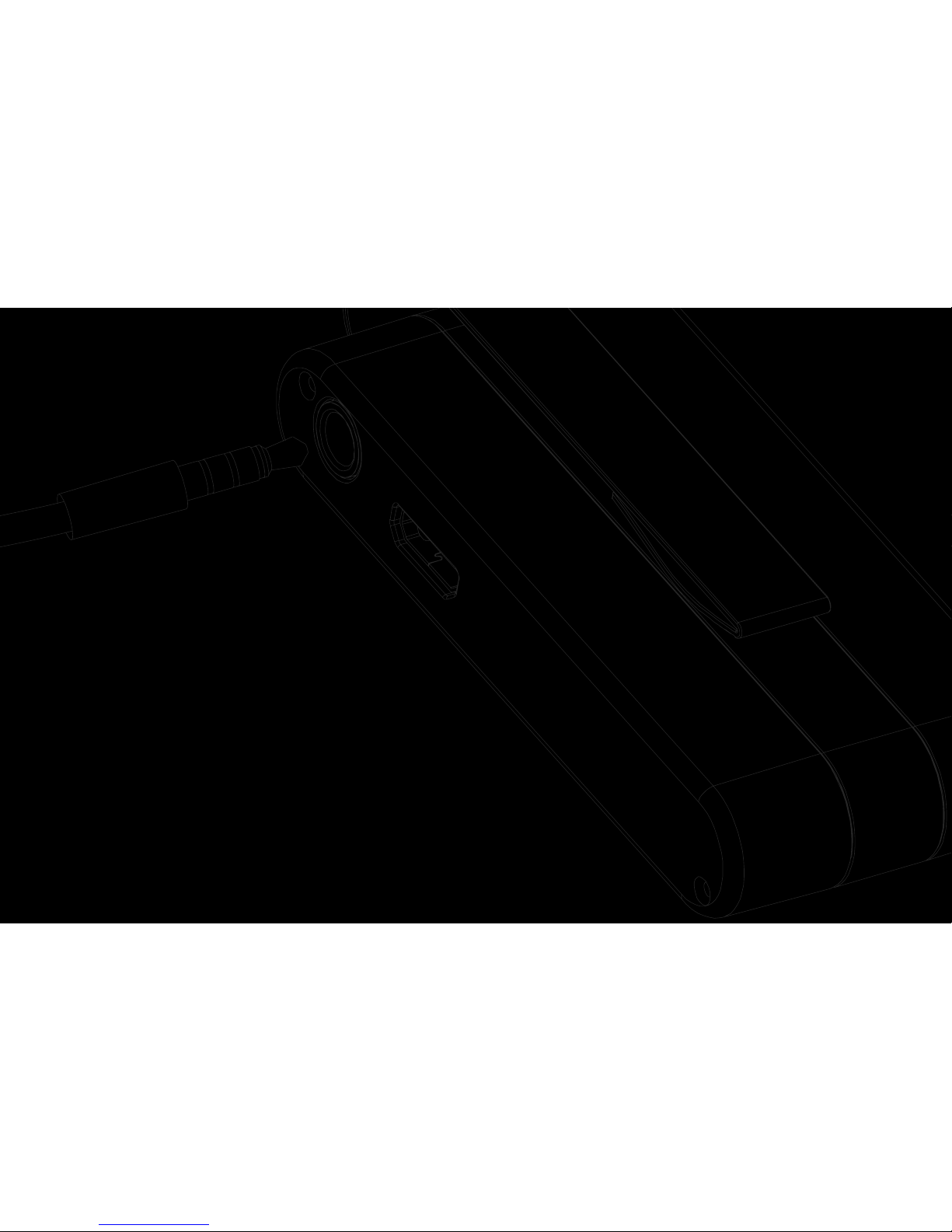
DIAGRAM
Volume +
Volume -
Power
Clip
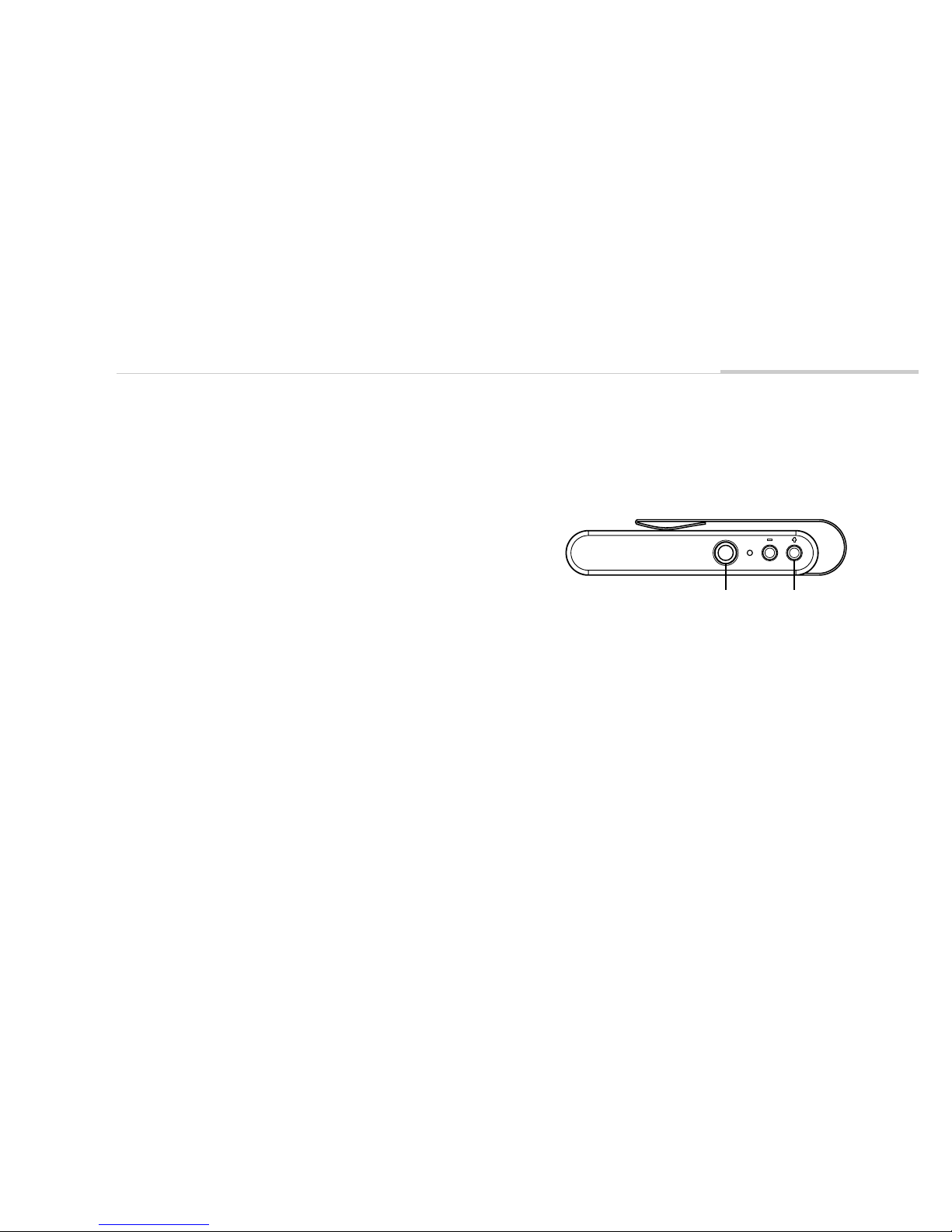
LED Indicator
3.5mm Port
Micro USB Port
JACK DIAGRAM
Page 5
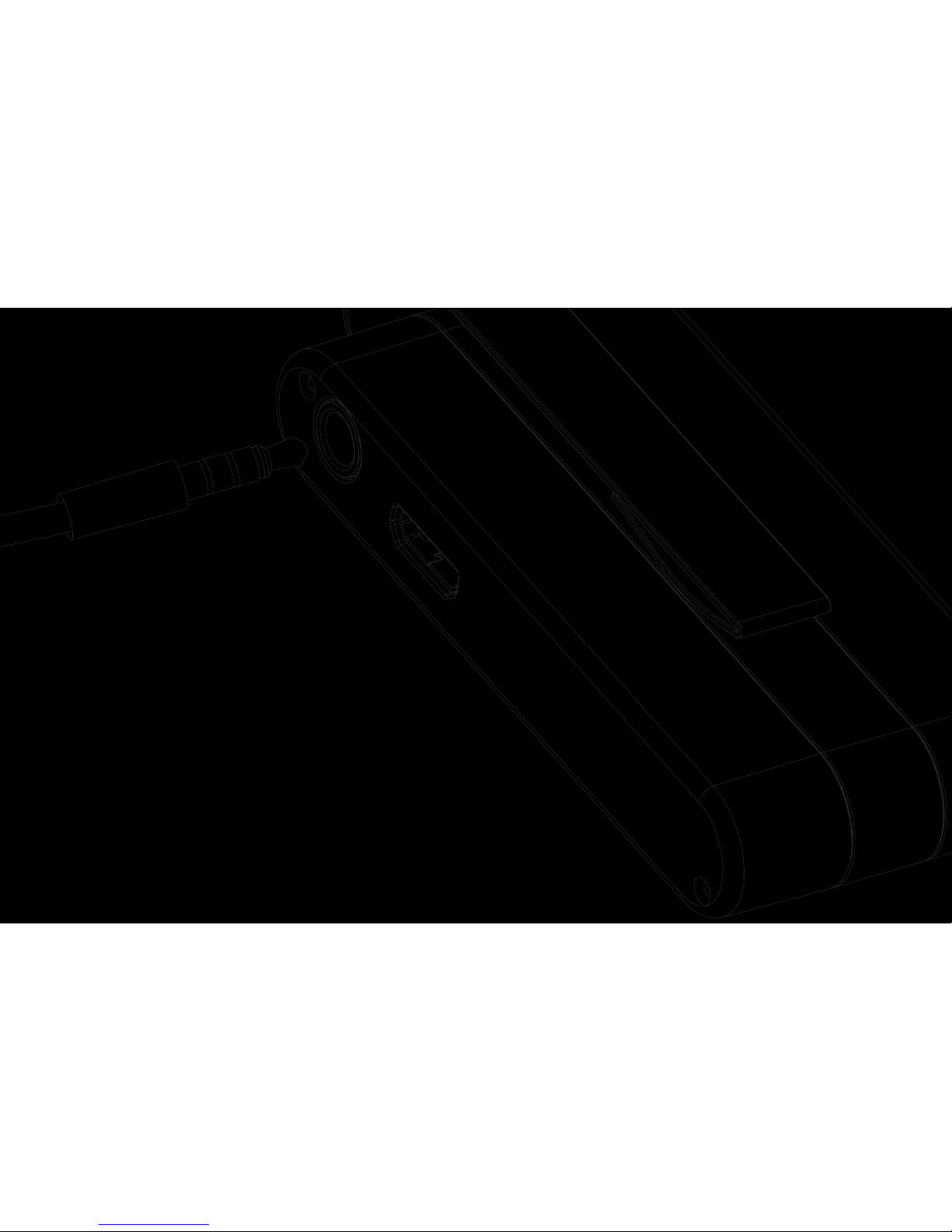
GETTING STARTED
Thank you for purchasing Jack! This section contains articles that will guide you through setup and
basic use. After that, you can check out the other sections to learn about more advanced features.
Page 6
02
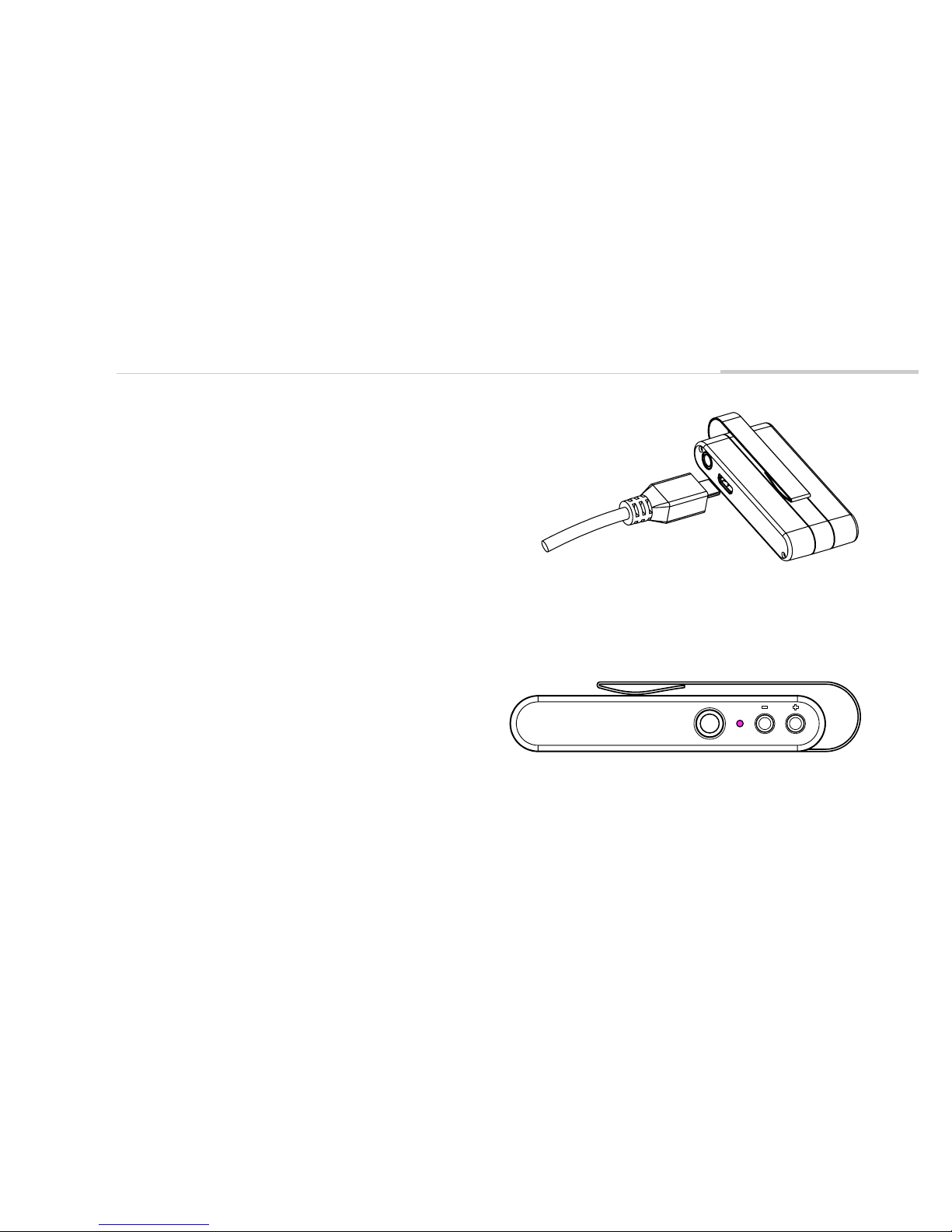
GET STARTED
Charge for at least 1 hour.
• Use the included Micro-USB cable to plug in to a
computer or wall adapter.
STEP 2
Turn on Jack.
• Press the larger button for at least two seconds
• The LED will turn purple, then flash blue
STEP 1
Page 7
03
GET STARTED
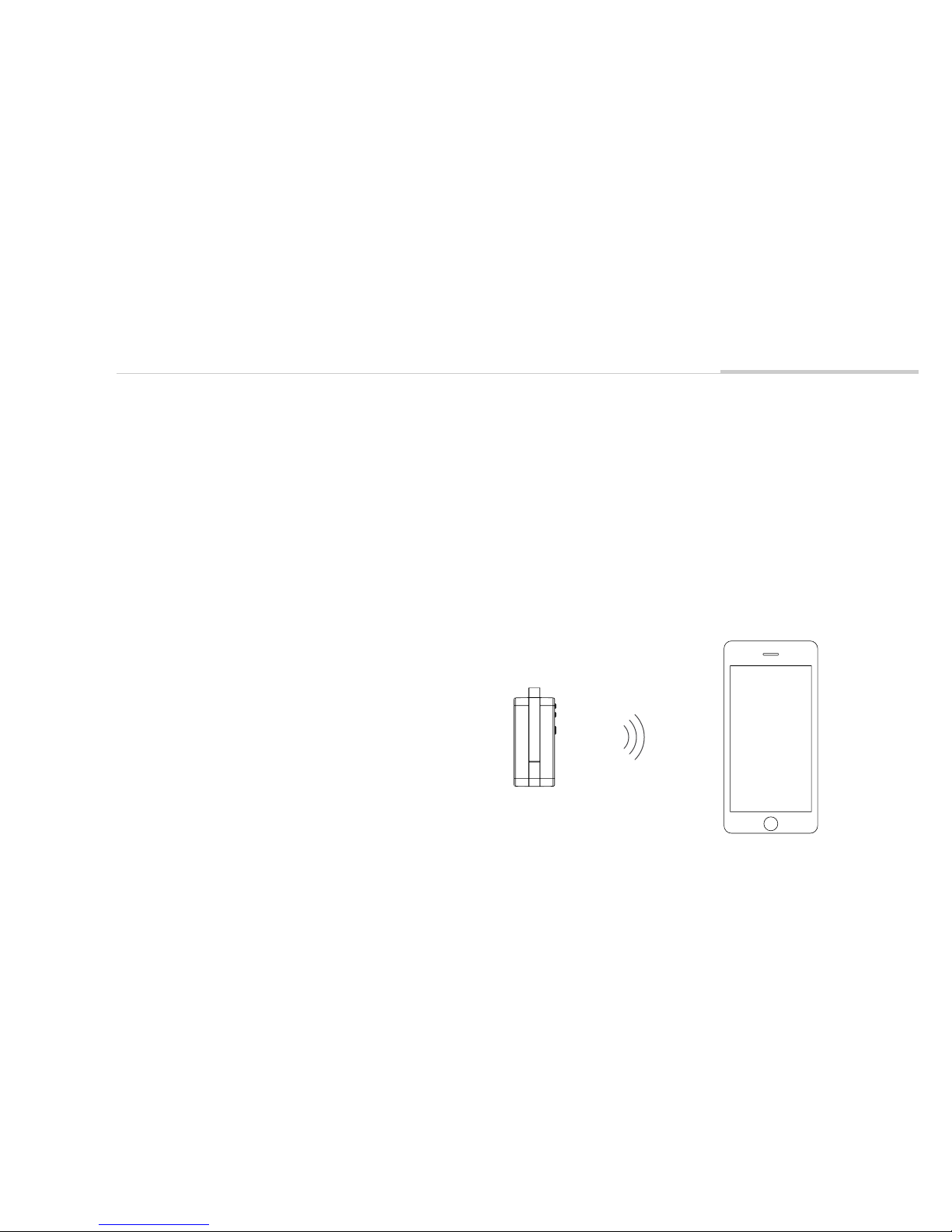
Find Jack in your phone's Bluetooth menu.
• iOs - Open the Settings app and click "Bluetooth"
• Android - Long press the Bluetooth icon on the top
menu, or open Settings -> Connected Devices ->
Bluetooth (may be slightly different depending on OS
version)
STEP 4
Pair and connect to Jack.
STEP 3
Page 8

04
BASIC USE
After Step 4, Jack will be paired to your phone and
connected in "Receive Mode". Audio is streamed
from a phone or computer to Jack, and played from
the AUX port. Plug in headphones, wired speakers, or
anything that can play audio from an AUX cable.
Disconnecting
If no audio is playing, Jack will disconnect and turn
off after 20 minutes. To save battery, we recommend
turning Jack off manually when you're done by holding the power button for 3 seconds.
Auto Connect
When powered on, Jack will attempt to connect to
the previously connected device. If the device is
unavailable (out of range, or Bluetooth is off), Jack
will remain in pairing mode.
Volume Control
There are three ways to control Jack's volume:
1. Change the volume on your phone or computer
2. Press the volume buttons on Jack
3. Use headphones with in-line volume control
Note: Not all in-line headphones will work correctly
due to different specifications between vendors.
However, headphones shipped with Jack will work
correctly, and we have done our best to be as compatible as possible.
BASIC USE
Page 9
05
CONFIGURATION
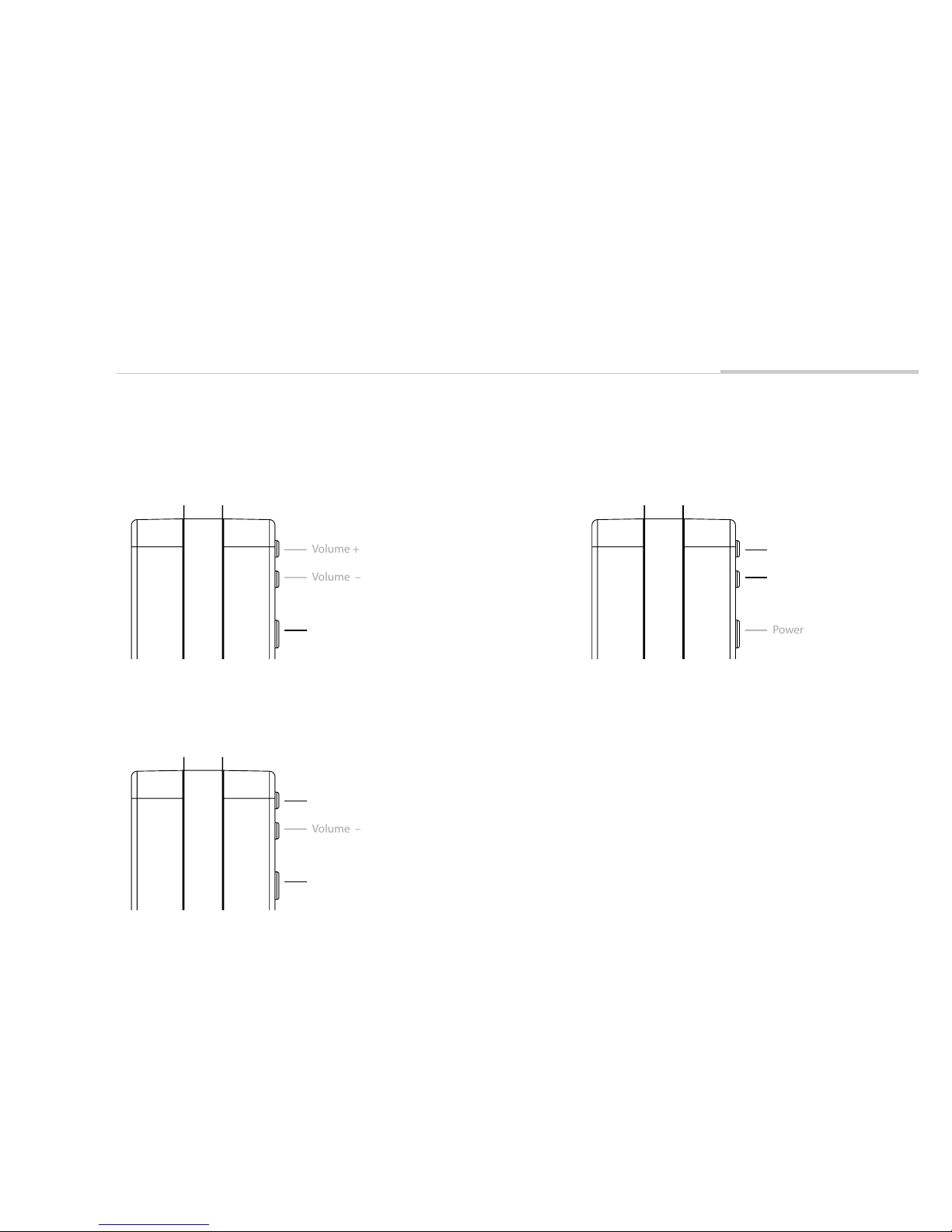
Receive Mode
When Jack is off, press the Power button for two
seconds to turn on in Receive Mode.
Transmit Mode
When Jack is off, press Power button and Volume +
button for two seconds (at the same time) to turn on in
Transmit Mode.
Share Mode
When two Jacks are in Receive Mode, hold the
Volume+ and Volume- down until they are sycned.
Volume +
Volume –
Power
Volume +
Volume –
Power
Volume +
Volume –
Power
Page 10

06
TECH SPECS
• 1/8" Aux port for input and output
• 300mAh LiPo battery
• Up to 12 hours playback at reasonable volume
• Steel clip
• Micro USB charging port
• 3 buttons
• 1 RGB LED
HARDWARE
• Bluetooth 4.2
• SBC and AptX audio codecs
• Play audio from up to 2 devices in Receive Mode
• One device active at a time
• Share synchronized Bluetooth audio with another Jack
• Stream input from the Aux port to 2 devices in Transmit Mode
CONNECTIVITY AND AUDIO
Page 11

07
CARE
Charging
Jack fully charges in less than 2 hours. If you haven't
charged Jack in several weeks or more, it could take a
bit longer.
To ensure product longevity, it's best not to let the
battery completely run out. Jack will shut itself off
before the battery is damaged, but it's not ideal to
let this happen too often.
Weather
Make sure to keep Jack out of extreme conditions.
Jack can handle a wide range of temperatures, but it
can get hotter than you might expect on a car dashboard or asphalt outside.
Jack is weather resistant and can handle rain, but
should not be fully submerged.
Clip
The clip is made of metal, but take care not to bend it
too far!
CARE
Page 12
08
SUPPORT
In the Getting Started section, you learned how to use Jack in "Receive Mode." That's the most
common way to use Jack, but in this section we'll go over everything else that's possible.
MODES
Page 13
09
MODES
If you follow the "Connecting" section in Quick Start
Guide, you will be connected to Jack in Receive Mode.
In this mode, a device (phone, computer, etc) streams
audio over Bluetooth to Jack. The audio is played
through the Aux port.
Buttons
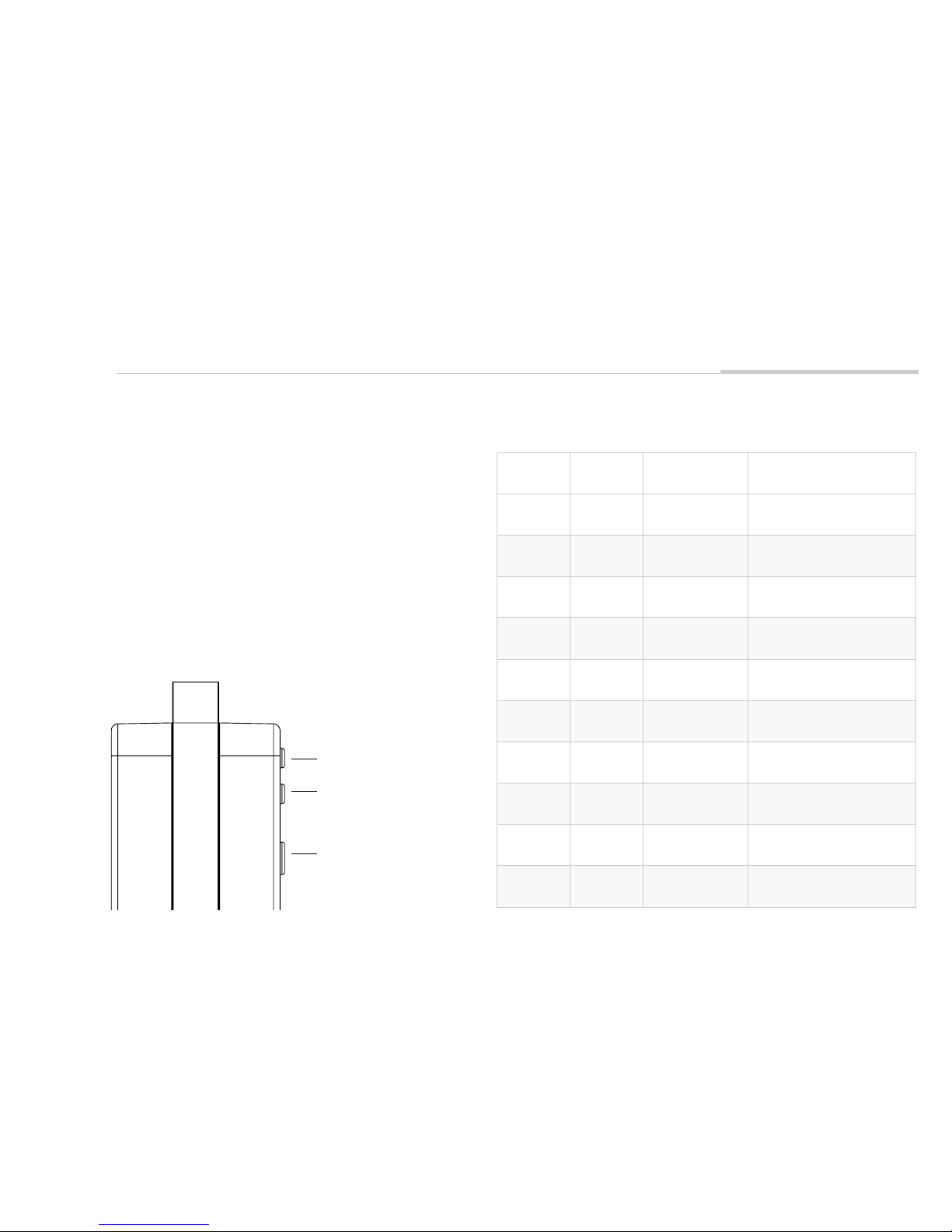
The table below lists button functionality when Jack is
in Receive Mode. Buttons are labeled Power (1),
Volume- (2), and Volume+ (3) according to this image:
RECEIVE MODE
Volume + ( 3 )
Volume – ( 2 )
Power ( 1 )
Buttons Press Type Jack State Function
1 2 seconds Off Turn Jack on
1 3 seconds On Turn Jack off
1 Short tap Music playing Pause music
1 Short tap Music paused Play music
2 Short tap Music playing Volume down
3 Short tap Music playing Volume up
2 2 seconds Music playing Previous track
3 2 seconds Music playing Next track
1 + 2 + 3 7 seconds Not playing music
Forget paired devices
Turn off
2 + 3 3 seconds On Allow Share Mode connection
Page 14
10
MODES
TRANSMIT MODE
Headphone Buttons
Some headphones, such as the ones we sell with Jack,
have in-line pause/play and volume buttons.*
Pause/play, volume, and next/previous track functions
can be controlled with these buttons.
Note: Due to differences in how these are implemented for iPhone/Android, not all headphone buttons will
work properly with Jack.
Jack can be placed in Transmit Mode by holding
buttons 1 and 3.
In Transmit Mode, Jack streams audio from the Aux
port to a connected Bluetooth device. For example,
you can use an Aux cable to plug Jack in to a TV, and
stream audio to Bluetooth headphones.
Connecting
When Jack is turned on in Transmit Mode for the first
time, it will attempt to pair with the nearest Bluetooth
Audio device (headset, speaker, etc). Jack will automatically attempt to reconnect to the paired device
the next time it is turned on in Transmit Mode. The
1 3
Page 15
11
MODES
paired device in Transmit Mode is separate from the
paired devices in Receive Mode.
Make sure the Bluetooth headset or speaker is in
pairing mode the first time, or Jack will not be able to
find it. If Jack is attempting to connect to a paired
device and you would like to pair instead, hold down
Button 3 for two seconds.
Buttons
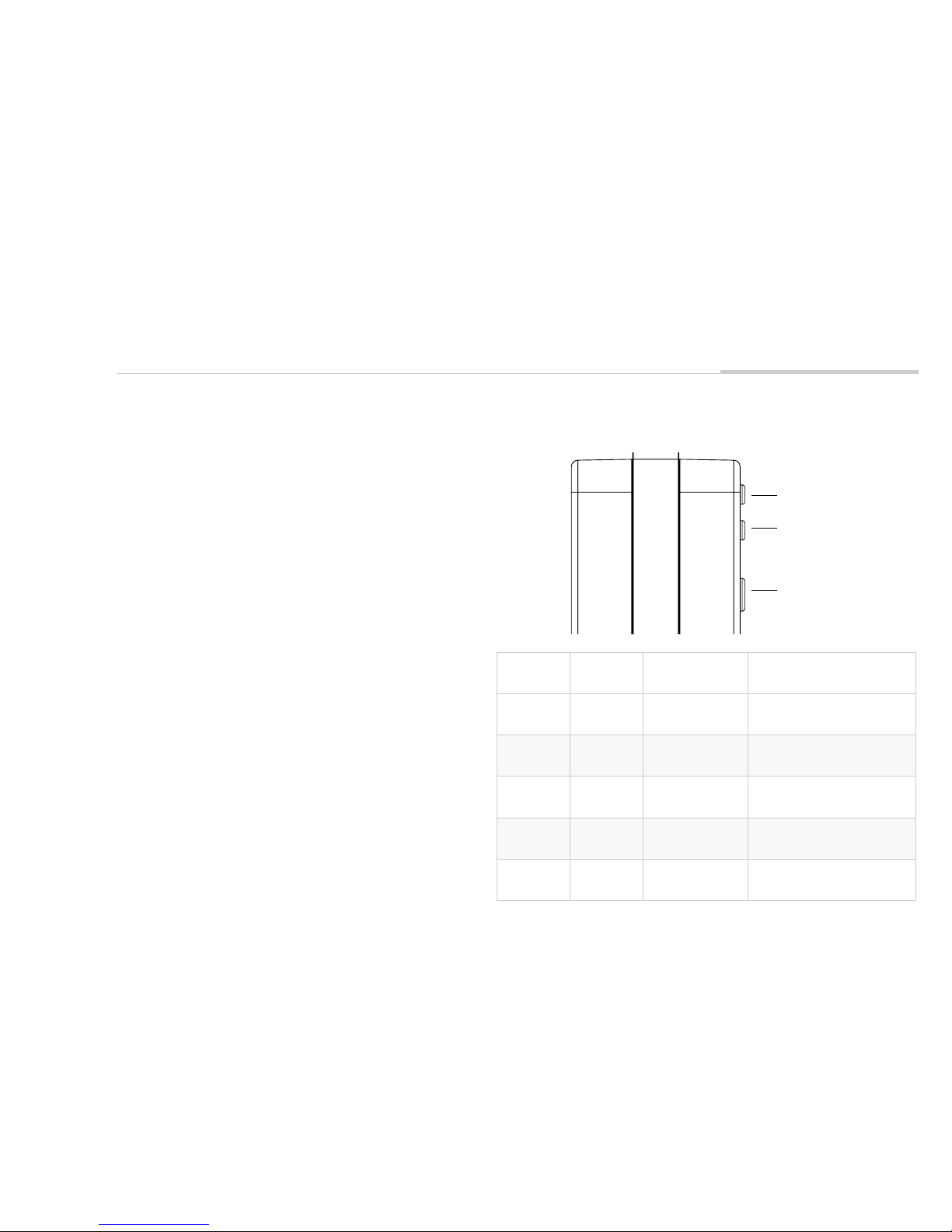
This table lists button functionality when Jack is in
Transmit Mode. Buttons are labeled 1, 2, and 3
according to this image:
Buttons Press Type Jack State Function
1 + 3 2 seconds Off Turn Jack on
1 3 seconds On Turn Jack off
3 2 seconds On Force pairing mode
2 2 seconds Connected
Attempt connection
to device
2+3 7 seconds On Forget paired devices
Volume + ( 3 )
Volume – ( 2 )
Power ( 1 )
Page 16

12
MODES
If you have two Jacks, they can connect in two
different ways:
1. One Jack is in Receive Mode, while another is in
Transmit Mode
• For example, the Transmit Jack is connected to
a TV via Aux, and the Receive Jack plays audio
via wired headphones.
2. Both Jacks start in Receive Mode, then enter Share
Mode.
This section explains how to connect two Jacks in
Share Mode.
Steps
Jack-A will refer to the Jack that connects to your
phone or computer. Jack-B will refer to the second one
that receives synchronized audio.
1. Connect your phone or computer to Jack-A in
SHARE MODE
Receive Mode
2. Turn on Jack-B, and make sure it doesn't
auto-connect to anything
3. Double tap buttons 2+3 together on Jack-A
• This can be a bit difficult to do properly the
first time
• Jack-A's LED will flash blue to indicate it is
ready to connect
4. Hold down buttons 2+3 on Jack-B until it connects
to Jack-A
• If you're not sure whether the Jacks are
connected, try playing music.
Notes
– Turning off either Jack will cause both to turn off.
– Both Jacks can pause or play the music.
– You must follow the above steps each time to use
Share Mode.
– Certain environmental factors may cause Jack to
eventually get out of sync. To fix this, try turning
off both Jacks and reconnecting.
Page 17

13
WARRANTY
LIMITED WARRANTY: Podo Labs products and
accessories are guaranteed against defects in
manufacturing or workmanship for six (6) months from
the original date of purchase. Podo Labs, at our sole
discretion, will repair or replace this product at no
charge with new or reconditioned parts, if found to be
defective during the limited warranty period specified
above. Returns or replacements of parts and/or
products are subject to shipping, handling,
replacement and/or restocking fees.
To submit a claim:
1. Contact our Support Team via email
[email protected] with a description of the
problem (with images or video if available), Podo
serial number and date of purchase.
2. If our Support Team cannot first solve the issue and
determines that your problem qualifies for a
warranty claim, you will receive a RMA (Return
LIMITED WARRANTY
Merchandise Authorization) number and shipping
label.
3. Package your defective product carefully for return
to Podo Labs, including your original receipt or
order confirmation, written explanation of the
problem, and RMA number. Podo Labs is not
responsible for damage caused during shipment,
whether due to inadequate packaging or otherwise.
4. Copy your RMA number on the outside of the box
and send to Podo Labs (items must be received by
Podo Labs within 14 days of issuing the RMA).
5. Podo Labs, at our sole discretion, will repair or
replace this product at no charge with new or
reconditioned parts, if found to be defective during
the limited warranty period specified above.
Podo Labs is not responsible for shipping costs
associated with warranty returns. Parts or products
received without an RMA number or out of the
warranty period will not be accepted and may or may
Page 18

14
WARRANTY
not be returned.
30 DAY GUARANTEE: If at any time within 30 days of
receiving a purchase from podolabs.com you are not
satisfied, you may return it for a refund. Damaged
items due to reasons not covered under warranty
cannot be accepted for refund under this Guarantee.
Any associated shipping fees are not refundable and
returns or replacements of parts and/or products are
subject to shipping, handling, replacement and/or
restocking fees. NOTE: this guarantee only applies to
orders placed online at podolabs.com.
To return an item purchased from podolabs.com:
If you bought your product directly from Podolabs.com
and would like to return it for whatever reason within
30 days of purchase, please follow the below
procedure. Podo Labs will credit your card or other
purchase method after receipt of the undamaged
merchandise.
1. Contact our Support Team by clicking on the
Support link on our contact page. We would love to
fix any problem that is leaving you unsatisfied.
2. Obtain an RMA number from Podo Labs Support
Team
3. Package your product carefully for return to Podo
Labs, including your original receipt and copy of
RMA form. We also appreciate comments or
suggestions to serve you better next time.
4. Copy your RMA number on the outside of the box
and send to Podo Labs (items must be received by
Podo Labs within 14 days of issuing the RMA).
Podo Labs 582 Market Street San Francisco, CA 94104
EXCLUSIONS & LIMITATIONS: This Limited Warranty
Page 19

15
WARRANTY
covers only the intended and normal use of the Podo
hardware and accessories. Safe handling and proper
use instructions can be found in this User Manual. This
Limited Warranty covers only the hardware product
“Podo” and official accessories manufactured by or for
Podo Labs, Inc. bearing the "Podo" trademark, trade
name or logo. The Limited Warranty does not apply to
any non-Podo Labs product or any software. For more
information on rights regarding software use, please
refer to the Podo Software License Agreement.
To the maximum extent allowed under applicable law,
Podo Labs assumes no liability for any accident, injury,
death, loss, or other claim related to or resulting from
the use of our products.
Podo Labs does not warrant that the operation of our
products will be error-free. This warranty does not
cover:
a) Consumable parts, such as Sticky pads, batteries,
coatings or finishes, and/or other parts designed to
diminish in function or efficacy over time, unless failure
is due to a defect in materials or workmanship;
b) Damage or failures caused directly or indirectly by
use with non-Podo Labs products;
c) Damage caused by improper handling, charging,
accidents, misuse, abuse, neglect, misapplication, fire,
water, lightning, or other acts of nature; failure to
follow directions or warnings; incorrect electrical line
voltage, fluctuations or surges; damage caused by
improper installation; product alteration or
modification; improper or unauthorized repair;
exterior finish or cosmetic damage; normal wear and
tear or normal aging of the product;
Page 20

16
WARRANTY
d) Damage caused by falls or impacts through
negligent or incorrect use of the Sticky pad or magnet
(including application to an inappropriate surface or
failure to test adherence in a safe manner) or use of a
worn-out Sticky pad;
THERE ARE NO EXPRESS WARRANTIES OTHER THAN
THOSE LISTED AND DESCRIBED ABOVE, AND NO
WARRANTIES WHETHER EXPRESS OR IMPLIED,
INCLUDING, BUT NOT LIMITED TO, ANY IMPLIED
WARRANTIES OF MERCHANTABILITY OR FITNESS
FOR A PARTICULAR PURPOSE AND WARRANTIES
AGAINST HIDDEN OR LATENT DEFECTS, SHALL
APPLY AFTER THE EXPRESS WARRANTY PERIOD
STATED ABOVE, AND NO OTHER EXPRESS
WARRANTY OR GUARANTEE GIVEN BY ANY PERSON,
FIRM OR CORPORATION WITH RESPECT TO THIS
PRODUCT SHALL BE BINDING ON PODO LABS.
EXCEPT AS PROVIDED IN THIS WARRANTY AND TO
THE MAXIMUM EXTENT PERMITTED BY LAW, PODO
LABS IS NOT RESPONSIBLE FOR LOSS OF REVENUE
OR PROFITS, FAILURE TO REALIZE SAVINGS OR
OTHER BENEFITS, LOSS OF OPPORTUNITY, LOSS OF
GOODWILL, LOSS OF REPUTATION, LOSS OF,
DAMAGE TO, COMPROMISE OR CORRUPTION OF
DATA, OR ANY OTHER SPECIAL, INCIDENTAL OR
CONSEQUENTIAL DAMAGES CAUSED BY THE USE,
MISUSE OR INABILITY TO USE THIS PRODUCT, OR
ANY BREACH OF ANY WARRANTY OR CONDITION
REGARDLESS OF THE LEGAL THEORY ON WHICH
THE CLAIM IS BASED, AND EVEN IF PODO LABS HAS
BEEN ADVISED OF THE POSSIBILITY OF SUCH
DAMAGES. RECOVERY OF ANY KIND AGAINST PODO
LABS SHALL NOT BE GREATER IN AMOUNT THAN
THE PURCHASE PRICE PAID FOR PODO. WITHOUT
LIMITING THE FOREGOING, PURCHASER ASSUMES
ALL RISK AND LIABILITY FOR LOSS, DAMAGE OR
INJURY TO PURCHASER AND PURCHASER'S
Page 21

17
WARRANTY
LIMITED WARRANTY: Podo Labs products and
accessories are guaranteed against defects in
manufacturing or workmanship for six (6) months from
the original date of purchase. Podo Labs, at our sole
discretion, will repair or replace this product at no
charge with new or reconditioned parts, if found to be
defective during the limited warranty period specified
above. Returns or replacements of parts and/or
products are subject to shipping, handling,
replacement and/or restocking fees.
To submit a claim:
1. Contact our Support Team via email
[email protected] with a description of the
problem (with images or video if available), Podo
serial number and date of purchase.
2. If our Support Team cannot first solve the issue and
determines that your problem qualifies for a
warranty claim, you will receive a RMA (Return
Merchandise Authorization) number and shipping
label.
3. Package your defective product carefully for return
to Podo Labs, including your original receipt or
order confirmation, written explanation of the
problem, and RMA number. Podo Labs is not
responsible for damage caused during shipment,
whether due to inadequate packaging or otherwise.
4. Copy your RMA number on the outside of the box
and send to Podo Labs (items must be received by
Podo Labs within 14 days of issuing the RMA).
5. Podo Labs, at our sole discretion, will repair or
replace this product at no charge with new or
reconditioned parts, if found to be defective during
the limited warranty period specified above.
Podo Labs is not responsible for shipping costs
associated with warranty returns. Parts or products
received without an RMA number or out of the
warranty period will not be accepted and may or may
PROPERTY AND TO OTHERS AND THEIR PROPERTY
ARISING OUT OF THE USE, MISUSE OR INABILITY TO
USE THIS PRODUCT SOLD BY PODO LABS NOT
CAUSED DIRECTLY BY THE GROSS NEGLIGENCE OR
WILLFUL MISCONDUCT OF PODO LABS. THIS
LIMITED WARRANTY SHALL NOT EXTEND TO
ANYONE OTHER THAN THE ORIGINAL PURCHASER
OF THIS PRODUCT, IS NONTRANSFERABLE AND
STATES YOUR EXCLUSIVE REMEDY.
Depending on your state of residence and applicable
local laws, the above limitations or exclusions may not
apply to you. Beyond the specific rights specified by
this Limited Warranty, you may have other or
additional rights, which vary from state to state.
GOVERNING LAW & ARBITRATION: This Limited
Warranty shall be governed by the laws of the State of
California without giving effect to any conflict of laws
principles that may provide the application of the law
of another jurisdiction. Any claim or dispute in
connection with this Limited Warranty shall be
resolved in a cost effective manner through binding
non-appearance-based arbitration. The arbitration
shall be initiated through an established alternative
dispute resolution provider mutually agreed upon by
the parties. The alternative dispute resolution provider
and the parties must comply with the following rules:
a) The arbitration shall be conducted by telephone,
online and/or be solely based on written submissions,
the specific manner shall be chosen by the party
initiating the arbitration;
b) The arbitration shall not involve any personal
appearance by the parties or witnesses unless
otherwise mutually agreed by the parties; and
Page 22

18
WARRANTY
not be returned.
30 DAY GUARANTEE: If at any time within 30 days of
receiving a purchase from podolabs.com you are not
satisfied, you may return it for a refund. Damaged
items due to reasons not covered under warranty
cannot be accepted for refund under this Guarantee.
Any associated shipping fees are not refundable and
returns or replacements of parts and/or products are
subject to shipping, handling, replacement and/or
restocking fees. NOTE: this guarantee only applies to
orders placed online at podolabs.com.
To return an item purchased from podolabs.com:
If you bought your product directly from Podolabs.com
and would like to return it for whatever reason within
30 days of purchase, please follow the below
procedure. Podo Labs will credit your card or other
purchase method after receipt of the undamaged
merchandise.
1. Contact our Support Team by clicking on the
Support link on our contact page. We would love to
fix any problem that is leaving you unsatisfied.
2. Obtain an RMA number from Podo Labs Support
Team
3. Package your product carefully for return to Podo
Labs, including your original receipt and copy of
RMA form. We also appreciate comments or
suggestions to serve you better next time.
4. Copy your RMA number on the outside of the box
and send to Podo Labs (items must be received by
Podo Labs within 14 days of issuing the RMA).
Podo Labs 582 Market Street San Francisco, CA 94104
EXCLUSIONS & LIMITATIONS: This Limited Warranty
c) Any judgment on the award rendered by the
arbitrator may be entered in any court of competent
jurisdiction.
If the foregoing arbitration clause does not apply for
any reason, you agree to submit to the personal
jurisdiction of the state courts located within Santa
Clara County, California and the federal courts in the
Northern District of California for the purpose of
litigating all such claims or disputes, which courts shall
have exclusive jurisdiction of such claims or disputes.
Notwithstanding the foregoing, Podo Labs may seek
injunctive or other equitable relief to protect its
intellectual property rights in any court of competent
jurisdiction.
To the extent this “GOVERNING LAW &
ARBITRATION” section is deemed invalid or
unenforceable, it shall be deemed severed from this
warranty and the remainder of this warranty shall be
unaffected.
MODIFICATIONS: The instructions and information in
this Guide are for reference only and may be modified
at any time without prior notice. For the most accurate
and up-to-date version of this Guide, please visit
www.podolabs.com. Podo Labs reserves the right to
modify or amend the product design or User Guide
without restrictions or notification.
Page 23

19
CONTACT
covers only the intended and normal use of the Podo
hardware and accessories. Safe handling and proper
use instructions can be found in this User Manual. This
Limited Warranty covers only the hardware product
“Podo” and official accessories manufactured by or for
Podo Labs, Inc. bearing the "Podo" trademark, trade
name or logo. The Limited Warranty does not apply to
any non-Podo Labs product or any software. For more
information on rights regarding software use, please
refer to the Podo Software License Agreement.
To the maximum extent allowed under applicable law,
Podo Labs assumes no liability for any accident, injury,
death, loss, or other claim related to or resulting from
the use of our products.
Podo Labs does not warrant that the operation of our
products will be error-free. This warranty does not
cover:
a) Consumable parts, such as Sticky pads, batteries,
coatings or finishes, and/or other parts designed to
diminish in function or efficacy over time, unless failure
is due to a defect in materials or workmanship;
b) Damage or failures caused directly or indirectly by
use with non-Podo Labs products;
c) Damage caused by improper handling, charging,
accidents, misuse, abuse, neglect, misapplication, fire,
water, lightning, or other acts of nature; failure to
follow directions or warnings; incorrect electrical line
voltage, fluctuations or surges; damage caused by
improper installation; product alteration or
modification; improper or unauthorized repair;
exterior finish or cosmetic damage; normal wear and
tear or normal aging of the product;
[email protected] - Say hi! Let us know how we're doing
[email protected] - For brand partnerships or media inquiries
[email protected] - Reach our support team or submit a warranty claim
582 Market Street, Suite 2100, San Francisco, CA 94104
CONTACT
 Loading...