

Page 1
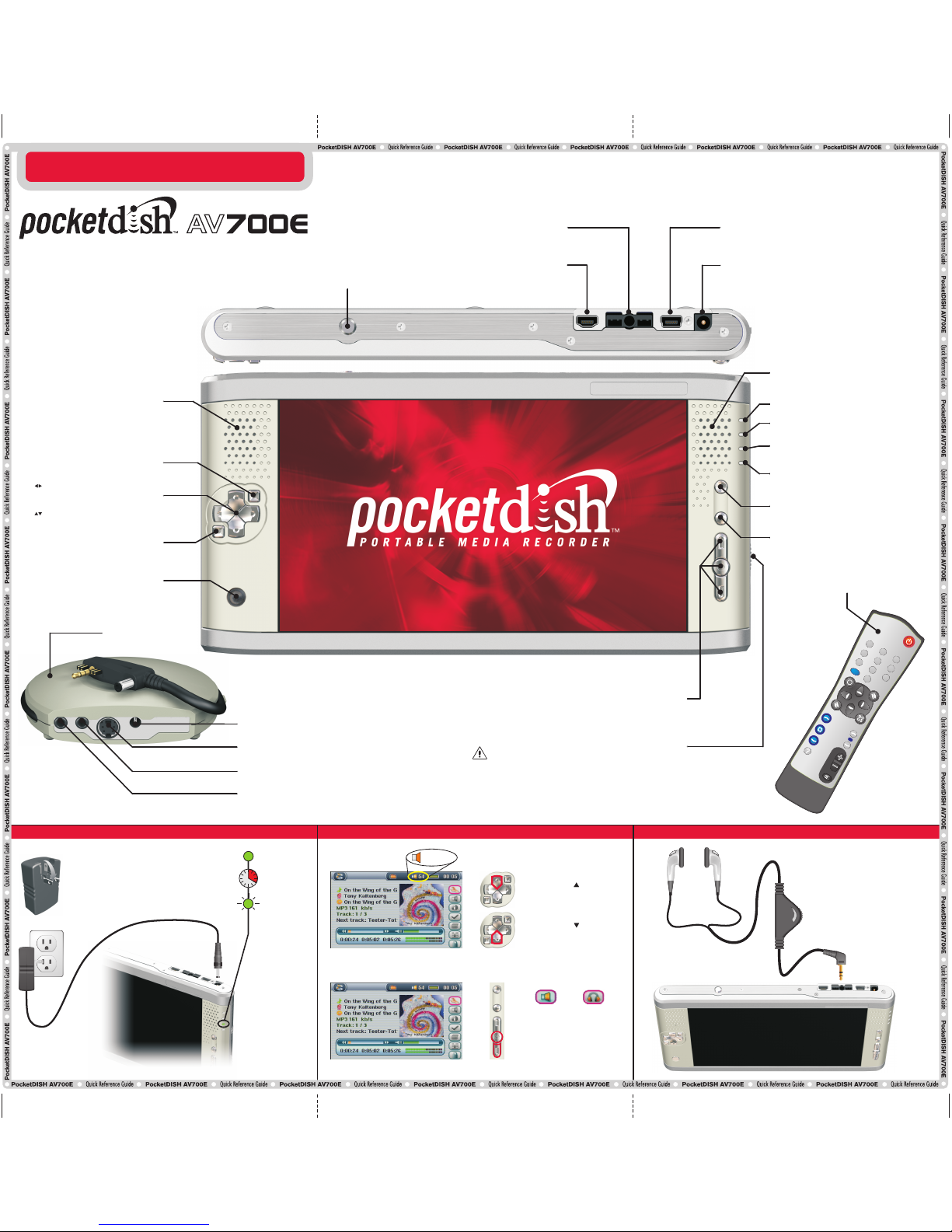
Install the DC plug
into the DC IN
power socket.
Min
Max
110Vac/60Hz
Flip down the pins
VOLUME CONTROL
ON: shows that PocketDISH is turned on
HDD: the hard drive is active when lit
CHG: a solid light indicates that PocketDISH is
connected to the battery charger. If charging is
complete, the light flashes
TV OUT: shows that the screen content is displayed on
a TV
Speaker: reproduces the audio
Speaker: reproduces the audio
ON: press and hold to turn on PocketDISH
Play: starts playback
Pause: pauses playback
Enter: acknowledges a selection
OFF: press and hold to turn off PocketDISH
Stop: stops playback
Escape: quits a selection
Exit: pauses or exits a game
Remote control eye: receives the
commands from the remote control unit
Page Down: moves the cursor down one
page (disabled during games)
Page Up: moves the cursor up one page
(disabled during games)
TV/LCD: press and hold to select
PocketDISH or TV for viewing
USB-A (Host): connect USB (mass
storage device) compatible equipment,
like a camcorder, digital photo camera or
a USB flash drive
Headphones
USB-B (Device): connect to a compatible
DISH Network DVR or computer
Battery latch
DC-IN (power): connected to the AC/DC power adapter that
came with PocketDISH
Video: record video only from a TV. For recording audio, also
connect the analog AV-cable to the AV in connector
AV out: send the audio and video from the PocketDISH to a TV
AV in: record audio and video from a TV or audio device onto
the PocketDISH
Docking Station
Up to 4 hours
ON
Flashing
4 Hours
Charging
Ready
Volume control:
If nothing is heard, while volume
control on PocketDISH is set to
maximum, adjust the in-line volume
control to a higher level until sound
is heard.
00 ... 99
QUICK REFERENCE GUIDE
QUICK REFERENCE GUIDE
CHARGE BATTERY CONNECT HEADSET CHANGE VOLUME
Upper, Center and Bottom Setup keys: to open and navigate through
the Setup menus, sub-menus and options to personalize your settings.
The upper and bottom Setup key are also used as Game Control key.
v
t
m
v
o
u
e
l
eumn
T
V
0
1
2
3
4
5
6
7
8
9
PocketDISH remote control
Power (DC IN): connect to the AC/DC power
adapter that came with the PocketDISH
: moves the cursor left/right
Previous, next: makes a selection,
advances or reverses quickly through a file
: moves the cursor up/down
Vol +/-: increases or decreases the volume
P O R T A B L E M E D I A R E C O R D E R
CHANGE VOLUME
Your PocketDISH has a rechargeable Li Ion battery. The Li Ion battery
is a high capacity power source. Do not use another battery charger
or AC/DC adapter. For your safety, charge the Li Ion battery only with
the AC/DC adapter that came with the PocketDISH. Failing to do so
can cause permanent damage to equipment and can result in serious
personal injury.
Charge the Battery
Built-in speaker on/off: toggles
between speaker and headset.
SPEAKER / HEADPHONES
Press and hold to decrease
the volume
Press and hold to increase
the volume
138494
Page 2
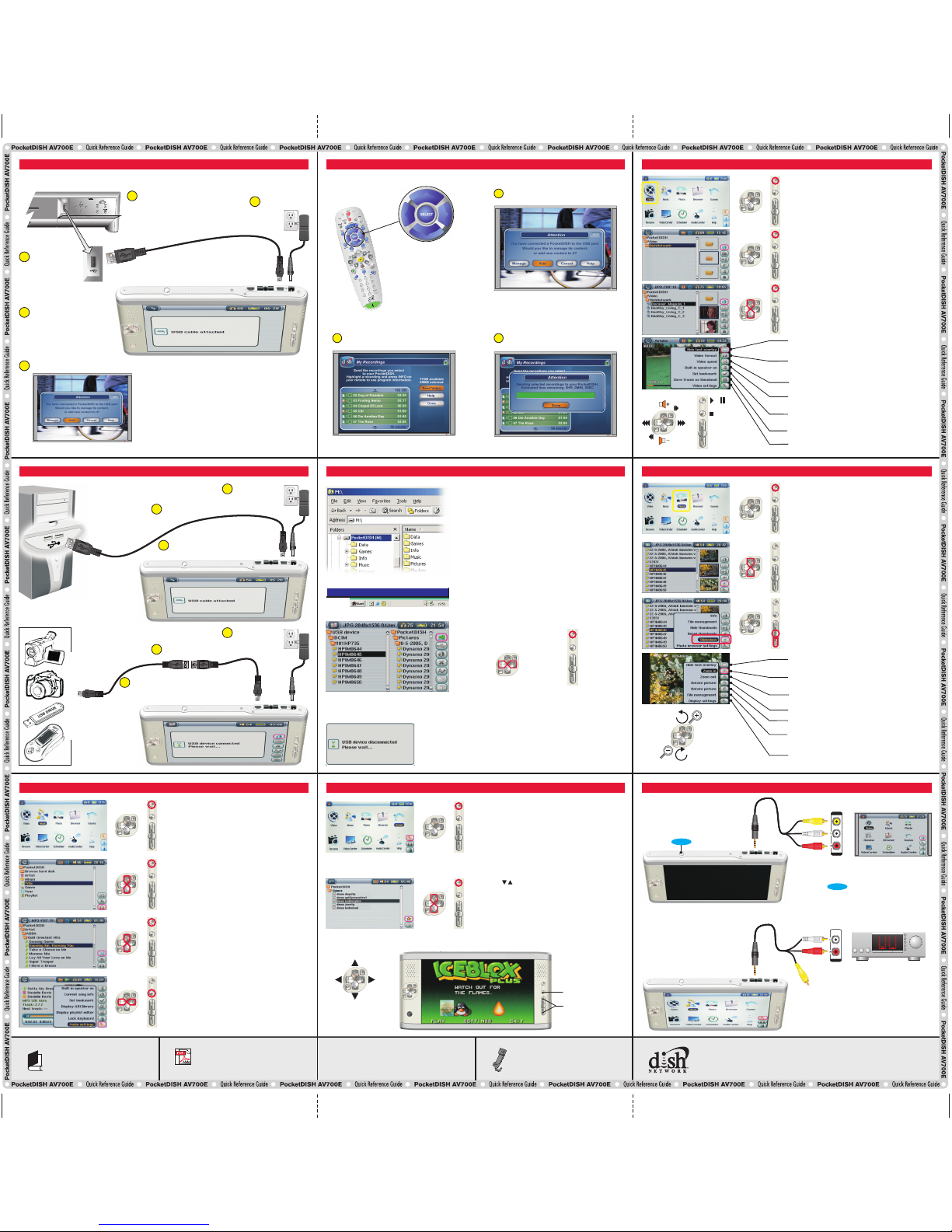
TRANSFER AUDIO/VIDEO FILES
COMPUTER
Connect the USB adapter
cable and USB cable
USB-A
Connect to power
USB-B
SEND MY RECORDINGS FROM THE DISH NETWORK DVR
PLAY A SONG PLAY A GAME
CONNECT A COMPUTER OR A USB MASS STORAGE DEVICE
CONNECT A TV OR AUDIO DEVICE (PLAYBACK)
VIEW A PHOTO OR SLIDESHOW
PLAYBACK VIDEOCONNECT A COMPATIBLE DISH NETWORK DVR
Connect the analog AV-cable to
the AV connection (center jack).
LINE IN
VIDEO
LINE IN
L
R
VOLUME
BASS
TREBLE BALANCE
Connect the AV cable to an input on your
audio device, and change the audio
device to that input.
Connect the analog AV-cable to
the AV connection (center jack).
On the Internet, please visit
www.pocketdish.com
FAQ
FIND AN ANSWER
Contains helpful videos, demos, tools
and documentation
HARD DRIVE
Provides detailed instructions about
your PocketDISH
USER’S GUIDE
Call the Archos Customer Service Center
at 1-877-300-8879 (toll free).
IF YOU NEED ASSISTANCE
Highlight the Photo icon.
Press ON to view the folder content.
Note: PocketDISH comes with demo photos.
Highlight the desired photo.
Press ON to view the single photo.
To view a slideshow, press the bottom Setup key and
select the Slideshow icon.
Press the center Setup key to confirm.
Select the Music icon.
Press ON to view the folder content.
Note: PocketDISH comes with demo songs and
Playlist.
Make your selection from the ARCLibrary by Artist,
Album, Title, Genre or Year.
Playlist: select a playlist to playback multiple songs.
Select the desired song and press ON.
Press OFF to end playback.
Highlight the DISH Network folder and press ON to view
the video files.
Highlight the Video icon (also used for playback of DISH
Network audio recordings).
Press ON to view the video list.
Note: PocketDISH comes with demo videos.
Select the desired video file.
Note: keys will have different functions for every game. Review the functions in the game’s settings.
Game Control keys
Game Control keys
PlayMode, Sound and LCD Brightness, and Video OSD
Normal speed (default) or slow motion (1/2, 1/4 or 1/8).
/
Connect the USB cable
The "USB device connected - Please wait ..."
pop-up displays. Wait until the Browser
displays. Now you can transfer files from the
USB device to the PocketDISH and vice versa.
Removes the on-screen menu temporarily
(1-Pic view only).
Rotates the photo clockwise (1-Pic view only).
Rotates the photo counter-clockwise (1-Pic view only).
Magnifies the photo up to three times
(refer to the + marks in the display).
Minimizes the photo. Note that beyond original size,
more photos are shown, up to 9 at the time.
Accesses the file options (if available).
- Info - Save as wallpaper - Delete
Opens the menu (Image Display - Progressive or
Interlaced, Picture Pause - 2-30 seconds, Pictures to
display - 1, 4 or 9 at the time)
Appearances and specifications may change without prior notice
© 2005 EchoStar Technologies Corporation. All rights reserved worldwide.
Previous Next
0
90
0
90
Zoom out
Zoom in
Pause or exit
1
2
3
3
2
Connect to power
1
Highlight the Games icon.
Press ON to view the games.
Note: PocketDISH comes with playable demo games. You
can buy your full games at: www.archos.com
Note: For detailed instructions on how to install a game on PocketDISH please refer to the User’s Guide.
Set Auto (Best playback size with respect to source),
Maximized image (scaled playback with respect to
source, some clipping might occur), Full picture format
(playback in original size, no clipping or scaling).
Open Windows Explorer and locate the PocketDISH drive.
Double click the PocketDISH drive to display its content.
Locate the folder where your audio/video files are stored.
Copy the desired files into the correct folder on PocketDISH.
Note: you can also transfer files from PocketDISH to store on the
computer. Locate the desired file and copy it to the folder on the
computer.
In the PC system tray (next to the clock), locate and click the
"Safely Remove Hardware" icon. Disconnect PocketDISH and
wait until the automatic file update is completed.
Press the Upper Setup key and select the Copy or Copy all files
option. Press the Center Setup key to acknowledge the transfer
from your USB device to PocketDISH.
USB MASS STORAGE DEVICE
When the transfer is completed, turn the USB device OFF and
wait until the automatic file update on PocketDISH is
completed..
Select the desired file.
Select file
PocketDISH
USB device
Safely remove USB Mass Storage Device
Set a bookmark manually. You can always start future
playback from this point forward.
Save the current scene as a thumbnail for presentation
in the video browser.
Removes the on-screen menu temporarily
Select recordings then select Send video
2
Press SELECT when done
3
Use these buttons to navigate
the screens displayed by the
receiver
Select Add
1
The "USB cable attached" pop-up
displays. PocketDISH keys are
temporarily disabled.
USB MASS STORAGE
Safely Remove USB Mass Storage Device
Press for at least three seconds
to toggle between LCD and TV.
Connect the AV cable to an input on your
TV, and change your TV to that input.
TV/LCD
TV/LCD
DISH Network DVR*
Connect the
USB cable
4
5
USB-B
1
Turn on the DVR and PocketDISH
The PocketDISH pop-up displays
Connect to power
The "USB cable attached”
pop-up displays PocketDISH
keys are temporarily disabled
2
3
* visit www.pocketdish.com for list of compatible receivers
Use the keys to highlight the game.
Press ON to play the game.
Built-in speaker on/off: to switch the speaker on or off
(headset only).
 Loading...