

Page 1
Plum Setup & User’s Guide v1.5 – updated July 2017
1
Plum%Setup%&%User’s%Guide%
%
%
%
%
%
%
%
%
%
%
%
%
For%your%safety%and%to%prevent%damage%to%your%Plum,%it%is%important%that%you%read%
these%instructions%before%use.%
% %
Page 2

Plum Setup & User’s Guide v1.5 – updated July 2017
2
!"#$%&'(&)'*+%*+,&
TABLE OF CONTENTS 2%
IMPORTANT SAFETY NOTES 4%
RESPONSIBLE DRINKING: 4%
COMPLY WITH ALCOHOL LAWS: 4%
GETTING TO KNOW YOUR PLUM 5%
SETTING UP YOUR PLUM 7%
LOCATION 7%
POWER 7%
CONNECTING TO THE INTERNET 7%
WEB APPLICATION 7%
ACTIVATING 7%
LOADING WINE BOTTLES 8%
DAILY OPERATION 9%
WHICH WINE BOTTLES AND CLOSURES CAN I USE IN PLUM? 9%
COOLING 9%
REMOVING WINE BOTTLES 9%
ADDING & REPLACING WINE BOTTLES 10%
CHECKING ARGON LEVELS 10%
OPENING THE DOOR 10%
CUSTOMIZING YOUR PLUM 11%
ACCESSING THE SETTINGS MENU 11%
POUR SIZES 11%
WINE TEMPERATURES 11%
SCREEN BRIGHTNESS 11%
VOLUME 12%
ACCESS CONTROL 12%
PROXIMITY SENSOR ADJUSTMENT 12%
SCREEN TIMEOUT 12%
BLUETOOTH 12%
MAINTAINING YOUR PLUM 13%
CLEANING THE TOUCHSCREEN 13%
CLEANING THE FRONT PANEL 13%
CLEANING THE STAINLESS STEEL SHELL 13%
CLEANING THE BOTTLE TRAYS 13%
CLEANING/REPLACING THE NEEDLES 13%
CLEANING/SANITIZING YOUR PLUM 13%
ARGON REFILLS 14%
Page 3

Plum Setup & User’s Guide v1.5 – updated July 2017
3
FACTORY RESET 14%
TRANSPORTING PLUM 14%
TROUBLESHOOTING 15%
TECHNICAL DATA 16%
LIMITED WARRANTY 17%
LEGAL 20%
OPEN SOURCE 20%
FCC 20%
&
Page 4

Plum Setup & User’s Guide v1.5 – updated July 2017
4
-./01!23!&4256!7&30!64&
When using electrical appliances, basic safety precautions shall always be followed to reduce the
risk of fire, electric shock, and/or injury to persons. In addition to basic precautions, it is
important you follow the following rules:
• Read all instructions
• To protect against fire, electric shock and injury to persons, do not immerse power cord,
plugs, or body of machine in water or other liquid
• Close supervision is necessary when any appliance is used by or near children
• Unplug from outlet before physically cleaning your Plum. Allow to reach room
temperature before removing or replacing parts, and before cleaning the appliance
• Unplug from outlet if you are not going to use for an extended period of time (i.e.
seasonal use)
• Do not operate any appliance with a damaged cord or plug or after the appliance
malfunctions, or has been damaged in any manner
• Do not insert any wine bottle that is outside of Plum’s bottle requirements for size or
closure contained in this manual.
• The use of an accessory attachment not certified by Plum may result in fire, electric
shock, or injury to persons
• Do not use outdoors
• Do not place on or near a stove, oven, or other heat source
• Do not use appliance for other than intended use
• Only for use with still wine. This Plum version does not support sparkling wine, beer, or
spirits
• For household use only
1%,8'*,9#$%&:;9*<9*=>&
Excessive or irresponsible consumption of alcohol may have personal, social or health
consequences. Plum is committed to encouraging responsible consumption; we ensure that
communications regarding our products do not encourage excessive consumption or misuse of
any kind. Alcohol-impaired driving is a serious problem, and if you plan to drink, we encourage
you to plan an alternative to driving yourself. You should never drive while under the influence
of alcohol.
)'?8$@&A9+B&2$C'B'$&D"E,>&
Plum may only be used by individuals that are of the legal drinking age in their jurisdiction. You
are responsible for ensuring you are complying with all local, state, and federal alcohol laws.
Page 5
Plum Setup & User’s Guide v1.5 – updated July 2017
5
F%++9*=&+'&G*'E&7'H;&/$H?&
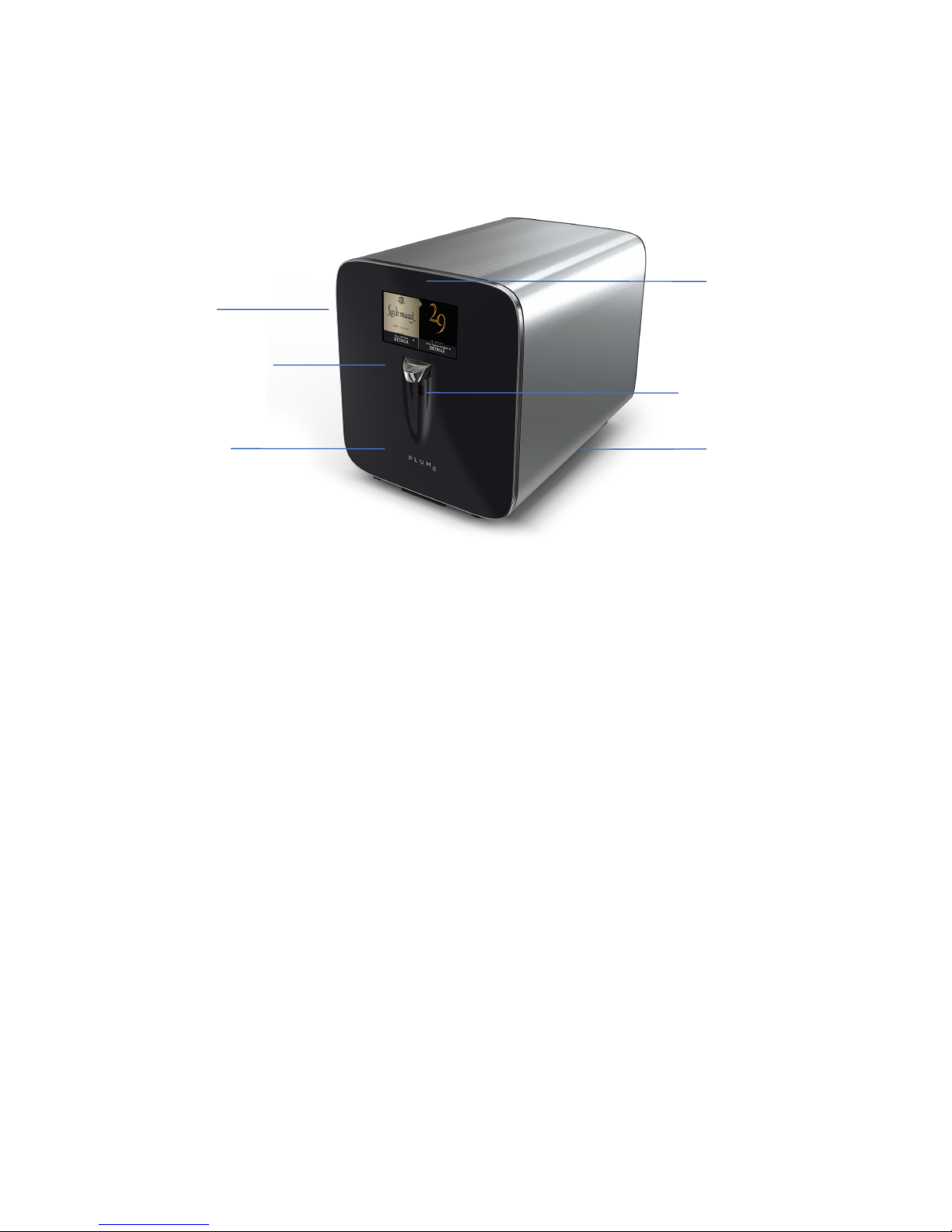
1 7” touchscreen
2 Wine spout
3 Speaker (hidden)
4 Electronic door lock (accessed via software)
5 Proximity sensor
6 Stainless steel shell
1%3%2%45%
6%
Page 6
Plum Setup & User’s Guide v1.5 – updated July 2017
6
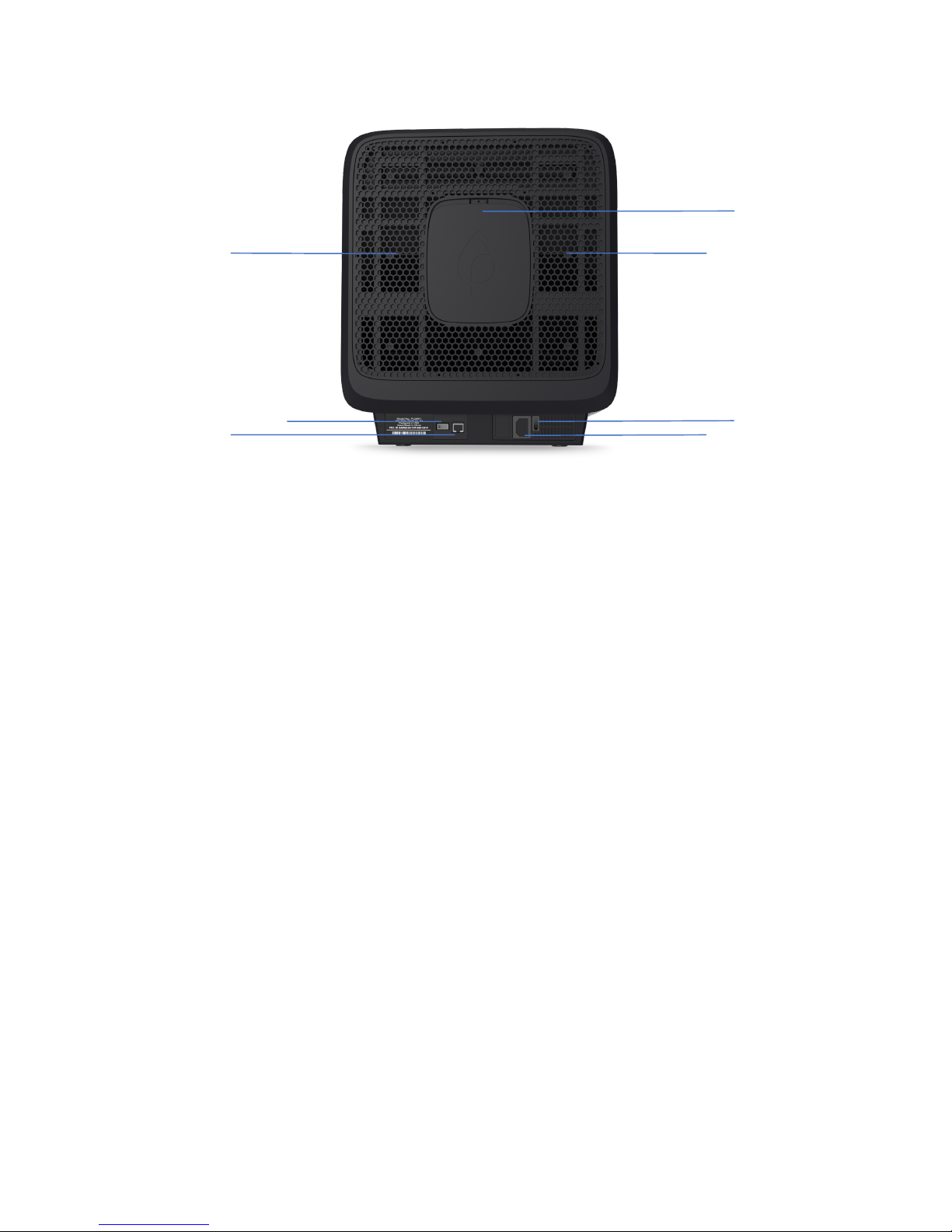
1 Right chamber cooling vent
2 USB port for service by authorized technician
3 Ethernet port
4 Argon door (requires screw removal)
5 Left chamber cooling vent
6 Power switch
7 Power plug
1%2%3%45%6%7%
Page 7

Plum Setup & User’s Guide v1.5 – updated July 2017
7
4%++9*=&H8&7'H;&/$H?&
D'C"+9'*&
Place your Plum on a hard surface with at least 2” between the rear of the Plum and a wall to
allow for adequate cooling. The ambient temperature of the room must be below 80 degrees
Fahrenheit to ensure proper cooling and to prevent your Plum from wearing out prematurely.
Plum is designed for INDOOR use only, and using your Plum outdoors will void your warranty.
/'E%;&
Insert the included power cord into Plum’s power on the rear of the device, and the plug into a
standard household power outlet. Plum works with 100-240v outlets, with a standard 15amp or
20amp circuit.
Switch on the power button on Plum which is located next to the power cord. Your Plum will run
diagnostics and be ready to use in approximately two minutes.
)'**%C+9*=&+'&+B%&-*+%;*%+&
Plum works with 802.11 b/g/n on the 2.4GHz spectrum.
Follow the on-screen instructions to find your WiFi network and connect your Plum to the
Internet. Your Plum needs an Internet connection in order to automatically identify bottles and
provide rich content on your wine.
If you do not have WiFi or a strong signal, you can also use your Plum’s Ethernet cable to
hardwire the Internet connection.
A%#&288$9C"+9'*&
Plum includes a companion application to make your Plum appliance even more useful. The
Plum web application automatically tracks your wine history so you can easily write wine
reviews or share what you are drinking on social media apps such as Facebook and Twitter.
To get started, go to my.plum.wine and create an account. Follow the on-screens steps,
including activating your Plum, which connects it to your account.
2C+9I"+9*=&
Activating your Plum lets you see what wines are on tap from your computer, tablet, or mobile
phone. You can also write reviews, and share your wines with others.
To activate your Plum, touch the Settings button on your appliance touchscreen, then the
General button, and finally the Activation button.
Enter the code it generates in the Plum web application to connect your appliance.
Page 8

Plum Setup & User’s Guide v1.5 – updated July 2017
8
D'"J9*=&A9*%&K'++$%,&
Take the bottle by the neck, and insert each bottle with the label fully facing up so the cameras
can capture an image of the label. Push the bottle down until it rests against the sealing cup.
Note: Plum uses a special 55 degree angle for bottle storage. This angle serves several purposes.
First, it allows sediment in unfiltered or unfined wines to collect in the shoulder of the bottle
rather than in your glass. Second, it keeps a liquid barrier on the cork until the very last glass,
which improves preservation. Finally, wine bottles cool faster on their side due to an interesting
(and complex) law of thermodynamics. So there you go!
Page 9

Plum Setup & User’s Guide v1.5 – updated July 2017
9
:"9$@&08%;"+9'*&
AB9CB&A9*%&K'++$%,&"*J&)$',H;%,&)"*&-&L,%&9*&/$H?M&
Your Plum can accept wine bottles from 10.5”-13” in length, and from 2-3.5” in diameter, which
means the vast majority of standard 750ml bottles will work. Some wines (i.e. certain German
Spätlese) will be too long to fit, and are not for use in your Plum.
Almost all closures will work with Plum including natural cork (up to 55mm in length), artificial
cork, engineered cork, and even metal screw caps. Plum will not work with other types of
closures including glass stoppers. Please do not put these closures in Plum as it may damage
your appliance.
If you have a closure with wax over it, you should remove the wax before inserting into Plum.
)''$9*=&
Your Plum will automatically cool each bottle to the perfect serving temperature for that varietal.
If you want to adjust the temperatures for a specific bottle, touch the wine DETAILS button and
then use the + and – buttons in the bottom left to adjust the temperature.
If you want to adjust the temperature for every bottle of a given varietal, touch the SETTINGS
button, then select TEMPERATURE, and scroll to the varietal that you wish to change.
The time it takes to reach the desired temperature will vary depending on how you stored the
bottle (i.e. room temperature or in a cellar at 55F) and what the target temperature is. Your Plum
will pre-chill the chamber to 55 degree to cool your bottle faster.
You can see a small cooling symbol on the screen if your bottle is currently cooling.
1%?'I9*=&A9*%&K'++$%,&
It is strongly recommended that you leave each bottle in your Plum until it is empty. This is
because Plum uses a special needle that works with any type of closure and enables faster
pouring of each glass. This needle will leave a small hole in the cork, so if you remove a bottle
that still has wine you should consume it within 24 hours depending on the varietal. It will also
leak a small amount of wine upon removal as the contents are under pressure.
If you wish to remove a bottle that still has wine in it, touch the SETTINGS button, then touch
the GENERAL button, then touch the REMOVE BOTTLES button and select the wine you
wish to remove. Please note that if the bottle is pressurized, a small amount of wine may escape
during removal. Please wipe down the bottle tray after removal.
The system will automatically prompt you to replace an empty bottle.
Page 10

Plum Setup & User’s Guide v1.5 – updated July 2017
10
2JJ9*=&N&1%8$"C9*=&A9*%&K'++$%,&
When you finish a bottle, the system will display REPLACE for that chamber. Press the
REPLACE button, and the system will disengage the needle and the door will automatically
open. Simply remove the empty bottle, and place the new bottle with the neck facing down and
the wine label fully visible in the lit Plum chamber and close the door. The system will
automatically identify and tap the new bottle.
)B%C<9*=&2;='*&D%I%$,&
The argon canister will preserve approximately 160 bottles of wine, as additional argon is used to
automatically purge oxygen from the needle and tubing to maximize preservation. The system
will automatically track how much argon is left and notify you when it’s low. If you want to
check the argon level at any time, touch the Settings button, and then touch the ARGON button.
08%*9*=&+B%&:'';&
If you want to open the door without removing the wine bottles, touch the SETTINGS button,
then the GENERAL button, and then the OPEN DOOR button.
Page 11
Plum Setup & User’s Guide v1.5 – updated July 2017
11
)H,+'?9O9*=&7'H;&/$H?&
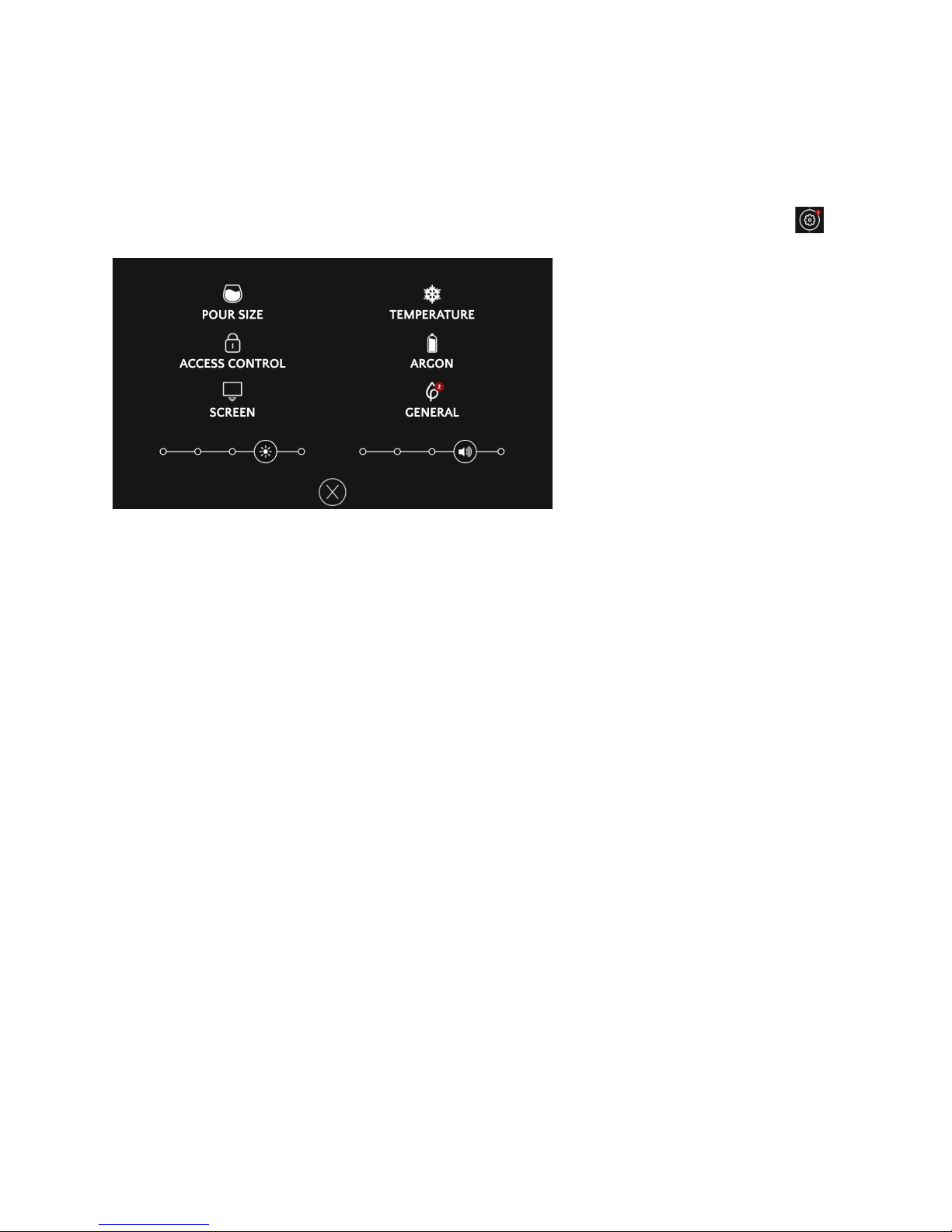
2CC%,,9*=&+B%&4%++9*=,&.%*H&
To personalize your Plum, start by clicking on the SETTINGS button on the home screen:
/'H;&49O%,&
Your Plum lets you choose from two different pour sizes for each wine: TASTE and GLASS.
By default, taste is 1.5 ounces, and glass is 5 ounces.
To change the pour size, touch the SETTINGS button, and then click POUR SIZE. Use the +
and - buttons to change the taste size on the left, or the glass size on the right.
You can change from oz to ml, by selecting ml at the top of the POUR SIZE screen.
A9*%&!%?8%;"+H;%,&
Your Plum is designed to automatically chill each of the 220 commercial varietals and blends of
wine to the perfect serving temperature. However, you may prefer a different temperature for a
given varietal. If you want to adjust temperature for a varietal, touch the Settings button, and
then touch TEMPERATURE button. The varietals that are currently in your Plum will come up
first, and then all the varietals and blends will be in alphabetical order. Select the varietal, and
then use the + and – buttons to adjust the temperature.
If you want to only adjust the temperature for a bottle of wine that is currently in your Plum,
click the DETAILS buttons and then use the + and – buttons.
4C;%%*&K;9=B+*%,,&
You can adjust the screen brightness by clicking on the SETTINGS button, and then moving the
slider in the lower left hand side of the screen.
Page 12

Plum Setup & User’s Guide v1.5 – updated July 2017
12
P'$H?%&
You can adjust the speaker volume by clicking on the SETTINGS button, and then moving the
slider in the lower right hand side of the screen.
2CC%,,&)'*+;'$&
If you want to prevent modifications to your settings of Plum, you can add a Settings code by
clicking on the SETTINGS button, and then clicking on the ACCESS CONTROL button.
Click the SETTINGS LOCK, and the system will prompt you to enter a 3-8 digit code, and then
confirm that code. This code will need to be entered each time you access the Settings page.
If you have anyone in your home below the legal age of consumption (or even a spouse who
wants your prized wine), and want to lock your Plum so that it requires a passcode to pour, you
may touch the ACCESS CONTROL button under settings. You will need to first enter a
settings code, and then enter a pour code. Both codes can be the same if you choose.
You must activate your account to set access control so that your device may be reset if you
forget your codes.
/;'Q9?9+@&4%*,';&2JRH,+?%*+&
You can adjust the sensitivity of the proximity sensor to prevent the screen from turning on
unintentionally. Touch the SETTINGS button, then click SCREEN button, and adjust the
Motion Sensitivity slider to the left to reduce sensitivity or to the right to increase sensitivity.
4C;%%*&!9?%'H+&
You can adjust how long your screen stays on after it detects motion. Touch the SETTINGS
button, then click SCREEN button, and adjust the Screen Timeout slider from 15 seconds to 5
minutes.
K$H%+''+B&
In a future software update, your Plum will automatically be upgraded so that you will be able to
pair your mobile device with your Plum to view information about your wine. This feature will
be in the SETTINGS menu.
Page 13

Plum Setup & User’s Guide v1.5 – updated July 2017
13
."9*+"9*9*=&7'H;&/$H?&
)$%"*9*=&+B%&!'HCB,C;%%*&
The touchscreen has a glass panel to make it durable and easy to clean. You can clean the
touchscreen to remove fingerprints by putting a bit of glass cleaner on a microfiber cloth to avoid
scratching your screen.
To avoid accidentally pouring wine, touch the Settings button, then the SCREEN button and
then the SCREEN CLEANING button, which will disable all input for 30 seconds so you can
clean the screen. After 30 seconds it will automatically return to the default wine screen.
)$%"*9*=&+B%&5;'*+&/"*%$&
The front panel is finished in a UV coating to prevent fading. To clean the front panel, simply
wipe the panel with a damp cloth. Avoid using harsh cleaners to prevent damaging the paint.
)$%"*9*=&+B%&4+"9*$%,,&4+%%$&4B%$$&
Your Plum is finished in a #4 brushed 304 grade stainless steel. It is recommended that you use
only stainless steel cleaner to keep your Plum looking beautiful.
)$%"*9*=&+B%&K'++$%&!;"@,&&
The bottle trays are powder-coated for durability. Simply wipe the bottle trays down with a cloth
if any wine is on the tray.
)$%"*9*=S1%8$"C9*=&+B%&3%%J$%,&
The needles do not need to be manually cleaned. If you want to wipe down the needle, you can
remove the needle cover and wipe it with a damp cloth.
The needles are incredibly durable and designed to last more than 400 bottles per chamber. If
your needle needs replacing, please contact Plum and you can order replacement needles along
with a simple tool to make replacement easier.
)$%"*9*=S4"*9+9O9*=&7'H;&/$H?&
Your Plum keeps track of when it needs cleaning of the tubing and needles. While there are no
health risks, it ensures that a wine with a flaw such as Brettanomyces does not affect your next
bottle. When the system needs cleaning, it will notify you on the touchscreen and walk you
through the process.
Use the included cleaning bottle and fill it to the indicated mark with hot tap water (important:
not to exceed 140° Fahrenheit). Drop in a cleaning tablet and insert into the chamber that needs
cleaning. The system will automatically run the cleaning cycle, which takes approximately seven
minutes. It will prompt you to put a container under the spout during cleaning.
Page 14

Plum Setup & User’s Guide v1.5 – updated July 2017
14
2;='*&1%(9$$,&
Your plum will automatically notify you when your argon is running low, and when it needs
replacing. Your argon canister is fully reusable, and you can order replacement canisters directly
from Plum or through authorized resellers. To replace the canister, power off your Plum by
removing the power cord, and then remove the screw from the argon door on the rear of your
plum. Unscrew the argon canister counter clockwise, and screw the new canister in until its
secure. Power your Plum back on, and touch the Settings button and ARGON button to verify
the argon canister is now displaying as full.
5"C+';@&1%,%+&
If you want to return your Plum to the original factory settings, touch the Settings button, then
touch GENERAL button, and then touch ABOUT button. Select the FACTORY RESET
button and then confirm to restore your Plum.
!;"*,8';+9*=&/$H?&
We recommend that you do not move your Plum frequently, but if you need to move your Plum,
it’s best to do so in its original packaging. When carrying Plum, hold it by the sides on the black
plastic base.
Page 15

Plum Setup & User’s Guide v1.5 – updated July 2017
15
!;'H#$%,B''+9*=&
Problem
Cause
Action
My screen won’t turn on
Power cord is not connected
on one side, power switch
was not flipped to on
position.
Check to ensure the power
cord is inserted fully into
Plum and that the other side
is inserted into a working
outlet, and verify the switch
is in the on position. If none
of this works, please contact
customer service.
I don’t hear the cooling
working.
Your bottle may already be at
proper serving temperature,
you may not be able to hear
the cooling.
Check the touchscreen for a
small snowflake icon below
the wine label which
identifies cooling. If you see
the icon, place your hand
behind the Plum on the side
where you are checking
cooling and feel for air
exiting Plum. If the
snowflake is on and you don’t
feel any airflow, please
contact Plum customer
support at 844-856-PLUM.
My screen says “Please
contact Plum for service”
Your Plum has encountered
an error that needs to be
manually reset, or requires
physical service.
Contact Plum customer
support at 844-856-PLUM.
Page 16

Plum Setup & User’s Guide v1.5 – updated July 2017
16
!%CB*9C"$&:"+"&
Display(
7”%IPS%touchscreen,%400%nits%brightness%
Processor(
CPU:%1.2%GHZ%quad-core%ARM.%GPU:%Broadcom%VideoCore%IV%
400%MHz%
Memory(
1%GB%SDRAM%
Storage(
4GB%microSD%
Network(
10/100%MBPS%Ethernet%
WiFi(
IEEE%802.11%b/g/n%compatible%
Bluetooth(
Bluetooth%4.1%compatible%(currently%disabled)%
Audio(
2%watt%speaker%
Argon(
Argon%canister%will%preserve%approximately%160%bottles%of%
wine%depending%on%use.%Canisters%fully%refillable.%
Size(and(Weight(
20.5”%deep,%17”%high,%15”%wide.%68%pounds.%
Electrical(
Line%voltage:%100–240V%AC.%Frequency:%50Hz%to%60Hz,%single%
phase%
Operating(Temperature:(
50°%to%80°%F%(10°%to%27°%C)%
Operating(Altitude:(
Up%to%6,000%feet%
Page 17

Plum Setup & User’s Guide v1.5 – updated July 2017
17
D9?9+%J&A";;"*+@&
THIS%LIMITED%WARRANTY%CONTAINS%IMPORTANT%INFORMATION%ABOUT%YOUR%RIGHTS%AND%
OBLIGATIONS,%AS%WELL%AS%LIMITATIONS%AND%EXCLUSIONS%THAT%MAY%APPLY%TO%YOU.%%
%
1.(WHAT(THIS(LIMITED(WARRANTY(COVERS;(PERIOD(OF(COVERAGE((
Wine%Plum,%Inc.%(“Plum”),%11%SW%12th%Ave,%Suite%104,%Dania%Beach,%FL,%USA,%warrants%to%the%
owner%of%the%enclosed%product%that%the%product%contained%in%this%box%(“Product”)%will%be%free%
from%defects%in%materials%and%workmanship%for%a%period%of%one%(1)%year%from%the%date%of%
delivery%following%the%original%retail%purchase%(the%“Warranty%Period”).%If%the%Product%fails%to%
conform%to%this%Limited%Warranty%during%the%Warranty%Period,%Plum%will,%at%its%sole%discretion,%
either%(a)%repair%or%replace%any%defective%Product%or%component;%or%(b)%accept%the%return%of%the%
Product%and%refund%the%money%actually%paid%by%the%original%purchaser%for%the%Product.%Repair%or%
replacement%may%be%made%with%a%new%or%refurbished%product%or%components,%at%Plum’%sole%
discretion.%If%the%Product%or%a%component%incorporated%within%it%is%no%longer%available,%Plum%
may,%at%Plum’%sole%discretion,%replace%the%Product%with%a%similar%product%of%similar%function.%
This%is%your%sole%and%exclusive%remedy%for%breach%of%this%Limited%Warranty.%Any%Product%that%has%
either%been%repaired%or%replaced%under%this%Limited%Warranty%will%be%covered%by%the%terms%of%
this%Limited%Warranty%for%the%longer%of%(a)%ninety%(90)%days%from%the%date%of%delivery%of%the%
repaired%Product%or%replacement%Product,%or%(b)%the%remaining%Warranty%Period.%This%Limited%
Warranty%is%transferable%from%the%original%purchaser%to%subsequent%owners,%but%the%Warranty%
Period%will%not%be%extended%in%duration%or%expanded%in%coverage%for%any%such%transfer.%%
%
2.(TOTAL(SATISFACTION(RETURN(POLICY%%
If%you%are%the%original%purchaser%of%the%Product%and%you%are%not%satisfied%with%this%Product%for%
any%reason,%you%may%return%it%in%its%original%condition%within%thirty%(30)%days%of%the%original%
purchase%and%receive%a%full%refund.%%
%
3.(WARRANTY(CONDITIONS;(HOW(TO(GET(SERVICE(IF(YOU(WANT(TO(CLAIM(UNDER(THIS(
LIMITED(WARRANTY%%
Before%making%a%claim%under%this%Limited%Warranty,%the%owner%of%the%Product%must%(a)%notify%
Plum%of%the%intention%to%claim%by%visiting%plum.wine/support%during%the%Warranty%Period%and%
providing%a%description%of%the%alleged%failure,%and%(b)%comply%with%Plum’%return%shipping%
instructions.%Plum%will%have%no%warranty%obligations%with%respect%to%a%returned%Product%if%it%
determines,%in%its%reasonable%discretion%after%examination%of%the%returned%Product,%that%the%
Product%is%an%Ineligible%Product.%(defined%below).%Plum%will%bear%all%costs%of%return%shipping%to%
owner%and%will%reimburse%any%shipping%costs%incurred%by%the%owner,%except%with%respect%to%any%
Ineligible%Product,%for%which%owner%will%bear%all%shipping%costs.%
%
4.(WHAT(THIS(LIMITED(WARRANTY(DOES(NOT(COVER%%
This%Limited%Warranty%does%not%cover%the%following%(collectively%“Ineligible%Products”):%Products%
marked%as%“sample”%or%“Not%for%Sale”,%or%sold%“AS%IS”;%or%Products%that%have%been%subject%to:%(a)%
modifications,%alterations,%tampering,%or%improper%maintenance%or%repairs;%(b)%handling,%
Page 18

Plum Setup & User’s Guide v1.5 – updated July 2017
18
storage,%installation,%testing,%or%use%not%in%accordance%with%this%User’s%Guide%or%other%
instructions%provided%by%Plum;%(c)%abuse%or%misuse%of%the%Product;%(d)%breakdowns,%fluctuations,%
or%interruptions%in%electric%power%or%the%telecommunications%network;%or%(e)%Acts%of%God,%
including%but%not%limited%to%lightning,%flood,%tornado,%earthquake,%or%hurricane.%This%Limited%
Warranty%does%not%cover%consumable%parts,%including%batteries,%unless%damage%is%due%to%
defects%in%materials%or%workmanship%of%the%Product,%or%software%(even%if%packaged%or%sold%with%
the%product).%Plum%recommends%that%you%use%only%authorized%service%providers%for%
maintenance%or%repair.%Unauthorized%use%of%the%Product%or%software%can%impair%the%Product’s%
performance%and%may%invalidate%this%Limited%Warranty.%%
%
5.(DISCLAIMER(OF(WARRANTIES%%
EXCEPT%AS%STATED%ABOVE%IN%THIS%LIMITED%WARRANTY,%AND%TO%THE%MAXIMUM%EXTENT%
PERMITTED%BY%APPLICABLE%LAW,%PLUM%DISCLAIMS%ALL%EXPRESS,%IMPLIED,%AND%STATUTORY%
WARRANTIES%AND%CONDITIONS%WITH%RESPECT%TO%THE%PRODUCT,%INCLUDING%THE%IMPLIED%
WARRANTIES%OF%MERCHANTABILITY%AND%FITNESS%FOR%A%PARTICULAR%PURPOSE.%TO%THE%
MAXIMUM%EXTENT%PERMITTED%BY%APPLICABLE%LAW,%PLUM%ALSO%LIMITS%THE%DURATION%OF%
ANY%APPLICABLE%IMPLIED%WARRANTIES%OR%CONDITIONS%TO%THE%DURATION%OF%THIS%LIMITED%
WARRANTY.%%
%
6.(LIMITATION(OF(DAMAGES%%
IN%ADDITION%TO%THE%ABOVE%WARRANTY%DISCLAIMERS,%IN%NO%EVENT%WILL%PLUM%BE%LIABLE%FOR%
ANY%CONSEQUENTIAL,%INCIDENTAL,%EXEMPLARY,%OR%SPECIAL%DAMAGES,%INCLUDING%ANY%
DAMAGES%FOR%LOST%DATA%OR%LOST%PROFITS,%ARISING%FROM%OR%RELATING%TO%THIS%LIMITED%
WARRANTY%OR%THE%PRODUCT,%AND%PLUM’%TOTAL%CUMULATIVE%LIABILITY%ARISING%FROM%OR%
RELATED%TO%THIS%LIMITED%WARRANTY%OR%THE%PRODUCT%WILL%NOT%EXCEED%THE%AMOUNT%
ACTUALLY%PAID%FOR%THE%PRODUCT%BY%THE%ORIGINAL%PURCHASER.%%
%
7.(LIMITATION(OF(LIABILITY((
THE%PLUM%ONLINE%SERVICES%(“SERVICES”)%PROVIDE%YOU%INFORMATION%(“PRODUCT%
INFORMATION”)%REGARDING%YOUR%NEST%PRODUCTS%OR%OTHER%PERIPHERALS%CONNECTED%TO%
YOUR%PRODUCTS%(“PRODUCT%PERIPHERALS”).%THE%TYPE%OF%PRODUCT%PERIPHERALS%THAT%MAY%
BE%CONNECTED%TO%YOUR%PRODUCT%MAY%CHANGE%FROM%TIME%TO%TIME.%WITHOUT%LIMITING%
THE%GENERALITY%OF%THE%DISCLAIMERS%ABOVE,%ALL%PRODUCT%INFORMATION%IS%PROVIDED%FOR%
YOUR%CONVENIENCE,“AS%IS”,%AND%“AS%AVAILABLE”.%PLUM%DOES%NOT%REPRESENT,%WARRANT,%
OR%GUARANTEE%THAT%PRODUCT%INFORMATION%WILL%BE%AVAILABLE,%ACCURATE,%OR%RELIABLE.%
YOU%USE%ALL%PRODUCT%INFORMATION,%THE%SERVICES,%AND%THE%PRODUCT%AT%YOUR%OWN%
DISCRETION%AND%RISK.%YOU%WILL%BE%SOLELY%RESPONSIBLE%FOR%(AND%PLUM%DISCLAIMS)%ANY%
AND%ALL%LOSS,%LIABILITY,%OR%DAMAGES,%INCLUDING%TO%YOUR%WINE,%WIRING,%FIXTURES,%
ELECTRICTY,%HOME,%PRODUCT,%PRODUCT%PERIPHERALS,%COMPUTER,%MOBILE%DEVICE,%AND%ALL%
OTHER%ITEMS%AND%PETS%IN%YOUR%HOME,%RESULTING%FROM%YOUR%USE%OF%THE%PRODUCT%
INFORMATION,%SERVICES,%OR%PRODUCT.%%
%
8.(LIMITATION(OF(WINE(PRESERVATION%%
Page 19

Plum Setup & User’s Guide v1.5 – updated July 2017
19
Customer%agrees%that%wine%preservation%will%be%dramatically%impacted%by%how%the%bottle%is%
stored%and%handled%prior%to%being%added%to%Plum,%the%varietal%of%the%wine,%the%winemaking,%and%
a%variety%of%other%factors%outside%of%Plum’s%control.%Plum%does%not%guarantee%or%promise%any%
specific%length%of%wine%preservation%or%monetary%benefit%from%the%use%of%the%Products%or%any%
feature%of%them.%Actual%preservation%and%monetary%benefits%vary%with%factors%beyond%Plum’s%
control%or%knowledge.%%%
%
9.%YOUR(RIGHTS(AND(THIS(LIMITED(WARRANTY%%
This%Limited%Warranty%gives%you%specific%legal%rights.%You%may%also%have%other%legal%rights%that%
vary%by%state,%province,%or%jurisdiction.%Likewise,%some%of%the%limitations%in%this%Limited%
Warranty%may%not%apply%in%certain%states.%The%terms%of%this%Limited%Warranty%will%apply%to%the%
extent%permitted%by%applicable%law.%For%a%full%description%of%your%legal%rights%you%should%refer%to%
the%laws%applicable%in%your%jurisdiction%and%you%may%wish%to%contact%a%relevant%consumer%
advisory%service.%
Page 20

Plum Setup & User’s Guide v1.5 – updated July 2017
20
D%="$&
Your continued use of Plum means you agree to our Privacy Policy, End User License
Agreement, and Terms of Service, as may be updated from time to time by Plum. Please read
and ensure you understand these terms. Customer also agrees to use the Appliance in accordance
with its specifications.
All intellectual property rights, including copyrights, patents, trademarks, and trade secrets, in
the products and anything developed under this Agreement are owned by Plum, its affiliates,
suppliers, or licensors. Winery’s possession, access, and use of the products does not transfer to
Customer or any third party any rights, title, or interest in or to any intellectual property rights.
Plum and its affiliates, licensors, and suppliers reserve all rights.
08%*&4'H;C%&
Plum is committed to the open source software community and uses a variety of open source
software in some of its products. Most open source software is used unmodified as binaries, but
in some cases Plum will modify it to fit certain product function requirements. Any
modifications of the open source package are made in accordance with the terms of the related
licenses, whether or not these licenses apply. Any code made available by Plum is for reference
only and is distributed with no support or warranty. To inquire about the packages currently
utilized by Plum, please contact us at [email protected].
The software included in this product contains copyrighted software that is licensed under the
LGPL, GPL, MPL, and GFDL. A copy of those licenses is included with the product. You may
obtain the complete Corresponding Source code from us for a period of three years after our last
shipment of this product, which will be no earlier than 2020-07-01, by sending a money order or
check for $5 to:
GPL Compliance Division
Wine Plum, Inc.
11 SW 12th Avenue
Suite 104
Dania Beach, FL 33004
USA
Please write “source for Plum” in the memo line of your payment.
You may also find a copy of the source at https://oss.plum.wine. This offer is valid to anyone in
receipt of this information.
5))&
This device complies with Part 15 of the FCC Rules. Operation is subject to the following two
conditions: (1) this device may not cause harmful interference, and (2) this device must accept
any interference received, including interference that may cause undesired operation.
Page 21

Plum Setup & User’s Guide v1.5 – updated July 2017
21
Caution: Changes or modifications not expressly approved by the party responsible for
compliance could void the user’s authority to operate the equipment.
NOTE: This equipment has been tested and found to comply with the limits for a Class B digital
device, pursuant to part 15 of the FCC Rules. These limits are designed to provide reasonable
protection against harmful interference in a residential installation. This equipment generates
uses and can radiate radio frequency energy and, if not installed and used in accordance with the
instructions, may cause harmful interference to radio communications. However, there is no
guarantee that interference will not occur in a particular installation. If this equipment does cause
harmful interference to radio or television reception, which can be determined by turning the
equipment off and on, the user is encouraged to try to correct the interference by one or more of
the following measures:
-- Reorient or relocate the receiving antenna.
-- Increase the separation between the equipment and receiver.
-- Connect the equipment into an outlet on a circuit different from that to which the receiver is
connected.
-- Consult the dealer or an experienced radio/TV technician for help.
FCC Radiation Exposure Statement:
This equipment complies with FCC radiation exposure limits set forth for an uncontrolled
environment.
This transmitter must not be co-located or operating in conjunction with any other antenna or
transmitter.
This equipment should be installed and operated with a minimum distance of 20cm between the
radiator and your body.
FCC DoC:
You can review the FCC compliance information by touching the SETTINGS button, and then
touching the ABOUT button.
 Loading...