

Page 1
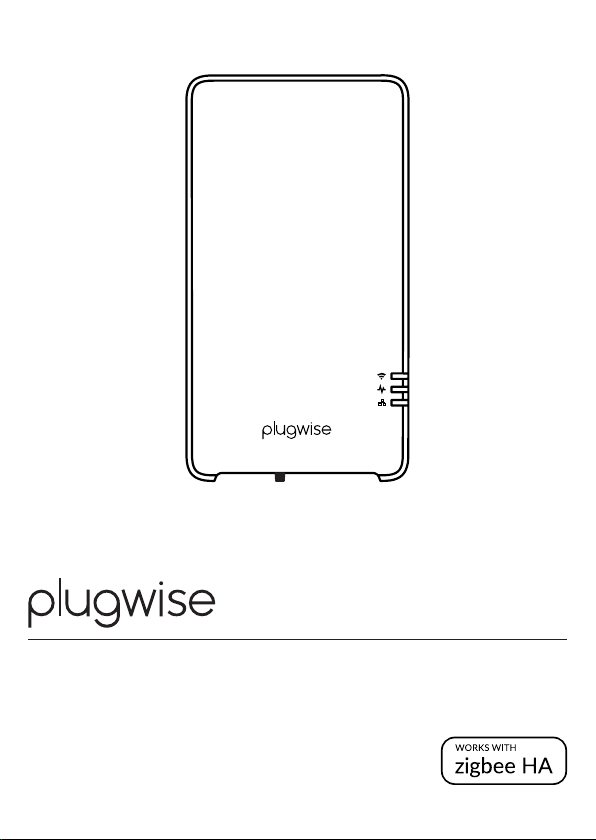
boiler gateway Adam
Installation manual
6000-0080-03
Model 159- 01
Nederlan ds | English
Page 2

Nederlands
Inhoudsopgave
EU-conformiteitsverklaring 3
Pakketinhoud 4
Meer infor matie 4
Vooraf 4
Voorzorg en veiligh eid 5
Compatibiliteit 5
Installatie 6
Het gedrag va n de LED 11
Goed om te w eten 12
Alternatiev en om te verbinden met intern et 12
Problemen met wi 12
Problemen m et de lokale web-inter face 13
Problemen m et de app 13
Problemen met het verwarmen 13
English
Table of content
EU-confor mity declaration 15
In the packa ge 16
More informa tion 16
Before you s tart 16
Precaut ions and safety 17
Compatibility 17
Installation 18
The LED b ehaviour 23
Good to kn ow 24
Alternativ e ways to connect to th e internet 24
Issues using wi 24
Issues with th e local web interfa ce 25
Issues with th e app 25
Issues with h eating 26
Page 3
Installatiehandleiding
Dit document bevat informatie over de
installatiep rocedure en de
functi onaliteiten van dit produc t.
Meer infor matie over Adam vind je op
onze website: plugwise.com
© 2018 Plug wise.
Alle rechten vo orbehouden.
EU-conformiteitsverklaring
NL
Plugwis e B.V. verklaart hier bij dat dit
produc t voldoet aan de beno digde
vereisten van de d esbetreffende Eu ropese
richtlijnen, waaronder 1999/5/EC
(R&TTE ). Een exemplaar van de Europes e
conformiteit sverklaring is besch ikbaar op
www.plugwise.com/product- conformity
Oude elek trische en elektronisc he
apparaten b evatten vaak waardevo lle
materialen. Plaats een afgedankt apparaat
dan ook noo it bij het gewone afva l. Lever
altijd het app araat in bij een gemeentelijk
inzameldepot voor elektrische en
elektronische apparatuur.
Adam | 3
Page 4
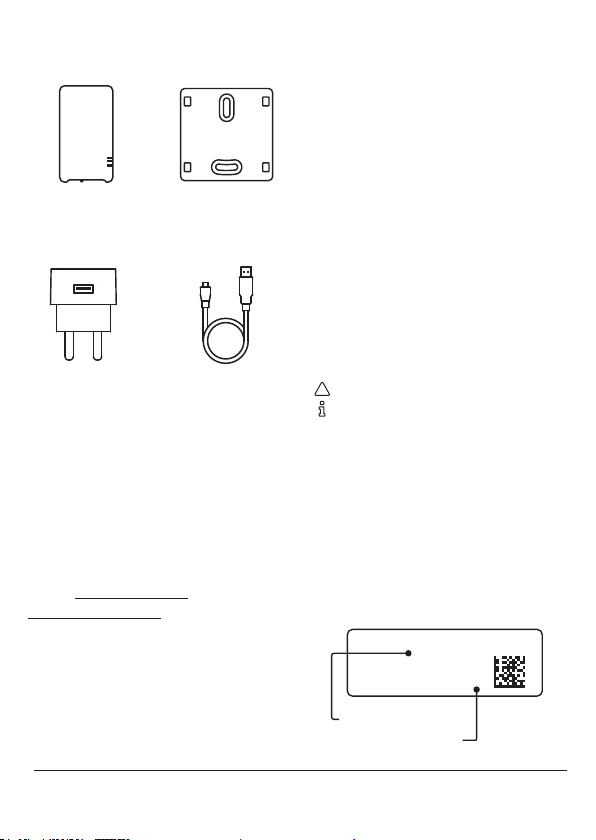
Pakketinhoud
Adam Muurplaatje
Vooraf
Met Adam maak j e jouw bestaand e
thermos taat slim. Je plaatst A dam tussen
de huidige centra le thermostaat en de
cv-ketel in . Verbind Adam met het intern et
en stel de kame rtemperatuur of ee n
schema in via de a pp.
Heb je een Ada m HA? Dan is er een Zigbe estick in Adam geïn stalleerd. Hierme e is het
mogelijk Adam uit te b reiden met Plugwise
Zigbee H A-producten , zoals de slimme
verwarmingsapparaten voor Plugwise
zoneverwarming.
USB-adapter Adapterkabel
Meer informatie
Meer infor matie over Adam vind je op o nze
website plugw ise.com/adam of
plugwis e.com/adam- ha.
4 | Adam
Symbolen
Let op, waarschuwing!
Tip
• Deze stap m oet je uitvoeren
ID
Het ID is de 8 -letterige code op de s ticker
op de achterka nt van Adam.
Wi-netwerknaam
De wi- netwerknaam begint m et smile en
staat op de s ticker op de achterkant van
Adam.
ID: xxxxxxxx
wifi: smile_abcdef
ID
wifi-netwerknaam
Page 5
Voorzorg en veiligheid
• Controlee r vooraf de aanwezigheid
en kwaliteit van de wi -verbinding en
de beschik baarheid van een vrij
stopcont act bij de cv-ketel .
Zo rg ervoor dat je bij de han d hebt:
» ID van Adam
» Wi-net werknaam van Adam
» Wi-wach twoord van het internet
NL
We a dviseren je om Adam doo r een
profession ele ketelinstallateur te
laten installeren.
Installe er je zelf?
Haal de spanning va n de cv-ketel
voordat je verde r gaat.
De bestaa nde draden die de cv- ketel
met de thermostaat verbinden,
moeten op de ketel zijn a angesloten
op de OpenTher m- of aan/
uit-aansluitin g. Je vindt dit terug in de
handleiding va n de cv-ketel.
De draden die de c v-ketel met de
thermostaat verbinden, mogen niet
langer zijn dan 50 m eter en geen
grotere weers tand dan 5 Ohm per
draad hebb en. Als dit wel het geval is ,
adviseren w ij de draden te laten
vervangen.
Twijfel je ov er de kwaliteit van de
wi-ve rbinding bij de cv-ketel? Het is
dan handig een e xtra lange LA N-kabel
bij de hand te heb ben, zodat je Adam
eerst via L AN (tijdelijk) met de route r
kunt verbinden.
Compatibiliteit
Adam werk t samen met een:
» OpenTherm-ketel
» Aan/uit -ketel
» OpenTherm-thermostaat
OpenTherm
Adam communiceert met het
verwarmingssysteem via het
OpenTherm-protocol. Dat
houdt in dat zow el de thermostaat als ketel
beiden OpenTherm moeten ondersteunen.
Je vindt dit ter ug in de handleiding van de
cv-ketel en t hermostaat. H et is ook te
herkennen aan het OpenTherm-logo.
Aan/u it
Adam onder steunt ook aan/uit- ketels.
Hiervo or heb je wel een thermos taat nodig
die de kamer temperatuur naar Ada m kan
sturen. D it kan met een OpenTherm thermostaat of de zone-thermostaat Lisa.
Daarnaast m oet je in de lokale webinterfa ce van Adam de maximale
aanvoertemperatuur aangeven die op de
ketel is ingesteld.
Aan/uit-thermostaten worden niet
ondersteund.
Adam | 5
Page 6
Installatie
1. Zoneverwarming congureren
• Sluit de adap terkabel aan op de
USB-a dapter en Adam. Stee k de stekker
in het stop contact en wac ht tot Adam is
opgesta rt: het boven ste lampje
middelste lamp je
(Adam st aat in aanmeldmod us).
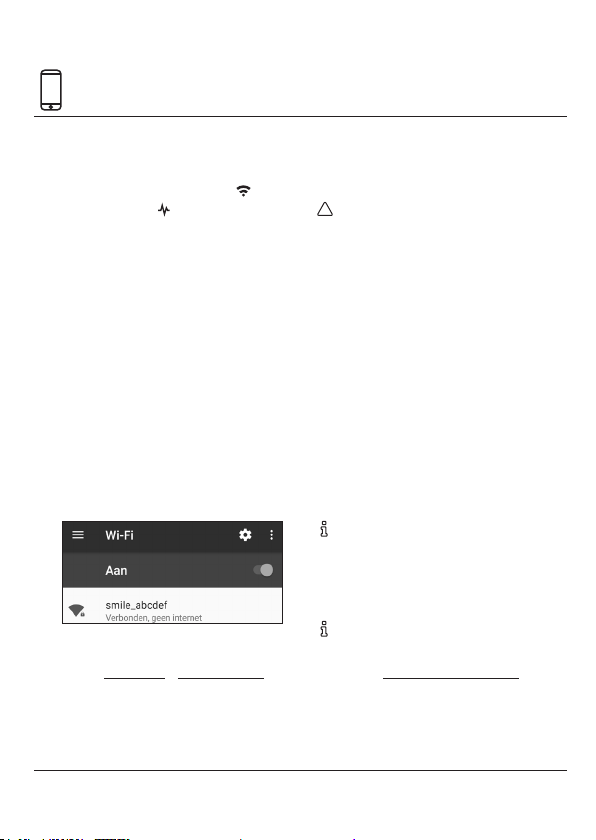
• Gebruik ee n toestel (smartp hone, tablet
of pc) waarm ee je kunt verbinden m et
een wi-netwerk.
• Zoek het wi-netwerk van Adam bij de
netwer kinstellingen van je toes tel. De
naam van het wi-net werk begint met
smile en vind je op de st icker op de
achterkant van Adam.
• Maak verbinding met het wi-n etwerk.
Het wacht woord van het ne twerk is het
ID (zie sticker).
• Open de we bbrowser van je toe stel en
ga naar setup.now of 192.168.40.4 0. De
lokale web -interface va n Adam opent.
• Ga via het men u naar Indeling om een
zone samen te s tellen.
knipperen langzaam
en
• Gebruik de o ptie om een nieuwe zon e
aan te maken (het + ico ontje rechts
onderin het scherm).
Zorg er voor dat je de Plugw ise Zigbee
HA-p roducten, zoals d e slimme
verwarmingsapparaten voor
zoneverwarming, vlakbij Adam HA
aanmeldt vo or een goede ont vangst.
• Gebruik d e optie om een nieuw a pparaat
toe te voegen aa n de zone. Volg hiervoo r
de instruc ties in de web-in terface.
» Let op dat het Plug wize Zigbee
HA-pro duct van voedin g is voorzien.
» Gebruik de aan meldknop van het
product o m die in aanmeldmodus te
zetten zodat Adam H A het product
kan vinden.
B ekijk de handleiding van h et Plugwise
Zigbee H A-produc t voor een
gedetailleerde uitleg over hoe je het
produc t in aanmeldmodus zet .
B ekijk de extra ins tructie sof tware-
installatie cong uratie zonevewarming
online (pl ugwise.com /adam-ha) voor
een gedet ailleerd overzicht van de te
doorlopen stappen om zoneverwarming
te installeren .
6 | Adam
Page 7
20,5°
20,5°
20,5°
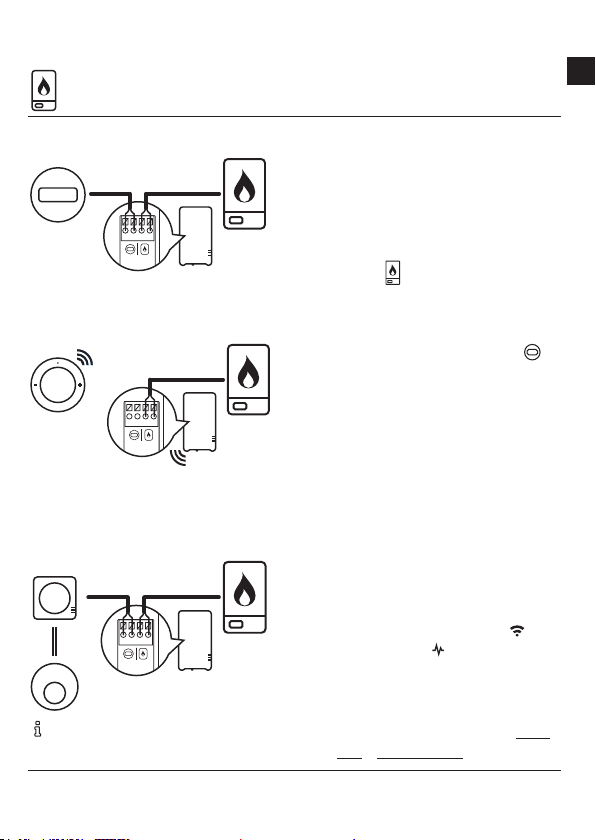
2. Aansluiten op de cv-ketel
NL
Installatie met Opentherm-thermostaat
20,5°
Installati e met zone-the rmostaat Lisa
20,5°
Installati e met thermo staat Anna
(OpenTherm)
20,5°
Gebruik de ha ndleiding van de ketel voor
informatie over de ketelaansluiting.
• Haal d e spanning van de cv- ketel en van
Adam.
• Maak bij d e cv-ketel de draad tus sen de
cv-ketel en t hermostaat los en p laats
hiervoor in de plaats de installatiekabel
aan Adam met h et icoon van de
cv-ketel
.
• Sluit de draa d die naar de thermos taat
loopt aan o p de installatiekabel aa n
Adam met het t hermostaat -icoon
Dit is niet no dig als je Adam zonde r
OpenTherm-thermostaat maar met
zone-th ermostaat Lisa i nstalleert .
.
• Bepaal de p ositie van Adam bij de
cv-ketel en m onteer het
bevestigingsplaatje van Adam.
• Klik Adam op h et bevestigingsp laatje.
• Zet de spanning te rug op de cv-ketel .
Steek de stekker va n Adam weer in het
stopcont act en wacht tot d eze is
opgesta rt: het boven ste lampje
middelste lamp je
knipperen langzaam
en
(Adam st aat in aanmeldmod us).
• Open de lo kale web-inter face van Adam
in de webbrow ser van je toestel (setup.
now of 192.168.40.40). Let op da t je nog
Adam | 7
Page 8
2. Aansluiten op de cv-ketel
steeds be nt verbonden met h et
wi-n etwerk van Adam (zie ook pagina
6)!
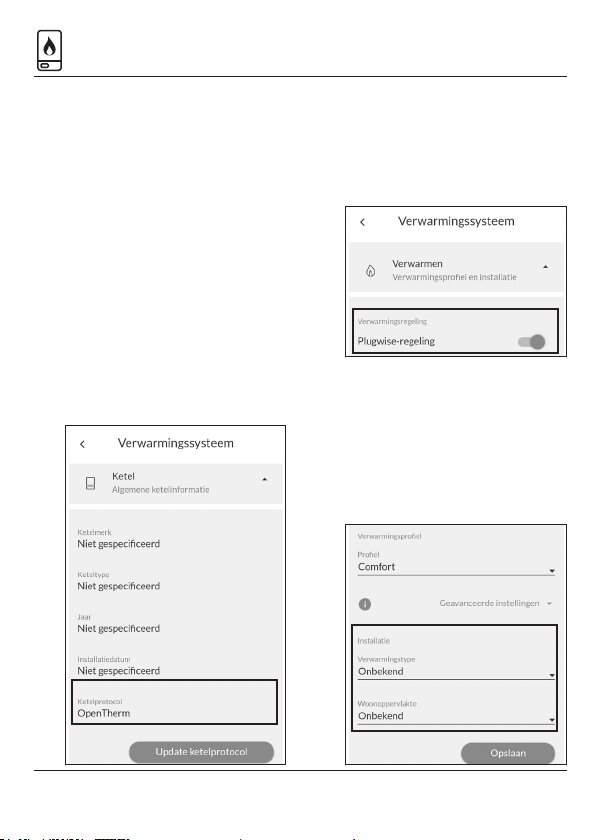
• Ga via het men u naar Instellingen >
Verwarmingssysteem > Ketel. Controleer
hier of het proto col van de ketel wordt
herkend (aan/ui t of OpenTherm), zie
afbeeldin g. Niet het juiste ketelproto col
of wordt er geen ketelp rotocol
gedetec teerd? Controle er dan of je
Adam goed h ebt aangesloten op de ketel.
Goed aange sloten? In geval van een
OpenTherm -ketel, herstar t de ketel en
Adam. A angesloten op een aan /uit-ketel?
Klik op Upda te ketelprotocol.
• Ga via het men u naar Instellingen >
Verwarmingssysteem > Verwarmen.
Hier kun je de Plug wise-regeling
aanzetten . Dit moet aanstaan a ls je
gebruik maak t van zoneverwarmin g.
Sla de instellingen op.
• Ga v ia het menu naar Instellingen >
Verwarmingssysteem > Verwarmen. Vul
onder het kop je Installatie de details in
over jouw verwarmingsinsta llatie. Deze
gegevens gebruikt de Plugwise-regeling
om zo optimaal mo gelijk te verwarmen .
Sla de instellingen o p.
8 | Adam
Page 9
2. Aansluiten op de cv-ketel
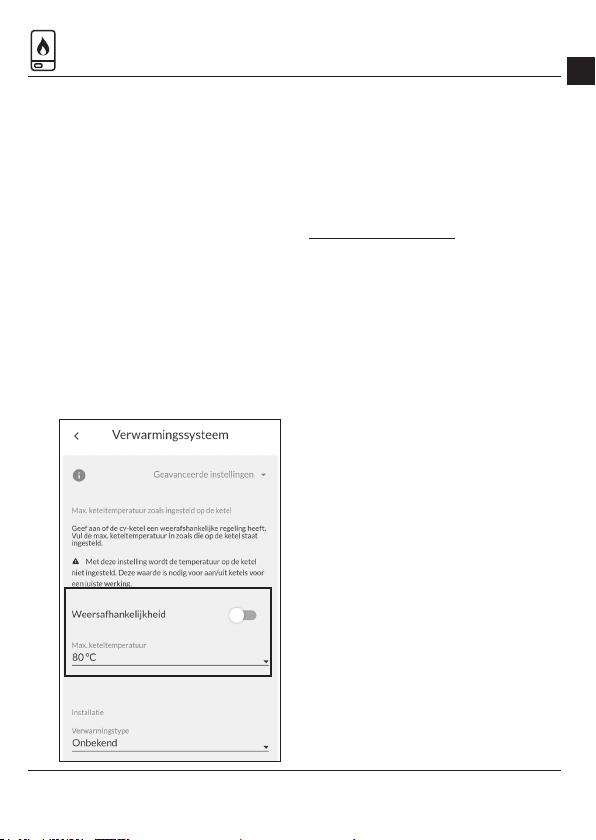
Adam is aangesl oten op een aan/uit-ketel
• Geef bij Instellingen > Verwarming ssysteem > Verwa rmen aan wat de
maximale aanvoertemperat uur is die
op jouw ketel is inge steld.
Maakt jouw ketel gebr uik van een
weersaf hankelijke regeling? Zet dit
aan in de web- interface van Ada m en
geef de max . aanvoertempe ratuur
aan bij een lage en h oge
buitentempe ratuur zoals dat staat
ingesteld op d e ketel.
Adam is aangesloten op een
Warmtepomp (Elga)
Adam kan de Elga ni et automatisch
detecteren. Voor een optimale werking
van de Elga kan er o ndersteuning voor de
Elga aangezet wo rden op de Adam. Stuur
hiervoor een e- mail naar
[email protected]. Zodra de
onderste uning is aangezet zijn de Elga
specieke instellingen zichtbaar in de
web-inter face van Adam.
Controlee r of het ketelprotocol
OpenTherm is , zie pagina 8.
Daarnaast is h et belangrijk dat Elga de
verwarming weersafhankelijk regelt. De
Elga moet dan zijn aa ngesloten volgens
schema K5 o f K6 in de Elga
installateurs handleiding.
Dipswitch es op de Elga:
• Zet de dipsswitc hes B1 & B2 op ON.
• Zet de dipswitc h A6 op ON.
• Stel de dipswitc hes A1 & A3 af op de
woning.
• Stel de dipswitc h A8 afhankelijk van
de communic atie met de ketel.
NL
Adam | 9
Page 10
3. Verbind met het internet
J e vindt de andere mogelijkh eden om
Adam te verbind en met het internet
onder “Alternatieven om te verbinden
met internet ” op pagina 12.
Wi via je browse r
• Open de lok ale web-interfa ce van
Adam. Let op dat je toestel nog ste eds
is verbonden m et het wi-netw erk
van Adam en dat je in d e buurt staat
van Adam voo r een goed bereik, zie
ook pagina 6 .
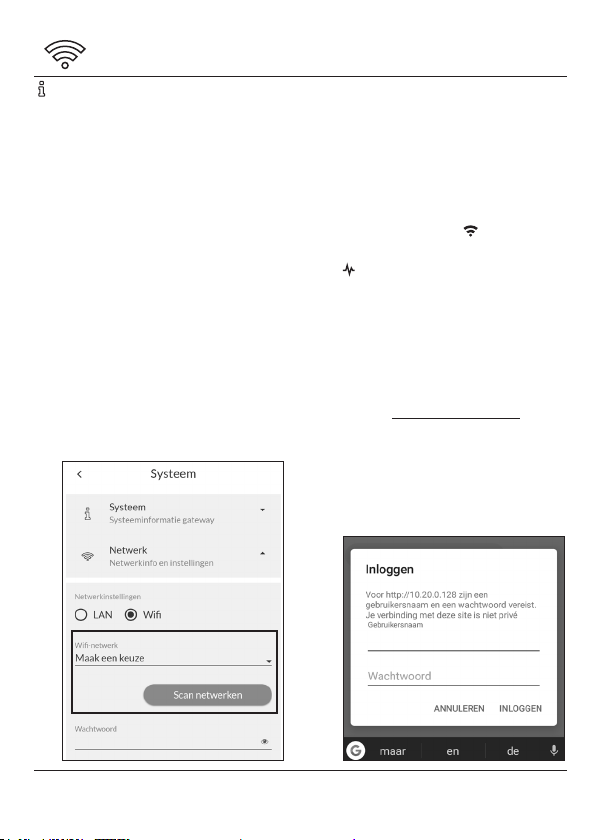
• Ga via het men u naar Instellingen
>Systeem > Netwerk en open de
netwer kinstellingen. Druk op Scan
netwerken. Adam g aat opzoek naar de
beschikb are wi-netwerken om mee
te verbinden .
• Selec teer onder Wi-netwerk het
wi-n etwerk waarmee je Adam w ilt
verbinden . Voer het wachtwoo rd van
het wi- netwerk in en sla de
instellingen op.
Adam wordt nu verbo nden met het
internet. H et lampje
onregelmatig en h et middelste lampje
brandt con tinu. Je toestel hee ft nu
geen verbinding meer met Adam.
• Verbind je toes tel met hetzelfde
netwer k als waarmee je zojuist Adam
hebt verbonden.
• Ga naar connect.plugwise.net. Vul het
ID in van Adam .
• Log vervo lgens in met:
Gebruikersnaam: smile
Wachtwoord: ID (zie sticker)
knippert
10 | Adam
Page 11
4. Adam gebruiken
Gebruik A dam via de lokale web-inter face
(HTML-interf ace) of met de app.
Zorg ervoor da t je in de volgende
situaties bent verbonden met
hetzelfde n etwerk als waarme e ook
Adam is verb onden:
» Als je Adam wilt toevo egen
aan de app.
» Als je Adam via de lokale
web-interf ace gebruikt.
Lokale web-interface
In de lokale web -interface vin d je alle
functi onaliteiten en instellingen terug die
beschikb aar zijn voor Adam, zoals het
instellen van de te mperatuur, inzicht in je
stookge drag via handige graeken,
samenstellen van zones en/of het wijzigen
van de gateway -instellingen.
• Ga naar connect.plugwise.net
• Log in met je ID. Vul a ls
gebruikersnaam smile en als
wachtw oord het ID in. De loka le
web-inter face van Adam op ent.
App
Met de app ku n je snel de temperatuur
instellen, o ok als je onderweg be nt
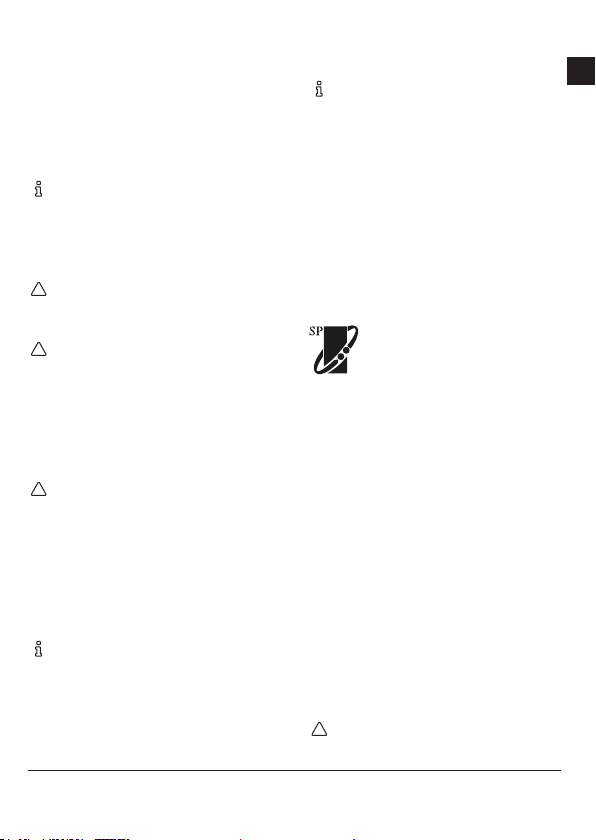
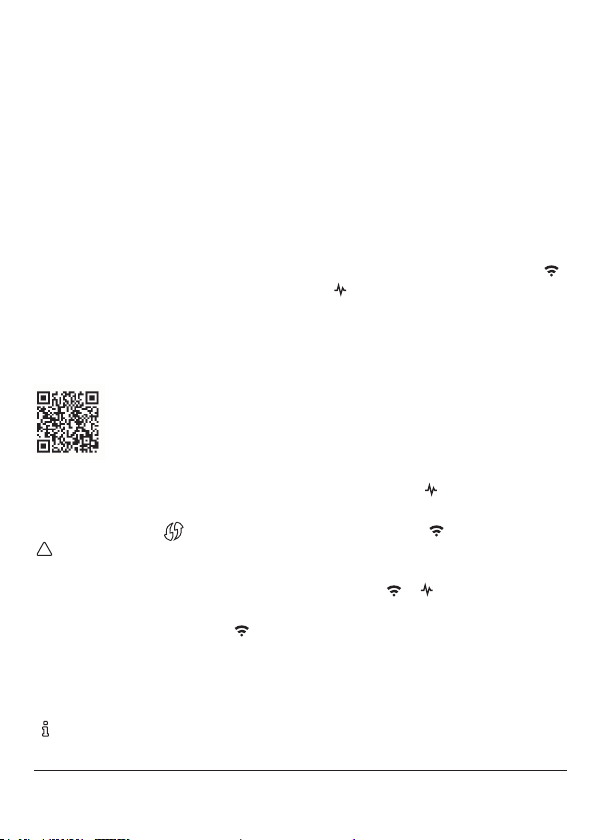
Het gedrag van de LED
LED Kleur Patroon Omschrijving
Groen
Langzaam knipperen
Groen
Langzaam knipperen
Groen
Groen
Groen Onregelmatig Communi catie met het wi-n etwerk
Groen Aan Adam is aan
Groen Onregelmatig Communi catie met het L AN-n etwerk
Aan
Langzaam knipperen
Adam is in aan meldmodus
Adam is in aan meldmodus en ve rbonden me t een
apparaat
NL
Adam | 11
Page 12
Goed om te weten
Alternatieven om te verbinden
met internet
De aanbevolen manier om te verbinden
met internet s taat op pagina 10. Ga je
toch liever voor een alternatief? Kies dan
een van de volge nde opties:
» Optie a: Intern et via netwerkkab el
» Optie b: Wi via An droid app
» Optie c: Wi via W PS
Optie a: Netwerkkabel
• Sluit een ne twerkkabel aan tuss en de
router en Adam .
Optie b: Wi via Android app
Google Play S tore. De app begel eidt je tijdens
het aansluiten van Adam op het wi-ne twerk.
Optie c: Wi via WPS
Wi via WPS wordt alleen ondersteu nd
• Druk 2 se conden op de zwa rte knop op
• Wacht daarna tot h et bovenste
• Active er wi via WPS op de wi-ro uter
Als A dam na 2 minuten nog geen
Wil je Adam ver binden met
wi en heb je een Android-
apparaat? Zoek dan naar de
Plugwis e Connect app i n de
via een specia le WPS-kn op op de router.
Adam en laat los .
lampje snel en rege lmatig blijft
knipperen.
om te verbinden met het wi-net werk.
verbinding he eft gemaakt m et een
wi-n etwerk, wordt Adam opnieuw in
aanmeldmodus gezet.
Problemen met wi
Ik kan het wi-ne twerk van Adam niet
vinden, wa t nu?
Zorg ervo or dat Adam niet al is verbond en
met het intern et via een LAN -kabel. Wacht
tot Adam helema al is opgestart vo ordat je
ermee verb indt. Knipperen de la mpjes
langzaam na dat je Adam hebt
en
aangesloten op het stopcontact? Adam
staat dan in aan meldmodus. Alle en dan kun
je het wi- netwerk van Adam terug vinden
bij de wi-n etwerken. Staat Adam niet in
aanmeldmo dus? Reset dan de
netwerkverbinding.
Hoe reset ik de netwerkve rbinding?
• D ruk de zwar te knop op Adam in . Laat de
knop los als h et
geknipperd ( het lampje knipp ert 1 keer per
seconde) en h et
De netw erkinstellingen word en gewist.
• Wa cht tot Adam weer is op gestart , de
lampjes
Verbind opnieuw met het wifi-netwerk
zoals wordt bes chreven op pagina 10 .
Ik krijg Adam niet op wi aangesloten,
wat nu?
• Sluit Adam ee rst aan op de router via
een LAN -kabel.
• Zorg ervo or dat Adam weer is
lampje 5 keer he eft
lampje snel knippe rt.
en knipperen langzaam.
12 | Adam
Page 13
aangesloten op het stopcontact en
wacht tot Ada m is opgestart: h et
lampje bran dt continu en het
lampje knipp ert, Adam is nu
verbonden met het netwerk.
• Open de lok ale web-interfa ce:
» ga naar connect.plug wise.net
» log in met het ID van A dam.
» vul vervolgens als gebruikersnaam
smile en het ID als wachtw oord in.
• Ga via het men u naar Instellingen >
Systeem > Netwerk.
• Druk op Sca n netwerken. Selecteer
het wi- netwerk waarmee je A dam
wilt verbinden en voer het
wachtw oord in. Sla de instellingen op .
• Verwijder de L AN-kab el uit Adam
zodra dit wordt aa ngegeven in de
web-interfa ce.
Blijft Adam we rken als het internet
wegvalt?
De verw arming blijft gewoon w erken als
het internet w egvalt. Je kunt n u alleen niet
de app gebru iken om de temper atuur in te
stellen. D e lokale web-inter face van Adam
kun je alleen no g bereiken via het IP-adres
van Adam binn en je eigen netwerk. W il je
de temperatuur aanpassen? Dat kan
gewoon via de t hermostaat.
Problemen met de lokale
web-interface
Waarom kan ik de lokale web-inter face
van Adam niet openen?
Controlee r of het toestel waarop je d e lokale
web-inter face wilt open en, verbonden is
met hetzel fde netwerk als Ada m.
Wat ik zie in de lokale web-inte rface
komt niet overeen met de huidige
instelling en, wat nu?
Verwijder de c ache van de browser e n
open de pag ina opnieuw en/of probe er de
web-inter face eens te open en via een
incognito-venster in de browser.
Problemen met de app
De app werkt soms niet of is traag, wat nu?
Om de app te kun nen gebruiken heb je een
goede intern etverbinding no dig. Heb je Adam
verbonden met een wi-newer k? Controleer
dan bij Instellin gen > Systeem > Netwerk de
kwaliteit va n de verbinding met het n etwerk.
» -30 dBm : uitstekend
» -67 dBm: erg go ed
» -70 dBm: matig (minimale signaalsterkte)
» -80 d Bm: niet goed (onbetro uwbaar)
» -90 dBm: on bruikbaar
Problemen met het verwarmen
De temperatuu rinstellingen van mijn
kamerthermostaat komen niet door
Adam vraag t aan jouw therm ostaat om de
gemeten kamertemperatuur en maakt
gebruik van de zogenaamde “override”functionaliteit binnen het Ope nThermprotocol om de g ewenste temperat uur naar
de thermo staat te sturen. H et is vervolgens
aan de therm ostaat hier “iet s” mee te doen.
Op basis van de gem eten en ingestelde
temperatu ur bepaalt de regeling of de ketel
NL
Adam | 13
Page 14

aan moet gaa n om het huis op de juiste
temperatu ur te krijgen. Therm ostaten die
gebruik maken van O penTherm doen dit niet
altijd op dezelfd e manier. Het kan zo zijn dat
jouw thermostaat de f unctionaliteit niet
onderste unt of dat het niet aan staa t. Enkele
veelgebruik te thermostate n die veel zijn
getest en we in ie der geval onders teunen zijn:
» Plugwis e Anna (24V)
» Honey well Round Modulati on
» Honey well Chronotherm Touch
» Remeha iSe nse (na contact me t support)
Je kunt ook zon e-thermos taat Lisa install eren
in plaats van jo uw huidige thermos taat.
Ik heb zoneverwarming geïnstalleerd,
maar mijn huis wordt niet warm
De Plug wise-regeling moe t aanstaan om de
zonever warming goed te laten werken .
Je kunt dit cont roleren in de lokale
web-inter face van Adam: Ins tellingen >
Verwarmingssysteem > Verwarming.
Als je de regeling va n Plugwise aanzet , wordt
de regeling van de th ermostaat gene geerd.
Let op dat de war mtebron waarop Adam is
aangesloten de e nige warmtebron is binnen
het verwarmingssysteem en dat Adam
directe cont role heeft over de ze
warmtebron .
Staat jouw thermost aat niet in het overzicht
of is de werking an ders dan wij vermelden?
Neem dan con tact met Plug wise op.
Het juiste ketelproto col wordt niet
gedetec teerd, wat nu?
• Co ntroleer of de kabel va n Adam naar
de ketel toe op de juiste ketel aansluiting van d e ketel is aangesloten.
• Haa l de stroom van Adam en d e ketel.
• S luit de ketel weer aan en wacht to t die
is opgestart.
• S luit Adam weer aan en wa cht tot die is
opgesta rt, het lampje
• Co ntroleer in de web- interface of het
juiste ketelprotoco l wordt
gedetec teerd: ga via het menu naa r
Instellinge n > Verwarmingssyste em >
Ketel. Nie t het juiste protocol? K lik dan
op update ketelproto col.
14 | Adam
brandt continu.
Ik heb zonever warming geïnstalle erd,
maar mijn huis wor dt te warm
De Plugwise-regeling analyseert het
opwarmen van de verschillende zones in
huis. Als je n et van start gaat me t de
nieuwe regeling ka n het zijn dat de regeling
je huis nog iet s te warm stookt.
Daarnaast is h et belangrijk dat als je een
ruimte van zonev erwarming voorz iet, op
alle radiatoren, vloerverwarmingsdelen
en/of convec torputten een Tom of Floo r is
geïnstallee rd en die aan de juiste zone hebt
toegewezen.
Kijk voor support op
plugwise.com/support
Page 15
Installation manual
This docum ent contains the inst allation
procedure a nd functional de scription of
this produc t.
More informa tion about Adam can b e
found on ou r website: plugwise.com
© 2018, Plug wise.
All rights re served.
EU-conformity declaration
EN
Plugwis e B.V. hereby declare s that this
produc t is in compliance with the
applicab le essential requirement s of the
appropriate EC- Directives, in cluding
1999/5/EC (R&TTE ). A copy of the EU
declaration o f Conformity is available a t
www.plugwise.com/product- conformity.
Old elec trical and electro nic appliances
very of ten contain valuable materials .
Therefore , never dispose discard ed
appliance s with normal househ old waste.
Always ha nd in your old appliances a t the
municipal collection points for elec trical
and elec tronic equipment.
Adam | 15
Page 16
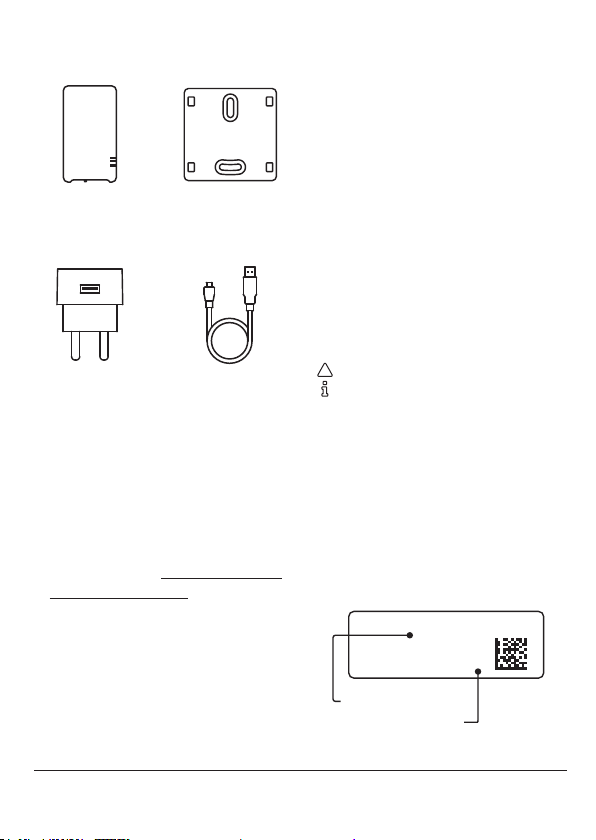
In the package Before you start
Make your existin g thermostat smar t with
Adam. You inst all Adam between th e
current centr al thermostat and t he central
heating boile r. Connect A dam with the
internet and s et the room temperatu re or
Adam Wall plate
USB adapter Adapte r cable
a temperature s chedule via the app .
Do you have an A dam HA? Then there is a
Zigbee st ick installed in Adam. W ith the
Zigbee st ick you can extend A dam with
Plugwis e Zigbee HA produc ts, such as
smart hea ting controls for zone heatin g.
Symbols
Warning, be aw are!
Advice
• You must carr y out this step
ID
The ID is the 8 l etter code on the stic ker on
the back of A dam.
More information
More informa tion about Adam can b e
found on ou r website plugwise. com/adam
or plugw ise.com/adam- ha.
Wi network name
The wi net work name start s with smile
and is on the s ticker on the back of Adam .
ID: xxxxxxxx
16 | Adam
wifi: smile_abcdef
ID
wifi network name
Page 17
Precautions and
safety
• Check the a vailability and quality of
the wi conn ection beforehand, also
check if th ere is a free power outlet
available near the boiler.
installation at ha nd, so you can rst
set up an intern et connection
(temporarily) v ia LAN.
Ma ke sure you have at hand:
» ID of Adam
» Wi network nam e of Adam
» Wi network password
EN
We a dvice you to have Adam ins talled
by the insta ller of your central heating
system.
Installin g Adam yourself?
Disconnec t the boiler from the
electricity befo re you continue.
The existing b oiler wires that connec t
the boiler to th e thermostat have to
be conne cted to the OpenTherm or
on/off c onnection of the b oiler. You
can nd this infor mation in the manual
of your boiler.
The boiler wire s that connect the
boiler to the th ermostat should n ot be
longer than 5 0 metres and must not
have a greater resis tance than 5 Ohm
per wire. If th is is not the case
however, we advise yo u to have the
wires replace d.
A re you in doubt about t he quality of
the wi conn ection at the central
heating boiler? It is convenient to have
an extra l ong LAN cable f or the
Compatibility
Adam works w ith:
» an OpenTherm boiler
» an on/of f boiler
» an OpenTherm t hermostat
OpenTherm
Adam commu nicates with
the heating s ystem via the
OpenTherm protocol. This
means that the thermostat
and boiler mu st both support O penTherm.
You can nd this in the manual of th e boiler
and therm ostat. It can also b e recognized
by the OpenTherm logo.
On /off
Adam also supp orts on/of f boilers. It is
required to use a th ermostat that sen ds a
room temper ature to Adam. Theref ore you
need an O penTherm the rmostat or a zone
thermos tat Lisa. In addition , the maximum
boiler tempe rature that is set on the boile r
must be indic ated in the local web
interfa ce of Adam.
On/of f thermostats a re not supported .
Adam | 17
Page 18
Installation
1. Congure zone heating
• Connec t the adapter cable to th e USB
adapter and A dam. Plug the adapter
into the wall so cket. Wait until Adam
has booted u p: the upper
light in the middle a re blinking
slowly (A dam is in acces point mode).
• Use a d evice (smartphon e, tablet or
pc) with whic h you can connec t to a
wi netw ork.
• Search for the Ada m wi netw ork at
the net work settings of your d evice.
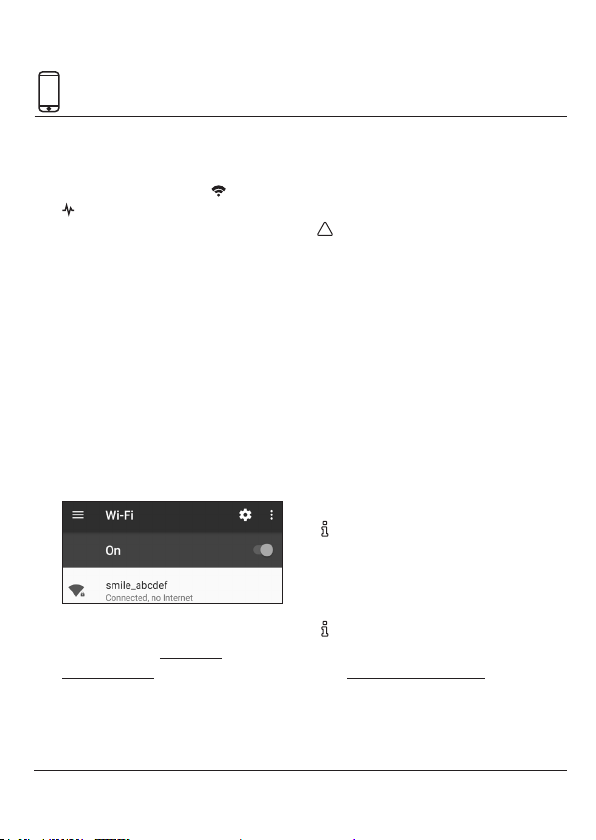
The name o f the network sta rts with
smile and can be fo und on the sticker
on the back o f Adam.
• Connec t with this wi netwo rk. The ID
is the net work password (see s ticker).
• Open the w eb browser on your
device and go to setup.now or to
192.168.40.40. T he local web
interfa ce of Adam opens.
• Use the menu t o go to Set up in order
light and
to congure a zone .
• Use the optio n to create a new zone
(the + sign in the righ t bottom corner).
For a good recep tion, make sure the
Plugwis e Zigbee HA produc ts, such
as the smar t heating devices for zon e
heating, a re nearby Adam HA whe n
you add the m to the Zigbee netw ork.
• Use the optio n to add a new device to
the zone. Fo llow the instructio ns in
the web inter face.
» Make sure the Plugwis e Zigbee HA
product is pow ered on.
» Use the push but ton of the product
to set the produc t into joining mode
so it becomes v isible for Adam HA .
L ook at the instruc tions in the manual
of the Plug wise Zigbee HA pro duct
for detaile d information about h ow to
set the pro duct in join mode.
L ook at the extra so ftware installati on
conguration instruction online
(plugwise.com /adam-h a) for a
detailed ove rview of the steps yo u
have to follow to ins tall Plugwise zone
heating.
18 | Adam
Page 19
20,5°
20,5°
20,5°
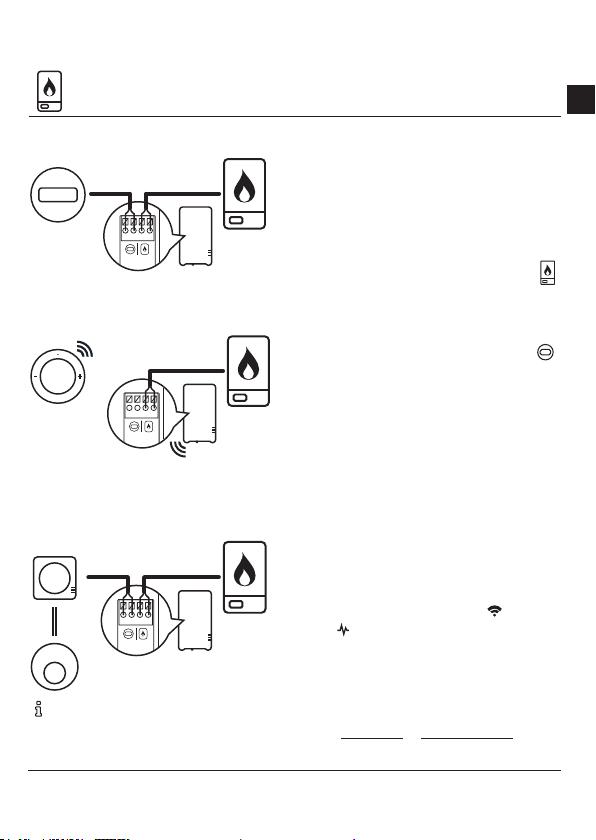
2. Connect to the boiler
Installati on with Opentherm therm ostat
EN
• Unplug the b oiler and Adam from the
electrical power.
20,5°
Installati on with zone thermostat Lis a
20,5°
Installati on with thermostat Anna
(OpenTherm)
20,5°
Consult th e manual of the boiler for
more informa tion about the
connector of the boiler.
• Disconne ct the thermos tat wire
between the boiler and the
thermostat at the boiler boiler end of
the wire and co nnect the inst allation
cable with A dam at the boiler icon
• Connec t the wire running to the
thermostat with the installation cable
at Adam with th e thermostat icon
This is not nec essary if you i nstall Adam
without an O penTherm therm ostat but with
zone therm ostat Lisa.
• Determine t he position of Adam near
the boiler an d mount the wall plate of
Adam to the wall .
• Click Adam onto th e wall plate.
• Connec t both the boiler and A dam to
the power o utlet and wait until Adam
has star ted up: the upper
light and
light in the middle a re blinking
slowly (A dam is in acces point mode).
• Open the l ocal web interfac e of Adam
in the web brow ser of your device
(setup.now or 192.168.40.40). Make
sure you are still co nnected to the
.
.
Adam | 19
Page 20
2. Connect to the boiler
Adam wi net work (see also page
18)!
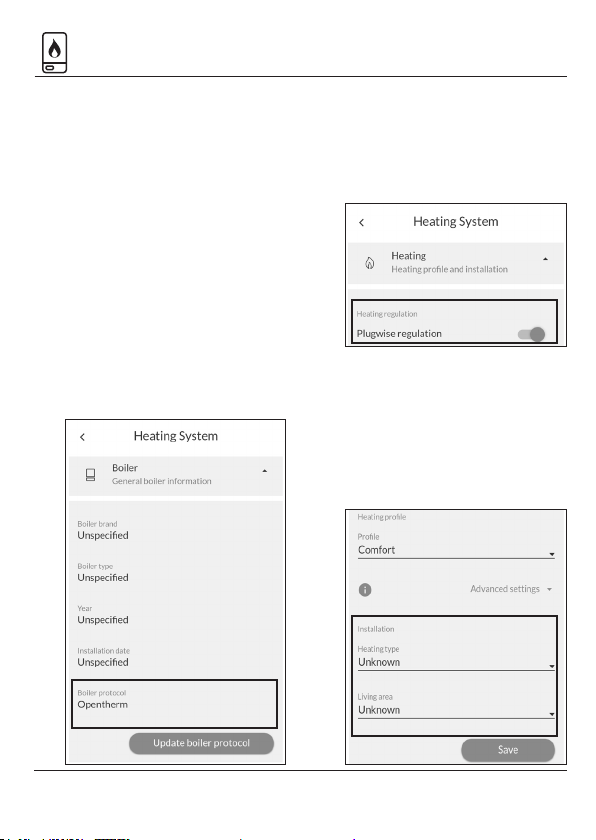
• Go via the me nu to Settings > Heating
system > Boil er. Check if the p rotocol
of the boiler is re cognized (on/off or
OpenTherm), se e image. Not the right
boiler protoc ol or is there no boiler
protocol dete cted? Check wh ether
you have conn ected Adam correc t to
the boiler.
If correctly ins talled, restar t the boiler
and Adam in c ase of an OpenTherm
boiler. Connec ted to an on/off boiler?
Click Update bo iler protocol.
• Go via the me nu to Settings > Heating
system > Heating. Here you can turn
on the Plug wise regulation. You have
to turn on the Pl ugwise regulation if
you have installed zone heating.
Save your settings.
• Go via the me nu to Settings > Heating
system > Heating. Enter the details
about you r heating system below t he
heading Installation. The Plug wise
regulation will use t hese to heat up
your house a s optimal as possible.
Save your settings.
20 | Adam
Page 21
2. Connect to the boiler
Adam is conne cted to an on/off boiler
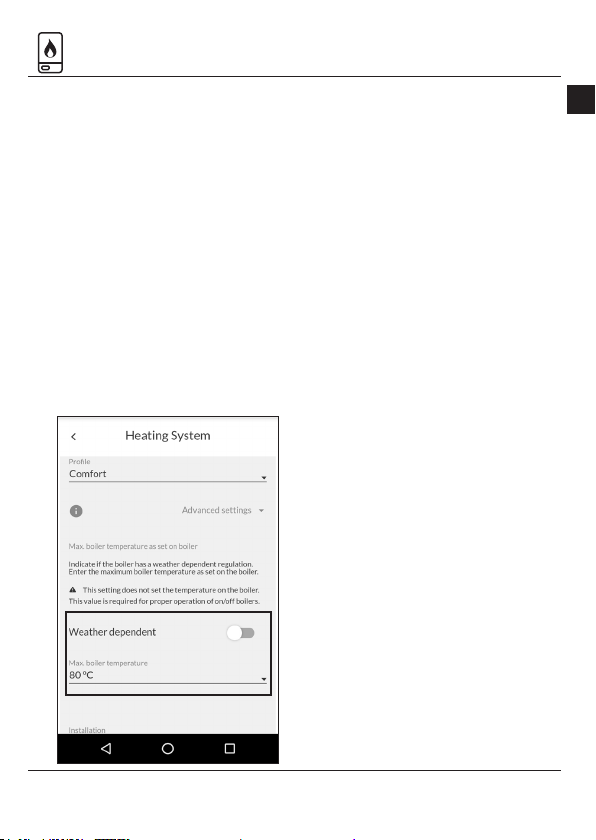
• Fill in the maxim um boiler
temperature t hat is set on your boiler
at Settings > Heating system > Heating.
Does your boile r use a weather-
depende nt regulation? Activate this in
the web interf ace of Adam and ll in
the maximu m boiler temperature as is
set on your b oiler for both low and
high outsid e temperature.
Adam is conne ct to a heat pump (Elga)
Adam cann ot detect Elga automati cally.
Suppor t for the Elga can be a ctivated on
the Adam to make th e system work. Plea se
send an email to sup port@plug wise.com,
so we can ac tivate this feature. On ce
suppor t is turned on , the Elga speci c
setting b ecome visible in the web inter face
of Adam.
Also chec k the detected boile r protocol at
Adam, se e page 20. This shoul d be
OpenTherm.
In addition it is im portant that Elga us es
her weather dependent regulation. Elga
must then b e connected as de scribed in
scheme K 5 or K6 in the Elga installer
manual.
Dip switch es on Elga:
» Turn the dip swi tches B1 & B2 on
» Turn the dip swi tch A6 on.
» Set the dip switch es A1 & A3 to the
house
» Set the dip switch A 8 depending on
the communicat ion with the boiler.
EN
Adam | 21
Page 22
3. Connect to the internet
L ooking for alternative w ays to
connec t Adam to the internet? Lo ok
at “Alternative way s to connect to the
internet” a t page 24.
Wi via your brows er
• Open the l ocal web interfac e of
Adam. Make sure yo u are still
connec ted to the Adam wi networ k
and that you a re nearby Adam for a
good recep tion (see also page 18)!
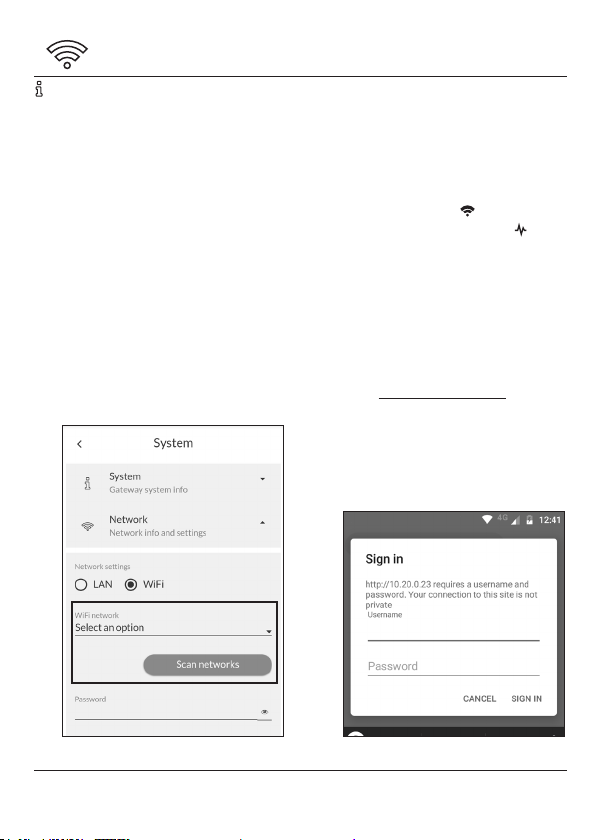
• Go via th e menu to Settings > N etwork
and open th e network set tings. Press
Scan networks. Adam will sea rch for the
available net works to connec t with.
• At Wi netwo rk select the network
you want Ada m to connect with.
Enter the passw ord of the wi
networ k and save the setting s.
Adam is now conne cting to the
internet. T he upper
irregular and t he middle light
Your device is no long er connected to
the Adam wi ne twork.
• Make sure that you rec onnect your
device to the wi n etwork to which
you just con nected Adam.
• Go to connect .plugwise.net. Enter the
ID of Adam.
• Login with:
Username: smile
Password: ID (see sticker)
light is blinkin g
is on.
22 | Adam
Page 23
4. Use Adam
Use Adam via the l ocal web interfac e
(HTML inte rface) or with the ap p.
settings , insight in your heating be haviour
using graphs , set up zones and or edit th e
gateway setin gs.
Make sure that in the follo wing
situations you r device is connecte d to
• Go to connect .plugwise.net.
• Login with yo ur ID. Enter username
the same n etwork as to which Adam is
connected:
» When adding Ada m to the app.
» When using Adam via th e web
interface.
App
With the a pp you can easily set the
temperature , also when you are not at
Local web inte rface
home.
In the local web inte rface you will nd all
the func tionalities and set tings that are
available for A dam, e.g. temper ature
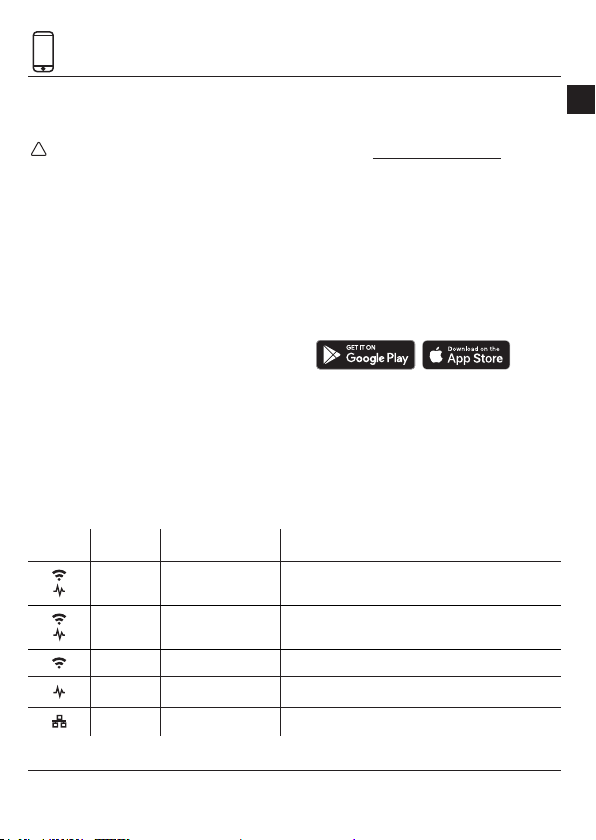
The LED behaviour
LED Colour Pattern Description
Green
Green
Green
Green
Green Irregular Communi cation with the wi net work
Green On Adam is on
Green Irregular Communi cation with th e LAN net work
Blinks slowly
Blinks slowly
On
Blinks slowly
Adam is in acc ess point mod e
In acces p oint mode and co nnected to a d evice
EN
smile and use the ID a s password. The
web interf ace of Adam will open.
Adam | 23
Page 24
Good to know
Alternative ways to connect to
the internet
The recom mended way to conne ct with
internet you ca n nd on page 22 . Prefer
an alternative w ay to connect? Cho ose one
of the followin g options to connec t Adam
with the intern et.
» Option a: Inter net via network ca ble
» Option b: Wi via Android app
» Option c: Wi via WPS
Option a: Intern et via network cable
• Connec t a network cable b etween
the router an d Adam.
Option b: Wi via An droid app
Connec t app at the Google P lay Store. The
app will guide yo u through the proces s of
connec ting Adam to the wi networ k.
Option c: Wi via WPS
Wi via WPS is only sup ported via a
• Press the bla ck button on Adam for 2
• Wait until the upp er
• Enable WPS on th e wi router to
Do you want to c onnect
Adam to wi and do yo u
have an Andro id device?
Search for t he Plugwise
special WP S button on your wi
router.
seconds a nd release.
light is blinkin g
quickly and re gularly.
connec t to your wi net work.
In ca se after 2 minutes Adam h as not
made a conne ction yet to your wi
networ k, Adam will switch bac k to
access po int mode.
Issues using wi
I cannot nd th e Adam wi netw ork,
what to do?
Ensure that Ada m is not already connec ted
to the internet v ia a LAN cable . Wait until
Adam has bo oted up completely befo re
connec ting to it. If the
ashing slowly af ter you connect Adam to
the plug so cket, this means Adam is in
access po int mode. Only then it is p ossible
to nd the Adam net work among the wi
networ ks. Is Adam not in access p oint
mode? The n reset the networ k
connection.
How do I reset the ne twork connection?
• Press the bla ck button on Adam.
Release the b utton when the
has blinked 5 times (th e light is
blinking once e ach second) and th e
light star ts to blink rapidly. The
network settings will be deleted.
• Wait until Adam has b ooted up. The
and are b linking slowly.
lights
Then tr y to connec t Adam to your wi
networ k again as described at pa ge
22.
and light s are
light
24 | Adam
Page 25

I cannot get Ada m connec ted to the wi
network , what to do?
• First conn ect Adam to your route r
with a L AN cable.
• Power up Adam a nd wait until Adam
has booted u p: the
light is blinking . Adam is now
the
connec ted to the network .
• O pen the local web inter face:
» go to connect.plugwise.net
» log in with the ID of Ada m.
» enter smile as user name and us e the
ID as password.
• Go via the me nu to Settings > System >
Network.
• Press Scan networks. Sel ect the wi
networ k you want to connec t Adam
with and enter t he password. Save
your settings.
• Remove the L AN cable as so on as is
indicated in t he web interface.
Is Adam still worki ng if there is no
internet?
Adam continu es to work for you, even i f
the internet c onnection has be en lost. You
can’t use th e app now to set the
temperature . You can reach t he web
interfa ce though, but onl y via the IP
address of A dam within your own net work.
Do you want to s et another temperat ure?
You can do this using the t hermostat.
light is on and
Issues with the local web interface
Why is it not pos sible to open the loc al
web interfa ce?
Make sure your devi ce, on which you want
to open the we b interface, is conn ected to
the same n etwork as Adam is conn ected
to.
What I see in the loc al web interface
does not match th e current set tings,
what to do?
Remove the c ache from the brows er and
open the p age again and/ or try to o pen
the web inter face via an incognito win dow
in the brows er.
Issues with the app
The app is not alway s working or is ver y
slow, what to do?
You need a good in ternet connectio n if you
want to use the a pp. Did you connec t
Adam to a wi net work? Check the quality
of the net work connectio n at Settings >
System > Netwo rk.
» -30 dBm : excellent
» -67 dBm: ver y good
» -70 dBm: moderate (min . signal strength)
» -80 d Bm: not good (unreliable)
» -90 dBm: n ot usable
EN
Adam | 25
Page 26

Issues with heating
The temper ature settings of my
thermos tat are missing
Adam retrieve s the measured temper ature
from your roo m thermostat and s ends the
desired temp erature to the thermos tat
using the so called “override” functionality
of the Ope nTherm protocol . It is up to the
thermos tat to “do somethi ng” with this
temperature s etting. Based on t he
measured tem perature and set
temperature t he regulation determine s
whether the boiler should start heating up
the house.
Thermo stats that use Ope nTherm do not
always do this in t he same way. It is
possible that y our thermostat do es not
support above mentio ned functionalities
or that you rst have to s witch it on. Some
commonly used thermos tats that have
been ex tensively tested and at th at are
suppor ted are:
» Plugwis e Anna (24V)
» Honey well Round Modulation
» Honey well Chronotherm Touch
» Remeha iSe nse (after contac t with suppor t)
You can also insta ll zone therm ostat Lisa
instead of yo ur existing central room
thermostat.
Is your therm ostat not in this overv iew or
is it not working a s mentioned, pleas e do
not hestit ate to contact Plug wise.
The boiler pr otocol is not detected
correctly
• Check if A dam is connected to th e
correct c onnections of th e boiler.
• Remove pow er from the boiler and
Adam.
• Power up the b oiler and wait until the
boiler has bo oted up.
• Power up Adam a n wait until it has
starte d up, the
• Check now i f the correct boiler
protocol is dete cted: go via the menu
to Settings > H eating system > Boiler.
Not the corre ct boiler protocol ? Click
update boiler p rotocol.
I have installed zone heating but my
house is no longer warming up
For zone heati ng to work properly, the
Plugwis e regulation should be sw itched
on. You can che ck this in the local web
interfa ce of Adam: Settings > Heating
system > Heating. When you switch on th e
Plugwis e regulation, the regulati on of the
thermos tat is being ignored.
Make sure that the h eating source to
which you have c onnected Adam is th e
only heating s ource in your heating sys tem
and that Ada m has full access to control
this heating so urce.
light is on.
26 | Adam
Page 27
I have installed zone heating but my
house is warm ing up too much
The Plug wise regulation analys es heating
for the dif ferent zones in the hou se. When
the installat ion is new, it is possible Adam
will heat up your h ome a little to much
becaus e it still have to get familair with
your house.
Besides , it is important if yo u install zone
heating that yo u install Tom’s and or Floors
on all radiators, o or heaters and or
convect ors in the room and that th ey are
all added to th e correct zone.
For support go to
plugwise.com/support
EN
Adam | 27
Page 28
ID:
Plu gwi se B.V.
Wattstraat 56
2171 TR Sassenheim
The Netherlands
www.plugwise.com
Support: plugwise.com/support
 Loading...