

Page 1
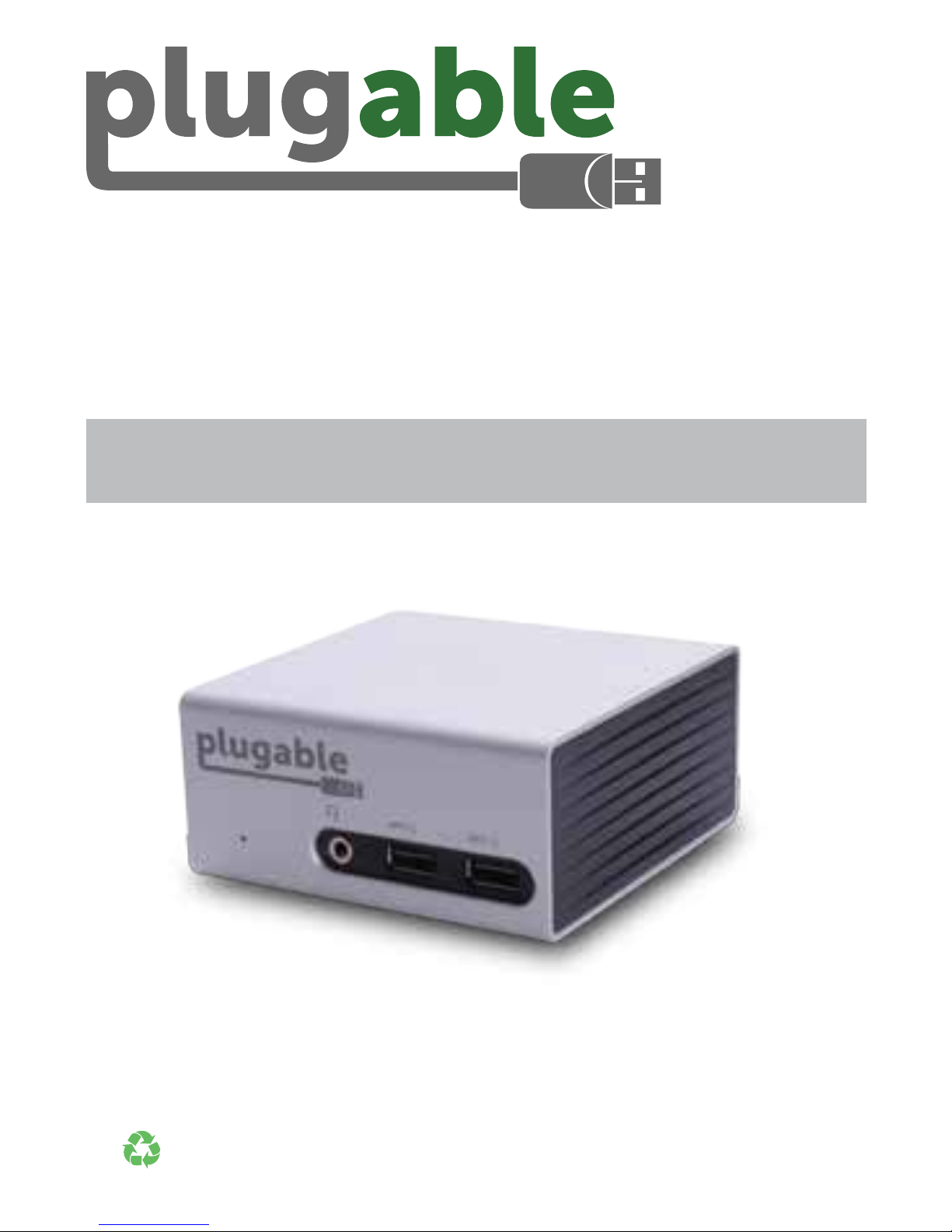
SuperSpeed USB 3.0
Multi-Display Docking Station
with 4K Support
For information on Drivers, FAQ, and Support, visit:
plugable.com/products/ud-5900
© 2015 Plugable Technologies | September 15, 2015
Recyclable
Material
Quick Installation Guide
English • Deutsch • Français • Español • Italiano • 日本語
Page 2
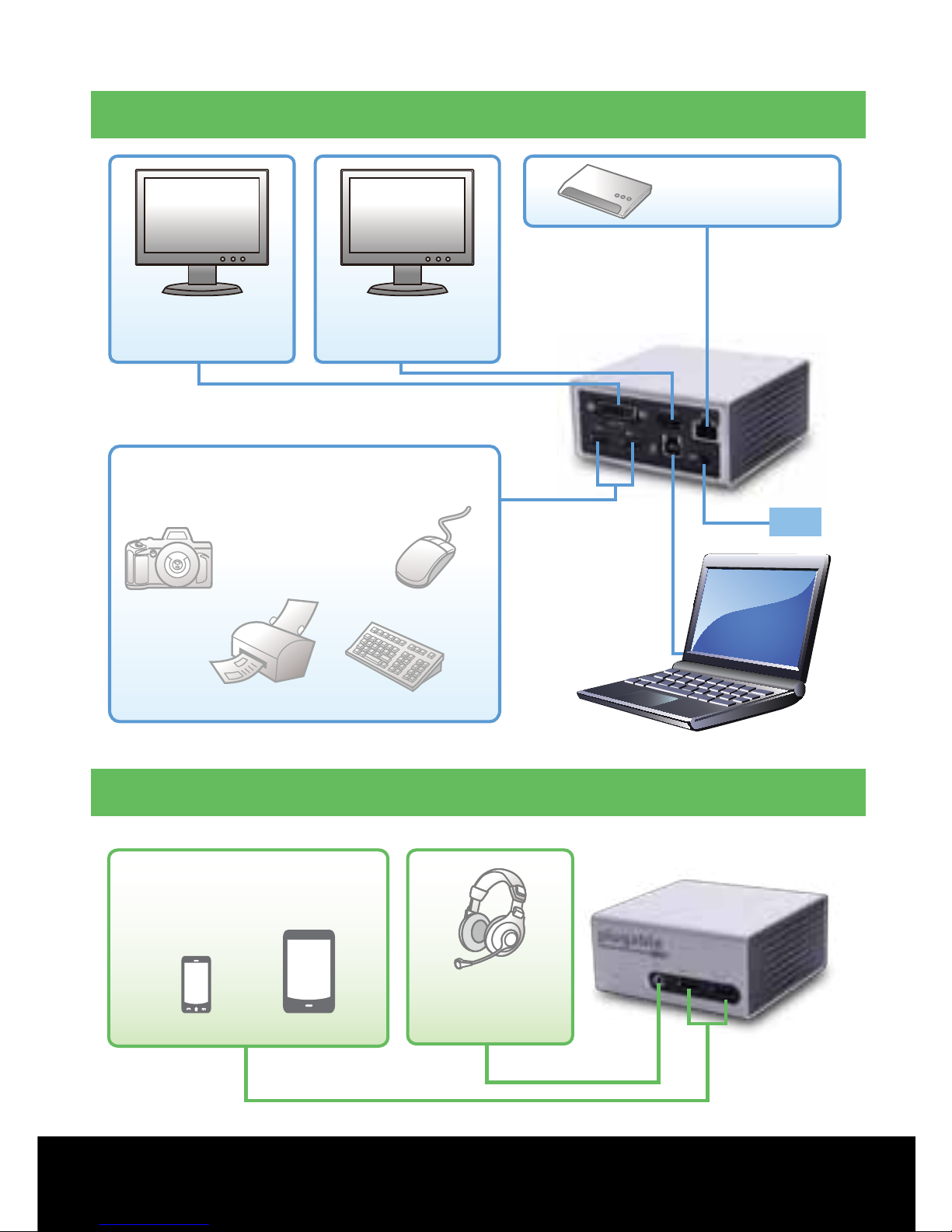
Connections
PS
UD-5900
Back Connections
Front Connections
USB Devices
(Data Transfer & Charging)
Cell Phone Tablet
Headphones
4K* / HDMI
Monitor
DVI / VGA
Monitor
Ethernet
Laptop/Tablet
Mouse
Printer
Keyboard
Camera
USB Devices
(Data Transfer & Charging)
2 |
Drivers - FAQ - Support - Visit:
plugable.com/products/ud-5900
Page 3

Driver Installation
Windows® 10 / Windows 8.1 / Windows 7
Step 1 If drivers were not received from Plugable via
email soon after purchase, download the most recent
drivers from
plugable.com/products/ud-5900
(If no internet connection is available, drivers are located on the
enclosed CD.)
Step 2 Connect display(s), Ethernet cable (optional),
and power adapter to docking station
Step 3
Install the downloaded drivers. Connect docking
station to PC when prompted to do so during installation
Step 4
After driver installation, please reboot your system
NOTE: Monitors may blink during driver installation
and system may need to be rebooted.
*4K resolution is supported when connecting a single
4K monitor to the HDMI port. Resolution decreases to
1080p/2K when using dual monitors.
Questions? We’re here to help. Email:
| 3
Page 4
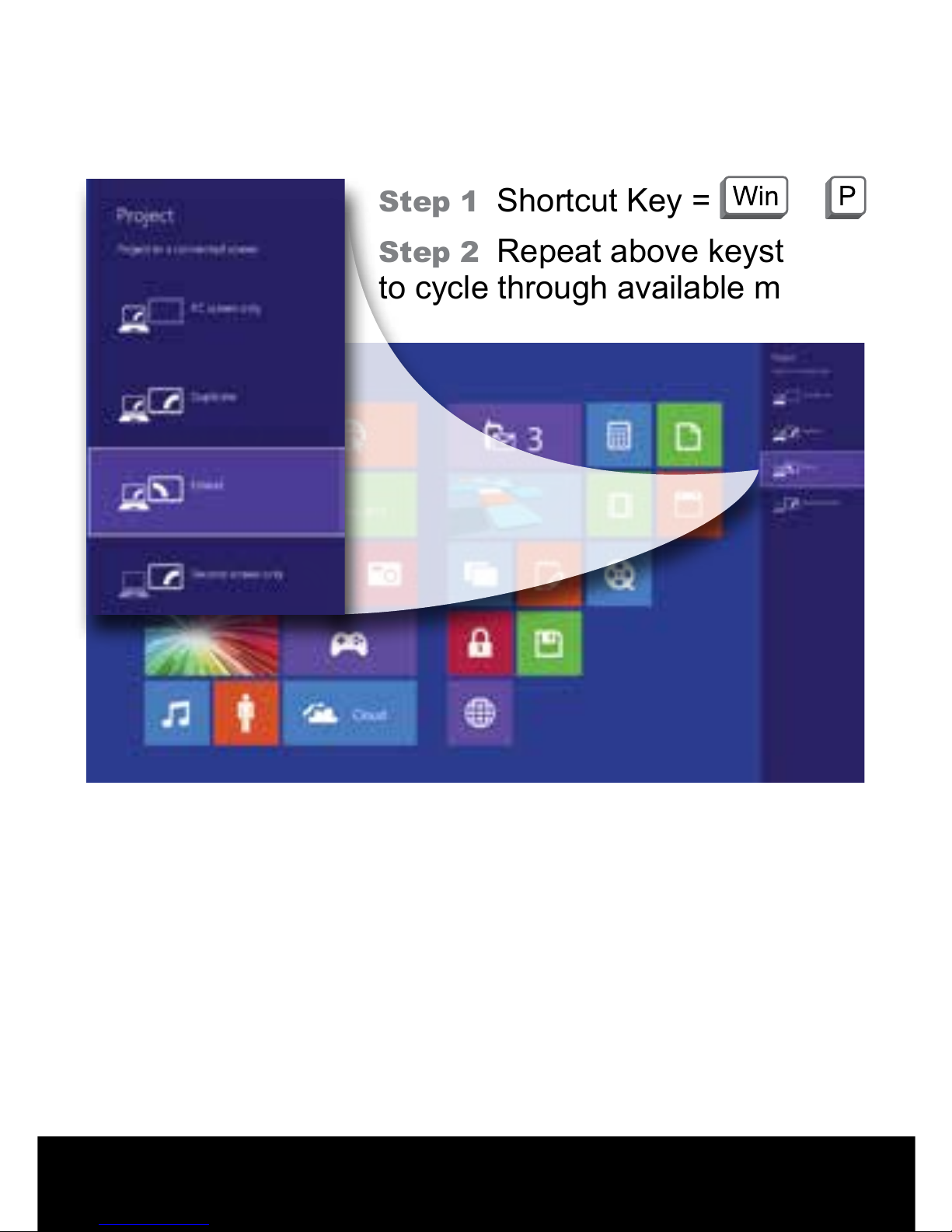
Changing Display Mode
Windows 10 / Windows 8.1 / Windows 7
Step 1 Shortcut Key = +
Step 2 Repeat above keystrokes
to cycle through available modes
4 |
Drivers - FAQ - Support - Visit:
plugable.com/products/ud-5900
Page 5
Informationen über Treiber, unsere FAQ sowie Details
zu unserem Support nden Sie unter:
plugable.com/products/ud-5900
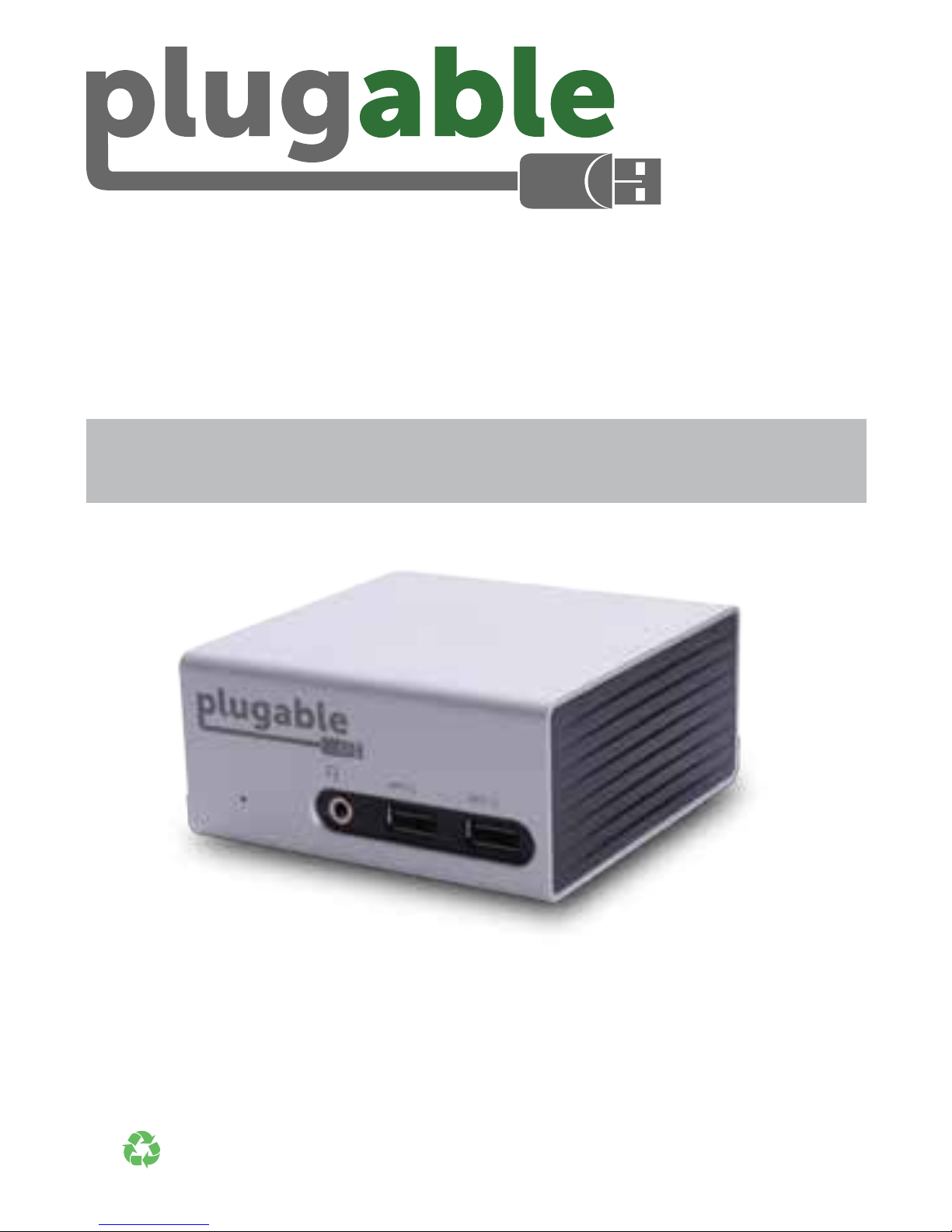
Multidisplay Dockingstation mit
Unterstützung für 4K Auösungen
© 2015 Plugable Technologies | September 15, 2015
Recyclable
Material
Schnelleinstiegsanleitung
| 5
Page 6
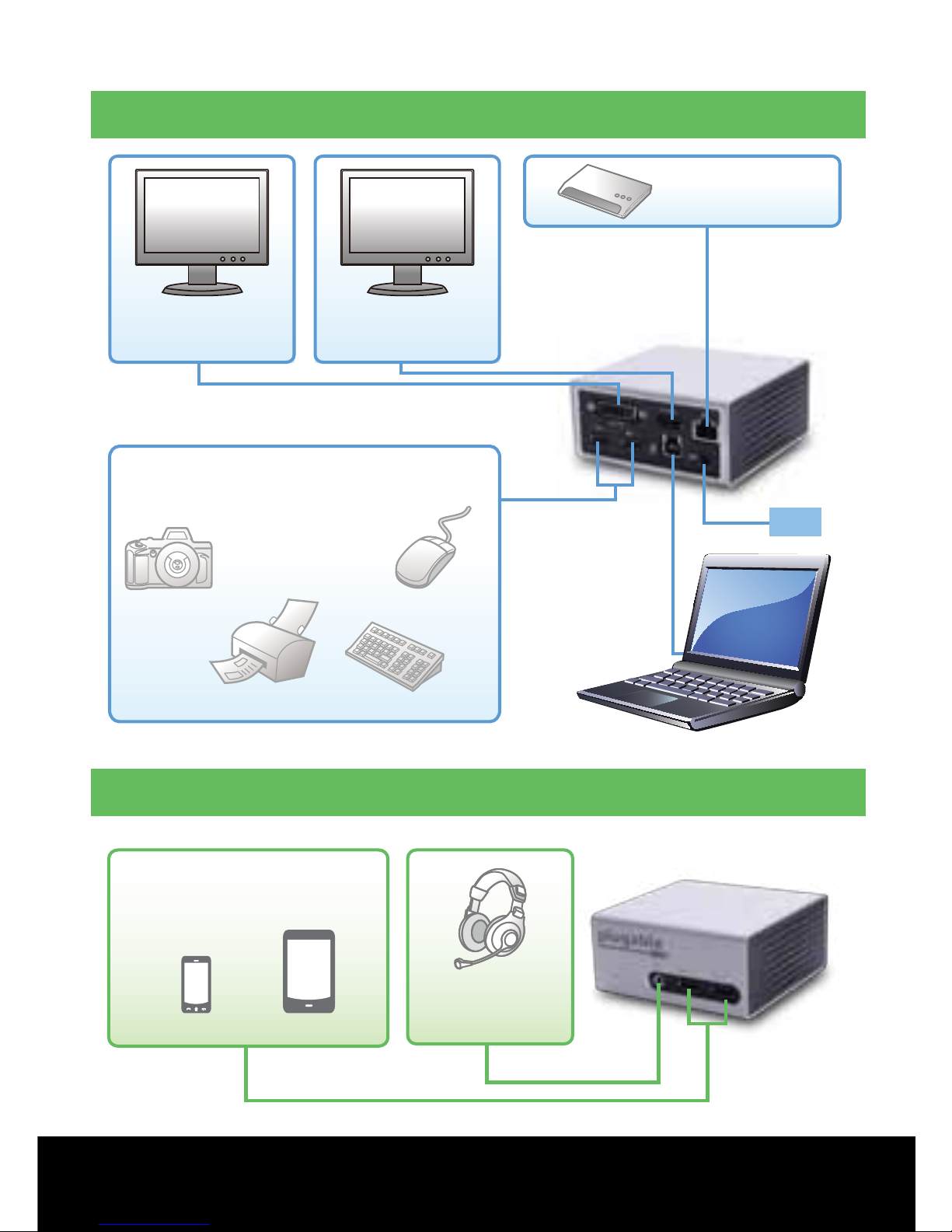
Anschlüsse
PS
UD-5900
Hintere Anschlüsse
USB Geräte
(Datentransfer und Aufladefunktion)
Handy Tablet
Kopfhörer
4K* / HDMI
Monitor
DVI / VGA
Monitor
Ethernet
Laptop/Tablet
Maus
Drucker
Keyboard
Kamera
USB Geräte
(Datentransfer und Aufladefunktion)
Vordere Anschlüsse
6 |
Treiber – FAQ – Support: Besuchen Sie :
plugable.com/products/ud-5900
Page 7

Treiberinstallation
Windows® 10 / Windows 8.1 / Windows 7
Schritt 1 Wenn keine Anweisungen von Plugable
via Email geschickt worden sind, dann können Sie
die neusten Treiber von
plugable.com/products/ud-5900
herunterladen
(Wenn keine Internetverbindung vorhanden ist können Treiber
von der beinhaltenden CD installiert werden)
Schritt 2 Treiber installieren und neustarten
Schritt 3 Ethernetkabel und Monitor(e) an die
Dockingstation anschließen
Schritt 4 Dockingstation an das Stromnetz
anschließen und verbinden Sie Ihren PC/Tablet via
mitgelieferten USB-Kabel an die Dockingstation
HINWEIS: Bildschirm kann während der Treiberinstallation
mehrmals blinken und bitte bei Auorderung neustatren.
*4K Auösung wird nur auf einen 4K Monitor via der
HDMI Schnittstelle unterstützt. Auösung wird auf
1080p/2K reduziert wenn man zwei Monitore anschließt.
Noch Fragen? Wir helfen Ihnen gerne weiter! Senden Sie eine E-Mail an:
| 7
Page 8
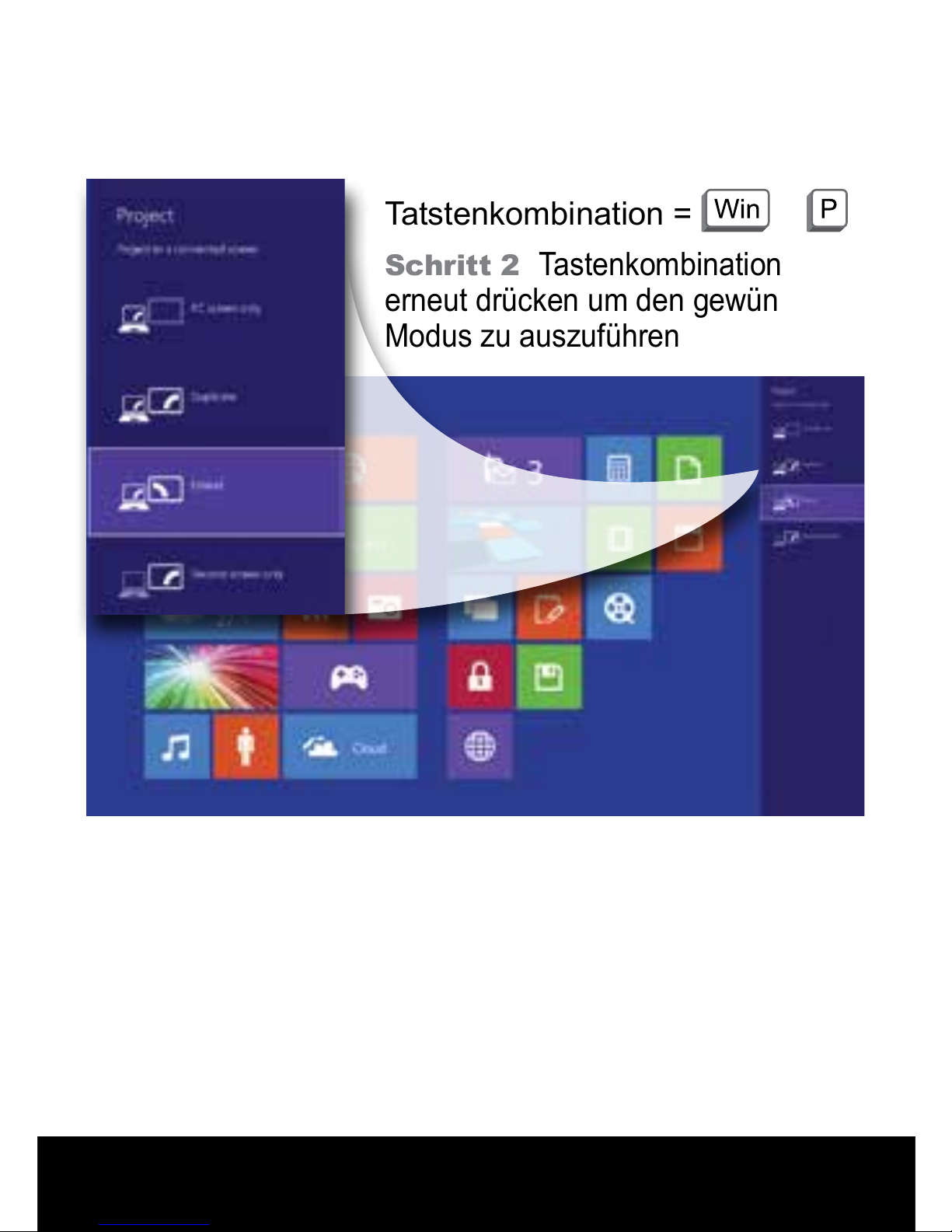
Bildschirmmodus
Windows 10 / Windows 8.1 / Windows 7
Schritt 1 Keyboard
Tatstenkombination =
+
Schritt 2
Tastenkombination
erneut drücken um den gewünschten
Modus zu auszuführen
8 |
Treiber – FAQ – Support: Besuchen Sie :
plugable.com/products/ud-5900
Page 9
Station d’accueil multi-écran
USB 3.0 supportant 4K
Pour des informations sur les pilotes, la FAQ et
l’assistance, rendez-vous sur:
plugable.com/products/ud-5900
© 2015 Plugable Technologies | September 15, 2015
Recyclable
Material
Manuel d’installation rapide
| 9
Page 10
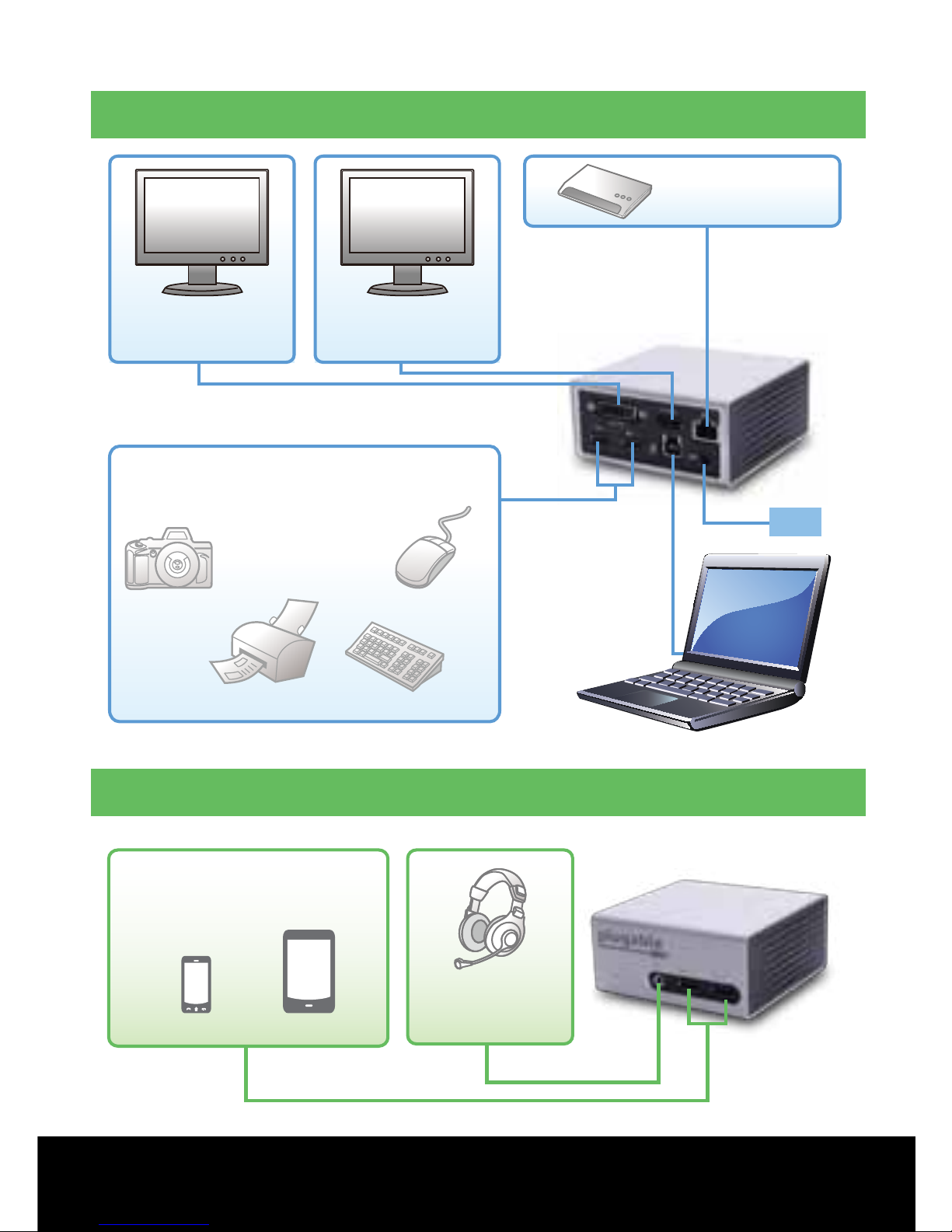
Connexions
PS
UD-5900
Connexions à l'avant
Appareils USB
(Transfert de données et chargement)
Téléphone portable
Tablette
Casques
Écran
4K* / HDMI
Écran
DVI / VGA
Ethenet
PC / Tablette
Souris
Imprimante
Clavier
Appareil photo
Appareils USB
(Transfert de données et chargement)
Connexions à l'arrière
10 |
Pilotes, FAQ et assistance : rendez-vous sur:
plugable.com/products/ud-5900
Page 11

Installation des pilotes
Étape 1 Si vous n’avez pas reçu de pilote de la part
de Plugable sur votre mail juste après votre achat,
téléchargez les pilotes les plus récents à partir de
plugable.com/products/ud-5900
(Si vous ne disposez pas de connexion internet, vous pouvez installer
les pilotes à partir du CD ci-joint.)
Étape 2 Installez les pilotes et redémarrez
Étape 3
Connectez le ou les écrans et câble Ethernet
(optionnels) à une station d’accueil
Étape 4 Branchez le câble d’alimentation fourni à
une station d’accueil et connectez la station à votre
PC/tablette avec le câble USB fourni
REMARQUE : il se peut que les moniteurs clignotent
pendant l’installation des pilotes et que le système ait
besoin d’être redémarré..
Windows® 10 / Windows 8.1 / Windows 7
*La résolution 4K est supportée lors de la connexion
d’un simple moniteur 4K sur le port HDMI. La
résolution décroît à 1080P/2K en achage dupliqué.
Des questions? Nous sommes là pour vous aider. E-mail :
| 11
Page 12
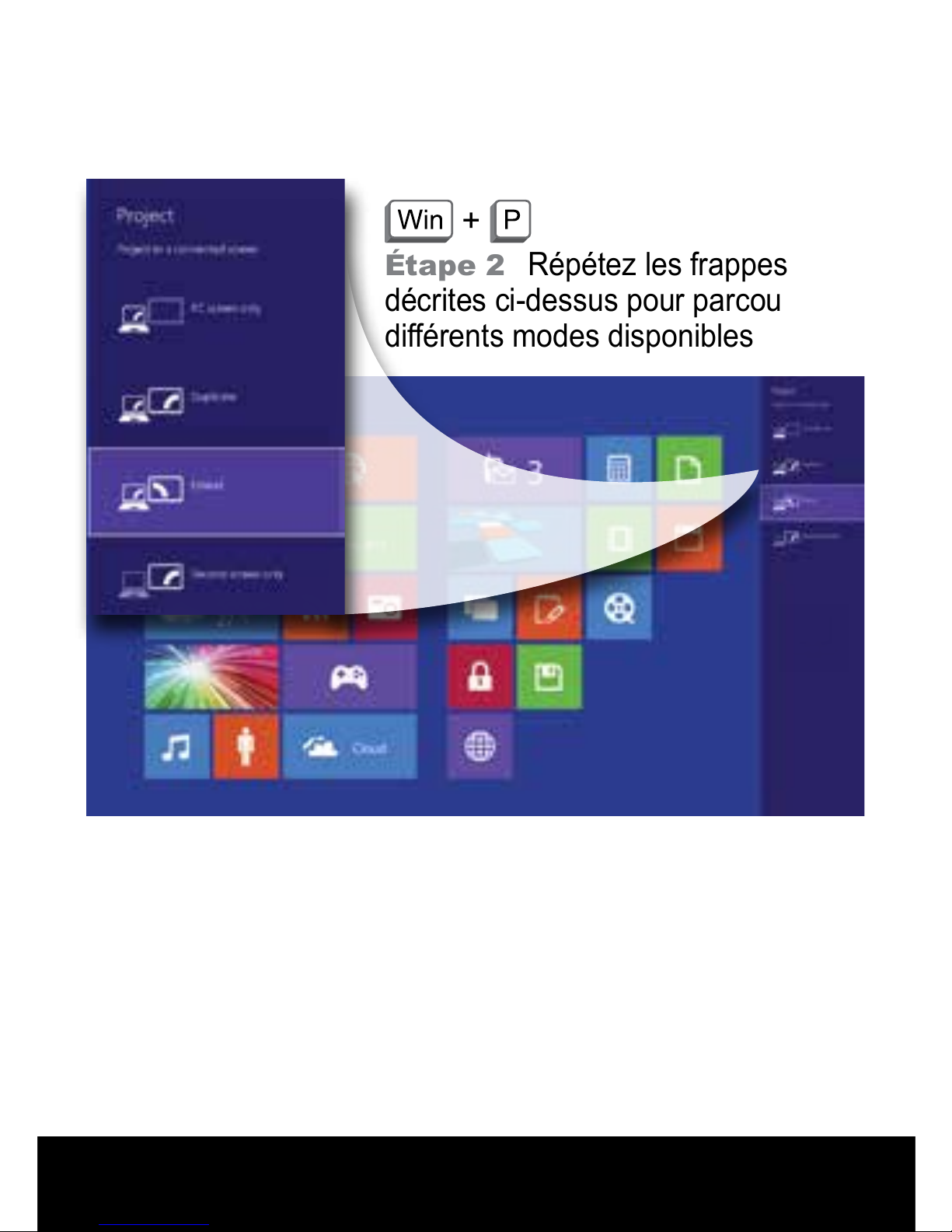
Changement de mode d’afchage
Windows 10 / Windows 8.1 / Windows 7
Étape 1 Raccourci clavier =
+
Étape 2
Répétez les frappes
décrites ci-dessus pour parcourir les
diérents modes disponibles
12 |
Pilotes, FAQ et assistance : rendez-vous sur:
plugable.com/products/ud-5900
Page 13
| 13
© 2015 Plugable Technologies | September 15, 2015
Estación de Acoplamiento
USB 3.0 Multipantalla
Compatible con 4K
Para información sobre Controladores, Preguntas
frecuentes y Soporte, visite
:
plugable.com/products/ud-5900
Guía de instalación rápida
Recyclable
Material
Page 14
14 |
Controladores - Preguntas frecuentes - Ayuda - Visita:
plugable.com/products/ud-5900
¿Tienes alguna pregunta? Estamos aquí para ayudarte. Correo electrónico:
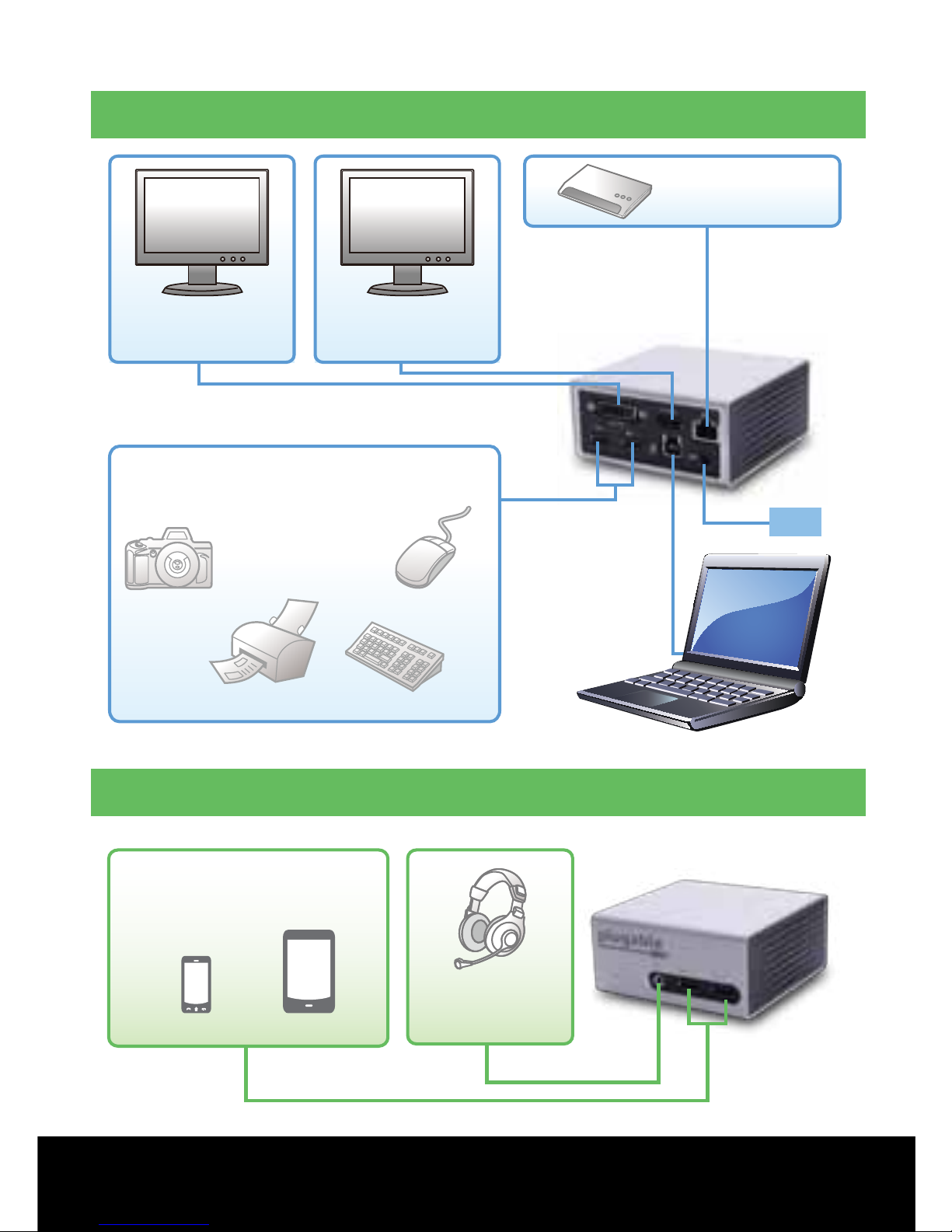
Connexions
PS
UD-5900
Dispositivos USBs
(transferencia de datos y carga)
Teléfono Móvil Tableta
Auriculares
Monitor
4K* / HDMI
Monitor
DVI / VGA
Ethernet
PC/Tableta
Ratón
Impresora
Teclado
Cámara
Dispositivos USBs
(transferencia de datos y carga)
Conexiones traseras
Conexiones frontales
Page 15

¿Tienes alguna pregunta? Estamos aquí para ayudarte. Correo electrónico:
| 15
Instalación del controlador
Paso 1 Si no recibes los controladores de Plugable
a través del correo electrónico poco tiempo después
de la compra, descarga los controladores más
recientes
plugable.com/products/ud-5900
(Si la conexión a internet no está disponible, los controladores se
pueden instalar con el CD adjunto.)
Paso 2 Instala los controladores y reinicia
Paso 3
Conecte la(s) pantalla(s) y el cable Ethernet
(opcional) a la plataforma de conexión
Paso 4
Conecte el cable de alimentación suministrado a
la plataforma de conexión y luego conecte el puerto a su
PC/tableta mediante el cable USB proporcionado
NOTA: Los monitores pueden parpadear durante la
instalación del controlador, y puede que el sistema
deba ser reiniciado.
Windows® 10 / Windows 8.1 / Windows 7
* Resolución 4K con un solo monitor 4K conectado al
puerto HDMI. La resolución disminuye a 1080P/2K al
utilizar dos monitores.
Page 16
16 |
Controladores - Preguntas frecuentes - Ayuda - Visita:
plugable.com/products/ud-5900
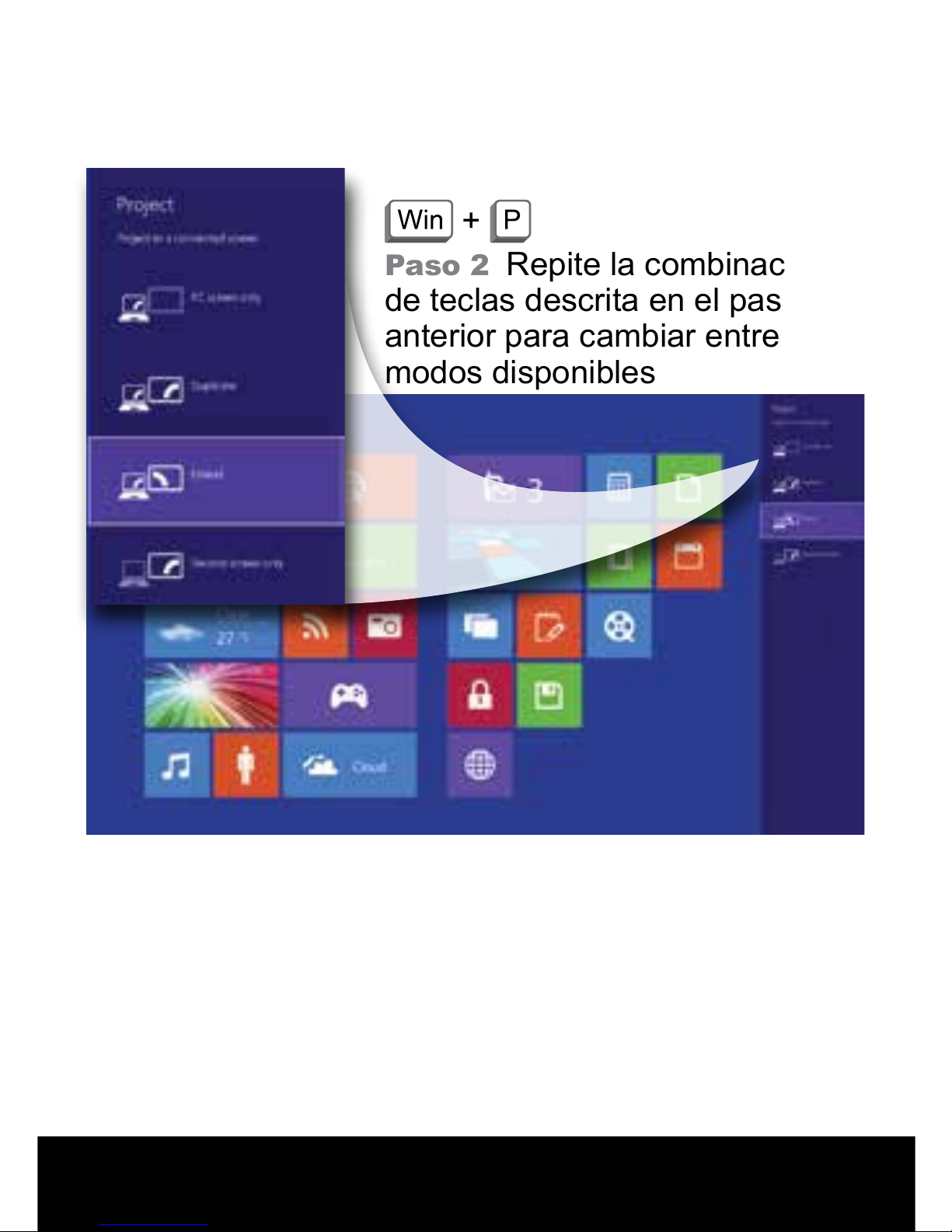
Cambiar el modo de visualización
Windows 10 / Windows 8.1 / Windows 7
Paso 1
Combinación de teclado =
+
Paso 2
Repite la combinación
de teclas descrita en el paso
anterior para cambiar entre los
modos disponibles
Page 17
Docking Station USB 3.0
Multi-Display con Supporto 4K
Per informazioni su Driver, FAQ e Assistenza, visita:
plugable.com/products/ud-5900
Recyclable
Material
Guida di installazione rapida
© 2015 Plugable Technologies | September 15, 2015
Page 18
18 |
Driver - FAQ - Supporto - Visitare:
plugable.com/products/ud-5900
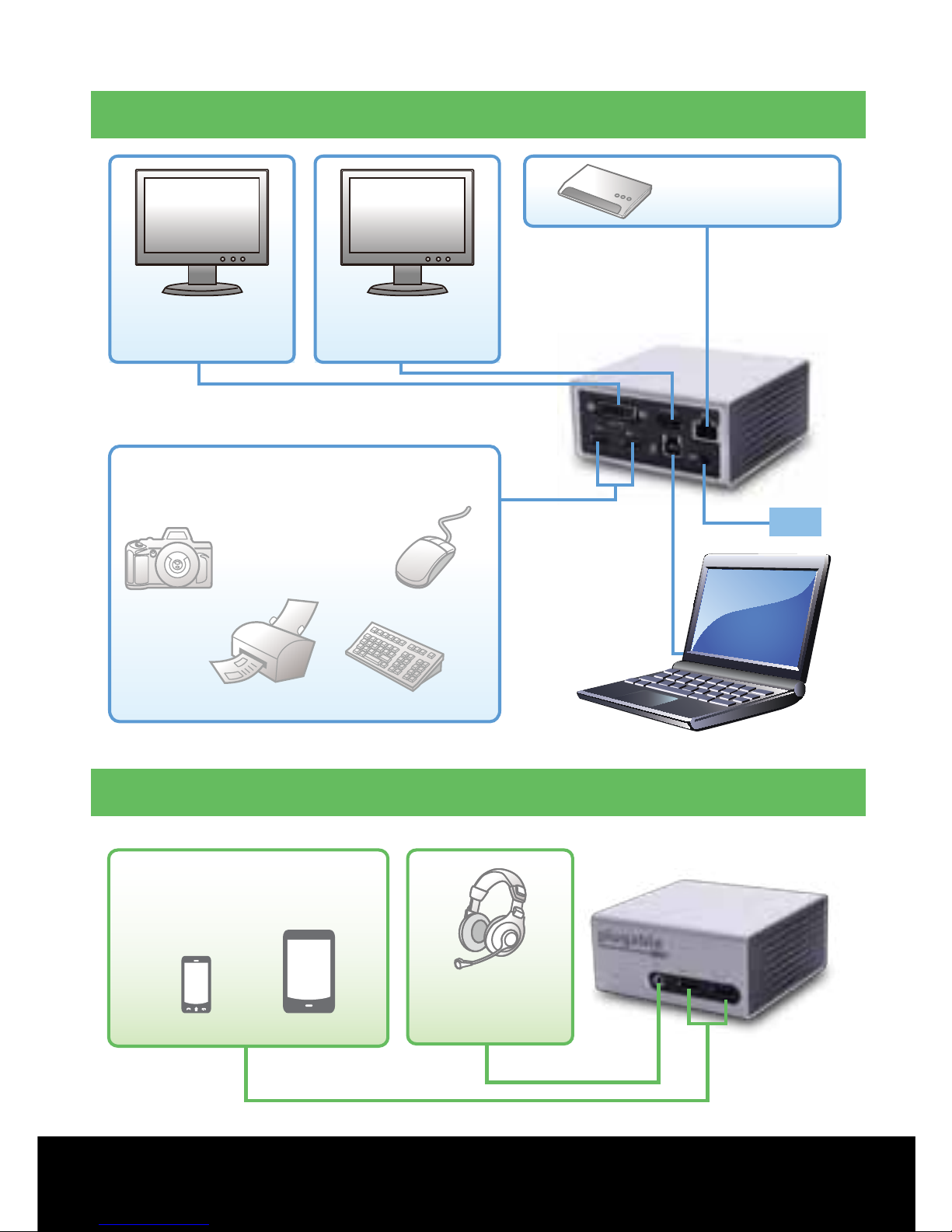
Connexions
PS
UD-5900
Connessioni Posteriori
Connessioni Frontali
Dispositivi USB
(trasferimento dei dati e ricarica)
Cellulare Tablet
Cuffie
Schermo
4K* / HDMI
Schermo
DVI / VGA
Ethenet
PC/Tablet
Mouse
Stampante
Tastiera
Fotocamera
Dispositivi USB
(trasferimento dei dati e ricarica)
Page 19

Hai delle domande? Siamo qui per aiutarti. E-mail:
| 19
Installazione driver
Passo 1 In caso di mancata ricezione dei driver
via e-mail da Plugable dopo l’acquisto, è possibile
scaricare i driver più recenti all’indirizzo
plugable.com/products/ud-5900
(Se non si dispone di connessione a Internet, è possibile installare i
driver dal CD allegato.)
Passo 2 Installare i driver e riavviare il sistema
Passo 3
Collegate lo schermo/gli schermi e il cavo
Ethernet
(opzionale) al supporto
Passo
4
Collegate
il cavo di alimentazione fornito al
supporto e quindi collegate la porta al vostro PC/tablet
utilizzando il cavo USB fornito
NOTA: i monitor potrebbero lampeggiare durante
l’installazione dei driver e potrebbe essere necessario
riavviare il sistema.
Windows® 10 / Windows 8.1 / Windows 7
* La risoluzione 4K è supportata collegando un unico
schermo 4K alla porta HDMI. La risoluzione si riduce
a 1080P/2K utilizzando due schermi.
Page 20
20 |
Driver - FAQ - Supporto - Visitare:
plugable.com/products/ud-5900
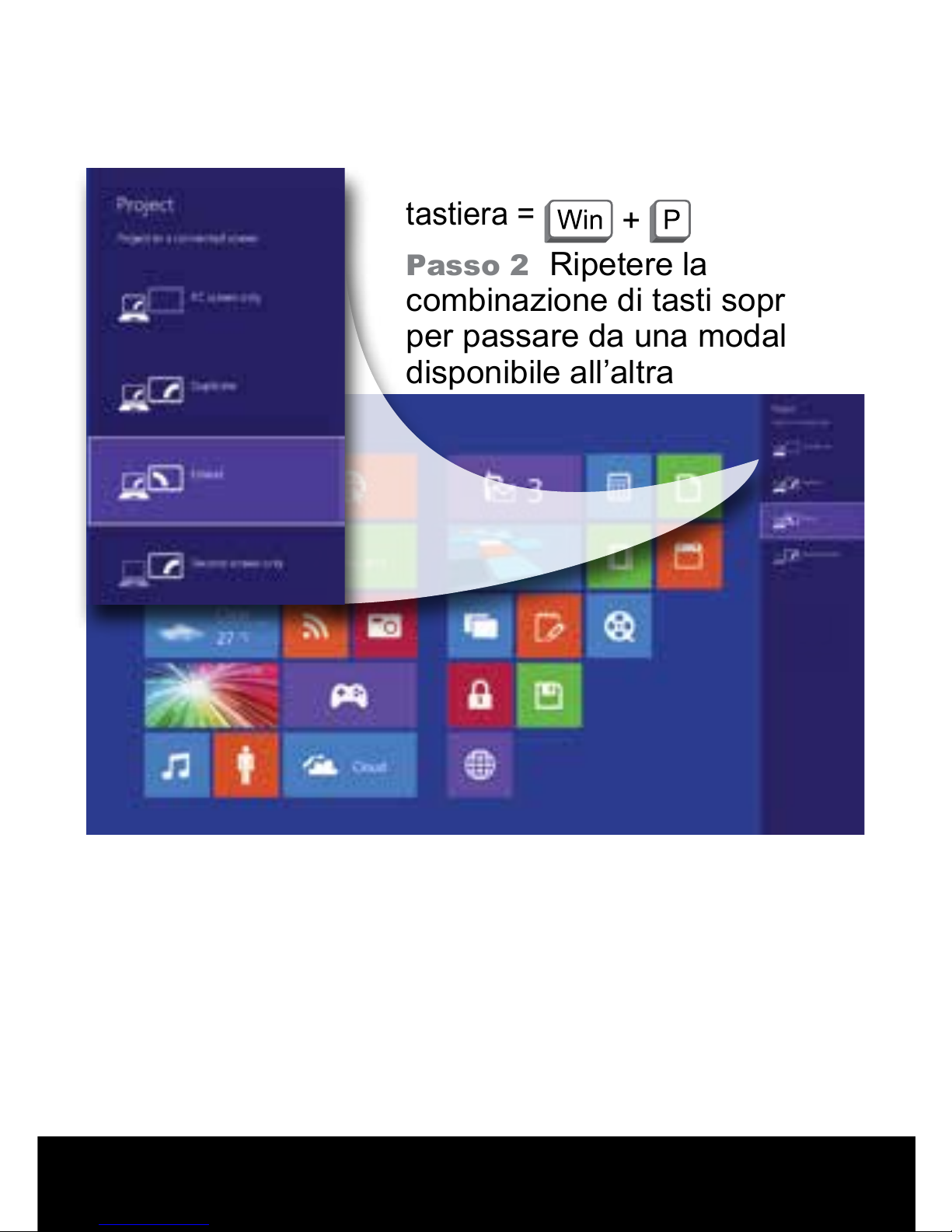
Cambiare la modalità di visualizzazione
Windows 10 / Windows 8.1 / Windows 7
Passo 1
Combinazione da
tastiera =
+
Passo 2
Ripetere la
combinazione di tasti sopra
per passare da una modalità
disponibile all’altra
Page 21
4K対応マルチ・ディスプレイ・ドッキン
グステ ー ション
ドライバ、FAQ およびサポートについてはこちらをご覧ください :
plugable.com/jp/products/ud-5900
© 2015 Plugable Technologies | September 15, 2015
Recyclable
Material
ク イック・イ ン スト レ ー ション・ガ イド
| 21
Page 22
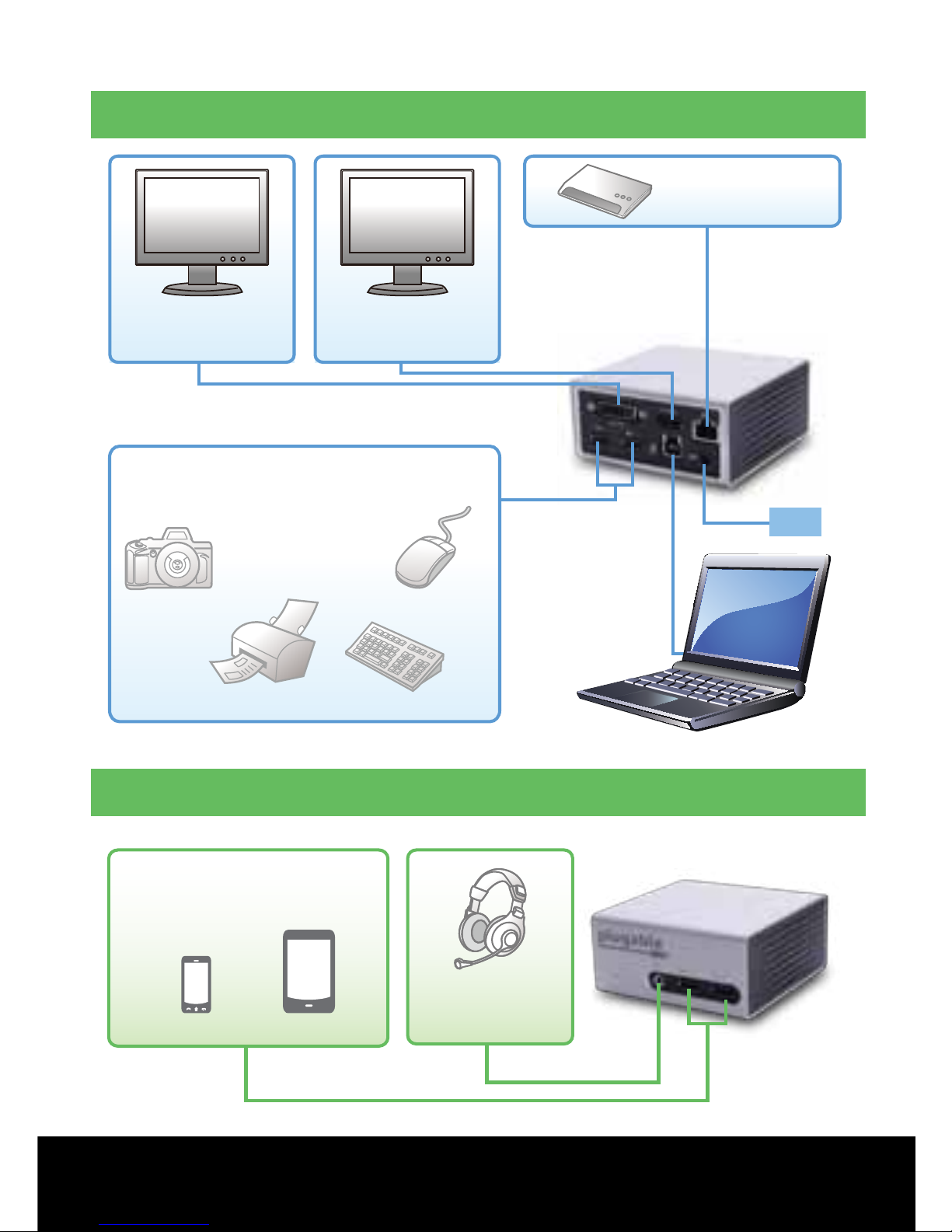
接続
PS
UD-5900
USB機器
(データ転送と充電)
スマートフォン
タブレット
ヘッドフォン
4K* / HDMI
モニタ
DVI / VGA
モニタ
イーサネット
ラップトップ/タブレット
マウス
プリンター
キーボード
カメラ
USB機器
(データ転送と充電)
背面
前面
22 |
ドライバ – FAQ – サポートはこちらへ:
plugable.com/jp/products/ud-5900
ご 質 問 が ありまし たら 、下 記 まで お 気 軽 にメ ー ル を お 送りくだ さ い 。
Page 23

ドライバ 情 報
Windows® 10 / Windows 8.1 / Windows 7
ステップ 1
ご購入後の
Plugable
からのメールで、ドライバ情報を
お受け取りになっていない場合には、下記のサイトから最新ドライ
バをダウンロードしてください。
plugable.com/jp/products/ud-5900
(インターネット接続ができない場合には、ドライバをCDから導入し
てい ただくこともできます。)
ステップ 2
ドライバを導入し、システムを再起動します。
ステップ 3
モニタとイーサネット・ケーブル(必要な場合)をドッキ
ングステーションに接 続します。
ステップ 4
AC電源アダプタをドッキングステーションに接続し、同
梱されているUSBケーブルを使ってPCやタブレットをドッキングス
テ ーション に 接 続しま す。
注: ドライバの導入に際し、モニタが点滅したり、システムの
再起動が必要になることがあります。
* 4K 解像度は、モニタが1台のみHDMIポートに接続されたと
きだけ設定可能です。モニタを2台接続する場合は、どちらも
最大1080p/2K解像度までに制限されます。
| 23
ご 質 問 が ありまし たら 、下 記 まで お 気 軽 にメ ー ル を お 送りくだ さ い 。
Page 24
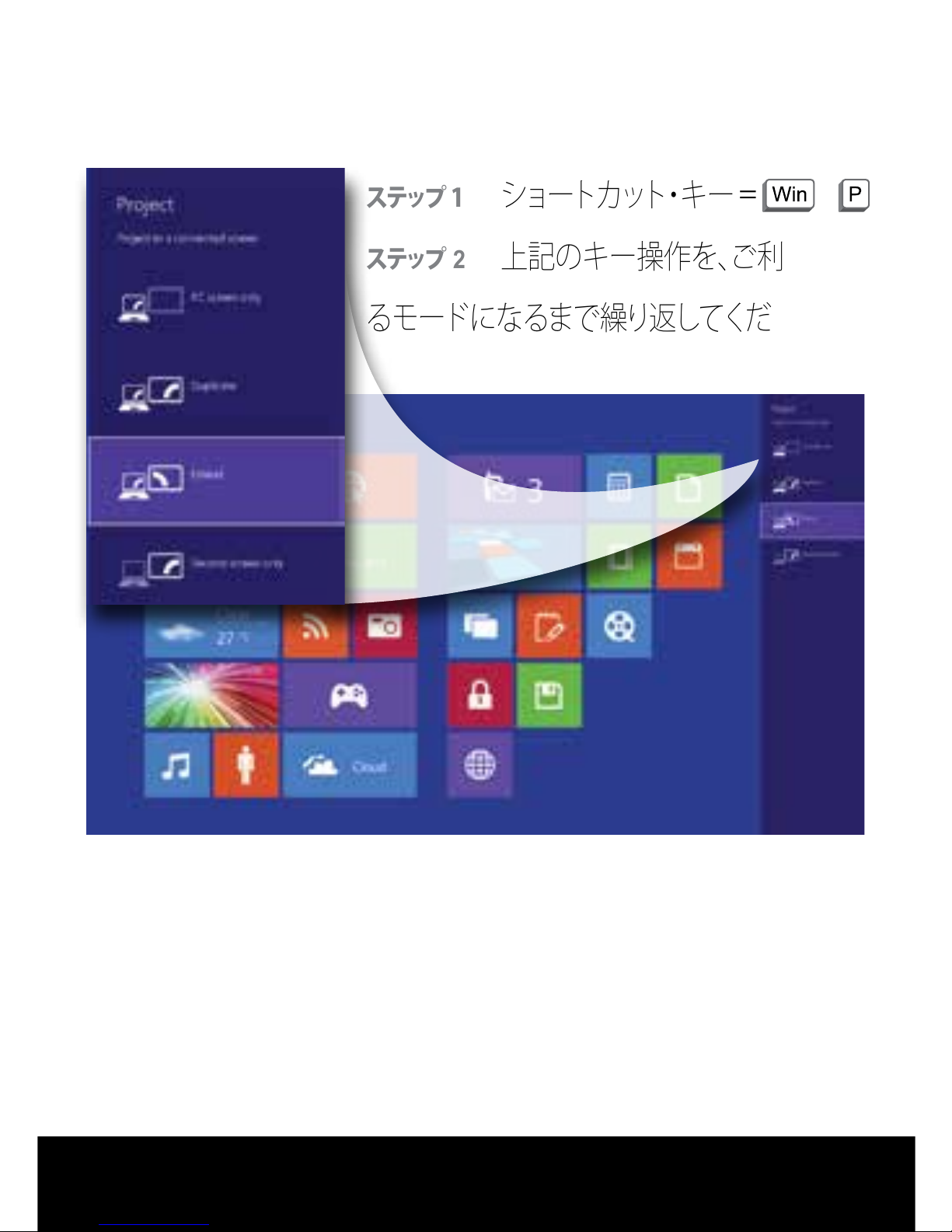
表示モードの変更
Windows 10 / Windows 8.1 / Windows 7
ステップ 1
ショートカット・キー
ステップ
2
上記のキー操作を、ご利用にな
るモードになるまで 繰り返してください。
= +
24 |
ドライバ – FAQ – サポートはこちらへ:
plugable.com/jp/products/ud-5900
 Loading...