

Page 1

CUBIT
Page 2
Welcome to CUBIT
3
3
1
1
6
6
6
6
7
7
8
8
2
2
4
4
3
5
5
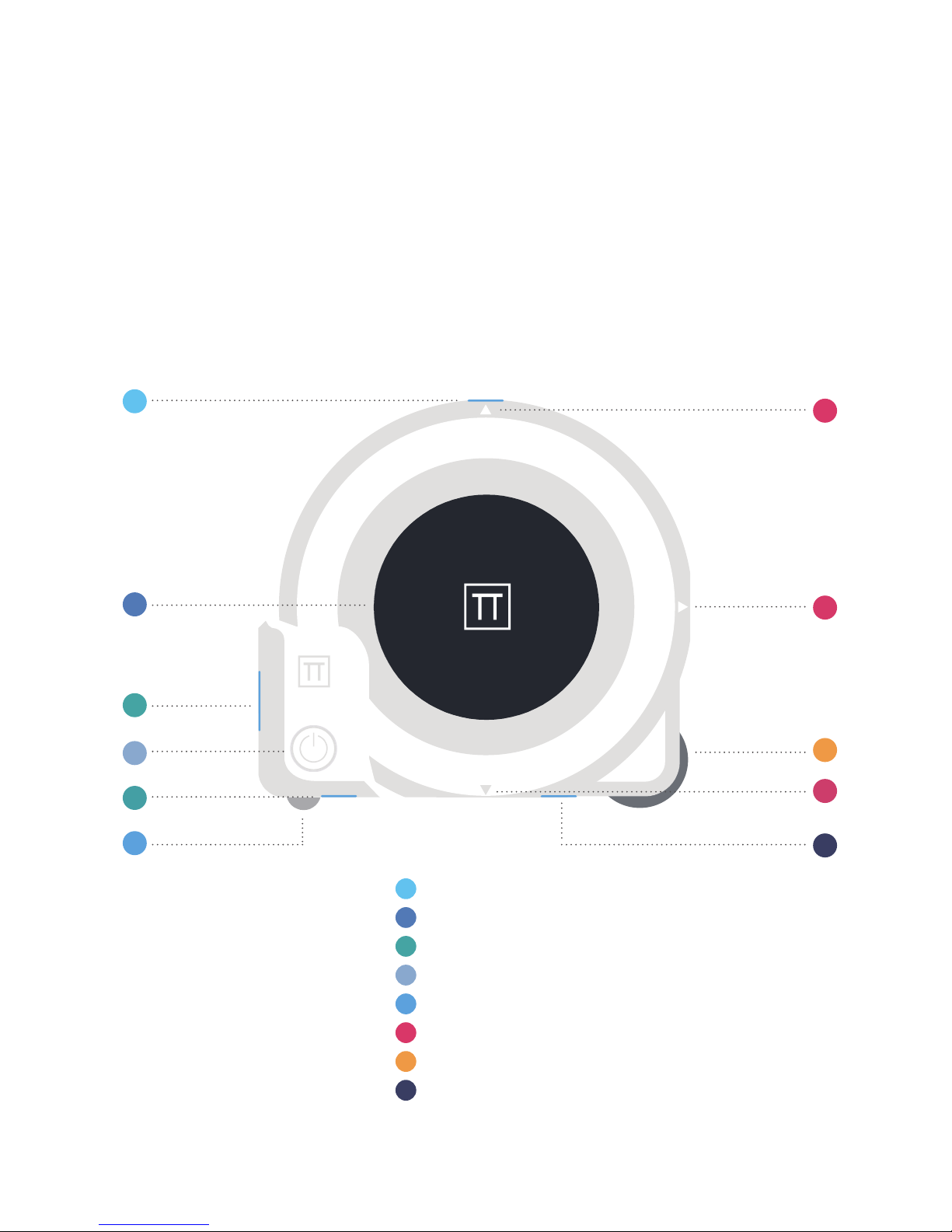
Mark Button
LCD Display
Laser Beam Window
Main Button
Ball
Reference Light
Wheel
USB Plug
Page 3
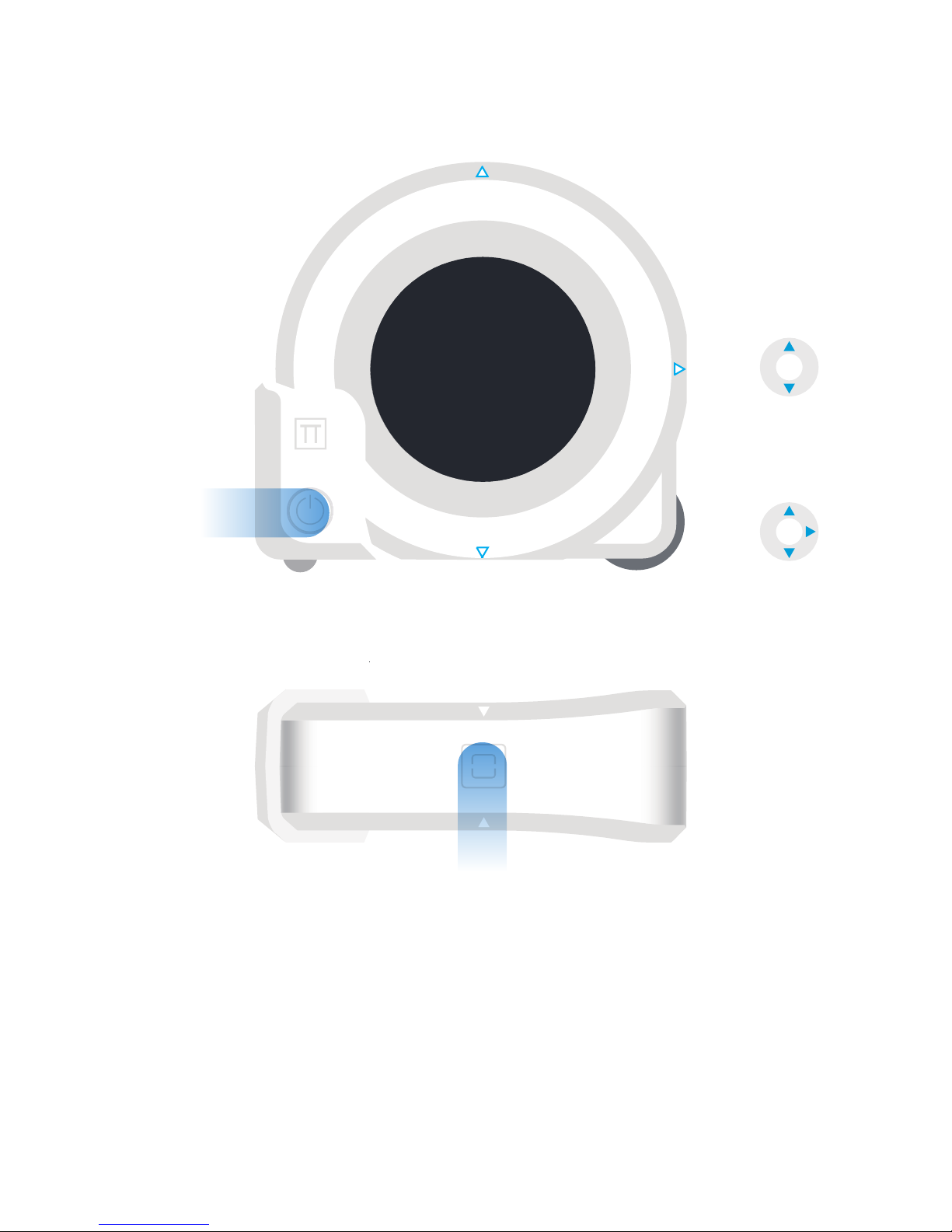
Short Press Main Button
to Power On.
Long Press Main Button
for 1-3s and release
to Clear the Measure
Result.
Long Press Main Button
for over 3s to Power
Down.
Short press Main Button
to switch the reference.
In GUIDE Mode
supports UP and DOWN
2references.
In Non-GUIDE Mode
supports UP and DOWN
and BACK 3references
In Non-GUIDE Mode
Short press Mark Butto to Turn On the laser and do single
measurement.
Long press Mark Button to Enter/ Exit the continuous
measurement.
In GUIDE Mode
Press Mark Button to switch to next Guide Point.
Page 4
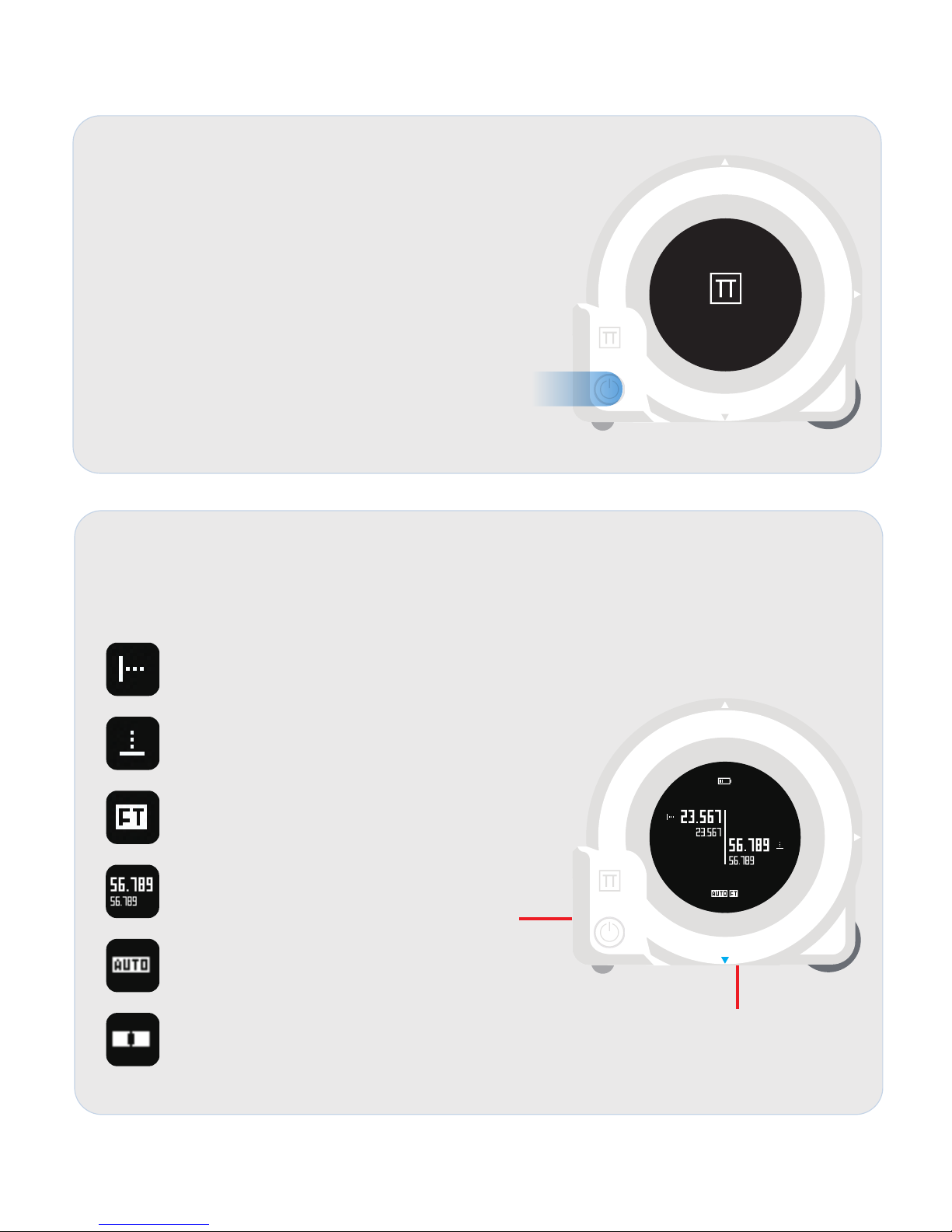
Startup View
CUBIT will show startup view and keep for
2seconds once the main button is pressed while
the CUBIT is powered off.
Laser Measurement View
CUBIT will enter laser measurement view once the laser measurement button is
pressed.
I
ndicates the direction of the following values are
for the LEFT LASER (X LASER currently).
Indicates the direction of the following values are
for the DOWN LASER (Y LASER currently).
Indicates the CUBIT is using FEET as its unit.
Larger size number is current measurement result.
Smaller size number is previous measurement
result.
Indicates the laser distance auto compensation
mode is enabled. This function is disabled in default
and can be turned on via Plott App.
Indicates the leveling status of the CUBIT.
X LASER
Y LASER
PLOTT
Page 5
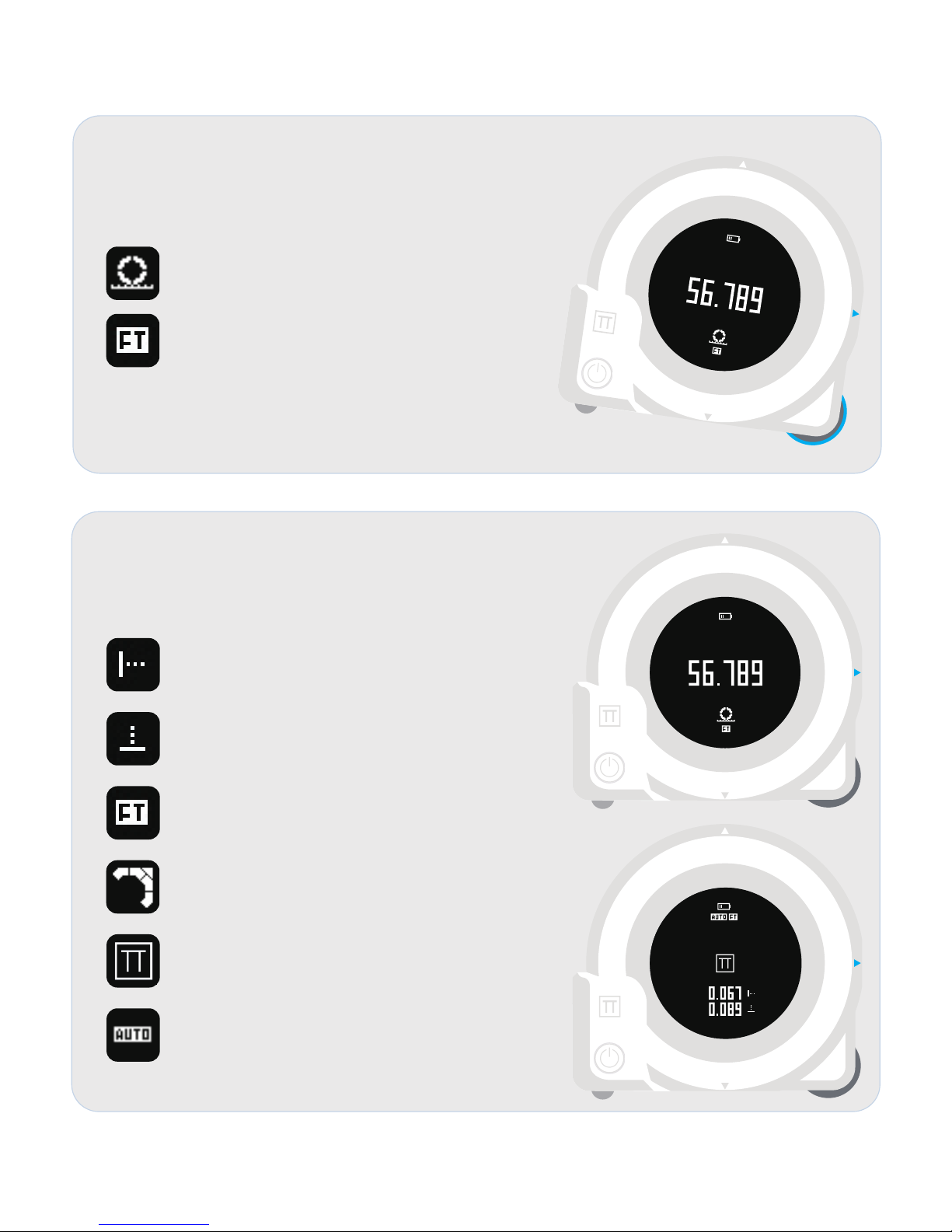
Wheel Measurement View
CUBIT will enter wheel measurement view once the
wheel is rotated.
Indicates the CUBIT is working in wheel mode.
Indicates the CUBIT is using FEET as its unit.
* FEET is the default unit.
* Working with Plott App and it can help to change to other units.
GUIDE View
CUBIT will enter laser measurement view once the
laser measurement button is pressed.
Indicates the direction of the following values are
for the LEFT LASER(X LASER currently) .
Indicates the direction of the following values are
for the DOWN LASER(Y LASER currently) .
Indicates the CUBIT is using FEET as its unit.
Indicates the CUBIT is guiding you to move to
top- left conner.
Indicates the CUBIT is showing you
current guidance point is matched.
Indicates the laser distance auto compensation
mode is enabled.
This function is disabled in default and can be
turned on via Plott App.
Page 6
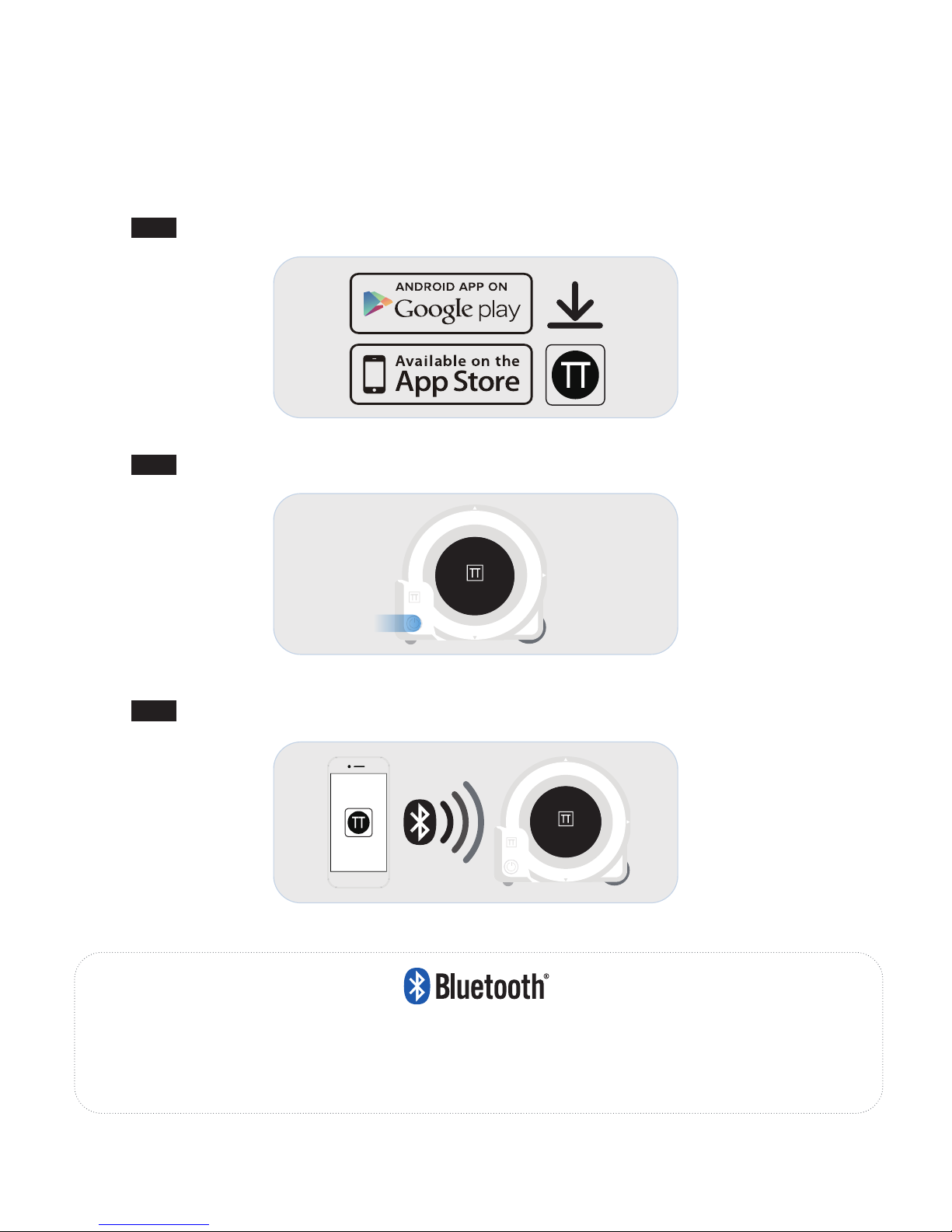
STEP
2
Turn ON the CUBIT
STEP
3
Connect
your CUBIT in the Device Management Page of the App.
“THE BLUETOOTH® WORD MARK AND LOGOS ARE REGISTERED TRADEMARKS OWNED BY
BLUETOOTH SIG, INC. AND ANY USE OF SUCH MARKS BY STANLEY TOOLS IS UNDER LICENSE. OTHER
TRADEMARKS AND TRADE NAMES ARE THOSE OF THEIR RESPECTIVE OWNERS.”
Bluetooth Operation: CUBIT
STEP
1
Download PlOTT App to your smartphone
PLOTT
PLOTT
Page 7

Under favorable conditions (good target surface,room temperature) up to 10 m (33 ft.). under unfavorable
conditions such as bright sunlight, a very weakly reflecting target surface or large temperature fluctuations,the
error can increase by ± 0.25 mm/m (± 0.003 in/ft.) for distances over 10 m (33 ft.).
*
Range
0.3 m to 20 m (0.99ft to 65 ft.)
(Two-directions)
Measure direction
X/Y(Two-directions) 0.5<1 mW
Measuring accuracy (± 3.0 mm≤10m)
Typ.: ± 3.0 mm*
Smallest unit displayed
1 mm (5/128’’) (Two-directions)
Laser class
2
Laser type
620-690 nm, Power<1 mW
Laser / Backlight automatic switch-off
After 30 s
After 90 s
Battery life (built-in)
300 - Cycle capacity of the remaining 80%,
Li-ion 1500 mAh
Dimension (h x d x w)
100.84 x 36 x 91.78 mm
Weight
175.6 g
Storage temperature range
-4-158F (-20~70°)
Operating temperature
32-104F (-0~40°)
Specifications
Page 8

Description Corrective Action
101
Received Signal Too Weak
/ Measuring Time Too Long
Use target plate or change target surface.
102
Received Signal Too High
Target too reflective, use target plate or
change target surface.
201
Too Much Background Light Reduce background light on target area.
202
Laser Beam Interrupted Remove obstacle and repeat measurement.
301
Temperature Too High Allow device to cool to operating.
302
Temperature Too Low
Allow device to warm up to operating
temperature.
401
Hardware Error
Switch on/off device several times. If
error cannot be cleared return defective
instrument to Service Center or distributor.
See warranty information.
402
Unknown Error
Contact Service Center or distributor. See
warranty information.
Error Codes
Page 9

insured and accompanied by proof of ownership. Receipt and previous registration is required.
Except for ordinary wear and tear resulting from normal usage, the instrument, upon inspection by the
Seller is determined to be defective in material and/or workmanship.
Under no circumstances shall the Seller be liable for any consequential, incidental or contingent
damages whatsoever.
Limitations and Exclusions
This warranty does not apply to instruments subject to negligence, abuse, accident, improper operation,
instruments damaged in transit or damage due to unauthorized service repairs made by someone other
than Northwest or any other Northwest authorized service personnel. Circumstances beyond Northwest
Instrument’s control cannot be warranted.
This warranty does not apply to regular required maintenance such as cleaning, adjusting, lubricating or
calibrating unless required as a result of a defect in workmanship or materials.
If, upon examination of the instrument, the Seller determines that additional repair services are required
and not covered under this warranty, the Seller shall notify the Buyer of such repair charges and proceed
only after authorization has been received.
This warranty does not apply to instruments damaged in transit to or from Northwest Instrument or any
authorized repair center. Other remedies may or may not be available for transportation damages.
A.
B.
B.
C.
Warranty
Standard Warranty Terms
The warranty period for the CUBIT is 12 months from the date of purchase. Northwest Instrument, Inc.
(Seller) warrants this instrument made by Northwest Instrument to be free from manufacturing defects in
materials and workmanship. For claims to be made under this warranty the instrument must be inspected by
Northwest and the defect must be proven to Seller’s satisfaction. At the time that it is proven to the Seller’s
satisfaction that the instrument is defective, it shall be repaired or replaced, at the Seller’s option and
returned to the original purchaser at no cost to them, including transportation charges. Seller’s sole
obligation and the Buyer’s sole remedy are limited strictly to repair or replacement with these provisions
below:
A.
The instrument is returned to Northwest, properly packaged with the transportation charges prepaid and
Page 10
WARNING:
Carefully read the Safety Instructions and Product Manual before using this product. The person responsible for
the instrument must ensure that all users understand and adhere to these instructions.
WARNING:
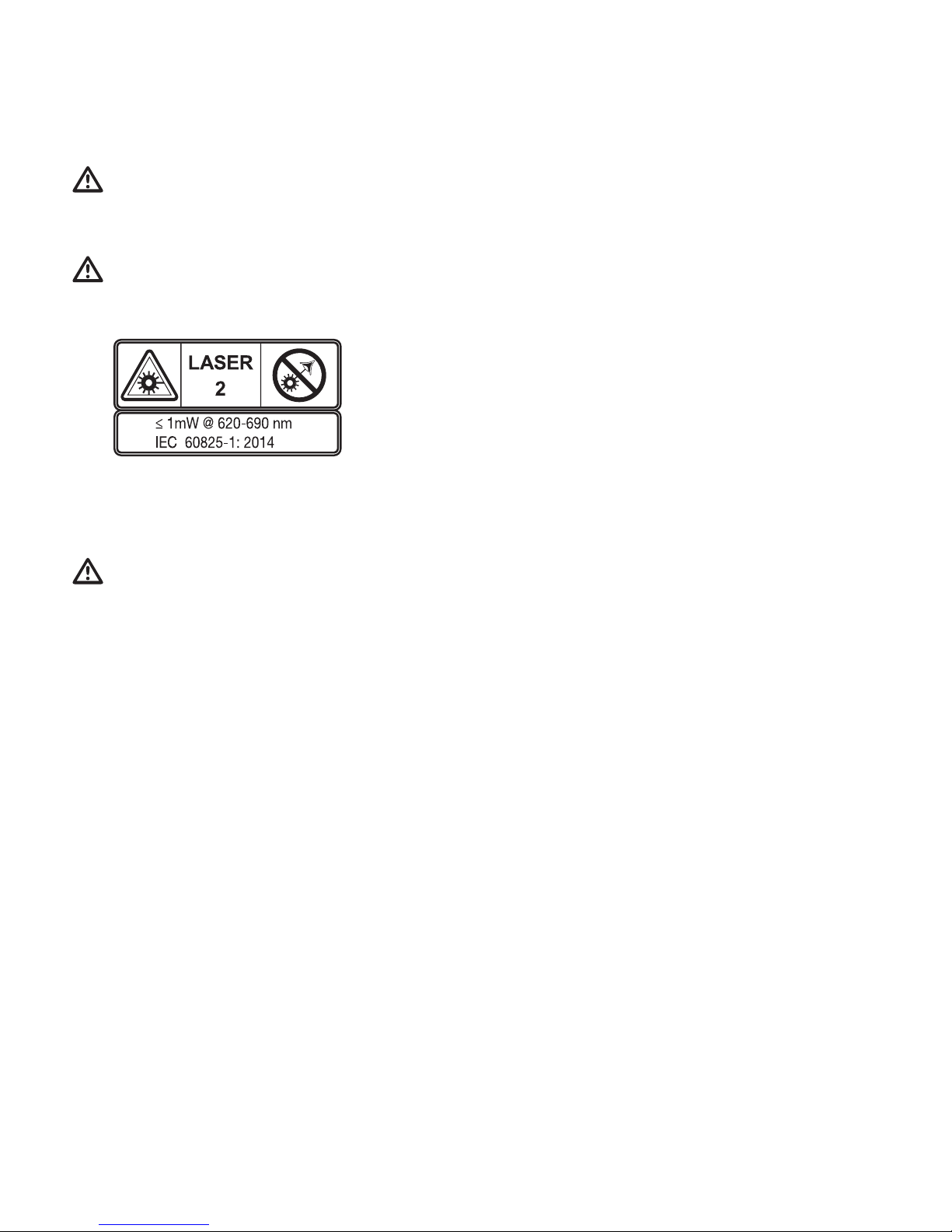
The following label information is placed on your laser tool to inform you of the laser class for your convenience
and safety.
USER SAFETY
WARNING:
While the laser tool is in operation, be careful not to expose your eyes to the emitting laser beam (red light
source). Exposure to a laser beam for an extended time may be hazardous to your eyes. Do not look into the beam
with optical aids.
The CUBIT Products emit a visible laser beam as shown in Figure A. The laser beam emitted is Laser Class 2 per
IEC 60825-1 and complies with 21 CFR 1040.10 and 1040.11 except for deviations pursuant to Laser Notice No. 50,
dated June 24, 2007
Caution
This device complies with Part 15 of the FCC Rules / Industry Canada licence-exempt RSS standard(s). Operation is
subject to the following two conditions: (1) this device may not cause harmful interference, and (2) this device must
accept any interference received, including interference that may cause undesired operation.
Le présent appareil est conforme aux CNR d'Industrie Canada applicables aux appareils radio exempts de licence.
L'exploitation est autorisée aux deux conditions suivantes : (1) l'appareil ne doit pas produire de brouillage, et (2)
l'utilisateur de l'appareil doit accepter tout brouillage radioélectrique subi, même si le brouillage est susceptible d'en
compromettre le fonctionnement.
Changes or modifications not expressly approved by the party responsible for compliance could void the user's
authority to operate the equipment.
This equipment has been tested and found to comply with the limits for a Class B digital device, pursuant to part 15 of
the FCC Rules. These limits are designed to provide reasonable protection against harmful interference in a residential
installation. This equipment generates uses and can radiate radio frequency energy and, if not installed and used in
accordance with the instructions, may cause harmful interference to radio communications. However, there is no
guarantee that interference will not occur in a particular installation. If this equipment does cause harmful interference
to radio or television reception, which can be determined by turning the equipment off and on, the user is encouraged
to try to correct the interference by one or more of the following measures:
Page 11
—Reorient or relocate the receiving antenna.
—Increase the separation between the equipment and receiver.
—Connect the equipment into an outlet on a circuit different from that to which the receiver is connected.
—Consult the dealer or an experienced radio/TV technician for help.
ARNING
Indicates a potentially hazardous situation or an unintended use which, if not avoided, will result in death or serious
injury.
Indicates a potentially hazardous situation or an unintended use which, if not avoided, may result in minor injury and/or
appreciable material, financial and environmental damage. Important paragraphs which must be adhered to in practice
as they enable the product to be used in a technically correct and efficient manner.
BATTERY SAFETY
The battery is a rechargeable lithium battery.
The battery plug should be installed near the equipment or easy to reach when charging.
DO NOT put the battery under high temperature. Batteries may explode when overheated.
DO NOT expose the equipment or battery under high temperature or near heating device, such as sunlight, microwave
oven, stoves, water heater etc. Batteries may explode when overheated.
DO NOT replace the internal battery.
DO NOT dispose the equipment and battery or any accessory as household garbage. Batteries may explode when
mishandled.
RECYCLING
DO NOT dispose of this product with household waste.
ALWAYS dispose of batteries per local code.
PLEASE RECYCLE in line with local provisions for the collection and disposal
of electrical and electronic waste under the WEEE Directive.
DECLARATION OF CONFORMITY
CUBIT declares that the CE Mark has been applied to this
product in accordance with the CE Marking Directive 93/68/
EEC.
This product conforms to IEC 60825-1:2014.
IEC 60825-1
Page 12

69 King street, Dover, NJ, 07801 U.S.A
Tel:(973) 347-6830
E-Mail:[email protected]
www.LETSPLOTT.com
PLOTT
 Loading...