

Page 1
Starter Kit
User's Guide
Warranty
Model: PS1
When using the device for
the first time
Charging is required. Charge the
device according to the procedure
on Page 18 before using.
Page 2
Ploom Exclusive Customer Service
Hours: 9:00 AM-10:00 PM (excluding
year-end and New Year's holidays)
0120-108-513
You can also make an inquiry via the
Ploom website.
https://www.ploom.jp/support/
Distributor
Japan Tobacco Inc.
2-2-1 Toranomon, Minato-ku,
Tokyo 105-8422
1.0
Page 3
2
Table of Contents
Introduction ..............................Page 3
Disclaimer ..................................Page 4
Safety Information ..................Page 5
Confirming the Contents
of the Kit .....................................Page 16
Parts of the Device .................Page 17
Troubleshooting ......................Page 30
Main Specifications ................Page 34
Warranty .....................................Page 35
Charging ...................................Page 18
Inserting a Stick ...................... Page 21
Heating .....................................Page 22
Use .............................................Page 24
Shutting O .............................Page 26
Cleaning .................................... Page 28
The content of this document may change
without notice. The latest version of the
User's Guide can be found on the Japan
Tobacco website.
https://www.ploom.jp/userguide/s/
Page 4
3
Thank you for purchasing a Ploom S Starter Kit (“Starter Kit”). Please read this
document carefully to ensure safe use.
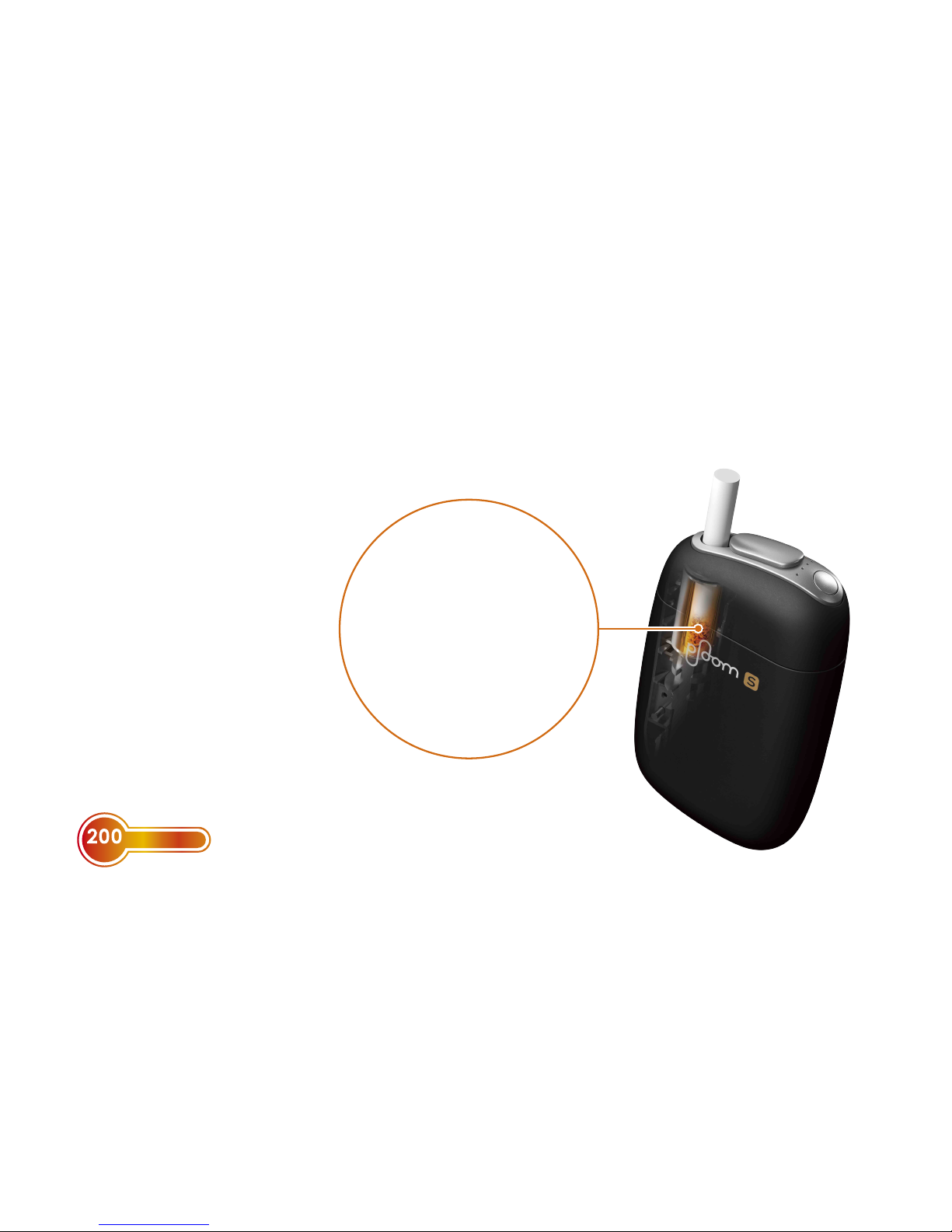
* During use, the temperature inside the tobacco
stick reaches about 200 °C.
°C
HIGH HEAT
Ploom S is a device
that allows you to
enjoy tobacco vapor*1
produced by heating
special tobacco sticks
with the built-in heater.
*1 "Tobacco vapor" is Japan
Tobacco's term for vapor
containing tobacco-leaf
derivatives.
Tobacco vapor*1 is
produced by heating
special tobacco sticks
with the built-in
heater.
Introduction
Page 5

4
Japan Tobacco Inc. and stores selling this Starter Kit shall bear no liability or
responsibility for direct or consequential damages resulting from improper use
of this kit.
Disclaimer
The User’s Guide (this document)
contains a printout of the
warranty (Page 35).
After you read this guide, keep it
in a handy place so that you can
find it for future reference.
• Do not use this Starter Kit and
Ploom S exclusive tobacco sticks
for other than the intended
purpose.
• Minors (under 20 years) are
prohibited from purchasing or using
this Starter Kit.
• When you use the device in a public
place, observe the rules set by your
local authority and facilities and
show good manners.
• If you transfer this Starter Kit to a
third party, be sure also to hand
over this kit together with the User’s
Guide (this document).
• The specifications and external
appearance of the products
included with this Starter Kit may
be changed without prior notice.
Page 6

5
Safety Information
Please read the following precautions carefully so that you can use the products
such as the device included with this Starter Kit and other accessories in a safe
and secure manner.
Meanings of warning indications
Levels of hazards and damages
DANGER
If you do not follow the instructions indicated with this sign, you will face
an imminent danger that will result in death or serious injury from fires,
electric shocks, overheating, explosion, and other hazards.
WARNING
If you do not follow the instructions indicated with this sign, you will face
a possible danger that can result in death or serious injury from fires,
electric shocks, and other hazards.
CAUTION
If you do not follow the instructions indicated with this sign, you may face
a hazardous situation that can result in a minor or moderate injury from
electric shocks or other accidents, or damage to property or items in the
surrounding area.
Specific caution signs Prohibited action sign Mandatory action sign
Explosion Fire Electric shock
Prohibited action
Mandatory action
Page 7
6
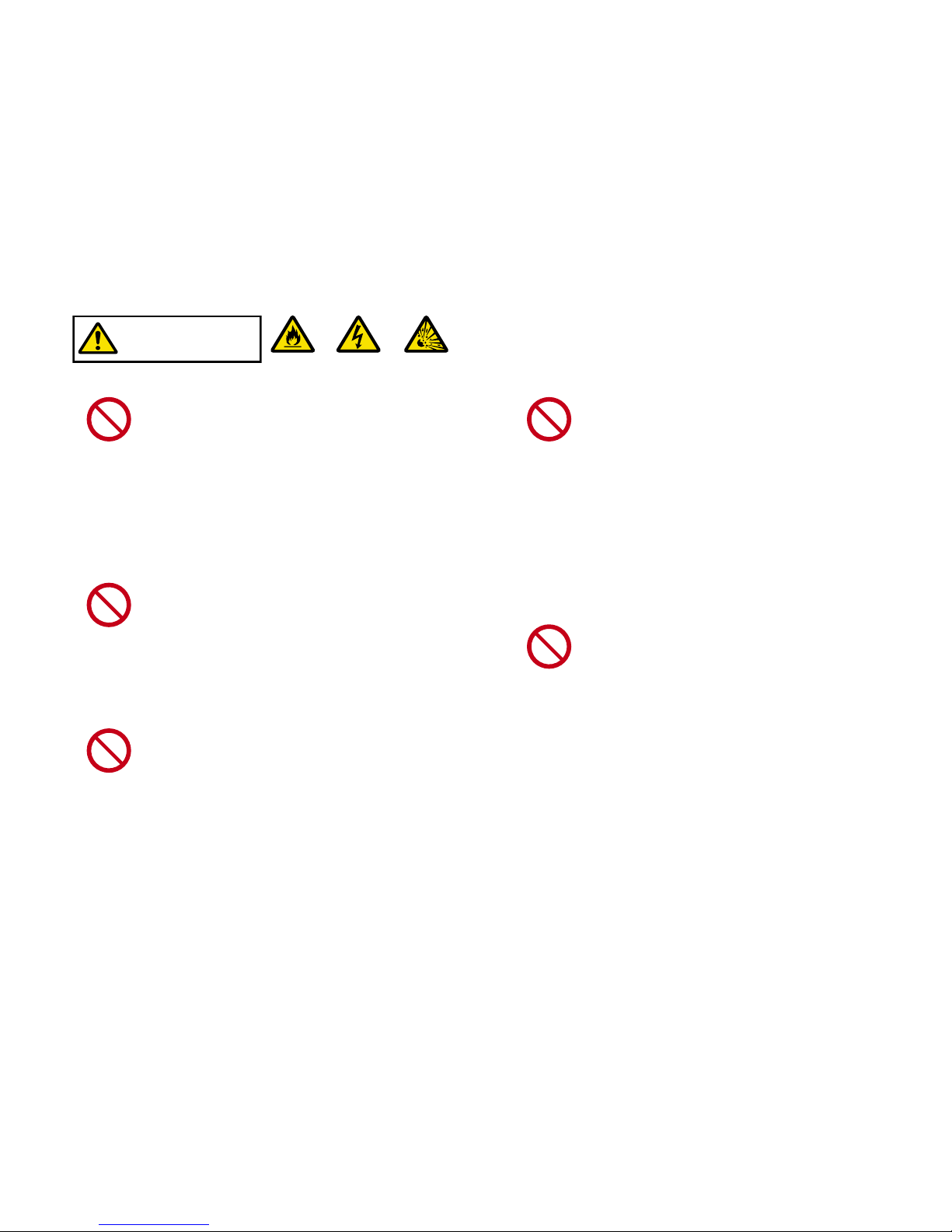
DANGER
Fire
Electric shock Explosion
Prohibited
action
Do not put the device and other
accessories in a fire or subject
it to heat.
Do not put the device and other
accessories in a fire or attempt to heat
them with matches, lighter or burner.
Doing so might cause overheating, fire
hazard or explosion.
Prohibited
action
Do not use, charge, or store the
device and other accessories
in
a place exposed to oily smoke,
steam flow, humidity or dust.
Doing so might cause a fire or give
you an electric shock.
Prohibited
action
Do not use the
device and other
accessories
near flammable
substances.
Do not use the device and other
accessories near flammable
substances (such as benzene, thinner,
spray, hairstyling products). Doing so
might cause a fire or explosion.
Prohibited
action
Do not use, charge, or store the
device and other accessories in
a place with high temperature.
Do not use, charge, or store the device
and other accessories near a fire, heat
generating devices, or heaters, in a
place exposed to direct sunlight and
high temperatures (such as inside a
car in summer). Doing so might cause
overheating, fire hazard or explosion.
Prohibited
action
Do not touch the device and
other accessories while the
device is being charged during
a thunderstorm.
If you touch the connected portion
between the AC Adaptor and Micro
USB Cable or the device during a
thunderstorm, this might give you an
electric shock.
Page 8
7
Prohibited
action
Do not charge the device if the
AC Adaptor or Micro USB Cable
is damaged.
Do not charge the device under the
following conditions. Doing so might cause
electric shocks, short circuit or fire hazard.
− The Micro USB Cable is damaged.
− The AC Adaptor plug is deformed.
− The Micro USB Cable connector is
not fully inserted into the jack.
Mandatory
action
In the event of a malfunction
or abnormal operation,
immediately stop using or
charging the device.
If you continue to use or charge the
device under such conditions, this
might cause an unexpected accident
or injury.
Prohibited
action
Do not clean the device while it
is being charged or the heater
is operating.
Doing so might cause a malfunction,
electric shocks, or an unexpected
accident.
Prohibited
action
Do not use, charge, or store the
device near water sources.
Do not use the device near a kitchen
sink, bathtub or washbowl, or store it
in a place with high humidity. Doing
so might cause the device to fall
into water or exposed to excessive
humidity, which might result in
malfunction of the device, fire or
electric shock. If the device gets wet,
stop using it immediately.
Page 9
8
Prohibited
action
Do not touch the AC Adaptor,
device, or Micro USB Cable with
wet hands.
If you plug or unplug the AC Adaptor
or touch the device or Micro USB
Cable with wet hands, this might give
you an electric shock.
Prohibited
action
Do not disassemble, modify or
repair the device.
Doing so might cause an unexpected
accident or injury. If you observe any
trouble of the device, contact “Ploom
Exclusive Customer Service” (back
cover).
WARNING
Fire
Electric shock
Prohibited
action
Do not leave the device and
other accessories within the
reach of infants and children.
If an infant or child has access to the
device and other accessories, this
might cause an unexpected injury.
Prohibited
action
Do not store or dispose of tobacco
sticks in an inappropriate manner.
Be sure to store unused tobacco sticks
in a place out of reach of infants and
children and dispose of the used sticks
out of sight in an appropriate manner.
Failing to do so might cause an infant
and child to accidentally ingest a
tobacco stick. If infants or children
accidentally ingest a tobacco stick,
immediately seek medical attention.
When you dispose of the device or
other accessories, be sure to follow
the regulations of each local authority.
Page 10
9
Prohibited
action
Do not cover or wrap the
device while it is being used or
charged.
Doing so might cause a fire or burns.
Prohibited
action
Do not touch the Tobacco
Stick Holder during use or
immediately after using.
Doing so might cause burns.
Prohibited
action
Do not touch the heated
portion of the tobacco stick
immediately after using.
Doing so might cause burns.
Prohibited
action
Do not remove the tobacco
stick while the heater is
operating.
When the Status Indicator LEDs are lit,
the heater is operating. If you remove
the tobacco stick while the heater
is operating, this might cause a fire.
Therefore, be sure to check that none
of the Status Indicator LEDs are lit. If
the LEDs are lit, stop the operation of
the heater (Page 28).
Prohibited
action
Do not insert non-exclusive
products. Insert only PloomS
exclusive tobacco sticks.
Only set Ploom S exclusive tobacco
sticks in the Tobacco Stick Holder of
the device. If you set a non-exclusive
product, this might cause an electric
shock, malfunction or unexpected
accident.
Page 11

10
Prohibited
action
Do not use the device in an
inappropriate manner other
than the method described in
this User’s Guide.
Doing so might cause an unexpected
injury or malfunction.
Mandatory
action
Periodically clean the AC
Adaptor plug.
If dust or other contaminants
accumulate in the plug of the AC
Adaptor, this might cause a fire. After
unplugging the AC Adaptor from the
electrical outlet, periodically clean the
plug with a dry cloth.
CAUTION
Prohibited
action
Do not charge the device
using products other than the
dedicated/recommended AC
Adaptor and Micro USB Cable.
Doing so might cause an unexpected
injury or malfunction.
Prohibited
action
Do not clean the device using
products other than the PloomS
exclusive Cleaning Brush.
Doing so might cause an unexpected
injury or malfunction.
Prohibited
action
When you clean the device, do
not use detergents, solvents,
chemicals, volatile substances,
compressed air, etc.
Doing so might cause damages
such as tarnishing or discoloration
of the surface, coating peel-o or
unexpected malfunction.
Page 12
11
Mandatory
action
When you charge the device,
make sure there are no foreign
substances on the terminal
portions and connection
portions.
If there is dust, foreign substances, or
moisture on the Micro USB Jack of the
device or connection portion of the
AC Adaptor, this might cause a short
circuit or malfunction.
Mandatory
action
Charge the device using only
the dedicated/recommended
AC Adaptor.
The AC Adaptor operates on AC
100V to 240V. Be sure to use the AC
Adaptor in Japan only. You can use the
AC Adaptor with an electrical outlet.
Prohibited
action
Do not inhale or breathe into
the tobacco stick set in the
device with excessive force.
Doing so might cause an unexpected
injury, burns, or malfunction.
Prohibited
action
Do not touch the AC Adaptor
and the device for an extended
period while the device is being
charged.
Doing so might cause low-temperature
burns.
Prohibited
action
Do not subject the device to a
strong impact.
If the device is dropped or hit against
some object and subjected to impact,
this might damage it and cause an
unexpected injury or malfunction.
Prohibited
action
Do not use the device while it is
being charged.
Doing so might cause a malfunction or
unexpected accident.
Page 13

12
Mandatory
action
To charge the device, connect
the parts in the correct order.
Failing to do so might cause an
unexpected accident or malfunction.
(For the correct order to connect the
parts, see Page 18.)
Mandatory
action
To charge the device, make sure
that the connectors and plugs
are firmly connected.
If the Micro USB Cable or AC Adaptor
is not firmly connected, this might
cause charging failure, or result in a
fire, electric shock or malfunction.
Mandatory
action
When you unplug the AC
Adaptor from the electrical
outlet, hold the adaptor firmly.
If you hold the Micro USB Cable to pull
out the AC Adaptor, this might cause
cable line breakage or unexpected
malfunction of the AC Adaptor. Be
sure to hold the AC Adaptor when you
unplug it from the electrical outlet.
Mandatory
action
When you unplug the Micro
USB Cable, hold the connector
firmly.
When you unplug the Micro USB
Cable, be sure to hold the connector
firmly. If you unplug the Micro USB
Cable by holding the device or
cable portion, this might cause a
malfunction such as line breakage of
the cable.
Mandatory
action
After the device is fully
charged, disconnect the Micro
USB Cable and AC Adaptor.
If you leave the adaptor or cable in the
connected state, this might cause a
malfunction.
Mandatory
action
After using, close the Sliding
Cover.
If you leave the Sliding Cover open,
dust or other foreign substances
might get into the device, and this
might cause a malfunction.
Page 14

13
Mandatory
action
Make sure to prevent the device
from being exposed to sand
and dust in places such as the
beach, sandy soil, or a place
exposed to clouds of dust.
If sand or dust gets into the device,
this might cause a malfunction.
Mandatory
action
Dispose of the tobacco stick in
an ashtray immediately after
you used it.
The tobacco stick becomes very hot
immediately after it is used. If you
dispose of the stick in an inappropriate
manner, this might cause a fire.
Mandatory
action
Always use a new tobacco
stick.
If you reuse the tobacco stick, you
will not be able to enjoy the full taste
and aroma.
Page 15
14
WARNING
Explosion
Fire
Mandatory
action
If you notice any battery fluid
leakage or abnormal smell,
immediately remove the device
away from a fire source.
If you continue to use the device
near a fire source, this might result
in ignition of the leaked battery fluid,
causing a risk of explosion or fire.
The Ploom S device has a built-in lithiumion battery. To avoid battery fluid leakage
or explosion and serious injury caused by
overheating or a fire hazard, be sure to observe
the following precautions so that you use the
device in a safe and secure manner.
DANGER
Prohibited
action
If the battery fluid leaks, do
not touch the device with bare
hands.
• If you get the fluid into your eyes,
this might cause loss of vision.
Do not rub your eyes and wash
them immediately with running
water. After that, immediately seek
medical attention.
• If the fluid adheres to clothes or
skin, this might cause burns or
inflammation. If you experience
symptoms such as burns or
inflammation after rinsing with
water, seek medical attention.
Precautions on the lithium-ion
battery
Page 16
15
CAUTION
Prohibited
action
Do not charge, use, leave or
store the device in extremely
high temperatures or low
temperatures.
Doing so might accelerate degradation
of the built-in battery. Also, do not
store the device in high-temperature
and high-humidity environments.
Prohibited
action
Do not burn the device or other
accessories.
It is highly dangerous to burn the
device or other accessories since they
are made of materials such as metal
and plastic.
Precautions on disposal of
products no longer used
WARNING
The Ploom S device has a built-in lithium-ion
battery. The device, AC Adaptor, Micro USB
Cable and Cleaning Brush are made of materials
such as metal and plastic. When you dispose of
them, be sure to follow the regulations of each
local authority.
Page 17
16
Confirming the Contents of the Kit
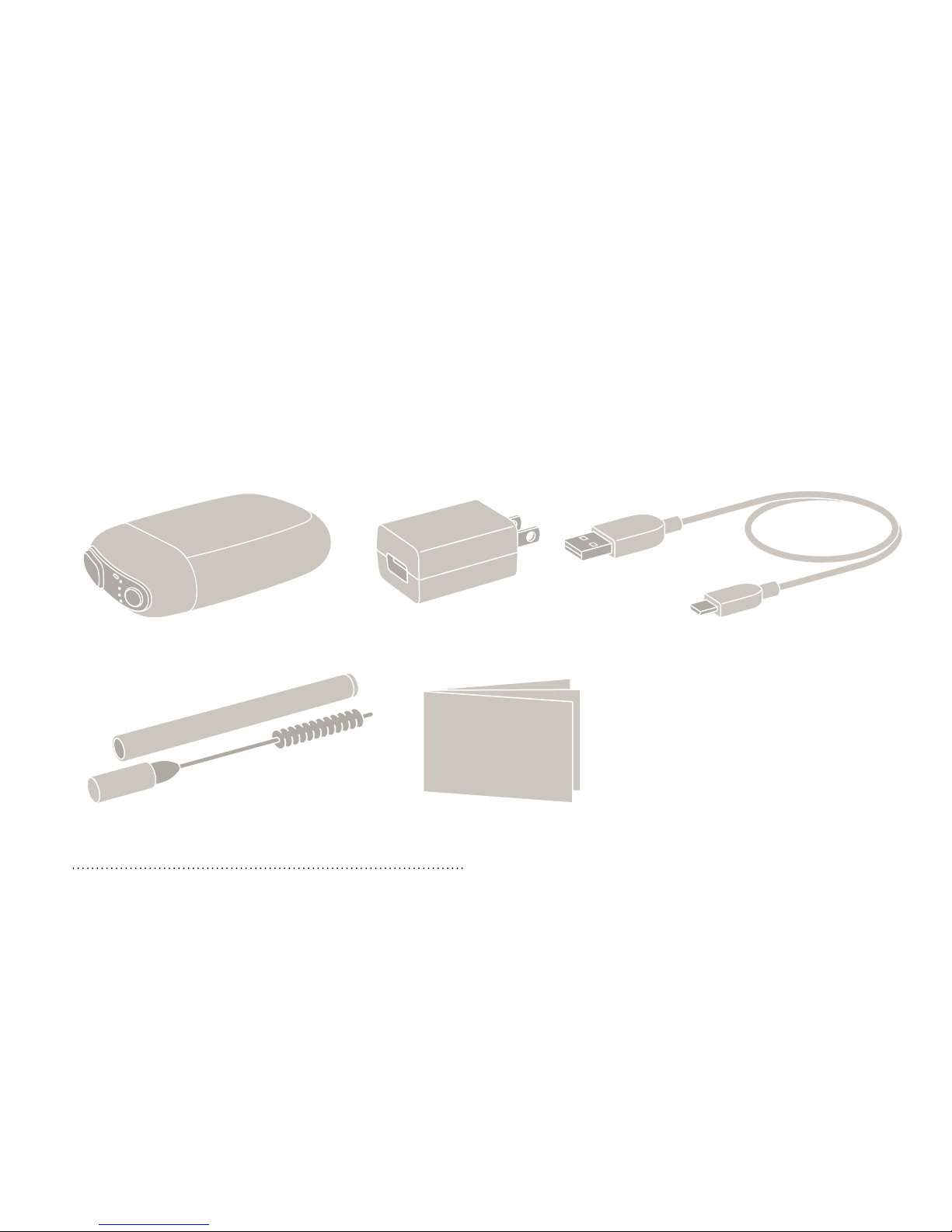
Before use, please ensure that the contents of your kit match those listed below. If
anything is missing, please contact “Ploom Exclusive Customer Service” (back cover).
About tobacco sticks
Separately sold Ploom S exclusive tobacco
sticks are required for use.
Device
AC Adaptor
Micro USB Cable
Cleaning Brush
User's Guide/Warranty
(This document)
Other documents may be
included such as a leaflet
about Ploom S.
Page 18
17
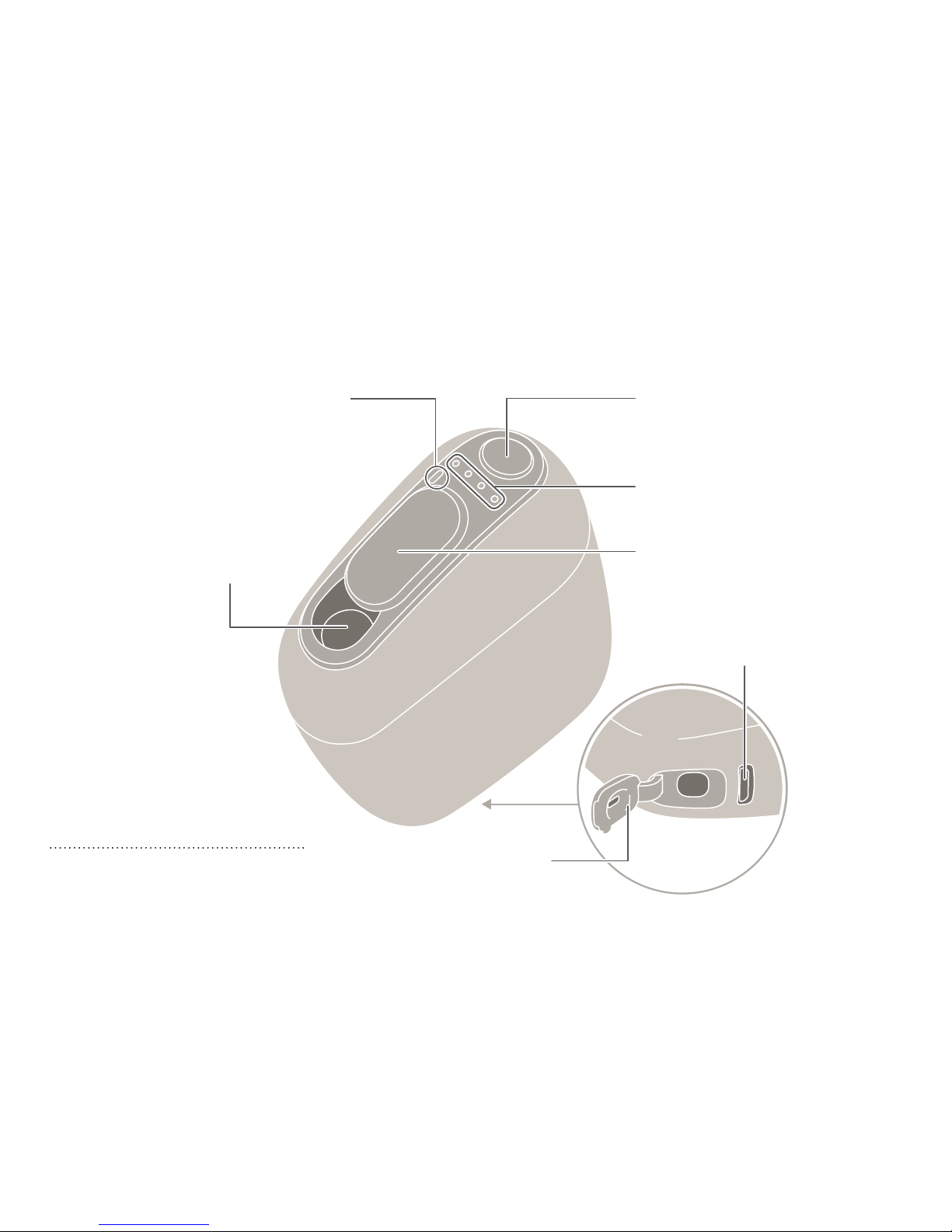
Parts of the Device
Sliding Cover
(Page 21, 27)
Status Indicator LEDs
(Page 19, 23, 25,
32)
Action Button
(Page 23, 28)
Tobacco Stick
Holder
(Page 22)
Mode Indicator LED
(Page 21, 30)
Micro USB
Jack (Page 18)
Cleaning Cover
(Page 29)
About the vibrating function
Vibrations alert you to the
start and finish of charging,
heating, use, etc.
Page 19
18
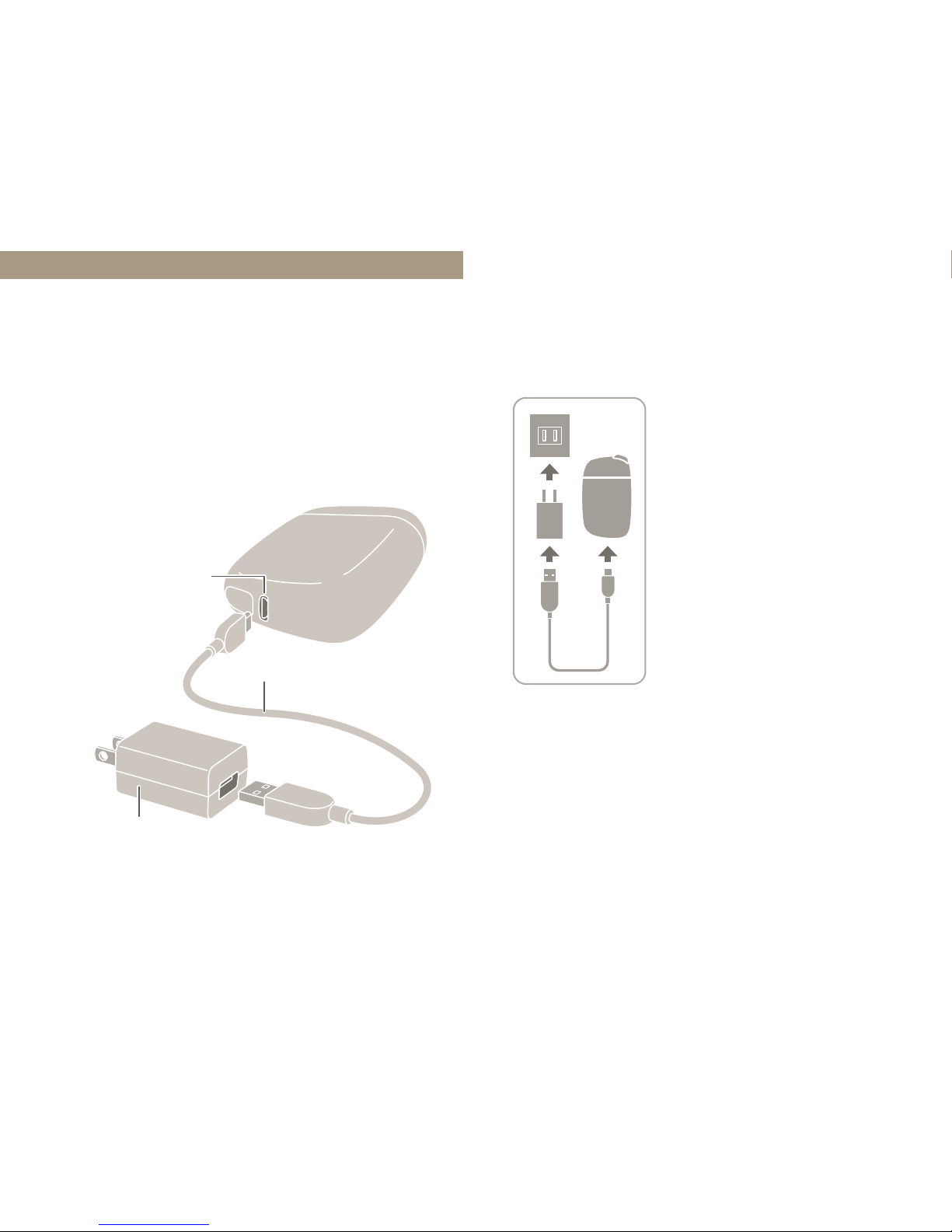
Charging
Charging is necessary when you use
the device for the first time after
purchase. Without charging, the
device will not turn on.
Micro
USB
Jack
Micro USB Cable
AC Adaptor
Connect the Micro
USB Cable to the
device and to the AC
Adaptor. Insert the
AC Adaptor into an
electrical outlet.
1 Start charging.
Page 20
19
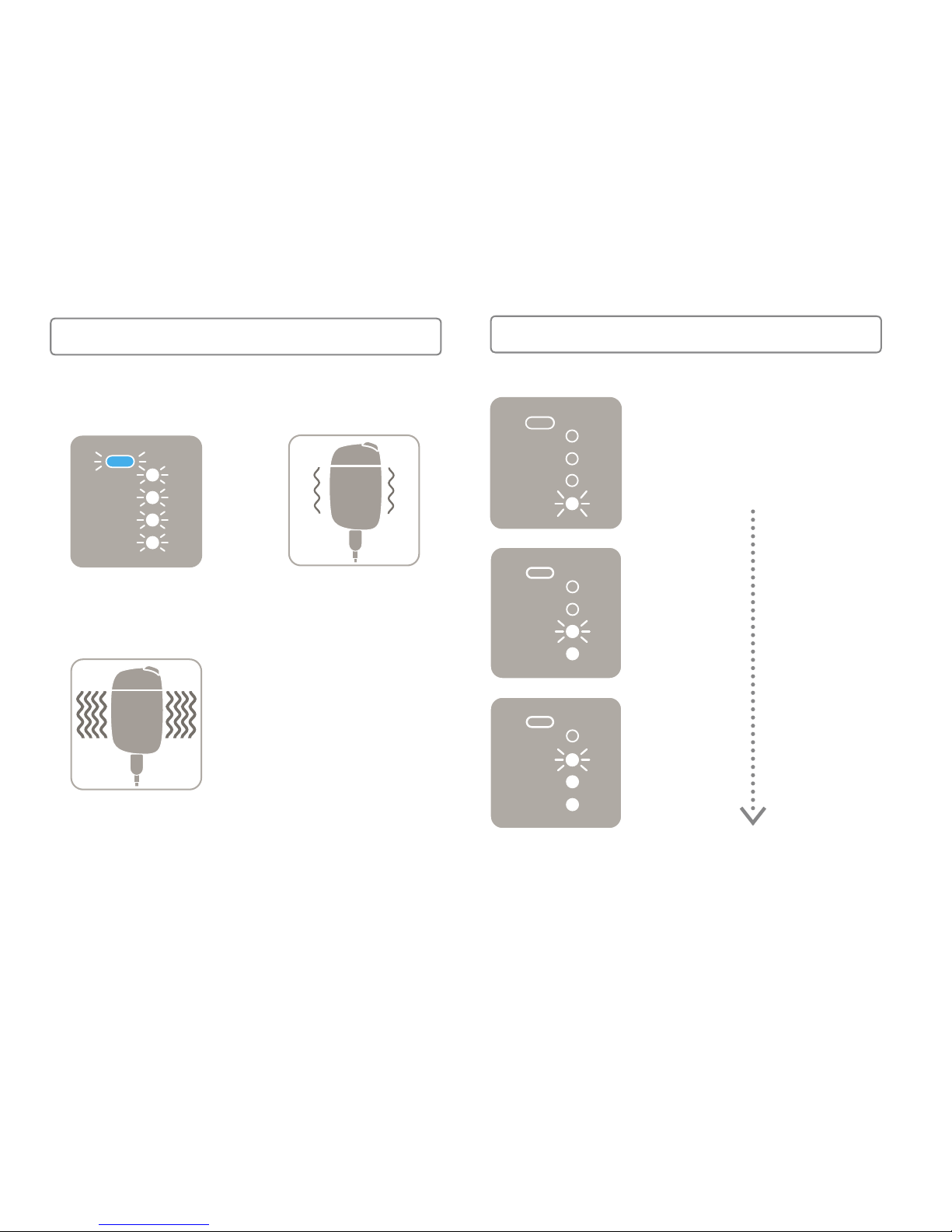
The Status Indicator
LEDs flash/light up
one by one as charging
progresses.
During Charging
All of the LEDs
flash.
The device vibrates
four times to alert
you that charging
has started.
First Time
The device vibrates
once to alert you
that charging has
started.
After First Time
Start of Charging
Page 21
20
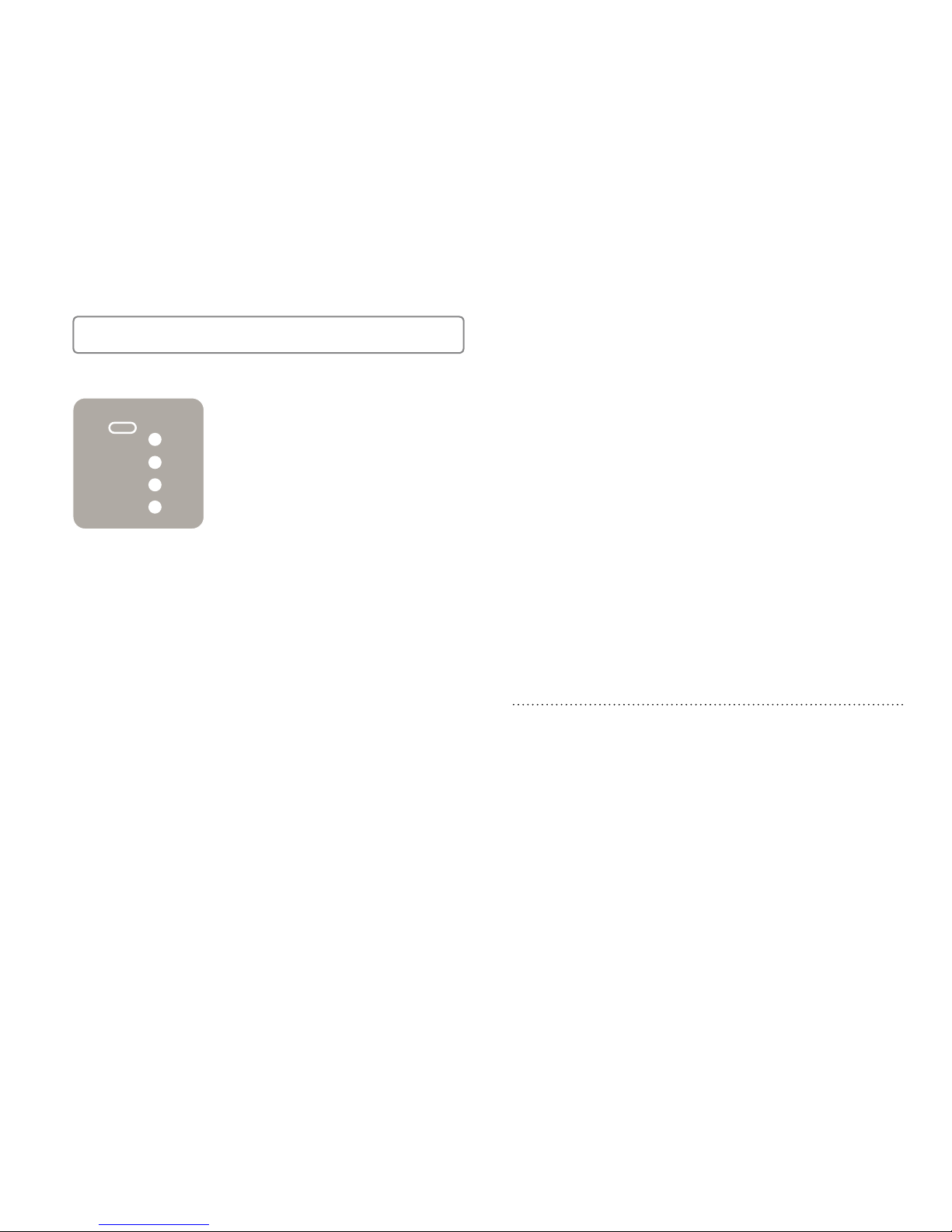
Once all of the LEDs
are lit up, charging is
complete. (They will
turn o after a certain
period of time.)
• You can use about 10 tobacco sticks on
a full charge. However, this number may
increase or decrease depending on the
deterioration of the battery, ambient
temperature, etc.
• Fully charging the battery from a
completely depleted state takes about
90 minutes. (When using the dedicated/
recommended AC Adaptor and Micro
USB Cable)
Charging Complete
How to check the remaining battery level
and timing of charging
• To check the remaining battery level,
briefly press the Action Button while the
Sliding Cover is closed. You cannot check
the remaining battery level during heating
or use.
• If the first Status Indicator LED is flashing,
this means that the remaining battery
level is extremely low. Please charge the
battery (Page18).
Page 22
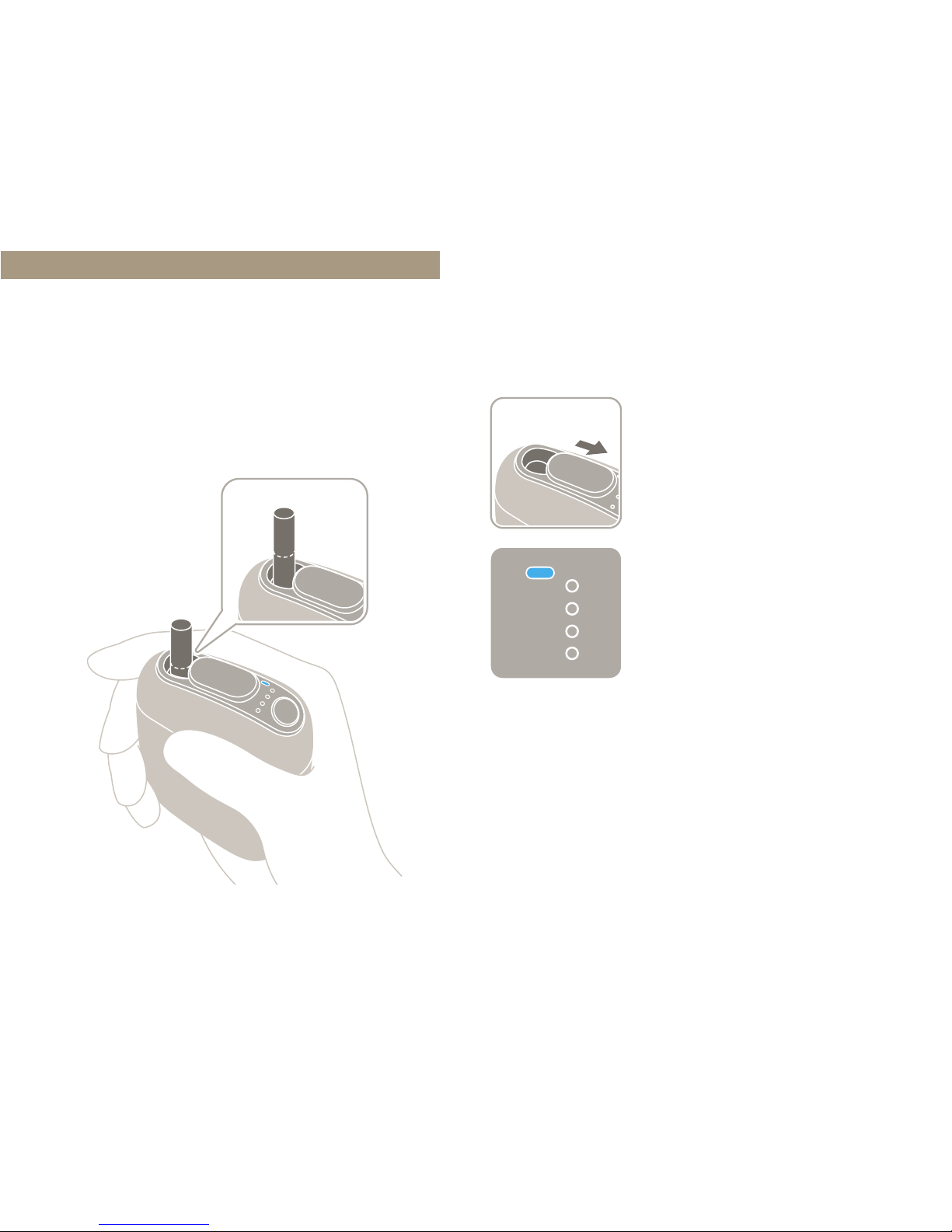
21
Inserting a Stick
Only use never-before-used tobacco
sticks.
The device will turn on.
The Mode Indicator
LED will light up in
blue.
1 Open the Sliding Cover.
• If the Mode Indicator LED does not light
up when you open the Sliding Cover, the
remaining battery level is extremely low.
Please charge the battery (Page18).
Page 23
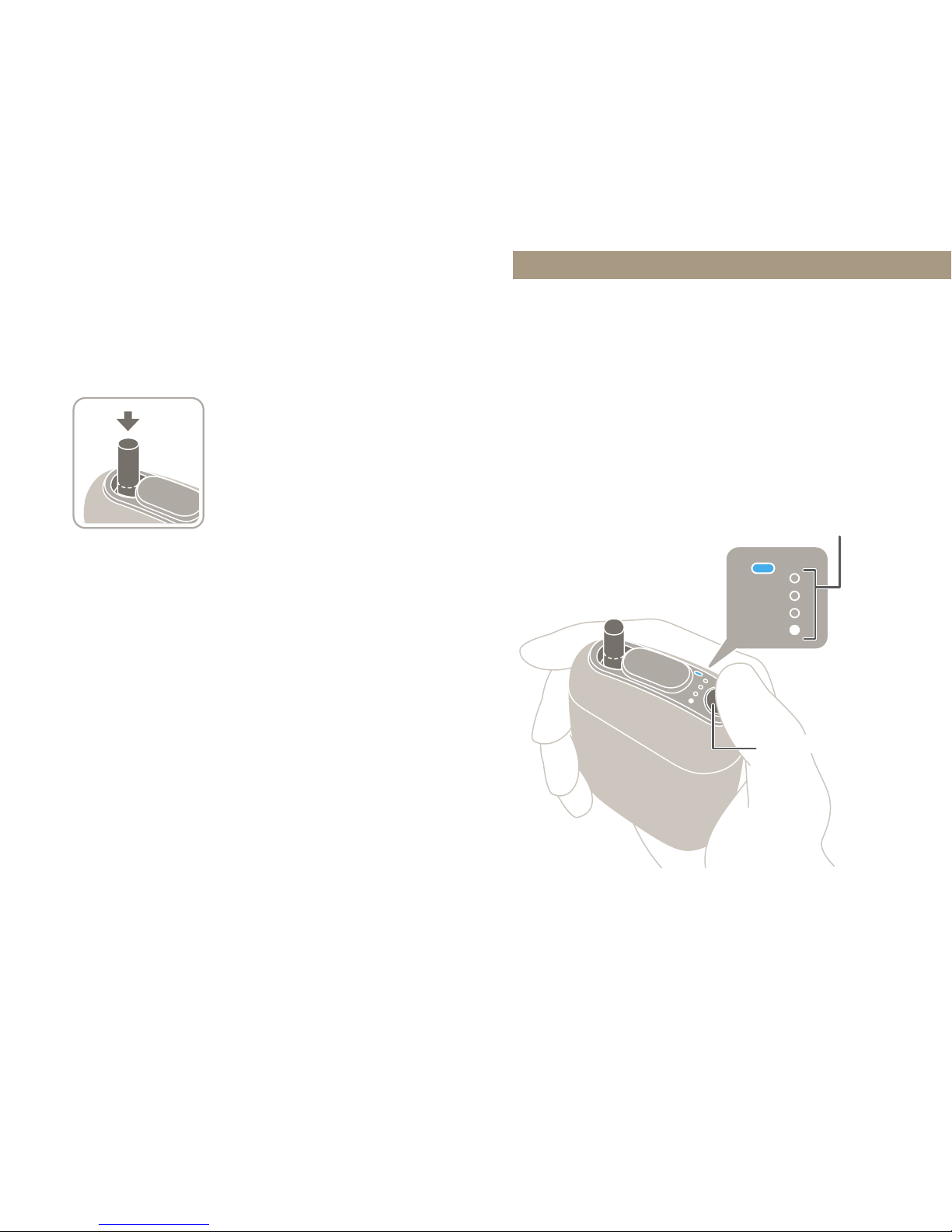
22
Slowly insert the
tobacco stick with the
leaves down until the
tip lightly touches the
bottom. Make sure that
the dotted-line portion
of the stick is not
covered.
2 Insert a tobacco stick.
• Reusing tobacco sticks will result in an
inferior flavor and aroma. Only use neverbefore-used tobacco sticks.
• Never insert tobacco sticks with the leaves
up. Doing so may cause a malfunction.
• Never use wet or damp tobacco sticks.
Heating
A heater built into the device heats
the tobacco stick.
Never remove
a tobacco stick
while the heater is
operating.
Status
Indicator
LEDs
Action Button
Page 24
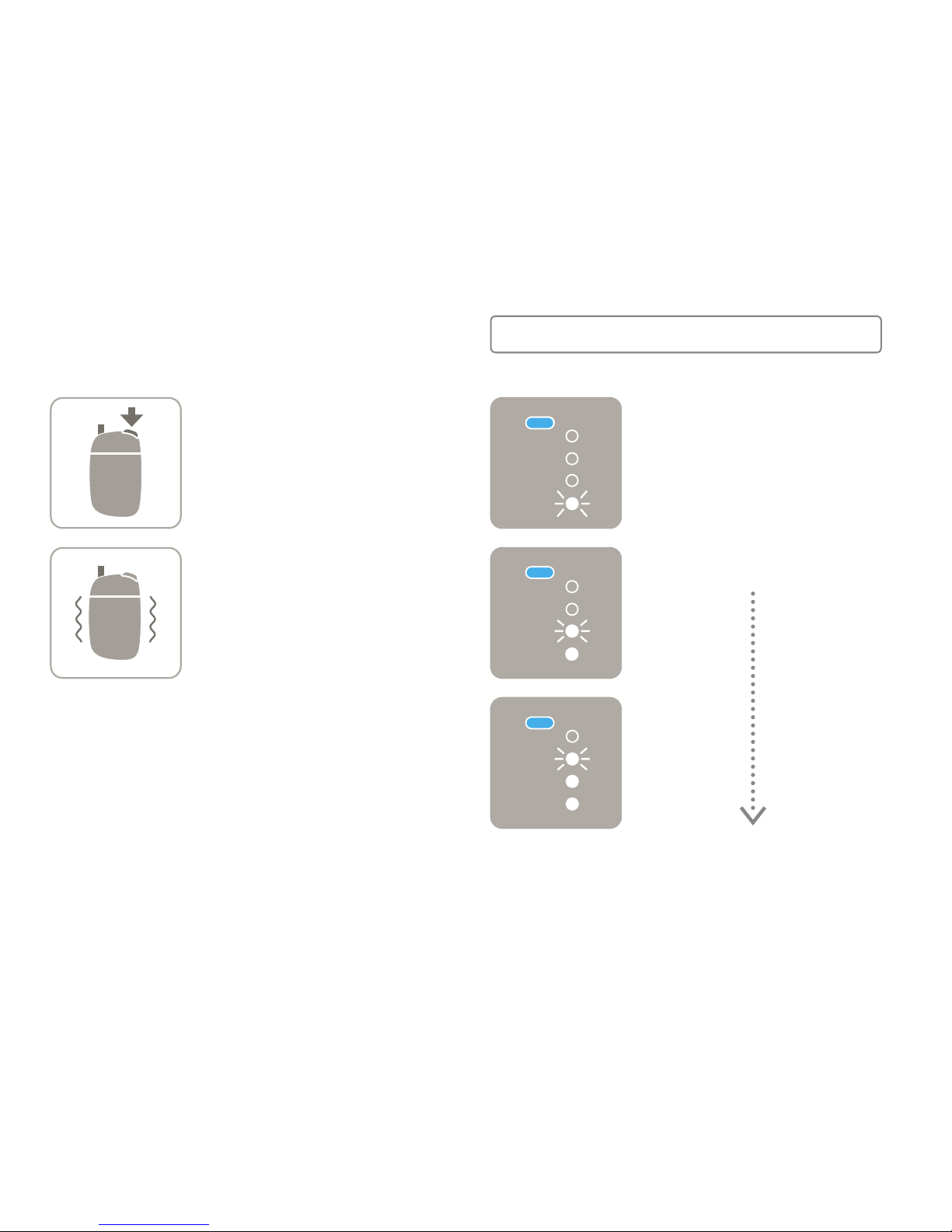
23
Hold down the Action
Button for at least two
seconds.
The device will vibrate
once.
1 Start heating.
The Status Indicator
LEDs flash and heating
starts.
The LEDs flash/light up
as heating progresses.
Heating takes about
40seconds to complete.
During Heating
• The heating time may vary depending on
the usage environment.
Page 25
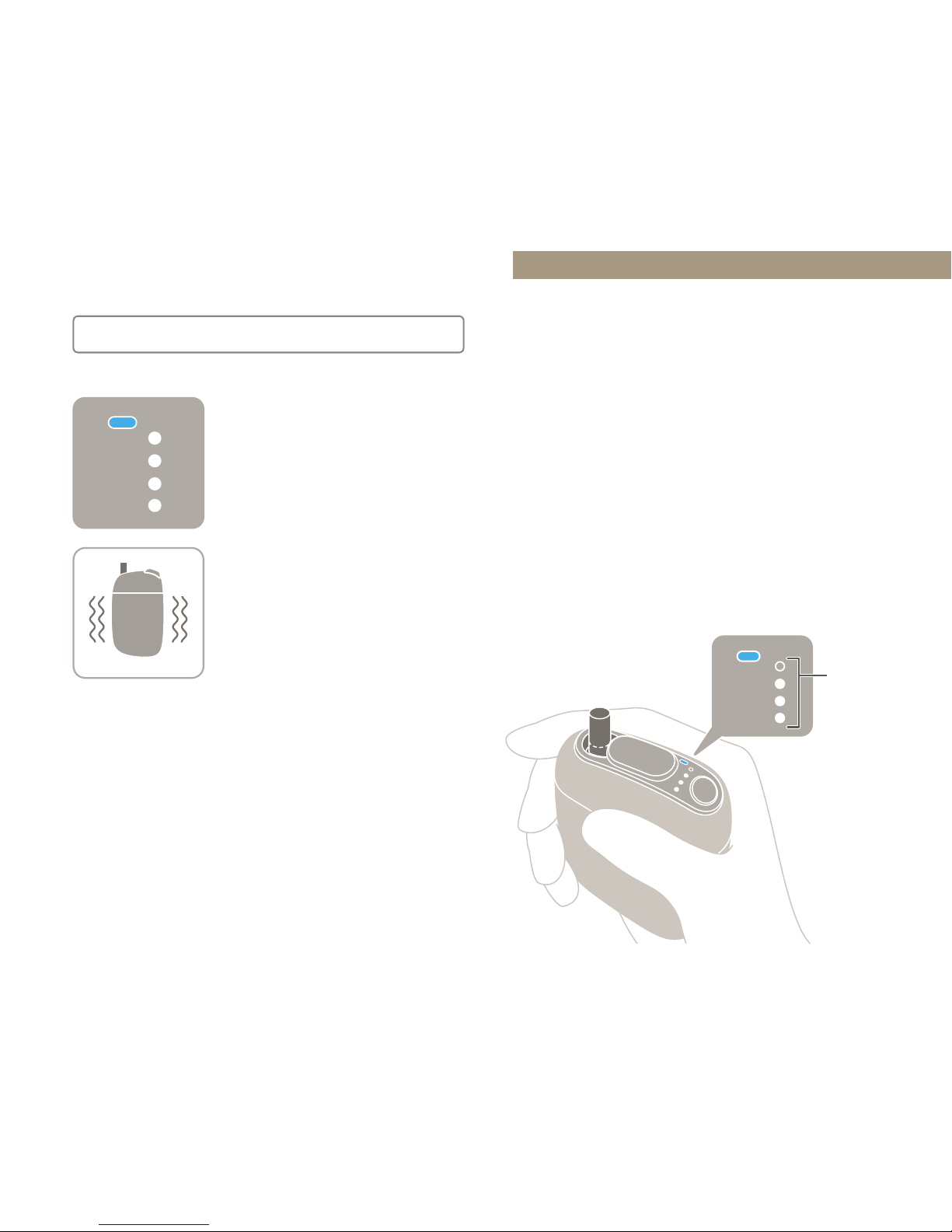
24
Once all of the LEDs
are lit up, the device
is ready.
The device will vibrate
twice to alert you that
heating is complete.
You can now enjoy the flavor and
aroma of the tobacco stick.
Ready for Use
Use
After each session of heating, you can
use the device for about 3minutes and
30seconds, or 14pus*1. If there is
enough battery power remaining, you
can then heat (Page22) another
stick and continue using the device*2.
*
1
One inhalation is counted as one pu. The maximum
number of pus may vary depending on how deeply
you inhale, and the usage environment.
*
2
Continuous use may not be possible if the
temperature of the heater is too high.
Never remove a tobacco
stick while the heater is
operating.
Status
Indicator
LEDs
Page 26
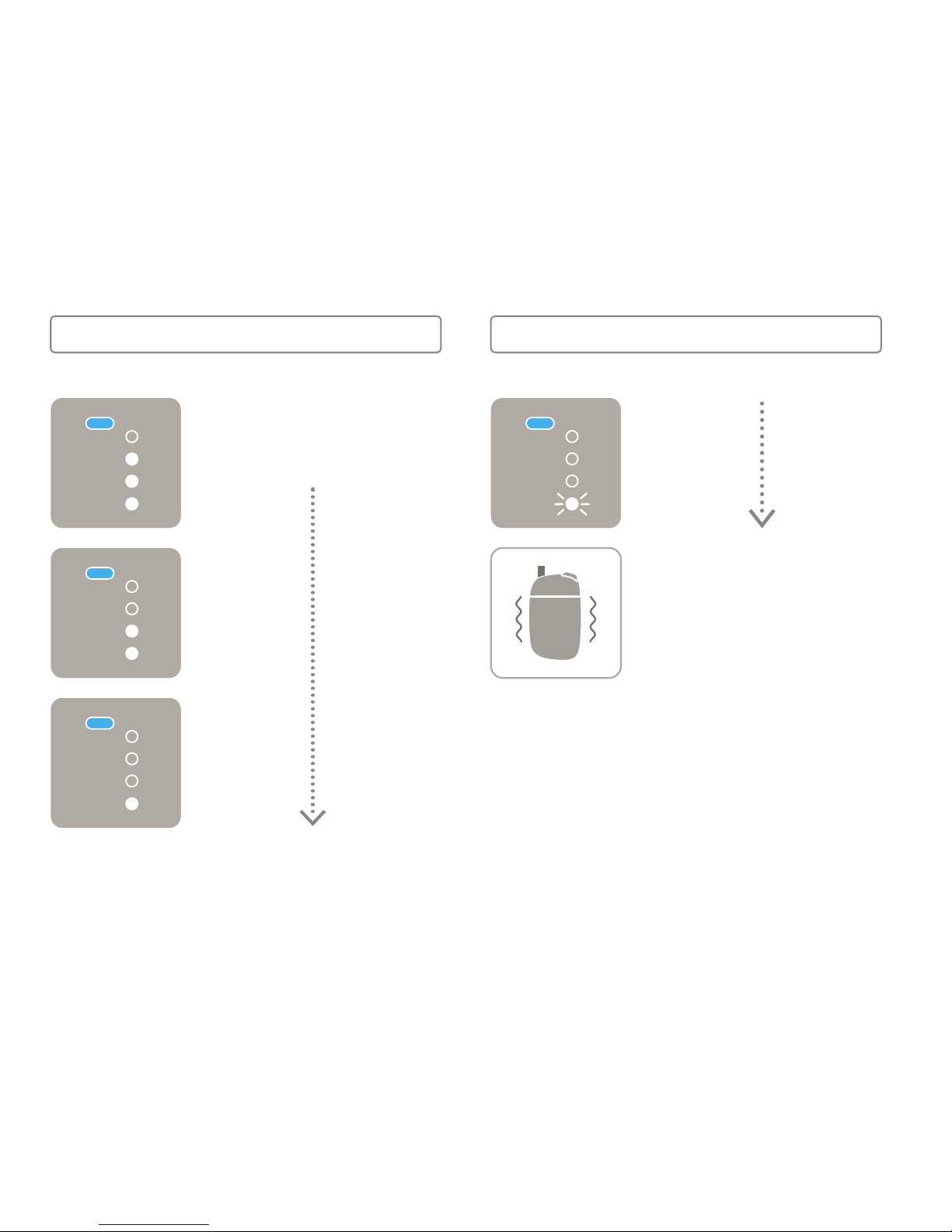
25
The remaining time is
indicated by the Status
Indicator LEDs.
Start of Use
When there are only
about 30 seconds
or two pus left, the
device vibrates once to
alert you that the heater
will shut o soon.
About 30
seconds left /
About 2 pus
left
(LEDs flash)
Alerts before Heater Shutdown
• If you want to stop using the device in the
middle of a session, shut it o correctly
according to the procedure under “To
stop using the device in the middle of a
session”(Page 28).
• Even when there is plenty of time remaining,
if there are only two pus left, the LEDs will
flash and the device will vibrate.
Page 27
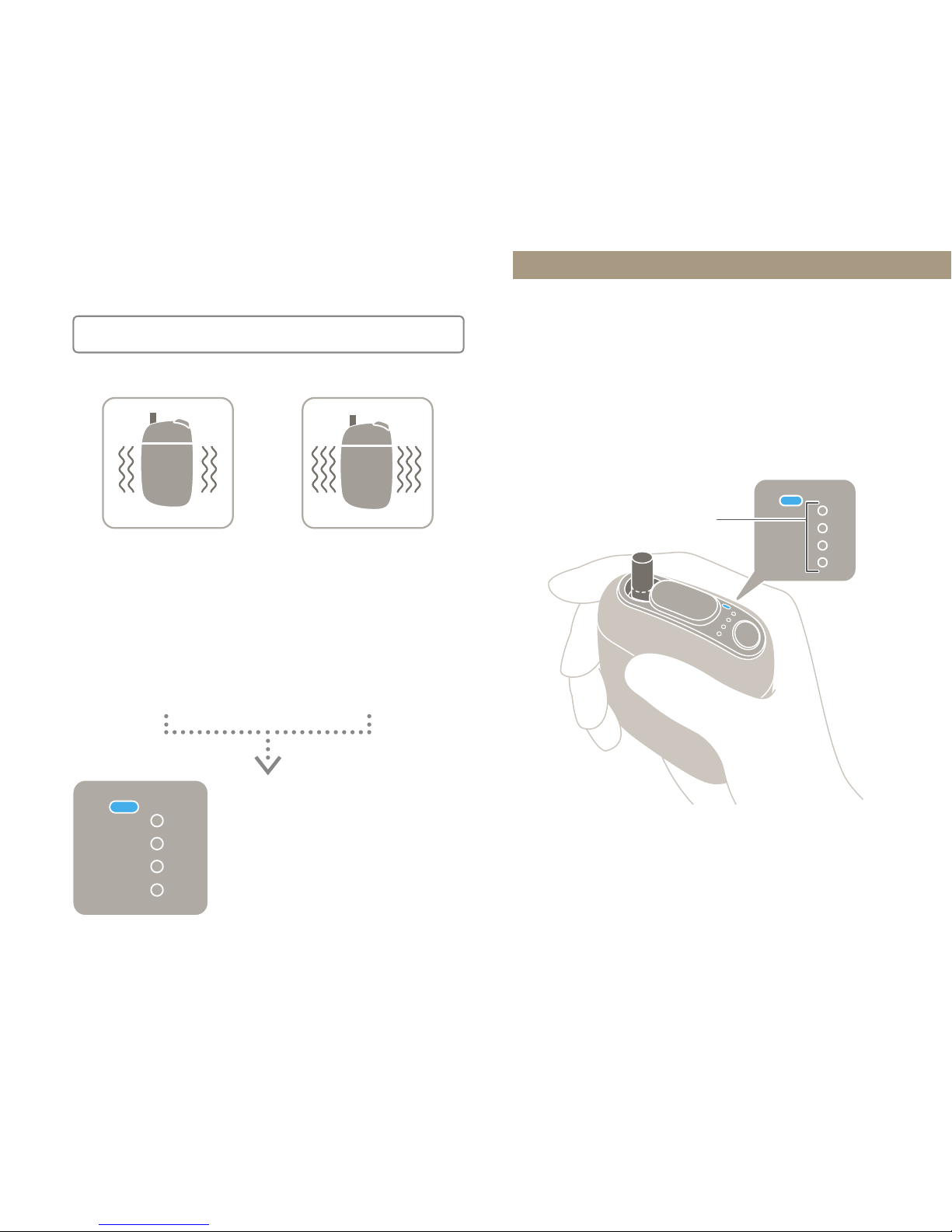
26
Heater Shutdown
Shutting O
Make sure that all of the Status
Indicator LEDs are turned o.
Status Indicator
LEDs
When the maximum
time (about
3 minutes and
30 seconds) has
elapsed,
the device vibrates
twice.
When you have
pued the
maximum number
of times
(14 pus),
the device vibrates
three times.
All of the Status
Indicator LEDs turn
o and the heater
shuts o.
Page 28
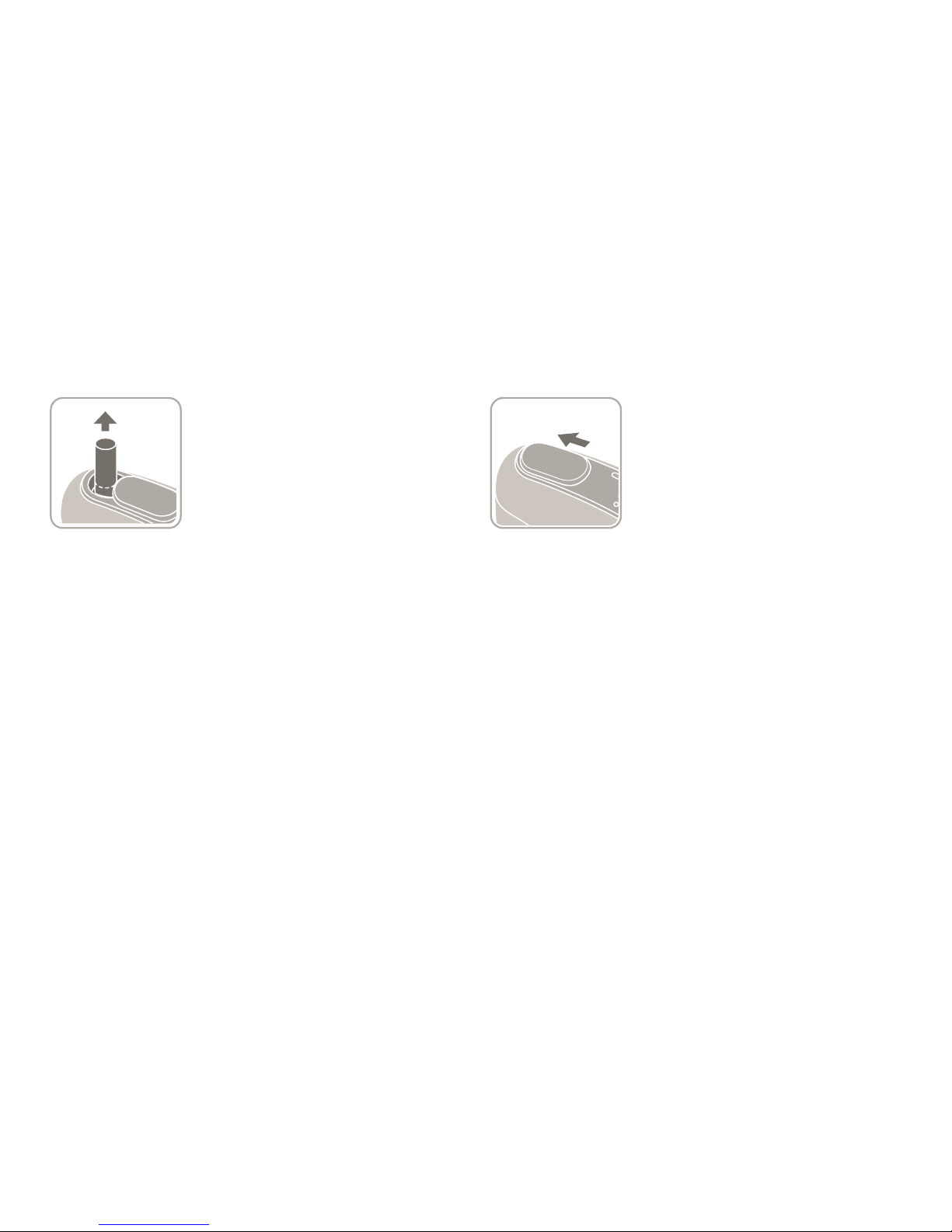
27
Hold the tobacco stick
by the tip, and pull it
straight out.
1 Remove the tobacco stick.
• Tobacco sticks become discolored after
use. This is normal and does not indicate
a problem with the tobacco stick or the
device.
The device will turn o.
2 Close the Sliding Cover.
• Make sure that the Sliding Cover is tightly
closed to avoid accidental operation when
carrying the device around.
• Tobacco sticks are very hot after use.
Improper disposal may cause a fire.
Always place tobacco sticks in an ashtray
immediately after use.
• Dispose of used tobacco sticks in
accordance with the instructions of
authorities. Maintain proper disposal to
keep used tobacco sticks out of sight of
infants and children.
Page 29
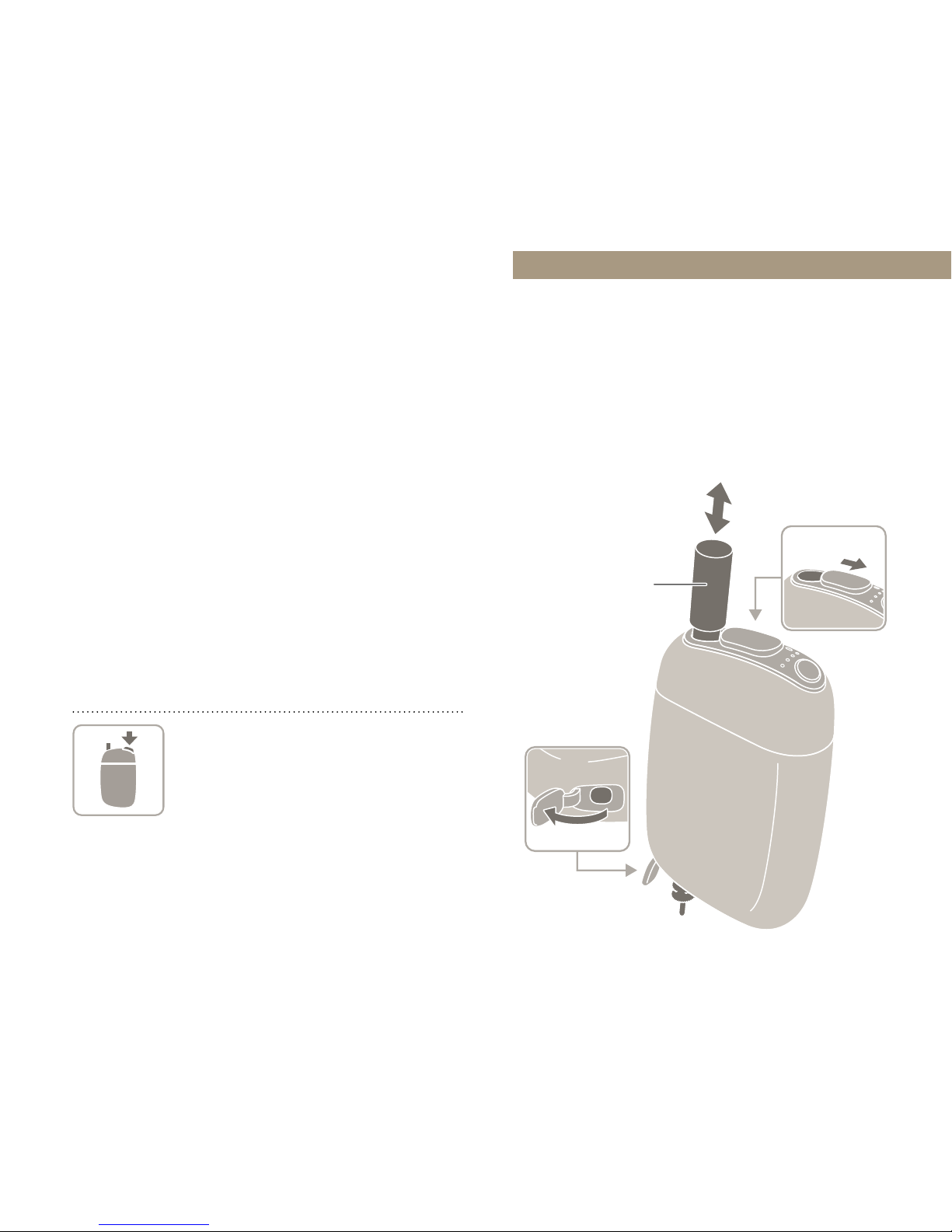
28
To stop using the device in the middle of
a session
Hold down the Action Button
for at least two seconds to shut
o the heater. Then, make sure
that all of the Status Indicator
LEDs are turned o before
removing the tobacco stick. If
you simply remove the tobacco
stick during heating, the heater
will not shut o.
Cleaning
It is recommended that you clean
the device after every 20 uses (one
tobacco stick per use).
Cleaning Cover
Cleaning Brush
Sliding Cover
Page 30

29
1 Open the Sliding Cover
and Cleaning Cover.
2 Perform cleaning.
Insert the Cleaning Brush into the
Tobacco Stick Holder and perform
cleaning.
3 Close the Cleaning Cover.
After cleaning is finished, pull out
the Cleaning Brush and close the
Cleaning Cover.
• The device retains heat for a short time
after use. Let the device cool o before
performing cleaning.
• Never attempt to remove fragments of
tobacco leaves by forcefully hitting or
shaking the device. Doing so may cause a
malfunction.
• Do not use the Cleaning Brush for any
purpose other than cleaning the interior
of the device.
• Only use the dedicated/recommended
Cleaning Brush.
• Never soak the Cleaning Brush in
detergent or other liquids to perform
cleaning.
• Only insert the Cleaning Brush into the
Tobacco Stick Holder. If you insert it into
the opening on the Cleaning Cover side,
this may damage the Cleaning Brush or
the device.
Maintaining the Cleaning Brush
Periodically rinse the Cleaning Brush with
water. Let it dry thoroughly before using
it again.
Page 31
30
Troubleshooting
If the device is not working properly
or acting strangely, check the
following items.
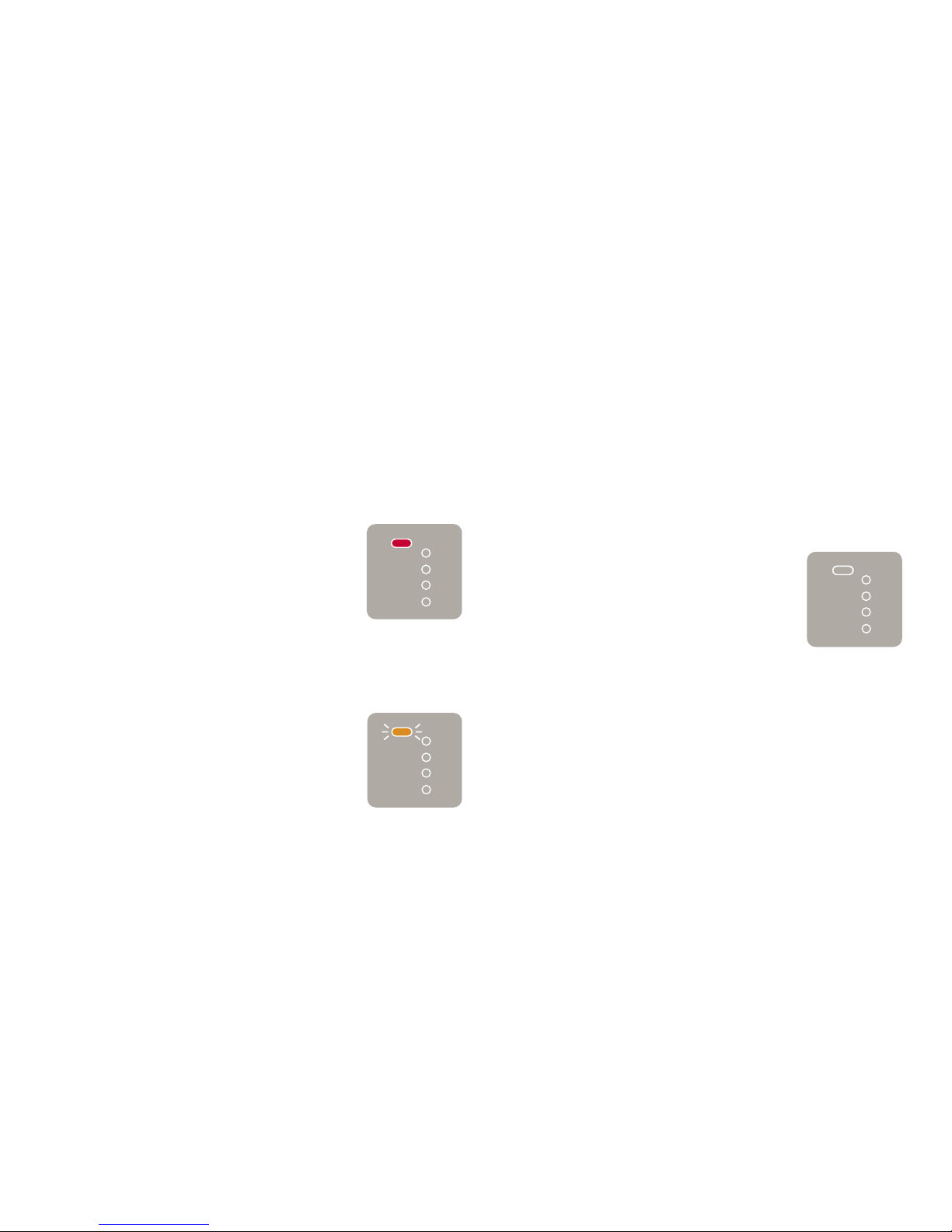
The Mode Indicator LED is lit up in red.
Check the content of the
Warranty (Page35), and
then contact “Ploom Exclusive
Customer Service” (back
cover).
The Mode Indicator LED is flashing
in orange.
This means that the device
cannot be used temporarily
because it has become too
hot (or too cold) due to its
current status, the ambient
environment, etc. Wait until the
Mode Indicator LED turns o
before using the device again.
The device is too hot to hold.
The device may be malfunctioning. Please
contact “Ploom Exclusive Customer Service”
(back cover).
The device may become somewhat hot after
continuous use due to extended use of the
heater. However, this is not a malfunction.
When you open the Sliding Cover,
the LEDs do not light up.
The battery is depleted.
Please charge the battery
(Page18). If charging does
not resolve the issue, there may
be a malfunction.
Please contact
“Ploom Exclusive Customer
Service” (back cover).
The device doesn't work.
The device will not work if the battery
is depleted. Please charge the battery
(Page18)
. The device may also fail to
work if it is too cold due to the external
temperature, etc. Wait for the device to
return to a normal temperature.
Page 32
31
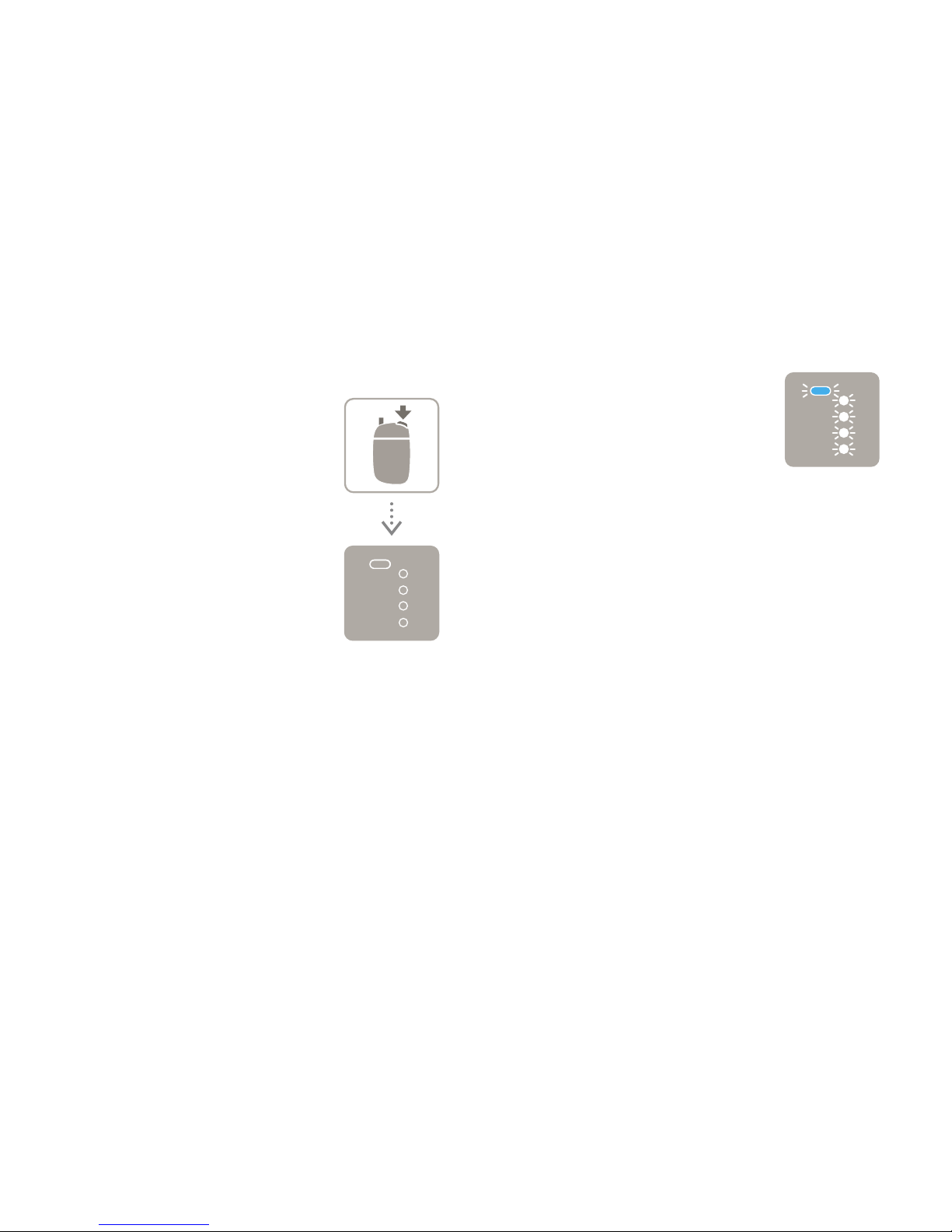
When you hold down the Action
Button to start heating, the Mode
Indicator LED turns o.
The remaining battery level is
extremely low. Please charge
the battery (Page18). If
charging does not resolve
the issue, there may be a
malfunction. Discontinue use of
the device and contact “Ploom
Exclusive Customer Service”
(back cover).
When you try to charge the battery,
all of the LEDs flash continuously.
This error may occur when the
battery is completely depleted
(the LEDs will not light up even
when you hold down the Action
Button with the Sliding Cover
closed) and you try to charge
it using a product other than
the dedicated/recommended
AC Adaptor and Micro USB
Cable. The device will not
charge under these conditions.
Charge the battery using the
dedicated/recommended AC
Adaptor and Micro USB Cable.
Page 33

32
When you check the remaining
battery level, one of the Status
Indicator LEDs flashes.
The remaining battery level is
extremely low.
Please charge the battery
(Page18). If charging does
not resolve the issue, there may
be a malfunction. Discontinue
use of the device and contact
“Ploom Exclusive Customer
Service” (back cover).
The battery becomes depleted
immediately, even after it is charged
correctly.
• If the battery life has become significantly
shortened, the battery may have
deteriorated to the point that it is nearing
the end of its lifespan. It is time to
purchase a replacement.
• The battery may become depleted
immediately if the device is too cold
due to the external temperature, etc.
Wait for the device to return to a normal
temperature before charging.
Page 34

33
Resetting the device
If the device is not working properly, try
resetting it. This may resolve the issue.
To reset the device, hold down the
Action Button with the Sliding Cover
closed until all of the LEDs flash and the
device vibrates three times.
You have been charging the battery
for a long time, but not all of the
Status Indicator LEDs are lit up yet.
• Charge the battery using the dedicated/
recommended AC Adaptor. If you use
a product other than the dedicated/
recommended AC Adaptor, charging may
take a long time.
• Check for dirt on the Micro USB Jack of
the device, the connectors of the Micro
USB cable, or the USB jack of the AC
Adaptor. If they are dirty, wipe them o
with a soft, dry cloth. Then, reconnect
them and try charging again.
• If they are not dirty, there may be an issue
with the device, AC Adaptor, or Micro USB
Cable. Please contact “Ploom Exclusive
Customer Service” (back cover).
The device will not turn on after it
was left unused for a long period
of time.
When you leave the device unused for
long periods of time, the battery voltage
decreases due to self-discharge. Charge the
battery before using the device again.
Page 35
34
Main Specifications
Device
Battery Type
Lithium-ion battery
Battery Capacity 1,020 mAh
Charging Time Approx. 90 minutes
Rated Voltage 5 V
Rated Current 1.5 A
Input Terminal USB jack (MicroB)
Dimensions Approx. 56.3mm ×
93.2mm × 24.5mm
(W / H / D)
Weight Approx. 95.1 g
AC Adaptor
Model Name WA-SJPT12-JA
Rated Input AC 100V-240V,
50/60Hz, 0.2 A
Rated Output DC 5 V, 1.5 A
Dimensions Approx. 31.6mm ×
59.5mm × 23.0mm
(W / H / D)
Weight Approx. 32g
For information on purchasing
separately sold accessories
like the AC Adaptor and
Cleaning Brush, refer to the
following website.
https://www.ploom.jp/
Micro USB Cable
Dimensions Approx. 60 cm
Weight Approx. 15.3 g
Cleaning Brush
Dimensions Approx. 10.0mm ×
11.0mm × 131.3mm
(W / H / D)
Weight Approx. 10.9g
Page 36
35
To request a product exchange, carefully read the
following content and then contact “Ploom Exclusive
Customer Service” (back cover).
Warranty
Warranty Period
The terms of this Warranty apply to
the following products included in
the Ploom S Starter Kit for eighteen
months from the date of purchase.
• Ploom S Device
• Micro USB Cable
• AC Adaptor
Scope of Warranty
• If a malfunction occurs while you
are using the Ploom S Starter Kit
in accordance with this document
(User's Guide) or due to a
manufacturing defect, you may
exchange the product free of cost.
• Free product exchanges under the
terms of this Warranty are subject
to the warranty period as of the
time of the initial purchase.
• The terms of this Warranty only apply
to products purchased in Japan.
* THIS WARRANTY IS VALID ONLY IN JAPAN.
Page 37

36
Stipulation of Exceptions to Warranty
The terms of this Warranty do not
apply in the following cases.
• There is no Warranty.
• There is no proof of purchase.
• Damage is superficial and has
no eect on the product's
performance (scratches, dents,
damage to the plastic parts, etc.).
• Failure is the result of combination
with an incompatible product.
• The product has been obviously
disassembled or modified.
• Deterioration of the product is the
result of normal use.
• The user failed to comply with the
indications of “Safety Information”
or the usage instructions in this
document.
• The warranty period has expired.
Page 38

37
Exchange Procedure
If you require a replacement within
the warranty period, please contact
“Ploom Exclusive Customer Service”
(back cover) for an explanation of the
free exchange procedure.
• You must provide proof of purchase
and the warranty period.
• The shipping destination for
replacements is limited to
addresses in Japan.
Other
• When a product is exchanged free
of cost, it will be replaced with a
product equivalent to the one that
you purchased. Please note that
the recovered product will not be
returned to you.
 Loading...