

Page 1
PLAC400QUICKSTA
Page 2

Thank You For Choosing PlayNetwork
This document describes the main features of PlayNetwork’s Combo™ digital music player, how to set it up, and
how to use it. Please take the time to read the easy step-by-step "Quick Start Guide". Familiarize yourself
with the basic features, follow the easy to install instructions, and in no time, you and your customers will be
enjoying the custom music programming created uniquely for your business.
What Is The Combo™ Player?
The Combo player is an advanced, commercial grade digital music player that was built specifically for use in
business environments. It's easy to turn on, plays your custom music programming (and messaging) according
to a pre-selected playlist and schedule, and has control features that allows for local playback options. Best of
all, once you turn the Combo player on, it’s basically a hands free player. You and your staff can forget about it
and spend your time focused on your customers.
For control reasons, the Combo player does not play consumer CDs and makes use of a special type of
music file format that cannot be downloaded or played on regular music players. If you’re receiving CD-ROM
updates from PlayNetwork, these discs are also formatted specifically for use with the Combo player and will not
work in any other device. Our customers love this feature as it guarantees that only the music that has been
approved can be transfered to the Combo player.
Basic Combo Player Features:
Operates hands-free. Turn it on and forget about it.
Stores hundreds of hours of stereo like quality music on its hard drive. The Combo player comes preloaded
with music to get you started right away.
Recieve song updates via CD-ROM or network connectivity where applicable. This usually occurs monthly
depending on your service agreement.
The LCD display shows artist and song information. This is handy when a customer asks you what’s playing.
Controls let you change programs, channels, and advance songs depending on your service agreement.
NOW THAT YOU HAVE A BETTER UNDERSTANDING OF WHAT’S IN THE BOX,
LET’S GET YOU STARTED.
TURN TO STEP 1. OF THE "QUICK START GUIDE."
PLAC400QUICKSTA
Page 3
COMBO™ C400 HARD DRIVE PLAYER
QUICK START GUIDE
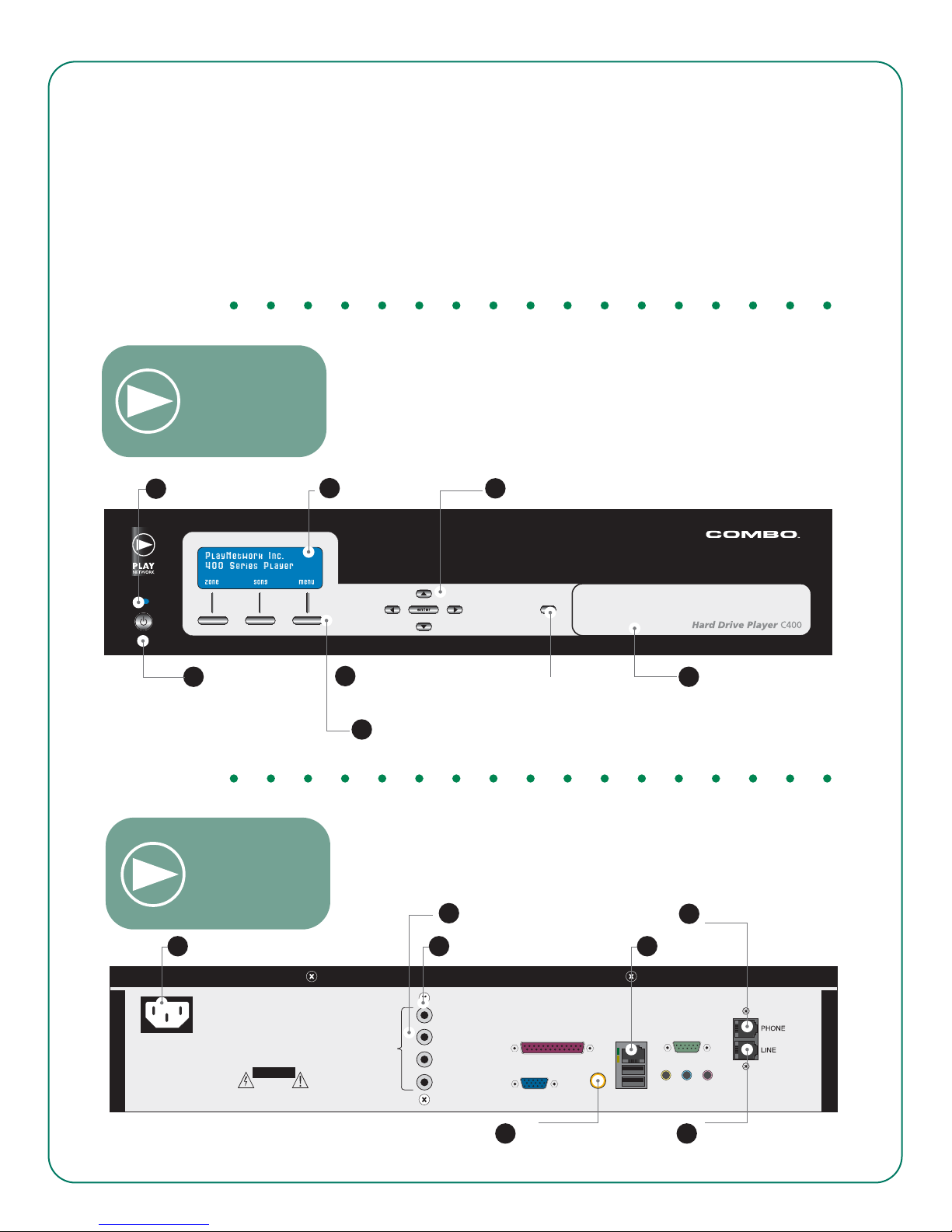
STEP 1. GET FAMILIAR WITH THE PLAYER CONTROLS
Front View:
A. Power/Standby Button
B. Shortcut Keys
C. CD-ROM Drive
D. Navigation Buttons
E. Power On Indicator
F. LCD Display
G. CD-ROM Disc Load/Eject
E. Power On Indicator
Back View:
A. Power/ Standby
Button
H. Power Inlet
I. Zone 1 Output
J. Zone 2 Output
K. Network Connector
L. Modem Connector
M. Digital Audio Output
N. Line Output
F. LCD Display
D. Navigation Buttons
G. CD-ROM Disc Load/ Eject
B. Shortcut Keys
J. Zone 2 Output
C. CD-ROM Drive
L. Modem Connector
H. Power Inlet I. Zone 1 Output
100-140 VAC
50-60 Hz
40 WATTS
CAUTION
RISK OF ELECTRICAL SHOCK
DO NOT OPEN
CAUTION
TO REDUCE RISK OF FIRE
OR ELECTRICAL SHOCK DO NOT
EXPOSE THIS EQUIPMENT TO
RAIN OR MOISTURE
AUDIO
OUTPUT
ZONE 1
ZONE 2
ZONE 3
ZONE 4
K. Network Connector
Network ComData Port
USBS/PDIFVGA
M. Digital Audio Output
N. Line Output
PLAC400QUICKSTA
Page 4
O
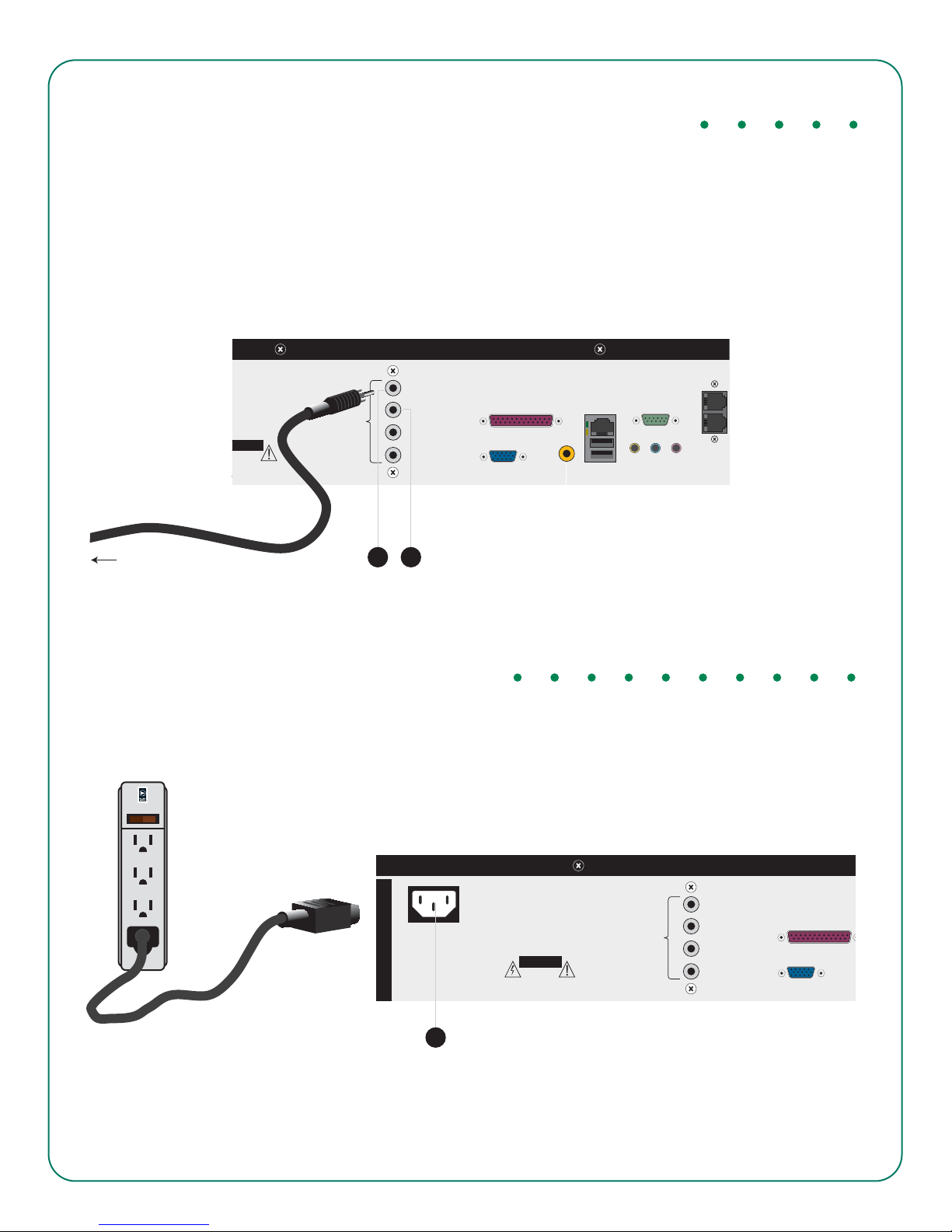
STEP 2. CONNECT COMBO PLAYER TO YOUR SOUND SYSTEM
S
Analog Audio - Connect an audio cable to the "Zone 1" output (I) on the back of the Combo player. Connect the
opposite end of the cable to your amplifier equipment. Repeat these steps for "Zone 2" (J) if a second zone is
required.
ZONE 1
Network ComData Port
USBS/PDIFVGA
UTION
F ELECTRICAL SHOCK
DO NOT OPEN
CAUTION
EDUCE RISK OF FIRE
TRICAL SHOCK DO NOT
E THIS EQUIPMENT TO
AIN OR MOISTURE
Analog Audio
AUDIO
OUTPUT
ZONE 2
ZONE 3
ZONE 4
To The Power Amplifier
I J
STEP 3. ATTACH THE POWER CORD
Find the power cord (included), plug one end into the AC Power Inlet (H) at the back of the player. Then plug the
cord into the power strip provided. Plug the power strip into your wall outlet. Use only 120VAC 60 Hz power.
SURGE PROTECTOR
ON
OFF
ZONE 1
100-140 VAC
50-60 Hz
40 WATTS
CAUTION
RISK OF ELECTRICAL SHOCK
DO NOT OPEN
CAUTION
TO REDUCE RISK OF FIRE
OR ELECTRICAL SHOCK DO NOT
EXPOSE THIS EQUIPMENT TO
RAIN OR MOISTURE
AUDIO
OUTPUT
ZONE 2
ZONE 3
ZONE 4
Data Port
VGA
H
PLAC400QUICKSTA
Page 5
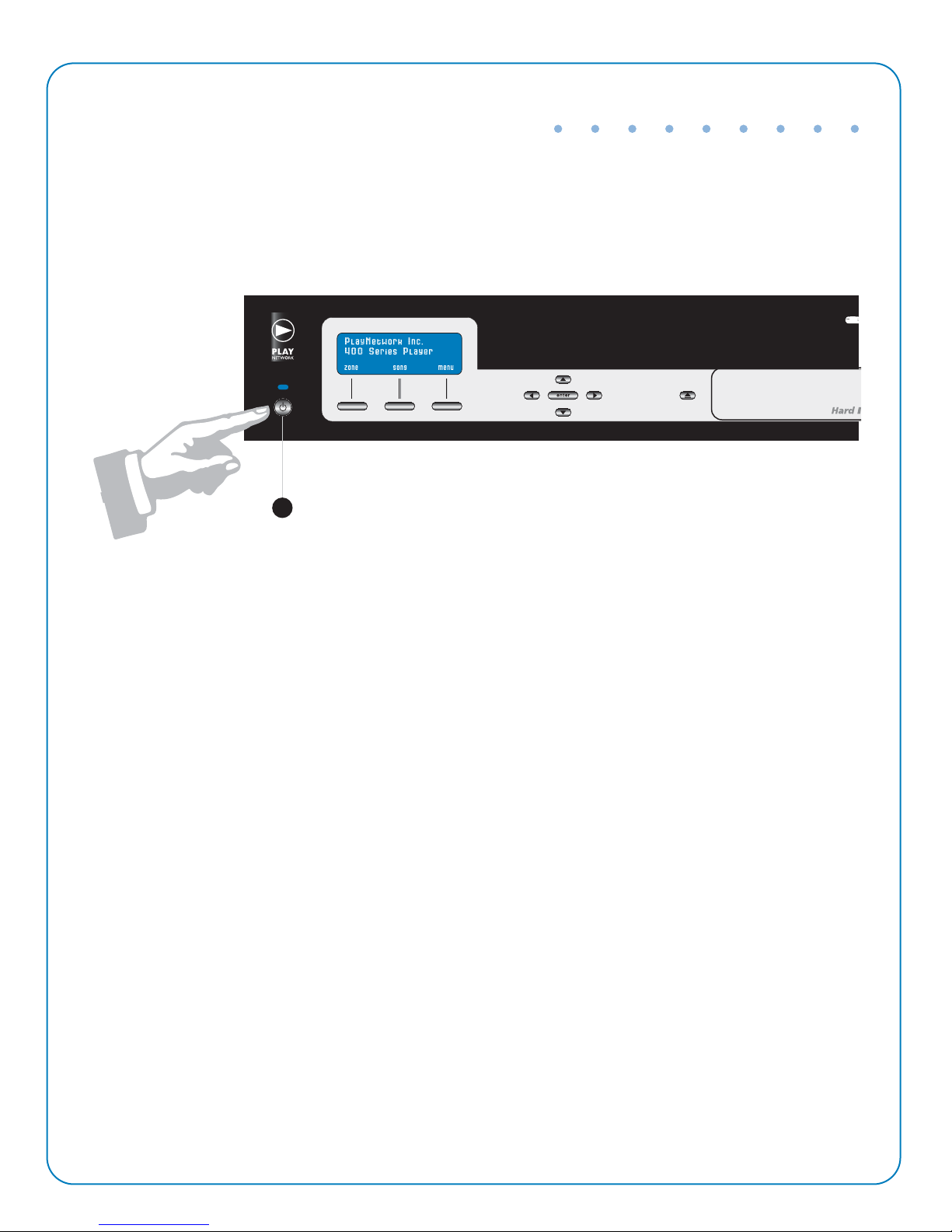
STEP 4. POWER UP THE COMBO PLAYER
First power up your amplifier, then power up your player. Push the Power Button (A) on the front panel. It will
take 2 minutes for the Combo player to boot up. Then, adjust the volume of your amplifier equipment to the
desired listening level. You’re in business. Enjoy the music.
A
NOTE: If you are not hearing any music, check to ensure that your amplifier is on and that you have correctly
followed steps 1-4. If you are still experienceing problems contact your service provider.
To Contact Your Service Provider:
1. Press enter or an arrow button to open the Main Menu.
2. Scroll down using the arrow buttons to Help and press Enter
3. Scroll down until you see your Customer Service Number, this is who to call for service.
PLAC400QUICKSTA
Page 6
STEP 5. UPDATING YOUR MUSIC
NETWORK UPDATED LOCATIONS: If your business is scheduled to recieve music updates via network
connection, these will occur automatically. Please ensure that the Combo music player is powered on at all times.
FOR CD-ROM UPDATES: If your location is not connected via network, you will recieve music updates via
CD-ROM for your Combo player, these will be delivered to you via US Mail.
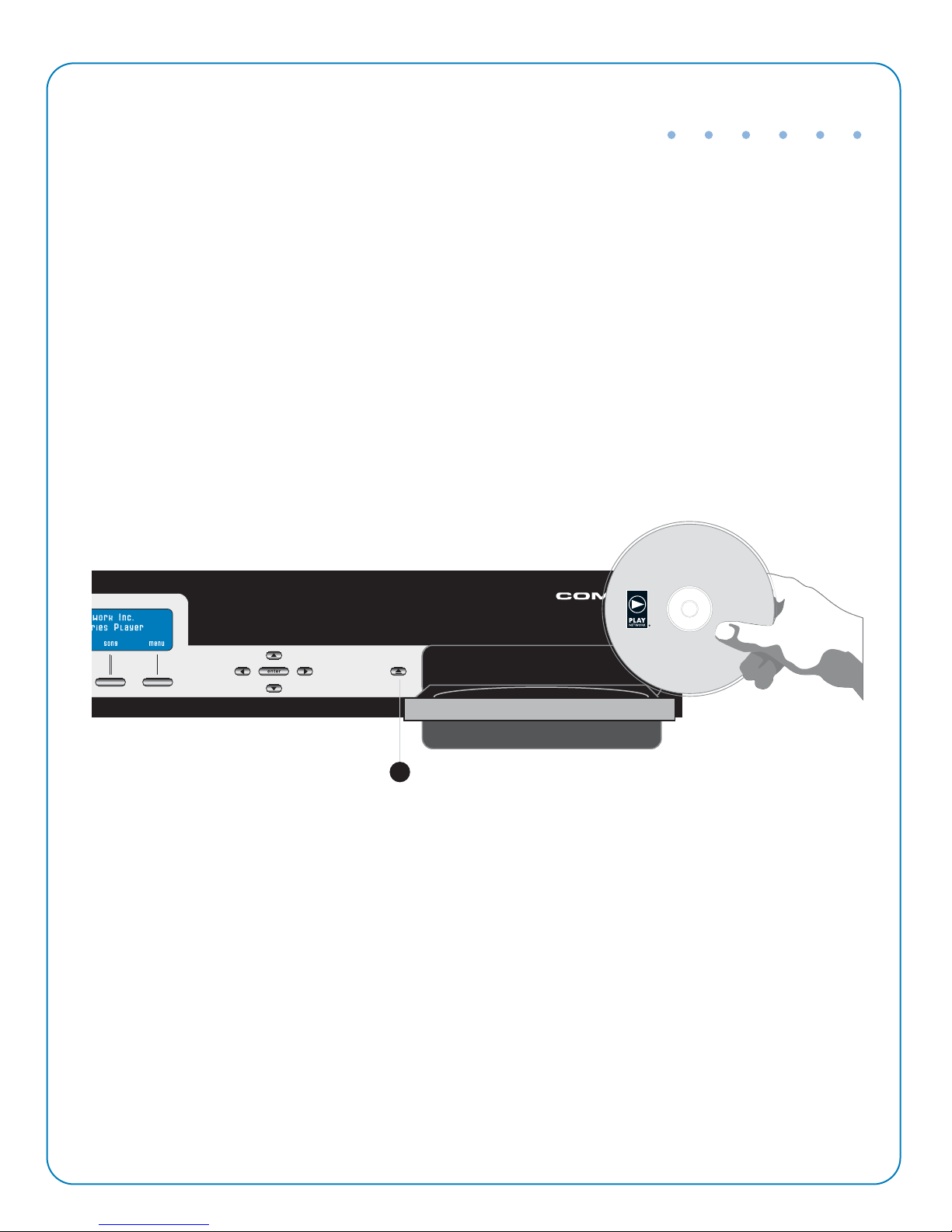
To update the Combo player with new music, press the CD-ROM Disc Load / Eject (G) button and insert the
update CD-ROM into the tray. Close the CD tray by pushing the CD-ROM Disc Load / Eject (G) button again
It will take approximately 5-10 minutes for the songs and playlist commands to be downloaded to the
Combo player’s hard drive. Once the download is complete, you may throw away the CD,
G
PLAC400QUICKSTA
Page 7
© 2009 PlayNetwork Inc. All rights reserved. Combo and AutoPlay are trademarks and PlayNetwork and
the PlayNetwork logo are registered trademarks of PlayNetwork Inc.or its affiliates in the U.S. and cert
othercountries.All other trademarks mentioned in this documentarethe property of their respective
owners. (0403R)
DRIVE YOUR BRAND. EXTEND YOUR REACH. JUST PUSH PLAY.
8727 148TH AVE., NE. REDMOND WA 98052 1.888.567.7562 www.playne tw or k.com
PLAC400QUICKSTA
 Loading...