

Page 1

Altec Lansing BackBeat™ 903/906
Getting Started
Page 2
2
Package Contents and Features
Please refer to the separate For Your Safety guide
for important product safety information prior to use
of the product.
For a detailed User Guide, including troubleshooting
tips, please visit www.alteclansing.com/backbeat9xx.
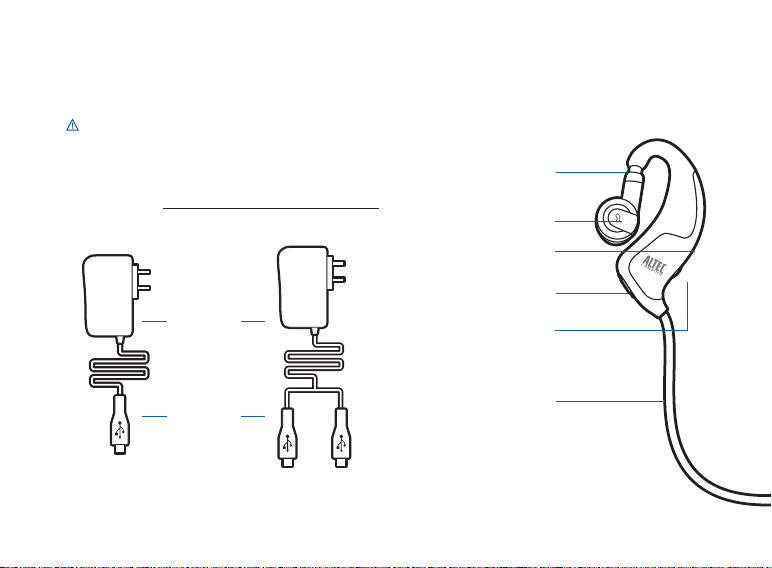
AC Charger
Micro-USB
Connector(s)
[BackBeat 903] [BackBeat 906]
Left Earpiece—Phone Controls
Telescoping/
Swivel Fit Adjustment
Call Control Button
(Answer/End)
LED Indicator
Charging Jack
Power/Pairing Button
Stereo Cable
Page 3
3
EN
Package Contents and Features
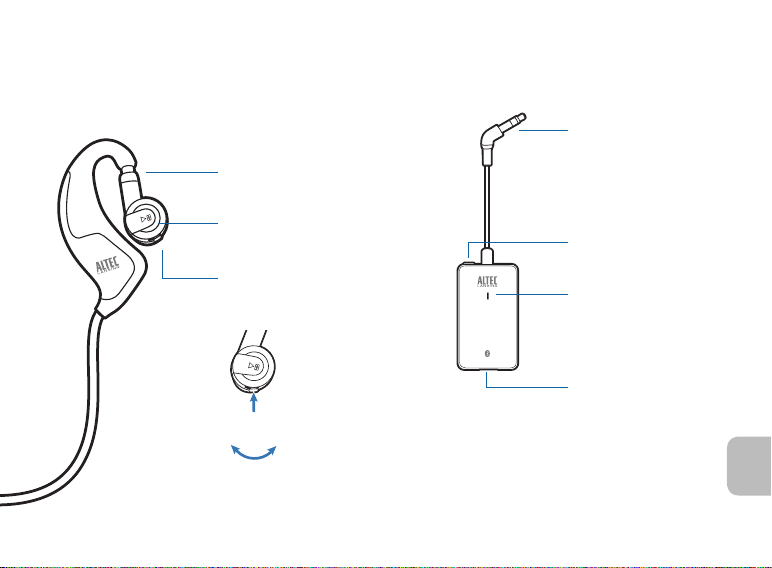
Right Earpiece—Music Controls
Telescoping/
Swivel Fit Adjustment
Play/Pause/
Bass Boost
OpenMic™ Button
Volume/Tracking/
Mute Button
Mute
Volume Down/
Track Back
Volume Up/
Track Fwd
Right Eartip
Bluetooth Adapter
[included with
BackBeat 906 only]
3.5mm connector
(for headphone jack)
Power/Pairing Button
LED Indicator
Charging Jack
Page 4
4
Charging Your Headphones or Bluetooth Adapter
1
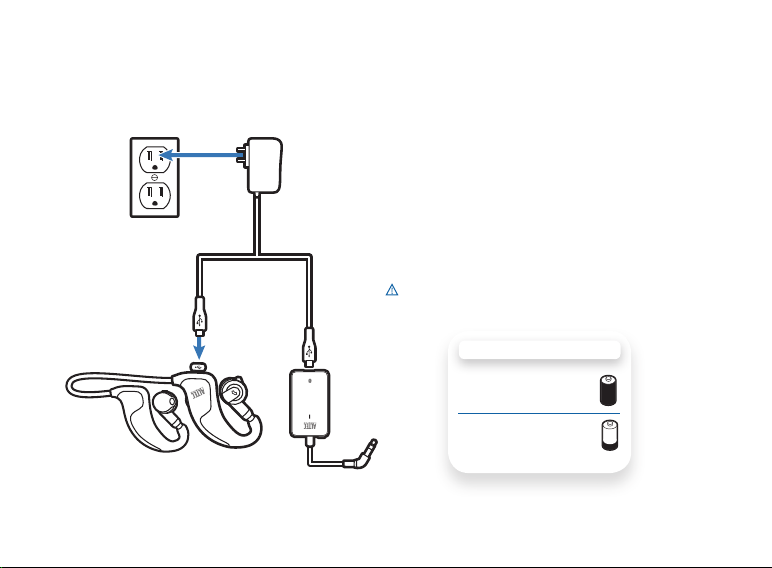
1 Plug the AC charger into a power outlet.
2 Connect the charger cable to the
headphones or Bluetooth adapter.
3 Charge each for at least 1 hour before first
time use, or 3 hours to fully charge.
The LED indicator glows red while charging.
2 2
[BackBeat 906 shown]
WARNING Do not use your headphones or
Bluetooth adapter while they are connected to the
charger.
CHARGING TIME
3 hours ...................
Full charge
1 hour .....................
Minimum charge
before first use
Page 5
5
EN
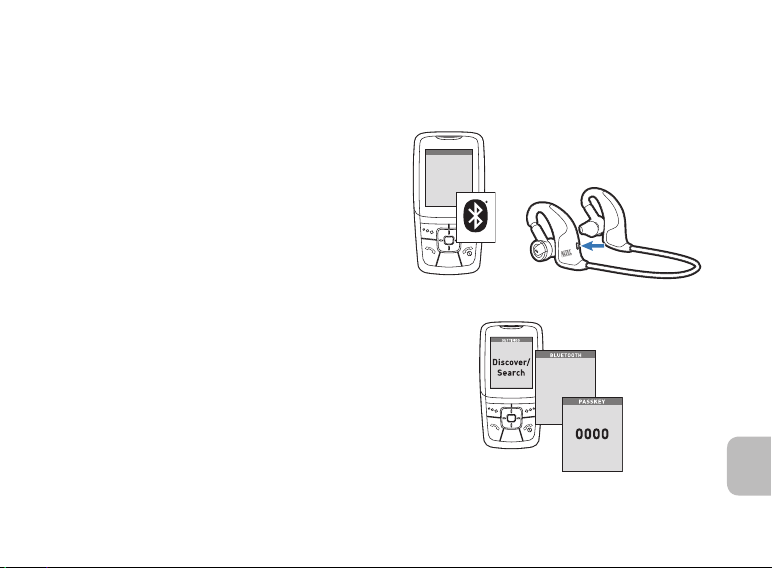
1 Turn on your phone’s or device’s Bluetooth
9xxBackBeat
SETTINGS
SETTINGS
Time and Date
Phone Settings
Bluetooth
Sound Settings
Network Services
Security
Reset Settings
feature.
2 With the headphones off, press and hold the
Power/Pairing button until the LED indicator
flashes blue and red.
3 Use the phone or device menu to search
for the Bluetooth headphones and select
9xxBackBeat.
See your phone’s or device’s user guide for more
information.
4 If prompted, enter 0000 for the PIN code/
passkey.
Pairing is successful when the LED indicator
flashes blue.
®
1
2
3
4
Page 6
6
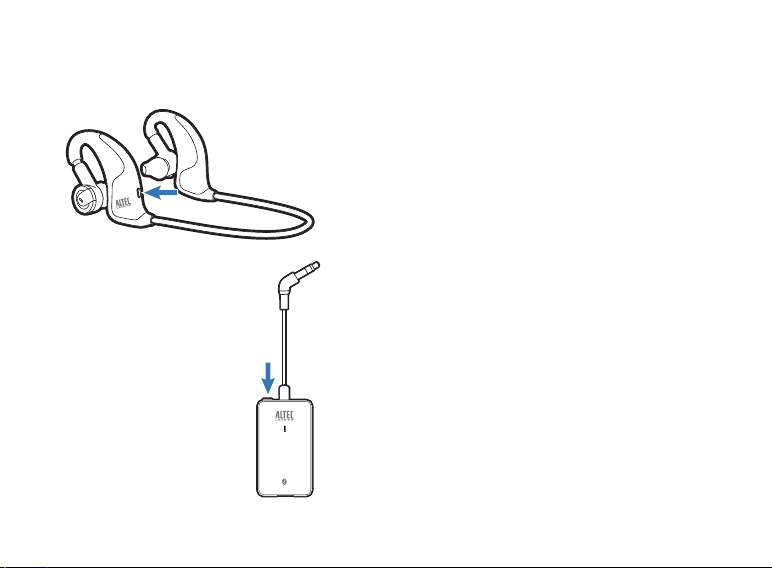
Pairing Your Headphones and Bluetooth Adapter
1 With the headphones off, press and hold the
Power/Pairing button until the LED Indicator
flashes blue and red.
2 With the adapter off, press and hold the
Power/Pairing button until the LED Indicator
flashes blue and red.
1
2
3 The headphones and adapter will both
rapidly flash blue when paired successfully.
Both are now ready for use.
[BackBeat 906 only]
Page 7
7
EN
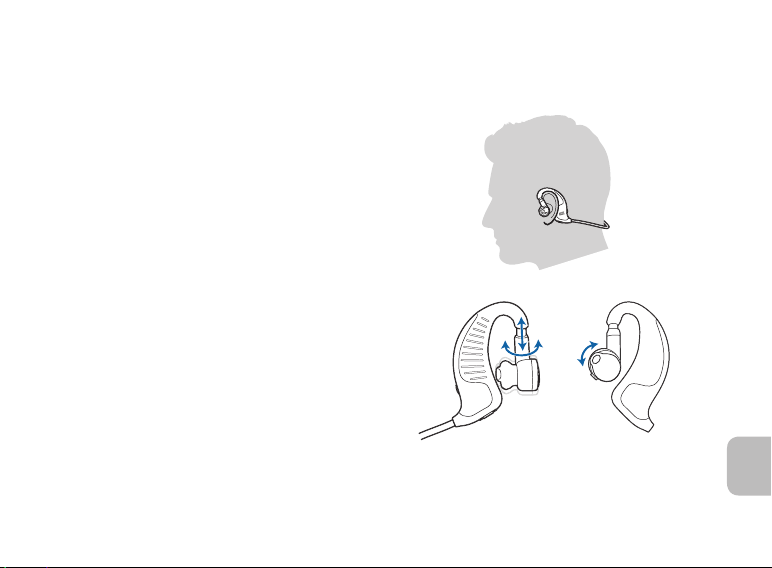
For optimal sound performance and a secure,
comfortable fit, the headphones should be adjusted
to rest gently in your ear and around the back of
your neck.
1 Drape the stereo cable behind your neck.
2 Guide one earpiece behind your ear and
secure the eartip inside your ear using the
telescoping/swivel adjustments.
3 Repeat step 2 with the other earpiece and
continue to adjust the fit in either ear until
both eartips rest comfortably and securely
in your ears.
Adjusting the Fit
1
2
Page 8

8
Headphones Phone Controls and Indicators
Action Indicator Light Tone
Turn on the
headphones
Turn off the
headphones
Answer/end
a call
Make a call Enter the number on your
Reject a call Press and hold the call control
Check battery
power
Press and hold the power/
pairing button for 2 seconds.
Press and hold the power/
pairing button for 4 seconds.
Tap the call control button. Three blue flashes (repeating)
phone and press send.
button for 2 seconds.
With headphones powered
on, tap the power/pairing
button. The indicator flashes
red to show the charge level.
Glows blue for 2 seconds,
then turns off.
Glows red for 4 seconds,
then turns off.
while phone is ringing. Blue flash
every 2 seconds while on a call.
Blue flash every 2 seconds
while call is in progress.
None Single long
Red flashes: Battery level:
1 More than 2/3 full
2 1/3 - 2/3 full
3 Less than 1/3 full
Four rising tones
Four falling tones
Three low tones
(repeating) while phone
is ringing. Single low
tone when call connects
or when disconnects.
Brief tones,
then ringing
low tone
None
Page 9

9
EN
Headphones Phone Controls and Indicators
Action Indicator Light Tone
Mute/unmute the
call (call in progress)
Adjust the call
volume (call in
progress)
WARNING Do not use headphones at high volumes for an extended period of time. Doing so can
cause hearing loss. Always listen at moderate levels. See www.alteclansing.com/headphonesafety for
more information on headphones and hearing.
Press in the volume/
tracking/mute button.
Tap the volume/tracking/mute
button forward (+) or
backward (-).
None Low and high tone to
mute, then a single low
tone every minute. High
and low tone to unmute.
None Brief low tone (2 low
tones when volume limit
is reached)
Page 10

10
Headphones Music Controls and Indicators
Action Indicator Light Tone
Play music Tap the play/pause button. None None
Pause-to-hear Tap the play/pause button
Move forward or
back one track
Answer a call while
listening to music
when music is playing.
Press and hold the volume/
tracking/mute button forward
or backwards for each track.
Tap the call control button.
Music will pause during call.
None None
None Single low tone for
Three blue flashes (repeating)
while phone is ringing. Blue
flash every 2 seconds while
on a call.
each track change
Three low tones
(repeating) while
phone is ringing.
Single low
tone when call
connects or when
disconnects.
Page 11

11
EN
Headphones Music Controls and Indicators
Action Indicator Light Tone
Reject a call while
listening to music
Adjust the volume
of music
NOTE To wirelessly stream stereo music or audio from a device to your headphones, your Bluetooth
device must support the Bluetooth Advanced Audio Distribution Profile (A2DP) profile. If your Bluetooth
device also supports the Audio/Video Remote Control Profile (AVRCP), you can use your headphones
to control music playback. If your device does not support the AVRCP profile, then you must use the
controls on your device to control music playback.
Press and hold the call
control button for 2 seconds.
Tap the volume/tracking/mute
button forward or backward.
None Single long low tone
None Brief low tone (2 low
tones when volume limit is
reached)
Page 12

12
WARRANTY BY PLANTRONICS AND ALTEC LANSING
Plantronics and Altec Lansing offer a one (1) year warranty to all Plantronics and Altec Lansing co-branded products (hereinafter
“Products”).
Limited Warranty. Plantronics/Altec Lansing warrants that the Products are free from defects in materials and workmanship, with
its obligations under this warranty being limited (save in the case of sole gross negligence causing death or personal injury) to
repair or replacement at its own expense provided a claim is made within the warranty period applicable to the Product.
Post replacement. Plantronics/Altec Lansing will provide replaced products with a minimum 6-month warranty or the remainder
of the original product’s warranty (12 months minus the time passed between the purchase date and the date the product failed),
whichever is greater.
WHAT DOES THIS WARRANTY NOT COVER? DAMAGE CAUSED BY, OR PERFORMANCE PROBLEMS RESULTING
FROM, USING THIS PRODUCT WITH A NON-PLANTRONICS/ NON-ALTEC LANSING AMPLIFIER, ADAPTER, SWITCHER
AND/OR CONNECTOR CABLE, ACCIDENT, ABUSE, MISUSE, OR AN ACT OF GOD (SUCH AS A FLOOD) ARE NOT
COVERED. IMPLIED WARRANTIES, INCLUDING THOSE OF MERCHANTABILITY, FITNESS FOR A PARTICULAR PURPOSE
AND NON-INFRINGEMENT SHALL (A) HAVE NO DURATION GREATER THAN 1 YEAR FROM THE DATE OF PURCHASE, (B)
TERMINATE AUTOMATICALLY AT THE END OF THAT PERIOD, AND (C) TO THE EXTENT PERMITTED BY LAW, BE EXCLUDED.
CONSEQUENTIAL AND INCIDENTAL DAMAGES, INCLUDING WITHOUT LIMITATION, LOSS OF PROPERTY AND THOSE
ARISING FROM BREACH OF ANY EXPRESS OR IMPLIED WARRANTY, ARE NOT THE RESPONSIBILITY OF PLANTRONICS,
AND TO THE EXTENT PERMITTED BY LAW, ARE EXCLUDED.
This warranty also does not cover Products that are modified or repaired by someone not authorised by Plantronics or without
Plantronics’/ Altec Lansing’ approval or that are subjected by the customer to misuse or unusual physical or electrical stress.
Products that have: (a) serial numbers or date tags that have been removed, altered or obliterated; (b) board serial numbers that
do not match each other, or board serial numbers that do not match the housing; or (c) nonconforming or non-Plantronics/ nonAltec Lansing housings or parts. Any of these voids the warranty. Consumable spares and accessories (unless they are found to
be non-functional or broken upon purchase of product), such as:
1. Cases and case parts
2. Modular Plugs
Page 13

13
EN
3. Cradles
4. Headbands
5. Lanyards
6. Pouches
7. Voice Tubes
8. Decorative Finishes
9. Switches
10. Eartips, Eartip Kits, Ear Cushions, Ear Loops and Ear BudeezTM
11. Chargers
12. Ipod adapters
13. 3.5/2.5 converters
14. Remote controls
15. Cables
No Other Warranties. Except as set forth above, and in the printed warranty which accompanies the Products, Plantronics/
Altec Lansing grant no other warranties, express or implied, by statute or otherwise, regarding the Products, their fitness for any
purpose, their quality, their marketability or otherwise.
Warranty by Distributor. The Distributor shall pass on to its customers a similar warranty to Plantronics’/ Altec Lansing’ standard
limited warranty for the Products, as set forth above, including all limitations set forth therein, and taking into account any national
mandatory law. The Distributor shall in writing advise Plantronics/ Altec Lansing of any national mandatory law that will affect the
warranty provided under the terms of this agreement to the customer.
Distributor Responsible for Warranty to Its Customers. The Distributor shall take all appropriate actions and do whatsoever
is necessary to notify and inform its customers that the Distributor and not Plantronics/ Altec Lansing is solely responsible for
performing all warranty obligations in accordance with this Section.
Support of Warranty. The Distributor shall assume and diligently perform all warranty obligations with respect to the Products
in accordance with the terms of Plantronics’/ Altec Lansing’ standard limited warranty for the Products as set forth in the
Page 14

14
printed warranty terms accompanying the Products and set forth in this section and shall indemnify, hold harmless and defend
Plantronics/ Altec Lansing from and against all actions, claims, demands, deeds, costs, attorneys’ fees and damage made or
brought against Plantronics/ Altec Lansing by any customer of the Distributor for breach of warranty.
Plantronics Not Responsible for Distributor’s Warranty. For the avoidance of doubt Plantronics/ Altec Lansing shall have no
liability whatsoever to the Distributor’s customers whose sole remedy shall be as provided by the Distributor under this section. In
no event shall Plantronics be liable for the cost of procurement of substitute goods by the Distributor or its customer, or for any
special consequential or incidental damages for breach of warranty or any other course.
Limitation of Liability. Plantronics’/ Altec Lansing liability under the terms of the above warranty is limited to replacement of
product units found to be defective in materials or workmanship. Plantronics/ Altec Lansing shall have no liability other than as
provided under warranty to distributor, whose sole remedy shall be as provided by Plantronics/ Altec Lansing under this section.
In no event shall Plantronics/ Altec Lansing be liable for the cost of procurement of substitute goods by distributor or for any
special, consequential, reliance or incidental damages, however caused, or under any theory of liability, even if Plantronics/ Altec
Lansing has been advised of the possibility of such damages. These limitations will apply notwithstanding the failure of essential
purpose of any limited remedy.
How To Get Warranty Service: To get this covered product repaired or replaced, you must contact Altec Lansing during the
warranty period by email ([email protected]). You must include in your email, your name, address, email address, telephone number, date of purchase and a complete description of the problem you are experiencing. In the United States, you may
alternatively contact Altec Lansing by telephone at 1-800-ALTEC88 – please be prepared to provide the same information. If the
problem appears to be related to a defect in material or workmanship, Altec Lansing will provide you a return authorization and
instructions for return shipment. Return shipments shall be at the customer’s expense, and the return must be accompanied by
the original proof of purchase. You should insure the shipment as appropriate because you are responsible for the product until it
arrives at Altec Lansing.
Page 15

15
EN
Page 16

www.alteclansing.com
HEADQUARTERS 535Rte.6&209,Milford,PA18337-0277•800-ALTEC-88.570-296-4434.•Fax570-296-6887
Patents pending.
©2008 Plantronics, Inc. All rights reserved. ALTEC, ALTEC LANSING, the Altec Lansing logo, BackBeat and OpenMic are
trademarks or registered trademarks of Altec Lansing, a division of Plantronics, Inc. Plantronics, the logo design, QuickPair,
and Sound Innovation are trademarks or registered trademarks of Plantronics, Inc. The Bluetooth® word mark and logos
are owned by the Bluetooth SIG, Inc. and any use of such marks by Plantronics, Inc. is under license. All other trademarks
appearing herein are the property of their respective owners.
80628-01 (10/08)
N10687
Z109
 Loading...