

Page 1

8-Port 10/100Mbps PoE Fast Ethernet Switch
FSD-808P
User’s Manual
Page 2

Trademarks
Copyright © PLANET Technology Corp. 2015.
Contents are subject to revision without prior notice.
PLANET is a registered trademark of PLANET Technology Corp. All other trademarks
belong to their respective owners.
Disclaimer
PLANET Technology does not warrant that the hardware will work properly in all
environments and applications, and makes no warranty and representation, either
implied or expressed, with respect to the quality, performance, merchantability, or
tness for a particular purpose.
PLANET has made every effort to ensure that this User’s Manual is accurate;
PLANET disclaims liability for any inaccuracies or omissions that may have
occurred.
Information in this User’s Manual is subject to change without notice and does not
represent a commitment on the part of PLANET. PLANET assumes no responsibility
for any inaccuracies that may be contained in this User’s Manual. PLANET makes
no commitment to update or keep current the information in this User’s Manual,
and reserves the right to make improvements to this User’s Manual and/or to the
products described in this User’s Manual, at any time without notice.
If you nd information in this manual that is incorrect, misleading, or incomplete,
we would appreciate your comments and suggestions.
FCC Warning
This equipment has been tested and found to comply with the limits for a Class A
digital device, pursuant to Part 15 of the FCC Rules. These limits are designed to
provide reasonable protection against harmful interference when the equipment is
operated in a commercial environment. This equipment generates, uses, and can
radiate radio frequency energy and, if not installed and used in accordance with
the Instruction manual, may cause harmful interference to radio communications.
Operation of this equipment in a residential area is likely to cause harmful
interference in which case the user will be required to correct the interference at
his own expense.
Page 3

CE Mark Warning
This is a Class A product. In a domestic environment, this product may cause radio
interference, in which case the user may be required to take adequate measures.
Energy Saving Note of the Device
This power required device does not support Standby mode operation.
For energy saving, please remove the power cable to disconnect the device from
the power circuit.
Without removing power cable, the device will still consume power from the
power source. In view of Saving the Energy and reduce the unnecessary power
consumption, it is strongly suggested to remove the power connection for the
device if this device is not intended to be active.
WEEE Warning
To avoid the potential effects on the environment and human health
as a result of the presence of hazardous substances in electrical and
electronic equipment, end users of electrical and electronic equipment
should understand the meaning of the crossed-out wheeled bin
symbol. Do not dispose of WEEE as unsorted municipal waste and
have to collect such WEEE separately.
Revision
PLANET 8-Port 10/100Mbps PoE Fast Ethernet Switch User’s Manual
For Model: FSD-808P
REVISION: 2.1 (JANUARY, 2015)
Part No.: 2351-A31190-005
Page 4

Table of Contents
1. Introduction ............................................................................................... 5
1.1 Checklist ............................................................................................. 5
1.2 Product Description .............................................................................. 5
1.3 Features ............................................................................................. 6
1.4 Specications ...................................................................................... 7
2. Hardware Description .................................................................................. 8
2.1 Front Panel ......................................................................................... 8
2.2 Rear Panel .......................................................................................... 9
3. Hardware Installation .................................................................................10
3.1 Desktop Installation ............................................................................ 10
3.2 Rack Mounting ...................................................................................11
3.3 Product Applications ............................................................................ 13
3.3.1 Connecting end node or Switch .................................................. 13
3.3.2 Department/ Workgroup PoE Switch: ..........................................14
3.4 Power over Ethernet Powered Device ...................................................15
4. Power over Ethernet Overview ....................................................................16
5. Troubleshooting .........................................................................................19
Appendix A Networking Connection ..................................................................20
A.1 DATA OUT PoE Switch RJ45 Port Pin Assignments (Port 1 to Port 8) .......20
A.2 10/100Mbps, 10/100Base-TX ...............................................................20
Page 5

1. Introduction
1.1 Checklist
Check the contents of your package for the following parts:
z FSD-808P x 1
z User’s Manual x 1
z Power Cord x 1
z Two Rack-mounting Brackets with Attachment Screws x 8
If any of these pieces are missing or damaged, please contact your dealer
immediately; if possible, retain the carton including the original packing material,
and use them again to repack the product in case there is a need to return it to us
for repair.
1.2 Product Description
To fulll the demand of sufcient PoE power for network applications with Fast
Ethernet transmission performance, the FSD-808P, a new member of the 802.3af
PoE Fast Ethernet Switch family, is an 8-port 10/100Mbps Power over Ethernet
Switch, which features high performance Fast Ethernet IEEE 802.3af PoE (up to
15.4 watts) with a total of 125-watt PoE budget. Its eight 802.3af PoE ports,
with PoE power injector function, are able to drive eight IEEE 802.3af compliant
powered devices. The FSD-808P also provides a simple, cost-effective, and nonblocking wire-speed performance in a compact 12-inch metal housing for desktop
deployment for SOHO ofce or department network application.
All RJ45 copper interfaces in the FSD-808P support 10/100Mbps auto-negotiation
for optimal speed detection over RJ45 Category 5 or 5e cabling. It also supports
standard auto-MDI/MDI-X that can detect the type of connection to any Ethernet
device without requiring special straight-through or crossover cable.
5
Page 6

1.3 Features
RJ45 Interface
Eight 10/100Mbps Fast Ethernet ports
8 ports support 48V DC power to PoE powered device
Power over Ethernet
Complies with IEEE 802.3af Power over Ethernet End-Span PSE
Up to 8 IEEE 802.3af devices powered
Supports PoE Power up to 15.4 watts for each PoE port
Auto detects powered device (PD)
Circuit protection prevents power interference between ports
Remote power feeding up to 100m
Switching
Hardware based 10/100Mbps auto-negotiation and auto MDI/MDI-X
Flow control for full duplex operation and back pressure for half duplex opera-
tion
Integrates address look-up engine, supporting 2K absolute MAC addresses
Automatic address learning and address aging
Hardware
12-inch desktop size, 1U height
LED indicators for PoE ready and PoE activity
Fanless design
6
Page 7
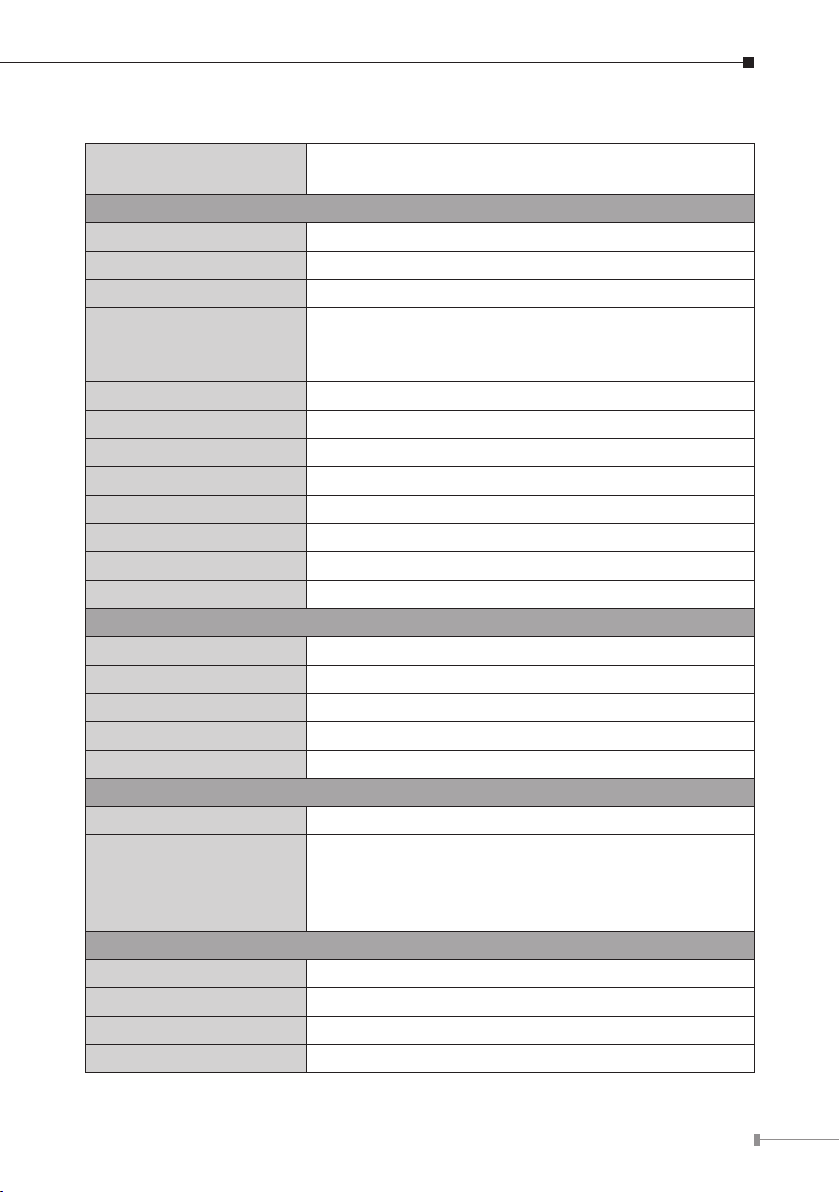
1.4 Specications
Model
Hardware Specications
Hardware Version 2
Network Connector 8-Port RJ45 for 10/100BASE-TX
PoE Inject Port 8-Port with 802.3af PoE injector function
LED Display
Switch Architecture Store and Forward switch architecture
MAC Address 2K MAC address table with auto learning function
Switch Fabric 1.6Gbps
Switch Throughput 1.19Mpps@64Bytes
Power Requirements AC 100~240V, 50/60Hz, 1.2A max.
Power Consumption Max.135 watts / 460 BTU
Dimensions (W x D x H) 280 x 180 x 43 mm
Weight 1.65kg
Power over Ethernet
PoE Standard IEEE 802.3af Power over Ethernet / PSE
PoE Power Supply Type End-Span
PoE Power Output Per port 48V DC, 350mA. max. 15.4 watts
Power Pin Assignment 1/2(+), 3/6(-)
PoE Power Budget 125 watts
Standard Conformances
Regulation Compliance FCC Class A, CE
Standard Compliance
Environment
Operating Temperature 0 ~ 50 degrees C
Storage Temperature -40 ~ 70 degrees C
Operating Humidity 5 ~ 95%, relative humidity, non-condensing
Storage Humidity 5 ~ 95%, relative humidity, non-condensing
FSD-808P
8-Port 10/100Mbps PoE Fast Ethernet Switch
System: Power (Green)
Per port : PoE (Orange)
LNK/ACT (Green)
IEEE 802.3
IEEE 802.3u
IEEE 802.3x
IEEE 802.3af
Ethernet
Fast Ethernet
Flow Control
Power over Ethernet
7
Page 8

2. Hardware Description
The FSD-808P provides two different running speeds -- 10Mbps and 100Mbps -and can automatically distinguish the speed of the incoming connection.
This section describes the hardware features of the FSD-808P. For easier
management and control of the Switch, familiarize yourself with its display
indicators and ports. Front panel illustrations in this chapter display the unit LED
indicators. Before connecting any network device to the FSD-808P, please read this
chapter carefully.
2.1 Front Panel
The Front Panel of the FSD-808P PoE Ethernet Switch consists of 8x auto-sensing
10/100Mbps Ethernet RJ45 ports. The LED Indicators are also located on the front
panel of the FSD-808P.
Figure 2-1: FSD-808P Switch Front Panel
2.1.1 LED Indicators
System
LED Color Function
PWR Green Light: Indicates the Switch has power.
Per 10/100Mbps Port
LED Color Function
PoE Orange
LNK/ACT Green
Light: Indicates the port is providing 48V DC in-line
power.
Light: Indicates the link through that port is successfully
established.
Blinking: Indicates that the Switch is actively sending or
receiving data over that port.
8
Page 9

2.2 Rear Panel
The rear panel of the FSD-808P indicates an AC inlet power socket, which accepts
input power from 100 to 240V AC, 50-60Hz.
100~240V AC
50 / 60Hz, 3A max.
Figure 2-2: FSD-808P Switch Rear Panel
1. The device is a power-required device, meaning it will not work
till it is powered. If your networks should be active all the time,
please consider using UPS (Uninterrupted Power Supply) for your
device. It will prevent you from network data loss or network
Power
Notice
downtime.
2. In some areas, installing a surge suppression device may also
help to protect your FSD-808P from being damaged by unregulated surge or current to the FSD-808P or the power adapter.
9
Page 10

3. Hardware Installation
Start up
Please refer to the following for your cabling:
10/100BASE-TX
All 10/100BASE-TX ports come with auto-negotiation capability. They automatically
support 10/100BASE-TX and 10BASE-T networks. Users only need to plug a
working network device into one of the 10/100BASE-TX ports, and then turn on
the FSD-808P. The port will automatically run at 10Mbps, 20Mbps, 100Mbps or
200Mbps after negotiating with the connected device.
Cabling
Each 10/100BASE-TX port uses RJ45 sockets -- similar to phone jacks -- for
connection to unshielded twisted-pair cable (UTP). The IEEE 802.3 / 802.3u Fast
Ethernet standard requires Category 5, 5e UTP for 100Mbps 100Base-TX. 10Base-T
networks can use Cat. 3, 4 and 5 (see table below). Maximum distance is 100
meters (328 feet).
Port Type Cable Type Connector
10BASE-T Cat. 3, 4, 5, 2-pair RJ45
100BASE-TX Cat. 5, 5e UTP, 2-pair RJ45
Any Ethernet devices like hubs/PCs can connect to the FSD-808P by using straightthrough wires. The eight 10/100Mbps ports are auto-MDI/MDI-X, which can be
used on straight-through or crossover cable.
3.1 Desktop Installation
To install the Switch on desktop, simply follow the following steps:
Step 1 Attach the rubber feet to the recessed areas on the bottom of the Switch
as shown in Figure 3-1.
Figure 3-1: Attaching the Rubber Feet to the PoE Fast Ethernet Switch
10
Page 11

Step 2: Place the Switch on desktop near an AC power source.
Step 3: Keep enough ventilation space between the Switch and the surrounding
objects.
When choosing a location, please keep in mind the environmental
restrictions discussed in Chapter 1, Section 4, under Specification.
Note
Step 4: Connect your Switch to 802.3af complied Power Devices (PD) and other
network devices.
A. Connect one end of a standard network cable to the 10/100 RJ45 ports
on the front panel of the Switch.
B. Connect the other end of the cable to the network devices such as
printer servers, workstations or routers, etc.
Connection to the Switch requires UTP Category 5, 5e, 6 network
cabling with RJ45 tips. For more information, please see the
Note
Step 5: Supply power to the Switch.
When the Switch receives power, the Power LED should remain solid Green.
Cabling Specifications in Appendix A.
A. Connect one end of the power cable to the Switch.
B. Connect the power plug of the power cable to a standard wall outlet.
3.2 Rack Mounting
To install the Switch in a 19-inch standard rack, follow the instructions described
below.
Step 1: Place your PoE Fast Ethernet Switch on a hard at surface, with the front
panel positioned towards your front side.
11
Page 12

Step 2: Attach a rack-mount bracket to each side of the Switch with supplied
screws attached to the package. Figure 3-2 shows how to attach brackets
to one side of the Switch.
Figure 3-2: Attaching the Brackets to the Switch.
You must use the screws supplied with the mounting brackets.
Damage caused to the parts by using incorrect screws would invali-
Note
Step 3: Secure the brackets tightly.
Step 4: Follow the same steps to attach the second bracket to the opposite side.
Step 5: After the brackets are attached to the Switch, use suitable screws to
date the warranty.
securely attach the brackets to the rack, as shown in Figure 3-3.
Figure 3-3: Mounting the Switch in a Rack
Step 6: Proceed with Steps 4 and 5 under session 3.1 Desktop Installation to
connect the network cabling and supply power to your Switch.
12
Page 13

3.3 Product Applications
3.3.1 Connecting end node or Switch
1. Place the FSD-808P on a smooth surface or fasten the mounting brackets
purchased separately with the provided screws in a standard 19” rack.
2. Connect the power cord to the power inlet socket of the FSD-808P and the other
end into the local power source outlet. When the Switch receives power, the
Power LED should remain solid Green.
3. Connect the other switch or PC to one port of the FSD-808P using Category
3/4/5/5e UTP/STP cabling.
4. Connect another switch or PC to the other port of the FSD-808P by following the
same process as described in Step 3.
Note
Figure 3-4: End Node or Switch Connection
Cable Distance for Switch
The cable distance between the FSD-808P and PC should not
exceed 100 meters for UTP/STP cable.
Make sure the wiring is correct
Category 3/4/5 cable can be used for 10Mbps operation. To
reliably operate your network at 100Mbps, you must use an
Unshielded Twisted-Pair (UTP) Category 5/5e cable, or better Data
Grade cabling. While a Category 3 or 4 cable may initially seem
to work, it will soon cause data loss.
13
Page 14

3.3.2 Department/ Workgroup PoE Switch:
Providing eight PoE in-line power interfaces, the FSD-808P can easily build a
power that can be the centrally-controlled IP phone system, IP Camera system
and Wireless AP group for the enterprise. For instance, up to 8 cameras can be
installed around the corner in the company for surveillance demands or up to 8
Wireless AP to build a wireless roaming environment in the ofce. Without the
power-socket limitation, the Switch makes the installation of cameras or wireless
AP easier and more efcient.
14
Figure 3-5: Department / Workgroup PoE Switch Connection
Page 15

3.4 Power over Ethernet Powered Device
3~5 watts
6~12 watts
Voice over IP phones
Enterprise can install PoE VoIP Phone, ATA and other Ethernet/
non-Ethernet end-devices to the central where UPS is installed
for uninterruptible power system and power control system.
Wireless LAN Access Points
Access points can be installed anywhere in Museums, Tourist
Sites, Airports, Hotels, Campuses, Factories and, Warehouses.
10~12 watts
3~12 watts
IP Surveillance
IP cameras can be installed in any location in Enterprises,
Museums, Campuses, Hospitals and Banks. No electrician is
needed as IP power is used.
PoE Splitter
PoE Splitter splits the PoE 48V DC over the Ethernet cable into
5/12V DC power output. It frees the device deployment from
restrictions due to power outlet locations, which eliminate the
costs for additional AC wiring and reduce the installation time.
15
Page 16

4. Power over Ethernet Overview
What is PoE?
Based on the global standard IEEE 802.3af, PoE is a technology for wired Ethernet,
the most widely installed local area network technology adopted today. PoE allows
the electrical power necessary for the operation of each end-device to be carried
by data cables rather than by separate power cords. New network applications,
such as IP Cameras, VoIP Phones, and Wireless Networking, can help enterprises
improve productivity. It minimizes wires that must be used to install the network
for offering lower cost, and less power failures.
IEEE 802.3af also called Data Terminal equipment (DTE) power via Media
dependent interface (MDI) is an international standard to dene the transmission
for power over Ethernet. The 802.3af is delivering 48V power over RJ45 wiring.
Besides, 802.3af also denes two types of source equipment: Mid-Span and End-
Span.
Mid-Span
Mid-Span device is placed between legacy switch and the powered device. MidSpan is tap the unused wire pairs 4/5 and 7/8 to carry power; the other four
are for data transmission.
End-Span
End-Span device is directly connected with powered device. End-Span could also
tap wires 1/2 and 3/6.
PoE System Architecture
The specication of PoE typically requires two devices: the Powered Source
Equipment (PSE) and the Powered Device (PD). The PSE is either an End-
Span or a Mid-Span, while the PD is a PoE-enabled terminal, such as IP Phones,
Wireless LAN, etc. Power can be delivered over data pairs or spare pairs of
standard CAT-5 cabling.
16
Page 17

How is Power Transferred Through the Cable
A standard CAT5 Ethernet cable has four twisted pairs, but only two of these are
used for 10BASE-T and 100BASE-T. The specication allows two options for using
these cables for power as shown in Figure 2 and Figure 3:
The spare pairs are used. Figure 2 shows the pair on pins 4 and 5 connected
together and forming the positive / negative supply, and the pair on pins 7 and 8
connected and forming the positive / negative supply. (In fact, a late change to the
spec allows either polarity to be used)
POWER SOURCING
EQUIPMENT (PSE)
4
5
SPARE PAIR
1
TX
2
SIGNAL PAIR
3
RX
6
SIGNAL PAIR
7
8
SPARE PAIR
48V
+ / -
+
/
-
Figure 1 - Power Supplied over the Spare Pins
The data pairs are used. Since Ethernet pairs are transformers coupled at each
end, it is possible to apply DC power to the center tap of the isolation transformer
without upsetting the data transfer. In this mode of operation the pair on pins 3
and 6 and the pair on pins 1 and 2 can be of either polarity.
POWERED DEVICE
(PD)
4
5
1
RX
2
3
6
7
8
DC / DC
Converter
Converter
TX
POWER SOURCING
EQUIPMENT (PSE)
+ / -
TX
/
-
+
48V
RX
4
5
1
2
3
6
7
8
SPARE PAIR
SIGNAL PAIR
SIGNAL PAIR
SPARE PAIR
POWERED DEVICE
(PD)
4
5
1
2
3
6
7
8
Figure 2 - Power Supplied over the Data Pins
RX
DC / DC
Converter
TX
17
Page 18

When to install PoE
Consider the following scenarios:
z You’re planning to install the latest VoIP Phone system to minimize cabling
building costs when your company moves into a new ofce next month.
z The company staff has been clamoring for a wireless access point in the picnic
area behind the building so they can work on their laptops through lunch, but
the cost of electrical power to the outside is not affordable.
z Management asks for IP Surveillance Cameras and business access systems
throughout the facility, but they would rather avoid another electrician’s
payment.
References:
IEEE Std 802.3af-2003 (Amendment to IEEE Std 802.3-2002, including IEEE Std
802.3ae-2002), 2003 Page(s):0_1-121
White Paper on Power over Ethernet (IEEE 802.3af)
http://www.poweroverethernet.com/articles.php?article_id=52
Microsemi / PowerDsine
http://www.microsemi.com/PowerDsine/
Linear Tech
http://www.linear.com/
18
Page 19

5. Troubleshooting
This chapter contains information to help you solve problems. If the Switch is
not functioning properly, make sure the Ethernet Switch was set up according to
instructions in this manual.
The Link LED is not lit.
Solution:
Check the cable connection and remove duplex mode of the Switch.
Performance is bad.
Solution:
Check the full duplex status of the Switch. If the Ethernet Switch is set to full
duplex and the partner is set to half duplex, then the performance will be poor.
100BASE-TX port link LED is lit, but the trafc is irregular.
Solution:
Check whether the attached device is not set to dedicate full duplex. Some devices
use a physical or software switch to change duplex modes. Auto-negotiation may
not recognize this type of full-duplex setting.
Why the Switch doesn’t connect to the network.
Solution:
Check the LNK/ACT LED on the switch. Try another port on the Switch. Make sure
the cable is installed properly. Make sure the cable is the right type. Turn off the
power. After a while, turn on the power again.
Why connecting PoE device to FSD-808P cannot be powered on.
Solution:
Please check the cable type of the connection from the FSD-808P (port 1 to port
8) to the other end. The cable should be an 8-wire UTP, Category 5 or above,
EIA568 cable within 100 meters. A cable with only 4-wire, short loop or over 100
meters will affect the power supply.
Please check and assure the device is fully complied with IEEE 802.3af standard.
What is the power output of each IEEE 802.af PoE port?
Solution:
Each PoE port supports 48V DC, 350mA, max 15.4-watt power output. Detect
and inject by the standard of IEEE 802.3af.
19
Page 20

Appendix A Networking Connection
A.1 PoE RJ-45 Port Pin Assignments (End-Span)
PIN NO RJ45 POWER ASSIGNEMNT
1 2 3 4 5 6 7 8
1
2
3
6
A.2 10/100Mbps, 10/100BASE-TX
When connecting the Switch to another Fast Ethernet switch, a straight-through or
crossover cable might be necessary. Each port of the Switch supports auto-MDI/
MDI-X detection. That means you can directly connect the Switch to any Ethernet
devices without making a crossover cable. The following table and diagram show
the standard RJ45 receptacle/ connector and their pin assignments:
RJ45 Connector Pin Assignment
Contact
1 Tx + (transmit) Rx + (receive)
2 Tx – (transmit) Rx – (receive)
3 Rx + (receive) Tx + (transmit)
4, 5 Not used
6 Rx – (receive) Tx – (transmit)
7, 8 Not used
Media Dependent Interface
MDI
z Power +
z Power +
z Power -
z Power -
MDI-X
Media Dependent Interface-Cross
20
Page 21

The standard cable, RJ45 pin assignment
The standard RJ45 receptacle/connector
There are 8 wires on a standard UTP/STP cable and each wire is color-coded. The
following shows the pin allocation and color of straight cable and crossover cable
connection:
Straight Cable
12345678
12345678
Cross Over Cable
12345678
12345678
SIDE 1
SIDE 2
SIDE 1
SIDE 2
SIDE 1
1 = White/Orange
2 = Orange
3 = White/Green
4 = Blue
5 = White/Blue
6 = Green
7 = White/Brown
8 = Brown
SIDE 1 SIDE 2
1 = White/Orange
2 = Orange
3 = White/Green
4 = Blue
5 = White/Blue
6 = Green
7 = White/Brown
8 = Brown
SIDE 2
1 = White/Orange
2 = Orange
3 = White/Green
4 = Blue
5 = White/Blue
6 = Green
7 = White/Brown
8 = Brown
1 = White/Green
2 = Green
3 = White/Orange
4 = Blue
5 = White/Blue
6 = Orange
7 = White/Brown
8 = Brown
Figure A-1: Straight-through and Crossover Cables
Please make sure your connected cables are with the same pin assignment and
color as the above diagram before deploying the cables into your network.
21
Page 22

EC Declaration of Conformity
For the following equipment:
*Type of Product : 8-Port 10/100Mbps PoE Fast Ethernet Switch
*Model Number : FSD-808P
* Produced by:
Manufacturer‘s Name : Planet Technology Corp.
Manufacturer‘s Address
New Taipei City 231, Taiwan (R.O.C.).
is herewith confirmed to comply with the requirements set out in the Council Directive on the
Approximation of the Laws of the Member States relating to Electromagnetic Compatibility
Directive on (
2004/108/EC).
For the evaluation regarding the EMC, the following standards were applied:
Responsible for marking this declaration if the:
Manufacturer Authorized representative established within the EU
Authorized representative established within the EU (if applicable):
Company Name: Planet Technology Corp.
Company Address: 10F., No.96, Minquan Rd., Xindian Dist., New Taipei City 231, Taiwan
Person responsible for making this declaration
Name, Surname Kent Kang
Position / Title : Product Manager
: 10F., No.96, Minquan Rd., Xindian Dist.,
EN 55022 (2006 + A1:2007)
EN 55024 (1998 + A1:2001 + A2:2003)
EN 60950-1 (2006 + A11:2009 + A1:2010)
(R.O.C.)
Taiwan
25, Aug., 2011
Place Date Legal Signature
PLANET TECHNOLOGY CORPORATION
10F., No.96, Minquan Rd., Xindian Dist., New Taipei City, Taiwan, R.O.C. Tel:886-2-2219-9518 Fax:886-2-2219-9528
e-mail: sales@planet.com.tw http://www.planet.com.tw
 Loading...