

Page 1
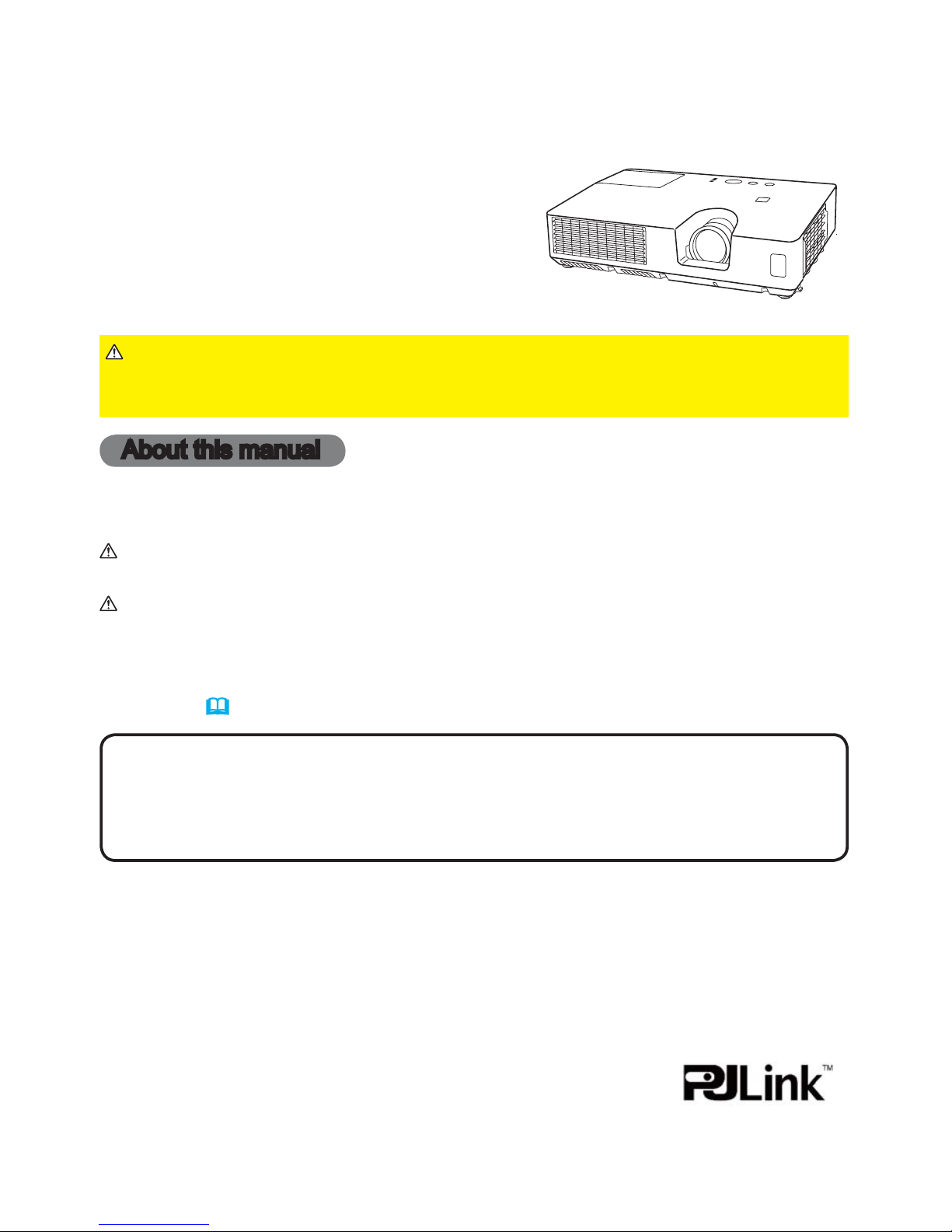
1
Projector
CP-X2021WN/CP-X2521WN/
CP-X3021WN
User's Manual (detailed)
Operating Guide
Thank you for purchasing this projector.
►Before using this product, please read all manuals for this
product. Be sure to read Safety Guide rst. After reading them, store them in a
safe place for future reference.
WARNING
• The information in this manual is subject to change without notice.
• The manufacturer assumes no responsibility for any errors that may appear in
this manual.
• The reproduction, transfer or copy of all or any part of this document is not
permitted without express written consent.
NOTE
Trademark acknowledgment
Various symbols are used in this manual. The meanings of these symbols are
described below.
About this manual
WARNING
CAUTION
This symbol indicates information that, if ignored, could possibly
result in personal injury or even death due to incorrect handling.
This symbol indicates information that, if ignored, could possibly
result in personal injury or physical damage due to incorrect
handling.
Please refer to the pages written following this symbol.
• Mac® is a registered trademark of Apple Inc.
• Windows
®
, DirectDraw® and Direct3D® are registered trademarks of Microsoft Corporation
in the U.S. and/or other countries.
• VESA and DDC are trademarks of the Video Electronics Standard Association.
•
HDMI, the HDMI logo, and High-Denition Multimedia Interface are trademarks or registered
trademarks of HDMI Licensing LLC in the United States and other countries.
• Trademark PJLink is a trademark applied for trademark rights in
Japan, the United States of America and other countries and areas.
• Blu-ray Disc
TM
and Blu-rayTM are trademarks of Blu-ray Disc
Association.
All other trademarks are the properties of their respective owners.
NOTICE This entry notices of fear of causing trouble.
Page 2
1
About The Symbols
Various symbols are used in this manual, the user’s manual and on the product
itself to ensure correct usage, to prevent danger to the user and others, and to
prevent property damage. The meanings of these symbols are described below.
It is important that you read these descriptions thoroughly and fully understand
the contents.
Projector
User's Manual - Safety Guide
Typical Symbols
This symbol indicates an additional warning (including cautions). An
illustration is provided to clarify the contents.
This symbol indicates a prohibited action. The contents will be clearly
indicated in an illustration or nearby (the symbol to the left indicates that
disassembly is prohibited).
This symbol indicates a compulsory action. The contents will be clearly
indicated in an illustration or nearby (the symbol to the left indicates that
the power plug should be disconnected from the power outlet).
Thank you for purchasing this projector.
NOTE
• The information in this manual is subject to change without notice.
• The manufacturer assumes no responsibility for any errors that may appear in
this manual.
• The reproduction, transmission or use of this document or contents is not
permitted without express written authority.
WARNING •
Before using, read these user's manuals of this projector to ensure
correct usage through understanding. After reading, store them in a safe place for
future reference. Incorrect handling of this product could possibly result in personal injury
or physical damage. The manufacturer assumes no responsibility for any damage caused
by mishandling that is beyond normal usage defined in these manuals of this projector.
WARNING
This symbol indicates information that, if ignored, could
possibly result in personal injury or even death due to
incorrect handling.
CAUTION
This symbol indicates information that, if ignored, could
result possibly in personal injury or physical damage
due to incorrect handling.
Read this Safety Guide first.
Page 3
2
Safety Precautions
WARNING
Never use the projector if a problem should occur.
Abnormal operations such as smoke, strange odor, no image, no sound,
excessive sound, damaged casing or elements or cables, penetration of
liquids or foreign matter, etc. can cause a fire or electrical shock.
In such case, immediately turn off the power switch and then disconnect the
power plug from the power outlet. After making sure that the smoke or odor
has stopped, contact your dealer. Never attempt to make repairs yourself
because this could be dangerous.
• The power outlet should be close to the projector and easily accessible.
Use special caution for children and pets.
Incorrect handling could result in fire, electrical shock, injury, burn or vision
problem.
Use special caution in households where children and pets are present.
Do not insert liquids or foreign object.
Penetration of liquids or foreign objects could result in fire or electrical shock.
Use special caution in households where children are present.
If liquids or foreign object should enter the projector, immediately turn off the
power switch, disconnect the power plug from the power outlet and contact
your dealer.
• Do not place the projector near water (ex. a bathroom, a beach, etc.).
• Do not expose the projector to rain or moisture. Do not place the projector
outdoors.
• Do not place flower vases, pots, cups, cosmetics, liquids such as water, etc
on or around the projector.
• Do not place metals, combustibles, etc on or around the projector.
• To avoid penetration of foreign objects, do not put the projector into a case
or bag together with any thing except the accessories of the projector,
signal cables and connectors.
Never disassemble and modify.
The projector contains high voltage components. Modification and/or disassembly of
the projector or accessories could result in fire or electrical shock.
• Never open the cabinet.
• Ask your dealer to repair and clean insider.
Do not give the projector any shock or impact.
If the projector should be shocked and/or broken, it could result in an injury,
and continued use could result in fire or electrical shock.
If the projector is shocked, immediately turn off the power switch, disconnect
the power plug from the power outlet and contact your dealer.
Do not place the projector on an unstable surface.
If the projector should be dropped and/or broken, it could result in an injury,
and continued use could result in fire or electrical shock.
• Do not place the projector on an unstable, slant or vibrant surface such as
a wobbly or inclined stand.
• Use the caster brakes placing the projector on a stand with casters.
• Do not place the projector in the side up position, the lens up position or
the lens down position.
• In the case of a ceiling installation or the like, contact your dealer before
installation.
Disconnect the
plug from the
power outlet.
Do not
disassemble.
Page 4
3
WARNING
Be cautious of High temperatures of the projector.
High temperatures are generated when the lamp is lit. It could result in fire or
burn. Use special caution in households where children are present.
Do not touch about the lens, air fans and ventilation openings during use or
immediately after use, to prevent a burn. Take care of ventilation.
• Keep a space of 30 cm or more between the sides and other objects such
as walls.
• Do not place the projector on a metallic table or anything weak in heat.
• Do not place anything about the lens, air fans and ventilation openings of
the projector.
• Never block the air fan and ventilation openings.
• Do not cover the projector with a tablecloth, etc.
• Do not place the projector on a carpet or bedding.
Never look through the lens or openings when the lamp is on.
The powerful light could adversely affect vision.
Use special caution in households where children are present.
Use only the correct power cord and the correct power outlet.
Incorrect power supply could result in fire or electrical shock.
• Use only the correct power outlet depending on the indication on the
projector and the safety standard.
• The enclosed power cord must be used depending on the power outlet to
be used.
Be cautious of the power cord connection.
Incorrect connection of the power cord could result in fire or electrical shock.
• Do not touch the power cord with a wet hand.
• Check that the connecting portion of the power cord is clean (with no dust),
before using. Use a soft and dry cloth to clean the power plug.
• Insert the power plug into a power outlet firmly. Avoid using a loose,
unsound outlet or contact failure.
Be sure to connect with ground wire.
Connect the ground terminal of AC inlet of this unit with the ground terminal
provided at the building using the correct power cord; otherwise, fire or
electric shock can result.
• Don’t take the core of power cord away.
Safety Precautions (continued)
Surely connect
the ground wire.
Page 5
4
WARNING
Be careful in handling the light source lamp.
The projector uses a high-pressure mercury glass lamp made of glass.
The lamp can break with a loud bang, or burn out. When the bulb bursts,
it is possible for shards of glass to fly into the lamp housing, and for gas
containing mercury to escape from the projector’s vent holes.
Please carefully read the section “Lamp”.
Be careful in handling the power cord and external connection
cables.
If you keep using a damaged the power cord or cables, it can cause a fire
or electrical shock. Do not apply too much heat, pressure or tension to the
power cord and cables.
If the power cord or cables is damaged (exposed or broken core wires, etc.),
contact your dealer.
• Do not place the projector or heavy objects on the power cord and cables.
Also, do not place a spread, cover, etc, over them because this could result
in the inadvertent placing of heavy objects on the concealed power cord or
cables.
• Do not pull the power cord and cables. When connecting and
disconnecting the power cord or cables, do it with your hand holding the plug
or connector.
• Do not place the cord near the heater.
• Avoid bending the power cord sharply.
• Do not attempt to work on the power cord.
Be careful in handling the battery of the remote control.
Incorrect handling of the battery could result in fire or personal injury. The
battery may explode if not handled properly.
• Keep the battery away from children and pets. If swallowed consult a
physician immediately for emergency treatment.
• Do not allow the battery in a fire or water.
• Avoid fire or high-temperature environment.
• Do not hold the battery with the metallic tweezers.
• Keep the battery in a dark, cool and dry play.
• Do not short circuit the battery.
• Do not recharge, disassemble or solder the battery.
• Do not give the battery a physical impact.
• Use only the battery specified in the other manual of this projector.
• Make sure the plus and minus terminals are correctly aligned when loading
the battery.
• If you observe a leakage of the battery, wipe out the flower and then
replace the battery. If the flower adheres your body or clothes, rinse well with
water.
• Obey the local laws on disposing the battery.
Safety Precautions (continued)
Page 6
5
Safety Precautions (continued)
CAUTION
Be careful in moving the projector.
Neglect could result in an injury or damage.
• Do not move the projector during use. Before moving, disconnect the
power cord and all external connections, and close the slide lens door or
attach the lens cap.
• Avoid any impact or shock to the projector.
• Do not drag the projector.
• For moving the projector, use the enclosed case or bag if provided.
Do not put anything on top of the projector.
Placing anything on the projector could result in loss of balance or falling,
and cause an injury or damage. Use special caution in households where
children are present.
Do not attach anything other than specified things to the projector.
Neglect could result in an injury or damage.
• Some projector has a screw thread in a lens part. Do not attach anything
other than specified options (such as conversion lens) to the screw thread.
Avoid a smoky, humid or dusty place.
Placing the projector in a smoke, a highly humid, dusty place, oily soot or
corrosive gas could result in fire or electrical shock.
• Do not place the projector near a smoky, humid or dusty place (ex.
a smoking space, a kitchen, a beach, etc.). Do not place the projector
outdoors.
• Do not use a humidifier near the projector.
Take care of the air filter to normal ventilate.
The air filter should be cleaned periodically. If the air filter becomes clogged
by dust or the like, internal temperature rises and could cause malfunction.
The projector may display the message such as “CHECK THE AIR FLOW”
or turn off the projector, to prevent the internal heat level rising.
• When the indicators or a message prompts you to clean the air filter, clean
the air filter as soon as possible.
• If the soiling will not come off the air filter, or it becomes damaged, replace
the air filter.
• Use the air filter of the specified type only. Please order the air filter
specified in the other manual of this projector to your dealer.
• When you replace the lamp, replace also the air filter. The air filter may be
attached when you buy a replacement lamp for this projector.
• Do not turn on the projector without air filter.
Avoid a high temperature environment.
The heat could have adverse influence on the cabinet of the projector and
other parts. Do not place the projector, the remote control and other parts in
direct sunlight or near a hot object such as heater, etc.
Avoid Magnetism.
Manufacture strongly recommends to avoid any magnetic contact that is not
shielded or protected on or near the projector itself. (ie.,. Magnetic Security
Devices, or other projector accessory that contains magnetic material that has not
been provided by the manufacture etc.) Magnetic objects may cause interruption
of the projector's internal mechanical performance which may interfere with cooling
fans speed or stopping, and may cause the projector to completely shut down
.
Page 7
6
Safety Precautions (continued)
NOTE
Do not give the remote control any physical impact.
A physical impact could cause damage or malfunction of the remote control.
• Take care not to drop the remote control.
• Do not place the projector or heavy objects on the remote control.
Take care of the lens.
• Close the slide lens door or attach the lens cap to prevent the lens surface being
scratched when the projector is not used.
• Do not touch the lens to prevent fog or dirt of the lens that cause deterioration of display
quality.
• Use commercially available lens tissue to clean the lens (used to clean cameras,
eyeglasses, etc.). Be careful not to scratch the lens with hard objects.
Take care of the cabinet and the remote control.
Incorrect care could have adverse influence such as discoloration, peeling paint, etc.
• Use a soft cloth to clean the cabinet and control panel of the projector and the remote
control. When excessively soiled dilute a neutral detergent in water, wet and wring out the
soft cloth and afterward wipe with a dry soft cloth. Do not use undiluted detergent directly.
• Do not use an aerosol sprays, solvents, volatile substances or abrasive cleaner.
• Before using chemical wipes, be sure to read and observe the instructions.
• Do not allow long-term close contact with rubber or vinyl.
About bright spots or dark spots.
Although bright spots or dark spots may appear on the screen, this is a unique characteristic of
liquid crystal displays, and such do not constitute or imply a machine defect.
Be careful of printing of the LCD panel.
If the projector continues projecting a still image, inactive images or 16:9 aspect images in
case of 4:3 panel, etc., for long time, the LCD panel might possibly be printed.
CAUTION
Remove the power cord for complete separation.
• For safety purposes, disconnect the power cord if the projector is not to be
used for prolonged periods of time.
• Before cleaning, turn off and unplug the projector. Neglect could result in
fire or electrical shock.
Ask your dealer to cleaning inside of the projector about every
year.
Accumulations of dust inside the projector cause result in fire or malfunction.
Cleaning inside is more effective if performed before every humid periods
such as rainy season.
• Do not clean inside yourself because it is dangerous.
Disconnect the
plug from the
power outlet.
Page 8

7
Safety Precautions (continued)
NOTE
About consumables.
Lamp, LCD panels, polarizors and other optical components, and air filter and cooling fans
have a different lifetime in each. These parts may need to be replaced after a long usage
time.
• This product isn’t designed for continuous use of long time. In the case of continuous use
for 6 hours or more, or use for 6 hours or more every day (even if it isn’t continuous), or
repetitious use, the lifetime may be shortened, and these parts may need to be replaced
even if one year has not passed since the beginning of using.
• Any inclining use beyond the adjustment range explained in these user’s manuals may
shorten the lifetimes of the consumables.
Before turning on the power, make the projector cool down adequately.
After turning the projector off, pushing the restart switch or interrupting of the power supply,
make the projector cool down adequately. Operation in a high temperature state of the
projector causes a damage of the electrode and un-lighting of the lamp.
Avoid strong rays.
Any strong ray (such as direct rays of the sun or room lighting) onto the remote control
sensors could invalidate the remote control.
Avoid radio interference.
Any interfering radiation could cause disordered image or noises.
• Avoid radio generator such as a mobile telephone, transceiver, etc. around the projector.
About displaying characteristic.
The display condition of the projector (such as color, contrast, etc.) depends on
characteristic of the screen, because the projector uses a liquid crystal display panel. The
display condition can differ from the display of CRT.
• Do not use a polarized screen. It can cause red image.
Turn the power on/off in right order.
To prevent any trouble, turn on/off the projector in right order mentioned below unless
specifying.
• Power on the projector before the computer or video tape recorder.
• Power off the projector after the computer or video tape recorder.
Take care not to fatigue your eyes.
Rest the eyes periodically.
Set the sound volume at a suitable level to avoid bothering other people.
• It is better to keep the volume level low and close the windows at night to protect the
neighborhood environment.
Connecting with notebook computer
When connecting with notebook computer, set to valid the RGB external image output
(setting CRT display or simultaneous display of LCD and CRT).
Please read instruction manual of the notebook for more information.
Page 9
8
• If the lamp should break (it will make a loud bang when it does), unplug
the power cord from the outlet, and make sure to request a replacement
lamp from your local dealer. Note that shards of glass could damage the
projector’s internals, or cause injury during handling, so please do not try to
clean the projector or replace the lamp yourself.
• If the lamp should break (it will make a loud bang when it does), ventilate
the room well, and make sure not to breathe the gas that comes out of the
projector vents, or get it in your eyes or mouth.
• Before replacing the lamp, make sure the power switch is off and the
power cable is not plugged in, then wait at least 45 minutes for the lamp to
cool sufficiently. Handling the lamp while hot can cause burns, as well as
damaging the lamp.
Lamp
The projector uses a high-pressure mercury glass lamp. The lamp can break with a
loud bang, or burn out, if jolted or scratched, handled while hot, or worn over time.
Note that each lamp has a different lifetime, and some may burst or burn out soon after
you start using them. In addition, when the bulb bursts, it is possible for shards of
glass to fly into the lamp housing, and for gas containing mercury to escape from the
projector’s vent holes.
About disposal of a lamp • This product contains a mercury lamp; do not put in trash.
Dispose of in accord with environmental laws.
For lamp recycling, go to www.lamprecycle.org. (in USA)
For product disposal, contact your local government agency or www.eiae.org (in the US)
or www.epsc.ca (in Canada).
For more information, call your dealer.
• Do not open the lamp cover while the projector is suspended from above.
This is dangerous, since if the lamp’s bulb has broken, the shards will
fall out when the cover is opened. In addition, working in high places is
dangerous, so ask your local dealer to have the lamp replaced even if the
bulb is not broken.
• Do not use the projector with the lamp cover removed. At the lamp
replacing, make sure that the screws are screwed in firmly. Loose screws
could result in damage or injury.
• Use the lamp of the specified type only.
• If the lamp breaks soon after the first time it is used, it is possible that
there are electrical problems elsewhere besides the lamp. If this happens,
contact your local dealer or a service representative.
• Handle with care: jolting or scratching could cause the lamp bulb to burst
during use.
• Using the lamp for long periods of time, could cause it dark, not to light up
or to burst. When the pictures appear dark, or when the color tone is poor,
please replace the lamp as soon as possible. Do not use old (used) lamps;
this is a cause of breakage.
WARNING
HIGH VOLTAGE HIGH TEMPERATURE HIGH PRESSURE
Disconnect
the plug from
the power
outlet
Page 10

9
Regulatory Notices
FCC Statement Warning
This device complies with part 15 of the FCC Rules. Operation is subject to the following
two conditions: (1) This device may not cause harmful interference, and (2) this device
must accept any interference received, including interference that may cause undesired
operation.
WARNING: This equipment has been tested and found to comply with the limits for a
Class B digital device, pursuant to Part 15 of the FCC Rules. These limits are designed
to provide reasonable protection against harmful interference in a residential installation.
This equipment generates, uses, and can radiate radio frequency energy and, if not
installed and used in accordance with the instructions, may cause harmful interference
to radio communications. However, there is no guarantee that interference will not occur
in a particular installation. If this equipment does cause harmful interference to radio
or television reception, which can be determined by turning the equipment off and on,
the user is encouraged to try to correct the interference by one or more of the following
measures:
- Reorient or relocate the receiving antenna.
- Increase the separation between the equipment and receiver.
- Connect the equipment into an outlet on a circuit different from that to which the receiver
is connected.
- Consult the dealer or an experienced radio/TV technician for help.
INSTRUCTIONS TO USERS: This equipment complies with the requirements of FCC
(Federal Communication Commission) equipment provided that the following conditions
are met. Some cables have to be used with the core set. Use the accessory cable or a
designated-type cable for the connection. For cables that have a core only at one end,
connect the core to the projector.
CAUTION: Changes or modifications not expressly approved by the party responsible for
compliance could void the user’s authority to operate the equipment.
For the Customers in CANADA
NOTICE: This Class B digital apparatus complies with Canadian ICES-003.
Warranty And After-Service
Unless seen any abnormal operations (mentioned with the first paragraph of
WARNING in this manual), when a problem occurs with the equipment, first refer to the
“Troubleshooting” section of the “Operating Guide”, and run through the suggested checks.
If this does not resolve the problem contact your dealer or service company. They will tell
you what warranty condition is applied.
Page 11

2
Contents
Introduction ...............3
Features ......................3
Checking the contents of package
... 3
Part names ....................4
Setting up . ................7
Arrangement ...................7
Connecting with your devices
.....10
Connecting to a power supply
.....15
Fastening the adapter cover ......
16
Using the security bar and slot . . . . 16
Remote control ............17
Installing the batteries ...........17
About the remote control signal . . . 17
Using as a simple PC mouse & keyboard
..18
Power on/off . .............19
Turning on the power . ..........19
Turning off the power . ..........20
Operating . ...............21
Adjusting the volume ............21
Temporarily muting the sound .....21
Selecting an input signal .........22
Searching an input signal . .......23
Selecting an aspect ratio .........23
Adjusting the projector's elevator . . 24
Adjusting the zoom and focus .....24
Using the automatic adjustment feature
... 25
Adjusting the position . ..........25
Correcting the keystone distortions
.. 26
Using the magnify feature ........27
Temporarily freezing the screen . . . 28
Temporarily blanking the screen . . 28
Using the menu function . .......29
EASY MENU...............31
A
SPECT
, A
UTO KEYSTONE
, K
EYSTONE
,
PICTURE MODE,
E
CO MODE,INSTALLATION
,
R
ESET
, F
ILTER TIME,LANGUAGE
,
A
DVANCED MENU,EXIT
PICTURE menu . ...........33
B
RIGHTNESS,CONTRAST,GAMMA,COLOR TEMP
,
C
OLOR
, T
INT,SHARPNESS,MY MEMORY
IMAGE menu . .............36
A
SPECT,OVER SCAN
,V
POSITION
,H
POSITION
,
H
PHASE
,H
SIZE
, A
UTO ADJUST EXECUTE
INPUT menu . .............39
P
ROGRESSIVE,VIDEO NR,COLOR SPACE
,
V
IDEO FORMAT,HDMI FORMAT,HDMI RANGE
,
C
OMPUTER IN
, F
RAME LOCK,RESOLUTION
SETUP menu ..............43
A
UTO KEYSTONE
,
K
EYSTONE
, A
UTO ECO MODE
,
E
CO MODE
,
I
NSTALLATION,STANDBY MODE
,
M
ONITOR OUT
AUDIO menu . .............46
V
OLUME,SPEAKER
, A
UDIO SOURCE
,
H
DMI AUDIO
SCREEN menu.............47
L
ANGUAGE,MENU POSITION
, B
LANK
,
S
TAR T U P
,
M
yScreen
, M
yScreen Lock
,
M
ESSAGE,SOURCE NAME,TEMPLATE
,C.C.
OPTION menu . ............53
A
UTO SEARCH
, A
UTO KEYSTONE
,
D
IRECT POWER ON
, A
UTO POWER OFF
,
U
SB TYPE B,LAMP TIME
, F
ILTER TIME
,
M
Y BUTTON,MY SOURCE,SERVICE
NETWORK menu ...........63
W
IRELESS SETUP
,W
IRELESS INFORMATION
,
W
IRED SETUP
,W
IRED INFORMATION
,
P
ROJECTOR NAME,MY IMAGE
, A
MX D.D
.,
P
RESENTATION,SERVICE
SECURITY menu ...........74
S
ECURITY PASSWORD CHANGE
,
M
YSCREEN PASSWORD,PIN LOCK
,
T
RANSITION DETECTOR,MY TEXT PASSWORD
,
M
Y TEXT DISPLAY,MY TEXT WRITING
Presentation tools . ........80
PC-LESS Presentation
.......80
Thumbnail Mode, Full Screen Mode,
Slideshow Mode, Playlist
USB Display
..................
89
Starting USB Display,
Right-Click menu, Floating menu,
Options window
Maintenance ..............93
Replacing the lamp .............93
Cleaning and replacing the air lter . . 95
Other care ....................97
Troubleshooting . ..........98
Related messages . ............98
Regarding the indicator lamps . . . 100
Resetting all settings ...........102
Phenomena that may be easy
to be mistaken for machine defects
. 102
Specifications ............107
Page 12
3
Introduction
• Keep the original packing materials, for future reshipment. Be sure
to use the original packing materials when moving the projector. Use special
caution for the lens.
• The projector may make a rattling sound when tilted, moved or shaken, since
a ap to control the air ow inside of the projector has moved. Be aware that
this is not a failure or malfunction.
NOTE
Introduction
The projector provides you with the broad use by the following features.
Checking the contents of package
9 This projector has a variety of I/O ports that supposedly cover for any
business scene. The HDMI port can support various image equipment which
have digital interface to get clearer pictures on a screen.
9 If you insert a USB storage device, such as a USB memory, into the USB
TYPE A port and select the port as the input source, you can view images
stored in the device.
9 This projector can be controlled and monitored via LAN connection.
Furthermore, you can use the designated USB wireless adapter (optional) to
establish wireless LAN connection.
9 This compact, lightweight projector uses a front exhaust system that keeps the
user comfortable by directing hot air away from the user.
Please see the Contents of package section in the User’s Manual (concise)
which is a book. Your projector should come with the items shown there. Require
of your dealer immediately if any items are missing.
Features
►Keep small parts away from children and pets. Take care
not to put in the mouth. If swallowed, consult a physician immediately for
emergency treatment.
WARNING
Page 13
4
Introduction
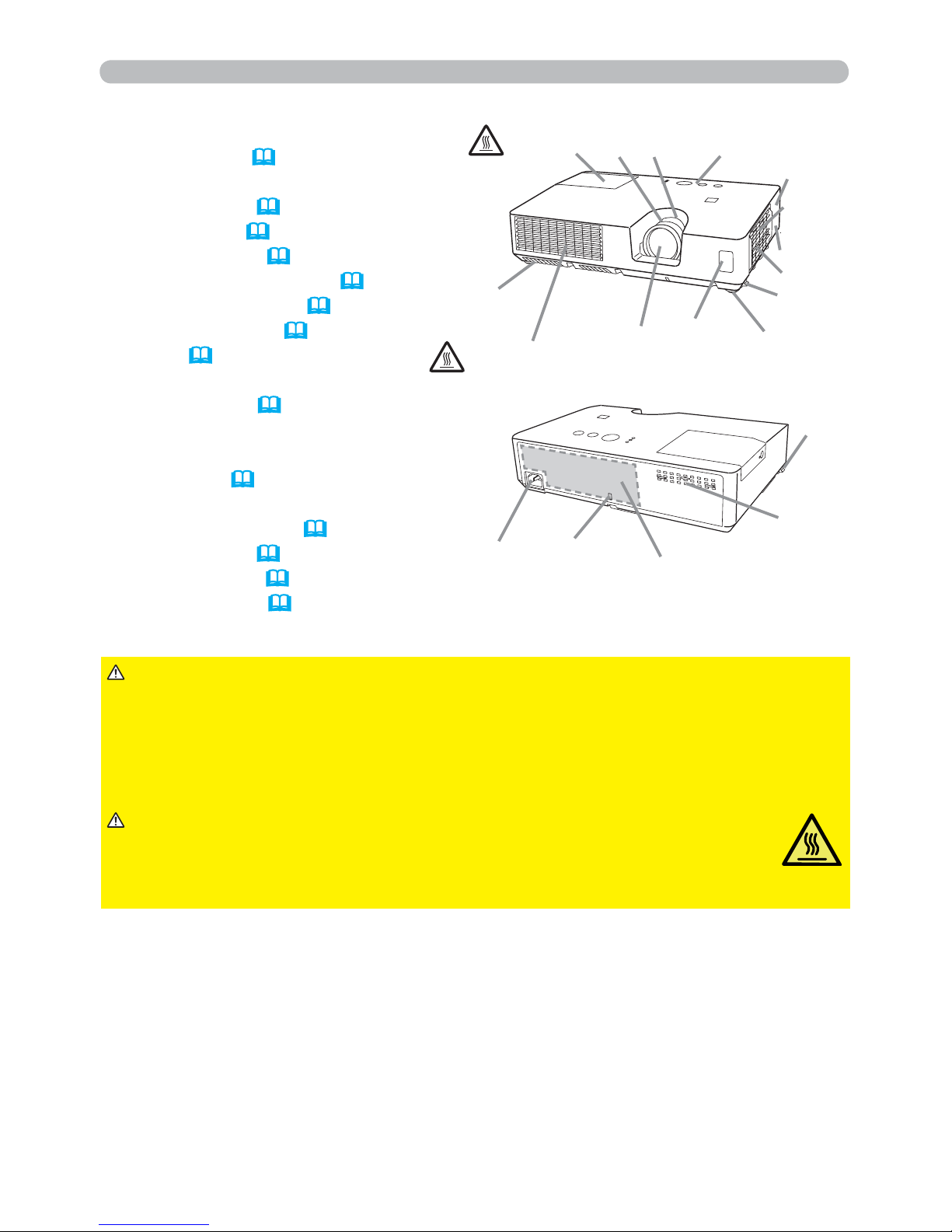
Part names
(1) Lamp cover (93)
The lamp unit is inside.
(2) FOCUS ring (24)
(3) ZOOM ring (24)
(4) Control panel (
5)
(5) Elevator buttons (x 2) (24)
(6) Elevator feet (x 2) (
24)
(7) Remote sensor (17)
(8) Lens (97)
(9) Intake vents
(10) Filter cover (
95)
The air lter and intake vent are
inside.
(11) Speaker (46)
(12) Exhaust vent
(13) AC IN (AC inlet) (15)
(14) Rear panel (
5)
(15) Security bar (16)
(16) Security slot (
16)
HOT!
HOT!
(12)
(1)
(2) (3) (4)
(7)
(9)
(8)
(10)
(6)
(5)
(11)
(6)
(15)
(13)
(16)
(14)
(5)
(9)
►Do not open or remove any portion of the product, unless the
manuals direct it.
►Do not subject the projector to unstable conditions.
►Do not apply a shock or pressure to this product.
►Do not look into the lens and the openings on the projector while the lamp is
on.
WARNING
►Do not touch around the lamp cover and the exhaust
vents during use or just after use, since it is too hot.
►Do not attach anything onto the lens except the lens cover of this
projector because it could damage the lens, such as melting the lens.
CAUTION
(continued on next page)
Page 14
5
Introduction
Part names (continued)
(continued on next page)
CONTROLMONITOR OUTAUDIO OUT
AC IN
LAN
HDMI
USB
DC5V 0.5A
TYPE A
USB
TYPE B
COMPUTER IN1 COMPUTER IN2
S-VIDEO
VIDEO AUDIO IN2
AUDIO IN1
(11)
(10)
(4)
(3)
(2) (7)
(8)
(9)
(13)(12)
(1)
(1) (3)(2)
(4)
(7)(6)
(5)
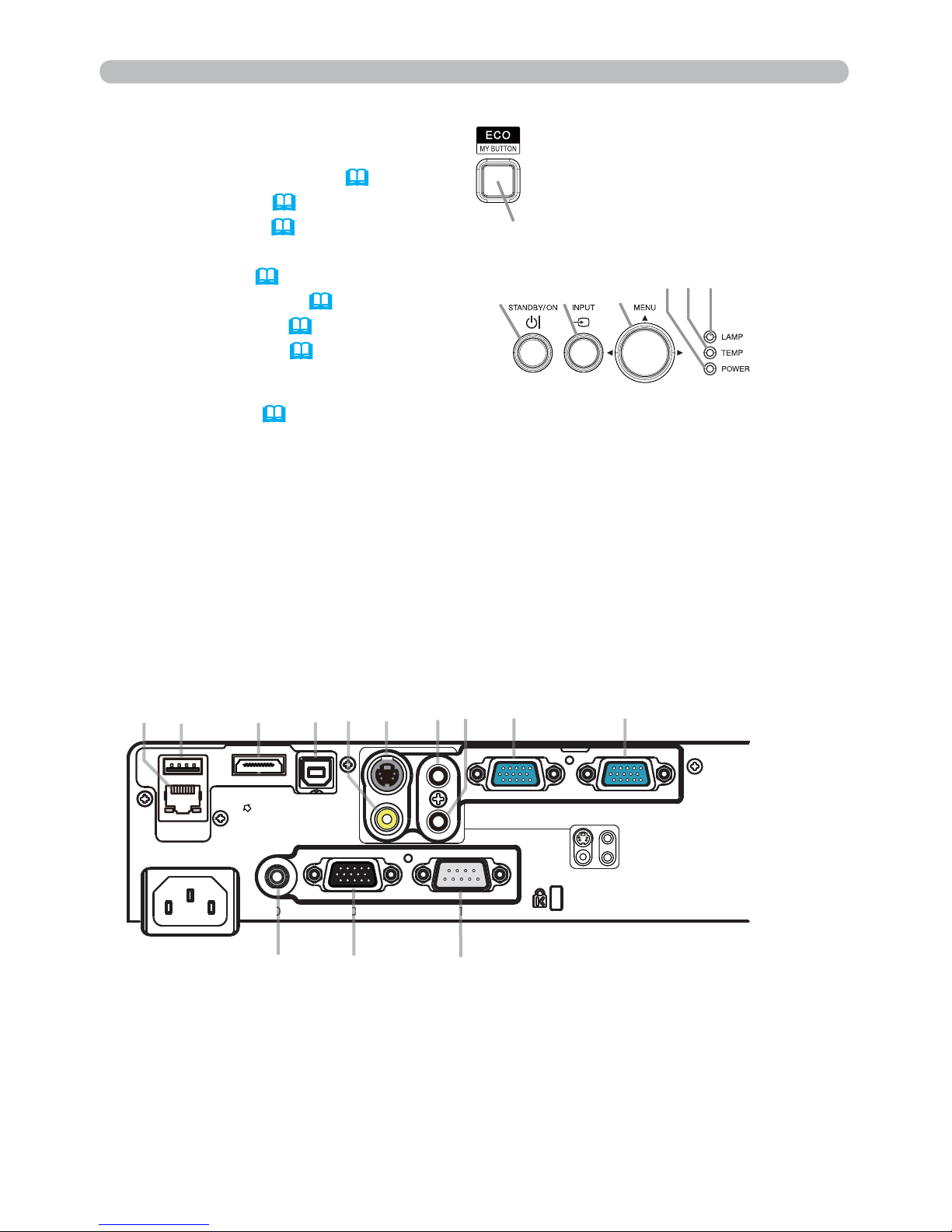
Rear panel
(
11 ~ 14)
(1) LAN port
(2) USB TYPE A port
(3) HDMI port
(4) USB TYPE B port
(5) VIDEO port
(6) S-VIDEO port
(7) AUDIO IN1 port
(8) AUDIO IN2 port
(9) COMPUTER IN1 port
(10) COMPUTER IN2 port
(11) AUDIO OUT port
(12) MONITOR OUT port
(13) CONTROL port
Control panel
(1) STANDBY/ON button (19)
(2) INPUT button (
22, 29)
(3) MENU button (29)
It consists of four cursor buttons.
(4) ECO
button (44)
(5) POWER indicator (
19, 100)
(6) TEMP indicator (100)
(7) LAMP indicator (100)
(5)
(6)
T
Page 15
6
Introduction
Part names (continued)
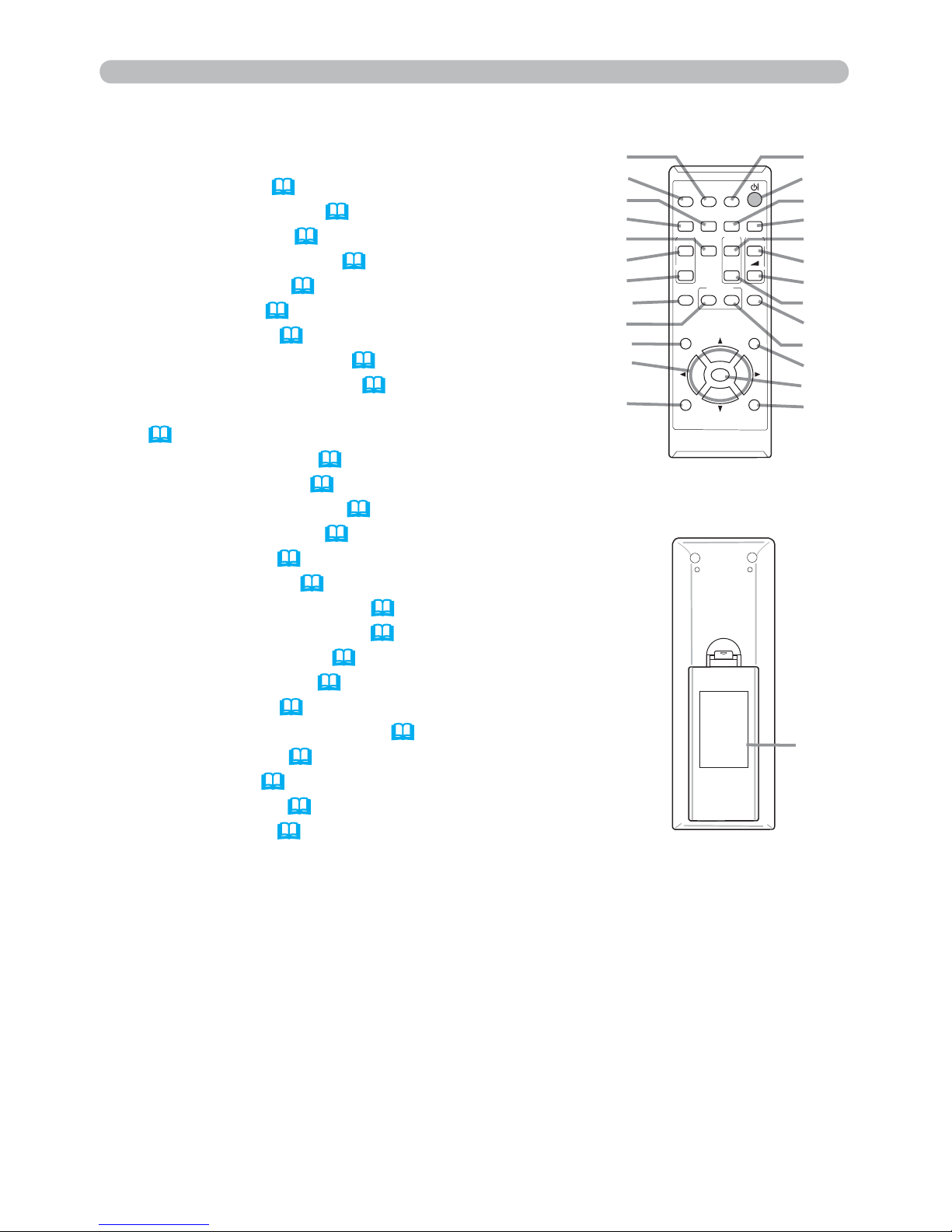
Remote control
(1) VIDEO button (
22)
(2) COMPUTER button (
22)
(3) SEARCH button (23)
(4) STANDBY/ON button (19)
(5) ASPECT button (
23)
(6) AUTO button (25)
(7) BLANK button (28)
(8) MAGNIFY - ON button (
27)
(9) MAGNIFY - OFF button (27)
(10) MY SOURCE/DOC.CAMERA button
(
22, 57)
(11) VOLUME - button (21)
(12) PAGE UP button (
18)
(13) PAGE DOWN button (18)
(14) VOLUME + button (
21)
(15) MUTE button (21)
(16) FREEZE button (
28)
(17) MY BUTTON - 1 button (56, 57)
(18) MY BUTTON - 2 button (
56, 57)
(19) KEYSTONE button (26)
(20) POSITION button (25, 29)
(21) MENU button (
29)
(22) ▲/▼/◄/► cursor buttons (29)
(23) ENTER button (
29)
(24) ESC button (29)
(25) RESET button (
29)
(26) Battery cover (17)
B a c k o f
the remote control
(2)
(1)
(6)
(5)
(16)
(8)
(9)
(19)
(17)
(20)
(22)
(24)
(10)
(4)
(3)
(7)
(12)
(14)
(11)
(13)
(15)
(18)
(21)
(23)
(25)
(26)
VIDEO
DOC.CAMERA
KEYSTONE
ASPECT
SEARCH
BLANK
MUTE
MY BUTTON
POSITION
ESC
MENU
RESET
COMPUTER
MY SOURCE/
AUTO
MAGNIFY
PAGE
DOWN
ON
OFF
FREEZE
UP
㧗
VOLUME
ENTER
Page 16
7
Setting up
Setting up
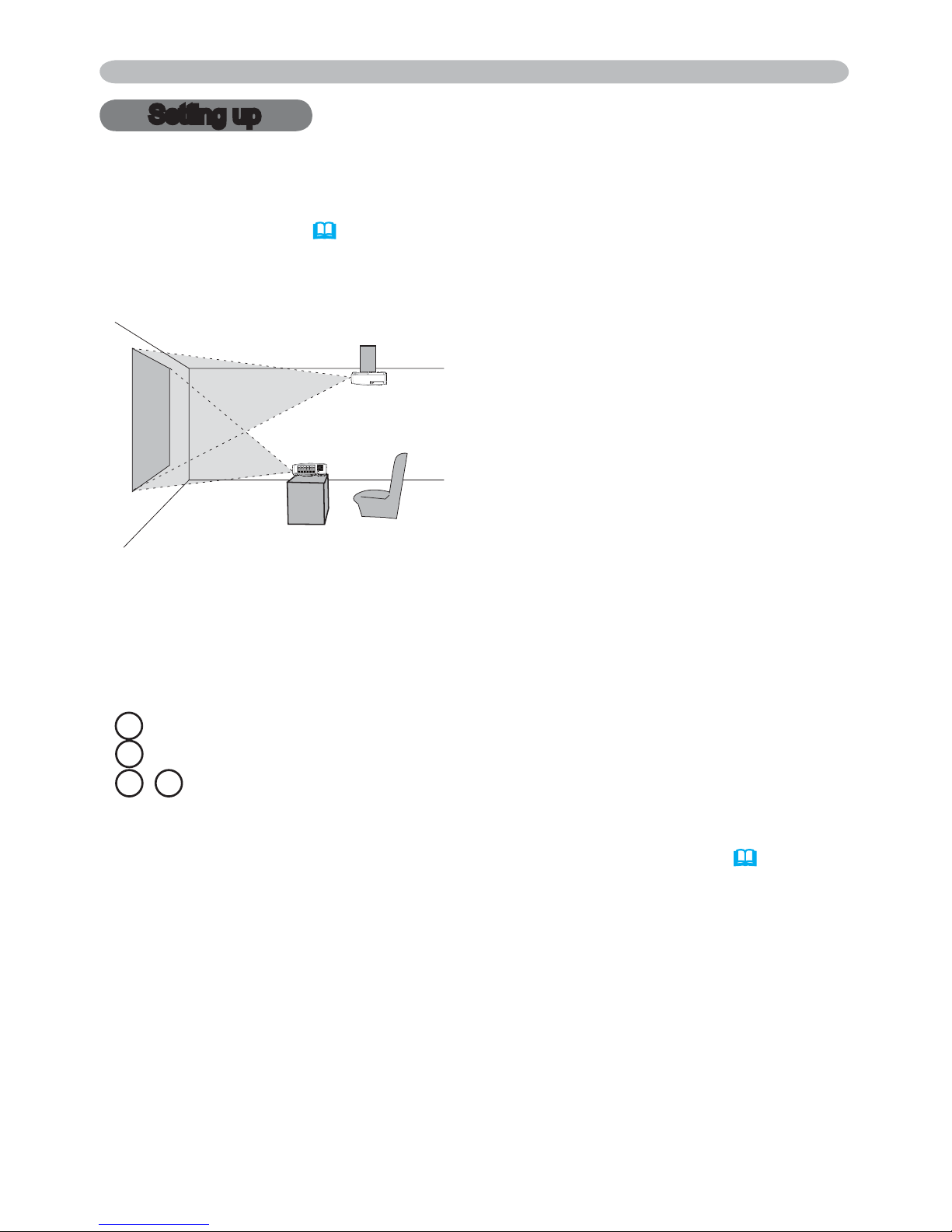
Install the projector according to the environment and manner the projector will be
used in.
For the case of installation in a special state such as ceiling mount, the specied
mounting accessories (
6SHFL¿FDWLRQV in the User’s Manual (concise)) and
service may be required. Before installing the projector, consult your dealer about
your installation.
Arrangement
Refer to tables T-1 and T-2 at the back of User's Manual (concise) as well as the
following to determine the screen size and projection distance.
The values shown in the table are calculated for a full size screen.
(continued on next page)
• If the projector is used at an altitude of about 1600 m (5250 feet) or higher,
set ALTITUDE of the SERVICE item in the OPTION menu to HIGH (
57).
Otherwise, set it to NORMAL. If the projector is used with a wrong setting, it may
cause damage to the projector itself or the parts inside.
a Screen size (diagonal)
b Projection distance (±10%, from the projector’s end)
c1 , c2 Screen height (±10%)
Page 17

8
Setting up
Arrangement (continued)
WARNING
(continued on next page)
►Install the projector where you can access the power
outlet easily. If an abnormality should occur, unplug the projector urgently.
Otherwise it could cause a re or electric shock.
►Do not subject the projector to unstable conditions. If the projector falls
or topples over, it could result in injury or damage to the projector and the
surrounding things. Using a damaged projector could result in a re and an
electric shock.
• Do not place the projector in unstable places, such as an inclined surface,
places subject to vibration, on top of a wobbly table or cart, or a surface that is
smaller than the projector.
• Do not put the projector on its side, front or rear position.
• Do not attach nor place anything on the projector unless otherwise specied in
the manual.
• Do not use any mounting accessories except the accessories specied by the
manufacturer. Read and keep the manuals of the accessories used.
• For special installation such as ceiling mounting, be sure to consult your dealer
beforehand.
►
'RQRWLQVWDOOWKHSURMHFWRUQHDUWKHUPDOO\FRQGXFWLYHRUÀDPPDEOH
things. Such things when heated by the projector could result in a re and burns.
• Do not place the projector on a metal stand.
►Do not place the projector where any oils, such as cooking or machine
oil, are used. Oil may harm the product, resulting in malfunction, or falling from
the mounted position.
►Do not place the projector in a place where it may get wet. Getting the
projector wet or inserting liquid into the projector could cause a re and an
electric shock, and damage the projector.
• Do not place the projector near water, such as in a bathroom, kitchen, or
poolside.
• Do not place the projector outdoors or by the window.
• Do not place anything containing liquid near the projector.
Page 18

9
Setting up
Arrangement (continued)
►3ODFHWKHSURMHFWRULQDFRROSODFHZLWKVXI¿FLHQW
ventilation. The projector may shutdown automatically or may malfunction if its
internal temperature is too high.
Using a damaged projector could result in a re and an electric shock.
• Do not place the projector in direct sunlight or near hot objects such as heaters.
• Do not place the projector where the air from an air conditioner or similar unit
will blow on it directly.
• Keep a space of 30 cm or more between a side of the projector and other
objects such as walls.
• Do not place the projector on carpet, cushions or bedding.
• Do not stop up, block nor cover the projector's vent holes. Do not place
anything around the projector that could be sucked in or stuck to the projector's
intake vents.
• Do not place the projector at places that are exposed to magnetic elds, doing
so can cause the cooling fans inside the projector to malfunction.
►Avoid placing the projector in smoky, humid or dusty place. Placing the
projector in such places could cause a re, an electric shock and malfunction of
the projector.
• Do not place the projector near humidiers. Especially for an ultrasonic
humidier, chlorine and minerals contained in tap water are atomized and could
be deposited in the projector causing image degradation or other problems.
• Do not place the projector in a smoking area, kitchen, passageway
or by the window.
• Position the projector to prevent light from directly hitting the projector's remote
sensor.
• Do not place the product in a place where radio interference may be caused.
• Check and correct the setting for ALTITUDE of SERVICE in the OPTION menu
according to the usage environment (
57). If the projector is used with a wrong
setting, it may cause damage to the projector itself or the parts inside.
• Keep heat-sensitive things away from the projector. Otherwise, they may be
damaged by the heat from the projector.
CAUTION
NOTICE
Page 19
10
Setting up
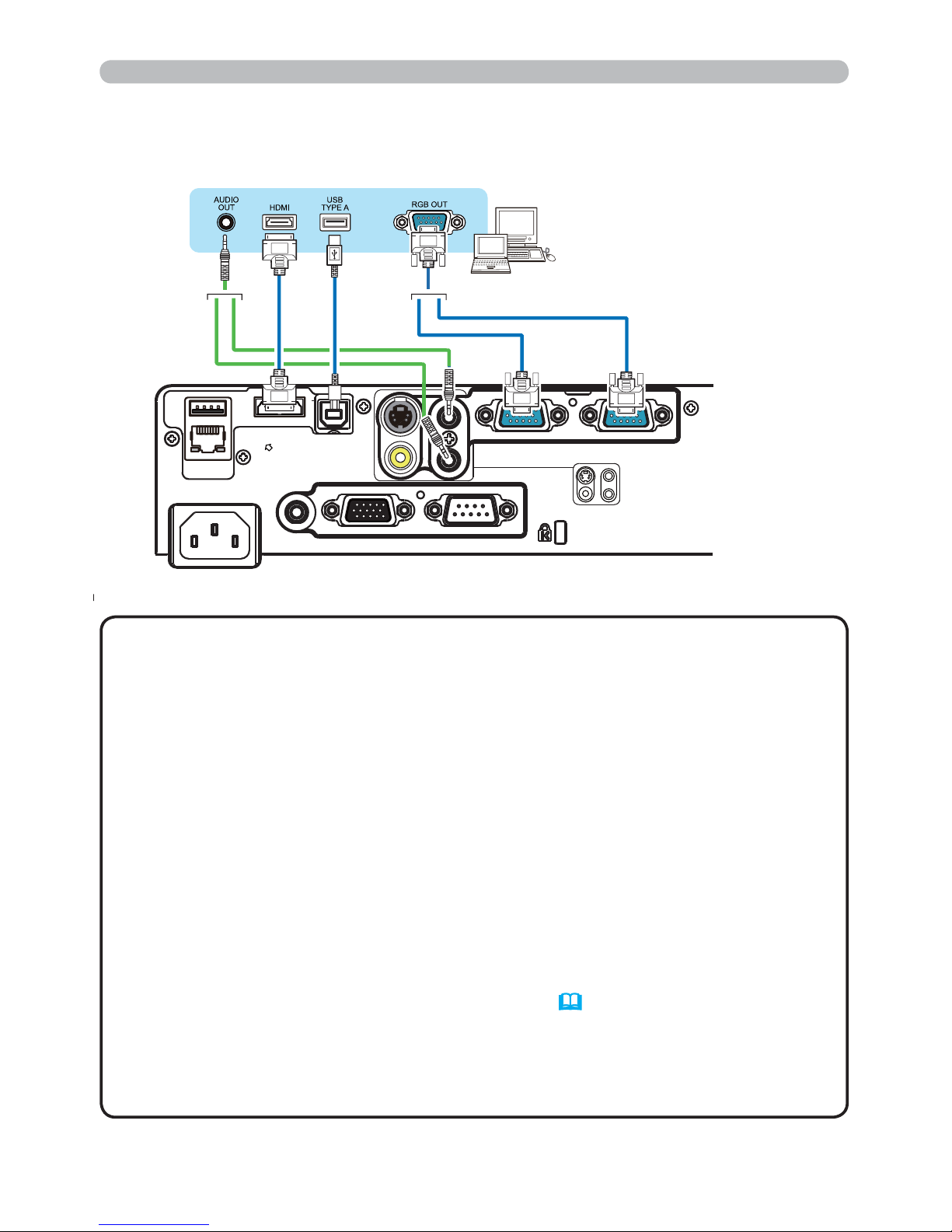
Connecting with your devices
Before connecting the projector to a device, consult the manual of the device to
conrm that the device is suitable for connecting with this projector and prepare
the required accessories, such as a cable in accord with the signal of the device.
Consult your dealer when the required accessory did not come with the product or
the accessory is damaged.
After making sure that the projector and the devices are turned off, perform
the connection, according to the following instructions. Refer to the gures in
subsequent pages.
Before connecting the projector to a network system, be sure to read Network
Guide too.
►Use only the appropriate accessories. Otherwise it could
cause a re or damage the projector and devices.
• Use only the accessories specied or recommended by the projector’s
manufacturer. It may be regulated under some standard.
• Neither disassemble nor modify the projector and the accessories.
• Do not use the damaged accessory. Be careful not to damage the accessories.
Route a cable so that it is neither stepped on nor pinched out.
WARNING
►For a cable with a core at only one end, connect the end
with the core to the projector. That may be required by EMI regulations.
CAUTION
• Plug-and-Play is a system composed of a computer, its operating system
and peripheral equipment (i.e. display devices). This projector is VESA DDC
2B compatible. Plug-and-Play can be used by connecting this projector to a
computer that is VESA DDC (display data channel) compatible.
-
Take advantage of this feature by connecting a computer cable to the
COMPUTER IN1 port (DDC 2B compatible). Plug-and-Play may not work
properly if any other type of connection is attempted.
-
Please use the standard drivers in your computer as this projector is a Plugand-Play monitor.
• Do not turn on or off the projector while connected to a device in
operation, unless that is directed in the manual of the device. Otherwise it may
cause malfunction in the device or projector.
• The function of some input ports can be selected according to your usage
requirements. Check the reference page indicated beside each port in the
following illustration.
• Be careful not to mistakenly connect a connector to a wrong port. Otherwise it
may cause malfunction in the device or projector.
- When connecting a connector to a port, make sure that the shape of the
connector ts the port.
- Tighten the screws to connect a connector equipped with screws to a port.
- Use the cables with straight plugs, not L-shaped ones, as the input ports of
the projector are recessed.
About Plug-and-Play capability
NOTE
(continued on next page)
Page 20
11
Setting up
Connecting with your devices (continued)
• Before connecting the projector to a computer, consult the computer’s
manual and check the compatibility of the signal level, the synchronization
methods and the display resolution output to the projector.
- Some signal may need an adapter to input this projector.
- Some computers have multiple screen display modes that may include some
signals which are not supported by this projector.
- Although the projector can display signals with resolution up to UXGA
(1600x1200), the signal will be converted to the projector’s panel resolution
before being displayed. The best display performance will be achieved if the
resolutions of the input signal and the projector panel are identical.
• If you connect this projector and a notebook computer, you need output the
display to an external monitor, or output simultaneously to the internal display
and an external monitor. Consult the computer's manual for the setting.
• Depending on the input signal, the automatic adjustment function of this
projector may take some time and not function correctly.
- Note that a composite sync signal or sync-on-green signal may confuse the
automatic adjustment function of this projector (
41).
- If the automatic adjustment function does not work correctly, you may not see
the dialog to set the display resolution. In such a case, use an external display
device. You may be able to see the dialog and set an appropriate display
resolution.
NOTE
(continued on next page)
CONTROLMONITOR OUTAUDIO OUT
AC IN
LAN
HDMI
USB
DC5V 0.5A
TYPE A
USB
TYPE B
COMPUTER IN1 COMPUTER IN2
S-VIDEO
VIDEO AUDIO IN2
AUDIO IN1
Computer
Page 21
12
Setting up
Connecting with your devices (continued)
(continued on next page)
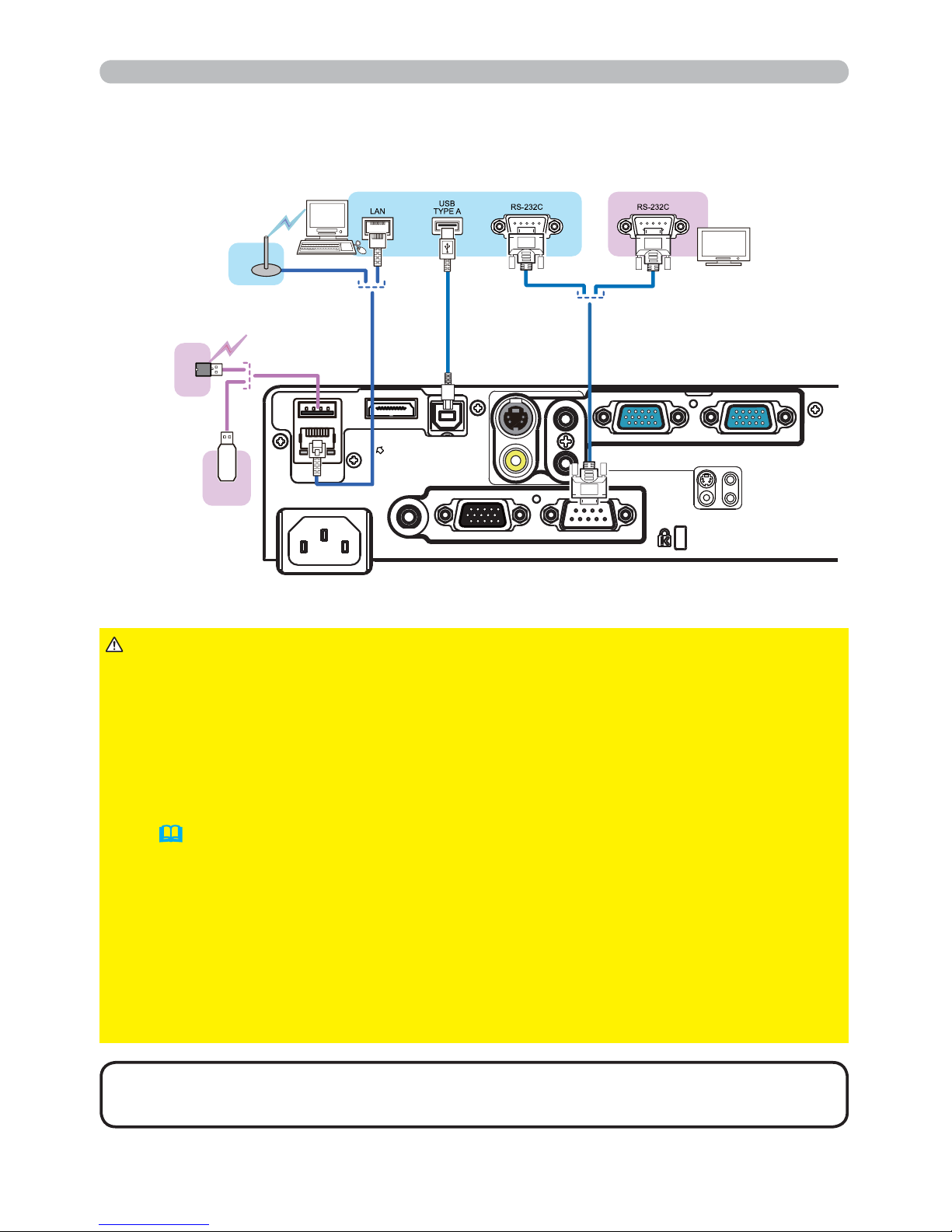
• If an oversized USB storage device blocks the LAN port, use a USB
extension cable to connect the USB storage device.
NOTE
► Before connecting the projector to a network system be sure
to obtain the consent of the administrator of the network.
►Do not connect the LAN port to any network that might have the excessive
voltage.
►The designated USB wireless adapter that is sold as an option is required to
use the wireless network function of this projector.
►Before removing the USB storage device from the port of the projector, be
sure to use the REMOVE USB function on the thumbnail screen to secure your
data (
83).
►Do not use any extension cable or device when connecting the adapter to the
projector. Before you insert or pull out the USB wireless adapter from the projector, turn off the power of the projector and pull out the power cord’s plug from the
outlet. Do not touch the USB wireless adapter while the projector is receiving AC
power.
►To connect both the LAN cable and USB device to the projector, use a LAN
cable that is at on the side where the plug’s wire is visible. Otherwise, both of
them cannot be connected correctly, or the wire may break (malfunction).
CAUTION
Computer External device
CONTROLMONITOR OUTAUDIO OUT
AC IN
LAN
HDMI
USB
DC5V 0.5A
TYPE A
USB
TYPE B
COMPUTER IN1 COMPUTER IN2
S-VIDEO
VIDEO AUDIO IN2
AUDIO IN1
Access
point
USB
wireless
adapter
(optional)
USB
storage
device
Page 22
13
VCR/DVD/Blu-ray Disc
TM
player
Setting up
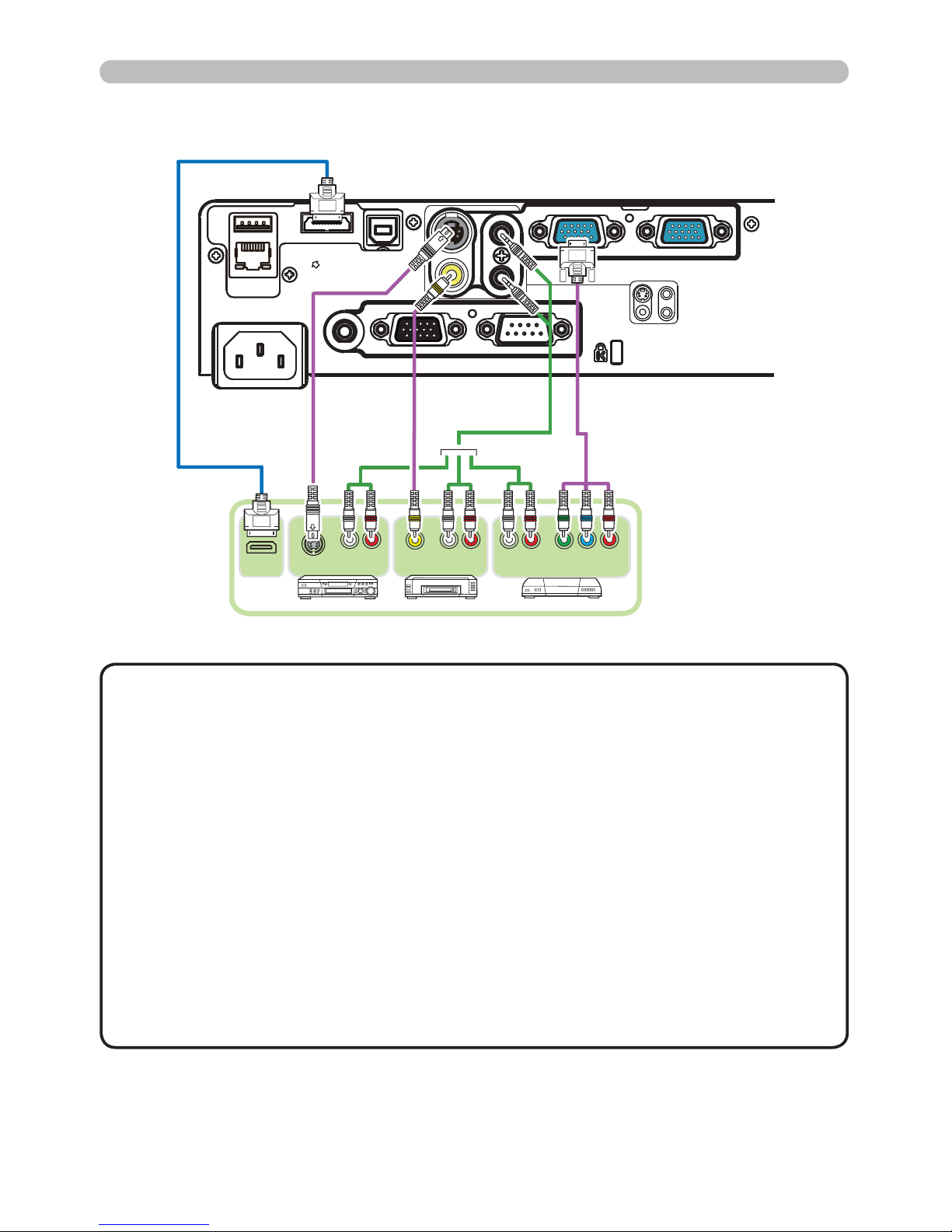
• The HDMI port of this model is compatible with HDCP (High-bandwidth Digital Content Protection) and therefore capable of displaying a video
signal from HDCP compatible DVD players or the like.
- The HDMI supports the following signals.
Video signal : 480i@60, 480p@60, 576i@50, 576p@50, 720p@50/60,
1080i@50/60, 1080p@50/60
Audio signal : Format Linear PCM
Sampling frequency 48kHz / 44.1kHz / 32kHz
- This projector can be connected with another equipment that has HDMI
TM
connector, but with some equipment the projector may not work properly,
something like no video.
- Be sure to use an HDMI
TM
cable that has the HDMITM logo.
- Use a Category 2-certi ed HDMI
TM
cable to input 1080p@50/60 signal to the
projector.
- When the projector is connected with a device having DVI connector, use a
DVI to HDMI
TM
cable to connect with the HDMI input.
NOTE
Connecting with your devices (continued)
(continued on next page)
Y CB/PB CR/PR
COMPONENT VIDEO OUT
L R
AUDIO OUT
VIDEO OUT
L R
AUDIO OUT
L R
AUDIO OUT
S-VIDEO OUT
CONTROLMONITOR OUTAUDIO OUT
AC IN
LAN
HDMI
USB
DC5V 0.5A
TYPE A
USB
TYPE B
COMPUTER IN1 COMPUTER IN2
S-VIDEO
VIDEO AUDIO IN2
AUDIO IN1
HDMI
Page 23
14
Setting up
Connecting with your devices (continued)
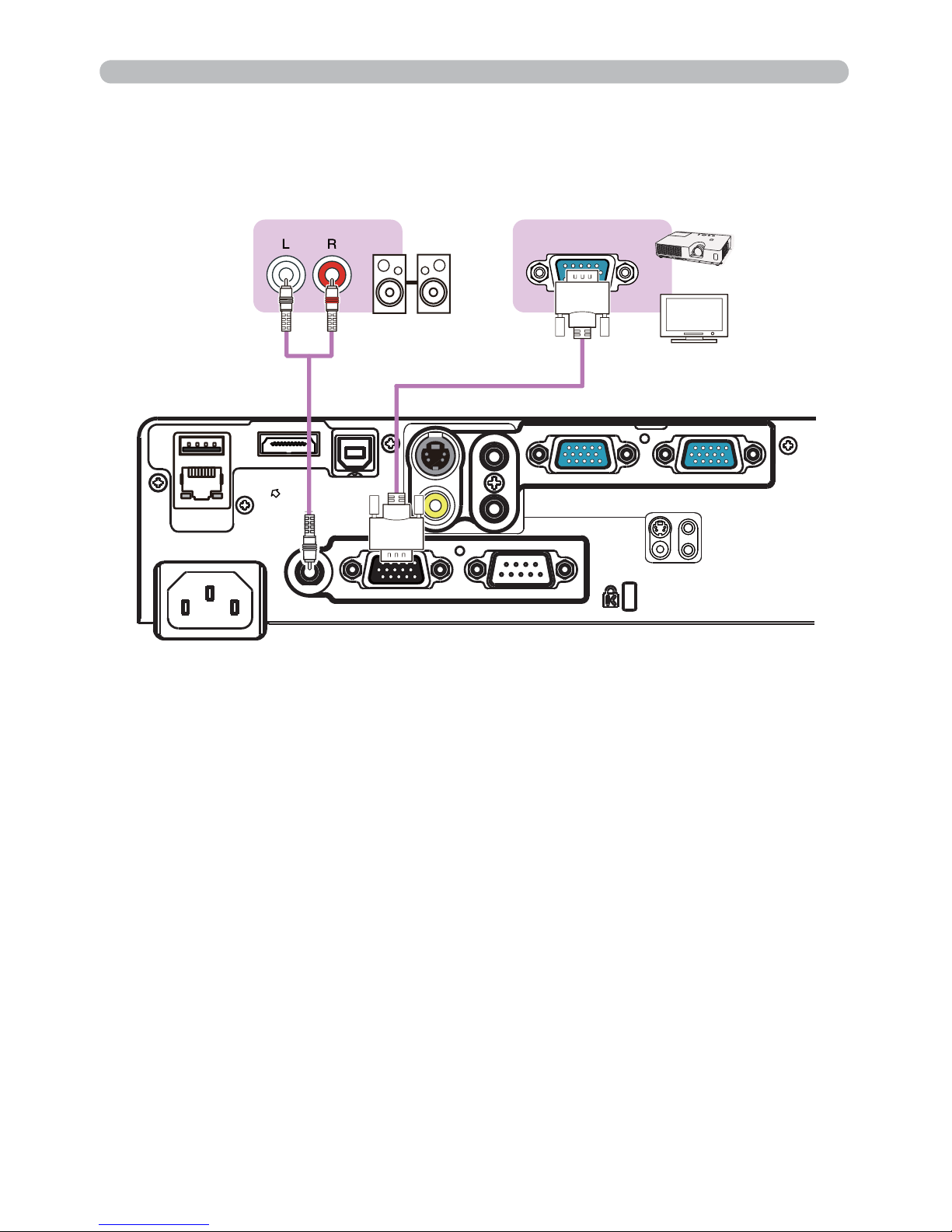
Monitor
Speakers
(with an ampli er)
CONTROLMONITOR OUTAUDIO OUT
AC IN
LAN
HDMI
USB
DC5V 0.5A
TYPE A
USB
TYPE B
COMPUTER IN1 COMPUTER IN2
S-VIDEO
VIDEO AUDIO IN2
AUDIO IN1
RGB IN
Page 24
15
Connecting to a power supply
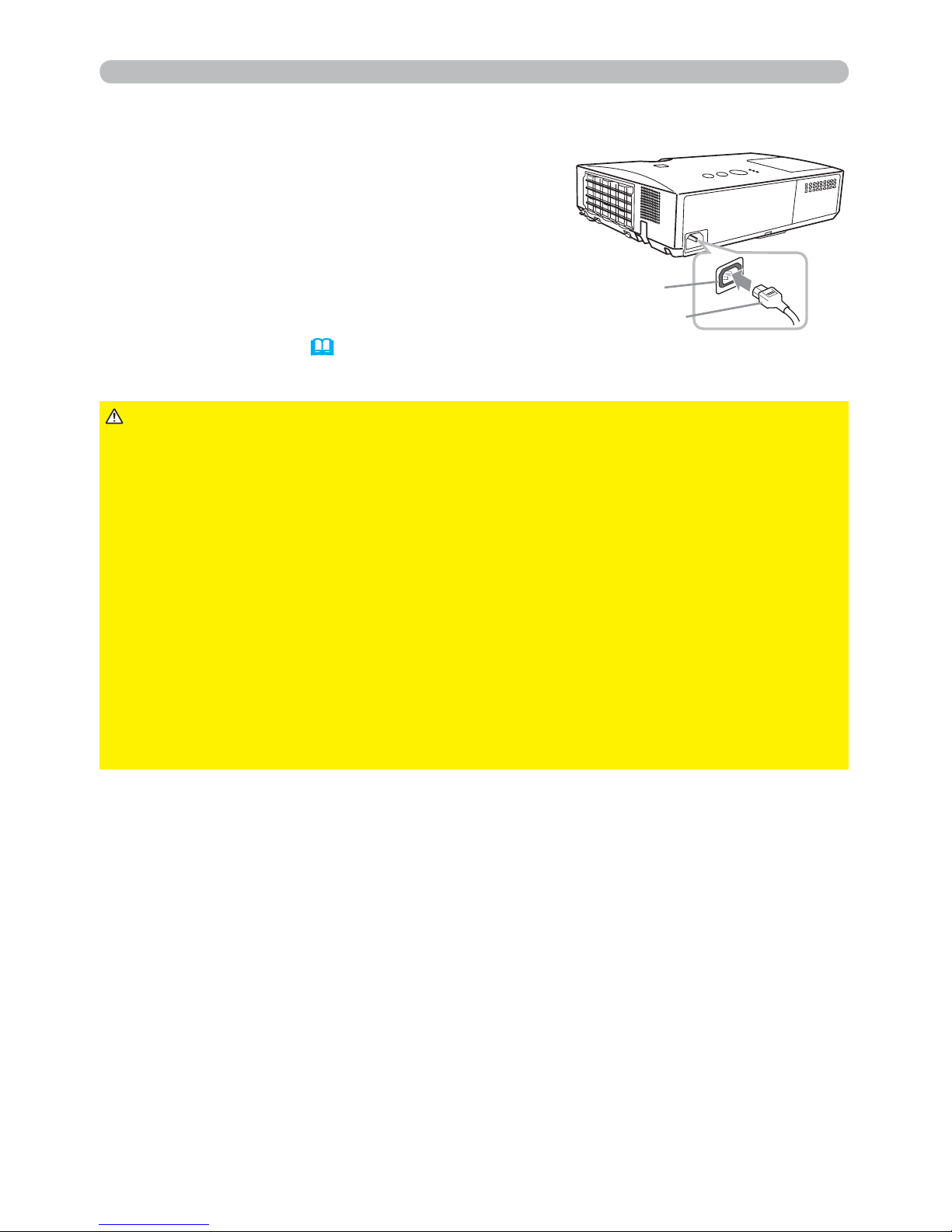
1.
Put the connector of the power cord into the
AC IN (AC inlet) of the projector.
2.
Firmly plug the power cord’s plug into the
outlet. In a couple of seconds after the
power supply connection, the POWER
indicator will light up in steady orange.
►Please use extra caution when connecting the power cord, as
incorrect or faulty connections may result in re and/or electrical shock.
• Do not touch the power cord with a wet hand.
• Only use the power cord that came with the projector. If it is damaged, consult
your dealer to get a new one. Never modify the power cord.
• Only plug the power cord into an outlet whose voltage is matched to the power
cord. The power outlet should be close to the projector and easily accessible.
Remove the power cord for complete separation.
• Do not distribute the power supply to multiple devices. Doing so may overload
the outlet and connectors, loosen the connection, or result in re, electric shock
or other accidents.
• Connect the ground terminal for the AC inlet of this unit to the ground terminal
of the building using an appropriate power cord (bundled).
WARNING
Please remember that when the DIRECT POWER
ON function activated (
53), the connection of the
power supply make the projector turn on.
Setting up
►This product is also designed for IT power systems with a phase-to-
phase voltage of 220 to 240 V.
NOTICE
AC IN
Power cord
Page 25
16
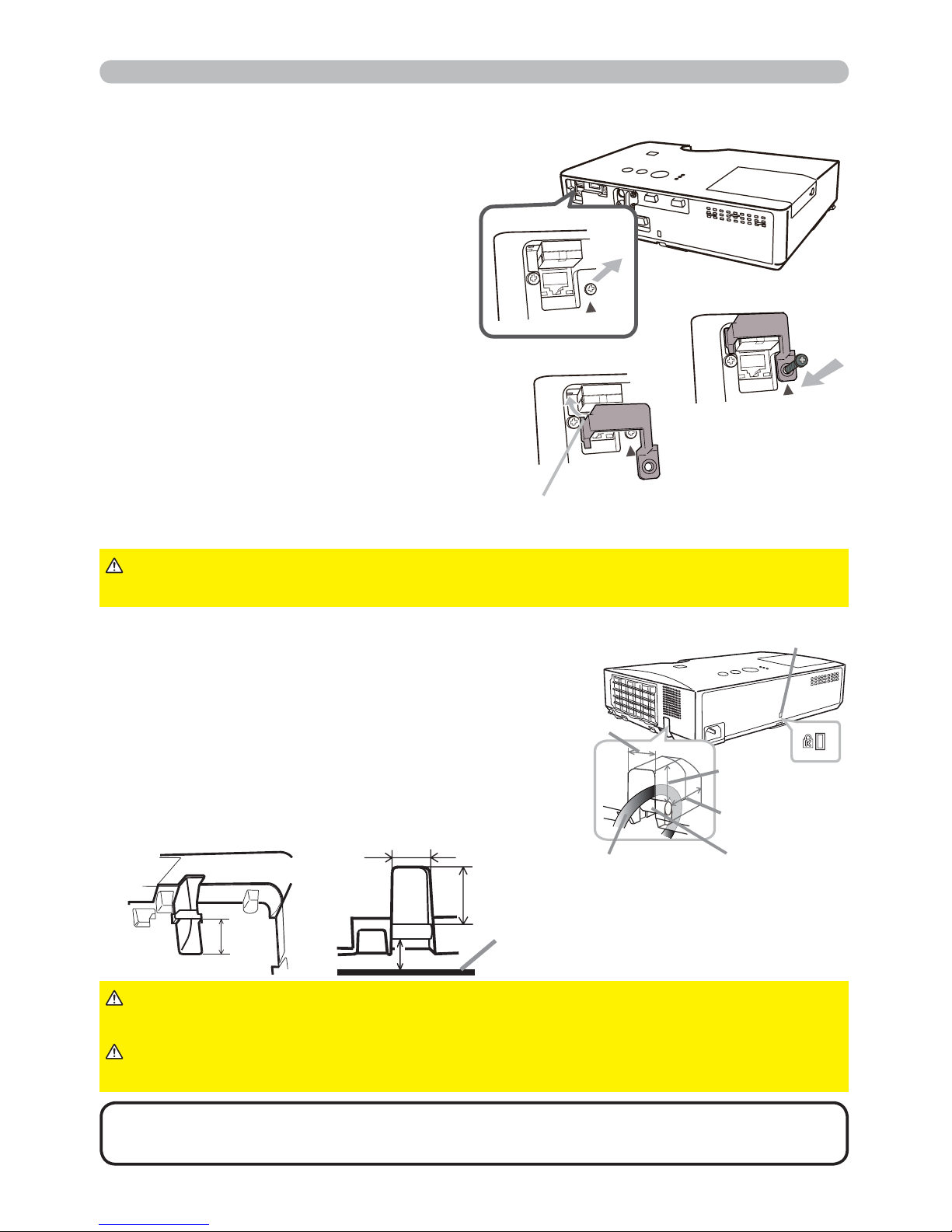
Use the supplied adapter cover to
prevent the USB wireless adapter from
coming off easily.
1.
Loosen the screw (marked with
triangle) on the bottom right of the
USB TYPE A port.
2.
Insert the tab of the cover into the
hole at the upper left of the USB
TYPE A port in the direction of the
arrow.
3.
Align the screw holes on the
projector and the cover. Then
insert the screw removed from the
projector into the hole and tighten
the screw.
Using the security bar and slot
A commercially available anti-theft chain or
wire can be attached to the security bar on
the projector. Refer to the gure to choose
an anti-theft chain or wire.
Also this product has the security slot for
the Kensington lock.
For details, see the manual of the security
tool.
►Do not use the security bar and slot to prevent the projector
from falling down, since it is not designed for it.
WARNING
►Do not place anti-theft chain or wire near the exhaust vents.
It may become too hot.
CAUTION
• The security bar and slot is not comprehensive theft prevention
measures. It is intended to be used as supplemental theft prevention measure.
NOTE
Setting up
Tab
Fastening the adapter cover
►Keep small parts away from children and pets. Take care not
to put in the mouth.
WARNING
2
3
Security slot
Anti-theft
chain or wire
security bar
18mm
18mm
12mm
18 mm
12 mm
18 mm
10 mm
Installation surface
1
Page 26
17
30º
3 m
30º
(approx.)
Remote control
About the remote control signal
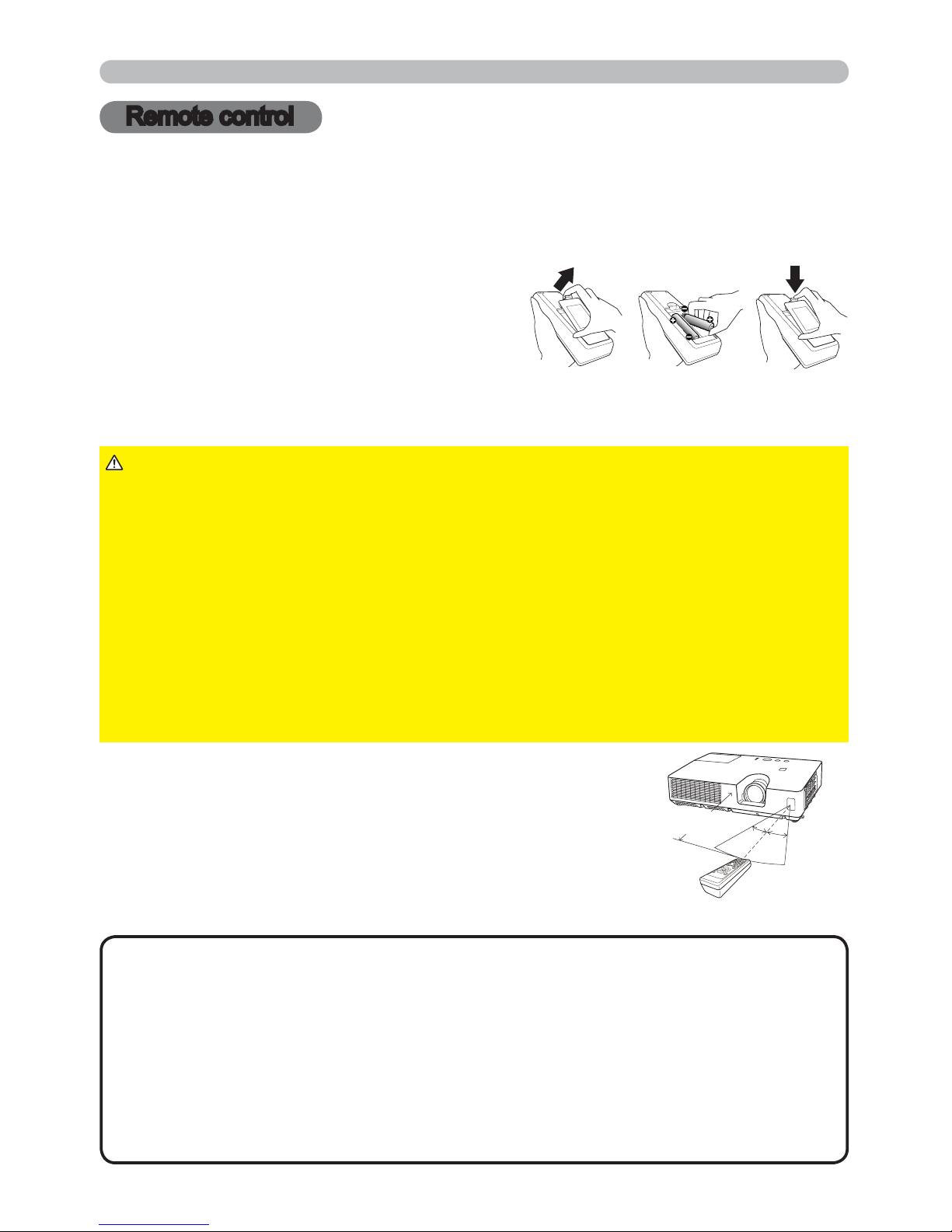
The remote control works with the projector’s remote
sensor. This projector has a remote sensor on the front.
The sensor senses the signal within the following range
when the sensor is active:
60 degrees (30 degrees to the left and right of the sensor)
within 3 meters about.
Installing the batteries
Please insert the batteries into the remote control before using it. If the remote control
starts to malfunction, try to replace the batteries. If you will not use the remote control for
long period, remove the batteries from the remote control and store them in a safe place.
1.
Holding the hook part of the battery
cover, remove it.
2.
Align and insert the two AA batteries
(HITACHI MAXELL, Part No.LR6 or R6P)
according to their plus and minus terminals
as indicated in the remote control.
3.
Replace the battery cover in the direction of the arrow and snap it back into place.
►Always handle the batteries with care and use them only as
directed. Improper use may result in battery explosion, cracking or leakage,
which could result in re, injury and/or pollution of the surrounding environment.
• Be sure to use only the batteries specied. Do not use batteries of different
types at the same time. Do not mix a new battery with used one.
•
Make sure the plus and minus terminals are correctly aligned when loading a battery.
• Keep a battery away from children and pets.
• Do not recharge, short circuit, solder or disassemble a battery.
•
Do not place a battery in a re or water. Keep batteries in a dark, cool and dry place.
•
If you observe battery leakage, wipe out the leakage and then replace a battery.
If the leakage adheres to your body or clothes, rinse well with water immediately.
• Obey the local laws on disposing the battery.
WARNING
•
The remote control signal reected in the screen or the like may be available.
If it is difcult to send the signal to the sensor directly, attempt to make the signal reect.
• The remote control uses infrared light to send signals to the projector (Class 1
LED), so be sure to use the remote control in an area free from obstacles that
could block the remote control’s signal to the projector.
•
The remote control may not work correctly if strong light (such as direct sun
light) or light from an extremely close range (such as from an inverter uorescent
lamp) shines on the remote sensor of the projector. Adjust the position of
projector avoiding those lights.
NOTE
Remote control
213
Page 27
18
Using as a simple PC mouse & keyboard
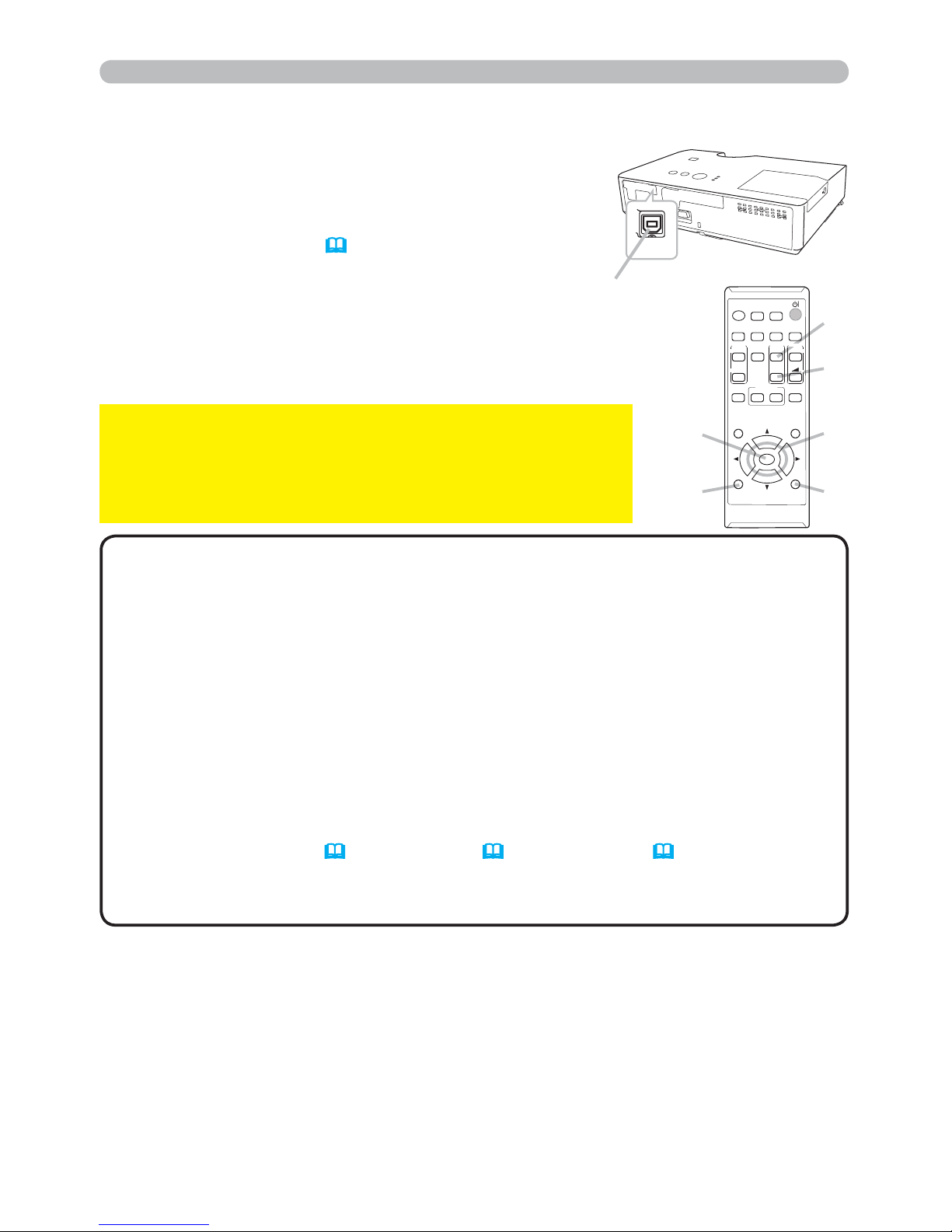
The accessory remote control works as a simple mouse
and keyboard of the computer, when the projector’s USB
TYPE B port and the computer’s type A USB port are
connected and MOUSE is selected for the USB TYPE B
item in the OPTION menu (
54).
(1)
(3)
(5)
(2)
(4)
(6)
VIDEO
DOC.CAMERA
KEYSTONE
ASPECT
SEARCH
BLANK
MUTE
MY BUTTON
POSITION
ESC
MENU
RESET
COMPUTER
MY SOURCE/
AUTO
MAGNIFY
PAGE
DOWN
ON
OFF
FREEZE
UP
㧗
VOLUME
1
2
ENTER
(1) PAGE UP key: Press PAGE UP button.
(2) PAGE DOWN key: Press PAGE DOWN button.
(3) Mouse left button: Press ENTER button.
(4) Move pointer: Use the cursor buttons ▲, ▼, ◄ and ►.
(5) ESC key: Press ESC button.
(6) Mouse right button: Press RESET button.
►Improper use of the simple mouse & keyboard
function could damage your equipment. While using this
function, please connect this product only to a computer. Be
sure to check your computer’s manuals before connecting this
product to the computer.
NOTICE
When the simple mouse & keyboard function of this product does not work
correctly, please check the following.
• When a USB cable connects this projector with a computer having a built-in pointing
device (e.g. track ball) like a laptop computer, open BIOS setup menu, then select the
external mouse and disable the built-in pointing device, because the built-in pointing
device may have priority to this function.
•
Windows 95 OSR 2.1 or higher is required for this function. And also this function may not work
depending on the computer’s con gurations and mouse drivers. This function can work with the
computer which can operate general USB mouse or keyboard.
• You cannot do things like press two buttons at once (for instance, pressing two buttons
at the same time to move the mouse pointer diagonally).
•
This function is activated only when the projector is working properly. This function is not
available in any of the following cases:
- While the lamp is warming up. (The POWER indicator blinks in green.)
- When either USB TYPE A or USB TYPE B port is selected.
- While displaying BLANK
(47)
, TEMPLATE
(51)
or MY IMAGE
(71)
screen.
- When any menu is displayed on the screen.
-
While using the cursor buttons to operate the sound or screen functions such as adjusting the
sound volume, correcting the keystone, correcting the picture position and magnifying the screen.
NOTE
Remote control
USB
TYPE B
USB TYPE B port
Page 28
19
1.
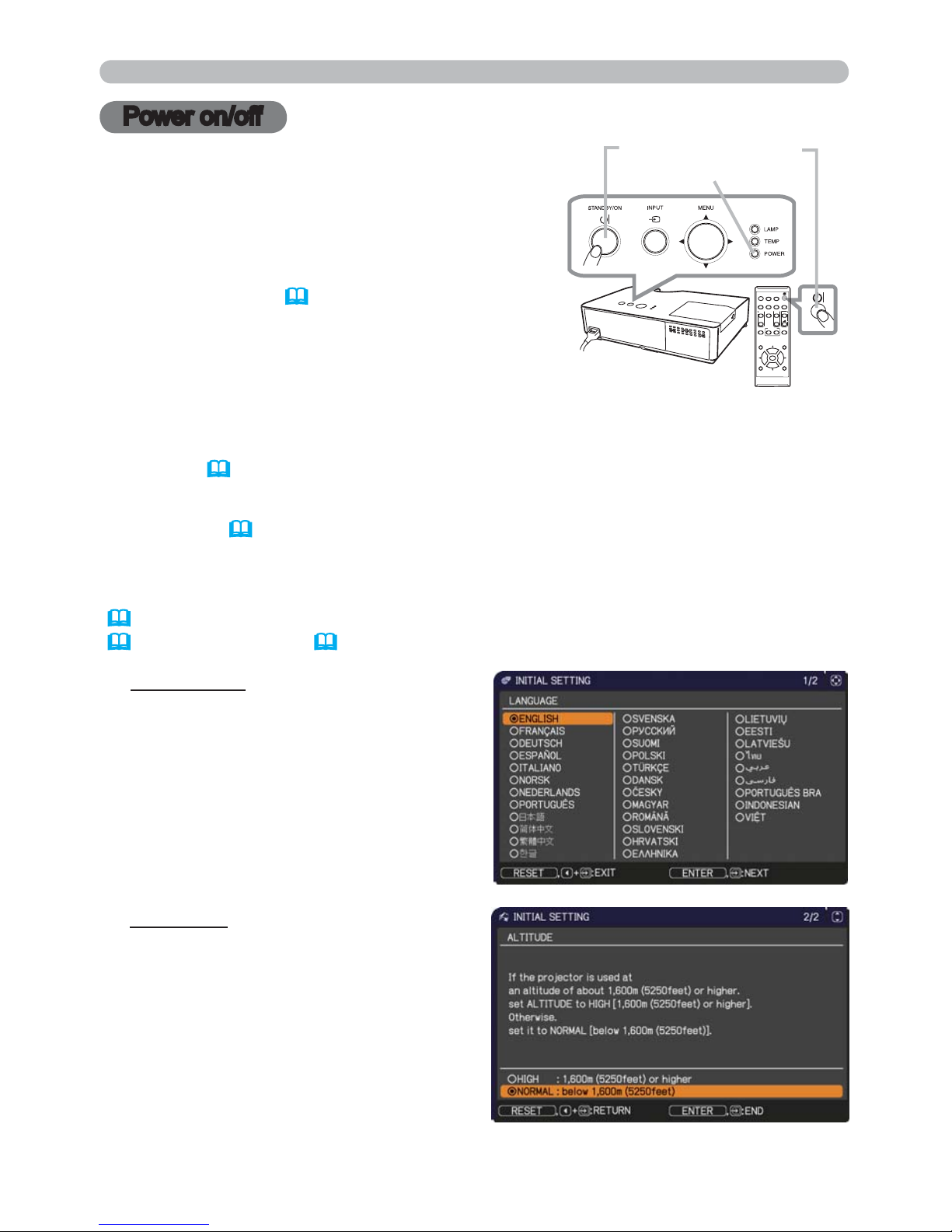
Make sure that the power cord is rmly and
correctly connected to the projector and the
outlet.
Turning on the power
2.
Make sure that the POWER indicator is
steady orange (
100). Then remove the
lens cover.
3.
Press STANDBY/ON button on the
projector or the remote control.
The projection lamp will light up and POWER
indicator will begin blinking in green. When the
power is completely on, the indicator will stop blinking and light in steady
green (
100).
Power on/off
To display the picture, select an input signal according to the section Selecting an
input signal (
22).
Power on/off
VIDEO
DOC.CAMERA
KEYSTONE
ASPECT
SEARCH
BLANK
MUTE
MY BUTTON
POSITION
ESC
MENU
RESET
COMPUTER
MY SOURCE/
AUTO
MAGNIFY
PAGE
DOWN
ON
OFF
FREEZE
UP
㧗
VOLUME
1
2
ENTER
STANDBY/ON button
POWER indicator
The INITIAL SETTING Menu will be displayed by factory default upon startup.
Once the INITIAL SETTING Menu is set, it will not appear until FACTORY RESET
(
62) is executed. If you wish to change the settings, refer to the LANGUAGE
(
47) and ALTITUDE (57) menu.
(1) LANGUAGE: Use the ▲/▼/◄/►
buttons to select the desired language
and press the ENTER button of the
remote control or the INPUT button of
the projector to execute.
(2) ALTITUDE: Use the ▲/▼ buttons to
select NORMAL for altitude below
1600 m (5250 feet), otherwise select
HIGH and press the ENTER button of
the remote control or the INPUT button
of the projector to execute.
Page 29
20
Power on/off
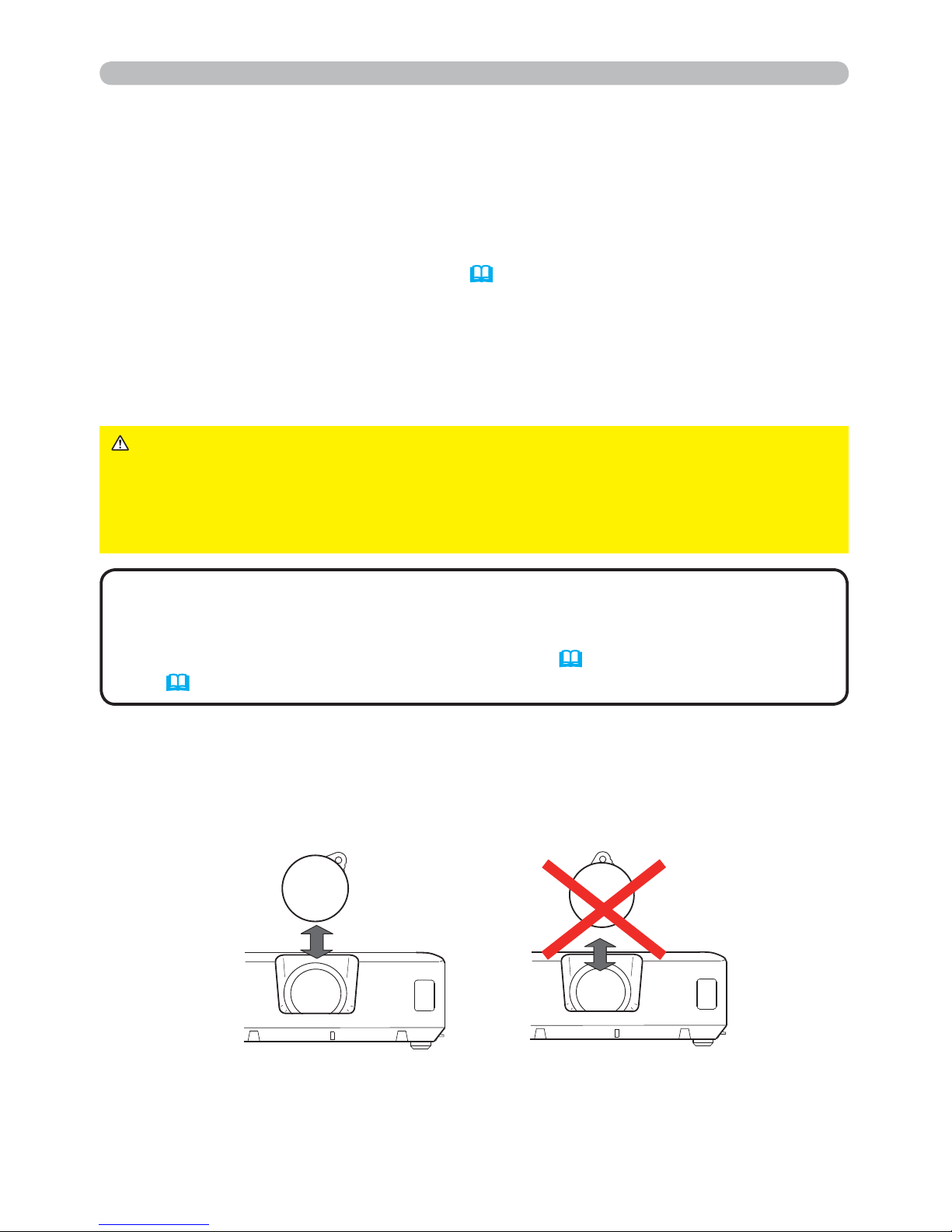
Precaution for lens cover attachment and removal
When you attach or remove the lens cover, move it vertically up and down while
keeping the knob to the right as illustrated in the gure.
►A strong light is emitted when the projector’s power is on.
Do not look into the lens of the projector or look inside of the projector through
any of the projector’s openings.
►Do not touch around the lamp cover and the exhaust vents during use or just
after use, since it is too hot.
WARNING
1.
Press the STANDBY/ON button on the projector or the remote control.
The message “Power off?” will appear on the screen for about 5 seconds.
Turning off the power
2.
Press the STANDBY/ON button again while the message appears.
The projector lamp will go off, and the POWER indicator will begin blinking in
orange. Then POWER indicator will stop blinking and light in steady orange
when the lamp cooling is complete (
100).
3.
Attach the lens cover, after the POWER indicator turns in steady orange.
Do not turn the projector on for about 10 minutes or more after turning it off.
Also, do not turn the projector off shortly after turning it on. Such operations might
cause the lamp to malfunction or shorten the lifetime of some parts including the lamp.
• Turn the power on/off in right order. Please power on the projector
prior to the connected devices.
• This projector has the function that can make the projector automatically turn
on/off. Please refer to the DIRECT POWER ON (
53) and AUTO POWER
OFF (
54) items of the OPTION menu.
NOTE
Page 30
21
Operating
1.
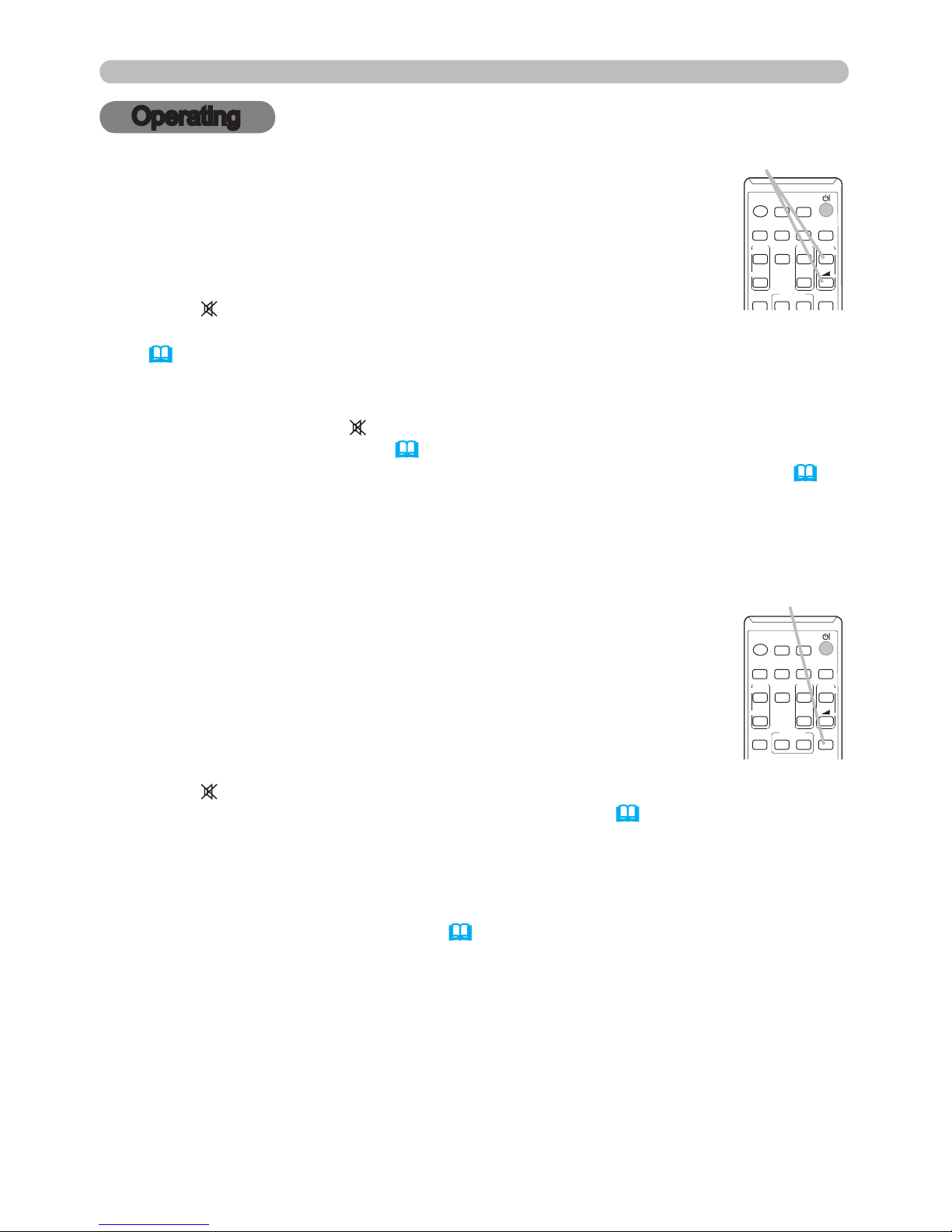
Adjusting the volume
Use the VOLUME +/VOLUME - buttons to adjust the volume.
A dialog will appear on the screen to aid you in adjusting the
volume. If you do not do anything, the dialog will automatically
disappear after a few seconds.
● When
is selected for current picture input port, the volume
adjustment is disabled. Please see AUDIO SOURCE item of AUDIO menu
(
46).
● Even if the projector is in the standby mode, the volume is adjustable when
both of the following conditions are true:
- An option other than
is selected for STANDBY in the AUDIO SOURCE
item of the AUDIO menu
(46).
-
NORMAL is selected in the STANDBY MODE item of the SETUP menu
(45).
● In the standby mode, the volume of the microphone is adjustable with the
VOLUME +/- buttons on the remote control, in synchronization with the volume
of the projector.
1.
Press MUTE button on the remote control.
A dialog will appear on the screen indicating that you have muted
the sound.
To restore the sound, press the MUTE, VOLUME + or
VOLUME - button. Even if you do not do anything, the dialog
will automatically disappear after a few seconds.
Temporarily muting the sound
● When is selected for current picture input port, the sound is always muted.
Please see AUDIO SOURCE item of AUDIO menu (
46).
● C.C. (Closed Caption) is automatically activated when sound is muted and an
input signal containing C.C. is received. This function is available only when
the signal is NTSC for VIDEO or S-VIDEO, or 480i@60 for COMPUTER IN1
or COMPUTER IN2, and when AUTO is selected for DISPLAY in the C.C.
menu under the SCREEN menu (
52).
VOLUME +/- button
MUTE button
VIDEO
DOC.CAMERA
KEYSTONE
ASPECT
SEARCH
BLANK
MUTE
MY BUTTON
COMPUTER
MY SOURCE/
AUTO
MAGNIFY
PAGE
DOWN
ON
OFF
FREEZE
UP
㧗
VOLUME
1
2
VIDEO
DOC.CAMERA
KEYSTONE
ASPECT
SEARCH
BLANK
MUTE
MY BUTTON
COMPUTER
MY SOURCE/
AUTO
MAGNIFY
PAGE
DOWN
ON
OFF
FREEZE
UP
㧗
VOLUME
1
2
Operating
Page 31
22
1.
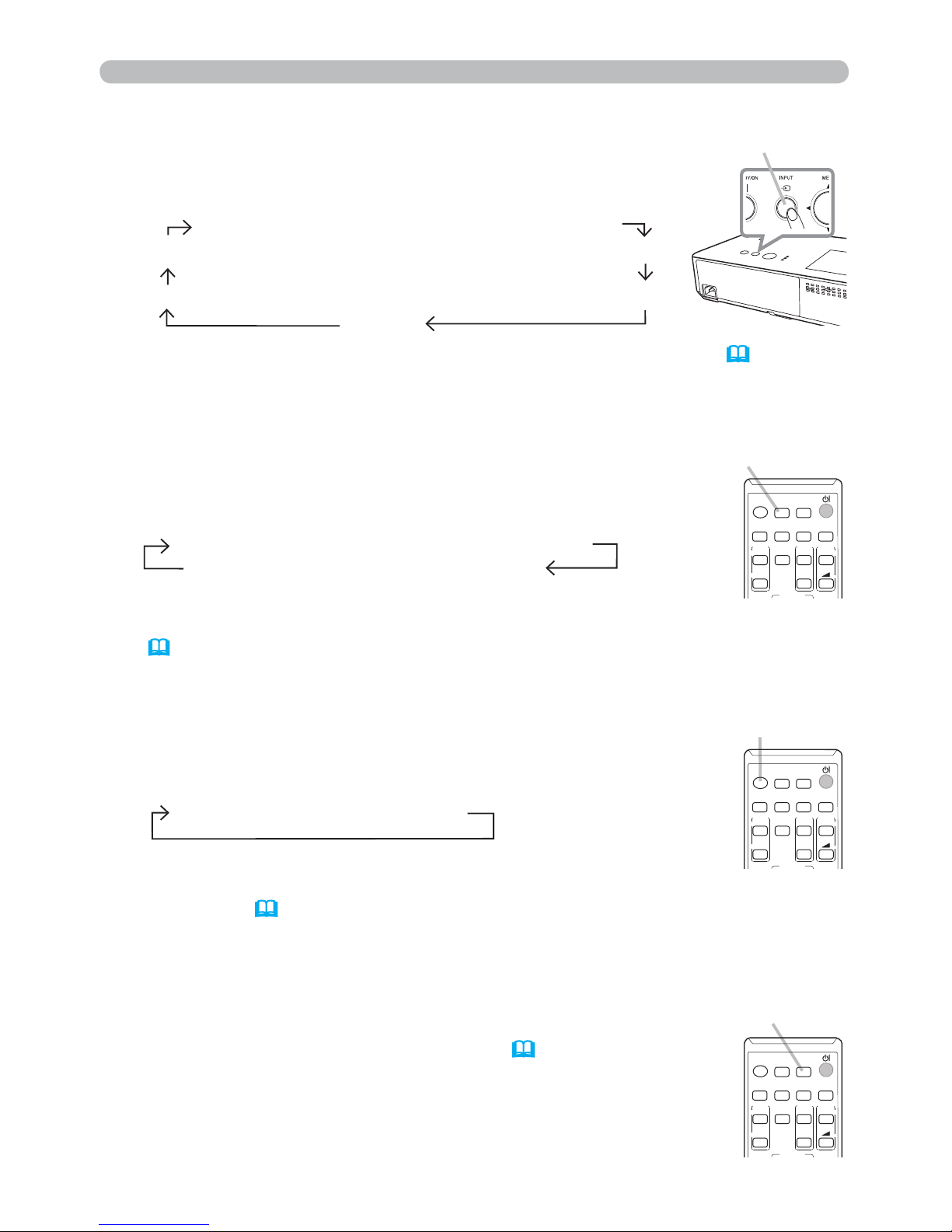
Press INPUT button on the projector.
Each time you press the button, the projector switches its
input port from the current port as below.
Selecting an input signal
INPUT button
● While ON is selected for AUTO SEARCH item in OPTION menu (53), the
projector will keep checking the ports in above order repeatedly till an input
signal is detected.
● It may take several seconds to project the images from the USB TYPE B port.
COMPUTER IN1 Æ COMPUTER IN2 Æ LAN
VIDEO USB TYPE A
S-VIDEO USB TYPE B
HDMI
VIDEO
DOC.CAMERA
ASPECT
SEARCH
BLANK
MY BUTTON
COMPUTER
MY SOURCE/
AUTO
MAGNIFY
PAGE
DOWN
ON
OFF
FREEZE
UP
㧗
VOLUME
1.
Press VIDEO button on the remote control.
Each time you press the button, the projector switches its
input port from the current port as below.
● While ON is selected for AUTO SEARCH item in OPTION menu,
the projector will keep checking every port sequentially till an input signal
is detected (
53). If VIDEO button is pressed when COMPUTER IN1,
COMPUTER IN2, LAN, USB TYPE A or USB TYPE B port is selected, the
projector will check HDMI port rst.
VIDEO button
VIDEO
DOC.CAMERA
ASPECT
SEARCH
BLANK
MY BUTTON
COMPUTER
MY SOURCE/
AUTO
MAGNIFY
PAGE
DOWN
ON
OFF
FREEZE
UP
㧗
VOLUME
MY SOURCE /
DOC. CAMERA button
1.
Press COMPUTER button on the remote control.
Each time you press the button, the projector switches its
input port from the current port as below.
●
While ON is selected for AUTO SEARCH item in OPTION menu, the
projector will keep checking every port sequentially till an input signal is detected
(
53). If COMPUTER button is pressed when VIDEO, S-VIDEO or HDMI port is
selected, the projector will check COMPUTER IN1 port rst.
●
It may take several seconds to project the images from the USB TYPE B port.
COMPUTER button
VIDEO
DOC.CAMERA
ASPECT
SEARCH
BLANK
MY BUTTON
COMPUTER
MY SOURCE/
AUTO
MAGNIFY
PAGE
DOWN
ON
OFF
FREEZE
UP
㧗
VOLUME
1.
Press the MY SOURCE / DOC. CAMERA button on
the remote control. The input signal will be changed
into the signal you set as MY SOURCE (
57).
● This function also can use for document camera. Select the
input port that connected the document camera.
COMPUTER IN1 Æ COMPUTER IN2 Æ LAN
USB TYPE B
Æ
USB TYPE A
HDMI Æ S-VIDEO Æ VIDEO
Operating
Page 32
23
Operating
Selecting an aspect ratio
● ASPECT button does not work when no proper signal is inputted.
● NORMAL mode keeps the original aspect ratio setting.
1.
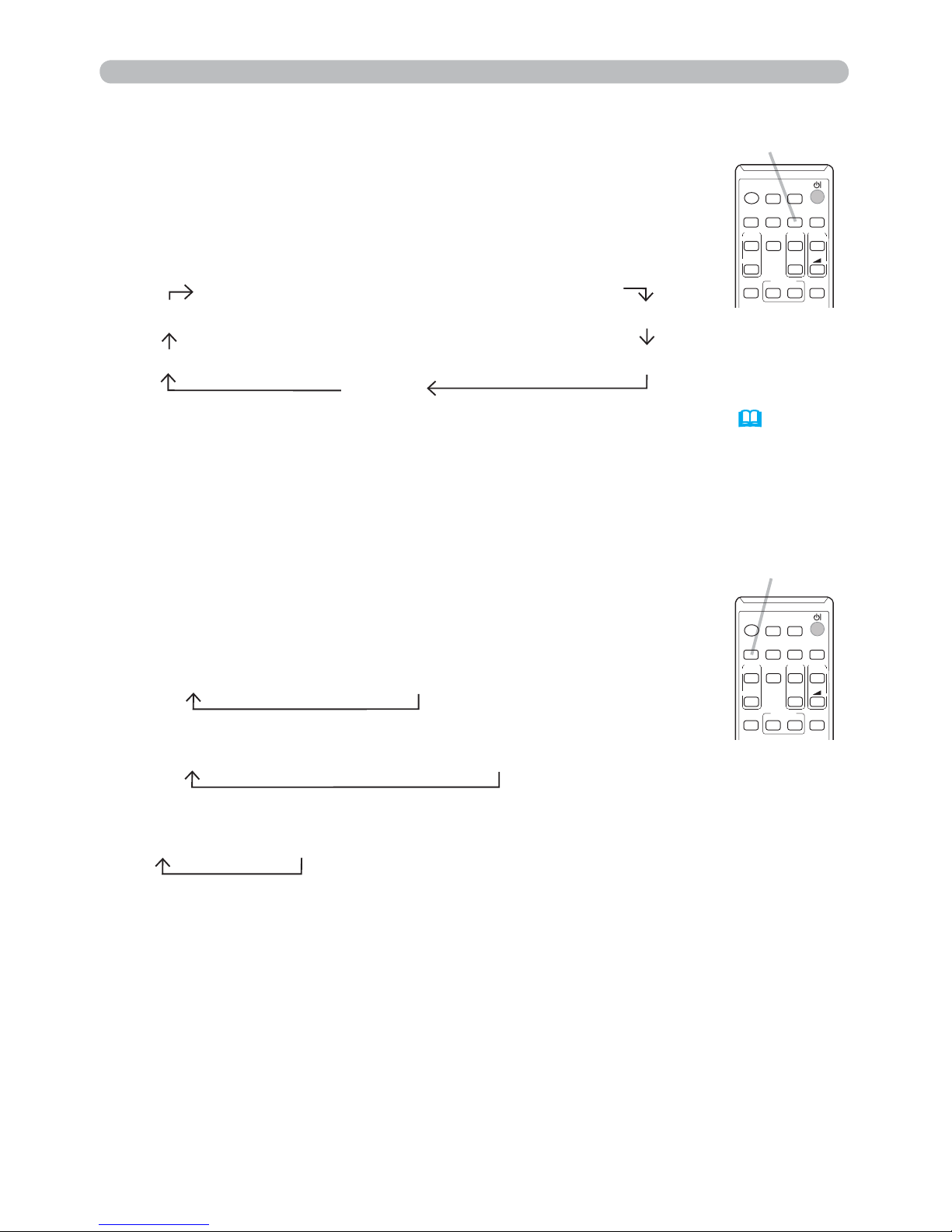
Press SEARCH button on the remote control.
The projector will start to check its input ports as below in
order to nd any input signals.
When an input is found, the projector will stop searching
and display the image. If no signal is found, the projector will
return to the state selected before the operation.
Searching an input signal
● While ON is selected for AUTO SEARCH item in OPTION menu (53), the
projector will keep checking the ports in above order repeatedly till an input
signal is detected.
●
It may take several seconds to project the images from the USB TYPE B port.
For a computer signal
NORMAL Æ 4:3 Æ 16:9 Æ 16:10
For a video signal, s-video signal or component video signal
4:3 Æ 16:9 Æ 14:9
For an input signal from the LAN, USB TYPE A or USB TYPE B port, or
if there is no signal
4:3 ( xed)
1.
Press ASPECT button on the remote control.
Each time you press the button, the projector switches the
mode for aspect ratio in turn.
ASPECT button
SEARCH button
VIDEO
DOC.CAMERA
KEYSTONE
ASPECT
SEARCH
BLANK
MUTE
MY BUTTON
COMPUTER
MY SOURCE/
AUTO
MAGNIFY
PAGE
DOWN
ON
OFF
FREEZE
UP
㧗
VOLUME
1
2
For an HDMITM signal
NORMAL Æ 4:3 Æ 16:9 Æ 16:10 Æ 14:9
VIDEO
DOC.CAMERA
KEYSTONE
ASPECT
SEARCH
BLANK
MUTE
MY BUTTON
COMPUTER
MY SOURCE/
AUTO
MAGNIFY
PAGE
DOWN
ON
OFF
FREEZE
UP
㧗
VOLUME
1
2
COMPUTER IN1 Æ COMPUTER IN2 Æ LAN
VIDEO USB TYPE A
S-VIDEO USB TYPE B
HDMI
Page 33
24
Operating
Adjusting the projector's elevator
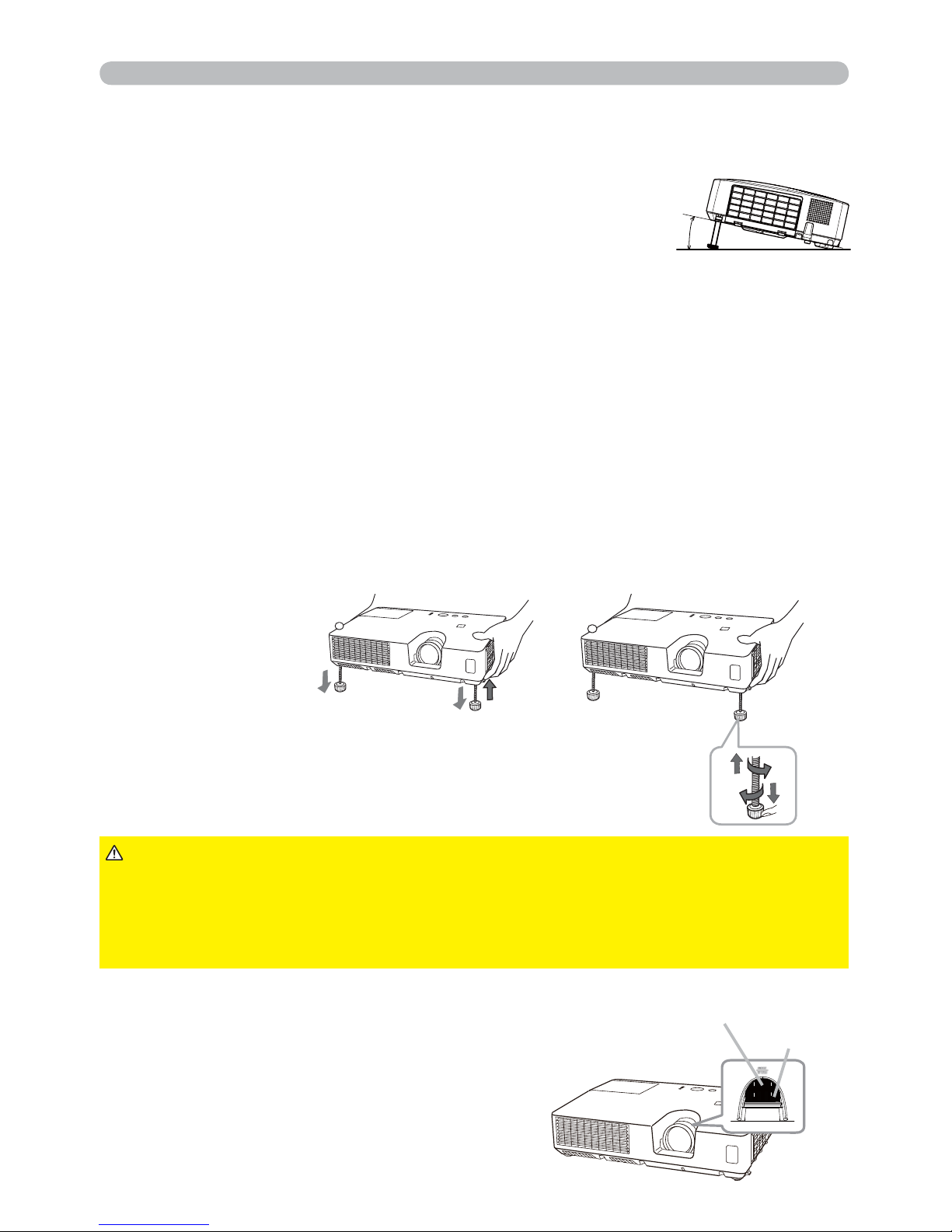
When the place to put the projector is slightly uneven to the left or right, use the
elevator feet to place the projector horizontally.
Using the feet can also tilt the projector in order to project at
a suitable angle to the screen, elevating the front side of the
projector within
12 degrees.
This projector has 2 elevator feet and 2 elevator knobs. An elevator foot is
adjustable while pulling up the elevator knob on the same side as it.
1.
Holding the projector, pull the elevator knobs up to loose the elevator feet.
2.
Position the front side of the projector to the desired height.
3.
Release the elevator knobs in order to lock the elevator feet.
To loose an elevator foot,
pull up the elevator knob
on the same side as it.
To nely adjust, twist the foot.
4.
After making sure that the elevator feet are locked, put the projector down
gently.
5.
If necessary, the elevator feet can be manually twisted to make more precise
adjustments. Hold the projector when twisting the feet.
►Do not handle the elevator buttons without holding the
projector, since the projector may drop down.
►Do not tilt the projector other than elevating its front within 12 degrees using
the adjuster feet. A tilt of the projector exceeding the restriction could cause
malfunction or shortening the lifetime of consumables, or the projector itself.
CAUTION
1.
Use the ZOOM ring to adjust the screen size.
2.
Use the FOCUS ring to focus the picture.
Adjusting the zoom and focus
12°
51
FOCUS ring
ZOOM ring
Page 34
25
Operating
1.
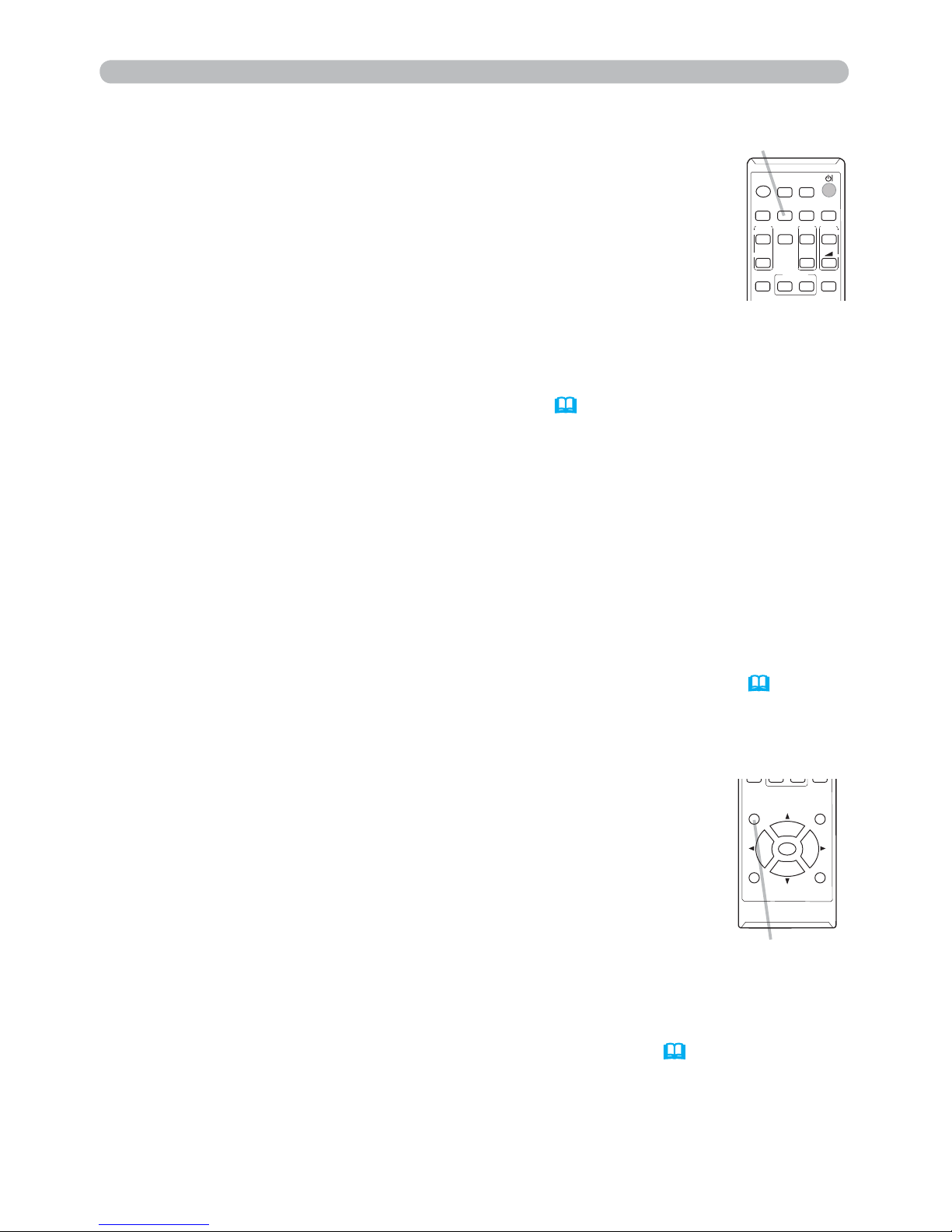
Press POSITION button on the remote control when no menu is
indicated.
The “POSITION” indication will appear on the screen.
Adjusting the position
2.
Use the ▲/▼/◄/► cursor buttons to adjust the picture position.
When you want to reset the operation, press RESET button on
the remote control during the operation.
To complete this operation, press POSITION button again. Even if
you do not do anything, the dialog will automatically disappear
after a few seconds.
●
When this function is performed on a video signal or an s-video signal, some image
such as an extra-line may appear at outside of the picture.
● When this function is performed on a video signal or s-video signal, the range of
this adjustment depends on OVER SCAN in IMAGE menu (
36) setting. It is not
possible to adjust when OVER SCAN is set to 10.
● If POSITION button is pressed when a menu is indicated on screen, the displayed
picture does not move its position but the menu does.
● This function is unavailable for a signal from the LAN, USB TYPE A, USB TYPE B
or HDMI port.
1.
Press AUTO button on the remote control.
Pressing this button performs the following.
Using the automatic adjustment feature
For a computer signal
The vertical position, the horizontal position and the horizontal
phase will be automatically adjusted.
Make sure that the application window is set to its maximum size
prior to attempting to use this feature. A dark picture may still be
incorrectly adjusted. Use a bright picture when adjusting.
For a video signal and s-video signal
The video format best suited for the respective input signal will be selected
automatically. This function is available only when the AUTO is selected for
the VIDEO FORMAT item in the INPUT menu (
40).
The vertical position and
horizontal position will be automatically set to the default.
● The automatic adjustment operation requires approx. 10 seconds. Also please
note that it may not function correctly with some input.
● When this function is performed for a video signal, a certain extra such as a line
may appear outside a picture.
● When this function is performed for a computer signal, a black frame may be
displayed on the edge of the screen, depending on the computer model.
●
The items adjusted by this function may vary when the FINE or DISABLE is selected
for the AUTO ADJUST item of the SERVICE item in the OPTION menu (
57).
POSITION button
POSITION
ESC
MENU
RESET
ENTER
AUTO button
For a component video signal
The vertical position and horizontal position will be automatically set to the default.
The horizontal phase will be automatically adjusted.
VIDEO
DOC.CAMERA
KEYSTONE
ASPECT
SEARCH
BLANK
MUTE
MY BUTTON
COMPUTER
MY SOURCE/
AUTO
MAGNIFY
PAGE
DOWN
ON
OFF
FREEZE
UP
㧗
VOLUME
1
2
Page 35
26
Operating
1.
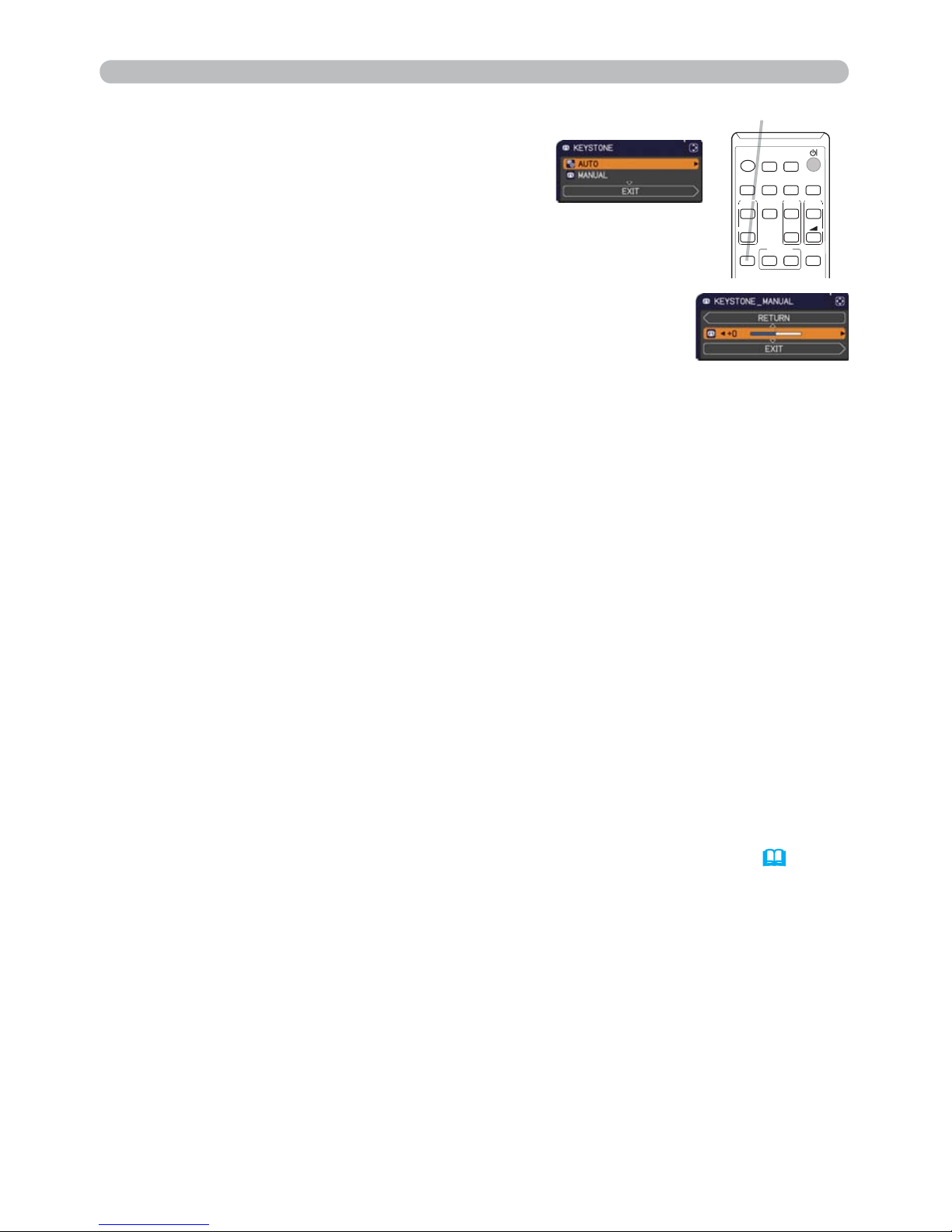
Press KEYSTONE button on the remote
control. A dialog will appear on the screen
to aid you in correcting the distortion.
Correcting the keystone distortions
2.
Use the ▲/▼ cursor buttons to select AUTO or MANUAL
operation, and press the ► button to perform the following.
(1) AUTO executes automatic vertical keystone correction.
(2) MANUAL displays a dialog for keystone correction.
Use the ◄/► buttons for adjustment.
To close the dialog and complete this operation, press
KEYSTONE button again. Even if you do not do anything, the
dialog will automatically disappear after a few seconds.
● The menu or dialog will automatically disappear after several seconds of
inactivity. Pressing the KEYSTONE button again nishes the operation and
closes the menu or dialog.
● The adjustable range of this function will vary among inputs. For some input,
this function may not work well.
● When REAR / CEILING or FRONT / CEILING is selected for the
INSTALLATION item in the SETUP menu, the automatic vertical keystone
correction function may not work correctly if the projector screen is slanted or
tilted downwards.
● When the zoom adjustment is set to the TELE (telephoto focus), this function
may be excessive. This function should be used when the zoom adjustment
is set to the full WIDE (wide-angle focus) whenever possible.
● When the projector is placed on the level (about ±4°), the automatic keystone
distortion correction may not work.
● When the projector is inclined to near ±30 degree or over, this function may
not work well.
● This function will be unavailable when the Transition Detector is on (
77).
KEYSTONE button
VIDEO
DOC.CAMERA
KEYSTONE
ASPECT
SEARCH
BLANK
MUTE
MY BUTTON
COMPUTER
MY SOURCE/
AUTO
MAGNIFY
PAGE
DOWN
ON
OFF
FREEZE
UP
㧗
VOLUME
1
2
Page 36
27
Operating
1.
Using the magnify feature
2.
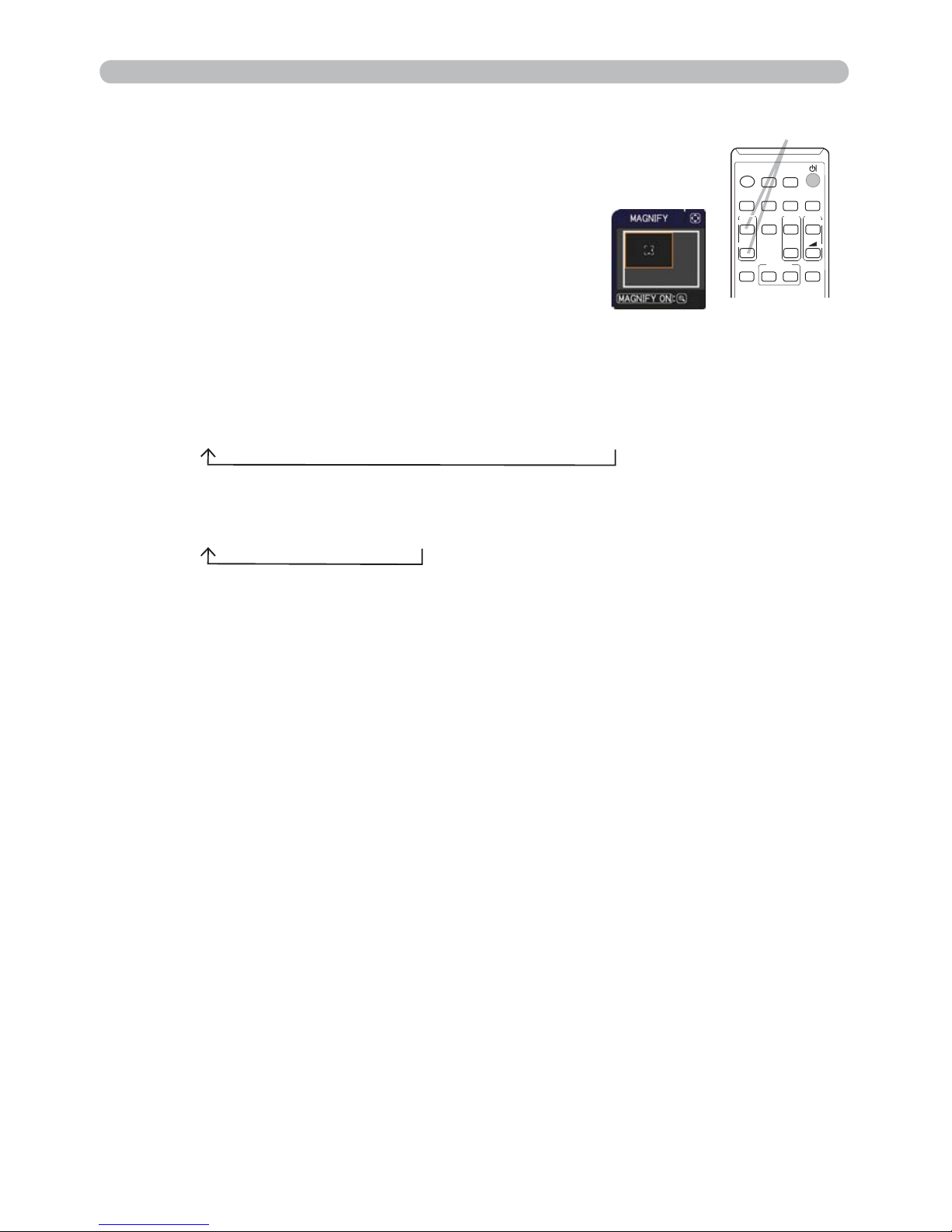
MAGNIFY
ON/OFF button
VIDEO
DOC.CAMERA
KEYSTONE
ASPECT
SEARCH
BLANK
MUTE
MY BUTTON
COMPUTER
MY SOURCE/
AUTO
MAGNIFY
PAGE
DOWN
ON
OFF
FREEZE
UP
㧗
VOLUME
1
2
3.
4.
Press the MAGNIFY ON button on the remote control.
The picture will be magni ed, and the MAGNIFY dialog
will appear on the screen. When the MAGNIFY
ON button is pressed for the rst time after the
projector is turned on, the picture will be zoomed
by 1.5 times. On the dialog, triangle marks to show
each direction will be displayed.
The display magni cation of the projector switches in order with every press
of the MAGNIFY ON button.
For computer signals, HDMI
TM
(RGB) signals, input signals from the
LAN, USB TYPE A or USB TYPE B port
1.5 times Æ 2 times Æ 3 times Æ 4 times Æ 1 time
For video signals, s-video signals, component video signals or
HDMI
TM
(Component) signals
1.5 times Æ 2 times Æ 1 time
While the triangles are displayed on the dialog, use the ▲/▼/◄/► cursor
buttons to shift the magnifying area.
Press the MAGNIFY OFF button on the remote control to exit magni cation.
● The MAGNIFY dialog will automatically disappear in several seconds with no
operation. The dialog will appear again if the MAGNIFY ON button is pressed
when the dialog has automatically disappeared.
● The magni cation is automatically disabled when the displaying signal or its
display condition is changed.
● While the magni cation is active, the keystone distortion condition may vary.
It will be restored when the magni cation is disabled.
● Some horizontal stripes might be visible on the image while magni cation is
active.
● This function is not available in the following cases:
- A sync signal in the range not supported is input.
- There is no input signal.
Page 37
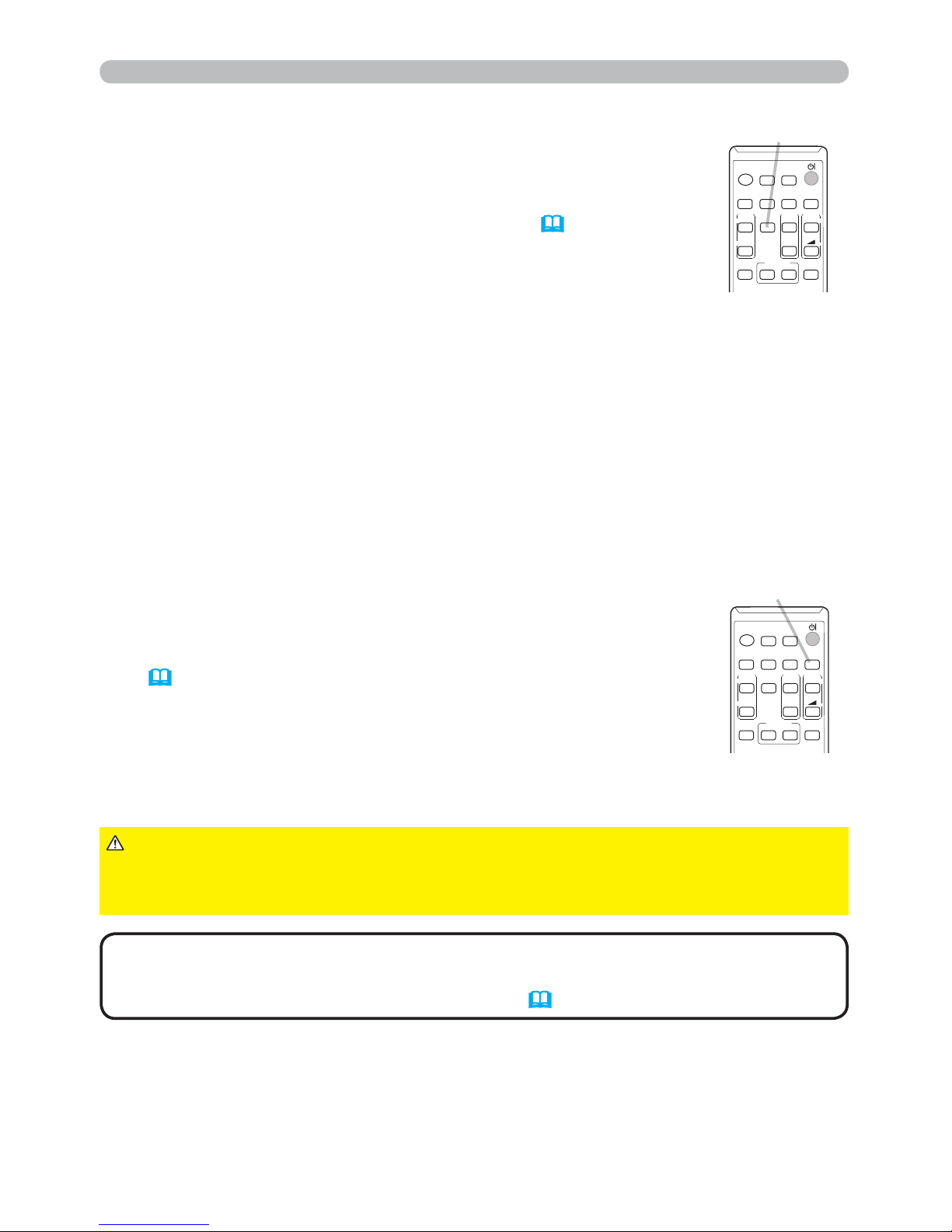
28
1.
Press BLANK button on the remote control.
The BLANK screen will be displayed instead of the screen of
input signal. Please refer to BLANK item in SCREEN menu
(
47).
To exit from the BLANK screen and return to the input signal
screen, press BLANK button again.
Temporarily blanking the screen
● The projector automatically exits from the
BLANK
mode when
some control buttons are pressed.
•
The sound is not connected with the BLANK screen function. If
necessary, set the volume or mute rst. To display the BLANK screen and mute
the sound at one time, use AV MUTE function
(57).
NOTE
1.
Press the FREEZE button on the remote control.
The “FREEZE” indication will appear on the screen (however,
the indication will not appear when the OFF is selected for
the MESSAGE item in the SCREEN menu (
49)), and the
projector will go into the FREEZE mode, which the picture is
frozen.
To exit the FREEZE mode and restore the screen to normal,
press the FREEZE button again.
Temporarily freezing the screen
● The projector automatically exits from the FREEZE mode when some control
buttons are pressed.
● If the projector continues projecting a still image for a long time, the LCD
panel might possibly be burned in. Do not leave the projector in the FREEZE
mode for too long.
● Images might appear degraded when this function is operated, but it is not a
malfunction.
FREEZE button
VIDEO
DOC.CAMERA
KEYSTONE
ASPECT
SEARCH
BLANK
MUTE
MY BUTTON
COMPUTER
MY SOURCE/
AUTO
MAGNIFY
PAGE
DOWN
ON
OFF
FREEZE
UP
㧗
VOLUME
BLANK button
VIDEO
DOC.CAMERA
KEYSTONE
ASPECT
SEARCH
BLANK
MUTE
MY BUTTON
COMPUTER
MY SOURCE/
AUTO
MAGNIFY
PAGE
DOWN
ON
OFF
FREEZE
UP
㧗
VOLUME
►If you wish to have a blank screen while the projector's lamp
is on, use the BLANK function above.
Taking any other action may cause the damage on the projector.
CAUTION
Operating
Page 38
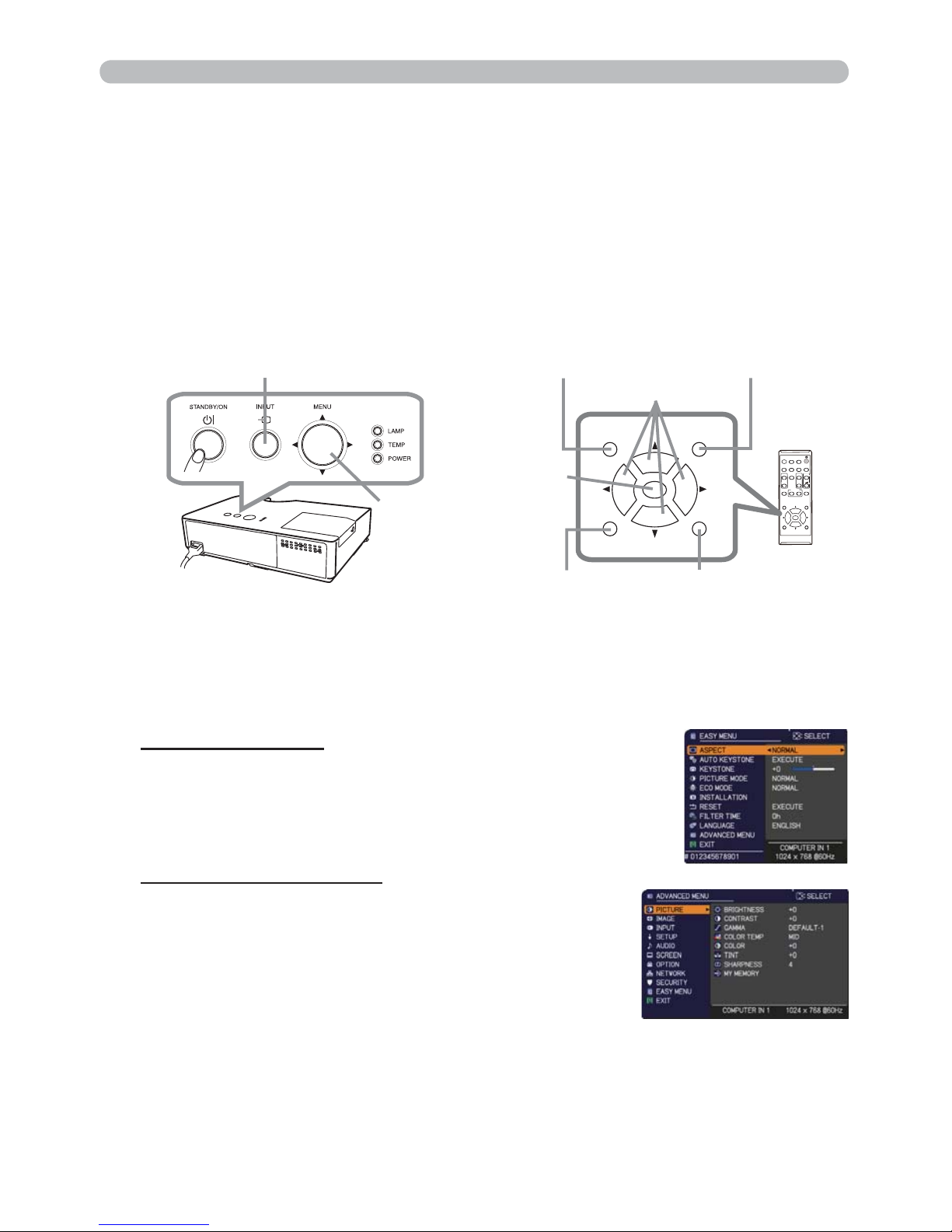
29
Operating
1.
To start the MENU, press the MENU button. The MENU you last used (EASY
or ADVANCED) will appear. EASY MENU has priority to appear just after
powered on.
Using the menu function
2.
(1) Use the ▲/▼ cursor buttons to select an item to
operate. If you want to change it to the ADVANCED
MENU, select the ADVANCED MENU.
(2) Use the ◄/► cursor buttons to operate the item.
This projector has the following menus:
PICTURE, IMAGE, INPUT, SETUP, AUDIO, SCREEN, OPTION, NETWORK,
SECURITY and EASY MENU.
EASY MENU consists of functions often used, and the other menus are classi ed
into each purpose and brought together as the ADVANCED MENU.
Each of these menus is operated using the same methods. While the projector
is displaying any menu, the MENU button on the projector works as the cursor
buttons. The basic operations of these menus are as follows.
In the EASY MENU
(continued on next page)
(1) Use the ▲/▼ cursor buttons to select a menu.
If you want to change it to the EASY MENU,
select the EASY MENU.
The items in the menu appear on the right side.
(2) Press the ► cursor button or ENTER button to
move the cursor to the right side. Then use the
▲/▼ cursor buttons to select an item to operate and press the ► cursor
button or ENTER button to progress. The operation menu or dialog of the
selected item will appear.
(3) Use the buttons as instructed in the OSD to operate the item.
In the ADVANCED MENU
MENU button
(Cursor buttons)
INPUT button
VIDEO
DOC.CAMERA
KEYSTONE
ASPECT
SEARCH
BLA
NK
MUTE
MY BUTTON
POSI
TION
ESC
MENU
RESET
COMPUTER
MY SOURCE/
AUTO
MAGNIFY
PAGE
DOWN
ON
OFF
FREEZE
UP
㧗
VOLUME
1
2
ENTER
POSITION
ESC
MENU
RESET
ENTER
ENTER button
MENU button
Cursor buttons
ESC button
RESET button
POSITION button
Page 39
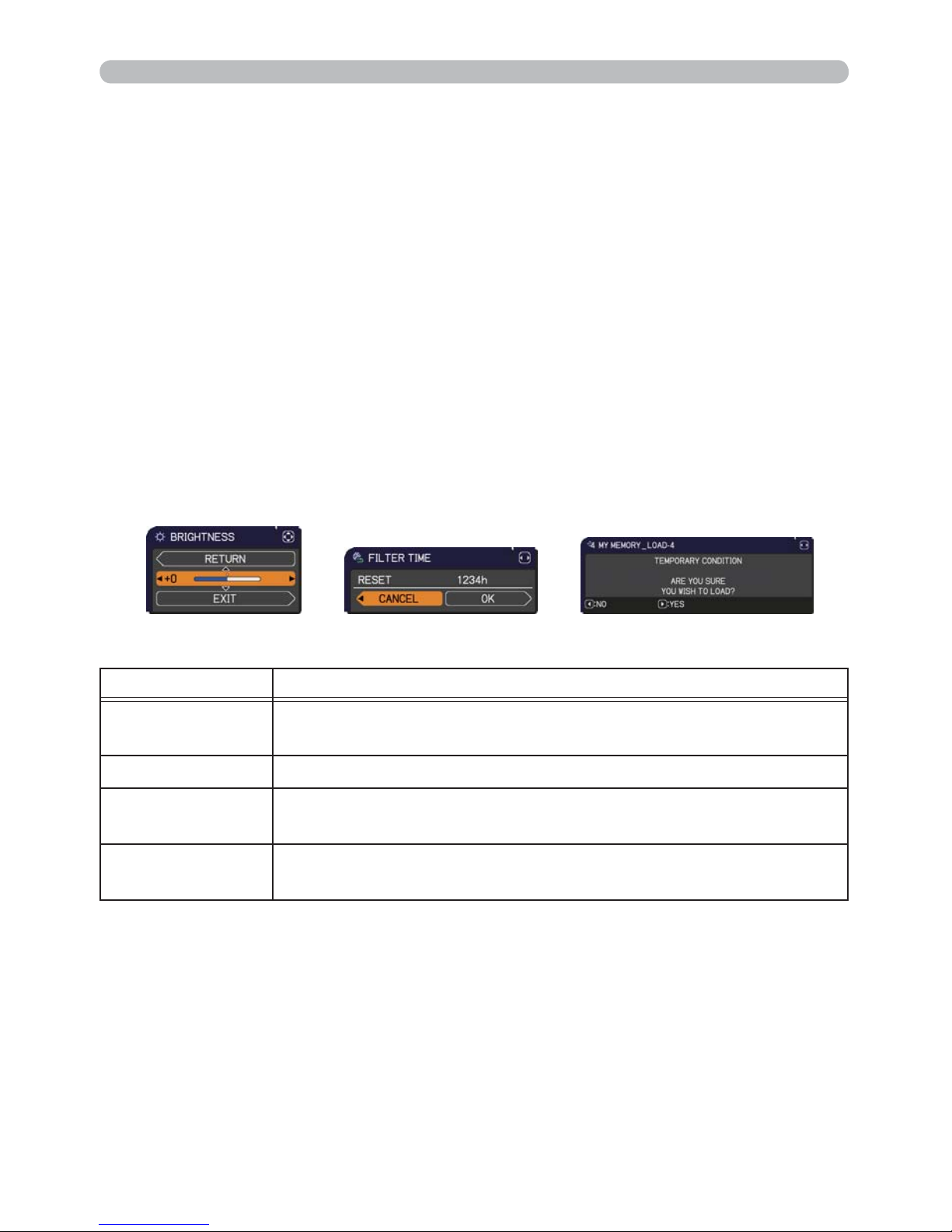
30
Using the menu function (continued)
3.
To close the MENU, press the MENU button again or select EXIT and press
the ◄ cursor button or ENTER button. Even if you do not do anything, the
dialog will automatically disappear after about 30 seconds.
●
If you want to move the menu position, use the cursor buttons after pressing
the POSITION button.
● Some functions cannot be performed when a certain input port is selected,
or when a certain input signal is displayed.
● When you want to reset the operation, press RESET button on the remote
control during the operation. Note that some items (ex. LANGUAGE,
VOLUME) cannot be reset.
● In the ADVANCED MENU, when you want to return to the previous display,
press the ◄ cursor button or ESC button on the remote control.
Indication in OSD (On Screen Display)
The meanings of the general words on the OSD are as follows.
Indication Meaning
EXIT
Selecting this word nishes the OSD menu. It's the same as
pressing the MENU button.
RETURN Selecting this word returns the menu to the previous menu.
CANCEL or NO
Selecting this word cancels the operation in the present
menu and returns to the previous menu.
OK or YES
Selecting this word executes the prepared function or shifts
the menu to the next menu.
Operating
Page 40
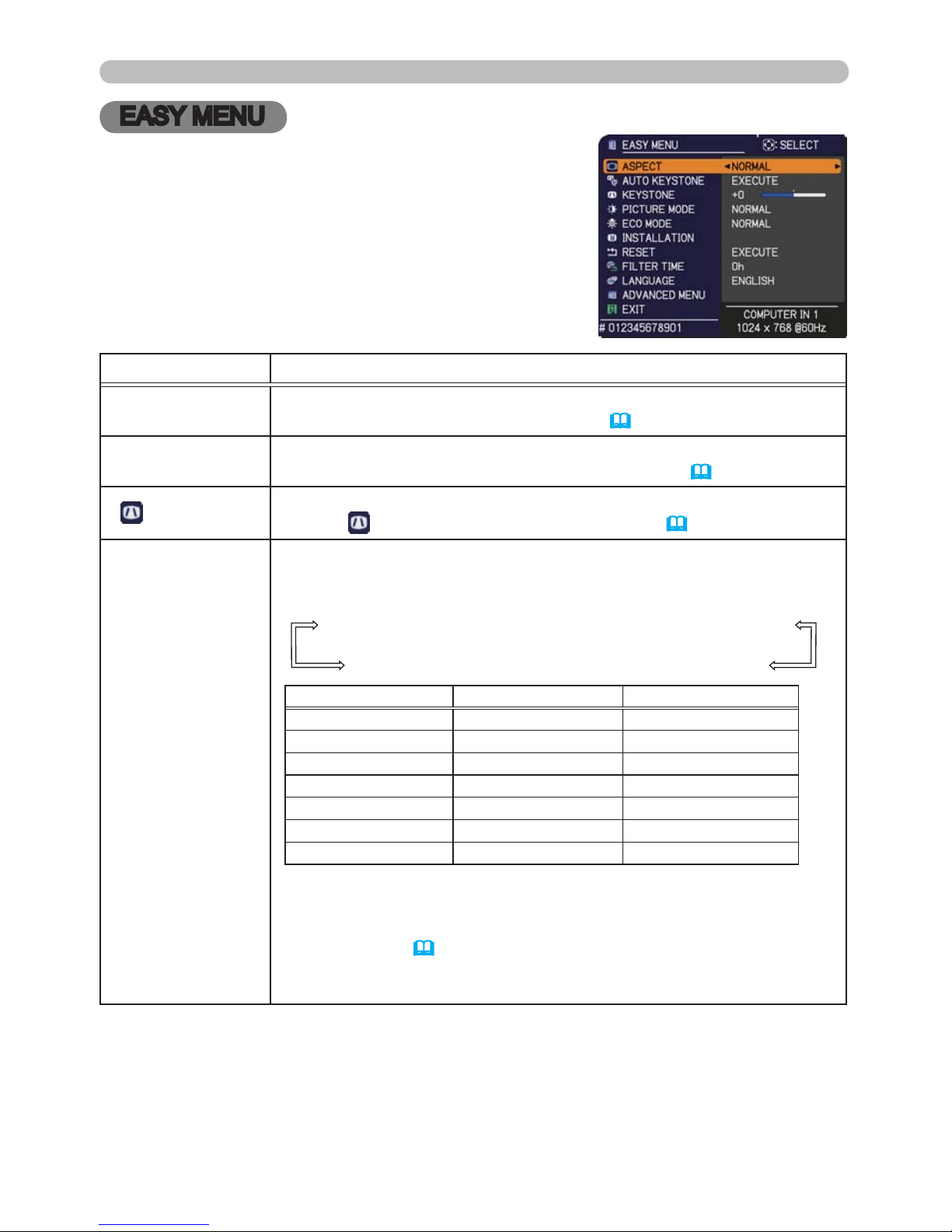
31
EASY MENU
EASY MENU
From the EASY MENU, items shown in the table
below can be performed.
Select an item using the ▲/▼ cursor buttons. Then
perform it according to the following table.
Item Description
ASPECT
Using the ◄/► buttons switches the mode for aspect ratio.
See the ASPECT item in IMAGE menu (
36).
AUTO KEYSTONE
Using the ► button executes the auto keystone function.
See the AUTO KEYSTONE item in SETUP menu (
43).
KEYSTONE
Using the ◄/► buttons corrects the vertical keystone distortion.
See the
KEYSTONE item in SETUP menu (43).
PICTURE MODE
Using the ◄/► buttons switches the picture mode.
The picture modes are combinations of GAMMA and COLOR TEMP
settings. Choose a suitable mode according to the projected source.
NORMAL Ù CINEMA Ù DYNAMIC Ù BOARD(BLACK)
DAYTIME Ù WHITEBOARD Ù BOARD(GREEN)
GAMMA COLOR TEMP
NORMAL 1 DEFAULT 2 MID
CINEMA 2 DEFAULT 3 LOW
DYNAMIC 3 DEFAULT 1 HIGH
BOARD(BLACK) 4 DEFAULT 4 Hi-BRIGHT-1
BOARD(GREEN) 4 DEFAULT 5 Hi-BRIGHT-2
WHITEBOARD 5 DEFAULT 2 MID
DAYTIME 6 DEFAULT 6 Hi-BRIGHT-3
• When the combination of GAMMA and COLOR TEMP differs
from pre-assigned modes above, the display on the menu for the
PICTURE MODE is “CUSTOM”. Please refer to the GAMMA and
COLOR TEMP (
33, 34) items in PICTURE menu.
• Lines or other noise might appear on the screen when this function
is operated, but it is not a malfunction.
(continued on next page)
Page 41
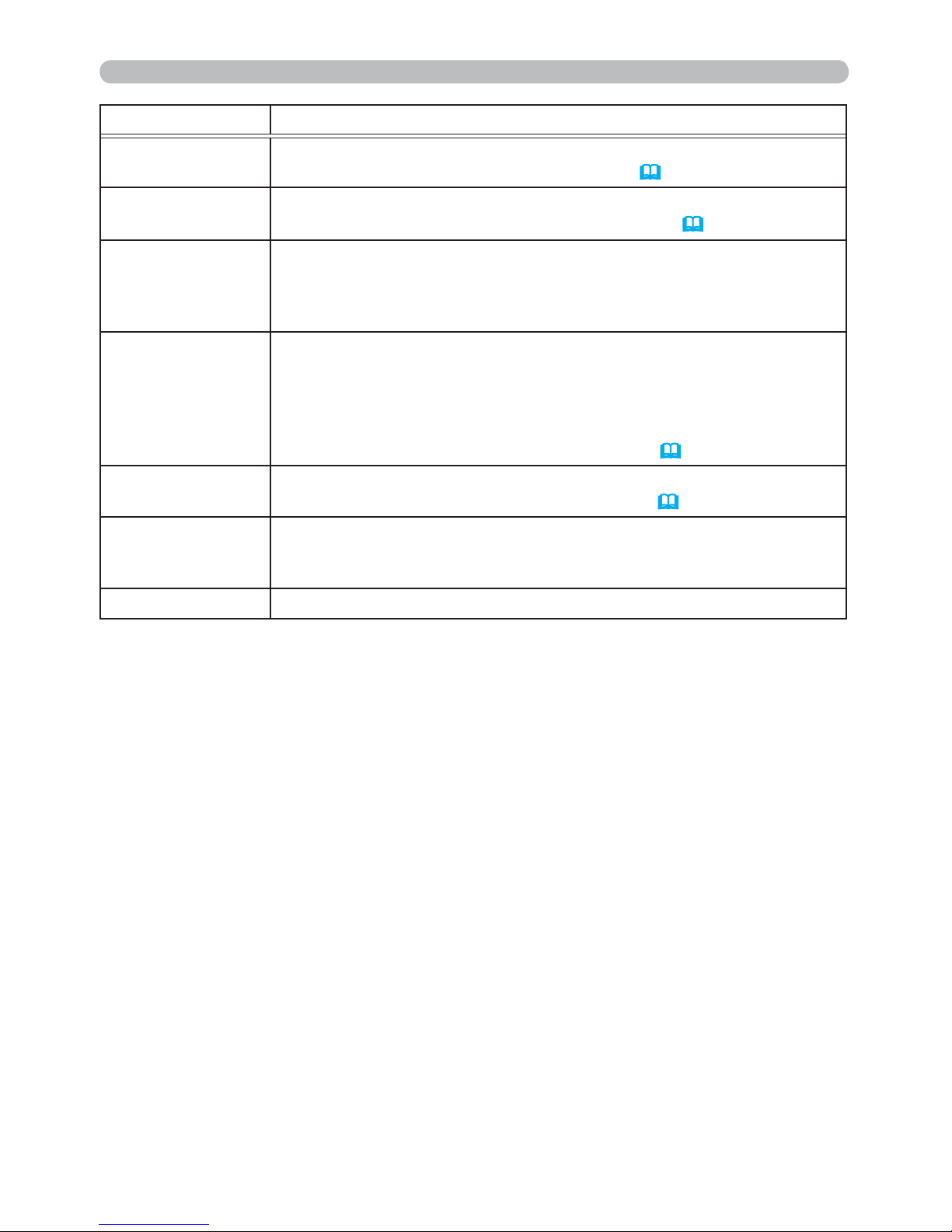
32
EASY MENU
Item Description
ECO MODE
Using the ◄/► buttons turns off/on the Eco mode.
See the ECO MODE item in SETUP menu (
44).
INSTALLATION
Pressing the ► button displays the INSTALLATION dialog.
See the
INSTALLATION
item in SETUP menu (44).
RESET
Performing this item resets all of the EASY MENU items except the
FILTER TIME and LANGUAGE.
A dialog is displayed for conrmation. Selecting the OK using the ►
button performs resetting.
FILTER TIME
The usage time of the air lter is shown in the menu.
Performing this item resets the lter time which counts usage time
of the air lter.
A dialog is displayed for conrmation. Selecting the OK using the ►
button performs resetting.
See the FILTER TIME item in OPTION menu (
55).
LANGUAGE
Using the ◄/► buttons changes the display language.
See the LANGUAGE item in SCREEN menu (
47).
ADVANCED MENU
Press the ► or ENTER button to use the menu of PICTURE,
IMAGE, INPUT, SETUP, AUDIO, SCREEN, OPTION, NETWORK or
SECURITY.
EXIT Press the ◄ or ENTER button to nish the OSD menu.
Page 42
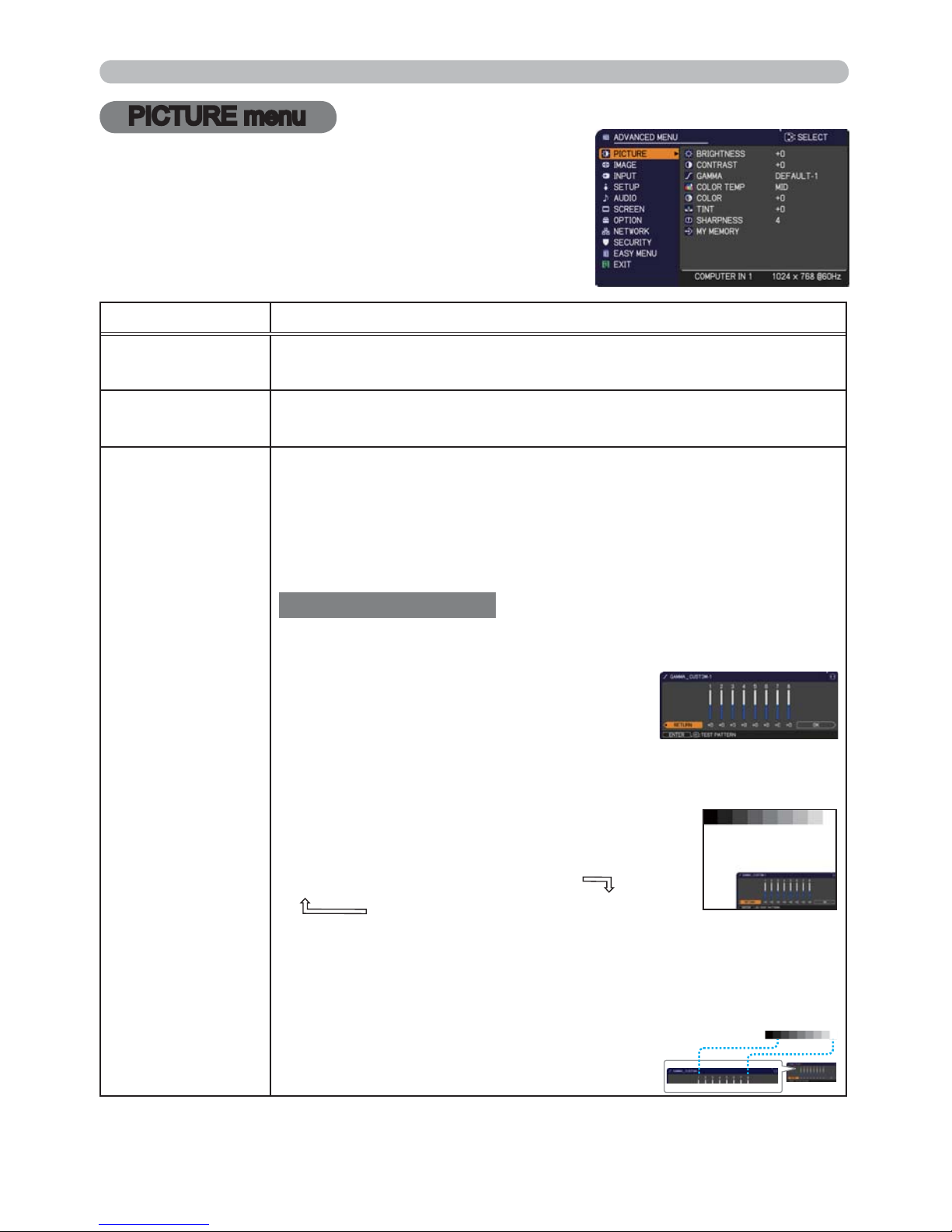
33
PICTURE menu
PICTURE menu
From the PICTURE menu, items shown in the table
below can be performed.
Select an item using the ▲/▼ cursor buttons, and
press the ► cursor button or ENTER button to
execute the item. Then perform it according to the
following table.
Item Description
BRIGHTNESS
Using the
◄/►
buttons adjusts the brightness.
Dark Ù Light
CONTRAST
Using the
◄/►
buttons adjusts the contrast.
Weak Ù Strong
GAMMA
Using the ▲/▼ buttons switches the gamma mode.
ÙÙ
ÙÙ
1 DEFAULTÙ 1 CUSTOM Ù 2 DEFAULTÙ 2 CUSTOM Ù 3 DEFAULT
6 CUSTOM 3 CUSTOM
6 DEFAULT
Ù
5 CUSTOM Ù 5 DEFAULTÙ 4 CUSTOM Ù 4 DEFAULT
To adjust CUSTOM
Selecting a mode whose name includes CUSTOM and then
pressing the ► button or the ENTER button displays
a dialog to aid you in adjusting the mode.
This function is useful when you want to
change the brightness of particular tones.
Choose an item using the ◄/► buttons,
and adjust the level using the ▲/▼ buttons.
You can display a test pattern for checking the effect of your
adjustment by pressing the ENTER button.
Each time you press the ENTER button, the
pattern changes as below.
No pattern Ö Gray scale of 9 steps
Ramp Õ Gray scale of 15 steps
The eight equalizing bars correspond to eight tone levels of the test
pattern (Gray scale of 9 steps) except the darkest in the left end. If you
want to adjust the 2nd tone from left end on the test pattern, use the
equalizing adjustment bar “1”. The darkest tone at the left end of the
test pattern cannot be controlled with any of equalizing adjustment bar.
• Lines or other noise might appear on the
screen when this function is operated, but it
is not a malfunction.
(continued on next page)
Page 43
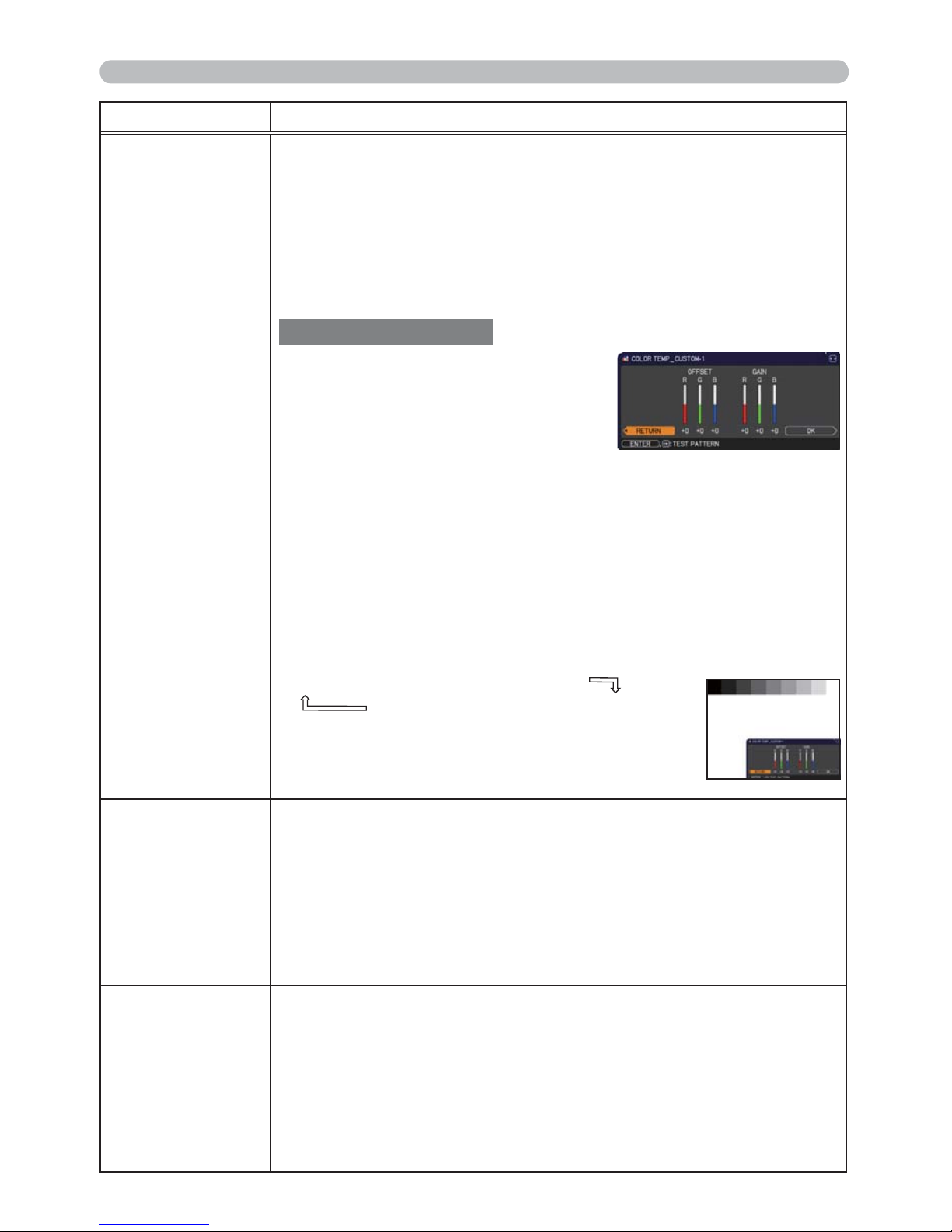
34
PICTURE menu
(continued on next page)
Item Description
COLOR TEMP
Using the ▲/▼ buttons switches the color temperature mode.
To adjust CUSTOM
Selecting a mode whose name includes
CUSTOM and then pressing the ► button
or the ENTER button displays a dialog
to aid you in adjusting the OFFSET and
GAIN of the selected mode.
OFFSET adjustments change the color intensity on the whole tones
of the test pattern.
GAIN adjustments mainly affect color intensity on the brighter tones
of the test pattern.
Choose an item using the ◄/► buttons, and adjust the level using
the ▲/▼ buttons.
You can display a test pattern for checking the effect of your
adjustment by pressing the ENTER button.
Each time you press the ENTER button, the pattern changes as below.
No pattern Ö Gray scale of 9 steps
Ramp Õ Gray scale of 15 steps
• Lines or other noise might appear on the screen
when this function is operated, but it is not a
malfunction.
COLOR
Using the ◄/► buttons adjusts the strength of whole color.
Weak Ù Strong
• This item can be selected only for a video, s-video and component
video signal.
•
For an HDMITM signal, this item can also be selected if either (1) or (2) applies.
(1) HDMI FORMAT item in the INPUT menu is set to VIDEO.
(2) HDMI FORMAT item in the INPUT menu is set to AUTO, and the
projector recognizes that it receives video signals.
TINT
Using the ◄/► buttons adjusts the tint.
Reddish Ù Greenish
• This item can be selected only for a video, s-video and component
video signal.
•
For an HDMITM signal, this item can also be selected if either (1) or (2) applies.
(1) HDMI FORMAT item in the INPUT menu is set to VIDEO.
(2) HDMI FORMAT item in the INPUT menu is set to AUTO, and the
projector recognizes that it receives video signals.
1 HIGH
Ù
1 CUSTOM
Ù
2 MID
Ù
2 CUSTOM
3 LOW
5 CUSTOM
Ù
5 Hi-BRIGHT-2Ù4 CUSTOMÙ4 Hi-BRIGHT-1
6 CUSTOM
Ù
Ù
ÙÙÙ
6 Hi-BRIGHT-3
Ù
3 CUSTOM
Page 44
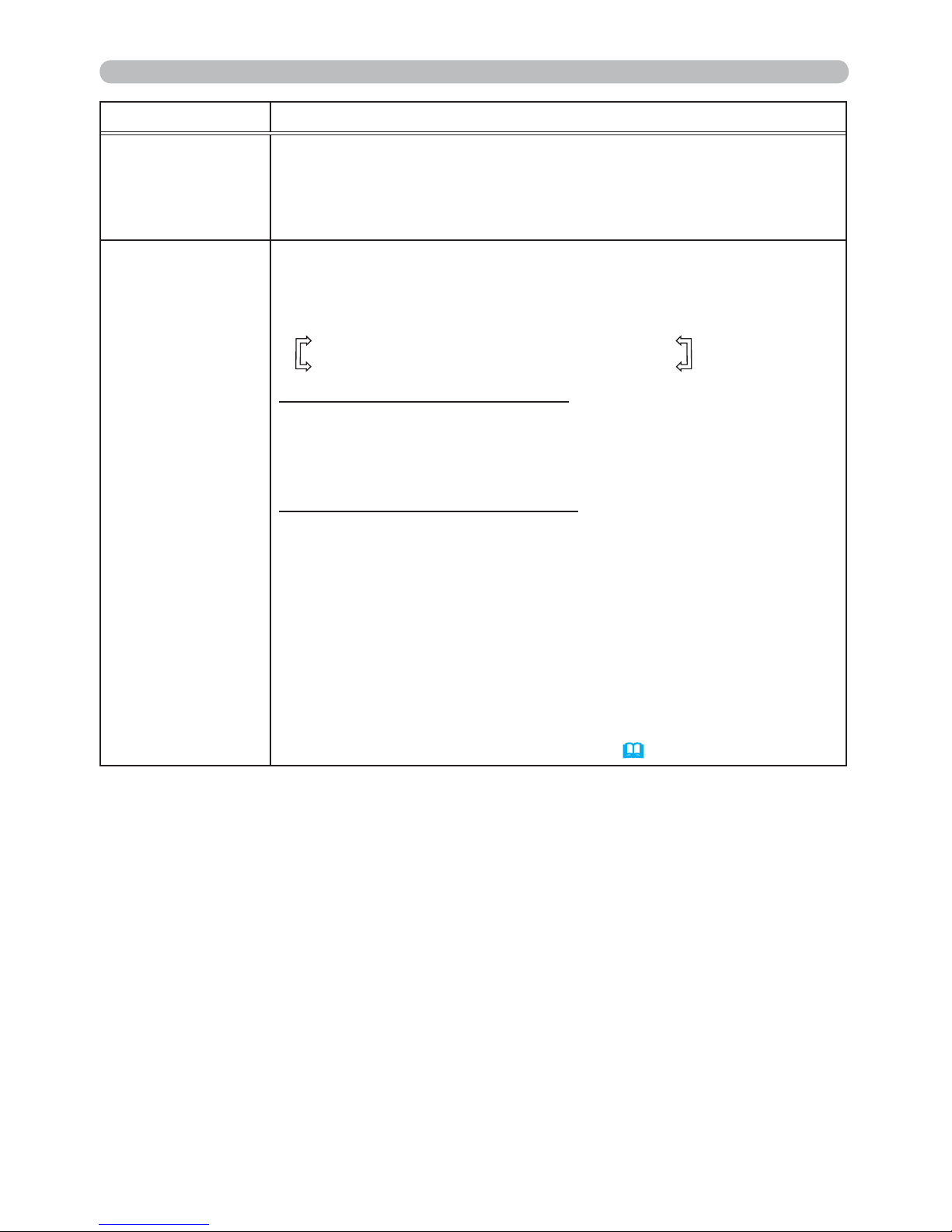
35
PICTURE menu
Item Description
SHARPNESS
Using the ◄/► buttons adjusts the sharpness.
Weak Ù Strong
• There may be some noise and/or the screen may icker for a
moment when an adjustment is made. This is not a malfunction.
MY MEMORY
This projector has 4 memories for adjustment data (for all the items
of the PICTURE menu).
Selecting a function using the ▲/▼ buttons and pressing the ► or
ENTER button performs each function.
SAVE-1 Ù SAVE-2 Ù SAVE-3 Ù SAVE-4
LOAD-4 ÙLOAD-3 Ù LOAD-2 Ù LOAD-1
SAVE-1, SAVE-2, SAVE-3, SAVE-4
Performing a SAVE function saves the current adjustment data into
the memory linked in the number included in the function’s name.
• Remember that the current data being stored of a memory will be
lost by saving new data into the memory.
LOAD-1, LOAD-2, LOAD-3, LOAD-4
Performing a LOAD function loads the data from the memory linked
in the number included in the function’s name, and adjusts the
picture automatically depending on the data.
• The LOAD functions whose linked memory has no data are
skipped.
• Remember that the current adjusted condition will be lost by
loading data. If you want to keep the current adjustment, please
save it before performing a LOAD function.
• There may be some noise and the screen may icker for a
moment when loading data. This is not malfunction.
• You can perform the LOAD function using MY BUTTON. Please
see MY BUTTON item in OPTION menu (
56, 57).
Page 45
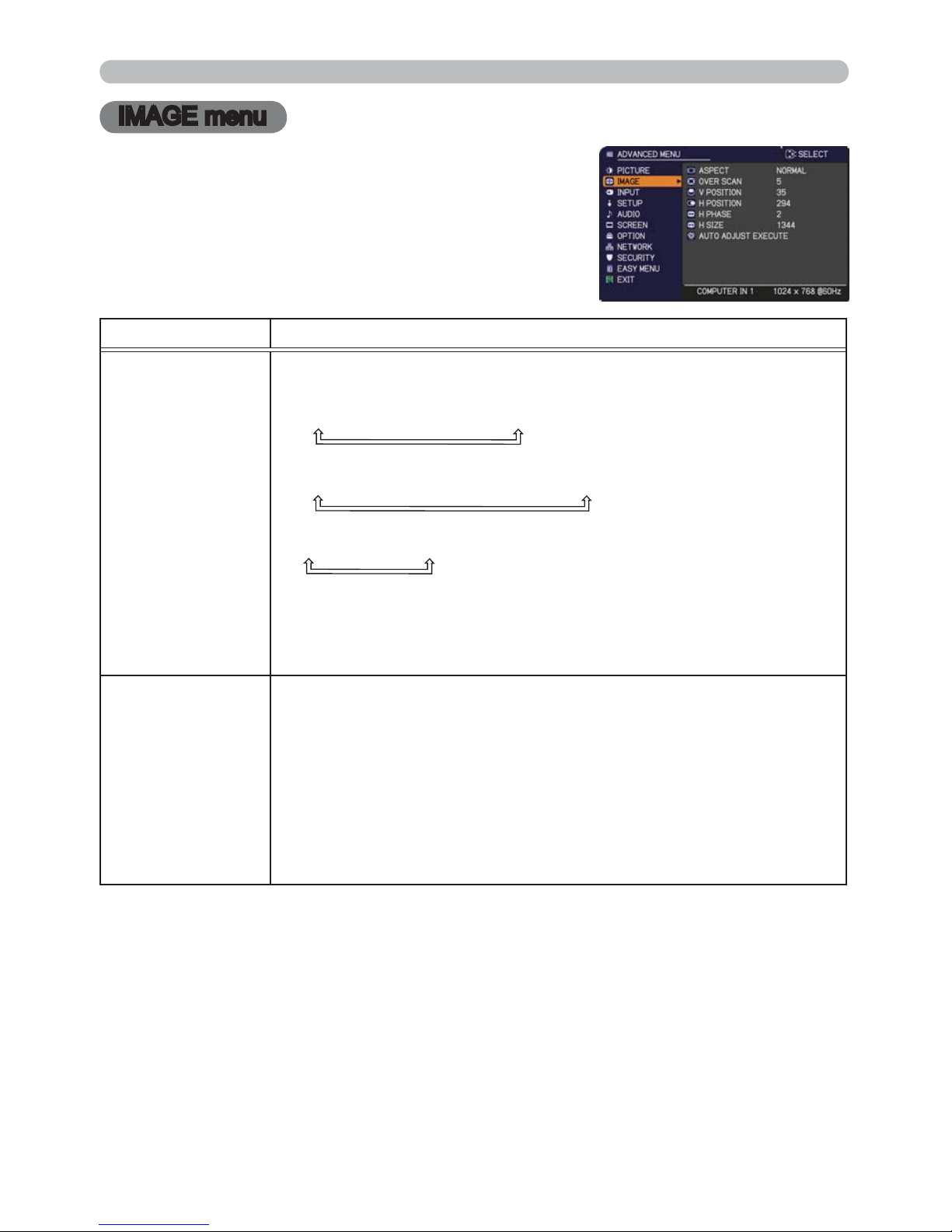
36
IMAGE menu
IMAGE menu
From the IMAGE menu, items shown in the table
below can be performed.
Select an item using the ▲/▼ cursor buttons, and
press the ► cursor button or ENTER button to
execute the item. Then perform it according to the
following table.
Item Description
ASPECT
Using the ▲/▼ buttons switches the mode for aspect ratio.
For a computer signal
NORMAL Ù 4:3 Ù 16:9 Ù 16:10
For an HDMITM signal
NORMAL Ù
4:3 Ù 16:9 Ù 16:10 Ù 14:9
For a video signal, s-video signal or component video signal
4:3 Ù 16:9 Ù 14:9
For an input signal from the LAN, USB TYPE A or USB TYPE B
port, or if there is no signal
4:3 (xed)
• The NORMAL mode keeps the original aspect ratio of the signal.
OVER SCAN
Using the ◄/► buttons adjusts the over-scan ratio.
Small (It magnies picture) Ù Large (It reduces picture)
• This item can be selected only for a video, s-video and component
video signal.
• For an HDMI
TM
signal, this item can also be selected if either (1) or
(2) applies.
(1) HDMI FORMAT item in the INPUT menu is set to VIDEO.
(2) HDMI FORMAT item in the INPUT menu is set to AUTO, and the
projector recognizes that it receives video signals.
(continued on next page)
Page 46
37
IMAGE menu
Item Description
V POSITION
Using the ◄/► buttons adjusts the vertical position.
Down Ù Up
• Over-adjusting the vertical position may cause noise to appear on
the screen. If this occurs, please reset the vertical position to the
default setting. Pressing the RESET button when the V POSITION
is selected will reset the V POSITION to the default setting.
• When this function is performed on a video signal or an s-video
signal, the range of this adjustment depends on OVER SCAN (
36)
setting. It is not possible to adjust when OVER SCAN is set to 10.
•
This function is unavailable for a signal from the LAN, USB TYPE A,
USB TYPE B or HDMI port.
H POSITION
Using the ◄/► buttons adjusts the horizontal position.
Right Ù Left
•
Over-adjusting the horizontal position may cause noise to appear on
the screen. If this occurs, please reset the horizontal position to the
default setting. Pressing the RESET button when the H POSITION is
selected will reset the H POSITION to the default setting.
• When this function is performed on a video signal or an s-video
signal, the range of this adjustment depends on OVER SCAN (
36)
setting. It is not possible to adjust when OVER SCAN is set to 10.
•
This function is unavailable for a signal from the LAN, USB TYPE A,
USB TYPE B or HDMI por
t.
(continued on next page)
Page 47

38
IMAGE menu
Item Description
H PHASE
Using the
◄/►
buttons adjusts the horizontal phase to eliminate icker.
Right Ù Left
• This item can be selected only for a computer signal or a
component video signal. This function is unavailable for a signal
from the LAN, USB TYPE A, USB TYPE B or HDMI port.
H SIZE
Using the ◄/► buttons adjusts the horizontal size.
Small Ù Large
• This item can be selected only for a computer signal. This function
is unavailable for a signal from the LAN, USB TYPE A, USB TYPE
B or HDMI port.
• When this adjustment is excessive, the picture may not be
displayed correctly. In such a case, please reset the adjustment
by pressing the RESET button on the remote control during this
operation.
• Images might appear degraded when this function is operated, but
it is not a malfunction.
AUTO ADJUST
EXECUTE
Selecting this item performs the automatic adjustment feature.
For a computer signal
The vertical position, the horizontal position and the horizontal
phase will be automatically adjusted.
Make sure that the application window is set to its maximum size
prior to attempting to use this feature. A dark picture may still be
incorrectly adjusted. Use a bright picture when adjusting.
For a video signal and s-video signal
The video format best suited for the respective input signal will
be selected automatically. This function is available only when
the AUTO is selected for the VIDEO FORMAT item in the INPUT
menu (
40).
The vertical position and horizontal position will be
automatically set to the default.
For a component video signal
The vertical position and horizontal position will be automatically
set to the default. The horizontal phase will be automatically
adjusted.
• The automatic adjustment operation requires approx. 10 seconds.
Also please note that it may not function correctly with some input.
• When this function is performed for a video signal, a certain extra
such as a line may appear outside a picture.
• When this function is performed for a computer signal, a black
frame may be displayed on the edge of the screen, depending on
the computer model.
• The items adjusted by this function may vary when the FINE or
DISABLE is selected for the AUTO ADJUST item of the SERVICE
item in the OPTION menu (
57).
Page 48
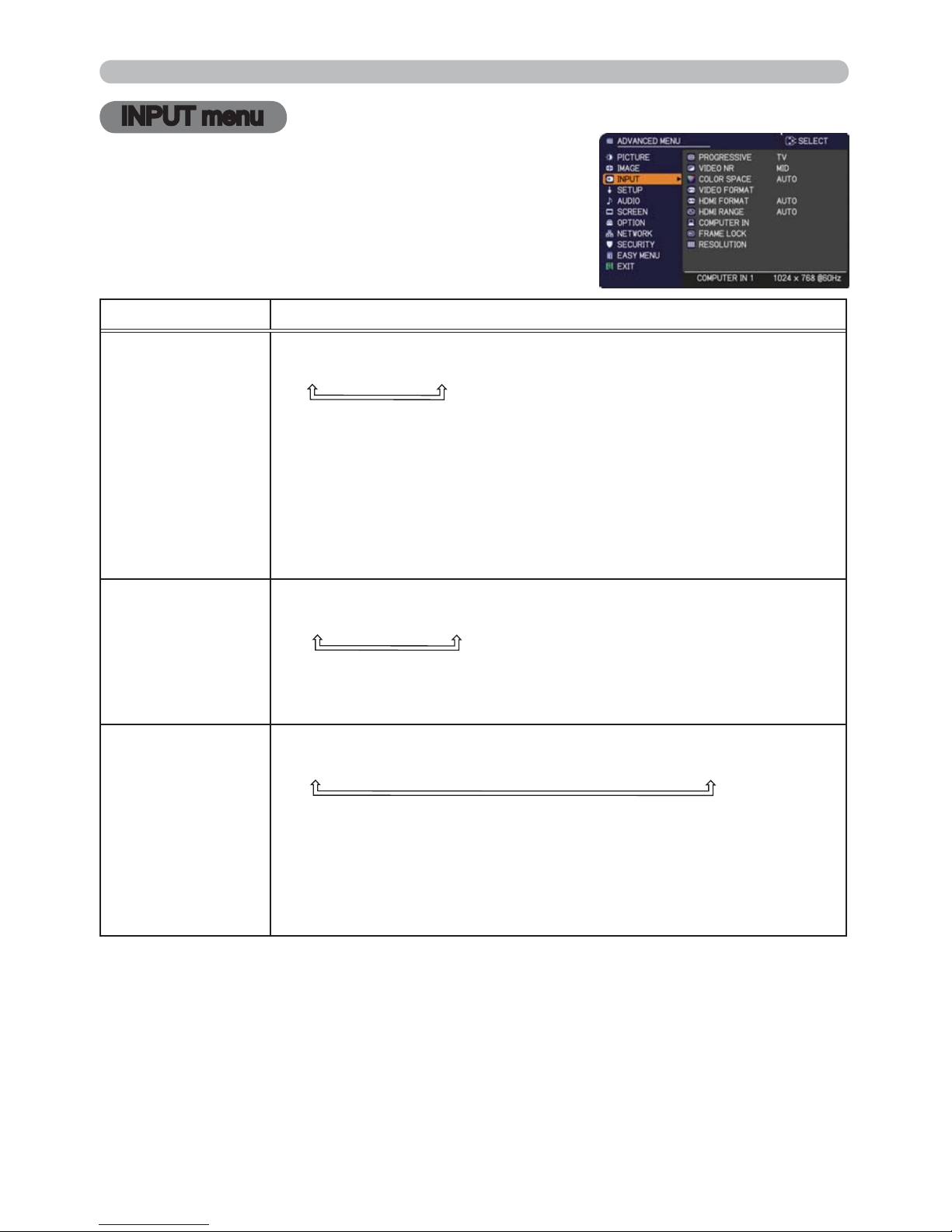
39
INPUT menu
INPUT menu
From the INPUT menu, items shown in the table
below can be performed.
Select an item using the ▲/▼ cursor buttons, and
press the ► cursor button or ENTER button to
execute the item. Then perform it according to the
following table.
Item Description
PROGRESSIVE
Using the ▲/▼ buttons switches the progress mode.
TV Ù FILM Ù OFF
•
This function works only for a video signal, s-video signal, component
video signal (of 480i@60 or 576i@50 or 1080i@50/60) and an HDMI
TM
signal (of 480i@60 or 576i@50 or 1080i@50/60)
.
• When TV or FILM is selected, the screen image will be sharp.
FILM adapts to the 2-3 Pull-Down conversion system. But these
may cause a certain defect (for example, jagged line) of the picture
for a quick moving object. In such a case, please select OFF, even
though the screen image may lose sharpness.
VIDEO NR
Using the ▲/▼ buttons switches the noise reduction mode.
HIGH Ù MID Ù LOW
• This function works only for a video signal, s-video signal,
component video signal (of 480i@60 or 576i@50 or 1080i@50/60)
and an HDMI
TM
signal (of 480i@60 or 576i@50 or 1080i@50/60).
COLOR SPACE
Using the ▲/▼ buttons switches the mode for color space.
AUTO Ù RGB Ù SMPTE240 Ù REC709 Ù REC601
• This item can be selected only for a computer signal (except for
signals from the LAN, USB TYPE A and USB TYPE B ports) or a
component video signal.
• The AUTO mode automatically selects the optimum mode.
• The AUTO operation may not work well at some signals. In such a
case, it might be good to select a suitable mode except AUTO.
(continued on next page)
Page 49
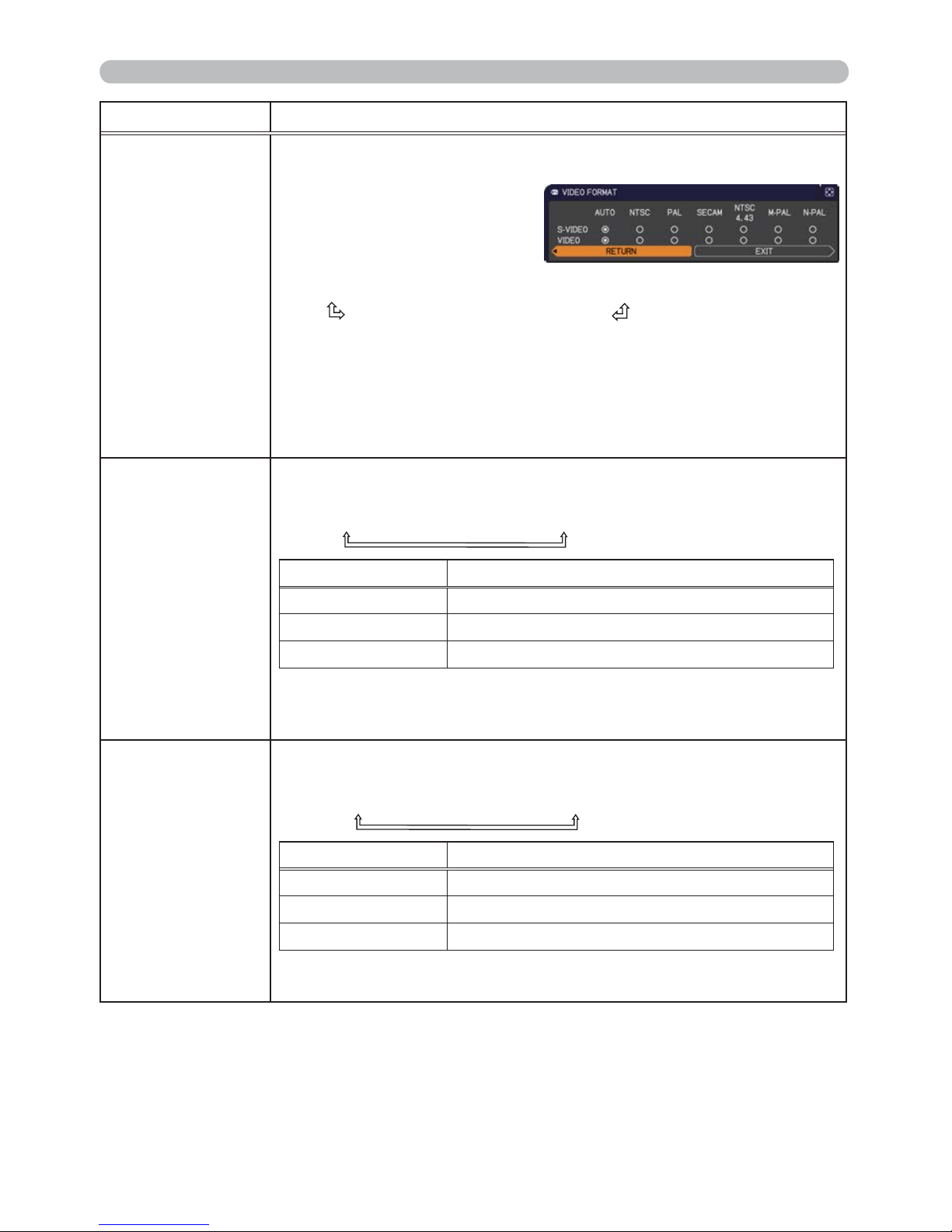
40
INPUT menu
Item Description
VIDEO FORMAT
The video format for S-VIDEO port and VIDEO port can be set.
(1) Use the ▲/▼ buttons to
select the input port.
(2) Using the ◄/► buttons
switches the mode for video
format.
AUTO Ù NTSC Ù PAL Ù SECAM
N-PAL Ù M-PAL Ù NTSC4.43
• This item is performed only for a video signal from the VIDEO port
or the S-VIDEO port.
• The AUTO mode automatically selects the optimum mode.
• The AUTO operation may not work well for some signals. If the
picture becomes unstable (e.g. an irregular picture, lack of color),
please select the mode according to the input signal.
HDMI FORMAT
Using the ▲/▼ cursor buttons switches the video format for an
input from the HDMI port.
AUTO Ù VIDEO Ù COMPUTER
Feature
AUTO automatically sets the optimum mode.
VIDEO sets the suitable mode for DVD signals.
COMPUTER sets the suitable mode for computer signals.
• When the COMPUTER is selected, the functions COLOR
(PICTURE menu), TINT (PICTURE menu) and OVER SCAN
(IMAGE menu) are unavailable.
HDMI RANGE
Using the ▲/▼ cursor buttons changes the digital range for input
from the HDMI port.
AUTO Ù NORMAL Ù ENHANCED
Feature
AUTO automatically sets the optimum mode.
NORMAL s
ets the suitable mode for DVD signals. (16-
235)
ENHANCED
sets the suitable mode for computer signals. (0-255)
• If the contrast of the screen image is too strong or too weak, try
nding a more suitable mode.
(continued on next page)
Page 50
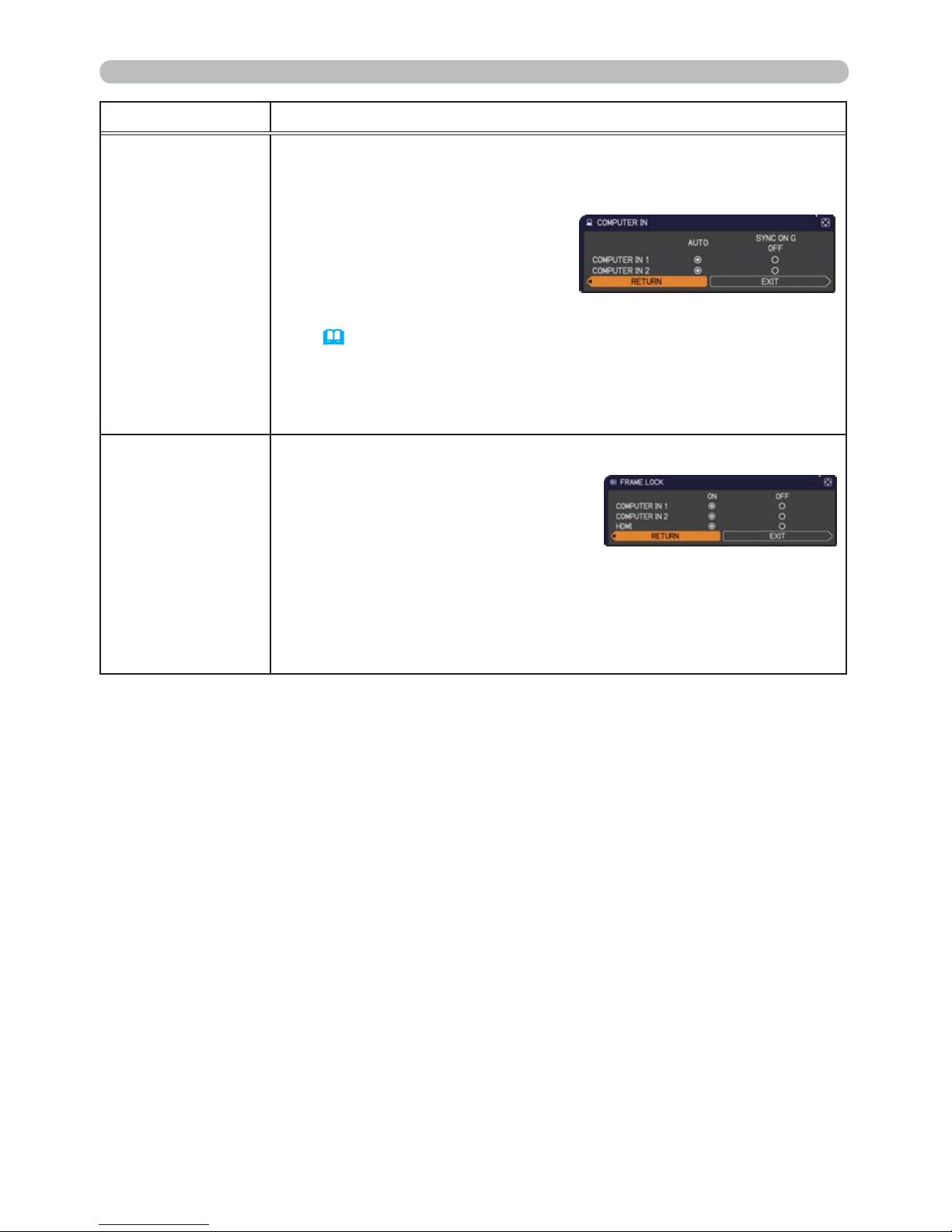
41
INPUT menu
Item Description
COMPUTER IN
The computer input signal type for COMPUTER IN1 and IN2 ports
can be set.
(1)
Use the ▲/▼ buttons to select the COMPUTER IN port to be set.
(2) Use the ◄/► buttons to select
the computer input signal type.
AUTO Ù SYNC ON G OFF
• Selecting the AUTO mode allows
you to input a sync on G signal or component video signal from the
port (
11, 13).
• In the AUTO mode, the picture may be distorted with certain
input signals. In such a case, remove the signal connector so that
no signal is received and select the SYNC ON G OFF, and then
reconnect the signal.
FRAME LOCK
Set the frame lock function on/off for each port.
(1) Use the ▲/▼ buttons to select
the input ports.
(2) Use the ◄/► buttons to turn the
frame lock function on/off .
ON Ù OFF
• This item can be performed only on a signal with a vertical
frequency of 49 to 51Hz, 59 to 61 Hz.
• When ON is selected, moving pictures are displayed more
smoothly.
(continued on next page)
Page 51
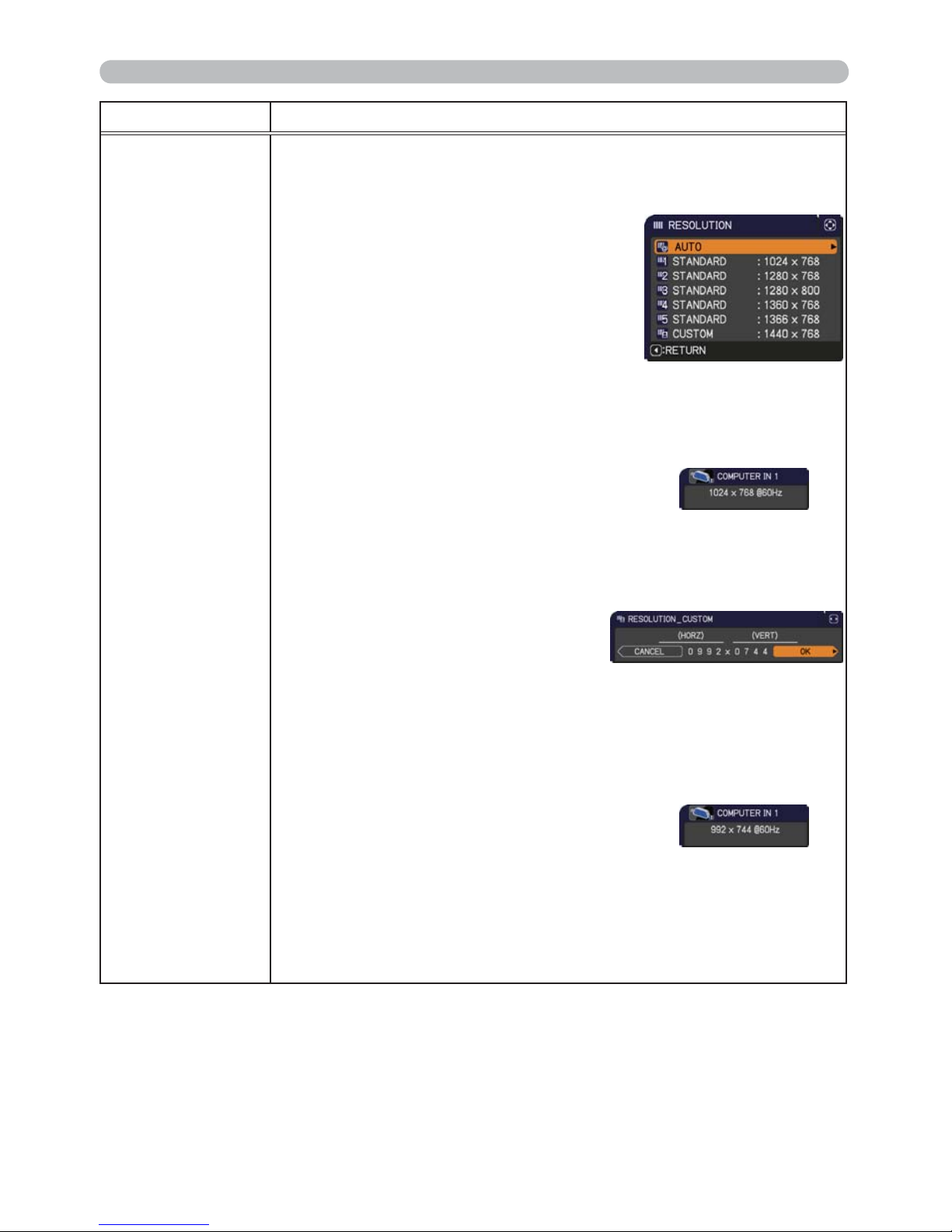
42
INPUT menu
Item Description
RESOLUTION
The resolution for the COMPUTER IN1 and COMPUTER IN2 input
signals can be set on this projector.
(1) In the INPUT menu select the RESOLUTION using the ▲/▼
buttons and press the ► button.
The RESOLUTION menu will be
displayed.
(2) In the RESOLUTION menu select the
resolution you wish to display using
the ▲/▼ buttons.
Selecting AUTO will set a resolution
appropriate to the input signal.
(3) Pressing the ► or ENTER button when
selecting a STANDARD resolution will
automatically adjust the horizontal and
vertical positions, clock phase and
horizontal size.
The INPUT_INFORMATION dialog will be
displayed.
(4) To set a custom resolution use the ▲/▼ buttons to select
the CUSTOM and the RESOLUTION_CUSTOM box will be
displayed.
Set the horizontal (HORZ) and
vertical (VERT) resolutions using
the ▲/▼/◄/► buttons.
This function may not support all
resolutions.
(5) Move the cursor to OK on screen and press the ► or ENTER
button. The message "ARE YOU SURE YOU WISH TO
CHANGE RESOLUTION?" appears. To save the setting, press
the ► button.
The horizontal and vertical positions, clock phase and horizontal
size will be automatically adjusted.
The INPUT_INFORMATION dialog
will be displayed.
(6) To revert back to the previous resolution without saving changes,
move the cursor to CANCEL on screen and press the ◄ or
ENTER button.
The screen will then return to the RESOLUTION menu
displaying the previous resolution.
• For some pictures, this function may not work well.
STANDARD
↓
CUSTOM
↓
Page 52
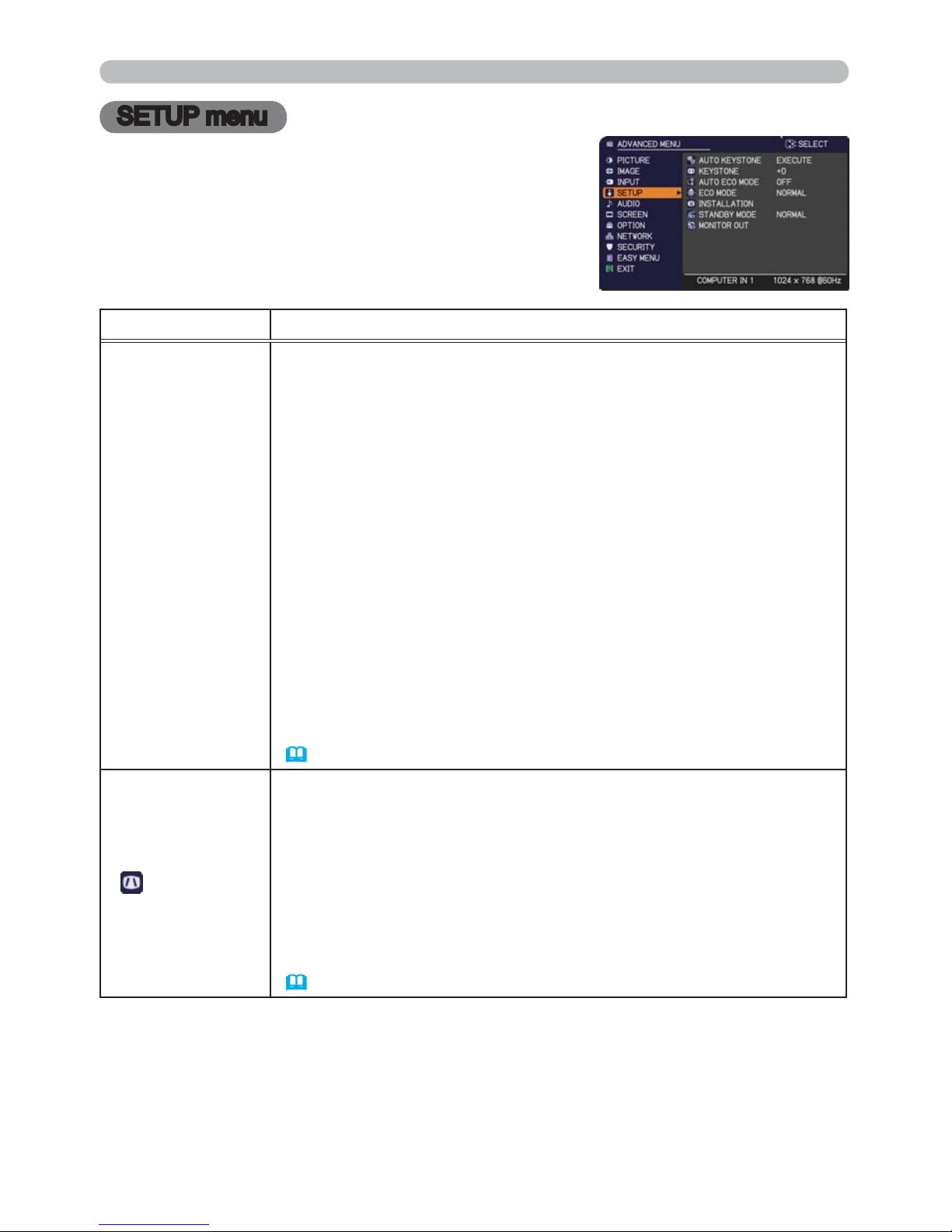
43
SETUP menu
SETUP menu
From the SETUP menu, items shown in the table
below can be performed.
Select an item using the ▲/▼ cursor buttons, and
press the ► cursor button or ENTER button to
execute the item. Then perform it according to the
following table.
Item Description
AUTO KEYSTONE
Selecting this item performs the Automatic keystone distortion
correction. Projector automatically corrects vertical keystone
distortion due to the (forward/backward) setup angle by itself.
This function will be executed only once when selected in the menu.
When the slant of the projector is changed, execute this function again.
• The adjustable range of this function will vary among inputs. For
some input, this function may not work well.
• When REAR / CEILING or FRONT / CEILING is selected for the
INSTALLATION item in the SETUP menu, this function may not
work correctly if the projector screen is slanted or tilted downwards.
• When the zoom adjustment is set to the TELE (telephoto focus),
this function may be excessive. This function should be used when
the zoom adjustment is set to the full WIDE (wide-angle focus)
whenever possible.
• When the projector is placed on the level (about ±4°), this function
may not work.
• When the projector is inclined to near ±30 degree or over, this
function may not work well.
• This function will be unavailable when the Transition Detector is on
(
77) .
KEYSTONE
Using the ◄/► buttons corrects the vertical keystone distortion.
Shrink the bottom of the image Ù Shrink the top of the image
• The adjustable range of this function will vary among inputs. For
some input, this function may not work well.
• When the zoom adjustment is set to the TELE (telephoto focus),
this function may be excessive. This function should be used when
the zoom adjustment is set to the full WIDE (wide-angle focus)
whenever possible.
• This function will be unavailable when the Transition Detector is on
(
77).
(continued on next page)
Page 53
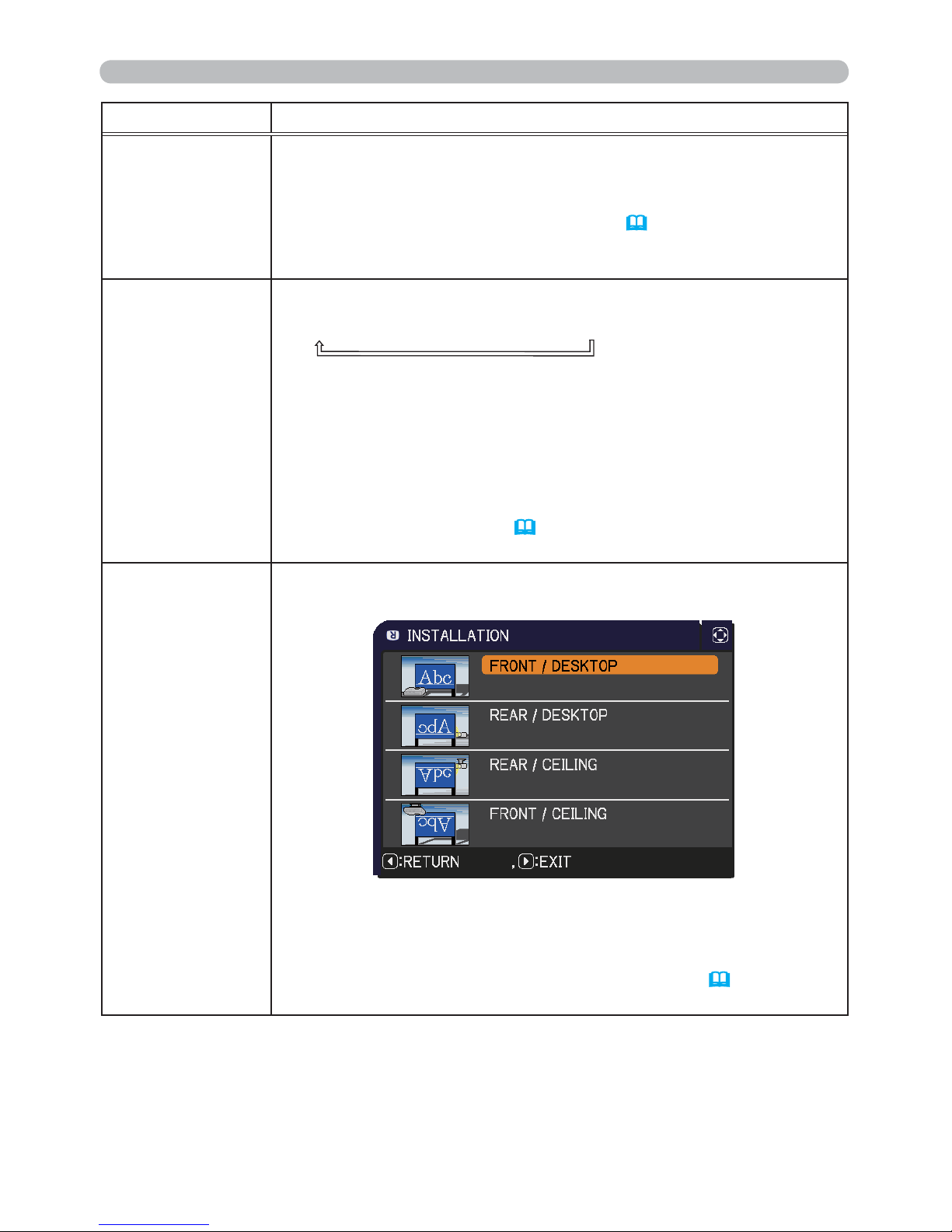
44
SETUP menu
Item Description
AUTO ECO MODE
Using the ▲/▼ buttons turns on/off the AUTO ECO MODE.
ON Ù OFF
• When ON is selected, the projector will always be set to Eco mode
at start-up regardless of the ECO MODE (
below) setting. An OSD
message “AUTO ECO MODE” will be displayed for tens of seconds
when the projector starts with this function activated.
ECO MODE
Pressing the ECO button switches the setting to ECO MODE.
ECO Ö INTELLIGENT ECO Ö NORMAL
• When the ECO is selected, acoustic noise and screen brightness
are reduced.
• When INTELLIGENT ECO is selected, the brightness of the
lamp changes according to the level of the input signal. The lamp
becomes brighter when the input signal level is high and darker
when the level is low. If dark images are projected continuously, the
brightness of the lamp may increase to maintain its performance.
• When AUTO ECO MODE (
above) is set to ON, the projector will
always be set to Eco mode at start-up regardless this setting.
INSTALLATION
Pressing the ►button displays the dialog for changing the
INSTALLATION setting.
Use the ▲/▼ buttons to select the desired setting on the
INSTALLATION dialog, and press the ENTER button of the remote
control or the INPUT button of the projector to execute.
If Transition Detector is ON and the INSTALLATION status is
changed, the TRANSITION DETECTOR ON alarm (
77) will be
displayed when the projector is restarted.
(continued on next page)
Page 54
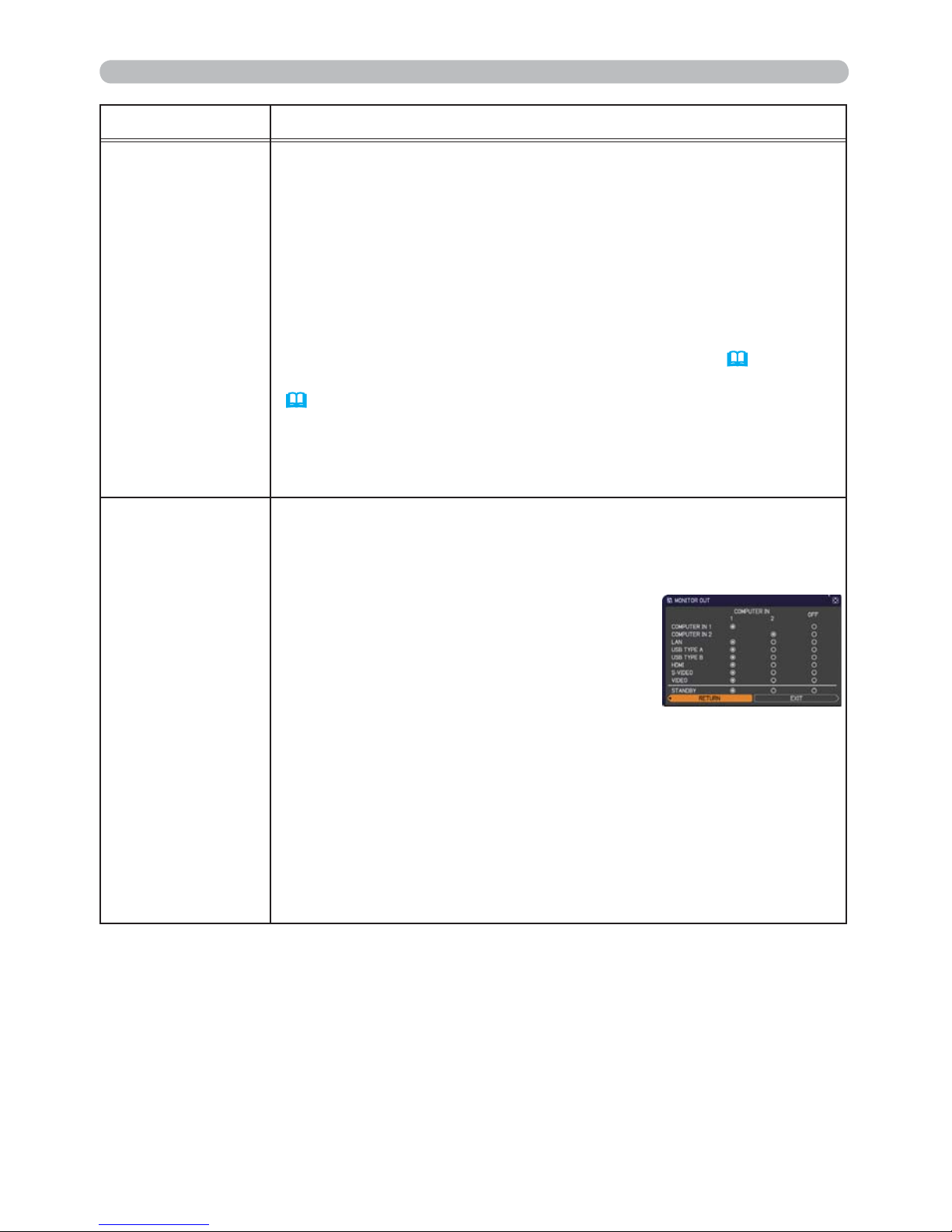
45
Item Description
STANDBY MODE
Using ▲/▼ buttons switches the standby mode setting between
NORMAL and SAVING.
NORMAL Ù SAVING
When SAVING is selected, the power consumption in the standby
mode is lowered with some functional restriction as below:
• When SAVING is selected, the RS-232C communication control
except to turn the projector on and the network function are disabled
while the projector is in the standby mode. If the COMMUNICATION
TYPE in the COMMUNICATION menu is set to NETWORK
BRIDGE, all of the RS-232C commands are disabled (
59).
• When SAVING is selected, STANDBY setting of AUDIO SOURCE
(
46) is invalid, and no signal is output from AUDIO OUT port in
the standby mode.
• When SAVING is selected, STANDBY setting of MONITOR OUT
is invalid, and no signal is output from MONITOR OUT port in the
standby mode.
MONITOR OUT
While the image signal from the input port chosen in step (1) is
projected, the image signal from the input port selected in step (2) is
output to MONITOR OUT port.
(1) Choose a picture input port using ▲/▼ buttons.
Choose STANDBY to select the picture
output in the standby mode.
(2) Select one of the COMPUTER IN ports
using ◄/► buttons.
Select OFF to disable the MONITOR OUT
port for the input port or standby mode
chosen in the step (1).
• You cannot select COMPUTER IN2 for COMPUTER IN1, and vice
versa.
• If you have changed the setting of STANDBY, it applies only to
the current standby mode, NORMAL or SAVING, selected under
STANDBY MODE, without changing the setting of the other mode.
The factory settings are as follows:
- COMPUTER IN1 for the NORMAL mode of STANDBY MODE
- OFF for the SAVING mode of STANDBY MODE
SETUP menu
Page 55
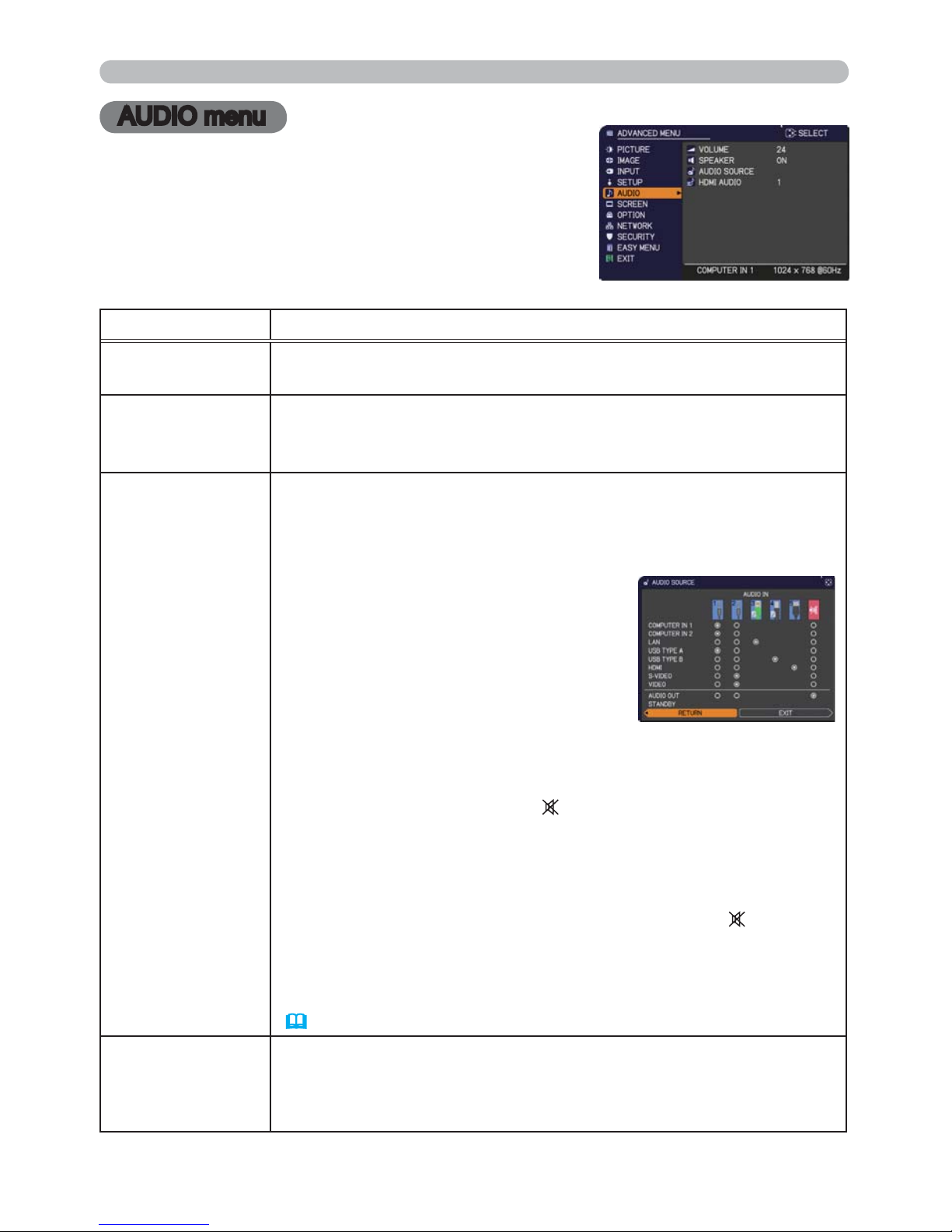
46
AUDIO menu
AUDIO menu
From the AUDIO menu, items shown in the table
below can be performed. Select an item using the
▲/▼ cursor buttons, and press the ► cursor button
or the ENTER button to execute the item. Then
perform it according to the following table.
Item Description
VOLUME
Using the ◄/► buttons adjusts the volume.
Low Ù High
SPEAKER
Using the ▲/▼ buttons turns on/off the built-in speaker.
ON Ù OFF
When OFF is selected, the built-in speaker does not work.
AUDIO SOURCE
While the image signal from the input port chosen in step (1) is
projected, the audio signal from the input port selected in step
(2) is output to both the AUDIO OUT port and built-in speaker of
this projector. However, the built-in speaker does not work when
SPEAKER is set to OFF.
(1) Choose a picture input port using the
▲/▼ buttons.
Choose AUDIO OUT STANDBY to
select the sound output in the standby
mode.
(2) Select an audio input port or the mute
icon using the ◄/► buttons.
The icons indicate the following;
No.1: AUDIO IN1 port No.2: AUDIO IN2 port
No.3: LAN port No.4: USB TYPE B port
No.5: HDMI port
: mutes the sound
• Audio input from port nos3 to 5 can only be selected by each of
the picture input ports.
• Even if the projector is in the standby mode, cooling fans may
work and make noises when the built-in speaker is in operation.
• C.C. (Closed Caption) is automatically activated when
is selected
and an input signal containing C.C. is received. This function is
available only when the signal is NTSC for VIDEO or S-VIDEO, or
480i@60 for COMPUTER IN1 or COMPUTER IN2, and when AUTO
is selected for DISPLAY in the C.C. menu under the SCREEN menu
(
52).
HDMI AUDIO
Using the ▲/▼ buttons switches the mode for the HDMI
TM
audio.
Check each of the two modes provided and select the suitable one
for your HDMI
TM
audio device.
1 Ù 2
Page 56
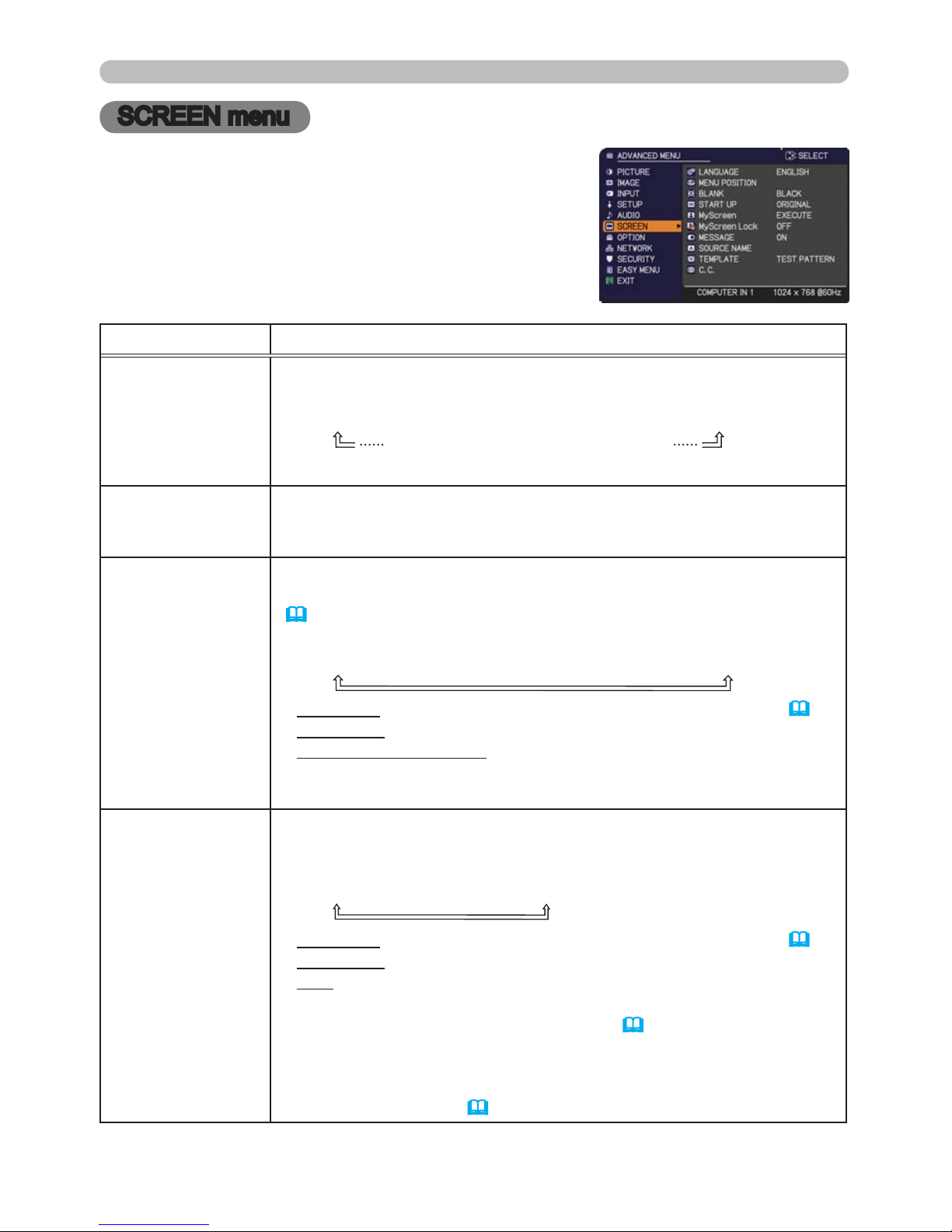
47
SCREEN menu
SCREEN menu
From the SCREEN menu, items shown in the table
below can be performed.
Select an item using the ▲/▼ cursor buttons, and
press the ► cursor button or ENTER button to
execute the item. Then perform it according to the
following table.
Item Description
LANGUAGE
Using the ▲/▼/◄/► buttons switches the OSD (On Screen
Display) language.
ENGLISH Ù FRANÇAIS Ù DEUTSCH Ù ESPAÑOL
(shown in the LANGUAGE dialog)
Press the ENTER or INPUT button to save the language setting.
MENU POSITION
Using the ▲/▼/◄/► buttons adjusts the menu position.
To quit the operation, press the MENU button on the remote control
or keep no operation for about 10 seconds.
BLANK
Using the ▲/▼ buttons switches the mode for the blank screen.
The blank screen is a screen for the temporarily blanking feature
(
28). It is displayed by pressing the BLANK button on the remote
control.
MyScreen Ù ORIGINAL Ù BLUE Ù WHITE Ù BLACK
MyScreen :
Screen can be registered by the MyScreen item (
48).
ORIGINAL : Screen preset as the standard screen.
BLUE, WHITE, BLACK : Plain screens in each color.
• To avoid remaining as an afterimage, the MyScreen or ORIGINAL
screen will change to the plain black screen after several minutes.
START UP
Using the ▲/▼ buttons switches the mode for the start-up screen.
The start-up screen is a screen displayed when no signal or an
unsuitable signal is detected.
MyScreen Ù ORIGINAL Ù OFF
MyScreen :
Screen can be registered by the MyScreen item (
48).
ORIGINAL : Screen preset as the standard screen.
OFF : Plain black screen.
• To avoid remaining as an afterimage, the MyScreen or ORIGINAL
screen will change to the BLANK screen (
above) after several
minutes. If also the BLANK screen is the MyScreen or ORIGINAL,
the plain black screen is instead used.
• When the ON is selected to the MyScreen PASSWORD item in
the SECURITY menu (
75), the START UP is fixed to MyScreen.
(continued on next page)
Page 57
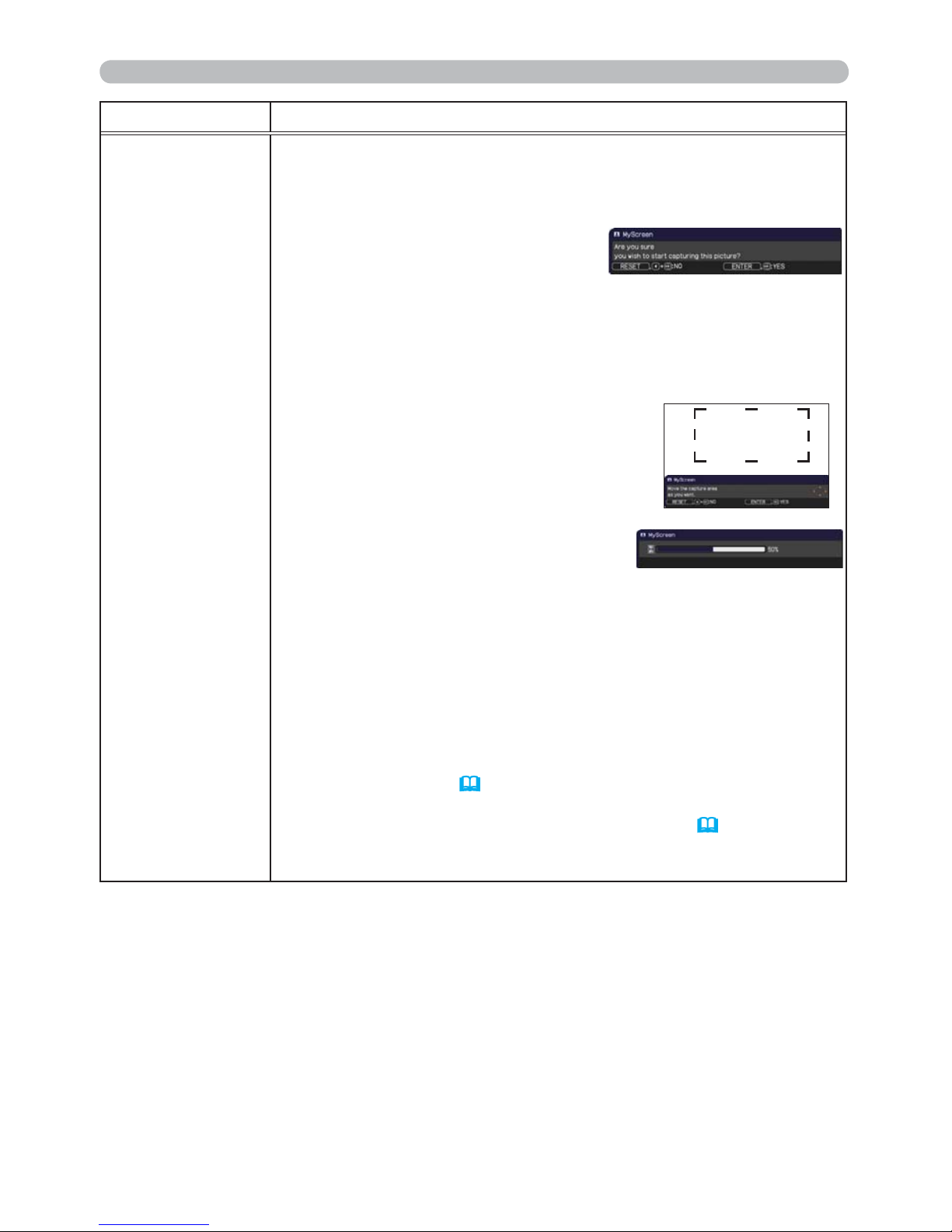
48
SCREEN menu
Item Description
MyScreen
This item allows you to capture an image for use as a MyScreen
image which can be used as the BLANK screen and START UP
screen. Display the image you want to capture before executing the
following procedure.
1. Selecting this item displays a dialog
titled “MyScreen”. It will ask you if
you start capturing an image from
the current screen.
Please wait for the target image to be displayed, and press the
ENTER or INPUT button when the image is displayed. The image
will freeze and the frame for capturing will appear.
To stop performing, press the RESET button on the remote
control.
2. Using the ▲/▼/◄/► buttons adjusts the
frame position.
Please move the frame to the position
of the image which you want to use. The
frame may not be able to be moved for
some input signals.
To start registration, press the ENTER
or INPUT button on the remote control.
To restore the screen and return to the previous dialog, press the
RESET button on the remote control.
Registration may take several minutes.
When the registration is completed, the registered screen and the
following message is displayed for several seconds:
³0\6FUHHQUHJLVWUDWLRQLV¿QLVKHG´
If the registration failed, the following message is displayed:
³$FDSWXULQJHUURUKDVRFFXUUHG3OHDVHWU\DJDLQ´
• This function cannot be selected when the ON is selected to the
MyScreen Lock item (
49).
• This function cannot be selected when the ON is selected to the
MyScreen PASSWORD item in SECURITY menu (
75).
•
This function is unavailable for a signal from the LAN, USB TYPE A,
USB TYPE B or HDMI port.
(continued on next page)
Page 58
49
SCREEN menu
Item Description
MyScreen Lock
Using the ▲/▼ buttons turns on/off the MyScreen lock function.
ON Ù OFF
When the ON is selected, the item MyScreen is locked. Use this
function for protecting the current MyScreen.
• This function cannot be selected when the ON is selected to the
MyScreen PASSWORD item in SECURITY menu (
75).
MESSAGE
Using the ▲/▼ buttons turns on/off the message function.
ON Ù OFF
When the ON is selected, the following message function works.
“AUTO IN PROGRESS” while automatically adjusting
“NO INPUT IS DETECTED”
“SYNC IS OUT OF RANGE”
“INVALID SCAN FREQ.”
“Searching….” while searching for the input
“Detecting….” while an input signal is detected
“AUTO ECO MODE” while starting up with AUTO ECO MODE
The indication of the input signal displayed by changing
The indication of the aspect ratio displayed by changing
The indication of the PICTURE MODE displayed by changing
The indication of the MY MEMORY displayed by changing
The indication of “FREEZE” and “II” while freezing the screen by
pressing the FREEZE button.
The indication of the TEMPLATE displayed by changing.
The indication of the ECO MODE displayed by changing.
• When the OFF is selected, please remember if the picture is
frozen. Do not mistake freezing for a malfunction (
28).
(continued on next page)
Page 59
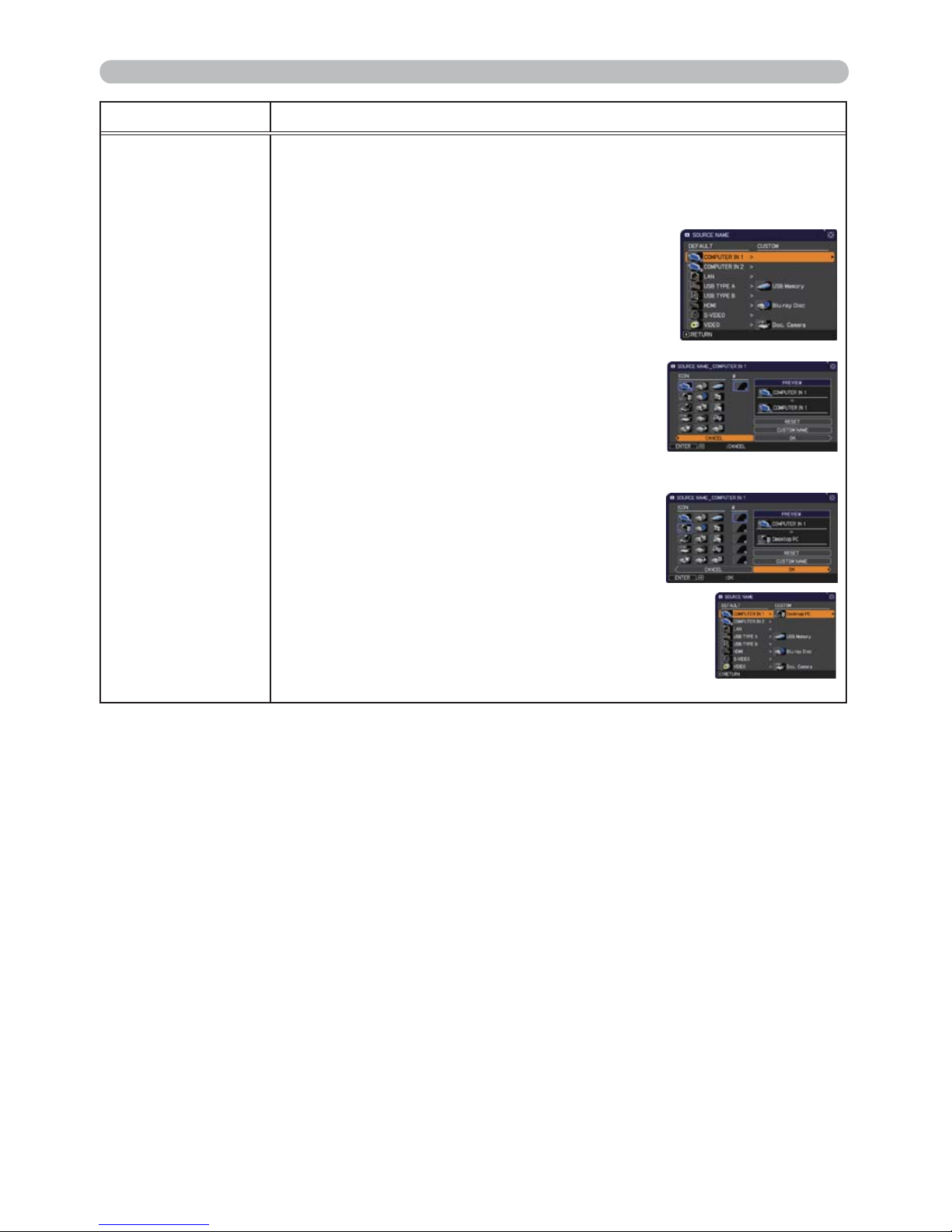
50
SCREEN menu
Item Description
SOURCE NAME
Each input port for this projector can have a name applied to it.
(1) Use the ▲/▼ buttons on the SCREEN menu to select SOURCE
NAME and press the ► or ENTER button.
The SOURCE NAME menu will be displayed.
(2) Use the ▲/▼ buttons on the SOURCE
NAME menu to select the port to be
named and press the ► button. The
SOURCE NAME dialog will be displayed.
Right side of the menu is blank until a
name is specied.
(3) Select an icon you would like to assign to
the port in the SOURCE NAME dialog.
The name assigned to the port will also
be automatically switched according to
your icon selection. Press the ENTER or
INPUT button to determine your icon selection.
(4) Select a number you would like to assign
to the port along with the icon. You can
select the number either from blank
(no number assigned), 1, 2, 3, or 4.
Then press the ENTER or INPUT button.
(5) If you would like to modify the name assigned
to the port, select CUSTOM NAME and
press the ENTER or INPUT button.
(continued on next page)
(continued on next page)
Page 60
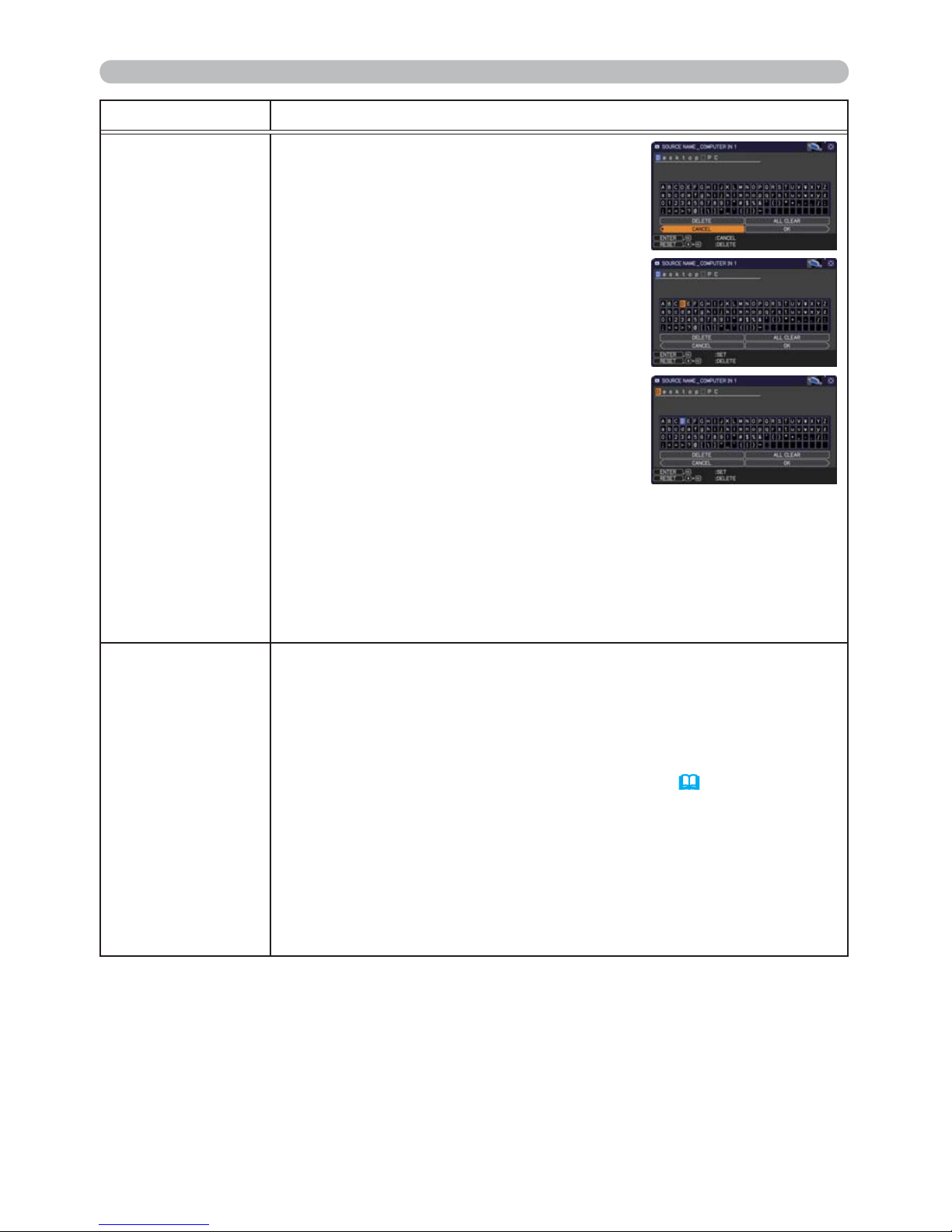
51
SCREEN menu
Item Description
SOURCE NAME
(continued)
(6) The current name will be displayed on
the rst line. Use the ▲/▼/◄/► buttons
and the ENTER or INPUT button to
select and enter characters. To erase 1
character at one time, press the RESET
button or press the ◄ and INPUT button
at the same time. Also if you move the
cursor to DELETE or ALL CLEAR on
screen and press the ENTER or INPUT
button, 1 character or all characters will
be erased. The name can be a maximum
of 16 characters.
(7) To change an already inserted character,
press the ▲ button to move the cursor to
the rst line, and use the ◄/► buttons to
move the cursor on the character to be
changed.
After pressing the ENTER or INPUT button, the character is
selected. Then, follow the same procedure as described at the
item (6) above.
(8) To nish entering text, move the cursor to the OK on screen and
press the ►, ENTER or INPUT button. To revert to the previous
name without saving changes, move the cursor to the CANCEL
on screen and press the ◄, ENTER or INPUT button.
TEMPLATE
Using the ▲/▼ cursor buttons switches the mode for the template
screen.
Press the ► cursor (or the ENTER) button to display the selected
template, and press the ◄ cursor button to close the displayed
screen.
The last selected template is displayed when the MY BUTTON
allocated to the TEMPLATE function is pressed (
57).
TEST PATTERN Ù DOT-LINE1 Ù DOT-LINE2 Ù DOT-LINE3
Ú
Ú
MAP2 Ù MAP1 Ù CIRCLE2 Ù CIRCLE1 Ù DOT-LINE4
You can turn a map upside down and scroll it horizontally when
MAP1 or MAP2 is selected. To invert or scroll the map, display
the guidance by pressing the RESET button on the remote three
seconds or more when MAP1 or MAP2 appears.
(continued on next page)
Page 61
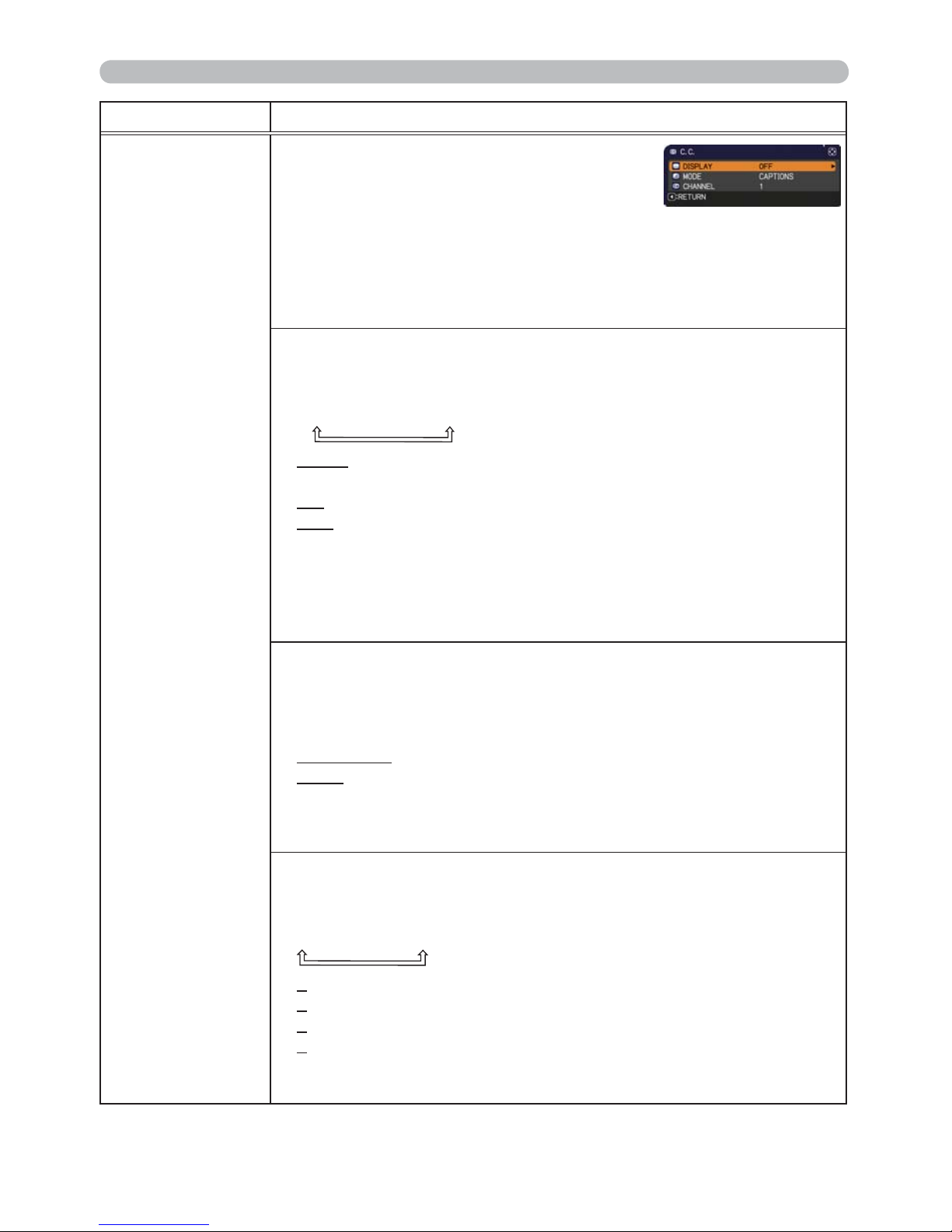
52
SCREEN menu
Item Description
C.C.
(Closed Caption)
The C.C. is the function that displays a
transcript or dialog of the audio portion of
a video, les or other presentation or other
relevant sounds. It is required to have NTSC
format video or 480i@60 format component
video source supporting C.C. feature to
utilize this function.
It may not work properly, depending on equipment or signal source.
In this case, please turn off the Closed Caption.
DISPLAY
Select Closed Caption DISPLAY setting from following options using
▲/▼ buttons.
AUTO Ù ON Ù OFF
AUTO : Closed Caption automatically displays when the volume
is muted.
ON : Closed Caption is on.
OFF : Closed Caption is off.
• The caption is not displayed when the OSD menu is active.
• The Closed Caption is the function to display the dialogue,
narration, and / or sound effects of a television program or other
video sources. The Closed Caption availability is depending upon
broadcaster and/or content.
MODE
Select Closed Caption MODE setting from following options using
▲/▼ buttons.
CAPTIONS Ù TEXT
CAPTIONS : Display Closed Caption.
TEXT : Display Text data, which is for additional information such
as news reports or a TV program guide. The information
covers the entire screen. Not all of the C.C. program has
Text information.
CHANNEL
Select Closed Caption CHANNEL from following options using ▲/▼
buttons.
1 Ù 2 Ù 3 Ù 4
1: Channel 1, primary channel / language
2: Channel 2
3: Channel 3
4: Channel 4
The channel data may vary, depending on the content. Some
channel might be used for secondary language or empty.
Page 62
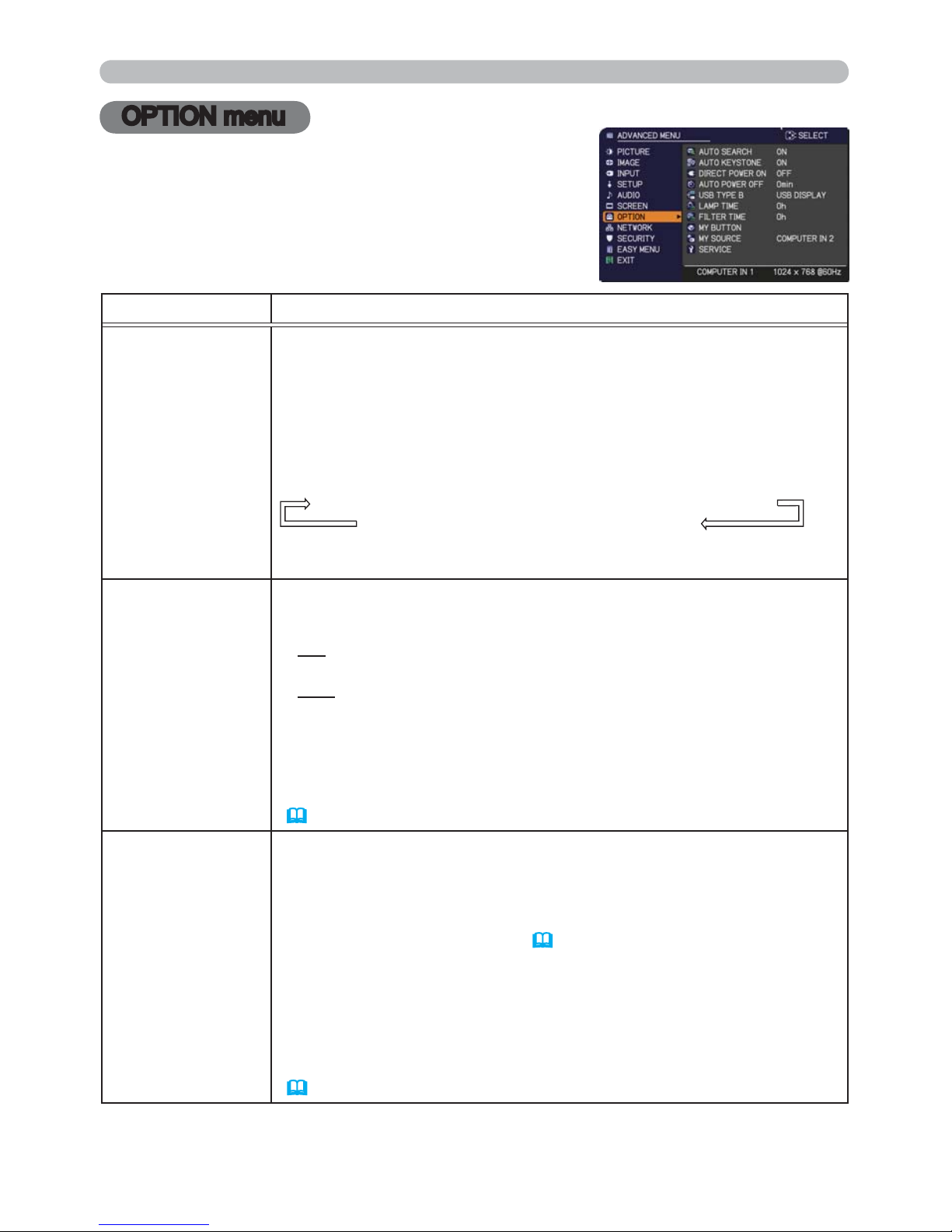
53
OPTION menu
OPTION menu
From the OPTION menu, items shown in the table
below can be performed.
Select an item using the ▲/▼ cursor buttons, and
press the ► cursor button or ENTER button to execute
the item, except for the items LAMP TIME and FILTER
TIME. Then perform it according to the following table.
Item Description
AUTO SEARCH
Using the ▲/▼ buttons turns on/off the automatic signal search
function.
ON Ù OFF
When the ON is selected, detecting no signal automatically cycles
through input ports in the following order. The search is started from
the current port. Then when an input is found, the projector will stop
searching and display the image.
COMPUTER IN1 Ö COMPUTER IN2 Ö LAN Ö USB TYPE A
VIDEO Õ S-VIDEO Õ HDMIÕ USB TYPE B
• It may take several seconds to project the images from the
USB TYPE B port.
AUTO
KEYSTONE
Using the ▲/▼ buttons turns on/off the automatic keystone function.
ON Ù OFF
ON : Automatic keystone distortion correction will be executed
whenever changing the slant of the projector.
OFF : This function is disabled. Please execute the AUTO
KEYSTONE (EXECUTE) in the SETUP menu for automatic
keystone distortion correction.
• When the projector is suspended from the ceiling this feature will
not function properly so select the OFF.
• This function will be unavailable when the Transition Detector is on
(77)
.
DIRECT POWER
ON
Using the ▲/▼ buttons turns on/off the DIRECT POWER ON
function.
ON Ù OFF
When set to the ON, the lamp in projector will be automatically turned
on without the usual procedure (
19), only when the projector is
supplied with the power after the power was cut while the lamp was on.
• This function does not work as long as the power has been
supplied to the projector while the lamp is off.
•
After turning the lamp on by the DIRECT
POWER
ON function,
if neither input nor operation is detected for about 30 minutes, the
projector is turned off, even though the AUTO
POWER
OFF function
(
54) is disabled.
(continued on next page)
Page 63
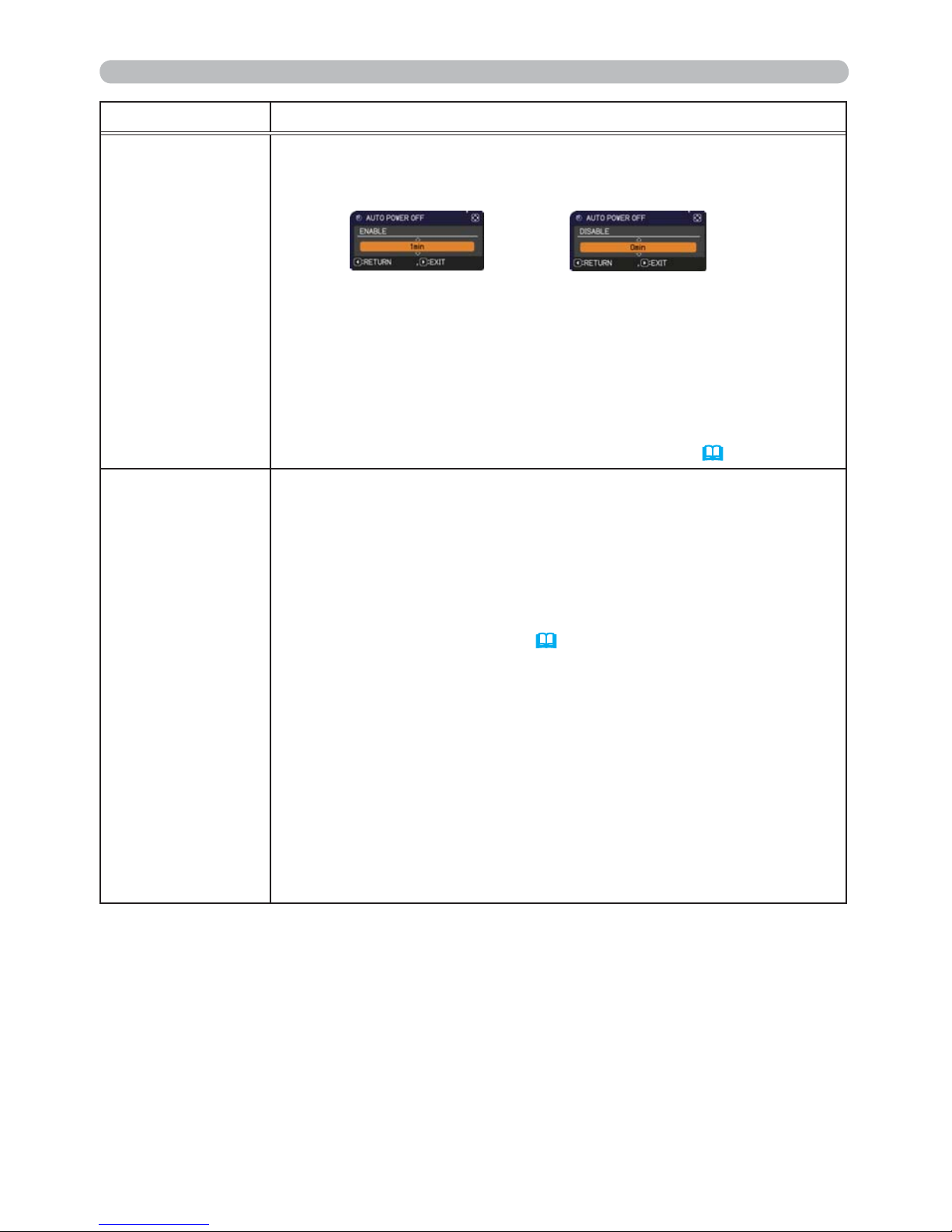
54
OPTION menu
Item Description
AUTO POWER
OFF
Using the ▲/▼ buttons adjusts the time to count down to
automatically turn the projector off.
Long (max. 99 minutes) Ù Short (min. 0 minute = DISABLE)
When the time is set to 0, the projector is not turned off automatically.
When the time is set to 1 to 99, and when the passed time with
no-signal or an unsuitable signal reaches at the set time, the
projector lamp will be turned off.
If one of the projector's buttons or the remote control buttons
is pressed or one of the commands (except get commands) is
transmitted to the CONTROL port during the corresponding time,
projector will not be turned off.
Please refer to the section Turning off the power
(20).
USB TYPE B
Using the ▲/▼ buttons selects the function of USB TYPE B port.
To use this function, you need to connect the USB TYPE B port of
the projector and the type A USB port of a computer.
MOUSE Ù USB DISPLAY
MOUSE : The accessory remote control works as the simple mouse
and keyboard of the computer.
USB DISPLAY : The port works as an input port that receives image
signals from the computer (
89).
• It may take several seconds to project the images from the USB
TYPE B port.
• In the following cases, a message to notify you that USB TYPE B
port is not available for picture input appears together with the USB
TYPE B dialog:
- This setting is switched to MOUSE while a picture input from the
USB TYPE B port is projected.
- The USB TYPE B port is selected as the picture input source while
this setting is set to MOUSE. Select USB DISPLAY in the dialog to
project the picture input to the USB TYPE B port. In this case, you
cannot use the simple mouse and keyboard function. Otherwise
select other port for picture input.
(continued on next page)
Page 64
55
OPTION menu
Item Description
LAMP TIME
The lamp time is the usage time of the lamp, counted after the last
resetting. It is shown in the OPTION menu.
Pressing the RESET button on the remote control or the ► button
of the projector displays a dialog.
To reset the lamp time, select the OK using the ► button.
CANCEL
Ö
OK
• Please reset the lamp time only when you have replaced the lamp,
for a suitable indication about the lamp.
•
For the lamp replacement, see the section Replacing the lamp (93).
FILTER TIME
The lter time is the usage time of the air lter, counted after the last
resetting. It is shown in the OPTION menu.
Pressing the RESET button on the remote control or the ► button
of the projector displays a dialog.
To reset the lter time, select the OK using the ► button.
CANCEL
Ö
OK
•
Please reset the lter time only when you have cleaned or replaced
the air lter, for a suitable indication about the air lter.
• For the air lter cleaning, see the section Cleaning and replacing
WKHDLU¿OWHU (
95).
(continued on next page)
Page 65
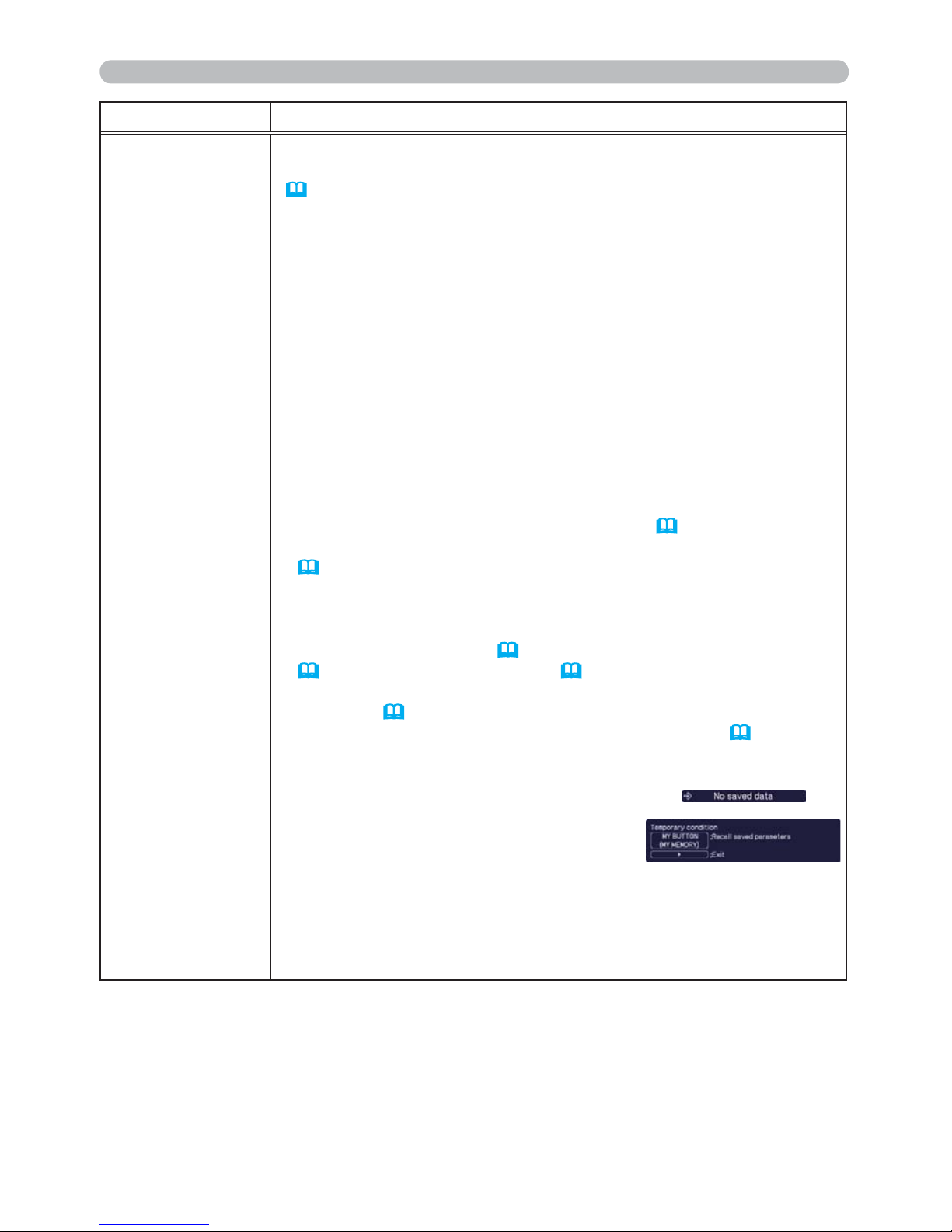
56
OPTION menu
Item Description
MY BUTTON
This item assigns one of the following functions to the ECO button
on the control panel and MY BUTTON 1/2 on the remote control
(
6).
(1) Choose a button to assign a function from ECO, MY BUTTON-1
and MY BUTTON-2. Use the ▲/▼ buttons to select the desired
function on the menu and press the ► button.
(2) Then using the ▲/▼/◄/► buttons sets one of the following
functions to the chosen button. Press the ENTER or INPUT
button to save the setting.
• COMPUTER IN1: Selects the input from COMPUTER IN1 port.
• COMPUTER IN2: Selects the input from COMPUTER IN2 port.
• LAN: Selects input from LAN port.
• USB TYPE A: Selects input from USB TYPE A port.
• USB TYPE B: Selects input from USB TYPE B port.
• HDMI: Selects input from HDMI port.
• S-VIDEO: Selects the input from S-VIDEO port.
• VIDEO: Selects the input from VIDEO port.
•
SLIDESHOW: Selects the input from USB TYPE A, and starts a Slideshow.
• MY IMAGE: Displays the MY IMAGE menu (
71).
• MESSENGER:
Turns the messenger text displayed on the screen on/off
(
5. Messenger Function in the Network Guide).
When there is no transferred text data to display, the message
”NO MESSENGER DATA" appears.
• INFORMATION: Displays SYSTEM_INFORMATION,
INPUT_INFORMATION (
62), WIRELESS INFORMATION
(
67), WIRED INFORMATION (
69) or nothing.
• AUTO KEYSTONE : Performs automatic keystone distortion
correction (
43).
• MY MEMORY: Loads one of adjustment data stored (
35).
When more than one data are saved, the adjustment
changes every time the MY BUTTON is pressed.
When no data is saved in memory, the
dialog "No saved data" appears.
When the current adjustment is not
saved to memory, the dialog as shown in
the right appears.
If you want to keep the current adjustment, please press
the ► button to exit. Otherwise loading a data will overwrite the
current adjusted condition.
(continued on next page)
(continued on next page)
Page 66
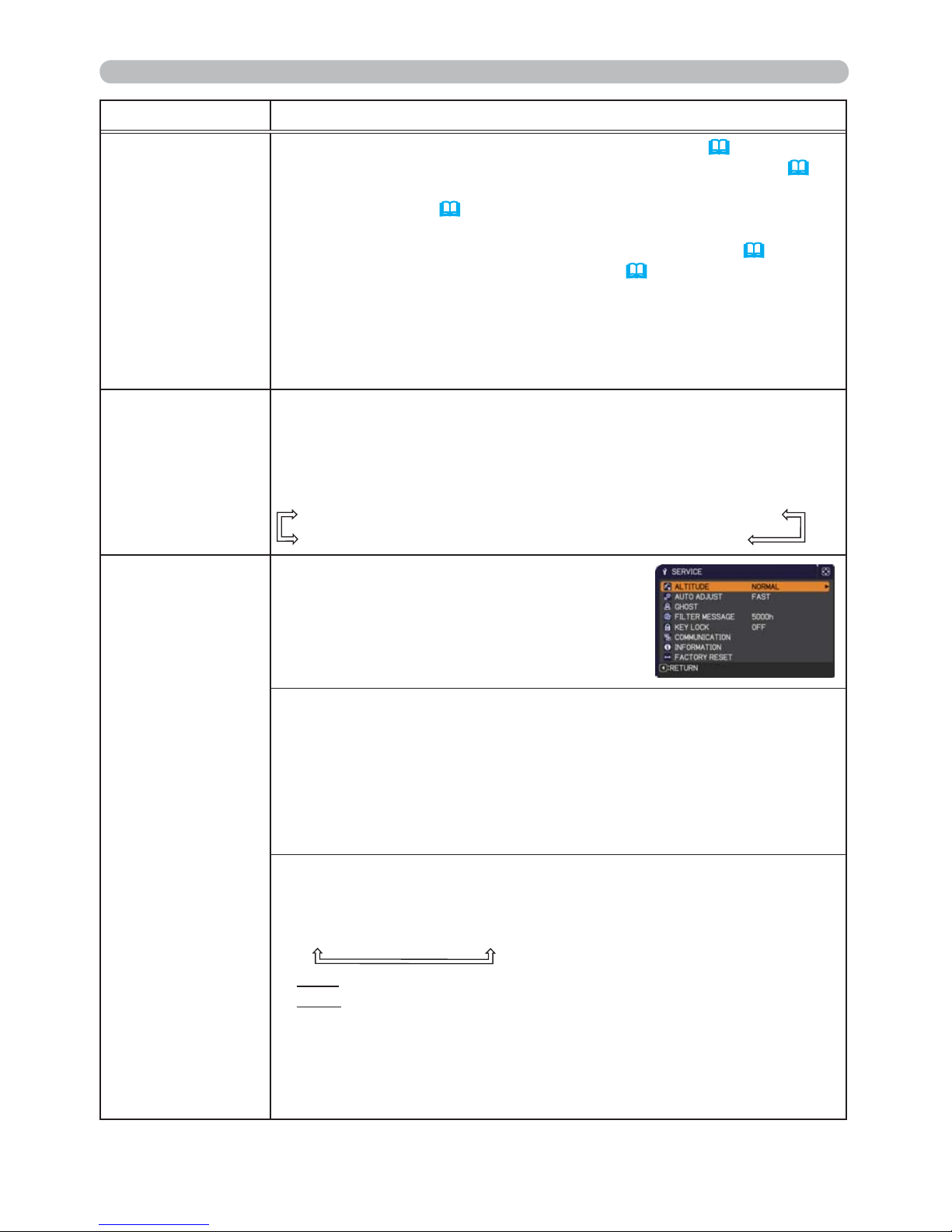
57
OPTION menu
Item Description
MY BUTTON
(continued)
• PICTURE MODE: Changes the PICTURE MODE (
31).
•
FILTER RESET: Displays the lter time reset conrmation dialogue
(
55).
• TEMPLATE: Makes the template pattern selected to the
TEMPLATE item (
51) appear or disappear.
• AV MUTE: Turns the picture and audio on/off.
• RESOLUTION: Turns on/off the RESOLUTION dialog (
42).
• ECO MODE: Changes the ECO MODE (
44).
• BLANK: Turns on/off the blank function. (ECO button only)
• FREEZE: Turns on/off the freeze function. (ECO button only)
• VOLUME: Turns on/off the volume dialog. (ECO button only)
• AUTO:
Performs the automatic adjustment function.
(
ECO button only
)
MY SOURCE
Using ▲/▼ buttons selects the picture input port to be selected with
pressing the MY SOURCE/DOC.CAMERA button on the remote
control.
You can use this function not only for document cameras but also
computers and other equipment.
VIDEO Ù COMPUTER IN1 Ù COMPUTER IN2 Ù LAN
S-VIDEO Ù HDMI Ù USB TYPE B
Ù
USB TYPE A
SERVICE
Selecting this item displays the SERVICE
menu.
Select an item using the ▲/▼ buttons,
and press the ► button or the ENTER
button on the remote control to execute
the item.
ALTITUDE
Using the ▲/▼ buttons switches the rotation speed of the cooling fans.
The HIGH is the mode for use at highlands etc. If the projector is used
at an altitude of about 1600 m (5250 feet) or higher, select HIGH.
Otherwise, select NORMAL.
Note that the projector is noisier when the
HIGH is selected.
HIGH Ù NORMAL
AUTO ADJUST
Using the ▲/▼ buttons to select one of the mode. When the
DISABLE is selected, the automatic adjustment feature is disabled.
FINE Ù FAST Ù DISABLE
FINE: Finer tuning including H.SIZE adjustment.
FAST: Faster tuning, setting H.SIZE to prearranged data for the
input signal.
•
Depending on conditions, such as input image, signal cable to the
projector, environment around the projector, etc., the automatic adjustment
may not work correctly. In such a case, please choose DISABLE to
disable the automatic adjustment, and make adjustment manually.
(continued on next page)
Page 67
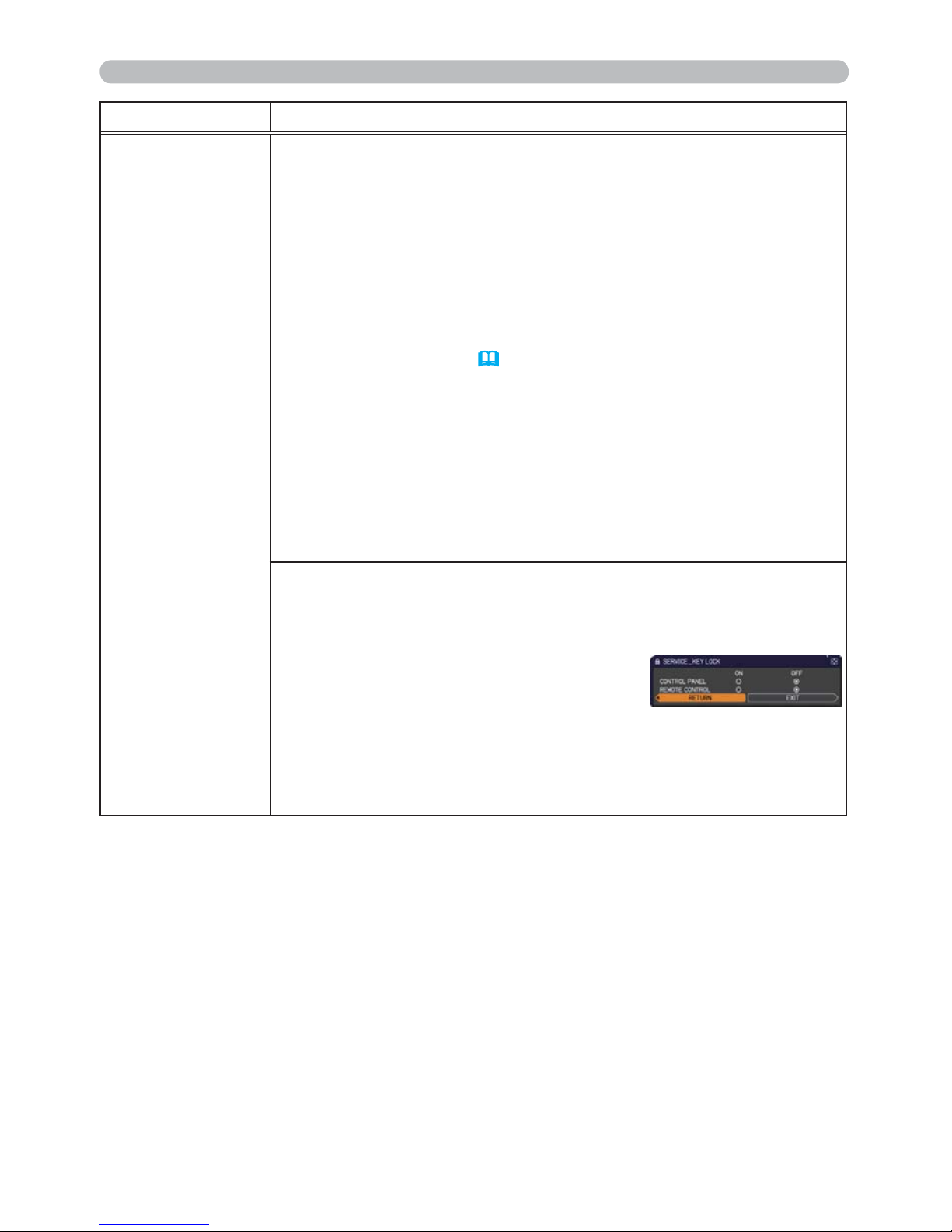
58
OPTION menu
Item Description
SERVICE
(continued)
GHOST
Adjust the settings using the ▲/▼ buttons to eliminate ghosting.
FILTER MESSAGE
Use the ▲/▼ button to set the timer for notifying by the message
when to replace the lter unit
100h Ù 200h Ù 500h Ù 1000h Ù 2000h
Ù 3000h Ù 4000h Ù 5000h Ù OFF
After choosing an item except OFF, the message “REMINDER ***
HRS PASSED ....” will appear after the timer reaches the interval
time set by this feature (
99).
When the OFF is chosen, the message will not appear. Utilize this
feature to keep the air lter clean, setting the suitable time according
to your environment of this projector.
• Please take care of the lter unit periodically, even if there is
no message. If the air lter becomes to be blocked by dust or
other matter, the internal temperature will rise, which could cause
malfunction, or reduce the lifetime of the projector.
• Please be careful with the operating environment of the projector
and the condition of the lter unit.
KEY LOCK
(1) Use the ▲/▼ buttons to choose the operations control.
CONTROL PANEL Ù REMOTE CONTROL
(2)
Use the ◄/► buttons to select ON or OFF.
ON Ù OFF
Selecting ON in Step 2 locks the buttons except STANDBY/ON on
the operations control selected in Step 1. Selecting OFF releases
the locked buttons on the operations control selected in Step 1.
• Please use this function to prevent tampering or accidental
operation.
(continued on next page)
Page 68
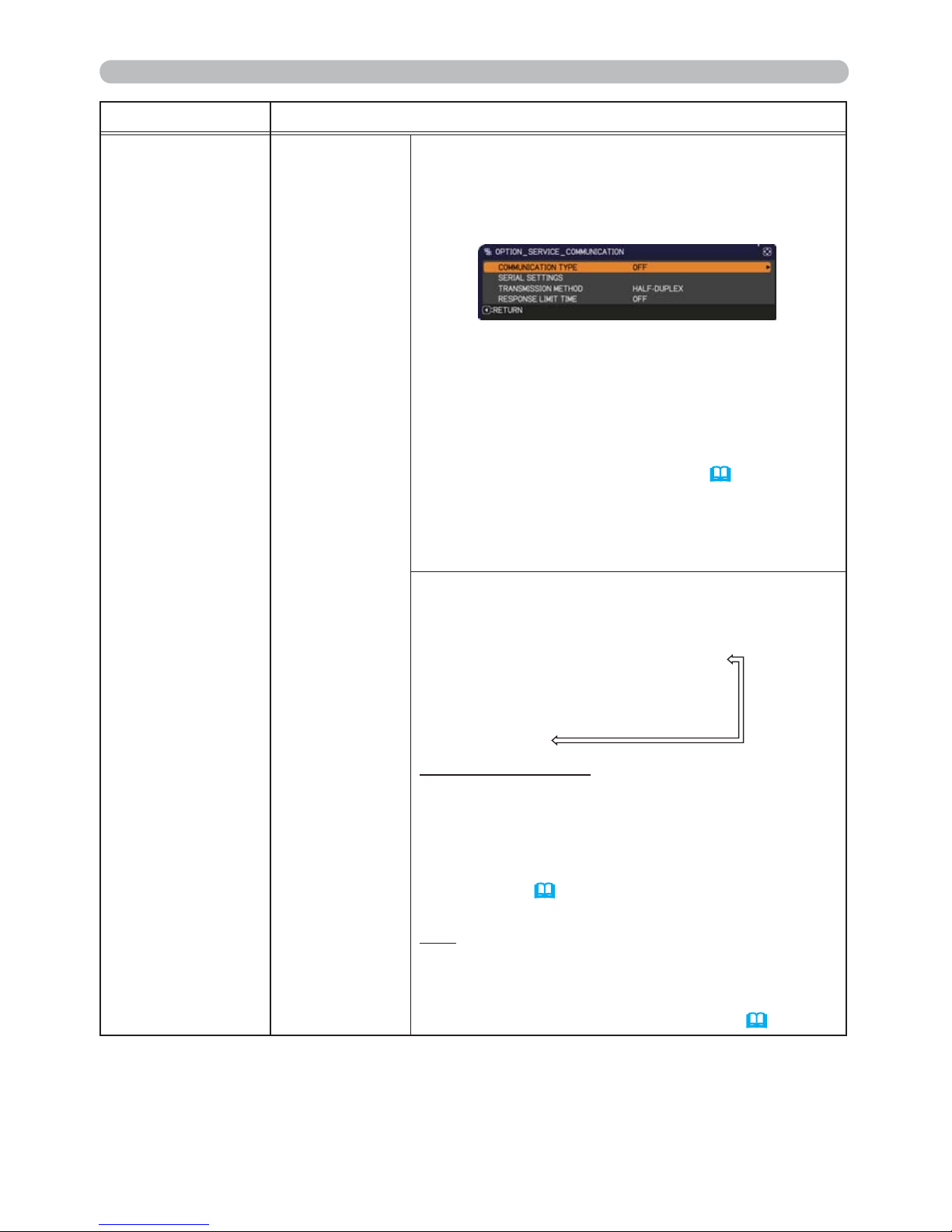
59
OPTION menu
Item Description
SERVICE
(continued)
COMMUNICATION
Selecting this item displays COMMUNICATION
menu.
In this menu, you can congure the serial
communication settings of the projector using the
CONTROL port.
• Select an item using the cursor buttons ▲/▼.
Then pressing the ► button opens the submenu
for the setting item you selected. Or, pressing
the ◄ button instead of the ► button makes the
menu back to the previous one without changing
the setup. Each submenu can be operated as
described above.
• When COMMUNICATION TYPE
(
below)
is
set to OFF, the other items in COMMUNICATION
menu are invalid.
• For the function of serial communication, refer to
the Network Guide.
COMMUNICATION TYPE
Select the communication type for transmission via
the CONTROL port.
NETWORK BRIDGE (WIRELESS)
Ú
NETWORK BRIDGE (WIRED)
Ú
OFF
NETWORK BRIDGE: Select this type, if it is
required to control an external device as a
network terminal, via this projector from the
computer. Select WIRELESS or WIRED as your
network connection mode.
The CONTROL port doesn't accept RS-232C
commands (
6. Network Bridge Function in
the Network Guide)
OFF: Select this mode to receive RS-232C
commands using the CONTROL port.
• OFF is selected as the default setting.
• When you select the NETWORK BRIDGE, check
the item, TRANSMISSTION METHOD
(
60)
.
(continued on next page)
Page 69
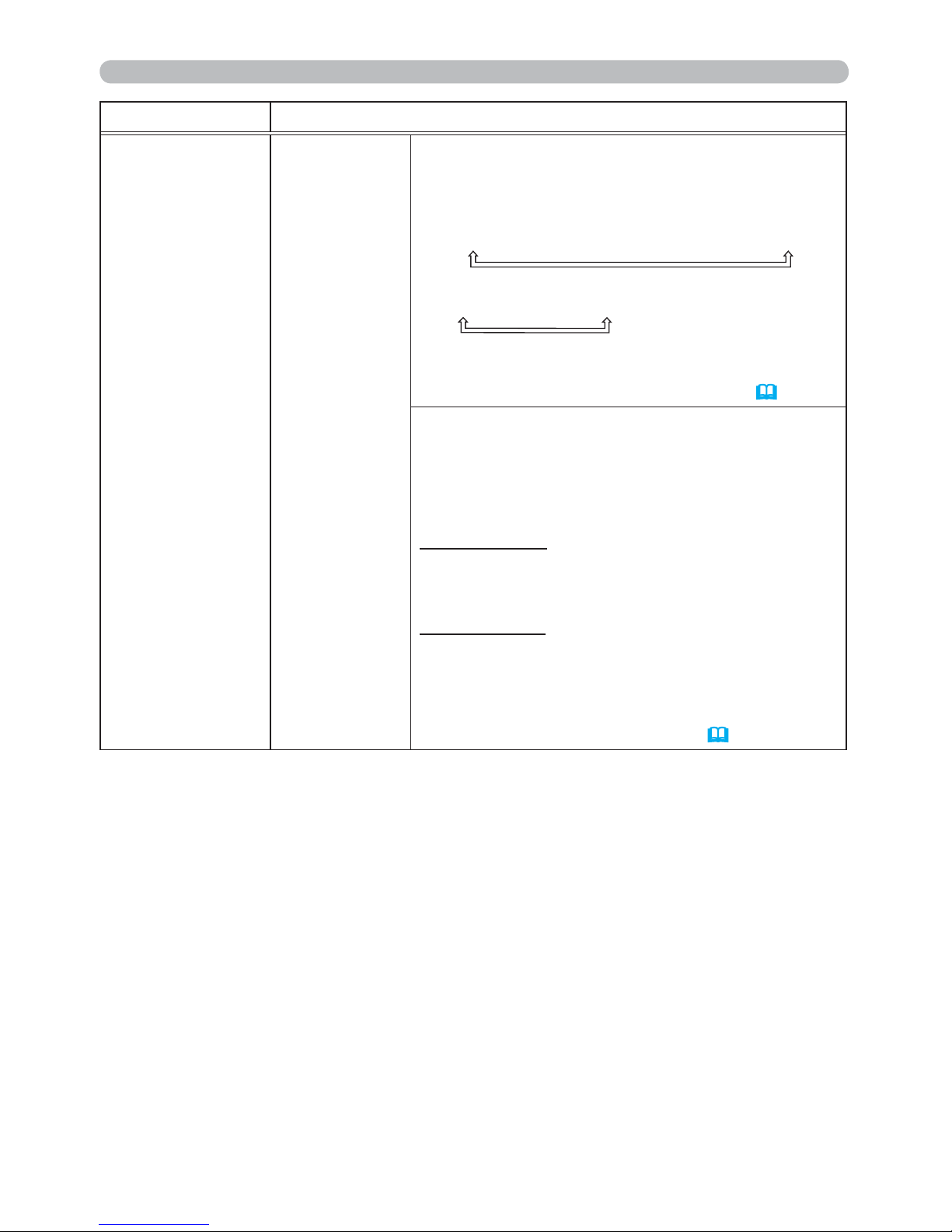
60
OPTION menu
Item Description
SERVICE
(continued)
COMMUNICATION
(continued)
SERIAL SETTINGS
Select the serial communication condition for the
CONTROL port.
BAUD RATE
4800bps Ù 9600bps Ù 19200bps Ù 38400bps
PARITY
NONE Ù ODD Ù EVEN
• The BAUD RATE is xed to 19200bps
and PARITY is xed NONE when the
COMMUNICATION TYPE is set to OFF (
59)
.
TRANSMISSION METHOD
Select the transmission method for communication
by the NETWORK BRIDGE from the CONTROL
port.
HALF-DUPLEX Ù FULL-DUPLEX
HALF-DUPLEX: This method lets the projector
make two way communication, but only one
direction, either transmitting or receiving data, is
allowed at a time.
FULL-DUPLEX: This method lets the projector
make two way communication, transmitting and
receiving data at the same time.
• HALF-DUPLEX is selected as the default setting.
• If you select HALF-DUPLEX, check the setting of
the item RESPONSE LIMIT TIME
(
61)
.
(continued on next page)
Page 70
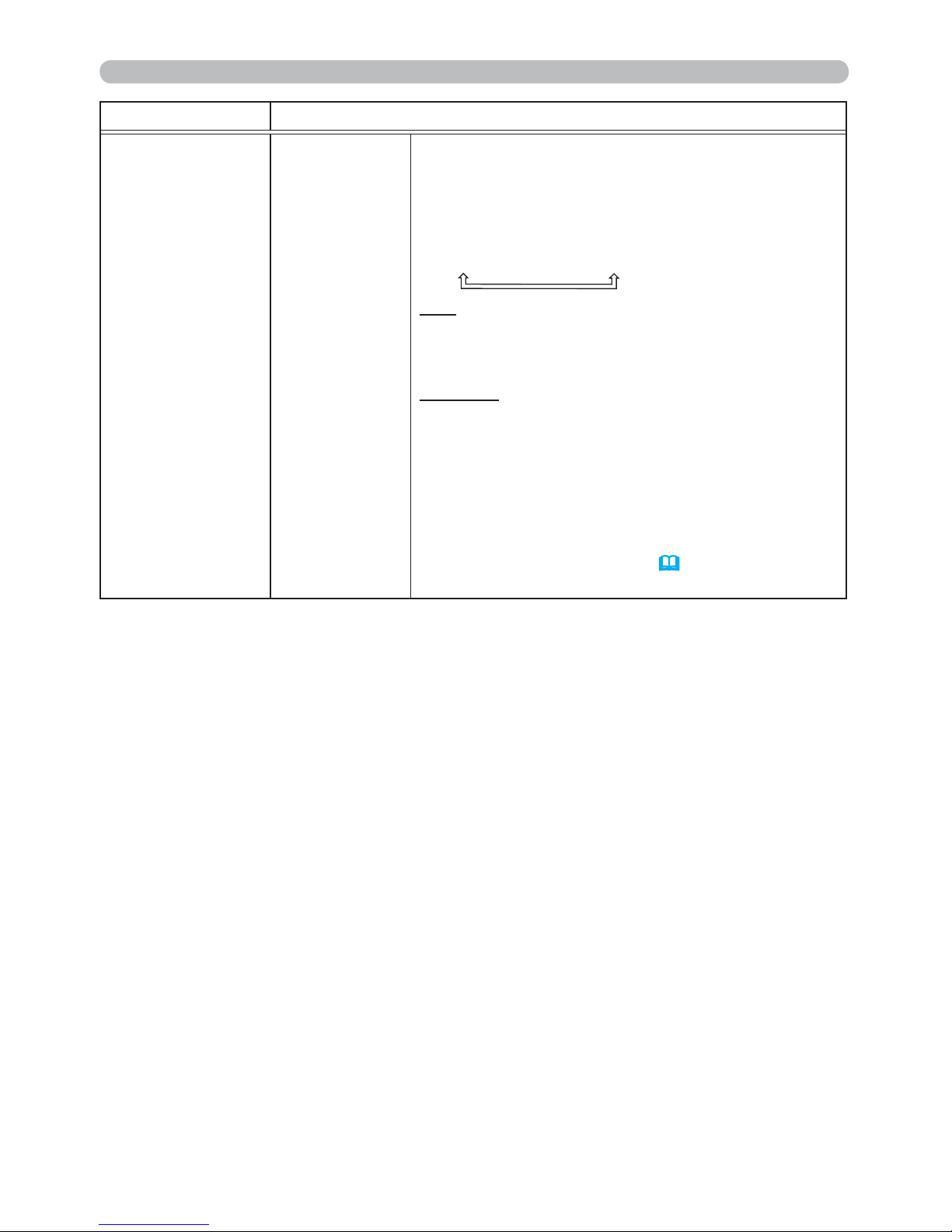
61
OPTION menu
Item Description
SERVICE
(continued)
COMMUNICATION
(continued)
RESPONSE LIMIT TIME
Select the time period to wait for receiving
response data from other device communicating by
the NETWORK BRIDGE and the HALF-DUPLEX
through the CONTROL port.
OFF Ù 1s Ù 2s Ù 3s
OFF: Select this mode if it is not required to check
the responses from the device that the projector
sends data to. In this mode, the projector can
send out data from the computer continuously.
1s /2s /3s: Select the time period to keep the
projector waiting for response from the device
that the projector sends data to. While waiting the
response, the projector does not send out any
data from the CONTROL port.
• This menu is available only when the NETWORK
BRIDGE is selected for the COMMUNICATION
TYPE and the HALF-DUPLEX is selected for the
TRANSMISSION METHOD (
59, 60).
• OFF is selected as the default setting.
(continued on next page)
Page 71
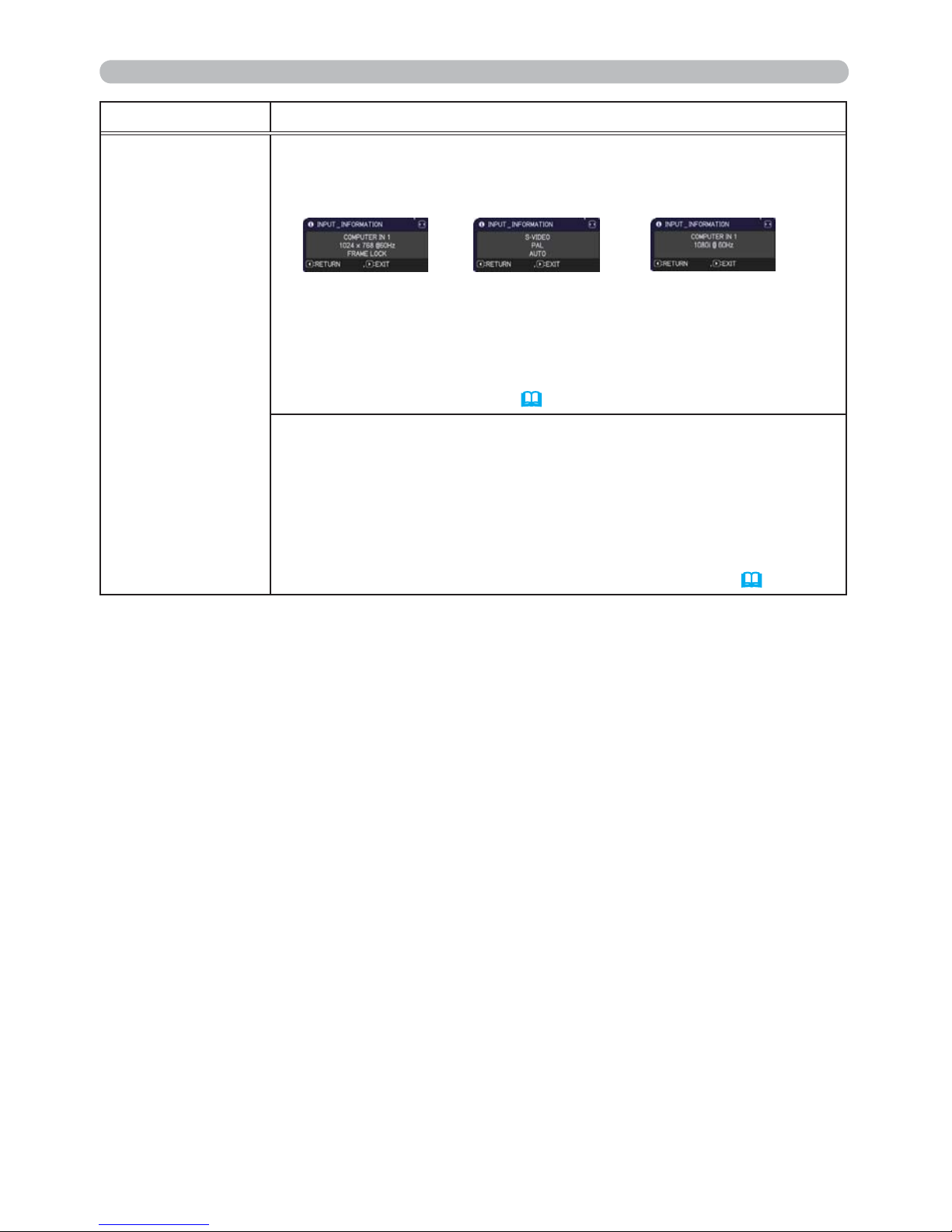
62
OPTION menu
Item Description
SERVICE
(continued)
INFORMATION
Selecting this item displays a dialog titled “INPUT_INFORMATION”.
It shows the information about the current input.
• The “FRAME LOCK” message on the dialog means the frame lock
function is working.
• This item can't be selected for no signal and sync out.
• When the MY TEXT DISPLAY is set to ON, the MY TEXT is
displayed together with the input information in the
INPUT_INFORMATION box (
79).
FACTORY RESET
Selecting OK using the ► button performs this function. By this
function, all the items in all of menus will collectively return to the
initial setting. Note that the items LAMP TIME, FILTER TIME,
LANGUAGE, FILTER MESSAGE, NETWORK and SECURITY
settings are not reset.
CANCEL Ö OK
Be sure to set ALTITUDE after resetting all the settings (
57).
Page 72
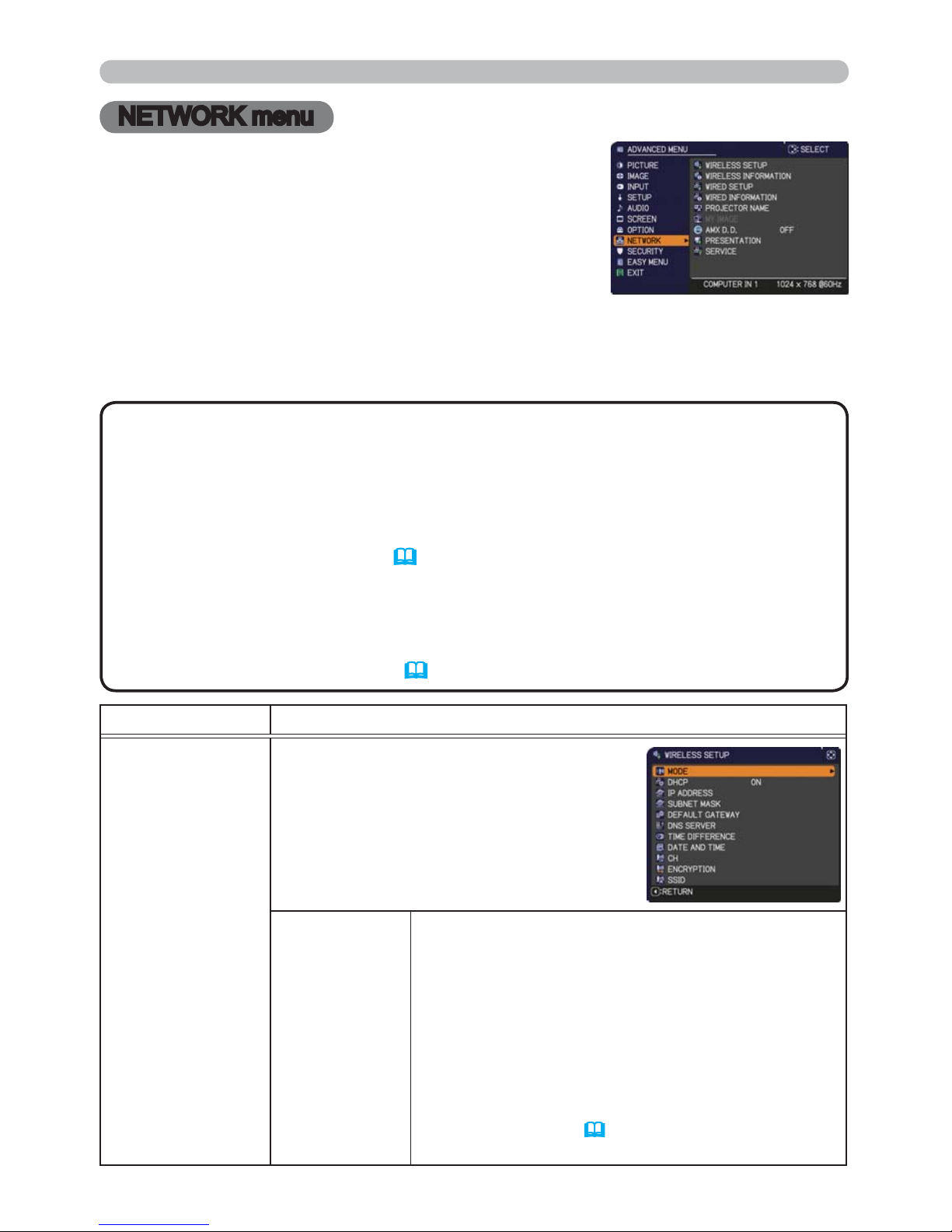
63
NETWORK menu
Remember that incorrect network settings on this
projector may cause trouble on the network. Be sure
to consult with your network administrator before
connecting to an existing access point on your network.
Select “NETWORK” from the main menu to access the
following functions.
Select an item using the ▲/▼ cursor buttons on the
projector or remote control, and press the ► cursor button on the projector or
remote control, or ENTER button on the remote control to execute the item. Then
perform it according to the following table. See the Network Guide for details of
NETWORK operation.
NETWORK menu
• To use the wireless network function of this projector, the designated
USB wireless adapter that is sold as an option is required. Do not use
any extension cable or device when connecting the adapter to the projector.
•
The projector does not allow both wireless and wired LAN to be connected to
the same network.
• Do not set the same network address for both wireless and wired LAN.
• If you are not utilizing SNTP (
3.1.8 Date/Time Settings in the Network
Guide), then you must set the DATE AND TIME during the initial installation.
• The network communication control is disabled while the projector is in
standby mode if the STANDBY MODE item of SETUP menu is set to SAVING.
Please connect the network communication to the projector after setting the
STANDBY MODE to NORMAL (
45
).
NOTE
Item Description
WIRELESS
SETUP
Selecting this item displays the WIRELESS
SETUP menu for the wireless LAN.
Use the ▲/▼ buttons to select an item,
and the ► or ENTER button on the remote
control to perform the item.
MODE
Use the ▲/▼ buttons to select the mode of the
network communication system. Select according
to the settings of your computer.
AD HOC Ù INFRASTRUCTURE
To save the setting, press the ► button.
• When ADHOC is selected, IEEE802.11 n cannot
be used.
• If ADHOC is set to MODE while one of WPAPSK or WPA2-PSK is selected in ENCRYPTION,
the ENCRYPTION (
65) setting switches to OFF
automatically.
(continued on next page)
Page 73
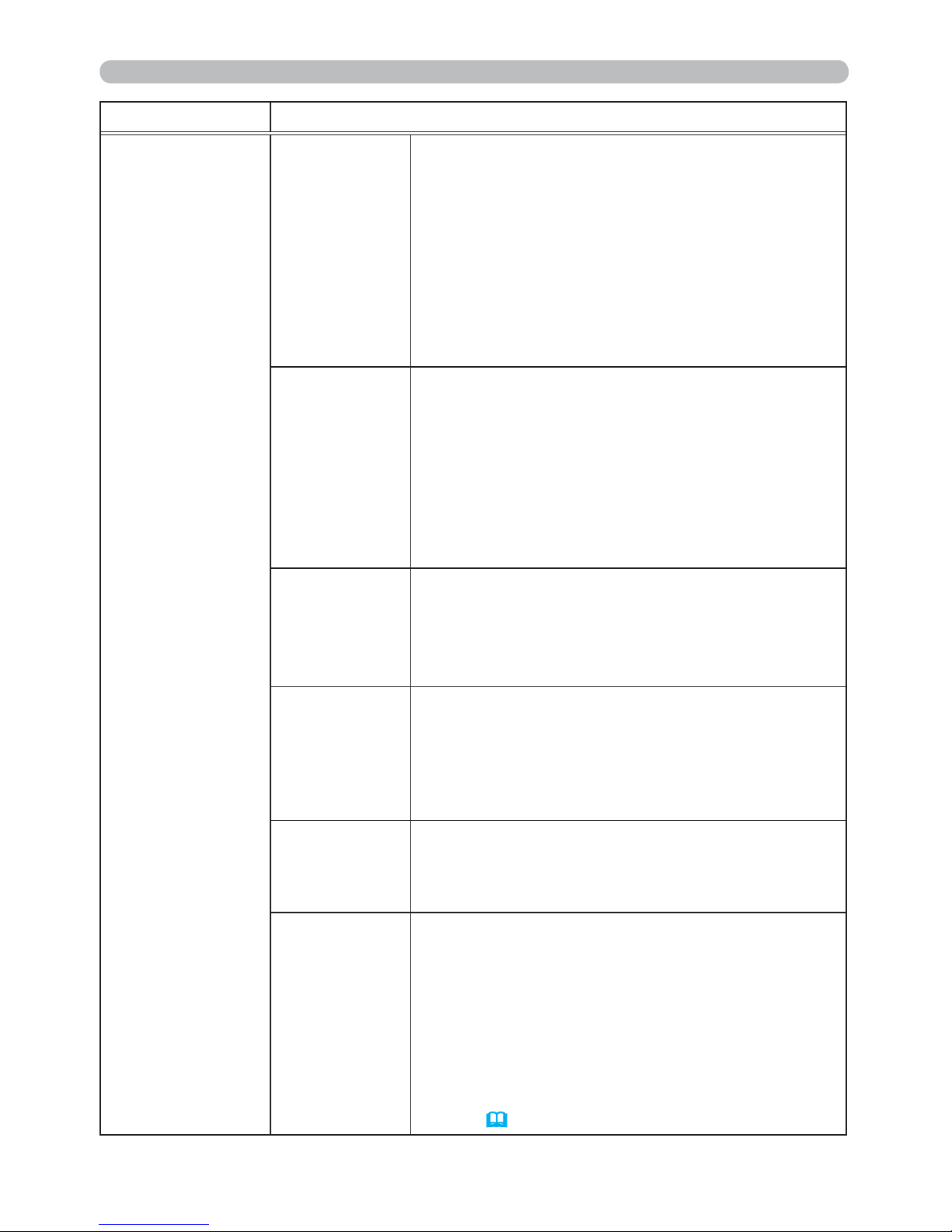
64
NETWORK menu
Item Description
WIRELESS
SETUP
(continued)
DHCP
(Dynamic Host
&RQ¿JXUDWLRQ
Protocol)
Use the ▲/▼ buttons to turn DHCP on/off.
ON Ù OFF
Select OFF when the network does not have DHCP
enabled. To save the setting, press the ► button.
• When the “DHCP” setting changes to “ON”, it
takes a little time to obtain IP address from DHCP
server.
• Auto IP function will be assigned an IP address if
the projector could not obtain an IP address from
server even if DHCP is “ON”
IP ADDRESS
Use the ▲/▼/◄/► buttons to enter the IP
ADDRESS.
This function can only be used when DHCP is set
to OFF.
• The IP ADDRESS is the number that identies
this projector on the network. You cannot have two
devices with the same IP ADDRESS on the same
network.
• The IP ADDRESS “0.0.0.0” is prohibited.
SUBNET
MASK
Use the ▲/▼/◄/► buttons to enter the same
SUBNET MASK used by your computer.
This function can only be used when DHCP is set
to OFF.
• The SUBNET MASK “0.0.0.0” is prohibited.
DEFAULT
GATEWAY
Use the ▲/▼/◄/► buttons to enter the DEFAULT
GATEWAY (a node on a computer network that
serves as an access point to another network)
address.
This function can only be used when DHCP is set
to OFF.
DNS SERVER
Use the ▲/▼/◄/► buttons to input the DNS
server address.
The DNS server is a system to control domain
names and IP addresses on the Network.
TIME
DIFFERENCE
Use the ▲/▼ buttons to enter the TIME
DIFFERENCE.
Set the same TIME DIFFERENCE as the one
set on your computer. If unsure, consult your IT
manager.
Use the ► button to return to the menu after
setting the TIME DIFFERENCE.
• When this item is set, the same item in the
WIRED SETUP menu is overwritten with the same
setting (
69).
(continued on next page)
Page 74
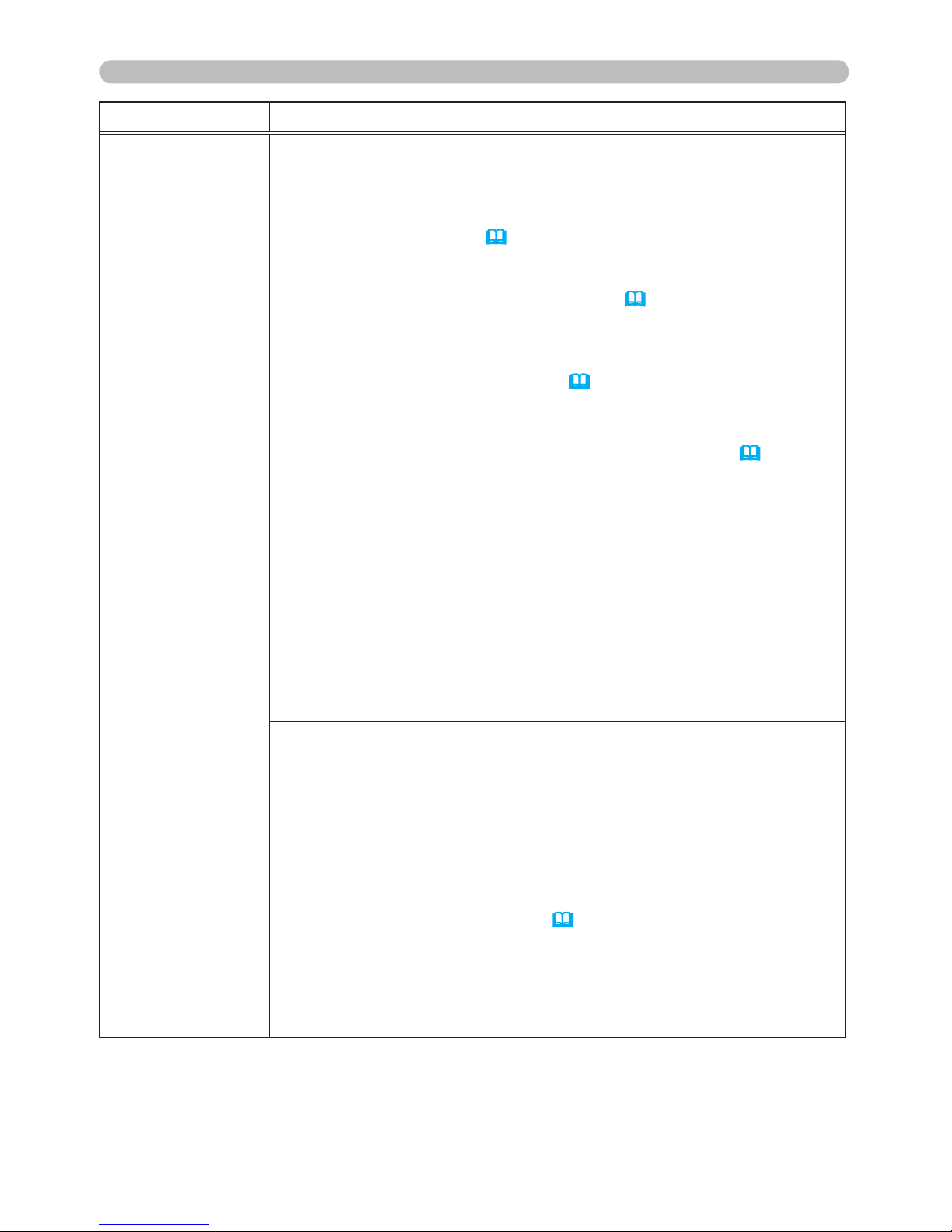
65
NETWORK menu
Item Description
WIRELESS
SETUP
(continued)
DATE AND
TIME
Use the ▲/▼/◄/► buttons to enter the Year (last
two digits), Month, Date, Hour and Minute.
• When this item is set, the same item in the
WIRED SETUP menu is overwritten with the same
setting (
69).
• The projector will override this setting and retrieve
DATE AND TIME information from the Time server
when SNTP is enabled. (
3.1.8
Date/Time
Settings in the Network Guide)
• This setting will be reset if the projector is turned
off while STANDBY MODE in the SETUP menu
is set to SAVING (
45), or when the AC power is
turned off.
CH
Use the ▲/▼ buttons to select the channel of the
wireless LAN to be used while MODE (
63) is set
to ADHOC. Select according to the settings of your
computer.
The channels 1 to 11 are available. To save the
setting, press the ► button.
• The available channels would be various
depending on a country. In addition, wireless
network card might be required due to the
standard.
• This item can only be selected when MODE
is set to ADHOC. When MODE is set to
INFRASTRUCTURE, the channel is automatically
selected.
ENCRYPTION
Use the ▲/▼ buttons to select the encryption
method to be used.
WPA2-PSK(AES) Ù WPA2-PSK(TKIP)
Ú Ú
OFF WPA-PSK(AES)
Ú Ú
WEP 64bitÙWEP 128bitÙWPA-PSK(TKIP)
To save the setting, press the ► button.
• When MODE (
63) is set to ADHOC, either
WPA-PSK and WPA2-PSK cannot be selected.
• If IEEE802.11 n is used while MODE is set to
INFRASTRUCTURE, TKIP and WEP are disabled.
• If OFF or AES is not selected, communication will
switch automatically to IEEE802.11 b/g.
(continued on next page)
Page 75
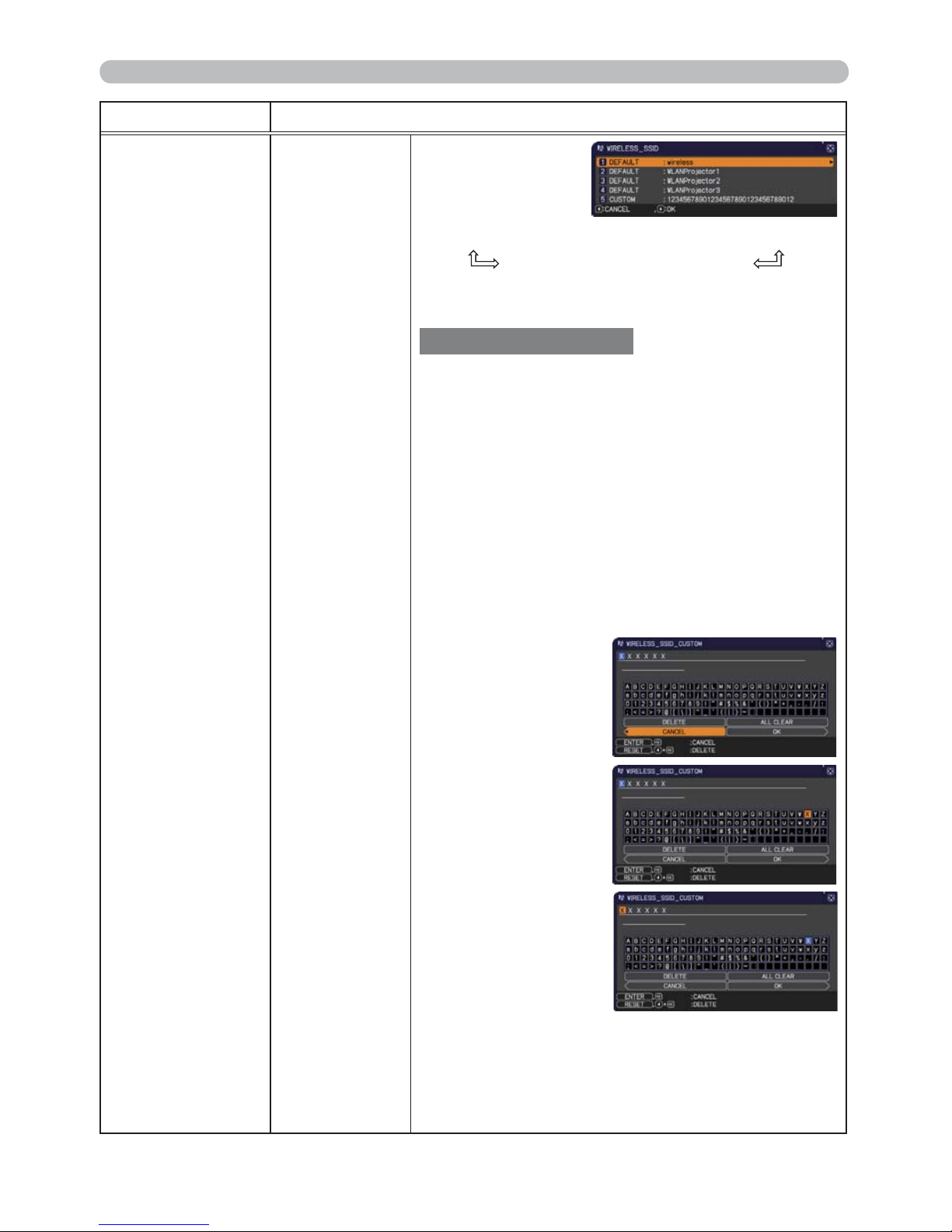
66
NETWORK menu
Item Description
WIRELESS
SETUP
(continued)
SSID
Use the ▲/▼
buttons to select the
SSID to display the
SSID menu.
#1 DEFAULT Ù #2 DEFAULT Ù #3 DEFAULT
#5 CUSTOM Ù #4 DEFAULT
Select one of the DEFAULT (#1~#4) and press ►
or ENTER button.
To adjust CUSTOM
Press the ► or ENTER button when the # 5
CUSTOM is selected. The SSID #5 CUSTOM
menu will be appeared.
(1)
The current SSID will be displayed on the
rst line. If not yet written, the line will be blank. Use
the ▲/▼/◄/► buttons and the ENTER or INPUT
button to select and enter characters. To erase 1
character at one time, press the RESET button or
press the ◄ and INPUT button at the same time.
Also if you move the cursor to DELETE or ALL
CLEAR on screen and press the ENTER or INPUT
button, 1 character or all characters will be erased.
The SSID can be input up to 32 characters.
(2)
To change an
already inserted
character, press
the ▲/▼ button to
move the cursor
to one of the rst
2 lines, and use
the ◄/► buttons
to move the cursor
on the character to
be changed. After
pressing the ENTER
or INPUT button,
the character is
selected. Then,
follow the same
procedure as
described at the
item (1) above.
(3)
To nish entering text, move the cursor to the OK on
screen and press the ►, ENTER or INPUT button.
To revert to the previous name without saving
changes, move the cursor to the CANCEL on screen
and press the ◄, ENTER or INPUT button.
(continued on next page)
Page 76
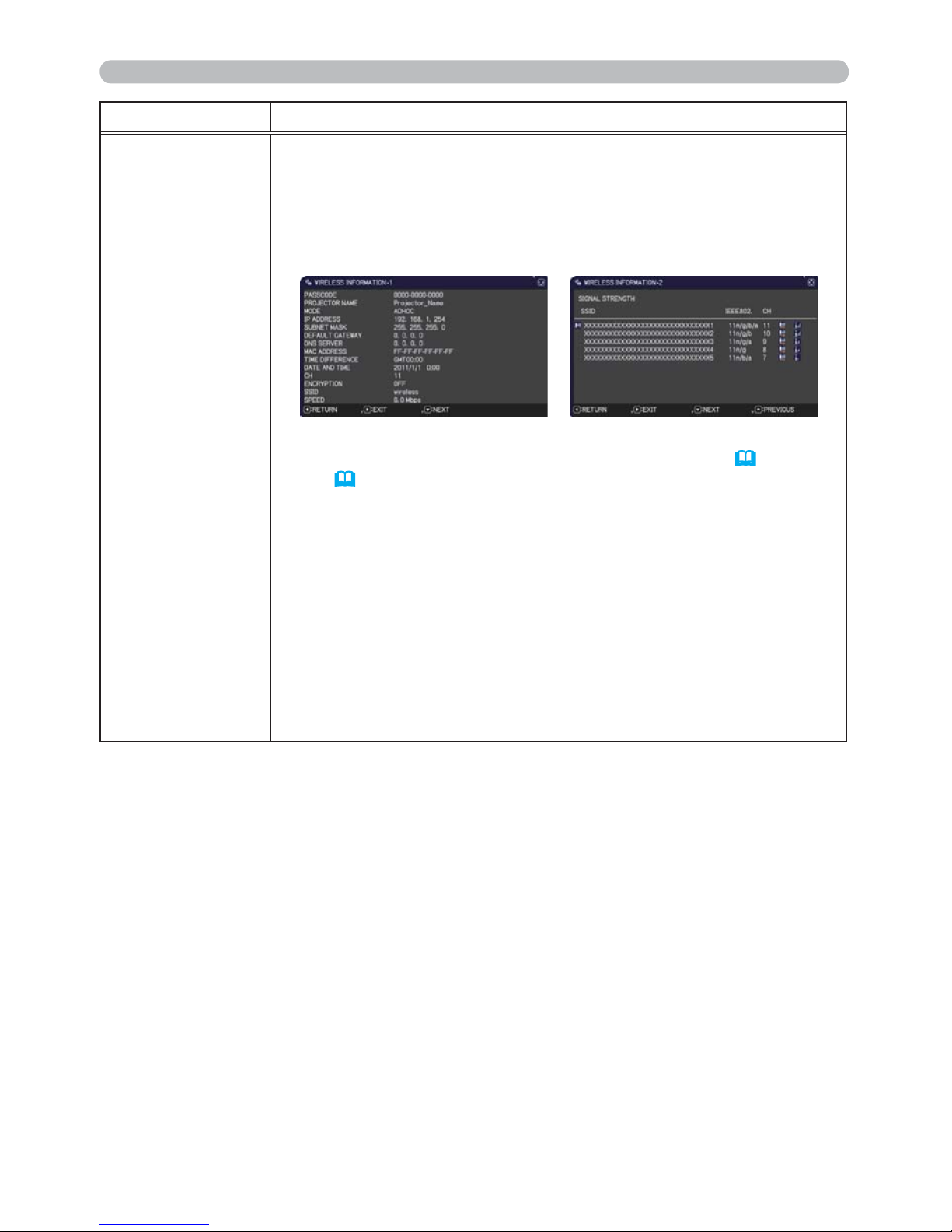
67
NETWORK menu
Item Description
WIRELESS
INFORMATION
"Selecting this item displays the WIRELESS_INFORMATION dialog
for viewing the wireless LAN settings." Use the ▲/▼ buttons to
switch the page.
The rst page shows the wireless LAN settings. The second and
subsequent pages display the signal information of wireless LAN
connection devices.
• For details of PASSCODE, refer to the manual for “LiveViewer”.
• Nothing (blank) is shown in the PROJECTOR NAME
(
70)
and
SSID
(
66)
field until you setup those items. Only the first 16
characters of the PROJECTOR NAME.
• IP ADDRESS, SUBNET MASK and DEFAULT GATEWAY indicate
“0.0.0.0” in the following condition.
(1) The USB wireless adapter is not inserted into the projector.
(2) DHCP is ON and the projector does not get address from DHCP
server.
• Nothing (blank) is shown in the MAC ADDRESS, CH and SPEED
elds if the USB wireless adapter is not inserted.
• The actual performance and setting will be shown in the CH eld,
instead of the setting value in the WIRELESS SETUP menu.
• An icon is displayed to the left of the SSID of the device connected
to the projector.
(continued on next page)
Page 77
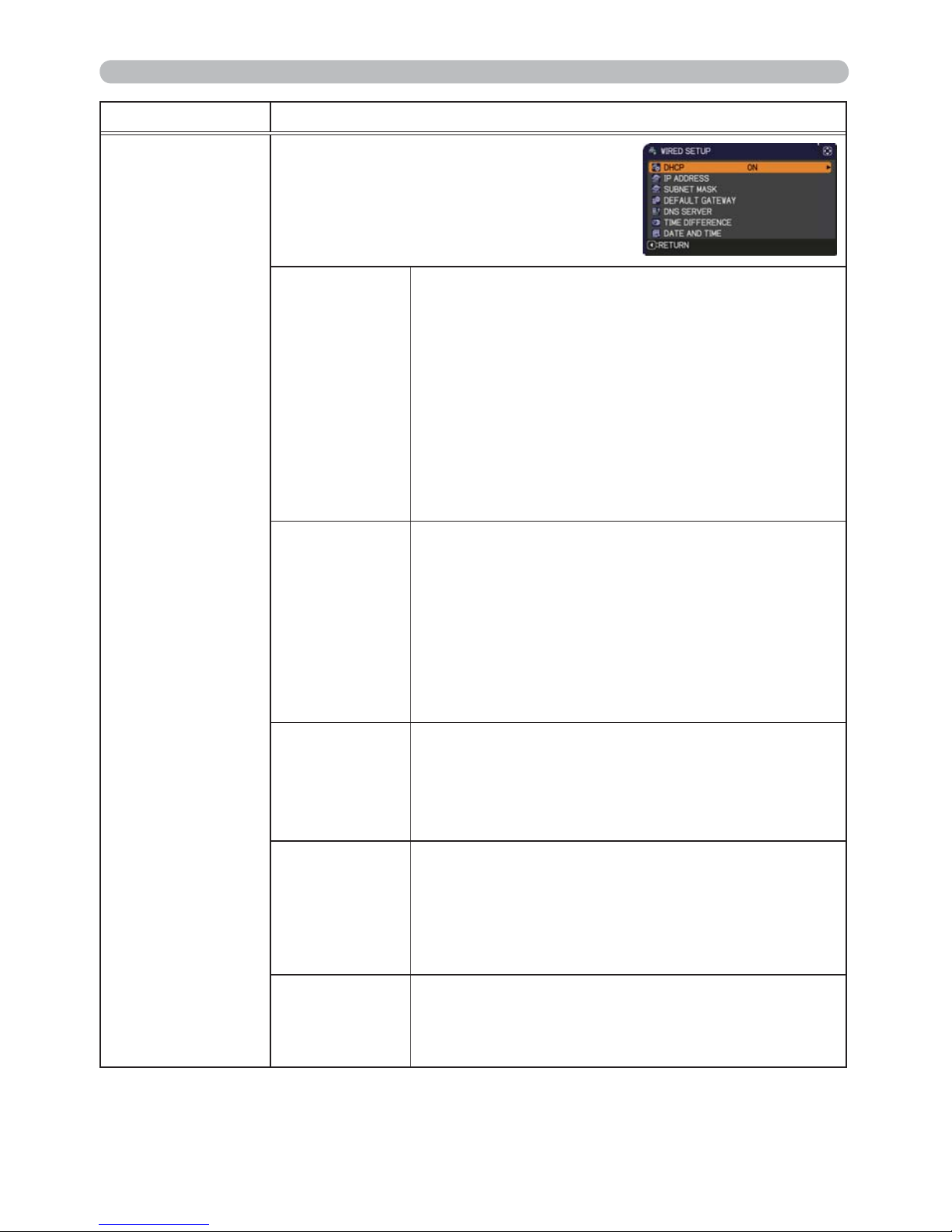
68
NETWORK menu
Item Description
WIRED SETUP
Selecting this item displays the WIRED
SETUP menu for the wired LAN.
Use the ▲/▼ buttons to select an item,
and the ► or ENTER button on the remote
control to perform the item.
DHCP
(Dynamic Host
&RQ¿JXUDWLRQ
Protocol)
Use the ▲/▼ buttons to turn DHCP on/off.
ON Ù OFF
Select OFF when the network does not have
DHCP enabled. To save the setting, press the ►
button.
• When the “DHCP” setting changes to “ON”, it
takes a little time to obtain IP address from DHCP
server.
• Auto IP function will be assigned an IP address if
the projector could not obtain an IP address from
server even if DHCP is “ON”.
IP ADDRESS
Use the ▲/▼/◄/► buttons to enter the IP
ADDRESS.
This function can only be used when DHCP is set
to OFF.
• The IP ADDRESS is the number that identies
this projector on the network. You cannot have two
devices with the same IP ADDRESS on the same
network.
• The IP ADDRESS “0.0.0.0” is prohibited.
SUBNET
MASK
Use the ▲/▼/◄/► buttons to enter the same
SUBNET MASK used by your computer.
This function can only be used when DHCP is set
to OFF.
• The SUBNET MASK “0.0.0.0” is prohibited.
DEFAULT
GATEWAY
Use the ▲/▼/◄/► buttons to enter the DEFAULT
GATEWAY (a node on a computer network that
serves as an access point to another network)
address.
This function can only be used when DHCP is set
to OFF.
DNS SERVER
Use the ▲/▼/◄/► buttons to input the DNS
server address.
The DNS server is a system to control domain
names and IP addresses on the Network.
(continued on next page)
Page 78
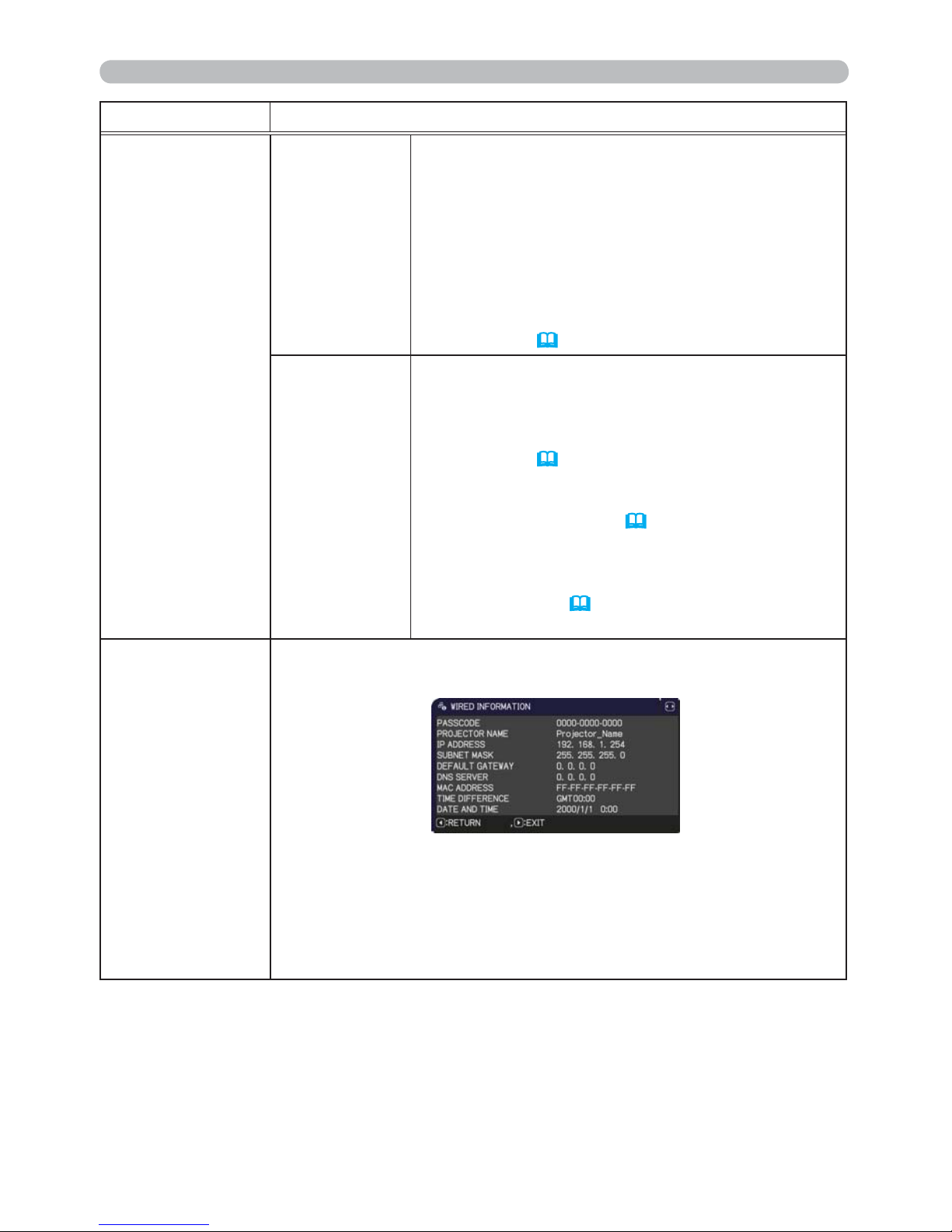
69
NETWORK menu
Item Description
WIRED SETUP
(continued)
TIME
DIFFERENCE
Use the ▲/▼ buttons to enter the TIME
DIFFERENCE.
Set the same TIME DIFFERENCE as the one
set on your computer. If unsure, consult your IT
manager.
Use the ► button to return to the menu after
setting the TIME DIFFERENCE.
• When this item is set, the same item in the
WIRELESS SETUP menu is overwritten with the
same setting (
64).
DATE AND
TIME
Use the ▲/▼/◄/► buttons to enter the Year (last
two digits), Month, Date, Hour and Minute.
• When this item is set, the same item in the
WIRELESS SETUP menu is overwritten with the
same setting (
65).
• The projector will override this setting and retrieve
DATE AND TIME information from the Time server
when SNTP is enabled. (
3.1.8
Date/Time
Settings in the Network Guide)
• This setting will be reset if the projector is turned
off while STANDBY MODE in the SETUP menu
is set to SAVING (
45), or when the AC power is
turned off.
WIRED
INFORMATION
Selecting this item displays the WIRED INFORMATION dialog for
viewing the wired LAN settings.
• For details of PASSCODE, refer to the manual for “LiveViewer”.
• Only the first 16 characters of the PROJECTOR NAME are displayed.
• IP ADDRESS, SUBNET MASK and DEFAULT GATEWAY indicate
“0.0.0.0” when DHCP is ON and the projector has not gotten address
from DHCP server.
(continued on next page)
Page 79
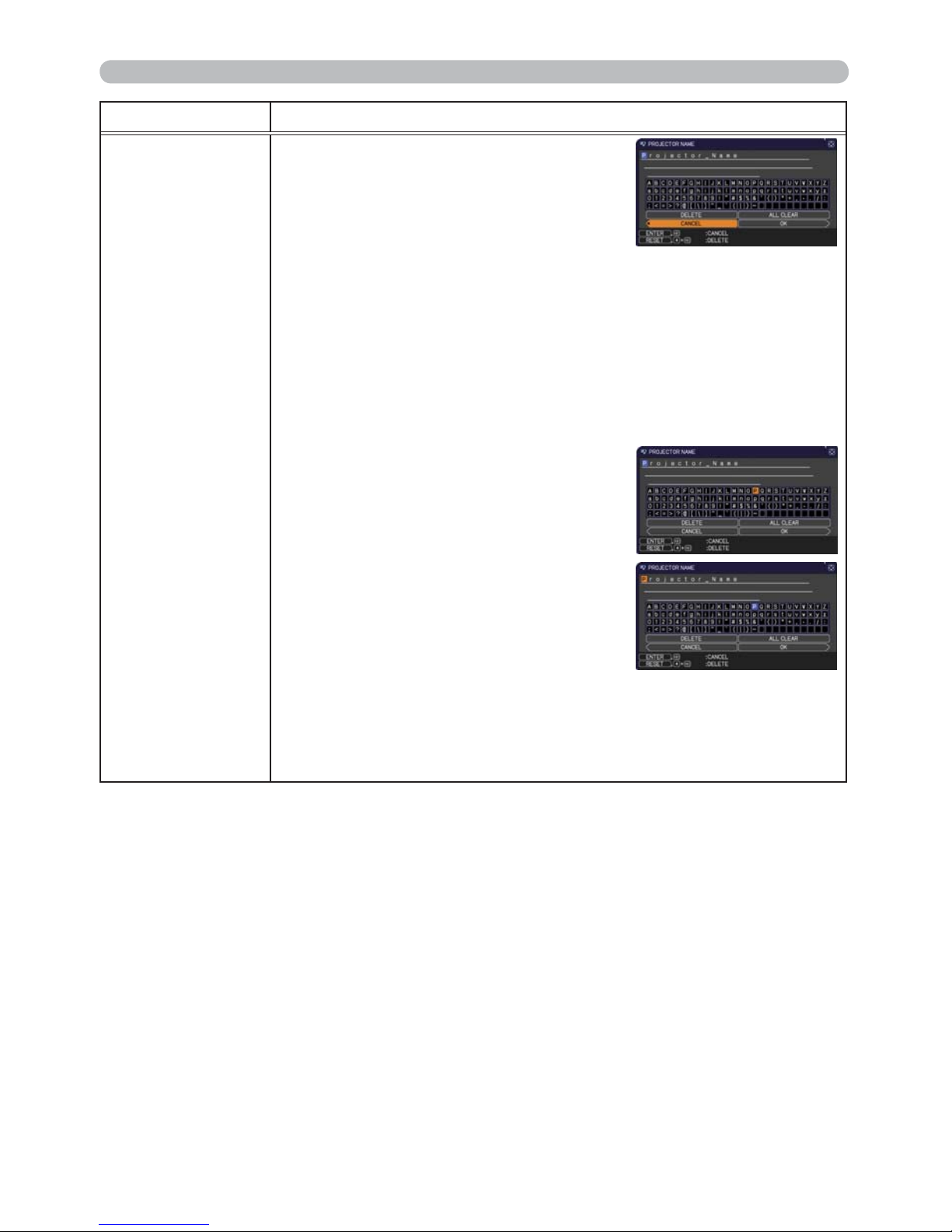
70
NETWORK menu
Item Description
PROJECTOR
NAME
(1) Use the ▲/▼ buttons on the
NETWORK menu to select the
PROJECTOR NAME and press
the ► button. The PROJECTOR
NAME dialog will be displayed.
(2) The current PROJECTOR NAME will be displayed on the rst 3
lines. Particular projector name is pre-assigned by default.
Use the ▲/▼/◄/► buttons and the ENTER or INPUT button to
select and enter characters.
To erase 1 character at one time, press the RESET button or
press the ◄ and INPUT button at the same time. Also if you
move the cursor to DELETE or ALL CLEAR on screen and
push the ENTER or INPUT button, 1 character or all characters
will be erased.The PROJECTOR NAME can be input up to 64
characters.
(3) To change an already inserted
character, press the ▲/▼ button
to move the cursor to one of the
rst 3 lines, and use the ◄/►
buttons to move the cursor on the
character to be changed. After
pressing the ENTER or INPUT
button, the character is selected.
Then, follow the same procedure
as described at the item (2) above.
(4) To nish entering text, move the cursor to the OK on screen and
press the ►, ENTER or INPUT button. To revert to the previous
PROJECTOR NAME without saving changes, move the cursor
to the CANCEL on screen and press the ◄, ENTER or INPUT
button.
(continued on next page)
Page 80
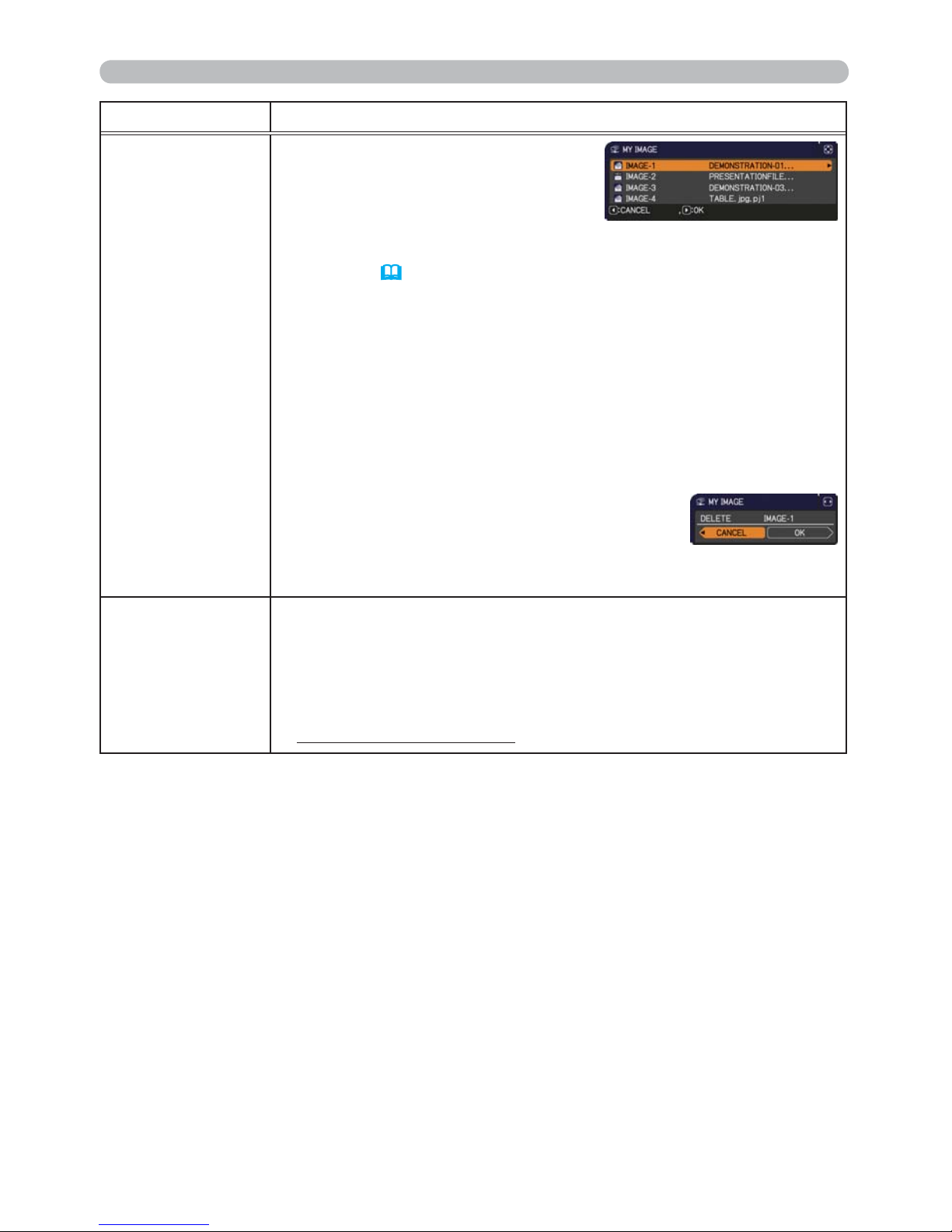
71
NETWORK menu
Item Description
MY IMAGE
Selecting this item displays the MY
IMAGE menu.
Use the application to transfer the image data. It can be downloaded from
the Hitachi web site.
Use the ▲/▼ buttons to select an item which is a still image by the
MY IMAGE (
4. My Image Function in the Network Guide) and the
► or ENTER button to display the image.
• The item without image stored cannot be selected.
• The image names are each displayed in 16 characters or less.
To switch the image displayed
Use the ▲/▼ buttons.
To return to the menu
Press the ◄ button on the remote control.
7RHUDVHWKHLPDJHGLVSOD\HGDQGLWVVRXUFH¿OHLQWKHSURMHFWRU
(1) Press the RESET button on the remote
control while displaying an image to display
the MY IMAGE DELETE menu.
(2) Press the ► button to perform to erase.
To stop erasing, press the ◄ button.
AMX D.D.
(AMX Device
Discovery)
Use the ▲/▼ buttons to turn the AMX Device Discovery on/off.
ON Ù OFF
When ON is selected, the projector can be detected by controllers
of AMX connected to the same network. For the details of AMX
Device Discovery, visit the AMX web site.
URL: http://www.amx.com/
(as of Dec. 2010)
(continued on next page)
Page 81

72
NETWORK menu
Item Description
PRESENTATION
Selecting this item displays the PRESENTATION menu.
Use ▲/▼ buttons to select one of the following items, then press ►
or ENTER button to use the function.
• To use Network Presentation, an exclusive application, "LiveViewer"
is required. It can be installed from the bundled application CD.
You can also download the latest version and relevant information
from the Hitachi website (http://www.hitachi-america.us/digitalmedia
or http://www.hitachidigitalmedia.com).For details of Network
Presentation and instructions to install the "LiveViewer", refer to the
manual for "LiveViewer".
QUIT
PRESENTER
MODE
If you set a computer to the Presenter mode while
its image is projected, the projector is occupied by
the computer and access from any other computer is
blocked.
Use this function to quit the Presenter mode and
allow other computers to access the projector.
Select this item to display a dialog.
Press ► button to choose OK in the dialog.
The Presenter mode is cancelled and a message is
displayed indicating the result.
• To make Presenter mode setting, use “LiveViewer”.
For details,
refer to the manual for "LiveViewer".
MULTI PC
MODE
If you set one or more computers to the Multi PC
mode on “LiveViewer” and send their images to the
projector, you can select the display mode on the
projector from two options below.
- Single PC mode: displays the image of the selected
computer on full screen.
- Multi PC mode: displays the images sent from up to
four computers on screen that is divided into quarter
sections.
Select this item to display a dialog.
Use the dialog to change the display mode as
explained below.
• To change from Multi PC mode to Single PC mode,
select one of computers in the dialog using the
▲/▼/◄/► buttons and press the ENTER or INPUT
button.
Press the ► button to choose OK, and then press
ENTER or INPUT again. The image for the selected
computer is displayed on full screen.
(continued on next page)
(continued on next page)
Page 82
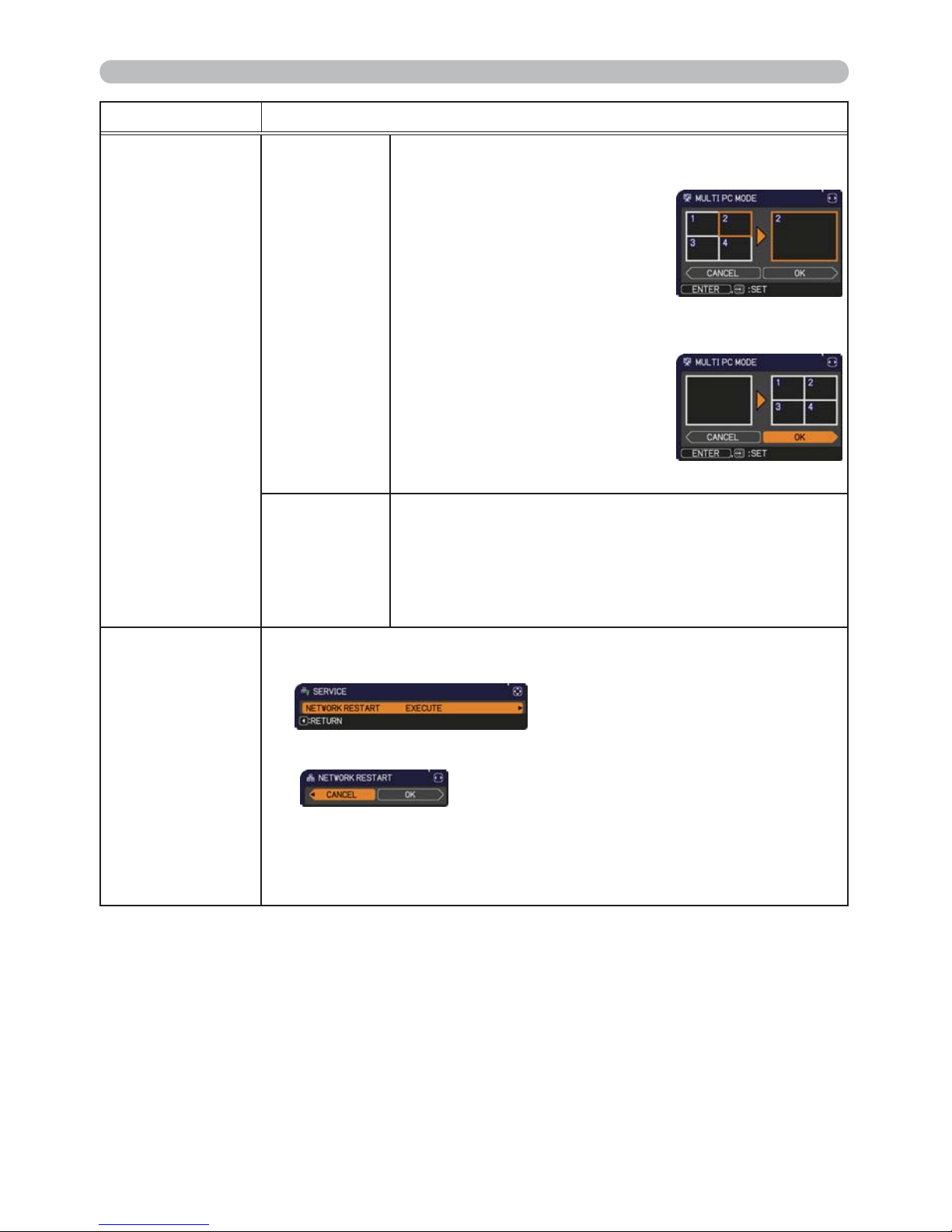
73
SECURITY menu
Item Description
PRESENTATION
(continued)
MULTI PC
MODE
(continued)
• To change from Single PC mode to Multi PC mode,
press ► button to choose OK in the dialog and press
the ENTER or INPUT button.
The display mode is changed.
•
For details on how to switch the
display mode to Multi PC mode
on your computer, refer to the
manual for
“LiveViwer”
.
• The Presenter mode setting of the selected
computer becomes valid when the display mode is
changed to Single PC mode.
Also, the Presenter mode setting
becomes invalid when the
display mode is changed to Multi
PC mode, regardless the setting
on the computers.
For details,
refer to the manual for “LiveViewer”.
DISPLAY
USER NAME
Selecting this item displays the user name. This
function helps you identify from which computer the
current image is sent.
• You can set user names for each computer on
“LiveViwer”. For details,
refer to the manual for
“LiveViwer”.
SERVICE
Executing this item restarts and initializes the network functions.
Choose the NETWORK RESTART EXECUTE using the button ►.
Then use the button ► to execute.
Network will be once cut off when choose restart.
If DHCP is selected on, IP address may be changed.
After selecting NETWORK RESTART EXECUTE, NETWORK menu
may not be controlled approx. 30 seconds.
Page 83
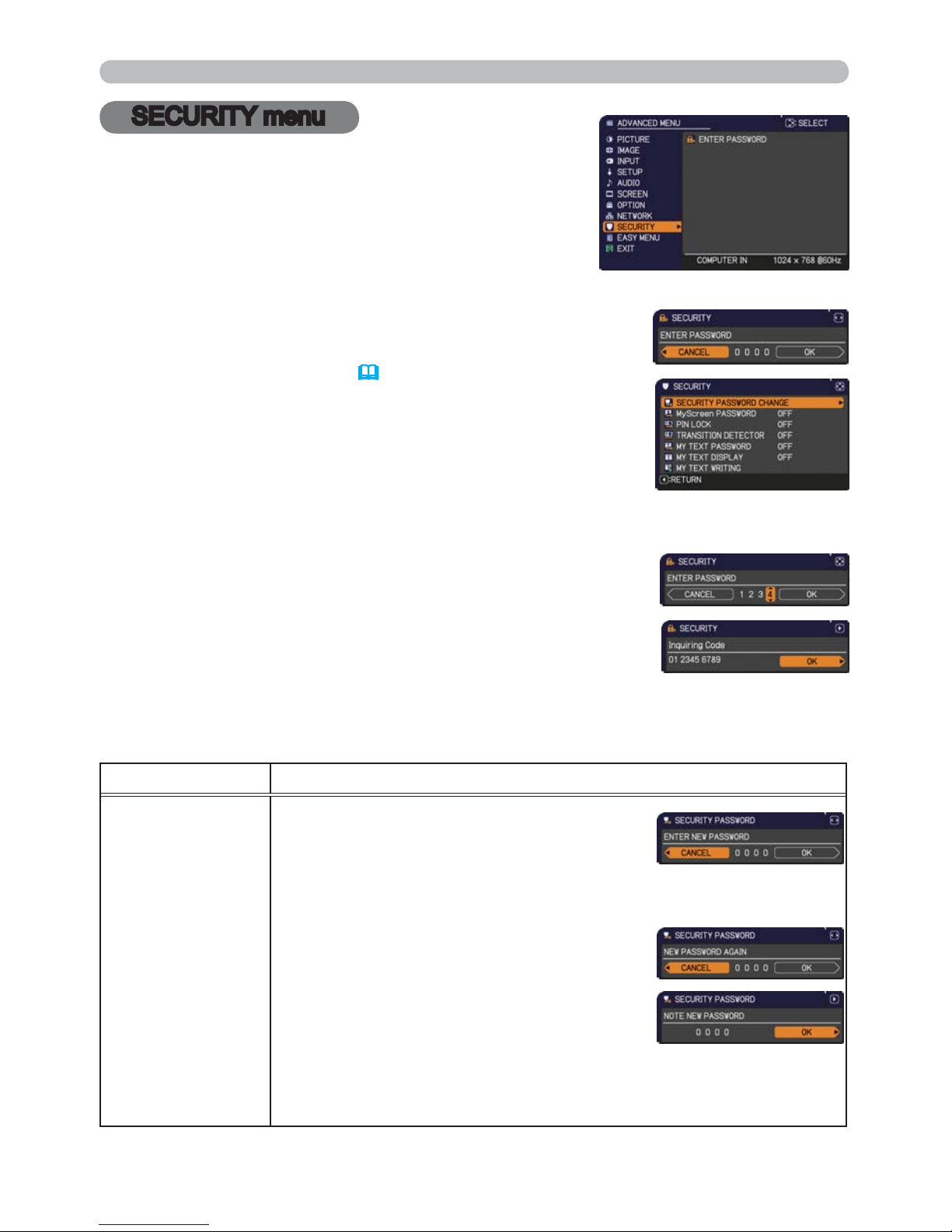
74
SECURITY menu
This projector is equipped with security functions.
From the SECURITY menu, items shown in the table
below can be performed.
To use SECURITY menu: User registration is required
before using the security functions.
Enter to the SECURITY menu
1. Press the ► button. The ENTER PASSWORD box will be displayed.
2. Use the ▲/▼/◄/► buttons to enter the registered password.
The factory default password is as follows.
3692
This password can be changed
(below)
. Move the cursor to
the right side of the ENTER PASSWORD box and press
the ► button to display the SECURITY menu.
• It is strongly recommended the factory default password to be
changed as soon as possible.
• If an incorrect password is input, the ENTER PASSWORD box
will be displayed again. If incorrect password is input 3 times, the
projector will turn off. Afterwards the projector will turn off every time
an incorrect password is input.
3. Items shown in the table below can be performed.
If you have forgotten your password
(1) While the ENTER PASSWORD box is displayed, press and hold the
RESET button on the remote control for about 3 seconds or press
and hold the INPUT button for 3 seconds while pressing the ►
button on the projector.
(2) The 10 digit Inquiring Code will be displayed. Contact your dealer
with the 10 digit Inquiring Code. Your password will be sent after
your user registration information is conrmed.
• If there is no key input for about 55 seconds while the Inquiring Code is displayed, the menu will
close. If necessary, repeat the process from (1).
Item Description
SECURITY
PASSWORD
CHANGE
(1) Use the ▲/▼ buttons on the SECURITY menu
to select SECURITY PASSWORD CHANGE
and press the ► button to display the ENTER
NEW PASSWORD box.
(2) Use the ▲/▼/◄/► buttons to enter the new password.
(3) Move the cursor to the right side of the
ENTER NEW PASSWORD box and press the
► button to display the NEW PASSWORD
AGAIN box, enter the same password again.
(4)
Move the cursor to the right side of the NEW
PASSWORD AGAIN box and press the ►
button and the NOTE NEW PASSWORD box
will be displayed for about 30 seconds, please
make note of the password during this time.
Pressing the ENTER button on the remote control or ► button on the
projector will close the NOTE NEW PASSWORD box.
• Please do not forget your password.
(continued on next page)
SECURITY menu
Page 84
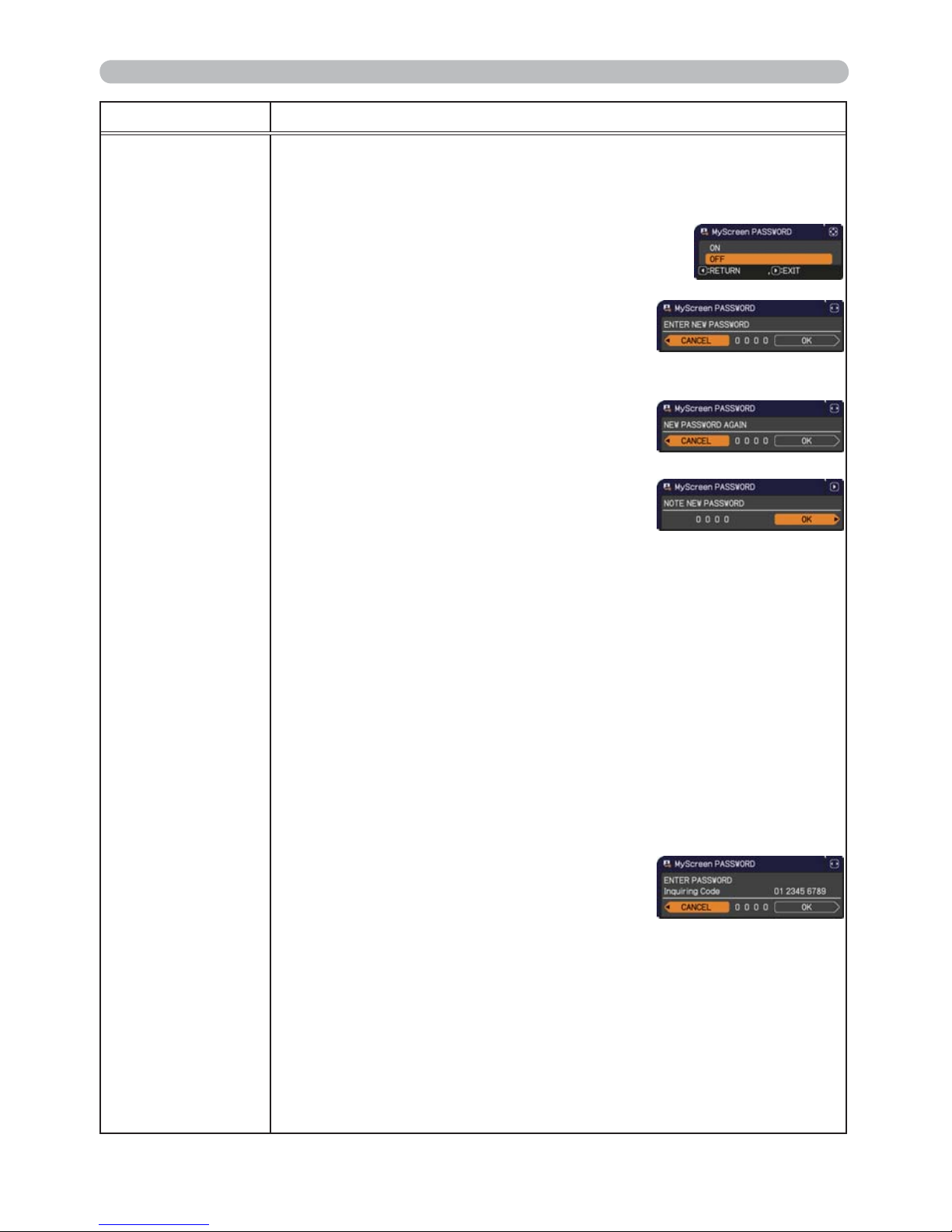
75
SECURITY menu
Item Description
MyScreen
PASSWORD
The MyScreen PASSWORD function can be used to prohibit access to the
MyScreen function and prevent the currently registered MyScreen image
from being overwritten.
1 Turning on the MyScreen PASSWORD
1-1 Use the ▲/▼ buttons on the SECURITY menu to
select MyScreen PASSWORD and press the ►
button to display the MyScreen PASSWORD on/
off menu.
1-2 Use the ▲/▼ buttons on the MyScreen
PASSWORD on/off menu to select ON.
The ENTER NEW PASSWORD box (small)
will be displayed.
1-3 Use the ▲/▼/◄/► buttons to enter the
password. Move the cursor to the right side
of the ENTER NEW PASSWORD box (small)
and press the ► button to display the NEW
PASSWORD AGAIN box, enter the same
PASSWORD again.
1-4 Move the cursor to the right side of the
NEW PASSWORD AGAIN box and press
the ► button to display the NOTE NEW
PASSWORD box for about 30 seconds,
please make note of the password during
this time.
Pressing the ENTER button on the remote control or ► button on the
projector will return to MyScreen PASSWORD on/off menu.
When a password is set for MyScreen:
•
The MyScreen registration function (and menu) will be unavailable.
•
The MyScreen Lock menu will be unavailable.
•
The START UP setting will be locked on MyScreen (and the menu will be
unavailable).
Turning the MyScreen PASSWORD off will allow normal operation of these
functions.
•
Please do not forget your MyScreen PASSWORD.
2 Turning off the MyScreen PASSWORD
2-1 Follow the procedure in 1-1 to display the MyScreen PASSWORD on/off
menu.
2-2
Select OFF to display the ENTER
PASSWORD box (large). Enter the registered
password and the screen will return to the
MyScreen PASSWORD on/off menu.
If an incorrect PASSWORD is input, the menu will
close. If necessary, repeat the process from 2-1.
3 If you have forgotten your password
3-1 Follow the procedure in 1-1 to display the MyScreen PASSWORD on/off
menu.
3-2 Select OFF to display the ENTER PASSWORD box (large). The 10 digit
Inquiring Code will be displayed inside the box.
3-3 Contact your dealer with the 10 digit Inquiring Code. Your password will
be sent after your user registration information is conrmed.
(continued on next page)
ENTER NEW PASSWORD
box (small)
ENTER PASSWORD box
(large)
Page 85
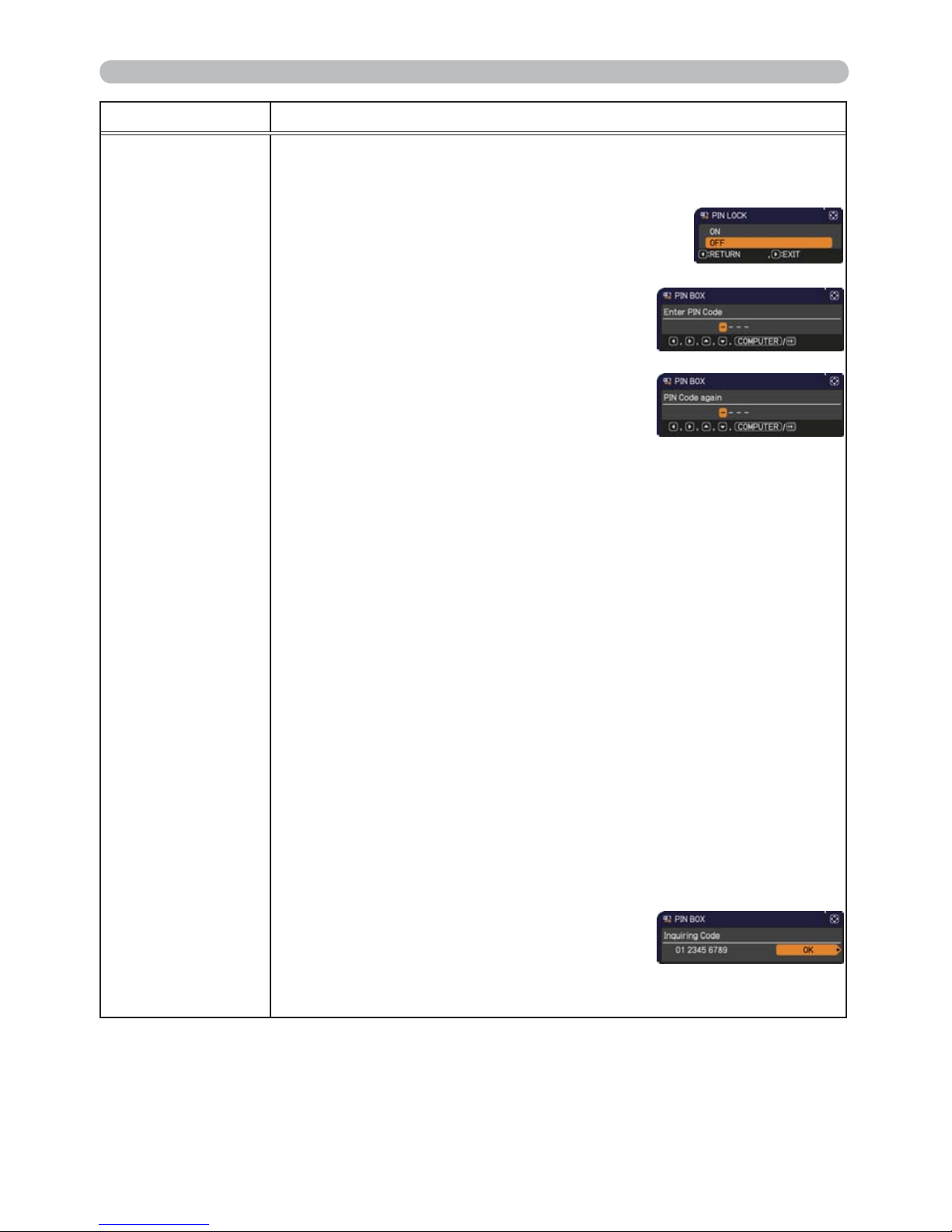
76
SECURITY menu
Item Description
PIN LOCK
PIN LOCK is a function which prevents the projector from being used unless
a registered Code is input.
1 Turning on the PIN LOCK
1-1 Use the ▲/▼ buttons on the SECURITY menu to
select PIN LOCK and press the ► button or the
ENTER button to display the PIN LOCK on/off
menu.
1-2 Use the ▲/▼ buttons on the PIN LOCK on/
off menu to select ON and the Enter PIN
Code box will be displayed.
1-3 Input a 4 part PIN code using the ▲/▼/◄/►,
COMPUTER or INPUT button.
The PIN Code again box will appear. Reenter
the same PIN code. This will complete the PIN
code registration.
•
If there is no key input for about 55 seconds
while the Enter PIN Code box or the PIN Code again box is displayed,
the menu will close. If necessary, repeat the process from 1-1.
Afterwards, anytime the projector is restarted after AC power is turned off
the Enter PIN Code box will be displayed. Enter the registered PIN code.
The projector can be used after entering the registered PIN code. If an
incorrect PIN code is input, the Enter PIN code box will be displayed again.
If an incorrect PIN code is input 3 times, the projector will turn off. Afterwards
the projector will turn off every time an incorrect PIN code is input. The
projector will also turn off if there is no key input for about 5 minutes while
the Enter PIN code box is displayed.
This function will activate only when the projector is started after AC power
is turned off.
•
Please do not forget your PIN code.
2 Turning off the PIN LOCK
2-1 Follow the procedure in 1-1 to display the PIN LOCK on/off menu.
2-2 Use the ▲/▼ buttons to select OFF and the Enter PIN Code box will be
displayed.
Enter the registered PIN code to turn the PIN LOCK function off.
If an incorrect PIN code is input 3 times, the projector will turn off.
3 If you have forgotten your PIN code
3-1 While the Enter PIN code box is displayed, press and hold the RESET
button for three seconds or press and hold the INPUT button for 3
seconds while pressing the ► button on the projector.
The 10 digit Inquiring Code will be displayed.
•
If there is no key input for about 5 minutes
while the Inquiring Code is displayed, the
projector will turn off.
3-2 Contact your dealer with the 10 digit Inquiring Code. Your PIN code will
be sent after your user registration information is conrmed.
(continued on next page)
Page 86
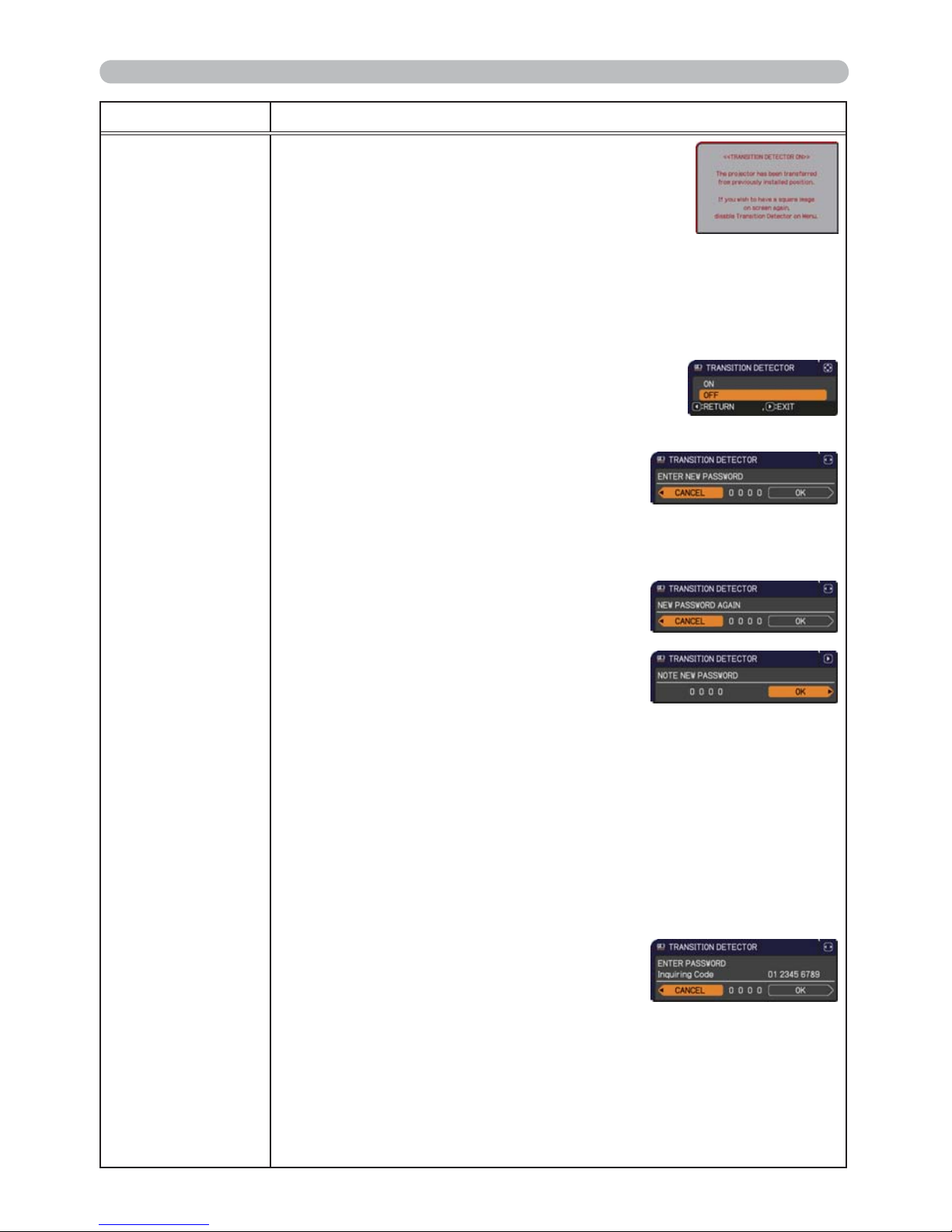
77
SECURITY menu
Item Description
TRANSITION
DETECTOR
If this function is set to ON and the vertical angle of
the projector or the INSTALLATION setting is different
from the previous recorded setting, the TRANSITION
DETECTOR ON alarm will be displayed and the input
signal will not be displayed.
• To display the signal again, set this function OFF.
• After about 5 minutes of displaying the TRANSITION DETECTOR ON
alarm, the lamp will turn off.
• Keystone adjustment feature has been prohibited as long as the Transition
Detector function is on.
1 Turning on the TRANSITION DETECTOR
1-1 Use the ▲/▼ buttons on the SECURITY menu
to select TRANSITION DETECTOR and press
the ► or the ENTER button to display the
TRANSITION DETECTOR on/off menu.
1-2
Use the ▲/▼ buttons on the TRANSITION
DETECTOR on/off menu to select ON.
Selecting ON will save the setting of the
current angle and the INSTALLATION setting.
The ENTER NEW PASSWORD box (small)
will be displayed.
1-3 Use the ▲/▼/◄/► buttons to enter a
password. Move the cursor to the right side
of the ENTER NEW PASSWORD box (small)
and press the ► button to display the NEW
PASSWORD AGAIN box, enter the same
password again.
1-4 Move the cursor to the right side of the
NEW PASSWORD AGAIN box and press
the ► button to display the NOTE NEW
PASSWORD box for about 30 seconds,
please make note of the password during this time.
Pressing the ENTER button on the remote control or the ► button on the
projector will return to the TRANSITION DETECTOR on/off menu.
• Please do not forget your TRANSITION DETECTOR password.
• This function will activate only when the projector is started after turning off
the AC power.
• This feature may not function properly if the projector is not in a stable
position when ON is selected.
2 Turning off the TRANSITION DETECTOR
2-1
Follow the procedure in 1-1 to display the TRANSITION DETECTOR on/off menu.
2-2
Select OFF to display the ENTER
PASSWORD box (large). Enter the registered
password and the screen will return to the
TRANSITION DETECTOR on/off menu.
If an incorrect password is input, the menu will
close. If necessary, repeat the process from 2-1.
3 If you have forgotten your password
3-1
Follow the procedure in 1-1 to display the TRANSITION DETECTOR on/off menu.
3-2 Select OFF to display the ENTER PASSWORD box (large). The 10 digit
Inquiring Code will be displayed inside the box.
3-3 Contact your dealer with the 10 digit Inquiring Code. Your password will
be sent after your user registration information is conrmed.
(continued on next page)
ENTER NEW PASSWORD
box (small)
ENTER PASSWORD box
(large)
Page 87
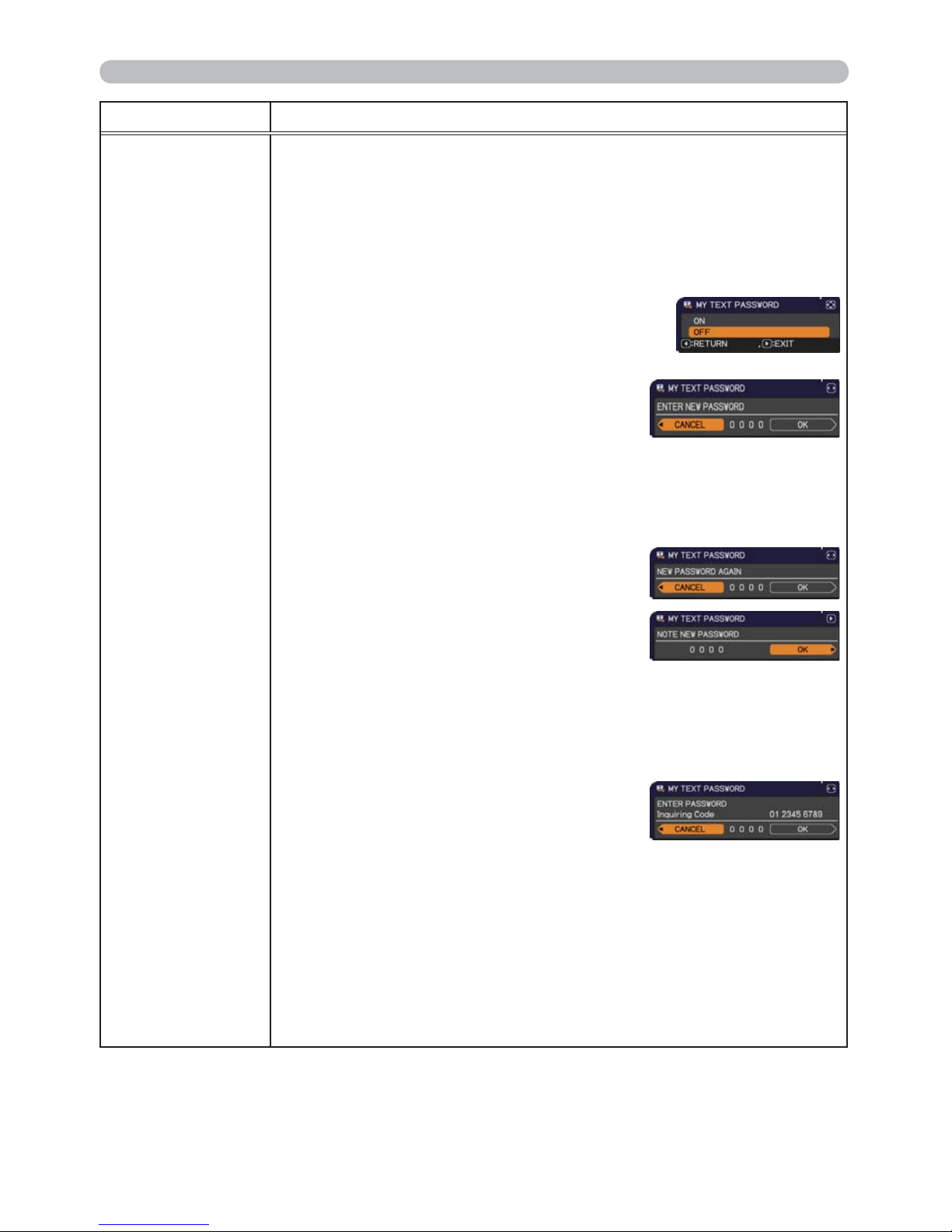
78
SECURITY menu
Item Description
MY TEXT
PASSWORD
The MY TEXT PASSWORD function can prevent the MY TEXT from being
overwritten. When the password is set for the MY TEXT;
• The MY TEXT DISPLAY menu will be unavailable, which can prohibit
changing the DISPLAY setting.
• The MY TEXT WRITING menu will be unavailable, which can prevent the
MY TEXT from being overwritten.
1 Turning on the MY TEXT PASSWORD
1-1 Use the ▲/▼ buttons on the SECURITY menu to
select the MY TEXT PASSWORD and press the
► button to display the MY TEXT PASSWORD
on/off menu.
1-2 Use the ▲/▼ buttons on the MY TEXT
PASSWORD on/off menu to select ON. The
ENTER NEW PASSWORD box (small) will
be displayed.
1-3 Use the ▲/▼/◄/► buttons to enter the
password. Move the cursor to the right side
of the ENTER NEW PASSWORD box (small)
and press the ► button to display the NEW
PASSWORD AGAIN box, and then enter the
same password again.
1-4 Move the cursor to the right side of the
NEW PASSWORD AGAIN box and press
► button to display the NOTE NEW
PASSWORD box for about 30 seconds, then
please make note of the password during
this time.
Pressing the ENTER button on the remote control or ► button on the
projector will return to the MY TEXT PASSWORD on/off menu.
2 Turning off the MY TEXT PASSWORD
2-1 Follow the procedure in 1-1 to display the MY TEXT PASSWORD on/off
menu.
2-2 Select OFF to display the ENTER
PASSWORD box (large). Enter the
registered password and the screen will
return to the MY TEXT PASSWORD on/off
menu.
If an incorrect password is input, the menu will close.
If necessary, repeat the process from 2-1
3 If you have forgotten your password
3-1 Follow the procedure in 1-1 to display the MY TEXT PASSWORD on/off
menu.
3-2 Select OFF to display the ENTER PASSWORD box (large). The 10 digit
inquiring code will be displayed inside the box.
3-3 Contact your dealer with the 10 digit inquiring code. Your password will
be sent after your user registration information is conrmed.
(continued on next page)
ENTER NEW PASSWORD
box (small)
ENTER PASSWORD box
(large)
Page 88
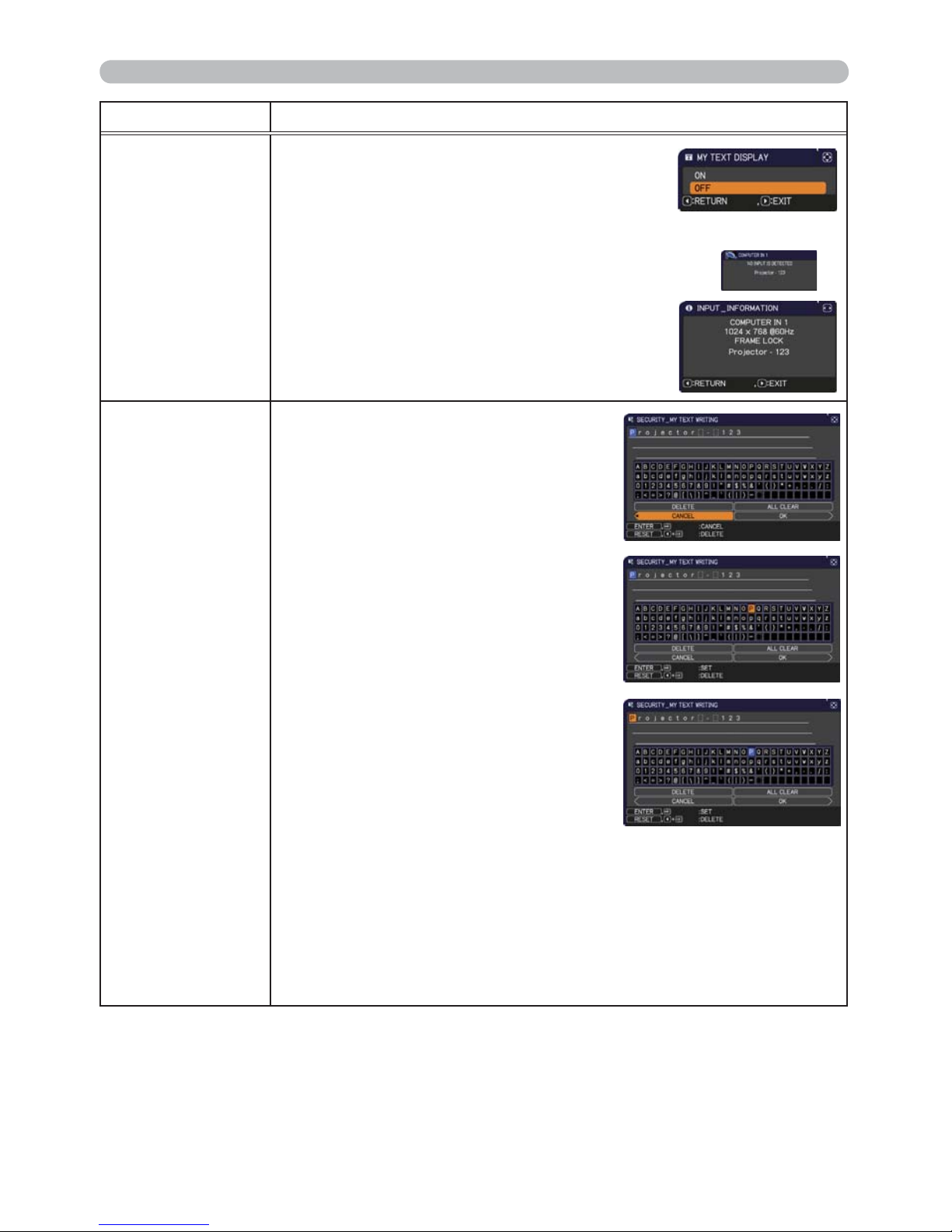
79
SECURITY menu
Item Description
MY TEXT
DISPLAY
(1) Use the ▲/▼ buttons on the SECURITY menu to
select the MY TEXT DISPLAY and press the ► or
ENTER button to display the MY TEXT DISPLAY
on/off menu.
(2) Use the ▲/▼ buttons on the MY TEXT DISPLAY on/off menu to select
on or off.
ON Ù OFF
When it is set ON, the MY TEXT will be displayed
on the START UP screen and the INPUT_
INFORMATION when the INFORMATION on the
SERVICE menu is chosen.
• This function is available only when the MY TEXT
PASSWORD function is set to the OFF.
MY TEXT
WRITING
(1) Use the ▲/▼ buttons on the
SECURITY menu to select the MY
TEXT WRITING and press the ►
button. The MY TEXT WRITING dialog
will be displayed.
(2) The current MY TEXT will be displayed
on the rst 3 lines. If not yet written, the
lines will be blank.
Use the ▲/▼/◄/► buttons and the
ENTER or INPUT button to select and
enter characters. To erase 1 character
at one time, press the RESET button or
press the ◄ and INPUT button at the
same time. Also if you move the cursor
to DELETE or ALL CLEAR on screen
and press the ENTER or INPUT button,
1 character or all characters will be
erased. The MY TEXT can be input up
to 24 characters on each line.
(3)
To change an already inserted character,
press the ▲/▼ button to move the
cursor to one of the rst 3 lines, and use
the ◄/► buttons to move the cursor on
the character to be changed.
After pressing the ENTER or INPUT button, the character is selected.
Then, follow the same procedure as described at the item (2) above.
(4) To nish entering text, move the cursor to the OK on screen and press
the ►, ENTER or INPUT button. To revert to the previous MY TEXT
without saving changes, move the cursor to the CANCEL on screen and
press the ◄, ENTER or INPUT button.
•
The MY TEXT WRITING function is available only when the MY TEXT
PASSWORD function is set to OFF.
Page 89
80
Presentation tools
Presentation tools
The PC-LESS Presentation reads image and audio data from the storage media
inserted into the USB TYPE A port and displays the image in the following modes.
The PC-LESS Presentation can be started by selecting the USB TYPE A port as
the input source.
This feature allows you to make your presentations without using your computer.
PC-LESS Presentation
- Thumbnail Mode (81)
- Full Screen Mode (
85)
- Slideshow Mode (
86)
[Supported storage media]
• USB memory (USB memory type, USB hard disk and USB card reader type)
• USB readers (adapters) that have more than one USB slot may not
work (if the adapter is acknowledged as multiple devices connected).
• USB hubs may not work.
• USB devices with security software may not work.
• Be careful when inserting or removing a USB device. (
12, 83)
NOTE
• NTFS is not supported.NOTE
[Supported format]
• FAT12, FAT16 and FAT32
The projector has the following two convenient tools that enable on-screen
presentations easily and quickly:
- PC-LESS Presentation (
below)
- USB Display (
89)
Page 90
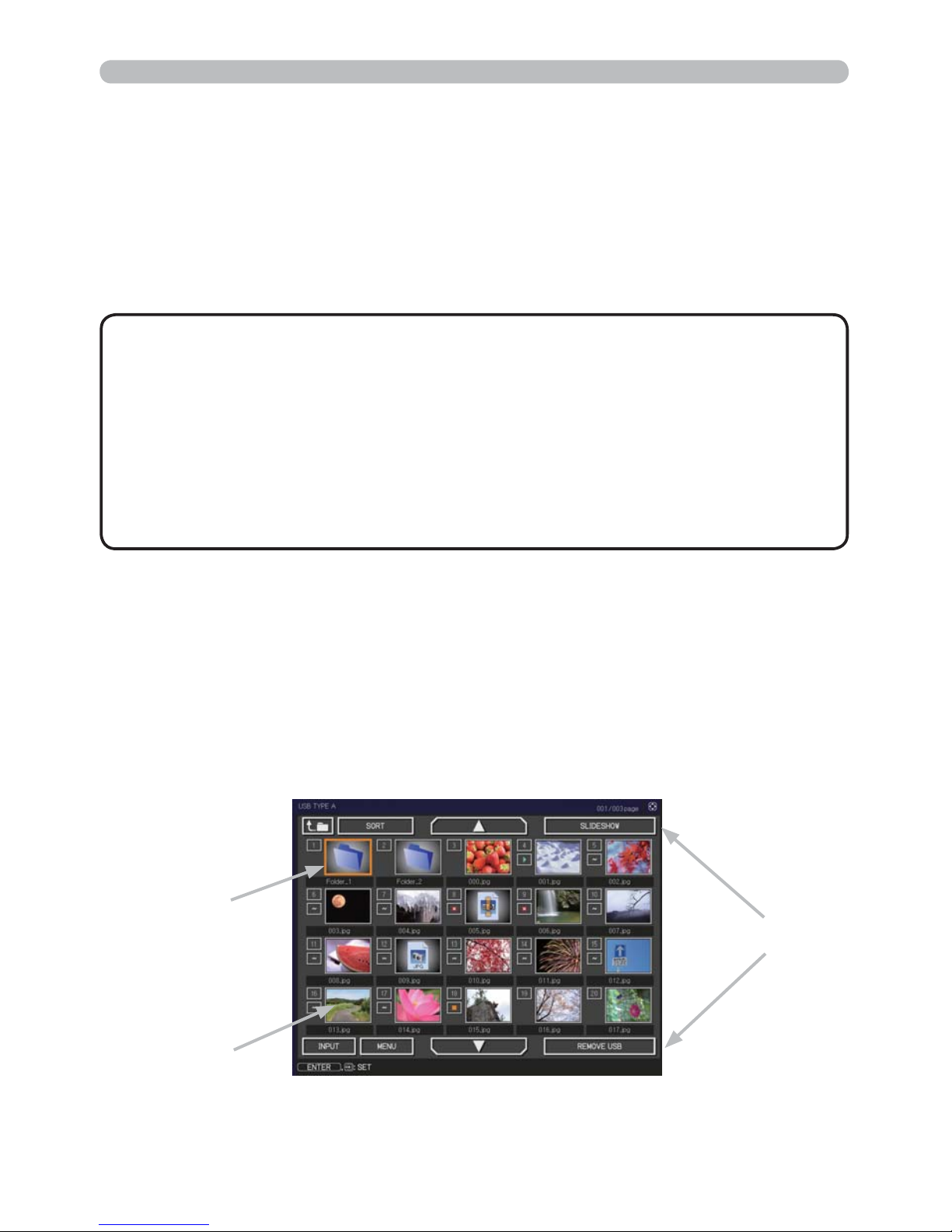
81
Presentation tools
• Files with a resolution larger than the following are not supported.
CP-X2021WN, CP-X2521WN,CP-X3021WN: 1024 x 768
• Files with a resolution smaller than 36x36 are not supported.
• Files with a resolution smaller than 100x100 may not be displayed.
• Some supported les may not be displayed.
• Only a frame appears when the content of image data cannot be displayed in
the Thumbnail mode.
• Even with the le format and audio format combinations described above,
playback of some les may fail.
NOTE
>6XSSRUWHG¿OHIRUPDWDQGLWVH[WHQVLRQ@
• JPEG (.jpeg, .jpg) * Progressive is not supported.
• Bitmap (.bmp) *
16bit mode and compressed bitmap is not supported.
• PNG (.png) * Interlace PNG is not supported.
• GIF (.gif)
Thumbnail Mode
PC-LESS Presentation (continued)
The Thumbnail mode displays the images stored in a USB storage device on the
Thumbnail screen. Maximum 20 images are displayed in a screen.
If you wish, you can jump into the Full Screen mode or Slideshow mode, after you
select some images in the Thumbnail mode.
The Thumbnail mode will be started as the primary function of the PC-LESS
Presentation after selecting the USB TYPE A port as the input source.
Thumbnail menu
Selected image
Thumbnail images
Page 91
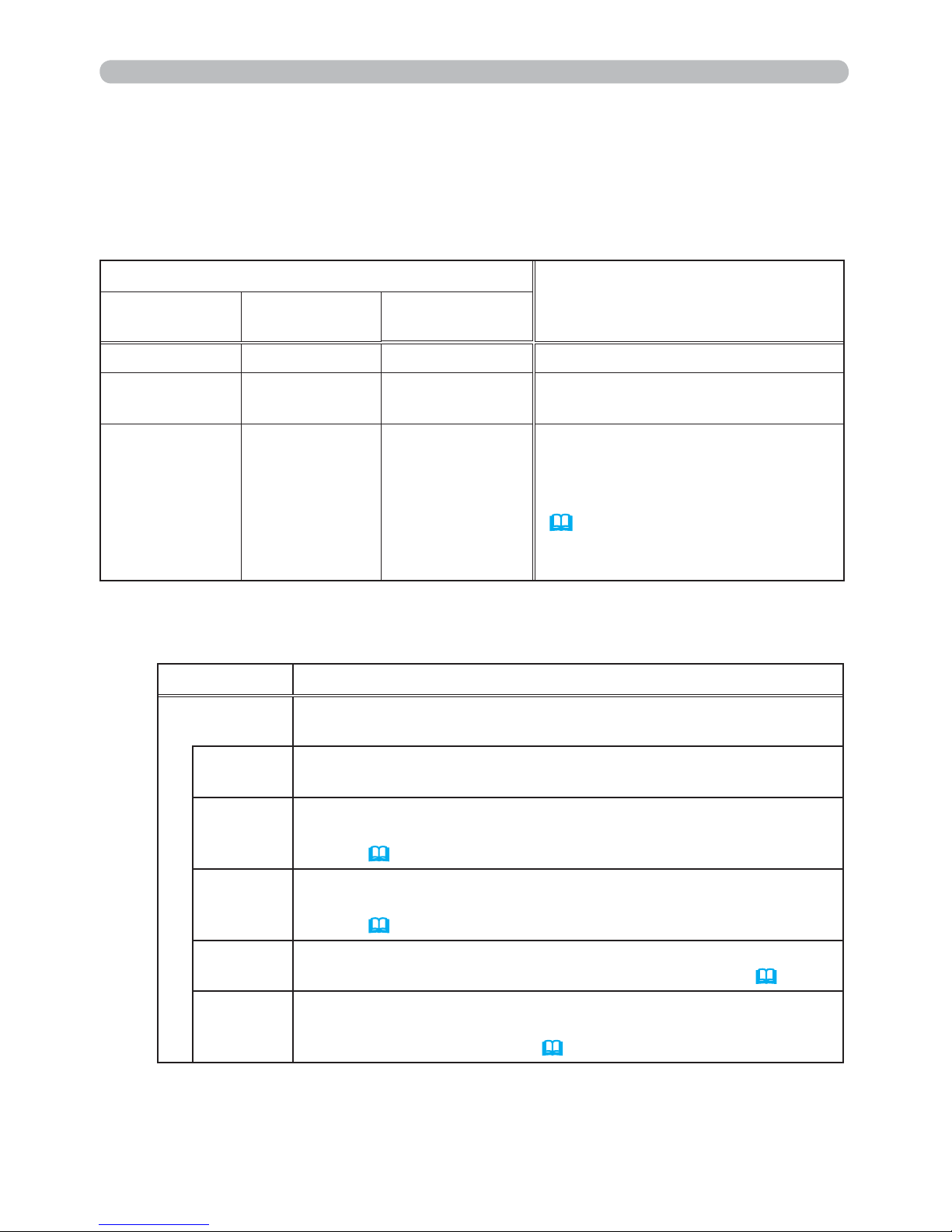
82
Presentation tools
PC-LESS Presentation (continued)
The SETUP menu for the selected image
Item Functions
SETUP
Use the ◄/► cursor buttons to switch each setting or use the ►
cursor button to execute the functions as follows.
RETURN
Press the ► cursor button or ENTER to return to the Thumbnail
screen.
START
Switch to ON to set the selected image as the rst image in the
Slideshow. This setting information will be saved in the “playlist.
txt” le (
88).
STOP
Switch to ON to set the selected image as the last image in the
Slideshow. This setting information will be saved in the “playlist.
txt” le (
88).
SKIP
Switch to ON to skip the selected image in the Slideshow. This
setting information will be saved in the “playlist.txt” le (
88).
ROTATE
Press the ► cursor or ENTER button to rotate the selected still
image 90 degrees clockwise. This setting information will be
saved in the “playlist.txt” le (
88).
You can control the images on the Thumbnail screen with the remote control,
control panel or Web Remote Control. The following functions can be supported
while the Thumbnail is displayed.
Operating by buttons or keys
Button operation
Functions
The remote
control
Control panel
Web Remote
Control
▲/▼/◄/►▲/▼/◄/► [▲]/[▼]/[◄]/[►] Moves cursor.
PAGE UP
PAGE DOWN
-
[PAGE UP]
[PAGE DOWN]
Switches pages.
ENTER INPUT [ENTER]
• Displays the selected image
on the Full Screen mode when a
cursor is on a thumbnail image.
• Displays the SETUP menu
(
below) for the selected image
when a cursor is on a thumbnail
image number.
Page 92
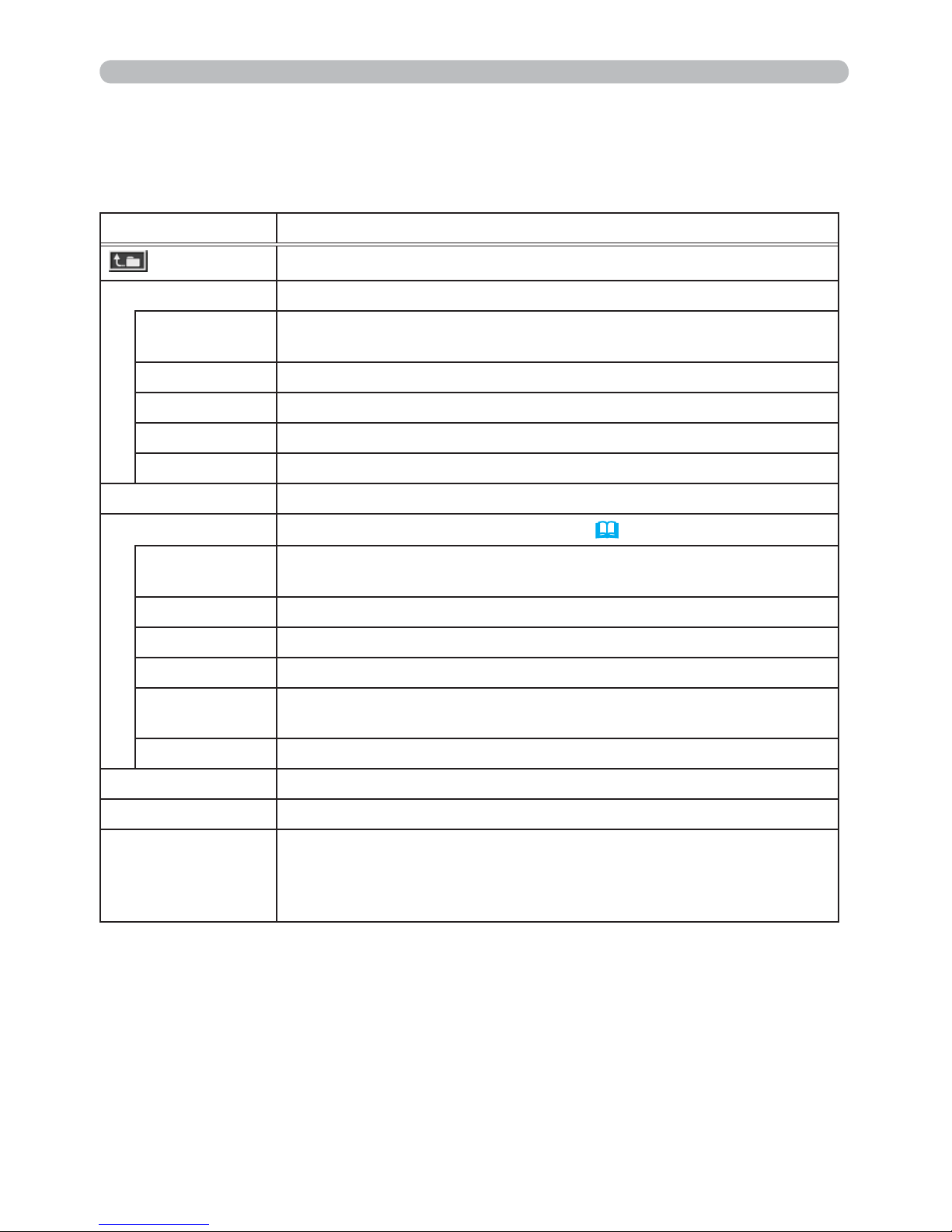
83
Presentation tools
You can also control the images by using the menu on the Thumbnail screen.
PC-LESS Presentation (continued)
Operating by the menu on the Thumbnail screen
Item Functions
Moves to an upper folder.
SORT Allows you to sort les and folders as following.
RETURN
Press the ► cursor button or ENTER to return to the Thumbnail
screen.
NAME UP Sorts in ascending order by le name.
NAME DOWN Sorts in descending order by le name.
DATE UP Sorts in ascending order by le date.
DATE DOWN Sorts in descending order.by le date.
▲/▼ Go to previous / next page.
SLIDESHOW Congures and starts the Slideshow (
86).
RETURN
Press the ► cursor button or ENTER to return to the Thumbnail
screen.
PLAY Press the ► cursor button or ENTER to start the Slideshow.
START Sets the beginning number of the Slideshow.
STOP Sets the end number of the Slideshow.
INTERVAL
Sets the interval time
of displaying still images during the
Slideshow.
PLAY MODE Selects the Slideshow mode.
INPUT Switches the input port.
MENU Displays the menu.
REMOVE USB
Be sure to use this function before removing USB storage device
from the projector. After that, the projector will not recognize a
USB storage device until you insert it again into the USB TYPE A
input port.
Page 93
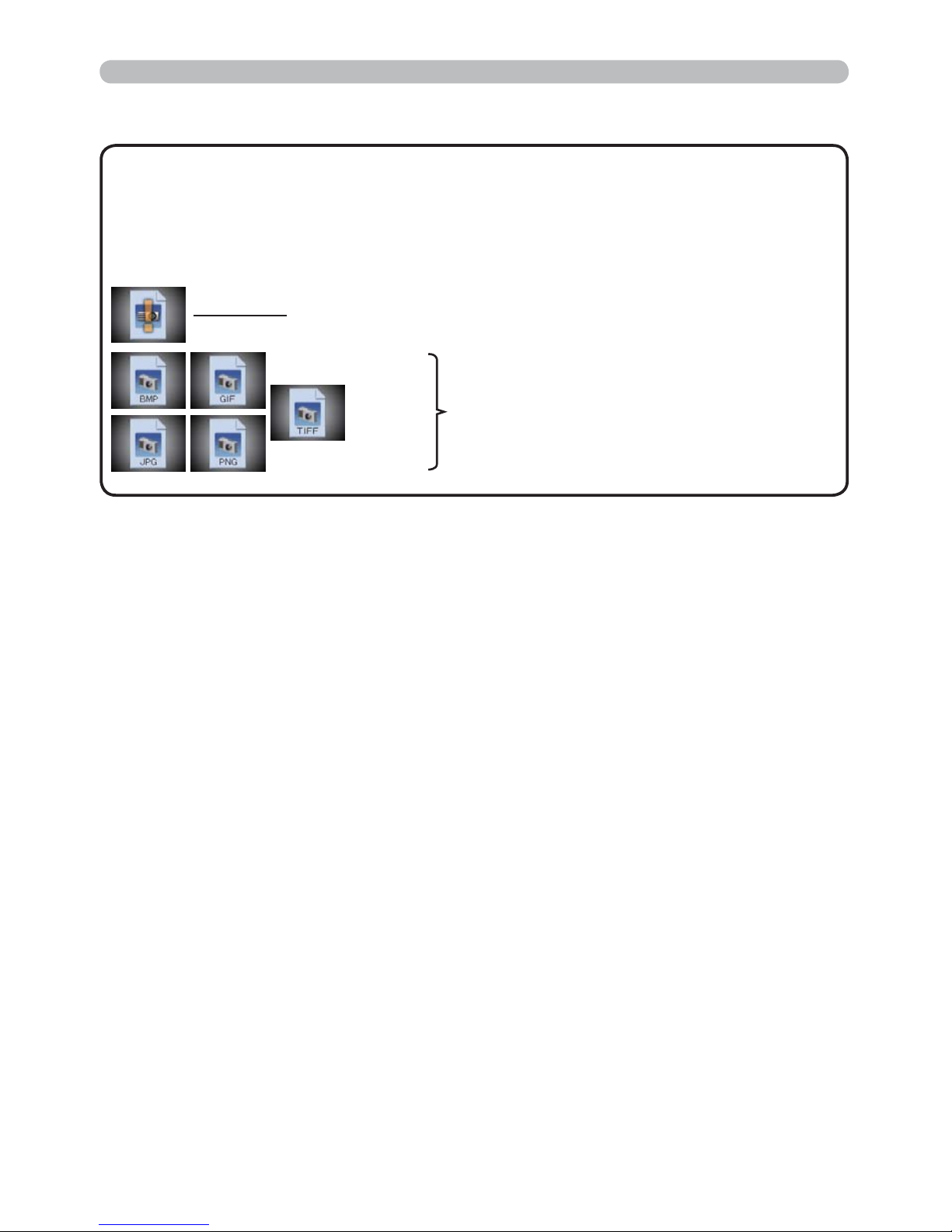
84
Presentation tools
PC-LESS Presentation (continued)
•
These operations are not accessible while the projector OSD is displayed.
• The Thumbnail mode is able to display up to 20 les in one page.
• It is not possible to change the input port by using the INPUT button when the
Thumbnail screen, Slideshow, or Full Screen is displayed.
• Some error icons will be displayed in the Thumbnail.
NOTE
This le seems to be broken or not supported format.
A le that cannot be displayed on the
thumbnail screen is indicated by a le
format icon.
Page 94
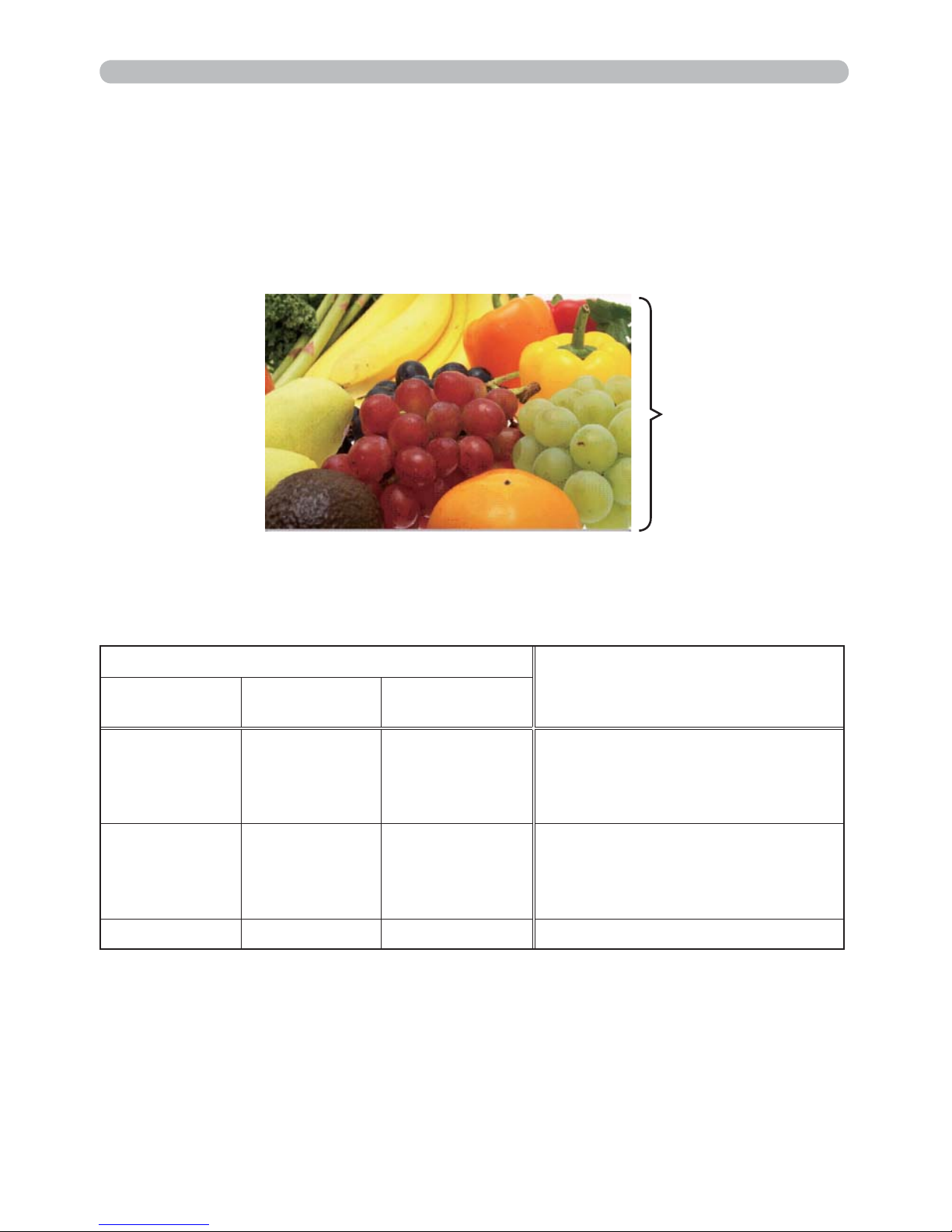
85
Presentation tools
PC-LESS Presentation (continued)
The Full Screen mode shows a full display image. To display in Full Screen mode,
select an image in the Thumbnail screen. Then press the ENTER button on the
remote control, the INPUT button on the control panel or click [ENTER] on the
Web Remote Control.
Full Screen Mode
Button operation
Functions
The remote
control
Control panel
Web Remote
Control
▼
►
or
PAGE DOWN
▼
or
►
[▼]
[►]
or
[PAGE DOWN]
Shows the next le.
▲
◄
or
PAGE UP
▲
or
◄
[▲]
[◄]
or
[PAGE UP]
Shows the previous le.
ENTER INPUT [ENTER] Displays Thumbnail.
The following operations are enabled in the Full Screen mode while a still image
is displayed.
Full screen display
Operations for still images
Page 95
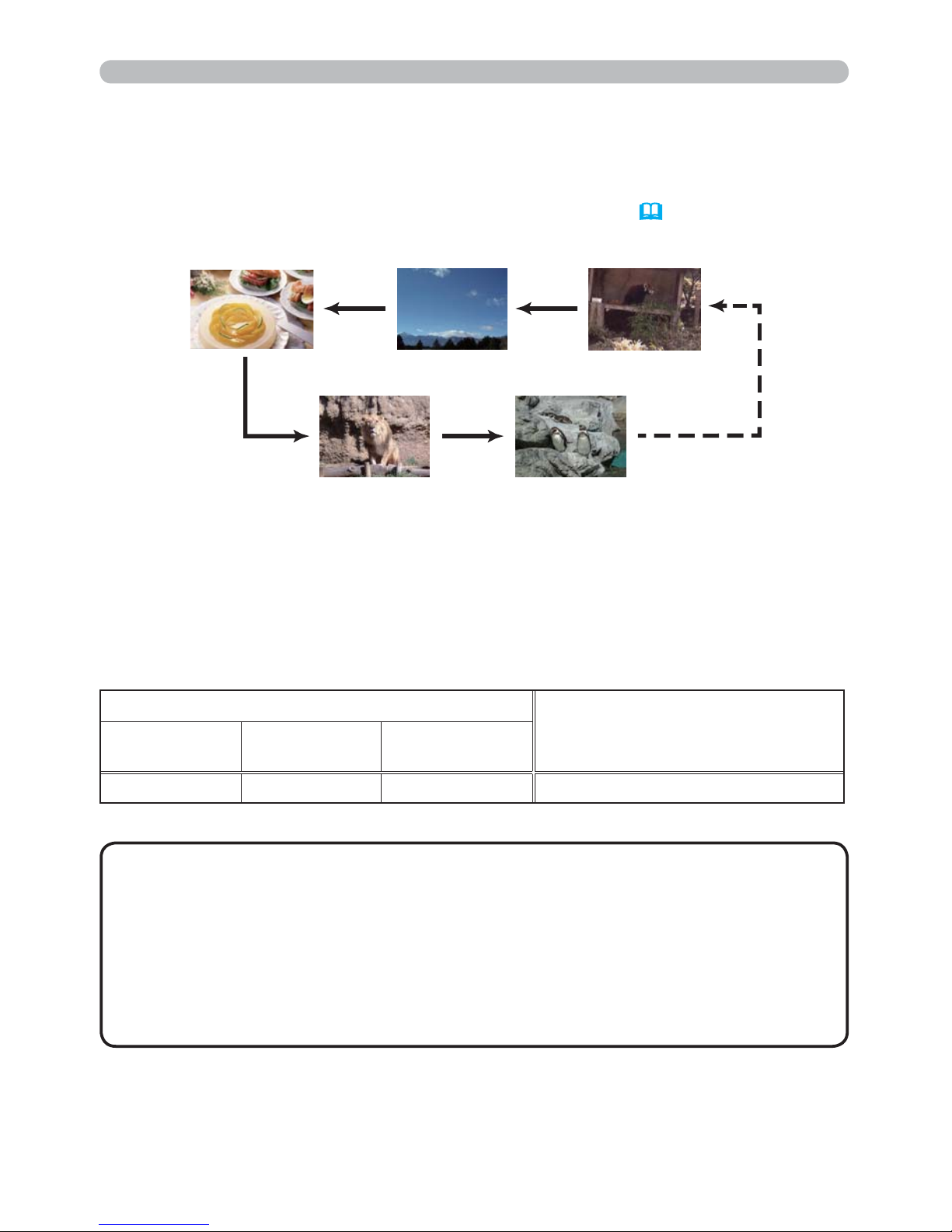
86
Presentation tools
PC-LESS Presentation (continued)
Slideshow Mode
While the Slideshow is displayed, the following button operations are enabled
when still images are displayed, and the same button operations in the Full
Screen mode are enabled when movies are displayed.
• These operations are not accessible while the projector OSD is
displayed.
• It is not possible to change the input port by using the INPUT button when the
Thumbnail screen, Slideshow, or Full Screen is displayed.
•
When the Slideshow mode is set to ONE TIME and the last le is a still image,
the last slide of the presentation will remain displayed until the ENTER button
on the remote control or Web Remote Control, or the INPUT button on the
control panel is pressed.
NOTE
You can start this function from the Slideshow menu. To display the Slideshow
menu, select the SLIDESHOW button in the Thumbnail mode and press the
ENTER button on the remote control, INPUT button on the control panel, or click
[ENTER] on the Web Remote Control.
Button operation
Functions
The remote
control
Control panel
Web Remote
Control
ENTER INPUT [ENTER] Displays thumbnail.
The Slideshow mode displays images in full screen and switches the images at
intervals set in INTERVAL on the Thumbnail screen menu (
83).
Page 96
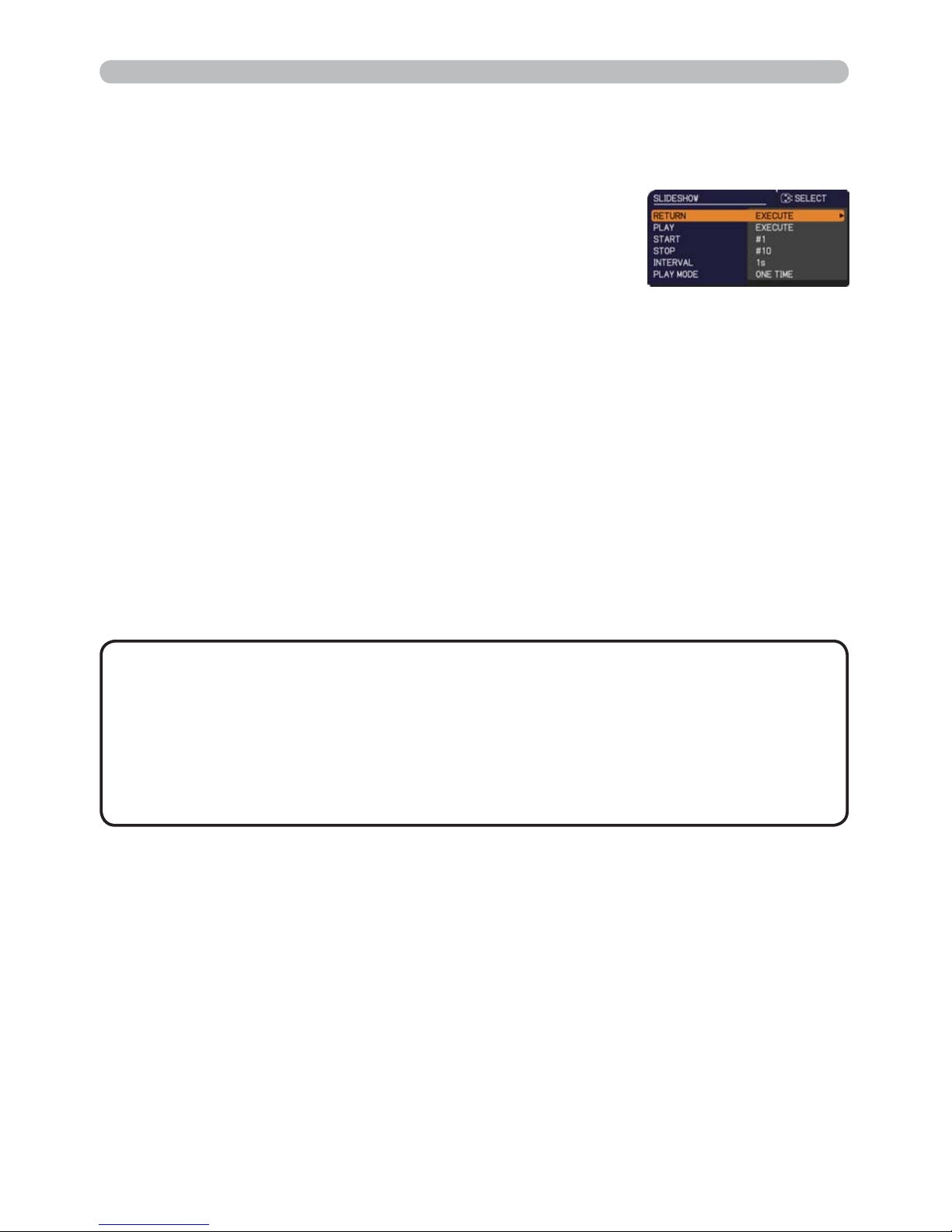
87
Presentation tools
PC-LESS Presentation (continued)
You can play the Slideshow at your desired conguration.
Congure the Slideshow items in the Thumbnail.
1) RETURN :
Returns to the thumbnail mode.
2) PLAY : Play the Slideshow.
3) START :
Set the beginning number of the
Slideshow.
4) STOP : Set the end number of the Slideshow.
5) INTERVAL : Sets the interval time for displaying still
images during the Slideshow.
It is not recommend to set the interval
time very short something like several
seconds, because it may take more than
several seconds to read and display an
image le if it is stored in very deep layer
directory or if so many les are stored in
the same directory.
6) PLAY MODE : Select the Slideshow mode.
ONE TIME : Play the Slideshow one
time.
ENDLESS : Play the Slideshow endless.
• The settings of the Slideshow are saved to the ³SOD\OLVWW[W´ le
that is stored in the storage media. If the le is not existed, it is generated
automatically.
• The settings for the START, STOP, INTERVAL, and PLAY MODE are saved to
the Playlist.
• If the storage media is under the write protection or the ³SOD\OLVWW[W´ is the
read only type le, it is impossible to change the settings of the Slideshow.
NOTE
Page 97

88
Presentation tools
PC-LESS Presentation (continued)
Playlist
The Playlist is a DOS format text le, which decides the order of displayed still
image les in the Thumbnail or Slideshow.
The playlist le name is “playlist.txt” and it can be edited on a computer.
It is created in the folder that contains the selected image les when the PC-LESS
Presentation is started or the Slideshow is congured.
[Example of “playlist.txt”¿OHV@
START setting : STOP setting : INTERVAL setting : PLAY MODE setting :
img001.jpg: : : :
img002.jpg:600: : :
img003.jpg:700:rot1: :
img004.jpg: : :SKIP:
img005.jpg:1000:rot2:SKIP:
The “playlist.txt” le contains the following information.
Each piece of information requires to be separated by “:”, and “:” at the end of each line.
1st line: START, STOP, INTERVAL and PLAY MODE settings (87).
2nd line and after: le name, interval time, rotation setting and skip setting.
interval time:
It can be set from 0 to 999900 (ms) with an increment of 100 (ms).
rotation setting
: “rot1” means a rotation at 90 degrees clockwise; “rot2” and
“rot3” increase another 90 degrees in order.
skip setting: “SKIP” means that the image will not be displayed in the
Slideshow.
•
The maximum length in a line on the "playlist.txt" le is 255 characters
including linefeed. If any line exceeds the limit, the "playlist.txt" le becomes invalid.
•
Up to 999 les can be registered to the Playlist. However, if some folders exist in
the same directory the limit number is decreased by the number of folders.
Any les over the limit will not be shown in the Slideshow.
•
If the storage device is protected or does not have sufcient space, the “playlist.txt”
le cannot be created.
• For the Slideshow settings, refer to the section Slideshow Mode (86).
NOTE
Page 98

89
Presentation tools
USB Display
The projector can display images transferred from a computer via an USB cable (11).
Select the USB DISPLAY for the USB TYPE B item in the OPTION menu.
When you connect your computer to the USB TYPE B port on the projector
using a USB cable, the projector will be recognized as a CD-ROM drive on your
computer. Then, the software in the projector, “LiveViewerLiteUSB.exe”, will run
automatically and the application, “LiveViewer Lite for USB”, will be ready on your
computer for the USB Display. The application, “LiveViewer Lite for USB”, will be
automatically closed when the USB cable is unplugged.
• If the software does not start automatically (this is typically because
CD-ROM autorun is disabled on your OS), follow the instructions below.
(1) Click on the [Start] button on the toolbar and select the “Run”
(2) Enter F:\LiveViewerLiteUSB.exe and then press the [OK]
• CD-ROM autorun is disabled while the screen saver is running.
• The image transmission from the computer is suspended while the passwordprotected screen saver is running. To resume the transmission, exit the screen
saver.
• Check our web site for the latest version of the software and its manual.
(
User's Manual (concise))
Follow the instructions that can be obtained at the site for updating.
NOTE
If your CD-ROM drive is not drive F on your computer, you will
need to replace F with the correct drive letter assigned to your
CD-ROM drive.
Hardware and software requirement for computer
• OS: One of the following. (32 bit version only)
Windows ® XP Home Edition /Professional Edition
Windows Vista
®
Home Basic /Home Premium /Business /Ultimate /Enterprise
Windows
®
7 Starter /Home Basic /Home Premium /Professional / Ultimate /
Enterprise
• CPU: Pentium 4 (2.8 GHz or higher)
• Graphic card: 16 bit, XGA or higher
• Memory: 512 MB or higher
• Hard disk space: 30 MB or higher
• USB Port
• USB cable : 1 piece
Starting USB Display
(continued on next page)
Page 99
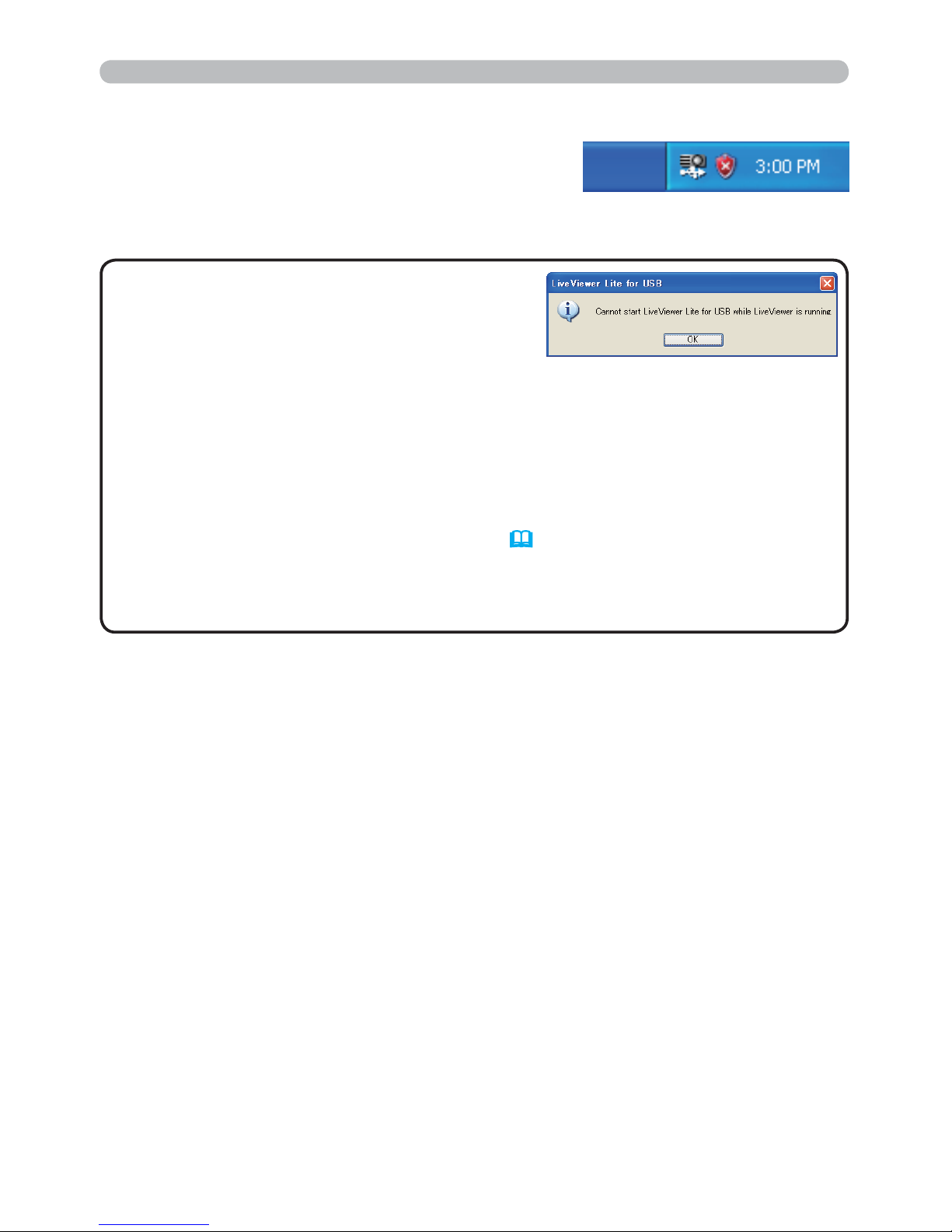
90
Presentation tools
This application will appear in the Windows
notication area once it starts. You can quit the
application from your computer by selecting “Quit” on
the menu.
• The “LiveViewer” (refer to the
Network Guide) and this application cannot
be used at the same time. If you connect your
computer to the projector by using a USB cable
while the “LiveViewer” is running, the following message will be displayed.
• Depending on the software installed on your computer, images on your
computer cannot be transferred using “LiveViewer Lite for USB”.
• If any application software having the rewall function is installed into your
computer, make the rwall function invalid with following the user's manual.
• Some security software may block image transmission. Please change the
security software setting to allow the use of "LiveViewer Lite for USB".
• When the audio input from USB TYPE B (46) is selected, if the sound level
is still low even after raising the volume level in the projector to the maximum,
check whether your computer outputs audio and raise the volume level
accordingly.
NOTE
USB Display (continued)
Page 100
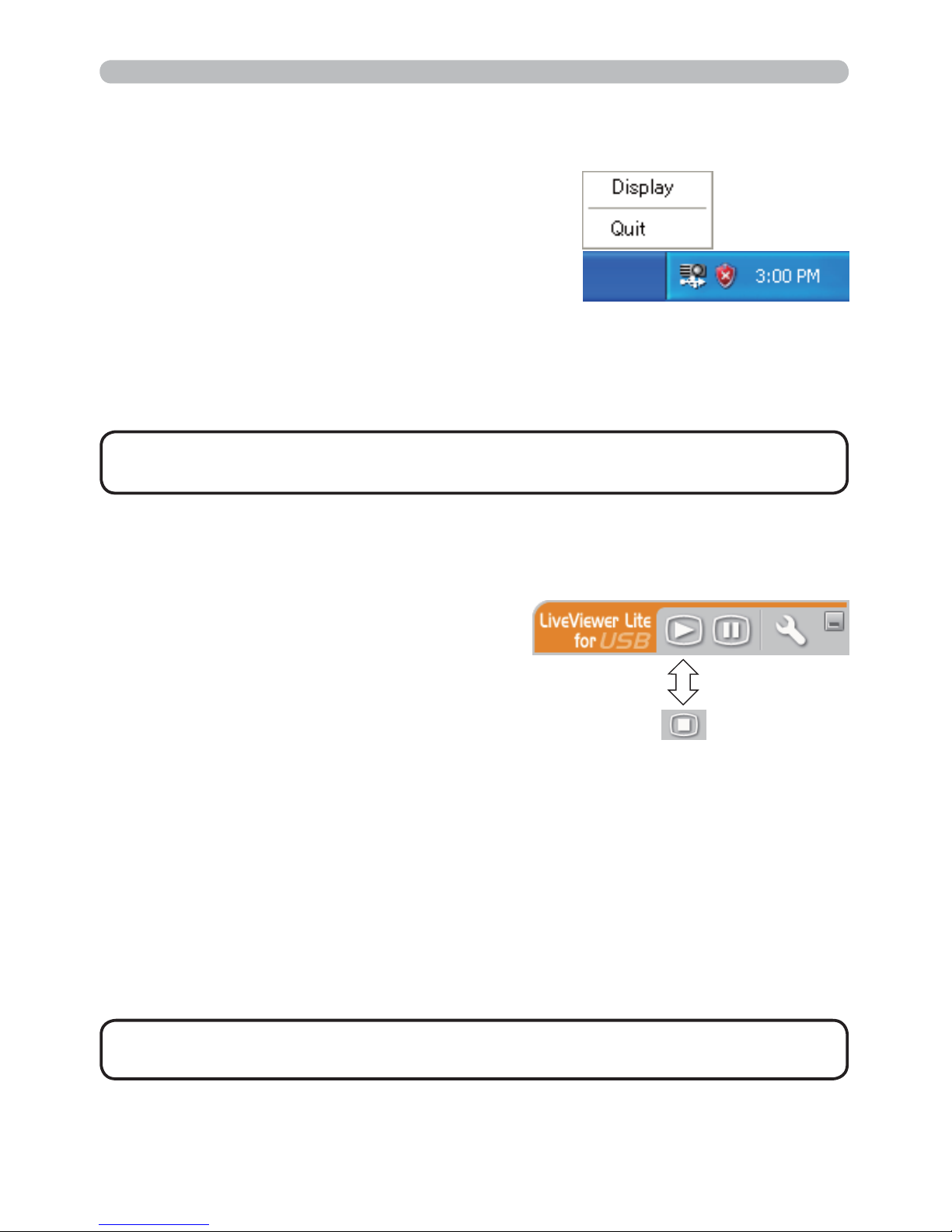
91
Presentation tools
Display : The Floating menu is displayed, and the icon disappears from the
Windows notication area.
Quit : The application is closed, and the icon disappears from the Windows
notication area.
The menu shown in the right will be displayed
when you right-click the application icon in the
Windows notication area.
USB Display (continued)
Right-Click menu
• If you wish to restart the application, you need to unplug the USB
cable and plug it again.
NOTE
If you select “Display” on the Right-Click
menu, the Floating menu shown in the right
will appear on your computer screen.
. Start capture button
The transmission to the projector is started
and the images will be displayed.
3 Stop button
The image transmission is stopped.
$ Hold button
The image on the projector’s screen is temporally frozen. The last image before
the button is clicked is remained on the screen. You can revise the image data
on your computer without showing it on the projector's screen.
/ Option button
The Options window is displayed.
1 Minimize button
The Floating menu is c
losed, and the icon reappears in the Windows notication
area.
Floating menu
• If you click the Start capture button and/or Stop button repeatedly,
images may not be displayed on the screen.
NOTE
.
3
$ /1
 Loading...