

Page 1
PiXA
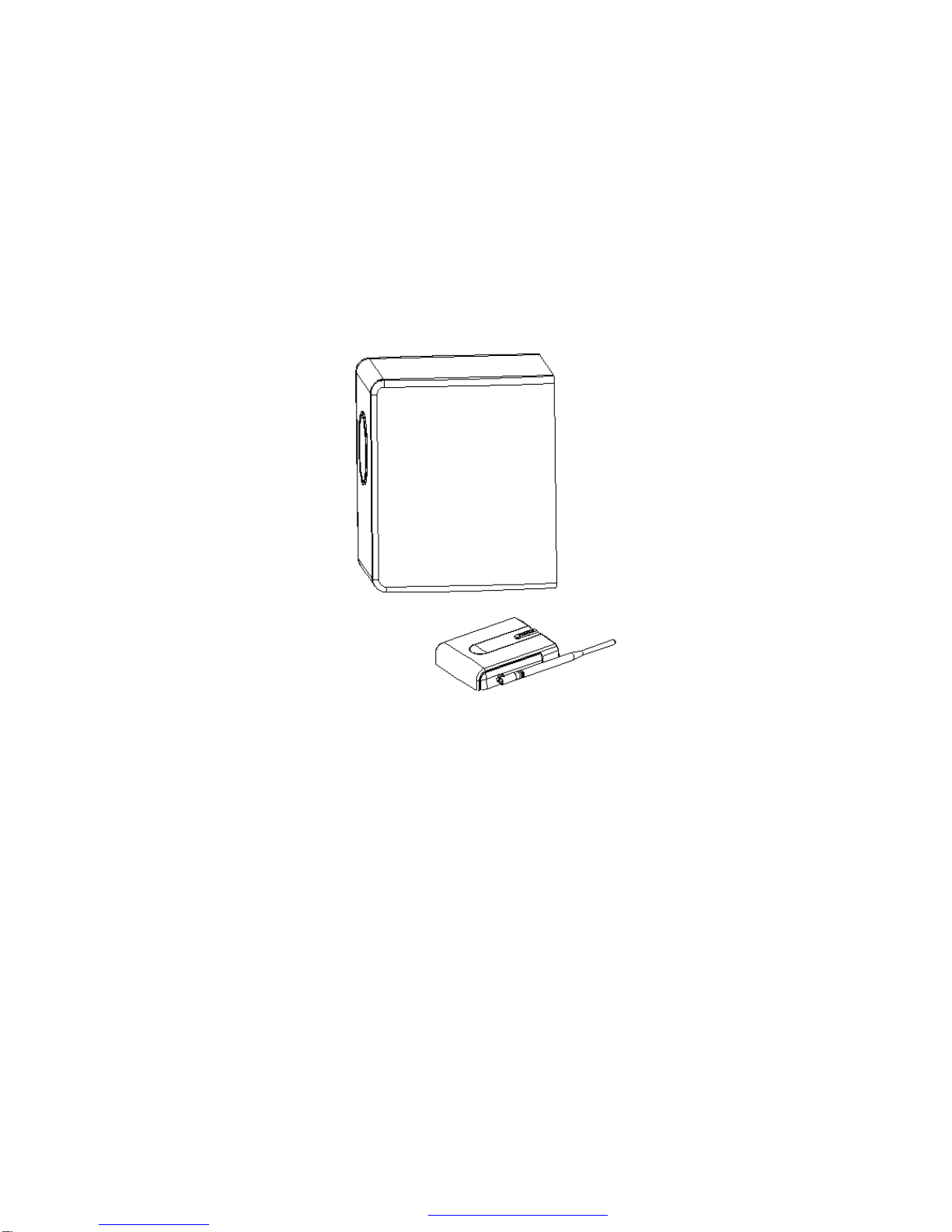
WSP-510 2.4G Wireless Subwoofer
Operating Instruction
PDF 檔案以 "FinePrint pdfFactory Pro" 試用版建立 http://www.fineprint.com
Page 2

PDF 檔案以 "FinePrint pdfFactory Pro" 試用版建立 轜http://www.fineprint.com
2
Page 3

Warnings
Federal Communication Commission Interference Statement
This equipment has been tested and found to comply with the limits for a Class B
digital device, pursuant to Part 15 of the FCC Rules. These limits are designed to
provide reasonable protection against harmful interference in a residential
installation.
This equipment generates, uses and can radiate radio frequency energy and, if
not installed and used in accordance with the instructions, may cause harmful
interference to radio communications. However, there is no guarantee that
interference will not occur in a particular installation. If this equipment does cause
harmful interference to radio or television reception, which can be determined by
turning the equipment off and on, the user is encouraged to try to correct the
interference by one of the following measures:
l Reorient or relocate the receiving antenna.
l Increase the separation between the equipment and receiver.
l Connect the equipment into an outlet on a circuit different from that to which
the receiver is connected.
l Consult the dealer or an experienced radio/TV technician for help.
FCC Caution: To assure continued compliance, any changes or modifications not
expressly approved by the party responsible for compliance could void the user's
authority to operate this equipment. (Example - use only shielded interface cables
when connecting to computer or peripheral devices).
FCC Radiation Exposure Statement
This equipment complies with FCC RF radiation exposure limits set forth for an
uncontrolled environment. This equipment should be installed and operated with a
minimum distance of 20 centimeters between the radiator and your body.
This device complies with Part 15 of the FCC Rules. Operation is subject to the
following two conditions: (1) This device may not cause harmful interference, and
(2) This device must accept any interference received, including interference that
may cause undesired operation.
PDF 檔案以 "FinePrint pdfFactory Pro" 試用版建立 http://www.fineprint.com
3
Page 4

Caution
l Any changes or modifications not expressly approved by the party
responsible for compliance could void the user’s authority to operate this
equipment.
l To prevent fire or shock, hazard, do not expose the unit to rain or moisture.
l To prevent the risk of electric shock, do not open the cabinet or remove cover
or amplifier. No user serviceable parts inside. Refer servicing to qualified
service personnel.
Servicing
If you have any question about this product, please email [email protected],
or visit PiXA's website at www.pixainc.com. Before requesting service, check
the troubleshooting section.
Wireless Note
**Warning: Wireless Limitation and Power Consumption
This subwoofer operates at 2.4G radio wave frequencies, and the unit is intended for use
within the same room as the signal source. Obstacles such as walls reduce the
effectiveness of the radio frequency wireless transmission. Refer to troubleshooting
section to minimize interference. Despite advanced engineering and technology
employed for minimal interference, the following sources are known to interfere with
wireless transmission:
l 2.4G coreless phones when operating within 10 feet
l Microwaves when operating within 6 feet
l 2.4G Wiireless LAN network access-point when operating within 3 feet
Please keep adequate distance from interference sources to insure normal
operation. Subwoofer automatically mutes when strong interference is detected.
PDF 檔案以 "FinePrint pdfFactory Pro" 試用版建立 http://www.fineprint.com
4
Page 5

Radio Wave Safety
Do not use the system in proximity of electronic equipment that requires high
accuracy control or handling of very low-level signals. The system may affect
the electronic equipment, causing malfunction or accident. Example of such
electronic equipment:
Hearing aid, cardiac pacemaker, other electrical medical equipment, fire
alarm, automatic door, and other automated control devices.
If you use a pacemaker or other electrical medical equipment, consult the
manufacturer or dealer to check the effects of radio waves on it.
PDF 檔案以 "FinePrint pdfFactory Pro" 試用版建立 http://www.fineprint.com
5
Page 6

Content
Warnings.............................................................................................................................3
Introduction.........................................................................................................................7
Installation...........................................................................................................................8
Functions and Controls.....................................................................................................10
Care Taking........................................................................................................................11
Troubleshooting................................................................................................................13
Specification.....................................................................................................................15
PDF 檔案以 "FinePrint pdfFactory Pro" 試用版建立 http://www.fineprint.com
6
Page 7

Introduction
Thank you for purchasing the PiXA WSP-510 Wireless Subwoofer. Before
operating the unit, please read the manual thoroughly and retain it for future
reference.
This subwoofer provides solid bass sound that adds impact and richness to any
movie, gaming and music experience. The subwoofer well compliments flat panel
TVs or any home theaters. Some features are:
l 2.4G pure digital wireless technology
l Simple installation that allows you to place the subwoofer anywhere in the
room without cords
l Solid bass that enriches the sound experience
l Auto wireless channel hopping for clear reception and tolerance from
interference
What's in the Box
Check that you have the following items:
l The Subwoofer unit
l The Transmitter unit with Antenna
l AC Power Adaptor for transmitter
l AC Power Cord for subwoofer
PDF 檔案以 "FinePrint pdfFactory Pro" 試用版建立 http://www.fineprint.com
7
Page 8
Installation
Caution: when connecting, make sure that all components are switched off and
unplugged. Turn down the volume before connecting audio signals.
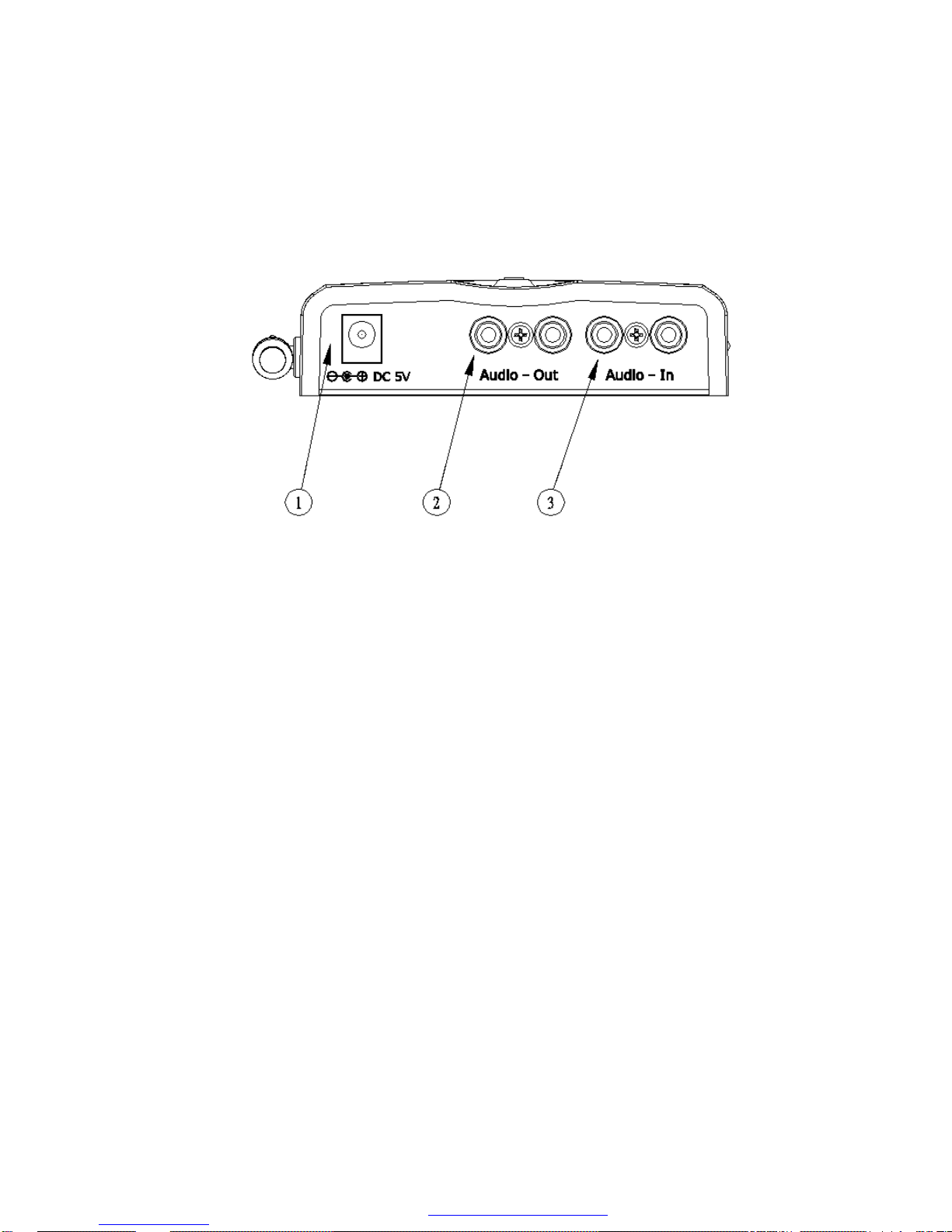
AUDIO-IN
Connect any audio source with a RCA stereo cord (not included) to the AUDIO-IN
jacks l on the transmitter unit. If connecting from a mono signal such as a
PREOUT or LFE of a pre-amp or receiver, connect to the red jack on the
AUDIO-IN jacks. The audio source may be a TV, Set-Top-Box, DVD Player,
Cable Box, or the PREOUT of an integrated receiver.
AUDIO-OUT
To bypass and re-transmit the audio signal from the transmitter unit to another
audio player, including TV, connect with a RCA stereo cord (not include) to the
AUDIO-OUT jacks k on the transmitter unit. Example includes connection to
audio input of a TV.
AC Adaptor
Plug the AC adaptor cable into a power outlet.
DC inlet
Connect the AC adapter to the DC 5V inlet j on the transmitter.
PDF 檔案以 "FinePrint pdfFactory Pro" 試用版建立 http://www.fineprint.com
8
Page 9
Subwoofer AC Power
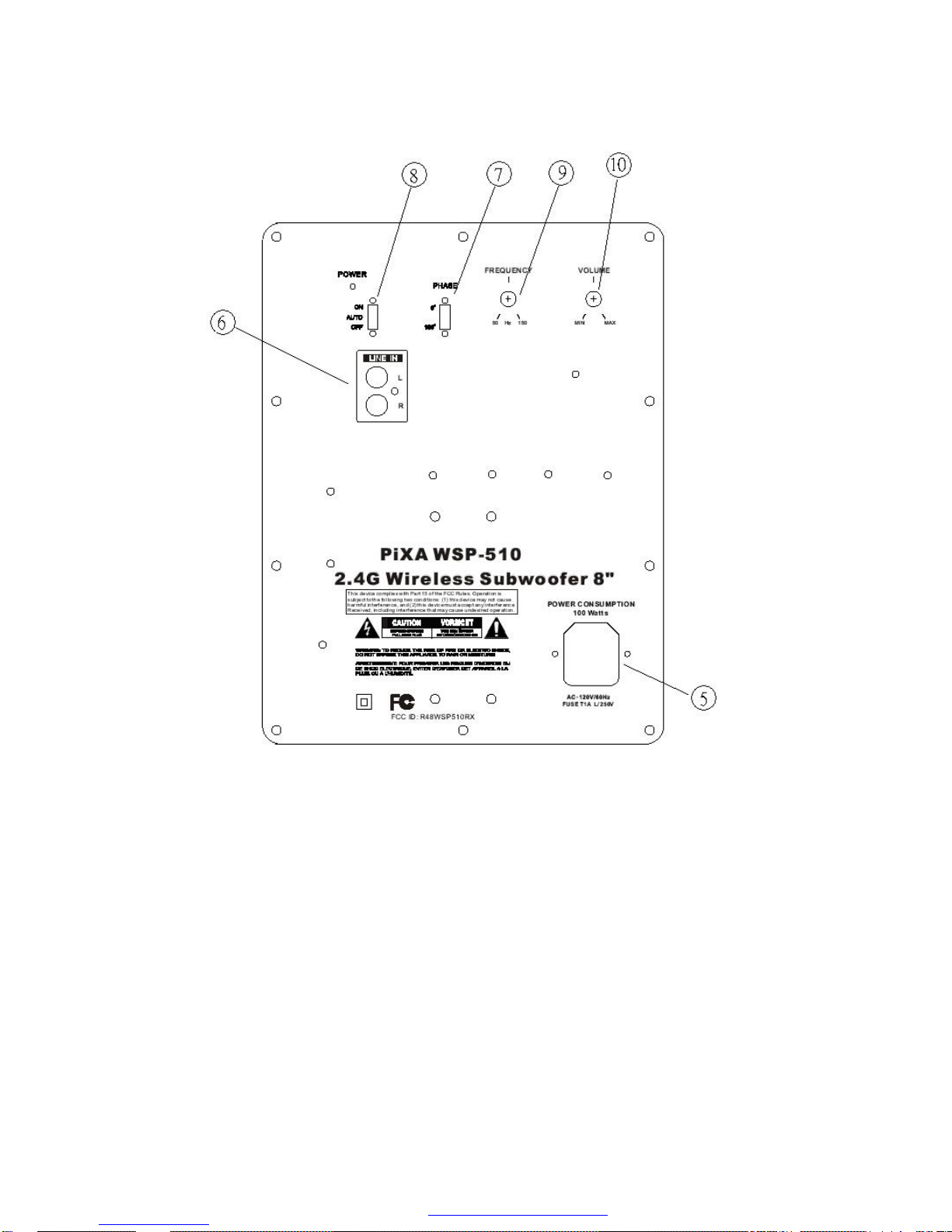
Connect the Subwoofer AC power cord from the subwoofer n to a power outlet.
Leave the Power Switch q in the default AUTO position.
Placing the Subwoofer
Since low frequency sound is non-directional, the subwoofer unit could be placed
anywhere in the room. Typical location is next to a TV or next to seating area.
Backup Signal Input
To connect the subwoofer without using the wireless option, connect audio source
to the LINE-IN jack o using a stereo RCA cord (not included). The subwoofer
PDF 檔案以 "FinePrint pdfFactory Pro" 試用版建立 http://www.fineprint.com
9
Page 10

automatically plays signal from wireless transmitter in priority.
Adjust volume and control
Always turn the VOLUME r to lowest level before powering up the subwoofer.
Gently turn up the volume to desired level of sound output. Adjust PHASE p and
crossover FREQUENCY s to match other speakers in the speaker system.
Listening to a program
1. First turn on the audio/video equipment and start playing.
2. The subwoofer automatically detects and switches on.
3. Turn up the volume to a moderate level with the Volume r control.
Functions and Controls
Volume
Always tune volume to lowest level then adjust upward. Adjust VOLUME r to
match output of other speakers in the speaker system. A good listening level is a
comforting sound that balances with output from the main speakers.
Phase
PHASE p adjusts the phase of the sound wave, as if switching the positive and
negative connections of the signal. Because subwoofer occupies a very different
frequency range, leave the phase at the default 0 degree is typically adequate.
Crossover
FREQUENCY s adjusts the upper roll-off crossover frequency. Adjust to match
the lower roll-off frequency of the main speakers. E.g. if main speaker's
frequency response is 100Hz to 20kHz, then adjust the FREQUENCY s to
100Hz.
PDF 檔案以 "FinePrint pdfFactory Pro" 試用版建立 http://www.fineprint.com
10
Page 11

Care Taking
Wireless Reception
This product is limited to home use. Transmission distance may be reduced
depending on environments. In the following locations, radio signal may be
interrupted.
l In reinforced concrete buildings or homes made of metallic beams.
l In a location exposed to the magnetic field, static electricity or equipment
that uses the same frequency band (2.4GHz), such as Bluetooth device,
radio Wireless LAN device, cordless phones, or microwave oven.
If you live in a high-density residential area, your neighbor's microwave may
interfere with the signal quality.
Location of Subwoofer
Because human ear cannot tell the direction of low frequency sound, the
subwoofer could be placed anywhere in the room for listening. Due to the
heaviness of the subwoofer, always place the subwoofer on the ground.
AC Handling
l This product is not waterproof. To prevent fire or shock hazard, do not expose
this apparatus to rain or moisture and do not put any water source near this
product, such as vases, flower pots, etc.
l The POWER switch does not completely separates the unit from the AC
power. The AC plug of the unit should be unplugged from the wall socket
when left unused for a long period of time.
l Do not leave the power cord near heating equipment. The coating of the
cord may melt, which could lead to fire and/or electrocution.
l Do not attempt to plug in or remove the AC power cord or adaptor with wet
hands. This may result in electrocution.
l Insert the prongs of the AC power cord or adaptor all the way into the power
PDF 檔案以 "FinePrint pdfFactory Pro" 試用版建立 http://www.fineprint.com
11
Page 12

outlet. If the connection is incomplete, heat may generate which could lead
to fire.
l Do not insert the AC adaptor or power cord into a power outlet where
connections are loose. Heat may be generated which could lead to fire.
Cleaning
Clean the cabinet of the speaker system with a soft cloth slightly moistened with
water. Do not use any type of abrasive pad or solvent as it may mar the finish of
the cabinet.
PDF 檔案以 "FinePrint pdfFactory Pro" 試用版建立 http://www.fineprint.com
12
Page 13

Troubleshooting
IN
Before requesting service, make the below checks. If you have any question
about this product, please email [email protected], or visit PiXA's website at
www.pixainc.com.
Problem Probable Causes Remedy
No Sound Is signal source connected to the
transmitter?
Is transmitter power and
subwoofer power plugged?
Connect signal source to the AUDIOjack on the transmitter.
Connect the AC adaptor to the
transmitter, and the AC power cord to
the subwoofer.
Is the volume too low? Turn up the volume on the subwoofer.
Are transmitter and subwoofer
from the same box?
The transmitter and subwoofer are
designed and sold as a pair, and they
identify each other in communication.
Communication may not be available
between separately purchased
transmitter and receiver.
PDF 檔案以 "FinePrint pdfFactory Pro" 試用版建立 http://www.fineprint.com
13
Page 14

Audio Interruption
or Dropout
Distance too large Maximum operating range of the
wireless subwoofer is 30 to 100 feet
depending on the environment. Use
within proper range.
Interference There may be radio communication
equipment using the same frequency
band (2.4 GHz) such as Bluetooth
device, WiFi LAN, cordless phone, or
microwave oven. Make sure
transmitter and subwoofer units are
more than 3 feet away from these
interference sources.
Audio Distortion Signal source input level is too
Turn down volume of the signal source.
strong
Signal source Input level too low Turn up the volume of the input source.
Obstruction Obstruction such as metal structure,
object or human walking through the
path of transmission may cause noise or
reduce operating range. Remove
obstruction from transmission path.
PDF 檔案以 "FinePrint pdfFactory Pro" 試用版建立 http://www.fineprint.com
14
Page 15

Specification
Audio Specification:
Sensitivity: 99 dBA
Frequency Response: 50Hz - 150Hz
8" Semi-Pressed Paper Cone Driver
Single button on/off control
50 Watt RMS @ 1% THD
Wireless Specification:
Operating Frequency: ISM band 2.4-2.4835 GHz
Auto scan for clear channel
Transmit range: 30 to 100 feet
Signal Input:
Audio Stereo In
Audio Stereo Out (by pass)
Aux. Line-In
Net Weight: 10.5kg (22lb)*
Dimensions: 400mm x 410mm x 390mm (Package)*
*Note: Specifications are subject to change without notice. Mass and dimensions are
approximate.
PDF 檔案以 "FinePrint pdfFactory Pro" 試用版建立 http://www.fineprint.com
15
Page 16

Pixa Inc.
Orange, CA
www.pixainc.com
PDF 檔案以 "FinePrint pdfFactory Pro" 試用版建立 http://www.fineprint.com
16
 Loading...