

Page 1
W elcome Guide
Bluetooth Headset
User Manual
EN DE RU ES FR IT
Thank you for purchasing the PISEN LE105 Bluetooth headset.
Wir bedanken uns für Uhren Kauf desPISEN LE105 Bluetooth drahtlosen Kopfhörers.
Благодарим вас за покупку беспроводных наушников PISEN LE105 с функцией Bluetooth.
Gracias por elegir los auriculares inalámbricos con Bluetooth de PISEN LE105.
Merci d'avoir acheté l’écouteur sans fil Bluetooth PISEN LE105.
Grazie per aver acquistato le cuffie wireless Bluetooth PISEN LE105.
Page 2
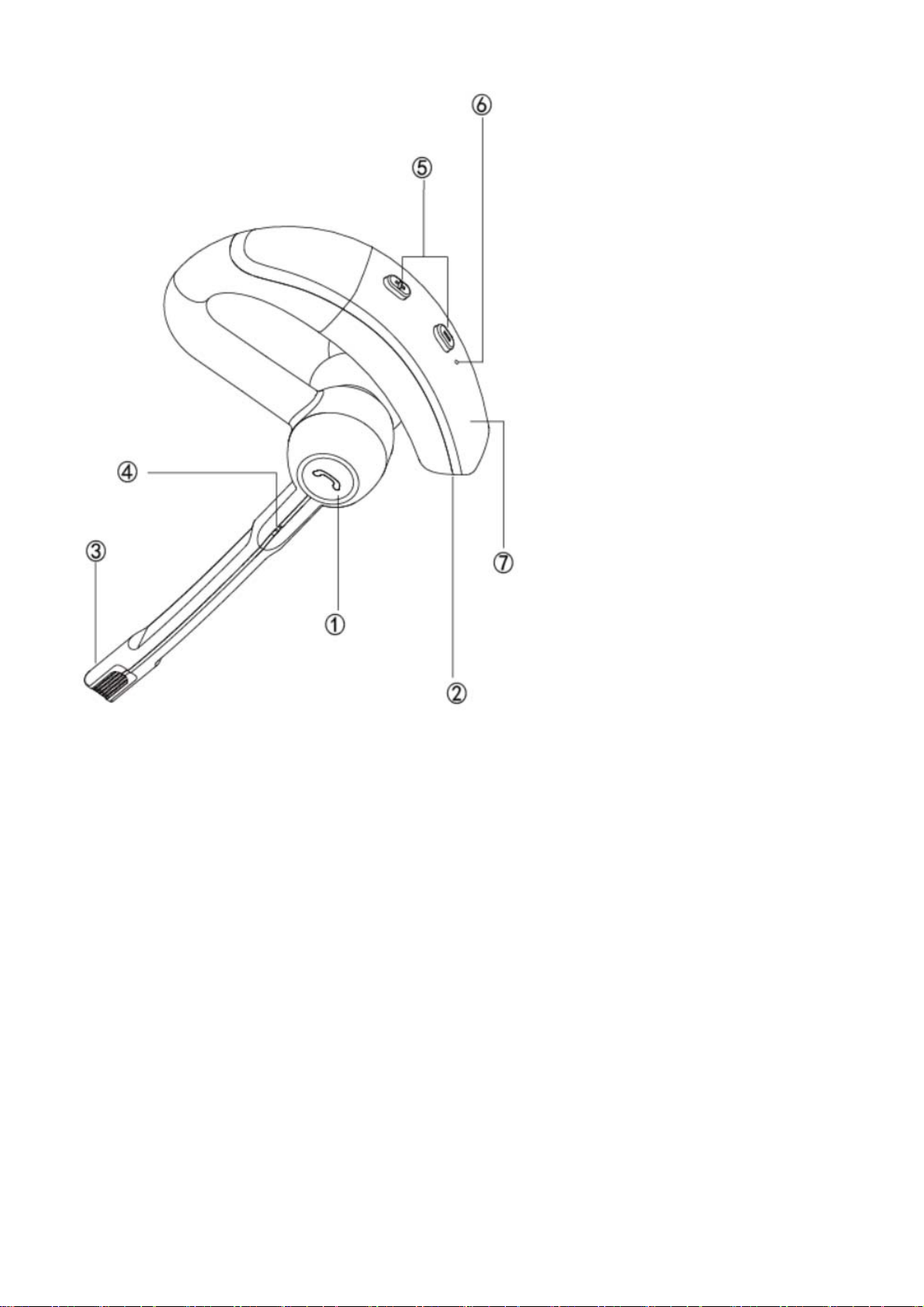
①Function Button(Power On/Off/Pause/Play)
Multifunktionstaste( Abspielen/Pause/EIN und AUS )
Многофункциональная кнопка( Включение/выключение/Воспроизведение/пауза)
botón multifunción( encendido / apagado / Reproducir / pausa)
Bouton multi-fonction (Play/Pause/Allumer et éteindre le produit)
Tasto multifunzione (Alimentazione on / off/Riproduzione/pausa)
② Charging Micro USB Port
Mikro-USB-Schnittstelle zum Aufladen
Micro USB интерфейс для заряда
Puerto Micro USB para cargar el dispositivo
Interface micro-USB pour recharge
Interfaccia Micro USB per la ricarica
③④ Microphone (Phone + Noise reduction)
Mikrofon
Микрофон
Micrófono
Microphone
Microfono
Page 3
⑤Volume+/Volume-
Leiser Taste / Lauter Taste
Увеличение громкости / Уменьшение громкости
Botón para subir el volumen / Botón para bajar el volumen
Volume + / Volume -
Pulsante Volume su / Tasto di Volume giù
⑥ LED Indicator Lights
LED-Anzeige
Светодиодный индикатор
LED
Indicateur LED
Indicatore LED
⑦NFC
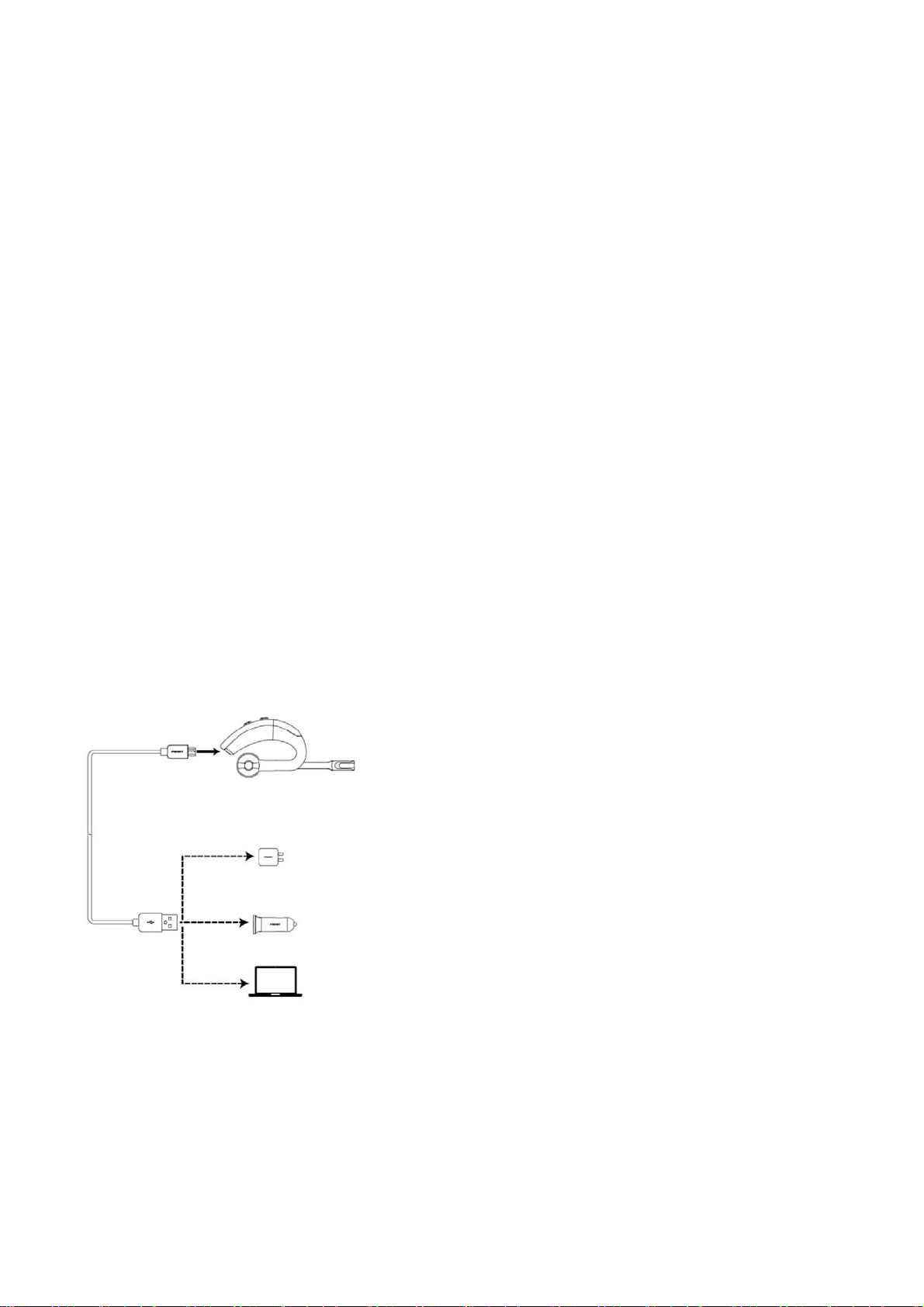
Charging the Battery
Batterie Aufladen | Зарядка батареи | Cómo cargar la batería | Charger la batterie | Ricarica della Batteria
Page 4

Attention
·Store the earphone with power off and in a dry environment.
·Lagern Sie den Kopfhörer in ausgeschaltetem Zustand und an einem trockenen Ort.
·Храните наушники с отключенным питанием и в сухом месте.
·Guarde los auriculares apagados en un sitio sin humedad.
·Rangez le casque hors tension et dans un environnement sec.
·Riporre le Cuffie spente e in luogo asciutto.
·If you don’t use the earphone for a long period, charging the battery
every 2 months for 1-2 hours.
·Falls Sie den Kopfhörer für längere Zeit nicht benutzen, laden Sie die Batterie alle 2 Monate für
1-2 Stunden.
·Если вы не используете наушники в течение длительного периода, заряжайте аккумулятор
каждые 2 месяца в течение 1-2 часов.
·Si no va a utilizar los auriculares durante un periodo largo de tiempo, cargue la batería cada dos
meses entre 1 y 2 horas.
·Si vous n'utilisez pas le casque pendant une longue période, charger la batterie tous les 2 mois
pendant 1 à 2 heures.
·Se non si usano le cuffie per un lungo periodo di tempo, ricaricare la batteria ogni 2 mesi per 1-2
ore.
·Please don’t twist or bend the earphone. This may cause permanent
deformation.
·Bitte verdrehen oder biegen Sie den Kopfhörer nicht Dies kann ihn dauerhaft beschädigen.
·Пожалуйста, не сгибайте и не сдавливайте наушники.
·No retuerza ni doble los auriculares ya que puede dar lugar a una deformación irreparable.
·Veuillez ne pas tordre ou plier les écouteurs. Cela peut provoquer une déformation permanente.
·Non piegare o torcere le cuffie. La deformazione potrebbe risultare permanente.
Page 5
Specifications
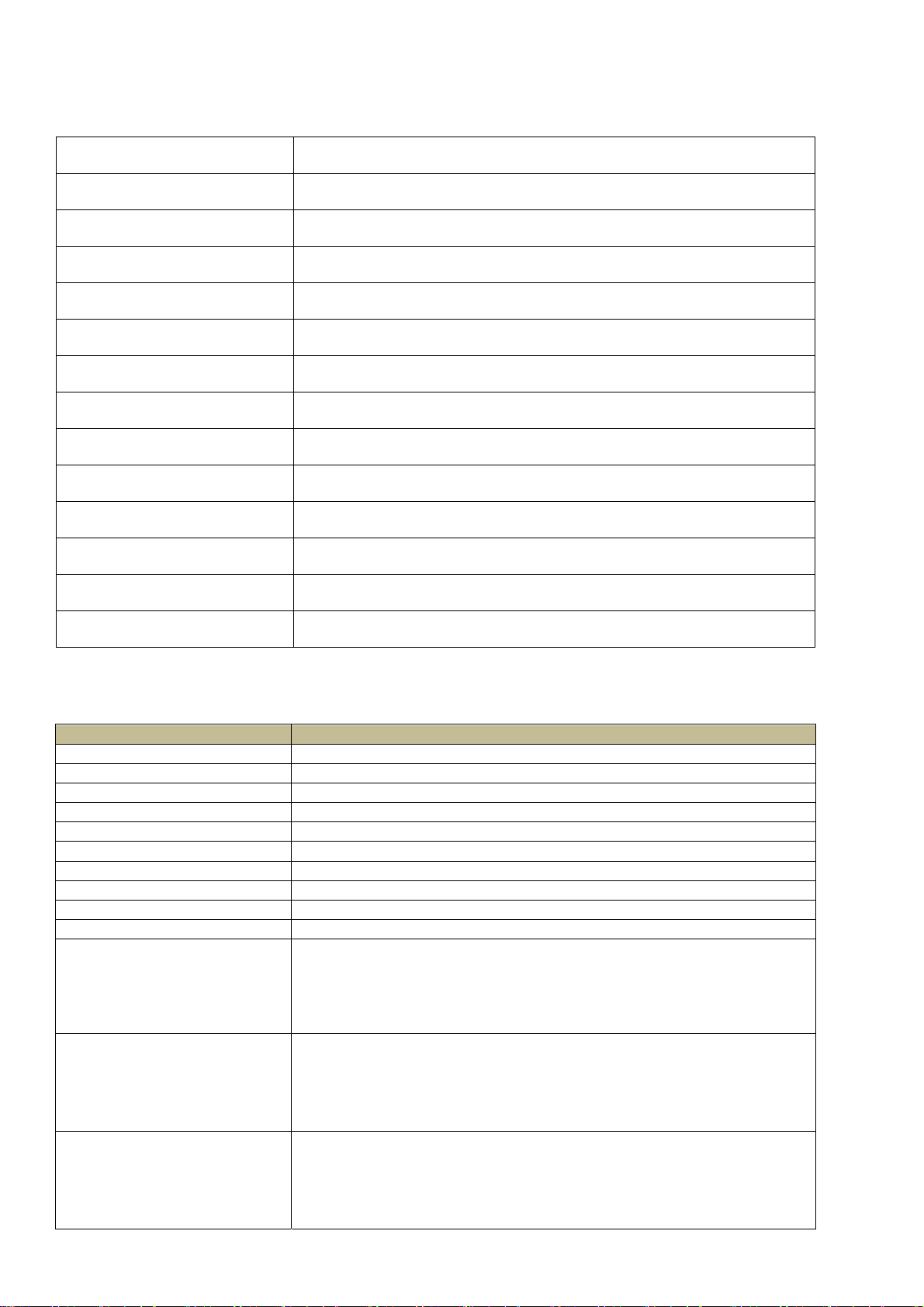
Model
Pairing Name PISEN-LE105
Bluetooth Version
Battery Type
Charging Port Micro USB 5V/1A
Support Profile HFP/A2DP/NFC
Weight 13.2g / 0.47oz
Transmission Range (Hz) 2.402GHz-2.48GHz
Charging Time
Running Time Up to 8 hours
Standby time
Operating Temperature -20˚C-60˚C
LE105
4.0
75mAh High-density lithium batteries
About 2 hours
6-10 days
Storage Temperature -40˚C-70˚C
FCC ID 2AF56-LE105
Control Instructions
Function Operation
Power on Press and hold the Multi-function button 1.5 seconds.
Power off Press and hold the Multi-function button 3-4 seconds.
Increase volume Press the volume up (+) button.
Decrease volume Press the volume down (-) button.
Answer a call Press the Multi-function button to answer the call.
End a call Press the function button during on-line call.
Play media Press the function button
Pause/restart media playback Press the function button
Skip to next track Long press next track (+) button.
Skip to previous track Long press previous track (-) button.
Press and hold the function button to enter pairing mode after
sounding power on. (LED flashes blue and red alternately when
Pairing mode
Multipoint Connection
Pair via NFC
entering the pairing mode.)
After turn on the headset, find and connect the Bluetooth device
showing as “LE105”. If a PIN code is required, enter “0000”.
Paired the first phone with the Bluetooth headset, then disable first
phone’s Bluetooth; paired the headset with second phone, then enable
the first phone’s Bluetooth, find out the connected Bluetooth headset
and finish 1-to-2 connection.
Touch the headset with the phone’s NFC area. (The NFC function of
the phone must be enabled and the screen be unlocked) The headset
auto boots and finishes connection. Touch again for 3 second, the
headset auto turns OFF.
Page 6
C
u
r
c
e
i
e
P
D
T
T
e
C
d
a
g
E
p
d
e
c
s
u
e
o
o
m
o
h
y
a
n
l
u
w
w
-
n
E
i
r
n
e
e
H
h
i
m
Q
G
c
r
n
r
h
c
o
f
d
-
m
F
c
p
n
m
d
i
e
q
o
r
e
u
iat
e
r
b
n
u
-
i
c
r
y
i
n
e
i
e
a
a
r
G
w
m
g
-
h
u
r
o
t
n
n
h
c
i
t
e
s
y
u
o
o
d
a
u
i
e
s
t
o
c
-
C
d
i
e
t
e
w
-
u
e
F
i
d
f
c
e
a
u
r
-
e
m
w
sto
ranty peri
Wa
Sin
e the purc
Fr
e service
Dur
ng warrant
this
warranty c
Fre
maintena
1.
roduct labe
2.
amages ca
3.
he breakdo
4.
he breakdo
-----
---------------
Pis
n Electro
For FA
Pisen
Conta
Suppo
@pise
er Se
d
ase date, t
period,if th
rd and pur
ce does n
damaged.
sed by sel
n and artif
n and the
--------------
s and mor
roup.com/s
t:
t@PisenGro
electronics
ics Co., Li
vice
is applianc
ere is any b
hase proof
t apply fo
-disassem
icial mecha
amage ca
---------------
help inform
pport
up.com
ited |
's quality
reakdown c
to get free
the follow
ly.
ical dama
sed by the
--------------
tion, please
Designed
arranty per
aused due
aintenanc
ing circum
e caused b
force maje
---------------
visit:
by PISEN
od is 12 m
o the produ
.
tances:
water or d
re.
---------------
Made in
nths.
t quality, pl
ropping do
--------------
hina
ase conta
n.
---------------
t the deale
---------------
with
-----
FC
STATEM
This
evice complies w
must
ccept any interfe
Chan
es or modificatio
NOT
: This equipment
rovi
e reasonable prot
This
quipment generat
radio
ommunications.
televi
ion reception, w
meas
res:
R
orient or relocate
In
crease the separat
C
nnect the equip
C
nsult the dealer o
D
NT
th Part 15 of the
ence received, in
s not expressly a
has been tested a
ction against har
s uses and can ra
owever, there is
ich can be determ
the receiving ant
on between the e
ent into an outlet
r an experienced
scove
Pisen
CC rules. Operat
luding interferen
proved by the pa
d found to compl
ful interference
iate radio freque
no guarantee that
ned by turning th
nna.
uipment and rece
n a circuit differ
adio/TV technici
more
roup.
on is subject to t
e that may cause
ty responsible fo
with the limits f
n a residential ins
cy energy and, if
interference will
equipment off a
ver.
nt from that to w
n for help.
essen
om
e following two c
ndesired operati
compliance coul
r a Class B digit
allation.
not installed and
ot occur in a part
d on, the user is
ich the receiver i
ials
nditions: 1) this
n.
void your author
l device, pursuant
sed in accordanc
cular installation.
ncouraged to try
connected.
evice may not ca
ty to operate the
to Part 15 of the
with the instruct
If this equipment
o correct the inter
se harmful interf
quipment.
CC Rules. These
ons, may cause h
does cause harmf
erence by one or
rence, and 2) this
limits are designe
rmful interferenc
l interference to r
ore of the follo
device
d to
to
adio or
ing
 Loading...