

Page 1
HEART - Version X
Y
F
A
S
S
T
T DR
Y
QUICK GUIDE
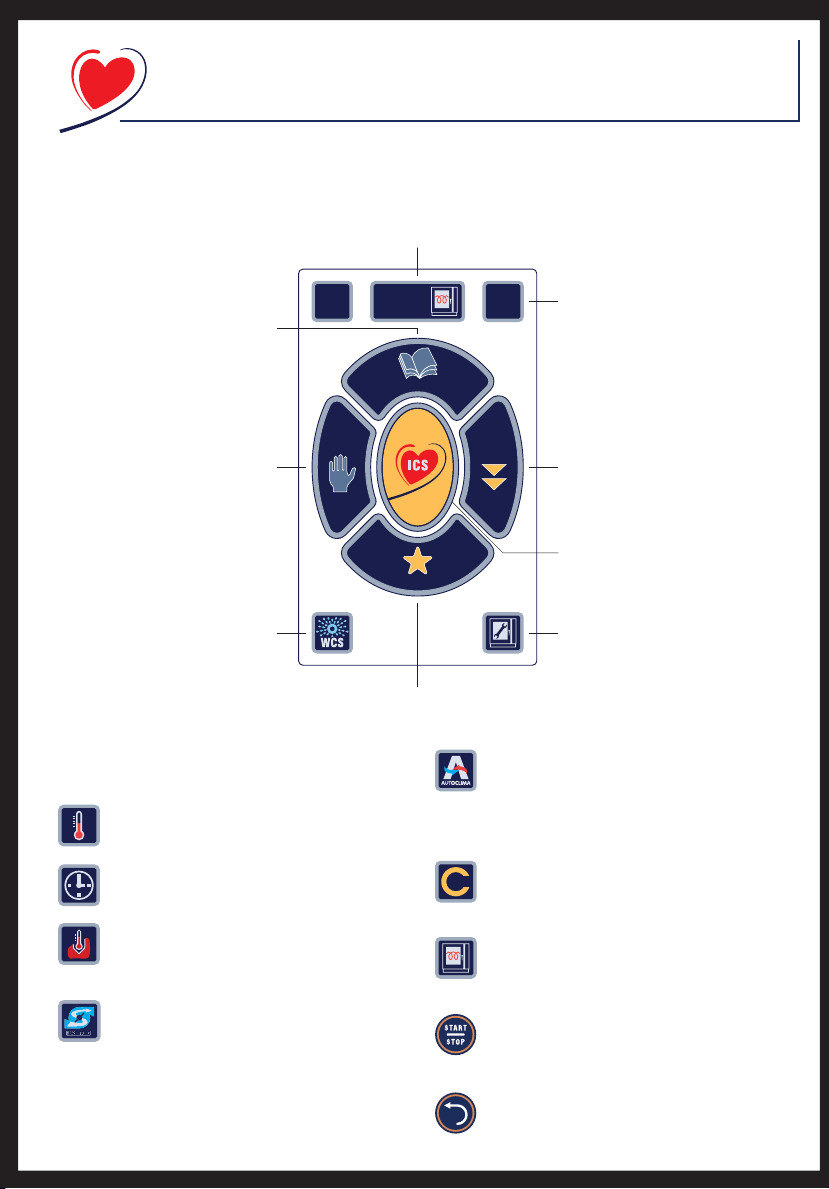
Touch screen and main icons
Press to conrm or change preheat mode and
temperature. Then press START to start it up. It is
possible to save the changed settings by pressing
“Save new setting”.
01/02/06
Select PROGRAMS to create,
15.35
start up and manage user
programs or a new program
Select MANUAL to set the
cooking mode, time,
MANUAL
temperature and/or other
cooking parameters directly.
Select WCS to access
the wash programs.
Then select the desired mode
Select FAVORITES to access the most frequently used
personal and automatic programs
his section sums up the meaning of some important
unctions that frequently recur.
s4%-0%2!452%
Used to adjust the temperature in the oven.
Pre-heat
the oven
PROGRAMS
Cooking
?
EXTRA
Select HELP and then any button
to receive information on the use
of that button.
Select EXTRA to access the
HOLDING, DEFROSTING, LEVEL
COOKING and REGENERATION
Interactive
functions
Select ICS to cook in fully
automatic mode.
Press the ICS button then choose
FAVORITES
the product to cook
Select SERVICE to access
the maintenance and
service functions
s!54/#,)-!
The “AUTOCLIMA” humidity control system
makes it possible to keep a constant level of
humidity in the oven when cooking by convection or
with the combination cycle.
s4)-%
Used to set the cooking time.
s#/2% TEMPERATURE
Used to set the temperature at the core of the
food.
s&!34$29INCONVECTIONMODEONLY
Used to evacuate the humidity from the oven
FAST DR
DR
quickly.
s#9#,%3
CYCLES
Used to add/move between the various cooking
cycles
s02%(%!4
Used to set oven pre-heating before starting to
cook.
s34!2434/0
START-STOP button: used to start and
stop cooking in progress.
s"!#+
BACK button: used to go back to the previous
menu/page.
Page 2
S
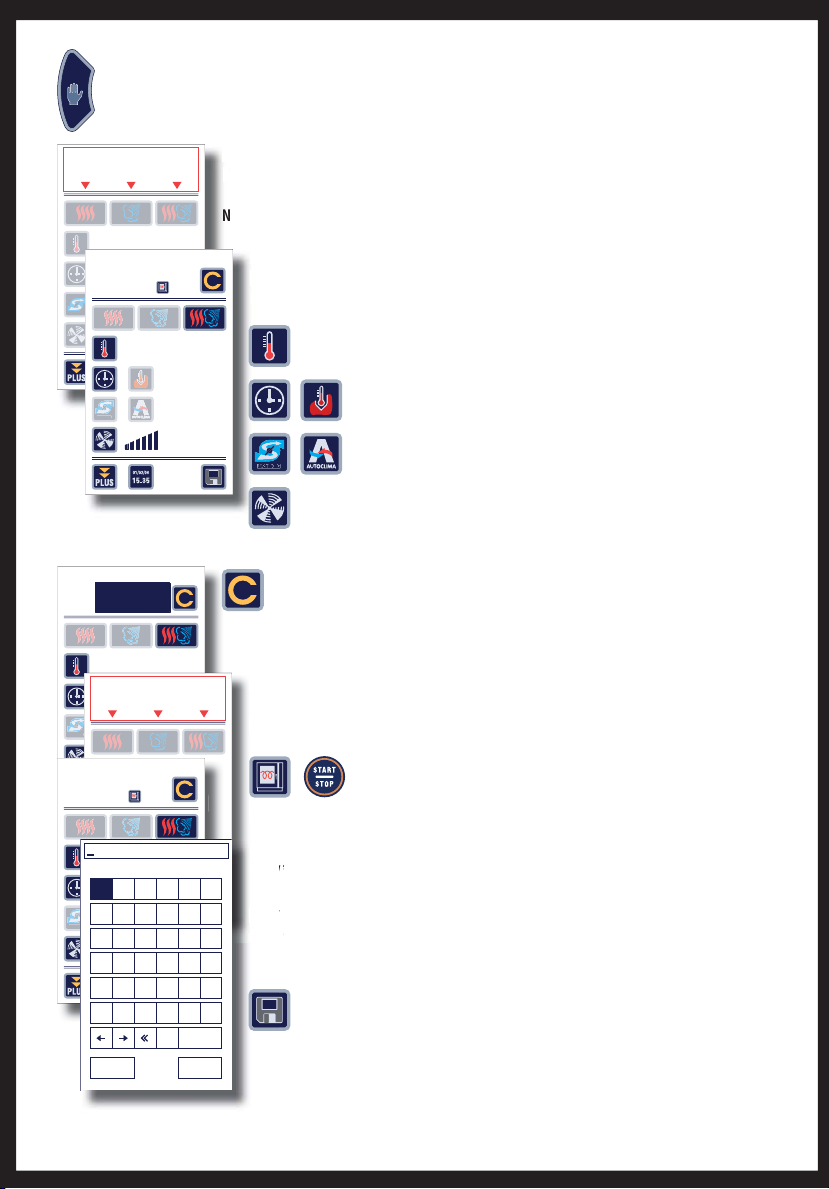
ETTING MANUAL
COO
G
s Select the cooking mode (Convection, Steam or Combination) directly on the touch screen
y
s Customize the parameter s, selecting the values for the fi rst cooking cycle, by pressing
d,
s
k
.
“
.
y
N
s Cust
y
k
FAS
Y
F
A
S
S
T DR
Y
s
e
a
n
r
e
d
de
Y
%130
MANUAL
Press the “Manual” button to access the manual cooking setting.
KIN
Manual
FAST DRY
SELECT THE COOKING
MODE
Manual
Before loading
preheat oven
FAST DRY
02
130°
SELECT THE COOKING
MODE
--
INF
--
10'
70
01/
%
130°
INF
--
CYCLES
%
s
edom ibmoCedom ria toH Steam mode
pressing the icon below the description of the type of cooking.
b
OTE:
he display will show the standard temperature for the selected cooking mode.
CYCLES
01
mbol on the touch screen and turning the knob onto the desired value. Press the
the s
to confi rm it.
nob
- Temperature,
%
T DR
- Time / Core temperature,
- Fast Dry
n convection mode only) / Autoclima,
- Fan spee
To add a cooking cycle, press the “Cycles” button on the touch screen, turn the
CYCLES
nob until the next cycle number appears and confi rm by pressing the knob.
NOTE:It is possible to set a maximum of 15 cooking cycles.
ct the type of cooking for the new cycle directly on the touch screen, change the
Sel
edom ibmoCedom ria toH Steam mode
nt parameters as for the previous cycle
elev
ew cycles if necessary until the program is completed.
Add
Manual
Before loading
preheat oven
Enter name of recipe
A BCDEF
GHI J K L
FAST DRY
MN O P Q R
STUVWX
YZ0123
456789
01/
01
130°
INF
--
canc SPACE
--
CYCLES
INF
--
%
ress the “START/STOP” button.
and p
%
ENTERESC
the oven is preheated, the oven holds the temperature and the pre-set
nc
ons.
on
setting a program, or at the end of cooking, it is possible to save the recipe
After
.
ma
ecipe will be saved in the user Programs
he
sOn completion of the program, preheat the oven by pressing the
Preheat” button or, if the oven is already preheated, put in the food
s Select the “Save” button, key in the name of the new recipe and confi rm with
ENTER, to save it in the user programs.
Page 3
S
COO
.
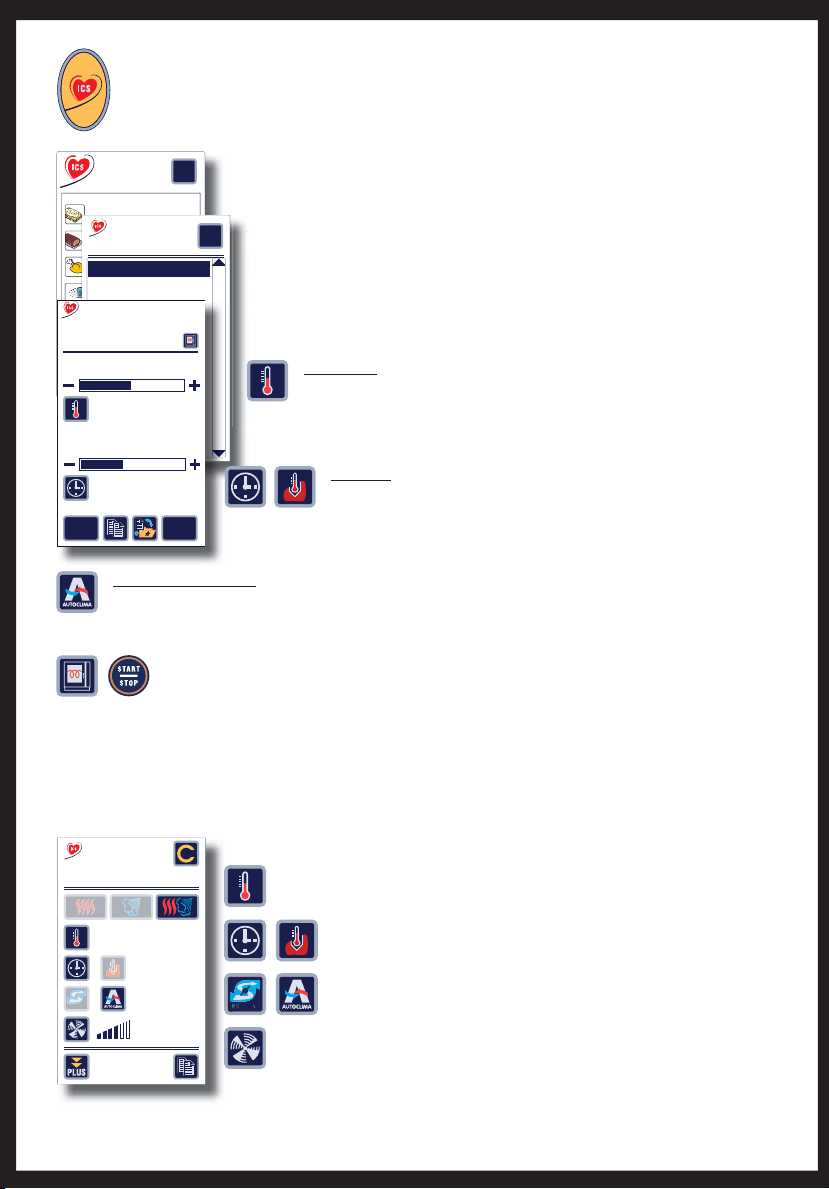
s Select the type of food directly on the touch screen or turn the knob onto the relevant
.
s Select the desired recipe directly on the touch screen or turn the knob to move onto
.
:
G
C
COO
G
y
d
.
Y
t
s
CUSTO
COO
S
s$uring cooking it is possible to customize the parameters related to
-
-
-
,
- F
turning the knob onto the desired value, confi rming by pressing the knob.
Cooking
s
fo
le
e
e
b
e
n
Bake
d Ro
man
dump
p
p
p
ling
g
g
g
s
S
e
Soup
d
S
S
T
T DR
s
o
Interactive
ETTING INTERACTIVE
KING
ress the “Interactive Cooking ICS” button to start cooking immediately starting with default settings
nteractive
I
ooking
C
ystem
S
First courses
Meats
First courses
Poultry-Game
Crepes-flan
Lasagne-moussaka-sonda
Fish
First courses
Baked Roman dumplings
Vegetables
Crepes-flan
teamed ric
Steamed rice
Before loading
preheat oven
Pastry-Bread
Soups with lid
s with li
Multigrill
Browning
?
od and then confi rm by pressing the knob
sSe
?
levant recipe and then confi rm by pressing the knob
the r
nding on the selected ICS cooking, parameters are automatically suggested that
Dep
e customized according to need
an
sBROWNIN
ustomize browning by selecting the “Temperature” icon or the value directly
touch screen and turning the knob onto the desired value, confi rming by pressing
130°
Cooking Degree
on th
the k
.
KIN
17'
electing the value directly on the touch screen and turning the knob onto the desire
Save
setting
Restore
original
s
alue, confi rming by pressing the knob
v
Customize the cooking by selecting the “Time”/”Core Probe” icon or b
s DEGREE OF HUMIDIT
Customize the degree of humidity by selecting the “Autoclima” icon or by selecting the value directly on the
ouch screen and turning the knob onto the desired value, confi rming by pressing the knob.
Preheat the oven by pressing the “Preheat” button or, if the oven is already preheated, put in the food
and press the “START/STOP” button.
nce the oven is preheated, the oven holds the temperature and the pre-set conditions.
MIZING
KING CYCLE
n the cooking cycle in progress the parameters are displayed in real time, pressing on the icons or on the corresponding
alues will show the settings.
First Courses
Crepes-flan
01/02
170°
CYCLES
Temperature,
Time / Core temperature,
10'
FAST DRY
30
%
FAST DRY
DR
Fast Dry
an speed,
r each program cycle, by simply pressing the related symbol on the touch screen and
f
in convection mode only) / Autoclima
Page 4
C
S
.
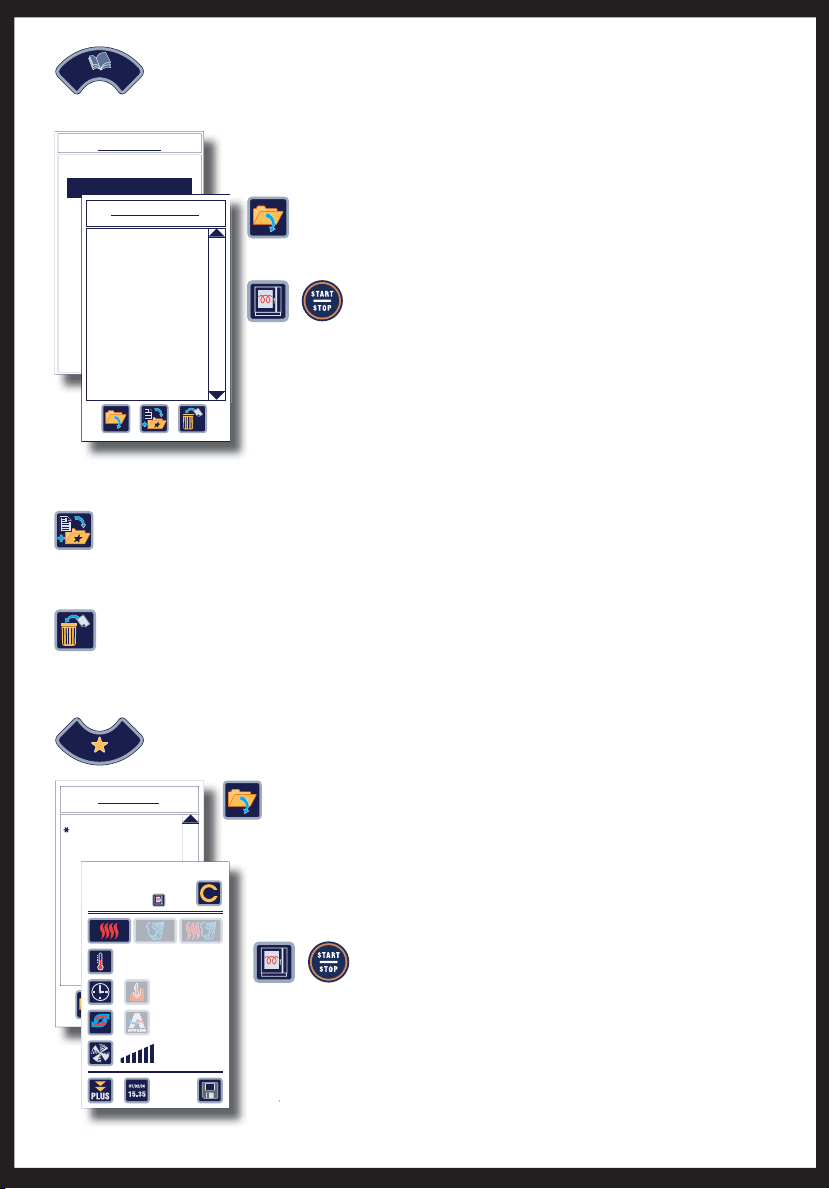
s Select “User Programs” by pressing on the display or confi rming by pressing the
.
M
prog
t
s Customize the cooking, if desired, selecting the parameters directly on the touch
i
s
k
di
N
m
PROGRAMS
h
s Cus
s
e
knob
e
d
v
t
ALLING UP USER PROGRAM
ress the “Program” button to access the “User Program” / “New Program” selection mask
PROGRAMS
nob to call up a previously saved program.
User programs
USER PROGRAMS
Programs 004 / 400
New program
ew progra
Crepes-flan (001)
Roasts 1 - probe
Large cream puffs (001)
Bread 2
s Select the program directly on the touch screen or turn the knob to move
onto the desired program, press the “Open” button or confi rm by pressing
the knob.
s Preheat the oven by pressing the “Preheat” button or, if the oven
is already preheated, put in the food and press the “START/STOP”
tton.
the oven is preheated, the oven holds the temperature and the pre-set
nce
tions.
n
ADDING A PROGRAM TO FAVORITES
s After selecting a program it is possible to add it to the list of favorites by pressing the “Add to Favorites”
utton
DELETING A USER PROGRA
s Select the desired program directly on the touch screen or turn the knob to move onto the desired
ram, and press the “Delete” button.
A window appears in which you are asked to confi rm deletion of the recipe.
Confi rm deletion by pressing “YES”.
CALLING UP FAVORITE RECIPES
FAVOURITES
FAVOURITES
Crepes-flan
Roasts 1 - probe
Large cream puffs (001)
Roasts 1 - Probe
Bread 2
Before loading
preheat oven
Press the “Favorites” button to access the selection mask for favorite recipes.
sSelect the recipe directly on the touch screen and press the “Open” button or
urn the knob to move onto the relevant recipe and then confi rm by pressing
e knob.
t
01/03
CYCLES
n and turning the knob onto the desired value, confi rming by pressing the
cre
.
s Preheat the oven by pressing the “Preheat” button or, if the oven
190°
10’
FAST DRY
--
%
the oven is preheated, the oven holds the temperature and the pre-set
nc
tions.
on
E:It is possible to inhibit all the functions of the main menu except for
NOT
orites”, “Wash” and “Preheating the Oven”.
“Fa
s already preheated, put in the food and press the “START/STOP”
tton.
ee
Page 5
S
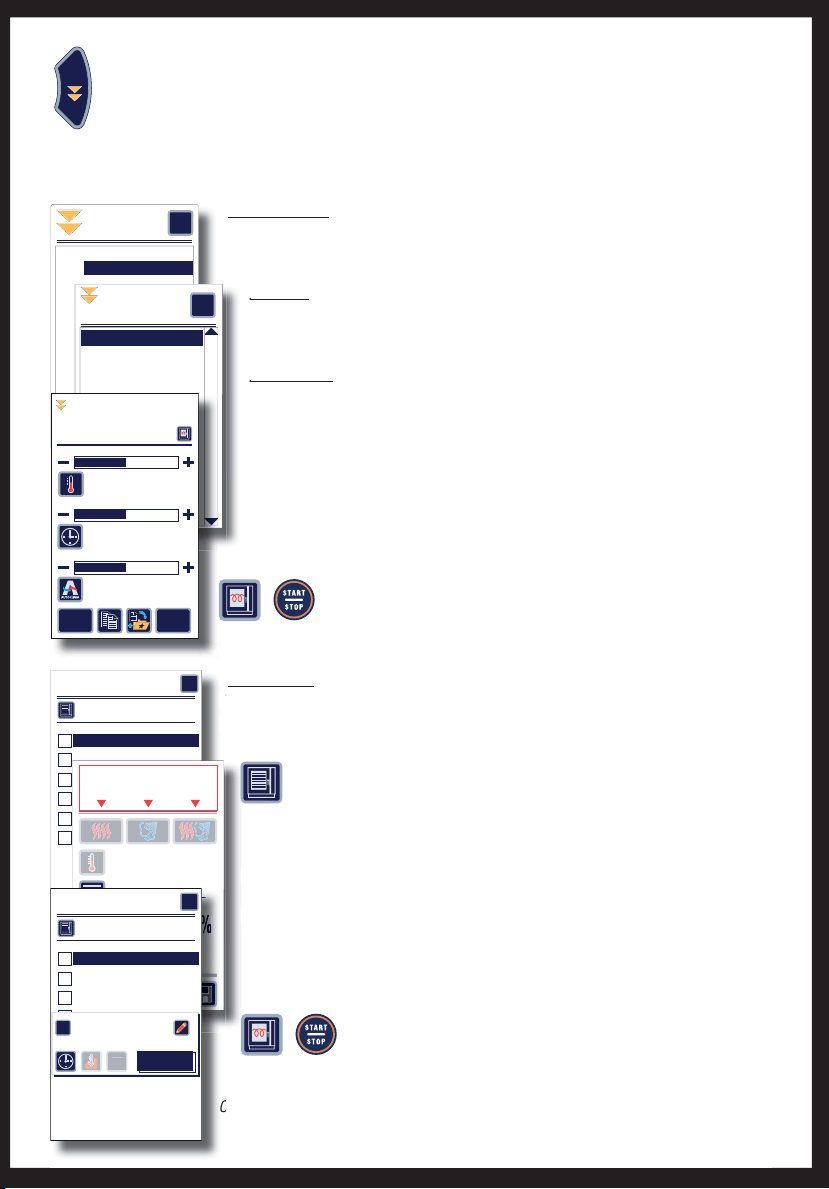
ETTING AN EXTRA MODE
:
s S
o
.
f
G
.
G
.
.
s
.
LEVEL
Jus
e
”
.
s
g
k
.
o
a
.
s
L
f
F
f
e
p
c
b
C
o
n
On b
akin
g ti
g
g
npr
p
p
obe
g
S
S
e
T
C
o
c
r
J
EXTRA
Press the “EXTRA” button to access setting the extra functions such as
Regeneration, Holding, Defrosting, Multi-level.
elect the type of operation you want to perform directly on the touch screen or turn the knob onto the relevant
peration and confi rm by pressing the knob
REGENERATION
EXTRA
Regeneration
EXTRA
Holding
Regeneration
Thawing
On dish
Multilevel
On dish-probe
On baking tin
EXTRA
On baking tin-probe
Regeneration
Banquetin
Banqueting
Banqueting
Before loading
preheat the oven
Banqueting-probe
Banqueting-probe
Browning
team regeneration
Steam regeneration
team regeneration-prob
Steam regeneration-probe
Cooking Degree
Degree of humidity
Save
setting
115°
10'
30
Restore
original
?
his function makes it possible to heat up food cooked beforehand, providing the right mix
T
temperature and humidity.
o
DIN
sHO
?
%
unction makes it possible to keep food hot when cooking has just ended, allowing
This
perator to serve the food “perfectly hot” during the time of service
the o
ROSTIN
E
unction makes it possible to defrost food quickly, with the possibility of monitoring
This
mperature at the core of the food as well
the t
ending on the type of selected Ex tra, parameters are automatically suggested that
s De
e customized according to need.
an
mize the parameters by selecting the values directly on the touch screen and
ust
g the knob onto the desired values, confi rming by pressing the knob
turni
Preheat the oven, where necessary, by pressing the “Preheat” button or
put the food in the oven and press the “START/STOP” button
MultiLevel
Cooking parameters
1
Level 01
2
Level 02
3
Level 03
4
Level 04
5
Level 05
6
Level 06
Multilevel
Cooking parameters
FAST DRY
1
Level 01
2
Level 02
3
Level 03
4
Level 04
OK
1 - Level 01
5
Level 05
6
Level 06
SELECT THE COOKING
MODE
MULTILEVEL
--
IT
0'
?
--
?
%
his function is used to cook by setting different times for the various levels and enables
btaining different cooking at the same time with the “JIT -
o
t in Tim
option
Select the “cooking parameters” icon to customize the mode and the cookin
edom ibmoCedom ria toH Steam mode
settings by selecting the values directly on the touch screen and turning the
nob to obtain the desired values, confi rming by pressing the knob.
ect the levels you want to customize directly on the touch screen
sSel
mize the parameters of time, core temperature or JIT, selecting the values
ust
tly on the touch screen and turning the knob onto the desired values, confi rming
dire
essing the knob.
y p
s Preheat the oven by pressing the “Preheat” button or, if the oven is
lready preheated, put in the food and press the “START/STOP”
utton.
nce the oven is preheated, the oven holds the temperature and the pre-set conditions
Page 6
O
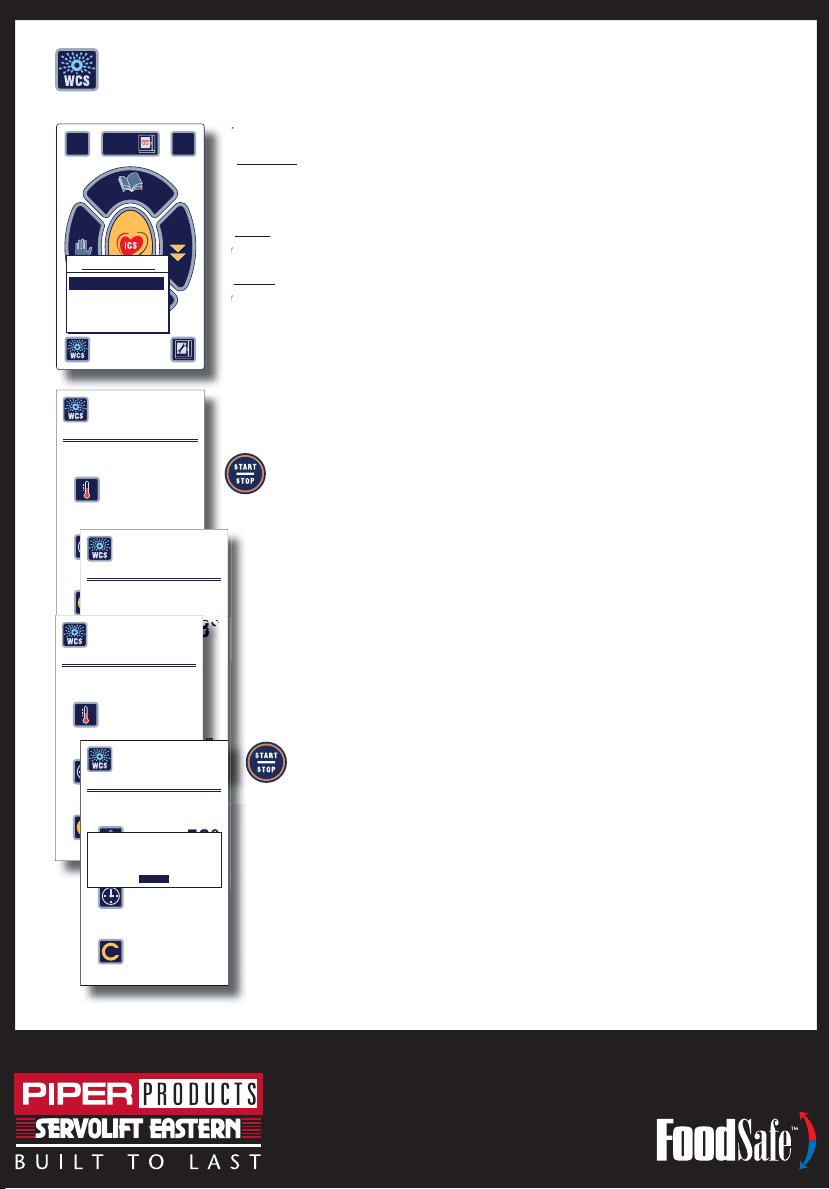
VEN WASHIN
G
.
:
SOFT:
.
.
Select the type of wash to be carried out directly on the Touch Screen or turn the knob
.
e
.
g.
.
n
W
s
o
t
e
o
o
yo
ke
e
h
i
e
o
03330
CYYYCCCLLEEESS
S
0
Press the “WCS” button to access the selection mask for the type of oven washing
01/02/06
Pre-heat
the oven
15.35
PROGRAMS
Cooking
MANUAL
OVEN WASHING
Interactive
MANUAL
SOFT
FAVOURITES
HARD
OVEN WASHING
MANUAL
PRESS START TO START
OVEN WASHING
COOLING
CYCLES
OVEN WASHING
MANUAL
SPRAY WITH CUBE CLEAN
CYCLES
OVEN WASHING
MANUAL WASHING
EXTRA
83°
--
MANUAL
01/03
52°
MANUAL
--
?
e oven is equipped with 3 wash programs:
imple procedure used to clean thoroughly and quickly with minimum
convenience to the operator. - Duration 10 minutes.
i
ith OPTIONAL Automatic Wash Kit
-
ash procedure designed to remove daily dirt without the operator taking any
irect action in the cleaning operations. - Duration 24 minutes
ARD:ash procedure designed to remove tough dirt without the operator taking any
-
rect action in the cleaning operations. - Duration 38 minutes
nto the relevant type of wash and then confi rm by pressing the knob
s0RESSTHE“START/STOP” button to start the manual wash procedure.
display will show “COOLING” if the oven temperature is high or “WAIT” if the oven
s The
rature is low.
emp
ven will go to the ideal temperature for washing.
The
u have chosen manual washing the display will show “SPRAY WITH CUBE CLEAN”,
83°
--
01/03
s If y
the door and spray the detergent inside the oven
open
u have chosen the soft/hard wash the display will show “INSERT ARM”, open the
s If
and put the wash arm into its seat, making sure it is fi rmly secured. In addition,
door
sure that the tube with the detergent tank is connected.
a
Close the door and press the “START/STOP” button to restart washing.
oven will proceed with the following cycles, the display will show the time
CYCLES
WASHING ENDED
PRESS ESC
ESC
CYCLES
01/03
1/03
58°
00'
03/03
s Th
ining to the end of washin
ema
e end of the wash cycle the display will show a window stating that the procedure
s At t
r. Press “ESC“ directly on the Touch Screen or confi rm by pressing the knob to
s ov
ve the window
m
manual washing, rinse the oven thoroughly.
s&OR
automatic washing, remove the wash arm.
s&OR
ÎääÊ-°Ên{ÌÊÛiÕiÊUÊ7>ÕÃ>Õ]Ê7ÊÊx{{ä£
*i\Ênääx{{ÎäxÇÊUÊ>Ý\ÊÇ£xn{ÓΣÓx
www.piperonline.net
 Loading...