

Page 1
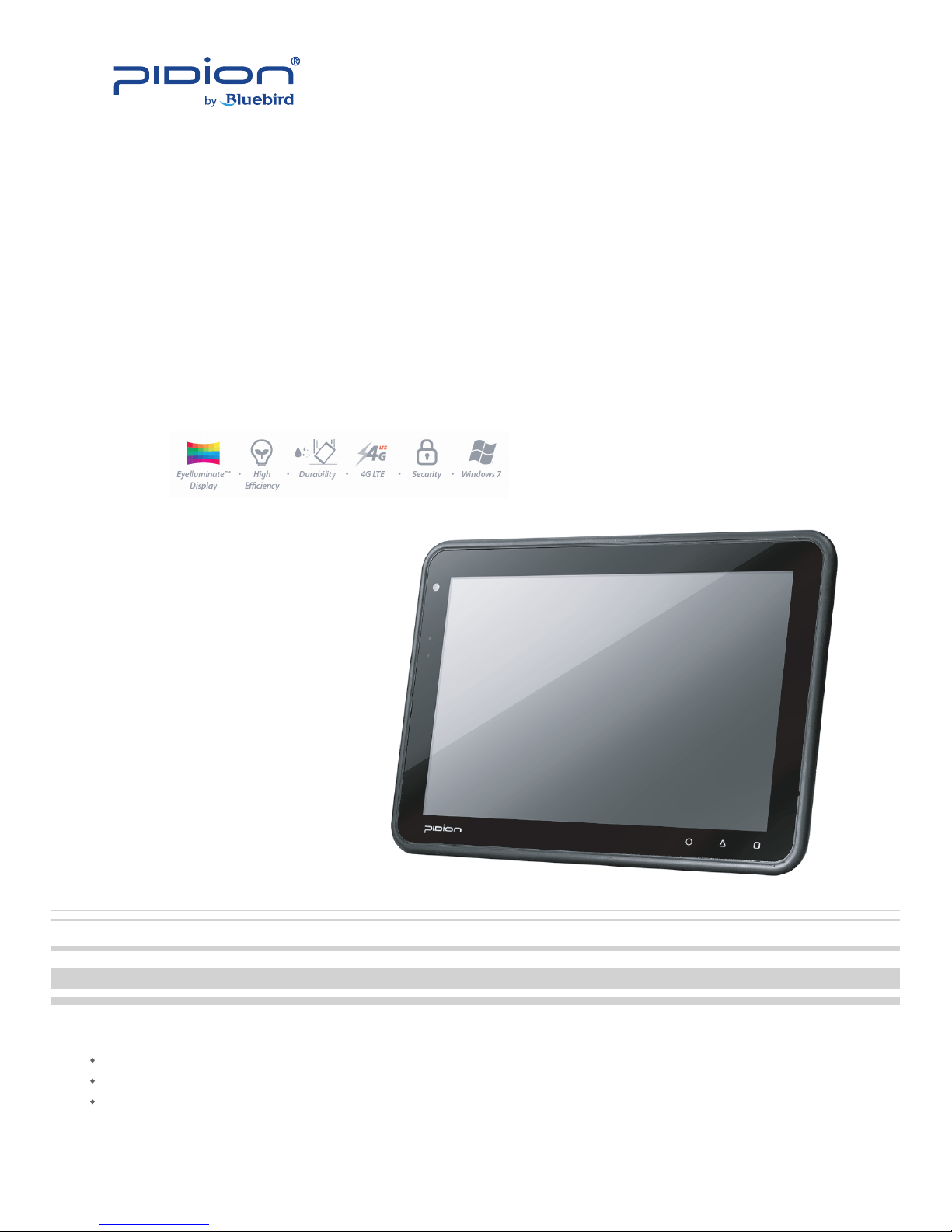
BP80
www.bluebirdsoft.com
Windows Business PAD
User’s Manual
Please read the following warnings before using the product.
Shapes and colors of the images shown in this manual may differ from the actual products.
Contents of the manuals may differ based on the software version of products or conditions of the wireless provider.
Page 2
2
BP80
MANUAL
• This user manual is protected by copyright.
• This user manual has been created by the Bluebird Soft. We have done our best not to
create typos, editing errors, and leaving out any information. Please understand if there
are any inconveniences.
• This product’s program is legally protected. Illegal copying, transmitting, or erasing of
the program is prohibited.
• This product’s partial functions might have problems from the environment, user
program, and other machines.
• The radio equipment can’t be used for life saving services because there is possibility to
have radio interference and failure.
REGISTERED TRADEMARK
User’s guidance
Pidion is an emerging global brand, striving to lead the market
in performance and mobility. Their products represent reliability,
innovation, and innovative technology. Pidion is a registered
trademark from the global brand of Bluebird Soft Inc. and is
copyright protected.
※ Please read warnings and cautious before use.
Device type User’s guidance
A-level
(IT Device at work)
This device is registered as suitable for electromagnetic wave
use at workplace.
It should be appropriately considered by dealers or users. If
you sell or buy this device by mistake, please replace it with a
product for home use.
Type registration
This wireless device may cause propagation interference, and
so, it cannot be used for life-saving services.
Page 3

3
BP80
MANUAL
Contents
Notice Before Using Device
....................................
5
Precautions Before Using Battery
.............................
5
About the product
1. Checking components
..........................................
6
2. Checking names of parts
........................................
7
3. Features
.........................................................
8
Learning Basics
1. To Connect the Terminal Power
..................................
9
Device Specifications
...........................................
10
Q & A
.............................................................
11
Service Center
...................................................
12
Warranty Certificate
............................................
14
Page 4

4
BP80
MANUAL
Notice Before Using Device
• This device is qualied for the standard of the safety of human body against
electromagnetic wave. For your own safety, please use certied devices provided by
headquarter.
If not the case, we cannot guarantee your safety.
• Do not press power button on the device if the device is wet or do not touch adapter or
power cord with wet hands. There is risk of electric shock.
• Do not remodel, take apart, or repair the device. Please refer to your customer service
center.
If not the case, you will not be able to get your free repair service.
• Please follow instructions when using the battery.
• Do not use your device at an explosive danger zone.
• In case your device is wet, do not put your device in heaters, microwaves, or etc to
dry- there is a risk of explosion or it can be the cause of malfunction.
(Please note there is a label in the device that changes color when it gets wet. In this case
you will not be able to get your free repair service.)
• Do not use your device when boarding a plane or inside of hospitals.
• Please backup the data and information from your device.
During the repair or upgrade, there is a slight possibility of your data being erased.
(Ring tones, text/voice message, characters will be reset.)
• Please refrain from using your device while driving. If you are in an unavoidable
situation, stop your vehicle or use your hand free kit.
• Do not use in places of high temperature and high humidity. The following can be the
causes of malfunction: getting wet from the rain, spilling drinks, and taking it in with you
at the sauna (high temp.)
In these cases, you cannot receive your free repair service.
• Do not place credit cards, phone cards, bankbook, and tickets next to the device.
The magnetic forces of the device can damage the information of listed item.
• Please avoid impacts or vibrations. When the device is not in use, unplug the power
cord and place it at a safe place where it won’t drop.
• Do not place your device at a dusty place. Keep your power cord away from any heating
devices. Unplug the power cord when cleaning. If there are any dusts or residue clean the
power cords pins thoroughly.
• When a battery is not in use for a long time, please charge and store it at room
temperature. Even for fully charged battery, the lifetime can be decreased because of its
own properties of voltage decrease.
• Do not paint your device. It can damage your screen or your device’s exterior.
Also, the paint can peel o and it triggers allergies. If there is allergic reaction, please nd
medical advice.
This information is for your own safety. Please observe the following precautions.
Page 5

5
BP80
MANUAL
Precautions Before Using Battery
• If the battery is taken apart by impact, applied heat, submersion, or hole-drilling, there is
a risk of a dangerous explosion. Please keep away from children and animals.
• Leaving the battery in the vehicles under direct sunlight or any enclosed space with hot
temperature can deform or break down the battery.
• Please do not make any improper contact on battery contact pin with necklaces, coins
or any electric conductors. Do not give any impact by sharp object. There is a risk of
explosion.
• Please use only the designated battery for the device.
If the original battery is not used, the life of the device may decrease and there is a risk of
explosion. (In this case you cannot receive the free repair service)
• When charging the battery, you must use the supplied standard power adapter.
If the original adapter is not used, the battery life may decrease and may explode.
(In this case you cannot receive the free repair service)
These are safety precautions in order to prevent a dangerous accident.
Please use the battery correctly and carefully observe the instructions.
Page 6
6
BP80
MANUAL
About the product
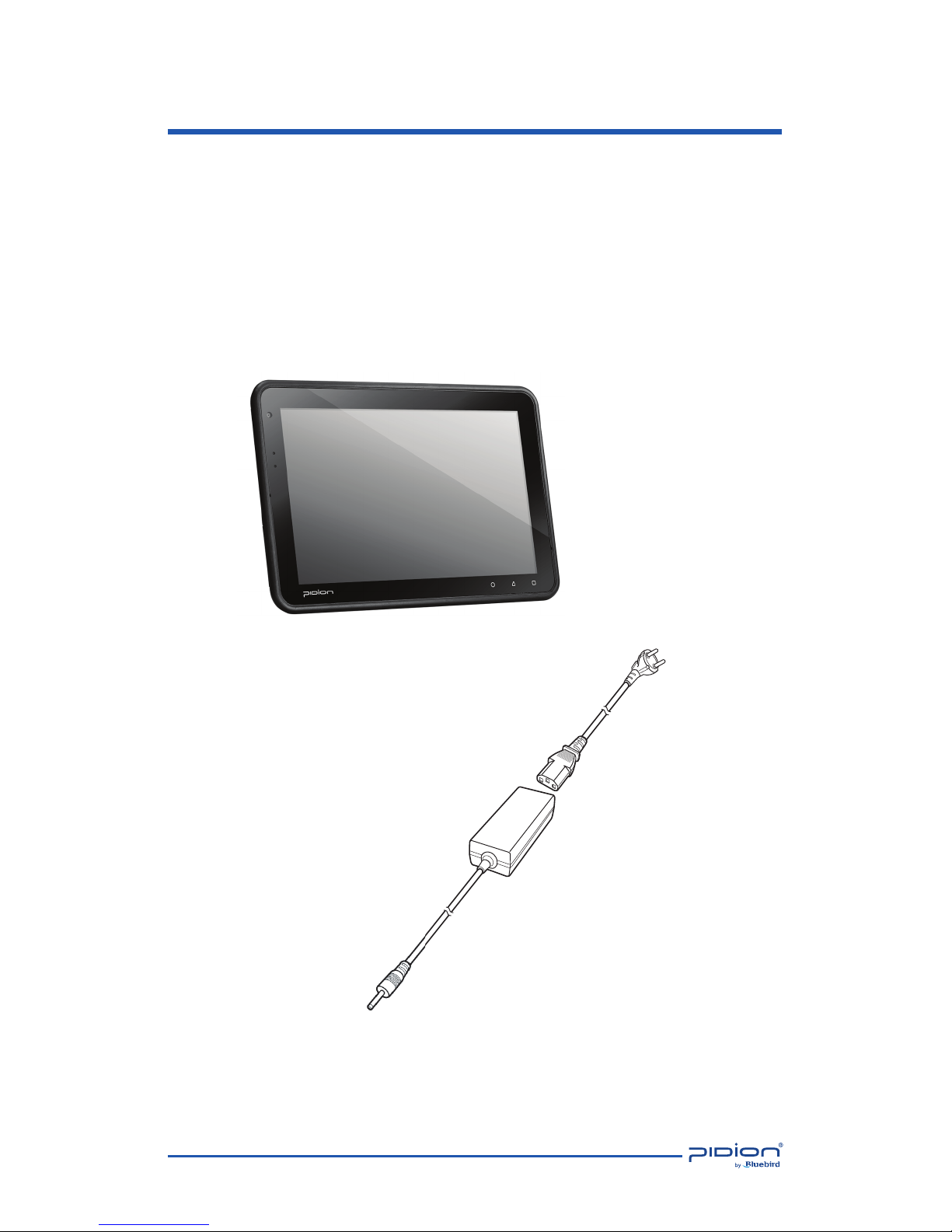
1. Checking components
The images in this User’s Manual may not reect the color and shape of the
actual product.
Please contact the Customer Care Center if you wish to purchase any additional
or optional products.
BP80 Main Body
Power Adapter
Power Cable
Page 7
7
BP80
MANUAL
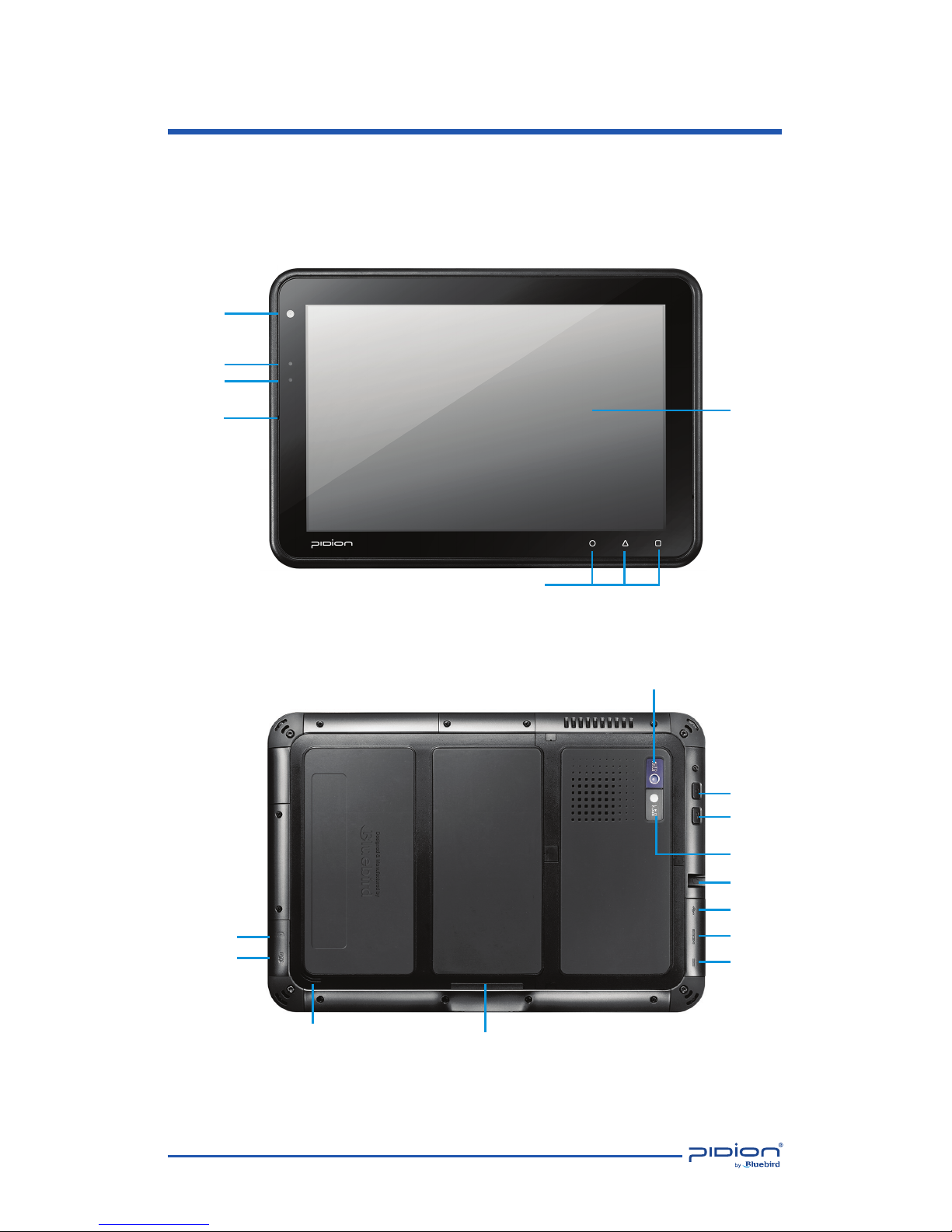
Power Button
Camera
Illuminance sensor
Security Button
LED Flash
Audio I/O
USB Port
DVI Port
Adapter jack
(19V 2.11A)
Cradle I/O
Connector
USIM Slot
MicroSD Slot
Speaker
Battery LED
Mic
Function
Button
< Front >
< Rear >
Screen
About the product
2. Checking names of parts
Camera
Page 8
8
BP80
MANUAL
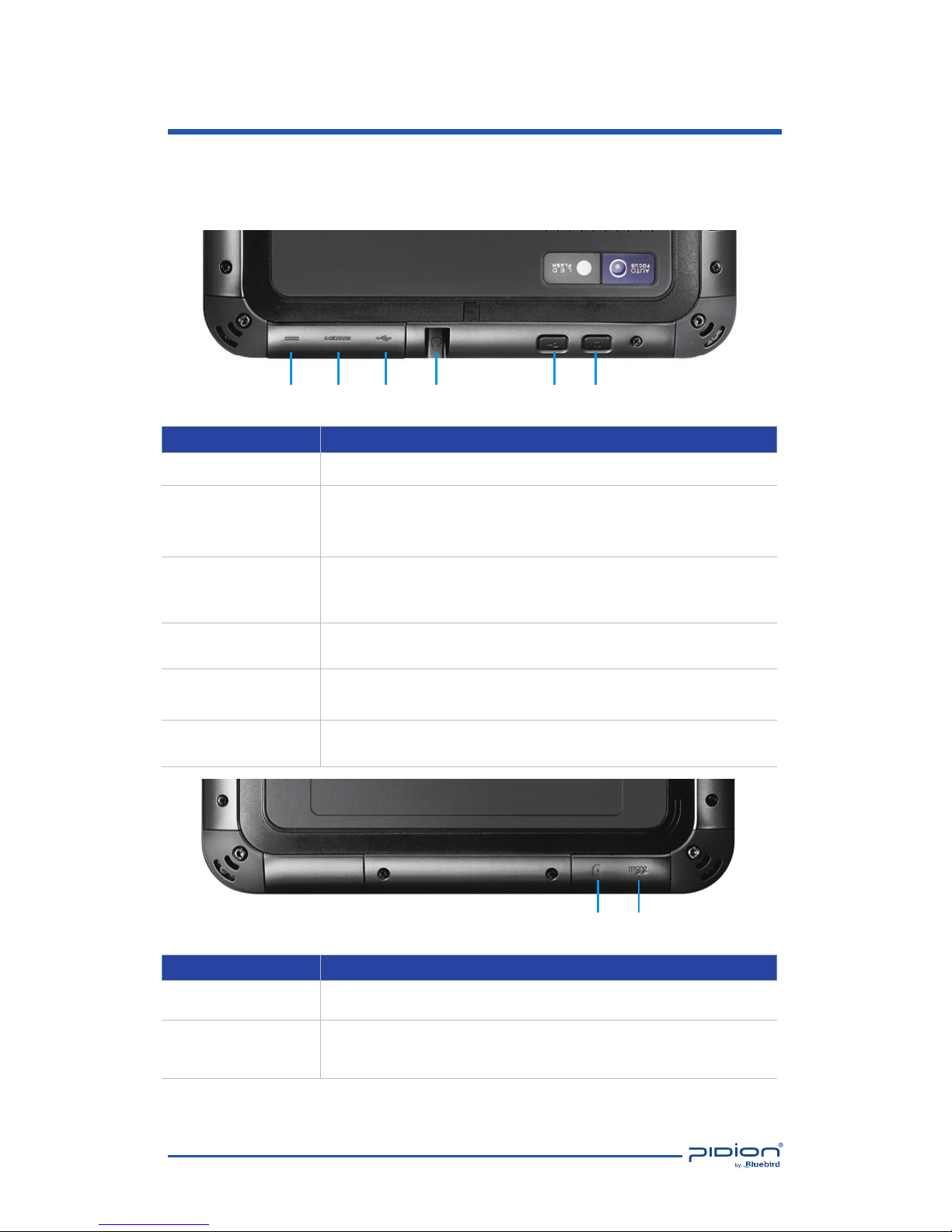
Item Description
1. Power Button Turns on the device
2. Security Button
BP80 lock can be turned off.
Perform the same "Ctrl + Alt + Delete key and the computer's
functions.
3. Audio I/O
Can connect headphones and speakers, or other audio
devices.
Compatible (3.5mm jack)
4. USB Port
You can connect an external storage device and the external
device.
5. DVI Port
Digital audio and video devices can be connected.
Support to Micro HMDI (type D).
6. Adapter jack
(19V 2.11A)
Adapter can charge.
Item Description
1. MicroSD Slot External memory card slot
2. USIM Slot
USIM card is inserted, the wireless network operators to
provide broadband network if necessary, can be used.
123456
12
About the product
3. Features
The front panel includes the following features:
Page 9
9
BP80
MANUAL
Learning Basics
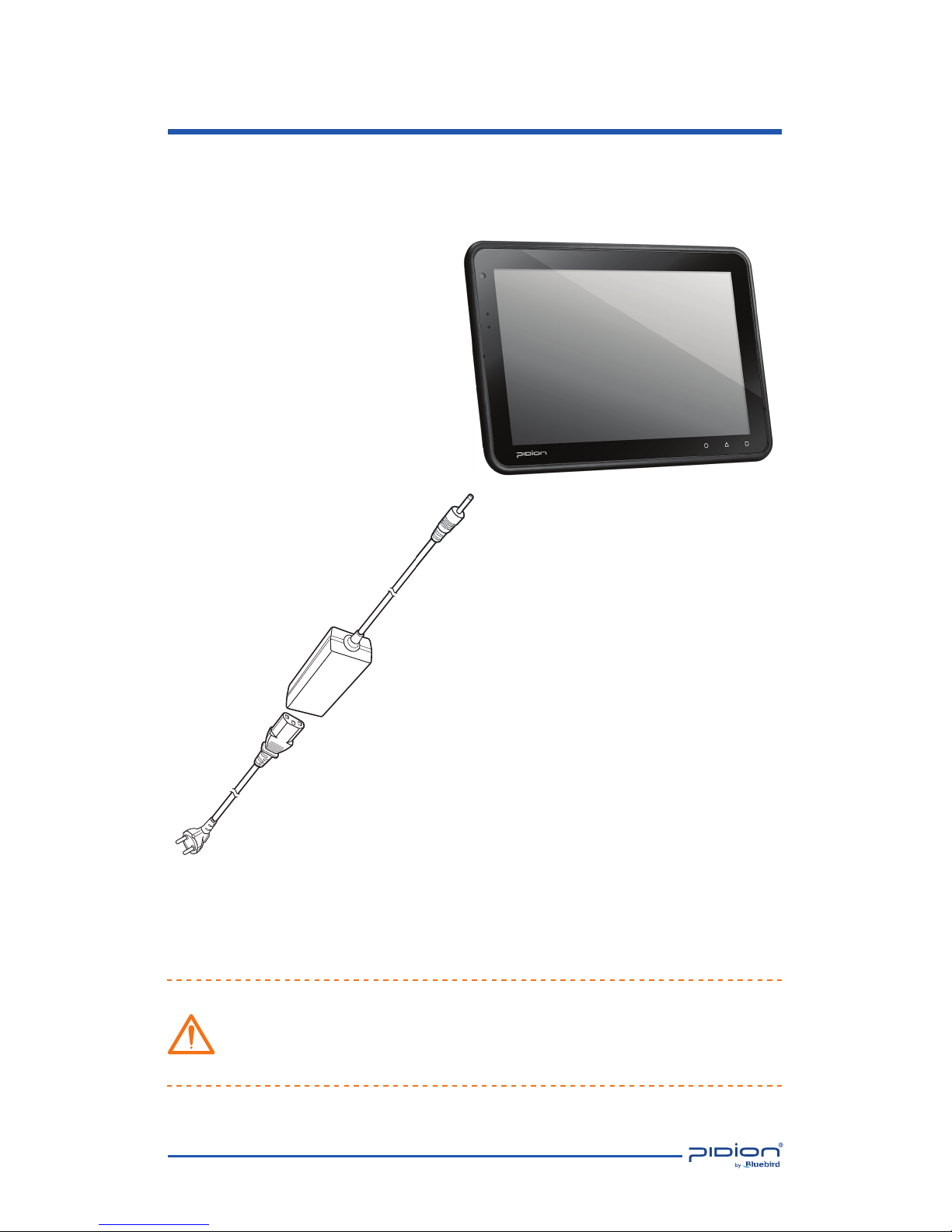
1. To Connect the BP80 Power
As you see in the picture, connect the adapter with the power cable to charge
the power.
• When The battery of the device is low, it may warn you with a ring and a
message.
• The charging time can vary depending on the environment.
A new battery is only partially charged. Please charge fully before using.
Power Adapter
Power Cable
Page 10

10
BP80
MANUAL
Physical Characteristics
Dimensions (W x H x D) •182 x 264 x 17.7 mm / 7.1 x 10.3 x 0.6 inch
Weight •980g/2.1lb(Including battery)
Display
• Eyelluminate™ Display;
10.1-inch LED-backlit widescreen Multi-Touch display with IPS technology;
1280 x 800 pixel;
Crystal Clear View at all Angles(even under direct Sunlight);
Covered with Anti FingerPrint Coated Corning® Gorilla Glass®
Keypad Virtual
Battery Built-in 51.8-watt-hour(14,000mAh) rechargeable lithium-polymer battery; Beyond 8 hours Battery Life
Expansion Slot User-accessible MicroSD slot for removable memory card up to 32G
SIM/SAM Slot 1 SIM
Audio Loud Speaker and microphone
Camera Rear: 3 megapixel Autofocus LED Flash; Video recording, HD with audio; Front: 1.3 megapixel; Webcam
GPS Assisted GPS
Sensor
Ambient light sensor;
Motion Sensor
Performance Characteristics
Processor • 1.6GHz Processor , Hyper Threading
OS • Optional, Windows 7; Windows Embedded standard 7P
Memory • 2 GB SDRAM
Storage • Optional, 64GB/32GB Solid State Drive (SSD)
Interface • 1 USB Host; 1 Micro HDMI; Power Jack; Headset Jack; Docking connector
User Environment Characteristics
Durability
•TankSmith™ Technology
IP65 Sealing
0.8m / 2.7ft. Drop to steel surface, 1drops per 6 sides
1.2m / 4ft. Drop to steel surface, 2drops per 6 sides (Applying the ruggedness pack)
Vibration • 4Gs peak, 5Hz to 2kHz, 1 hour duration per axis
Operating Temp •
5℃ to 43℃ / 41℉ to 110℉
Storage Temp •
-20℃ to 65℃ / -4℉ to 149℉
Humiditiy • 95% non-condensing
ESD • +/-15kv Air, +/-8kv contact, +/-2kv charge body
Integrated Radio Options
WWAN Radio(Optional) • 4G LTE, HSPA+/HSPA/UMTS, EDGE/GSM
WLAN Radio(Optional) • IEEE 802.11a/b/g/n (Rigorous Security in Full Support: WPA, WPA2, 802.1X, WEP, AES-CCMP, TKIP)
WPAN Radio(Optional) • Bluetooth V4.0 LE
NFC(Optional)
• NFC(Near Field Communication), All Types Supported(MIFARE/CALYPSO/FELICA/ETC.);
ISO21481 (NFCIP-2), TypeA, Type B
Security Characteristics
Security
• Stonewall Security™;
BitLocker™, BitLocker To Go, AppLocker, TPM, Enhanced Writer Filter (Varies on OS Option)
peripherals
Options
• Smart Plug Type 1 : Magstripe Reader
Smart Plug Type 2 : Barcode Scanner & Scan Key / IC card / Spin hand strap / SAM Slot in one
Square Handle (type 1 or type2)
1Slot Cradle
Blue-Pen
Device Specifications
Please ask your sales representative for the specs not listed above.
Page 11

11
BP80
MANUAL
Q & A
Q
Water went into my device. What do I do?
A
First, remove the battery from the device and completely dry them
in a dry place.
After drying for a good period of time, try to turn it on. If it still does not
turn on, the main-board or other parts needs to be replaced.
Please contact to your service center.
Q
The BP80 won’t turn on.
A
The program may be damaged. Please try resetting your device.
If it still doesn’t work, Please contact the service center.
Q
The BP80 won’t charge.
A
A Make sure the power cable and your device have been properly
connected.
Try to clean the charging terminals. If they still do not work,
your battery life might be nished or it may be a broken battery.
(The battery warranty lasts for 6 months)
Q
How do I get the repair service?
A
You can send the device via a delivery service to headquarter.
When sending the package, make sure you pay for the shipping
fee in advance.
When the repair is nished, headquarter will cover the shipping cost.
Q
My battery drains very quickly.
A
The battery can be drained quickly when the Wi-Fi or Bluetooth is
turned on.
If it drains quickly regardless of using the options above,
please purchase another battery.
• If you have done the above and the device still does not work, please contact to
the service center.
• After the 1 year warranty the repair service will be charged.
Page 12

12
BP80
MANUAL
Service Center
Before Requesting After-Sales Service
Before asking for after-sales service, please back up the data from the terminal.
We do not back up data from the products received in the Customer Care
Center. Therefore, we assume no responsibility for loss/deletion of data.
Bluebird Soft Customer Service
• FAX : +82-2-548-0870
• E-Mail : [email protected]
• Address : Customers service center, SSang-young IT twintower B 703,
Sangdaewon-dong 442-5, Joongwon-gu, Sungnam-si, Keonggi-do,
Korea
Operating hours
• Mon.-Fri. : 9:30 A.M. ~ 6:30 P.M. (GMT Time: +9 Hours)
The center is closed on Saturdays, Sundays and holidays.
Registering for After-Sales Service
• We receive the products for after-sales service through mail, delivery service
and hand carry only in principle.
• If you bought the product from any party other than the authorized dealer,
you need to register the product before asking for after-sales service.
• Please enclose an evidence of purchasing or the receipt to the product for
after-sales service.
• Please enclose the name, telephone number, address and symptom for
prompt service.
• You can ask for after-sales service through the dealer or the Customer Care
Center in the head oce.
• Do not intentionally damage the label on the product.
• Damaged label may result in a disadvantage to the customer.
• When you return the product to Bluebird Soft for service, please put the
product in a protective box.
• Warranty will not be provided for any damage occurring during delivery.
We recommend you to use the box and protective cover supplied with the
product.
• Make sure to deliver the product in a safe way. Bluebird Soft assumes no
responsibility for loss of the product during delivery.
Page 13

13
BP80
MANUAL
Service Center
Charged Service
1. If it is not a default, it will be charged when requesting for after-sales service.
- Service request due to inappropriate use of the customer
- Loss of a PIN number
- Use of programs that might eect the program
(over-clock, forceful changes in the input of the system, personal
developments)
2. Default due to a mistake on the part of the customer
- Default due to inappropriate or careless use of the product (dropping,
submersion under water, shock, damage, unreasonable operations, etc).
- Default due to a repair or unauthorized technician.
- Default caused intentionally or by carelessness of the customer.
- Default due to the use of fraudulent parts or components.
3. Other cases
- Default due to nature (re, damage due to sea wind, ood damage, etc.).
- Expendable parts have exhausted there life (batteries, antenna, or other
component parts).
4. Regulations of treatment after charged service
- If the same default occurs on the part that had been repaired within a 2
months(60 days) period, it will be provided with free of charge repair service.
There will be no returning of goods or repayment upon the following situation
• Removal of the sealing of the product if it had been sealed.
• If the product has been damaged due to careless use by the customer or due to
a natural disaster (floods, rain, fire, etc.).
• Loss of product or other components (CD, diskette, manual, connecting cables,
etc).
• Damage to the product after 10 days of purchase, the product will either be
exchanged or provided with after-sales service (note, returning of goods or
repayment is not allowed).
Page 14

14
BP80
MANUAL
Name of Product
Windows Business PAD
Name of Model
BP80
Date of Purchase
Manufacture Number
Place of Purchase
Term of Guarantee 1 year from purchase
Warranty Certificate
Thank you for purchasing a product from Bluebird Soft Inc.
• If a circumstance arises where you lose a receipt or the certi cate of guarantee, then
the term of guarantee will be calculated 3 months (certi ed by the number of the
manufacture, a certi cate of inspection) after the date of manufacture.
• In case of accessories (such as batteries), only those that match the sales list managed by
the service center will be eligible for customer service.
• A repair or an exchange of batteries that does not match the sales list of the service
center due to the carelessness of the customer will be fully charged.
Warranty
1. Bluebird Soft Inc. (hereinafter referred to as Bluebird) provides the warranty service
for its products in compliance with the regulations on compensation for damage of
customer.
2. Upon receiving a noti cation on a defect of its product within the range of warranty
during the warranty period, Bluebird will repair or replace the defective product
according to its warranty policy.
3. If the defective product within the range of warranty is not repairable or replaceable,
Bluebird shall refund the purchasing price within a designated period from the date of
receiving a notice of defect.
4. Bluebird assumes no responsibility for repairing, replacement or refund until it receives
the defective product from the customer. The replacement shall be equivalent to a new
product in the aspect of performance.
5. Warranty of Bluebird is valid in the countries where the Bluebird products are
distributed by Bluebird. (Contract for additional warranty service like eld service)
6. Bluebird products may contain the recycled products, components or materials
equivalent to new products in the aspect of performance.
7. This warranty is applied to software products only when the programming commands
are not executed. Bluebird does not guarantee interruption-free or error-free
performance.
Page 15
Hours
Mon. ~ Fri. : 9:30 A.M. ~ 6:30 P.M.
(GMT Time: +9 Hours)
We are not open on Saturday,
Sundays and National Holidays.
Address
Customers service center, SSang-young
IT twintower B 703, Sangdaewon-dong
442-5, Joongwon-gu, Sungnam-si,
Keonggi-do, Korea
Bluebird constantly strives to bring
utmost satisfaction to all our customers.
Customers Service Center
User’s Manual
Please read the following warnings before using the product.
Shapes and colors of the images shown in this manual may differ from the actual products.
Contents of the manuals may differ based on the software version of products or conditions of the wireless provider.
Page 16
 Loading...