

Page 1
Peripheral Product
Interactive Whiteboards - PIB
WHITEBOARD - PIB Revision 3.0 1 of 7 Subject to change without notice December, 1998
Field Information & Sales Tools
PictureTel Visual Collaboration:
Interactive Whiteboard, Interactive
Flipchart, Personal Whiteboard
Overview
The PictureTel range of Interactive whiteboards, flipcharts
and personal whiteboards are designed to allow people to be
able to use the tools that they are familiar with in a more
efficient and productive way. They can be used both locally
or in a video conference.
These products are ideally suited in any meeting environment
that requires people to share ideas of which some of the
following are examples:
• Presentations - inc. PowerPoint,
• Budget/forecasting meetings
• Briefings
• Lecturing
December 1998
NOTE: Customer has to supply PC, NetMeeting 2.1
(4.3.2203) and is responsible for the mounting of the
whiteboards and projector.
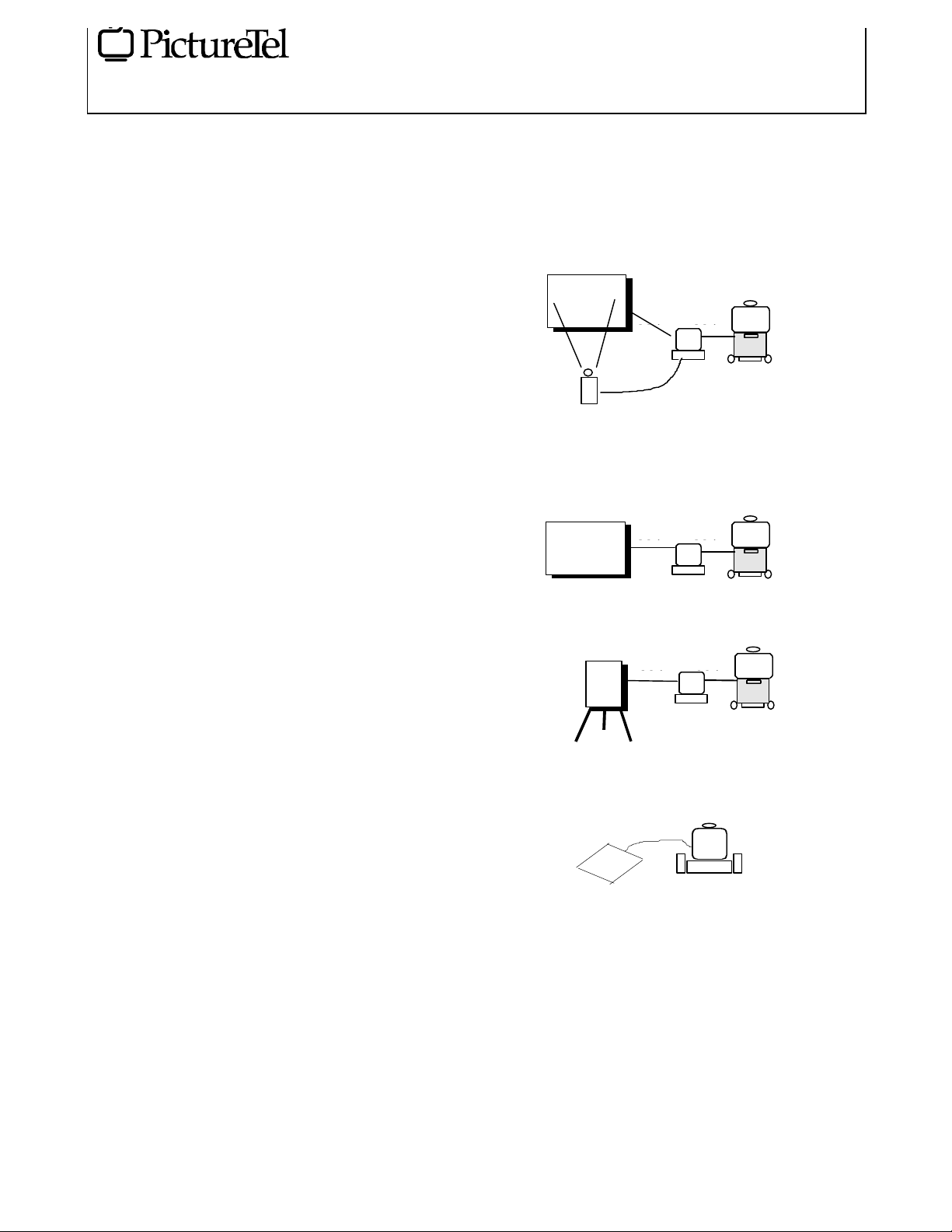
1. Interactive Whiteboard with projector
Com2
vga
Projector
2. Interactive Whiteboard
Com2
Com1
PC
VCS
Com1
• Note taking
• Distance learning - “shared whiteboards”
• Brainstorming
• Project management
• Product Management
• Disaster recovery/Rescue co-ordination (e.g. major
incidence like aircraft crash)
• Computer aided training programmes
• Software training
• Sales Management
• Software sales
• Marketing promotions/campaigns
Product Description
There are 3 products main products in the range:
1. Interactive Whiteboard with a 195cm (77”) diagonal
2. Interactive Flipchart with a metal stand
3. Personal Whiteboard - flexible mat 30cm x 30cm (12” x
12”) active area (Actual size 38cm x 42cm)
3. Interactive Flipchart
FlipChart
4. Personal Whiteboard
Com2
PC
VCS
Com1
PC
VCS
Live
Product Configurations
There are 4 main configurations of the products:
Page 2

Peripheral Product
Interactive Whiteboards - PIB
WHITEBOARD - PIB Revision 3.0 2 of 7 Subject to change without notice December, 1998
Field Information & Sales Tools
Product Operation
1. Interactive Whiteboard with projector
An electronic pen allows you to launch a plain Whiteboard
from the softkeys on the side of the board. You can now
write on the board with the electronic pen as if it were a
normal Whiteboard. With the softkeys you can move on to
the next page or change colour of the pen.
It is possible to come out of the whiteboarding function and
take full control of the PC desktop image which is projected
onto the Whiteboard. This has the benefit in that any
application on the PC can be controlled from the Whiteboard.
For example, a PowerPoint presentation or an Excel
spreadsheet.
If the user wants to collaborate in real time with remote users
via video conferencing then they will require NetMeeting 2.1
(4.3.2203) and share the whiteboarding application as well as
any other applications. It is then possible to collaborate so
that the Remote user can annotate onto any of the data being
shared. The Remote user as a minimum will require a PC
with NetMeeting 2.1 (4.3.2203) connected to the VCS.
2. Interactive Whiteboard
Without the projector you can only use the Whiteboard as a
normal Whiteboard except that everything that you write is
recorded on the PC. In this case you can use normal Expo dry
erasers inserted inside a Multimedia pen holder (Optional MPEN)
If the user wants to collaborate in real time with remote users
via video conferencing then they will require NetMeeting 2.1
(4.3.2203) and share the whiteboarding application. It is then
possible for the Remote user to see what is being written on
the Whiteboard. If the Remote user wants to annotate then
the local user will only see that on their local PC and not on
the Whiteboard as there is no projector to project that image.
The Remote user as a minimum will require a PC with
NetMeeting 2.1 (4.3.2203) connected to the VCS.
December 1998
positioned for connecting to Live200/LiveLAN systems With
this pen you have the option of using it as a normal mouse.
However, with a ball point pen insert it is possible to place a
piece of paper on top of the personal Whiteboard and write
on the paper. This requires NetMeeting 2.1 (4.3.2203)
Whiteboard to be open in the background with the image on
the paper being shown in NetMeeting 2.1 (4.3.2203)
Whiteboard.
Product Specifications
Interactive Whiteboard:
Size:
66” x 48.25” x1.25” (36lbs)
167.6cm x 122.6cm x 3.2cm (16.3kg)
Active Area: 63.3” x 45.6” (160.8cm x 115.8cm)
77” (195.6cm) diagonal
Box Contents:
Board
Rechargeable electronic Pen with right hand mouse
button function
Universal Input Power Supply (IEC) type
Fast Start Installation Card
3.5” installation and utility diskettes inc. Presentation
tools s/w
Two chargeable cables (30cm (12”) & 250cm (100”))
Wall mount brackets
450cm (15’) RS232 9-pin Serial Cable and 180cm (6’)
Extension Cable
Projector
3. Interactive Flipchart
This unique product allows you to write on normal (anti
feathering) Flipchart paper and the image is captured in real
time on the PC.
If the user wants to collaborate in real time with remote users
via video conferencing then they will require NetMeeting 2.1
(4.3.2203) and share the Flipchart application. It is then
possible for the Remote user to see what is being written on
the Flipchart. If the Remote user wants to annotate then the
local user will only see that on their local PC and not on the
Flipchart as there is no projector to project that image. The
Remote user as a minimum will require a PC with
NetMeeting 2.1 (4.3.2203) connected to the VCS.
4. Personal Whiteboard
The personal Whiteboard looks like a 30cm x 30cm mouse
mat and has a corded pen attached to it. This product is
Display: 3 x 1.3-inch polysilicon TFT LCDs with dichroic
optical system for enhanced color accuracy and
saturation
Resolution: True 800 x 600 SVGA with compression up
to 1024 x 768 XGA
Computer Compatibility: PC compatible
Video Compatibility: Full NTSC, NTSC 4.43, PAL,
SECAM
Contrast Ratio: 300:1
Brightness: 750 ANSI lumens (typical)
Projection Lens: Zoom/wide angle lens with 1.3 zoom
ratio
Page 3

Peripheral Product
Interactive Whiteboards - PIB
WHITEBOARD - PIB Revision 3.0 3 of 7 Subject to change without notice December, 1998
Field Information & Sales Tools
Light Source: Long-life, high-efficiency 150-Watt UHE
lamp with 2,000 hours of life
Aspect Ratio: 4:3
Color Palette: 16.7 million colors
Response Time: 25ms
Noise: World's quietest SVGA projector at 39db
Size:
Dimensions: 6.0" (H) x 11" (W) x 15.3" (L) or (38.8cm x
29.8cm x 15.3cm) with handle and lens. Portable
(meets most airline requirements for carry-on luggage).
Weight: 12 pounds (5.4kg)
Input:
Connection: Exclusive system connects PCs with no
adapters required
Image Configuration: Plug-and-project auto
synchronization, auto tracking, auto positioning, auto
source detect, and auto black/white level detect
Control Panel: On-board, backlit control panel with
mouse pad
Output:
December 1998
Remote Control: Ergonomic and intuitive 2-button
remote that controls PC
Flipchart
Size:
Dimensions: 50” X 39” X 6” (127cm x 99cm x
15.3cm)
Weight: 65lbs (29.kg)
Box Contents:
Flipchart board with metal stand
Rechargeable multimedia pen
Universal input power supply (IEC type)
Users Manual
Fast Start Card
3.5” Installation and Driver Diskette
67.5cm (27”) x 85cm (34”) (standard) 50-sheet Paper
Easel Pad
Set of dry erase markers and eraser
450cm (15’) RS232 9-pin serial cable and 180cm (6’)
extension cable
Brightness: 750 ANSI lumens (typical)
Audio: 3-Watt built-in speaker with stereo loopthrough
capabilities, and audio outputs for satellite speakers
Projection Distances/
Image Sizes: 5 feet (1.5m*)/ 2.95 feet (.885m) to 3.85
feet (1.155m)
8 feet (2.4m)/ 4.72 feet (1.416m) to 6.16 feet (1.848m)
10 feet (3m)/ 5.9 feet (1.77m) to 7.7 feet (2.31m)
14 feet (4.3m)/ 8.26 feet (2.537m) to 10.78 feet
(3.311m)
18 feet (5.5m)/ 10.62 feet (3.245m) to 13.86 feet
(4.235m)
Other:
Power Supply: 100-240 V at 50-60 Hz
Power Consumption: 255 Watts
Options: VGA extension cable, ceiling mount kit
Page 4
Peripheral Product
Interactive Whiteboards - PIB
WHITEBOARD - PIB Revision 3.0 4 of 7 Subject to change without notice December, 1998
Field Information & Sales Tools
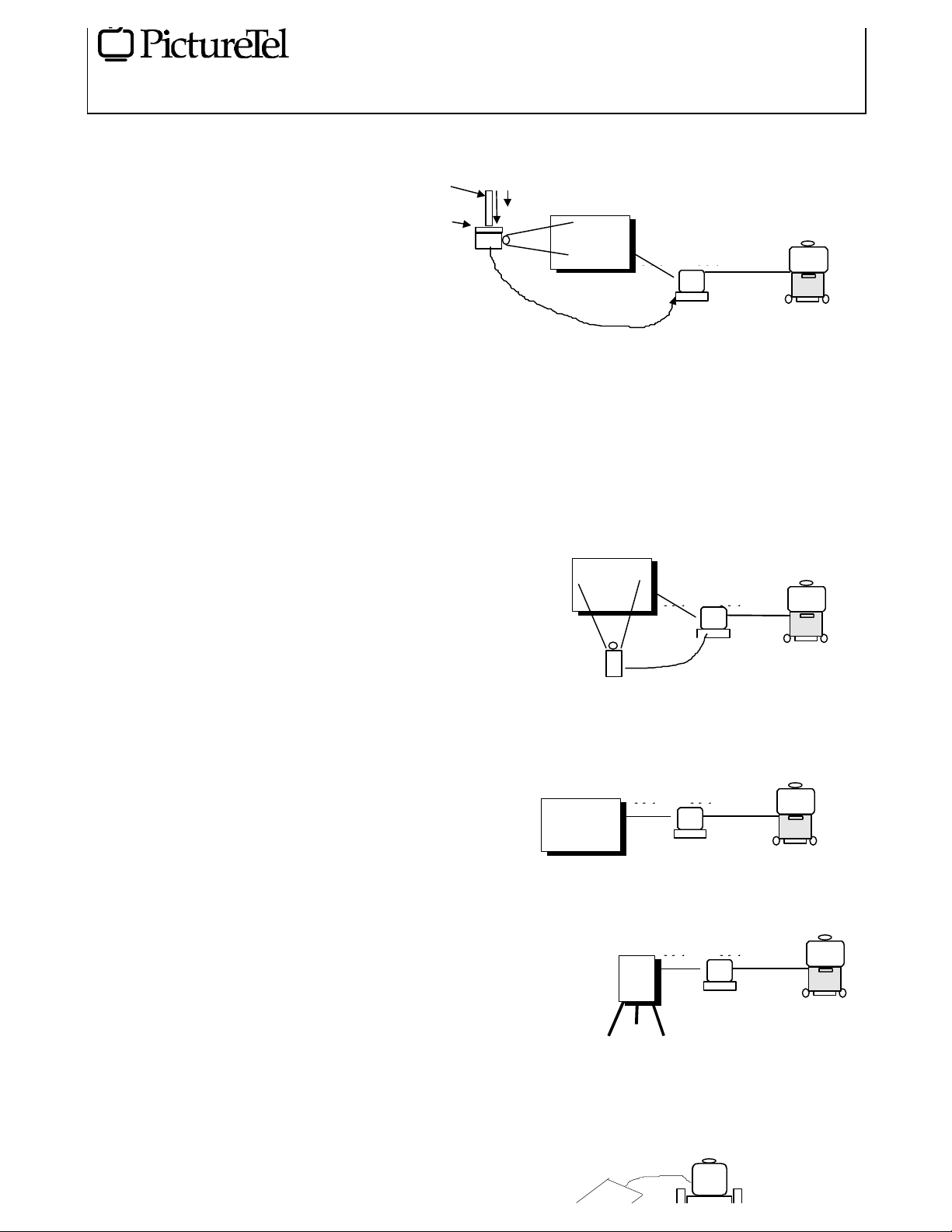
Pipe extension
Personal Whiteboard
Active area: 30cm (12”) x 30cm (12”)
Actual size: 38cm x 42cm
Soft flexible mat
Includes corded pen with right hand mouse switch
Power derived from COM port.
PC Specification
It is the customers responsibility to supply everything
listed below:
Win95
Internet Explorer with access to WWW either via modem or
LAN
NetMeeting 2.1 (4.3.2203) 2.1
2 x Serial Ports (115.2 kbps)
Ceiling mount kit
Projector
December 1998
cable for PC-Whiteboard, 7.5M (25') of serial cable PCCodec. Requires 2 x PWR-CBL-[x] for relevant country
60cm
116cm
Com2
600cm
1800cm
vga
Com1
750cm
PC
VCS
4. IBOARD-PRO 77" Interactive Whiteboard and
projector - Includes 6M (21') of serial cable for PCWhiteboard, 7.5M (25') of serial cable PC-Codec, 1.9M (6')
projector to PC VGA cable. Requires 2 x PWR-CBL-[x] for
relevant country
1 x bus mouse port (Must not be a serial mouse)
200Mhz Intel Pentium or better Intel processor
32Mb RAM
1.0Gb Hard Drive or better
Floppy
20X CD or better
Keyboard & Mouse
SVGA 800 x 600 monitor (running at different resolutions
can cause incompatibilities with remote ends)
PictureTel Model Number Description
Below is a description of what you will receive when you
order the relevant model numbers from the PictureTel
pricebook. It is important to study these carefully so that you
place the correct order for your customers. Please note that
the PC and VCS have been shown only for illustrative
purposes and are not included in the model numbers. The
individual product specifications are shown above.
Not including accessories there are 5 main model numbers:
1. IBOARD-PRO-KIT This all encompassing solution
includes the 77" Interactive Whiteboard, projector,
ceiling mount, variable pipe extension and 18M (60') of
VGA-PC extension cable - Includes 6M (21') of serial
PC
Com1
Com1
750cm
VCS
Com2
600cm
vga
Projector
4. IBOARD 77" Interactive Whiteboard - Includes 6M
(21') of serial cable for PC-Whiteboard, 7.5M (25') of serial
cable PC-Codec. Requires 1 x PWR-CBL-[x] for relevant
country, M-PEN and MARKER-KIT
190c
Com2
5. ICHART Interactive Flip Chart with metal stand.
Includes 6M (21') of serial cable for PC-Whiteboard, 7.5M
(25') of serial cable PC-Codec. Requires 1 x PWR-CBL-[x]
for relevant country
600cm
PC
Com2
750cm
VCS
Com1
600cm
Flipchart
PC
750cm
VCS
6. PBOARD Personal Interactive Whiteboard
Page 5
Peripheral Product
Interactive Whiteboards - PIB
WHITEBOARD - PIB Revision 3.0 5 of 7 Subject to change without notice December, 1998
Com2
Field Information & Sales Tools
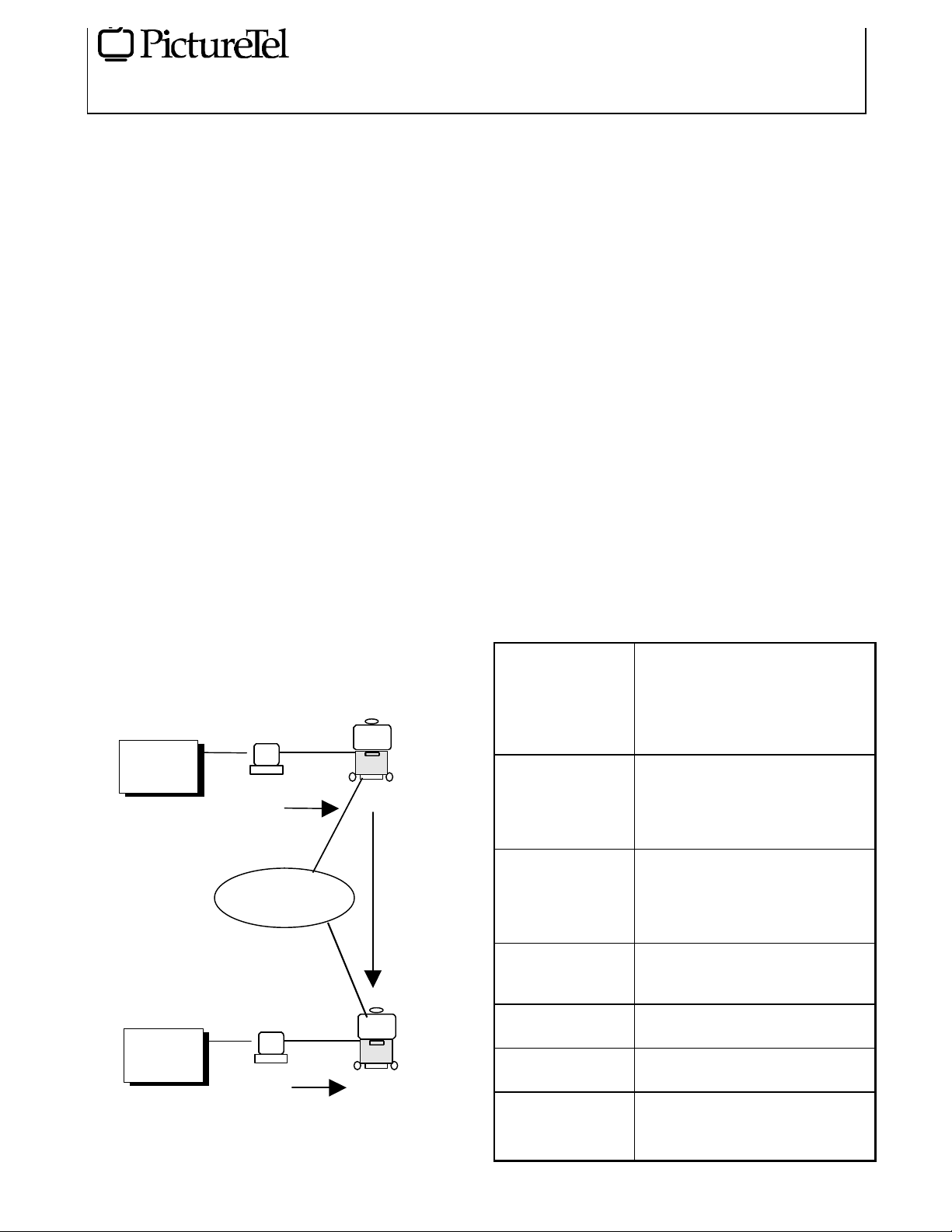
How To Make A Data Call
The user manual describes this in detail and should be
referred to. Below is a brief description of the process:
• Configure Netmeeting for Null Modem operation under
[Tools] [Options] [Protocols]. Select [Properties] to set
the Incoming call wait to 99 seconds and adjust the [Com
Properties] to 38400, 8 bits, 1 stop bit , No parity,
hardware Flow Control (note: Netmeeting returns “None”
afterwards). Set to “accept incoming calls” under [Tools]
[Options] [General]
• Setup the VCS dataport configured to “LiveShare Plus”
and at 38400 kbps. Do not use any other speeds
• When wanting to make a call always make the
Netmeeting call to the VCS before making the video call
if using dissimilar video conferencing systems. This is
done by selecting [Call] and entering COM1 (or COM2)
in the “Address” field and “Null Modem” in the “Call
Using” field. Once this is done you can make the video
call. The remote end will then also need to make a Call
from their Netmeeting to COM1
• If you are calling from a Concorde to a Concorde or
Venue to Venue or SwiftSite to SwiftSite then the steps
below can be used:
Site A
Steps:
Com2
Com1
December 1998
second is the “Presentation Tools”. Any application
driven from the toolbar is then automatically shared with
the remote end.
Pre-Requisites
The following common pre-requisites apply to the Interactive
Whiteboard and Flipchart:
The first release of this product will only support Win 95
platforms.
For use with Room Systems (Concorde Rev 6.30 or higher,
Venue 1.3 or higher, SwiftSite 1.3 or higher) via a customer
supplied PC in accordance with the above PC specification.
The personal Whiteboard requires Live200/LiveLAN
versions 1.5/3.1 (Win 95)
If the video call involves a Concorde and a SwiftSite/Venue
then the SwiftSite or Venue must start the video call. Starting
from the Concorde in this scenario will result in lower call
success.
Accessories
Some of these accessories come as standard with the product
(see Product Specification above) but can be ordered as
consumable items:
M-PEN Rechargeable Multimedia pen holder
that can take normal dry erasers as
supplied in MARKER-KIT .Always
used with Flipchart and needs to be
ordered separately if using the
Whiteboard without a projector.
M-PEN-INSERT Non marking inserts for the
PC
STEP 2
Network
Com1
STEP 2
PC
• If Site A is leading the meeting then once the Netmeeting
call is established Site A will need to share 2
applications: the first is the “Soft Key Driver” and the
Concorde
STEP 1
Concorde
MARKER-KIT This contains the marker pens that can
E-PEN Rechargeable electronic pen (non-
E-PEN-INSERT Non marking pen inserts for electronic
IBOARD-STAND Metal stand with wheels for mounting
VGA-EXT VGA extension cable from the PC to
multimedia pen. Only required if the
user wants to use either the
Whiteboard or Flipchart as a mouse
pad without marking it,
be inserted into the multimedia pen
(M-PEN). This also contains an eraser
and cleaning fluid. Only use these
marker pens for the multimedia pen.
marking) for use with interactive
Whiteboard and projector
pen (E-PEN)
Whiteboard if it is not fixed to the wall
the projector 18M (60’). Always
required when mounting projector in
the ceiling. Is part of IBOARD-PRO-
Page 6
Peripheral Product
Interactive Whiteboards - PIB
WHITEBOARD - PIB Revision 3.0 6 of 7 Subject to change without notice December, 1998
Field Information & Sales Tools
KIT
CEILING-MOUNT Quick release ceiling mount for the
projector. This is mostly used in
conjunction with the pipe extension for
a professional ceiling installation
PIPE-EXT A variable pipe length extension for
use with ceiling mount for the
projector. Adjustable from 60cm (24")
to 116cm (46")
PRO-LAMP Replacement lamp for the projector
Installation and Configuration
It is the customer’s responsibility for any mounting of the
Whiteboard and/or projector if that is required. This includes
the determination of whether their room has the appropriate
fixtures for mounting.
Where the customer makes use of their own cabling
PictureTel will not be responsible for that cabling nor the
operation of the equipment over the cabling. If PictureTel
installation has been chosen then the engineer will test the
functionality and prove the system with their own cables.
The PictureTel solution can run on most IBM compatible
PC’s in accordance with the PC specification supplied above.
However, PictureTel cannot be held responsible for any
conflicts on the customer supplied PC with the whiteboarding
software or Netmeeting.
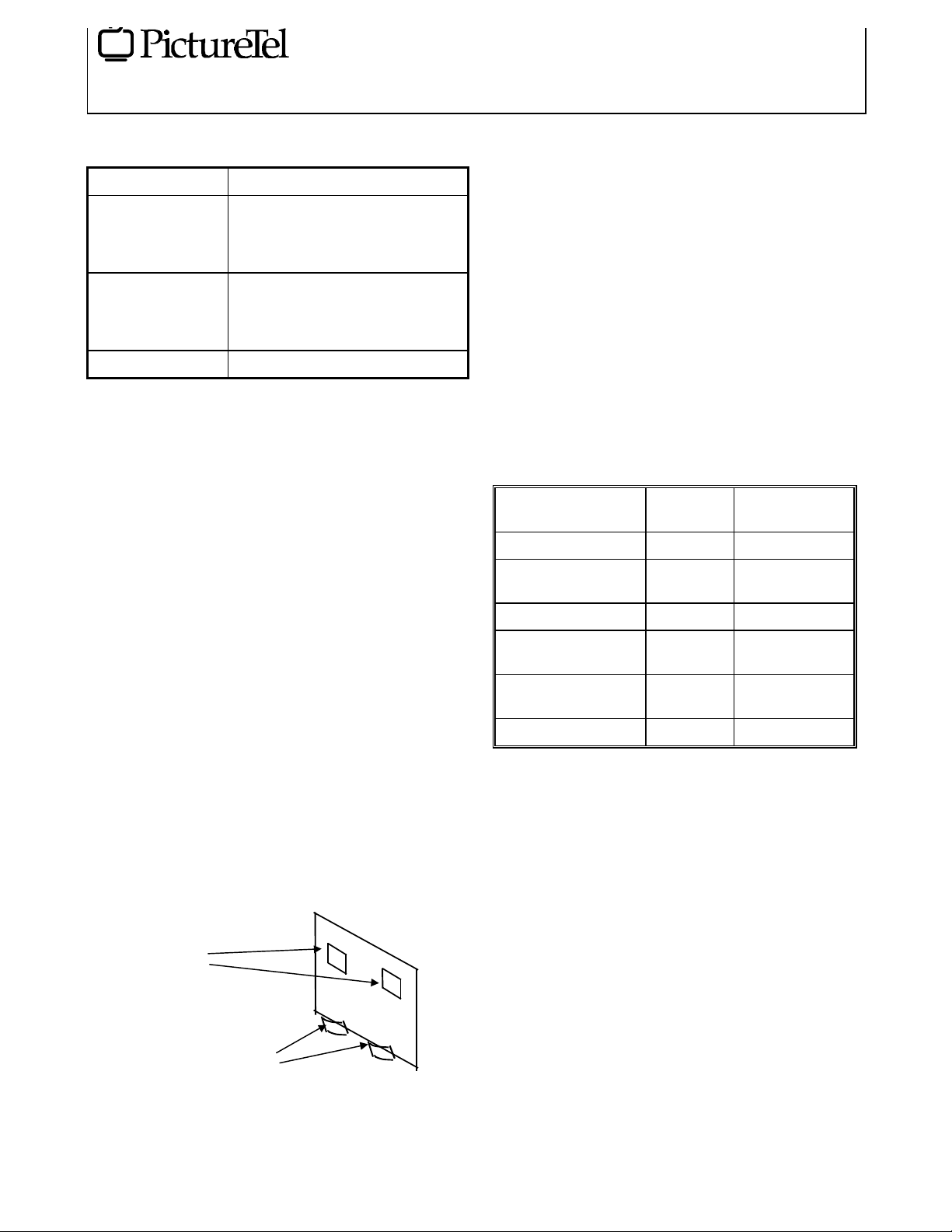
Note: The whiteboards are supplied with wall mounting
brackets. It is important that the 2 brackets are used o
support the Whiteboard on the bottom rim. There are 2
further brackets on the rear of the board that are only used to
balance the board and are not designed to be weight bearing.
December 1998
Availability
These products will be available worldwide. Please note that
initial introduction will be done on a regional basis, so it is
advisable to check with your PictureTel account manager as
to local availability.
Competition
No other video conferencing company has this range of ownbranded solutions as part of their standard portfolio. This
once again outlines one of the strengths of PictureTel in
being able o provide the total solution from single stop shop.
This adds to PictureTel’s unique position as being the leader
in collaborative business networking solutions provider.
Some companies, like Vtel, use SmartBoard as part of their
range.
MAIN
MANUFACTURERS
PictureTel See above Electromagnetic
Smart Technology SmartBoard Resistive (touch
Microfield SoftBoard Laser
IBID IBID xxx Resistive (touch
Quartet - IBID OEM Quartet
3M - Microfield OEM 3M 3000 Laser
PRODUCT
NAME
3000
TECHNOLOGY
sensitive)
sensitive)
Resistive
Unique Selling Point of PictureTel’s
Offering
a) Natural - The Whiteboard and Flipchart look and feel
exactly the same as normal whiteboards and flipcharts
thus making it easier to accept by users
b) Unique - Due to using electromagnetic technology it
allows for products like the Flipchart which is unique in
Balance brackets
Weight bearing brackets
that it can take a normal Flipchart pad that people can
write on using normal dry marker pens . The personal
Whiteboard is unique in that the local user can actually
write on normal paper placed on the mat. The
Whiteboard can also be used to trace large drawings (e.g.
A0 autocad). This range of features is not available from
any of the competition.
c) Scalable - Whole range of products from Whiteboard to
Flipchart to personal Whiteboard to fit any budget
d) Durable - The whiteboards and flipcharts are as durable
as normal whiteboards because they contain no moving
parts (SoftBoard does) and no delicate material (Smart
Page 7

Peripheral Product
Interactive Whiteboards - PIB
WHITEBOARD - PIB Revision 3.0 7 of 7 Subject to change without notice December, 1998
Field Information & Sales Tools
uses both glass and a soft film which is unlikely to stand
up to rigorous use)
e) Size - At 77” diagonal the PictureTel Whiteboard is the
largest on the market in its class. There is also the
possibility to have custom built whiteboards (w/o
projector) that can be even larger.
f) PictureTel branding - To the end user it is one solution
and one supplier and one point of contact
g) Single stop shop - To the channels the whole solution is
available from PictureTel with
marketing/sales/service/installation/training and technical
support.
h) Global Support - PictureTel is represented all around
the world
Support
The PictureTel whiteboards are covered by PictureTel's
standard service and support policies. Please refer to the
Price Schedule for additional information. Any items not
supplied by PictureTel will not be supported: this includes
the PC and any functionality related to Netmeeting, which is
the responsibility of MicroSoft
December 1998
References
• Price Schedule, PictureTel Corp.
 Loading...