

Page 1
Homeowner guide
PY701-PRT-Packging_HomeownerGuide_5.indd 1 10/9/17 10:10 AM
PY701-PRT-Packging_HomeownerGuide_5.indd
Job #
Job Name
Creative
Media
Color
Pages
Binding
Bleed
Trim (flat)
Folded
Notes Notes
PY701
Phyn Packaging
Homeowner guide
Booklet
1C: PMS 2387U
12 (reader spreads)
Saddle stitched
10.25”w x 6.75"h
10"w x 6.5"h
5"w x 6.5"h
CD
AD
CW
Brand Impact
Studio
Jason
Rob
Dan
Molly
Lindy
enso
Page 2

Thanks for choosing Phyn
We sincerely appreciate you bringing Phyn into your home, and promise
to be a good houseguest.
Phyn is a smart water assistant that starts to learn about your plumbing
system as soon as you’re connected. By analyzing your water pressure
as you go about your routine, Phyn gets to know the subtle dierences
between a running bath and a burst pipe.
Phyn Plus monitors your entire home’s water from a single location on
the main water line, alerting you to potential leaks the moment they’re
detected, and giving you the power to turn o your water remotely using
the Phyn app.
This guide will help get your Phyn Plus up and running, and get you
connected to Phyn and speaking water.
Pour obtenir des instructions en français, visitez phyn.com/manual/fr
1
PY701-PRT-Packging_HomeownerGuide_5.indd 2-3 10/9/17 10:10 AM
Page 3
Phyn and your privacy
We’re open about how we use data, and we’ll always get your permission
before sharing any personally identifiable information. To learn more
about our Privacy Policy, visit phyn.com/privacy
Pairing Phyn Plus to your
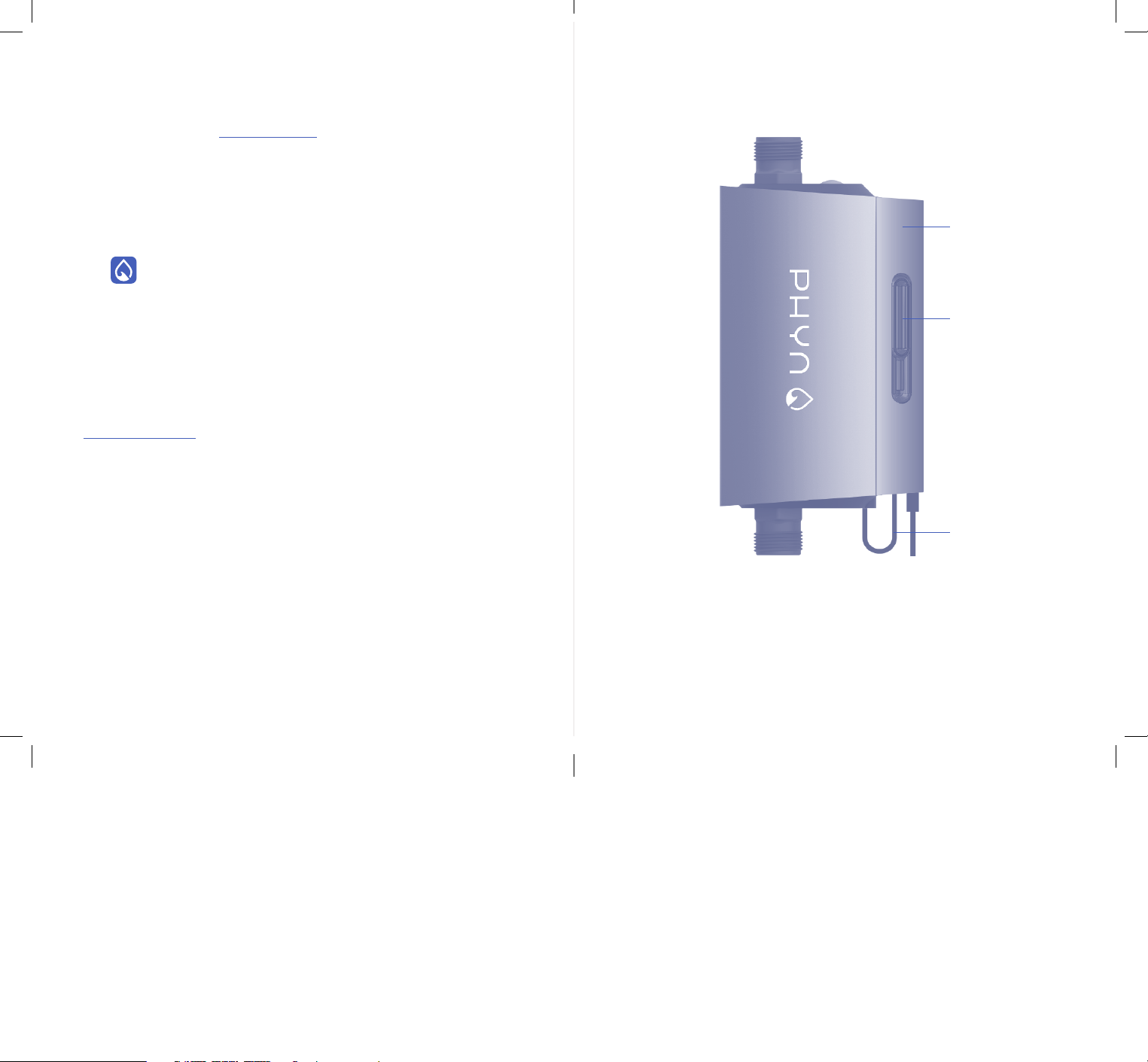
A guide to Phyn Plus
Wi-Fi network
1 Download the free Phyn app, available from both
the Apple App Store and Google Play.
2 Follow the steps in the app to create your Phyn account.
3 Follow the in-app prompts to connect Phyn Plus to your
home’s Wi-Fi.
Need help? We’re here for you
Visit phyn.com/installhelp for installation videos and additional tips.
Mounting bracket &
A
integrated power supply
Power connector
C
cable
A
B
C
Detachable manual
B
shuto valve tool
32
PY701-PRT-Packging_HomeownerGuide_5.indd 4-5 10/9/17 10:10 AM
Page 4
How to control the shuto valve
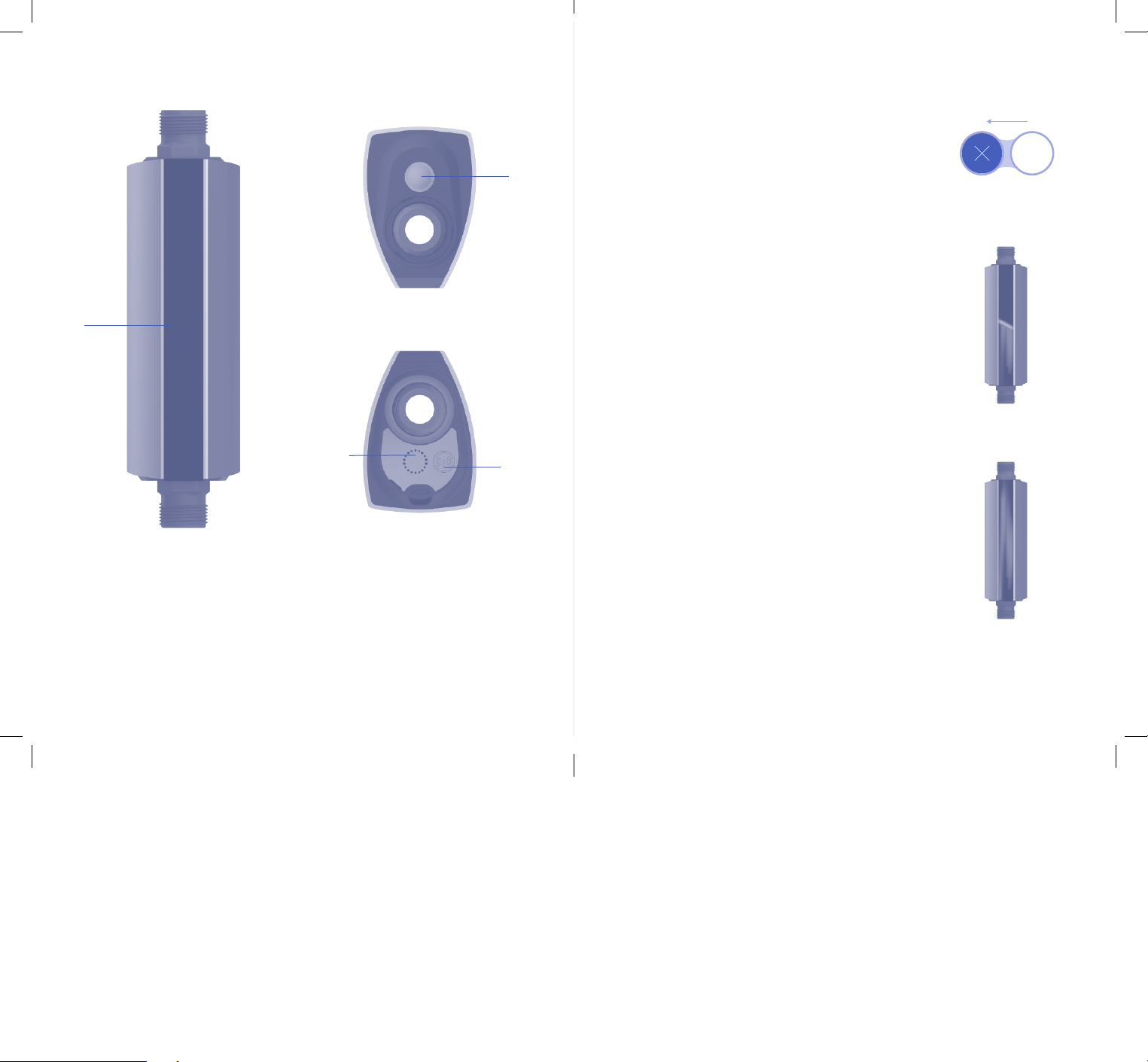
Front
Top
E
D
Bottom
Via the app
You can turn o your water remotely right from the
home screen of the Phyn app by sliding the Water
toggle from “On” to “O.” To turn your water back on,
simply slide the toggle back to “On.”
From the device, when it is powered on
To engage the shuto valve from the device itself, locate
the Action button on the top of the unit and hold it down
until shuto is activated. The LED animation on the front
of the unit will show a stop to the flow of water
to indicate your water has been turned o.
Water is O
Manually, when the device isn’t powered
F
LED display panel
D
Action button
E
(used to reset the device
and engage the shuto valve)
PY701-PRT-Packging_HomeownerGuide_5.indd 6-7 10/9/17 10:10 AM
Shuto valve access port
F
External Wi-Fi antenna port
G
(antenna not included)
G
In the event of a power outage, the shuto valve will
remain in the same position it was in when power was
lost. If there is a need to turn the water o (or on) while
the device is not powered:
1 Remove the manual shuto valve tool from the
mounting bracket.
2 Locate the shuto valve access port on the
underside of the unit and remove its cover.
3 Use the tool to turn the shuto valve to the
“Close” position to turn o your water, or to
the “Open” position to turn on your water.
O
On
54
Page 5

How to restore Phyn Plus
to factory settings
To restore Phyn Plus to its factory settings, locate the Action button on
the top of the unit. Tap the button three times, then press and hold it
for 5 seconds. Once the device has restored itself, you will need to
re-connect it to your home Wi-Fi network (see “Pairing Phyn Plus to
your Wi-Fi network” on page 2).
Safety precautions
• Do not block airflow to Phyn Plus. Keep immediate surrounding
area clear.
• Use cable tie mounts to ensure that no cables are hanging loose
and creating a hazard.
Support & Warranty
Phyn Plus comes with a 2-year limited warranty. For full product
warranty terms, conditions and information, visit phyn.com/warranty
or request a free hard copy of our warranty by sending a
self-addressed stamped envelope to: Phyn Plus warranty request,
1855 Del Amo Boulevard, Torrance, CA 90501
Terms of Service
Use of Phyn Plus requires creation of a Phyn account and acceptance
of terms of service, which can be found online at phyn.com/terms
Patents
For a full list of patents, visit phyn.com/patents
• To avoid risk of fire and shock: use only the provided cable
and power adapter.
• To avoid risk of serious injury: keep Phyn Plus and all components
out of the reach of children and pets.
• We recommend using only an electrical outlet equipped with
a ground fault circuit interrupter (GFCI) (look for “Test” and
“Reset” buttons on your outlet).
• Phyn does not provide third-party monitored emergency
notification or response.
WARNING: This product may contain chemicals
known to the State of California to cause cancer,
birth defects or other reproductive harm.
PY701-PRT-Packging_HomeownerGuide_5.indd 8-9 10/9/17 10:10 AM
Requirements
• Wi-Fi 802.11 b/g/n, 2.4 GHZ
• Working broadband internet connection
• Compatible phone or tablet with the Phyn app installed and SMS
Phyn Plus requires a Wi-Fi internet connection in your home. The
device may be subject to interruptions or failures for reasons beyond
Phyn’s control, like poor or spotty Wi-Fi connectivity or broadband
service provider outages. For a full list of requirements, visit
phyn.com/requirements
76
Page 6

FCC Statement
This device complies with Part 15 of the FCC Rules. Operation is subject to the following two
conditions: (1) This device may not cause harmful interference, and (2) this device must accept any
interference received, including interference that may cause undesired operation.
This product has been tested and complies with the specifications for a Class B digital device,
pursuant to Part 15 of the FCC Rules. These limits are designed to provide reasonable protection
against harmful interference in a residential installation. This equipment generates, uses, and
can radiate radio frequency energy and, if not installed and used according to the instructions,
may cause harmful interference to radio communications. However, there is no guarantee that
interference will not occur in a particular installation. If this equipment does cause harmful
interference to radio or television reception, which is found by turning the equipment o and on, the
user is encouraged to try to correct the interference by one or more of the following measures:
• Reorient or relocate the receiving antenna
• Increase the separation between the equipment and devices
• Connect the equipment to an outlet other than the receiver’s
• Consult a dealer or an experienced radio/TV technician for assistance
FCC Caution: Any changes or modifications not expressly approved by the party responsible for
compliance could void the user’s authority to operate this equipment.
FCC Radiation Exposure Statement
This equipment complies with FCC radiation exposure limits set forth for an uncontrolled
environment. This equipment should be installed and operated with minimum distance 35 cm
between the radiator and your body. This device and its antenna(s) must not be co-located or
operating in conjunction with any other antenna or transmitter except in accordance with FCC
multi-transmitter product procedures.
Innovation, Science and Economic Development Canada Statement
CAN ICES-3 (B)/NMB-3 (B)
Operation is subject to the following two conditions: (1) This device may not cause interference,
and (2) this device must accept any interference, including interference that may cause undesired
operation of the device.
The device could automatically discontinue transmission in case of absence of information to
transmit, or operational failure. Note that this is not intended to prohibit transmission of control or
signaling information or the use of repetitive codes where required by the technology.
Innovation, Science and Economic Development Canada Radiation Exposure Statement
This equipment complies with IC radiation exposure limits set forth for an uncontrolled environment.
This equipment should be installed and operated with minimum distance 35 cm between the radiator
and your body.
This device and its antenna(s) must not be co-located or operating in conjunction with any other
antenna or transmitter except in accordance with IC multi-transmitter product procedures.
©2018 Phyn LLC. Phyn is a trademark of Belkin International, Inc. All rights reserved.
All trade names are registered trademarks of respective manufacturers listed. App Store is
a service mark of Apple Inc. Wi-Fi is a registered trademark of the Wi-Fi Alliance. Google
Play is a trademark of Google Inc.
Engineered in Torrance, CA
Manufactured in USA
Assembled in Mexico
Phyn LLC
1855 Del Amo Blvd
Torrance, CA, USA 90501
8
PY701-PRT-Packging_HomeownerGuide_5.indd 10-11 10/9/17 10:10 AM
Page 7

PY701-PRT-Packging_HomeownerGuide_5.indd 12 10/9/17 10:10 AM
 Loading...