

Page 1

PRM90U21C
User’s Manual
Prepared by PHYCHIPS
Page 2
Overview
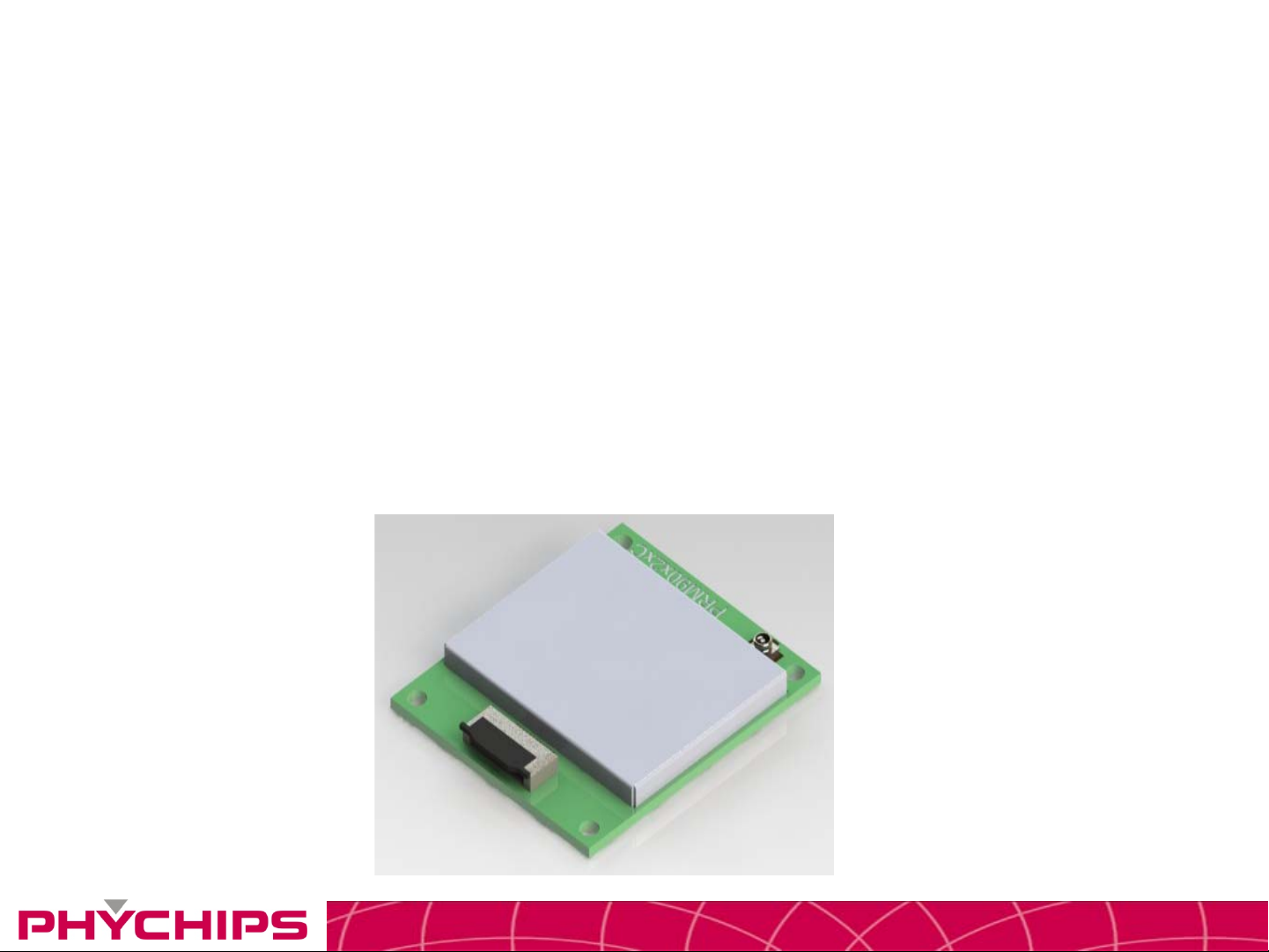
• The PRM90U21C is a UHF RFID Reader hybrid module which integrates high performance UHF
RFID reader chipset, VC-TCXO, Low Drop Regulator, Balun, Coupler, Saw filter, Power amp,
Isolator and low pass filter.
• UHF RFID reader chipset uses PR9000 of PHYCHIPS which integrates 900MHz radio, baseband
processor, industry standard enhanced 8052 MCU, memory (64k Flash & 16k SRAM) and many
other features.
• This module fully compliant with ISO18000-6C/EPC Global Gen II reader protocol and provide all
functions of PR9000. Also reduce size, cost and power consumption.
CONFIDENTIAL2
Page 3
Pin Description
CONFIDENTIAL3
Page 4
Pin Description
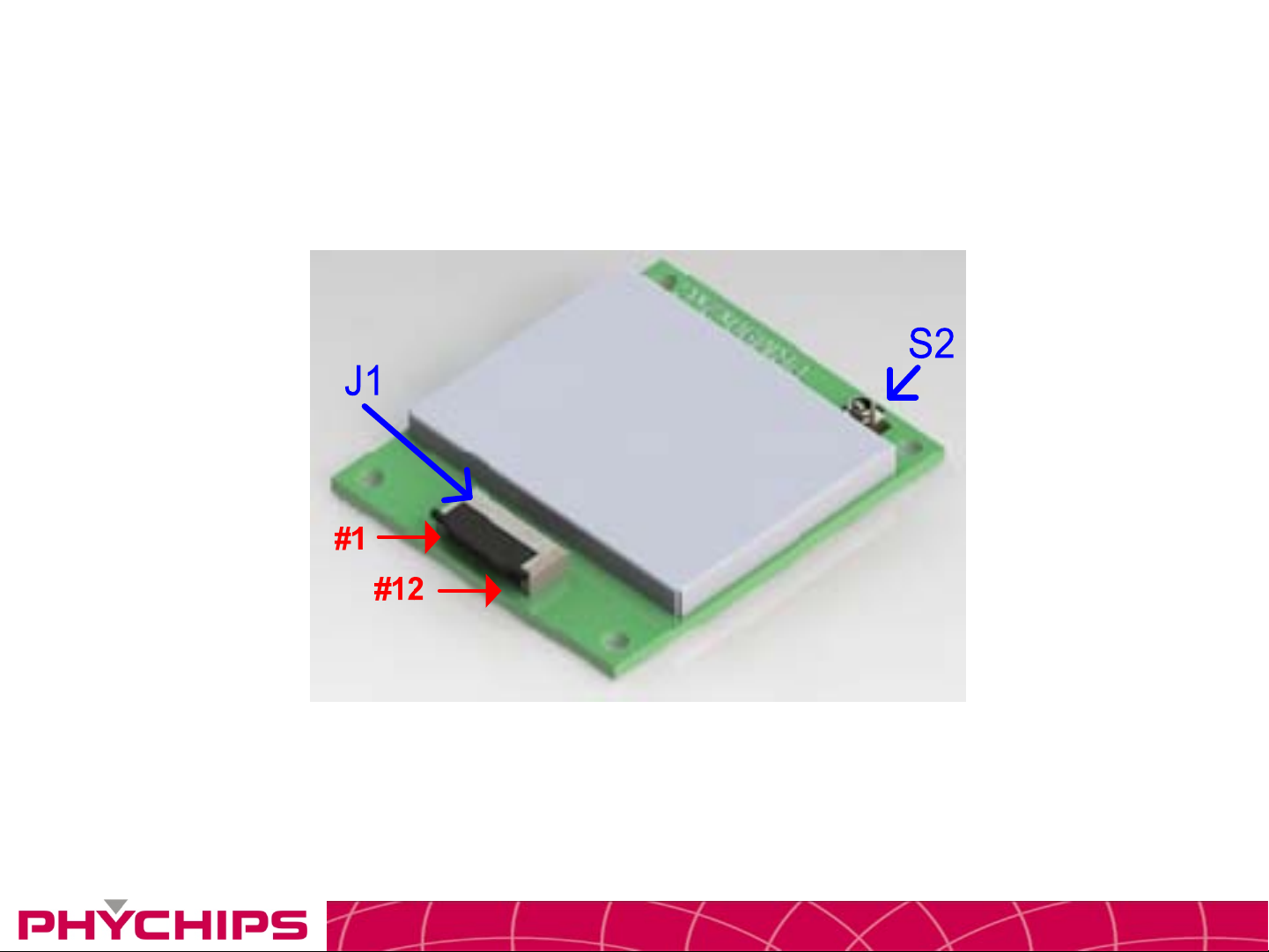
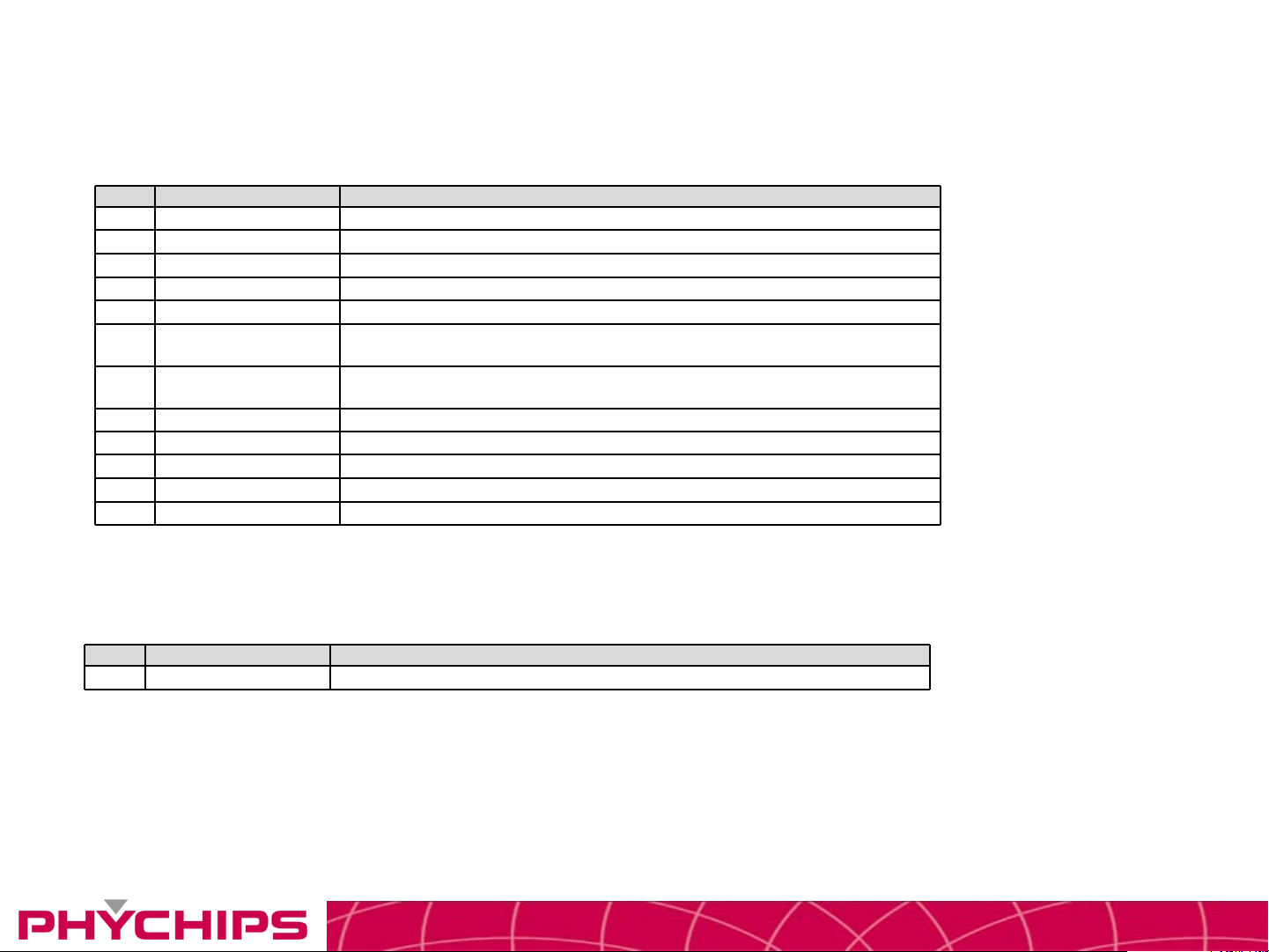
J1 (Part No. : 88511-1201-001 by Aces)
No. Pin Name Description
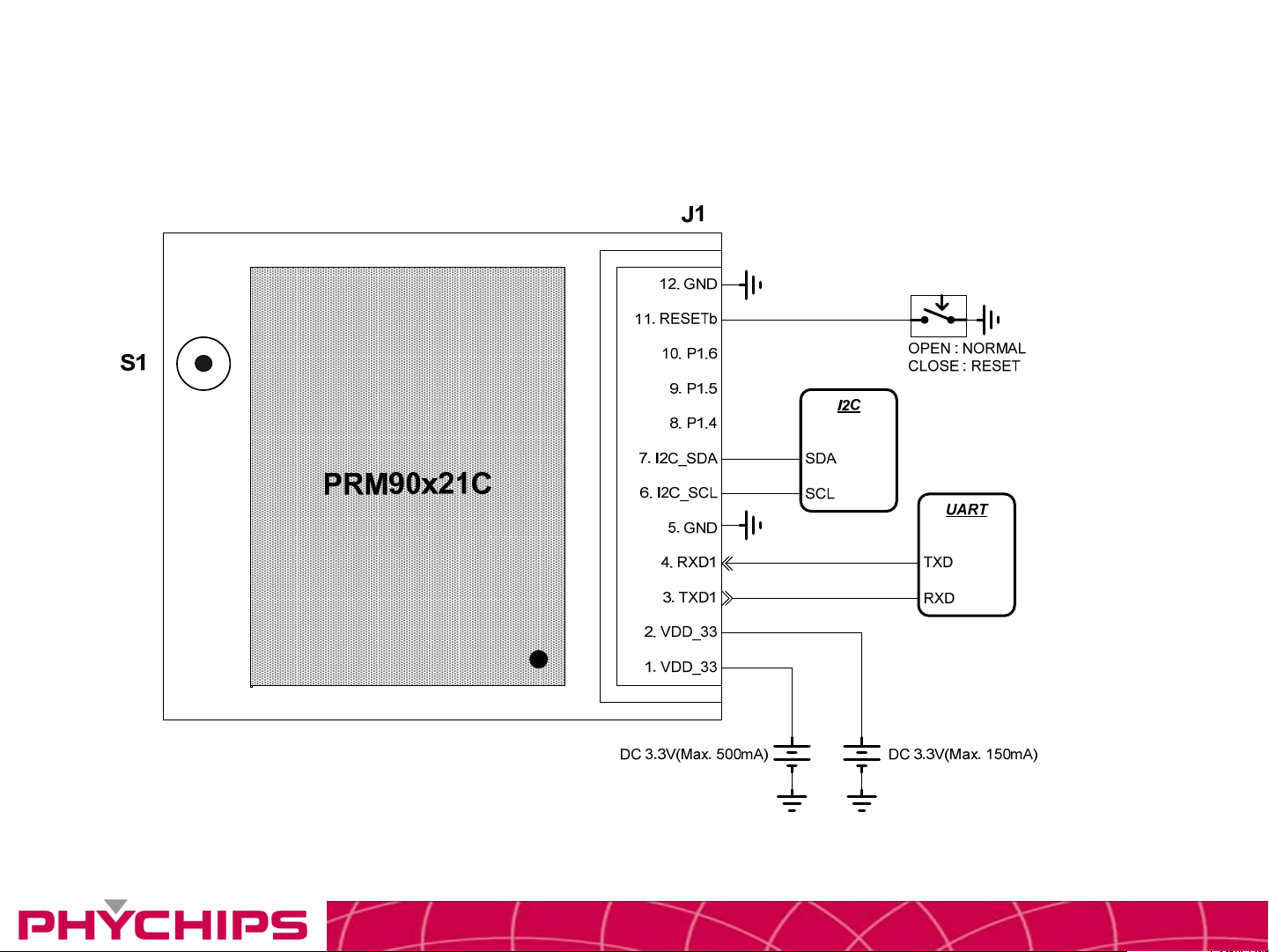
1 VDD_33 3.3V DC Power for Power Amp(Max. 500mA)
2 VDD_33 3.3V DC Power Supply for SOC(Max. 1 5 0mA)
3 TXD1 Quasi-bidirectional I/O port or Serial Port 1 Output
4 RXD1 Quasi-bidirectional I/O port or Serial Port 1 Input
5 GND Ground
6 I2C_SCL
7 I2C_SDA
8 P1.4 Quasi-bidirectional I/O port or External Interrupt 2 (Positive Edge)
9 P1.5 Quasi-bidirectional I/O port or External Interrupt 3 (Negative Edge)
10 P1.6 Quasi-bidirectional I/O port or External Interrupt 4 (Positive Edge)
11 RESETb External Reset for SOC
12 GND Ground
I/O for I2C. The pull-up resistor is always switched on.
This port is quasi-bidirectional
I/O for I2C. The pull-up resistor is always switched on.
This port is quasi-bidirectional
RF IO (Part No. : U.FL Jack Type)
No. Pin Name Description
S2 RF IO Rx Input / Tx Output, U.FL Type
CONFIDENTIAL4
Page 5
Application Circuit
CONFIDENTIAL5
Page 6
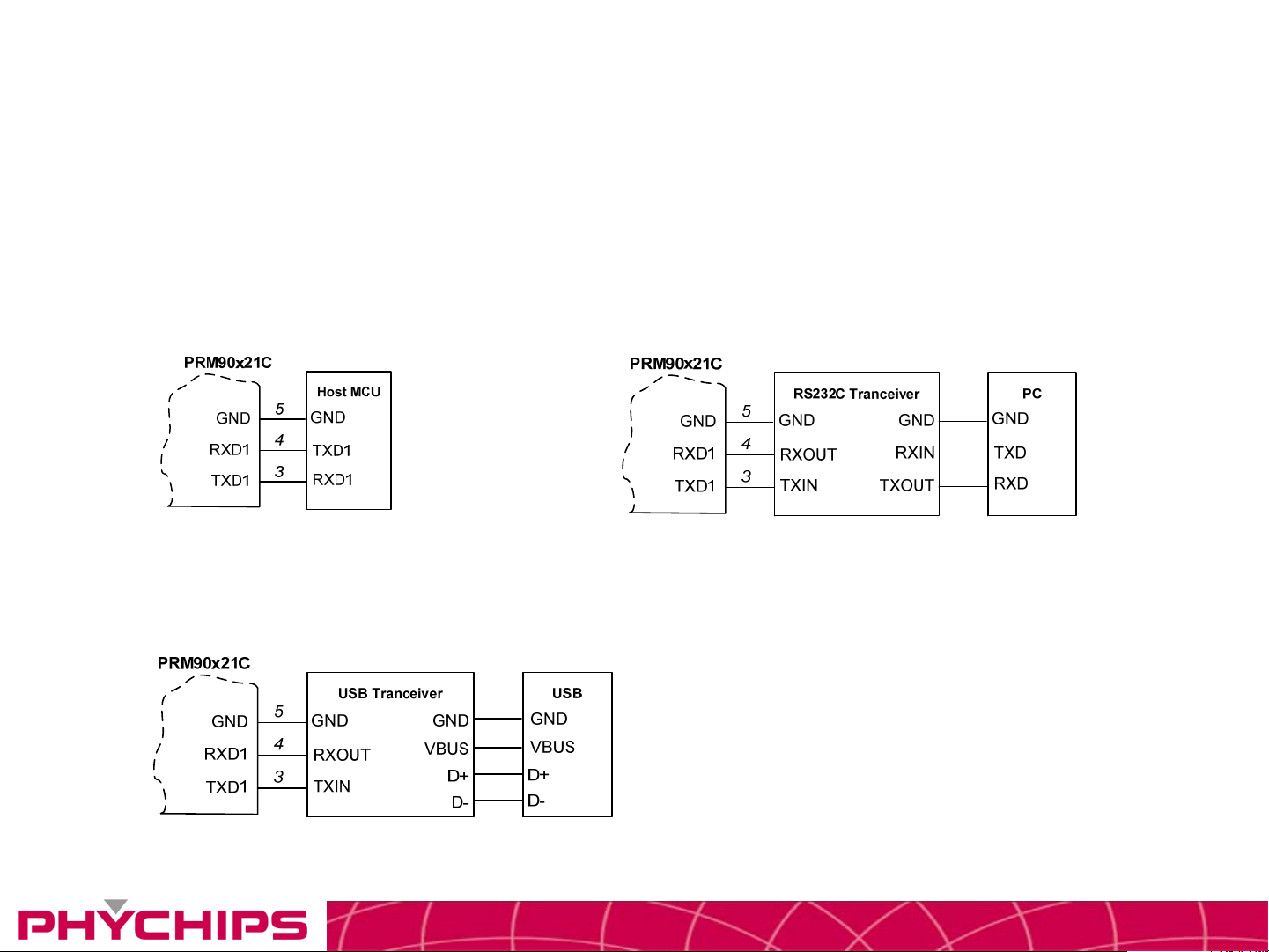
UART Connection
• The serial interface assigned to two pins. RXD1is for receiving command from host
and TXD1 is for transmitting response to host. Pin connection is shown as below
figure.
<Connecting to Host MCU> <Connecting to RS232 Transceiver>
<Connecting to USB Transceiver>
CONFIDENTIAL6
Page 7
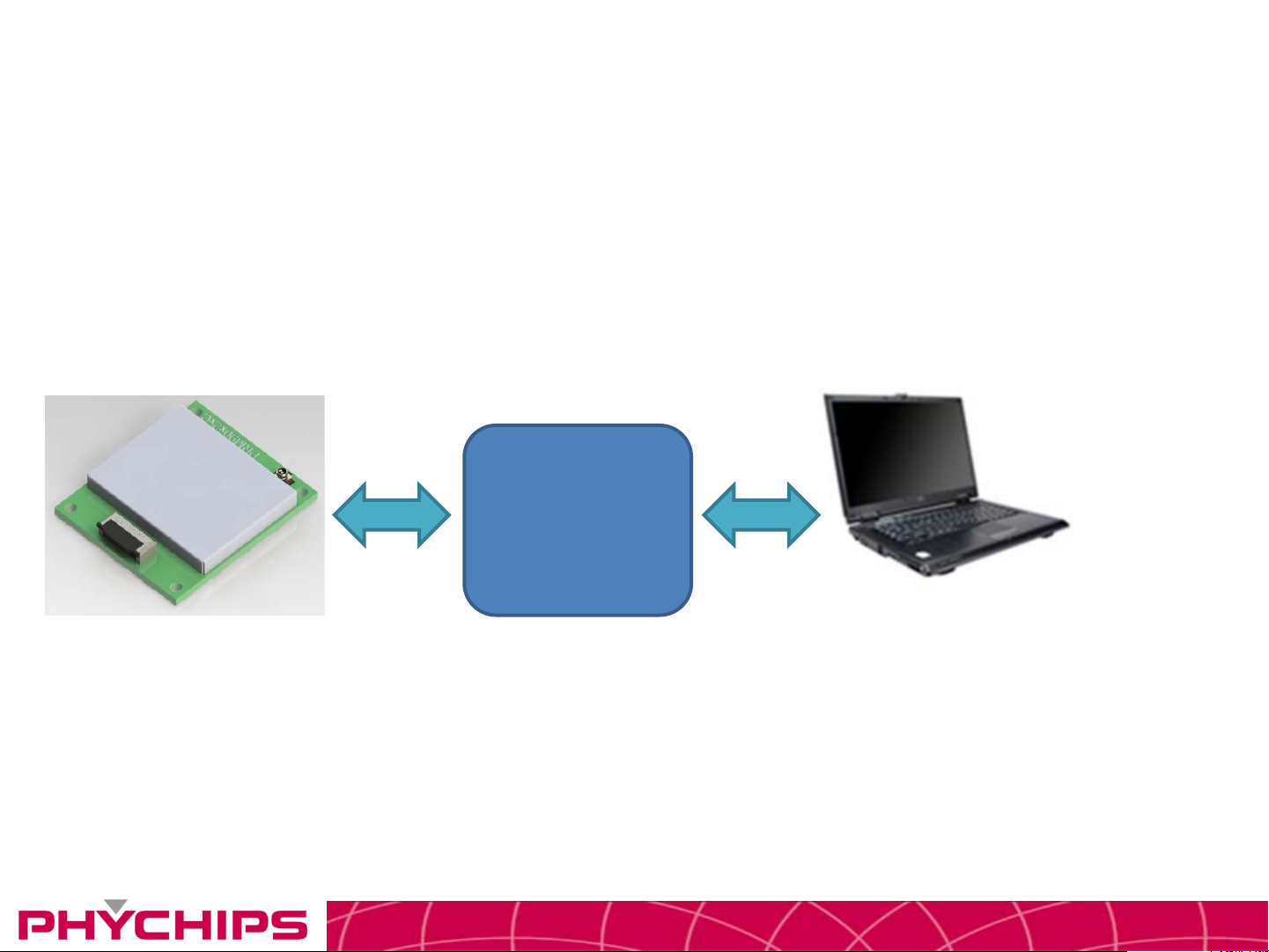
Using GUI
• Connect PC to Reader Module by UART
Controller
USB
CONFIDENTIAL7
Page 8
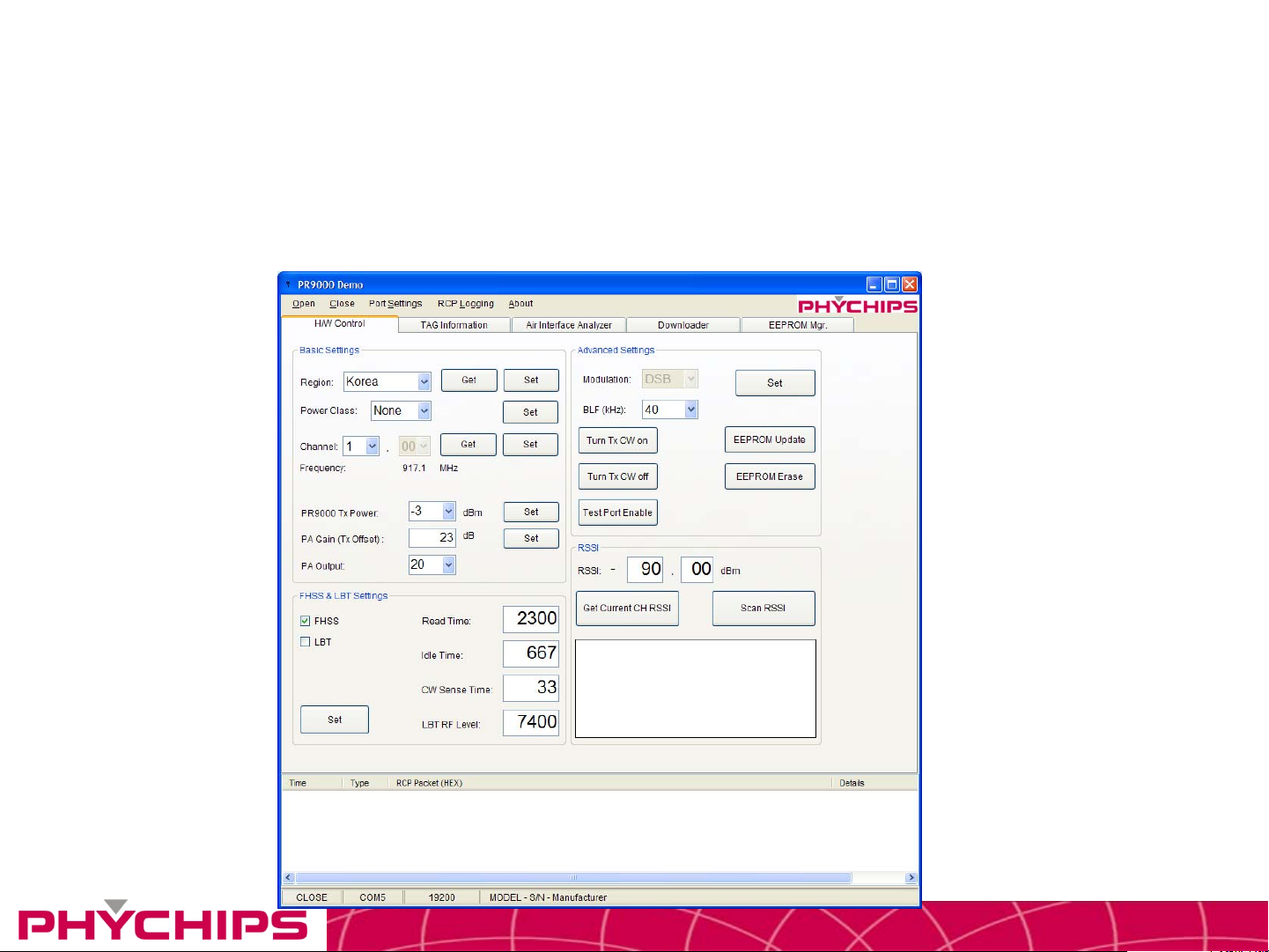
Using GUI
• The GUI is for the user to be able to quickly get started working with PRM90U21C RFID reader. To run the GUI,
click the Windows start button, Program menu, Phychips, PR9000 SDK. After start-up, a window will be opened
as shown below.
CONFIDENTIAL8
Page 9
Using GUI
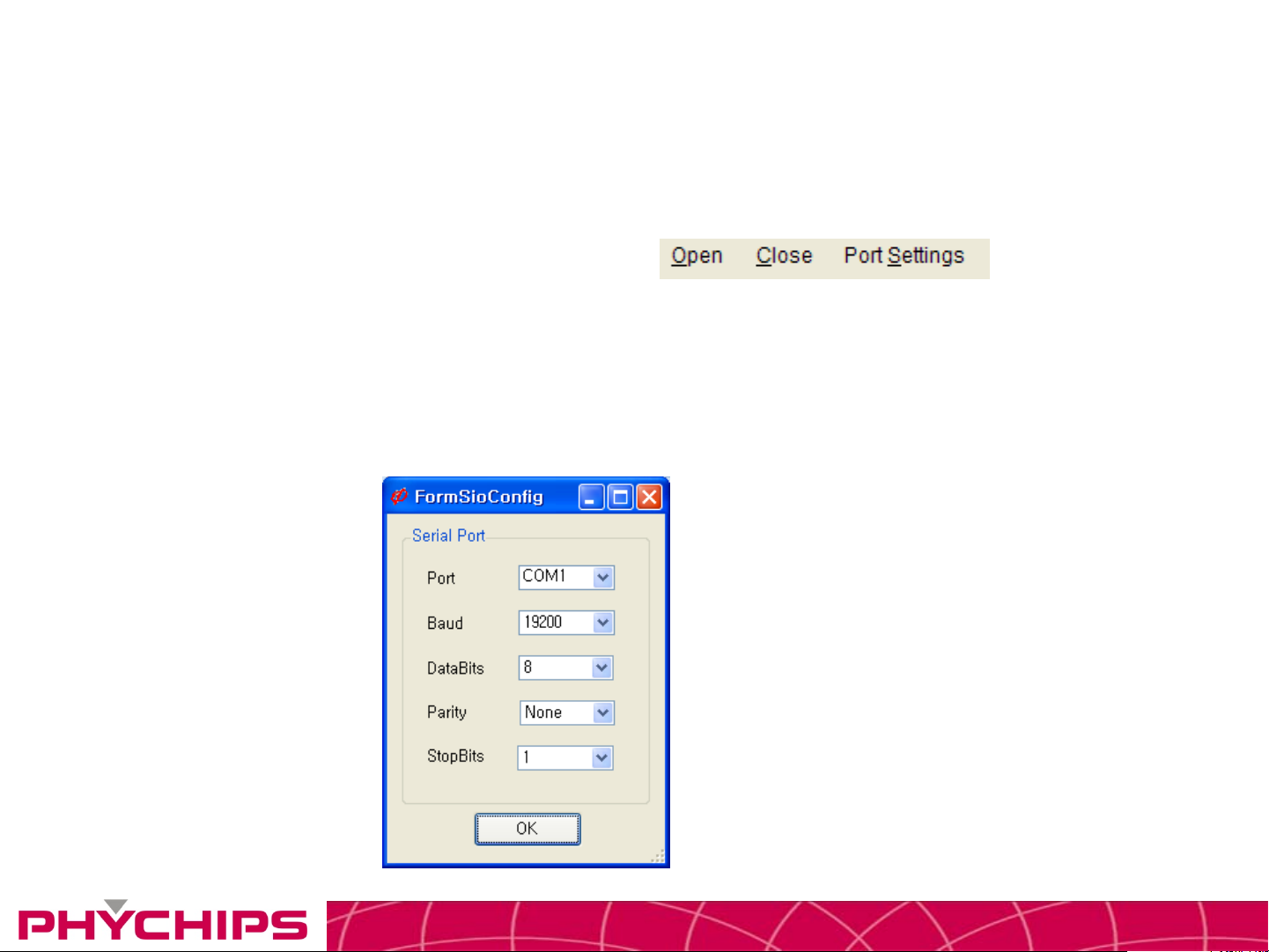
• Serial Port Control
– Serial port is controlled by below menu.
– To open serial port, click Open menu.
– To close serial port, click Close menu.
• Serial Port Configurations
– Port number is selectable from COM1 upto COM9. (Depending on your Windows system
settings) Baud Rate should be set 19200 bps
Port Settings
CONFIDENTIAL9
Page 10
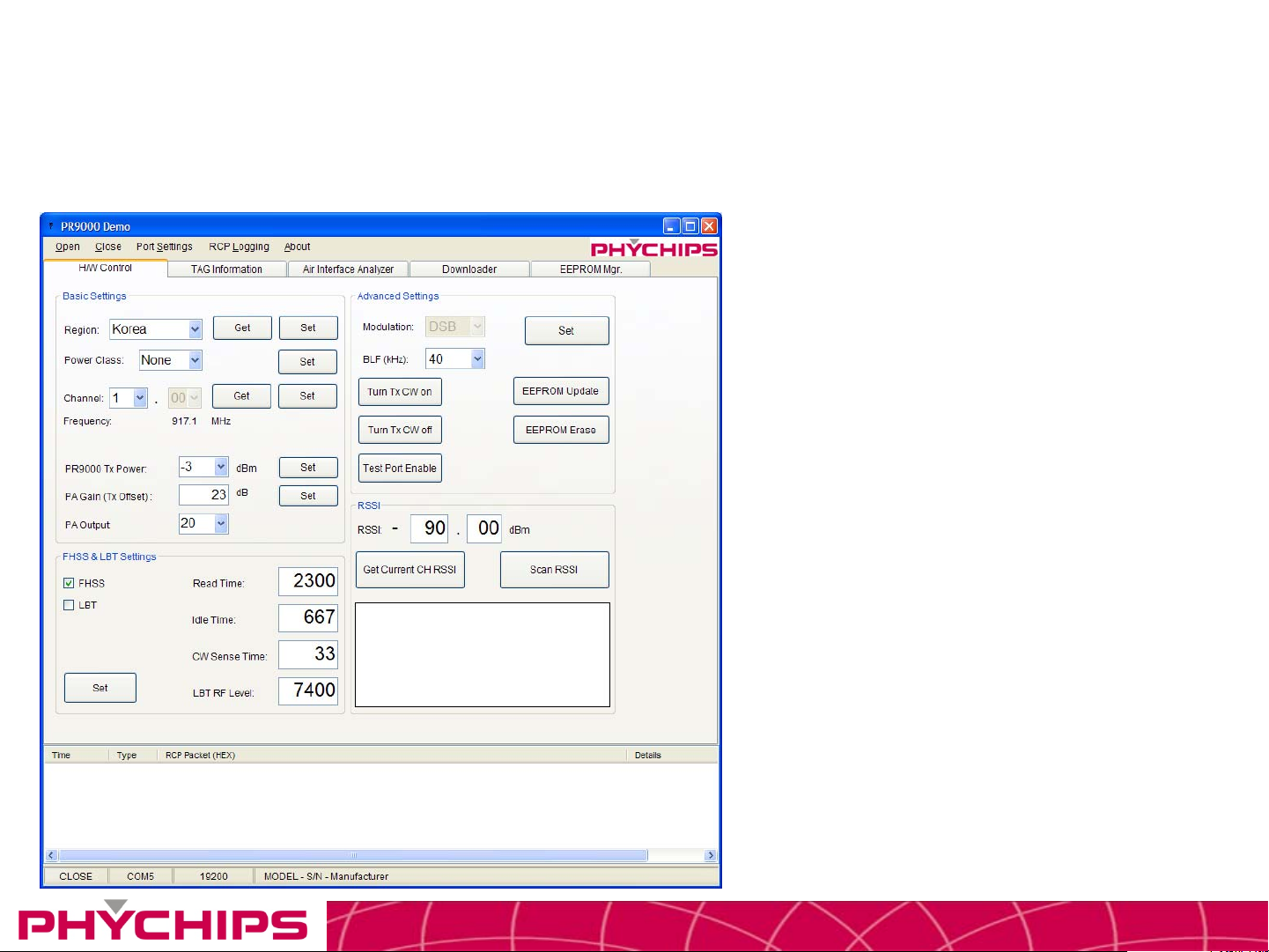
Using GUI
CW Mode
12
3 4
5 6
7
8
1. Port Setting
- Baud Rate : 19200
- Data Bits : 8
- Parity : None
9
- Stop Bit : 1
2. Click to Open
3. Select Region : Europe
4. Click to Set Button
5. Select Channel
6. Click to Set Button
7. Select Tx Power : 1dBm
8. Click to Set Button
9. Click to Turn Tx CW on Button
CONFIDENTIAL10
Page 11
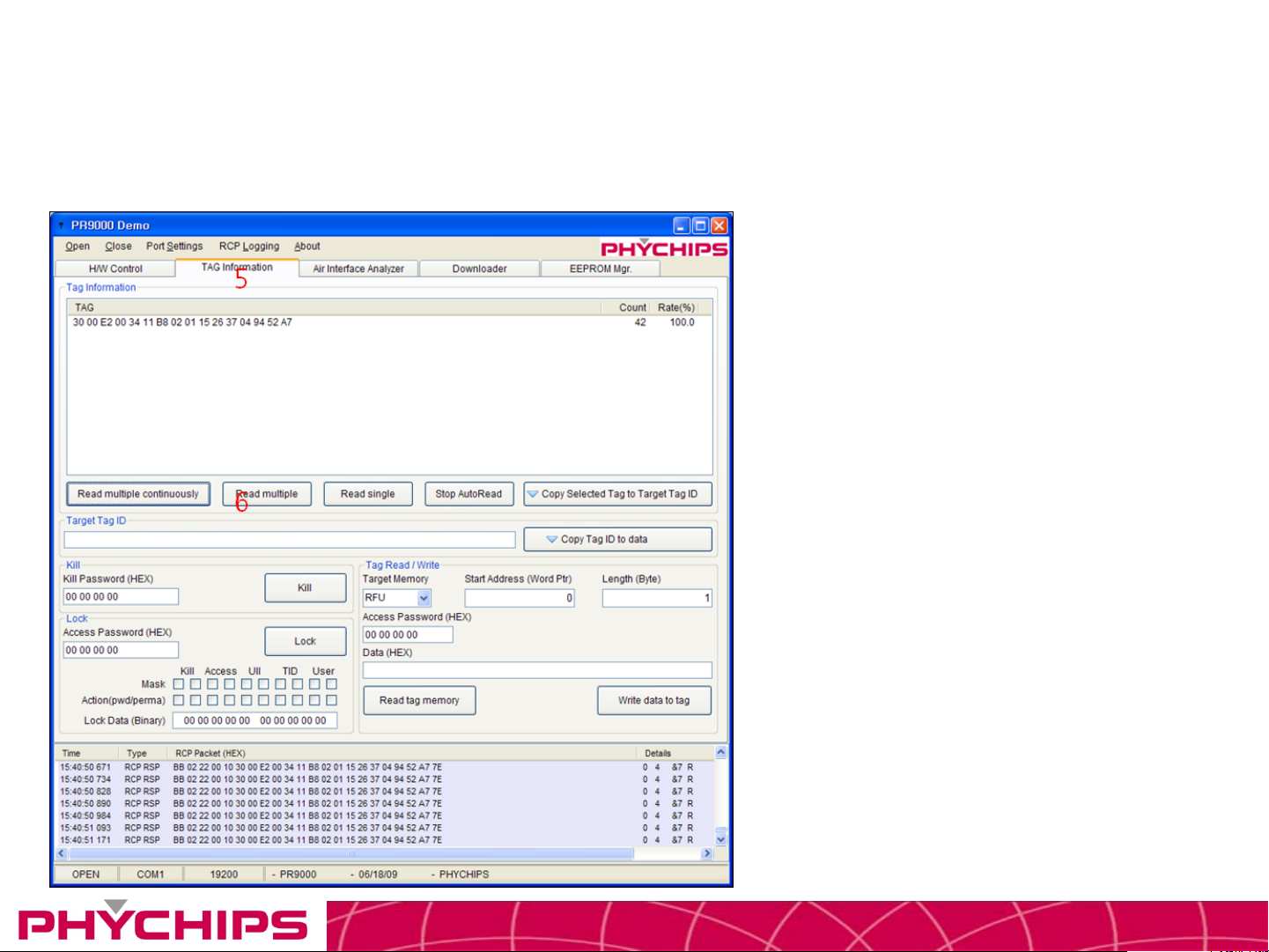
Using GUI
Read/Write Mode
5. Click to TAG Information tab.
6. Click to Read multiple button
CONFIDENTIAL11
Page 12

• FCC Information to User
• This equipment has been tested and found to comply with the limits for a Class B digital device,
pursuant to Part 15 of the FCC Rules. These limits are designed to provide reasonable protection
against harmful interference in a residential installation. This equipment generates, uses and can
radiate radio frequency energy and, if not installed and used in accordance with the instructions,
may cause harmful interference to radio communications. However, there is no guarantee that
interference will not occur in a particular installation. If this equipment does cause harmful
interference to radio or television reception, which can be determined by turning the equipment off
and on, the user is encouraged to try to correct the interference by one of the following measures:
• • Reorient or relocate the receiving antenna.
• • Increase the separation between the equipment and receiver.
• • Connect the equipment into an outlet on a circuit different from that to which the receiver is con-
nected.
• • Consult the dealer or an experienced radio/TV technician for help.
• Caution
• Modifications not expressly approved by the party responsible for compliance could void the user’s
authority to operate the equipment.
• FCC Compliance Information : This device complies with Part 15 of the FCC Rules. Operation is
subject to the following two conditions: (1) This device may not cause harmful interference, and (2)
this device must accept any interference received, including interference that may cause undesired
operation
• IMPORTANT NOTE:
• FCC RF Radiation Exposure Statement:
• This equipment complies with FCC RF radiation exposure limits set forth for an uncontrolled
environment. This equipment should be installed and operated with a minimum distance of 20
centimeters between the radiator and your body.This transmitter must not be co-located or
operating in conjunction with any other antenna or transmitter.
CONFIDENTIAL12
 Loading...