

Page 1
SISTEMA PER GUIDA
INTELLIGENTE
SMART DRIVING
AUXILIARY SYSTEM
ANDROID 5.0
MANUALE ISTRUZIONI • INSTRUCTIONS MANUAL
NOTICE DE MONTAGE ET D’EMPLOI • GEBRAUCHSANWEISUNGEN
MANUAL DE INSTRUCCIONES
IT
GB
FR
DE
ES
VM321
02/2018
Page 2

Avvertenze • Warning • Avertissements • Warnungen • Advertencias
IT -
Non installare l’unità dove possa limitare il campo di visibilità del conducente. • Non tentare di riparare l’unità a
utonomamente. Il montaggio o le riparazione devono essere effettuate solo da esperti. ATTENZIONE la versione
android 5.0 non è aggiornabile. Rivolgersi all’assistenza.
GB -
Do not install the unit where it can limit the field of vision of the driver. • Do not attempt to repair the unit
yourself. Assembly and repair must be performed by qualified technicians. PLEASE NOTE that the ANDROID 5.0
version is not upgradeable. Get in touch with the Technical Support.
FR
-
Ne pas installer l’unité où le champ de visibilité du conducteur peut être limité. • Ne pas essayer de réparer
l’appareil vous-même. L’assemblage ou la réparation doit être effectuée uniquement par des experts.
ATTENTION: la version ANDROID 5.0 ne peut être mise à jour. Contacter le support technique.
DE -Installieren Sie das Gerät nicht, wo das Sichtfeld des Fahrers eingeschränkt werden kann. • Versuchen Sie
nicht, die Einheit selbst zu reparieren. Montage oder Reparaturarbeiten dürfen nur von Fachleuten durchgeführt
werden. Bitte beachten Sie, dass die ANDROID 5.0 Version nicht upgradefähig ist.
Wenden Sie sich an den Technischen Support.
ES - No instalar el dispositivo en un lugar que pueda obstacular el campo de visión del conductor. • No tentar de
reparar personalmente la unidad. El montaje o la las reparaciones tienen que ser efectuada exclusivamente por
profesionales. ATENCIÓN la versión ANDROID 5.0 no se puede actualizar. Contactar con la Asistencia técnica.
2
Page 3

Utilizzo • Use • Utilisation • Nutzung • Utilizo
IT - Il VM321 è un dispositivo multifunzione con ANDROID 5.0 che permette di essere utilizzato per le seguenti
funzioni:
• DVR registrazione del percorso anche in continuo con telecamera anteriore e posteriore opzionale (VM262),
con visualizzazione sul monitor.
• FRONT COLLISION per mantenere la distanza appropriata dagli altri veicoli.
• G-SENSOR in caso di collisione salva l’ultimo le registrato anche se l’auto è parcheggiata e spenta.
• NAVIGAZIONE 2 Soluzioni di navigazione, ON-LINE o OFF-LINE.
• MULTIMEDIA visualizzazione di filmati, audio tramite impianto originale con modulatore di frequenza, presenti
su Micro SD.
• BLUETOOTH con protocollo AVRCP.
GB - VM321 is a multifunctional device with ANDROID 5.0 which can be used for a huge number of functions:
• DVR for path recording (continuous if necessary) of the front and rear camera optional (VM262) with viewing on
the monitor.
• FRONT COLLISION for keeping the proper distance from other vehicles.
• G-SENSOR for storing the last recorded file in case of collision, even if the car is parked and off.
• NAVIGATION 2 Navigation solutions, ON-LINE or OFF-LINE.
• MULTIMEDIA display of movies on the Micro SD, audio through original system with frequency modulator.
• BLUETOOTH with protocol AVRCP.
FR - Le VM321 est un appareil multifonction avec ANDROID 5.0 disposant de :
• DVR Enregistrement, même continu, du parcours à travers la caméra avant et de recul optional (VM262) avec
visualisation sur écran.
• FRONT COLLISION pour garder la distance appropriée des autres véhicules.
• G SENSOR en cas de collision le dernier fichier est mémorisé même si l’auto est garée ou éteinte.
• NAVIGATION 2 Solutions de navigation, EN-LIGNE ou HORS LIGNE.
• MULTIMEDIA visualisation des films sur la micro SD, audio via le système d’origine avec modulateur de fréquence.
• BLUETOOTH avec protocole AVRCP.
DE - VM321 ist ein multifunktionelles Gerät mit ANDROID 5.0, das die Durchführung unterschiedlicher Funktionen
dient:
• DVR Streckenaufzeichnung (auch kontinuierlich) durch Front-und Rückfahrkamera optional (VM262) mit
Visualisierung auf dem Monitor.
• FRONT COLLISION um den ausreichenden Abstand zu anderen Fahrzeugen zu behalten.
• G-SENSOR im Falle eines Zusammenstoßes wird die letzte aufgenommene Datei gespeichert, auch wenn das
Auto geparkt oder ausgeschaltet ist.
• NAVIGATION 2 Navigationslösungen, ON-LINE oder OFF-LINE.
• MULTIMEDIA Anzeige von auf der Micro SD vorhandenen Filmen , Audio durch das Originalsystem mit
Frequenzmodulator.
• BLUETOOTH mit Protokolle AVRCP.
ES - El VM321 es un dispositivo multifunción con ANDROID 5.0, que ha sido estudiado para ser utilizado en
innumerables funciones:
• DVR Grabador del recorrido con cámara delantera y trasera optional (VM262).
• FRONT COLLISION Para mantener la distancia apropiada de los demás vehículos.
• G-SENSOR en caso de colisión memoriza el último archivo grabado incluso si el automóvil está estacionado y
apagado.
• NAVEGACIÓN 2 Soluciones de navegación, ON-LINE u OFF-LINE.
• MULTIMEDIA visualización de los videos presentes en la Micro SD, el audio se transmite al equipo original del
coche mediante el modulador de frecuencia del VM32.
• BLUETOOTH Con protocolo AVRCP.
3
Page 4
Funzioni • Functions • Fonctions • Funktionen • Funciones
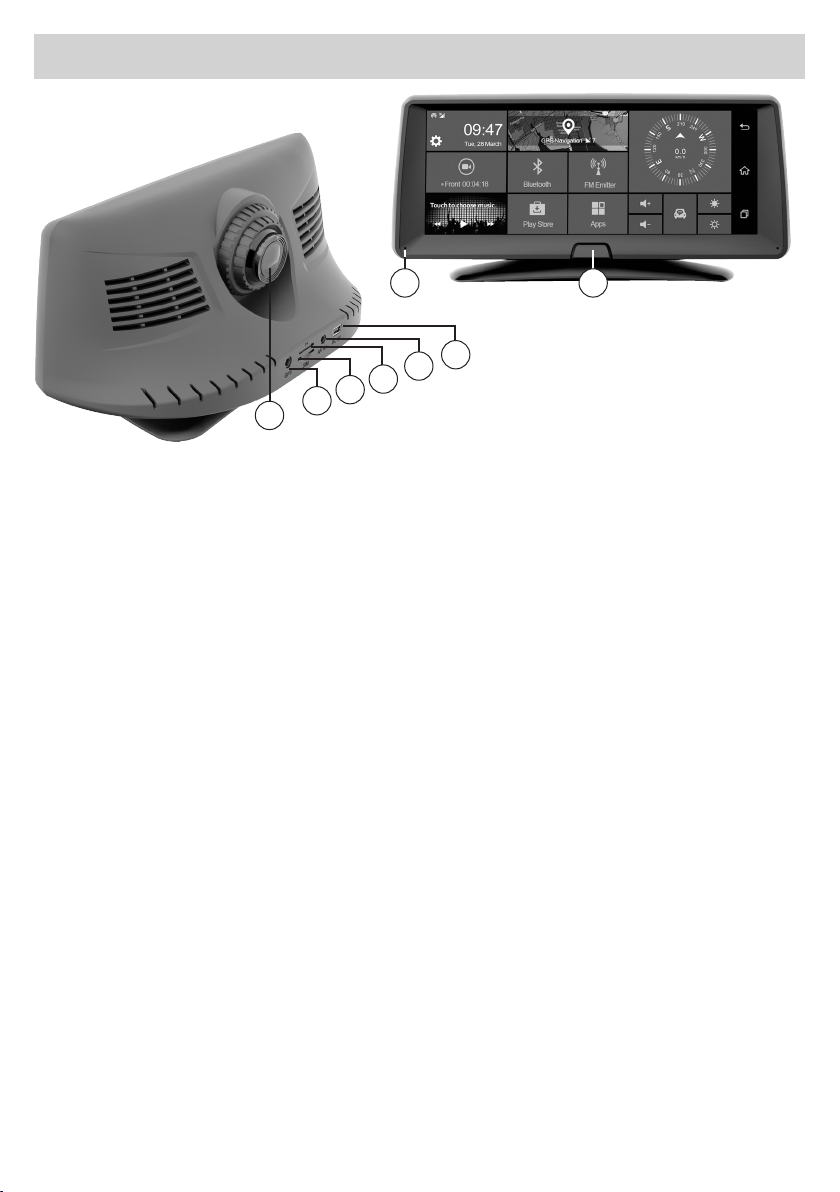
7
6
5
4
3
2
1
IT GB
1 Telecamera
2 Ingresso antenna GPS
3 Ingresso SIM dati
4 Slot Micro SD Card/DVR
5 Ingresso telecamera posteriore (optional VM262)
6 Ingresso connettore alimentazione
7 Microfono
8 On/O (Premere a lungo)
NOTA BENE. Premendo brevemente
il tasto ON/O (8) si passa alla modalità standby.
FR
1 Camera
2 Entrée antenne GPS
3 Entrée SIM de données
4 Slot Micro SD Card/DVR
5 Entrée caméra arrière (en option VM262)
6 Entrée du connecteur d’alimentation
7 Microphone
8 On / O (appui long)
REMARQUE: en appuyant brièvement sur la touche ON/
OFF (8) on passe en mode veille.
1 Camera
2 GPS antenna input
3 Data SIM input
4 Micro SD Card / DVR slot
5 Rear camera input (optional VM262)
6 Power connector input
7 Microphone
8 On / O (Long press)
NOTE : briefly pressing the ON/Off key (8) the device
switches to standby mode.
DE
1 Kamera
2 GPS-Antenneneingang
3 Daten SIM-Eingang
4 Steckplatz für Micro SD-Karte / DVR
5 Hinterer Kameraeingang (optional VM262)
6 Stromanschluss Eingang
7 Mikrofon
8 An / Aus (lange drücken)
HINWEIS: Mit kurzem Drücken auf die ON/O-Taste (8)
wechselt das Gerät in den Standby-Modus.
8
ES
1 Camara
2 Entrada antena GPS
3 Entrada tarjeta SIM para datos
4 Ranura Micro SD Card/DVR
5 Entrada retro-camara posterior (opcional VM262)
6 Entrada conector alimentación
7 Micrófono
8 On/O (Presionar hasta encender/apagar el dispositivo)
TENER EN CUENTA. Presionando brevemente
la tecla ON/O (8) se pasa al modo standby.
4
Page 5
Collegamenti • Connections • Branchements • Verbindungen • Conexiones
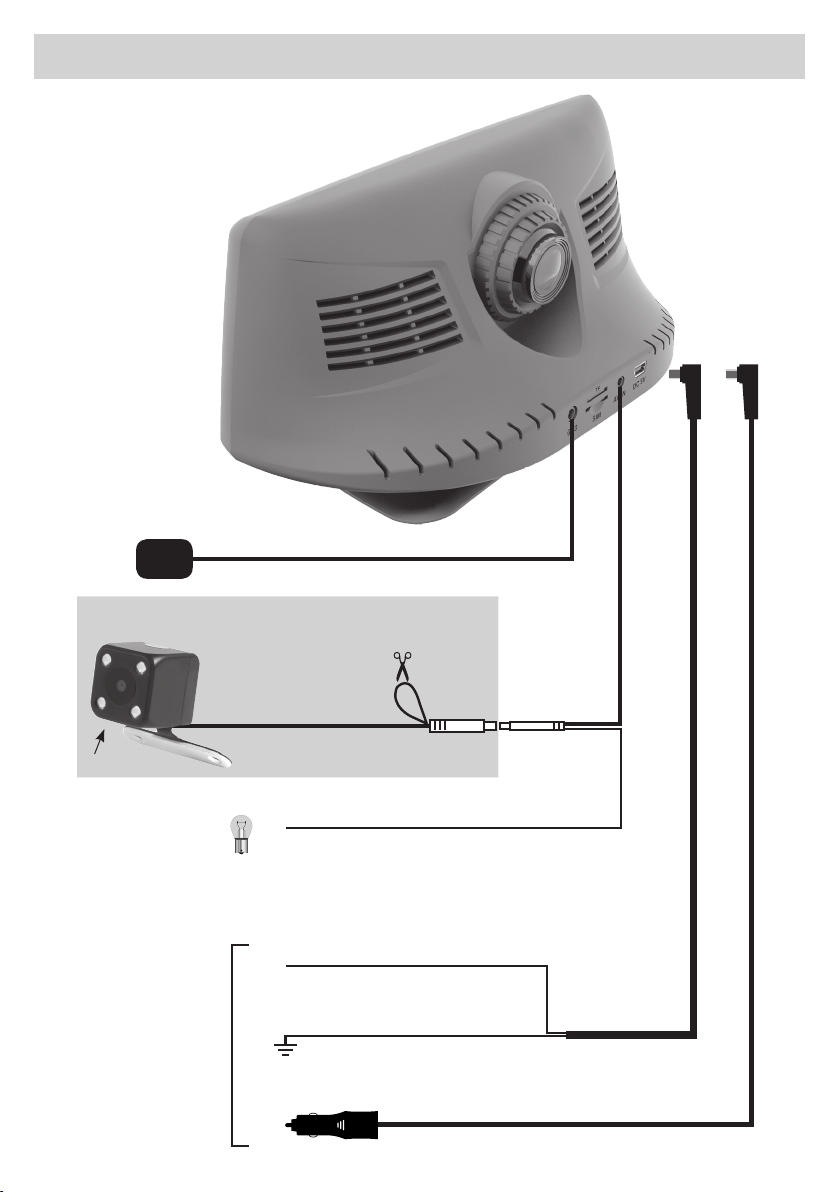
GPS
VM262 OPTIONAL
4 LED
LUCI DI RETROMARCIA
REVERSE-GEAR-LIGHTS
FEUX DE RECUL
RÜCKFAHRSCHEINWERFER
LUCES DE MARCHA ATRÁS
ALIMENTAZIONE
POWER
ALIMENTATION
STROMVERSORGUNG
ALIMENTACIÓN
MIRROR
NORMAL
+12V
ALIMENTAZIONE LED - LED POWER - ALIMENTATION LED
+12V
+12V
ROSSO / RED / ROUGE / ROT / ROCHO
NERO / BLACK / NOIR / SCHWARZ / NEGRO
Massa / Ground / Masse / Masa
ROSSO / RED / ROUGE / ROT / ROCHO
LED STROMVERSORGUNG - ALIMENTACIÓN LED
5
Page 6
Funzioni • Functions • Fonctions • Funktionen • Funciones
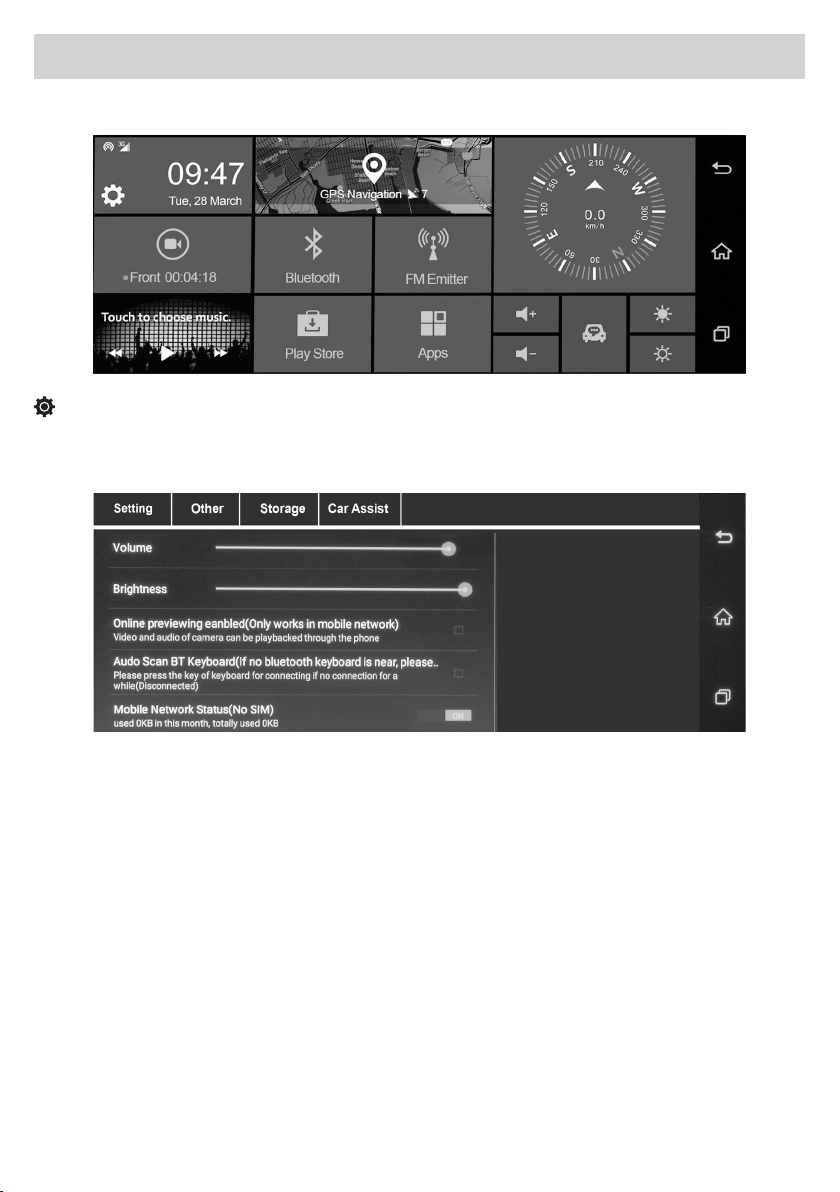
MENU PRINCIPALE •MAIN MENU • MENU PRINCIPAL • HAUPTMENÜ • MENÚ PRINCIPAL
SETUP
IMPOSTAZIONI DI SISTEMA • SYSTEM SETTINGS • PARAMETRES DU SYSTEME
SYSTEM-EINSTELLUNGEN • AJUSTES DEL SISTEMA
IT - Setting Regolazioni e impostazioni: Volume / Luminosità / Visione online (funziona solo su rete mobile)
ON-OFF / Tastiera audio Bluetooth ON-OFF / Stato della rete mobile ON-OFF / SoftAP ON-OFF / WLAN ON-OFF /
DVR Setting.
Other Regolazioni e impostazioni: Auto Sleep / Segnale acustico in caso di pericolo collisione ABILITA-DISABILITA
Video protetti ABILITA-DISABILITA / Sensibilità FRONT COLLISION / RESET di fabbrica
Impostazioni ANDROID / Aggiornamento di sistema / Info versione software.
Storage Regolazioni e impostazioni: Informazioni scheda MICRO SD Card / Informazioni DVR
Informazioni memoria interna / Gestione memorie / Formatta la MICRO SD Card.
GB - Setting Adjustments and settings: Volume / Brightness / Online viewing (working on mobile network only)
ON-OFF / Bluetooth audio keyboard ON-OFF / Mobile network status information ON-OFF / SoftAP ON-OFF /
WLAN ON-OFF / DVR Setting.
Other Adjustments and Settings: Auto Sleep / Acoustic signal in case of collision danger ENABLES-DISABLES
Protected Videos ENABLES-DISABLES / FRONT COLLISION Sensitivity / Factory RESET
ANDROID settings / System update / Software version information.
Storage Adjustments and Settings: MICRO SD Card Information / DVR Information
Internal memory information / Memory management / Format the MICRO SD Card.
6
Page 7

Funzioni •
FR - Setting Réglages et paramétrages: Volume / Luminosité / Visualisation en ligne (disponible uniquement sur
le réseau mobile) ON-OFF/ Clavier audio Bluetooth ON-OFF / Informations sur l’état du réseau mobile ON-OFF /
SoftAP ON-OFF / WLAN ON-OFF / Réglages DVR.
Autre réglages et paramétrages: Veille automatique / Signal sonore en cas de danger de collision
ACTIVE-DESACTIVE / Protection Vidéos ACTIVE-DESACTIVE / Sensibilité COLLISION AVANT / Restauration réglages
d’origine
Paramétrages ANDROID / Mise à jour du système / Informations sur la version du logiciel.
Storage: Réglages et paramétrages : Informations sur la carte micro SD / Informations DVR
Informations mémoire interne / Gestion de la mémoire / Formatage de la MICRO carte SD.
DE - Setting Anpassungen und Einstellungen: Lautstärke / Helligkeit / Online-Anzeige (nur im Mobilfunknetz
verfügbar) ON-OFF / Bluetooth-Audio-Tastatur ON-OFF / Statusinformationen zum Mobilfunknetz ON-OFF / Sof
tAP ON-OFF / WLAN ON-OFF / DVR-Einstellung.
Sonstiges : Anpassungen und Einstellungen: Auto Sleep / Akustisches Signal bei Kollisionsgefahr AKTIVIERENDEAKTIVIEREN
Geschützte Videos AKTIVIEREN-DEAKTIVIEREN / FRONT KOLLISION Empfindlichkeit / Rücksetzen auf Werkseinstel
lung ANDROID-Einstellungen / System-Update / Informationen zur Software-Version.
Speicherung : Anpassungen und Einstellungen: MICRO SD-Karteninformationen / DVR-Informationen
Interne Speicherinformationen / Speicherverwaltung / Formatierung der MICRO SD Card.
ES - Ajustes: Volumen / Brillo / Visión online (funciona solo con red móvil) ON-OFF / Teclado audio Bluetooth ON-
OFF / Información del estado de la red móvil ON-OFF / SoftAP ON-OFF / WLAN ON-OFF / DVR Setting.
Other Ajustes: Auto Sleep / Señal acústico en caso de peligro de colisión HABILITA-DESHABILITA / Video
protegidos HABILITA-DESHABILITA / Sensibilidad COLISION FRONTAL / RESET de fabrica
Ajustes ANDROID / Actualización sistema / Info versión software.
Storage Ajustes: Información tarjeta MICRO SD Card / Información DVR
Información memoria interna / Gestión memorias / Formatear MICRO SD Card.
Functions • Fonctions • Funktionen • Funciones
-
-
7
Page 8
Funzioni •
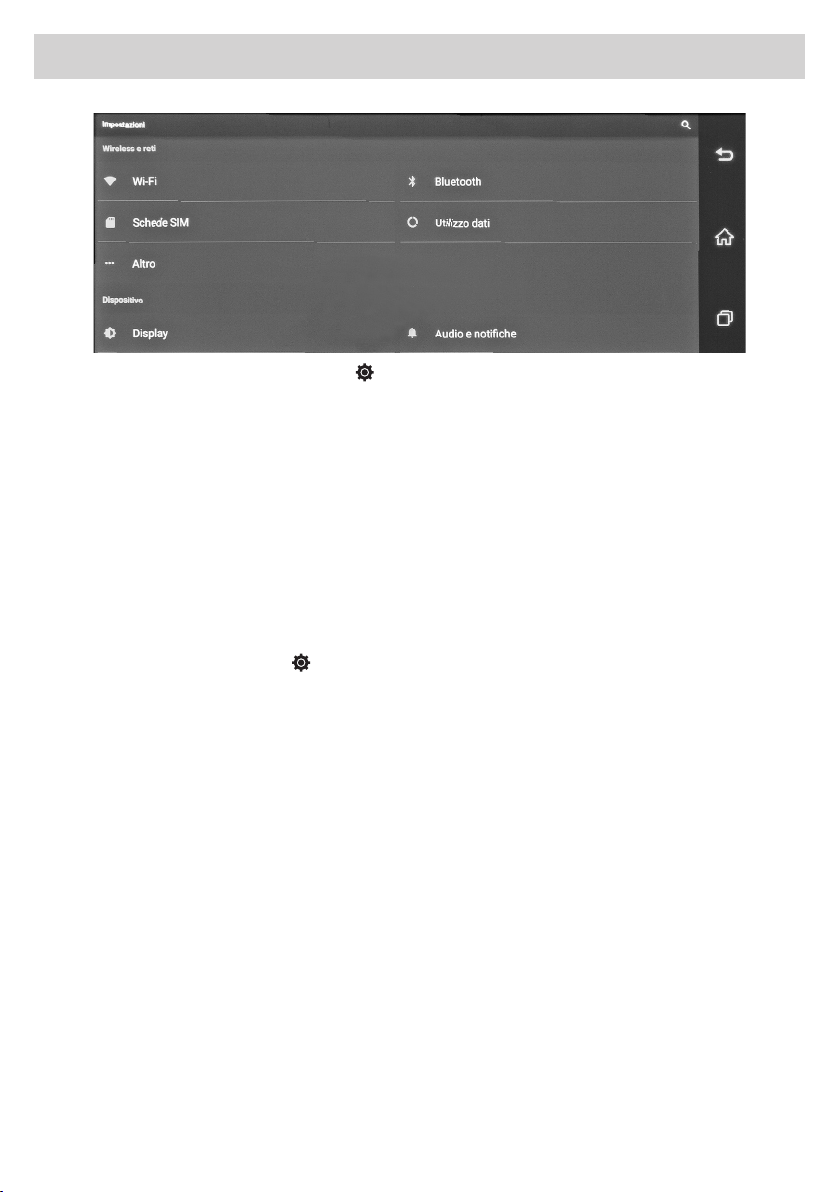
IT IMPOSTAZIONI ANDROID (percorso Menu SetupOther Impostazioni)
Regola impostazioni: Wi-Fi / Bluetooth / Audio / Display / Screenshot.
Utilizzo dati: Mostra il graco della memoria utilizzata da ogni applicazione in KB.
Altro: Imposta Modalità aereo / Tethering / Hotspot / VPN / Ethernet / Reti mobili.
Memoria: Visualizza la memoria disponibile.
Sicurezza: Imposta blocco schermo - password.
Lingua e emissione: Regola impostazioni lingua - scrittura tastiera.
Backup e ripristino: Esegue backup e ripristino dati di fabbrica.
Aggiungi account: Congura nuovi account Google.
Data e Ora: Regolazione, automatica o manuale e fuso orario.
Accessibilità: Impostazione di utilizzo del dispositivo.
Opzioni sviluppatore: Regola impostazioni.
About device: Aggiorna sistema. Informazioni Android, Kernel, Build ed esegue factory mode.
Functions • Fonctions • Funktionen • Funciones
GB ANDROID SETTINGS (Path Menu
Adjust settings: Wi-Fi / Bluetooth / Audio / Display / Screenshot.
Data Use: Shows the memory graph used by each application in KB.
Other: Sets Airplane mode / Tethering / Hotspot / VPN / Ethernet / Mobile networks.
Memory: Displays the available memory.
Security: Sets screen lock - password.
Language and output: Adjusts language settings - keypad writing.
Backup and restore: Backs up and restores factory data.
Add account: Configures new Google accounts.
Date and Time: Automatic or manual adjustment and time zone.
Accessibility: Setting device usage.
Developer Options: Adjust Settings.
About device: Updates the system. Information Android, Kernel, Build and performs factory mode.
SetupOther Settings )
8
Page 9

Funzioni •
FR RÉGLAGES ANDROID (Parcours SetupOther Settings )
Régle les paramètres: Wi-Fi / Bluetooth / Audio / Écran / Capture d’écran.
Utilisation des données: Montre graphiquement la mémoire utilisée par chaque application en KB.
Autre: Règle le mode Avion / Tethering / Hotspot / VPN / Ethernet / Réseaux mobiles.
Mémoire: visualise la mémoire disponible.
Sécurité: Règle blocage écran - mot de passe.
Langue et écriture: règle les paramètres de la langue, écriture clavier
Backup et réinitialisation: effectue le backup et restaure les données d’origine
Nouveau compte : configure les nouveaux comptes GOOGLE
Date et Heure: réglage automatique ou manuel et fuseau horaire
Accessibilité: réglage d’utilisation de l’appareil.
Options développeur: règle les paramètres
Informations sur le produit: mise à jour du système. Informations Android, Kernel, Build et active le mode usine
Functions • Fonctions • Funktionen • Funciones
DE ANDROID EINSTELLUNGEN (Pfad Menü
Einstellungen-Anpassung: Wi-Fi / Bluetooth / Audio / Bildschirm / Screenshot.
Datenverwendung: Schaubild-Anzeige der von jeder Anwendung verwendeten Speicher in KB
Sonstiges: Flugmodus einstellen / Tethering / Hotspot / VPN /Ethernet / Mobile Netzwerke.
Speicher: Zeigt den verfügbaren Speicher an.
Sicherheit: Legt die Bildschirmsperre fest - Passwort.
Sprache und Ausgabe: Passt die Spracheinstellungen an - Tastaturbeschriftung.
Sicherung (Backup) und Wiederherstellung: Sichert und stellt die Werkseinstellungen wieder her.
Konto hinzufügen: Konfiguriert neue Google-Konten.
Datum und Uhrzeit: Automatische oder manuelle Einstellung und Zeitzone.
Zugänglichkeit: Einstellung der Geräteverwendung.
Entwickler-Optionen: Passt die Einstellungen an.
Über das Gerät: Aktualisiert das System. Android-, Kernel-, Build-Informationen und Ausführung der
Werkseinstellungen.
ES AJUSTES ANDROID (Ruta Menú
Ajustar: Wi-Fi / Bluetooth / Audio / Display / Screenshot. en KB
Utilización de los datos: Muestra el gráco de la memoria utilizada en cada aplicación.
Otro: Ajusta Modo aéreo / Tethering / Hotspot / VPN / Ethernet / Redes móviles.
Memoria: Muestra la memoria disponible.
Seguridad: Congura el bloqueo de la pantalla - password.
Idioma y emisión: Ajustar idioma - escritura teclado.
Backup y puesta en funcionamiento: Ejecuta backup y vuelve a los datos de fábrica.
Añadir account: Congura nuevas cuentas de Google.
Fecha y Hora: Ajuste automatico o manual del huso horario.
Accesibilidad: Ajuste de utilización del dispositivo.
Opciones desarrollador: Congurar ajustes.
Acerca de: Actualizar sistema. Información Android, Kernel, Build y ejecuta el modo fabrica.
SetupSonstigesEinstellungen)
SetupOtherAjustes)
9
Page 10
Funzioni •
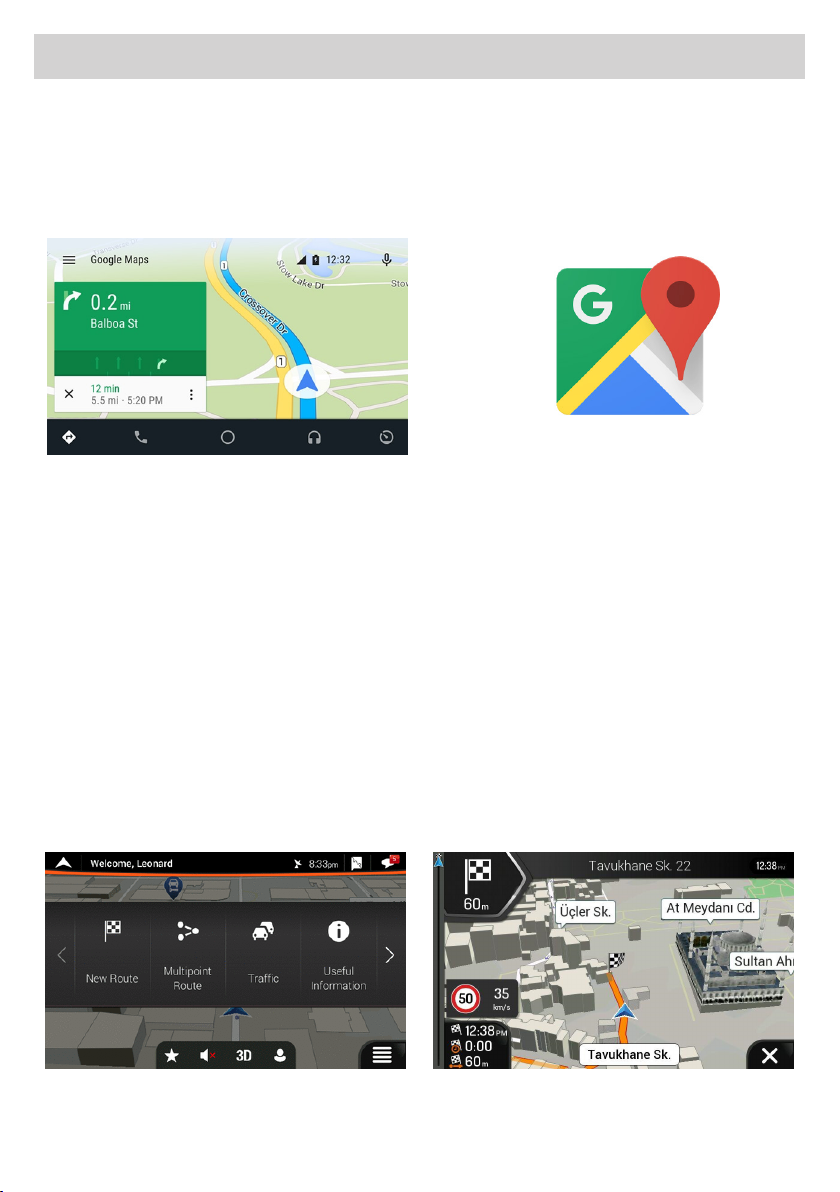
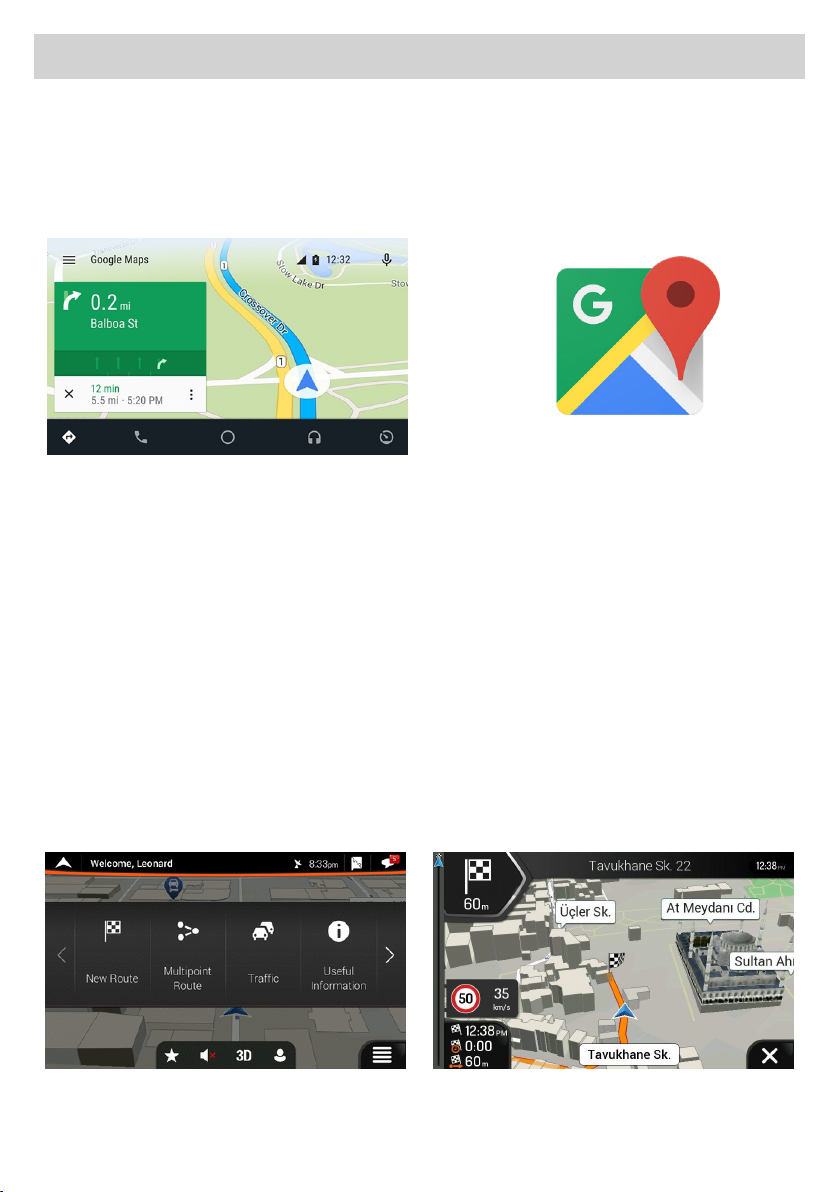
IT GPS
Il sistema multimediale è provvisto di due soluzioni per la navigazione GPS.
1) Navigazione on-line: è possibile utilizzare, grazie al sistema Android, l’applicazione MAPPE che permette di
navigare tramite la cartograa di Google.
Per l’utilizzo di questa modalità il sistema deve essere connesso ad uno smartphone o tablet tramite Hotspot e la
navigazione GPS sfrutterà la connessione dati con costi di utilizzo in base al proprio prolo tariario.
Functions • Fonctions • Funktionen • Funciones
L’app uciale di Android ore navigazione GPS in tempo reale, informazioni su traco, trasporto pubblico e
dettagli su milioni di luoghi, come recensioni e orari di punta.
È possibile utilizzare mappe complete e precise di 220 paesi digitalizzate TOMTOM, con informazioni dettagliate
su oltre 100 milioni di attività commerciali.
Tutte le funzionalità sono disponibili con connessione dati 3G/4G, il sistema multimediale deve essere collegato
ad uno smartphone/tablet in Hotspot.
2) Navigazione o-line: la nuova cartograa iGo Nextgen di Nav&Go con mappe TomTom è invece la soluzione
professionale che completa il sistema multimediale rendendolo un accessorio indispensabile per l’attività
giornaliera.
Se avete acquistato la versione con cartograa inclusa sarà possibile utilizzare tutte le funzionalità del nuovo
software Nextgen: semplice ed essenziale, solo le funzioni che realmente servono alla guida.
Le mappe sempre disponibili per una navigazione sicura ed eciente.
Metà dello spazio di memoria di altri sistemi di navigazione, permettendo di risparmiare memoria per le altre
necessità nei viaggi, come musica e video.
Opzioni di calcolo percorsi veloci e variegate per trovare sempre il miglior itinerario possibile. Disponibilità
oine per essere sempre sulla strada giusta, in una aollatissima città come in una zona remota senza bisogno di
connessione dati.
10
Page 11
Funzioni •
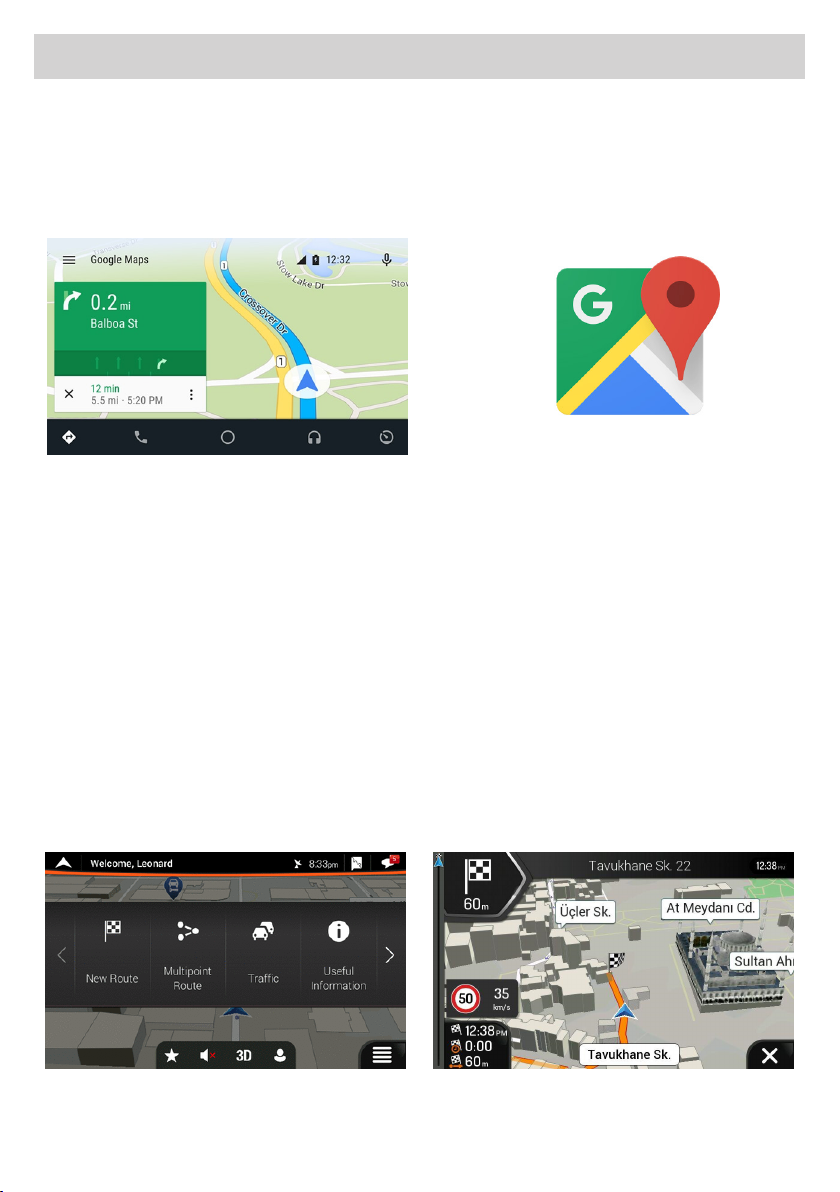
GB GPS
GB The multimedia system is equipped with two GPS navigation solutions.
1) Online navigation: thanks to the Android system, you can use the MAPS application that allows you to naviga
te through Google cartography.
In order to use this mode, the system must be connected to a smartphone or tablet via Hotspot . Thus, the GPS
navigation will use the data connection, whose costs depend on your tariff profile.
The official Android app provides real-time GPS navigation, traffic information, public transport and details about
millions of locations, such as reviews and peak times.
Complete and precise TOMTOM digitalized maps of 220 countries can be used, with detailed information on over
100 million commercial activities.
All the functionalities are available with 3G/4G data connection, the multimedia system must be connected to a
smartphone/tablet in Hotspot.
2) Off-line navigation: the new Nav&Go Nextgen iGo mapping with TomTom maps is rather the professional
solution, that completes the multimedia system making it an essential accessory for daily activity.
If you have purchased the version with cartography included, it will be possible to use all the functionalities of the
new simple and essential Nextgen software: including only those functions that the driver needs.
Maps are always available for a safe and efficient navigation.
Half memory capacity of other navigation systems, which allows to save memory for other needs, when travelling,
such as music and video.
Fast and various route calculation options to always find the best possible route. Offline availability to be always
on the right track, in a crowded city , as well as in a remote area without the need for a data connection.
Functions • Fonctions • Funktionen • Funciones
-
11
Page 12
Funzioni •
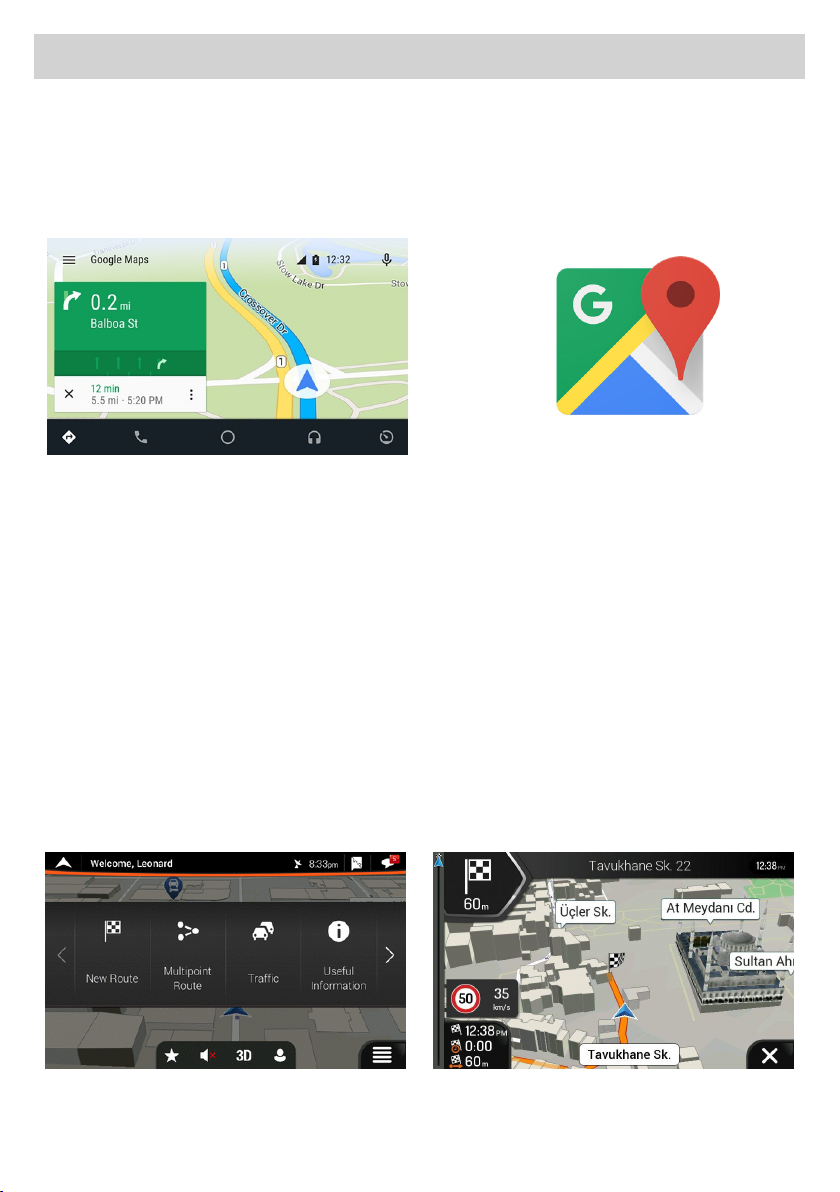
FR GPS
Le système multimédia a deux solutions pour la navigation GPS.
1) Navigation en ligne: grâce au système Android, vous pouvez utiliser l’application MAPPES qui permet de navi
guer moyennant la cartographie de Google.
Pour utiliser cette modalité, le système doit être connecté à un smartphone ou à une tablette via Hotspot et la
navigation GPS utilisera la connexion de données et les coûts seront ceux de votre profil tarifaire.
L’application officielle Android fournit la navigation GPS en temps réel, les infos trafic, le transport public et des
détails sur des millions d’endroits, tels que les commentaires et les heures de pointe.
Des cartes numériques TOMTOM complètes et précises de 220 pays peuvent être utilisées, avec des informations
détaillées sur plus de 100 millions d’activités commerciales.
Toutes les fonctionnalités sont disponibles avec la connexion de données 3G/4G, le système multimédia doit être
connecté à un smartphone / tablette en Hotspot.
2) Navigation Hors-ligne (OFF-LINE) : la nouvelle cartographie Nav&Go Nextgen iGo avec cartes TomTom est la
solution plus professionnelle, qui complète le système multimédia et en fait un accessoire indispensable pour les
activités quotidiennes.
Si vous avez acheté la version avec cartographie incluse, vous pourrez utiliser toutes les fonctionnalités du nouve
au logiciel Nextgen: simple et essentiel, équipé uniquement des fonctions dont le conducteur a réellement besoin.
Les cartes sont toujours disponibles pour une navigation sûre et efficace.
Disponibilité de la moitié de l’espace de mémoire par rapport aux autres systèmes de navigation, ce qui permet
d’avoir de la mémoire disponible pour d’autres nécessités, comme la musique et la vidéo, lors des déplacements.
Calcul rapides et variées des itinéraires pour trouver le meilleur chemin possible. La possibilité off-ligne vous
permet d’être toujours sur la bonne route, soit dans une ville habitée que dans une zone isolée sans besoin de
connexion de données.
Functions • Fonctions • Funktionen • Funciones
-
-
12
Page 13
Funzioni •
DE GPS
Das Multimediasystem verfügt über zwei GPS-Navigationsmöglichkeiten.
1) Online-Navigation: Dank des Android-Systems können Sie die MAPS-Anwendung nutzen, mit der Sie durch die
Google-APP navigieren können.
Um diesen Modus nutzen zu können, muss das System über Hotspot mit einem Smartphone oder Tablet verbun
den sein. So nutzt die GPS-Navigation die Datenverbindung, deren Kosten von Ihrem Tarifprofil abhängen.
Die offizielle Android-App bietet Echtzeit-GPS-Navigation, Verkehrsinformationen, öffentliche Verkehrsmittel und
Details zu Millionen von Orten, wie z.B. Bewertungen und Verkehrsdichte.
Es können komplette und präzise digitalisierte TOMTOM-Karten von 220 Ländern verwendet werden, mit detail
lierten Informationen bis zu über 100 Millionen geschäftlichen Aktivitäten.
Alle Funktionalitäten sind bei 3G/4G Datenverbindung verfügbar, das Multimediasystem muss mit einem
Smartphone/Tablet über Hotspot verbunden werden.
2) Offline-Navigation: Das neue Nav&Go Nextgen iGo Mapping mit TomTom-Karten ist eher eine professionelle
Lösung, die das Multimediasystem vervollständigt und es zu einem unverzichtbaren Zubehör für die tägliche
Arbeit macht.
Wenn Sie die Version mit Navi-Software erworben haben, können Sie alle Funktionalitäten der neuen einfachen
und intuitiven Nextgen-Software nutzen, die nur die Funktionen umfasst, die der Fahrer wirklich benötigt.
Für eine sichere und effiziente Navigation stehen die Karten jederzeit zur Verfügung.
Halbe Speicherkapazität im Vergleich zu anderen Navigationssystemen, die es ermöglicht, Speicherplatz für ande
re Bedürfnisse auf dem Weg zu sparen, wie z.B. Musik und Video.
Schnelle und vielfältige Routenberechnungsoptionen, um immer die bestmögliche Route zu finden. OfflineVerfügbarkeit, um immer auf dem richtigen Weg zu sein, sowohl in einer Großstadt, als auch in einem abgelege
nen Gebiet ohne Datenverbindung.
Functions • Fonctions • Funktionen • Funciones
-
-
-
-
13
Page 14
Funzioni •
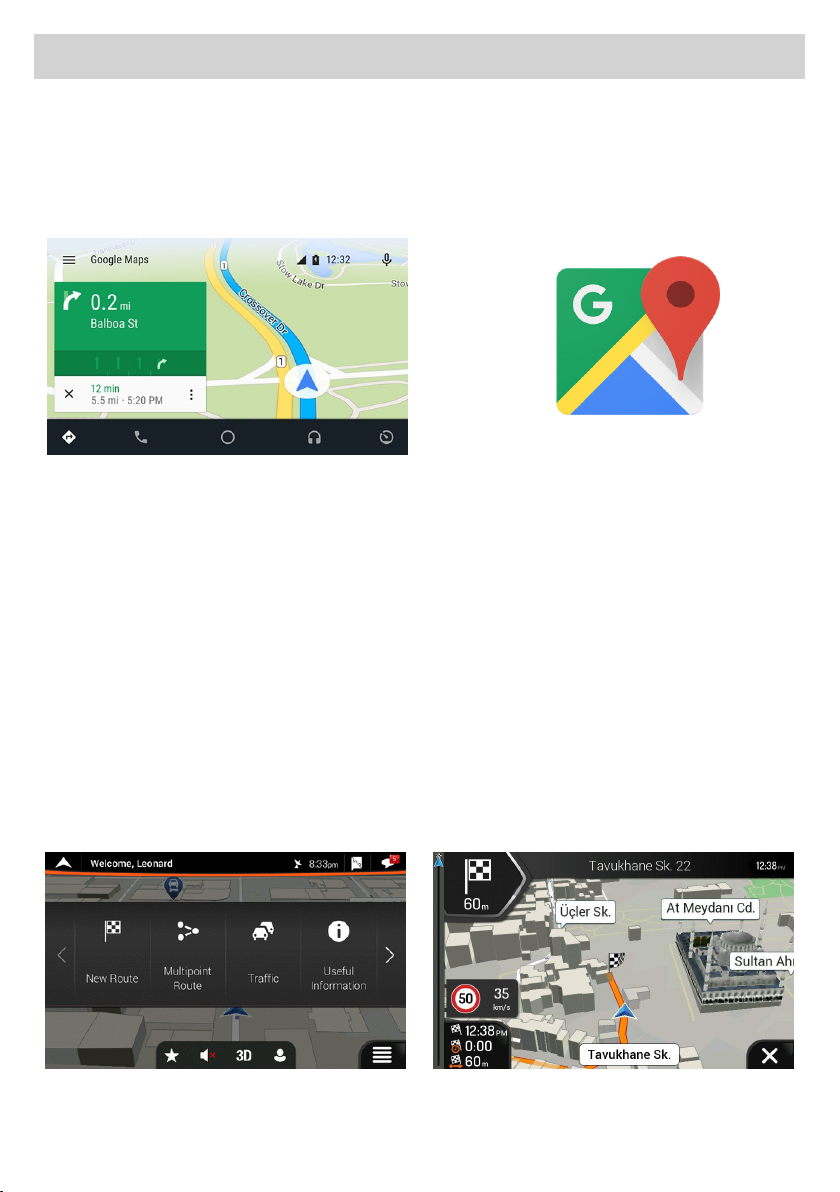
ES GPS
El sistema multimedia dispone de dos soluciones de navegación GPS.
1) Navegación on-line: Gracias al sistema Android, es posible utilizar, la aplicación MAPAS que permite la
navegación mediante la cartografía de Google.
Para utilizar este modo el sistema tiene que estar conectado a un Smartphone o Tablet mediante Hotspot y
la navegación GPS utilizará la conexión de datos con costes según el contrato que tiene con su compañía
telefónica.
La App ocial de Android ofrece la navegación GPS en tiempo real, información sobre el tráco, transportes
públicos y detalles sobre millones de lugares, como recensiones y horarios de punta.
Es posible utilizar mapas completos y precisos de 220 países digitalizados por TOMTOM, con informaciones
detalladas sobre más de 100 millones de actividades comerciales.
Todas las funcionalidades están disponibles con conexión de datos 3G/4G, el sistema multimedia debe estar
conectado a un Smartphone/Tablet en Hotspot.
2) Navegación o-line: la nueva cartografía iGo Nextgen de Nav&Go con mapas TomTom es sin duda la solución
profesional que completa el sistema multimedia convirtiéndolo en un accesorio indispensable para la actividad
diaria.
Si habéis comprado la versión con la cartografía incluida será posible utilizar todas las funciones del nuevo
software Nextgen: sencillo y esencial, solo las funciones que realmente sirven en la conducción. Los mapas
siempre están disponibles para una navegación segura y eciente.
Ocupa la mitad del espacio de memoria de otro sistema de navegación, permitiendo ahorrar memoria para
otras necesidades en los viajes, como música y video. Opciones de cálculo rápido de recorridos y soluciones
para encontrar siempre los mejores itinerarios posibles. Disponibilidad oine para estar siempre en la correcta
carretera, en una abarrotada ciudad como en una zona remota sin la necesidad de conexión por datos.
Functions • Fonctions • Funktionen • Funciones
14
Page 15
Funzioni •
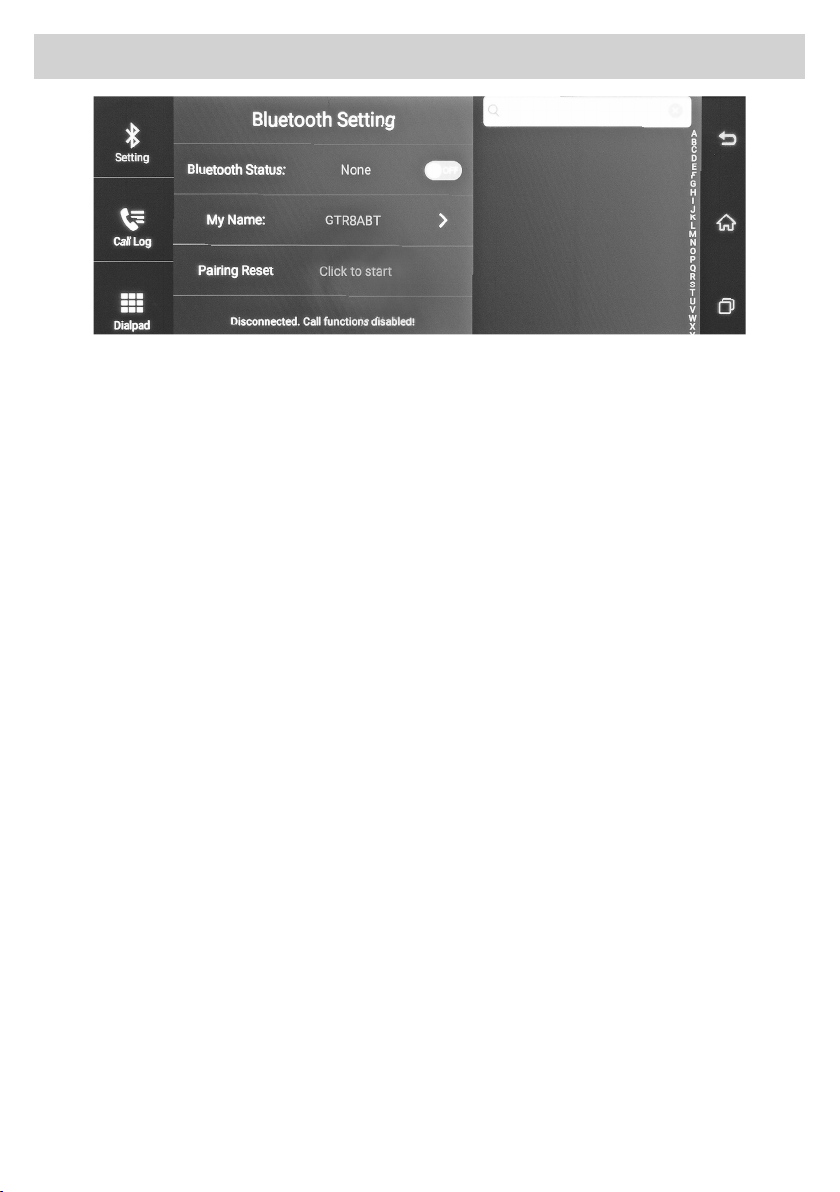
IT BLUETOOTH - Vivavoce
Attivare la funzione Bluetooth sul cellulare, cercare il dispositivo Bluetooth ed inserire la Password 0000.
Quando appare l’icona Bluetooth, la connessione è andata a buon ne e la rubrica e il registro chiamate possono
essere scaricate automaticamente. Toccando lo schermo dell’unità è possibile chiamare, ricevere, ricercare numeri.
GB BLUETOOTH - Hands-free
Activate the Bluetooth function on your mobile, search for the Bluetooth device and enter the Password 0000.
If the Bluetooth icon appears, the connection has been successful. The phone book and the call log can therefore
be automatically downloaded. By touching the screen of the unit you can dial, receive or search for a number.
FR BLUETOOTH - Mains libres
Activer la fonction Bluetooth sur le portable, chercher le dispositif Bluetooth et insérer le mot de passe 0000.
Lorsque vous visualisez l’icône Bluetooth, la connexion est réussie. Le répertoire et le journal des appels peuvent
être téléchargés automatiquement. En touchant l’écran de l’unité il est possible d’appeler, recevoir, chercher des
numéros. etc.
Functions • Fonctions • Funktionen • Funciones
DE BLUETOOTH - Freihandmodus
Aktivieren Sie die Bluetooth-Funktion auf dem Handy, suchen sie nach dem Bluetooth-Gerät und geben Sie das
Passwort 0000 ein. Wenn das Bluetooth-Symbol angezeigt wird, wurde die Verbindung erfolgreich hergestellt
und das Telefonbuch und die Anruiste können automatisch heruntergeladen werden. Beim Berühren des
Bildschirms der Einheit ist es möglich Anrufe tätigen, erhalten, nach Nummern suchen usw.
ES BLUETOOTH - Manos libres
Activar la función Bluetooth en el Smartphone y buscar nuevos dispositivos, buscar el dispositivo Bluetooth e
introducir la Password 0000. Cuando aparece el icono Bluetooth, indica que la conexión ha ido a buen n, la lista
de contactos y el registro de las llamadas pueden ser descargadas automáticamente. Tocando la pantalla del
dispositivo es posible llamar, recibir y buscar números etc.
15
Page 16
Funzioni •
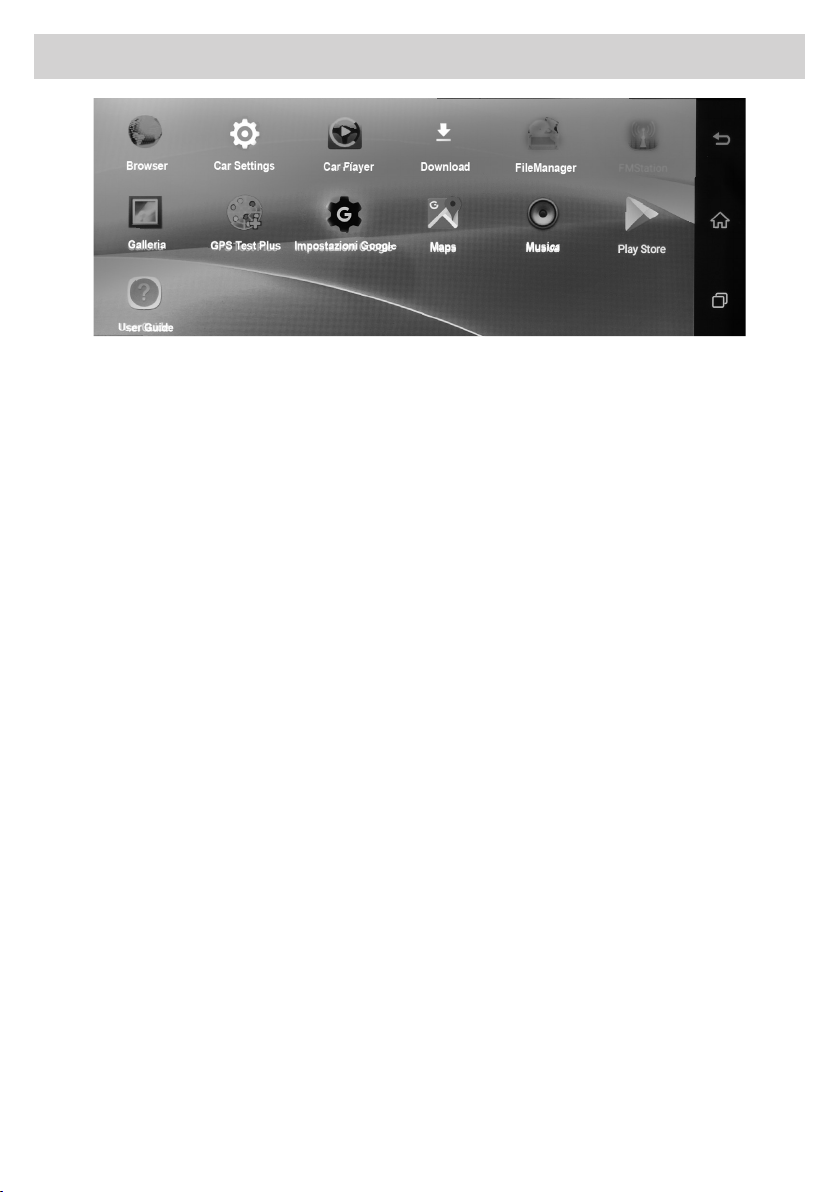
IT APPLICAZIONI ANDROID
BROWSER, DOWNLOAD, FILE MANAGER, GALLERIA, GPS TEST PLUS,
IMPOSTAZIONI DI GOOGLE, MAPS, MUSICA, PLAY STORE: Applicazioni base Android.
CAR SETTING: Apre il menù SETUP.
CAR PLAYER: Apre galleria dei lmati DVR memorizzati.
FM STATION: Apre il menù del modulatore di frequenza per la trasmissione del segnale audio.
GB ANDROID APPLICATIONS
BROWSER, DOWNLOAD, FILE MANAGER, GALLERY, GPS TEST PLUS,
GOOGLE SETTINGS, MAPS, MUSIC, PLAY STORE:
CAR SETTING:
CAR PLAYER :
FM STATION: Opens the frequency modulator menu for transmitting the audio signal.
Functions • Fonctions • Funktionen • Funciones
Basic Android applicaons.
Opens the SETUP menu.
Opens the gallery of stored DVR movies.
FR APPLICATIONS ANDROID
BROWSER, DOWNLOAD, GESTIONNAIRE DE FICHIERS, GALERIE, GPS TEST PLUS,
RÉGLAGES GOOGLE, MAPPES, MUSIQUE, PLAY STORE: Applications Android de base.
PARAMÈTRES VÉHICULE: Ouvre le menu SETUP.
CAR PLAYER: Ouvre la galerie de films DVR sauvegardés.
STATION FM: Ouvre le menu du modulateur de fréquence pour transmettre le signal audio.
DE ANDROID-ANWENDUNGEN
BROWSER, DOWNLOAD, DATEI-MANAGER, GALERIE, GPS TEST PLUS,
GOOGLE-EINSTELLUNGEN, MAPS, MUSIK, PLAY STORE: Grundlegende Android-Anwendungen.
CAR EINSTELLUNGEN: Öffnet das SETUP-Menü.
CAR PLAYER: Öffnet die Galerie der gespeicherten DVR-Filme.
FM STATION: Öffnet das Frequenzmodulator-Menü zur Übertragung des Audiosignals.
ES APLICACIONES ANDROID
BROWSER, DOWNLOAD, FILE MANAGER, GALERIA, GPS TEST PLUS,
CONFIGURACIONES DE GOOGLE, MAPS, MUSICA, PLAY STORE: Aplicaciones nativas de Android.
CAR SETTING: Abre el menú SETUP.
CAR PLAYER: Abre galería de los videos DVR memorizados.
FM STATION: Abre el menú del modulador de frecuencia para la transmisión de la señal de audio.
16
Page 17
Funzioni •
Functions • Fonctions • Funktionen • Funciones
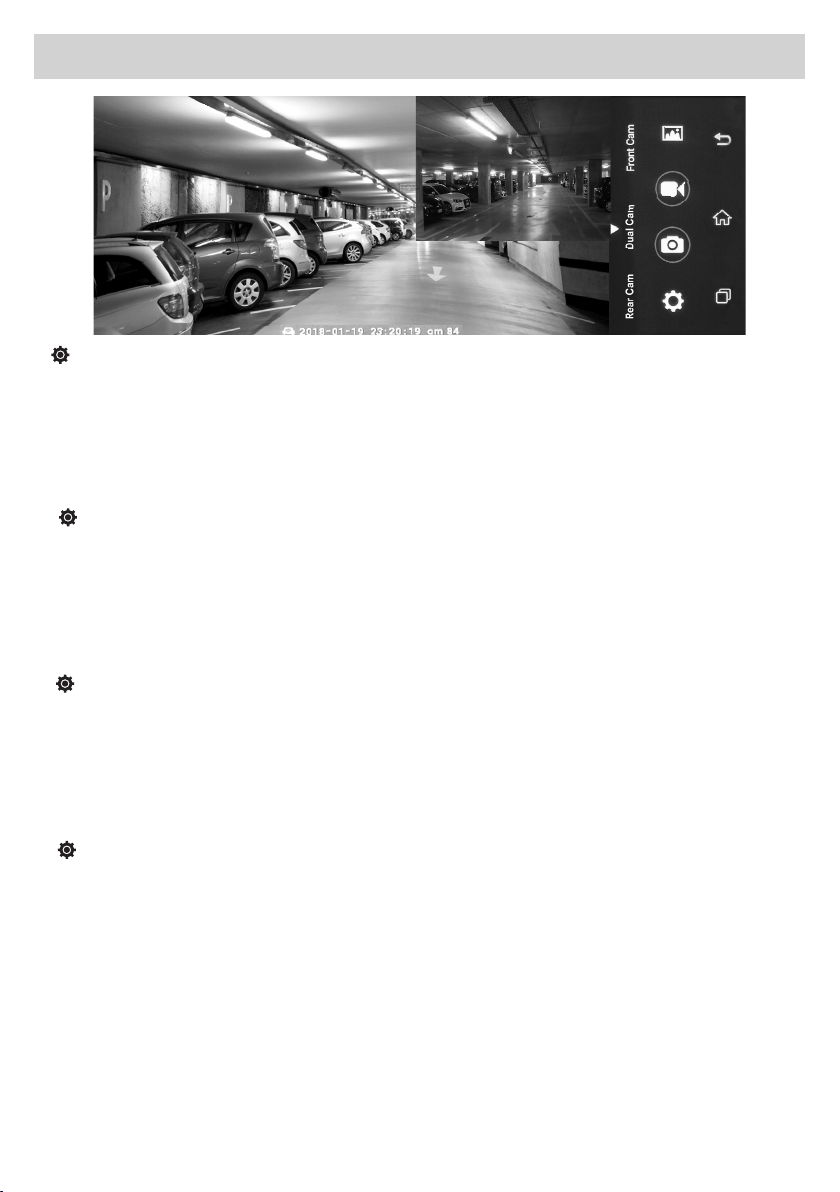
IT DVR
AUTO-SAVE TIME: Imposta la durata di auto salvataggio dei lmati.
AUTO EXIT PREVIEW: Imposta il tempo di uscita dalla funzione DVR durante inattività.
FRONT CAMERA QUALITY: Imposta il formato dei lmati con la telecamera anteriore.
MUTE RECORD: Attiva / Disattiva registrazione audio nei lmati.
SHOW FLOAT BUTTON: Attiva / Disattiva pulsante rapido DVR sulla HOME.
DISPLAY GPS WATERMARK: Attiva / Disattiva. · INFORMAZIONI SOFTWARE.
GB
DVR
AUTO-SAVE TIME: Sets the self-saving duration of movies.
AUTO EXIT PREVIEW: Sets the exit time from the DVR function during inactivity.
FRONT CAMERA QUALITY: Sets the format of movies with the front camera.
MUTE RECORD: Activates / Deactivates audio recording in movies.
SHOW FLOAT BUTTON: Activates / Deactivates DVR quick button on the HOME.
GPS WATERMARK DISPLAY: Activates / Deactivates. · SOFTWARE INFORMATION.
FR
DVR
DELAI DE SAUVEGARDE AUTOMATIQUE: Règle la durée de sauvegarde automatique des films.
AVANT PREMIÈRE SORTIE AUTOMATIQUE: Règle le temps de sortie de la fonction DVR pendant l’inactivité
QUALITÉ DE LA CAMÉRA AVANT: Règle le format des films avec la caméra avant.
MUTE RECORD: Active / Désactive l’enregistrement audio dans les films.
SHOW FLOAT BUTTON: Active / Désactive le bouton rapide DVR sur la page d’accueil.
ÉCRAN GPS WATERMARK: Active / Désactive. · INFORMATIONS DU LOGICIEL.
DE
DVR
AUTO-SAVE TIME: Stellt die Dauer der automatischen Speicherung von Filmen ein.
AUTO EXIT PREVIEW: Stellt die Ausgangs-Zeit der DVR-Funktion während der Inaktivität ein.
FRONT KAMERA QUALITÄT: Stellt das Format von Filmen mit der Frontkamera ein.
MUTE RECORD: Aktiviert / deaktiviert die Audioaufnahme in Filmen.
SHOW FLOAT BUTTON: Aktiviert / deaktiviert die DVR-Schnelltaste auf dem HOME.
GPS WATERMARK BILSCHIRM: Aktiviert / deaktiviert Informationen. · SOFTWARE -INFORMATIONEN
ES DVR
AUTO-SAVE TIME: Ajusta la duración de los videos grabados en automático.
AUTO EXIT PREVIEW: Ajusta el tiempo de salida de la función DVR durante la inactividad.
FRONT CAMERA QUALITY: Congura el formato de los videos con la anterior.
MUTE RECORD: Activa / Desactiva grabación audio en los videos.
SHOW FLOAT BUTTON: Activa / Desactiva pulsador rápido DVR en la HOME.
DISPLAY GPS WATERMARK: Activa / Desactiva informaciones. · INFORMACIONES SOFTWARE.
17
Page 18

Caratteristiche tecniche • Technical specifications • Caracteristiques techniques
Technische Eigenschaften • Características Técnicas
IT
- Monitor 7” Risoluzione 1280 x 480 Capacitivo Multi-Touch Screen TFT-LCD
OS Android 5.0 Memoria interna ROM 16G 1 slot SD card no a 32G
Antenna GPS 1 slot 3G Navigazione
Telecamera frontale Retrocamera opzionale VM262
G-Sensor Microfono Vivavoce bluetooth - BT 4.0
Trasmettitore FM WIFI 2.4G - 802.11 b/g/n
Formati AUDIO/VIDEO supportati: MP3, WMA, WAV, RA – MP4, MPEG4, MV, TS, MKV, AVI
Dimensioni: L 195 x H 85 x P 45mm
GB -
Screen size 7” panel Resolution 1280 x 480 Capacitive Multi-Touch Screen TFT-LCD
OS Android 5.0 Internal memory ROM 16G Extended Storage SD card up to 32G
GPS antenna 1 3G Slot Navigation
Front camera Back camera Optional VM262
G-Sensor Microphone Bluetooth hand-free - BT 4.0
FM transmitter WIFI 2.4G - 802.11 b/g/n
AUDIO/VIDEO formats supported: MP3, WMA, WMA, WAV, RA - MP4, MPEG4, MV, TS, MKV, AVI
Dimensions: W195 x H 85 x D 45mm
FR -
Écran 7 «. Résolution 1280 x 480. Écran multi-tactile capacitif TFT-LCD
OS Android 5.0. Mémoire interne ROM 16G. 1 fente pour carte SD jusqu’ à 32G
Antenne GPS. 1 fente 3G. Navigation
Caméra avant. Caméra arrière en option VM262
G-Sensor. Microphone. Bluetooth mains libres - BT 4.0
Émetteur FM. WIFI 2.4G - 802.11 b/g/n
Formats AUDIO/VIDEO compatibles: MP3, WMA, WMA, WAV, WAV, RA - MP4, MPEG4, MV, MV, TS, MKV, AVI
Dimensions: L 195 x H 85 x H 85 x H 85 x P 45mm
DE -
Monitor 7 „. Auflösung 1280 x 480. Kapazitiver Multi-Touch-Bildschirm TFT-LCD
OS Android 5.0. Interner Speicher ROM 16GB, 1 SD- Öffnung bis zu 32GB
GPS-Antenne 1 Öffnung 3GB. Navigation
Frontkamera. Optionale Rückfahrkamera VM262
G-Sensor. Mikrofon. Bluetooth Freisprecheinrichtung - BT 4.0
FM-Transmitter. WIFI 2.4G - 802.11 b/g/g/n
Kompatible AUDIO/VIDEO-Formate: MP3, WMA, WMA, WMA, WAV, RA - MP4, MPEG4, MV, TS, MKV, AVI
Abmessung: B 195 x H 85 x T 45mm
ES - Monitor 7”. Resolución 1280 x 480. Capacitivo Multi-Touch Screen TFT-LCD
OS Android 5.0. Memoria interna ROM 16G. 1 ranura SD card hasta 32G
Antena GPS. 1 ranura 3G. Navegación
Cámara frontal. Retro-cámara opcional VM262
G-Sensor. Micrófono. Manos libres bluetooth - BT 4.0
Trasmisor FM. WIFI 2.4G - 802.11 b/g/n
Formatos AUDIO/VIDEO compatibles: MP3, WMA, WAV, RA – MP4, MPEG4, MV, TS, MKV, AVI
Dimensiones: L 195 x H 85 x P 45mm
18
Page 19

Page 20

MADE IN P.R.C.
PHONOCAR Via F.lli Cervi, 167/C • 42124 Reggio Emilia (Italy) • Tel. ++39 0522 941621
www.phonocar.com • e-mail:[email protected]
 Loading...